


LG’s V30S ThinQ is the AI-fueled phone the V30 should’ve been
In the midst of a tricky fiscal year, LG decided to run with a new strategy: cook up interim smartphones to sell between its major flagship releases. The plan was based in part on the surprising success of phones like the X cam, and since the company needed to try something different, it pressed on with its experiment. And lo, the LG V30S ThinQ was born.
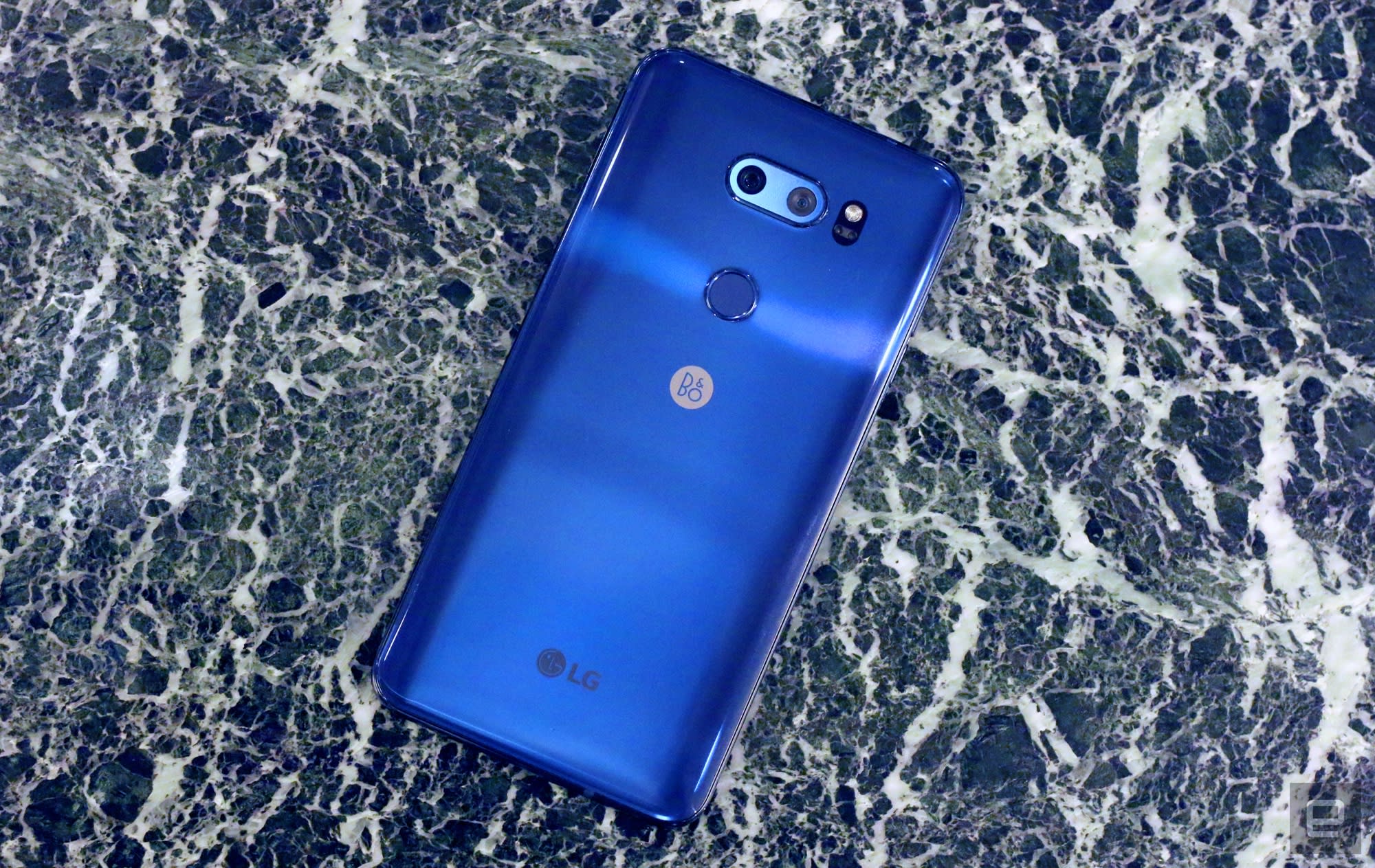
If you were looking for dramatic changes to the original V30 hardware, you might be disappointed by this “interim” release. In fact, let’s run through all of the way the V30S ThinQ we received for testing differs from the original:
- It has 6GB of RAM, up from 4GB.
- Internal storage ranges from 128GB to 256GB, compared to 64GB-128GB in the first release.
- This P-OLED display doesn’t have the original’s scratchy, uneven appearance in low light.
- It’s blue.
That’s it. Broadly speaking, LG is selling last year’s phone with a fancy firmware update. This news will disappoint anyone who wanted a proper G-series flagship, like the ones we got two years running here at MWC, but all of the company’s messaging in the run up to the show indicated that we wouldn’t get a striking, brand-new machine.
To make this whole situation even weirder, Ian Hwang (LG’s director of product portfolio) confirmed that these AI features should eventually wind up on the original V30 as well. Subsequent conversations with an LG spokesperson instead suggested that some AI features would not be ported to earlier devices and that these decisions would be made on a market-by-market basis — suffice to say, we’re still trying to figure out exactly what’s what.
By now, you might wondering why LG had to make a brand new version of an existing phone for these AI features to live on the first place. We’re not really sure ourselves. LG has struggled to find its footing in the mobile world, so it’s little surprise that the LG V30S ThinQ kinda feels like a cash-grab. It’s not unlike Essential pushing out limited edition colorways to drum up some more momentum ahead of its brand new smartphone. Asking people to pay for a new version of a phone with features that are largely compatible with the original can be upsetting, but here’s the thing: these AI features actually work pretty well.

Chris Velazco/Engadget
LG worked with a company called EyeEm to train its image recognition algorithm on over 100 million photos, and in most of our tests, that work seems to have paid off. You’ll tap into all that machine learning through the camera app, where you’ll see two new options beneath the viewfinder: QLens and AI Cam. The former honestly feels like a barebones version of Bixby, with shortcuts to feed an image of what’s in front of the camera to Amazon (for shopping links) and Pinterest (to add things to your visual collection).
Shopping with a visual AI is always a little tricky because you can’t always count on the AI to correctly identify what’s in front of it. We pointed the QLens at a box of clearly marked cereal, and a handful of correct Amazon shopping links appeared at the bottom of the screen. Nice. When we pointed it at a red sweatshirt and a MacBook Pro and even another V30, we got a handful of suggestions we could tap to see related Amazon listings. In those cases, the camera was able to roughly identify the object — suggestions included “Apple laptop” and “LG cell phone” — but wasn’t smart enough to pin down the model and offer the correct links.

Chris Velazco/Engadget
We fared a little better with QLens’s Pinterest integration, though: taking a picture of a shirt prompted Pinterest suggestions that, in some cases at least, matched the shirt surprisingly well. Some suggestions were red and some had a similar texture to the real thing, so LG’s algorithm was getting pretty close.
AI Cam was more immediately useful. There are eight scene mode presets — portrait, animal, city/building, flower, sunrise, sunset, food and landscape — and as the camera is meant to fire up whichever is appropriate for what it’s looking at. While that identification process is happening, little ethereal keywords bubble up onto the screen to illustrate how the phone is “thinking” about the object. It’s completely unnecessary, but just about everyone I’ve shown it to has enjoyed it — it’s a neat way to illustrate the algorithm in action and seeing those keywords slowly become more relevant is actually kind of fascinating.
More importantly, when objects in front of the camera — like some flowers or donuts on a table — matched one of the presets, the correct shooting mode kicked in just about every time. Mismatches and false positives are certainly possible, but in the few hours we’ve been testing the V30S ThinQ, we didn’t encounter any. If anything, it just took a while for phone to decipher certain images. You don’t even need to be using the dual camera for this trick to work; identifications made through the front-facing camera worked just as quickly. If LG could tune the algorithm’s performance to the point where this feature could run by default, the company might really be onto something.

Chris Velazco/Engadget
And then there’s Google Assistant. For the most part, it works exactly the way you’d expect it to: throw an “OK, Google” or a “Hey, Google” at it, and the Assistant cheerily responds and takes your requests. The difference is, the V30S ThinQ (I will never not hate that name) is the first Android phone we’ve tested with device-specific Google Assistant commands. At present, there are 23 such commands, ranging from “OK, Google, take a wide-angle selfie” to “Hey, Google, take a documentary video.” (For the uninitiated, the latter opens the camera with a specific Cine video mode to emulate classic docs.)
You can find the full list of commands here, and almost all of them worked exactly as designed. The experience isn’t perfect, though: Google Assistant doesn’t seem to understand the word “Cine” as LG uses it, so that list of commands is flawed from the get-go. And for some reason, the Assistant was never able to understand me when I said the word “noir.” Go figure.
The issues I encountered were surprisingly minor, and that’s made more impressive by the fact that the software on this tester phone isn’t final yet. That LG (with quite a bit of help) managed to build an AI experience that functions as well as it does is no small feat, and I really wish LG had just waited and released this thing as the definitive V30 from the get-go.
Chris Velazco/Engadget
LG’s chosen path, however, leaves me on the fence. I honestly can’t tell how crucial the extra 2GB of RAM here is to the usefulness of this AI, but either way, it feels like original V30 owners are getting a raw deal. And while I can’t blame LG for trying to reverse its fortunes, interim releases like this one can be hard to swallow, especially since the first V30 only appeared on the market about six months ago. This whole interim release thing raises some questions, too: does it mean, for instance, that LG is abandoning its annual upgrade cycle? Only time will tell.
Of course, there’s one other big question: should anyone actually buy this thing? That’s hard to answer without an actual price tag, but one thing seems clear: there’s more to LG’s seemingly opportunistic update than meets the eye.
Catch up on the latest news from MWC 2018 right here.
Google Home Max review: Smart Sound makes the world go ’round
The personal assistant you have in your phone isn’t going to live there forever. Companies like Amazon, Apple, and Google are increasingly looking to place that assistant strategically throughout your life so you’ll always have access to it.
That all starts with the home.
It didn’t take long after the launch of the Amazon Echo for Google to release its Google Home smart speaker. Then in September, Google announced two new Home devices — the affordable Home Mini and high-end Home Max. The Google Home Max is the most interesting of the two devices though, as it brings high-quality sound at a price that’s comparable to that of Apple’s HomePod.
Is it worth the $399 price tag? Let’s find out.

The setup process is easy. Once you plug it in, you’ll be prompted to download the Google Home app to complete the setup. From there, you can name the speaker to designate it to a certain area of the house. We’ll dig into the Google Home app later. For now, let’s address the hardware.
This is a big speaker, measuring 13.2 x 7.4 x 6.0 inches. It obviously isn’t something you’re going to want to move very often. At 11.7 pounds, it isn’t that big of a deal if you need to move it into another room, but bringing it to a friends house might be a bit of an issue.
Editor’s Pick
Google’s plan to take over the home starts with Google Home Mini
Google is betting big on artificial intelligence, and it’s doing a great job at making sure everyone has access to it. If you own an Android smartphone, you now have access to Google Assistant. If …
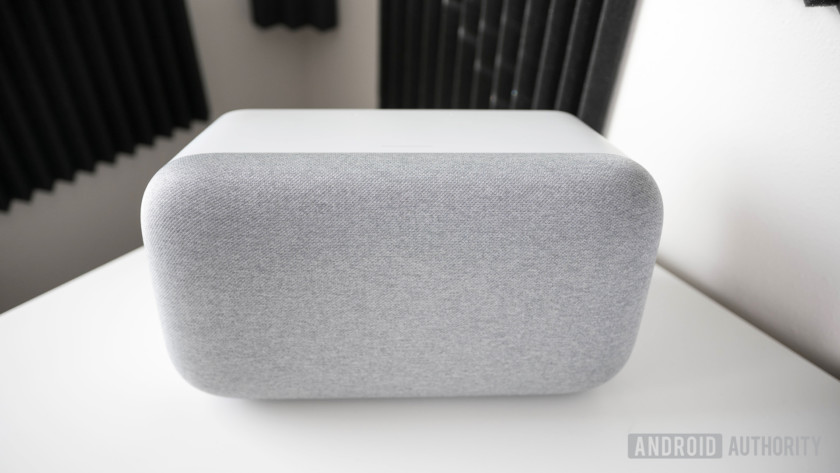
The housing is made of the same plastic that you’ll find on the original Google Home and the smaller Home Mini, so it’s smooth to the touch and isn’t prone to fingerprints. However, the fabric on the front of the Google Home Max is unique — it’s what Google calls “acoustically transparent,” so it supposedly won’t hinder the way your music sounds. It also feels great, almost like a nice felt fabric compared to the slightly plastic-feeling bottom of the original Google Home. Behind the fabric is where you’ll find dual 4.5-inch woofers for pushing air along with two tweeters.
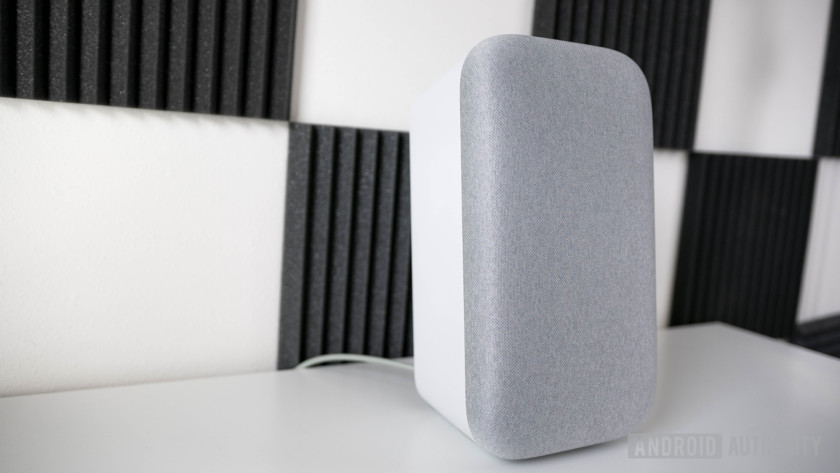
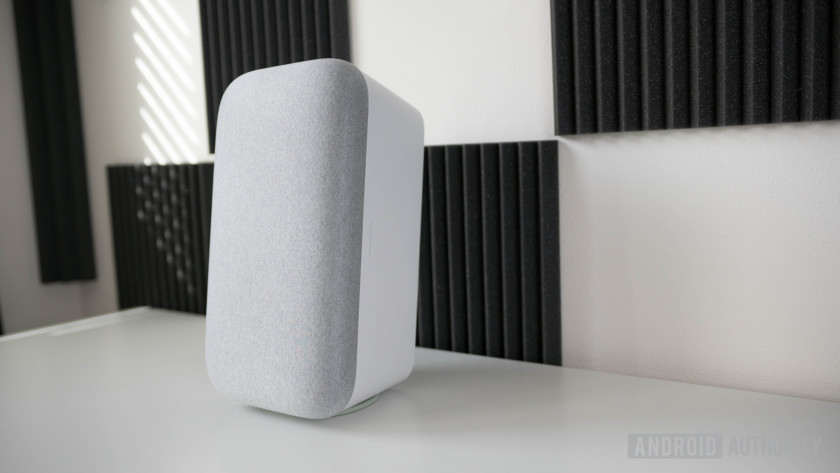
The parallelogram(ish) shape of the speaker means it can be vertically or horizontally oriented. You’ll need to make sure to throw on the little bass pad included in the box to avoid scratching the bottom. This bass pad also helps absorb some of the rumble from the woofers so you won’t accidentally rumble your phone off the table.
Although you can physically rest the speaker on any of its four sides, there are only two correct orientations because of the touch sensitive controls. If you place the speaker vertically with the touch sensitive controls along the left side, or horizontally with the touch-sensitive controls on the bottom, you’ll get a warning message telling you that the speaker is upside down.
The overall design being very modern and minimal so that it fits in any part of the house.
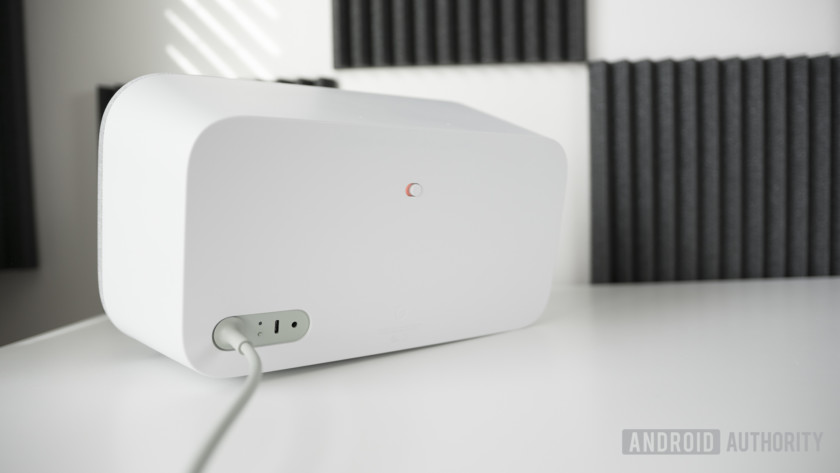
Along the back of the speaker sits the mute switch, a power input, USB Type-C input, and a 3.5 mm input. It’s clear Google paid attention to the speaker’s aesthetics, with the overall design being very modern and minimal so that it fits in any part of the house. Whether I have the speaker in my living room or the kitchen, it perfectly blends into its surroundings. I’m reviewing the white model, but you can get an even more discreet look by opting for the all-black color.
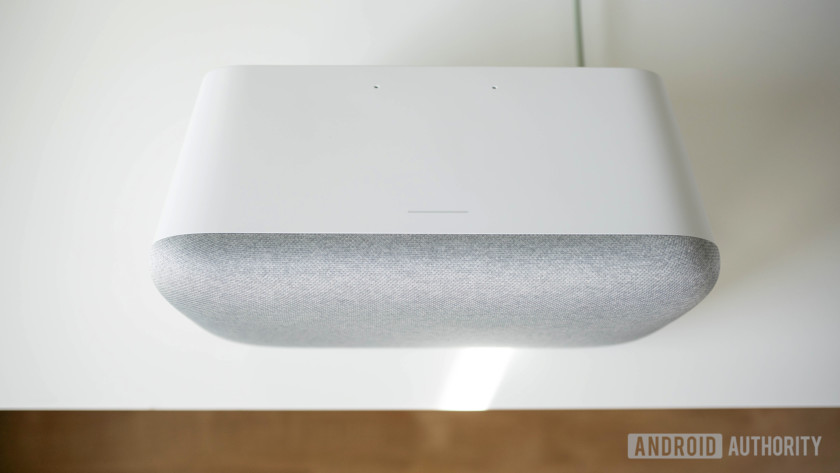
Up top is a touch-sensitive section for controlling music playback, and it’s perfectly responsive whether I tap to pause/play music or swipe left/right to adjust volume. Unfortunately, there’s no skipping between songs or returning to a previous song unless you ask the Google Assistant.
The Google Home Max has Bluetooth 4.2 and Chromecast built-in so you can stream your music to it easily, but the main way to interact with the speaker is with your voice. Using the hotword “Okay Google” or “Hey Google” lets you take advantage of the Google Assistant to control your music, but you can also ask it questions or control compatible smart home devices if you have any. Digging further into the Google Home setup you can customize your preferences, such as your preferred music streaming service, or even what kind of news stories you want to hear at the beginning of the day.
One thing unique to the Max is the ability to connect two of them together for stereo sound.
These are all features offered in every Google Home, but one thing unique to the Max is the ability to connect two of them together for stereo sound. If you’re able to buy two, this is definitely the way to go. If you’re looking for a multi-room audio solution, you can of course create groups that sync up a number of Google Home speakers together to play simultaneously.
Google Assistant is great at some things, but not so great at others.
Google Assistant is great at some things, but not so great at others. I’m not sure if it’s something in the way that I have my speakers set up, but when I tell the Home Max to put a song on repeat it lies to me. I get the confirmation message that the song will repeat, but when it’s over it moves right on to the next song. As the center of the smart home, you can tell it to stream Netflix or YouTube to a Chromecast or turn your light on or off (if you have compatible smart lights), but it’s a tad slow. Also when I wake up and ask Google about my day, it’ll tell me the weather and jump right into the podcasts that I picked out in the app no problem. But when I ask it when my next flight is, it can’t find one even though the event is clearly in my calendar app.
It might be the smartest smart speaker, but that’s a pretty low bar to clear right now. Luckily, the Assistant (and therefore the usefulness of it in a speaker) is getting better every day as Google adds functionality to it.

The biggest issue I have with the Google Home speakers is that after playing music and pushing the volume to a certain point, the microphones aren’t able to pick up my voice at all. I wanted to find out exactly how much of an issue this was, so I tested it in a semi-unconventional way. I put a post-it note on the floor every five feet. I then recorded myself saying “Hey Google” and played that from a speaker at five foot intervals: 5 feet, 10 feet, 15 feet, and 20 feet away, all while the speaker was playing the song “Havana” by Camila Cabello (my guilty pleasure) at four different volumes: 25%, 50%, 75%, and 100%. If the speaker registered my voice, it passed and got a check. If it didn’t, it got an X. You can see by the graphic that the Google Home Max definitely needs to do a better job at picking up voices so you’re not stuck yelling at the top of your lungs like I was.
After pushing the volume to a certain point, the microphones aren’t able to pick up my voice at all.
On the bright side, the Home Max’s sound quality is great compared to other smart- and non-smart speakers. Because of its large size the speaker is able to push some air to add some bump to the bass, and though it isn’t what I would call “bass-heavy”, it’s definitely noticeable. In the song “Moon River” by Frank Ocean the low E string is a little too strong for my taste, but it gives the song some grittiness and never gets in the way of his vocals in the midrange, which is what counts.
Related
Google Home Max is the company’s smartest speaker, all thanks to Smart Sound
It’d be accurate to call 2017 the year of the smart speaker, and judging by what we saw at CES 2018 this year might not be any different. Just about every manufacturer we can think …
The bass pad also keeps the rumbling of the speaker from disturbing anything around it, and the Google Home Max also uses six internal microphones to detect in real time how much of its sound waves are being reflected off nearby surfaces, and it corrects for that. You won’t need to go into any EQ settings because the Google algorithm does it for you. Now, whether that lack of control is a good or a bad thing is up to you (since you can’t tweak it unless you go deep into the Google Home app), but I find it to at least be consistent. Wherever I put the speaker the lows aren’t affected.
The slight emphasis in the lower frequencies will probably be a positive for most people because of its subtlety. It doesn’t overpower the mids at all and when paired with how loud this thing can get, so it’s perfect for powering your parties. That said, it sounded good even at low volumes and I ended up using it to play music in the background throughout the day as well.
Vocals in the song “Generator ^ Second Floor” by Freelance whales were till plainly audible even with all of the other instruments joining in the during the chorus at around the 2:17 mark which includes plenty of thumping drums and bells ringing throughout.
Speaking of the bells, one of my only issues regarding sound quality has to do with the high frequencies. It sounds like Google played it safe here and didn’t give them the same kind of emphasis as it did with the lows, which is understandable. When was the last time you heard someone say “Drop the bells”? There isn’t much noticeable distortion at max volume, but there also isn’t a ton of reverb to hi-hats and cymbals which can really help with the soundstage of your music.
There are plenty of Bluetooth speakers you can choose from if you want something portable — many of them are good enough for home use as well. But the Google Home Max is different. I own the original Google Home and two Google Home Minis (thank you Black Friday deals), but besides setting timers while cooking, asking it basic math when I’m lazy, or setting alarms, Home speakers are not particularly useful. I definitely don’t use them to listen to music since the quality isn’t great.
Whether it’s just for background music while I work or listening to podcasts, the Home Max has woven itself into my life in a way no other Home products have.
Still, I find myself constantly using the Google Home Max. Whether it’s just for background music while I work, streaming the latest apps video to my TV, or listening to podcasts, the Home Max has woven itself into my life in a way no other Home products have. Even though it sucks at hearing my voice, I have no problem saying that anyone who wants a smart speaker will love the Google Home Max. At $399 you’re getting a speaker that not only sounds good, but also gives you everything god that the Google Assistant has to offer. Just try not to yell at it too loudly.
Buy now from Best Buy
Buy now from the Google Store
Quick look: Android Go on the Alcatel 1X
One of Google’s big initiatives for 2018 is Android Go, a lite version of Android 8 Oreo that is optimized for phones with 1 GB of RAM or less. Android head Hiroshi Lockheimer teased several Android Go devices coming at MWC 2018 and today Alcatel introduced the first one.
Read: Alcatel’s 2018 phone lineup unveiled at MWC
The Alcatel 1X looks and feels as “budget” as you’d expect from a phone that retails for 100 euros, but its saving grace might be the fact that it actually runs Oreo. That’s not something that can be said about most phones out there, including some that cost seven times more than the 1X.

How good is Oreo Go edition on the Alcatel 1X? If you were hoping for the answer to be “smooth as butter,” you’re in for a disappointment. Despite the optimizations and down-sizing, there’s a jankiness to the Alcatel 1X you just can’t get around. Loading the recent apps takes a noticeable moment and there are frequent instances of lag when scrolling through the app drawer or through a webpage.
But! This is a phone that costs less than some people spend on a case! Besides the 1 GB of RAM, the phone features a quad-core MT6739 processor clocked at 1.28 GHz, 16 GB of onboard storage and a 5.3-inch 18:9 “VGA+” display. Considering these specs, it’s actually impressive to see Android 8.1 Oreo in the About section of the settings, and it’s even more impressive that Oreo Go edition is fully serviceable. One other thing to keep in mind is that the phones we tested at the Alcatel pre-briefing were pre-production units, meaning there’s still time for the company to stamp out performance issues before the public release.

The operating system is just a part of the Android Go platform – the other main component is a set of slimmed-down Go apps, including Assistant Go, YouTube Go, and Files Go. We weren’t able to test these apps extensively, but in our short time with them, they did the job just fine. You won’t get the full experience you get with the regular versions, but that’s not really the point of the Go platform.
Android Oreo Go edition addresses one of the biggest problems that plague the low-end of the Android smartphone market, which is the fact that customers rarely get the latest version of Android out of the box. The other big issues are the lack of security patches and the lack of OS updates. The 1X is a mixed bag in this regard: Alcatel says it will receive “regular Android security updates, on a minimum quarterly basis.” That’s not as good as the monthly cadence that high-end phones offer, but it’s a step above what cheap Android phones have offered so far in terms of updates, which is to say, nothing. Unfortunately, Alcatel had nothing to share when it comes to OS updates.


Leaving Android Go edition aside, the Alcatel 1X comes in multiple variants, depending on the market: 1 GB or 2 GB of RAM, single-SIM or dual-SIM, fingerprint sensor or no fingerprint sensor, 8 MP camera or 13 MP camera, and even Google Assistant and no Google Assistant.
The model with 2 GB of RAM features Face Key, a camera-based facial recognition feature. While it’s not as secure as PINs, patterns, or fingerprints, Face Key worked pretty fast and reliably in our time with the phone.
Available in multiple colors starting in April, the Alcatel 1X will start from 99 euros for the single-SIM version and 109 euros for the dual-SIM model.
Read: General Mobile’s Android Go edition phone leaked
At the end of the day, Alcatel and Google managed to put 2018 software on 2013 hardware and made them work together harmoniously, more or less. We look forward to seeing what other manufacturers were able to achieve with Android Go. Stay tuned for more coverage from MWC 2018 in the coming days.
How to import custom wallpapers for your PlayStation 4
Sometimes your own style is the best style.

With the latest release of the PlayStation 4 firmware, Sony has relaxed their long-standing restriction on using your own wallpapers for the background on the home screen. The process is not as easy as it could be, as with all thing Sony there are hoops to jump through, but we are here to guide you through it.
Step by Step
Create a folder on your USB Thumb drive named “Images”
Log on to your PlayStation 4 and go to settings.
Select Themes from the menu, then choose Custom.
Choose “Select File” and choose “USB Storage Device”
Select the wallpaper you want to use.
Crop the wallpaper to your liking and select the menu colors.
Detailed Instructions

To start this process you will need to make sure your USB thumb-drive is ready, actually, you will need to make sure you own a USB drive, turns out I didn’t. Sony wants you to create a top-level folder called Images to put your wallpapers in, it’s simple to do and I’m sure whether you use Mac OS or Windows you know the drill. This is where you need to put all the wallpapers you want to use for the PS4, so go ahead and do that now.
More: The best USB Drives of 2018

From here start up the PlayStation 4 and go over to the settings tab, from there you can easily find the themes section. Make sure the USB is plugged in at this point and then enter the themes. You can see from here that all the default themes and any themes you have downloaded before are here as well as a tab marked Custom which is where Sony wants you to keep your stuff.
More: Best PlayStation 4 Games 2018

From the custom menu, you get to change some things to your liking. Sony still doesn’t want you messing with too many different things so options are limited but the Select Image button is there for you to choose your own wallpaper. Select the USB Device option to access your wallpapers and choose the one you want. I chose a nice picture of Portsmouth UK, my hometown.
Once you have chosen the image you get to crop it as needed so it fits desktop correctly, the maximum image you can use is 1920×1080 so if you are image editor savvy you can probably play around with the image before you transfer it to make it perfect.

The other two choices available to you are a Make Area Dim checkbox which just makes the selectable areas on screen more visible when you use bright backgrounds and the Select Color action which gives you some color options for the moving menus in the home screen. The colors are pretty standard but if, like me, you have a desktop with a good primary color scheme finding the right color should be easy enough. Try to use complimenting colors if you can, a white background with white menu options would make everything a headache!
Once you have set all your options you are ready to go, from then on your background can be whatever you want it to be, as many times as you like.
PlayStation 4

- PS4 vs. PS4 Slim vs. PS4 Pro: Which should you buy?
- PlayStation VR Review
- Playing PS4 games through your phone is awesome
Amazon
Recommended Reading: Tim Cook on Apple’s iPhone X, HomePod and more
Why Apple is the world’s most innovative company
Robert Safian,
Fast Company
Apple may be one of the biggest companies in the world, but it still doesn’t open up often about how it operates. A few times a year though, we catch a glimpse. Fast Company caught up with CEO Tim Cook back in January to chat Apple’s recent run of new gear in an interview that published this week.
|
Celebrating the Game Boy Camera, one of Nintendo’s weirdest, most ingenious inventions Following the success of Switch, AV Club takes a look back at one of Nintendo’s weirdest projects. |
The tragedy of Erik Killmonger There have been a number of great reads on Black Panther already, but this piece examines the narrative through the lens of the antagonist. |
|
The workplace that Susan Fowler wrought A former Uber employee penned a memo about sexual harassment a year ago. So… where are we now? |
The myth of the hacker-proof voting machine As the US approaches mid-term elections, voting security is a hot topic in the wake of Russian meddling. |
Apple Pay Cash nears its first international expansion
Apple Pay Cash may not be limited to Americans for much longer. Users in Brazil, Ireland and Spain have all reported seeing the peer-to-peer payment service show up in iOS’ Messages app, suggesting that launches in their countries (and potentially more) are just around the bend. Apple hasn’t officially announced anything yet, but it’s hard to imagine the company asking people to configure the feature and letting it sit unused for more than a short while.
Despite the apparently imminent expansion, it’s doubtful that Apple Pay Cash will allow money transfers between countries. As 9to5Mac observed, competing services typically limit you to paying others on your home turf — the stiff fees alone would discourage across-the-border payments.
An international rollout could be crucial to generating some momentum for Apple’s fledgling offering. Rivals like Venmo might be US-only, but others have a broader reach — Skype’s PayPal-based Send Money feature is available in 26 countries as of this writing. If Apple Pay Cash is going to become the go-to option for iPhone and iPad owners looking to repay their friends, it needs to be more than just a one-country product.
@_inside @stroughtonsmith I think Apple Pay Cash might be coming to Ireland soon! Saw this when texting someone today, and it stayed for all messages! pic.twitter.com/P5Uue8YgN1
— CompuMop (@CompuMop) February 23, 2018
Via: AppleInsider, 9to5Mac
Source: CompuMop (Twitter), Manuel Arroyo (Twitter), Filipe Esposito (Twitter)
MIT’s Veil service will make private browsing more private
After reports and studies revealed that browsers’ private modes aren’t that secure, MIT graduate student Frank Wang decided to take things into his own hands. He and his team from MIT CSAIL and Harvard have created a tool called Veil, which you could use on a public computer — or on a private one on top of using incognito mode and Tor if you have big secrets to keep or if you’ve just become paranoid after years of hearing about hacks and cyberattacks.
Wang said in a statement:
“Veil was motivated by all this research that was done previously in the security community that said, ‘Private-browsing modes are leaky — Here are 10 different ways that they leak. We asked, ‘What is the fundamental problem?’ And the fundamental problem is that [the browser] collects this information, and then the browser does its best effort to fix it. But at the end of the day, no matter what the browser’s best effort is, it still collects it. We might as well not collect that information in the first place.”
MIT explained that data tends to move between different cores in multicore chips and caches, which attackers could access by exploiting flaws. Once those memory banks are full, computers could transfer data to their hard drive, and browsers can’t always delete them. Veil works by encrypting a website before showing it on your screen. You’ll have to type out a URL on Veil’s website instead of your address bar, but it will work whatever browser you use. The encrypted Veil-version of a website will look like its ordinary counterpart, except it has a decryption algorithm embedded in the page. Without that algorithm, the website will be unintelligible — with it, the website’s data will only be loaded so long as it’s displayed on screen.
If that isn’t enough, Veil was designed to be able to offer even more security features. Its “blinding” server can add a bunch of nonsense code to every page, and no two pages with meaningless codes will be the same. Further, it can take a picture of the website you want to visit and serve you that photo. The image won’t have any executable code, but when you click on parts you want to see, Veil will send you an updated image.
It’s unclear whether you’ll have to endure a considerable lag to load encrypted websites or their photos. Developers will have to create Veil versions of their websites first, so we can test it out. Wang and his team created a compiler that can automatically do that, but that means you can only use Veil with websites that actively want to support it.
Source: MIT
 AIVAnet