


Watch Samsung’s Galaxy Unpacked 2018 event right here!
Samsung’s getting ready to unveil its next flagship smartphone, the Galaxy S9, at MWC 2018 in Barcelona. You can watch a livestream of the Unpacked 2018 event in the video below, and don’t forget to follow the action on our liveblog, as well — where we’ll have colorful commentary from our senior editors Cherlynn Low and Chris Velazco. It all starts at 9AM PT/12PM ET, so you have a few minutes to grab a drink and a snack before finding out what the Galaxy S9 looks like.
Catch up on the latest news from MWC 2018 right here.
Samsung Galaxy S9 and S9+ hands-on: The devil is in the details
Getting to know the Galaxy S9 is like unwrapping a present you think you’ve already opened. On the surface, it looks familiar, but once you peel back the layers, you’ll notice the contents are new.
That’s not to say that the changes between the Galaxy S9 and the Galaxy S8 are insignificant. There’s a ton of them, and you’ll have to look carefully to spot them all, but when considered as a package, this update feels more incremental than monumental. At least, based on our brief time with it so far.
Camera
Like I said, there are many small changes in the Galaxy S9, but the bulk of them have to do with the camera. This should come as no surprise — Samsung has been teasing some of the new features for a while now. Right off the bat, this is the first Galaxy S flagship with dual cameras (and dual optical image stabilization). The setup here is similar to the Note 8: two 12-megapixel cameras with one wide-angle and one telephoto lens, and it offers similar extra tools like Dual Capture and Live Focus (a la iPhone’s Portrait Mode).

Chris Velazco/Engadget
The paired sensors are only available on the larger S9+, though, so fans of daintier handsets might have to make do with slightly reduced image quality (more on the specific differences on that front later).
A dual lens setup is only one of a slew of new camera features for the S9 and S9+. They both come with something the company is calling “Dual Aperture” which sounds like it allows for two openings on a single lens. But really, it’s one aperture that jumps between two f-stops — f/2.4 and f/1.5. That last one is the widest aperture on a smartphone yet — the record was last held by the LG V30, with its glass lens reaching f/1.6.
While the mechanical shutter is on both phones, the S9+ only has it on the primary (wide-angle) lens. The shutter switches between the f-stops automatically by default, jumping to f/1.5 when the phone detects low-light conditions and f/2.4 in bright scenes. You can also manually control it in the camera’s Pro mode, but you can’t select any f-stops between the two — your only options are f/1.5 and f/2.4.
Still, the wide max aperture helps the S9 and S9+ let in more light, which makes for brighter and clearer images in the dark. At our demo, Samsung showed off how well this worked on a model scene encased in a black-out cylinder. I peered through the dime-sized hole at the top and barely made out a circle in the middle of an otherwise pitch-black setting. After placing the S9’s lens on the cylinder, I clearly saw that it was actually a traffic circle, surrounded by houses and trees.
The picture that the S9 snapped in these conditions was surprisingly noise-free, thanks to what the company named “Super Speed Dual Pixel.” It combines the dual pixel technology that was introduced with the S7s and adds dedicated processing and memory to enable multi-frame noise reduction using 12 separate images per photo you shoot. Thanks to the RAM built into the sensor, the S9 is able to stitch those together quickly, resulting in hardly any delay between pressing the shutter button and the picture showing up.
The S9 and S9+ can also shoot some serious slow-mo. Samsung took a page right out of Sony’s playbook, adding 960fps video capture. That’ll create clips that are four times slower than the S8 could take (at 240fps). Or, in real-world terms, 0.2 seconds of actual time will be slowed down to about 6 seconds of playback.
As we saw with the Sony Xperia XZ Premium, taking video at that speed can be tricky. To avoid amassing gigantic files at such a high framerate, smartphones typically limit ultra slow-mo recording to brief windows. On the Xperia XZ Premium, this meant you had to go to a specific mode and hit a separate button to start the slow-motion capture. That’s flawed, as it expected that you’d be able to predict when something interesting would happen.
Samsung’s approach is to add an automatic mode. When you start recording slow-mo video on the S9, a square frame appears in the middle of the screen. The moment something moves into that frame, the phone automatically switches to 960 fps for 0.2 seconds. You’re allowed up to six slow-mo bursts in each recording. During our preview, this feature behaved erratically. It worked well when the subject was perfectly still before something moved into the frame, but most other times, it didn’t use slow-mo when you’d expect. To be fair, we were checking out an early version of the software, and this could become more reliable by the time it ships.

Mat Smith/Engadget
Those who want (slightly) more control over when to use 960fps can use Pro mode, which is more like Sony’s method. The nice thing here is that you have the option to do it yourself or let the phone think for you, even if it is finicky right now.
I really liked the ultra-slow-mo videos we got from our tests, although most footage at that exaggerated speed appeals to me. Engadget’s senior mobile editor Chris Velazco played with a fidget spinner and a deck of cards while making a truly appalling face, and the S9 recorded it in excruciatingly smooth glory. Since we were using a set with studio lights, the clips turned out bright and clear, but we don’t know how the camera will fare in less-than-optimal conditions yet.
All the new camera tools I’ve described so far can be found on both versions of the S9, and like I said before the dual camera setup is only on the S9+. From what we can tell so far, the main difference resulting from that is the S9+ captures better Live Focus portraits than the smaller phone since the latter is relying on software to create the blurred background.
Samsung didn’t say if the new flagships can record 4K HDR video, even though they both pack Qualcomm’s latest Snapdragon 845 chipset, which supports that feature. The company’s reps haven’t answered our queries on that yet, so we’ll have to wait for confirmation.
AR Emoji

Chris Velazco/Engadget
Another camera-related feature is AR Emoji — Samsung’s answer to Apple’s Animoji. So far, I find the S9’s version more fun, mostly because it creates an emoji of my face and not an impersonal, generic one (although I do love me some talking poop). You can use the S9 to create a cute cartoon version of yourself by taking a photo of you staring straight forward. The phone was better at reproducing my likeness than Bitmoji or any other app I’ve used.
But the replication didn’t work as well for everyone. The avatars for some other journalists or Samsung’s own reps, looked nothing like them. For these people, AR Emoji might be less fun, but I was definitely sucked into styling up my avatar with great hair, a cool outfit and cute glasses. After you’re done customizing your emoji, the S9 auto-generates a set of animated stickers that you can insert from within the Messaging app’s keyboard (other apps can find these from the Gallery).

There are a plethora of options right from the get-go, and their resemblance to actual gestures I would do in real life is uncanny. You can also make facial expressions, and the S9’s front cameras will pick them up to be conveyed by your avatar — just like you can do with Animoji.
Bixby
Another area where Samsung made major changes is Bixby — specifically in the augmented reality Vision section. Besides interface tweaks that make Bixby Vision look more in tune with the camera app, Samsung also added three new modes — Live Translate, Makeup and Food. The previously available shopping and landmark recognition features are now individual modes, too.
The Live Translate tool uses Google’s Translate service, and that has worked well for me in the past. So I’m not surprised that Bixby was able to quickly and accurately translate text in images in real time. What impressed me was Bixby’s ability to read handwritten words — especially when it correctly interpreted my ugly Chinese characters.

Although I had way too much fun playing with the new Makeup feature, I wasn’t impressed with its performance. Like a slew of other selfie-makeup apps, it lets you apply digital makeup in real time and buy products you like without leaving the app. Bixby has a limited offering of color and pattern options, though, which limits its appeal. Still, this is something that’s easily addressed by software updates over time.
Another new Bixby feature is its ability to estimate the number of calories in food you point the S9 at. Samsung teased this at CES, but we only saw a preview version on a Note 8 then. Now, the software is more mature and was able to accurately identify an onion bagel, showing that it contained 270 calories. Based on a quick Google search, that count is pretty accurate.
During our hands-on, Bixby struggled to identify dishes that contained more (and mixed) ingredients. It mistook a cup of granola parfait, which included berries and yogurt, as just a cup of granola alone. Because of that, it also provided an incorrect calorie count. Again, this is an issue that can be fixed over time as Samsung’s software team figures out how to differentiate components of a meal, and when it works, it provides a nifty service.

As before, Bixby Vision recognizes objects like your fresh new sneakers or favorite watch and displays a card in the viewfinder to show you its make, model and price. This feature is still hit-or-miss, though. It correctly identified Velazco’s Adidas kicks, but not my DKNY Minute watch, mistaking it for a Rolex (I wish). It works well with things like wine bottles or artwork, though. Vision can also display information about places of interest when you point it at landmarks.
One final update on the camera — the front 8-megapixel camera and the iris scanner now work together for more reliable unlocking via what Samsung calls “Intelligent Scan.” According to the company’s reps, the iris scanner isn’t as effective in bright light as it is in the dark. With the new system, the S9 will try to sign you in with your eyes by default, but when that fails, it will use facial recognition. Unfortunately, we didn’t get to test out this feature during our demo, so we’ll have to wait till we get our hands on a review unit to try it.

Chris Velazco/Engadget
And everything else
Samsung built stereo speakers into the S9’s front and bottom, which make it 1.4 times as loud as the S8, according to the company. The latest flagship certainly sounded noticeably louder than its predecessor during our demo, although we had too short a time with it to evaluate audio quality.
Samsung also tidied up the S9’s front by trimming the bezel and masking the array of cameras and sensors above the screen. You won’t really notice these differences until you look closely, but the effect is a slightly more minimalist design than before.
There are also some updates that you probably already expected. In the US, both the S9 and S9+ will have Snapdragon 845 CPUs, with the smaller phone packing 4GB of RAM while the larger handset carries 6GB. They’ll ship with Android 8.0 Oreo, too.
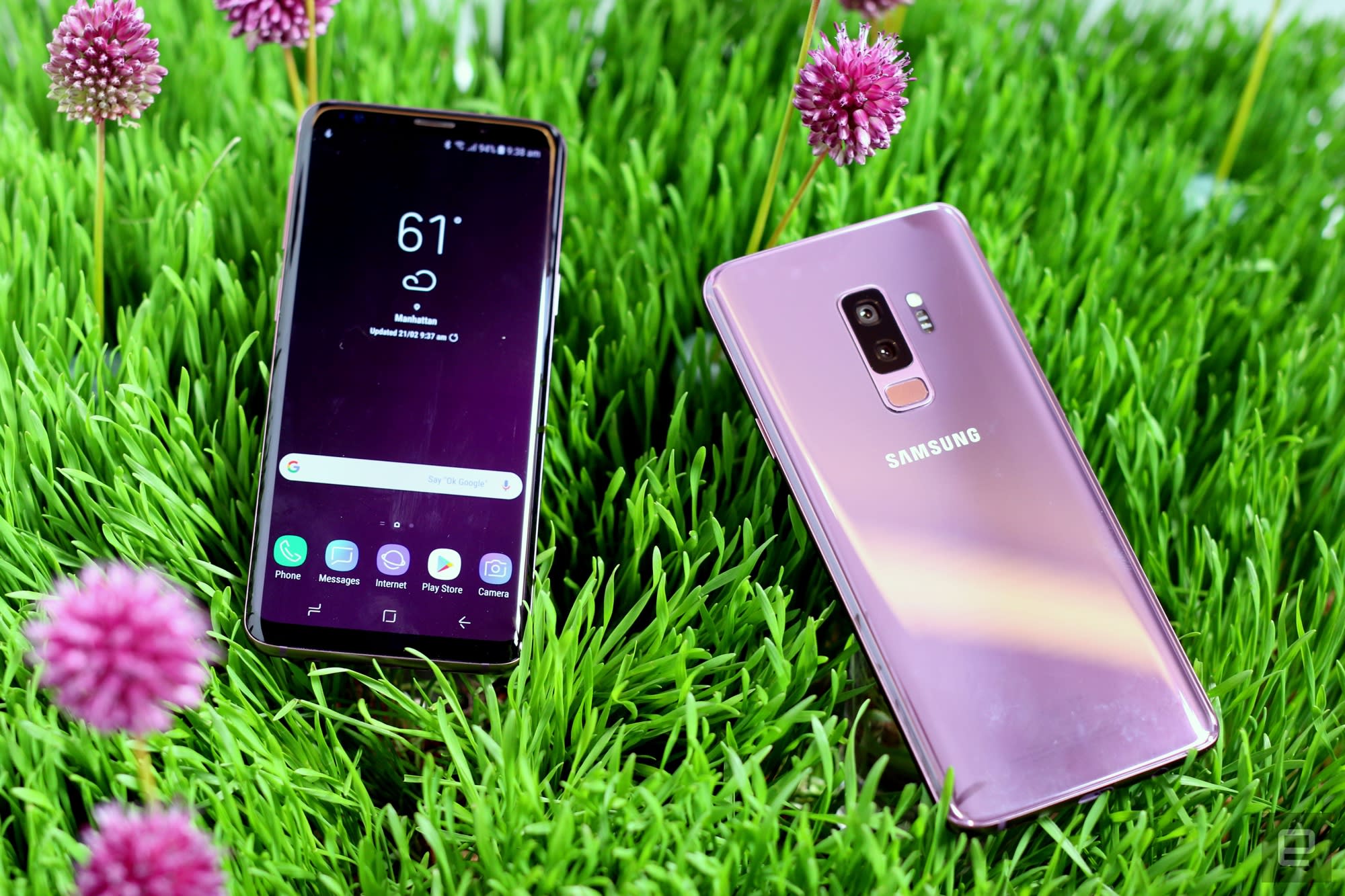
Otherwise, the rest of the S9 remains largely the same as the S8. Their respective screens are the same size (5.8-inch and 6.2-inch), their batteries have the same capacity (3,000 mAh for the S9, 3,500 mAh for the S9+), they’re just as durable and water-resistant as their predecessors, and will still support fast wireless charging.
Many of the new software features like Bixby and camera updates will ultimately become available for older handsets like the S8 and Note 8, as long as the hardware supports it. That means that if you’re an S8 owner and don’t feel the need for a camera upgrade, you could easily skip the S9 and not miss much.
It’ll take more time with the phone before I can properly evaluate whether the S9’s bundle of changes amount to more than the sum of their parts, but for now, Samsung’s latest feels like an interim update.
AT&T has already announced it will sell the S9 on its Next installment payment program from $26.34 over 30 months. The S9+ will cost $30.50 each month. That works out to about $790 for the S9 and $915 for the S9+ — expect the other carriers to come in at about the same price, give or take $50. In the UK, the Galaxy S9 will cost £739 while the S9 Plus comes in at £869.
You’ll have a bit more time before you have to decide if you want to get the new flagships, though — pre-orders start March 2nd, while the devices arrive March 16th.
Catch up on the latest news from MWC 2018 right here.
Samsung’s updated DeX desktop experience uses the S9 as a trackpad
When it launched last year, Samsung’s first DeX dock was the latest in a long line of attempts to blur the line between phones and traditional PCs. And you know what? It worked surprisingly well, even though the value for most people wasn’t particularly clear. That didn’t stop Samsung from trying again, though: the company unveiled a new version of it’s DeX hardware alongside the Galaxy S9 and S9 Plus, and it’s much different from the dock we got last year.
In its closed form, the original DeX dock sort of resembled an extra-chunky hockey puck, and the sliding mechanism that allowed a phone to fit was quite clever. That’s gone. Instead, this year’s DeX Pad looks like a shrunken Sega Genesis that the phone is meant to rest on top of. It seems like a step backward in design until you realize that Samsung wanted the phone’s touchscreen as close as possible to the surface it’s resting on so you can use it as a trackpad.
This isn’t the first time we’ve seen an approach like this — Razer did the same thing with its lapdock concept at CES — but it works quite well for navigating between running apps on a bigger display. You’ll eventually be able to use that connected phone as a keyboard too, if you’ve got a masochistic streak. I was hoping to take this for a spin just to see if the road-warriors and traveling salespeople Samsung is targeting with the DeX Pad could squeeze some use out of a tiny touch keyboard, but it wasn’t ready for me to play with just yet.
More importantly, you’ll be able to drive higher resolution displays than you could before — in the old days, max resolution for a connected screen topped out at 1080p, which is less than ideal for anyone who has invested in high-end hardware. Things are a little better now, though, since you can crank up the resolution to 2,560 x 1,440 on that big display (as long as you’re using an S9, at least). When you take the boost in screen resolution along with more accessible touch controls and the Galaxy S9’s power, some novel experiences being to emerge. I definitely didn’t think I’d spend a chunk of my day playing Final Fantasy XV: Pocket Edition on a desktop monitor while fiddling with a phone-touchpad combo, but the whole thing felt more elegant than expected.
Some changes, however, might rub some people the wrong way. The DeX Pad packs still two full-sized USB ports, a USB-C port and an HDMI-out, the ethernet jack present in the original is nowhere to be found. Whether anyone will actually miss that thing is another question, but shouldn’t have to wait long to find out.
Catch up on the latest news from MWC 2018 right here.
After Math: Calls for alarm
While the survivors of the Stoneman Douglas shooting provided the nation with a master class in how to effectively articulate policy reform demands and ruthlessly drag talking heads of the political class, the tech industry had some communication issues of its own. Like the 1,600 911 calls a set of iPhones at a California repair center made, or the Tinder security flaw that enabled account access with only a phone number, or how the FCC is getting sued (again) for trying to roll back Net Neutrality rules. Numbers, because how else are you going to see how savagely the NRA is getting ratioed?

1,600: That’s how many calls a group of iPhones at a California repair center autonomously made to 911 over the last five months — around 20 a day. Unfortunately, dispatchers stopped buying the “accidental butt dial” after the first four or five dozen incidents.

23: The number of state attorney generals (well, 22 states plus DC) who have filed a lawsuit against the FCC to prevent the federal agency from enacting its Net Neutrality rule rollback. Makes you wonder what the other 28 state AGs are waiting for.

20: Google assistant can already understand what you’re asking it in eight different languages. Ahead of the 2018 Mobile World Congress, the company has announced that it will expand that linguistic list to more than 20 tongues by the end of the year. Huzzah! Or however you say that in Swedish.

$1,250: That’s how much Tinder paid a team of security researchers that identified a significant vulnerability within its app that would allow users access to other people’s accounts with little more than a phone number.

5:1: Twitter relaxed its rules regarding how brands interact with regular people over DM this week. The regulations now stipulate that brands can message you five times every 24 hours for each DM you send them first.

95GHz: That’s the low end of the spectrum that FCC chairman, Ajit Pai, suggested selling off “to boost innovation,” though more likely because that’s what would make the telecom industry (whom he jokes about still working for) happy.
Matebook X Pro hands-on: Huawei’s new Windows laptop looks excellent
This post was originally published on Dgit.com.
Huawei is a company you don’t traditionally associate with computers, but the company’s Matebook range has served as road opener in this regard. At MWC 2018 today, Huawei unveiled its latest, the Matebook X Pro, which it hopes will set the standard for portable small laptops.
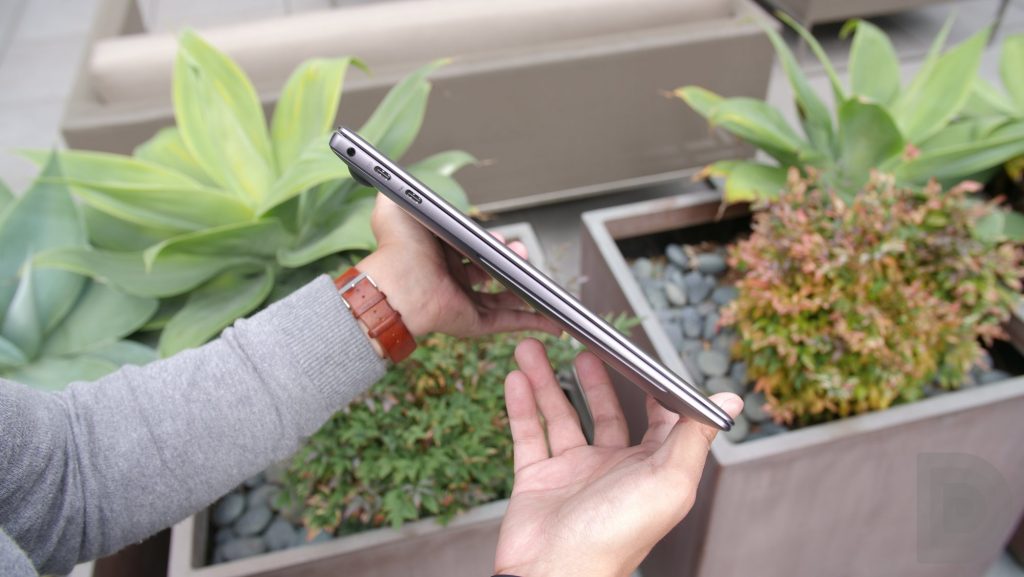
The Matebook X Pro is a slim Windows 10-powered laptop that offers a 14-inch display in a smaller 12-inch notebook body. The Matebook X Pro measures just 14.6 mm in thickness and weighs about 2.93 lbs. The aluminum alloy body, with its sandblasted finish, makes for a comfortable in-hand experience.
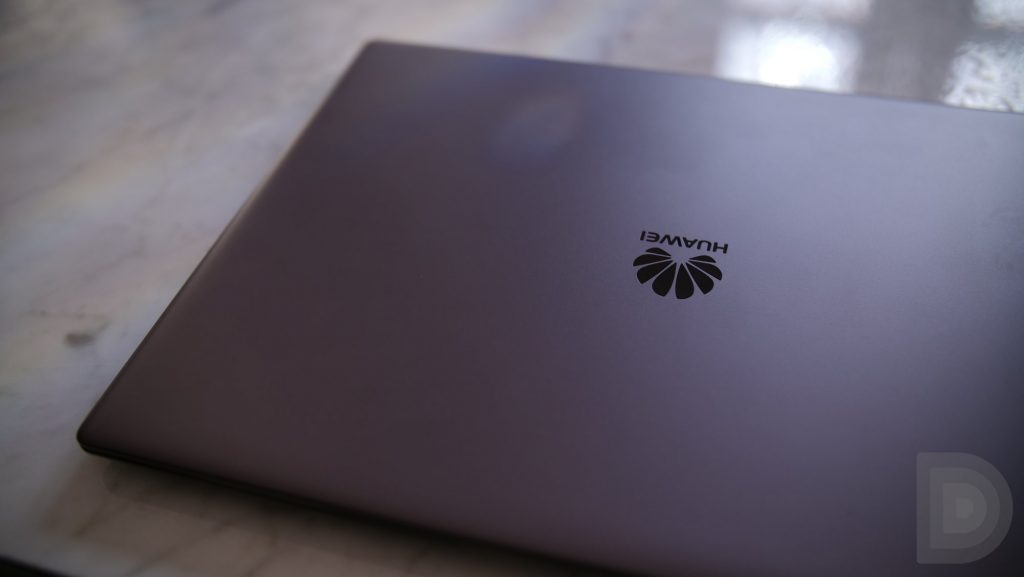
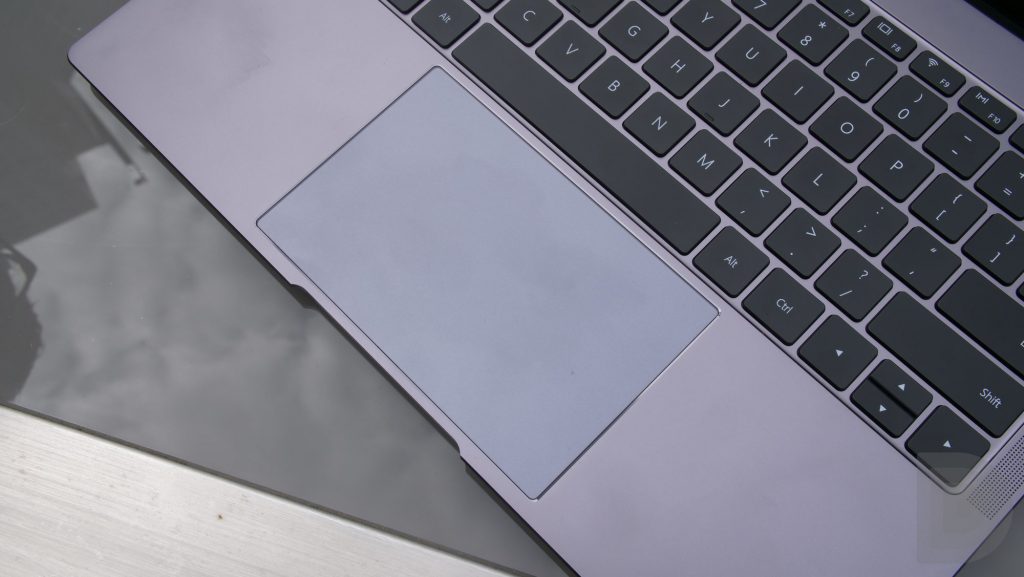
The Matebook X Pro boasts impressively small bezels and a screen-to-body ratio of 91 percent — one of the highest on a mobile PC. The display measures 13.9-inches with 3K resolution (3000×2000 pixels). Unlike the original Matebook X, the Pro comes with a full 10-point touch screen which adds to the ways you can interact with it, although the trackpad is still my preferred input method.
> Read our Huawei Matebook X review
The display boasts a max brightness of 450-nits, meaning it can be used outdoors with relative ease. In our brief testing, we had no issues with sunlight legibility, even in direct sunlight. There’s also an anti-fingerprint coating which should help reduce fingerprint marks when using the touchscreen. The eye comfort mode also makes its way over from Huawei smartphones and automatically adjusts the temperature of the display to reduce glare and blue light in darker conditions.

The super small bezels is one of the standout features on the Matebook X Pro and Huawei looks set to regain its title of the narrowest bezel on a computer from 2016. Yet, going for a small bezel and smaller body often means making cuts elsewhere — the keyboard for example — which can impact on the overall experience.
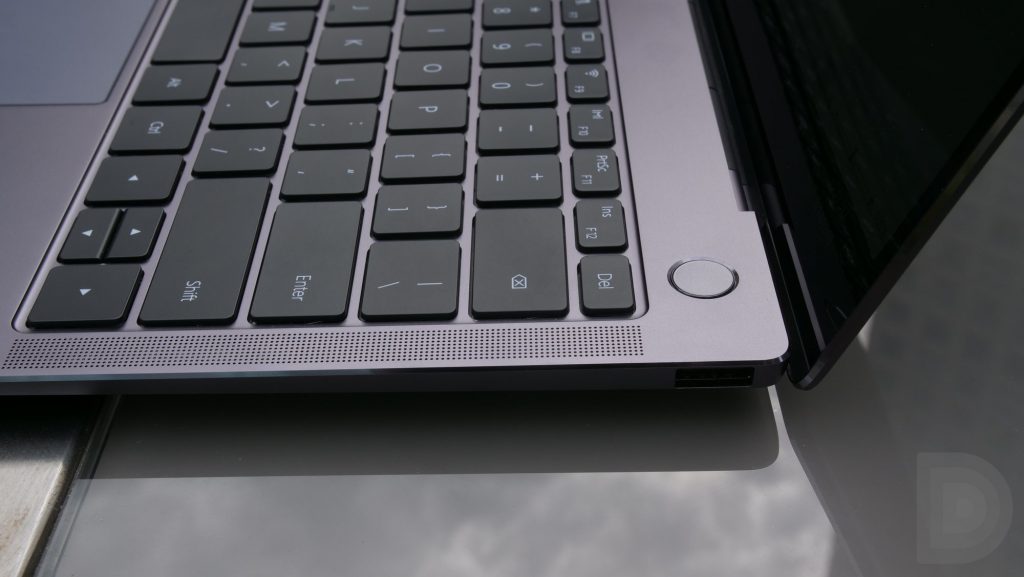
Despite a 12-inch body, the Matebook X Pro features a full-size keyboard that is a joy to use. Other computers in this size come with reduced-size keyboards which impact on the experience. I often struggle to acclimate to the keyboard when using a new computer, but as soon as I started using the Matebook X Pro, the keyboard felt familiar and effortless to use. Within minutes, I was typing away with no reduction in speed or efficiency compared to my 15-inch Macbook Pro.
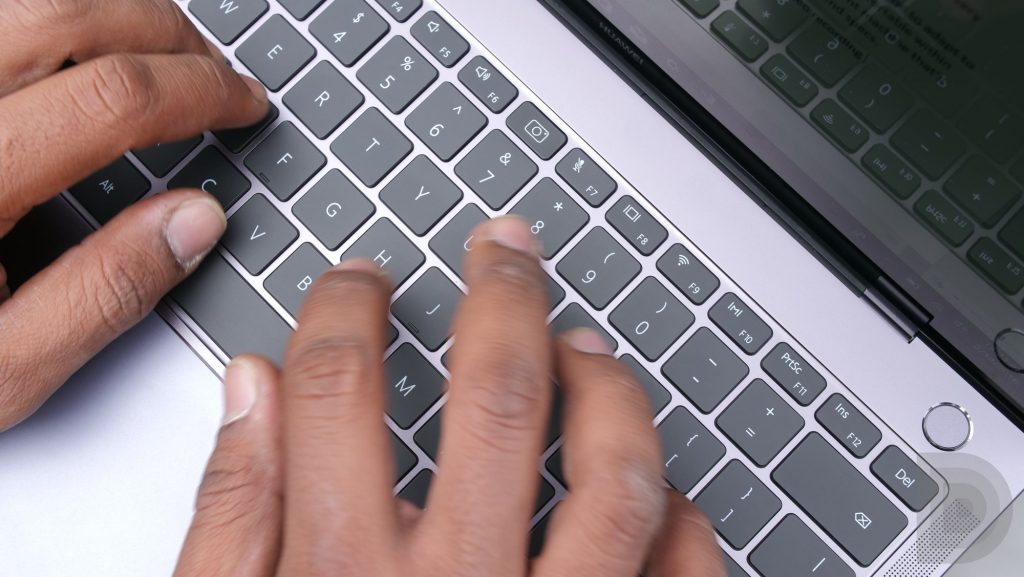
The full-size chicklet back-lit keyboard will appeal to many people who want something portable but still have the familiarity of the keyboard on a bigger laptop. The backlight only turns on when it’s dark outside to reduce battery consumption, but you can also override this. Beneath the keyboard you’ll find an extra-large precision touchpad which works as well as any other Windows laptop, but wasn’t particularly memorable.
The keyboard is also where you’ll find one of the more bizarre innovations on the Matebook X Pro – the camera. Huawei’s research suggests that less than 3 percent of people use the camera on their laptops and the majority of people cover their camera, due to security worries. Instead of putting the camera in the bezel on the display as most laptops do, Huawei chose to build it into a spring-loaded key on the keyboard, between the F6 and F7 keys. Essentially, the camera is only enabled when you physically press the key to pop it up.
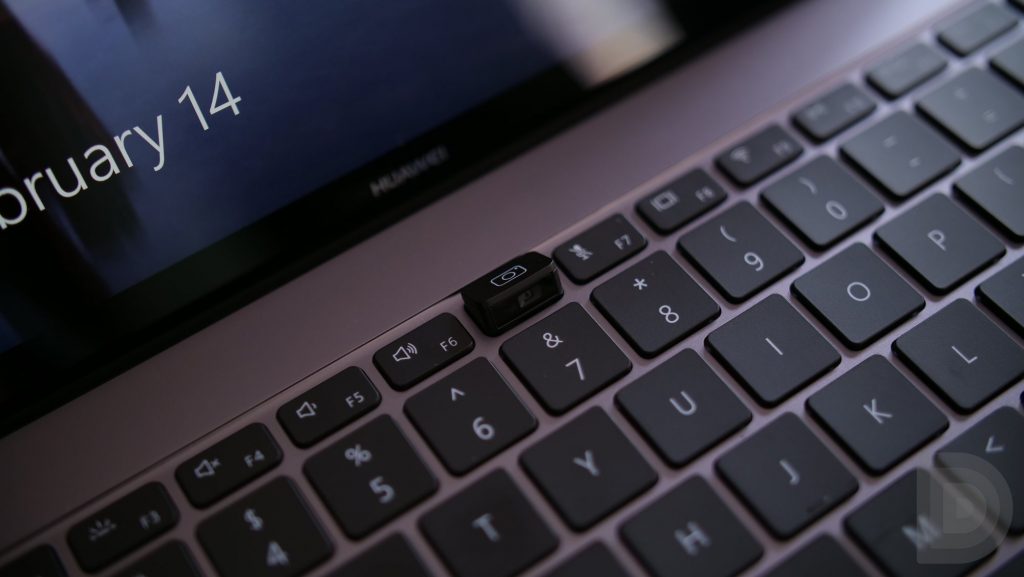
The camera itself offers a wide field of view which is great for video calls, but we found the positioning to be a little awkward. Other than the traditional place atop the display, there’s no other comfortable place to put a camera on a laptop, so this isn’t overly surprising.
Last year, the Matebook X was the first PC to support the Dolby Atmos audio standard, and this year, Huawei has continued in this vein. The Matebook X Pro supports the second generation of Dolby Atmos Surround Sound and features a quad speaker with split frequencies, allowing the laptop to take full advantage of Dolby’s next generation audio. Dolby Atmos offers special awareness for sound, allowing you to have a truly immersive audio experience. Based on our brief time with it, the Matebook X Pro seems to deliver on this promise.
The Matebook X Pro also features four microphones for far-field technology, which allows you to enable Cortana at up to 6 meters (19.5 feet) away. Considering that the average floor is 10 feet, you can theoretically talk to Cortana from two floors away, although we’re not quite sure why you’d want to do that given, well, you won’t be able to hear its response!
The Matebook X Pro comes in three different options but all of them feature the full Intel Core i5 or i7 processor, rather than the mobile variants used in other computers. There are two RAM options – 8GB or 16GB – as well as two storage options – 256GB and 512GB.
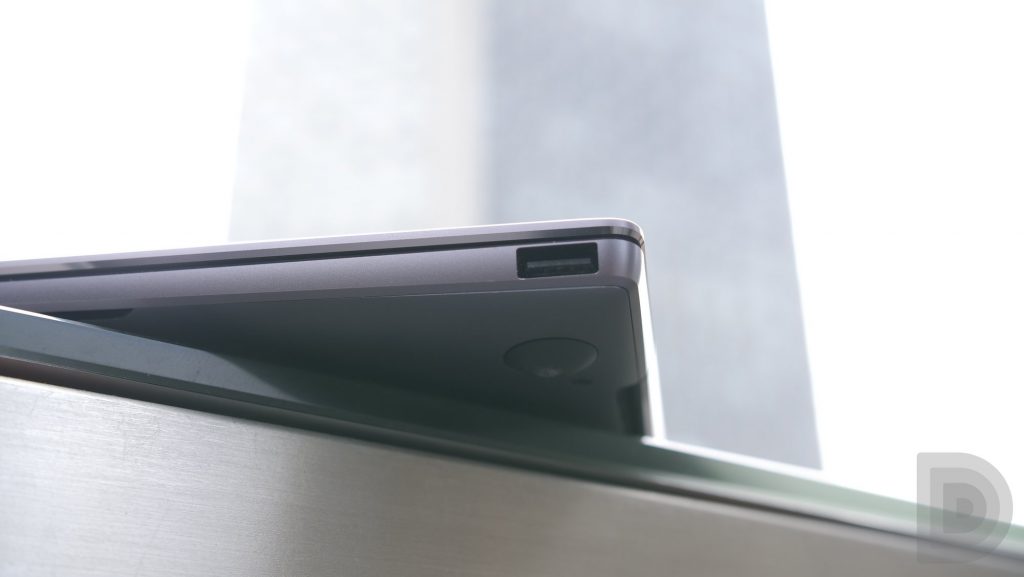
The Matebook X Pro is also the thinnest 14-inch PC with a discrete graphics card. Huawei has worked closely with NVIDIA to develop a slim graphics card. Each variant of the Matebook X Pro comes with the NVIDIA GeForce MX150 graphics card with 2GB of GDDR5 RAM. For those who need something more substantial, there’s two USB-C ports – both can charge the device – and the one that supports Thunderbolt 3 allows you to connect an external graphics card.
The entire experience is powered by the largest battery capacity in any device of this size. The Matebook X Pro features a 57.4 Wh battery which is slated to deliver 15 hours of web browsing, 14 hours of office tasks, or 12 hours of 1080p video playback on a single charge. Huawei says it is still working with Microsoft to optimize the battery life, so the actual battery performance could turn out even better.
Rather than a traditional bulky laptop charger, the Matebook X Pro uses a single 65-watt USB-C charger that can also be used to charge your tablet or phone. When charging the Matebook X Pro, a 30-minute charge offers around six hours of usage, while a full charge takes approximately 2-3 hours. To charge your phone or tablet, the charger automatically adjusts the voltage but offers quick charging speeds. The premise behind the redesigned charger is that you only need one charger for all of your electronics and with more devices moving towards the USB-C standard, this definitely appears to be the case.
The Matebook X Pro will be available in the coming months, but exact pricing and availability are yet to be confirmed. However, Huawei did confirm Microsoft will be offering the Matebook X Pro in all of its stores. Furthermore, the U.S. version of the Matebook X Pro will run Windows 10 Home Signature Edition, with Microsoft controlling all the software, and the device will have Windows Defender preloaded. After the recent security concerns around Huawei in the U.S. market, this is a smart move and should hopefully allay some concerns. The Matebook X Pro also comes bundled with Office 365 for one year, as well as the Matedock 2.0 that launched last year.
For me, the Matebook X Pro is an interesting device because of its great keyboard, fantastic size, and battery life. What do you think? Would you buy one? Let us know your thoughts in the comments below!
Huawei’s MediaPad M5 has upgraded hardware and Oreo out of the box

Latest Android slates come in 10.8- and 8.4-inch flavors, with optional pen input and a desktop mode.
Your options for good, cheap Android tablets a pretty limited these days. Samsung’s Tab S3 line is the go-to option for many in the West. Huawei, however, occupies the number three spot for tablet sales — after Apple and Samsung — when you look at the global numbers.
The products haven’t been perfect, though. The previous-gen MediaPad M3 suffered from frustrating software issues — a consequence of the older EMUI interface — although the hardware was solid.
At Mobile World Congress 2018, Huawei returns with a by-the-numbers upgrade to the MediaPad series, bringing modest spec upgrades, a fine-tuning of design and most importantly of all, newer software based on Android 8.0 Oreo.
| Dimensions | 212.6mm x 124.8mm x 7.3mm | 258.7mm x 171.8mm x 7.3mm |
| Weight | 316 grams | 498 grams |
| Colors | Space Gray, Champagne Gold | Space Gray, Champagne Gold |
| Resolution | 2560 x 1600 IPS LCD | 2560 x 1600 IPS LCD |
| CPU | Huawei Kirin 960, Octa-core | Huawei Kirin 960, Octa-core |
| OS | Android 8.0 + EMUI 8.0 | Android 8.0 + EMUI 8.0 |
| Memory | 32GB/ 64GB/ 128GB + microSD | 32GB/ 64GB/ 128GB + microSD |
| RAM | 4GB | 4GB |
| Wireless | Wi-Fi: IEEE802.11a/b/g/n/ac; 2.4 GHz/ 5 GHz Bluetooth: 4.2, optional LTE | Wi-Fi: IEEE802.11a/b/g/n/ac; 2.4 GHz/ 5 GHz Bluetooth: 4.2, optional LTE |
| Sensors | Ambient light sensor, gyroscope, accelerometer, compass, Hall effect sensor, fingerprint sensor | Ambient light sensor, gyroscope, accelerometer, compass, Hall effect sensor, fingerprint sensor |
| Audio | Built-in microphone, dual speakers, HUAWEI Histen stereo sound effect | Built-in microphone, dual speakers, HUAWEI Histen stereo sound effect |
| Camera | Front camera: 8MP, fixed focus Rear camera: 13MP, autofocus | Front camera: 8MP, fixed focus Rear camera: 13MP, autofocus |
| SIM | Nano SIM | Nano SIM |
| Battery | 5100mAh | 7500mAh |
| In the box | 9V 2A travel charger, Type-C charging/data cable, USB Type-C to 3.5mm headset jack adapter cable | 9V 2A travel charger, Type-C charging/data cable, USB Type-C to 3.5mm headset jack adapter cable, M Pen (MediaPad M5 Pro only) |
The MediaPad M5 comes in three flavors: There’s an 8.4-inch version that handles very much like a giant smartphone, and a larger 10.8-inch model that’s heftier, with more of a convertible angle. (Though still with software derived from the bits running on Huawei’s phones.) The MediaPad M5 Pro is a special version of the larger model, and comes bundled with Huawei’s M Pen stylus, as well as a keyboard dock. The tablet can also connect to any regular keyboard over Bluetooth, just like most other Android devices, and this will also activate desktop mode.
The hardware is solid if derivative. Unlike the Windows 10-powered Matebook X Pro, there’s nothing too fancy going on with minimal bezels or precision-milled chamfers. Instead, the big design addition is 2.5D glass on the front, giving the tables a more organic feel. Both displays pack 2560×1600 resolution panels, and in Huawei’s well-lit indoor demo area, both were sufficiently bright for easy visibility. That said, neither could hold a candle to Apple’s laminated panel on the iPad Pro.
Other core features from Huawei’s MediaPad series have made it across to the new devices too, including Harman Kardon audio tech behind quad speakers and Huawei’s HiSten audio enhancements for wired music playback. These are, after all, primarily media consumption tablets.
Huawei’s new tablet runs last year’s chips, but performance doesn’t seem to have suffered.
On the inside, both MediaPad models run Huawei’s older Kirin 960 chip, as opposed to the latest Kirin 970 processor, along with 4GB of RAM and between 32 and 128GB of storage, depending on the model. That’s somewhat disheartening, but presumably an indication of the mid-level price point Huawei’s targeting for these new tabs.
In the limited time we used them though, we didn’t run into any of the subtle performance glitches that affected the MediaPad M3. And the interface, though still essentially a blown-up phone UI, runs smoothly even at that relatively high resolution.
The MediaPad M5 Pro takes the hardware of the 10.8-inch model and adds Huawei’s M Pen stylus, with 4096 levels of pressure sensitivity, and a bundled keyboard dock. Huawei has also adapted the desktop interface from the Mate 10 Pro, which kicks into action when it’s connected to a keyboard. Although we weren’t able to preview this mode ahead of today’s announcement, it appears to be almost identical to the Mate 10’s implementation, which has its own basic window manager for resizing Android apps.
The Huawei MediaPad M5 ships later this year. Here’s the pricing:
- 4G+32GB Wi-Fi: 8.4″ 349EUR | 10.8″ 399EUR
- 4G+64GB Wi-Fi: 8.4″ 399EUR | 10.8″ 449EUR
- 4G+128GB Wi-Fi: 8.4″ 449EUR | 10.8″ 499EUR
- 4G+32GB LTE: 8.4″ 399EUR | 10.8″ 449EUR
- 4G+64GB LTE: 8.4″ 449EUR | 10.8″ 499EUR
- 4G+128GB LTE: 8.4″ 499EUR | 10.8″ 549EUR
From the Editor’s Desk: ThinQ very much

The V30S is a commendable phone that nobody’s going to care about after today.
Leaving aside the ridiculous nine-syllable name, the LG V30 S+ ThinQ — or simply V30 S ThinQ if you’re talking about the 128GB model, or LG V30 S if you want to preserve your sanity — is a solid mid-cycle refresh of yet another underappreciated LG phone. After briefing journos at Mobile World Congress in Barcelona LG pulled the trigger on its latest handset early, clearly wanting to get ahead of the Samsung Galaxy S9 news cycle.
As Daniel writes in his hands-on feature, it’s pretty much a V30 with 6GB of RAM, some tweaked colors and 128 or 256GB of storage. The “ThinQ” part of the name shoehorns LG’s brand for AI into the name of the phone, since this new V30 model can control your LG smart appliances through Google Assistant — alongside a handful of exclusive Assistant commands that LG’s worked with Google to introduce. On the camera side, LG adds an impressive low-light pixel-binning mode, while also giving us a slightly dubious Bixby Vision clone, so you can visually search with Pinterest or buy the things before your very eyes through Amazon.
And there’s also a new AI shooting mode that’s surprisingly fun to use, because you can actually see it working, as a cloud of words percolates across the screen, describing what the V30 S sees in the scene.
But ultimately, there’s not much here that really demands a new hardware SKU — with the possible exception of the RAM, which will help with some of the heavy lifting involved in the camera’s AI features. Even then, LG reps in Barcelona told me some of these features will be back-ported to the older V30, further undermining the central reason for this model’s existence. As Engadget’s Richard Lai points out, LG was already selling a 6GB V30 in Korea, in the form of its Signature Edition handset. And as it stands, with no U.S. carrier announcements and no word on European availability, it seems like Korea may be the only launch market.
LG’s new strategy for mobile, we’re told, is centered around releasing more iterative updates to its products at semi-regular intervals. Yet with the V30 S, the result is likely to be the same as last year’s G6 — it’ll be relevant for a short time, before being steamrolled by the upcoming Samsung flagship.
As always with LG phones, there’s a lot to like about this updated V30. But the company seems to have squandered the opportunity to build on the V30’s hardware in more meaningful ways, instead putting out a stopgap release to see us through until the real flagship arrives.
Other odds and ends before we start MWC Media Hell Day:
-
Yep, we’re here in Barcelona covering all the announcements, and you can find continuing coverage here on the site, on the Twitters, the ‘Tubes for video, and the ‘gram for live photos and behind-the-scenes fun.
-
We’ve got a packed schedule over the next few days, with big events from Samsung (of course), as well as Huawei, Nokia, Sony, ASUS, and others.
-
And oh boy — just when I thought things couldn’t get any dumber, OnePlus owners will have to mail their phones in if they want HD streaming support in apps like Netflix.
That’s it for now. I’ll be back in a few weeks with some post-GS9 thoughts.
-Alex
The Prime-exclusive version of LG’s Q6 is down to $160 for one day only
This price won’t last.

Amazon’s Prime exclusive phone selection has grown over the past year, and the recent announcement about the removal of lock screen ads makes the phones even more enticing. LG’s unlocked Q6 is down to just $159.99, but this price is only good for today. At release, it sold for $250 and more recently has sold for $200, making this the lowest price yet.
It features a 5.5-inch full HD 18:9 display, a 13MP rear camera, and has passed 14 different military-standard tests for durability, which makes it meet the MIL-STD-810G certification. Inside there is 32GB of storage, which you can expand with a microSD card. It is unlocked so you can use it with a GSM carrier of your choice.
Don’t forget that this price is only good for today, February 25, so you won’t want to miss out.
See at Amazon
Yi 4K+ action camera review: Powerful, and so simple to use

Yi Technology makes some great action cameras with decent mobile connectivity. And this is the best of them all.
As smartphone cameras continue to improve, for many the need to carry a dedicated camera continues to disappear. But there are times you want something that isn’t your phone.
Action cameras aren’t what you take out with you to take high-quality landscape photos, or to cover a wedding. But they’re really good if you’re into mountain biking, or skydiving, or any number of other outdoorsy type activities.
You wouldn’t (probably) strap your Pixel 2 to your helmet, but you certainly would an action camera. I’ve spent a bit of time playing around with the Yi 4K+, the company’s most expensive, well-equipped action camera.
And it’s really good.
See at Amazon
Rugged hardware, high specs

- Lens: 155-degree FOV, f/2.8
- Sensor 12MP Sony IMX377
- Video Up to 4K resolution at 60 FPS
- CPU Quad-core Ambarella H2
- Display 2.2-inch touchscreen640x360, 330PPI
- Connectivity Dual-band Wi-FiBluetooth 4.0, USB-C
- Stabilization EIS (3-axis gyro and accelerometer)
- Battery 1200mAh
The market isn’t exactly flooded with cameras, be they standalone or smartphone, that are capable of shooting 4K video at 60 frames per second (FPS). That’s the party piece of the 4K+, and one of the biggest differentiators to other 4K action cameras from Yi.
It’s pretty well equipped for such a little box.
It’s not quite as simple as it looks on paper, though. There are tradeoffs you make when shooting at 4K60. The first is battery life, naturally, the second is stabilization. There’s no OIS here, only EIS, but you can’t even use that when shooting at 4K60. So you’re completely destabilized.

Yi has just launched a new gimbal designed for use with its cameras, which is another $200, but probably essential if you want super-smooth, 60FPS high-resolution video.
The camera itself is a very nice piece of hardware. It’s made from pretty tough plastic and trimmed in a not entirely necessary soft-touch finish. It’s grippy, at least, if you’re handling it. On the bottom you get a standard tripod mount, there’s a flap covering the solitary USB-C port, while the microSD card lives behind the battery door. The USB-C port is used for charging, external microphones with the included adapter cable and AV out.

Controls are simple since there’s only really one button. Everything else is done using the 2.2-inch touchscreen on the rear. It’s not bad, either. It looks decent when you’re trying to use it for shooting your photos and videos, and the touch response is really good.
The Yi 4K+ also has an “in-housing” mode that duplicates touch features for a combination of presses on the shutter button, so you can still navigate easily while the camera is in a waterproof housing.
The Yi Action app

The Yi action cameras all work with both Android and iOS thanks to the companion app which, as it happens, is pretty well done. Everything you can do on the camera you can also do in the app, from tweaking settings to altering your white balance, ISO etc., and of course, using it as a viewfinder and remote shutter.
There are a couple of moments of weirdness from time to time, like Chinese text appearing to tell you, well, something. While the camera supports Bluetooth 4.0, that’s only for remote shutters, to connect to the app you have to use Wi-Fi.
There’s a choice of using 2.4GHz or 5GHz and if you’re using anything running a pre-Oreo version of Android connecting will be pretty seamless. You’ll need to manually connect each time you want to use it, but it’s fairly quick.

If you’re using an Oreo powered phone you’ll have to agree to connect to a wireless connection that has no Internet. On my Pixel 2 I kept missing the notification icon, but if you don’t accept this then the camera won’t connect.
Once you’ve taken your photos and video, the companion app can be used to wirelessly transfer these to your phone. You can either transfer a low-quality preview or the original file, but there’s one very minor drawback. Nothing else drains the battery as quickly on the camera as transferring files wirelessly.
Performance
Besides the limitations on stabilization, shooting at anything up to 4K60 on this camera is a breeze. It gets a little toasty after a while when you’re shooting at 4K, but nothing too horrendous, and you’ll need to buy a spare battery or two.
You’re not even limited to having the wide-angle effect on everything. The camera has a mode that can suppress this, but wide-angle is one of the reasons I like this camera personally compared to just using a phone. To be clear though, photos are not as good as you can take on a good phone.
Here are a few sample photos shot with the wide-angle left on.


Video quality is excellent, though there are things to bear in mind. The internal microphone is passable, but for the best results, you’ll want to use an external one. And when you use an external microphone you must turn off the camera’s Wi-Fi or you’ll get a horrible interference on your audio. Which means you can’t use your phone to control it while you’re using an external microphone.
So there are some slight annoyances, but overall the quality speaks for itself. As far as this type of small camera goes I think it’s very good. I’m no skydiver, but I’d be very happy to strap this camera to my body somewhere while doing extreme sporting.
You’ve also got a timelapse mode built in, though you’ll perhaps want a battery pack hooked up if you’re planning on using it for any long shots.
The bottom line

The GoPro is the default choice for action cameras but having tried out the Yi 4K+ I’m not entirely sure why that is. This is a very well put together piece of equipment with great specs, a nice companion app for your phone and a price that’s not ridiculous.
It isn’t perfect, and the external microphone interference drove me crazy for days, especially since no-one in the Yi forums had a definitive answer to the issue.
But there’s so much to like. The quality of the footage, the excellent display, battery life that for the most part is pretty good considering its size and what you’re able to shoot. To get the very best you’ll need some extra accessories, like a cage with a cold shoe if you’re using an external microphone.
It’s also on offer on Amazon quite a lot. In the time I’ve been playing with this one it’s been on a significant lightning deal three times, so there’s always going to be a way to shave a good chunk off the $299 RRP. If you want a high-quality action camera that has a great companion app for your phone, you could do a lot worse.
See at Amazon
Amazon’s Fire TV stick drops down to $30, 4K Fire TV to $50
Cut the cord.

Amazon has dropped the price of its Fire TV Stick down to $29.99, and the 4K Fire TV down to $49.99. This is a savings of $10 and $20 respectively. If you’ve been considering cutting the cord, or want to add some streaming options to a new TV in your home, this is one of the best ways to do it. Especially if you take advantage of this Fire TV 4K bundled with an OTA HD Antenna for $54.99, which is just $5 more than the stick itself.
If you wanted to try out DirecTV Now, don’t forget that you can get the Fire TV 4K for $35 when you prepay for one month worth of service.
See at Amazon
 AIVAnet