


Samsung Galaxy A8+: Everything you need to know
The Galaxy A8+ brings the Infinity Display design aesthetic to the mid-range segment, along with Samsung Pay and IP68 water resistance.

We’re now in the fourth generation of the Galaxy A series. Every year, Samsung introduces a new feature that was previously limited to its flagship Galaxy S range to the mid-range lineup, including Samsung Pay and IP68 certification for dust and water resistance. This year, Samsung is bringing its Infinity Display design language to the Galaxy A series.
There are improvements in other areas as well — the Galaxy A8+ is powered by Samsung’s latest Exynos 7885 Octa, which feature ARM’s high-performance Cortex A73 cores. Based on the region, the device will come with 6GB of RAM as well. With prices starting from $500, there’s certainly a lot to like about the Galaxy A8+. This is what you need to know about Samsung’s latest mid-range phone.
It has a 6-inch Infinity Display

The Galaxy A8+ has an 18.5:9 Infinity Display with thin bezels, much like the Galaxy S8+ and the Note 8. However, while Samsung’s flagships have a QHD panel, the Galaxy A8+ features a 6.0-inch display with a resolution of 2220×1080.
The panel isn’t curved either, so if you had issues using the dual curved screens on the S8+ or the Note 8, then you’ll have an easier time with the Galaxy A8+. The bezels aren’t as narrow either, and the entire design at the front is more in line with that of the LG G6 or the Pixel 2 XL than one of Samsung’s phones.
Samsung Galaxy A8+ review: Throwing down the gauntlet
Samsung leads the display industry right now, with the company seeing record revenues from its display business. As such, the Super AMOLED display on the A8+ is one of the best in this segment, with deep blacks and vibrant colors. Starting this year, Samsung is also extending support for its Gear VR platform to its Galaxy A lineup.
The Galaxy A8+ also has a sensibly-placed fingerprint sensor, which is now located underneath the camera module. This is likely the position Samsung will use for the upcoming Galaxy S9 and S9+ as well, alleviating a major pain point from last year.
Samsung’s most powerful device yet in this segment

With OnePlus gaining popularity in countries like India, Samsung is finally starting to get aggressive in terms of hardware. Earlier models in the Galaxy A series featured underwhelming hardware, but that’s definitely not the case with the Galaxy A8+. With the Exynos 7885 Octa under the hood and 6GB of RAM along with 64GB of storage, the Galaxy A8+ is Samsung’s strongest showing yet in the mid-range price bracket.
The Exynos 7885 Octa is particularly interesting as it features two Cortex A73 cores clocked at 2.2GHz. The two high-performance cores are augmented by six energy-efficient Cortex A53 cores at 1.6GHz. The Galaxy A8+ is well-equipped elsewhere too, featuring a microSD card slot, Wi-Fi ac, Bluetooth 5.0, and a 3500mAh battery that easily manages to deliver a day’s worth of usage from a full charge.
First Samsung phone with dual front cameras

The Galaxy A8+ has the distinction of being the first Samsung phone with dual front cameras. The phone comes with a 16MP f/1.9 lens augmented by a secondary 8MP f/1.9 lens, and offers Live Focus for selfies — a feature that made its debut last year with the Galaxy Note 8 (albeit on the rear camera).
There’s growing demand for phones with high-resolution front cameras, particularly in Asian markets. One out of four devices sold last year in India was advertised with a selfie camera, and that number is only set to grow as the likes of Xiaomi join the fray. For its part, the front camera on the Galaxy A8+ is one of its best features, and Live Focus does a great job in terms of creating a bokeh effect for shots.
If you’re interested in a Samsung phone with a great front camera, the Galaxy A8+ is a great choice.
Runs Android 7.1.1 Nougat out of the box

For a device of its caliber, it’s a shame that the Galaxy A8+ runs Android 7.1.1 Nougat out of the box. The software experience itself is identical to what you’d find on Samsung’s flagships — the phone features Samsung Experience 8.1 out of the box — but it would have been better had the device came with Oreo out of the box.
With the phone not yet making its way to most global markets, there’s still a chance that it will be offered with Oreo out of the box by the time it launches in the U.S.
Wide availability kicking off later this year

The Galaxy A8+ is currently live in two markets — South Korea and India — and the phone is expected to make its way to global markets shortly. Samsung hasn’t shared details on when the Galaxy A8+ — and its smaller sibling, the Galaxy A8 — will make its way to the U.S. or the UK, but if previous launches in the Galaxy A series are any indication, we should know more before the end of the quarter.
The smaller Galaxy A8 is up for sale in the Netherlands as well as other European markets for €499 ($620), and while it hasn’t officially launched in the UK just yet, Clove is selling the device for £479 ($670). The Galaxy A8 series is Samsung’s best showing yet in the mid-range segment, but for $600 there are plenty of other options available, including the OnePlus 5T.
For now though, India seems to be the main priority for the Galaxy A series, where the device is available exclusively on Amazon for ₹32,999 ($512).
See at Amazon India
Linksys Velop mesh router review: Towers of Wi-Fi power
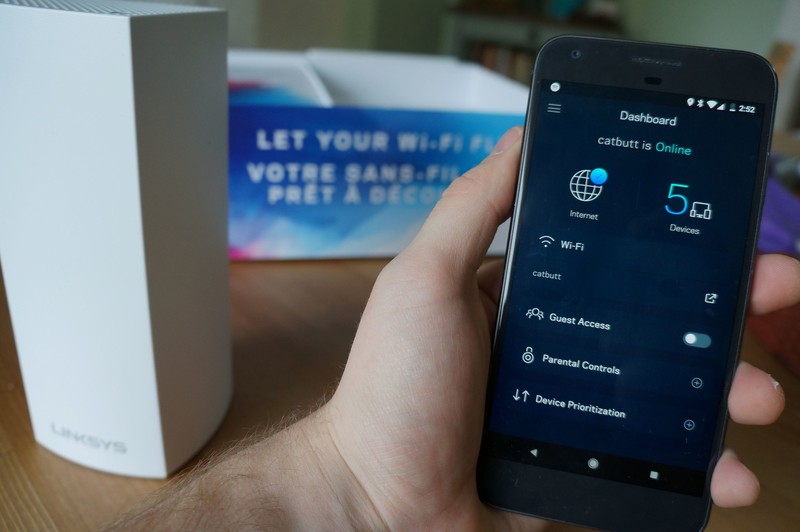
With Linksys Velop, you’ll enjoy top Internet speeds everywhere in your home.
Mesh Wi-Fi systems are the hottest trend in the home internet segment and you might currently be considering upgrading your old router setup to a mesh network. I know I was.
- Speed: MU-MIMO Seamless Wi-Fi (802.11ac)
- Band support: Tri-Band: 2.4 GHz — 2 x 2, 5 GHz Radio 1 — 2 x 2, 5 GHz Radio 2 — 2 x 2
- Local radio: Bluetooth 4.0 LE
- Local connection: 2 WAN/LAN ethernet ports
- Security: WPA2 Encryption
- Processor: 716 MHz Quad Core
- Price: $300
A year ago I moved into a spacious three-story character home with copper piping throughout the walls and floors for the radiators. With the router foolishly located in the basement, the Wi-Fi really struggled to properly service the upper floors where the bedrooms and my home office are located. After dealing with frustrating intermittent connection issues for months, it was due time to test how a mesh Wi-Fi network might improve the situation.
Enter the Linksys Velop Whole Home Wi-Fi system. I received a 2-pack of Velop nodes for reviewing purposes and have been using it for about a week.
Priced at $350 for the two node pack and as high as $500 for the three-pack, this is the most expensive mesh network option out there. Coming from a trusted networking brand like Linksys, could it deliver “Wi-Fi that sets you free” like its packaging proudly proclaims? Let’s dive in.
The design Noticeable nodes
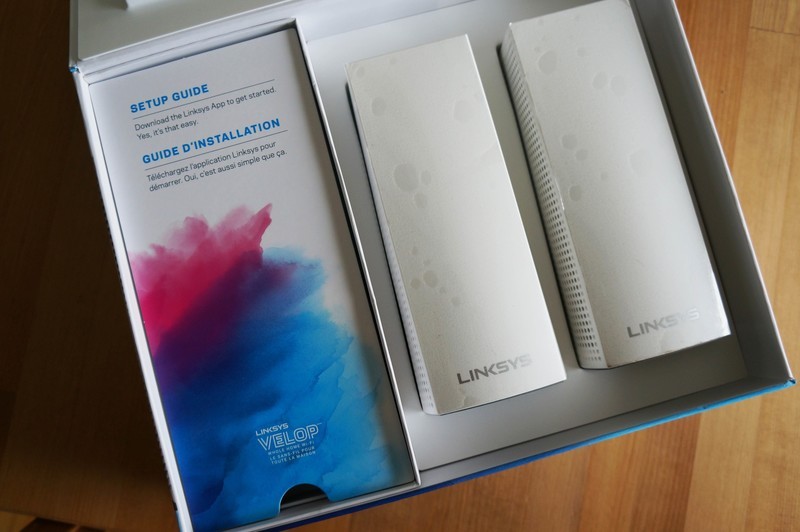
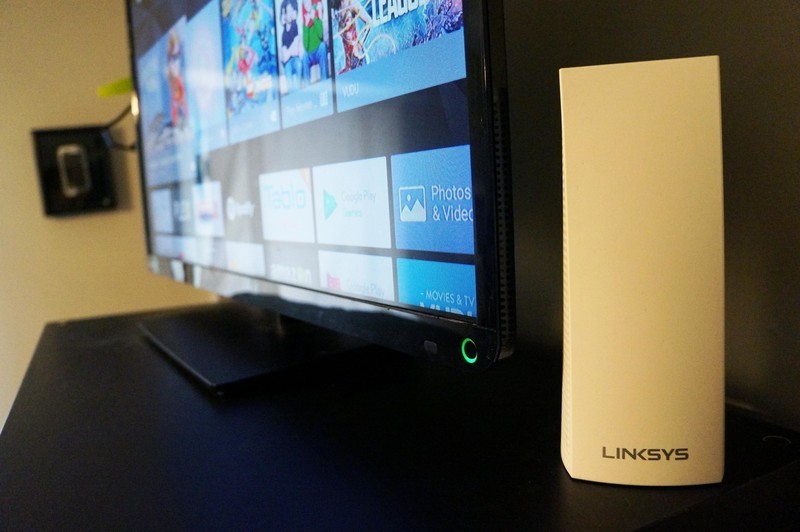
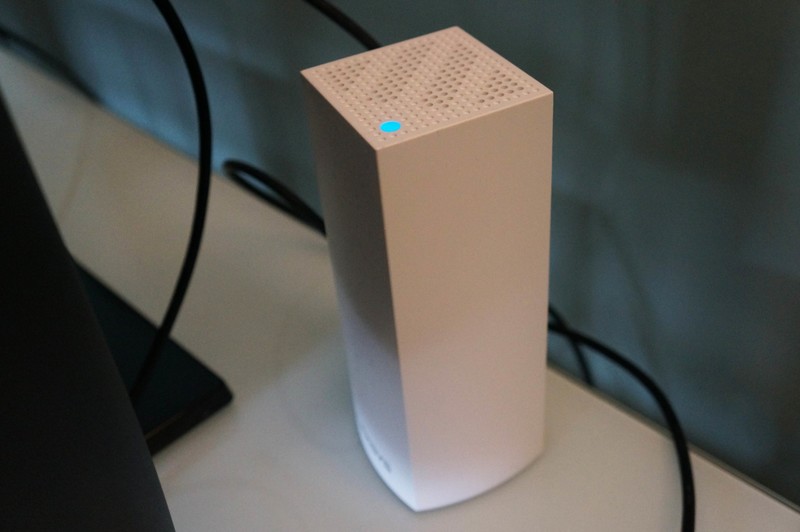
The design of the Linksys Velop nodes is far from subtle. The would tower over competitors like the Google Wi-Fi pucks or sleek Eero nodes, and yet I don’t find them to be too bulky to deal with. Both nodes would eventually find homes hiding behind TV screens, so their taller stature doesn’t really factor into my day-to-day use at all.
Cable management accounts for at least two inches of the Velop node’s height, as there’s ample room provided for connecting the power adapter and ethernet cables necessary for set up. It’s a smaller detail, but I really loved the flexible-yet-firm rubber nubs built into the base that helps keep things organized.
Each Velop node can provide coverage for about 2,000 square feet of your home.
Each node includes two Ethernet ports, an on/off switch and a reset button, and it doesn’t matter which node you use to connect to your modem. Plus, you can optionally use the ethernet ports on the second node for a hard-wired connection for consoles or desktop computers. Once set up, Linksys says each node offers 2,000 square feet of Wi-Fi coverage. Therefore, the two-pack offers up to 4,000 square feet of combined coverage if implemented properly — more than enough range to not only cover the whole house but most of the backyard, too.
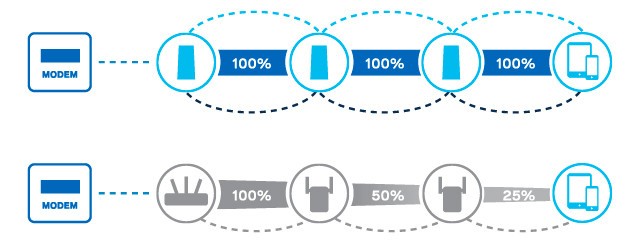
According to Linksys, the Velop system is designed to ensure you get peak Wi-Fi performance throughout your home. Unlike other Wi-Fi extenders that offer might add range at the expense of signal strength, you should be able to do network-heavy activities like stream 4K content wherever you want in your house as if you’re sitting next to the wireless modem.
My only real complaint is somewhat petty but the power supply is massive. It’s as big as any other brick in my set up and plugging it into my power bars was a challenge.
Installation Setup is a breeze
Fortunately, finding an outlet for each node was the most difficult part of the setup process. All you need to get the Velop network set up is a hardwired connection to your existing modem and the Linksys app on your phone.
After plugging in the first node to the modem and creating an account within the Linksys app, you just follow along with the steps on the app and watch the changing lights on the top of the node. This is really refreshing because, after printers, nothing frustrates me more than dealing with network settings.
If the thought of setting up an advanced Wi-Fi network seems like a huge headache, you’ll be thrilled to know that Linksys has made setup foolproof.
Like I mentioned above, our wireless modem is located in the basement, so I had initially set up the node right next to the modem in the basement — but then I remembered that some previous owner had snaked ethernet cable up to the living room. Since the Velop node allows you to use the second ethernet port as a hub for connecting wired devices, it was easy to relocate the node to the living room where it supplied a strong signal to the whole main floor while also still allowing for a hardwired connection to our media center PC.
Once the mesh network was established, setting up the second node was even easier. The only caveat is that it needs to be in range if another connected node. Fortunately, my home office on the second floor was well within range. Adding a second node was as easy as plugging it in and tapping “Add Node” in the app. It was instantly added to the network and best of all it now offered me the option of connecting my NVIDIA Shield TV to the network via ethernet.
Overall, I probably spent more time figuring out where I wanted to place each node than it did to actually get them set up through the app. Considering how expensive this system is, it had better be easy.
The app Features aplenty
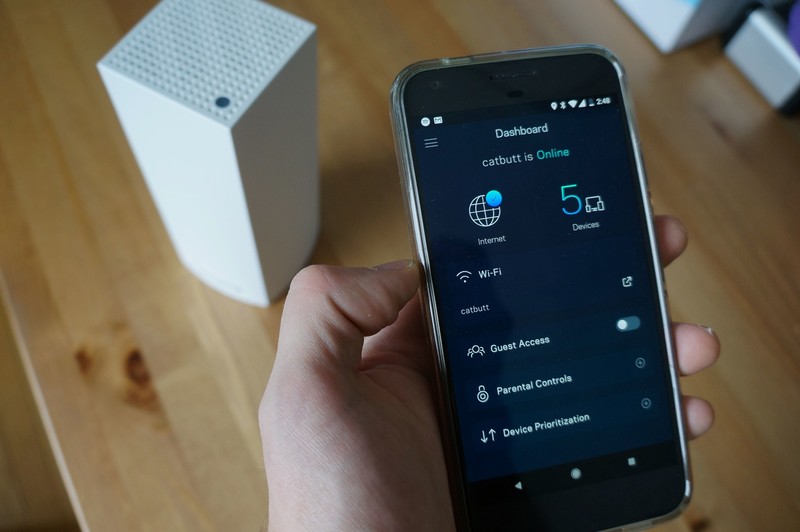
I kind of figured that I’d only use the Linksys app for setup and then stash it away in a folder and forget about it. But the Linksys app has proven to be a really convenient tool for managing my home network.
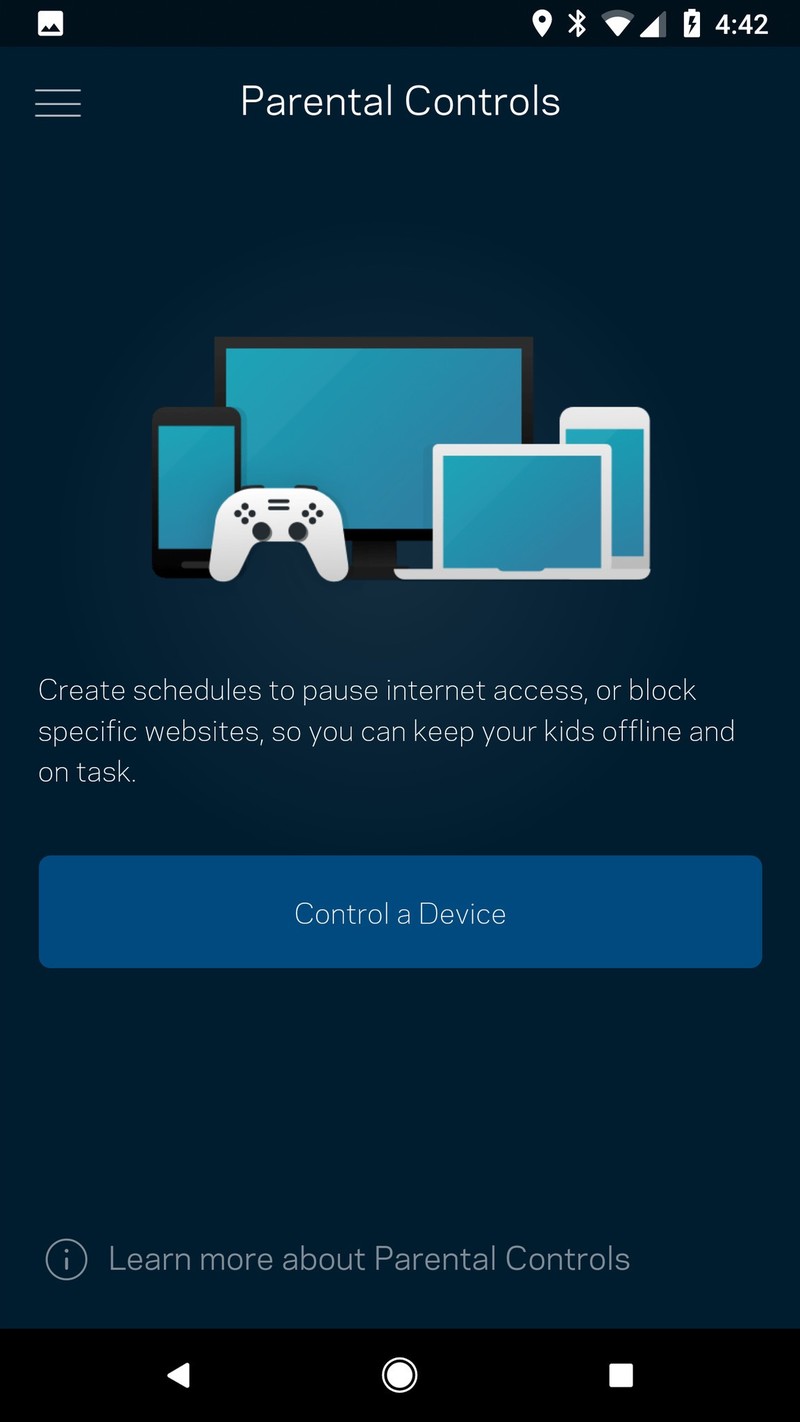
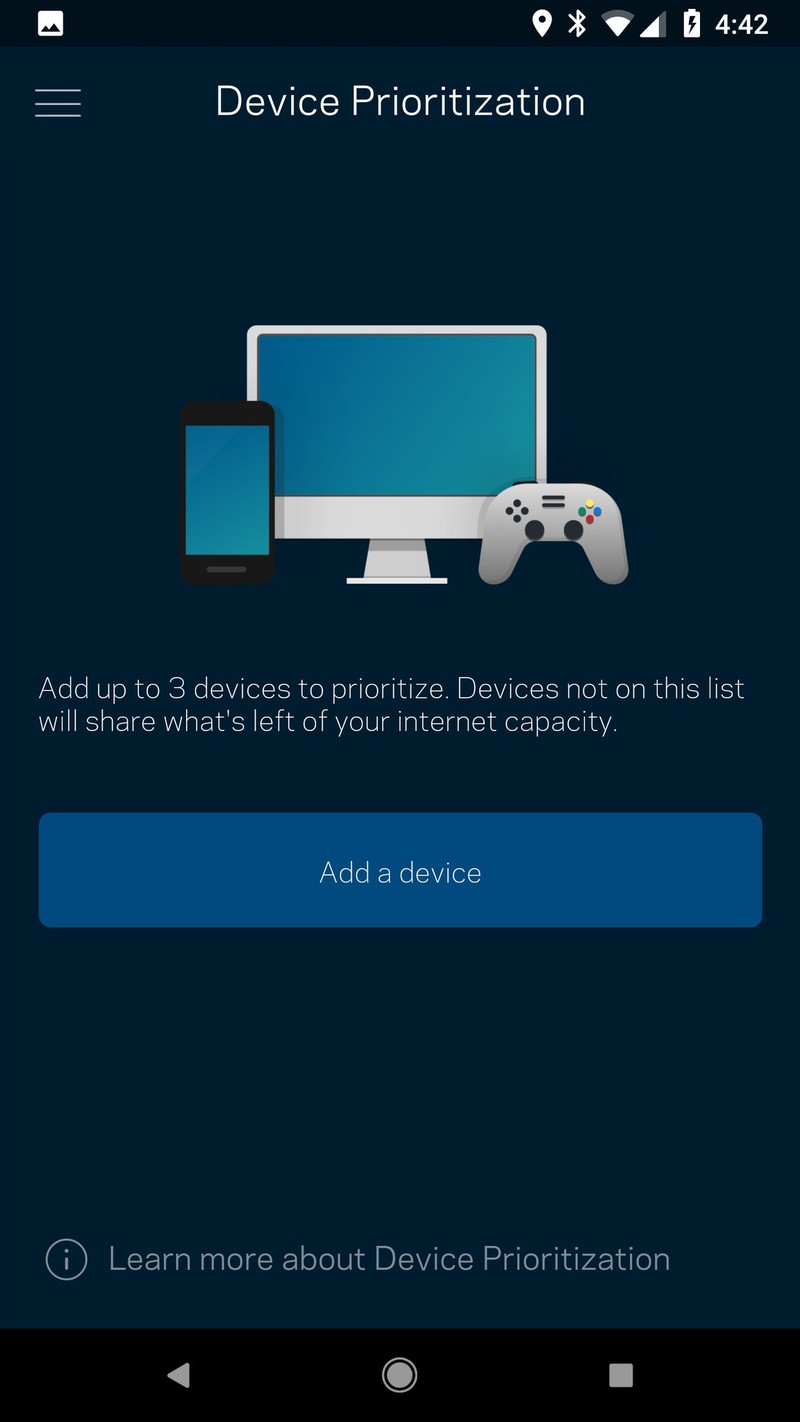
It’s got the standard features you’d expect like a dashboard for looking at your network at a glance and how many devices are currently connected, and also includes parental controls for managing internet access on connected devices and blocking specific websites. You also have the option of activating device prioritization which I guess is one of the perks of being your household network admin.
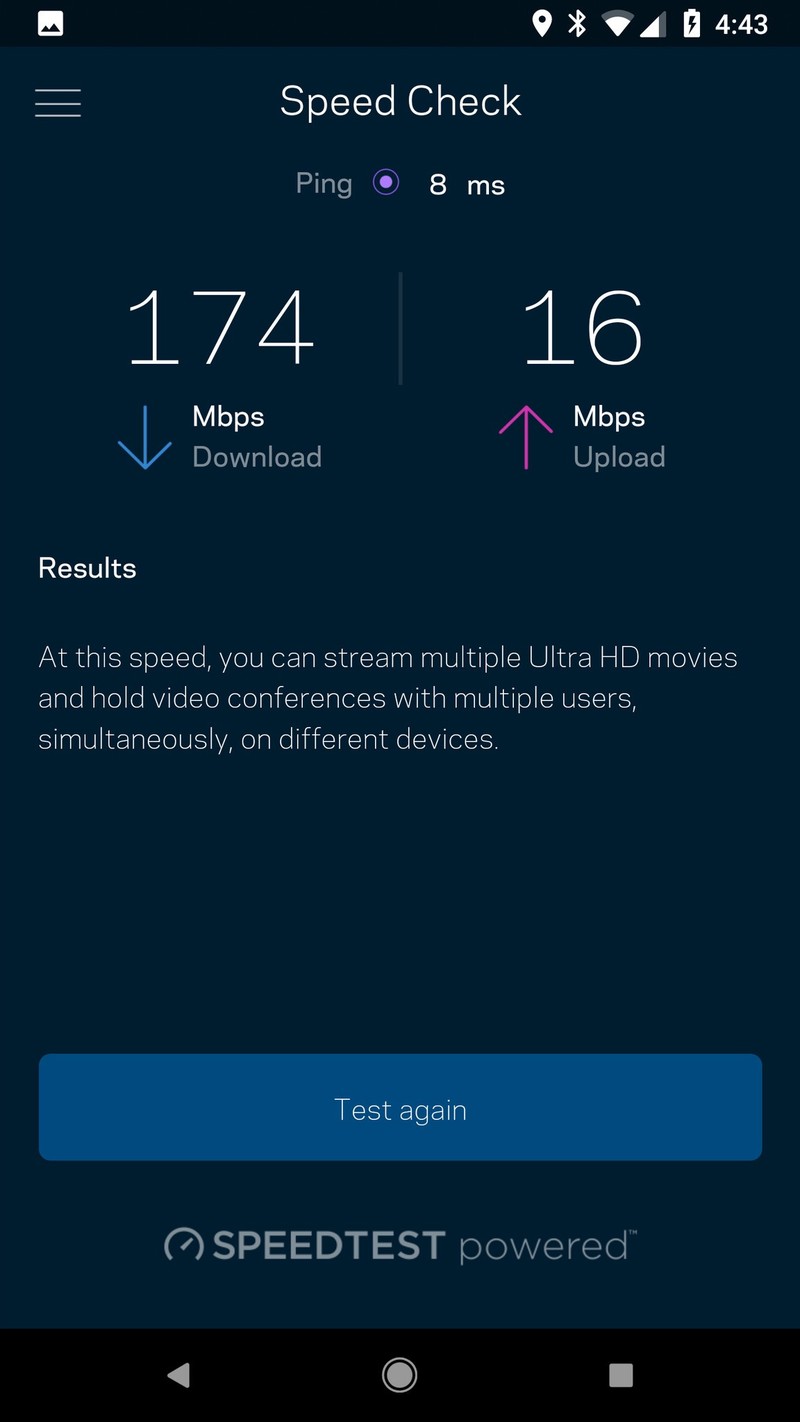
It also includes a built-in tool for checking your network speeds, powered by Ookla’s popular Speedtest service, which is really handy. And the app also contains access to all the advanced settings you’d desire if you’re the type to go in and tinker with your network settings. Firmware will update automatically as required and you can flip the switch to turn on a separate network for guests so that you’re not giving access to your entire network to anyone who visits your house.
Speaking of that guest network, Linksys has also included Alexa compatibility for all its Smart Wi-Fi products, including Velop. That means that you’ll be able to conveniently turn on your guest Wi-Fi as needed using just your voice which is really handy when guests arrive and ask for your Wi-Fi password.
However, you’re also able to ask for the Wi-Fi password for your whole network also using Alexa which, as many Alexa users have pointed out, is a pretty big security issue if you’re trying to keep that password secret and secure. Plus, Alexa can’t always read out every special character, so if your Wi-Fi password is super complex Alexa might not even be able to read it out properly.
Network testing Night and day improvements
In the last year, we’ve added five smart speakers and a bevy of other connected devices to our network, which was a lot for the one wireless modem to handle. Soon I was regularly dealing with stuttering Skype calls, dropped video Hangouts, and (worse of all) buffering Netflix content.
I could instantly tell the internet had improved as soon as I connected all my devices to the new Velop mesh network, but I ran a few tests from my home office on my Pixel XL using the SpeedTest app.
The results were pretty dramatic.
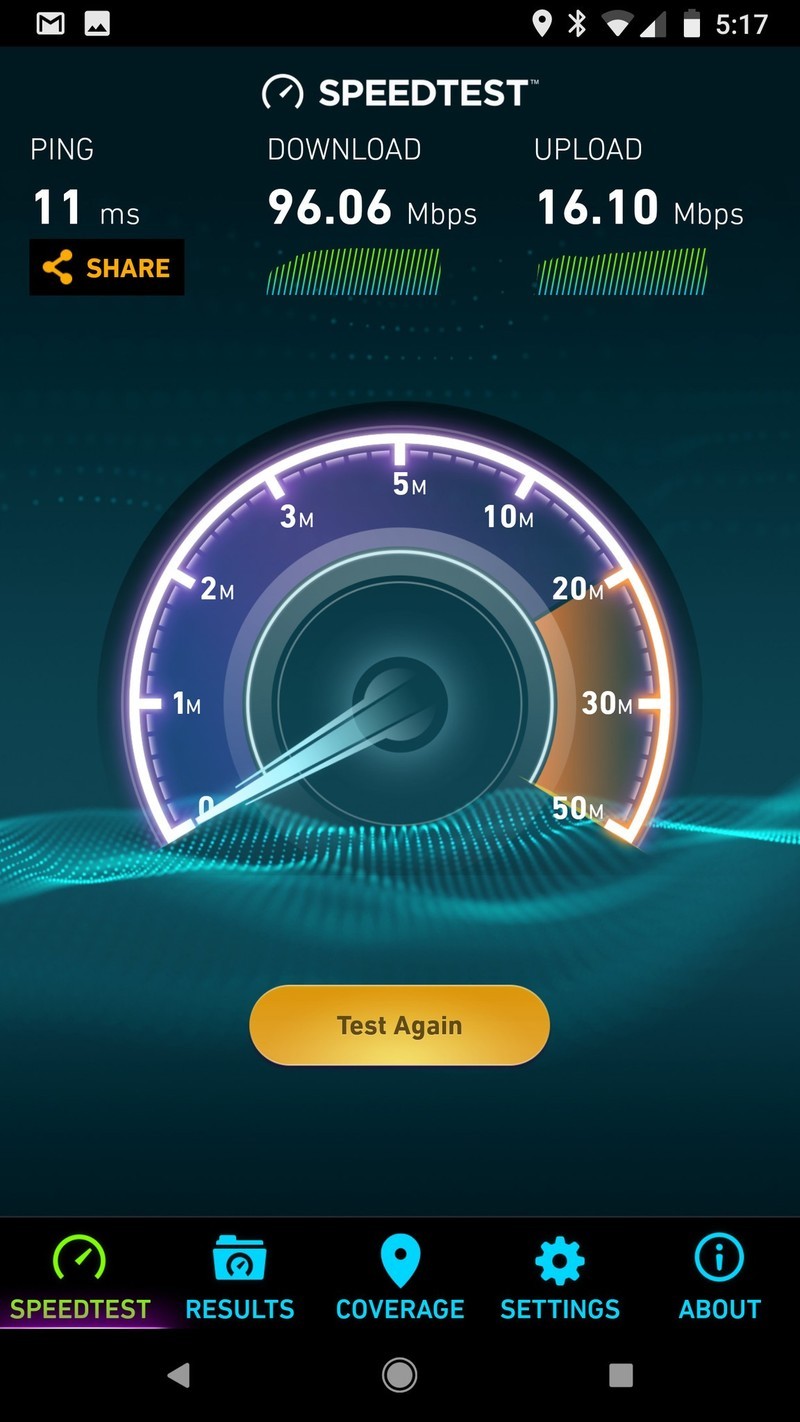
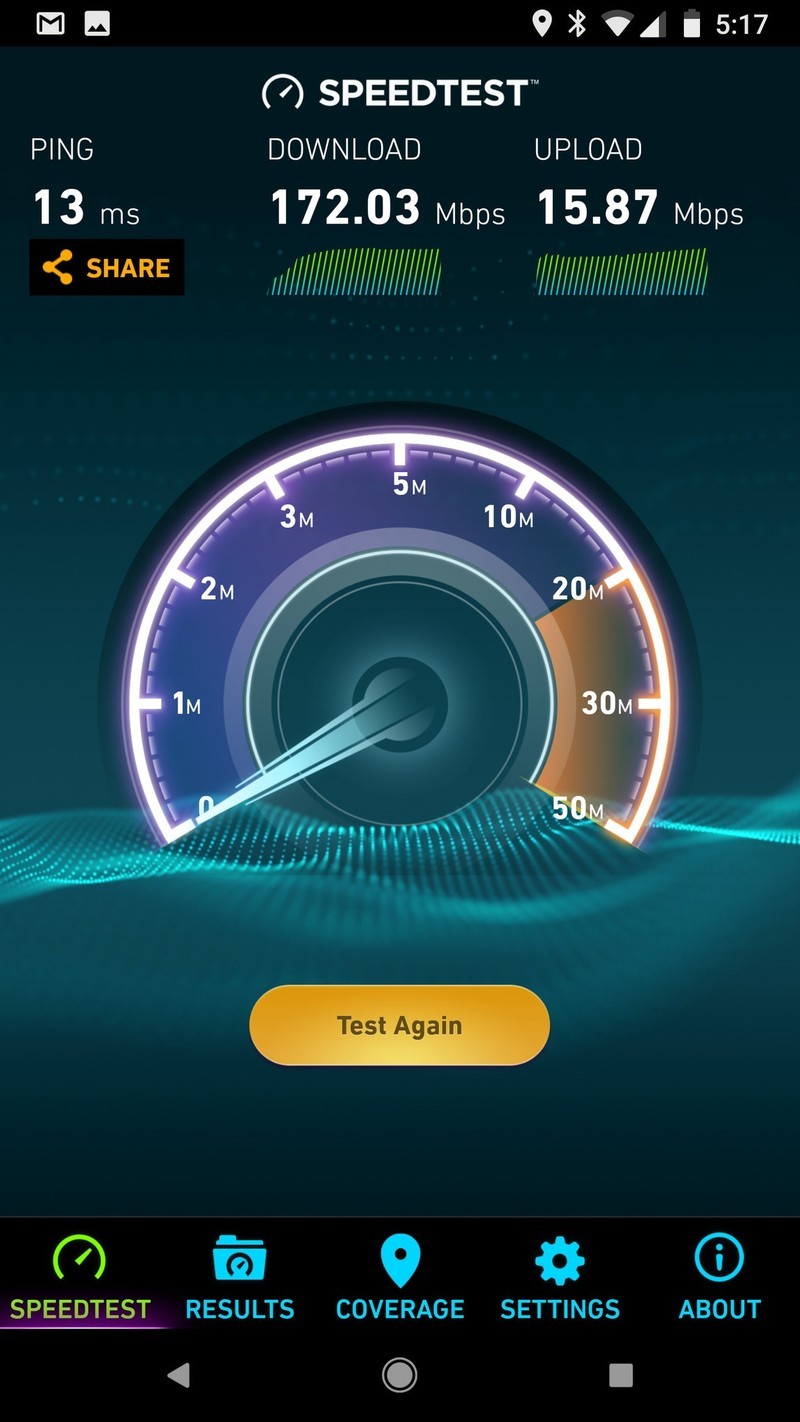
I shouldn’t have expected anything less than this, but damn. On the left is a test of my old Wi-Fi setup from my home office, and the right is the speed test I ran after setting up the Linksys Velop network. That’s a massive jump and the exact performance advertised by Linksys. It’s also extended the Wi-Fi range into our backyard, and if I lived 2,000 miles south from Canada and there wasn’t a foot of snow and ice on our back deck right now I’d probably be writing this review outside just to see how far the range extends.
The verdict Exactly what I needed
This was my first time setting up and using a mesh network in my home, so I’m still in that honeymoon phase where my internet no longer sucks and everything is rosy in the world. The question ultimately will be if you can justify the higher cost. A 3-pack of Google Wifi will run you around the same as a 2-pack of Linksys Velop nodes, with both claiming to offer similar coverage and consistently fast speeds. Buying the Linksys Velop 3-pack for $500 is absolutely overkill unless you live in a 4,000+ square-foot mansion.
Like our friend Jerry says, the ideal Wi-Fi network is something you should set up once and never think about until it’s time to replace. The Linksys Velop Whole Home Wi-Fi absolutely delivered on its claims, allowing me to significantly improve the network in a big old house that’s now ready to handle further conversion into the 21st century smart home.
See at Amazon
What would you like to see in the Essential Phone 2?
Essential, here’s your to-do list.
For Essential’s first foray into the smartphone world, the Essential Phone could have been a lot worse. The phone still has one of the best designs of any device on the market, its build quality is second-to-none, and relentless software updates have made the UI and camera performance considerably better than they were on day one.

Essential’s already said that it’s working on a successor to the Essential Phone, and while details on what to expect with the Essential Phone 2 are still up in the air, some of our forum users already started talking about what they’d like to see with it.
Here’s what they had to say:
panopticon
02-17-2018 09:45 AM“
They should lose the magnetic accessory attachment, add a real headphone jack that supports HD audio, and waterproof it. Lose the extra rear camera, unless it’s going to be used for something useful. Lastly…a better loudspeaker and redesign the earpiece. Otherwise it’s a solid design. And don’t mess with the build quality!
Reply
philesk
02-17-2018 10:32 AM“
The Essential 2 must have a better camera which has OIC and camera software that really works. Collaborate with Zeiss, Leica, Cannon or Nikon to get the camera hardware and software right. Waterproof and wireless fast charging. Put the finger print reader under the screen and have face unlock that actually works. If they want to charge over $900 & compete with Apple and Samsung they probably need…
Reply
SactoKingsFan
02-17-2018 03:55 PM“
I doubt the headphone jack will be one of the top priorities. Using a better camera with OIS, not releasing the phone several months before it’s ready and keeping the price well below the original $700 will sell a lot more phones than a headphone jack.
Reply
bhatech
02-17-2018 03:52 PM“
My wish list:
1. Main thing is get the software, performance, scrolling, freezing issues etc ironed out at launch and provide a flawless experience like many other phones out of the door.
2. Camera performance, especially speed of capture and lowlight picture improvements.
3. Others, not much. They pretty much nailed with the hardware. So may be water resistant rating, wireless charging…
Reply
With that said, we’d now like to hear from you – What would you like to see in the Essential Phone 2?
Join the conversation in the forums!
Essential Phone
- Essential Phone review
- Essential Phone specs
- The latest Essential Phone news
- Join our Essential Phone forums!
Amazon
Best Buy
Sprint
Telus
Google Tez now supports bill payments
Since its debut last September, Google Tez has become one of the most popular peer-to-peer payment services in India. Tez crossed 12 million users just a couple months after its launch, and today, the app is adding a new bill payment feature.

Google announced that this was something it was working on back in December, but now that it’s launching, we have more details on how exactly it’ll work. To add a new bill, all you have to do is go to New Payment -> Pay your bills. From here, you’ll be able to choose from a list of over 80 billers, enter your account info for the ones you’d like to add, and start making payments right away.
Users will be sent notifications as new bills come in, and in addition to paying current ones, you can go through your billing history to see which ones you’ve already paid and how much you’re paying month-to-month. Bill payments you make are categorized by each biller, and you can set up bill payments for multiple accounts.
Supported companies for this feature include the likes of Reliance Energy, BSES, and DishTV. More providers will be added down the road, and in honor of its launch, Google is giving away scratch cards for the chance of winning up to ₹1000 for each biller you add to Tez during February.
Samsung Galaxy A8+: Everything you need to know
Android P wish list: What I want Google to add
Please and thank you, Google ❤️
With each new year that comes, we get a heap of new hardware from the likes of Samsung, LG, OnePlus, Google, and more. However, as exciting as this hardware is, something that I personally get more enthusiastic about is the release of brand-new Android versions.

Last year’s Android Oreo may not have been the most visually different upgrade compared to 2016’s Nougat, but even so, the additions of picture-in-picture, Google’s Autofill API, adaptive app icons, etc. make it the most mature and well-polished version of the software to-date.
2019 will see the release of Android P, and while some of you may think it’s too early to speculate about what we’ll see in the next big Android release, it’ll be here before you know it. A report from February 12 shed some light on features we can expect in the update, and in just three short months, we’ll get our very first look at Android P during Google’s annual I/O developer conference.
As such, these are the features/changes I’m hoping to see the most in Android’s latest and greatest.
A refreshed user interface

Although there have been little tweaks here and there over the years, Android’s looked more-or-less the same since the Lollipop update in 2014. This is when Google introduced the world to Material Design, and its design language has easily been my favorite one Android’s ever had. With that said, coming up on four years of the same general aesthetic does leave me yearning for something new and different.
Android is due for a visual update, not a complete overhaul.
Thankfully, it looks like we may get something along these lines. The Chromium Gerrit has been spotted with references to something called “Material Design 2” – suggesting that Google is working on a successor of sorts to the Material Design we know and love today. Not much is known about Material Design 2 just yet, but there are references to tweaked colors, new icons, and better readability of some items.
If Google’s wants to spruce up Android’s look, this is the way to do it. A complete overhaul would just cause more unneeded fragmentation, but adding new elements and visuals to the same general design principles would allow Android P to look fresh without causing developers to completely redo the look and feel of their apps.
A more powerful Google Assistant

We’ve seen a lot of updates to the Google Assistant since its debut on the 2016 Pixel and Pixel XL, and as much as I love using it on a daily basis, there are some features I’d like to see added with Android P.
The Google Assistant excels when it comes to asking random questions and controlling smart home gadgets, but performing in-app functions is a very different story. You can do simple things like asking the Assistant to open YouTube and search for a video, but that’s about it.
As much hate as it gets, Samsung’s Bixby currently has an edge over Google Assistant in these regards. When I briefly used the Galaxy S8 late last year, I loved being able to use my voice to tell Bixby to open Samsung Health and add a cup of water to my daily intake tracker. This direct tie-in with applications is one of Bixby’s greatest strengths, and it’s something I’d like to see added to Google Assistant.
Tighter integrations with Chrome OS

On a similar note, I’d also like Google to use Android P as a way to get serious about better-connecting Android and Chrome OS. I tried using an iPhone 7 for a few months last year, and while Android will always be my preferred mobile operating system of choice, Apple is killing it when it comes to the relationship between iOS and macOS.
Google needs to give Android users a reason to use Chrome OS, and vice versa.
Things like AirDrop, Universal Clipboard, and a desktop iMessage app that also syncs with your SMS conversations give iPhone owners a reason to buy and stay with MacBooks and iMacs for their computing needs, and this is something Google needs to follow through with, too.
We saw something called “SMS Connect” in October with Android 8.1 suggesting that Google was working on a way for Android users to natively receive and reply to SMS messages on a Chromebook. This was a pleasant surprise, but it never came to fruition with 8.1’s public release.
Along with this, Google already offers some benefits to Pixel 2 and Pixelbook owners, such as being able to unlock with the Pixelbook by using the fingerprint sensor on your phone and allowing the Pixelbook to automatically tether to a Pixel 2 when it detects there are no available Wi-Fi networks.
It’s evident that Google wants Android and Chrome OS to better communicate with one another, and while these little touches here and there have been encouraging to see, I really hope this is something Google gets serious about with Android P. Apple gives consumers a reason to own an iPhone and iMac – it’s time Google does the same with the Pixel and Pixelbook.
More user customizations out of the box

My last point is something of a pipe dream, but I decided to put it in here because — why not?
Android is often said to be superior to iOS due to the greater user customization options that are available, but I’d like to see these expanded even more with Android P. Android Oreo introduced Adaptive Icons and gave users the ability to change their shape, and the Pixel 2 allowed for elements like the notification tray, folders, and app drawer to change between a light and dark theme based on which wallpaper you currently have.
These are things I love messing with, and it’d make me happy to see Google expand on them even more. Allow third-party icon pack support for the default launcher, make the auto-changing themes a standard across Android and not limited to just the Pixel line, and give users some control over the color of the UI like OnePlus does with its own OxygenOS.
There haven’t been any reports or rumors hinting that this is something Google’s working on, but hey – a guy can dream, right?
What are you looking forward to?
Those are the things I’m hoping to see the most in Android P, but what about you? What are the top features or upgrades you’d like to see in the next version of Android? Sound off in the comments below!
Android Oreo
- Android Oreo review!
- Everything new in Android Oreo
- How to get Android Oreo on your Pixel or Nexus
- Oreo will make you love notifications again
- Will my phone get Android Oreo?
- Join the Discussion
Anker’s $32 SoundCore 2 Bluetooth speaker offers 24 hours of battery life per charge
Does the battery ever die?
Anker’s original SoundCore speaker was one of our all-time favorites, and the SoundCore 2 follows right in its footsteps. From the awesome sound quality to the long-lasting battery life, it’s hard to find a better Bluetooth speaker to buy. This speaker normally sells for around $40, but right now you can save $8 on the purchase making it just $31.99 at Amazon.

With 24 hours of battery life, you may expect this to be on the larger side, but it’s actually quite small. It comes in at just 6.4 x 1.7 x 2.1 inches and weighs only 12.6 ounces. It is outdoor-proof thanks to its IPX5 rating, so dirt, dust, snow, and water spills won’t affect its awesome performance. You can connect devices to it using its built-in Bluetooth 4.2 connectivity, or go old school and connect an Aux cable to its 3.5mm jack. Anker backs the speaker with an 18-month warranty, so why aren’t you buying one right now?
Today’s discount is only available on the black version of the speaker. Both the red and blue variants are still at $41.99. The original SoundCore speaker is down to $25.99 today.
See at Amazon
Deal: Get free Gear IconX earbuds with Galaxy S8 or Note 8 purchase
It pays to wait.
As leaks and rumors have shown, the Galaxy S9 will be a very iterative upgrade compared to the Galaxy S8. If you aren’t concerned about having the very latest phone and would rather stretch your dollars as far as possible, Samsung’s running a new promo that’s worth a look.

Between now and March 1, you can get a free pair of Samsung’s Gear IconX earbuds when buying a Galaxy S8, S8+, S8 Active, or Note 8. The offer is limited to residents in the United States, and it applies to the AT&T, T-Mobile, Sprint, Verizon, U.S. Cellular, and unlocked variants of the above phones.
The Gear IconX usually sell for $199 on their own, and in his full review of them last October, AC’s Andrew Martonik praised the earbuds for their solid battery life, easy pairing process, and seamless handling of music transfers.
You’ll only be able to get the black version of the IconX with this deal, but for the price of free, I don’t imagine too many people will be picky about the lack of color options.
See at Samsung
Samsung Galaxy Note 8
- Galaxy Note 8 review
- Galaxy Note 8 vs. Galaxy S8+
- Which Note 8 color is best?
- Complete Galaxy Note 8 specs
- Join our Galaxy Note 8 forums
Verizon
AT&T
T-Mobile
Sprint
Best Buy
Deal: Honor 9 Lite in UK comes with free wireless earphones (£70 value)
Available in both black and blue.
The Honor 9 Lite just launched in the United Kingdom earlier this month, and while the phone already packs a lot of value on its own, Honor is sweetening the deal even more by including a free pair of wireless earphones when buying it.

Honor’s including its own Sport Bluetooth Earphones with the Honor 9 Lite, and they feature the traditional design of two speakers connected by a single wire that you can wear around your neck when not listening to any tunes.
The earphones connect to the Honor 9 Lite via Bluetooth, an IP52 rating protects them against water and sweat, and Honor promises 10 days of standby time and more than 11 hours of actual playback.
You can get the headphones in either blue or black with this promo, and they usually sell for £69.99 on their own.
See at Honor
Best sports games for Android

Get your game on — even in the offseason — with the best sports games available for Android.
After a few golden years of fantastic entries, it seems that sports games, too, have all but succumbed to the freemium model. There’s far too few quality sports games out there that just let you jump into the game without having to deal with player cards, upgrades or waiting for ‘stamina meters’ to refill. Nearly all the top mobile sports game franchises have switched over to a team building system that requires you to unlock (or buy) card packs to upgrade your team.
But there are still great games to be played! We’re covering the five major North American sports here — football, basketball, baseball, hockey, and, ahem, soccer — with two options for each. The first will typically be more sim-based for the hardcore sports fan, while the second is a more arcade-like option for casual players.
- Snowboard Party: World Tour
- Red Bull Free Skiing
- Madden NFL Mobile
- Football Heroes Pro 2017
- FIFA Mobile Soccer
- Score! Hero
- NBA Live Mobile
- NBA JAM
- MLB Nine Innings 2017
- MLB RBI Baseball 17
- Matt Duchene Hockey Classic
- Hockey Hero
- Golf Star
Snowboard Party: World Tour
While Android shamefully lacks a port of quintessential snowboarding franchise SSX, it does have its own snowboarding franchise in the form of Snowboard Party.
The latest title in the series is Snowboard Party: World Tour, and it rocks. The graphics are great, the pop-punk soundtrack is fitting, and the touch controls are surprisingly tight. There are also four different mode to choose from — Time-Attack, Freestyle, Big Air, and Halfpipe, along with a multiplayer mode for playing against your friends. There are 16 snowboarders to customize and upgrade, which you can do without spending a dime although in-app purchases are included.
This is an Editor’s Choice on the Google Play Store, and after spending even just a few minutes playing this game it’s clear to see why. This is the best snowboarding game you can play on your phone!
Download: Snowboard Party (Free w/IAPs)
Red Bull Free Skiing
The first game we’re featuring is Red Bull Free Skiing. This is a surprisingly solid game with decent graphics
It’s very easy to learn the basics of this game. The tutorial walks you through the different game modes — Tricks, Race, and Powder — which also teaches you about the other aspects of the game. Yes, there are loot boxes to open, in-game currencies to collect and spend on player upgrades, and in-app purchases for buying more gold, but the core gameplay itself is pretty good and there are no ads, which is pretty rare for free-to-play games like this.
But the gameplay itself is the real standout. The graphics are pretty decent for a mobile game, and it’s a blast to pull of epic backflips and spins. Whether you’re a skier yourself looking to hit the virtual slopes when you’re not on the mountain, or a fan of extreme sports games in general, this is definitely one game worth checking out!
Download: Red Bull Free Skiing (Free w/IAPs)
Madden NFL Mobile
Football fans know that Madden is king on consoles, and despite the freemium, card-collecting gameplay at the core of the Android version, Madden NFL Mobile still reigns supreme on the mobile gridiron as well.
Yes, you’re stuck building your team through opening card packs, which can be bought with in-game coins or purchased with real cash. Fortunately, there’s a number of ways to earn in-game currency: Head-to-head match-ups against other users where you exchange offensive drives, a single-player season mode where you play out through a full season against CPU opponents, and multiple daily live events to test your skills. The live events offer some nice nostalgia for those who remember the mini-camp drills from Madden 2004. On the field, the touch controls are on point and while the graphics are understandably a far cry from those found on the latest PlayStation and Xbox editions, they’re more than serviceable for the bite-sized football action Madden NFL Mobile provides.
Madden NFL Mobile provides good fun whether during halftime or break time at work — as long as you don’t mind being slightly bogged down by the collectibles aspect.
Download: Madden NFL Mobile (Free, with IAPs)
Football Heroes Pro 2017
Football Heroes Pro 2017 is a full-fledged arcade football game, licensed by the NFLPA. Unlike the more realistic sim-style of Madden, it provides a casual football experience (think Tecmo Bowl) in your downtime when you’re all caught up with the real games. Players build and train their own team with their favorite real-life players and unlock new plays by opening card packs. Premium currency can be used to buy card packs, though you’re also able to buy packs with coins earned from winning and by leveling up your players. Gameplay-wise, this one features a lot of button mashing for tackling and breaking tackles.
For those looking for a casual football game to kill time during commercial breaks, Football Heroes Pro 2017 has plenty to offer.
Download: Football Heros Pro 2017 (Free, with IAPs)
FIFA Mobile Soccer
The FIFA games for mobile used to stand out as one of the best investments available in the paid app section of the Google Play Store, with FIFA 13 remaining one of the best mobile games I’ve ever played. Sadly, EA has shifted to a freemium model with the entire focus of the game being on building your own Ultimate Team.
While I personally feel like the change in format is a disservice to players, the game itself still plays like a dream and will surely keep any footy fans addicted for some time. There are four game modes to choose from: you start out with Live Events and Attack Mode, and unlock Leagues and Season once your profile reaches level 5. Live Events throw you into different drills and game situations where you can unlock coins, XP, and specific card packs. Attack Mode pits you against other players around the world in turn-based gameplay where you’re each given time on offense to rack up as many goals as you can (hence the name). The newest addition is Leagues, which lets you start or join your own global league consisting of other players. It’s both competitive and cooperative, as you can either compete in a league tournament or collectively challenge another league. Season mode is the single-player mode you’ve come to expect, but you’ll need to maintain an internet connection to play FIFA Mobile, even in single-player mode.
While FIFA Mobile is missing the freedom to play as you like from previous editions, it’s still the best footy game you can play on Android.
Download: FIFA Mobile (Free, with IAPs)

Advertisement
Score! Hero
For something a little different, look no further than Score! Hero. Instead of putting you in charge of building a team, you create your own player and work your way through a professional career from rookie to legend.
Another difference from other games is the way you control the action. Instead of the free-flowing action found elsewhere, you only take over once your team has control of the ball. Play freezes, waiting for you to swipe at the ball to take your shot or pass to a teammate. It’s an interesting dynamic that really highlights the strategic elements of soccer and a nice change of pace. Each level sets up the game situation and gives you your mission for completing it, but if the defending team intercepts or otherwise gains control of the ball, you’re forced to restart the level or spends some of your in-app funds to use a rewind to redo your last kick. Sometimes your mission involves scoring back-to-back goals which make those rewinds extra tempting, but you’ll want to avoid relying on them unless you’re intending on dropping real cash into the game. All told, Score! Hero features 420 levels to play through. Can you beat them all?
Download: Score! Hero (Free, with IAPs)
NBA Live Mobile
Another sport, another EA Sports title. If you’re a fan of NBA Live on consoles, or even the NBA 2K franchise, you’ll likely dig the mobile offering. Again, with every other sports title offered by EA this year around, there’s the unavoidable emphasis on card collecting to unlock players. If your sensibilities are offended by that, you’ll want to look elsewhere.
Otherwise, what you get here is pretty solid. Dive into daily live events, or challenge other players around the world to a head-to-head challenge where you go back and forth playing one quarter at a time. Season mode lets you play a full NBA season with your team, all the way through to the NBA Championships. Once you’ve reached level 5, you unlock Leagues, which lets you start up a league for you and all your friends, or join a random league. They operate similar to clans and allow for friendly matches between other league members, or for interleague showdowns. Another neat feature of leagues is if someone in your league makes an in-app purchase, everyone in the league gets a free gift — essentially an added incentive to engage in that freemium model.
Download: NBA Live Mobile (Free, with IAPs)
NBA Jam


NBA Jam has been available on Android since October 2010, and yet it still remains as one of the most polished and fun sports games you can play on the platform.
This remake of the 90s classic features all the fast-paced two-on-two action you remember from back in the day, with upgraded graphics including hilarious big head animations for every player in the game. Touch controls are simple and responsive, making it super easy to set up an epic alley-oop, or sink three shots in a row and hear Tim Kitzrow — the original NBA JAM commentator — yell his infamous line, “HE’S ON FIRE!”
There are four modes of play and no in-app purchases or currencies to deal with, so you can jump into a game right away. On top of quick matches and a Classic Campaign where you can unlock legendary players and other goodies, you can play online (but good luck finding a random opponent) or with a friend over local Wi-Fi.
If you’re an NBA fan or a fan of the original game, NBA Jam should be a mainstay on your Android device.
Download: NBA Jam ($4.99)
MLB Nine Innings 2017
The 9 Innings franchise has been a very popular game on Android over the years, and the latest edition might be the best yet. The game features all 30 MLB ballparks and over 800 players, which have been carefully rendered in 3D for a very authentic gameplay experience.
There’s a number of ways to play depending on how much free time you have. You can jump into an exhibition game or play your way through a full season with options to play bat/pitch only or take control of both sides of the game. The game also features a unique “Live Player System”, which will accurately reflect the real-life performance and value of MLB players throughout the season.
You’re also tasked with collecting your favorite players and building your dream team which, coupled with the free-to-play model, means you’re going to have to deal with in-app purchases. If you can get past that, you should have a great time playing this game throughout the season.
Download: MLB Nine Innings 2017 (Free w/IAPs)
R.B.I. Baseball 17
If you’re looking to play full baseball games on your Android device without being pestered with in-app purchase offers, R.B.I. Baseball 17 is your best bet. This paid app was developed by the MLB and is also available on PS4 and Xbox One.
While the game might feel a little lacking on the consoles, it looks and plays quite nicely on Android, featuring beautifully rendered stadiums and all 30 MLB teams available with regularly updated rosters. Choose your preferred game mode and play a quick exhibition game, take your favorite team through a full season, or jump right into the heat of the post-season.
This game is fairly optimized for mobile gaming, allowing you to play a full nine-inning game in under 20 minutes with intuitive two-button on-screen controls. Keep in mind that all those pretty graphics requires a fairly modern phone to play it, which means R.B.I. Baseball 17 only supports devices with memory/processor comparable to the Samsung Galaxy S5 and up.
This game will set you back $4.99 in the app store but in exchange, you won’t have to deal with clunky free-to-play game mechanics.
Download: R.B.I. Baseball 17 ($4.99)
Matt Duchene Hockey Classic
For whatever reason, EA Sports’ has not ported their celebrated NHL franchise for consoles over to mobile platforms. It’s a shame, but Matt Duchene Hockey Classic might be the next best thing.
The latest in a line of games attached to rising NHL players (previously Patrick Kane), Matt Duchene Hockey Classic is free to try but you only get Team Finland and Team Sweden when you download it from the Google Play Store. Fortunately, you’ll need to pay a very reasonable price to unlock the full game, which includes 60 teams and a plethora of game modes including playoffs, outdoor games and “Hockey Giants”, which is essentially big head mode. As you might have noticed from the title, this game isn’t officially licensed by the NHL, so while, for instance, the team from Boston wears black and yellow jerseys there are no logos nor are there any active rosters. It’s also a bit of a resource hog. You’ll definitely notice some sluggish moments if you play on an older device. But considering the lack of options for full-featured hockey games on Android, Matt Duchene Hockey Classic delivers as well as you’d expect.
Download: Matt Duchene Hockey Classic (Free, with IAP to unlock full game)
Advertisement
Hockey Hero
Hockey Hero is an outlier on this list, as it’s not exactly a traditional sports game — more a sports-themed entry if anything. However, with its charming retro graphics, simple gameplay, and minimal ads, it’s a great break from the rest of the titles on this list.
The concept is both wacky and simple — tap and hold to control the hockey hero, who must deftly deke past wave after wave of opposing players who are looking for a fight. If you lift your finger off, time slows down allowing you to determine the clear path between defenders. You move on an endless sheet of ice comprised of multiple hockey rinks attached end-to-end so that once you’ve skated to the end of one rink and scored, you immediately skate on towards the next rink. It’s a silly and fun concept for an endless runner style and is a great game you can just pick up and play whenever you have some free time. As you progress further, you unlock different jerseys for your hockey hero, giving you goals to work towards.
Hockey Hero is far from a traditional sports title, but with its simple controls and fun concept, it’s definitely worth checking out.
Download: Hockey Hero (Free, with IAPs)
Golf Star
Hit the links in Golf Star, the best golf game for Android!
This game features great graphics and easy controls. Customize your golfer and jump into Career Mode and hone your skills. It’s going to take you a bit of time to figure out the intricacies of the physics and how to properly read the greens and aim your putts, but you’ll pick it up in no time.
Beyond the single-player Career Mode, there are a couple of different ways to play against friends and other online opponents. Tournament Mode lets you compete in one-on-one competitions against live opponents. More game modes are unlocked as you progress your character from beginner to amateur — all the way until you achieve pro status.
Win and you’ll earn rewards, which can also be bought via in-app purchases. Golf Star also requires you to spend a certain amount of hearts each time you play, which you’ll need to wait to regenerate. If you’re alright with dealing with those free-to-play mechanics, you’re sure to enjoy Golf Star for Android.
Download: Golf Star (Free w/IAPs)
What did we miss?
There’s a ton of sports games in the Google Play Store but if we’re completely honest, most of them aren’t worth your time. If you think we missed one that should absolutely be on our list, let us know in the comments!
Android Gaming

- Best Android games
- Best free Android games
- Best games with no in-app purchases
- Best action games for Android
- Best RPGs for Android
- All the Android gaming news!
PlayStation Gold Wireless Headset 2018: Should you upgrade?
There’s a new headset from Sony for your PlayStation, and you might consider the upgrade.

The original PlayStation Gold wireless headset is the perfect headset for gaming. In fact, it’s one of the better headsets you can use for just about anything. While it is a great headset, Sony has released a new updated version of the Gold headset. It looks very similar on the outside, but Sony promises a better all-around experience from this new model.
Is this new headset really that much different from the old headset, and is it worth the money? Here’s my thoughts on whether you should upgrade your headset.
Original Gold Headset

The original Gold headset is rather big, which makes it less comfortable for every head size, but it’s great for gaming with friends online. The microphone is clear and your friends can here you very well. These are not noise-cancelling, but the over-the-ear design does surround you with sound rather well. Sometimes it shares that sound with the person next to you, though, so be careful!
There’s a lot of detail in the sound on these headsets, with loud booms and soft whispers coming through as clearly as if you were in the game. The positive side of the large headset is that you will have no problem using it for extended periods of time, making it easier for you to be immersed into each world. The size makes it a little awkward for VR, which makes sense since it was made long before the PlayStation VR, but it’s still a great option when you want to play wired.
You can currently purchase this headset for $88 if you’re looking to save some money on a great headset.
See at Amazon
New Gold Wireless Headset

This new headset has improved on quite a bit of the complaints many people have had of the old headset. With the 7.1 virtual Surround sound to improve the sound as well as improved ear cushions for refined comfort, this headset will definitely improve your game play. The mic cancels out the sound around you so all your friends hear is your voice, and the controls for the volume of the the mic, the game, and the mute button are all easier to access.
Another great thing about this headset is that you will have access to special audio modes in certain games. Created by developers exclusively, these modes use the special additions of this headset to enhance game play. You can download these custom modes onto your PlayStation through the Headset Companion app on your PlayStation 4, and it’s a special audio experience that will only exist for Sony fans.
Sony improved the design with PlayStation VR in mind, helping with the immersion into which ever world you enter into. With a thinner band and improved comfort, it makes it easier to wear with your VR headset without any discomfort you usually feel with over the ear headphones. With the sound improvement of the 7.1 virtual Surround sound and all the added design features, you’re sure to enjoy your experience in each VR world you enter.
Right now, this headset is only available for pre-order until February 22nd, but you should grab it before it’s no longer available.
See at Amazon
Ready to upgrade?
Whether you’re going to keep your Gold headset or upgrade to the new one, you’ll have a great headset no matter what. If you’re someone who enjoys gaming, then either headset is a great choice. The new design makes it a bit more comfortable, especially if you’re a smaller person like I am. If the sound quality is something that you’re looking to improve as well, then I would definitely go for the newer headset. The individual audio profiles alone will make it worthwhile to you.
If you’re looking for a new headset to fully immerse yourself into the world of VR, then this new headset is exactly what you need. It’s design has been tailor-made for the VR experience, and the added sound quality will make your immersion even better.
Here’s where you can pick up the new PlayStation Gold Wireless headset!
Depending on what kind of gaming you’re looking to get out of the headset, you could use either headset for your gaming experience. However, the newer headset will give you the noise-cancelling that you might be looking for, and has improved on a lot of the qualities the old headset lacks.
Let us know what you think!
PlayStation 4

- PS4 vs. PS4 Slim vs. PS4 Pro: Which should you buy?
- PlayStation VR Review
- Playing PS4 games through your phone is awesome
Amazon
 AIVAnet