


LG’s 2018 flagship to have all-new design and be released in June
The phone will use a new MLCD+ panel for its display.
For all intents and purposes, the LG G7 is dead. LG’s CEO reportedly scrapped the phone shortly after CES and ordered the mobile department to go back to the drawing board, and now that some time has passed, we’ve got new information about what we can expect from LG’s big 2018 flagship.

According to Venture Beat, the G6’s successor is currently being referred to as “Judy” and has a “brand new design” compared to past phones in LG’s recent lineup. Judy will ship with a 6.1-inch 18:9 Full Vision display, and while that may sound like nothing special, the panel LG’s reportedly using is.
Rather than using OLED like on the V30, Judy is said to be LG’s first phone with an MLCD+ panel. MLCD+ has an RGBW matrix with white sub-pixels, and it has a brightness rating of 800-nits while also using 35% less power compared to IPS LCD tech. LG’s OLED panels on the Pixel 2 XL and V30 left a lot to the imagination, so I don’t think anyone will be upset over its absence on Judy.
Here’s to hoping LG’s MLCD+ panel is better than its OLED ones.
As for other specs/features, Judy sounds like a pretty common 2018 flagship. It’ll come with Qualcomm’s Snapdragon 845 processor, 64GB of internal storage, dual 16MP rear cameras with an f/1.6 aperture for each, IP68 dust and water resistance, and support for HDR10. Judy will also have wireless charging, its own digital assistant (yay?), and AI camera tech that we’ll get our first look at with the LG V30S at MWC.
The small 4GB of RAM is an odd choice considering the V30 came with 6GB, and there’s also mention of “boombox” stereo speakers.
Most of this sounds great, but unfortunately, it’ll still be a while before we get to go hands-on with Judy. LG reportedly won’t ship the phone until this June, and this lines up with the company saying it was only going to release new phones “when it is needed.”
Based on this new info, are you excited for what LG has in store for 2018?
LG G7 (2018 flagship): Rumors, Specs, Release Date, and More!
Smart Fortwo EV Cabrio is the tiny car for the big city
There are cars out there that fill a need in someone else’s life. Maybe you live in a large city and don’t have the room or desire for a truck with a powerful diesel engine. Or you’re part of a couple that has no need for an SUV with seats for eight. For me, the Smart Fortwo Cabrio EV seemed to fit the bill of cars that would be good for someone, just not me. I like electric cars, but I also need something large enough to haul gear and, well, I like going fast. Then I spent a week with the tiny EV.
The $28,100 Smart Fortwo Electric Drive Cabrio takes the existing tiny-car platform, throws in an electric motor and makes it a convertible just for fun. It has a range of 57 miles and a footprint that would fit into the back of most pickup trucks. That small size is the allure, and an occasional curse, of the Fortwo.
The obvious benefit of its size is that you can park it almost anywhere. In San Francisco, that’s a blessing. I could fit it into side street spaces that don’t have meters because there’s always a spot that no other car would fit into, and if a motorcycle isn’t already there, it’s yours. Parking in my neighborhood at night, usually a 20-minute chore, became a game of “can I fit in that tiny spot?” Nine times out of 10, I could.
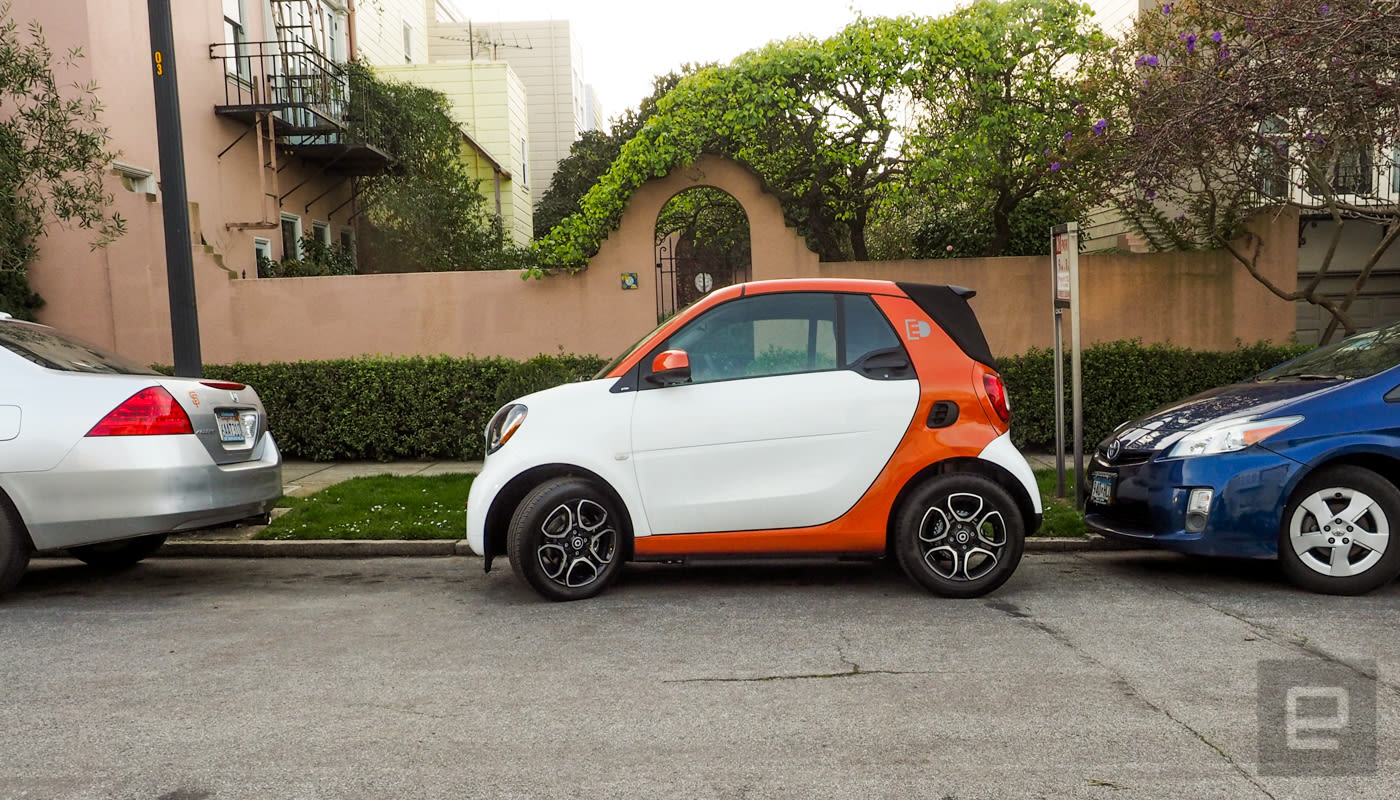
The car has a short wheelbase (a shade over six feet) and a tight 11.4 feet turning circle (for comparison a Honda Fit’s is 17.5 feet). Thanks to those, the vehicle made easy work of even the tightest parking lots and structures. Other cars at weird angles? Spots by the wall with an SUV spilling over the parking lines? None of those are problems for the Fortwo driver — it’s a tiny parking machine.
But that size also makes some people uncomfortable; friends wondered how safe it was. The Fortwo earned “good” ratings from the IIHS and a four-star crash rating from NHTSA for the 2017 version (the 2018 version — which is the same design — has not been rated). We’ve been conditioned in this country to think “larger is safer.” The Fortwo is safe even if some of the people I talked to thought otherwise.
Still, the micro compact does suffer from some issues due to its size. Potholes, even small ones, jostle the car. During my drives on some of San Francisco’s barely maintained roads, it felt more like I was off-roading than heading to work.
I also had to adjust to the fact that the (already minute) trunk of the Fortwo had shrunk thanks to the convertible top. Grocery shopping was fine if I went alone, as I could place bags in the passenger seat. Otherwise, expect to limit purchases to four half bags (with the tops folded over) of goods. And forget large bundles of toilet paper or paper towels, those will end up in the passenger’s lap.

Initially, I found these limitations to be more than I’d be willing to endure in my day-to-day life, but the Fortwo grew on me. I accepted the ride quality and lack of practical storage as tradeoffs for the ability to park anywhere I wanted. Plus, I could put the top down (which I did frequently) whenever the sun was out. Even when the high of the day was 50 degrees, I’d put the top down.
During those slightly cold, but sun-filled jaunts I acquainted myself with the vehicle’s infotainment system. If you’re expecting Mercedes-level quality (Benz is Smart’s parent company), you’re going to be disappointed. The optional 7-inch touchscreen does have navigation and a media player, but its support of Android Auto is its “best” feature. Sadly, there is no love for CarPlay.
Surprisingly, my 6-foot 3-inch frame didn’t feel cramped in the car, although there was never a chance to see how I felt after a long trip since it’s built to stick close to home. The 17.6kWh battery’s 57-mile range makes sure of that. Not that I would really want to take it on a long drive.
The Fortwo borrows side-wind stabilization from the Mercedes Sprinter van line, but the car is truly at home in an urban environment. Even with the charge time cut in half from six to three hours from the previous version (thanks to a 240-volt charger) you’d still spend far more time waiting for the battery to top up than actually driving to your destination.
My battery tests yielded a range of about 54 miles per charge in city traffic. When I hit the freeway for any length of time, the range dropped dramatically, as it does with all EVs.

And yet, even with the short range, the rough ride, almost no trunk space, and the limited infotainment system, the little car grew on me. The Fortwo is not exactly zippy, but the EV torque is still slightly spirited and combined with tight steering makes it an enjoyable drive. Dropping the top was just a bonus.
That extra sunshine is pricey though. Starting at $28,100, the Cabrio version of the Fortwo is over $4,000 more than the hardtop version of the EV (which starts at $23,900). That’s a steep price to pay for the wind rushing through your hair. Still, even without a top, it’s cheaper than the E-Golf and Fiat 500e: Both of those creep over the $30,000 mark. But those cars also have more room and range, so it’s a trade-off. Of course, all of those prices are before any government tax credits for buying an EV.
The Smart Fortwo Electric Drive Cabrio is an odd little car. Other than being a convertible, it doesn’t hit any of the checkmarks on the list of features I need. If anything it reminds me of why I love riding my Vespa in San Francisco. It’s small and nimble but powerful enough to keep up with highway traffic. Plus I can park it anywhere. A bonus is that it’s fun to ride. The Fortwo is a bit like that. It’s a fun utility that doesn’t quite make sense, but sometimes you just enjoy something for exactly what it is, and that’s enough.
Wes Anderson’s ‘Isle of Dogs’ VR mock-doc is live on Pixel phones
Big-budget VR tie-ins are nothing new. Dunkirk got its own version from Intel, Blade Runner 2049 has one that debuted at Comic-Con and even Spider-Man got his own virtual reality “experience” when the reboot launched last year. Wes Anderson’s Isle of Dogs premieres next month in the US, but you can experience the film’s VR tie-in now via Google Spotlight Stories app and your Pixel phone. The faux-documentary will go live for everyone else via YouTube (VR, 360 and 2D) March 2.
The Isle of Dogs Behind the Scenes (in virtual reality) features dogs from the upcoming film as they’re interviewed for a faux behind-the-scenes VR feature. You’ll be able to listen to the dogs as voiced by Bryan Cranston, Bill Murray, Edward Norton, Liev Schreiber, Jeff Goldblum, Scarlett Johansson, Tilda Swinton, F. Murray Abraham and Bob Balaban. As the stop-animated canines talk about their “making of” stories, you’ll be able to look around the set, which moves much faster at time-lapse speed, according to Variety. You’ll see animators working with models, drawing on a chalkboard and more, and there are a few easter eggs to discover, like recordings of Anderson’s own face. While the VR experience was shot on the movie set over a period of four months by VR studio Felix & Paul, Wes Anderson was apparently a big part of making it. “He’s been involved with every single frame of every single shot,” co-founder Paul Raphaël told Variety. “I was incredibly impressed.”
Via: Upload VR
Source: Google
How security became more important than convenience
Since the dawn of infosec, the belief that we users are a group of dullard cattle who blindly trade our own security for convenience at every turn has been trumpeted by the stewards of IT and the infosec-arrogant, while bolstered by old research.
Not anymore, says a new in-depth study from IBM on consumers’ relationships with biometrics, authentication and the future of identity. If they have a choice, consumers now prefer taking extra security steps over using “123456” as a password.
According to IBM Security’s new “Future of Identity Study,” users of both mobile and desktop are wide awake to what’s happening with each new high profile breach, and it’s made them change their priorities. Strong security and privacy are now at the forefront of the average user’s concerns, especially when it comes to banking, financial, online marketplaces, and their email accounts.
That’s a sharp contrast to research from Gartner in 2008, which also surveyed 4,000 people and found that most consumers didn’t want to change the way they did passwords or security, and were highly resistant to using password managers or adopting additional security measures around log-ins.
“Despite widespread security concerns,” Gartner concluded ten years ago, “consumers continue to rely on service providers to protect their safety and persist in using unsafe password management practices, preferring to maintain the status quo rather than exploring new security methods.”
IBM’s 2018 report surveyed nearly 4,000 adults from around the world. Most respondents were in the US. Over half said they would never trade security for convenience. Like, never.
That sentiment increased with age. IBM’s findings showed that 53 percent of 18-23 year olds were in the “no trade-offs” camp, whereas this sentiment increased in older people. At the end of the spectrum where the olds were, 84 percent of people 55 and older said that nope, they’d never ever sacrifice security for convenience.

Sadly it was only people who said this, and not corporations, who are sometimes people, but are always sacrificing our security for their convenience.
Additionally, IBM found that 74 percent of consumers said they’d prefer to use extra security like two-factor authentication, extra passwords, or any other additional step for added protection. If they could, they would. Interestingly, the study said that “36 percent of those ages 18 – 20 say they use password managers to keep passwords and avoid having to memorize them, compared to only 26 percent of users in the general population.”
It all comes down to trust. Between Yahoo’s flaming 3 billion user security disaster, Equifax’s negligent ongoing dumpster fire, and Facebook’s endless compromises of our personal security, consumers have turned a corner from thinking that large companies have their security acts together.
Perhaps what’s surprising is not that people would choose better security over letting some company make their logins “frictionless,” but that they’re willing to do something about it. That includes rage-quitting whoever screwed up their security. IBM’s report found that in the wake of a breach, one in five users will stop using an affected app or service, or move to a competitor’s service. The younger the user, the more likely they’ll dump whoever got breached and take their trust somewhere else.
I can only imagine the amount of resentment building against companies people can’t switch away from, like Equifax, Anthem (BlueCross BlueShield), or government agencies such as the Office of Personnel Management (OPM).
The debate about trade-offs between security and convenience is an old one. But now it looks like the idea that users do whatever is easiest is just as dated. Now people know the risks. And no one trusts companies with their security or privacy anymore.
“For apps related to finances (banking, investing and budgeting),” the study detailed, “people vastly ranked security as top priority (70 percent on average) over privacy or convenience (16 percent and 14 percent respectively) — yet when it came to social media, convenience took a slight lead (36 percent convenience, 34 percent security, 30 percent privacy).”
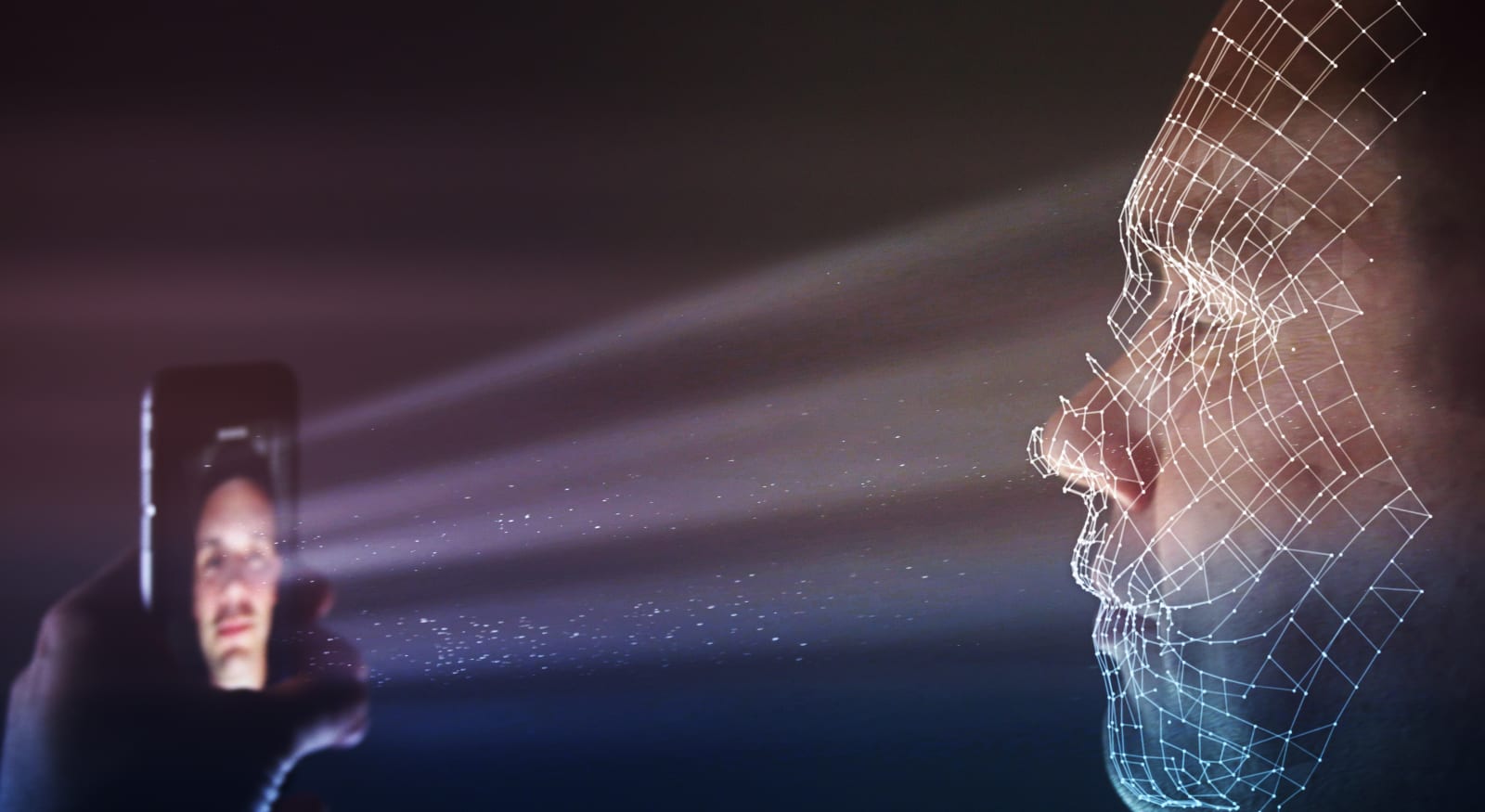
One of the extra security steps making its way into mainstream use is biometrics, like fingerprint, face, retina, and palm scanning. Samsung is working on phones that scan your palm; LG wants to use your voice; the Galaxy S8 already uses retinal scans. A Dubai airport plans to replace security counters with facial recognition scans. Mastercard is adding fingerprint scanners to its credit cards. And of course, flagship Androids and iPhones all come with fingerprint and Face ID options.
It’s all been met with conflicting reactions of excitement and anxiety from consumers, security professionals, and privacy pundits. Their concerns are all well-founded, and as my colleague Cherlynn Low put it, “After Apple first put Touch ID on the iPhone 5s in 2013, people pointed out that it didn’t work very well and that it wasn’t secure.”
Yet IBM’s study shows biometric security to be an inevitability consumers are starting to embrace. Its data showed that 67 percent of respondents are comfortable with using biometrics for security, with a whopping 87 percent willing to consider using different types of biometric authentication in the future.
Even still, everyone’s biggest concerns with biometrics are privacy and security. According to IBM, 55 percent of respondents are worried about how their data will be collected and used, with 50 percent saying they’re concerned about people using faked biometric credentials to break into their accounts.
So maybe it’s time for companies and their infosec advisors to start trusting users with more options for individuating the ways we can lock down our own security on their services. Instead of trying to corral us into whatever must-be-numbers-and-letters half-baked password recipe voodoo they think is best. While their own IT decision makers bump around in the dark prioritizing patches instead of actually applying them. I dunno. It’s just a thought.
Images: maurusone via Getty Images (Login); Spencer_Whalen via Getty Images (FaceID)
Essential’s Amazon-exclusive phone comes with Alexa onboard
Oh, you thought Essential was out of new color options to show off? Not quite. The company announced today that a new, so-called Halo Gray model is now available to purchase exclusively from Amazon. Unlike the other, limited-edition versions of the PH-1, this new model goes for $449 rather than $599 and it ships with Amazon’s Alexa app pre-installed.
With its matte black ceramic rear and titanium trim, the Halo Gray isn’t as ostentatious as some of the models Essential revealed yesterday, but Linda Jiang — the young head of Essential’s industrial design — told Engadget the look was meant to use “two finishes and colors that exemplified the materials in their best light.”
“The reason why we have the matte black on the back is that it doesn’t fingerprint at all,” Jiang said. “It has a super-nice, almost silky bone-like finish to it.” The phone’s metal frame, meanwhile, was chosen because of its specific character as a metal. “It has such a nice, warm color to it, very different from aluminum or stainless steel,” she added. The end result is a device that feels markedly different than either of the first versions of the Essential phone, seemingly built for people who prefer a more subtle approach to smartphone design.
“I think that our original black has a different type of premium, one that’s almost bling-y and in-your-face,” said Jiang. “This one’s premium in a way that’s so understated; it’s like a matte Lamborghini Aventador versus the red Ferrari.”
With the Halo Gray now in the mix, Essential is finally ready to move on. The company confirmed that no new color options are in the works — all work internally has shifted to crafting the Essential 2 (or whatever they plan to call it). And while Jiang wouldn’t talk specifically about what we could expect from the company’s smartphone sequel, there’s at least one issue she’s attempting to tackle through design: smartphone addiction.
” I really can’t get from place to place without a smartphone,” she said. “We’re so aware of that — I feel like especially this generation of kids are just so stuck on their smartphones, and you know our generation is becoming aware of that. My goal is to make it a more symbiotic relationship.” She’s not entirely sure how to make that happen, but her aim seems clear: she wants to help people strike a more balanced relationship with their devices, one that reduces our level of dependence without sacrificing functionality. For now, we’ll just have to wait and see how her plans pan out.
Source: Twitter
IKEA and Teenage Engineering preview their collaboration on Instagram
Teenage Engineering is known for its wonky-looking yet functional synths and speakers, while IKEA furniture fills college (and folks who still live like it’s college) apartments. Their powers combined has produced…some neat, boldly-colored speakers, actually. On its Instagram, Ikea just posted a sneak peek at their upcoming line of collaborated products built “so that you can host your party, wherever you may be.”
From sketch to final prototype, we are checking in on #FREKVENS! Together with Jesper Kouthoofd from Teenage Engineering the aim is to create products so that you can host your party, wherever you may be. During Diseño Democrático this week we are showing the final prototypes of the collection. Love it? Share your thoughts in the comment section below! #teenageengineering #prototype #ikeatoday #diseñodemocratico #IKEAMADRIDDD
A post shared by IKEA Today (@ikeatoday) on Feb 14, 2018 at 7:10am PST
Per the photo, the new line FREKVENS (translated to “frequency”) looks to include speakers, an LED box, a spotlight and, of course, speakers — all the tools needed to party. That might not be everything: When IKEA first announced the line last June, the company mentioned it would include an electronic choir, vinyl player, party lighting “and everything else you need in order to throw a really good music party wherever you are.”
Their ideal use case? Drop by IKEA for dinner party supplies and add some go-anywhere party gear to your cart.
“When you are younger you usually come up with the idea of a party the same day and I think a lot of people use IKEA that way. ‘I’m going to have a party, I need some glasses, napkins, candles and stuff and will go to IKEA to get it.’ For us, it is about finding a reason to make and play some music. Thinking about the totality of what you need for a party is a good start”, Teenage Engineering CEO and head of design Jesper Kouthoofd said in an Ikea blog post back in September.
Sadly, you’ll have to wait ’til next year to bring the party: The FREKVENS line is slated to arrive in IKEA stores in February 2019.
Via: The Verge
Source: Ikea (Instagram)
Google Pixel 2 users report warming phones and shortened battery life
If you’ve noticed your Pixel 2 running warm lately or found its battery life to suddenly be shortened, you’re not alone. As 9to5Google points out, Pixel 2 and Pixel 2 XL users are reporting on Reddit and Google’s Pixel User Community that their phones are having some issues since they installed Google’s February security update. 9to5Google’s Ben Schoon reports that his own Pixel 2 XL has been running warm while in standby mode since the update and that its battery life is noticeably reduced.
Some users are reporting both issues affecting their phones, while others have experienced just one or neither. Some reports say that they’ve experienced greater battery drain, but inconsistently even with similar phone usage. Most complaints seem to point to the problems occuring after installing this month’s security update, though what might be causing these issues is still up in the air.
We’ve reached out to Google about the reports and we’ll update this post when we have more information.
Via: 9to5Google
Source: Reddit (1), (2), Pixel User Community
Cyber attacks reportedly cost the US as much as $109 billion in 2016
Cyber attacks are increasingly becoming a fact of life. North Korea attacked aerospace and telecom networks last year. Olympics officials confirmed a recent attack that took place during the opening ceremonies. While Russia denied its involvement in the devastating NotPetya attacks, the US has finally joined other countries in blaming Russia for them. Now, a report from the White House Council of Economic Advisers says that malicious cyber activity like this cost the US economy between $57 and $109 billion in 2016.
The report stated that while the main actors are foreign governments like Russia, China, Iran and North Korea, corporate competitors, activists looking to advance their agendas and organized crime are also responsible for the staggeringly large cost. Effective efforts to combat all the malicious activity, said the report’s authors, will likely add to the growth of our country’s gross domestic product.
Source: Reuters
MacRumors Giveaway: Win a Keyring Lightning Cable From Popcord
For this week’s giveaway, we’ve teamed up with Popcord to offer MacRumors readers a chance to win a Popcord Lightning cable, which is a portable cable that’s designed to fit right on your keyring so it’s always with you for charging emergencies.
The Popcord, which started out as a Kickstarter project, features a Lightning connector attached to a thick silicone body that loops over to fit into an aluminum cover that also doubles as a USB-A port. The resulting Lightning cable loop is compact and fits onto a keyring, belt loop, bag hook, or any similar accessory.

When you need to charge an iOS device, you can pull the Lightning connector out of the cover, plug it into an iOS device, and plug the other end into any USB-A port on a MacBook or charging adapter. It’s a simple solution for when you need a Lightning cable in a pinch. Folded up, Popcord is about two and a half inches long, and extended, it measures in at almost five inches.

Priced at £29.00 or $40 (shipping included), Popcord is a bit expensive in a market crowded with similar keychain cable solutions, but it is MFi (Made for iPhone) certified, longer than most keychain solutions, and made from a thick, durable rubber that’s also flexible. The Popcord comes in several colors, including red, green, white, and black.

We have 15 Popcords to give away to MacRumors readers. To enter to win, use the Rafflecopter widget below and enter an email address. Email addresses will be used solely for contact purposes to reach the winners and send the prizes. You can earn additional entries by subscribing to our weekly newsletter, subscribing to our YouTube channel, following us on Twitter, or visiting the MacRumors Facebook page.
Due to the complexities of international laws regarding giveaways, only U.S. residents who are 18 years or older and Canadian residents (excluding Quebec) who have reached the age of majority in their province or territory are eligible to enter. To offer feedback or get more information on the giveaway restrictions, please refer to our Site Feedback section, as that is where discussion of the rules will be redirected.
a Rafflecopter giveawayThe contest will run from today (February 16) at 11:00 a.m. Pacific Time through 11:00 a.m. Pacific Time on February 23. The winners will be chosen randomly on February 23 and will be contacted by email. The winners will have 48 hours to respond and provide a shipping address before new winners are chosen.
Tag: giveaway
Discuss this article in our forums
How to Use the Hidden Camera Level Tool in iOS 11
Apple’s native Camera app in iOS 11 has plenty of tools for helping you get the right shot, but some are more hidden than others. The camera level is the perfect example of a really handy tool that many users don’t even know exists, mainly because it’s part of a feature that’s turned off by default.
If you tend to take a lot of photos from an overhead point of view, like a picture of a meal on a table, or an object lying on the floor, then you’ll want to use the camera level, as it helps you capture a balanced shot without having to use a tripod arm or mount. It’s also useful for taking shots of scenes directly above you, such as in the sky or on the ceiling.
Subscribe to the MacRumors YouTube channel for more videos.
Here’s how to enable and use it on iOS 11.
How to Enable the Camera Level on iPhone and iPad
The camera level tool is part of the Grid overlay, which is useful in itself for applying the rule of thirds in your pictures for more balanced compositions. First then, you need to turn on Grid mode.
Open the Settings app on your iOS device.
Scroll down the list and tap Camera.
Toggle on the switch next to Grid.
How to Use the Camera Level on iPhone and iPad
Open the Camera app on your iOS device.
Set the capture mode to Photo, Portrait, Square, or Time Lapse, using the sliding menu above the shutter button.
Position the camera lens above or below the subject of your photo.
Line up the floating crosshair with the fixed crosshair in the center of the screen by adjusting the angle of your phone’s camera. The crosshairs will both glow yellow when in perfect alignment.
Tap the shutter button to capture the shot. The aligned crosshairs turn yellow (right), indicating the lens is parallel with the ground.
The level tool also comes in handy when scanning documents on a desk with your phone’s camera, but iOS now offers a dedicated scanning feature in the Notes app, so you’ll probably want to use that instead.
Related Roundup: iOS 11
Discuss this article in our forums
 AIVAnet