


Google spending $2.5 billion to expand operations across the US
Just over two years ago, Google announced it would convert a 1,300-acre former Hemlock Semiconductor facility in Clarksville, Tennessee into a new $600 million data center. Today, the search giant broke ground on the site — and Google CEO Sundar Pichai used the opportunity to announce the company will invest $2.5 billion to open new facilities or expand existing ones in 14 states.

In addition to the upcoming Clarksville facility, part of the $2.5 billion will go to opening or expanding data centers in Alabama, Oregon, Virginia and Oklahoma. The company will create or add to offices in nine other states: California, Colorado, Illinois, Massachusetts, Michigan, New York, Pennsylvania, Texas and Washington. The expansion plan will add thousands of jobs and bring Google’s operations to a total of 21 states and six data centers.
Google planned the Clarksville site to be a model of efficiency, and purchased enough renewable energy to offset 100 percent of its electricity use, in keeping with the company’s aspirations. Today, Pichai added that the company is donating $300,000 in grant money to Goodwill of Middle Tennessee to add digital skills training to its workforce-development program.
Via: CNBC
Source: Google blog
Twitter pulls the plug on its official Mac app
We had high hopes about Twitter for Mac after the company acquired Tweetie and put its name on the desktop app, but now Twitter is shutting it off. This evening its Support account revealed that its app has been pulled from the Mac store, and will be in 30 days “will no longer be supported.” Twitter said that it’s “focusing our efforts on a great Twitter experience that’s consistent across platforms” so users will have to use the website, Tweetdeck or third-party apps.
It’s not really surprising either — back in 2015 we predicted that a 2018 update might bring already-behind the curve features like timeline syncing, but it was not to be. Most hardcore users are probably opting for other apps that have survived over the years like Tweetbot or Twitterific, so this news is more of a sad closing note to the app’s development than a major loss.
We’re focusing our efforts on a great Twitter experience that’s consistent across platforms. So, starting today the Twitter for Mac app will no longer be available for download, and in 30 days will no longer be supported.
— Twitter Support (@TwitterSupport) February 16, 2018
Source: Twitter Support
Atari will use cryptocurrency to bolster its online gambling business
In its latest bid for relevance, Atari is glomming onto the cryptocurrency craze. The company is hoping to bolster its gambling business in Europe with Atari Token, according to Bloomberg. “Our aim is to take strategic positions with a limited cash risk, in order to best create value with the assets and Atari brand,” CEO Frederic Chesnais noted in a release. Like Kodak and, err, Long Island Iced Tea before it, the stock market has responded favorably to the news, pushing Atari share prices up by over 60 percent after the company announced its intent to jump into cryptocurrency. Maybe now the company can afford to tell people what it’s going to include in the Ataribox.
Source: Bloomberg
Twitter Discontinues Twitter for Mac App
Twitter today announced that it plans to stop supporting the Twitter for Mac app in order to focus its attention on a “great Twitter experience that’s consistent across all platforms.
Starting today, the Twitter for Mac app is no longer available for download, and in 30 days, Twitter plans to stop supporting it all together.
Twitter says to get a “full Twitter experience on Mac,” customers should visit Twitter on the web.
We’re focusing our efforts on a great Twitter experience that’s consistent across platforms. So, starting today the Twitter for Mac app will no longer be available for download, and in 30 days will no longer be supported.
— Twitter Support (@TwitterSupport) February 16, 2018
Twitter for Mac has never never received a lot of attention from Twitter. In 2015, the company announced plans to refocus its efforts on building new features into its Mac app after providing only sporadic updates over the last several years, but even after adding new features, the app was largely unpopular with Twitter users, earning only 1 and a half stars out of five in the App Store.
For the full Twitter experience on Mac, visit Twitter on web. 👉 https://t.co/fuPJa3nVky
— Twitter Support (@TwitterSupport) February 16, 2018
In recent months, Twitter has also been streamlining its apps. The discontinuation of the official Mac app follows Twitter’s decision to remove the Twitter for Apple Watch app last September.
Twitter for Mac users who are looking for a desktop app experience rather than a web interface can use a third-party app such as Tweetbot or Twitterrific.
Discuss this article in our forums
How Mattel is using AR to let you preview Hot Wheels playsets
Taking a cue from Lego, Mattel is betting on augmented reality as a new way to entice shoppers. The company will introduce an AR app this fall, which will generate a virtual version of its Hot Wheels City playsets when you point your phone or tablet at their boxes in stores. The idea is to give kids and parents a better sense of how the set looks and functions without open anything up, and without retailers wasting precious floorspace on demo units.
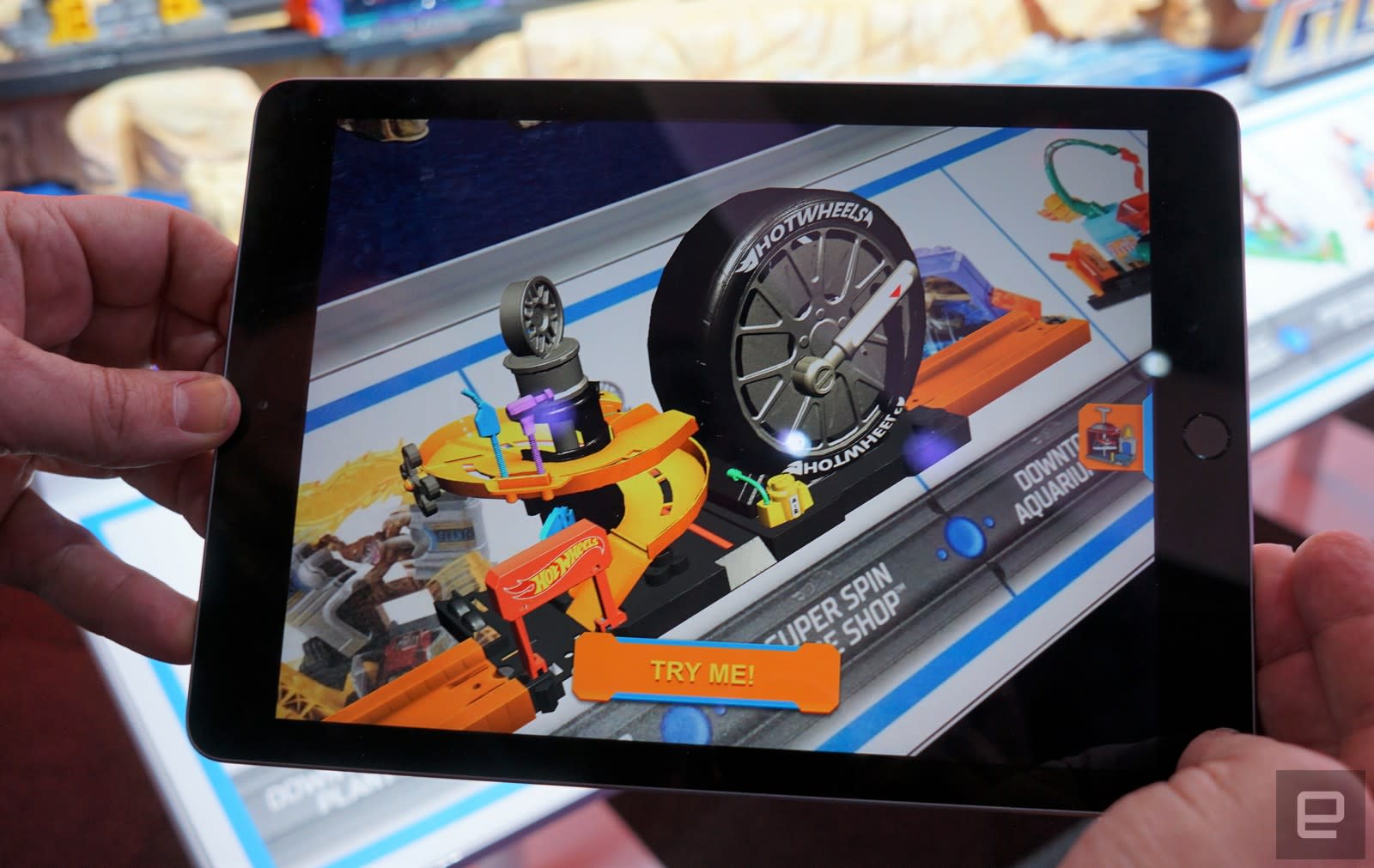
At New York City’s Toy Fair, the AR models appeared quickly when a representative held an iPad over a playset’s title. They captured most of the detail of the physical toy, and they made it clear how your Hot Wheels car would be traversing the track. That’s important, since Mattel will have 12 different Hot Wheels City sets to choose from. They can all be connected to each other to create an elaborate route for your cars. But with the playsets ranging from $10 to $15 for most (with two more elaborate options at $25 and $70), it’s helpful to glimpse these toys before you invest in them.
Lego did something similar with its in-store AR app, which also let you preview and interact with toys. Now that Apple and Google are finally focused on building augmented reality platforms for their phones, we should expect to see even more brands jump on the bandwagon. IKEA’s Place app, one of the launch ARKit titles on iOS, used the technology to see how furniture fits into your homes. Mattel sees this AR retail experience as a first step, but it likely won’t be the company’s last.

Devindra Hardawar/Oath
Here’s how to use the Asus Zenfone 4’s best camera features
You decided the Asus Zenfone 4 is the phone for you, a decision likely swayed by the dual-lens camera that takes wide-angle shots, instead of yet another implementation of the blurred background, bokeh effect. Now the phone is in your hand, how about a quick overview of how to use the top five features in the Zenfone 4’s camera app?
Wide-angle mode
Main camera mode
Open the main camera app and you’re greeted with a lot of buttons and information to take in. Don’t worry, you will soon be familiar with it. The first, and probably the most important, is the way to activate wide-angle mode. In the lower half of the screen, just above the shutter release, are two icons that look like mountains. The left icon is for standard view and the icon on the right denotes wide-angle mode. Tap either one to swap between them.
Wide-angle camera mode
You will know which mode you’re in because the icon changes to a green color, and main camera or wide-angled camera flashes across the screen, plus if you take a look in the top right (in landscape orientation) the software will remind you too.
Portrait mode
Andy Boxall/Digital Trends
Just because the two camera lenses are for wide-angle shots, doesn’t mean Asus has ignored your desire for bokeh shots. The ZenFone 4 has a Portrait mode, but it’s a little temperamental. It’s activated from the main camera viewfinder page.
Look along the top row of icons, and tap on the button that looks like two people. It should be crossed out when you first open the app. A green notification will appear saying you’re in Portrait mode. Portrait mode operates in both the front and rear cameras, but depends on good lighting conditions and being fairly close to the camera lens.
Portrait mode off
Portrait mode activated
If you’re expecting to take bokeh shots of flowers, cats, or any other object you may be disappointed. The ZenFone 4 isn’t very good at picking these items out in its Portrait pictures, and you’re left with a very normal shot. Point the camera at a person and it gets better but in our tests, you needed to be up close to get a strong effect.
Press the button again to cancel Portrait mode.
Be a Selfie Master
Andy Boxall/Digital Trends
The Asus ZenFone 4 has a selfie mode in the main camera app, and a separate app called Selfie Master. We found using the main camera app was perfectly acceptable for selfies, due to its extensive range of beautification settings. Here is how to get started.
- Tap the button to the right of the shutter release (in portrait orientation) to swap to the front camera.
- Activate Beauty Mode with the button on the far left of the shutter release.
- To use Portrait mode, tap the button that looks like two people along the top row of icons.
- If you want to play around with the beauty settings, look for the Settings icon in the bottom right of the viewfinder. It’s sometimes a little hard to see as it can blend into the background. Tap it and you’ll see a row of settings appear along the bottom of the viewfinder.
- Tap each one to adjust the properties. From left to right they are: Skin Tone, Soften Skin, Brighten Skin, Enhance Eyes, and Thin Cheeks. Each one has a left-to-right slider to increase or decrease the effect.
- If you don’t want to mess around with the individual settings, just tap Auto to let the phone sort everything out for you.
- Next to the Settings button, there is an icon that looks like a lightbulb. Tap this to alter the warmth of the lighting around you — it’s handy if you’re under fluorescent light, for example.
Photo editing
Asus has built a comprehensive photo editing suite into its Gallery app. From the main home screen on your phone, tap Gallery and find the picture you’d like to edit. Tap it and then look on the bottom right (in portrait orientation) for an icon that looks like a picture with a pen. Tap it to open the edit mode.
- All the important settings run along the bottom of the screen. By default, when you open the edit mode you’re presented with various filters. Tap each to apply them to the image, and scroll through the list to see different effects.
- Look at the bottom of the screen and tap the next icon to the right, which lets you add different frames to your photo.
- The next icon has tools for cropping, rotating, straightening, or mirroring the photo.
- Finally, the icon furthest on the right is for altering each individual aspect of the photo, including sharpness, highlights, shadows, exposure, and more. Tap each setting and use the slider to adjust the properties.
- When you’re happy with the image, save it using the button shaped like a computer disk in the top left of the screen.
- On the opposite side of this icon are two handy icons where you can take away any effects you added, in case you change your mind.
Sticky icons
Sticky icon in bottom left
Camera modes
In the main camera app, there is an icon for Pro mode in the top left of the screen (in landscape orientation), but this can be changed to access a different mode if you use it more often. Swipe down on the main screen to enter mode selection. You will find the Zenfone 4’s different camera features, including panorama, Pro mode, and various video modes. Pro mode will likely have a pin icon on it, denoting it’s pinned to the main camera screen.
If you tap and hold down any other icon, the pin will jump over to it and that mode will be accessible directly from the main camera screen.
That is it! Enjoy using your Asus Zenfone 4 and its cool wide-angle camera.
Editors’ Recommendations
- Snap the best picture you can by mastering the Xiaomi Mi A1’s camera
- Asus Zenfone 4 review
- Samsung’s awesome 2018 Galaxy A8 even has a dual-lens camera on the front
- Sharp shooters: The best camera phones you can buy
- Stop backing into your neighbor’s car with the best backup cameras
Eufy’s $20 mini smart plug is perfect for a smart home beginner or expert
This is the smart plug to buy.

Eufy, a sub-brand of Anker, makes some great home accessories, and the company’s smart outlets are no exception. Mini smart plugs are some of the most popular options because they don’t take up much space and you can stack two of them on top of each other without any issue. For a limited time, you can pick up Eufy’s mini smart plug for $19.99 at Amazon, which is $10 lower than it normally sells for.
You can control the outlet using the free iOS or Android app or with your voice through Amazon’s Alexa. Smart plugs are great to have around to control lamps, small appliances, scent warmers, and so much more. If you don’t want to commit to trying one out for $20, Eufy has its slightly-larger regular smart plug down to $13.99 right now as well.
Ready to go all-in on some new smart home gear? Be sure to check out Eufy’s Lumos smart bulb for $17.99 and its Genie smart speaker with Alexa built in for $19.99.
See at Amazon
Android phones may soon send more precise location info to 911 dispatchers
Early tests have shown promising results.
911 is a number no one in the U.S. ever wants to call, but in the case that you do, you want emergency responders to get to your location as fast as humanly possible. When you currently call 911, your wireless carrier sends your location info to the 911 dispatcher so they know where to send help. Google’s recently been testing a system of its own to handle this process, and it has the potential to be considerably more accurate.

According to The Wall Street Journal, Google ran tests of its system on Android phones in December and January for residents of Florida, Tennesse, and Texas. During these tests, Google’s system proved to be more accurate than that of the carriers’ 80% of the time.
How much better is Google’s system? When a carrier sends your location data to a dispatcher, it’s typically within a radius of 522 feet from where you’re actually at. With the system Google trialed, it was accurate within 121 feet. Along with the higher accuracy, Google’s system was also able to send the location info faster than carriers could.
This new tech will be showcased at a conference later in the week, and assuming everything goes well, Google plans on expanding it to all Android devices at some point in 2018.
While this may not be as exciting as some of the stuff that’s in store for Android P, it’s an important feature that I’m more than happy to see Google working on.
Verizon Prepaid gets affordable $30/month plan and 3G mobile hotspot
Amazon’s samples let you try before you buy and give you credit back
Free shipping is nice, but free food is better!
Did you know Amazon Prime members get access to entire pages of samples and sample boxes that Amazon will actually reward you for trying? Whether you want some Optimum Nutrition protein bars for $7.99 or an $11.99 variety of treats for your pupper because he’s such a good boy, Amazon’s collection of sample boxes is growing every day. The fun thing about these boxes is after you’ve paid for the samples, Amazon will give you an equivalent credit on your account to spend on a full size item.
This works even with individual samples, and Amazon has its own landing page for that! Not interested in an entire box? Get a $2 RXBAR chocolate peanut butter protein bar with free Prime shipping for just this item, and Amazon will give you $2 back you can spend here.

These are great deals for the adventurous. It’s a low risk way to try out brands, colors, and flavors you’ve never tried before, and then you can spend the promotional credit on your favorite new thing. Plus, the grooming and beauty sample boxes give you a bunch of samples you could put in a travel or hiking kit. If you’re not a risk-taker, just look for samples of practical stuff you’d use anyway. You’re still saving money with the credit you get back.
You’ll need to be an Amazon Prime member to take advantage of these samples, so sign up for that here. You can always just sign up for the 30-day free trial if you’re really interested.
Here are some of the other sample boxes available right now (the inventory changes frequently):
- RXBAR Blueberry Protein Bar – $2 – Spend your credit here
- Dude Wipes flushable wet wipe – $2 – Spend your credit here
- Mr. Olympia Sports Nutrition – $9.99 – Spend your credit here
- Men’s Luxury Grooming – $19.99 – Spend your credit here
- Purina Cat Food – $6.99 – Spend your credit here
- Women’s Luxury Beauty – $19.99 – Spend your credit here
Pixel owners get behind the scenes look at ‘Isle of Dogs’ in VR
Dogs and VR – what more could you want?
On March 23, Wes Anderson’s Isle of Dogs film will hit theaters for all to see. The stop-motion animation takes place in a future Japan in which all dogs have been banned to an island due to canine flu, and it follows a young 12-year-old boy searching for his best friend. Isle of Dogs currently has a 100% on Rotten Tomatoes, and nearly a month before it comes to theaters, Pixel and Pixel 2 owners can get a behind-the-scenes sneak peak in virtual reality.

The VR experience takes viewers on the set of Isle of Dogs and features interviews with the film’s cast, including the likes of Bill Murray, Bryan Cranston, Scarlett Johansson, and others. In addition to cast interviews and seeing the rest of the crew moving all around you, you’ll also get to see some of the hard work that goes into making a stop-motion animation like this.
Pixel and Pixel 2 owners can experience this VR treat now through the Google Spotlight Stories app, and on March 2, it’ll see a wider release in VR, 360, and 2D formats on YouTube VR, Fox Searchlight’s YouTube channel, and any device with the YouTube VR app (such as Daydream and PlayStation VR).
Even if you’re like me and this is your first time hearing about Isle of Dogs, you kind of have to check this out. Who can say no to VR doggos and puppers?
Google Pixel 2 and Pixel 2 XL
- Pixel 2 FAQ: Everything you need to know!
- Google Pixel 2 and 2 XL review: The new standard
- Google Pixel 2 specs
- Google Pixel 2 vs. Pixel 2 XL: What’s the difference?
- Join our Pixel 2 forums
Best Buy
Verizon
Google Store
Project Fi
 AIVAnet