


TNT’s NBA VR livestreams begin February 16th
Last November, Intel and TNT announced a partnership to bring 360-degree, 3D broadcasts of NBA games to GearVR and Daydream VR headsets. Now Turner Sports and Intel have officially launched the app that brings an immersive basketball experience via TNT’s VR app and powered by Intel’s True VR technology. While the current VR app is mainly a Turner Broadcasting initiative, it can only help the NBA expand its audience via the technology.
The app puts inside TNT’s Studio J, recreated for VR, which will serve as your portal to the NBA programming. You can watch game highlights and recaps along with live NBA games on TNT, provided you’ve logged in with your cable subscription. You’ll get at least four camera angles to explore, as well, letting you choose a court side or bird’s eye view of all the action. The NBA All-Star 2018 festivities start on February 16th in Los Angeles, with the actual game streaming live to the NBA on TNT VR app on the 18th. One NBA game per week will be available live in the app after that, beginning with the LA Clippers at Golden State on February 22nd and finishing up April 10th with Boston at Washington. The VR app will also have select NBA on TNT playoff games through the 2018 Western Conference Finals.
Rugged e-skin can heal its cuts and scrapes
Scientists dream of prosthetics and robots with electronic skin that can convey heat and pressure just like the real thing, but there’s a big problem getting in the way: the outside world. Bumps and scrapes can damage these sensors, and it’s not really practical to toss these skins in the trash when they’re no longer useful. UC Boulder researchers hope to fix that. They’ve developed an e-skin that can communicate temperature and pressure, but is both self-healing and fully recyclable. You could take a cut on a synthetic arm without panicking, and reuse any damaged ’tissue’ to make replacements.
The trick is the use of a unique polymer (polyimine) laced with silver nanoparticles. It can still conduct electricity and withstand stress, but its covalent atomic bonds make it both self-healing and recyclable at room temperatures. It just has to use widely available ethanol compounds to patch itself up, and you can degrade the polymers using a recycling solution that separates the silver from the skin in question.
Any practical uses are a long way off, but they’re definitely on the horizon. You can easily use a modest amount of heat and pressure to make the skin wrap around curved surfaces, so it’s ideal for smart prosthetics or advanced robots that may need both ruggedness and a delicate grip. All told, e-skin is becoming more of a practical reality outside of the lab.
Via: Newsweek
Source: UC Boulder, Science Advances
What we’re using: Google Maps while lost in Japan
This month, Associate Editor Mariella Moon humblebrags about her vacation to Japan. But that’s not what she’s going to discuss. Hailing from a country where Google Maps is lacking in detail (and metro details), she didn’t expect much. However, even after installing several rival map and guidance apps, it turned out that Google knew best when it came to directions in Tokyo’s spaghetti subway — and even offered a price estimate. The mapping service is moving fast, but it also brings into focus all the work Google still has left to do elsewhere.

Mariella Moon
Associate Editor
I’ve wanted to go to Japan for ages, but the prospect of navigating such an extensive and complex train system was daunting — especially since I’m the type who gets lost even going to places I’ve been to a million times before. After I spent hours upon hours familiarizing myself with frequently recommended Japan navigation apps and websites like Hyperdia, I felt more than ready to take on some of the busiest train stations on the planet. When I got there, though, I didn’t touch any of them — all I used was Google Maps.
I’ve been conditioned to ignore Google Maps, since it’s not always helpful (or accurate) where I live, in the Philippines. Admittedly, it has become a lot more detailed in my country over the years. I now see establishments in places that used to show only unmarked land. Granted, some of them don’t actually exist, but that’s what you get when anyone can add a business listing. It now shows shops inside malls, and a few years ago it finally got Street View.
I now also see public transit options when searching for directions around Manila. However, it’s still not always reliable, due to the types of public utility vehicles we have available. It can’t track every bus when they don’t follow regular schedules, and it definitely can’t tell you when the next jeepney or tricycle will pass by. For instance, it suggests I walk a few kilometers to get to my local market instead of riding a jeepney. It also wants me to travel to the next city to ride a bus for a faraway province when I live near a terminal with direct buses going there. The transit options it presents do include trains, but since they break down quite often, don’t expect those departure times to be correct.

Mariella Moon
In Japan, though, Google Maps became my staunchest ally. It offered clear, easy-to-follow routes that helped me make sense of the chaos, even during Tokyo’s infamous rush hours. The country has quite a few railway companies, so knowing which line to look for is kinda important if you don’t want to wander around labyrinthine stations for hours. Google Maps also shows shops inside train stations (for each floor!), marks every crosswalk and even has a timestamp for when a bus you can take will arrive if there’s a stop close by.
While Google Maps might never be as detailed or as accurate here because of the way our transportation system works, I’m crossing my fingers and hoping that it continues to improve. It was also pretty useless in Japan a decade or so ago, after all. And I hope Google polishes Waze while it’s at it — the navigation app has taken me down cul-de-sacs far too many times.
IDC: Essential shipped less than 90,000 phones in 2017
Andy Rubin’s Essential Phone found its way into our best-of lists this holiday season and had a couple of great price drops, including a $399 Cyber Monday deal. Still, the phone doesn’t seem to be doing very well. According to a tweet from IDC research director Francisco Jeronimo, the phone sold less than 90,000 units in the first six months after it launched.
. @Arubin’s @essential smartphone is still a long way from becoming a successful venture. In 2017, it shipped less than 90K units (first six months after launch) pic.twitter.com/NHVlA2Gjzr
— Francisco Jeronimo (@fjeronimo) February 12, 2018
Even if Essential had sold twice or three times as many phones, it would still be a long way off from disrupting Samsung or Apple dominance in the market, with the latter company selling over 1 million iPhone 8s and Xs per day according to Forbes. Of course, this is a startup and Essential Phone is its first product. No one expects Apple-level shipments right away. Still, the number is pretty low, especially given the hype around the device. The Rubin-led company has had several snafus in getting its flagship phone to market, too, including months-long delays and lawsuits claiming that Essential’s accessory technology is stolen.
Via: The Verge
Source: Francisco Jeronimo/Twitter
Netflix will stream HBO’s ‘The Defiant Ones’ outside of the US
Netflix might make headlines for securing its latest show, but its documentaries have been powerhouses in their own right; Last year, The White Helmets won the streaming service its first Academy Award. But the company is just as open to securing non-fiction content from other providers. On March 23rd, Netflix subscribers outside the US and Canada can watch The Defiant Ones, the HBO documentary miniseries chronicling Dr. Dre’s and Jimmy Iovine’s decades-long partnership.
Yes, excluding the US and Canada: Netflix’s announcement made it clear that it’s launching the miniseries everywhere else next month. The four-episode series originally aired on HBO last July as an epic chronicle of both men’s careers and collaboration amid the rise of gangsta rap in the late 80s, the growth of the music industry in the 90s and its fall to Napster-style internet sharing, and finally, Apple’s multibillion-dollar acquisition of Beats by Dre in 2014.
Whether Netflix will acquire the US and Canadian rights is unclear. As of now, The Defiant Ones is still available on HBO GO’s browser version in America (though curiously not on mobile). If that’s disappointing, at least Netflix’s Juventus FC documentary arrives later this week.
Source: Netflix
Play ‘Overwatch’ for free (again) this weekend
Blizzard has a habit of seasonally opening up its hero shooter Overwatch for everyone to try every couple months, typically just after it announces a new hero, event or map. Fittingly, the publisher announced that new PC, PS4 and Xbox One players can try out the game for free next weekend to get a taste of the just-launched Lunar New Year seasonal event.
HEROES WANTED!
Play Overwatch FREE Feb 16–19 on PC, PlayStation 4, and Xbox One.
💻 🎮 https://t.co/Pq264DygsZ pic.twitter.com/dw31d2Z2Do
— Overwatch (@PlayOverwatch) February 12, 2018
In addition to snagging the event’s temporarily-available skins, new players can try out the newly-tweaked Capture The Flag the Thailand-inspired map made for the mode. They’ll also get to toy with the still-fresh amusement park-themed Blizzard World. Those who are coming back to Overwatch can scan the game’s patch notes to skim hero changes (e.g. Junkrat and Mercy both got slight ability nerfs on January 30th).
And finally, as with every free weekend, any skins or other items unlocked will carry over if a new player purchases the game.The gratis play runs from February 16th to 19th.
Source: Overwatch
Instagram tests screenshot warnings for Stories
Instagram is borrowing another feature from Snapchat, although this is one you’ll definitely appreciate if you value your privacy. The social site has confirmed to TechCrunch that it’s testing a screenshot warning system for Stories. If you’re in, you’ll get a notice that Story creators can see the screenshots you take. You won’t get an alert with each screenshot when you’re the creator, but you will see that people took screenshots when looking at your viewer list.
There’s no word on whether or not this will be a widely available feature. That likely depends on how the warnings affect habits. It might back away if it notices that many users stop watching, for example.
If this does roll out, however, it could encourage Story creation among those who’d otherwise hesitate to hit the record button. Stories on services like Instagram or Snapchat are alluring in part because you can share moments from your day without leaving a permanent public record. The alert system could discourage creepers from getting around that restriction to take embarrassing screenshots, and could help you spot abuse that you’d otherwise miss.
PSA: How you get notified on Instagram when someone took a screenshot of your Stories pic.twitter.com/Iua2QeyskF
— iz reading On the Edge of Scandal 🍑 (@readbyher) February 11, 2018
Source: TechCrunch, Twitter (1), (2)
Apple Maps Transit Directions Now Available in Tucson, Arizona
Apple recently updated its Maps app to add transit directions and data for Tucson, Arizona. Transit directions have been available in Phoenix, Arizona since October of 2017, but transit information for Tucson appears to be new.
Apple Maps users in Tucson can now select public transportation routes when getting directions between two locations, with SunTran bus lines available as a transit transportation option. Amtrak routes are also available, and have been for some time.
Apple has not yet added Tucson to the website where it lists locations where transit directions are available, but it should be added in the near future.
Transit directions were first added to Apple Maps in 2015 with the launch of iOS 9. Maps initially only offered transit information in a handful of cities, but over the course of the last three years, Apple has worked to expand the feature to additional areas.
Transit information is now live in dozens of cities and countries around the world, with a full list available on Apple’s iOS 11 Feature Availability website.
Tag: Apple Maps
Discuss this article in our forums
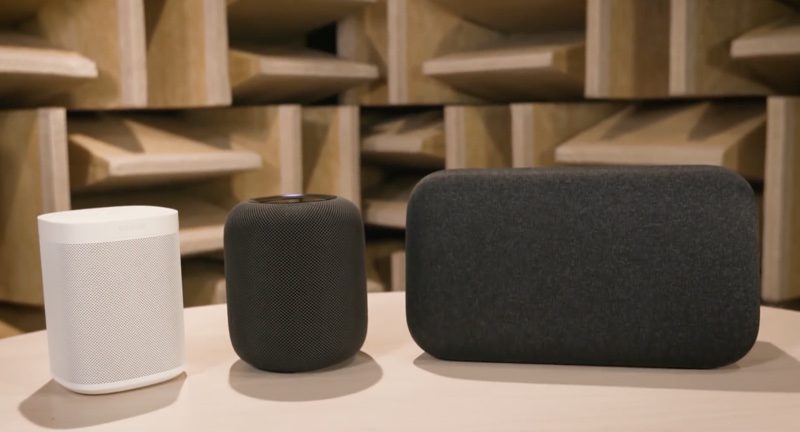
Consumer Reports: Google Home Max and Sonos One Sound Better Than HomePod
Consumer Reports has conducted some early audio testing of the HomePod, and while the full evaluation isn’t yet finished, the site believes that both the $400 Google Home Max and the $200 Sonos One sound better than Apple’s new $349 smart speaker.
The HomePod received a “Very Good” sound quality rating, as did the Sonos One and the Google Home Max, but the latter two speakers also received higher overall sound quality scores.
Consumer Reports says that its speaker tests are conducted in a dedicated listening room, with experienced testers who compare each model with “high-quality reference speakers.” In the case of the HomePod, testers found a few issues.
The bass was “boomy and overemphasized,” while midrange tones were “somewhat hazy,” and treble sounds were “underemphasized.” Overall, Consumer Reports found the HomePod’s sound to be “a bit muddy” when played next to the Sonos One and the Google Home Max.
The HomePod will serve many music fans well, but CR testers did hear some flaws. The HomePod’s bass was a bit boomy and overemphasized. And the midrange tones were somewhat hazy, meaning that some of the nuance in vocals, guitars, and horns was lost: These elements of the music couldn’t be heard as distinctly as in more highly rated speakers. Treble sounds, like cymbals, were underemphasized. But the HomePod played reasonably loudly in a midsized room.
All three smart speakers “fall significantly short” of other wireless speakers Consumer Reports has tested, like the Edifier S1000DB, priced at $350.
The HomePod’s sound has been highly praised both by new HomePod owners and by media sites that tested the device ahead of its release. While Consumer Reports doesn’t believe the HomePod outshines the Google Home Max and the Sonos One, other reviews have disagreed, including an extensive, in-depth review published by a self-professed audiophile earlier this morning.
Related Roundup: HomePodTags: Google, Consumer Reports, SonosBuyer’s Guide: HomePod (Buy Now)
Discuss this article in our forums
How to AirPlay Audio From Your Mac to HomePod
To play music from third-party music services like Spotify to your HomePod, you don’t need an iOS device — a Mac will work too. You can send any audio playing on your Mac right to your HomePod, and not just audio from iTunes.
To AirPlay from Mac to HomePod, your Mac and your HomePod need to be on the same Wi-Fi network.
Make Sure Volume is Enabled in Menu Bar
It’s easiest to AirPlay sound to the HomePod from a Mac using the menu bar on your Mac, but to do that, you need to make sure your audio settings are readily accessible. By default, audio settings aren’t available on the menu bar, so you’ll need to fix that.
Open up System Preferences.
Choose Sound.
Select the “Output” tab. 
Check the “Show volume in menu bar” box.
While it’s easiest to use the menu bar, you can actually AirPlay to the HomePod using the Sound section of System Preferences. To do so, double click on the HomePod, which should be named after the room that it’s in.
Selecting HomePod as an Audio Output Device from the Menu Bar
Once sound controls are accessible from the menu bar, it’s simple to route the sound from your Mac to the HomePod.
Click on the volume button in the menu bar.
Under the “Output Device” list, choose the HomePod, which is labeled as the room that it’s in. Mine is Office 2, because I have two AirPlay devices in my office. 
With the HomePod selected as the audio output device, all audio from your Mac will be sent to the HomePod. You can’t pick and choose — every sound from your Mac will be played on the HomePod instead of on your Mac’s speakers.
When using the HomePod this way, as an external speaker for the Mac, there’s no option to use Siri to do things like skip songs. tYou’ll need to control playback on your Mac, but you can use the physical controls on the HomePod to adjust volume.
AirPlaying from iTunes
For the most part, you need to use the audio output settings to AirPlay music from a third-party service to the Mac, but if you’re playing content from iTunes, you can use the built-in iTunes AirPlay controls.
Open iTunes.
Play a song from Apple Music or your music library. 
In iTunes, click on the  icon.
icon.
Select the HomePod icon.
Because you can play Apple Music and iCloud Music Library content directly on the HomePod, there’s probably not much need to AirPlay from iTunes to the HomePod, but the option is there if you need it.
Related Roundup: HomePodBuyer’s Guide: HomePod (Buy Now)
Discuss this article in our forums
 AIVAnet