


Backup, Restore, and Clone Hard Drives & System Using AOMEI Backupper 4.0.6
How to avoid the surprising data loss caused by the crashed system, failing hard drive, all-pervading malware and other uncontrollable factors? Here you may need some backup software to create images of your Windows system, partition, hard drives or some specific files. AOMEI Backupper is standing out from the backup marketing and is one of the most easiest backup software for windows home office and business users. It’s designed to be compatible with all recent Microsoft Windows versions, from windows XP to windows 10.
AOMEI Backupper provides all-in-one backup and recovery functions for even novices. It has a friendly user interface and users can get a well-understanding with all the functions easily. Moreover, it guides users with simple descriptions with each step succinctly without being overly detailed.
The Main Features in AOMEI Backupper:
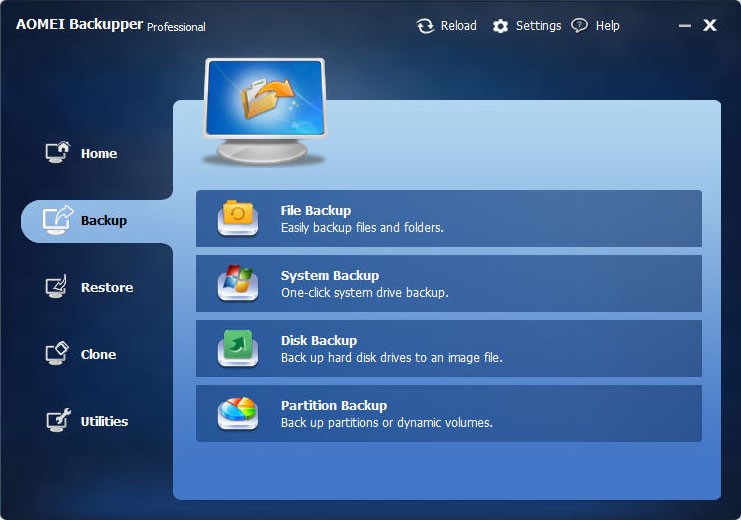
Backup: It’s easy to create system image and create disk image with AOMEI Backupper. The freeware could choose the system partitions & files automatically if you just want to create a system backup with the system backup feature. The backup processing could be carried out without interrupting other programs in Windows. It’s the same simplicity and convenience to do backup for disk, partition and files as well. With one click and let the program to do the rest. More advanced features could be achieved in the Backup options and Schedule. You can make up full backup, incremental backup and differential backup as you like. Some smarts tips help to manage the backup images more safely and quickly.
Restore: AOMEI Backupper is a reliable and fast disaster recovery based on the backup image you made before. You can restore your Windows system, hard drive, partition and files from the backup images. From here, it shows the importance of backup again. Note that the program can only recognize the image made with its own.
Clone: Clone is another feature to manage your Windows computer and hard drive. It provides to migrate Windows operating system and transfer hard drive to another location without data loss. If you need to upgrade computer from small hard drive to large one, the disk clone feature is a better choice. If you are trying cloning feature, you can use the data directly without any restoration.
Advanced Utilities: The utilities supply many advanced functions to enhance your experience. It includes check images, explore image, merge images, create bootable media and so on. With all those features, it could fulfill the demands for data backup and restore.
New Features in AOMEI Backupper 4.0.6:
- Added new multiple languages: Italian (Italiano), Dutch (Nederlands), Spanish (Español) and Turkish (Türkçe). Now AOMEI Backupper supports 10 languages.
- Fixed issue: antivirus software like Avira falsely report AOMEI Backupper as Adware or gen2.
If you’re looking for a free backup program and find the limitation of windows backup, you should give AOMEI Backupper a try. It has the paid version as well and the profession edition provides a full solution for pc backup. Even the standard/free edition could back up your important data and restore them when you need it.
Huawei P20 invite hints at triple rear cameras as P20 Lite breaks cover
Huawei’s upcoming P20 may offer a triple-lens rear camera setup.
Huawei announced last week that its upcoming phone in the P series will be called the P20. The phone is slated for an official unveil on March 27 in Paris, and if Huawei’s event invite is any indication, it looks like the P20 will be the first phone with three cameras at the back.

Initial rumors hinted at a triple-lens rear camera setup for the P20, and the invite teaser — which has the tagline, “See Mooore with AI” — reinforces that notion. Mobile photography has been an area of focus for Huawei for several generations now, and it’ll be interesting to see what the manufacturer comes up with next month.
Meanwhile, we’ve also got an early look at the Huawei P20 Lite courtesy of factory CAD renders from OnLeaks and TigerMobiles. The renders show off dual cameras at the back — arrayed vertically — along with dual cameras at the front of the phone. The P20 Lite is rumored to feature a 6.1-inch display.


The phone made its way to the FCC earlier this week, giving us a better look at the display. It looks like the panel will offer a resolution of 2280 x 1080, and the documents also reveal a 2900mAh battery. With the phones set to make their debut in the coming weeks, we should get more details about either device shortly. In the meantime, what do you make of the P20 Lite based on the leaked renders?
Samsung rolls out stable Oreo update to Galaxy S8/S8+, starting with Europe
The stable Oreo update is going out to beta testers first, with a wide release slated for later this week.
Samsung concluded the Oreo beta program for the Galaxy S8 and S8+ at the end of last month, with a stable build set to hit both devices sometime in February. It now looks like the company has kicked off the update process, starting with customers in Europe.

According to German site AllAboutSamsung, the stable Oreo update is now going out to customers enrolled in the beta program, with a full rollout scheduled to kick off from later this week.
The update comes in at 487MB for those already on the Oreo beta build, but the file size will be considerably larger for those making the switch from Nougat. The Oreo update brings a laundry list of features, including system-wide autofill, ability to run two instances of an app simultaneously with Dual Messenger (which debuted on the Note 8, and so much more:
Right now, there’s no indication as to when the update will be rolling out in other markets, but we’ll let you know once we have more details.
Samsung Galaxy S8 and S8+
- Galaxy S8 and S8+ review!
- Galaxy S8 and S8+ specs
- Everything you need to know about the Galaxy S8’s cameras
- Get to know Samsung Bixby
- Join our Galaxy S8 forums
Verizon
AT&T
T-Mobile
Sprint
Unlocked
Amazon now delivers Whole Foods products to your home in two hours
Over the past few months, Amazon slowly but surely helped people get used to the idea that it now owns Whole Foods by hawking its wares in the chain’s stores. Now it’s fully embracing the supermarket chain as part of its identity by making its goods available for purchase via Amazon’s Prime Now service. Unfortunately, the offering is only available in select Austin, Cincinnati, Dallas and Virginia Beach neighborhoods for now, but the company plans to expand its reach to more cities throughout the year.
Under Prime Now, you’ll be able to order fresh produce, meat, seafood and other organic food (even select alcohol products) that you can usually buy from Whole Foods stores and get them delivered to your home in two hours. If you need it faster than that, say if you have a surprise visitor or have forgotten to buy stuff for dinner, you can pay $8 to get your order delivered in one hour, so long as it’s worth at least $35. Whole Foods delivery is only available from 8AM to 10PM, though — you can’t rely on it for your sudden midnight cravings.
To take advantage of the delivery series, simply head over to Prime Now’s website or download its app and check your Zip code to see if it’s available in your location.
Whole Foods Market co-founder and CEO John Mackey said in a statement:
“We’re happy to bring our customers the convenience of free two-hour delivery through Prime Now and access to thousands of natural and organic groceries and locally sourced favorites. Together, we have already lowered prices on many items, and this offering makes Prime customers’ lives even easier.”
Source: Prime Now
Intel releases new Spectre patch for its Skylake CPUs
More than a month after researchers revealed a pair of serious security issues affecting many modern CPUs, Intel is still working on updates that close the hole. VP Navin Shenoy has written another blog post about the situation, and said that the company has released microcode updates for Skylake-based chips to its industry partners. If one of those chips is inside your PC, you should expect to see a patch arriving shortly, and other platforms should follow “in the coming days.”
That includes those based on technology including (but not limited to) Broadwell and Haswell which had previously seen an update that the company withdrew after reports of random reboots. Basically, keep an eye out for more firmware and OS updates in the coming days, but we don’t yet know exactly how long it will take for this mess to get sorted out on every platform.

Source: Intel
First HomePod Orders Start Shipping Out in Australia
Customers in Australia who ordered a HomePod for February 9 delivery have begun receiving shipment notifications from Apple letting them know their orders have shipped and are on the way.
It’s Thursday evening on February 8 in Australia, so the first HomePod deliveries will begin in the country in just a matter of hours.
Though the screenshot says February 6, MacRumors reader Ben tells us that he first saw his order status change about an hour ago.
Apple does not appear to have sent out any shipment notifications in the United Kingdom or the United States as of yet, but those alerts should be going out soon, at least in the UK.
While U.S. shipment alerts have not gone out yet and orders are still listed as “Preparing for Shipment,” Apple actually sent preliminary shipment information to UPS several days ago.
Customers expecting launch day delivery in the United States may be able to locate their HomePod’s shipping information by going to the UPS website, selecting the track by reference number option, and entering the phone number associated with a HomePod order.

Apple is using Next Day Air delivery in the United States and shipping out from local hubs, which is there is no tracking information available yet.
In the United States, HomePod deliveries will kick off at around 8:00 a.m. local time on Friday, February 9, with customers on the East Coast receiving their orders first. Apple is no longer offering the HomePod for February 9 delivery or in-store pickup, but the company will likely have a supply of HomePods available for walk-in purchase in retail stores in the U.S., UK, and Australia on launch day.
(Thanks, Ben!)
Related Roundup: HomePodBuyer’s Guide: HomePod (Buy Now)
Discuss this article in our forums
Samsung Galaxy A8+ vs. OnePlus 5T: Close encounters of the phone kind

Samsung is taking the fight to OnePlus in the affordable flagship segment.
Over the last three years, OnePlus has managed to carve out a niche for itself in the smartphone segment by offering top-of-the-line hardware for several hundred dollars less than the competition. This model proved to be incredibly popular, and we now have a wide range of options if you’re in the market for a feature-rich device that doesn’t break the bank. The culmination of those efforts is the OnePlus 5T, which is the device to beat in the $500 segment.
Samsung was trying to achieve a similar result with the Galaxy A series. Aimed at a younger audience, phones in the Galaxy A series offered features previously limited to the flagship Galaxy S lineup at a more affordable price point. Previous efforts in this space have been rather lacklustre, but with the Galaxy A8+ Samsung finally got its act together.
The A8+ brings the Infinity Display design language to the mid-range price bracket, and is the first Samsung device to feature dual front cameras. It’s clear that Samsung put a lot of thought into the features and the pricing, with the phone costing exactly the same as the OnePlus 5T in India, one of the A8+’s launch markets. With the phone set to make its global debut in the coming months, it’s time to see if it can mount a challenge to the OnePlus 5T.
Where both are evenly matched

Previous devices in the Galaxy A series featured underwhelming hardware, but that’s no longer the case with the Galaxy A8+. Simply put, the A8+ is Samsung’s best showing in this price bracket, and shows that the manufacturer is finally taking the mid-range segment seriously. To that effect, the A8+ comes with 6GB of RAM and 64GB of storage, as well as an all-new Exynos 7885 Octa chipset.
The A8+ needs to field decent hardware to even be counted, and that’s because of what the OnePlus 5T is packing. Offering 8GB of RAM and 128GB of storage and powered by the Snapdragon 835, the OnePlus 5T is the phone to beat in this segment. Of course, hardware is just one aspect of a device, and increasingly it’s the software that affects the day-to-day performance. But more on that later.
Here’s how both devices match up on the hardware front:
| Operating System | Android 7.1.1 Nougat | Android 7.1.1 Nougat |
| Display | 6.0-inch 18.5:9 Super AMOLED display2220 x 1080, 411PPI pixel densityGorilla Glass | 6.01-inch 18:9 Optic AMOLED display2160 x 1080, 401PPI pixel densityGorilla Glass 5 |
| Chipset | Octa-core Exynos 7885 OctaTwo 2.2GHz Cortex A73 cores, six 1.6GHz Cortex A53 cores14nm | Octa-core Qualcomm Snapdragon 835Four Kryo 280 cores at 2.45GHzFour Kryo 280 cores at 1.90GHz10nm |
| GPU | Mali-G71 | Adreno 540 |
| RAM | 4GB/6GB | 6GB/8GB LPDDR4X |
| Storage | 32GB/64GB | 64GB/128GB |
| Expandable | Yes (dedicated microSD slot) | No |
| Battery | 3500mAh | 3300mAh |
| Charging | USB-C | USB-CDash Charge |
| Water resistance | IP68 | No |
| Rear Camera | 16MP, f/1.7, PDAF, auto HDR1080p at 30fps | 16MP f1.7 + 20MP f1.7, PDAF4K at 30fps |
| Front Camera | 16MP + 8MP (f1.9) with Live Focus1080p video | 16MP f2.0, EIS1080p video |
| Connectivity | Wi-Fi ac, Bluetooth 5.0, FM radioGPS, GLONASS, BeiDou, NFC, Samsung Pay | Wi-Fi ac, dual band, 2×2 MIMOBluetooth 5.0, aptX HDGPS, GLONASS, BeiDou, NFC |
| Security | One-touch fingerprint sensor (back) | One-touch fingerprint sensor (back) |
| SIM | Dual Nano SIM | Dual Nano SIM |
| Dimensions | 159.9 x 75.7 x 8.3mm | 156.1 x 75 x 7.3mm |
| Weight | 191g | 162g |
| Colors | Black, Gold, Blue | Midnight Black, Sandstone White, Lava Red |
Both the A8+ and 5T feature Samsung AMOLED panels, so it shouldn’t be too surprising that they’re evenly matched in this area. The 5T has more customization options in that you can set sRGB or DCI-P3 color profiles, and there’s a Reading Mode that turns the panel monochrome.

Both devices are on an equal footing when it comes to the cameras as well. Daylight shots on the 5T are more natural and true to life, but the A8+ has a slight edge when it comes to low-light conditions.
The 5T does a better job of lighting up a scene in low-light shots, but there’s far too much noise and the images look washed out. And the two cameras at the front of the A8+ give it a distinct edge when taking selfies.


Galaxy A8+ to the left, OnePlus 5T to the right


What the OnePlus 5T does better

The OnePlus 5T absolutely destroys the Galaxy A8+ when it comes to the overall software experience. OnePlus has been steadily optimizing OxygenOS over the course of the last year, and the added grunt of the Snapdragon 835 chipset means the 5T is in a league of its own in terms of performance.
And the fact that the device manages to do this while costing half as much as a Pixel 2 XL is a testament to OnePlus’ software optimization efforts. My review unit picked up the Android 8.0 Oreo update this week, and if you care about updates at all, you’ll want to go with the OnePlus 5T.
OnePlus 5T destroys the Galaxy A8+ when it comes to the software experience.
Samsung missed out on an easy opportunity to claim a win in this area, as the A8+ comes with Android 7.1.1 Nougat out of the box. With the Galaxy S8 series and the Note 8 taking the priority when it comes to updates, it’s going to be a long wait before the A8+ makes the switch to Oreo.
The OnePlus 5T also wins out on the design front. At 7.3mm, the 5T is a whole millimeter thinner than the Galaxy A8+, and the Lava Red color option is downright gorgeous. The rounded edges, subtly curving back and 2.5D curved glass up front makes it a delight to use the 5T.
As for the A8+, the device has more similarities with the Pixel 2 XL or the LG G6 than the Galaxy S8+ from a design standpoint.
The flat display means you don’t have to worry about accidental touches, but the overall design of the A8+ leaves a lot to be desired. And considering it packs a 3500mAh battery — the same as the S8+ — there’s no reason for it to be so bulky. At 191g, it’s one of the heaviest phones I’ve used in a while, and is just unwieldy.
The 5T also has a more sensible location for the fingerprint sensor. The A8+ has the sensor located just underneath the camera module — a welcome change from the Note 8 — but it’s still higher up than where my index finger usually rests at the back.
I’m also not a fan of the speaker placement on the Galaxy A8+. It’s placed just above the power button on the right hand side of the device, and the position isn’t ideal if you do a lot of video calling or use the hands-free mode a lot.
You’re not going to find any issues with battery life on either device, but if you do need to top up in the middle of the day, the OnePlus 5T is a better choice thanks to Dash Charge. You easily get a few hours’ worth of usage from a 15-minute charge, and the phone itself doesn’t heat up while charging.
What the Galaxy A8+ does better

For its part, the Galaxy A8+ also has a few features that give it a leg up over the OnePlus 5T. However, these aren’t as easily quantifiable as benchmark figures. With the A8+ essentially acting as a device that offers flagship-class features, you get Samsung Pay and IP68 dust and water resistance.
Samsung Pay is the feature I miss the most when using a non-Samsung device.
Samsung Pay may not seem like that big a deal, but that’s the feature I miss the most when switching away from a Samsung device. If you’re like me and make a lot of purchases at retail stores, Samsung Pay is incredibly convenient and a lot of fun to use. What sets it apart is its ability to work with NFC-enabled readers as well as older machines via MST (Magnetic Secure Transmission).
The same goes for water resistance. If your OnePlus 5T falls into a pool of water, you’re looking at anywhere between $100 to $150 to get it fixed. In the case of the Galaxy A8+, you can just fish it out of the water and carry on with your day.
Which should you buy? OnePlus 5T

At the end of the day, it all comes down to what you’re looking for in a device. The Galaxy A8+ is targeted at a mainstream audience, and while it may not have the sheer performance of the OnePlus 5T, you do get a decent camera, design that’s styled after Samsung’s flagships, and water resistance.
However, the fact that the phone comes with Android 7.1.1 Nougat makes it a non-starter. For now, the OnePlus 5T is still the device to beat.
See at OnePlus
The Pixel Visual Core, explained
The Pixel Visual Core is a special piece of silicon that’s unique to Google’s Pixel 2 phones. In short, it’s a custom chip designed to help with the Pixel’s HDR+ image processing — that’s the computational secret sauce that makes the Pixel 2 camera so great.
But it’s also a little misunderstood — the visual core isn’t necessarily used in every photo your Pixel takes, even since Google enabled it by default in the February update for the Pixel 2 and Pixel 2 XL.
So we’re going to take a step back here, and go over what the Visual Core is, what it does and doesn’t do — and the differences now that Pixel 2 owners can use it. Check out our explainer video above to find out everything you need to know about the Pixel Visual Core!
- Android Central on YouTube
- Google Pixel 2 + Pixel 2 XL review
- How to update your Pixel to the latest version
- More on the Pixel Visual Core
Google opens Maps Go beta to US-based testers
You can now take the lite version of Google Maps for a spin if you’re in the US. Google has opened the beta version of Maps Go to US beta testers, giving you a way to look up directions or transit info even if you’re an area with poor connection. Google launched Android Oreo Go December last year, but Maps Go didn’t become available until mid-January. It was only compatible with very, very few (mostly Oreo Go) devices, though, and availability was limited to a few locations. Android Police has noticed the rollout first and has managed to install it even on regular non-Go Android phones.
We can confirm that you can now install it in the US straight from Google Play even if you have a flagship device. If you’ll recall, Oreo Go is a barebones version of Android created to run on low-end devices that have small memory and storage. Google created a suite of Go apps, including Maps Go, which are around 50 percent smaller than their full-featured counterparts to go with the platform.
While Maps Go has fewer features than the full Maps app — Engadget Senior Editor Richard Lawler says it’s like using Google Maps back in 2011 — it still has what you need to be able to help you find your destination. You can download it right now from Google Play, so long as you join the beta testing program first.
Source: Google Play, Android Police
iPhone Source Code From iOS 9 Leaked on Github
Source code for a core component of the iPhone’s operating system recently leaked on GitHub, according to reports from Motherboard and Redmond Pie.
The code, which appears to be for iBoot, or the part of iOS that ensures a trusted boot of the operating system, was initially shared online several months ago on Reddit, but it resurfaced today on GitHub where it will presumably receive more attention. Motherboard consulted security experts who have confirmed that the code appears to be legitimate.
The iBoot code appears to be from a version of iOS 9, so it’s not entirely relevant to the current iOS 11.2.5 operating system, but some of the code from iOS 9 likely still exists in iOS 11. It remains to be seen if anything will come of the leak, though, and it’s also worth noting that modern iOS devices have protection in the form of the Secure Enclave.
There are files missing from the GitHub leak so the code can’t be compiled, but security experts on Twitter say it could allow hackers and security researchers to find iOS vulnerabilities and create jailbreaks.
This is the SRC for 9.x. Even though you can’t compile it due to missing files, you can mess with the source code and find vulnerabilities as a security researcher. It also contains the bootrom source code for certain devices…
— Apple External (@Apple_External) February 6, 2018
Along with the iBoot code, the leak includes a documents directory that offers up additional information relevant to iBoot, which Redmond Pie suggests could make it much easier to find a bootrom exploit for permanently jailbreaking iPhones and iPads.
Apple has open sourced portions of macOS and iOS in recent years, but iBoot is something that Apple has been careful to keep private. As Motherboard points out, Apple’s own bug bounty program pays out up to $200,000 for vulnerabilities discovered in secure boot firmware components.
Discuss this article in our forums
 AIVAnet