


Apple Explains Why Power Management Features Were Introduced in January 2017 But Not Disclosed Until February 2017
iOS 10.2.1, introduced on January 23, 2017, has become one of Apple’s most infamous iOS updates as it marked the introduction of power management features that slow down older iPhones with degraded batteries.
Apple introduced the update, and designed the power management features, to fix unexpected shutdowns that were impacting iPhone 6 and 6s devices.
When iOS 10.2.1 was first released in January of 2017, Apple made no mention that it addressed unexpected shutdowns, and the company did not bring up the issue again until a month later, in February of 2017. On February 23, Apple explained that the iOS 10.2.1 introduced “improvements to reduce occurrences of unexpected shutdowns.”
In a recent inquiry, Senator John Thune, chairman of the Senate Commerce Committee, asked Apple why there was a discrepancy between the time that the update was introduced and the time when Apple explained what was in the update, a question Apple answered today.
Apple says that iOS users were not immediately informed about the power management features in iOS 10.2.1 because it first needed to confirm that the update successfully solved the problem causing unexpected shutdowns. From Reuters’ Stephen Nellis:
After gathering and analyzing data, we issued the iOS 10.2.1 software update in January 2017, for iPhone 6, iPhone 6 Plus, iPhone 6s, iPhone 6s Plus, and iPhone SE.
Then we looked at the diagnostic data made available by the update, and it indicated that the rate of unexpected shutdowns was greatly reduced for iPhone 6 and 6s owners. In February 2017, we updated our iOS 10.2.1 Read Me notes to let customers know the update “improves power management during peak workloads to avoid unexpected shutdowns.” We also provided a statement to several press outlets and said that we were seeing positive results from the software update.
Even after Apple provided details on iOS 10.2.1, customers did not know the full extent of how the power management features worked until December of 2017, which is why Apple has landed in hot water with customers and government officials around the world.
In addition to the inquiry from Senator Thule, Apple is also being investigated by the U.S. Department of Justice and the U.S. Securities and Exchange Commission to determine whether Apple violated security laws “concerning its disclosures” when it launched the iOS 10.2.1 update.
Apple is facing dozens of lawsuits over the issue, and the company is also dealing with inquiries in countries that include China, Italy, South Korea, France, and Brazil.
Discuss this article in our forums
iPhone 8, 8 Plus, and X Batteries Less Impacted by Performance Management
Apple’s newest iPhones, including the iPhone 8, iPhone 8 Plus, and iPhone X, use a “different performance management system” than older iPhones, which means any performance management features may be less noticeable on these devices.
Apple outlined the difference between its newer iPhones and older models in an updated support document covering the Battery Health features introduced in today’s iOS 11.3 beta. Apple says iPhone 8, 8 Plus, and X use a more advanced hardware and software design that’s better able to estimate power needs and battery performance.
iPhone 8, iPhone 8 Plus, and iPhone X models use a more advanced hardware and software design that provides a more accurate estimation of both power needs and the battery’s power capability to maximize overall system performance. This allows a different performance management system that more precisely allows iOS to anticipate and avoid an unexpected shutdown. As a result, the impacts of performance management may be less noticeable on iPhone 8, iPhone 8 Plus, and iPhone X. Over time, the rechargeable batteries in all iPhone models will diminish in their capacity and peak performance and will eventually need to be replaced.
Though the iPhone 8, iPhone 8 Plus, and iPhone X may be less impacted by performance management features in the future, Apple says that the rechargeable batteries in all iPhone models will eventually diminish in capacity and need to be replaced for the iPhone to continue running at peak performance.
While Apple previously said that the iPhone 8, 8 Plus, and iPhone X do not have power management features installed at the current time, today’s updated support document gives us some insight into how these devices might be affected in the future.
Apple has implemented performance management features in the iPhone 6, iPhone 6 Plus, iPhone 6s, iPhone 6s Plus, iPhone SE, iPhone 7, and iPhone 7 Plus. As of iOS 11.3 beta 2, customers can check to see if their devices are impacted by processor slowdowns in a new “Battery Health” section of the Settings app.
Installing iOS 11.3 will turn off any current performance management features on older devices, and it will only be reimplemented if and when a device experiences an unexpected shutdown. Customers also have the option of turning off the feature even after an unexpected shutdown, but it will need to be disabled after each performance failure.
For devices that have degraded batteries that are causing performance issues, replacing the battery solves the problem. Apple is continuing to offer $29 battery replacements through the end of 2018.
Discuss this article in our forums
How to Disable Apple’s Performance Management Features in Older iPhones in the iOS 11.3 Beta
Starting with the second beta of iOS 11.3, Apple has introduced a new “Battery Health” feature that’s designed to provide you with more information about the state of your battery and whether or not it’s impacting device performance.
If your iPhone has a degraded battery that is leading to throttling issues, the “Battery Health” section will let you know about it, and it will provide an option to turn off performance management to put a stop to any throttling that’s going on.
There are, however, some nuances to this feature that you need to know about, which we’ll outline below.
When Installing iOS 11.3
When you first install the iOS 11.3 update, all performance management features that might have been enabled are automatically disabled. So when you first install the beta, you don’t need to do anything because performance management is turned off.
You will, however, need to watch out for an unexpected shutdown that turns your device off, because if this happens and you have a bad battery, performance management will be turned back on. More on this below.
Accessing Battery Health
You can check out the status of your battery in the new Battery Health section, which will tell you the maximum capacity of the battery in your iPhone and whether or not it’s running at peak performance capacity. Here’s how to get to it:
Open up the Settings app.
Scroll down to “Battery” and tap it.
Tap on “Battery Health.”
All the info you need to know about your battery is listed here. Maximum Capacity will let you know how your battery is performing overall, and it directly correlates to how long your iPhone will last on a single charge.
Peak Performance Capability will let you know if a degraded battery has resulted in performance slowdowns.
What it Looks Like When Your Device Running Normally
When your iPhone is running as normal, under the “Peak Performance Capability” section, it will say “Your battery is currently supporting normal peak performance.”

You may still have somewhat degraded Maximum Battery capacity as this number slowly declines after charging cycles, but throttling does not kick in until the battery becomes severely degraded and can no longer offer enough power to support spikes in processor usage.
What it Looks Like if You Have a Bad Battery
If you have a bad battery, it will say “Your battery’s health is significantly degraded,” and it will let you know that an Apple Authorized Service Provider can replace the battery to restore full performance.
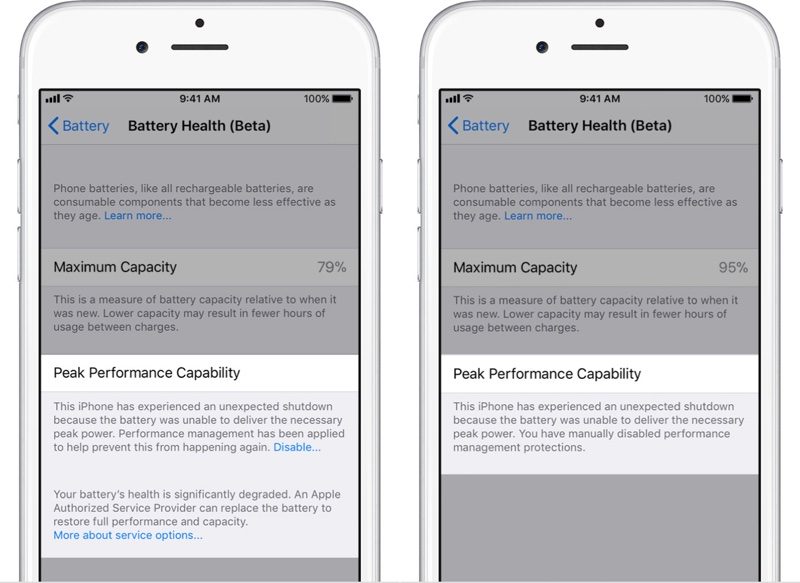
It will also tell you if performance management features have been turned on, and it will provide an option to turn them off.
What Happens When You Have an Unexpected Shutdown
As mentioned above, all performance management features are disabled automatically upon installing iOS 11.3. If your device has a bad battery and it shuts down because of it, performance management will be automatically enabled.
If this happens, you will see the following message under “Peak Performance Capability” in Battery Health.
“This iPhone has experienced an unexpected shutdown because the battery was unable to deliver the necessary peak power. Performance management has been applied to prevent this from happening again.”

If you have an unexpected shutdown AND your battery capacity is significantly degraded, you’ll see a slightly different message suggesting an immediate battery replacement.

How to Disable Performance Management if Your Battery is Bad
After experiencing an unexpected shutdown, performance management is turned on automatically on your iPhone. You will, however, see a small “Disable” option when this happens, and if you tap it, you’ll be given the option to disable performance management.

Disabling performance management will turn off any throttling that’s been applied, but it will leave your device vulnerable to future unexpected shutdowns.
You will not see the option to disable performance management until your device has experienced at least one unexpected shutdown, and once you disable it, there is no option to turn it on again.
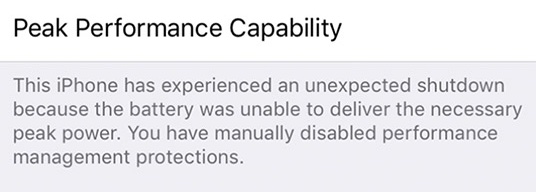
If your iPhone shuts down again while performance management is disabled, though, performance management will automatically turn it on again.
This means you will need to turn performance management off again each time your device experiences an unexpected shutdown, as Apple believes slower performance is preferable to sudden losses of power.
How to Permanently Disable Performance Management
If you have a device with a bad battery that is experiencing unexpected shutdowns and is subjected to Apple’s performance management feature, the only permanent solution is to get a new battery.
Having your battery replaced will restore an older iPhone to full working order, with maximum capacity and performance capabilities.
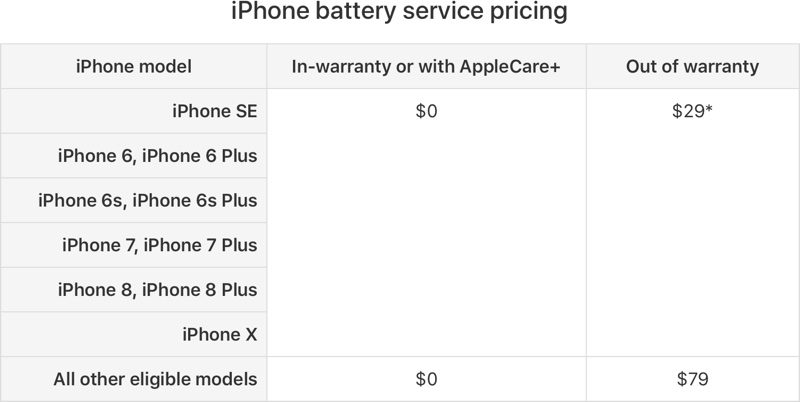
Apple is offering $29 battery replacements for the iPhone 6 and newer through the end of 2018. Your battery does not need to be experiencing shutdowns to be replaced – you can also get a replacement for a battery that’s not operating at maximum capacity, no questions asked. You can get one $29 battery replacement per device.
Newer devices like the iPhone 8, iPhone 8 Plus, and iPhone X that have a high maximum capacity near 100% don’t need replacement, but at levels below 90%, it could be worth getting a new battery while Apple is still offering them at a discounted price. To get a battery replacement, contact Apple Support.
If you have AppleCare+ or are under your one-year device warranty and have a battery that’s below 80 percent, you won’t even need to pay the $29 fee — that’s considered a defective battery and Apple will replace it for free.
Devices Impacted by Performance Management
Performance management features have been installed on the iPhone 6, 6 Plus, 6s Plus, 7, 7 Plus, and SE. On other iPhones, like the iPhone 8, 8 Plus, and X, you will be able to see readings for Maximum Capacity and Peak Performance Capability, but you won’t need to worry about throttling or unexpected shutdowns.
Related Roundups: iPhone 7, iPhone 8, iPhone XTag: iPhone SlowdownBuyer’s Guide: iPhone 8 (Neutral), iPhone 8 (Neutral), iPhone X (Buy Now), iPhone 8 (Neutral)
Discuss this article in our forums
Apple Seeds Second Beta of macOS High Sierra 10.13.4 to Developers
Apple today seeded the second beta of an upcoming macOS High Sierra 10.13.4 update to developers, two weeks after seeding the first beta and two weeks after releasing macOS High Sierra 10.13.3.
The new macOS High Sierra 10.13.4 beta can be downloaded from the Apple Developer Center or through the Software Update mechanism in the Mac App Store with the proper profile installed.
macOS High Sierra 10.13.4 includes bug fixes and performance improvements for issues that weren’t addressed in macOS High Sierra 10.13.3. The update includes support for some features that are also available in iOS 11.3, like Messages on iCloud, which uploads all of your iMessages to the cloud. It will also support Business Chat, a feature coming when iOS 11.3 and macOS 10.13.4 are released to the public.
The new macOS update also includes the smoke cloud wallpaper that was previously only available on the iMac Pro, and it introduces a warning when opening up a 32-bit app as part of an effort to phase them out.
In the future, Apple plans to phase out 32-bit Mac apps, just like it did with 32-bit iOS apps. Apple says macOS High Sierra is the last version of macOS that will support 32-bit apps without compromises.
Related Roundup: macOS High Sierra
Discuss this article in our forums
 AIVAnet