


Apple’s UK HomePod Shipping Estimates Slip to Feb 13 But Pre-Order Stock Still Available for Friday’s Launch at Authorized Resellers
Apple’s HomePod pre-launch stock showed the first signs of dwindling supply on Monday. Customers in the U.K. placing new pre-orders on the company’s regional online store can now expect deliveries of Apple’s smart speaker to arrive no earlier than Tuesday, February 13, three days after the official launch day this Friday.
In the United States and Australia, where HomePod is also launching this week, shipping estimates for the smart speaker in both White and Space Gray colors are still listed as Friday, February 9.
Despite the slip in Apple’s delivery date, U.K. residents can still get hold of a HomePod on launch day by pre-ordering online from authorized Apple resellers. At the time of writing, stock is listed as available at Argos, EE, and Currys PC World. John Lewis will also be accepting HomePod pre-orders from 8pm GMT on Wednesday, February 7.
Last week, Apple’s first batch of pre-order customers began receiving notifications from their banks about being charged for their orders, with many located in the U.K. Apple began taking orders for the HomePod on January 26 in the United States ($349), U.K. (£319), and Australia ($499). Later this spring, the HomePod will also launch in France and Germany.
Related Roundup: HomePodBuyer’s Guide: HomePod (Buy Now)
Discuss this article in our forums
WonderFox HD Video Converter Factory Pro Review
In recent years, the number of HD video conversion programs has increased a lot. And having a good converter to compress and save space, as well as to make the material compatible with most devices and players, has become essential. Therefore, I will introduce an outstanding HD Video Converter produced by WonderFox to you.
WonderFox HD Video Converter Factory Pro is a HD Video Converter which supports more than 300 formats and devices. Its interface is very friendly and with a few clicks, you can convert the files to whichever format you want. WonderFox HD Video Converter Factory Pro is a powerful program for converting video files between many available formats, including those most commonly found in everyday applications.Thus, it is really worth mentioning.
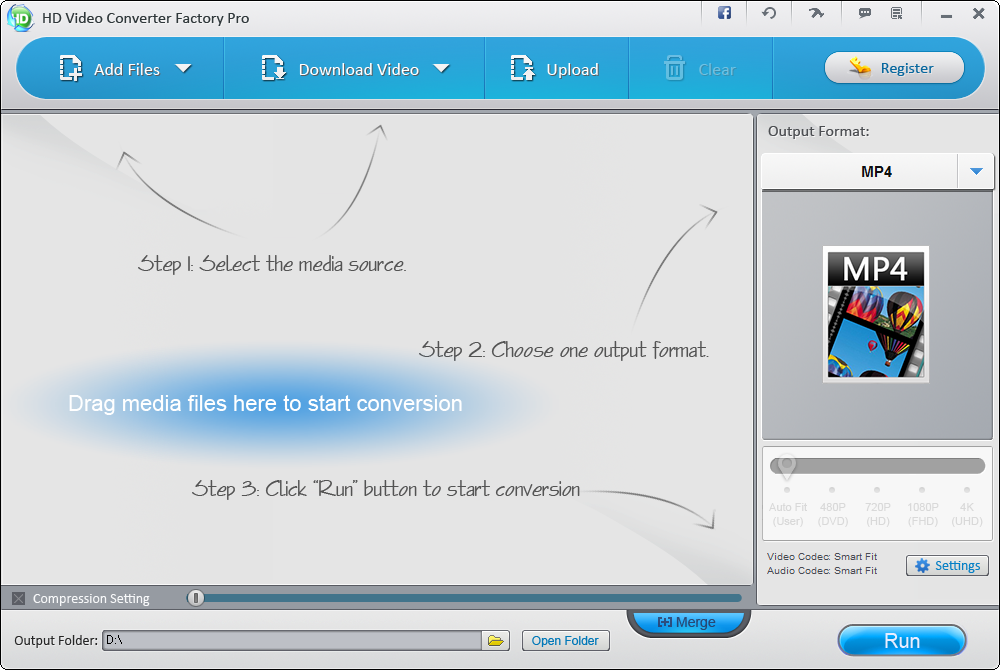
Main Features of WonderFox HD Video Converter Factory Pro
WonderFox HD Video Converter Factory Pro has many functions and it can offer some video editing capabilities, such as trimming, cutting out fragments or combining multiple files into one. A useful feature is the option to download files from sites such as YouTube, DailyMotion, Vimeo and more. Here are the main features of this program:
- Enable you to convert videos to 300+ video formats and devices;
- Support batch conversion;
- Support video editing function, such as cliping, croping and merging videos;
- Be able to download online videos from YouTube, Facebook and Vimeo etc;
- Convert videos at a 50X conversion speed;
- Enable you to fix Audio Video Sync Problems;
- Have the ability to make ringtone;
- Reduce video size without losing quality.
How to Use WonderFox HD Video Converter Factory Pro to Make Iphone Ringtones?
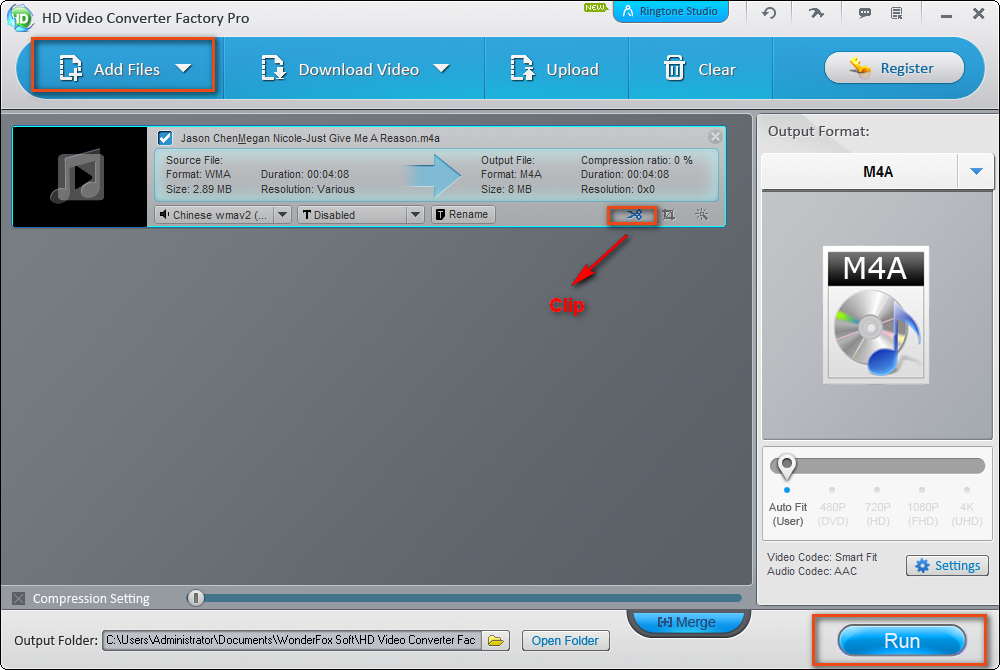
WonderFox HD Video Converter Factory Pro can help you to make Iphone ringtone and you just need 5 steps:
Step 1 Download, install and run WonderFox HD Video Converter Factory Pro;
Step 2 Import the audio or video file you want to set as your iPhone ringtone by clicking the “Add Files” button;
Step 3 If you don’t want to set the whole song as ringtone, you can clip the song and keep your favorite part of the song;
Step 4 Click the “Run” button to make ringtone;
Step 5 Stream the ringtone file to your iPhone, but you should make sure that any iPhone device can recognize and support the ringtone files you make.
Final Words
WonderFox HD Video Converter Factory Pro is a good tool for those who need to convert videos to various formats and devices. Despite its large capabilities, the application has a very intuitive and user-friendly interface, so no one should have problems converting their media. Among the available formats supported by the program,there are AVI, MP4, MPG, MOV, FLV, MKV, H.264, WMV, ASF, 3GP, RMVB, OGV and more. In addition to the conversion, the application also allows you to customize various options that allow you to change the resolution and aspect ratio, adjust the number of frames per second and volume, and more. If you have trouble in choosing such video converter because of a large number of video converters, you can consider using WonderFox HD Video Converter Factory Pro.
UK banks ban Bitcoin purchases with credit cards
It’s happened in the US and now it’s happening in the UK. Lloyds Banking Group, which runs Halifax, Bank of Scotland, MBNA and, of course, Lloyds, has banned its customers from buying bitcoin with their credit cards. “We do not accept credit card transactions involving the purchase of cryptocurrencies,” a Lloyds Banking Group spokesperson told the Guardian. It’s thought to be the first UK bank — or rather, banking chain — to block its members from investing in the cryptocurrency. The worry, presumably, is that people will borrow cash and then be saddled with large amounts of debt they cannot pay back due to Bitcoin’s fluctuating value.
Bitcoin had a stellar trajectory in 2017, rising from roughly $800 to $19,783 in late December. As the value grew, so did the attention of traditional investors and tech-savvy citizens who wanted to make a quick buck. The following month, however, Bitcoin’s value cratered. The reasons are unclear, but it was a harsh reminder of the volatility of cryptocurrencies. Bitcoin now sits at just under $8,000 and understandably, banks are worried about its customers getting caught up in the ‘digital gold’ craze. We’ve asked HSBC, Barclays, Santander and smaller banks such as First Direct for their current position on credit card-funded Bitcoin transactions.
Financial institutions in the US made a similar move last week. Credit cards issued by Bank of America, JP Morgan Chase and Citigroup are now restricted from Bitcoin purchases due to the associated risks. At the same time, politicians around the world are scrambling to figure out what, if any regulation is required to protect their citizens. UK Prime Minister Theresa May said at the World Economic Forum in Davos: “In areas like cryptocurrencies, like Bitcoin, we should be looking at these very seriously, precisely because of the way they can be used, particularly by criminals.” South Korea, meanwhile, has tried to control the market by introducing rules that limit cryptocurrency trading to real-name bank accounts.
Source: The Guardian
Samsung heir Jay Y. Lee released from prison as court suspends sentence
Samsung’s vice chairman released after spending just under a year in prison.
Samsung vice chairman Jay Y. Lee has been released from prison following a successful appeal. The executive — heir to the Samsung chaebol — was found guilty of bribery and embezzlement in a case that brought down South Korean president Park Geun-hye last year.
Lee was found to have paid up to $8.2 million to the Park administration to shore up the government’s support over a merger between Samsung C&T Corp and Cheil Industries, which would’ve given the executive controlling power over the resulting entity. Lee was initially handed a five-year prison term, but he was set free after the Seoul High Court halved that to two and a half years and granted him a stay of execution on the sentence for four years.

Lee was incarcerated for just under a year (353 days), with Bloomberg noting that the executive will be on probation for four years. He is expected to resume his duties as Samsung’s vice chairman shortly.
As for Samsung, the company replaced all CEOs in Q3 2017, and while the manufacturer is facing a crisis in the boardroom, its profits have never been better. Samsung recorded profits of $50 billion in 2017, with the memory and display units seeing record growth.
US military explores using sea life to spot threats
The sea is potentially full of undersea military threats, and that makes it daunting to detect them all using hardware. The scale and cost would be utterly impractical. DARPA, however, has a potential workaround: make sea life do the work. It recently launched a Persistent Aquatic Living Sensors program (yes, that shortens to PALS) that will study the viability of using both natural and modified sea organisms to detect underwater vehicles. If the US military can translate the biological responses of this sea life into usable data, it could warn ships without needing conspicuous, expensive hardware — the fish and plants would be enough.
Well, mostly enough. The challenge is meeting DARPA’s requirements. Any resulting system will ideally send data to devices as far as 500 meters (1,640 feet) away, and should be smart enough to distinguish between different objects. It wouldn’t be very effective if enemies could see a transmitter bobbing on the water, or if it sounds the alarm for a passing dolphin.
There could be many upsides if it works. Cost is clearly a major draw, but life also adapts, reproduces and sustains itself. You might not need to continuously refine or rebuild these sensing systems. Life also has a knack for detecting a wide variety of cues even in the most extreme conditions, such as the darkness of the deep sea.
However well this progresses, it’s going to take a while before you hear about the results. DARPA isn’t even holding its first proposer’s event until March 2nd. It could take years before there are real-world tests, let alone a complete system. That patience may pay off, though, if the Navy and other military branches can catch hostile drones and submarines without giving themselves away.
Source: DARPA
Panavision’s latest cinema camera has an 8K RED sensor
Nearly every blockbuster film used to end with “Lenses and Panaflex camera by Panavision,” but now it’s more likely that your favorite movie was short on Arri or RED. Panavision is trying to flip that equation, however, by adopting one of its rivals’ key pieces of tech. Its latest cinema camera, the Millenium DXL2 uses RED’s Monstro 8K VistaVision sensor, giving it 16-bit, 8,192 x 4,320 RAW output with a claimed 16 stops of dynamic range.
Perhaps to combat Arri’s stellar reputation for skin tone reproduction, Panavision also unveiled its own “color science” for the camera called Light Iron Color 2. The new system will also appeal to cinematographers who are used to classic Kodak and Fujifilm motion picture films. “Light Iron Color 2 deviates from traditional digital color matrices by following in the footsteps of film stock philosophy instead of direct replication of how colors look in nature,” Panavision explains on its website.
At the same time, Light Iron Color 2 offers a new workflow that will make it easier for crews to handle bulky RAW files in order to view footage on set and dump files. “We have been listening to feedback from cinematographers and the results of our collaboration are directly manifested in the DXL2,” said Panavision CEO Kim Snyder.
The 40.96 x 21.6 millimeter sensor has a larger area than a full-frame DSLR sensor, but is just the perfect size for Panavision’s famous Primo 70mm or its newly unveiled “65Vintage” line. Thanks to its large size, the RED’s Monstro sensor has excellent low-light sensitivity for a cinema camera, allowing directors to shoot quickly with minimal lighting setups.
Finally, Panavision took another page from RED by making the DXL2 relatively modular, with separate power, wireless, EVF and other modules. That will allow cinematographers to quickly switch from a bulky studio setup to a handheld or gimbal Steadicam-type configuration. The camera body itself weighs just 10 pounds, the company notes.
You’re probably now expecting some ridiculous price tag, which would likely be true, except that Panavision doesn’t sell cameras — it only rents them. For that, you can probably expect a day rate of around $750 to $1,000 or more, not counting the lenses.
Via: Cinema5D
Source: Panavision
Xiaomi all set to unveil the Redmi Note 5 in India on Feb. 14
Xiaomi’s next budget phone will make its debut in India on February 14.
Xiaomi overtook Samsung to become the largest smartphone brand in India last month, and the company is now getting ready to kick off its 2018 launch cycle. The Chinese manufacturer sent out invites to the media for a launch event on February 14 in New Delhi, where we’re likely to see the Redmi Note 5 make its debut.

Xiaomi unveiled the Redmi 5 series late last year, but with the Redmi Note lineup paving the way for the brand’s budget ambitions, we’ll likely see an all-new device at next week’s event. Not much is known about the Redmi Note 5 at this point, but it isn’t hard to make a few educated guesses. The device will feature an 18:9 panel, and will be powered by the Snapdragon 625/630.
We’ll likely see a similar set of storage options, including variants with 4GB of RAM and 64GB of storage, and there’s also the possibility of a dual rear camera configuration, much like the Mi A1. Xiaomi said at the end of last year that it will turn its attention to the camera segment, so it is entirely feasible we’ll see considerable upgrades in this area.
As for the software side of things, the Redmi Note 5 will run the latest version of MIUI 9, but it’ll be interesting to see if it will be based on Oreo or Nougat. Xiaomi hasn’t detailed its Oreo update plans yet, but that could change next week.
I’ll be on the ground at the event next week, so stay tuned to know more about Xiaomi’s plans for the Indian market in 2018. In the meantime, let me know what you’re looking forward to seeing from the Redmi Note 5 in the comments below.
Broadcom hopes to woo Qualcomm with a higher takeover bid
Broadcom clearly isn’t taking Qualcomm’s “no” for an answer. Reuters sources have claimed that the wireless chip giant is about to raise its takeover bid for Qualcomm from $70 per share to between $80 and $82 per share — a huge increase for a deal that would have already set records. It would also include a “higher-than-usual” breakup fee in case regulators put the kibosh on the merger. While details are reportedly in flux, Broadcom would announce the sweeter offer on February 5th.
Neither company has commented so far.
This might work. Qualcomm originally rebuffed Broadcom because its first offer “significantly undervalues” a company that’s considered a cornerstone of the cellular world. At the same time, this wouldn’t address all of Qualcomm’s gripes. Broadcom has sworn that it could wrap up a deal within a year, but Qualcomm has said it would more likely take 18 months and could easily run into trouble. A unified company would dominate many aspects of the wireless world, from chipsets to telecom infrastructure — officials may worry that they could enable a monopoly.
Broadcom may keep trying even if this next bid doesn’t fly. The firm is determined to expand its 5G repertoire, and there are few more tempting targets than Qualcomm, for whom 5G is everything in the near future. The question is whether or not Broadcom can afford to make an offer Qualcomm would take. It knows it’s vital to the wireless industry, and it might not want to give up its independence unless there’s a bid that’s just too good to ignore.
Source: Reuters
Studies suggest cellphone radiation doesn’t threaten humans
No, the debate over the risks of cellphone radiation isn’t over yet. The US National Institutes of Health’s National Toxicology Program has published details of draft studies which suggest that normal cellphone radiation levels aren’t harmful to humans. The research subjected rats to very high levels of RF radiation at 2G and 3G cellular frequencies, and produced results where there was no clear pattern of harm even at the exaggerated radiation levels.
In one study, some male rats subjected to the radiation did develop cancer tumors around their hearts. But the female rats didn’t, and neither sex suffered symptoms in another study. And then there’s the truly odd data. Both newborn rats and their mothers had reduced weight but grew to normal sizes, and exposed rats lived longer than those that hadn’t. And these are at exposure rates that are “much higher” than the current cellphone safety standard, the Food and Drug Administration said.
In its comments on the study, the FDA stressed that the study didn’t translate neatly to typical human experiences beyond the exposure levels. Rats are clearly much smaller than humans, so they’re enduring that intense radiation across their entire bodies where a human might only deal with those levels near their ears or thighs. This didn’t include 4G frequencies, either, so any risk that was there might not have been present with an LTE connection.
Things aren’t entirely set in stone yet. There will need to be finished studies with outside reviews that might interpret the findings differently or prompt follow-ups. However, the early data illustrates exactly why there’s no firm proclamation on the safety of cellphones. Lab tests can only tell you so much, and long-term tests tend to provide ambiguous, incomplete results. These latest studies mostly imply that there’s no obvious short-term effect.
Via: The Verge
Source: FDA, NIH
Here’s how to enroll in the iOS beta program to get updates early
Do you love staying on the cutting edge of all things Apple, including the latest iOS 11.3 changes? Then it makes sense to enroll in the iOS beta program, which allows you an early experience with the latest iOS updates before they go live for the rest of the public. Pretty much anyone can sign up to be part of the beta program and explore iOS 11.3 — as long as you know where to go. Here is how to enroll in the iOS beta program.
Note: The beta program works with iPhones and iPads (other programs are available for the Apple TV, Mac, etc.). However, older versions may not be compatible with the newest iOS changes, so you may find issues with old models — more on this below. Additionally, beta programs are a way to test for bugs and problems, so all the usual warnings about lost data apply here.
Step 1: Back up your iOS device
In a perfect world, beta previews would never have a problem, but we definitely don’t live in that world. There is a chance that the beta will introduce bugs onto your iPhone, or possibly even delete your data and brick your device. To be on the safe side, connect your chosen device to a computer and pop open iTunes.
Select the name of your device on the sidebar once it is recognized. You will see a screen of device information, including a section called Backups. Here, look for a section that says Manually Back Up and Restore, and select the option that says Back Up Now.
You usually have an option to encrypt your backup if you want the extra protection, as well as an option to back up your apps. Encryption is up to you, but you should probably back up your apps in case something goes wrong. This may take a little space, which is why we’re doing a manual backup on your computer instead of trying to back up on iCloud.
Once the backup is finished, there is one more important step. Go up to iTunes in the top menu, select it, then choose Preferences, followed by the Devices tab on the new open window, and then go to the backup of the device you are using. Here, right-click for the option to Archive your backup, which will add a lock icon to the device name. This is a little extra insurance that prevents the iOS beta from overwriting your backup in the future, so you will always have a copy of your current information safe.
Step 2: On your device, head toward the beta website
Disconnect your iOS device from your computer, and make sure the device has a stable internet connection. Visit the Apple Beta Software Program website. Here, you can check out what devices support iOS 11. Spoiler: All iPads are compatible, plus iPhones starting with the iPhone 5S — and even the sixth-generation iPod Touch. You can also learn more about some of the new features iOS 11 brings to the table, explore other beta programs, and learn about how the beta program works.
We encourage you to take a little time here and at least glance through the FAQs to learn what to expect. When you’re ready, select the Sign Up button to enroll in the program.
Step 3: Sign up for the beta!
First, the enrollment process will ask for your Apple ID and password. It’s important that you use the ID that is associated with your mobile device. You may have to enter your passcode or another additional security code at this point.
When finished, take a look at the Beta Software Program agreement, read the warning labels, and select Accept when you’ve made up your mind. That’s it! You are enrolled and ready to begin.
Step 4: Download the beta onto your device
The enrollment will take you to the beta program guide, where you can explore the iOS beta tab to learn more. However, if you are on your mobile device you should also get a notification that a new software update is available that will load the beta up.
Downloading this update is easy: Just go to your iOS Settings and select the General tab, then select Software Update. This should bring up the update window, showing you what version of iOS you can update to. You can begin the update process by selecting Download and Install whenever you are ready.
You will probably want to plug your device in while it updates to make sure that it doesn’t run out of battery life. Now, just sit back and wait for your beta experience to begin!
If you want to get rid of the beta at any time, check out how to uninstall iOS beta software from your iPhone.
Editors’ Recommendations
- The iOS 11.3 update lets you to turn off performance throttling on your iPhone
- An update to watchOS 4.3 brings several new features to the Apple Watch
- How to factory reset an iPhone
- Imgur adds looping GIF feature, new iOS news feed before big desktop redesign
- Common iOS 11 problems and advice on how to handle them
 AIVAnet