


YouTube’s live TV service is now available on Apple TV
Looks like Google is making good on its promise to bring its cord-cutting alternative to more popular platforms. YouTube TV is now available for Apple TVs, after having hit Roku devices earlier today. The service is available in almost 100 different metro areas, and can also be downloaded for Chromecast, Android TV, Xbox One and newer Samsung and LG TVs. It’s taken almost a full year since Google announced the service for this to happen.
As a refresher, YouTube TV lets subscribers watch more than 40 channels live, with options like CBS, Fox, NBC, CBS, USA and FX. Sports fans will appreciate the 10 available sports options that include ESPN, Fox Sports and NBCSN. You can also add on Showtime for an extra fee on top of the monthly $35 cost. That covers up to six users, which roughly works out to an affordable $6 per person.
You’ll also get unlimited cloud DVR storage and will be able to search for TV shows just like you would on Google the search engine.
Now that YouTube TV is available on all the important devices, perhaps Google can focus on adding more partners to the service. You can check out the full list of available channels here.
Source: YouTube TV (Twitter)
‘Diablo’ creator’s next game is a 2D dungeon crawler
If you lost hours and hours delving beneath Tristram in the original Diablo, you have David Brevik to thank, who created and programmed the classic action RPG. The veteran developer went on to co-found and head the studio that became Blizzard North, which made the even-more-successful Diablo II. After years consulting and leading studio Gazillion Entertainment, Brevik is returning to dungeons and lurking horrors in his next game It Lurks Below, which he created entirely himself and will launch later this year.
Like Diablo, It Lurks Below is a hybrid adventure game mixing class-based RPG elements with live action…and a lot of loot. Brevik even built the engine bringing the game’s 2D pixel-block look to life. The game also has digging and construction mechanics — literal delving — in the vein of Minecraft and Terraria, which the veteran developer apparently adores, but wanted to put his own spin on.
“I wanted more of a point to a lot of those games,” Brevik told Polygon. “I wanted to make an RPG, with classes and leveling up, random items, where you get more and more powerful as you go down into the core of the world and fight baddies.”
Before it launches on Steam at an unspecified date later in 2018, players will be able to get an early look at It Lurks Below through closed betas. The first, happening this weekend, has already filled its 200 slots, but others will come — and if you really can’t wait, you can watch Brevik stream his new gem on the Twitch account of his personal studio Graybeard Games.
Source: Polygon
Nintendo Labo hands-on: Cardboard has never been this fun
Leave it up to Nintendo to get us excited over cardboard. Labo, its DIY Switch-powered cardboard accessory line, seemed like the purist encapsulation of Nintendo’s philosophy: “Play” is far more important than having the best graphics. At first glance, Labo seems like a unique mixture of digital and analog gaming that kids will likely love. And based on my brief time with a few Labo kits today, it’s something adults will likely have a blast with as well.
Entering the Labo demo area gave me flashbacks to elementary school. A name card pointed me to my assigned table, which I shared with another reporter. All of the desks were arranged around the edges of the room, which gave Nintendo’s representatives, decked out in bright pink sport coats, plenty of room to show off the accessories. On the side of my desk lay a tray filled with markers, crayons and snacks, all of which really made me question my adulthood.

We started out by building the RC Car Toy-con, which looks more like a vibrating bug than any sort of vehicle. My partner and I punched out the required parts from the sheets of cardboard, then followed along with the Switch’s instructions for constructing the toy. The interface was a bit confusing at first — for some reason, you have to hold down the touchscreen buttons to move the tutorial forwards and backwards, instead of just tapping them. Once we figured that out, though, it was mostly smooth sailing.
The Labo app clearly lays out what you need to be working on, and how exactly you need to fold specific creases to construct each accessory. You can also use the Switch’s touchscreen to move the on-screen diagram, letting you see different angles in case you’re having trouble. My deskmate and I had our RC Cars constructed within 15 minutes, and we finished them off by sliding on our Joy-cons. I was honestly surprised by just how well they fit into a few cardboard slots.

After that, we attached a cardboard antenna to the Switch tablet (no, the antenna doesn’t actually do anything), and used the Labo app to buzz our RC Cars around the table. It’s not exactly a complex toy — it relies on the Joy-con’s HD rumble feature to move, and the app lets you control the intensity and direction of its vibrations. Still, it’s a quick and helpful introduction to Nintendo’s vision for Labo.
Completing the RC Car was also useful morale booster before we were confronted with a more daunting project: the Labo Fishing Rod. It’s significantly more complex, since it involves moving parts. All of its components are spread across six cardboard sheets, and they number in the dozens. My partner and I split up the work of punching out the required pieces, and we took turns putting it all together.
First up, we had to construct the three extending portions of the rod, adorably named “Papa bear,” “Mama bear,” and “baby bear.” Furious cardboard creasing and folding ensued, and we had to pay extra attention to the instructions on the Switch. Some components were very large, and we had to make sure the folds and notches were all in the right place. At one point, we ended up building the “baby bear” part instead of “mama bear” (they look very similar, okay?!). We were still able to finish the piece properly, without precise instructions from the app, since we started to understand Nintendo’s folding logic.

Unfortunately, we weren’t able to finish the Rods in the 50 minutes Nintendo gave us. I was looking forward to seeing how the reeling mechanism gets assembled, but I guess I’ll have to wait for the Labo’s launch. Nintendo took pity on us, though, and let us play with some finished Fishing Rods. They didn’t exactly feel sturdy — cardboard can only do so much — but I was impressed by how natural the reeling felt.
After we failed at construction, Nintendo moved us along to a room filled with completed Labo Toy-cons. I hopped on a child-sized bike — feeling even more ridiculous as kids plopped down alongside me — and picked up the Motorbike accessory. It’s basically just a pair of handlebars, with space for a Joy-con in each, and a nook for the Switch tablet in the middle. It also has a long base, which rests against your thigh or stomach to balance the entire contraption as your playing.

Devindra Hardawar/AOL
For the most part, I was impressed by how tactile the Motorbike accessory felt in its accompanying Switch game (which comes with the $70 Labo variety pack). I started the engine by hitting a cardboard trigger right under my thumb, and revved up by twisting the right handlebar, as you would an actual motorcycle. It took me a few minutes to get a hang of the motion controls, but it wasn’t too long before I was drifting and passing by my opponents. (My kingdom for a Switch Excitebike game that took advantage of this.)
Devindra Hardawar/AOL
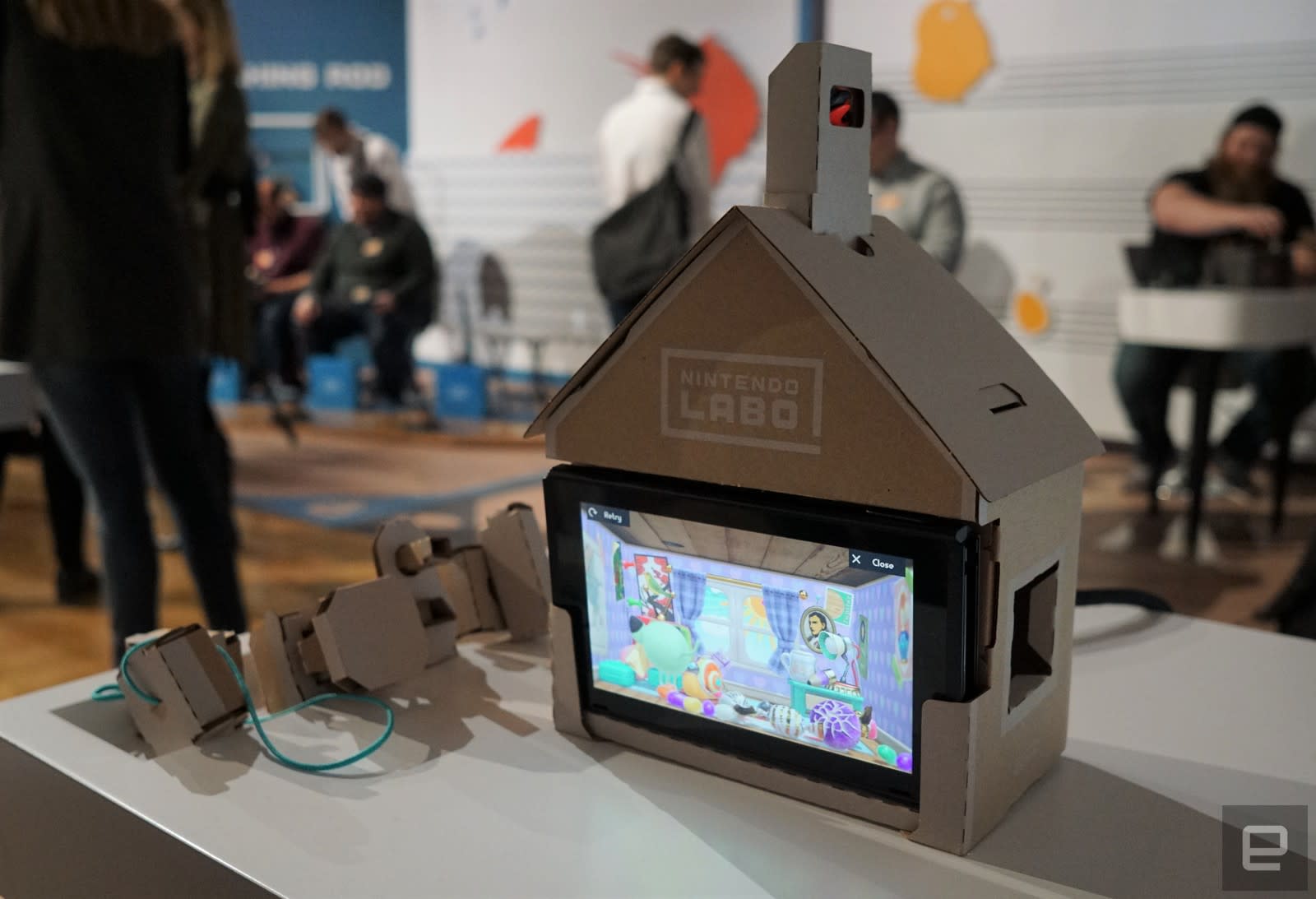
The Labo House was a bit of a curiosity. It basically looks like a dollhouse for your Switch, which interacts with a variety of cardboard accessories. Each of those has a different function: One just rotates, one serves as a large button and another is a switch with two modes. There are slots on the sides and bottom of the house for inserting the blocks, each of which changes the environment for the unfortunate inhabitant inside the virtual house. Popping in two of the blocks unlocks a minigame — the rotating crank and button, for example, unlocked a conveyor belt that charges up and gets releases when you slap the button. The crank and switch, meanwhile, let me microwave a bunch of ingredients to create a virtual cupcake.

I had more fun with the Piano Toy-con, which turns the Switch into a portable synthesizer for kids. Each of its keys were surprisingly responsive, and it had no problem registering multiple notes when I was jamming down with all ten fingers. You can also alter the notes by inserting blocks at the top of the piano, which turn the keys into things like cat cries and operatic voices. A lever on the left side lets you alter the pitch of the keys, and you can also kick off some pre-recorded songs by hitting the play button. It’s the sort of toy that could inspire kids to take music more seriously, even if its own feature set is fairly limited.
I finished off my demos with the Fishing Rod Toy-con and its accompanying game. It’s certainly a unique experience, as it’s the first title I’ve seen to use the Switch in its vertical orientation. The console sits in a tray, which also houses the string that connects to the fishing rod. The Joy-cons, meanwhile, are in the base and rotating crank portions of the rod. When you’re sitting in front of the Switch, it’s as if your physical fishing line is connected directly to its virtual counterpart. It reacts fluidly as you move the rod around, and thanks to the Joy-con’s HD rumble feature, the feedback from fish biting and fighting against my line felt almost like the real thing.

Unfortunately, I didn’t have a chance to try out the complex Toy-con Robot suit, due to limited timing during our demos. It certainly looks like fun, at least based on the reactions from kids at the session. I can’t imagine how long that would take to put together, especially since I couldn’t get the fishing rod together in an hour. I’d imagine most Switch owners would start with the $70 Toy-con variety pack, though. It includes the RC Car, Fishing Road, House and Motorbike Toy-cons. You’d have to shell out another $80 for the Robot kit alone.
When it comes to durability, several Nintendo reps at the event assured us that the Labo accessories could easily abuse from overzealous children. Still, at the event it was pretty clear that some components were already suffering from too much playtime. The cranking parts for the Fishing Rod and House felt a bit worn down. I also had to readjust the keys on the Piano a few times, after they became misaligned. I wouldn’t be surprised if the Toy-cons could last for a few months, but I seriously doubt they’d survive much longer than that. And I can’t imagine parents will be too happy when they see how quickly $70 toys can be destroyed.

Devindra Hardawar/AOL
After spending a few hours with Nintendo’s Labo accessories, I’m even more excited about their potential. The kids at the event were never bored, even as they struggled with complex instructions. Personally, I’m looking forward to gifting Labo kits to kids in my family, and helping them build each accessory. I’d bet it’d make them even more appreciative of their playtime, once they know how their toys are built.
Apple Pay Expanding to Brazil Soon [Updated]
Apple Pay is set to expand to a Brazil later this year, Apple CEO Tim Cook revealed in today’s first quarter earnings call. While Apple didn’t provide an exact date for the launch of Apple Pay in Brazil, Cook did say it would come soon.
We began hearing rumors of an Apple Pay expansion to Brazil two years ago, but in December of last year, iPhone users in Brazil were able to see terms of service information when attempting to add a Visa Platinum Personnalité card from Itaú Unibanco, suggesting an imminent launch.
It is not yet clear which banks will support Apple Pay when the feature launches, as there is not yet an Apple Pay website for the feature in the country. More details are likely to be available soon.
Since its 2014 launch, Apple has expanded Apple Pay to more than a dozen countries, including the United States, the United Kingdom, Australia, Canada, Singapore, Switzerland, Hong Kong, France, Russia, China, Japan, New Zealand, Spain, Taiwan, Ireland, Italy, Denmark, Finland, Sweden, and United Arab Emirates.
Apple Pay works on all iPhones with Touch ID or Face ID, including iPhone 6, 6s, 6, 7, 8, 6 Plus, 6s Plus, 7 Plus, 8 Plus, SE, and X. It is also available on all Apple Watch models and can be used to make purchases in apps and on the web on Macs and iPads.
During today’s earnings call, Apple also shared some details on Apple Pay, which saw its best ever quarter in Q1 2018.
Apple Pay grew 50 percent year-over-year, and it is now accepted at more than half of all retail locations in the United States, and at 2/3rds of the country’s top retailers. Global Apple Pay purchase volume was also up.
Update: Apple has launched an Apple Pay webpage on its Brazilian site.
Related Roundup: Apple Pay
Discuss this article in our forums
Apple Watch Sees Best Quarter Ever With Series 3 Sales Up More Than 100% Compared to Series 2 Sales Last Year
Apple today said that the Apple Watch saw its best quarter ever in Q1 2018, with the new Series 3 models selling at twice the volume of the Series 2 models last year. Apple Watch saw a 50% growth in units and revenue for the fourth consecutive quarter.
When combined with sales of Beats headphones and AirPods, total revenue from wearables was up almost 70 percent year-over-year.
Apple’s “Other” category, which includes Apple TV, Apple Watch, Beats, iPod, and Apple-branded and third-party accessories, was the major contributor to the company’s revenue, bringing in $5.5 billion.
Apple says wearables, including the Apple Watch, the AirPods, and Beats, were the second largest contributor to revenue growth after the iPhone.
Last year, in Q1 2017, Apple’s “Other” category was responsible for $4 billion in revenue, so overall revenue from that category was up $1.5 billion.
Related Roundups: Apple Watch, watchOS 4Buyer’s Guide: Apple Watch (Buy Now)
Discuss this article in our forums
Apple Did Not Consider How Battery Replacement Program Would Impact iPhone Upgrade Rates
During today’s earnings call covering the first quarter of 2018, Apple CEO Tim Cook was asked whether investors should be concerned about slowing upgrade rates due to Apple’s battery replacement program and the fact that consumers may opt to replace their batteries instead of purchasing a new iPhone.
In response, Cook said that he couldn’t answer because it wasn’t something that Apple took into account. Apple “did not consider, in any way, shape, or form, what it would do to upgrade rates,” said Cook.
We did it because we thought it was the right thing to do for our customers. I don’t know what effect it will have for our investors. It was not in our thought process of deciding to do what we’ve done.
In the same answer, Cook said the iPhone has fantastic reliability, and that the previously-owned market is continually expanding, with customers handing down older iPhones and using trade-ins to get new devices. Cook said he believes customers handing their devices down is a positive, because “the more people on iPhone, the better.”
Following the revelation that Apple introduced power management features that slow older iPhones in order to prevent unexpected shutdowns in devices with degraded batteries, Apple was accused of planned obsolescence and deliberately slowing devices to prompt customers to upgrade.
Apple has vehemently denied that the power management features were implemented to spur customers to upgrade, and the company has said that instead, the features were meant to expand the life of an iPhone for as long as possible.
Apple has apologized for the misinformation that has circulated about the power management features, and it has also introduced a program allowing customers to get $29 battery replacements for the iPhone 6 and newer. In iOS 11.3, Apple will provide more information about battery health and give customers the option to toggle off the power management feature all together.
Tag: iPhone Slowdown
Discuss this article in our forums
Apple CEO Tim Cook: iPhone X Has Been the Top Selling iPhone Every Week Since it Shipped
During today’s earnings call covering the first fiscal quarter of 2018, Apple CEO Tim Cook said that the iPhone X has “surpassed our expectations” and has been the “top selling iPhone” every week since it shipped in November.
Apple says the iPhone X, iPhone 8, and iPhone 8 Plus lineup brought in the highest revenue of any iPhone lineup in the company’s history.
Apple does not break down iPhone sales by model, but the company sold 77.3 million iPhones in total, which was below analyst expectations. iPhone average selling price was up thanks to the iPhone X, coming in at $796 compared to $695 in the year-ago quarter.
Cook also said that customer satisfaction is “off the charts” for the iPhone X, and that Face ID was “incredibly well received.”
Cook was asked about the future of the iPhone X and whether Apple sees its lineup expanding to encompass two iPhone X-style devices in the future, and he of course declined to respond.
He did, however, say that Apple is “thrilled” with the reception to the iPhone X, and that with its launch, the company was setting up the next decade of development. “That’s how we look at it, and that’s the reason it’s chock full of incredible innovations. So you can bet that we’re pulling that string,” Cook said.
Going forward, Apple CFO Luca Maestri said in answer to a question about slower growth in the coming quarter that Apple believes iPhone revenue will actually grow double digits compared to last year’s March quarter. iPhone sell-through growth, he says, will be accelerating compared to the December quarter.
Apple’s guidance for the second quarter of fiscal 2018 includes expected revenue of $60-$62 billion and gross margin between 38 and 38.5 percent.
Related Roundup: iPhone XBuyer’s Guide: iPhone X (Buy Now)
Discuss this article in our forums
YouTube TV App Officially Launches for Apple TV
YouTube this morning teased that its YouTube TV Apple TV app was “coming very soon,” and “coming very soon” apparently meant this afternoon.
The YouTube TV app is now available for download from the App Store on the Apple TV, where it is featured prominently in a banner.
YouTube TV’s new Apple TV app comes just in time for Super Bowl LII, which is set to take place on Sunday, February 4. YouTube also recently expanded to Roku devices, presumably with the aim of luring new subscribers who want to watch the Super Bowl.
The YouTube TV service, which is priced at $35 per month, offers subscribers access to television shows on ABC, CBS, Fox, NBC, the CW, Disney, ESPN, FX, USA, and dozens more.
YouTube TV boasts more than 40 channels, including live sports and news. It also offers unlimited DVR storage space and allows subscribers to access their shows from anywhere in the United States, plus it includes content from the $9.99 per month YouTube Red service.

Introduced back in April, YouTube TV is a live streaming service designed to compete with offerings like Sling TV, Hulu with Live TV, DirecTV Now, and Playstation Vue, all of which are available via apps on fourth and fifth-generation Apple TV models.
Related Roundup: Apple TVTags: YouTube, YouTube TVBuyer’s Guide: Apple TV (Buy Now)
Discuss this article in our forums
OnePlus 5T review: Still a premium experience on the affordable side

It was just a few months ago that OnePlus pulled its seventh smartphone, the OnePlus 5T, out of the hat. An incremental update over the OnePlus 5, which saw the light of day only three months before, the OnePlus 5T conforms to the mid-cycle upgrade laws established by the launch of the OnePlus 3 and OnePlus 3T last year.
In the months following the OnePlus 5’s release, the company went back to the drawing board and promptly came up with a newer, slightly improved version. And the OnePlus 5T is certainly all about refinements – the biggest one being the display.
With its latest flagship, OnePlus has addressed one of the biggest complaints users had about the OnePlus 5 – the lack of modern bezel-less 18:9 display. Since the arrival of the OnePlus 5 in June, more flagships with expansive edge-to-edge displays like the Samsung Galaxy Note 8, LG V30 and Google Pixel 2 XL have arrived on the market, probably providing additional motivation for OnePlus to release a bezel-less phone of its own. But is it a worthy contender to the throne of smartphones? Continue reading below to find out.
Design and Display
 While the OnePlus 5T keeps much of the 5’s internal hardware including the Snapdragon 835 processor, battery, and 3.5mm headphone jack, it distinguishes itself from its predecessor through design.
The 5T has a larger 6-inch AMOLED display with thin bezels all around, thus adhering to the all-screen trend which has ruled consumers’ preferences in recent months. Despite the larger front panel, the 5T’s overall footprint remains quite similar to that of its predecessor. If we are to look at the numbers on paper, the new flagship is only a few millimeters taller and thicker and slightly heavier.
Like the 5, the OnePlus 5T is made of anodized aluminum and features a subtle curve at the back and gently-rounded corners. But while the phone’s rear does look nice, we found it to be ridiculously slippery. Luckily our review unit shipped with a selection of three official cases. We slapped the Ebony Wood Bumper Case and we had no problem gripping the device firmly afterward.

The aspect ratio has changed from 16:9 to 18:9, which is the same ratio you see in drool-worthy flagships like the Samsung Galaxy S8 or the LG G6. Screen resolution is kept at a moderate FHD+ or 2160 x 1080 pixels, which is a bit disappointing for those who were hoping OnePlus will take things to the next level with the 5T and offer a 2K display.
But that doesn’t mean screen quality is poor. On the contrary. The OnePlus 5T takes advantage of a lovely Full AMOLED panel – which now occupies more than 80% of the front of the screen – and offers rich colors and high brightness levels.
Brightness is slightly better (430 to 470 nits) than on the 5, but the 5T has better sunlight visibility thanks to its Sunlight Display mode. This feature – which is part of the company’s adaptive mode – increases contrast when you’re doing one of these things: viewing or shooting photos and videos or playing a game outside.
It’s winter here in Europe, so we haven’t had the chance to test the 5T’s Sunlight Display mode while taking pictures in the really bright summer sun – which is a challenging scenario for most phones out there, but we’re pretty satisfied with how the 5T’s display performed in winter daylight.

Even if the screen looks quite excellent by default, users are given the option to adjust the calibration of the display to suit their particular set of needs. You can choose from presets like sRGB, DCI-P3 or adaptive move, and also make adjustments to make the screen look warmer or colder. It’s really up to you and your personal preferences.

The back of the phone is the scene of another important change. Since OnePlus skinned down the bezels, the fingerprint sensor which lived inside the physical home button on the 5, has been moved on the 5T’s back. We’re actually quite thankful for the change, as we have always favored handsets which offer the authentication sensor in this position. It feels more natural for us to have it there, as we pick up the phone, but some hardcore OnePlus fans might be sad to see the physical button go. However, they certainly won’t be sorry for how fast the scanner is.
Moving on to the left side of the handset, it’s home to the textured alert slider which gives you the option to easily switch sound profiles (Ring, Do Not Disturb and Silent) without unlocking the device. Underneath it, sits the volume rocker, while the power/lock key lives on the right.

The 3.5mm headphone jack is still part of the equation, located at the bottom, next to the USB-C port and speaker. Speaking of which, the sound quality on the OnePlus 5T is decent, but nothing too write home about. The sound was clear and sharp when we were playing music in a private setting, but in a noisy environment sound easily got muffled. We tried listening to music on YouTube with different headsets on and the results were always good indoors.
Call quality on the OnePlus 5T is excellent. We could always hear the person at the other end very clearly and we didn’t notice any interruptions.
Like the 5, the 5T is sold with any kind of water or dust resistance, which can be considered a big minus when compared to products such as the Pixel 2 or Samsung Galaxy S8. But to be fair, OnePlus had to cut a few corners in order to keep the price tag of the phone relatively affordable.
Performance and Battery

Unlike the OnePlus 3T, the 5T did not get any noticeable upgrades under the hood. This can be explained by the fact that while in 2016 Qualcomm rolled out the Snapdragon 820 which was closely followed by the updated Snapdragon 821 a few months later, in 2017, the chip maker’s high-end mobile chip portfolio revolved solely around the Snapdragon 835 – which powers both the 5 and 5T.
OnePlus offers the new phone in two versions, one with 6GB of RAM + 64GB of storage and another with 8GB of RAM + 128GB of storage. Our review unit came with the more advanced configuration.
And as you’d expect with specs as high as these, performance proved to be extremely smooth. In our three weeks using the 5T, the phone didn’t freeze once, nor did we experience a slouch in performance even as we were playing demanding games. At times, the phone gets a bit hot, but compared to other phones we’ve used (the Xiaomi Mi 4i comes to mind) the 5T keeps at a decent temperature at all times.

Battery life is one of the many highlights of the OnePlus 5T. The phone relies on the same 3,300 mAh battery as the OnePlus 5, despite the new model having a bigger display to power. Even so, battery life on the 5T is very good. Starting the day at 100% percent, we were routinely able to get through the day until evening with at least 30% left.
Our daily routine consisted of reading a few articles in the morning, browsing social media, answering messages on WhatsApp and Facebook, checking apps like Imgur or 9gag and talking for at least one hour on the phone.

Even when the phone runs out of juice, the OnePlus 5T can be rapidly charged via the Dash Charge system which allows users to fully replenish the cell. It took us about 80 minutes to fully charge our review unit.
Another advantage of Dash Charge is that you can play games or binge on Netflix even while your phone is charging, and that won’t affect charging speeds. Also, temperatures are kept low while charging.
One thing to keep in mind is that you’ll need to use the dedicated white charger if you want to take advantage of the fast charging speeds, as OPPO (OnePlus’ parent company) has yet to license the technology to third-party vendors.
To be clear, you can use other chargers with the OnePlus 5T or use your Dash Charger with our handsets, but in both cases, they will merely be able to offer standard charging speeds – nothing out of the ordinary.
Cameras

With the 5T, OnePlus a tweaked the dual-camera setup that made a debut on its predecessor. You still have a 16-megapixel main sensor, but what used to be the telephoto lens is now a 20-megapixel sensor designed to shoot better low-light shots. For nighttime photos, the 5T switches on the second lens, which takes advantage of algorithms that merge the data from multiple pixels to improve color accuracy and detail.
But despite the promise of better low-light photography, we found the 5T to be a bit lacking in this department. Indeed, some shots turned out looking decent. Others merely gave the appearance of being so, but when we zoomed in, the loss of detail was quite obvious.


OnePlus widened the aperture on the second lens to allow the phone to shoot better night-time or low-light photos, but this was at the expense of the optical zoom. As a result, all zooming you do will be carried out digitally. When you hit the 2x button in the camera app, the phone will still zoom into the frame, but the resulting image is merely a crop of the original sensor. Zooming isn’t bad when done in bright light, but if you’re at a concert sitting in the back trying to take a picture of the band, the result comes out looking quite grainy.


While the OnePlus 5T isn’t impressive when it comes to low-light photography, things change radically in bright daylight when the phone’s camera performs extremely well. Portrait Mode makes a comeback and seems to be slightly improved than on its predecessor. In our experience, the main camera did a good job at identifying the face or object we wanted to isolate and blurred the background accordingly.


Finding your way around the camera interface is quite intuitive. The camera app launches in an Auto mode that lets you make minor adjustments to brightness, aspect ratio, flash and turn the HDR function on/off. You can switch between a Photo, Video (720p, 1080p at 30fps/60fps and 4K) or Portrait mode (bokeh) with a single tap.
Swipe up to switch to Pro mode in order to have more control over how you shoot your pictures including adjusting ISO, white balance, shutter speed and so on, or if you want to do a slow-motion video, time-lapse or panorama.

The 5T comes with a 16-megapixel selfie snapper, which as we found, produced pretty nice results. Indeed, in scanty artificial lighting conditions, self-portraits turned out to grainy. Fortunately, selfies look much better in natural light, although be warned that the selfie camera has a beautification filter on by default, so while it can produce flattering selfies, the results might not look very realistic. Naturally, you can turn it off completely or dial it down.


But if you want to let the real you shine through (complete with skin pores, lines and everything else) we suggest you try taking selfies with the main camera(s). On the OnePlus 5T, it’s actually quite easy to do so. A neat trick of the phone’s camera interface is that it allows you to shoot a photo by holding your finger on the fingerprint sensor on the back. What’s more, in this manner you’ll be able to use Portrait mode while shooting self-portraits, as the selfie camera does not have one.
Software
When it comes to software, you can’t really go wrong with the OnePlus 5T and its OxgenOS. Oddly, the 5T launched with a version of Oxygen based on the Android 7.1.1 Nougat, but the Oreo update is expected to land sometime in the first quarter of 2018. Actually, the first Oreo beta for the OnePlus 5T already started rolling out before the end of 2017.

Anyway, OxgenOS offers an experience very close to pure Android, while including a lot of extra features and customization options that will allow you personalize the look of your phone any way you please. For example, you can flip the order of your Android keys or hide them entirely, or take a screenshot by swiping three fingers on the display. Speaking of which you can also take advantage of the Extended Screenshot option that allows users to capture one long, continuous screenshot that shows more content than can fit on the screen at one time.
OxygenOS has its own launcher, which introduces OnePlus’ own “shelf” – accessible by swiping left on the main screen – that shows things like recent contacts, apps, data usage and battery life. You can also set reminders from there and add/delete widgets.

You can swipe upwards to open the app drawer and there’s the option to pick from different icon packs and change the layout of each home screen.
OnePlus also offers the possibility of changing the Default theme to Dark or Light to suit your individual needs. From there, you can also change the accent color which has the effect of changing the settings toggle colors, as well as the toggles’ in your system tray. It’s super handy for when you feel like you want to change your device’s look. And if at the end of the day, you find that you’re not yet satisfied with the look of your interface, you can always download a third party launcher.

We’re also big fans of the Parallel Apps functionality – although it’s not exclusive to OnePlus handsets. It allows you to clone social apps, so if you have more than one Instagram account (or Skype or whatever) you can stay logged in in both and switch between them at ease.

Another neat feature is Gaming Mode which disables all visual notifications while you’re playing a game and don’t want to be disturbed by any outside intrusions.
Reading Mode and Night Mode, both make a welcome comeback on the OnePlus 5T. The two modes can be used to alter the color of the display to give you a better browsing experience in certain scenarios.
Night Mode works by tinting the screen yellow and reducing light channels with the purpose of allowing you to fall asleep easier after using your device. Reading Mode, on the other hand, is a bit different. It changes the display so that it becomes completely black and white, which gives you the impression or reading on paper.
Face Unlock
One of the main distinctions between the 5T and 5 is the inclusion of Face Unlock with the former model. Like the name suggests, Face Unlock is a feature which lets users unlock their device just by looking at it. But unlike iPhone X’s more advanced Face ID, OnePlus’ solution simply uses 2D recognition, rather than a complex 3D depth map to tell whether it’s the owner of the phone who’s looking at the display.
Given that Face Unlock is not as secure as Face ID, it can be used to authorize payments for Android Pay or any other forms of authentication. The system is meant only to unlock your phone for you and that’s it.

But does it work? In the weeks we spend with the phone we found Face ID is extremely fast. You’ll need to press the wake button for the front camera to read your face, but once you do that, it unlocks the phone at lightning speed. It worked well in multiple scenarios as we tried unlocking the 5T from various angles, with glasses on, with our mouths covered by a scarf or in low-light conditions.
It’s by no means a perfect system, as there were a few times when it failed to do its job properly. Fortunately, users can quickly switch to the fingerprint scanner to gain access to their device.
Overall, OxygenOS offers a very satisfying package, capable of providing a rich and rewarding experience to the vast majority of users
Conclusion

It’s easy to forget that three years ago there was no OnePlus. In this short time, the company has managed to build a pretty solid reputation and to create the new “affordable flagship” niche on the smartphone market.
And the OnePlus 5T can easily be considered the company’s highest point of achievement, so far. Sure, there’s plenty of room for improvement, as the phone does not include a higher resolution display like more expensive flagships, nor does it offer water resistance, wireless charging, Hi-Fi audio, a microSD card or a mind-blowing main camera.
But if you put these aspects out of your mind for a second and go out into the real world and use the OnePlus 5T you’re guaranteed to have a real blast, because it’s a remarkable phone, it truly is. It’s lightning fast, takes advantage of a surprisingly good Face Unlock feature, has a great display and includes all the goodness OxygenOS has to offer, all at a price that can still be considered competitive when compared to the Google Pixel 2 XL or Galaxy Note 8.
Indeed, it would have been nice if the phone launched with Android 8.0 Oreo out of the box, but at least we can console ourselves with knowing that the Oreo open beta for the OnePlus 5T is available as we speak.
As a last note, the phone does suffer from a major roadblock that might not seem obvious at first. Like many unlocked phones on sale in the US it’s only compatible with GSM carriers like AT&T and T-Mobile, so Sprint and Verizon subscribers will have to look somewhere else for an affordable flagship.
Wirecutter’s best deals: HIFiMan’s HE400i headphones drop to $180
This post was done in partnership with Wirecutter. When readers choose to buy Wirecutter’s independently chosen editorial picks, it may earn affiliate commissions that support its work. Read their continuously updated list of deals here.
Also, stay tuned for Wirecutter’s special Valentine’s Day deals covering everything from candles to high-end chocolates and even NSFW items. Head to Twitter at @wirecutterdeals for #TheSweetestDeals on February 5th from 8pm-12am ET.
HiFiMan HE400i SE Open-Back Headphones

Street Price: $250; Deal Price: $180 w/ code LISTENUP
After our previous pick, the HE400S, were discontinued, the HE400i dropped from their $500 list price down to $250 last year. That makes these headphones an incredible value, and we recently saw them fall to $220. Now we’re seeing an even better deal on the Special Edition Dark Blue Chrome color with a new low price of $180 when you use code LISTENUP. Grab these while they’re available as this deal isn’t likely to last.
The HiFiMan HE400i is our top pick in our guide to the best open-back headphones under $500. Brent Butterworth wrote, “When we first tested headphones for this article, HiFiMan’s HE400S and HE400i roughly tied, with half of our panelists preferring one and half preferring the other. The HE400S became our top pick because it was $200 less costly, but now the HE400S is discontinued and the HE400i sells for even less than the HE400S’s original price. This makes the HE400i one of today’s best bargains in audio, and probably the least expensive way to experience the kind of detailed, spacious, lifelike sound audiophiles crave.”
Anker Karapax Touch for iPhone X

Street Price: $12; Deal Price: $9
The Anker Karapax Touch case in white for the iPhone X is down to a new low price of $9. This is the first price drop we’ve seen for this color of this phone case, which typically has a street price of $12. The Anker Karapax Touch is also available in black for $7 from its usual street price of $9, a dollar higher than the lowest we’ve seen but still a good price for those seeking that color. We aren’t sure how long this deal will last, so if you’ve been looking for a solid all purpose case for your iPhone X, consider buying now.
The Anker Karapax Touch is the previous top pick all purpose case in our guide to the best iPhone X cases. Nick Guy wrote, “Anker’s Karapax Touch is one of the best basic cases we tested, and was our previous top pick. The single piece of TPU-like material fit the phone perfectly, provided a substantial amount of protection relative to its minimal thickness and weight, and didn’t affect how the buttons felt. It’s essentially a clone of the Incipio NGP, a case we’ve long liked and recommended, but with slightly better grip and less obtrusive branding for a lower price. The back of the case is a bit slicker than the Silk Base Grip, though; we think a little more grip is better for most people.”
Grenco Science G Pen Elite Vaporizer

Street Price: $150; Deal Price: $105 w/ code GPEN30
If you’re in the market for a vaporizer or are considering one as a Valentine’s Day gift for a loved one, this is a nice opportunity to save on our top portable vaporizer pick. Usually $150, when you use code GPEN30 in cart the price drops to $105, a tremendous discount. While this isn’t the lowest price we’ve seen, it’s within $10 and is definitely worth a look. The code can be applied to more than one at a time, so you can save on a few at once too.
The Grenco Science G Pen Elite Vaporizer is our top pick in our guide to the best portable vaporizer. Mark Smirniotis wrote, “This is the second year in a row we’ve found the Elite to be the best vaporizer for the money. The Elite has features you rarely see in the under-$200 price category, like combination convection and conduction heating, a digital display for battery life and precision temperature control. We’ve twice convened a group of Los Angeles Wirecutter contributors to test the best models, and both times the Elite was a crowd-pleaser—in the most recent test, a year-old Elite that saw regular use and minimal cleaning performed just as well as a brand new one out of the box. As our expert sources and testers agree, the quality of the Elite far surpasses the cheapest vaporizers on the market, and even though premium competitors can cost twice as much, most people won’t get double the value out of them.”
Sonos One Smart Speaker 2-Pack

Street Price: $400; Deal Price: $350
This matches the lowest price we’ve seen on a 2-pack of this newly updated smart speaker from Sonos. With the same excellent sound quality as the Sonos Play:1, plus the smart speaker functionality that allows you to control smart home devices through Alexa (with other support coming later this year), this is a great option if you’ve already got some Sonos multiroom wireless speakers. It also matches the lowest per unit price we’ve seen for an individual Sonos One smart speaker, so it’s unlikely we’ll see a lower price for a while.
The Sonos One is a smart speaker we like and explore in great detail in our Sonos One Review. Jon Chase wrote, “The Sonos One is a smart speaker that combines the multiroom audio capabilities and great sound quality of a Sonos Play:1 with the intuitive voice controls of Amazon’s Alexa. If that’s exactly what you’re looking for, we think it’s a great addition to any existing Sonos system—aside from a few kinks. But Sonos is promising a lot more than that. Right now, it’s limited to Alexa devices, but Sonos has promised to add support for Google Assistant and Apple’s AirPlay 2 in 2018. If it gets there it will offer all the functionality of the Amazon Echo, Google Home, and Apple HomePod in one device.”
Because great deals don’t just happen on Thursday, sign up for our daily deals email and we’ll send you the best deals we find every weekday. Also, deals change all the time, and some of these may have expired. To see an updated list of current deals, please go to thewirecutter.com.

