


YouTube will address ‘egregious’ acts by creators in new policies
The massive backlash to Logan Paul’s Aokigahara forest video pushed YouTube to make a few changes in how it handles the content it hosts. The company took some specific actions against Paul himself, putting his original projects on hold and pulling his Preferred status, but it has also begun to tweak its policies and regulations overall. Now, in a blog post, YouTube CEO Susan Wojcicki says there are more changes to come. “We’re also currently developing policies that would lead to consequences if a creator does something egregious that causes significant harm to our community as a whole,” she wrote. “While these instances are rare, they can damage the reputation and revenue of your fellow creators, so we want to make sure we have policies in place that allow us to respond appropriately.”
Already, YouTube has said it will begin to manually vet videos before they can be added to its top tier Preferred ad program. It has also changed its creator partnership requirements, with creators now having to accrue 4,000 hours of watchtime over the last 12 months and 1,000 subscribers before they can make money from their content. Additionally, Google is working to build up its content review team to 10,000 people. Along with new consequences for creators, Wojcicki said that throughout the year YouTube will focus on being more transparent, providing new ways for creators to make money, giving viewers more ways to engage with video content and investing in learning and education.
It’s good that YouTube is taking more responsibility over what is published on its platform, but while Logan Paul is the latest creator to step over the line, he’s certainly not the first. Let’s not forget Pewdiepie and the numerous awful things he’s said online. The point is, Paul isn’t a singular circumstance, there’s been a pattern building for years, and YouTube should’ve taken a more active role long before Paul was able to post that wildly disrespectful video. It will be interesting to see what sorts of consequences YouTube lays out for creators going forward.
“As YouTube grows, I want to remain focused on our mission to give everyone a voice and show them the world,” said Wojcicki. “It’s my commitment in 2018 to ensure we do this responsibly, with greater openness, smarter policies, more engaging products, more revenue for creators, and a higher emphasis on learning and education.”
Via: Polygon
Source: YouTube
This shameless iPhone X clone costs just $160
What? A company has made a phone that borrows heavily from Apple’s design? (And LG, Samsung while we’re here.) At least the notch is real this time. Oukitel’s U18 is up for preorder, priced at $160, making it the cheapest iPhone X that… isn’t an iPhone X at all. But, you could get six of them for the price of a real one.
The hardware design is all over the place: look at that Samsung chin, or the LG-inspired button on the back. Meaning, for some reason, Oukitel’s brought together all the things that I hate. However, it is backed it up with a 4,000mAh battery, at least. (It’s the same company that debuted that insane 10,000mAH smartphone a way back.)
There’s also curved glass wrapped across the wide 21:9 dimension 5.8-inch screen, but the rest of the spec sheet is a mixture of average and fancy. There’s a MediaTek 1.5GHz octocore processor, 16-megapixel dual-camera setup and, despite the curves and notch, it’s only got a 1512 x 720 resolution screen, but again — it’s $160. Well, for the first 999 buyers, this week. It’ll then go up a… notch to $180 for everyone else.
Source: Oukitel
YouTube labels news videos that have received government funding
YouTube has been making efforts to improve its transparency, which is why anyone viewing news broadcasts on the platform may notice a change starting today. If a news video has received any public funding or government support, YouTube will show a notice below the video. This only applies to videos that are uploaded by news organizations.

The feature starts rolling out today for US users only, and YouTube cautions that there may be bumps in the road to its implementation: “We don’t expect it to be perfect,” the release said. Eventually, the company plans to expand this feature. In the meantime, users can use the “send feedback” option to flag imperfect implementation.
As the landscape between online news and ads becomes more muddled, increasing transparency is an important step to take. Both Twitter and Facebook have put regulations into place that require people who run political ads to disclose who is behind them. It’s good that YouTube is taking action as well.
Source: YouTube
BMW’s C evolution squeezes EV technology into a scooter
While new companies like Zero and Gogoro are establishing themselves as first-rate two-wheeled vehicle builders, the Hondas and Yamahas of the world have taken a more cautious approach to the market. BMW, on the other hand, launched its own electric scooter way back in 2014. Sadly it was only available in Europe — until now. It’s finally in the US, and I took it for a spin in America’s parking lot (i.e., Los Angeles).
The $13,750 BMW C evolution isn’t what the average American thinks of when the word “scooter” is mentioned. Instead of a tiny 50cc bike, the electric maxi-scooter is a 606-pound beast that should comfortably seat two (I didn’t have any friends willing to ride with me) and at first glance could be mistaken for a motorcycle. But don’t let the large footprint fool you: It’s a quick commuting machine that’s as comfortable on the freeway as it is on surface streets.
If you’re a regular scooter rider or even someone who rides a typical motorcycle (aka not a huge Harley or Gold Wing), it takes a few miles to get used to the weight of the bike. It can be intimidating, but after you get into the groove, the electric scooter offers a smooth ride. That’s probably because it’s tough to bounce around that much mass. Whatever the reason, combined with the bike’s snappy, fluid acceleration and electric-motor whir, navigating Los Angeles on the C evolution felt civil.
It helped that the bike has a 99-mile range rating, which, during my tests, were nearly dead-on — as long as I didn’t spend too much time on the freeway. Not bad, considering I regularly switched from the bike’s energy-efficient Eco Pro mode to the high-powered Dynamic mode, which gives you all the power and regenerative braking.
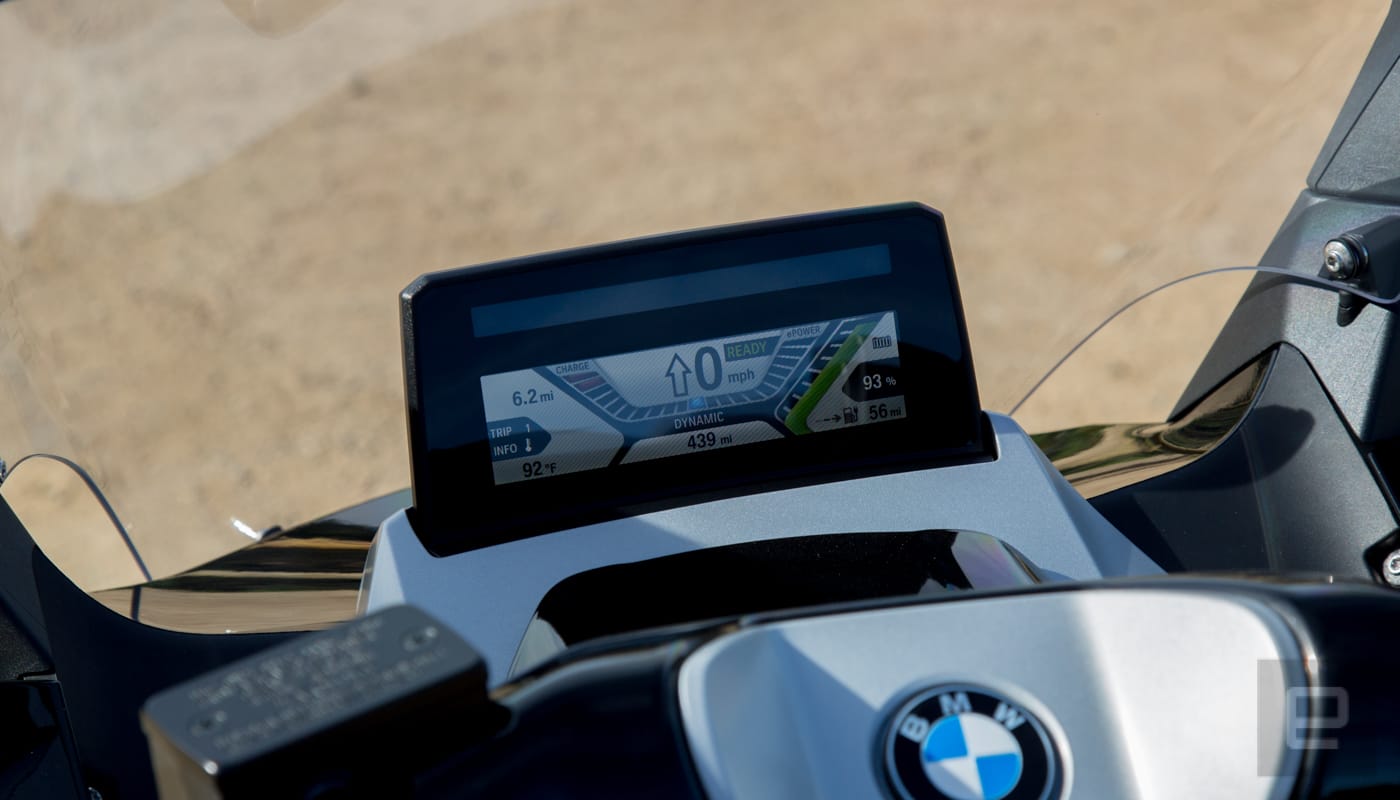
Typically I use the energy-efficient mode on a car or bike for testing, then forego it after a few hours in the name of speed. On the C evolution, the Eco Pro mode was more than adequate to handle nearly all riding situations. I only switched to Dynamic mode to power up a hill on Interstate 405 and blast away from traffic lights (thanks to a 48-horsepower motor that pushes 53 pounds of torque).
There are two other modes available: Road gives you all the power with a little regenerative braking while Sail removes all regenerative braking. I stuck with Eco Pro and Dynamic modes for 95 percent of my rides, since they offered the best combination of riding and regenerative energy creation.
Regardless of how you ride, there is the usual electric-vehicle caveat that if you spend any time at high speeds on the freeway, you’re going to burn through your charge. During an 11-mile jaunt on the highway at a steady 65MPH, I drained 20 percent of the battery. That’s something to consider if you’re interested in any EV for a daily commute that involves a lot of time on the freeway.
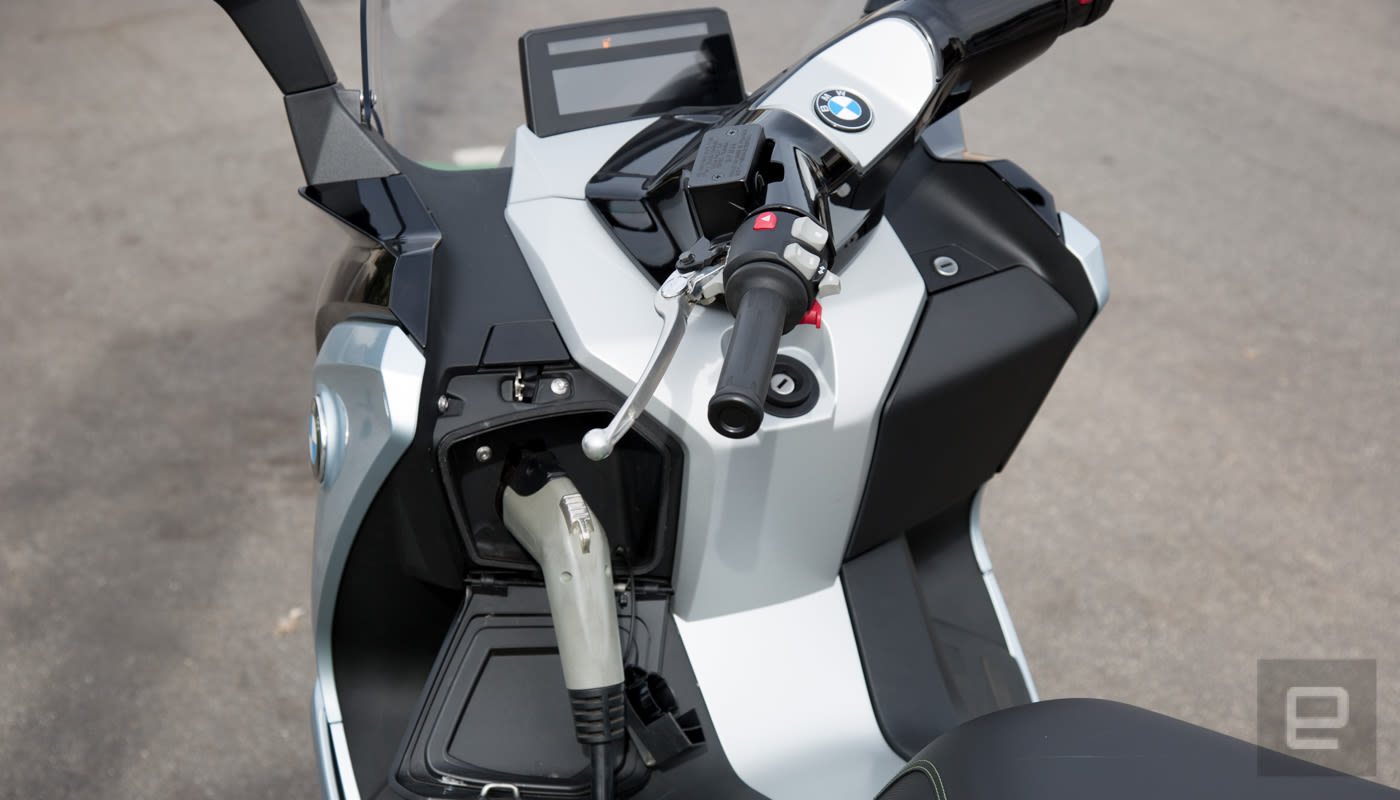
Recharging the bike after flying down the highway via the level 2 port took about 4 to 4.5 hours. It can also be charged with the 110-volt outlet you have at home, but expect it to take about twice as long. In a city like Los Angeles where malls, Whole Foods Markets and other businesses have chargers in their parking lot, pushing past the century mark during a single day wasn’t a problem — that is, if you’re cool shopping or eating while you charge. That might not be so healthy for the bank account.
That’s the rub with electric motorcycles and scooters. Unlike their four-wheeled counterparts, it’s tough to see a financial incentive. The gas-powered BMW counterparts to the C evolution both get 51 miles per gallon, so the monthly outlay of cash isn’t that high to begin with. There are the maintenance cost savings, but with a price tag that’s about $3,000 more than comparable with BMW gas-powered scooters, it’s tough to see the financial upside of the C evolution.
That said, as I rode through LA and saw a constant brown haze on the horizon, both over land and water, it was a reminder that petrol-powered vehicles contribute to that smog. In the grand scheme of things, it’s important to see the C evolution and other EVs as vehicles that will reduce that brown sky. Sure, on a spreadsheet buying one doesn’t add up, but when you take into account the impact vehicles have on our air, if you can afford to go EV and it fits into your lifestyle, it’s almost a no-brainer.
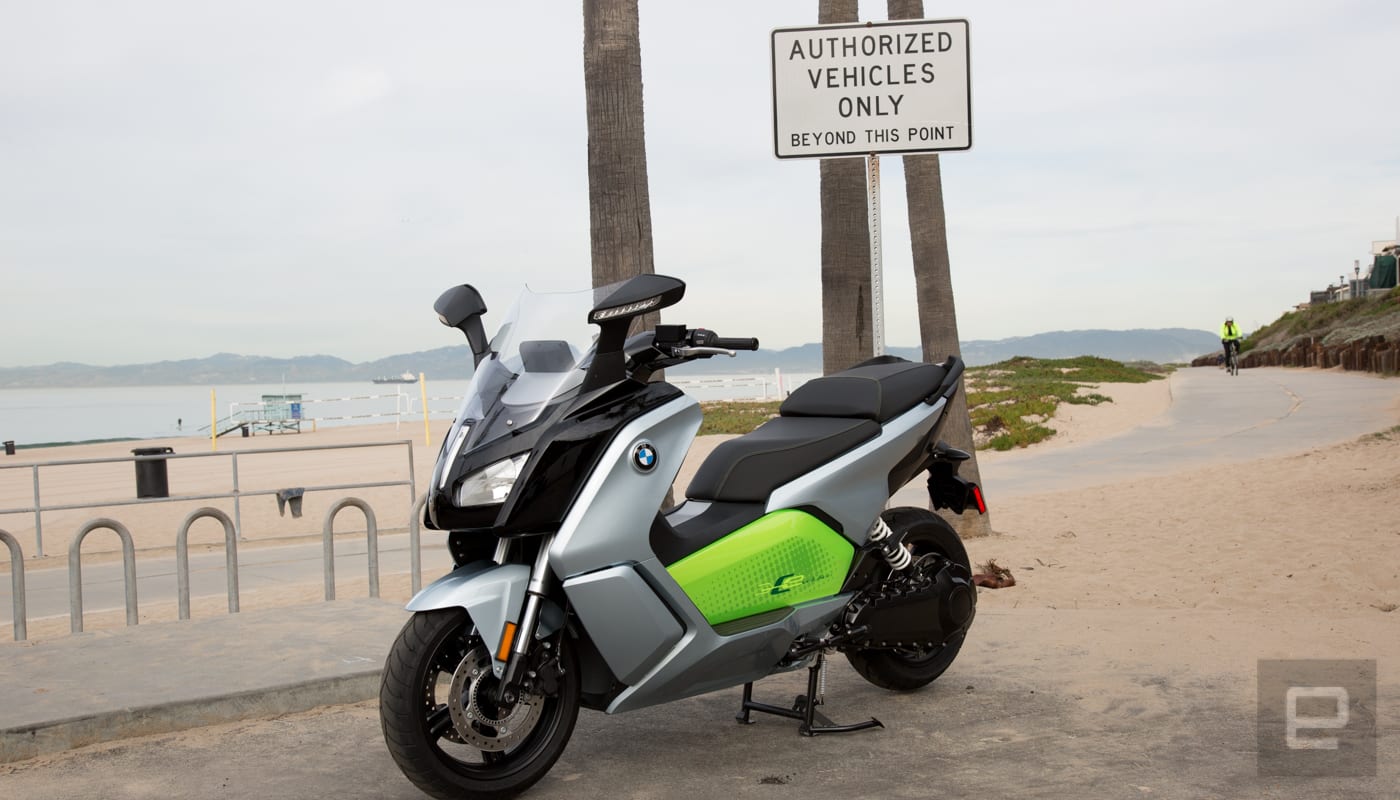
It also helps that the C evolution is a blast to ride, thanks to electric motor torque. Plus, the BMW electric scooter that’s purchased today might encourage the automaker to put electric motorcycles on the market tomorrow. Scooters make sense as EVs, but an electric motorcycle — especially one for BMW — well, those would be just too much fun to pass up.
Microsoft offers cheaper Surface laptops with lower specs
Microsoft wants to make it easier to buy into the Surface family. The company has begun offering a lower specced Laptop running Windows 10 S — Microsoft’s take on Chrome OS — and an Intel Core m3 processor in the US. It’ll set you back $799 versus the standard model’s $999 asking price, and is only available in the platinum colorway, as spotted by Windows Central. As for storage and memory, you’ll get 128GB and 4GB, respectively. If you’re thinking that sounds an awful lot like the $799 Surface Pro tablet, you aren’t wrong. But, that won’t get you a keyboard cover, which The Verge points out is a $130 add-on.
In related news, Microsoft has also debuted a new variation of the Surface Book 2 with less storage and a lower price. An entry-level model with 128GB of storage and a 13.5-inch screen, 8GB of RAM and an Intel Core i5 processor costs $1,199. For those keeping track at home, that’s $300 cheaper than the previous lowest-cost model, but the discount comes at a price: half the internal storage.
Other prices have dropped as well. A Surface Laptop with an i5 processor, 8GB of RAM and 256GB of storage is $200 cheaper now, in what seems like a temporary sale rather than a permanent price cut.
The pair of these “new” devices likely aren’t going to make any waves with power users, but they represent Microsoft’s next steps for the Surface line. Specifically, hitting mass adoption. The lower-priced Surface Laptop is perfect for people who just need a computer for email and word processing tasks, while the Surface Book 2 could sway potential MacBook Air and MacBook customers toward Windows.
The company recently posted 2 percent growth in its “Personal Computing” segment, and more moves like this could help drive sales and increase that relatively stagnant number.
Via: Windows Central
Source: Microsoft
British Airways is finally offering onboard WiFi
British Airways is meant to be a premium airline, however in one department it’s woefully archaic: WiFi. If you choose one of its planes for a long-haul trip, you’re typically stuck with its in-flight entertainment or whatever you remembered to download beforehand. Not anymore. At long last, BA is offering “high-speed” WiFi on a grand total of three aircraft. That’s right, three. The company promises that the number will rise to 118 planes over the next two years, however. That means you can finally stream Netflix and post photos to Instagram while you’re 35,000 feet up.
BA is, unsurprisingly, behind schedule with the roll out. Last April, it said customers in all cabins would “shortly” have access to WiFi on long-haul flights. Onboard connectivity would then be added to short-haul flights later that year, the company promised. (The latter will now commence “later this year,” a BA spokesperson told Engadget today.) Admittedly, this is Europe’s “first ever 4G high-speed inflight network,” which presumably comes with some technical challenges. It’s hard not to feel frustrated, though, when so many of BA’s competitors offer WiFi around the world.
BA will offer two WiFi tiers: Browse and Stream. Browse starts at £4.99 and limits your usage to basic webpages, messaging apps and social media. Stream, as the name implies, is suitable for Netflix and other video streaming services, and will start at £7.99. Both services will be available 10 minutes after take-off, once the aircraft has reached a height of roughly 10,000 feet. The first hour is free but after that you’ll need to sign up for one of the aforementioned packages. Browse nets you a minimum speed of 250Kbps, while Stream offers “no less than approximately 1Mbps.”
Source: British Airways (Press Release)
Chrome OS update comes with Spectre fix and new screenshot shortcut
Chrome OS version 64 has made its way to stable channel, which means it’s hitting your device very, very soon if it hasn’t yet. It’ll add a handful of new features and improvements, including a screenshot shortcut if you have a Chromebook with a 360-degree hinge like the Acer Spin. You only have to press the power and the volume down buttons at the same time, like what you’d do on an Android phone. It also adds a flag to make Split View easier to activate and gives Android apps the ability to run in the background. In addition, the update improves your lockscreen’s performance, presumably making it faster, and finally enables the use of VPN for apps downloaded from Google Play.
While Google is keeping the list of bug fixes under wraps until most people have installed the update, it has revealed that the version includes “additional browser mitigations” to protect your device against the Spectre and Meltdown vulnerabilities. Chrome OS version 64, of course, comes with version 64 of the Chrome browser. That you’re also getting improved pop-up blockers, as well as another feature that can protect you against malicious auto-redirects.
Via: 9to5google
Source: Chrome releases
Spotify now shows songwriter and producer credits
Spotify announced today that when listening through the desktop platform, users will now be able to view song credits. Starting now, right-clicking on a track and selecting “Show Credits” from the menu will bring up its performer, writer and producer credits as well as the source from which that info was provided. Spotify says that currently, those details have been compiled from record label-provided metadata and they may be incomplete in some cases, but going forward, the feature will become more functional and will use information from other sources.
Spotify hasn’t had a very smooth relationship with songwriters and artists in the past. It has agreed to multi-million dollar settlements in lawsuits that alleged it didn’t properly pay publishers and songwriters and in attempts to build more trust, it has limited its free streaming option and purchased a company that streamlines information on proprietary rights. Last year, Spotify also launched Secret Genius — a songwriter-focused initiative that includes an ambassador program, playlists, podcasts and an award show.
It’s a little surprising something as simple as credits took this long, and it’s probably not as good as higher royalties, but it’s a good move — one that Tidal also made in November — since everyone involved in creating a song deserves to have their work acknowledged. In a statement, Annika Goldman, Spotify’s director of music publishing operations, said, “The more we share information, the more opportunities we can help create for songwriters. This is just the beginning of making songwriter and producer credits more easily available to Spotify listeners, and we look forward to continually improving that information, in close collaboration with our music industry partners.”
Via: Pitchfork
Source: Spotify
Catch every touchdown, ad, and trailer: How to watch the 2018 Super Bowl
The Philadelphia Eagles and New England Patriots will meet Sunday at U.S. Bank Stadium in Minneapolis to compete for the Lombardi Trophy in the 52nd Super Bowl game, in one of the biggest live sporting events of the year. In fact, in the U.S. it’s one of the largest live TV events, period.
Whether you watch for the football, for the halftime show (which is being performed by Justin Timberlake this year), or for the commercials and movie trailers, there’s something for everyone. Let’s be honest — between the viewing parties, the packed bars and restaurants, and the general excuse to eat, drink, and be around friends and family, the Super Bowl is practically a national holiday.
To make sure you can tune in on game day, we’ve put together this guide featuring the best ways to watch online or otherwise, regardless of which device, service, or platform you’re using.
NBC app/website
Date: Sunday, Feb. 4
Time: 3:30 p.m. PT/6:30 p.m. ET
Where: U.S. Bank Stadium, Minneapolis
Teams: Philadelphia Eagles vs. New England Patriots
NBC is showing the Super Bowl this year, and it’s providing some simple options for everyone to watch the game for free. At noon PT on Sunday, February 4, NBC will begin airing its 11 hours of Super Bowl coverage — including the pregame show, the game itself, the halftime show, all the commercials, and even an episode of the TV show This is Us — on its NBC app, as well as through browsers on NBC.com.
Normally, you’d have to authenticate your TV subscription by logging in with your provider’s credentials to watch on these platforms, but those restrictions will be lifted for a limited time on game day. Below are the easiest options to access the app. And continue on below if you’re looking for an alternative — we have you covered there as well.
Smartphones and tablets
For smartphones and tablets, downloading the NBC app for Android or iOS is easy as pie. However, you could also download either the Yahoo Sports or NFL Mobile apps to watch the game, both of which are available on iOS and Android as well.
Web browsers
As we mentioned above, the free game-day stream on NBC.com or NBCSports.com will be your best bet. If your laptop or desktop computer has an HDMI output, this is a free and easy way to connect to your TV using your browser of choice. If you happen to have a Chromecast, you can also cast the game from Google Chrome directly to your TV. Easy peasy.
Streaming devices and game consoles
The aforementioned NBC app is currently available on several streaming devices, including Android TV, Apple TV, Fire TV, Roku devices, and Xbox One consoles. Simply download the app to your preferred streaming device and you’re good to go. PlayStation 4 users, however, will need to be subscribed to PlayStation Vue (or use a free trial account) in order to watch the game. But don’t worry, we’ve got you covered there as well.
Live TV streaming services
Cable cutters who have subscribed to one of the numerous live TV streaming services out there — PlayStation Vue, Sling TV, Hulu Live TV, DirecTV Now, YouTube TV, etc. — can watch the game, provided (and this is key) that NBC is offered in their market and/or as part of their channel package. Luckily, each of these services includes a free trial period which usually lasts seven days or more, which is plenty of time to get your game on. Just be aware that you will be charged for a month’s subscription if you don’t cancel before the trial period ends, so go ahead and set that reminder now.
Another streaming service to consider is FuboTV, an up-and-coming live-streaming service that focuses almost exclusively on sports programming. Subscribers will be able to watch the Super Bowl on their local NBC affiliate, again provided local channels are currently available in your market. While the service normally costs $20 for your first month and $45 per month after that, a seven-day trial does exist for those who haven’t used the service yet. You’ll be able to sign up for the trial and watch the Super Bowl, and provided you cancel before your complimentary seven days are up, it’ll all be for free.
Antenna TV
If you’ve got an HD antenna, you can have your cake and eat it too, as it were — as long as you get NBC in your area, of course. Here’s a handy-dandy guide to find out if you can get NBC at your home base, just type your information into the boxes provided. If you don’t already have one, here are some great options for antennas to get you hooked up ahead of the game. If it’s coming at you fast, your local Best Buy or other electronics store should carry at least one of our favorite options, if not more.
Cable or satellite
Alright, we know you already know this but we had to add it just to be thorough. If you subscribe to a TV provider, the absolute easiest way to watch is on your local NBC Sports affiliate, and the same goes if you have a satellite hooked up. This is obviously going to be the most reliable option overall, as you won’t have to worry about internet connection speeds or dropouts, nor will you have to fiddle with app downloads or browser windows.
Editors’ Recommendations
- Gentlemen, start your engines: Here’s how to watch Formula 1 online
- ‘Sunday Night Football’ will arrive on all your devices for the 2018 season
- Cutting the cord? Let us help you find the best streaming TV service
- Watch the big game and save some cash with these digital TV antenna deals
- Verizon will help you watch the NFL … even if you’re not a Verizon customer
Garmin vívofit 4 review: two steps forward, one step back
There are plenty of cheap fitness trackers on the market, but often the lower price tag means getting fewer features. That’s still the case with Garmin’s new vívofit 4, but this device aims to bridge the gap between lower end wearables and the other $100-plus devices out there.
The vívofit 3 was one of our favorite fitness trackers in 2017. Is the vívofit 4 a worthy successor? Let’s find out.
Garmin vívofit 4 review notes: Our first vívofit 4 review unit had a bug that would stop the device from counting steps. Our second review unit has had no such issues.
I’ve been using the Garmin vívofit 4 as my main fitness tracker for roughly two weeks. The Google Pixel 2 XL has been my smartphone companion of choice for the duration of this review.
Show More
Design
Related reading
Garmin vívosport review
What happens when you take one of the best fitness trackers on the market and add a new color display, all-day stress tracking, strength training, and more in a thinner form factor? You get the vívosport, …
Garmin has done a pretty good job at making the vívofit 4 look like the company’s pricier fitness trackers, like the vívosmart 3 or vívosport. The vívofit 4 is slim, measuring just 11 mm thick and 23 mm wide — slightly wider than its predecessor. It’s light, too, at just 25 grams. I often went through the day without realizing it’s still on my wrist, which is important for a fitness tracker.
One of the big differences in design between the vívofit 3 and 4 is the bump up to a larger, color screen. The vívofit 4 has a slightly larger 11 x 11 mm display (the 3’s was 10 x 10 mm). The vívofit 4’s screen has a backlight too, which can be turned on by pressing and holding the physical button for about a second.

The display is easy to read outdoors, though it can be difficult to read in average-low light when you’re inside if the backlight isn’t turned on. It feels a little odd the backlight doesn’t turn on when you click the button, but that’s probably to keep that battery going for a full year.
The included strap is comfortable enough to keep on your wrist all day, though it feels more plasticky than the vívosport’s strap. It also comes with a standard watch-style clasp this time — likely a welcome change for those upgrading from any other vívofit model.


You can buy the vívofit 4 in three different color options — black, white, or black/lime green speckle. All three of those bands can be purchased separately for $19.99 a piece, or you can spring for the two pack of merlot and navy speckle bands for $29.99.
Features and performance

The vívofit 4 costs $80 — $60 less than the vívosmart 3 and $120 less than the vívosport. The lack of a GPS and a heart rate monitor means it isn’t for everyone, but it’s definitely an attractive device for those who just need the basics.
It’ll track your steps taken, calories burned, sleep, and distance traveled, though the lack of a GPS means you won’t get hyper-accurate distance data.

See also
The best heart rate monitors and watches (January 2018)
Keeping track of your heart rate is one of the most essential metrics when it comes to leading a healthy lifestyle and improving your fitness training and finding a good heart rate monitor is part …
Normally lacking a heart rate sensor would be okay. Previous vívofit models allowed you to connect to an external heart rate sensor thanks to ANT+ connectivity. For some reason Garmin didn’t find it necessary to include ANT+ support with the vívofit 4, which is quite frankly a shame. Heart rate sensor connectivity made the vívofit line stand out from other similarly priced trackers, and now it’s gone. This alone makes it difficult to recommend over the competition.
The removal of ANT+ connectivity is a shame.
Garmin says moving to a color display and including more features built into the software made the company concerned about the amount of code space available to support ANT+ connectivity. A Garmin representative told Android Authority it could be added back “in the future.” We sure hope this feature returns with the vívofit 5.

The vívofit 4 supports Garmin’s wonderful automatic activity recognition feature, Move IQ. That means you won’t need to manually start an activity before your workout. It auto-detects activities like walking, running, biking, using an elliptical, and swimming, though it won’t track your swims — you’ll need to spring for a more expensive device if you want lap/speed data.
The vívofit 4 comes with a 5 ATM water resistance rating, which means you can take it in the pool or shower.
Even though it has a rating of 5 ATM, the vívofit 4 won’t track your swims — you’ll need to spring for a more expensive device if you want lap/speed data.
If you’re just interested in the vívofit 4 as a pedometer, you’ll be happy to hear that it’s great a tracking steps. After we received our second review unit, the vívofit 4 was able to keep up with the vívosport and Fitbit Charge 2 in terms of step count accuracy.
One other useful feature is the move bar. Throughout the day, the vívofit 4’s colored move bar fills up and notifies you when you’re stationary for too long. Walking around for a few minutes will clear the move bar, or you can turn these notifications off if you don’t want to be bugged throughout the day.

During exercise, the vívofit 4 keeps track of your steps taken, total exercise time, and calories burned. It will also show you distance, pace, and speed information but these metrics are based on accelerometer data, so they’re not going to be as accurate as you might like. Still, the fact that the device attempts to provide these metrics will help give users a general idea on their performance level.
The vívofit 4’s accelerometer was hit and miss throughout our testing period, but it was mostly a miss. It often overshot distance and speed by a lot. I took a three-mile run on the treadmill and kept a steady pace of 7.8 mph. In the screenshots below, you’ll see the vívofit 4 recorded my distance as 2.57 miles, my best pace as 2:30 minute/mile, and my max speed as 23.9 mph!


Sleep tracking ranges from mostly accurate to wildly inaccurate, depending on what you’re doing before you go to bed. There are times when the vívofit 4 recognized I was reading in the living room before bed, and did not record that I was sleeping. Other times I wasn’t so lucky. Watching Netflix before bed resulted in the vívofit 4 entering sleep mode, which means it looked like I slept 12 hours multiple nights in a row. Even worse, during the time that I was watching Netflix, the device recorded that I was in deep sleep mode — not even light sleep.


You can alter mis-recorded sleep and activity data right from the Garmin Connect app, but we wish the device would record the data correctly in the first place.
Garmin Connect records your sleep levels and movement throughout the night, as well as how much of your sleep was deep, light, and if you were awake. The app also offers weekly sleep trend graphs, though they’re not displayed in a very helpful fashion. We much prefer the line graphs Fitbit’s app offers.
Luckily you can alter mis-recorded sleep and activity data right from the Garmin Connect app, though we wish the device would record the data correctly in the first place.

Related
Fitbit Ionic review
Fitbit is probably the most well-known company in the fitness tracker world, but smartwatches are new territory. The closest they’ve come to making a smartwatch was 2015’s Fitbit Blaze, but even that wasn’t all that …
Despite having a screen (albeit a small one), the device has very few smart features. You can set alarms, but there’s still no way for the vívofit 4 to send you smartphone notifications. It’s not like we want to read full emails on that tiny screen, but at least some vibration alerts would be nice. It’d be extremely useful for the device to vibrate and show an email icon when a new email is received or display a phone icon when someone’s calling your phone. It’s a missed opportunity for a device with a display to not offer any type of smart notification, especially when most other wearables on the market offer these features.
It’s a missed opportunity for a device with a display to not offer any type of smart notification, especially when most other wearables on the market offer these features.
We understand the argument that smartphone notifications would kill the battery faster, but even if that were the case it’d still last way longer than most other fitness trackers. We’re sure many users would be happier with eight-month battery life and vibration alerts than with no alerts and year-long battery life.

Admittedly “year-long battery life” sounds way sexier than “eight-month battery life,” and Garmin feels that way too. That’s right — the vívofit 4 takes two SR43 coin cell batteries, which Garmin says will power the device for up to a full year. This is hugely beneficial for those who never want to take their fitness tracker off to charge it up. There’s also no proprietary charging cable to worry about losing.
Okay — Garmin included some smart features here. The vívofit 4 has a stopwatch, a countdown timer, a weather widget, and a find my phone feature which will ring your phone if it’s connected with Bluetooth. There are also a handful of different watch faces to choose from, which can be customized with the color of your choosing.
| Display | 11 x 11 mm color, transflective eight-color memory-in-pixel (MIP) display 88 x 88 pixels |
| Battery | Up to one year 2 x SR43 user-replaceable |
| Memory | Four weeks of activity data |
| Materials | Silicone or TPU |
| Water resistance | 5 ATM |
| Connectivity | Bluetooth Smart |
| Notifications | Move reminders, alarms |
| Compatibility | Android, iOS |
| Dimensions and weight | Small/Medium: 19 x 9.4 x 122-188 mm, 25 g
Large: 19 x 9.4 x 148-215 mm, 25.5 g |
| Colors | Small/Medium: white, black, lime green speckled Large: black Interchangeable bands: speckled merlot, speckled navy pack |
The Garmin app

Garmin Connect seems to improve every time we review a new Garmin device. It’s not the most approachable fitness app out there, but it works.
The newest improvement to Connect is the My Day screen, which is where you’ll spend most of your time in the app. This is the main screen, which displays your daily steps, intensity minutes, calories burned, sleep, and even an activity summary from the last seven days. Tapping on any one of these sections will allow you to dive deeper into that activity.


The navigation tab at the bottom of the app hasn’t changed. From there, you can get quick access to the Challenges, Calendar, News Feed, and Notifications sections. Challenges lets you connect with and challenge other Garmin users. The News Feed section shows your recent activities from the previous 30 days.
The Calendar section lets you go back in time and see all the activities recorded for a particular day. This is a novel idea — it can be quite useful — but it’s not implemented as well as it could be. Once you open up the Calendar, all you see are a bunch of differently colored bars on each day of the week. There’s no indication whatsoever about which colored bar correlates to which activity, so unless you memorize what each bar stands for you’re going to play a guessing game every time you look up previous stats. It’s a minor annoyance, and certainly won’t bug everybody.


Garmin, your app is finally good. Now focus on adding more third-party app support.
If you use any other applications like MyFitnessPal, Strava, or Office 365, you can easily sync your activity data from Garmin Connect. Unfortunately those are the only third-party apps that work with Connect, which is still far behind Fitbit’s extensive list.
Gallery

Should you buy it?
The Garmin vívofit 4 is available now on Garmin.com and Amazon for $79.99, which is $20 cheaper than the vívofit 3 at launch. That cheaper price tag doesn’t come without consequences, though.
If you use your vívofit 3 with a heart rate monitor, the vívofit 4 should be an obvious pass unless you’re okay with logging HR data in another app. As for the competition, the Fitbit Alta (non HR) offers similar features for a slightly higher price tag, but that also means you’re getting into vívosmart 3 pricing territory. The Huawei Band 2 Pro is also a viable option for $10 less, and it comes with built-in GPS and heart rate sensors.
In a lot of ways, the vívofit 4 is a worthy successor to the vívofit 3. It’s more comfortable, with a better strap, a new color display, and plenty of useful extras like a weather widget and stopwatch. The lack of heart rate monitor connectivity is unfortunate. Hopefully it returns with the next model.
The vívofit 4 is an inexpensive fitness tracker that you basically never have to take off, and it keeps track of the basics. We just wish it tracked the basics a little better.
Throughout our two weeks of testing, the vívofit 4 was so close to delivering accurate results but ultimately fell short more often than we’d like. It offers users a more general idea of their performance levels, which is why most people will buy the vívofit 4. It’s an inexpensive fitness tracker that you basically never have to take off, and it keeps track of the basics. We just wish it tracked the basics a little better.
Next: How to get into great shape with a fitness tracker in just 7 minutes… a day

