


‘Brawlout’ wants to beat ‘Super Smash Bros.’ at its own game
The first Super Smash Bros. game launched on the N64 almost 20 years ago and became an instant classic. Every main Nintendo console since has brought a new entry to the series, but the inevitable iteration on the Switch hasn’t been announced. Tomorrow, gamers will get the next best thing: Brawlout, the 2D fighter heavily inspired by the Smash Bros. franchise. But will reaching Nintendo’s console first let Brawlout win fans’ hearts?
The indie game has plenty to attract players itching for a polished 2D brawler. Brawlout’s roster isn’t deep at 8 playable characters (and 10 slightly-tweaked alternate versions of those, a la Street Fighter’s Ken), but more are scheduled in the next few months. The game is so close to Smash Bros. that veterans will be right at home after a few minutes of play. And at $20, it’s cheap enough to slake your Smash Bros. thirst until that franchise comes to the Switch.
But Brawlout has something not even a top-tier Nintendo title can offer: After it arrives on the Switch, Brawlout is coming to PS4 and Xbox One early next year.
That could propel Brawlout beyond the game it’s imitating. Finally, Smash Bros. fans without a Nintendo console will be able to play the next best thing. And, heck, they might end up preferring the indie underdog — its developers made their own tweaks to the Smash Bros. formula that favor more aggressive play. Specifically, they did away with any sort of shields or blocking and restricted throwing to specific ‘grappler’ characters. Without defensive tools for players to lean on, they must perfect the intricate timing between enemy attacks to make their move.
“Just by living in the same genre there are always going to be fans of [Smash Bros.] who find similarities, but Brawlout is much more closely related to traditional fighting games like Street Fighter and Mortal Kombat. We’ve focused heavily on aggressive mechanics so that new players will be able to easily nail impressive combos while not feeling overwhelmed by friends who’ve had a bit more practice,” Angry Mob CEO Bogdan Iliesiu told Engadget. “It’s easy to learn and difficult to master, which we think is a good way to appeal to both casual players and gamers looking to dedicate the time to honing their skills to become pros.”
Angry Mob strived to make a game the pros would play, and cultivated a group of about 30 skilled beta players for feedback. As part of a much smaller studio than Nintendo, Brawlout’s developers can quickly make changes to please the game’s playerbase, something they see as a strength.
Brawlout launches on #NintendoSwitch December 19th!@NintendoAmerica @NintendoEurope @NintendoVS #eShop
(Headphones 🎧 Recommended) pic.twitter.com/diHtuiy8bh— BRAWLOUT 🎮 DEC 19 (@brawloutgame) December 8, 2017
But high-skill play isn’t Smash Bros.’ biggest draw — rather, that its roster is stuffed with Nintendo stars and other video game icons. Without some of the most recognizable characters in gaming, Brawlout has an uphill battle to attract new players.
It does have the next best thing, though: A small but growing number of heroes borrowed from successful indie titles. The sword-wielding protagonist from Hyper Light Drifter was added to the game back in August, while the luchador wrestler Juan from Guacamélee joined in early December. Assuming contract negotiations pan out, Angry Mob plans to add another indie game luminary in January and possibly another in March. And the plan is for every platform to get the new brawlers at the same time.
As anyone who publishes on multiple platforms knows, however, it’s a challenge to coordinate new content releases. Because Brawlout is built on Unity, it’s easy to support the game on all platforms, Iliesiu said. But they still have to slog through each particular certification process before adding content.
But first Angry Mob has to release the game on PS4 and Xbox One, which they aim to do in early 2018. There’s still a list of features and guidelines to get running on each platform. Once it comes out on the other consoles, non-Nintendo players will finally get a taste of Smash-like fights. Unintentionally, this will immunize Brawlout from a big problem facing the Smash Bros. community: Dwindling stock of the superior GameCube controller. But even though all leading consoles will carry the game, cross-platform play will still be a pipe-dream. Not impossible, but difficult and unlikely, Iliesiu said.
“[Cross-play is] really tricky for a fighting game because, in a fighting game whenever you do cross platform, you have to have a server. And if you have a server in our game, instead of four frames of input lag, you get like at least eight frames on top of the input lag and the experience won’t be as good. So we have to see. We hope to have a large player base on each platform and that solves it all,” Iliesiu said.
After it’s out on PS4 and Xbox One, the game will be within reach of another milestone: Finally exiting Early Access on Steam, which it’s been in since publicly launching in April 2017. There are a few networking tools to add first, and then the Brawlout team can focus on monetization. As an indie title, Iliesiu made it clear that growing the playerbase was more important than scoring microtransations to unlock content, so new brawlers will be free for everyone. Instead, Angry Mob might focus on selling character skins and other visual additions (which they’ve already started doing with streamer-designed skins), but plans are still up in the air.
In the vacuum left by a Nintendo console without a Smash Bros. game, Angry Mob is racing to grow its community while building the game’s roster. At some point in the future, a Smash Bros. game will arrive on the Switch, and the faithful will come flocking. But Angry Mob believes its game is distinctive in its own right.
“We’ve focused on a different approach to the combat flow, with more focus on aggressive play, so that’s where I’d say our main difference is. We’ve also incorporated a Rage Mode, to allow players to get stronger as they take more damage, which we think lends itself to a more balanced round,” Iliesiu said. “Our biggest surprise was how well it lent itself to a party game, while still retaining the mechanics to allow it to stand as a competitive fighter. While our pro players might come from fans of other platform fighter games, we tend to see a lot of new players who are more interested in having a fun time that has them laughing until they hurt.”
Brawlout costs $20 on all platforms and comes out tomorrow on the Switch. Xbox One and PS4 versions are slated to come out sometime in early 2018, but it’s also available on Steam.
Magic Leap tips its mixed-reality hand with a Sigur Rós app
We really don’t know a lot about Magic Leap, the secretive mixed reality company that made waves back in 2015 with a huge investment from Google. Magic Leap has been experimenting with light-bending nanomaterials, and has promised Madefire mixed reality comics for an undefined launch day and may or may not have leaked a backpack-style prototype. The thing is, no one knows what Magic Leap’s technology consists of.
According to a new report at Pitchfork, however, part of the tech might just be concerned with music. Iceland’s own Sigur Rós has been working with Magic Leap for the past four years, says Pitchfork, on a new audiovisual project called Tónandi, an app that might show up on a Magic Leap device. Pitchfork‘s Marc Hogan got to try out a 10-minute demo of the app, which he says felt like “an entire ecosystem (made) out of sound.” As you can see below, it’s a dreamy sort of aesthetic, and Hogan notes that the app was well aware of his surroundings, instead of just dropping virtual objects on top of real ones.

Image credit: Magic Leap/Pitchfork
While Hogan praises his time in the rig, which he is strictly unable to describe thanks to non-disclosure agreements (no surprise there), he also notes that Tónandi is still somewhat of a work in progress, and a solution searching for a problem. Even the tech-savvy band is at odds to figure out a definitive purpose for the app. Lead singer Jónsi Birgisson told Hogan, “This could maybe replace everything that we know: phones, TVs, computers…”
Bassist Hólm has a more prosaic idea. “This could be the new way to release an album,” he said. “Maybe this is the future of that.” If nothing else, this new experience shows us another tantalizing, yet limited glimpse of Magic Leap’s mixed reality plans as we all hope for an actual product release… some day.
Source: Pitchfork
Apple Watch Series 3 Costs More Than $10/Month on Most Carriers, Can’t Be Reactivated Without Fees
When the Apple Watch Series 3 first launched, carriers in the United States and other countries where the LTE version of the device is available offered three free months of service and waived activation fees.
That fee-free grace period is coming to an end, and customers are getting their first bills that include the $10 per month service charge.
If you have an Apple Watch Series 3 with LTE functionality, you’ve probably already learned that $10 is not all it’s going to cost per month. On carriers like AT&T and Verizon, there are additional service charges and fees, which means it’s not $10 per month for an Apple Watch, it’s more like $12-$14.
On Verizon in California, for example, there’s an additional $1.55 in fees on top of the $10 per month charge.

On AT&T in North Carolina, fees and surcharges add an additional $4.39 to the $10 per month charge, bringing the total to almost $15 per month for an Apple Watch. In some states, these fees on Verizon and AT&T are even higher.

If you’re planning to avoid fees by deactivating service and activating again when it’s needed, that may not be the best plan of action. As Macworld’s Michael Simon points out, line activation fees that come with reactivation can be hefty.
Though the Apple Watch Series 3 is linked to the cellular number of the iPhone on a given carrier, it requires adding an additional line to a cellular service account. When you cancel and re-add a line, there’s an activation fee involved. On Verizon, for example, if you deactivate the Apple Watch Series 3 and then want to activate it again at a later date, there’s a $25 charge. Suspending service doesn’t work, as it requires a $10/month fee, aside from a one-time 30 day free suspension on Verizon. From Macworld:
Because Apple Watch uses NumberShare on Verizon, it’s not considered a month-to-month or prepaid device, so it’s not so easy to skip a month of service. According to the Verizon representative I spoke to, I have two options:
– Suspend my Apple Watch service for up to 90 days at a time. This will cost me $10 a month, so that’s not really an option.
– De-activate the watch completely. That will wipe it from my account and bill. However, I will need to pay a $25 activation fee once I decide to reinstate service. That’s a recurring change. That means Verizon will essentially charge me for two and half months service every time I turn it off and on again.
Like Verizon, AT&T charges $25, while Sprint charges $30. T-Mobile no longer charges activation fees, so it may be more affordable to cancel and reinstate service if you’re a T-Mobile subscriber.
On AT&T and Verizon, though, that $25 re-activation fee is the cost of two months of service, or close to it, when taxes and fees are included, meaning it’s not really worthwhile to start and stop service if you’re going to do it more than once or twice a year.
Macworld was also told that if he stopped and started service he could run into problems when attempting to reactivate the watch, but it’s not entirely clear why.
With the three-month grace period, most Apple Watch owners have likely learned whether or not the $10-$15 per month fees are worth the freedom of an always-on wrist-worn cellular connection. Neither Apple nor the carriers in the United States were fully upfront about the additional service fees and taxes and the hassle involved with deactivation/reactivation, though, so there are bound to be some users who will feel tricked when the first full Series 3 bill comes in.
Related Roundups: Apple Watch, watchOS 4Buyer’s Guide: Apple Watch (Buy Now)
Discuss this article in our forums
Could Nokia be planning a new QWERTY keyboard phone?
As first spotted by Nokia enthusiast website Nokia Power User, a new Nokia smartphone was recently approved by the FCC. Named TA-1047 in the documentation, details on the possible handset are sparse, but it is rumored the device will be dual-SIM, and will have a diagonal measurement of 5.5-inches, and dimensions of 133 x 68 mm (5.23 x 2.67 inches), making it smaller than the budget-friendly Nokia 2.
While rumors are still circulating about the Nokia 9 and an upcoming reboot of the Nokia 6, this seems to be a different device that isn’t headed for the U.S. market. Nokia Power User revealed that an uncredited leaker had information the TA-1047 would be a smaller smartphone with a full QWERTY keyboard; more akin to an old-school BlackBerry than an modern Nokia smartphone.
The news is entirely uncredited, as mentioned, so it’s certainly not worth betting the farm on it just yet. However, if NPU’s leaker is correct, then the phone would feature a 3.3-inch, 480×480 resolution display, be powered by a Qualcomm Snapdragon 230, and be running an operating system referred to as “Kai OS.” Whether this OS will be a re-skinned version of Android or Nokia’s own OS will remain to be seen, but it might be worth considering that Kai OS could be a modified version of the Series 30+ OS seen on the 2017 Nokia 3310. Given Nokia has run stock Android on most of its recent smartphones (and considering the recent launch of Android Oreo Go), it seems more likely this device will be running a custom OS.
Other rumors from GizChina have floated the idea this could be the long-awaited 4G model of the 2017 Nokia 3310, and highlight the TA-1047’s Wi-Fi and 4G connections as being perfect for an upgraded Nokia 3310. GizChina also agrees that this model will not see sales in U.S. markets.
With BlackBerry having brought back the QWERTY keyboard-equipped phone with its KeyONE, might we be seeing a resurgence in the market? It’s unlikely, but if the leaks are correct that the TA-1047 will come equipped with a full physical keyboard and lower-end specifications, then this phone could be filling in an otherwise unknown hole at the budget end of the market for such a device.
Editors’ Recommendations
- Nokia 3310 3G review
- Nokia 9 rumors suggest a strong 2018 for the reinvigorated company
- BlackBerry Motion review
- The new BlackBerry Motion does away with the KeyOne’s best feature
- Everything you need to know about the Nokia 2, a budget-friendly smartphone
This $7 digital tire gauge is a must-have for every vehicle
Knowing your tire pressure is important!
Right now you can pick up this Tekton digital tire gauge for just $7 at Amazon, which is a savings of $4.99 from its regular price. This may seem like a silly thing, but having one in the glove compartment can be a big help in many cases. It turns on with the press of one button, and the digital display will quickly read out your tire pressure.
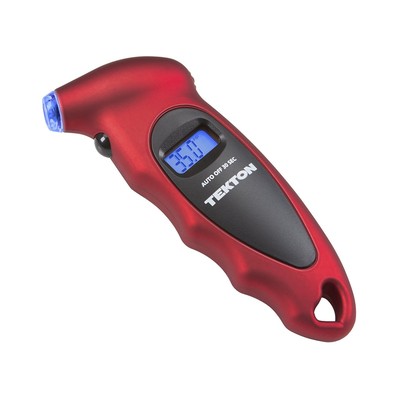
- Lighted nozzle and display screen for ultimate visibility in low light or at night
- Digital display instantly and clearly shows exact reading, eliminating the guesswork of analog gauges
- Nozzle seals to valve stem for quick and accurate measurements
- Simple push-button control turns unit on, selects the desired range, and automatically shuts off after 30 seconds to save the batteries
- Ergonomic design comfortably fits hand and features a soft, non-slip surface for sure grip
These are great for stocking stuffers and to have in all the vehicles you own. Be sure to grab one (or five) of them now!
See at Amazon
Samsung’s Galaxy A8 might be one of 2018’s best budget phones
Samsung might have something really special here.
Samsung releases a lot of phones each year, and its two standouts are typically entries in the Galaxy S and Note lines. Next year, however, we could see something pretty special in the form of the Galaxy A8 (2018).
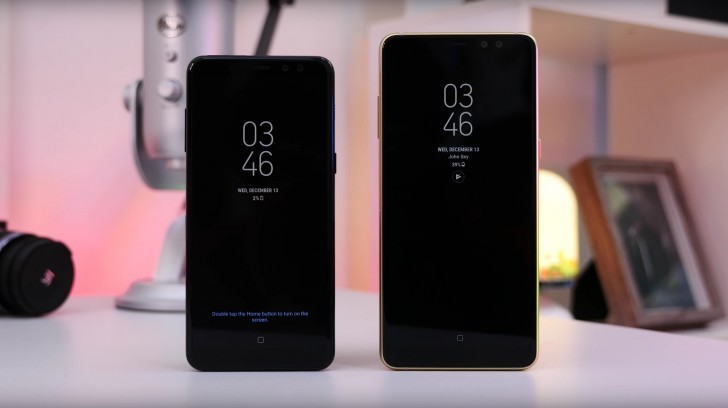
The Samsung Galaxy A8 and A8+ (2018)
The Galaxy A series of devices from Samsung isn’t anything new, and the main focus of it has always been on offering quality phones for not a ton of cash. The A8 and A8+ are expected to be the two most powerful Galaxy A devices released in 2018, and thanks to a recently leaked hands-on video, we’ve got a pretty clear picture of what to expect from them.
Similar to the Galaxy S8 and S8+, the A8 and A8+ will have more similarities than differences. Both phones feature Samsung’s own Exynos 7885 processor, 4-6GB RAM, 32-64GB of expandable storage, and IP68 dust/water resistance. Both devices will also have the same 16MP f/1.7 rear-facing camera, as well as a 16MP and 8MP front-facing camera package. This makes the A8/A8+ the first Samsung devices to come equipped with dual front-facing cameras, and this enables a front-facing Live Focus mode, as well as a face unlock feature.
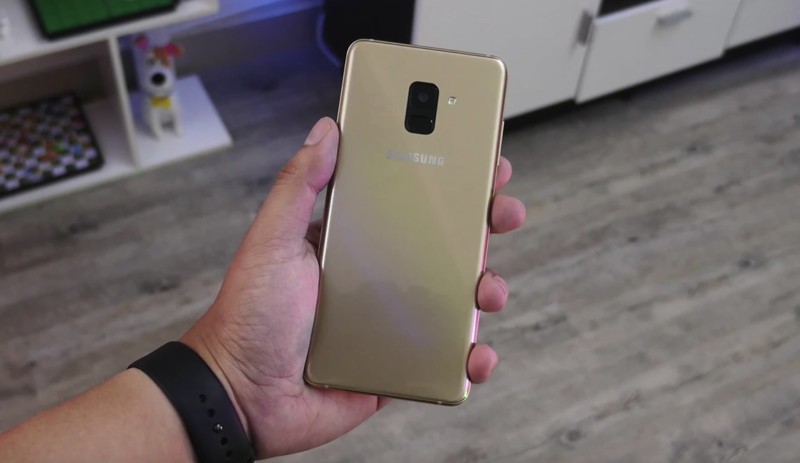
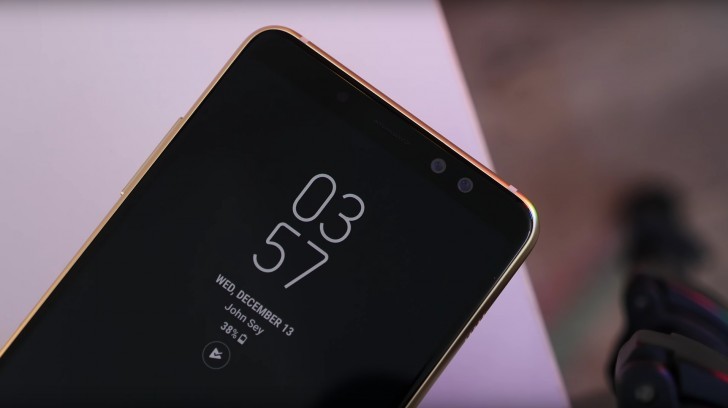

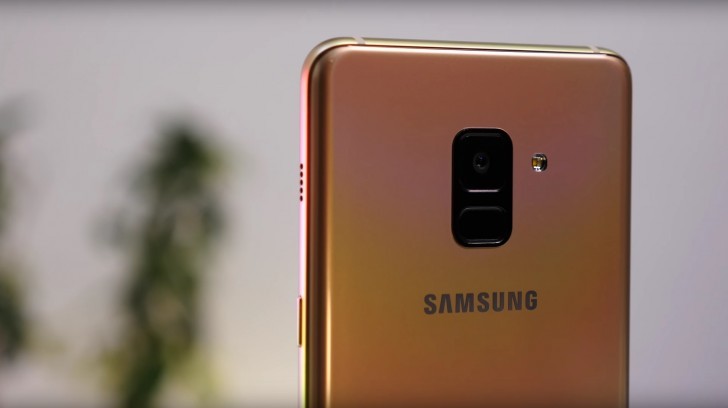
As if that wasn’t enough to get excited about, both the A8 and A8+ will offer Super AMOLED Infinity Displays not unlike what’s found on the S8. Both the A8 and A8+ are said to have a max resolution of FullHD+, and while that might not be as crispy as the likes of the S8 or Note 8, you still have an 18:9 aspect ratio, extremely small bezels, and rounded corners.
Top all of this off with metal bodies, a fingerprint sensor below the rear camera, and 3,000 mAh and 3,500 mAh for the A8 and A8+, respectively, and there’s a lot to like here.
Samsung is currently expected to announce the A8/A8+ at CES this coming January, and although pricing details have yet to be announced, we’d guess that these phones will be available at or under $500.
Samsung Galaxy S9: Rumors, Specs, Release Date, and More!
Samsung Galaxy Note 8 review, 3 months later: A polarizing powerhouse

You can’t ignore the power of this company.
Samsung retains a massive influence in the smartphone world, holding an outsized mind share even relative to its legitimately massive market share. The Galaxy Note 8 is a perfect example of this — it doesn’t sell nearly as well as the Galaxy S line, yet it’s held up as the pinnacle of what Samsung is capable of on account of its bigger size, extra features and super-high price.
We published our Galaxy Note 8 review over three months ago, back on September 5. In that time we’ve continued to use other phones, watch the industry evolve and let the “new phone” honeymoon phase fully wear out on the Note 8. Now that we have more time under our belt with the phone, it’s time for a revisit and a fresh review. Here’s our new take on the Galaxy Note 8 after over three months of use.
See at Amazon

Just gorgeous
Galaxy Note 8 What I still love
My interest in the latest Samsung phones primarily centers around their hardware. All aspects of it. And the Note 8 has a whole lot of room to show off Samsung’s quality. Yes this is a somewhat derivative design from all the way back to the Galaxy S6 edge, but that shouldn’t take away from the fact that Samsung has continued to refine its processes to make something wonderful. The huge panes of curved glass just fit so perfectly with the metal sides, and everything has a great feel to it. Though the Note 8 is a bit bulbous and kind of bursting at the seams compared to the Galaxy S8+, I still can’t find an angle where it doesn’t look great.
The Note 8 is beautiful from every angle, and concerns over fragility are overblown.
I continually hear complaints about the fragility of the last few generations of Samsung phones, but I have yet to experience any such issues. Yes the back is glass, and yes glass will pick up scratches over time. That’s just the tradeoff we have to deal with in order to get this striking design and wireless charging. I feel like I could easily enjoy a Note 8 with a flat display rather than a curved one, but once again it’s just a tradeoff in terms of making the phone a bit narrower and more striking. Both decisions are worth it in my view.
And it all wraps around this ridiculously great display. It’s massive. It’s bright. It’s just beautiful in every aspect. When you crank it all the way up this display can reach eye-searing brightness levels, which you immediately miss when using any other phone. Viewing angles are great, colors are punchy and everything is super crisp. Samsung has its displays locked in, and this is one of the Note 8’s strongest features. You just can’t complain about anything here.


Pixel 2 hype aside, the Note 8 has a great pair of cameras.
It turns out that even though the Pixel and Pixel 2 have taken over the largest portion of camera hype in the last year, Samsung still knows how to do great things with its cameras. The “Live Focus” portrait mode may have been a bit of a gimmick (I still forget about it regularly), but the core fundamentals and shots you can get from the Note 8 are still top-notch.
Samsung knows how to produce eye-pleasing images with just a little bit of extra punch and without a bunch of unnatural over-sharpening. It was tough to take a bad photo, and leaving HDR set to automatic mode and snapping quick shots so often yielded great results. The 2x lens, while hardly ever used for Live Focus, still found its place for more dramatic shots with a tighter field of view.
As ever, the one area where I missed my Pixel 2’s camera was in some low light shots, where things get a little grainy and blotchy as the camera tries to process things and you really notice the lack of fine detail. It’s particularly apparent in scenes that require a very wide dynamic range, as the dark parts of the scene seem smooth or out of focus as lighter areas are tack-sharp. This is where Google’s HDR+ processing absolutely leads the industry.

Size and software
Galaxy Note 8 What I don’t like
On the opposite side of things, my biggest issues with the Galaxy Note 8 come from the practicality of using it every day. Once I get past the lust of the hardware and “potential” it exudes, I run into a couple usability issues that significantly reduce my positivity. I just can’t get around the size of this thing, and how frustrating it is to try and operate with one hand. Reaching the top of the screen is impossible without using the one-handed mode (triple tap the home button!), and the overall width and screen curves make it near-impossible to do edge swipe-in gestures. This is a two-handed phone. That may be fine for you, but it doesn’t work for me in any way.
I need to use my phone in one hand, and the Note 8 just isn’t compatible with that.
And yes, I still can’t stand the fingerprint sensor placement. It’s not personal preference of front vs. back vs. side … I legitimately can’t reach it. I’ve learned to deal with its location on the much smaller Galaxy S8, but it just isn’t possible to gracefully reach and use the fingerprint sensor on the larger phone. I use a good half-dozen apps multiple times a day that require fingerprint authentication, and every single time I open one I start that awkward shuffle of the phone in my hand to reach the fingerprint sensor. And in doing so, I regularly gunk up my camera lens. It sucks. It will never not suck. And no matter how good iris scanning works for the lock screen (which is perhaps 85% of the time), it can’t be used for these apps that only work with a fingerprint sensor.
Since the Note 8 came out I’ve spent considerable time using phones like the Google Pixel 2, OnePlus 5T and Android One Moto X4. I easily slot Samsung’s take on Nougat underneath this group. There isn’t anything functionally wrong with “Samsung Experience” version 8.5, but the company is still fighting a battle against bloat and a lack of overall design direction. Too much of the way you interact with the interface feels tied back to the time of KitKat and Lollipop. So even though the software looks more modern now it sure doesn’t act accordingly.
The light colors, subtle shadows and use of transparency is great, but the function isn’t — the lock screen is a calamitous combination of ideas, the launcher is clunky (those folders …), the settings go down into deep rabbit holes of untold depths, some buttons just aren’t intuitive, and there are features tucked away in every little corner. On one hand this has certainly made the Note 8 a lot easier to pick up and use its basic functions without all of the extras getting in the way, but when all of that legacy cruft is still there to find and simply hidden from initial view it’s frustrating. Samsung is selling tons of phones, has a massive user base that’s used to how it does things, and has software that’s super-powerful. But I don’t see how you can use a Note 8 and say it’s more delightful and pleasing to interact with than a Pixel 2 XL. Sorry, not sorry.
Design is one thing, but this $940 phone shouldn’t be stuttering or dropping frames after three months.
The styling and features not jiving with my personal tastes are one thing, but I’ve been seriously underwhelmed once again with how the Note 8’s speed has held up after a few months of installing apps and loading it up with data. Precisely as I experienced after three months with my Galaxy S8, the Note 8’s daily performance has started to slow. Most things I do are quick and smooth, but there are still far too many instances now where apps hang up just a few beats before launching or scrolling, or animations stutter and drop frames.
If the script from my Galaxy S8 plays out the same way here, a factory reset should be the cure. But why am I factory resetting my $940 phone to get it to perform after three months like it did after three days? I’m growing even less tolerant of this behavior. It just shouldn’t be a thing now, particularly in a company’s super-high-end phone. (For what it’s worth, our own Alex Dobie’s Exynos-powered UK Galaxy Note 8 doesn’t exhibit such sluggishness. Annoying, to say the least.)

Polarizing powerhouse
Galaxy Note 8 Three months on
Time has only generated more respect for the quality of the Note 8’s hardware — in the materials, design and build quality all around. It’s gorgeous from every angle, feels great when you pick it up and has aged as well as you can expect from a phone with this much exposed curved glass. I’m still in awe over how wonderful the display is and suspect I’ll feel the same another three, six or nine months from now. Battery life is still good, and wireless charging is a treat. And oh yeah, it has a headphone jack!
The old saying of ‘time heals all wounds’ doesn’t apply here. The Note 8 has shortcomings.
And yet, the old saying of “time heals all wounds” doesn’t apply here. Samsung’s fingerprint sensor placement is just as bad today as it was on day one — my finger hasn’t gotten any longer in three months. Its iris scanning has proven to be adequate, but far from a quality fingerprint sensor. The phone is also just way too big for me to use in one hand — and it just doesn’t offer much of a unique experience, aside from the S Pen, to show for these poor ergonomics.
Samsung’s software is indeed an acquired taste, and three months on I do have a better understanding of how to get around its quirks and make it work how I want. Turning off Bixby is a great start, as is replacing the launcher and clearing out some default apps. But since the Note 8 came out I have also spent weeks using Android 8.0 Oreo on a Pixel 2 — and Samsung’s software experience just doesn’t come close to Google’s in terms of speed, fluidity, ease of use, consistency and overall delight. And the way the phone now exhibits inconsistent performance stutters is disheartening.
The biggest issue with the Note 8 may be that you can get a Galaxy S8 for over $200 less.
My complaints about the unwieldy size and extreme price are pretty well mitigated by the fact that Samsung sells the Galaxy S8 and S8+. Just going down to the Galaxy S8+ you instantly save over $100, improve ergonomics just a bit, and get a larger battery while only losing the fringe features of dual cameras and the S Pen. Save another $100 and you get the Galaxy S8, which offers the same core experience as the Note 8 in a size you can actually manage in one hand while retaining most of the features and hardware quality. Samsung’s own great Galaxy S8 and S8+ make the Note 8 feel a bit less … valuable.
For someone who has to have the absolute best phone a company offers, and doesn’t care about the sheer impracticality of what that entails, the Note 8 is a great phone today just as it was three months ago. It does just about everything anyone could ask for. But three months after first reviewing the Note 8, it’s even clearer that in pursuit of being the biggest and baddest, it doesn’t offer a well-rounded smartphone experience that other phones — including those from Samsung — can. It’s just a bit too big, a bit too expensive and overall a bit too compromised to be a go-to recommendation.
It’s a flagship. A halo device. But not the best phone Samsung sells today.
See at Amazon
Samsung Galaxy Note 8
- Galaxy Note 8 review
- Complete Galaxy Note 8 specs
- Galaxy Note 8 vs. Galaxy Note 5
- Which Note 8 color is best?
- Join our Galaxy Note 8 forums
Verizon
AT&T
T-Mobile
Sprint
Best Buy
Grab the wireless Yi Home Camera for $20, because some home security is better than none
Home security doesn’t have to be an all-out expensive endeavor.
Amazon is selling the Yi Wireless Home Camera for just $19.99 when you enter promo code V3Z6L6M6 at checkout to save $9 off its regular price.

The wireless Yi Home Camera features 720p HD resolution with a 111-degree wide-angle lens. It can also zoom up to 4X and has a 940mm infrared sensor for clear vision in the dark. It has the capability to send instant alerts to your phone when activity is detected, and you can also initiate a 2-way conversation with its built-in microphone and speaker.
This product supports up to a 32GB micro SD card but doesn’t include one. Luckily, you can grab one by Samsung on sale today for $8. Without it, you’d be able to view a live-stream of the camera’s video via your smartphone but you wouldn’t be able to save anything, so you’ll want to make sure to pick one up. There’s also a secure cloud service you can choose to pay for which could store your video footage.
See at Amazon
These are the Yule Log videos to put on your Chromecast this Christmas!

Yule needs a Yule Log, does it not?
There have been Yule Log DVDs around for as long as there have been DVD players, but let’s face it — they all suck. That’s a DVD you have to store all year long that always has the same boring music and the same low-quality video year after year. We can do better! We have the technology! With a Chromecast and a big-screen TV, skip the boring old DVDs and cast one of these excellent Yule Logs instead!
Nick Offerman’s Yule Log
You may know Nick Offerman as Ron Swanson from NBC’s Parks and Rec. He and Lagavulin got together and produced both a Christmas Eve Yule Log video and a ‘New Year’s Eve’ Countdown that feature Nick Offerman being Nick Offerman, sipping some lovely single-malt scotch, and staring in the general direction of the camera for a ridiculously long amount of time. Each video has its own quirk, but seeing an entire party going on behind the New Year’s Eve video, complete with singing and fireworks is pretty ridiculous.
Vader Yule Log
Is this a five-hour video of a son burning his father’s dead body? Yes, yes, it is. Is that a really morbid thing to put on your digital fireplace this Christmas? Yes, yes, it is. Is this still a really cool, really nerdy Yule Log?
Why yes, yes, it is.
BB-8 Yule Log
Sphero, makers of the adorable BB-8 toys that we all wanted so badly Christmases past, has released a Yule Log so that we can get nerdy without, y’know, desecrating a corpse (see above). BB-8 moves his head about and chirps happily as he sits warm by the hearth, apparently resting atop a— is that a Wookie pelt?!
Marvel Fireplace Series
Marvel teamed up with Coca-Cola to help put superheroes on your hearth all through the holiday. They have five Yule Log videos from Captain America and Thor to the Guardians of the Galaxy. You even get two lovely views: a more traditional Close Up Yule Log loop or a more detailed home view. Each loop has its own details, sounds, and quirks, from vintage carols on Cap’s to technological chirps on Iron Man’s.
Hulu’s Streaming Wonderland

Want to go beyond the fireplace? Hulu is here for you with other cute, festive videos to place on your big screen instead. Watch syrup drip out of a maple tree, Santa get stuck in the chimney, or best of all: watch a gorgeous standing rib roast cook to tender, mouth-watering perfect, in an old-fashioned gas oven, no less.
Hulu’s Streaming Wonderland
Google Play Music Chromecast Fireplace Visualizer

Want a fireplace Yule Log without hearing music you hate? Google Play Music’s got you covered. You can make any song a Yule Log with their Chromecast Fireplace Visualizer, which replaced the ultra-zoomed and usually awful album art with a roasting fire. This is a yule log you can use all year round (and I do).
How to enable Google Play Music Chromecast Fireplace Visualizer
Warner Brothers Classic Christmas Yule Log
Don’t want to hassle with building a playlist for your log? You just want some holiday songs and a crackling fireplace? Okay. We can do that, too. Warner Brother’s two-hour loop is as modern as it is classic, with songs from Michael Buble, Josh Groban, Idina Menzel.
PBS Newshour 4K Yule Log
You don’t even want music, just a nice, crisp, crackling fire? PBS has got you covered. No ads, no muss, no fuss. Fine.
Whatever Yule Log you use, have a happy holiday, and celebrate as much or little as you want. Save me a piece of fudge!
4K Fireplace Thunderstorm
There’s more to a yule log than just the crackling of a fire, and if you’re from a storm-prone area like Texas — or you just really like the sounds of a good thunderstorm — then this yule log is for you. It features a yule log underscored by thunderstorm sounds. This way, you have the sounds of fire and water. Well, and electricity, thanks to the rolling booms of the thunder.
8 Hours of Snow on a Lake
Y’know, you could make a fire in your fireplace or a fire pit outside. You know what you can’t make? A snowstorm. As a Texan, one of Christmas’s most iconic symbols is a pipe dream unless you want to spend Christmas away from hearth and home. This is a yule log video that features no yule and no log, but it features a Christmas atmosphere we can’t recreate outside our doors. I’m dreaming of a White Christmas, just like the ones I’ll never know.
Relaxing Sounds of Snow Falling, Wind and Quiet Misty Stream Flowing Near the Forest
This is a long video, and it features a beautiful, misty, snowy sunset, and seven hours of dark windy snowfall. This is a snowy yule log you could start at the beginning of your party, and once the video’s dark you know it’s time for everyone to head home. This is a feast for the eyes until sundown, and by then, it may have lulled you into a peaceful snowy sleep.
Also, forget rose gold, I want rose snow.
Updated December 2017: We’ve added some more yule log video cheer for the new holiday season!
Chromecast

- Chromecast vs. Chromecast Ultra: Which should you buy?
- Chromecast and Chromecast Audio review
- Chromecast Ultra vs. Roku
- Join the discussion in our forums
Chromecast:
Google Store
Best Buy
Chromecast Audio:
Google Store
Best Buy
Chromecast Ultra:
Google Store
Best Buy
Talon reimagines how Twitter’s timeline should look
Highlighting what matters.

The stock Twitter app has received some greatly-needed updates over the past couple years, but for those that still feel like it’s missing that something special, there’s no shortage of third-party clients to choose from. Talon is one of the more popular Twitter clients around, and it’s getting a new UI for your timeline that admittedly looks really nice.

Called “Timeline Style”, this new layout showcases tweets as their own cards and places the metadata around them so it’s still easy to find but doesn’t get in the way of tweets themselves. The developer of Talon, Luke Klinker, says that Timeline Style works best on larger phones and allows you to better focus on the content that matters.
Any images, videos, website links, GIFs, or quoted tweets are placed below the main tweet as their own card, and everything is connected by a never-ending line on the left. As the name suggests, it helps make Twitter’s timeline look more like an actual timeline.

Talon’s new Timeline Style UI.
You can enable the new look by opening up Talon and going to Settings -> App Style -> Timeline Style Tweet Layout, and before applying it to the app, you’ll now see a quick preview of how it’ll change things so you can decide whether or not it’s something you’ll like.
Timeline Style won’t be replacing the default layout for Talon anytime soon, but if you want to check it out for yourself, it’s available now as part of the latest update to the app.
Best Twitter Apps for Android
 AIVAnet