


Develop better hydration habits with the DrinKup water bottle
You can lead us to a full bottle of water, but sometimes, you just can’t make us drink. While we’re all perfectly aware of how important hydration is, many of us would be hard-pressed to cite a recent day in which we actually consumed the recommended half a gallon of water (or eight eight-ounce glasses). That could change, however, with the introduction of the DrinKup, a water bottle that claims to combine smart technology, design, and convenience to not only wean folks off plastic water bottles but also help them develop proper hydration habits.
While plenty of smart water bottles depend upon companion smartphone apps as the conduit to their connected capabilities, the DrinKup actually keeps all hydration statistics handy within the bottle itself. Simply look at the bottle’s smart lid to learn more about how much you are (or aren’t) drinking. With its ultrasonic sensors, the smart lid will tell you how much water you’ve consumed throughout the day, and will also send you reminders to fill up should you go too long without taking a sip. If your water has been languishing untouched in the DrinKup for too long, the lid will let you know that its contents have likely gone stale, so you can replenish your supply.
Of course, DrinKup does have a companion app, and also integrates with Fitbit, Apple Health, and other platforms. When you’re on your mobile device or wearable, you can check out your hydration goals (which are catered to your individual needs), interact with your friends by sending them drink reminders of your own, and even monitor multiple DrinKup bottles so you can pester children or significant others to drink up.
The DrinKup is said to be BPA-free and makes use of Bluetooth 4.2 technology, which the team claims allows for 30 days of battery life on a single charge. And while the DrinKup should probably be used most frequently for water, should you choose to put your hot coffee or tea in the bottle, it will act as a thermos — the double-walled insulation claims to preserve hot drinks for 12 hours, while cold drinks will last 24 hours. And if you forget what’s actually in your bottle, simply tap the lid and turn your bottle upside down — if the contents’ temperature is high, the cap will notify you that it contains hot liquid inside.
You can buy the DrinKup now from the company website for $79.
Editors’ Recommendations
- Bid adieu to plastic for good with the self-cleaning Quartz Bottle
- You can wear the Closca water bottle and feel good about saving the planet
- Camping with bad coffee again? The Lume coffee grinder makes it fresh
- The Mitte water system doesn’t just purify — it adds minerals to your water, too
- Pro-X is the first portable electric water filter for use in the outdoors
Honor View 10 hands-on review
Research Center:
Honor View 10
The Honor 7X is easily one of the best value smartphones released in 2017. But Honor isn’t only about budget phones with plenty of bang-for-your-buck. It’s taking on OnePlus too with the flagship-spec Honor View 10 — a phone Honor said will introduce you to the joy of mobile artificial intelligence.
If you have enviously been looking at the superb Huawei Mate 10 Pro, but can’t stomach the price, then the Honor View 10 will send waves of excitement flooding through your body, and see dollar bills fly out of your wallet.
Flagship specifications
Here’s a View 10 — which is known as the V10 in China — specification rundown to get things started. The LCD screen is 5.99-inches (2,160 x 1,080 pixel resolution) with an 18:9 aspect ratio, shrinking the surrounding bezels right down. They don’t disappear entirely, and the section below the screen is large enough to squeeze in a capacitive home button — no, it doesn’t physically press — with a fingerprint sensor inside.
Andy Boxall/Digital Trends
The metal body is only 6.97mm thick, and is smooth all over, aside from two large and ugly camera lens bumps. These are filled with a 20-megapixel and 16-megapixel lens array, producing both bokeh shots and monochrome pictures. We snapped a couple of pictures at the launch event, but it was tough to judge quality. Using and taking photos with the camera app was slick and natural, just like on the Mate 10 Pro and other Huawei/Honor phones with the same camera software. We should note, Honor is a subsidiary of Huawei and the two companies often share technologies.
As powerful and pleasurable to use as you’d expect.
A 3,750mAh battery sends energy to Huawei’s new Kirin 970 processor with the Neural Processing Unit (NPU). This is a big deal. It performs artificial intelligence calculations on the device, rather than in the cloud, speeding things up, and keeping them more secure. We’ve already seen its ability in the Huawei Mate 10 Pro. It’s joined by 6GB of RAM, 128GB of storage space, Android 8.0 Oreo and EMUI 8, fast charging, and face unlock using the front camera.
The NPU performs many of the same tasks on the Honor View 10 as it does on the Mate 10 Pro. For example, it will change camera settings based on the scene. There are 13 in total, ranging from recognizing the beach to pets. Several other AI-related features are ported across from the Honor Magic, an interesting China-only phone we checked out almost a year ago. Honor said it couldn’t release the Magic internationally due to trouble setting up important partnerships. The Kirin 970 and the NPU, plus the rise of mobile AI has changed the situation.
What can it do? It intelligently recognizes your face and only shows you your private lock screen notifications, much like Apple’s iPhone X. This joins a secure face unlock system, an auto screen activation, and an auto screen rotate. It works if you’re laying down in bed looking at the phone sideways. Sadly, it wasn’t possible to try out these features in the short hands-on time we had with the phone. What makes them extra interesting is they’re not available on the more expensive Huawei Mate 10 Pro.
Honor View 10 Compared To
OnePlus 5T
Sony Xperia XZ1 Compact
Lenovo Moto G5S Plus
HTC U11 Life
Google Pixel 2
LG V30
Sony Xperia XZ1
Essential Phone (PH-1)
Asus Zenfone AR
ZTE Blade Z Max
Moto Z2 Force
Asus Zenfone 3 Zoom
Moto Z2 Play
Motorola Moto E4
Huawei Nova 2 Plus
In the time we did spend with the View 10, the software zipped through menus, the camera reacted quickly, we played a game and it performed really well, the screen is great to look at, and the phone is slim and comfortable to hold. It was as powerful and pleasurable to use as you’d expect such a high performance phone to be. In the U.K., the Honor View 10 will cost just 450 British pounds when it’s released on January 8, around 250 British pounds less than the Mate 10 Pro. That’s unquestionably superb value.
What about the Mate 10 Pro?
Does that mean you should ignore the Huawei flagship even if it’s within budget? No, based on our early impressions, you shouldn’t. The Huawei Mate 10 Pro’s Leica camera is more than just a branding exercise and produces jaw-dropping photos. The two lenses are different, up to and including megapixel count; so we’d be shocked if the Honor phone matched it, but are prepared to have our minds changed when we spend more time with it. The Huawei phone’s design is also more attractive, with the glossy rear panel and flush camera lenses looking and feeling more premium than the rather plain Honor View 10. It’s the same with the stunning OLED screen on the Mate 10 Pro, plus the View 10’s battery is a little smaller too. These are the immediate compromises you’ll make buying the Honor View 10 over the Huawei Mate 10 Pro.
However, the savings is so substantial, and the Honor Magic AI tweaks are genuinely helpful, it’s impossible not to be very, very tempted by the View 10. It almost seems too good to be true. We have yet to see U.S. pricing yet, but the View 10 is cheaper than the OnePlus 5T, a fantastic smartphone at a great price. If the Honor View 10 really is as good as it seems, and appears to be after a short while using it; then you’d have to be crazy to ignore it. We very much look forward to trying the View 10 out more.
The best touchscreen laptops
When we talk about touchscreens, they’re usually in reference to phones, tablets, 2-in-1s, convertibles, and all-in-one PCs. After all, that’s where touchscreens are best utilized, especially when touch-based input is at the forefront of your computing experience. But regardless of how much Steve Jobs hated them, there’s a crowd that wouldn’t mind a traditional clamshell laptop with a screen supporting touch.
Below you will find a mixture of Chromebooks and Windows 10 PCs. Our favorite is the HP Spectre 15 as seen in our recent review, sporting a 13.3-inch screen and an eighth-generation Intel Core i7-8550U processor. We also chose a great option for a premium experience, and a great solution if you’re on a tight budget. Our picks for the best Chromebook and budget-friendly options have locked specifications and prices while our other selections have configurations you can customize through the manufacturer.
Our Pick
HP Spectre 13
Why you should buy this: This touch-enabled laptop provides excellent performance backed by a solid battery, and a beautiful yet thin and light form factor.
Who’s it for: Customers willing to purchase a laptop above the $1,200 mark.
How much will it cost: $1,249+
Why we picked the HP Spectre 13:
For this model, HP provides two configurations with a starting price of $1,249 although we reviewed the higher-end model. The big difference between the two is the underlying processor: a seventh-generation Core i7-7500U in one model, and an eighth-generation Core i7-8550U in the other. Both provide the same amount of system memory and storage, but the seventh-generation version is slightly bigger in size due to two additional speakers.
As the specifications show, the laptop measures just 0.41 inches thick, and weighs 2.45 pounds. Complementing this thin and light form factor is a cooling system that enables the full potential of Intel’s chip without causing excessive heat and possible performance bottlenecks. The system also includes dynamic power settings that adjusts to the current application, so you get high performance when you need it, enabling a longer battery duration.
See on Amazon
Screen size:
13.3 inches
Screen type:
In-Plane Switching
Resolution:
1,920 x 1,080
Processor:
Intel Core i7-7500U
Intel Core i7-8550U
Graphics:
Intel HD Graphics 620
Intel UHD Graphics 620
Memory:
8GB LPDDR3 @ 1,600MHz
Storage:
256GB PCIe NVMe M.2 SSD
Audio:
2x Bang & Olufsen speakers
4x Bang & Olufsen speakers
Connectivity:
Wireless AC (up to 867Mbps)
Bluetooth 4.0
Bluetooth 4.2
Ports:
2x Thunderbolt 3
1x USB-C (Gen1)
1x Headphone/microphone jack
Camera:
HP TrueVision HD IR camera
Battery:
38.0 WHr (9.75 hours)
43.7 WHr (11.5 hours)
Dimensions:
12.80 x 9.03 x 0.41 inches
12.13 x 8.83 x 0.41 inches
Weight:
2.45 pounds
Color:
Dark ash silver
Ceramic White
Starting price:
$1,249
Best 15-inch touchscreen laptop
HP Envy 15t
Why you should buy this: Here’s another premium touch-enabled laptop manufactured by HP, but at a far lower cost.
Who’s it for: Customers wanting high performance for a reduced price.
How much will it cost: Starting at $1,019 (currently reduced to $719)
Why we picked the HP Envy 15t:
Here’s another touch-capable laptop from HP. This model isn’t quite as expensive, but still provides a premium experience for a lower price. It’s based on two seventh-generation Intel Core i7 processors, and provides two resolution options when purchasing through HP’s website: 1,920 x 1,080, and 3,840 x 2,160. Memory configurations span between 8GB and 16GB using two memory slots.
With the current two, the Core i7-7560U is the newer chip, but has a slower base speed than the older Core i7-7500U processor. Either way, for a starting price of $1,019 (or $719, even better), the HP Envy 15t is a great buy for non-gaming use.
See on Amazon
Screen size:
15.6 inches
Screen type:
In-Plane Switching
Resolution:
1,920 x 1,080
3,840 x 2,160
Processor:
Intel Core i7-7500U
Intel Core i7-7560U
Graphics:
Intel HD Graphics 620
Intel Iris Plus Graphics 620
Memory:
8GB DDR4 @ 2,133MHz
12GB DDR4 @ 2,133MHz
16GB DDR4 @ 2,133MHz
Storage:
256GB PCIe NVMe M.2 SSD
360GB PCIe NVMe M.2 SSD
512GB PCIe NVMe M.2 SSD
1TB PCIe NVMe M.2 SSD
1TB HDD (5,400RPM) + 128GB M.2 SSD
1TB HDD (5,400RPM) + 256GB M.2 SSD
Audio:
2x Bang & Olufsen speakers
Connectivity:
Wireless AC (up to 867Mbps)
Bluetooth 4.2
Ports:
1x USB-C (Gen1)
3x USB-A (Gen1)
1x HDMI
1x Headphone/microphone jack
1x SD card reader
Camera:
HP Wide Vision HD Webcam
HP TrueVision HD IR Camera
Battery:
52 WHr (up to 7 hours)
Dimensions:
14.96 x 10.04 x 0.71 inches
Weight:
4.8 pounds
Color:
Silver
Starting price:
$719
Best 15-inch touchscreen Chromebook
Acer Chromebook 15
Why you should buy this: Acer’s solution is the largest Chromebook to date, and is backed by premium components.
Who’s it for: Customers looking for a premium computing experience outside the Windows platform.
How much will it cost: $399
Why we picked the Acer Chromebook 15:
This is Acer’s largest Chromebook to date, and we thought it was a great. There’s only one configuration available, which consists of an Intel Pentium N4200 processor, 4GB of system memory, and 32GB of storage. That’s not a lot of space, of course, but Chrome OS wasn’t designed to download and install programs. On that same note, the platform now supports Google Play and Android apps, so Acer helps alleviate your storage woes with a built-in SD card reader.
Notable features in Acer’s Chromebook include a 15.6-inch screen supporting wide viewing angles, deep colors, and a Full HD resolution. There are also two USB-C ports, both of which can be used to charge the Chromebook. Meanwhile, all four USB ports are capable of video output and wired networking using a compatible adapter (although Google would likely rather you purchase a Chromecast for pushing your screen on an external display). Other ingredients include a 720p webcam and Wireless AC networking.
See on Best Buy
Screen size:
15.6 inches
Screen type:
In-Plane Switching
Resolution:
1,920 x 1,080
Processor:
Intel Pentium N4200
Graphics:
Intel HD Graphics 505
Memory:
4GB LPDDR4
Storage:
32GB
Audio:
2x speakers
Connectivity:
Wireless AC
Bluetooth 4.2
Ports:
2x USB-C (Gen1)
2x USB-A (Gen1)
1x Headphone / microphone combo
1x SD card reader
Camera:
720p Webcam
Battery:
Up to 12 hours
Dimensions:
14.9 x 10.1 x 0.75 inches
Weight:
4.30 pounds
Color:
Silver
Price:
$399
Best touchscreen laptop on a budget
Dell Inspiron 15 5567-3655GRY
Why you should buy this: Dell’s Inspiron 15 5567 is a decent touch-based 15.6-inch solution based on a seventh-generation CPU, and a Full HD screen.
Who’s it for: Customers seeking a touch-based laptop for under $600
How much will it cost: $589
Why we picked the Dell Inspiron 15 5567:
Finally, we have a great touch-based laptop for under $600. It’s based on Intel’s seventh-generation Core i5-7200U processor, and the chip’s integrated HD Graphics 620 component. This combo powers a 15.6-inch screen with a Full HD resolution, and is backed by 8GB of system memory running at a decent 2,400MHz and a rather slow hard drive spinning at a mere 5,400 rotations per minute.
As for other features, this laptop provides three USB ports, HDMI-based video output for external monitors and HDTVs, wired networking, an SD card slot, and a 720p infrared camera that supports Windows 10 facial recognition via Windows Hello. Unfortunately, the Wireless AC component is capped at 433Mbps, which is half of what you typically see in most laptops sold on the market.
Note that if you want more oomph out of a laptop, there’s a version with a discrete GeForce GTX 1050 graphics chip for $100 more.
See on Amazon
Screen size:
15.6 inches
Screen type:
Twisted Nematic
Resolution:
1,920 x 1,080
Processor:
Intel Core i5-7200U
Graphics:
Intel HD Graphics 620
Memory:
8GB DDR4 @ 2,400MHz
Storage:
1TB 5,400RPM HDD
1x DVD burner
Audio:
2x Waves MaxxAudio Pro speakers
Connectivity:
Wireless AC (up to 433Mbps)
Bluetooth 4.2
Ports:
2x USB-A (Gen1)
1x USB-A 2.0
1x HDMI 1.4a
1x SD card slot
1x Ethernet
Camera:
720p IR camera
Battery:
42WHr
Dimensions:
10.20 x 15.35 x 0.92 inches
Weight:
5.19 pounds
Color:
Fog Gray
Price:
$589
Editors’ Recommendations
- The best Linux laptops you can buy
- The best laptops under $500
- AMD CEO shows off first laptop packing a Ryzen-branded chip at Best Buy
- Spin it or flip it? HP Spectre x360 vs. Microsoft Surface Laptop
- Best cheap gaming PCs
Save on in-app purchases with $100 worth of Amazon Coins for $76
Grab a discount on in-app purchases for your favorite mobile game.
Amazon is currently selling $100 worth of Amazon Coins for just $76. This 24% discount saves you $24.
Amazon Coins can be used the same as cash. For $76, you’ll receive 10,000 Coins (normally 100 is equivalent to $1) which can be used on games, apps and in-app items like gems, boosters and power-ups from the Amazon Appstore. You can even gift coins or earn back a portion of what you’ve spent after eligible purchases.

These Coins can be used via Fire tablets, Fire TV, or on any Android device through the Amazon Appstore. When buying an item in the Appstore, you’ll spend Coins on default if you have enough for that purchase. Otherwise, it will prompt you to buy more.
This is a really easy way to save on in-app purchases. If your favorite mobile game never has a sale, this is a good way to grab a discount anyway. So save your game progress (if possible), download the Amazon Appstore, and then re-download the game through the Appstore. A little bit of hassle could save you $24, or more in the long run if you continue using Amazon Coin. You can also currently buy $500 worth of Amazon Coin for $375.
Amazon Coins are regularly discounted, with $100 worth of coins available for $90 usually.
Researchers found a way to tuck AR objects behind real ones
Current AR technology does a pretty decent job of placing a virtual image in front of an actual one, but blocking a virtual image with a real object is actually quite difficult and something that available head-mounted augmented reality displays can’t do yet. But MIT Technology Review reports that University of Arizona researchers have developed a prototype system that can do just that.
The project was led by Hong Hua, a professor in the College of Optical Sciences, and she told MIT Technology Review that trick is getting precise control of the real-world light. Her prototype does this with a series of lenses and mirrors, not totally unlike a telescope. In the image above you can see a digital teapot is sitting both in front of a can of compressed air and squeeze bottle as well as behind a can of spray paint. With this prototype, Hua’s goal was to make it as inexpensive as possible, which she and her graduate student did by using lenses already available rather than custom designing new ones, so the end result was a bit bulky. Hua says they’re now working on a wearable prototype.
Though she says this research isn’t related, Hua is a consultant for Magic Leap and is listed on at least two of the company’s patents, including this one that features mutual occlusion capabilities. So maybe that means this technology is already finding its way into Magic Leap’s work. Regardless, Hua says getting these functions into smaller devices probably won’t happen anytime soon. “To make it into the popular glasses form factor is probably going to take a while,” she told MIT Technology Review. But it’s a promising start to solving a complex problem.
The work was recently published in Optics Express.
Via: MIT Technology Review
Source: Optics Express
White House lets NSA’s warrantless surveillance continue until April
The Foreign Intelligence Surveillance Act’s Section 702, which authorizes the NSA’s warrantless data gathering, is supposed to expire on New Year’s Eve. Don’t tell that to the White House, though. Lawyers for the executive branch have determined that FISA Section 702 surveillance can legally continue until April 26th, 2018. The rationale comes down to a technicality. As the FISA Amendments Act says orders issued under 702 can continue for a year, and the last year-long certification was issued on April 26th, 2017… well, you do the math.
If the argument holds up, it’ll please officials worried that surveillance will either have to stop or continue on dubious legal grounds. That’s entirely possible when Congress is currently focused on pushing through its tax plan, and might not significantly advance House or Senate bills renewing Section 702 until the new year. An extension could give them months to prepare for the possibility that the program might wind down, which would push them to conduct more targeted espionage.
Whether or not that’s a sincere concern is another matter. Senator Ron Wyden explained to the New York Times that security agencies have a habit of waiting “until the last minute” to object to an expiry, knowing that they can raise the specter of national security threats to get what they want. A technical extension might give room for a proper debate, but it could also lead to further stalling. It’s no secret that intelligence officials want to make Section 702 permanent — it wouldn’t be surprising if officials went quiet until the spring.
Source: New York Times
Google shuts down Chrome ‘apps’ section on Mac and Windows
Way back in August 2016, Google announced that it would be shuttering the apps section in the Chrome Web Store. As the company had stated in a blog post, this was one step in a process to shut down standalone Chrome Apps that nobody really downloaded from their browser anymore. Today Google followed through: Chrome browser users can no longer access or install apps from the Chrome Web Store.
By early 2018, Chrome Apps already installed in Google’s browser will no longer function. Chrome OS users, however, will still be able to access them for the foreseeable future. And folks just using Chrome to surf the web will still be able to download extensions and themes.
Instead, Ars Technica points out, Google is pushing developers in a different direction for desktop: Progressive Web Apps (PWA). The hybrid online-meets-installed software launched earlier this year on Android, essentially bringing app features to websites. Google is reportedly estimating a mid-2018 release for PWA on desktop.
Via: Ars Technica
Source: Chrome Web Store
Tidal now works with Apple’s CarPlay
Spotify, Google Play Music and the BBC’s iPlayer Radio all work with Apple’s CarPlay. Now Tidal users can get in on the action, too; the company tweeted the compatibility of its streaming app with the iOS-based in-car system.
We’re proud to announce that TIDAL is now CarPlay compatible! Get ready to access all your favorite music & TIDAL playlists right from your car’s dashboard. pic.twitter.com/JqqMFbJlwg
— TIDAL (@TIDAL) December 6, 2017
Tidal says that subscribers will be able to access all their favorite music and playlists from CarPlay-enabled dashboard systems. The news comes just a couple of weeks after Tidal announced that its customers could finally control their music on Sonos speakers with the Tidal app itself.
Via: The Verge
Source: Tidal
Apple’s Rumored 2018 6.1-Inch Lower-Cost iPhone With LCD Display Could Feature Metal Back
Apple will release three iPhones in 2018, including two OLED models and one LCD model that could feature a metal back like the iPhone 7 and the iPhone 7 Plus, reports Nikkei.
Citing a source “privy to the company’s product designs,” Nikkei says the LCD model will feature a 6.1-inch display, while the two OLED models will measure in at 5.8 inches and either 6.2 or 6.3 inches.
The LCD model with a metal back will “come in several colors,” much like existing aluminum iPhones, and the body for the device could be manufactured by Casetek, a Pegatron subsidiary.
Nikkei’s information is in line with previous details shared by KGI Securities Analyst Ming-Chi Kuo, who often has accurate insight into Apple’s plans, though there is some variance in size predictions for the three devices.
Kuo believes Apple will introduce three iPhones in 2018: an OLED model that measures in at 5.8 inches like the current iPhone X, an OLED model that measures in at 6.5 inches that will serve as a sort of “iPhone X Plus,” and a 6.1-inch model that features an LCD display.
 Kuo’s 2018 iPhone predictions
Kuo has said that all three models will feature a full-screen edge-to-edge design and a TrueDepth camera system like the current iPhone X, but he made no mention of a different casing material. The current iPhone X, iPhone 8, and iPhone 8 Plus all feature glass backs to support wireless charging.
A 6.1-inch LCD model with a metal body presumably made of aluminum would not be able to work with wireless charging, and it is not clear if Apple is willing to take a step back and remove a new key feature from future iPhones.
The 6.1-inch LCD model has thus far been described by Kuo as a lower-resolution model that will be more affordable than the two OLED models, with the aim of targeting the low-end and midrange markets.
Since earlier this year, we’ve been hearing hints of a two device lineup next year, with Apple planning to introduce a larger-screened OLED iPhone to sell alongside a new 5.8-inch model, which seems like the next logical iteration of the iPhone X. The first rumor of a third device with an LCD display came from Kuo in November.
Related Roundup: iPhone XBuyer’s Guide: iPhone X (Buy Now)
Discuss this article in our forums
Omnicharge Omni 20 review: The one charger to rule them all?

We’re at an interesting, and somewhat transitional time when it comes to what types of devices we’re carrying with us on a regular basis. Chances are good that you’re currently toting something today that has a different port than what your old device had. Further, you might even be carrying something entirely different in your bag, such as a 2-in-1 or Chromebook.
As a lot of you know the last generation or two of phones has given way to a newer and emerging type of charging: USB Type C. It’s faster and more efficient, and it’s found in a wider variety of products. If you’ve purchased a new Chromebook in the last year or so, then you probably have at least one of those ports.
For just about everyone else, it’s business as usual. In other words, who knows what your needs are today? We’re mixing and matching our devices and one day can be totally different from the next.
Perhaps you need to take your laptop with you for a few days on a business trip. Maybe you’ve got a tablet that you’ve been using quite a bit lately. Or, come next week you and the family may be taking a small vacation and each of you has a different selection of devices.
In the past, it was really easy for us to find a quality portable charger. Largely it was a case of us buying something with a standard USB port and/or a microUSB plug. Today, though, we tend to need a little bit of everything. Thankfully, the mobile charging industry has kept pace and now offers excellent options that help fit the all-in-one bill.
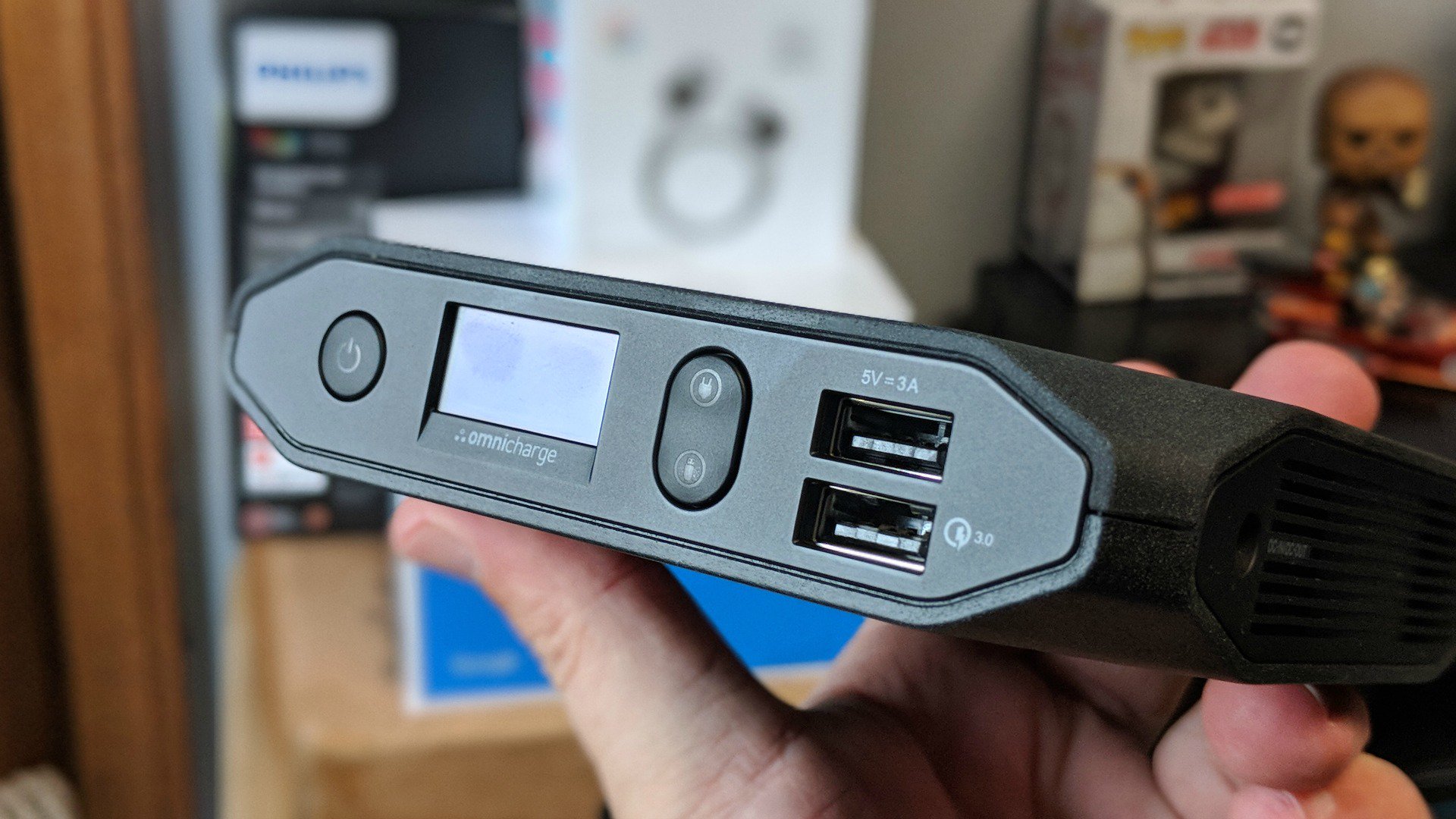
The Omnicharge Omni 20 is one such product that helps ensure that you stay charged no matter what you’re carrying. It’s a portable solution some 20400mAh worth of power which can be shared through a variety of plugs and ports.
Included in the unit, and the box, are 5V USB, USB Quick Charge 3.0, 120V AC/150V HDVC (100W Max), and a DC (1V-24V) output. If you opt for the Pro Bundle ($50 extra), you’ll get tips for HP, Dell, Lenovo, and a universal plug. In short, it’s everything you’ll have something for just about everything.
When it comes to larger capacities in portable chargers, one feature we tend to appreciate most is an indicator of sorts. We like to be able to glance at our batteries to see how much juice is left to replenish our devices. You get an excellent one in the Omni 20 as it not only shows an exact percentage, but also details on battery temp, estimated time left on charge, and more.
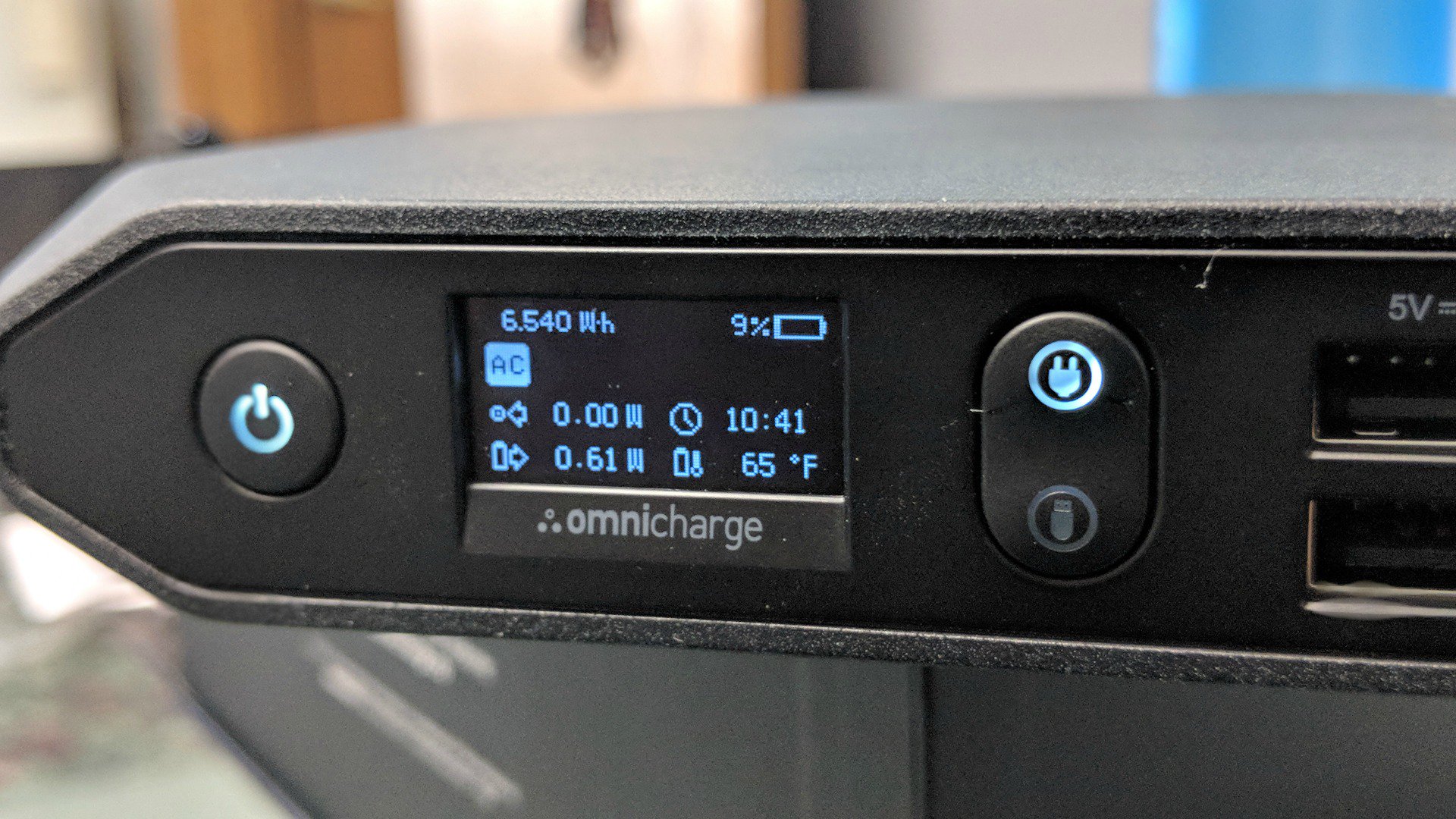
There are more than one dozen status icons to help you get a feel for the status and health of your Omni 20. Some will show basic details such as what port is being used, but others can tell you if you’re in risk of overpowering or overheating.
We are incredibly impressed with just how much power and flexibility you can squeeze into a device this small. Just a few years ago we were carrying around 10,000mAh units that took up more space. There is a trade-off though; the Omni 20 weighs in at 1.4 pounds so it’s heftier than your old charger.
The Omni 20 is just about a square at 5-inches x 4.8-inches and is about one inch thick. You’ll not be throwing this in a hoodie pocket or a handbag but it doesn’t feel all that unwieldy or inconvenient in a backpack.
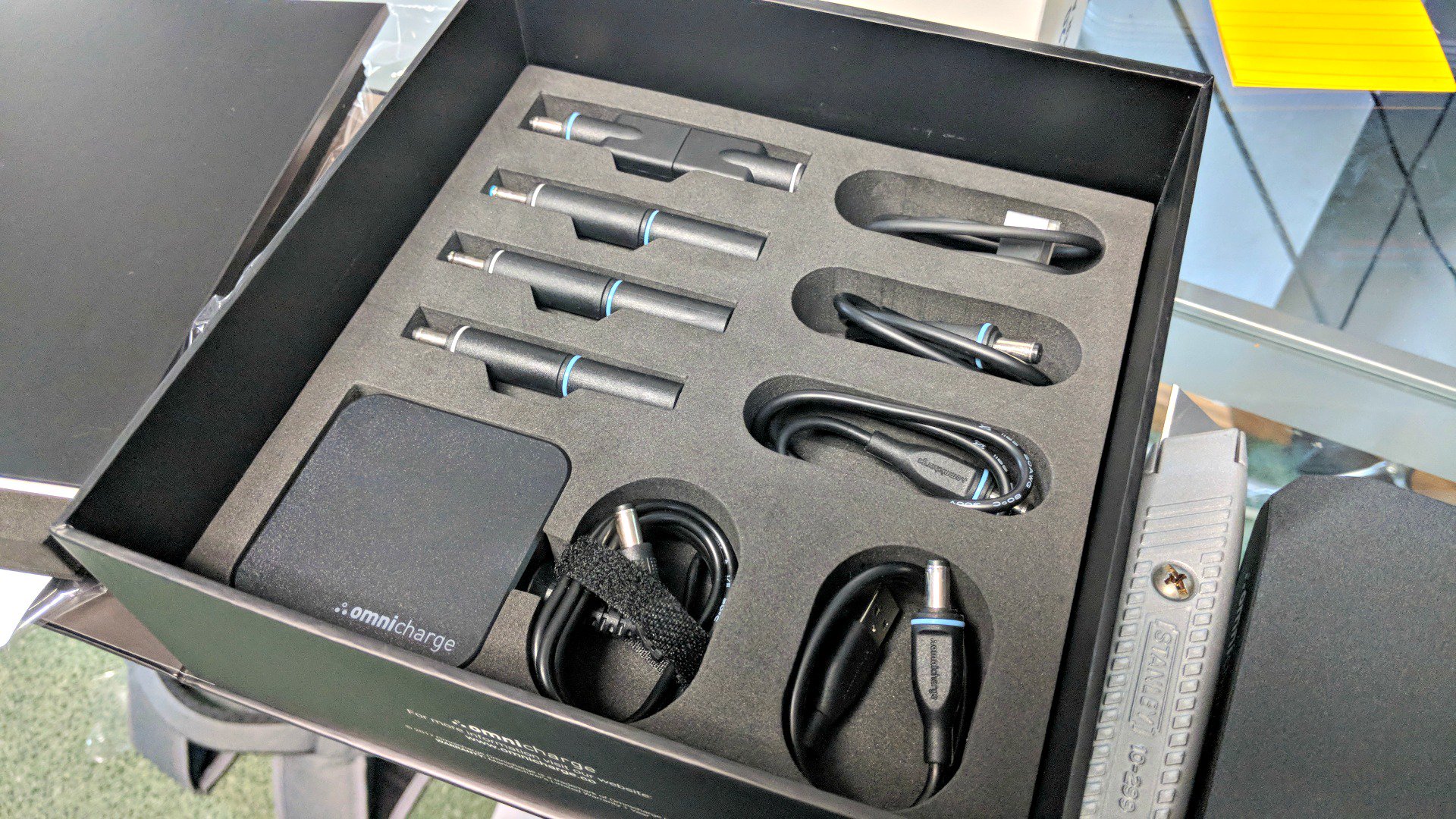
The Omni 20 isn’t cheap, coming in with a $250 price tag. You can certainly get other battery packs for much less money, especially if all you care about is having a USB port. Where this one shines, though, is that it has such a wide array of charging capabilities. Not only does it have two USB ports, but you can also charge a laptop, Nintendo Switch, digital camera, or something else by using the AC adapter.
If you have a phone that utilizes wireless charging, you’ll love the Omni 20 for its wireless output. Simply place your phone on top of the unit and you can charge your Galaxy S8 or other phones. We had to play a little bit with figuring out the exact placement of this but once we knew, it was easy from that point on.
There’s enough power here to charge a typical high-end smartphone up some 7-9 times. Digital cameras, tablets, and other products will vary, but we venture to guess you’re looking at multiple charges each. If you’re a drone enthusiast, you’ll definitely appreciate having something like this with you in the car or backpack.
If your laptop uses one of the special tips, go with the Pro Bundle ($299) and rest easier knowing you have that, too. This is handy for those times when you don’t have the power cord that your laptop requires. Or, rather, when you don’t want to bring it with you at all.
We love the flexibility and functions of the Omni 20 but we’d really liked to have seen a dedicated USB Type-C port. Incidentally, Omnicharge was offering an Indiegogo for a variant, the Omni 20 USB-C. That model has two Type-C ports, one for output and one for input/output. Funded some 42 times over, it will begin shipping this month.

While we won’t take this charger with us to dinner or around town for a night out, it’s the first one we’ll grab for a weekend outing. Camping, a trip out of town, or a day with the family… there’s plenty of reasons for us to pick the Omni 20. We don’t recommend this one for an every day sort of usage, but if you’re a remote worker or spend time in the field, you’ll appreciate having it. This goes double if you’re using multiple devices at a time.
Is it the one charger to rule them all? Pretty much, but there’s still a little room for improvement. It’s close enough for us to suggest it to you, but we’d like a lower price point and USB Type-C to really push it over the top.
 AIVAnet