


These helpful Windows 10 keyboard shortcuts will update your OG Windows skills
For many old-school PC users, Windows 8 was a bit of a disappointment. Microsoft prioritized tablet functionality at the expense of the mouse-and-keyboard experience, leaving many Windows users perplexed as to how to navigate. Thankfully, Windows 10 put the emphasis back on the keyboard and that means shortcuts. For those looking to learn the ropes in Windows 10, you’ll want to learn the basics first, such as how to type symbols and how to copy and paste.
But even if you’ve been using Windows since you could read, there’s actually quite a lot of new functionality to learn in Windows 10. With all of these exclusive features, such as the Cortana smart assistant, there are a bunch of new corresponding Windows 10 keyboard shortcuts. That means even if you’re a Windows veterans, you might be in unfamiliar territory when you boot up Windows 10 for the first time.
Get caught up to speed quickly with our handy guide to some of the more important keyboard shortcuts you need to know in Windows 10.
New Windows 10 keyboard shortcuts
Windows 10 opened up a world of new keyboard shortcuts to better navigate and utilize the operating system’s interface and features. Below is a set of some of the new keyboard functions available for Windows 10 users. Be sure to hold down the Windows key () to the left of the spacebar before punching the appropriate letter or key.
Don’t feel bad about referring back to the chart as needed — memorization will come in time.
Keyboard shortcut
Function
+ Q
Open Cortana for voice input
+ S
Open Cortana for text input
+ I
Open Windows settings pane
+ A
Open Windows 10 Action Center
+ X
Open Start button context menu
+ Left
Snap active window to left
+ Right
Snap active window to right
+ Up
Snap active window to top of screen
+ Down
Snap active window to bottom of screen
+ Ctrl + D
Create a new virtual desktop
+ Crtl + Left
Cycle through desktops to the left
+ Ctrl + Right
Cycle through desktops to the right
+ Ctrl + F4
Close current desktop
+ TAB
Access all desktops and apps in Task View
+ PrtSc
Take a screenshot and save it to Pictures folder
+ G
Open the Game DVR recorder
+ Alt + G
Start recording current activity on screen
+ Alt + R
Stop recording
Command prompt shortcuts
The revised Windows 10 command prompt also has new shortcuts, making it easier to use.
Keyboard shortcut
Function
Shift + Left
Highlight text to the left of cursor
Shift + Right
Highlight text to the right of cursor
Ctrl + C
Copy selected text to clipboard
Ctrl + V
Paste text from clipboard into command prompt
Ctrl + A
Select all text after prompt
General Windows 10 keyboard shortcuts
There are plenty of returning keyboard shortcuts to go along with all the new Windows 10 shortcuts. The following are some of the most basic, general, and sought-after keyboard shortcuts for general day-to-day use for Windows users.
Keyboard shortcut
Function
Display or Hide the Start screen
Ctrl + Shift + Esc
Open the Task Manager
+ M
Minimize all windows
+ Shift + M
Restore minimized windows on the desktop
+ R
Open the Run dialogue box
+ F1
Open Windows Help and Support
+ Up arrow
Maximize the desktop window
+ Down arrow
Minimize the desktop window
+ plus (“+”) or minus (“-“)
Zoom in or out using Magnifier
+ L
Lock your PC or switch accounts.
Alt + F4
Close the active item, or exit the active app
Alt + Enter
Display properties for the selected item
Control + C
Copy the selected item
Control + X
Cut the selected item
Control + V
Paste the selected item
Control + Y
Redo an action
Control + Z
Undo an action
F1
Display Help
F2
Rename the selected item
F3
Search for a file or folder
F4
Display the address bar list in the File Explorer
F5
Refresh the active window
F10
Activate the menu bar in the active app
Updated: 11/06/2017 by Jon Martindale – Updated shortcuts and links. The original article was posted on July 31, 2015.
Editors’ Recommendations
- Here’s how to take a screenshot on a Mac — it’s easier than you think
- Wondering how to copy and paste? It’s easier than you think
- How to take a screenshot on PC with Windows 7, 8, or 10
- Chromebook, say ‘Cheese!’ Here’s how to take a screenshot using Chrome OS
- O6 smart bluetooth remote review
Augmented reality glasses will soon help legally blind people see again
Why it matters to you
Augmented reality could be a tool that gives thousands of legally blind people greater independence.
Although this will no doubt change over time as the technology becomes more mature, right now augmented reality (AR) is mainly being used for retail apps and games. Now, we may love shopping and gaming as much as the next person, but a technology as genuinely transformative as AR surely has a few more profoundly life-changing applications hiding up its sleeve. One of those use-cases? Helping people who are legally blind or have otherwise impaired vision to see again.
The project is the work of computer vision scientist Philip Torr and neuroscientist Stephen Hicks, both of whom work at the United Kingdom’s University of Oxford. For the past several years, they’ve been developing smart AR glasses, which pick up on visual weaknesses in a person’s eyesight and enhance these details — allowing individuals to navigate independently, avoid collisions, or see better in dark or low-light conditions. These glasses use a combination of smart computer vision algorithms and cameras to register scenes in front of an individual, and then exaggerate certain details of it — such as increasing image contrast, highlight specific features, or creating “cartoonish representations of reality” — depending on the requirements of the user. For example, a person with blurry vision due to glaucoma can have the salience of certain important parts of an image enhanced.
Having started their work in the research realm, Torr and Hicks spun it off as its own company, called OxSight, in 2016. To help with this, they have received a number of investments, including a $658,000 grant in the form of a Google Global Impact Award, and additional funding from angel investors. With their help, they now plan to roll the technology out commercially later this year. The glasses are powered by Android, although the creators promise that the final versions will look just like regular sunglasses, so they shouldn’t make their users stand out from the crowd.
Sadly, they’re not spilling any more details about the glasses’ tech specs. When Digital Trends contacted OxSight, we were told that they are not giving any more interviews until the glasses are ready to launch. Hopefully we’ll have an update soon.
Editors’ Recommendations
- NASA enters virtual and augmented realities with new pilot projects
- Amazon Glass? Online retail giant may be working on Alexa-powered eyewear
- Windows Mixed Reality hands-on preview
- Defense giant BAE wants to replace fighter jet controls with augmented reality
- Apple AR glasses: News and rumors about ‘Project Mirrorshades’
If your screen is damaged, don’t play in VR

A cracked phone screen can ruin your adventures in VR.
Phone base VR headsets have made firing on pirates in space or catching your favorite television show where nobody can interrupt you easier than ever. Of course, since your VR headset runs off of your phone, you can run into issues. One of the biggest things that can go wrong is if you accidentally manage to crack your screen. While even a small crack can seem out of the way and inconsequential can have a serious negative impact on your gameplay.
Read more at VRHeads
HTC U11+ wallpapers are now available for download
All of HTC’s wallpapers from the U11+ are up for grabs to download and use on any phone.
The U11+ is HTC’s new hotness, and the phone that I would buy in a heartbeat … if it were available in the U.S. For anyone else who’s unable or just uninterested in picking up the U11+, but still wants the wallpapers, developer LlabTooFeR has made them available to download.

There are 21 wallpapers in total, ranging from geometric shapes and structures to more fluid, liquid-like patterns, all with a variety of colors to choose from. My personal favorites are the last three in the collection, which look like colorized closeups of the rings in a tree trunk. We have a preview of some of the included wallpapers, as well a link to download the full set.
Download the U11+ wallpapers!


Are you planning on getting the U11+? Or at the very least, using its colorful collection of wallpapers?
HTC U11+ hands-on preview: More screen, more battery, translucent body
Why Broadcom’s $130 billion Qualcomm deal would be bad for mobile innovation
Broadcom wants to position itself for the 5G future with its $130 billion Qualcomm acquisition.
We spend a lot more time talking about Qualcomm on this site than Broadcom, but the two companies share a considerable amount of space within the smartphones, tablets, and other IoT products that we use today. Broadcom designs most of the Wi-Fi, Bluetooth, and NFC chips inside our devices, while Qualcomm dominates the mobile CPU, GPU and wireless modem space, especially in North America.

That’s why Broadcom’s bid to purchase Qualcomm for $130 billion ($105 billion in stock and $25 billion in assumed debt) would be such a blockbuster for the chipmaker, and for the semiconductor business in general. Broadcom Inc., as it stands today, is actually a conglomeration of a number of different companies after Avago Technologies Ltd. bought Broadcom Corp. in 2016 for $37 billion. Since then, Broadcom has sliced and diced its way to profitability; the company’s CEO, Hock Tan, is known as a “ruthless cost cutter,” and is known to “gut pie-in-the-sky research projects and focus on the most promising tech developments,” according to Fortune.
Broadcom is trying to buy a Qualcomm that’s weakened by lawsuits and plateauing demand.
Qualcomm, which makes the popular and ubiquitous Snapdragon line of mobile platforms, dominates the Android market in terms of SoCs (systems on a chip) and has an enormous patent portfolio that generates billions of dollars in licensing revenue from almost every company that builds a phone or device with a wireless signal. The dominance is so profound, in fact, that Apple — one of Qualcomm’s biggest customers — is suing the company for anti-competitive practices. So is the U.S. Federal Trade Commission, which asserts that Qualcomm imposes “onerous and anti-competitive supply and licensing terms on cell phone manufacturers.” Samsung and Intel have signed briefs supporting the FTC’s claims, while earlier this year the Taiwanese Fair Trade Commission fined Qualcomm $773 million for similar reasons.

Broadcom’s move to acquire Qualcomm would make it the third-largest semiconductor company in the world, behind Intel and Samsung, with revenues of nearly $50 billion per year. In fact, Qualcomm is the larger of the two companies by revenue alone, but Broadcom’s cost-cutting measures leave it both more nimble to raise money for acquisitions, and more profitable on the balance sheet.
That cost-cutting would kill Qualcomm as we know it today, according to PCMag’s Sascha Segan.
Qualcomm is innovating, hard. It’s pushing down into chipsets for feature phones and “smart things,” and up into core technologies for 5G. It’s developed a tiny antenna, which might be the way to put 5G into phones, and IR dot-projector camera setups that can mimic Apple’s Face ID on Android devices.
An independent Qualcomm could come out of its struggle with Apple with a new focus on 5G, and on the hundreds of millions of mundane and strange device that we’ll connect to the internet over the next decade. A Broadcom-owned Qualcomm could be choked by cost-cutting and revenue optimization, and its staff scattered to the winds. I know which one I’d rather see.
In Qualcomm’s product line, Broadcom sees its future roadmap, a company led (or to some, misled) by engineers that have built up a bloated organization full of wasted resources that it wants to make lean. Its core business, even without the healthy licensing fees from Apple, is very strong, and its dominance in the cellular mobile segment is only set to continue as we slog towards the debut of 5G. Qualcomm believes that the handsome licensing fees it gleans, many of which rely on the continued use of legacy networks like Verizon’s and Sprint’s CDMA, are justified, and is using heavy-handed tactics like countersuing Apple to reinforce that fact. Broadcom may either settle with Apple (itself being a long-time partner of the phone maker) or sell off Qualcomm’s patent portfolio to the highest bidder. Either way, Apple will win.
Broadcom is pursuing Qualcomm in a “rare moment of weakness,” but still has to convince the company’s board that the deal is worth the money. Many Qualcomm shareholders believe that the $105 billion net price for the company is too low, while others believe that it’s not in the long-term best interests of the company.
Qualcomm is no stranger to consolidation in the semiconductor business, either: it is awaiting regulatory scrutiny of its proposed $47 billion acquisition of NXP Semiconductors, another big name in the mobile chip space. Broadcom promises to pursue Qualcomm with or without that deal. In the end, though, just as Broadcom itself is no longer the company it was a few years ago, Qualcomm’s relentless drive towards 5G may hit a roadblock sooner than later.
How to fix Snapchat login errors on Android
How do I fix login temporarily failed on Snapchat?
Unfortunately for users on Android devices, Snapchat has a habit of not always logging people into their accounts. While trying to open the app, some users have come across a message that reads:
“Oh no! Your login temporarily failed, so please try again later. If your login continues to fail, please visit https://support.snapchat.com/a/failed-login :)”
Snapchat has stated that Snapchatters using a rooted Android device may encounter this message more than others. While this is frustrating, there are a couple of other reasons this message could be appearing on your phone screen. Snapchat recommends three things to try if your login isn’t working:
Make sure you’re using the official Snapchat app from the Google Play Store on your Android device.
Double check that your system clock and date is correct.
Confirm that you have a valid Google Account on your Android device.
Once you verify that you have a valid Google Account, you can manually sync your account to your phone to make sure your Google Account is working.
How to sync and verify your Google Account on your Android phone
Launch Settings from your home screen, the Notification Shade, or the app drawer.
Tap Accounts. You may have to scroll a bit to find it.
Tap Add account.
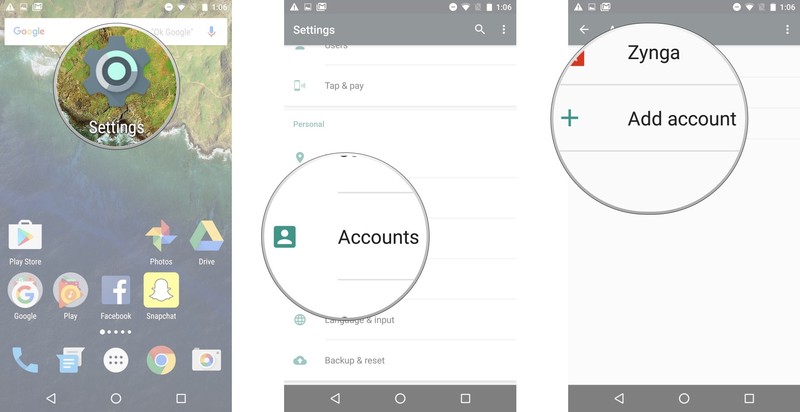
Tap Google.
Enter your email.
Tap Next.
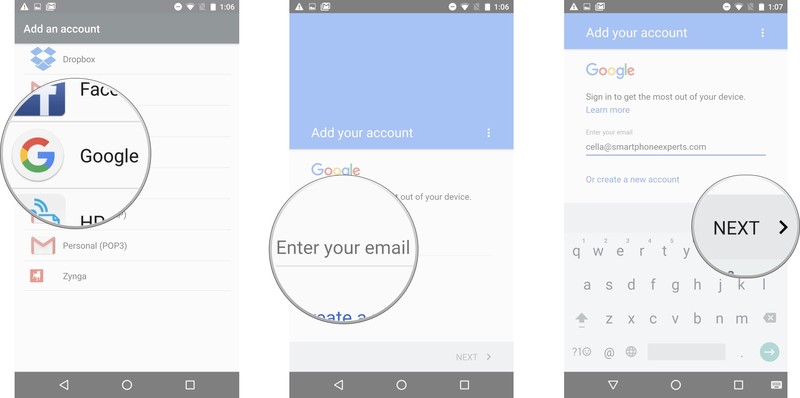
Enter your password.
Tap Next
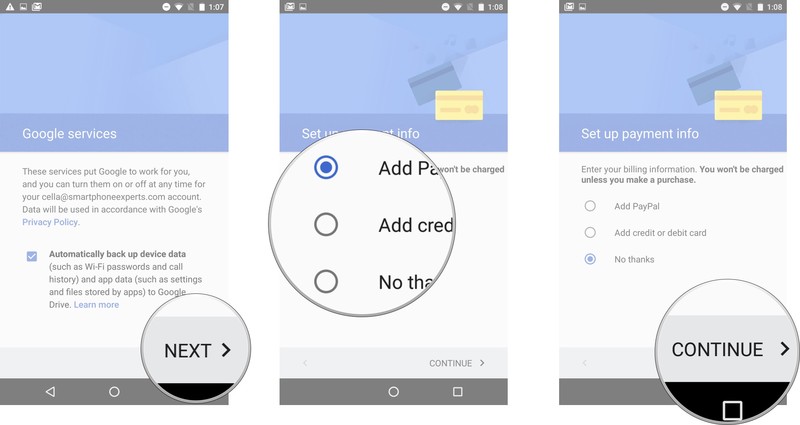
Tap Accept in the lower right corner.
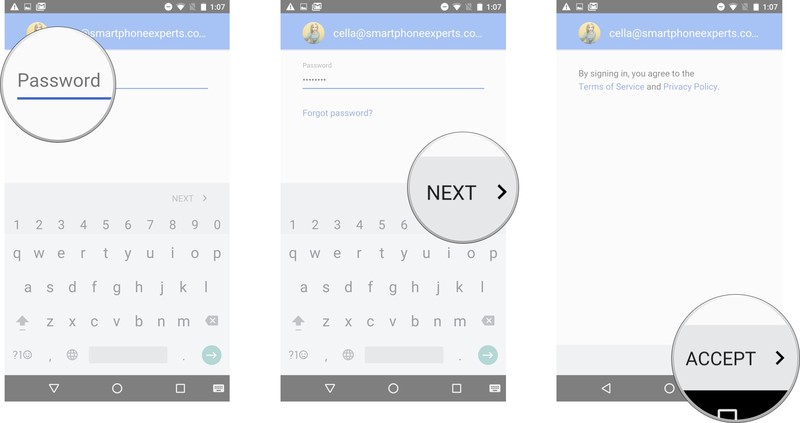
Tap Next in the lower right corner.
Tap payment information option.
Tap continue in the lower right corner.
Tap Google.
Tap the more button; it’s the three vertical dots in the upper right corner.
Tap Sync now.
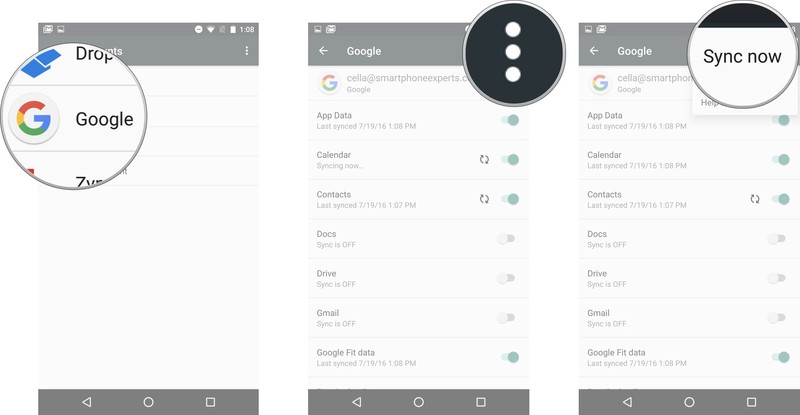
If your Google account isn’t valid, you may see a Sync Error message appear.
Other potential fixes
If the above fix doesn’t work for you, there are a couple other things you can try. If you’re on 3G or LTE, try switching to a Wi-Fi network; if you’re on Wi-Fi, try turning it off. Sometimes, it’s not Snapchat itself but your connection to it.
Another thing to try is rebooting your phone. It sounds simple, but apps can be finicky, and they made need a freshly-booted device to log in.
Finally, be patient. The issue is likely on Snapchat’s side, which can be frustrating, but there’s nothing you can do. Maybe try Instagram — it stole Snapchat’s best features, anyway.
What do you think?
Is there a way you’ve tried that helps get rid of Snapchat’s error message on your Android phone? Let us know what other techniques have worked for you and which ones haven’t.
November security patch rolling out now for Pixel and Nexus devices
Hasta la vista, KRACK!
We’re just about a week into November, and as such, it’s time once again for a new Android security patch! The latest patch level is labeled as 2017-11-06, and like you’d expect, there are numerous fixes here to make your device more stable and secure.
With the November patch, the biggest thing worth mentioning here is that there’s now a fix for the KRACK WPA2 Wi-Fi vulnerability that was discovered last month.

Additionally, Google says that it’s fixed a “critical security vulnerability” that was discovered within the Media framework for Android. This vulnerability could turn on a remote attacker with a special file that then executed arbitrary code throughout a privileged process. There haven’t been any reports of this vulnerability actually affecting any users, but even so, it’s nice to see Google resolving the matter before it had a chance to get nasty.
As per usual, the November 6, 2017 security patch is available to download for the Pixel 2 XL, Pixel 2, Pixel XL, Pixel, Pixel C, Nexus 6P, Nexus 5X, Nexus 6, Nexus 9, and Nexus Player.
You can flash the factory images if you want to get the patch on your device this very second, but if you’re okay with waiting a few days, you should receive the OTA update soon.
Pixels and Nexuses now receiving October security patch from Google
The iPod Shuffle for Spotify can actually shuffle your songs now
Mighty is basically an iPod Shuffle for offline Spotify playback, but when I reviewed it over the summer it was missing that namesake feature. Well, not anymore. Thanks to a software update for the compact device, Mighty can now shuffle through the songs of a playlist rather than having to go through them in order.
There’s also a repeat function that’s automatically turned on when shuffle in enabled. Turn shuffle off and repeat will also be inactive. In terms of shuffle working across playlists, Mighty says that isn’t something it’s looking at right now due to how much it could complicate using the device. It also points out that Spotify doesn’t even offer that functionality. There’s also a new Stay Fresh feature as part of this update. The tool keeps the playlists you have synced to Mighty updated automatically when you charge the player at night. All you have to do is turn the tool on in the Mighty app, plug it in to a charger and make sure it’s in range of your WiFi connection to get the job done. This will certainly come in handy when you’re tired of hearing the same songs on your workout playlist.
Other items included in this update are aux cable support for speakers, a low power mode for listening with a wired connection (read: better battery life) and the ability to sync individual playlists rather than everything loaded onto Mighty. You can also now stop a sync while it’s in progress and perform a factory reset of the device should the need arise.
While the software update that’s available now through the Android and iOS Mighty app does bring some welcome improvements, there’s one big item the company still plans to address: You are still limited to Spotify content on Mighty. The company says adding other sources is in the works for next year.
Source: Mighty
Uber will donate $5 million to sexual assault prevention
Uber’s quest to reform its behavior now includes donations to good causes. The ridesharing firm has promised to contribute $5 million over 5 years to organizations that help prevent sexual assault and domestic violence. The initial round of pledges will go to groups like A Call to Men, the National Network to End Domestic Violence and NO MORE, with a focus on tackling “critical funding gaps” in marginalized communities.
It’s tempting to see this as a public relations move. Uber has had a reputation for pervasive sexism in its ranks and problems with drivers perpetrating everything from harassment to rape, and this could improve its image. It’s also timely: the Harvey Weinstein scandal has spurred many people to come forward with stories of sexual assault and harassment. Uber may not want to stay silent and reinforce notions that it’s deaf to these concerns.
At the same time, though, this reflects Uber’s attempts to repair its underlying culture, particularly since Travis Kalanick stepped down. The company has taken multiple tangible steps to address sexism, harassment and assault, including awareness training for executives and customer support reps as well as hires intended specifically to fix its toxic culture. In past years, the pledge would have been seen as insincere at best. Now, it at least reflects what Uber would like to do — even if there’s still a lot of work left to do.
Source: Uber Newsroom, BusinessWire
Comcast’s internet service was down in several major US cities (updated)
If you rely on Comcast for your internet service, you probably know that things are down in a big way for the provider. According to the consumer watchdog site DownDetector, there are more than 8,000 reports of outages across the US as of 1:00 PM ET on Monday.
The site notes that the recent reports of outages mostly concern internet connectivity, not television or phone service, and mostly originate from areas like Mountain View, Denver, Portland, New York, Chicago, Seattle, Houston, San Francisco, the Bronx and Minneapolis. Comcast, a major owner of NBCUniversal, does business in 40 states and the District of Columbia. The company has confirmed the issues with its Xfinity internet service, and says that it is working on a fix.
Some customers are having issues with their XFINITY Internet service. We apologize & appreciate your patience while we work to fix.
— ComcastCares (@comcastcares) November 6, 2017
The company just tweeted attributing the outage to an “external network issue.” We’ll continue to update this post as more information becomes available.
Update: As of about 3:30 PM ET, Comcast has said that its connectivity issues are resolved:
Internet issues should now be resolved for almost all customers. We apologize for the inconvenience & thank you for your patience.
— ComcastCares (@comcastcares) November 6, 2017
Via: The Verge
Source: DownDetector
 AIVAnet