


LG V30+ coming to T-Mobile November 17
All yours for $130 down and $30/month for 24 months.
The V30 is one of LG’s best and most refined smartphones in a number of years, and as you’d probably expect, you can pick the handset up through a number of different carriers. LG also announced the V30+ alongside the regular V30, and after first debuting on Sprint and then U.S. Cellular, the slightly upgraded variant is now making its way to T-Mobile.

In case you forgot, the main difference for the V30+ is that it comes equipped with 128GB of internal storage as opposed to the regular V30’s 64GB. Both phones can be expanded up to 2TB with a microSD card, but for customers that want to have as much storage space as possible out of the box, the V30+ is the handset for you. Additionally, T-Mobile’s version of the V30+ comes bundled with a free pair of LG QuadPlay headphones.
T-Mobile will start selling the V30+ on November 17, and just like the V30, it features a 600MHz band to connect to gigabit speeds when they’re made available.
You’ll need to hand over $130 down and then $30/month for 24 months for the V30+, making it $50 more expensive than the regular V30.
LG V30
- LG V30 review: The no-BS flagship
- Top LG V30 camera features
- Full LG V30 specs
- LG V30 vs. G6 vs. GS8
- The V30 is the first phone to support 600MHz spectrum
- Join our LG V30 forums

Best Cases for Amazon Fire Tablet HD 10
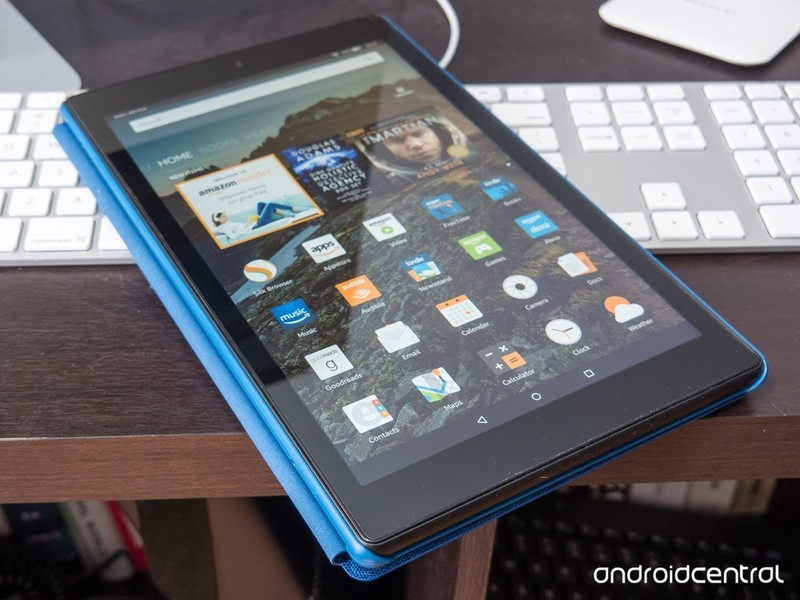
The Amazon Fire HD 10 may be more affordable than most tablets, but you’ll still want to keep it protected with a case!
The Amazon Fire HD 10 (2017) is the latest generation of Amazon’s popular line of affordable tablets. It’s got Alexa built in and runs all the Android apps from Amazon’s own app store, along with easy access to Amazon Books, Music, Games, and everything else Amazon has to offer!
With all that the Fire HD 10 can do, you’ll want it on you at all times — which also means you should probably keep it protected from harm with a case. Here are the best cases for the Amazon Fire HD 10!
- Amazon Tablet Case
- MoKo Folding Case
- Fintie Keyboard Case
- MoKo Kids Shock Proof Case
Amazon Tablet Case
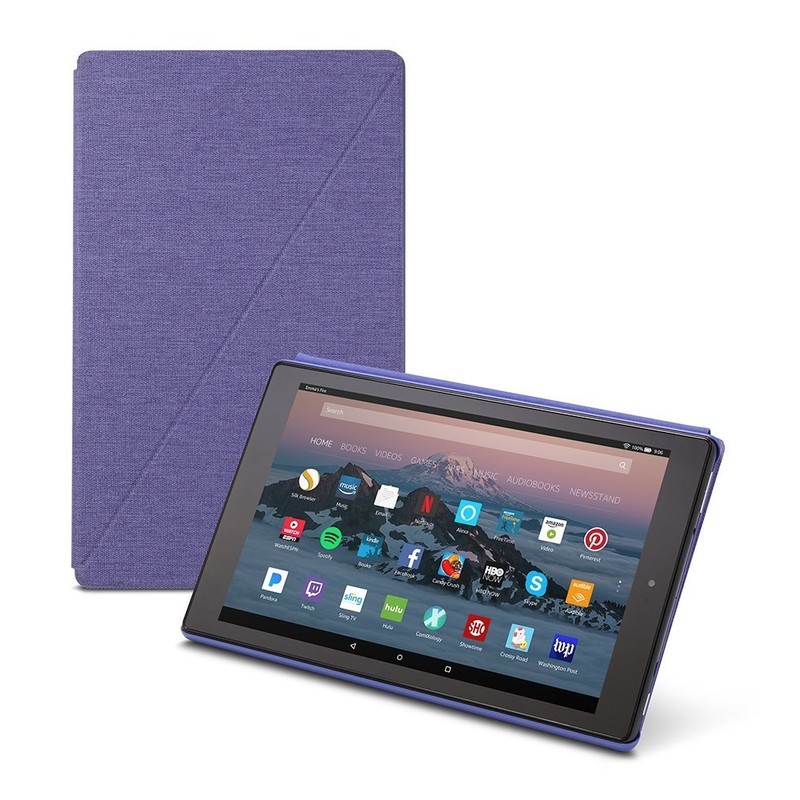
It makes sense to start with Amazon’s own accessory for its tablet, so that’s what we’ll do.
Amazon offers a pretty classic and slim design for its case, featuring a full cover for the front of the tablet with magnetic closures to keep things securely shut when you aren’t using it. You’ll be able to automatically wake or put the tablet to sleep by simply opening or closing that cover, too, which is super convenient.
Made of premium fabric with a microfiber interior, your Fire HD 10 will be well protected. It’s also able to be folded into a kickstand for hands-free viewing — perfect for watching movies or even using Alexa!
You can get yours for $40 in your choice of four colors!
See at Amazon
MoKo Folding Case
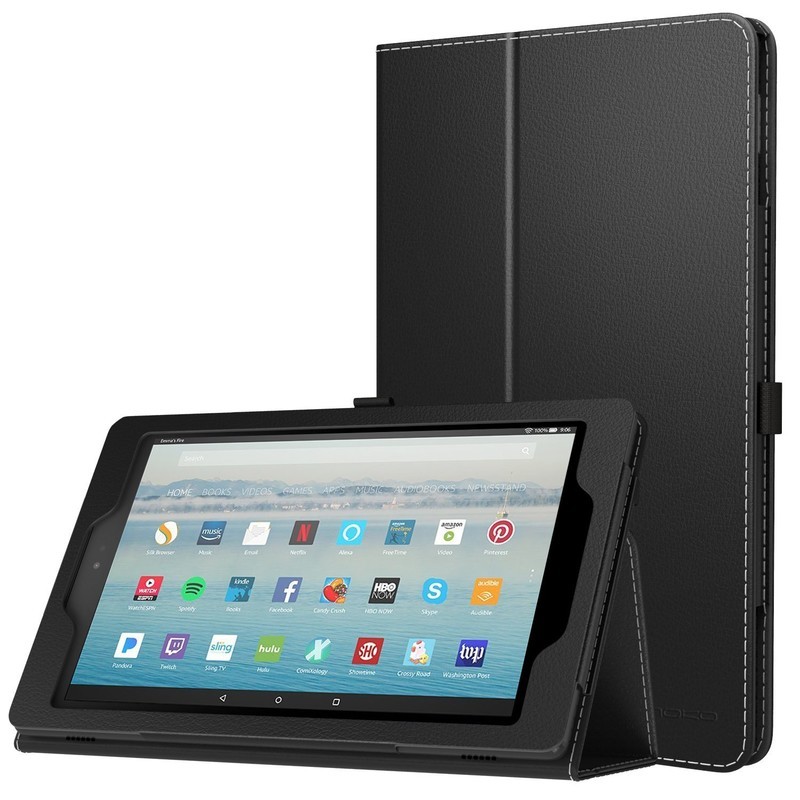
Looking to save some dough on a basic case for your Fire HD 10? MoKo has you covered with its folding case that offers great protection at a discount price.
It’s a pretty standard folding case that offers a front cover that doubles as a folding kickstand for hands-free viewing. It’s made of premium PU leather with a microfiber interior and a magnetic closure and stylus loop (stylus not included).
You can get yours in a solid color for $15 or a fun picture pattern for $18. It’s also backed by a lifetime warranty by MoKo.
See at Amazon
Fintie Keyboard Case
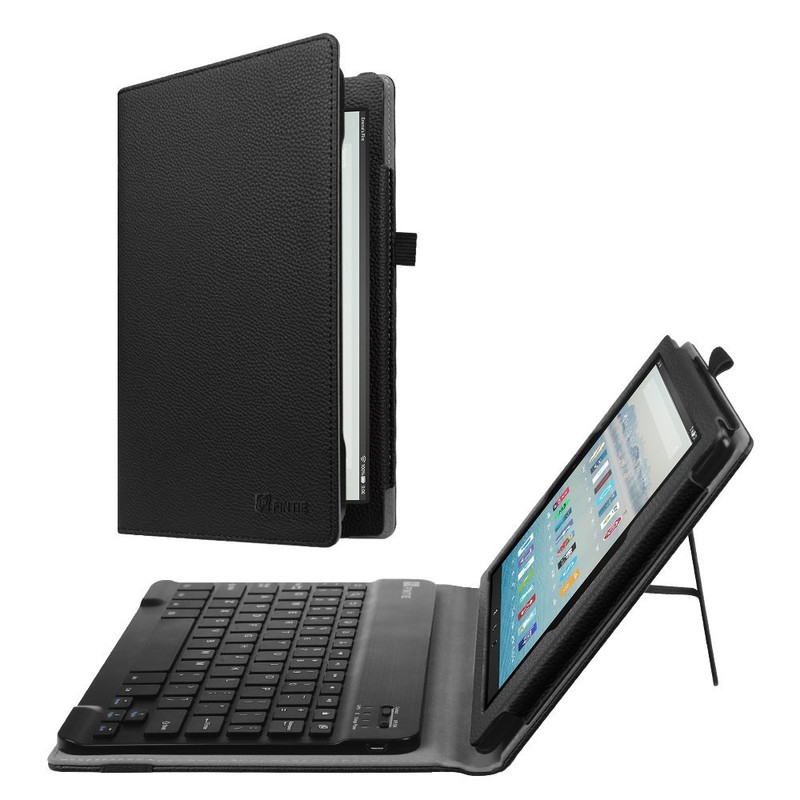
Looking to get a bit more functionality from your tablet case? You might want to consider the Fintie Keyboard Case, which includes a full Bluetooth keyboard on the inside of the cover.
The keyboard is super slim and detachable via magnets, so you can take the keyboard out if you won’t need it. But when you do, it’s there with a great experience provided by a spring mechanism under each key to ensure a tactile response with every keystroke.
The case itself is also made of premium synthetic leather with a microfiber interior to keep your tablet protected. Availble in six stylish options, you can get this case starting at just $35.
See at Amazon
MoKo Kids Shock Proof Case
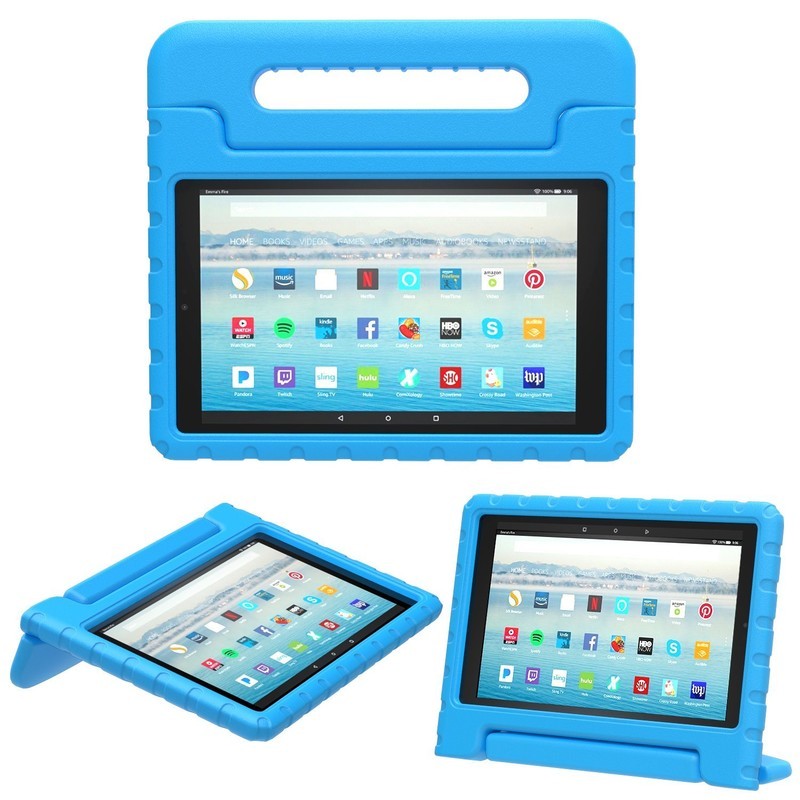
MoKo also makes a reliable Fire HD 10 case specifically designed for kids — or I guess anyone who’s particularly prone to dropping things.
No, this one is definitely for the kids. It’s been constructed with an interior sleeve made of shock-absorbing silicone and a rigid polycarbonate shell on the exterior. MoKo doubled up on the silicone in the corners to provide even better drop protection for those vulnerable parts of the tablet.
The case features a handle that can be folded over and used as a kickstand in both a horizontal or vertical orientation. This case is available in three fun colors and will let you give your tablet to a little one without having to worry about it getting destroyed.
See at Amazon
To protect and save your Fire HD 10!
Do you buy a case for all your tech? Does the Fire HD 10 deserve a case? Let us know in the comments!
Amazon Fire tablets
- Amazon Fire 7
- Amazon Fire HD 8
- Amazon Fire 7 Kids Edition
- Amazon Fire 8 Kids Edition
- Amazon Fire HD 10
See more at Amazon
Google’s new Files Go app offers easy storage management and file transfers
The app’s been pulled from the Play Store, but you can still download the APK.
Google’s no stranger when it comes to creating apps to try new things and test out unexplored waters, and in this latest move from the company, a new application called “Files Go” recently made its way to the Play Store as part of an early access program before quickly being removed.

Files Go is being marketed as a “smart storage manager, and its main purpose is to help you easily see which files/apps are on your device and what ones you can delete so you can quickly free up precious storage.
Upon opening the app, you’ll be met with two main home screens – Storage and Files. The Storage page is where you’ll go to see how much storage is being used of the available space on your device, and you’ll also have quick links for cleaning application caches and deleting any photos, videos, or applications that Files Go thinks you should remove.


On the Files page, you can browse through all of your phone’s content by downloads, received files, images, videos, audio, and documents. Below these tabs, you’ll be able to send and receive files via Bluetooth to other people that also have the Files Go app – no Internet connection required.
You can download the Files Go APK here, and as long as you’re running Android 5.0 Lollipop or later, you should be good to go. However, seeing as how the app’s release notes mention that this is an “early dev build”, you should expect a fair amount of bugs.
Grab a 64GB Moto G5 Plus without Amazon’s ads for just $225
Leave the ads behind and pay less!
Is this deal for me?
Amazon currently has the 5th-gen Moto G down to $224.99, which is a savings of $75 from its regular price. This deal is on the more powerful variant of the phone, which has 4GB of RAM and 64GB of storage as opposed to the 2GB of RAM and 32GB that the $209.99 version has. Previously, the most affordable way to purchase this phone was to buy the Prime-exclusive version which was loaded with Amazon’s ads, but this discount makes the unlocked one even cheaper.

We’ve seen the 32GB version drop to $180 before, but the 64GB version has never been this low. Being an unlocked phone, it is compatible with Verizon, Sprint, AT&T, and T-Mobile, as well as other prepaid carriers in the U.S.
TL;DR
- What excites us about this deal: There are actually two configurations of this phone, and this is the better one. It has 4GB of RAM and 64GB of storage, which is double what the other has in both aspects, and you are only paying $15 more for the better specs. Amazon also sells an ad-powered version of this phone, but even that one is $10 more than this deal, and with this one, you won’t have to deal with any of that extra stuff that Amazon loads.
- Things to know before buying: This phone is unlocked and will be fully compatible with all four major U.S. cellular carriers. It has 64GB of storage for your apps, media and more, and you can also add a microSD card if you want to have even more space available.
See at Amazon
This is the essential NaNoWriMo survival kit

These tools can help you to survive NaNoWriMo.
November has dawned, and while for many people this means No Shave November or prepping for the holidays, for me and hundreds of thousands of other fiction writers around the world, November is for writing a novel. For us, November is NaNoWriMo, National Novel Writing Month, where we try to write a complete novel of 50,000 words or more inside of a month without losing our minds in the process.
We’re six days into the chaos, so I’ve collected my survival kit. These include the technology, apps, and accessories that I use to survive when I’m spending hours each night staring at a screen and manically typing.
Dabble Writer

The most important aspect of NaNoWriMo is having a writing program that is easy to use and does absolutely everything that you want it to. In years past I’ve used Google Docs, Scrivener, Word, and even one year where I tried to write by hand. Out of all the programs I’ve played with, though, my experience with Dabble Writer has been the best, hands down.
This is a web program that lets you manage your novel, add chapters, scenes, edit and adjust your plotline, and so much more. It’s all online, and while there isn’t a mobile app available quite yet, it does everything you need it to without getting in the way of your actual goal — writing a novel. There is even a special mode for NaNoWriMo, which will automatically sync your word count with the main NaNo website, making keeping your word count up to date simple and easy. There’s even a feature to export to word to back up your manuscript, and since everything is saved on the cloud you can bounce from one computer to the next without having to worry about losing work in the process.
Dabbler usually requires a monthly subscription of about $4.99, but they’re running a trial for anyone participating in NaNoWriMo, which will give you free access through December 6th. Additionally, NaNo participants can 20% off for the year, and NaNoWriMo winners can grab it for 50% for a year.
Download: Dabble Writer ($4.99/month)
Starbucks app

During November, I tend to spend basically every spare moment tucked into a corner typing away towards that 50k goal. Doing that without something to keep me going can be pesky, so I tend to drink coffee. A lot of coffee. To make sure that I get that perfect latte, and that I’m not wasting perfectly good writing time waiting in line, I use my Starbucks app.
I can order ahead and pick up my drink when I arrive, and I can get as much espresso as will fit into a cup, to make sure that those neurons are still firing properly. It’s also easy to load up a caffeine budget on the app, and since I’m a gold member, I even earn myself free goodies in the process.
Download: Starbucks (free)
Evernote

Trying to keep track of everything that my brain throws at me for a new story is never an easy prospect, and in the days before smartphones, you could generally find me carting around a folder filled with printouts, scrawled notes, pictures I’d taken, and anything else I thought I might need during the course of my writing.
Evernote made that so much easier. I can add notes, create Notebooks to hold information for characters or settings, and save photos to those Notebooks as well. With the web clipper for Chrome, I can also snag important snippets and save links, and it’s all synced between my mobile device and computer. I can even draw doodles for family crests of chunks of map that pop into my head at an inopportune moment.
Download: Evernote (free)
Chromebook

While apps and programs to write with are all handy, they don’t do me any good if I don’t have a solid device to do the actual writing on. While I have a desktop and a MacBook that I could be using, I’ve found that my Chromebook gets the job done so well that I haven’t touched either of them since Halloween.
My Chromebook is light, easy to use, and when it comes time to go hunting for inspiration it’s a convertible, so I can use it more like a tablet. While the first few hours of writing without a caps lock was a little bit jarring, once I got into the swing of things I never looked back. Because I only open the window I’m writing in, there aren’t really any distractions to keep me from working on my novel.
While I’m using an Asus Chromebook, the one that will do you the best is the Samung Chromebook Plus. Convertible, light, easy to use, and available for about $425, it does an awesome job of letting you strike out distractions and just get right to work.
See at Amazon
Spotify Music

Getting into the right mood for whatever scene I’m working on can easily be the most difficult part of sitting down to write each day. That’s where music comes in. While I’ve got a solid 30GB of saved music on an external drive, in the last few years I’ve made the jump to Spotify Music. I pay $14.99 each month for the family plan, and it’s worth every last penny.
I’ve got access to an absolutely massive collection of just about every genre, with playlists that Spotify creates from my listening trends, and thousands upon thousands of playlists for a specific genre or mood. It’s also easy to transfer my own music into Spotify through local files so that I can listen to everything all from one place. Being able to jump between radio stations, playlists, local files, and even top music around the world, all without ever being interrupted by a commercial makes it easier to jump into my story and get to work.
Download: Spotify (free, subscriptions)
Are you writing?

NaNoWriMo is a non-profit that aims to get people writing and telling the stories that matter to them. While writing a novel is always difficult, doing it in just 30 days is a marathon, and having some help makes it easy to hit your goals everyday. Have you ever participated in NaNoWriMo? Do you use any of these apps to help you write? Let us know about it in the comments below!
Amazon Fire TV Stick Basic Edition available in 100 countries for $50
Available in more markets, but at a higher price and with fewer features.
Amazon’s Fire TV lineup is one of your better options out there when it comes to streaming boxes/dongles, and on November 7, the latest entry in this series was announced as the Fire TV Stick Basic Edition.

With a name like “Basic Edition” at the end of it, you kind of know what to expect from this “new” Fire TV Stick. The HDMI-dongle plugs into the back of your TV, and once you power it on, you’ve got access to Amazon Prime Video, Netflix, Hulu, YouTube, and all of your other favorite streaming applications.
The Fire TV Stick with Alexa Voice Remote costs $10 less and has all the power of the Alexa AI.
The Fire TV Stick Basic Edition comes equipped with a quad-core processor, 1GB of RAM, 8GB of internal storage for all of your apps/games, and 802.11ac Wi-Fi. There’s also support for 1080p HD video streaming with the High Efficiency Video Codec, as well as Dolby Audio for a higher-quality audio experience.
Amazon’s big goal with the Fire TV Stick Basic Edition is to bring the product to as many countries as possible, and with it being sold to over 100 different regions, the company certainly has that part of the plan down pat.
However, what we can’t understand is why Amazon didn’t just make the Fire TV Stick with the Alexa Voice Remote available for additional markets instead of essentially rebranding the first-gen Fire TV Stick and increasing its price. The Fire TV Stick with Alexa Voice Remote only costs $40, and as its name suggests, comes with a remote that has Alexa built-in.
The Fire TV Stick Basic Edition costs $10 more and lacks Alexa functionality.
In any case, if you’re interested in buying the Fire TV Stick Basic Edition, it’s available for purchase now and will start shipping out tomorrow, November 8.
See at Amazon
Amazon Fire TV
- What’s new on Amazon Prime Video
- Read our full review!
- Get the latest news
- Join the discussion
Buy at Amazon
Facebook ends experiment debunking fake news with comments
It’s increasingly clear that some of Facebook’s methods for downplaying fake news are more effective than others. The social site has ended an experiment where it tried prioritizing comments that accused stories of being fake, theoretically challenging fake news and other sketchy articles. A Facebook spokesperson talking to the BBC didn’t explain the exact reasons behind discontinuing the trial (it’s described as a “small test which has now concluded”). However, some of the publicly available examples suggest that it was just too indiscriminate.
Users included in the test noted that the system was simply promoting comments that included keywords like “fake” or “lie,” regardless of what the comment was saying. It wasn’t picky about the source stories, either, so you’d see these incredulous statements highlighted on trustworthy articles. How are you supposed to trust Facebook’s judgment if it isn’t scrutinizing the content of the stories themselves?
This isn’t the end of the experiments. The spokesperson said the company will “keep working to find new ways” to fight misinformation online. Facebook knows there’s a lot of work left to do, in other words — it’ll take a while before it can reliably discredit the right stories.
Source: BBC
Engadget giveaway: Win a set of goTenna Mesh off-the-grid communicators!
Communications have always been a sticky issue when traveling off the grid, either in remote rural or forested areas, exploring other countries or when networks fail. goTenna Mesh fills this gap with it’s Bluetooth-connectable radio antennas. Pair your mobile device with one and you can send private or broadcast messages and GPS coordinates to anyone in the 1-4 mile range with another goTenna Mesh — no mobile connection required. If others in the area have a device, they help create an ad-hoc mesh network expanding the range of communication. The goTenna Mesh can also help you stay in touch with friends and family at crowded events where mobile networks are jammed up. They work with a variety of international radio spectrums, too, making it a great backup to roaming mobile options when abroad. This week, goTenna has provided us with two of its Family 4-packs for a couple of lucky readers. All you need to do is head to the Rafflecopter widget below for up to three chances at winning this off-the-grid communication solution.
a Rafflecopter giveaway
- Entries are handled through the Rafflecopter widget above. Comments are no longer accepted as valid methods of entry. You may enter without any obligation to social media accounts, though we may offer them as opportunities for extra entries. Your email address is required so we can get in touch with you if you win, but it will not be given to third parties.
- Contest is open to all residents of the 50 states, the District of Columbia and Canada (excluding Quebec), 18 or older! Sorry, we don’t make this rule (we hate excluding anyone), so direct your anger at our lawyers and contest laws if you have to be mad.
- Winners will be chosen randomly. Two (2) winners will each receive one (1) GoTenna Mesh Family Pack (four units, value $329).
- If you are chosen, you will be notified by email. Winners must respond within three days of being contacted. If you do not respond within that period, another winner will be chosen. Make sure that the account you use to enter the contest includes your real name and a contact email. We do not track any of this information for marketing or third-party purposes.
- This unit is purely for promotional giveaway. Engadget and AOL are not held liable to honor warranties, exchanges or customer service.
- The full list of rules, in all of its legalese glory, can be found here.
- Entries can be submitted until November 8th at 11:59PM ET. Good luck!
Tencent is the latest tech company working on autonomous cars
Tencent is pushing beyond its WeChat messaging app and gaming, moving into the autonomous driving space. The Chinese conglomerate will tap its artificial intelligence and mapping initiatives to compete against the likes of Baidu, according to Bloomberg’s sources. Back in 2015 Tencent announced it’d partner with electronics maker Foxconn (responsible for the iPhone and countless other gadgets in your house) to make smart vehicles. That happened in the same 24 hours that Baidu announced similar motives.
As Bloomberg notes, Tencent has invested in both Tesla and Nio, neé NextEV. The latter of which promises to have an autonomous electric vehicle on these shores by decade’s end. Given that Tencent apparently has been testing a working prototype internally, that claim doesn’t seem too unrealistic.
There are countless companies moving into or developing projects for the autonomous space, but the difference is that Tencent makes acquisitions and investments rather than hoping for vice versa.
Via: TechCrunch
Source: Bloomberg
Waymo’s driverless taxi service will open to the public soon
Waymo is working on an autonomous taxi fleet, modeled after the pilot program it currently offers outside of Phoenix. The big difference here is that once fully launched, Waymo’s service won’t have a driver behind the wheel. Additionally, the company will up its fleet of self-driving Chrysler Pacifica minivans from 100 to 500. As you’d imagine, the entire ride-hailing process will be handled via a mobile app. While the initial service area will be limited to the Phoenix metro area, in a post on Medium, the company says eventually it will “cover a region that’s larger than the size of Greater London.” Waymo says that the public will be able to start taking autonomous rides “over the next few months” in the agricultural suburb, Chandler, Arizona.
Ars Technica writes that at first the taxis will have a Waymo employee in them so they can hit the “pull over” button in the event of an emergency.
This puts Waymo ahead of competitor Uber, which is still refining its autonomous approach for commercial trucks, Otto. Uber’s consumer-facing autonomous ride service had a small number of self-driving cars in Pennsylvania, but safety concerns (among other, more political reasons) have slowed progress. That’s not to mention the IP-theft lawsuit that’s been brewing between Waymo and Uber, either.
Via: Ars Technica, TechCrunch
Source: Medium
 AIVAnet