


Firefox will soon flag sites that have been hacked
Firefox has having a good run right now, having just released its much speedier and better-looking Quantum browser. It’s now working on a new feature that security fans are bound to like: It will warn you if you’re visiting a site that has suffered a data breach. Firefox is working on the feature in collaboration with “Have I Been Pwned,” the popular site that can check your email and tell you if your credentials have been stolen by hackers.
Troy Hunt, the security expert behind Have I Been Pwned, confirmed the news, tweeting that “yes, we’re doing some awesome things with @mozilla and @haveibeenpwned.” The update is still in the early stages, but you can download it from Github, then compile and add to Firefox if you want to test it out. Bear in mind that it only works with the Developer Edition, though.
The add-on is fairly basic, for now. If you visit a site on Have I Been Pwned’s naughty list, it will throw a flag stating, “You visited hacked site ashleymadison.com.” It won’t stop you from entering, but it does give users an idea that, at some point or another, the site’s security procedures were less than optimal.
As many people have now worked out, yes, we’re doing some awesome things with @mozilla and @haveibeenpwned 😎 https://t.co/UFW0CNLGtk
— Troy Hunt (@troyhunt) November 22, 2017
Hunt is working with Mozilla on the code, but isn’t quite sure how the final feature will work. “Firefox is just looking at which sites have been been breached and we’re discussing other ways of using the data in the future,” he told Engadget in a message. “They’ve got a broad reach and surfacing this info via Firefox is a great way to get more exposure around data breaches.”
Hacked sites, on the other hand, might not be too thrilled about a feature that will shame them about their previous lax security. However, if properly implemented, it could provide a very useful service to consumers, letting them know that they might need to change their password and not recycle the breached one. So far, Hunt tweeted, users have responded enthusiastically. “Wow, surprised at how much positive feedback this is garnering so quickly, I’m pretty stoked.”
Via: Bleeping Computer
Source: Firefox (Github)
Black Friday 2017: The Best Deals on iPhones, iPads, Apple Watch, Macs, and More
Thanksgiving is well underway in the United States, and Black Friday deals online and at brick and mortar stores are starting to go live across the country. Major retail stores like Target, Best Buy, and Walmart will be opening their doors this evening, while many online-only deals are already live.
Below, we’ve rounded up some of the best deals we’ve come across on Apple products like iPhone, iPad, Apple Watch, Macs, and accessories, and many, many more deals can be found in our dedicated Black Friday roundup.
iPhone
Walmart is offering a $300 Walmart Gift Card with the purchase of an iPhone X, iPhone 8, iPhone 8 Plus, iPhone 7, or iPhone 7 Plus on an AT&T Next or Verizon Device Payment plan. This deal is limited to stores, with activation appointments available starting at 6:00 p.m. Actual activations will begin at 8:00 p.m.
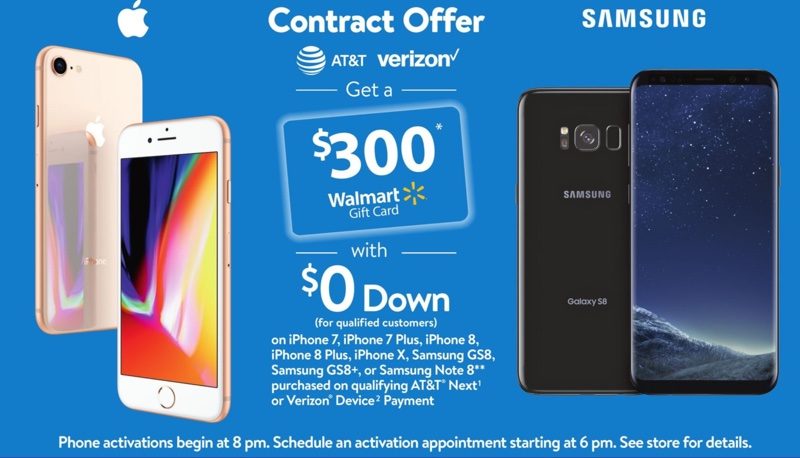
Sam’s Club is offering a $100 Sam’s Club gift card with the purchase of “any Apple iPhone,” which may include the iPhone X, but it isn’t clear if the retailer will have any in stock. This deal does apply to the iPhone 8 and the iPhone 8 Plus.
Target is offering a $250 Target gift card with the purchase of an iPhone 8 or an iPhone 8 Plus on an installment plan from Verizon, Sprint, or AT&T.
If you prefer a straight cash discount, Best Buy is offering up to $200 off the iPhone 8 and 8 Plus on an installment plan from Verizon, Sprint, or AT&T.
iPad Pro
There are several deals to be had on the latest 2017 10.5 and 12.9-inch iPad Pro models, with multiple retailers offering discounts.
Best Buy is discounting the 10.5-inch iPad Pro by up to $150, while Target will be offering a $120 discount, dropping the price on the entry-level 32GB 10.5-inch iPad Pro model to $530, down from the regular price of $650.
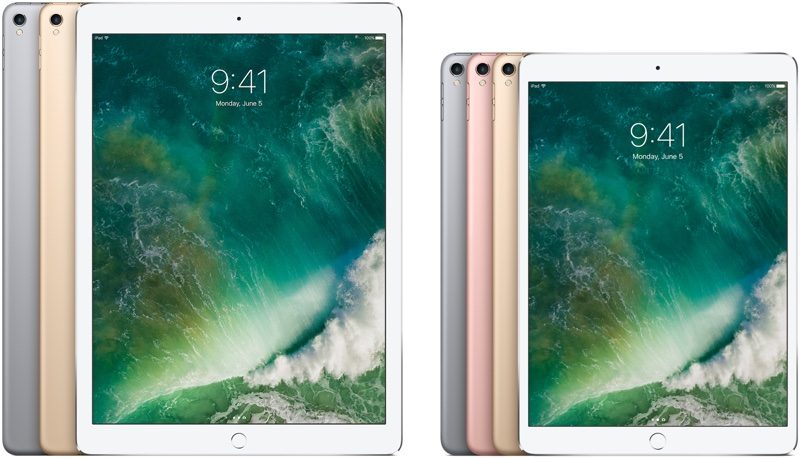
B&H Photo is also offering several iPad Pro models at $50 to $100 off.
– 10.5-inch iPad Pro: 64GB, Wi-Fi – $599.00, down from $649.00
– 10.5-inch iPad Pro: 256GB, Wi-Fi – $699.00, down from $799.00
– 12.9-inch iPad Pro : 64GB, Wi-Fi – $739.00, down from $799.00
– 12.9-inch iPad Pro: 256GB, Wi-Fi – $849.00, down from $949.00
5th-Generation iPad (2017)
Both Target and Best Buy are offering the 2017 32GB iPad for $249.99, which is a discount of $80 off of the regular price of $329.99. Walmart is offering the same deal.

If you’re looking for a deal on a Wi-Fi + Cellular iPad, Sam’s Club has the sole deal on the cellular model, offering $130 off.
Apple Watch
There are essentially no deals on the new Apple Watch Series 3 models, with the exception of Kohl’s. Kohl’s is offering $90 in Kohl’s cash with the purchase of select Apple Watch Series 3 models.

Target is discounting Apple Watch Series 1 models by $70, dropping entry-level pricing down to $179.99. That’s the best Series 1 deal, and Macy’s is matching it by discounting Series 1 models by $70 as well, while Best Buy is offering a $50 discount if the previous deals are unavailable for some reason.
MacBook Pro
When taking into account B&H Photo’s free shipping and no taxes on orders outside of New York, the company is offering the best deals on most MacBook Pro models. Adorama, which doesn’t charge taxes outside of New York and New Jersey, is also offering the same discounts. MacMall and Best Buy’s prices are similar on most Macs, but they can’t beat no taxes for the most part.

Best Buy does actually have the best discounts on 15-inch MacBook Pro models and some higher-end 13-inch models, offering $50 off over Adorama and B&H, but in states where sales tax is a factor, B&H or Adorama deals are still likely to be better overall. In some cases, Amazon also has comparable deals.
Best Buy is discounting all 15-inch MacBook Pro models by $250, while 13-inch models are between $150 and $200 off.
13-inch MacBook Pro models
– 2.3 GHz, 8GB RAM, 128GB SSD in Silver (Amazon) (Adorama) (B&H Photo) – $1,149, down from $1,299
– 2.3GHz, 8GB RAM, 128GB SSD in Space Gray (Adorama) (B&H Photo) – $1,149, down from $1,299
– 2.3GHz, 8GB RAM, 256GB SSD in Silver (Amazon) (Adorama) (B&H Photo) – $1,349, down from $1,499
– 2.3GHz, 8GB RAM, 256GB SSD in Space Gray (Adorama) (B&H Photo) – $1,349, down from $1,499
– 3.1GHz, 8GB RAM, 256GB SSD in Silver (Amazon) (Adorama) (B&H Photo) – $1,649, down from $1,799
– 3.1GHz, 8GB RAM, 256GB SSD in Space Gray (Adorama) – $1,629, down from $1,799
– 3.1GHz, 8GB RAM, 512GB SSD in Silver (Amazon) (Adorama) (B&H Photo) – $1,849, down from $1,999
– 3.1GHz, 8GB RAM, 512GB SSD in Space Gray – (Amazon) (Adorama) (B&H Photo) – $1,849, down from $1,999
– 3.1GHz, 16GB RAM, 512GB SSD in Space Gray (Adorama) – $2,049, down from $2,199
– 3.5GHz, 16GB RAM, 512GB SSD in Space Gray (Adorama) – $2,249, down from $2,499
15-inch MacBook Pro models
– 2.8GHz, 16GB RAM, 256GB SSD in Silver (Amazon) (Adorama) (B&H Photo) – $2,199, down from $2,399
– 2.8GHz, 16GB RAM, 256GB SSD in Space Gray (Amazon) (Adorama) (B&H Photo) – $2,199, down from $2,399
– 2.9GHz, 16GB RAM, 512GB SSD in Silver (Amazon) (Adorama) (B&H Photo) – $2,599, down from $2,799
– 2.9GHz, 16GB RAM, 512GB SSD in Space Gray (Amazon) (Adorama) (B&H Photo) – $2,599, down from $2,799
– 3.1GHz, 16GB RAM, 1TB SSD in Space Gray (Adorama) – $3,199, down from $3,399
MacMall is offering discounts on a wide range of MacBook Pro models with non-standard configurations, allowing customers to purchase machines with upgraded components like RAM and graphics cards.
– 13-inch MacBook Pro with Touch Bar (Mid 2017): 3.3GHz, 16GB RAM, 256GB SSD – $1,909, down from $2,099
– 13-inch MacBook Pro with Touch Bar (Mid 2017): 3.1GHz, 16GB RAM, 512GB SSD – $2,029, down from $2,199
– 13-inch MacBook Pro with Touch Bar (Mid 2017): 3.5GHz, 16GB RAM, 512GB SSD – $2,299, down from $2,499
– 13-inch MacBook Pro with Touch Bar (Mid 2017): 3.1GHz, 16GB RAM, 1TB SSD – $2,379, down from $2,599
– 13-inch MacBook Pro with Touch Bar (Mid 2017): 3.3GHz, 16GB RAM, 1TB SSD – $2,449, down from $2,699
– 15-inch MacBook Pro with Touch Bar (Mid 2017): 3.1GHz, 16GB RAM, 512GB SSD – $2,699, down from $2,999
B&H Photo and Adorama also have deals on several older MacBook Pro models.
– 13-inch MacBook Pro (Late 2016): 2.0GHz, 8GB RAM, 256GB SSD – $1,199, down from $1,499
– 15-inch MacBook Pro with Touch Bar (Late 2016): 2.6GHz, 16GB RAM, 256GB SSD – $1,799, down from $2,399
– 15-inch MacBook Pro with Touch Bar (Late 2016): 2.9GHz, 16GB RAM, 256GB SSD – $1,899, down from $2,899
– 15-inch MacBook Pro with Touch Bar (Late 2016): 2.7GHz, 16GB RAM, 512GB SSD – $2,099, down from $2,799
MacBook
Adorama and B&H are offering the best deals on the current 2017 12-inch MacBook Pro models, with discounts of $150.

– 1.2GHz, 8GB RAM, 256GB SSD in Gold (Adorama) (B&H Photo) – $1,149, down from $1,299
– 1.2GHz, 8GB RAM, 256GB SSD in Rose Gold (Adorama) (B&H Photo) – $1,149, down from $1,299
– 1.2GHz, 8GB RAM, 256GB SSD in Silver (Adorama) (B&H Photo) – $1,149, down from $1,299
– 1.2GHz, 8GB RAM, 256GB SSD in Space Gray (Adorama) (B&H Photo) – $1,149, down from $1,299
– 1.3GHz, 8GB RAM, 512GB SSD in Gold (Adorama) (B&H Photo) – $1,449, down from $1,599
– 1.3GHz, 8GB RAM, 512GB SSD in Rose Gold (Adorama) (B&H Photo) – $1,449, down from $1,599
– 1.3GHz, 8GB RAM, 512GB SSD in Silver (Adorama) (B&H Photo) – $1,449, down from $1,599
– 1.3GHz, 8GB RAM, 512GB SSD in Space Gray (Adorama) (B&H Photo) – $1,449, down from $1,599
MacMall has a decent discount on an older high-end 2016 MacBook model if you don’t need the latest version, offering it for $1,379, down from its regular price of $1600.
– 12-inch MacBook (Early 2016): 1.2GHz, 8GB RAM, 512GB flash storage – $1,379.00, down from $1,599.00
MacBook Air
Best Buy has the best deals on the MacBook Air at $200 off each model. These are the 2017 MacBook Air models that received refreshed processors back in June.

– 1.8GHz, 8GB RAM, 128GB SSD – $799.99, down from $999.99
– 1.8GHz, 8GB RAM, 256GB SSD – $999.99, down from $1,099.99
iMac
Best Buy, Adorama, B&H Photo, and MacMall all have deals on various iMac models, some of which are discounted by $200 or more.

21.5-inch
– 2.3GHz, 8GB RAM, 1TB HD (Best Buy) – $899.99, down from $1,099.99
– 3.0GHz, 8GB RAM, 1TB HD (Adorama) (B&H Photo) – $1,179, down from $1,299
– 3.4GHz, 8GB RAM, 1TB Fusion (Best Buy) – $1,599.99, down from $1,799.99
27-inch
– 3.4GHz, 8GB RAM, 1TB Fusion (Adorama) (B&H Photo) – $1,649, down from $1,799
– 3.5GHz, 8GB RAM, 1TB Fusion (Adorama) (B&H Photo) – $1,849, down from $1,999
– 3.8GHz, 8GB RAM, 2TB Fusion (Amazon) (B&H Photo) – $2,099, down from $2,299
– 4.2GHz, 8GB RAM, 1TB SSD (Adorama) – $2,849, down from $3,099
Amazon and eBay Deals
Both Amazon and eBay are offering a huge number of rotating deals that will change on a regular basis throughout Thanksgiving and Black Friday.
Deals go so quickly and are so numerous that it’s impossible to list them, but make sure to check out both sites to see what’s on sale. eBay and Amazon are both offering discounts on iPhones, iPads, and tons of Apple accessories.
Best Accessory Deals
– $100 iTunes Gift Cards – $85 from Amazon with Promo Code ITUNES15
– BeatsX wireless headphones – $99, down from $149
– DJI Spark drone – $399, down from $499
– Beats Studio 2 Wireless Headphones – $160, down from $380
– Powerbeats wireless headphones – $160, down from $200, Plus $20 Target gift card
– Apple-branded iPhone cases – 15 percent off regular price
– Apple Watch bands – Up to $30 off
– Philips Hue bulbs – 20% off
– Philips Hue Lightstrip – $40 off
– Apple Pencil and Smart Keyboard – $10 off
– August HomeKit Smart Lock – $80 off
– $100 iTunes Gift Card Multipack – $84.47, down from $100
– Sonos speakers – Up to $100 off
– BlackPods AirPods – $40 off any BlackPods order, including mail-in
Make sure to check out our Black Friday roundup for specific times on when retail stores will open and for more information on the deals listed above. Our roundup also features hundreds of additional deals on Apple products and Apple-related accessories, so it’s worth taking a look if you want to get a good deal on a new Mac, iPhone, or iPad.
Note: MacRumors is an affiliate partner with some of these vendors. When you click a link and make a purchase, we may receive a small payment, which helps us keep the site running.
Related Roundup: Apple Black Friday
Discuss this article in our forums
Sony Xperia XZ1 Compact review: small but powerful
While most smartphone OEMs are creating standard and plus or XL sized versions of their smartphones, Sony believes there’s still a market for a small, compact flagship that doesn’t skimp out on the specs. But is there still a need for a small phone with flagship caliber specifications or have consumers fully adapted to the abundance of large screened smartphones that we have today? Find out in our full review of the Sony Xperia XZ1 Compact!
Design

The Xperia XZ1 Compact, as the name suggests, is a smaller version of Sony’s main flagship, the Xperia XZ1 and as such it shares many of the same features and specifications. Aside from the phone’s smaller size there are a few key differences, the most notable being the phone’s design.
Instead of the rounder and slightly curvier design of the XZ1, the XZ1 Compact is more reminiscent of classic Sony designs with a more boxy rectangular look. There are some slight tapers all around but for the most part the XZ1 Compact has a flat appearance on all sides and has a less aggressive loop design when compared to the XZ1.

The phone’s construction is also worth noting as it’s made mostly from plastic whereas the XZ1 features an all metal construction. Despite the difference in material choices, the XZ1 Compact has a very solid and sturdy feel and there are hints of metal on the top and bottom portions of the phone that add to the phone’s overall build quality. The phone’s body is coated in a non-glossy satin-like finish that provides a nice grip and doesn’t attract fingerprints.
The XZ1 Compact’s main appeal is that it’s just as powerful as the standard XZ1, only smaller
If it wasn’t obvious enough already, the XZ1 Compact’s main appeal is that it’s just as powerful as the standard XZ1, only smaller. This smaller size equates to a phone that is an absolute breeze to use in one hand.
Many manufacturers are attempting to make bigger phones smaller by slimming down bezels, but Sony simply made a smaller phone. While having a small phone can have it’s drawbacks, it’s extremely refreshing to use a phone that can be navigated without two hands or any awkward shuffling just to reach the farthest corners of the screen.
Display

A smaller body naturally means a much smaller display. The XZ1 Compact’s screen is an IPS LCD measuring in at at 4.6 inches with a resolution of 1280×720 which is .6 inches smaller on the diagonal than the XZ1 and also lower resolution.
Compared to many smartphone screens that we’ve seen in 2017, the screen on the XZ1 Compact is fairly standard. It’s surrounded by thick bezels on all sides and doesn’t feature any fancy curves or rounded corners. It’s a screen that could easily sound underwhelming but it’s a more than serviceable display especially on a smartphone of this size.
The 720p resolution is low but on a 4.6-inch screen it works perfectly fine, equating to 319 ppi
The 720p resolution is low but on a 4.6-inch screen it works perfectly fine, equating to 319 ppi. It clearly isn’t the sharpest and, having grown so accustomed to quad HD displays, my eyes were immediately able to see the difference. But it’s still sharp enough to comfortably read text, flip through photos or browse the web.
Regardless of sharpness, the quality of the display is quite nice as colors are pleasantly vibrant, the viewing angles are good and outdoor visibility is not an issue in direct sunlight as long as the screen is at max brightness.

Sony’s software allows for tweaking of the display’s colors with a few different profiles that can change the display’s vividness and contrast, and white balance adjustments can also be made to better suit your tastes.
If you’re big into media consumption, the small amount of screen real estate feels undeniably cramped.
If you’re big into media consumption, the XZ1 Compact’s screen won’t offer the best experience simply due to its small size, which is the only real downside to this display. It still works fine for watching YouTube or playing games but the small amount of screen real estate feels undeniably cramped.
Performance

The guts of the XZ1 Compact are completely identical to it’s bigger brother. The XZ1 Compact features the same Snapdragon 835 processor with 4 GB of RAM and, as expected, the phone performs beautifully. It’s fast to launch apps, play games, and swiping and scrolling through web pages or the Android interface is smooth and fluid.
Editor’s Pick
Are smartphones still getting faster? Does Moore’s law still apply?
Moore’s Law predicts that the number of transistors used on dense integrated circuits will double year on year. The theory belongs to Gordon Moore, who co-founded Intel and who had observed this trend up to …
The lower resolution display certainly makes the phone feel ever so slightly snappier due to less strain being put on the processor. The phone performs every bit as well as any other flagship with the same specs and regardless of how much I threw at it, the XZ1 Compact was always able to keep up.


Hardware

When it comes to the rest of the phone’s hardware, there are no compromises here and the XZ1 Compact comes with all the bells and whistles that you would want in a smartphone. For starters, there is a 3.5 mm headphone jack and the XZ1 Compact provides the typical slew of audio capabilities as prior Sony phones including Sony’s proprietary DSEE HX technology that will upscale compressed music files for a closer to Hi-Res sound. There’s also built in support for other high resolution audio codecs such as LDAC.

The XZ1 Compact also features dual front facing stereo speakers giving the phone’s thick top and bottom bezels a purpose. The speakers are clear with no distortion but definitely lack in volume compared to other phones with a front facing speaker setup.
Editor’s Pick
Everything you need to know about IP ratings
It’s a great time to be a tech lover. Looking back on the smartphone releases of 2016, the biggest problem we might have is that virtually every new device is great. In fact, many of …
For storage, the phone is available in only one storage capacity at 32 GB but should you need more there is a microSD card slot with support for up to 256 GB of additional storage. IP68 dust and water resistance is also on board, giving the phone protection against the occasional splash in the rain or submersion.

The phone does feature a fingerprint sensor in the side mounted power key but, like the last few generations of Sony devices, the fingerprint sensor has been omitted from the U.S. model. It’s something we’ve now become accustomed to with Sony phones but it’s still disappointing that U.S. consumers don’t have access to this feature.
Despite the phone’s smaller size, the battery capacity is still the same 2700 mAh power pack as the standard XZ1 – lasting me a full two full days of use
Despite the phone’s smaller size, the battery capacity is still the same 2700 mAh power pack as the standard XZ1. This sounds small for a phone in 2017, but it has proven itself to be more than enough. Plus, the lower resolution 720p display makes a huge impact to the phone’s longevity.
The XZ1 Compact has been quite the marathon runner, lasting me a full two days of use before needing a charge. I consider myself a heavy user as I watch quite a bit of YouTube and play games for several hours per day on my phone so I was extremely impressed with the XZ1 Compact’s battery life. Screen on time consistently reached the 5 to 6 hour mark.


Camera

With the exception of the front facing camera, the camera experience on the XZ1 Compact is identical to the XZ1. The XZ1 Compact features the same 19 MP rear facing Exmor sensor as the XZ1 with 5-axis image stabilization, 4K video recording, and slow motion video at a whopping 960 frames per second.
The main camera experience on the XZ1 Compact is identical to the XZ1
Instead of the 13 MP front facing shooter of the XZ1, the XZ1 Compact has an 8 MP front facing camera but it’s still more than capable for video calls and taking selfies. It’s a wide angle lens which makes it easy to fit more into the frame but it does suffer from some slight barrel distortion towards the edges.

Sony dubs the rear shooter a “Motion Eye” camera as it’s able to predict and capture unexpected motion. The way this works is a fairly simple process and it’s all done automatically by the camera. When the camera senses unexpected motion such as a person running or a moving car it will predictively capture three photos in addition to the one you take yourself giving you 4 photos. You can then assess the results and pick the one that looks best or keep them all.
The XZ1 Compact camera can easily capture moving subjects with little to no motion blur
It’s a neat and useful camera trick that works very well and when paired with Sony’s predictive hybrid autofocus, the camera can easily capture moving subjects with little to no motion blur.
The other standout feature that’s also available on the standard XZ1 is the 3D scanning capabilities through Sony’s new 3D creator app. This app lets you scan faces, food, or any other random object with its free form scan technology. For a mobile product, the 3D scanning of the XZ1 Compact is impressive and Sony is working on giving this technology more utility. For now these scans can be used as wallpapers, GIFs, and be shared to social media but eventually these scans will be capable of being used as gaming avatars or to insert yourself into a game once these partnerships become available.

The scans can be backed up and sync’d to the cloud for safe keeping and you can even print them off if you have a 3D printer. If you don’t own a 3D printer, the 3D creator app allows for easy ordering of your prints through Shapeways or Sculpteo, both of which Sony has partnered with.
The quality of the 3D scans themselves are very accurate and look incredible but for best results you’ll want to create your scans in well lit areas. Scans in low light will make it hard to capture the details properly, which often resulted in deformed scans in my testing.
Editor’s Pick
Here’s what Sony needs to do to get back in the smartphone game
After a series of restructuring efforts, Sony recently announced a return to good looking financial health, stating that the company is on track to set a new annual profit record. Full year profits are expected …
With the same rear camera and image processing, the image quality is the same as the standard XZ1. In adequate lighting, color reproduction is pleasant but not oversaturated and there’s plenty of detail and sharpness. But just like the XZ1, the XZ1 Compact’s biggest weakness is dynamic range. Shadows are overly dark causing details to be lost in these areas.
The camera performs decently in low light but the lack of optical image stabilization is apparent as photos don’t always come out with tack sharp focus. White balance can sometimes be problematic and in extreme low light situations, highlights can look heavily overblown with a lot of blooming or flaring effects.
Software

When it comes to software, Sony currently has a big leg up as the XZ1 Compact is currently one of the few smartphones on the market to ship with Android 8.0 Oreo. All of the Android 8.0 features remain intact such as notification dots, native picture-in-picture, improved visual tweaks, new autofill APIs, and much more.
The XZ1 Compact is one of the few smartphones on the market shipping with Android 8.0 Oreo
Sitting on top of Android Oreo is Sony’s own skin which doesn’t drastically alter the experience (as it’s still very close to stock), but Sony’s skin does feel outdated in some aspects. The app drawer for example still utilizes a dedicated button in your dock instead of the swipe up that pure Android uses. Sony’s skin does however include some nice features such as customizable themes and Playstation integration. Outside of Sony’s typical suite of apps the software is virtually free of bloatware.


Gallery

Specifications
| Display | 5.2-inch Full HD with HDR 1920 x 1080 resolution 423 ppi |
4.6-inch 720p Triluminos Display 1280 x 720 resolution 319 ppi |
| Processor | 64-bit octa-core (2.35 GHz Quad + 1.9 GHz Quad) Qualcomm Snapdragon 835, 10 nm processor | 64-bit octa-core (2.35 GHz Quad + 1.9 GHz Quad) Qualcomm Snapdragon 835, 10 nm processor |
| RAM | 4 GB | 4 GB |
| Storage | 64 GB MicroSD expansion up to 256 GB |
32 GB MicroSD expansion up to 256 GB |
| Cameras | Rear camera – 19 MP 1/2.3″ AF sensor with f/2.0 aperture Front camera |
Rear camera – 19 MP 1/2.3″ AF sensor with f/2.0 aperture Front camera |
| Battery | 2,700 mAh Non-removable QuickCharge 3.0 Qnovo Adaptive Charging |
2,700 mAh Non-removable QuickCharge 3.0 Qnovo Adaptive Charging |
| Water resistance | IP68 dust and water resistance | IP68 dust and water resistance |
| Connectivity | Wi-Fi 802.11 LTE Cat 16, 4CA, 4×4 MIMO Bluetooth 5.0 USB Type-C, 3.1 NFC DNLA |
Wi-Fi 802.11 LTE Cat 15, 4CA, 4×4 MIMO Bluetooth 5.0 USB Type-C, 2.0 NFC DNLA |
| Sensors | Accelerometer Fingerprint Sensor (not in US) Gyro Sensor |
Accelerometer Fingerprint Sensor (not in US) Gyro Sensor |
| SIM | Nano SIM (single or dual market dependant) |
Nano SIM |
| Software | Android 8.0 Oreo | Android 8.0 Oreo |
| Dimensions and weight | 148 x 73 x 7.4mm 156 grams |
129 x 65 x 9.3mm 143 grams |
Pricing & Final Thoughts
The Xperia XZ1 Compact is available as an unlocked GSM device and starts at $599.99. It can be purchased through retailers such as Best Buy or Amazon and at the time of this writing it can currently be found at a discount. Unfortunately, you won’t find this phone hitting carrier shelves any time soon if that is your preferred method of purchase.
If one handed usability is your main priority, you won’t find a phone that does it better than the XZ1 Compact
The 600 dollar price tag is admittedly steep considering there are many other flagships with better specifications and more forward looking designs for an equal or lesser price. The XZ1 Compact does however have it’s advantages such as the 3D scanning capabilities and Android Oreo out of the box.
But ultimately what it boils down to is how much that compact form factor is worth to you. After all that is the main appeal of this phone. In this day and age a small sized smartphone with flagship specs is hard to come by and if one handed usability is your main priority, you won’t find a phone that does it better than the XZ1 Compact.
These are the best MacBook Pro accessories – and no, they’re not all dongles!
With the 2016 redesign of Apple’s iconic MacBook Pro we saw the end of USB-A, and the rise of Thunderbolt 3/USB-C. That means MacBook users often find themselves living the dongle life.
Need to plug in an external monitor? There’s a dongle for that. A wired mouse or keyboard? Dongles. Thankfully, third party manufacturers have met the challenge head on, designing a number of dongles, docks, and adapters that will make the life easier for any MacBook user.
Our list of the best MacBook Pro accessories isn’t all dongles, however. Even if you already have a full complement of dongles for your beloved MacBook Pro, check out our list here — there are more than a few additions that will make any MacBook Pro better.
Nonda USB-C to USB-A mini-dongle
This little guy is a lifesaver. It’s the smallest and least expensive item on this list, at $9, and every MacBook Pro owner should have a pocket full of these at all times. You never know when you’re going to need to plug in a keyboard, mouse, flash drive, or other accessory and these get the job done without cluttering up your ports. They also have the added benefit of matching the color of your MacBook.
Anker 4 Port USB-A to USB-C hub
If you need more than one USB-A port at a time, this four port hub from Anker will get the job done. At $17 it’s a bit more expensive than other single-port adapters, but you end up getting a much more versatile product, turning one port into four. Unlike some multi-port USB hubs, this one connects via a thin cable, so it won’t crowd out your MacBook’s other USB-C ports.
OWC Thunderbolt 3 Dock
If you don’t mind spending a little extra, you really can’t do better than the OWC Thunderbolt 3 dock. This thing packs 13 ports, offering four USB-A ports, an SD Card slot, S/PDIF audio output, a Firewire 800 port, an ethernet port, two USB-C ports, a mini DisplayPort, a headphone jack, and another USB-A port on the front. Again, those ports all come at a cost — this dock starts at $300.
Logitech MX Master Wireless Mouse
Bill Roberson/Digital Trends
See? We told you they weren’t all dongles.
The Logitech MX Master wireless mouse packs a ton of features into a tiny, comfortable package. It can connect via a USB wireless receiver, or via Bluetooth — in case you don’t have a dongle handy. It has an excellent hand-feel, all the extra buttons are in just the right positions, and this thing was engineered for all-day use.
It’s been one of our favorites over the years, and it’s easy to see why. It’s the Bluetooth mouse to beat. At only $64 on Amazon, it’s cheaper than many of its contemporaries — including the Apple Magic Mouse — and outperforms them with ease.
Apple Magic Keyboard
Apple Wireless Keyboard
Another Bluetooth accessory for your MacBook Pro, the Apple Magic Keyboard offers a full-sized keyboard experience if you’re tired of your MacBook Pro’s second-gen butterfly switch keys — they’re not for everyone. At $89, it’s a bit expensive, but that’s about what you can expect to pay for decent Bluetooth keyboard. Keeping your accessories connected wirelessly allows you to keep your precious USB-C ports from getting overcrowded.
BenQ PD3200U Designer Monitor
With all those wireless accessories and dongles, there’s one more item you need to make your workstation complete: A professional-grade designer monitor. If you’re working from a MacBook Pro, at a desktop workstation, there’s a pretty good chance you’ll be able to appreciate the rich contrast and pitch-perfect color accuracy the BenQ PD3200U provides. This 4K designer monitor starts at $800, which is a lot, but it’s a bit less than some of its similarly-sized competitors. Keep in mind, this is a 4K 32-inch monitor, so it’s like working on a big-screen TV.
Updated 11-22-17 to reflect the latest MacBook Pro lineup.
Give Rachael Ray a run for her money with these 11 best cooking apps
We carry our phone with us everywhere we go — whether it be our living room or work space — so why shouldn’t we venture into the kitchen with it? Cooking apps are the next step in the complete mobile takeover, offering step-by-step instructions detailing how to make a fine oven-fried chimichanga, curate a weekly meal plan, and more.
The app market is loaded with both premium and freemium offerings for both iOS and Android. Some cater more to the executive chef at your local five-star restaurant, while others help those of you who are still learning to dice an onion or boil water. Here are top picks for the best cooking apps, regardless of your kitchen expertise.
Oh She Glows
With more 95 plant-based recipes, Oh She Glows meal options aren’t just healthy, they’re also extremely aesthetically pleasing. From gazpacho, to butternut squash “mac ‘n cheeze,” to cheesy lentil bolognese casserole, the mouth-watering dishes are endless. While the photography alone might make it tough to choose what you want to whip up, the interface is simple to use. Each recipe has a brief description, directions, a list of tips, and nutritional information. There’s also the option to favorite specific recipes to refer back to later, or to keep track of ones you want to make again. The detailed search filters allow you to narrow down which meals are best to create based on your preferences such as “Kid Friendly,” “Homemade Staples,” and “Quick + Easy.”
Download now for:
Android iOS
BigOven
With more 350,000 recipes, BigOven makes cooking simple. With this cooking app, you’ll be inspired and organized in the kitchen and on the go. Some of the highlights include access to BigOven’s massive library of recipes, the ability to add snapshots of your own recipes, the option to make a grocery list in the app based on recipes you’d like to create, and help to make your meal planning a lot easier with the weekly organizer. The app also adds a social feature, allowing you to check out what your friends, family, and favorite bloggers are making. Plus, it offers seasonal collections right from the home screen to get you inspired.
Download now for:
Android iOS
Food Network in the Kitchen
Food Network’s In The Kitchen brings all your favorite TV chefs from the network directly to your mobile device! There are over 70,000 recipes to choose from, regardless of it’s breakfast, lunch, or dinner. The app also offers helpful videos and photos from notable Food Network chefs and shows. You can also search for what you want or need by chef or ingredient. Furthermore, you can add your own notes, tips, and substitutions for any recipe. Its latest “Cook with Me” feature, allows you to keep your hands free while cooking and control the app using voice commands.
Download now for:
Android iOS
Yummly
Yummly’s greatest strength lies with its search engine. Of course, it’ll provide hundreds of recipes to replicate and experiment with, but you can also tailor searches to fit your specific needs and lifestyle. Going on a diet, but still want to enjoy a good burger? Yummly has you covered. Have a particularly nasty food allergy you’d rather not deal with anytime soon? Yummly can adjust for that as well.
The app will come to learn what you like and don’t like over time and begin recommending recipes more suited for your individual lifestyle. From there, you can easily save those recipes or add the needed ingredients to an in-app shopping list. Best of all, Yummly has Instacart built-in, allowing you to use that shopping list to shop on Instacart, then order those items, and, depending on where you live, have them delivered within the hour.
Download now for:
Android iOS
Allrecipes Dinner Spinner
Every recipe available from Allrecipes comes from a community of more than 30 million. This extends to the photos, reviews, and ratings, which gives this particular app more of a social feel than others. One huge benefit to this is that you’re able to see what ingredients are on sale and what recipes are the cheapest to make on any given day. The app will also recommend recipes when you walk into certain stores, which could come in handy if you’re in the mood to make something special, but don’t really know what yet. Aside from all of that, Allrecipes comes with all the usual features, like the ability to create shopping lists, save your favorite recipes, and filter your search results by diet, cooking time, and foods you don’t like.
Download now for:
Android iOS
Cookpad
If social media doesn’t already saturate every aspect of your life, Cookpad — formerly known as All the Cooks — is the app for you. Cookpad creates a virtual place to exchange recipes with friends, family, and strangers. When you’re done cooking, you can upload a recipe with a picture of the finished dish and others can comment. The comments range from potential substitutions for food allergies, to side dishes that would pair well with the recipe, each of which depends on the dish at hand. Recipes are also sorted into different categories and the app creates a profile for you, so you can see what others have uploaded and liked.
Download now for:
Android iOS
Epicurious
Epicurious has been heralded as a flagship cooking app since it was first released. The app provides more than 30,000 tested and member-rated recipes within a beautiful, streamlined interface. The app also allows you to manage your shopping lists and recipes across platforms, and even perform voice-activated commands that are specifically designed for hands-free cooking. Though editors of Epicurious offer their own selection of recipes, the app also manages to present those from the likes of Gourmet magazine, Self, and other notable publications.
Download now for:
iOS
Android Pay vs. Samsung Pay: Which do you use?
Android Pay works great, but a lot of our forum users would rather use Samsung Pay any day of the week.
If you own a modern Android phone, there’s a good chance you’ve used it to make a mobile payment at one point or another. Android Pay is your only real option to use if you own a phone from HTC, LG, Google, or OnePlus, but if you own any modern Samsung flagship, you have the choice between Android and Samsung Pay.

Samsung Pay has long had the advantage of supporting both NFC and MST transactions, and when you combine this with the ability to earn free money by simply spending as you normally would, you end up with a couple big reasons to take advantage of Samsung’s service if you own hardware that’s compatible with it.
When posed with the question of Android Pay versus Samsung Pay, this is what some of our forum users had to say.
ZOMMBIE1
11-21-2017 01:00 PM“
its 100x better! not only does it work in more places, you can make money just by using it with the rewards program.
Reply
bigredgonzo
11-21-2017 01:59 PM“
Overall, the biggest advantage of Samsung Pay over Android Pay and iPay is the MST technology. You can use it to tap, just like Android Pay and iPay, but where taps are not accepted, it can simulate a swipe. In fact, I find that the MST (magnetic secure transmission) works better than the tap technology. The big trick is to get the cashier to get the machine ready for a swipe, when you aren’t…
Reply
amyf27
11-21-2017 02:21 PM“
There is no comparison, IMO. If I see a slider, my Samsung Pay works. I don’t have to look for Android Pay available notices etc.
Reply
Baby_Doc
11-21-2017 08:24 PM“
I haven’t use Google Pay, but I use Samsung Pay all of the time. I have my Costco Visa card registered which gives me money back when I use it almost anywhere. Along with that, I am also getting Samsung Reward Points, which is a bonus you don’t get with Google
Reply
With all that said, we’d now like to pass the question on to you – Do you use Android Pay or Samsung Pay?
Join the conversation in the forums!
This limited edition PS4 Pro comes with Destiny 2 and is now on sale for $350
We didn’t expect a lot of PS4 Pro deals this year, so this is a nice surprise!
Amazon is selling the PlayStation 4 Pro 1TB Limited Edition Console – Destiny 2 Bundle for only $349.99! This is a match of GameStop and Best Buy’s price, but they have the standard Black console without Destiny 2! Amazon wins.
There are a ton of other great PlayStation sales going on right now, including unique prices on games, the PlayStation VR down to one of its best prices, and more.

Features include:
- This Limited Edition bundle is the perfect package for existing and new Destiny fans.
- Destiny 2 players on PS4 will have access to bonus content before its available anywhere else.
- Bonus content includes a competitive multiplayer map, a three person co-op Strike, a new ship, specialized gear set and an exclusive exotic weapon.
- HDR in Destiny 2 coming soon.
See at Amazon
Eufy BodySense vs. Fitbit Aria 2: Which smart scale is best for you?

Which Smart Scale is the right fit for your active lifestyle?
I’ve covered a number of topics in this health column, from tracking your dietary habits to the best accessories to get the most out of your runs. This week, I’ll be focusing on the devices we use to track our progress.
Smart scales might seem like a superfluous upgrade to a pretty basic piece of bathroom equipment, but they’re great for getting a more accurate insight into your overall health rather than just knowing your total weight. Based on first impressions the Eufy BodySense and Fitbit Aria 2 both look nearly identical, but just like with people, it’s what’s on the inside that counts.
Why should you get a smart scale?

So maybe you’re reading this while thinking about your reliable old bathroom scale and thinking that it does its designed job pretty well. Why upgrade?
Well, if you’re only interested in occasionally checking your current weight, maybe you don’t need to upgrade. But if you’re trying to improve your health you should know that basing your fitness goals off of your total weight only gives you a fraction of your overall health.
Smart scales use technology called bioelectrical impedance to measure your body fat percentage, bone density, and much more.
Smart scales use technology called bioelectrical impedance to measure your body fat percentage, bone density, and much more. This is accomplished by sending the slightest electrical current up through your legs — muscle and water are a better conductor of electricity than fat or bone. You can see the different conductive areas on the scale where your feet need to touch to complete the connection. It’s great to see a more accurate breakdown of your overall health, but the technology is not foolproof and despite the picture above, you’ll need to weigh yourself barefoot to get all those added metrics tracked — but no one needs to see a close-up of my bare feet.
All your measurements are tracked automatically and presented as a graph so you can track your progress and see the impact that proper dieting and exercise is having. Maybe you’re not losing weight, but your body fat percentage is going down while your muscle mass is quietly increasing. With a smart scale, you’ll be able to note those important differences.
Both the Eufy and Fitbit scales offer support for multiple users and instantaneously send the info right to your phone, but it’s the connection method between scale and phone that’s different and ultimately might be the deciding factor in which one you go with.
Eufy BodySense Smart Scale

Eufy is a sister company of Anker, which is of course known for its outstanding portable batteries and affordable Bluetooth speakers. While Anker makes great accessories for your phone accessories, Eufy focuses on smart home products, from robot vacuums to the BodySense Smart Scale.

Using the BodySense Smart Scale is just as easy as using any other scale, only with the added benefit of getting a ton of cool stats sent to your phone. All you need is the EufyLife app open on your phone and a Bluetooth connection when you step onto the scale and the scale displays your weight while sending the more specific metrics to your phone, where they’re tracked over time in graphs that really help to illustrate your progress. The BodySense scale can manage up to 20 unique users and you can also configure it to sync your data to Google Fit automatically after each measurement.
The EufyLife app is easy to use, although it’s kind of annoying to have your phone on you and open to the app each time you want to get your full metrics. Fortunately, once the Bluetooth connection is established it pops up on your phone almost immediately and gives you a great breakdown of your stats at a glance, with graphs and more info available by tapping on each measurement.
Aesthetically I love the look of the Eufy smart scale, especially how the display is right under the glass and nearly invisible until it comes to life when you step on. The most important feature in a smart scale for me is the ability to use it quickly and efficiently as a normal scale for the times when you don’t particularly care about all those or if a visitor wants to check their weight. But if cost is most important to you, the Eufy BodySense will leave you smiling at just $50.
See at Amazon
Fitbit Aria 2

You all know Fitbit, the company that brought fitness trackers into the mainstream. The Fitbit Aria 2 is the latest companion scale that’s designed to seamlessly sync with the Fitbit dashboard like the rest of Fitbit’s product line.
The display is the heart and sole of the Aria 2. It’s big and bright — and nearly impossible to get a good picture of with decent lighting. It’s also capable of a lot more than just displaying your weight, as you’ll see fun little animations pop up there, along with a customized user icon just so you know that your Aria is tracking for the right person.

Another important difference is how the Aria 2 wirelessly syncs its data to your phone. Unlike the Eufy smart scale, the Aria 2 connects to your home’s Wi-Fi network and will automatically sync to your connected Fitbit account so that your vitals are waiting for you on your Fitbit Dashboard whenever you decide to check in. The tradeoff here is that it seems to take the Aria 2 a bit longer to process the information — it takes about four seconds for the Eufy to lock in on my weight and nearly 10 seconds for the Aria 2 to stop fluctuation between measurements. It’s certainly not a deal-breaker, but it is quite noticeable when you used them back-to-back.
If you already wear a Fitbit daily for tracking steps and workouts, getting the Aria 2 is really a no-brainer. Fitbit offers a really polished app experience which lets you set goals, plan meals, and track your workouts. Adding the Aria 2 only enhances the overall Fitbit experience.
The Aria 2 is currently available for pre-order on Amazon for $129 and available in both white and black styles. Having previously spent some time with the first Aria smart scale, I’ve certainly found the Aria 2 to offer a more refined experience along with being easier to set up and use. The Aria 2 is superior, but if you don’t mind settling for the older model you can get the original Aria smart scale at a blowout price of just $87 which is still a pretty good deal.
See at Amazon
Which should you get?
The Fitbit Aria 2 is a great scale for any hardcore fitness folks who never go a day without wearing their Fitbit tracker. If you’re already going to be checking in on the Fitbit app regularly, it just makes sense to go with a device that will seamlessly mesh with your app and other devices.
On the other hand, if you’re just looking to upgrade your boring old bathroom scale to a cool new smart scale that works without much fuss, the Eufy BodyScale is a great option at a very reasonable price. It’s a little clunky having to have the EufyLife app open on your phone, and it’s easy to forget to do so and miss out on recording a day. But at less than half the price of the Aria 2, it’s an easy compromise to make for those looking to get good value on a smart scale.
T-Mobile outage? Here’s what you need to do!

Having trouble staying connected to the T-Mobile network? Here’s what to do to determine if there’s an outage in your area.
T-Mobile is one of the fastest growing mobile networks in America, but sometimes that that can lead to growing pains — outages and other network issues.
If you’re experiencing issues connecting to the T-Mobile network, here’s a step-by-step guide of how you can figure out what’s causing the issue.
First things first, make sure it’s not your phone
If you’re having trouble with your T-Mobile device and are thinking of calling technical support, you should save yourself some time and be sure that it isn’t a setting on your phone that’s causing the connectivity issues.
T-Mobile has a support page for troubleshooting signal issues and it’s as good a place to start. Here are the first things you should try:
- Be sure to check your device settings to make sure Airplane mode is off and Data roaming is turned on. In network settings, the Network mode should be set to auto.
- Tap the Mobile data icon in your notification shade twice to turn toggle your phone’s network services.
- Remove any cases or covers from the device.
- Try turning off your device, wait five seconds, and then turn your device on again.
- Ensure that your T-Mobile SIM card is properly installed on your phone.
It’s easy to blame a wireless carrier when things go wrong (fun, too), but sometimes we do it to ourselves. It can be pretty easy to accidentally switch into Airplane mode without noticing it. Its embarrassing when it happens, but it’s even more embarrassing to find out while on the phone with a customer service rep.
Check the T-mobile Coverage Map

T-Mobile has a pretty reliable nationwide network that’s been steadily expanding over the past few years, but there are a still a few gaps in coverage and not all areas are serviced with full 4G data. If you’re travelling through a part of the country you’ve never been to before and are experiencing slower data speeds you’ll want to check T-Mobile’s coverage map.
You can browse around the map and zoom in to see the specific coverage provided in your area, or search by address, city, or zip code.
Learn more
Check out T-Mobile’s outage report

If you’re well within T-Mobile’s coverage and still experiencing issues, there might be an outage in your area. Outage.Report is a reliable site that tracks outages reported across the country for all major carriers.
At a glance you’ll be able to see if there have been any outages reported in the last 20 minutes, a color-coded history of network problems reported over the last few months, along with a heat map showing areas which are currently experiencing issues. It’s a handy site worth bookmarking if you’re a T-Mobile customer. Also, If you’re experiencing an outage make sure to click the “Not working for me” button and report it!
Learn more
Still need help?
So you’ve checked to make sure your phone’s settings are set right, you’ve confirmed you’re well within T-Mobile 4G coverage, and there’s no reported outage in your area — and yett you’re still struggling with network issues.
It’s time to call T-Mobile technical support. They can be reached by dialling 611 from a T-Mobile phone, or toll free at 1-877-746-0909. Agents are available 24/7 and will help you further troubleshoot any issues with your service.

Many of these Logitech PC accessories are down to historic lows at Amazon
Grab some PC essentials at their lowest prices ever.
Is this deal for me?
If you’ve been looking for some new Logitech PC accessories, you are going to want to check out these awesome deals. A variety of keyboards, mice, speakers and more are all on sale at both Amazon and Best Buy. Many of these prices are historic lows for the items, and others are within a few dollars of the lows.

Keyboards
- Logitech K480 Bluetooth Keyboard – $19.99 (Was $26.80)
- Logitech G910 Orion Spark – $89.99 (Was $127.43)
- Logitech K800 Wireless Keyboard – $49.99 (Was $63.99)
- Logitech K830 Living Room Keyboard – $39.99 (Was $62.99)
Mice
- Logitech MX Anywhere 2 – $39.99 (Was $49.99)
- Logitech M510 – $14.24 (Was $19.99)
- Logitech G300s Ambidextrous Gaming Mouse – $19.99 (Was $24.99)
- Logitech M560 – $14.24 (Was $25.99)
Headsets & Speakers
- Logitech G230 Stereo Gaming Headset – $24.99 (Was $34.99)
- Logitech G430 7.1 DTS Headphone – $34.99 (Was $39.99)
- Logitech Z906 5.1 Surround Sound – $199.99 (Was $299.99)
- Logitech Z623 2.1 Speaker System – $89.99 (Was $149.99)
Racing Wheels
- Logitech G920 Dual-motor Driving Force Racing Wheel – $199.99 (Was $279.99)
- Logitech G29 Driving Force Race Wheel – $239.98 (Was $319.99)
TL;DR
- What makes this deal worth considering? – Some of these Logitech products are down to their lowest prices ever!
- Things to know before you buy! – These deals are thanks to Black Friday, so there’s no telling when they’ll run out.
See at Amazon
 AIVAnet