


Third Man Records Reveal Exclusive New Beats Solo3 Wireless Headphones Launching November 24
Beats By Dre today unveiled an all-new black-and-yellow version of the Beats Solo3 Wireless Headphones, which will be exclusive to Third Man Records. The Third Man Records Limited Edition headphones will cost $329.50 — which is $30 more expensive than other Solo3 headphones sold by Apple — and officially go on sale Friday, November 24.
The limited edition #ThirdManBeats #Solo3Wireless are available for presale on https://t.co/VfpppzFO7p now. pic.twitter.com/Nv9IAMB5a5
— Beats By Dre (@beatsbydre) November 16, 2017
For the $30 premium on other Solo3 Headphones, customers who purchase the Third Man Records edition will get a custom carrying case, black-and-yellow 3.5mm braided cable that matches the headphones, and an exclusive flexi-disc featuring The Raconteurs’ song “Level.” The headphones also feature a few details related to Third Man Records, including the company’s logo and stripes on the inside and outside of the headphones, respectively.
Visit the Third Man Store to pre-order the new Beats Solo3 Wireless Headphones today.
Tags: Beats, Beats by Dre
Discuss this article in our forums
iHome Launches Outdoor Smart Plug Compatible With HomeKit
iHome today launched the iSP100, a smart plug for controlling outdoor lights, decorations, and small appliances with up to 1,800 watts of power. The three-pin Type B smart plug works with a GFI-enabled outdoor 120V power supply and has a rugged design that is able to withstand the elements of weather.
Like iHome’s indoor smart plugs, the iSP100 is compatible with Apple’s HomeKit platform, allowing iPhone and iPad users to set schedules and scenes to automate outdoor lighting or whatever is plugged into it. The smart plug can be controlled with Apple’s Home app or the iHome Control app from the App Store.
iHome also unveiled a trio of Wi-Fi-enabled, battery-powered smart home sensors, each priced at $29.99, but none of them support HomeKit.
- iSB01 — Motion Sensor
- iSB02 — Leak Sensor
- iSB04 — Door/Window Sensor
The new sensors can be configured to automatically turn iHome smart plugs on or off should a door or window open, motion be detected, or a leak occur. For example, if a motion detector senses motion in a room, it can trigger the smart plugs in that room to turn on, switching on lights, fans, and other appliances.

iHome’s smart home products can be purchased at select retailers, including Amazon, Apple, Bed Bath & Beyond, Best Buy, and Home Depot. The iSP100 is available now, while the trio of sensors are listed as “coming soon.”
Tags: HomeKit, iHome
Discuss this article in our forums
HTC’s Vive Tracker adds much-needed tactile control to VR
Virtual reality has made a lot of progress lately toward looking and sounding better, but we’re still in the early stages of making it feel better on a tactile level. Standalone headsets like the upcoming Oculus Go and the just-announced HTC Vive Focus will definitely improve the experience by eliminating that pesky umbilical cord that connects you to a computer. However, the realism of many of these simulated worlds is still hamstrung by the need to handle a controller in order to interact with anything. HTC’s Vive Tracker, available for pre-order today, goes a long way toward making VR feel more true to the experience it’s meant to be simulating, replacing the usual plastic wand with accessories that can emulate the weight and feel of real-world tools like sports equipment and projectile weapons.
We first saw the Vive Tracker at this year’s CES, where my colleague Devindra Hardawar got to handle a full-sized rifle to shoot virtual baddies. The initial crop of tracker accessories doesn’t include anything even close to that size and heft. Instead, the Hyper Blaster is a handgun that aims to replicate the look and feel of the classic NES Zapper down to its clicky trigger and garish grey-and-orange color scheme. The tracker screws onto the barrel of the gun, with a row of gold connector pins allowing signals from the gun to reach the tracker with no discernible lag.

To accompany the retro look HTC is bundling the blaster with the game Duck Season, a horror game that resembles an updated version of Nintendo’s classic Duck Hunt. The game still requires usage of a standard Vive controller in your non-dominant hand, asking you to put the two peripherals together like you were holding a real shotgun. Unfortunately, just as Devindra experienced back in January, the game lost sync with the tracker for a bit, causing me to miss at least two targets. Otherwise, the experience was enjoyable, with the trigger satisfyingly clicky and the in-game responses instantaneous.
The other major peripherals available at launch are a tennis racket and a ping pong paddle, packaged together in a bundle with the tracker and the game Virtual Sports. The two accessories gave me flashbacks to a decade ago, when you couldn’t walk into a game store without seeing a pile of cheap plastic tennis racket and golf club shells for your Wiimote. Thankfully, the Vive Tracker peripherals are solid and hefty, and once I put on the Vive headset I couldn’t tell the difference between a real paddle and the accessory I held in my hand.

I played a quick round of table tennis and found myself turning and flipping it in my hand to get spin on the ball. The experience was immersive enough that once I finished playing, I tried to put the “paddle” down on the “table,” forgetting that there was nothing actually there. But if I had actually dropped it on the floor, the build of both the accessory and the tracker itself seem sturdy enough to survive the fall.
HTC also has plans to make your body into a game peripheral, selling a pair of straps that will allow you to place the tracker on your arms or feet. Each TrackStrap set comes packaged with the game Redfoot Bluefoot Dancing, which I didn’t get to try. I did get to try a shooter game that let me kick dinosaurs, though, which was ineffective in defeating them but still deeply satisfying. HTC says that games like Island 359 will allow for full-body tracking starting in December, while games like Climbey, Holodance and High Fidelity are already compatible.

The biggest issue for the Vive Tracker is that the selection of compatible games is still rather small. At the device’s launch next month there will be six titles for the blaster and six for the racket peripherals. However, HTC is committed to adding at least five more games by the end of December with another 10 coming early next year.
The basic tracker ships in December and runs $100, while the two bundles will cost $150 each. The TrackStrap sets go for $25 a pair plus the dance game, but don’t include a tracker. It’s a bit pricey, but if you’ve already invested in a Vive and a computer good enough to run it you might be willing to part with the cash needed to further optimize your VR experience.
Element adds a Roku TV to its 4K line-up
You’ve got plenty of choice if you’re seeking a new Roku TV. The company’s software is built-in to a bunch of budget to affordable televisions from TCL and RCA (and soon Philips), among others, several of which pack a 4K picture. Now, you can add Element to that list of manufacturers as well. The firm behind the Fire TV Edition is branching out to offer Roku support on its latest set: A 50-inch 4K TV with HDR.
If that sounds familiar, it’s because it veers closely to the specs offered by TCL’s well-received P-Series model, which now only comes in a 55-inch version with Dolby Vision HDR for $650. Meanwhile, the Element Amazon Fire TV Edition costs $550 for the 50-inch model. Element didn’t provide a price for its Roku TV, but we know the ball park figure it should be eyeing if it wants to compete. The company’s new set is due on November 27th at Walmart.
By now, you should be familiar with HDR: It stands for High Dynamic Range and boasts more intense brightness, deeper blacks, and a wider range of colors in between. The competing Dolby Vision standard (available on the TCL P-Series) vaunts a a future-proof 12-bit color range and maximum 10,000 nit brightness, but only AV nerds obsess over the technical details. Everyone else can just sit back and enjoy the glorious visuals.
As for Roku’s OS, the latest version comes with a smart guide for local TV programming. Enhanced voice controls also let you search for more movies, shows, actors, and directors. Plus, there’s a 4K spotlight channel that should give you quick access to the 4K, HDR, and Dolby Vision content for your brand-spanking new Ultra HD TV. And, if you can stomach the ads, there are free channels to peruse too.
Surface Book 2 review: Microsoft gets closer to the ‘ultimate laptop’
Microsoft’s Surface Book 2 is an even stronger MacBook Pro competitor than before. Mostly, that’s because there’s finally a 15-inch model for people who need a bit more screen real estate. But the company has fixed most of the issues we had with last year’s 13-inch model, as well. That’s particularly true when it comes to the Surface Book 2’s unique hinge, which lets you remove and flip around the display. It’s the ideal follow up — one that does everything its predecessor did well without any compromises. It’s another strong entry for Microsoft, in a year where it already launched the excellent Surface Laptop and Surface Pro.
Hardware
As a sequel, the Surface Book 2 focuses on refinement. The smooth, all-metal case makes a return, and it’s as sturdy as ever on the larger 15-inch model we received for testing. I didn’t feel any flex in the keyboard base or display — it’s almost like a solid slab of metal. Of course, the same was true for the original Surface Book, but it’s good to see that design scales well.
As you can imagine, the larger Surface Book 2 is heftier than typical 13-inch systems we see today, at 4.2 pounds. Apple’s comparable MacBook Pro, meanwhile, weighs in close to four pounds and it’s significantly thinner. (The Surface’s hinge, unfortunately, adds a bit of thickness.) The 13-inch Surface Book starts out at 3.38 pounds with integrated graphics, but if you opt for the NVIDIA GPU it jumps up to 3.68 pounds. The similarly-sized MacBook Pro wins out when it comes to overall size, since it’s just a mere 3 pounds.
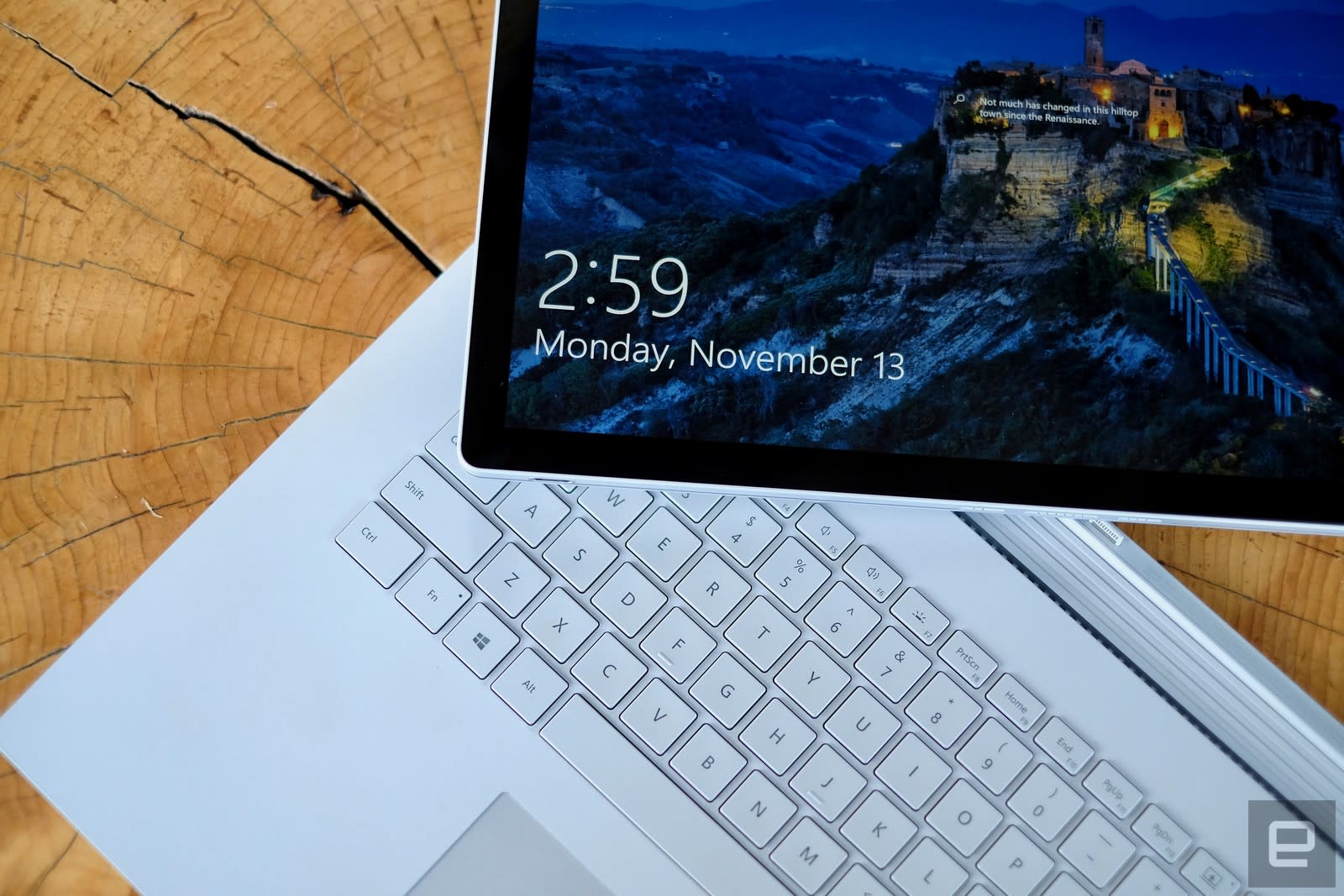
It’s been awhile since I’ve used a 15-inch laptop regularly, but I had no trouble getting used to the Surface Book 2. Despite its added heft, it’s comfortable to hold and easy to use on your lap. Of course, it has a larger footprint than most Ultrabooks, but I still managed to get work done in cafes and even on a plane tray table. You’ll have to live with a bit of top-heaviness, though, since its hardware is split across its screen and keyboard base. Standard notebooks can get away with incredibly thin displays, since they don’t have to stuff an entire computer’s worth of hardware behind the screen.
With the 15-inch Surface Book 2, you’re also getting a sizable resolution bump up to 3,240 by 2,160 pixels (260 ppi). Sure, it’s not 4K, but honestly that doesn’t matter much in a laptop this size. It’s sharp enough that you won’t notice any pixelation in text or images, even when you bring the screen right up to your face. Microsoft is sticking with the boxy 3:2 aspect ratio, rather than 16:9 widescreen. That’s helpful when it comes to productivity apps, since it gives you more vertical screen space, but it means you’ll have to live with black bars when you’re watching movies.
Edgar Alvarez/AOL
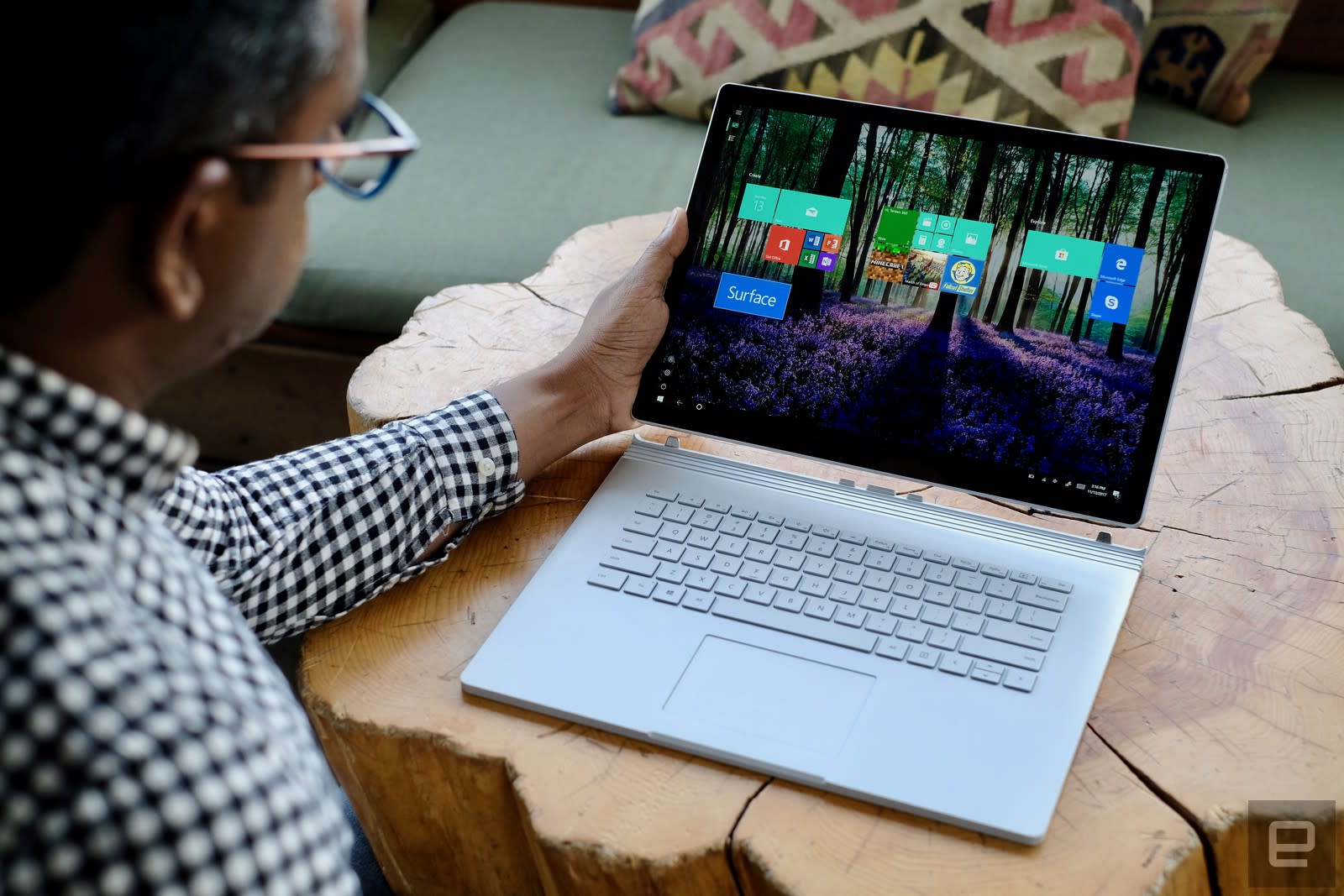
Instead of changing the laptop’s overall design, it’s clear that Microsoft spent more time revamping the Surface Book 2’s hinge. That’s what sets it apart from other convertible Windows laptops. The screen pops out to be used as a tablet. Or, you could turn the display around and dock it backwards, which effectively turns the keyboard base into a stand. There’s a stronger connection between the screen and base now, which, for the most part, removes the annoying wobbling we saw with the first Surface Book.
There’s still a slight amount of shakiness while you type, but it’s dramatically less than before. With the last model, it was sometimes difficult to follow what was happening on the screen as it was bobbing up and down. The Surface Book 2’s screen detachment feature worked pretty smoothly: Just hit the detach button, wait for the green light, and lift up the display. Removing and reattaching the screen felt smoother than the last model.
The screen is in line with the gorgeous displays we’ve seen from the Surface family. It’s bright enough to use outside, and colors practically pop off the screen. It makes just about everything look great, be it text, photos or movies. While I’d like to see OLED screens appearing in more laptops today, Microsoft is still getting great results from LCDs.

Edgar Alvarez/AOL
In tablet mode, the Surface Book 2 is almost comically large, but it’s still relatively easy to hold and only about as heavy as a hardcover graphic novel. It’s not meant to completely replace smaller slates, instead it’s a screen you can yank out when you need to read a long article or just watch a movie in bed.
The laptop still features an excellent keyboard, with a satisfying amount of travel distance and a smooth, accurate touchpad. There’s some extra wrist pad room to balance out the larger display. Around the sides, it has two USB 3.0 ports, an SD card reader, and for the first time on a Surface, there’s a USB-C port. While it’s not compatible with Intel’s Thunderbolt technology, which supports speeds up to 40 Gbps, instead of USB 3.1’s 10 Gbps. Still, you’ll at least be able to plug in devices using the new standard, like hard drives and smartphones. You can also charge the laptop over USB-C, but you’ll need to buy a separate adapter that can deliver enough juice.

Since it’s meant to function as a tablet, the Surface Book 2 also includes a rear 8 megapixel camera, as well as a 5 megapixel front-facing shooter. And just like all of the other Surface laptops, there’s a Windows Hello authentication camera on the front, which lets you log in with your face. The Surface Book 2 also supports the Surface Pen, which is particularly useful when using it as a tablet. Though it’d be even better if Microsoft included it in the box, instead of making you pay an extra $100 for it.
Performance and battery life
| Surface Book 2 (15-inch, 1.9Ghz – 4.2Ghz Core i7-8650U, 6GB NVIDIA GTX 1060) | 6,195 | 4,882 | E14,611 / P11,246 / X4,380 | 15,385 | 2.25 GB/s / 1.26 GB/s |
| Surface Book (2016, 2.6GHz Core i7-6600U, 2GB NVIDIA GeForce GTX 965M) | 5,452 | 4,041 | E8,083 / P5,980 / X2,228 | 11,362 | 1.71 GB/s / 1.26 GB/s |
| Surface Pro (2017, Core i5, Intel HD 620) | 5,731 | 4,475 | E2,782 / P1,666 / X431 | 4,260 | 1.6 GB/s / 817 MB/s |
| Surface Laptop (Core i5, Intel HD 620) | 5,075 | 4,279 | E2,974 / P1,702 / X429 | 3,630 | 658 MB/s / 238 MB/s |
| ASUS ROG Zephyrus (2.8GHz Intel Core i7-7700HQ, NVIDIA GTX 1080) | 6,030 | 7,137 | E20,000 / P17,017 / X7,793 | 31,624 | 3.4 GB/s / 1.64 GB/s |
| Alienware 15 (2.8GHz Intel Core i7-7700HQ, NVIDIA GTX 1070) | 6,847 | 7,100 | E17,041 / P16,365 | 20,812 | 2.9 GB/s / 0.9 GB/s |
| Alienware 13 (2.8GHz Intel Core i7-7700HQ, NVIDIA GTX 1060) | 4,692 | 4,583 | E16,703 / P12,776 | 24,460 | 1.78 GB/s / 1.04 GB/s |
| Razer Blade Pro 2016 (2.6GHz Intel Core i7-6700HQ, NVIDIA GTX 1080) | 6,884 | 6,995 | E18,231 / P16,346 | 27,034 | 2.75 GB/s / 1.1 GB/s |
| ASUS ROG Strix GL502VS (2.6GHz Intel Core i7-6700HQ , NVIDIA GTX 1070) | 5,132 | 6,757 | E15,335 / P13,985 | 25,976 | 2.14 GB/s / 1.2 GB/s |
| HP Spectre x360 (2016, 2.7GHz Core i7-7500U, Intel HD 620) | 5,515 | 4,354 | E2,656 / P1,720 / X444 | 3,743 | 1.76 GB/s / 579 MB/s |
| Lenovo Yoga 910 (2.7GHz Core i7-7500U, 8GB, Intel HD 620) | 5,822 | 4,108 |
E2,927 / P1,651 / X438 |
3,869 | 1.59 GB/s / 313 MB/s |
| Razer Blade (Fall 2016) (2.7GHz Intel Core-i7-7500U, Intel HD 620) | 5,462 | 3,889 | E3,022 / P1,768 | 4,008 | 1.05 GB/s / 281 MB/s |
| Razer Blade (Fall 2016) + Razer Core (2.7GHz Intel Core-i7-7500U, NVIDIA GTX 1080) | 5,415 | 4,335 | E11,513 / P11,490 | 16,763 | 1.05 GB/s / 281 MB/s |
| ASUS ZenBook 3 (2.7GHz Intel Core-i7-7500U, Intel HD 620) | 5,448 | 3,911 | E2,791 / P1,560 | 3,013 | 1.67 GB/s / 1.44 GB/s |
| Razer Blade Stealth (2.5GHz Intel Core i7-6500U, Intel HD 520) | 5,131 | 3,445 | E2,788 / P1,599 / X426 | 3,442 | 1.5 GB/s / 307 MB/s |
Microsoft also packed in some major hardware upgrades in the 15-inch version: An 8th generation Intel quad-core i7 processor and NVIDIA GTX 1060 graphics. The smaller model, meanwhile, starts with a 7th gen Core i5 CPU and integrated graphics, but you can bump it up to the new i7 chip and a GTX 1050 GPU.
Its hefty CPU and graphics capabilities make it well suited to heavy-duty content creation, like video editing and 3D rendering. And of course, that also means it’s a decent gaming machine. The Surface Book 2 achieved a solid 60 frames per second in Gears of War 4 while running in 1080p with high graphical settings. And in Forza 7, it clocked between 50 and 60FPS in 1080p with Ultra quality levels. Sure, dedicated gaming laptops can get even better results, but the Surface Book 2 is still impressive.
While Microsoft claims the computer will get 17 hours of battery life while playing video, it actually lasted a surprising 20 hours and 50 minutes in our testing. And that’s without any battery saving features turned on. But of course, that’s just when it comes to dealing with a local video file. Battery life will depend on what, exactly, you’re doing with the Surface Book 2. During my daily workflow, it lasted between 12 to 14 hours. And after one hour of gaming, it lost around 20 percent of battery life.
| Surface Book 2 15-inch | 20:50 |
| Surface Book with Performance Base (2016) | 16:15 |
| Surface Laptop | 14:49 |
| Surface Pro | 13:40 |
| ASUS ROG Zephyrus | 1:50 |
| Surface Book with Performance Base (2016) | 16:15 |
| Apple MacBook Pro 2016 (13-inch, no Touch Bar) | 11:42 |
| Apple MacBook Pro with Retina display (13-inch, 2015) | 11:23 |
| Apple MacBook Pro 2016 (15-inch) | 11:00 |
| HP Spectre x360 15t | 10:17 |
| Apple MacBook Pro 2016 (13-inch, Touch Bar) | 9:55 |
| ASUS ZenBook 3 | 9:45 |
| Apple MacBook (2016) | 8:45 |
| Samsung Notebook 9 | 8:16 |
| Alienware 13 | 7:32 |
| Microsoft Surface Pro 4 | 7:15 |
| HP Spectre 13 | 7:07 |
| Razer Blade Stealth (Spring 2016) | 5:48 |
| Razer Blade Stealth (Fall 2016) | 5:36 |
| Dell XPS 15 (2016) | 5:25 (7:40 with the mobile charger) |
| Alienware 15 | 4:31 |
| Razer Blade Pro (2016) | 3:48 |
| ASUS ROG Strix GL502VS | 3:03 |
Pricing and the competition

The 15-inch Surface Book 2 starts at $2,499 with a 256GB SSD, 16GB of RAM and NVIDIA GTX 1060. You can go all the way up to a 1TB SSD for $3,299. In comparison, Apple’s 15-inch MacBook Pro goes for $2,399, but its Radeon Pro graphics aren’t as powerful as NVIDIA’s.
If you’re looking at the smaller Surface Book 2, we’d recommend jumping to the $1,999 Core i7 model with NVIDIA graphics. It’s $500 more than the entry-level version, but the added cost is worth it for power users. If you have lighter computer needs, the Surface Laptop and Pro might be better options, instead of the cheapest Surface Book 2. And if that’s too expensive for you, Dell’s XPS 15 costs just $1,299 with GTX 1050 graphics.
Wrap-up
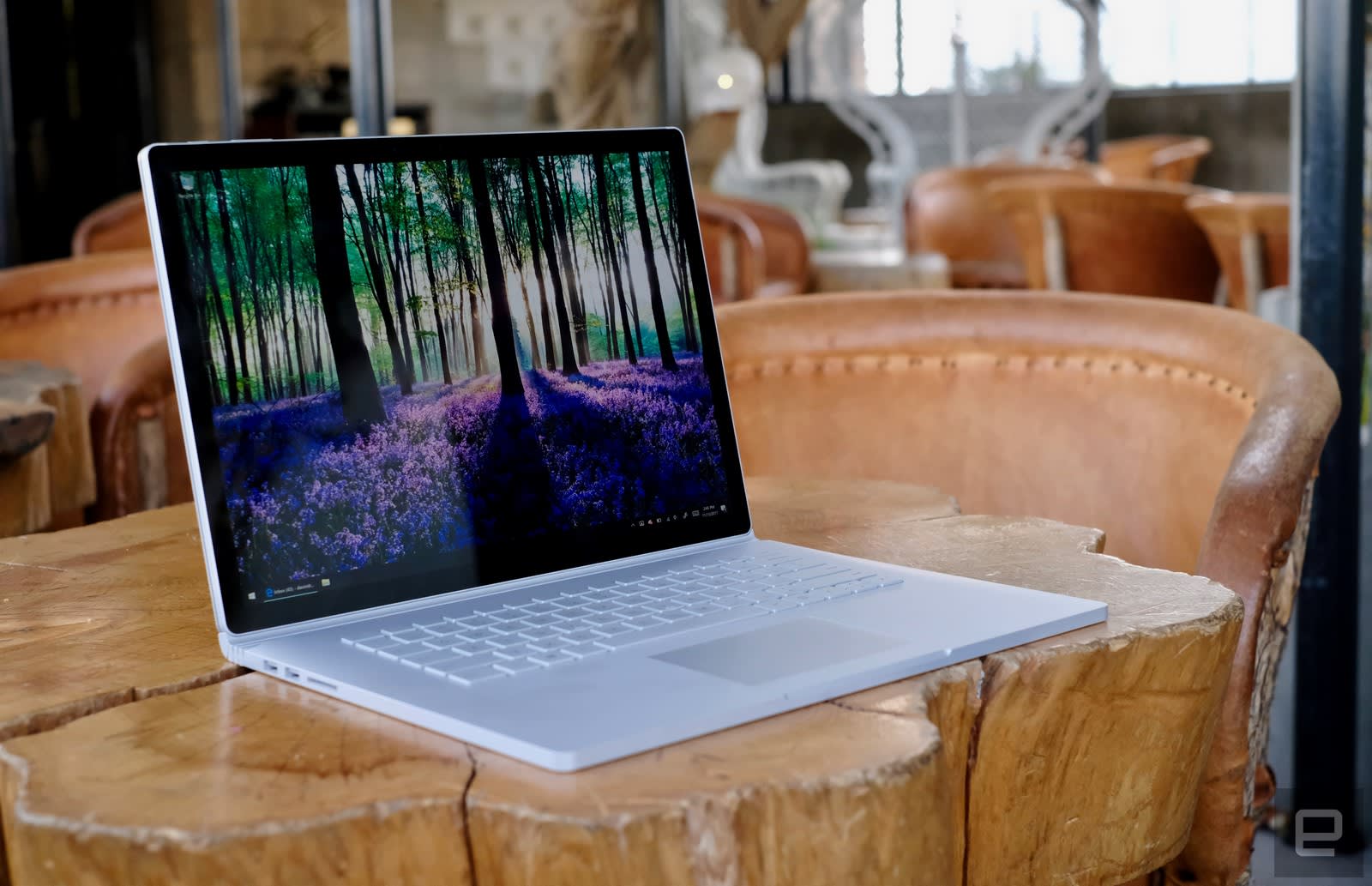
The Surface Book 2 is exactly what we’ve wanted from a high-end Microsoft laptop. It’s powerful, sturdy and its unique hinge doesn’t come with any compromises. While there are cheaper Windows laptops out there with similar specs, the Surface Book 2 stands apart by bringing together some of the best hardware around with the flexibility of a convertible notebook. It’s the closest a PC maker has come to taking on the MacBook Pro, both in style and substance.
Photos by Edgar Alvarez.
Amazon and Allrecipes team up to take on Blue Apron’s meal kits
We’ve heard rumblings that Amazon might be ready to take on Blue Apron with “prepared food kits,” and now it looks like it’s finally here. Today, AmazonFresh and Allrecipes.com announced a new partnership that will allow for meal preparation delivery. Top recipes on the site will now have an embedded option allowing users to purchase the ingredients for same-day delivery through Amazon Fresh.
To use the service, you should first select AmazonFresh as your grocery retailer of choice in your Allrecipes.com account. Then, find the recipe you want to make and locate the option to send the ingredients to your AmazonFresh shopping cart. This option will only be available on the site’s most popular recipes.
You’ll then be sent to AmazonFresh to check out. While Allrecipes will choose recommended food brands for you, you will have the option to swap them out for your preference in the AmazonFresh cart. You can then select a delivery time, whether the same day or the next, before checking out on Amazon. A spokesperson confirmed to Engadget that this service would only be available in the markets that AmazonFresh currently operates in.

There’s a few notable things here. First, this isn’t exactly a Blue Apron analogue. While specific meal ingredients will indeed be delivered to your door, the service does not choose the dishes for you. On the front end, you’ll have to do a little more work, but the flip side is that you can actually choose the dishes you make. In traditional services, you’re locked into a very limited choice of meals per week. The ability to choose your meals (a big complaint amongst subscribers to services like Blue Apron) is really key with this partnership, and likely why it will do well, but the restricted AmazonFresh geography means that it’s not a true Blue Apron competitor.
Facebook says messaging apps aren’t turning people into hermits
Think people are replacing face-to-face communication with gadgets and chat apps? A Facebook study says you’re dead wrong. Based on the survey commissioned by the Messenger team for the 25th anniversary of the first text ever sent (December 3rd, 1992), those who message their friends more often are 52 percent more likely to meet up with people in person than those who don’t send messages as much. Makes sense, since the more you keep in touch, the more likely you are to set up meetings, parties and dates. “What we found is that messaging turns out to be not a wedge, but instead a bridge bringing us closer together,” the team said.
The survey has also confirmed that more and more people are now using messaging as a form of communication. Around 80 percent of adults aged 19 to 64 and 91 percent of teens from 13 to 18 years of age admitted to sending messages every day. But it’s not just messaging that has become more popular over the past two years. Apparently, people have been emailing, video chatting and meeting friends face-to-face more, as well, which is consistent with the team’s finding that more messaging also means more in-person interactions. People in Brazil, France, Germany and the US, in particular, have been meeting people face-to-face a lot more lately.
Finally, over 60 percent of the survey’s respondents reported having greater social satisfaction and more authentic relationships, thanks to the conversations they’re having on messaging apps. Emojis and GIFs help: those more comfortable using visuals find their voice through the sometimes-confusing, oft-amusing graphics. Among the respondents over the age of 55, 77 percent admitted using emojis to communicate.
Online communication can also strip off filters and make people bolder and more honest. Of course, that’s not always a good thing — sometimes people can be too bold on a messaging app and more hateful than frank. But for those who tend to keep their opinions to themselves in person, messaging could help them open up and forge real relationships that might not have flourished otherwise.
Source: Facebook
Just Eat gets the approval it needs to acquire Hungryhouse
Five years ago, a merger between Just Eat and Hungryhouse would have been impossible in the UK. They were two of the largest online takeaway sites and would, therefore, have created a monopoly. Now, of course, the situation is a little different. With Deliveroo, UberEats and Amazon vying for orders, both companies are now mid-sized players in Britain. As a result, the Competition and Markets Authority has approved Just Eat’s acquisition of Hungryhouse, which was originally announced last December. In short, the regulator believes competition will still be rife in the UK, and that Hungryhouse wasn’t large enough to survive on its own.
For the financial year ending on December 31st, 2016, Just Eat reported revenue of £238 million profits (before tax) of £109 million. Hungryhouse, by comparison, had revenues of £29.1 million and suffered an operating loss of £7.6 million. Without the acquisition, then, it’s unclear how long Hungryhouse owner Delivery Hero would have carried on in the UK. Both platforms are, conceptually, very similar — they act as an intermediary between customers and restaurants, but don’t get involved with the deliveries. They stand in stark contrast to Deliveroo, Uber and Amazon, who use colourful couriers to shuffle food and drink back and forth.
The business models are different, but the goal is the same: to own the takeaway market. Just Eat, unsurprisingly, has started experimenting with deliveries too. (These include drop-offs by tiny six-wheeled robots.) Even with Hungryhouse under its banner, the company will be incentivised to continue these tests. If it fails to compete with Deliveroo and Uber on pricing or convenience, its market share will shrink. That’s why the CMA isn’t worried about Just Eat’s acquisition and its impact on UK competition. As the FT reports, the buyout is now expected to wrap up in January.
Source: CMA
Facebook, Google and others add trust icons to tackle fake news
More than 75 major news outlets have agreed to use Trust Indicators on their content in a bid to stem the tide of fake news. Facebook, Google, Twitter and Bing will display the indicators on their sites as part of a partnership with The Trust Project, which aims to promote authentic fact-based journalism.
Trust Indicators will appear next to news articles and provide information about the source of the story, describing the outlet’s best practice, the author’s expertise and providing citations and references where necessary. Google is still figuring out the best way to display the indicators, while Facebook is rolling them out today as part of a wider move to add more contextual information to stories shared on its platform. The company says it’s starting with a small group of publishers but hopes to expand this pool over time.
Via: The Verge
Source: The Trust Project, Google, Facebook
Amazon’s Echo with a screen hits the UK for £200
It’s taken a while, but Amazon’s Echo Show is finally ready for British customers. The boxy device, which comes with a 7-inch display and Alexa smarts, was announced way back in May. Pre-orders for the UK opened on September 28, and today, at last, the first units are shipping out. Each one costs £199.99, though a two-pack will net you a £100 saving. It’s an expensive bundle, but one that makes sense given the Echo Show can be used for voice and video calls. The idea, presumably, is that you’ll buy one for yourself and a relative so you can chat freely over the festive period.
The Echo Show has eight microphones with noise cancellation and beam-forming technology. That means you can use the device like a regular Echo speaker, accessing thousands of “skills” that include Spotify, Uber, Just Eat and BBC News. With a screen, of course, Alexa can show you things too, including song lyrics, calendar appointments and recipe instructions. Heck, it can even show you a live video feed from compatible smart home cameras. As my colleague Nathan Ingraham wrote in his review: “It’s not necessary, but it is nice.” The only catch? There’s no YouTube. Google pulled support last month and we doubt it’ll be coming back anytime soon.

 AIVAnet