


Apple Says ‘Face With Tears of Joy’ is Most Popular Emoji in United States Among English Speakers
Apple has revealed that “face with tears of joy” is the most popular emoji among English speakers in the United States.
The face topped Apple’s list of the top 10 emoji, ahead of a red heart, loudly crying face, heart eyes face, face throwing a kiss, face with rolling eyes, skull, smiling face with smiling eyes, weary face, and thinking face.
Apple’s chart isn’t labeled, much to the disappointment of anyone who was desperately seeking emoji statistics.

Apple shared the chart in a recently published overview of its differential privacy technology on macOS Sierra and iOS 10 and later, which allows the company to collect and aggregate anonymized data from a large number of users while preserving the privacy of individual users.
The differential privacy technology used by Apple is rooted in the idea that statistical noise that is slightly biased can mask a user’s individual data before it is shared with Apple. If many people are submitting the same data, the noise that has been added can average out over large numbers of data points, and Apple can see meaningful information emerge.
Apple says it uses local differential privacy to help protect the privacy of user activity in a given time period, while still gaining insight that improves the intelligence and usability of iOS and macOS features such as:
• QuickType suggestions
• Emoji suggestions
• Lookup Hints
• Safari Energy Draining Domains
• Safari Autoplay Intent Detection (macOS High Sierra)
• Safari Crashing Domains (iOS 11)
• Health Type Usage (iOS 10.2)
Apple has specifically developed a technique known in the academic world as “local differential privacy”:
Local differential privacy guarantees that it is difficult to determine whether a certain user contributed to the computation of an aggregate by adding slightly biased noise to the data that is shared with Apple. But before adding this noise, it’s necessary to define a data structure that captures a sketch of user input with a small number of bits. Apple currently makes use of two specific techniques.
In iOS, information being shared with Apple for the categories of data that are protected using Differential Privacy is visible under Settings > Privacy > Analytics > Analytics Data, in entries that begin with “DifferentialPrivacy.”
In macOS, users can launch the Console app and view the information under the Differential Privacy category of System Reports.
Apple’s differential privacy overview provides many more technical details about the technology, including info about the Count Mean Sketch technique that allows Apple to determine the most popular emoji.
Tags: emoji, Differential privacy
Discuss this article in our forums
The Morning After: Friday, November 3rd 2017
Hey, good morning! You look fabulous.
The iPhone X arrives today, but the morning’s big X news is all about Xbox. We have our review of the new One X ready (roughly 25 years after the debut of a certain cartoon), plus a look at what happened to Donald Trump’s Twitter account.
Do you even 4K?Xbox One X review

The Xbox One X has unprecedented power for a gaming console, but its $500 price may restrict its appeal to hardcore gamers. On the plus side, it offers more room for 4K or 60 fps gaming than the PS4 Pro and includes a 4K Blu-ray player. However, a lack of support for Dolby Vision HDR and unanswered questions about Microsoft’s plans for Mixed Reality headset support leave a few holes in its argument.
Art and appliance.Samsung’s 43-inch Frame TV is now available for $1,300

The 43-inch version of Samsung’s 4K TV that can disguise itself as an art piece is now available on Samsung.com and from various retailers in the US. It’s the latest entry in the Korean conglomerate’s The Frame series, following the 55- and 65-inch versions’ debut back in June. This one will set you back $1,300 — definitely not cheap, but relatively more affordable than the biggest variant that will cost you $2,799.
That’s one way to go.Someone at Twitter pulled the plug on @realDonaldTrump

An outgoing Twitter employee deactivated the President’s Twitter account last night. For about 11 minutes.
How do you think it went?Apple Q4 2017 earnings

Before the iPhone X rolled out to customers today, Apple informed investors how things have been going for the previous quarter. It’s hard to tell how the launch of the iPhone 8 and 8 Plus affected the company, but sales were up a bit from last year. Same for iPads and Macs, while the catch-all division that tracks Watch, AirPods and Apple TV sales took in $3.23 billion last quarter — 36 percent more than the same period last year.
This is familiar.Cosmic rays reveal hidden cavities in Egypt’s Great Pyramid

We know how this works, we’ve seen Stargate like a hundred times.
Is this the future of FMV?Live-action drama ‘Erica’ blurs the line between game and interactive movie

Flavourworks PS4 game Erica uses live-action footage for an interactive experience unlike most. There are tons of objects to investigate, and players can expect to make choices or selections every 15 seconds or so.
‘Black Mirror’ has new competition.CBS is bringing back ‘The Twilight Zone’ on All Access

Now that Star Trek Discovery is rolling, CBS is reaching into the vault to relaunch another classic on its subscription streaming service. Execs revealed that a Twilight Zone show is on the way, and rumors indicate it will be made by Jordan Peele’s Monkeypaw Productions (Get Out).
Oreo taste test.Samsung wants you to beta test the next Galaxy phone’s software

Before Samsung releases Android Oreo for its current (and future) Galaxy devices, it’s looking for a few brave souls to test it out. The next version of TouchWiz, oops, we mean Samsung Experience 9.0 is available to select Galaxy S8 and S8 Plus owners in a few countries — click through to get educated on all of the requirements.
But wait, there’s more…
- New Kevin Spacey accusations come from ‘House of Cards’ crew
- MIT students trick AI into identifying a turtle as a gun
- Men’s health tech creates shame-free ways to get treatment
- Co-opinion: ‘Wolfenstein II’ is definitely not ‘Doom’
- CIA releases cache of Bin Laden’s personal files with malware warning
- OnePlus confirms the 5T exists, and will keep the headphone jack
The Morning After is a new daily newsletter from Engadget designed to help you fight off FOMO. Who knows what you’ll miss if you don’t Subscribe.
Craving even more? Like us on Facebook or Follow us on Twitter.
Have a suggestion on how we can improve The Morning After? Send us a note.
BBC to stream 1,000 extra hours of live sport each year
The BBC continues to reduce the amount of public money it spends, it’s led to some notable sporting events being cut from its programming. It’s already been forced to drop the rights to big-name British golfing tournaments, Formula 1 and perhaps the most prestigious global sporting event of all: the Olympics (although it has since agreed a sub-licencing deal with Discovery-owned Eurosport).
Instead, the corporation has focused on sports that it believes are most valuable to licence fee payers, including Wimbledon tennis and Six Nations rugby. Expanding that commitment, the BBC today announced “its biggest increase of live sport in a generation,” confirming that will add 1,000 extra hours of live sport to the BBC Sport and iPlayer websites each year.
The BBC hopes to make up the additional hours with live coverage from 30 additional sports. In 2017, it’s streamed a live match from every qualifying round of the FA Cup and brought visitors live action from the Women’s Super League for the first time. Just last week, it streamed England’s 5-2 win against Spain in the Under-17 World Cup final. Across 2018 and beyond, British Basketball, British Athletics, wheelchair tennis, netball, ice hockey and badminton will be added to the roster.
In terms of content, the BBC is in a good place. It’s secured the rights for the Olympic Games and Wimbledon until 2024, the World Cup until 2022, Euro 2020 and the Six Nations and FA Cup to 2021. While many of those events will be broadcast on TV, the BBC Sport team has committed to making more specialised sporting coverage available via BBC Sport and iPlayer, ensuring that viewers can tune in no matter where they happen to be.
Watch how a rogue drone caused major disruption at a busy airport
Why it matters to you
While the risk of a mid-air catastrophe is the main concern when it comes to rogue drones, they also give controllers a major headache when it comes to reorganizing flights.
This past July a rogue drone was spotted in airspace close to Gatwick, one of the U.K.’s busiest airports. Its appearance forced the temporary closure of the airport’s runway, causing major disruption to flights that were preparing to land there.
Air traffic controllers stopped planes coming in for a total of 14 minutes, but even that relatively short period of time caused major hassle for airport officials.
A fascinating video (above) released by the U.K.’s National Air Traffic Services (NATS), the country’s main air navigation service provider, uses computer graphics to visualize the disruption caused by the drone that day, offering an insight into the kind of challenges controllers face when drones fly into restricted zones close to their airport.
In the video we can see how the holding areas for incoming aircraft became quickly congested as airport staff searched frantically for the operator of the drone. As the incident continued, some planes were even forced to land at other airports many miles away because they were running low on fuel and had no idea how long they would have to wait.
The drone initially forced the runway to close for nine minutes. It then disappeared, allowing flights to resume. But 17 minutes later it was spotted again, forcing controllers to suspend flights for a second time, this time for five minutes.
The drone disappeared for good at 6.41 pm, allowing the runway to reopen, but NATS says in the video that the knock-on effect “extended into the evening” because controllers had to clear the stacked planes and reschedule arrival times for other incoming aircraft.
Increasing reports of rogue drones flying close to airports mirror the rapid rise in consumer drone ownership, and officials at airports around the world are concerned about a possible catastrophe if a drone collides with an aircraft in mid-air.
In October, 2017, a drone struck a passenger plane over Quebec City in Canada in what’s thought to be the first incident of its kind. Fortunately, the plane suffered only minor damage and was able to land safely.
Canada’s transport minister, Marc Garneau, said at the time that the potential for a catastrophic accident involving a drone and an aircraft is “the kind of nightmare scenario that keeps me up at night,” though he acknowledged that “the vast majority” of drone operators fly their machines responsibly
As for NATS, it offers a note of caution at the end of its video: “If you’re operating a drone, you are a pilot,” the message says, adding that it’s “your responsibility to fly it safely.”
Editor’s Recommendations
- A drone hit a passenger plane in Canada in first reported incident of its kind
- A Phantom 4 drone hit a helicopter over New York and the drone came out worse
- Hobby drones are hampering wildfire air crews in California
- Drones can help when disaster strikes, but only when they’re allowed to
- Take to the virtual skies with these free flight simulators
Xbox One X review: A console that keeps up with gaming PCs
The Xbox One X is the ultimate video game system. It sports more horsepower than any system ever. And it plays more titles in native 4K than Sony’s PlayStation 4 Pro. It’s just about everything you could want without investing in a gaming PC. The only problem? It’s now been a year since the PS4 Pro launched, and the One X costs $500, while Sony’s console launched at $400. That high price limits the Xbox One X to diehard Microsoft fans who don’t mind paying a bit more to play the console’s exclusive titles in 4K. Everyone else might be better off waiting, or opting for the $279 Xbox One S.
Hardware
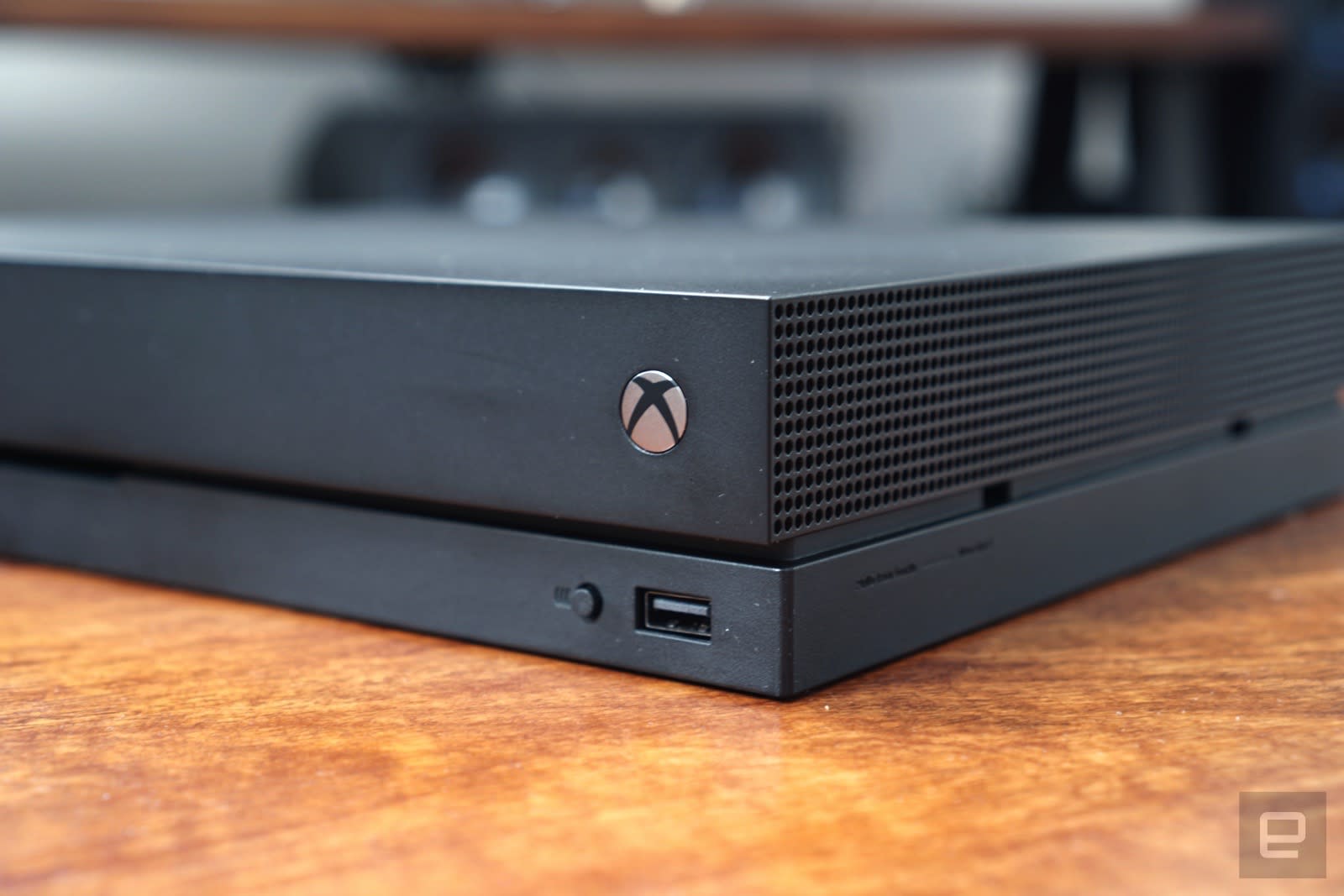
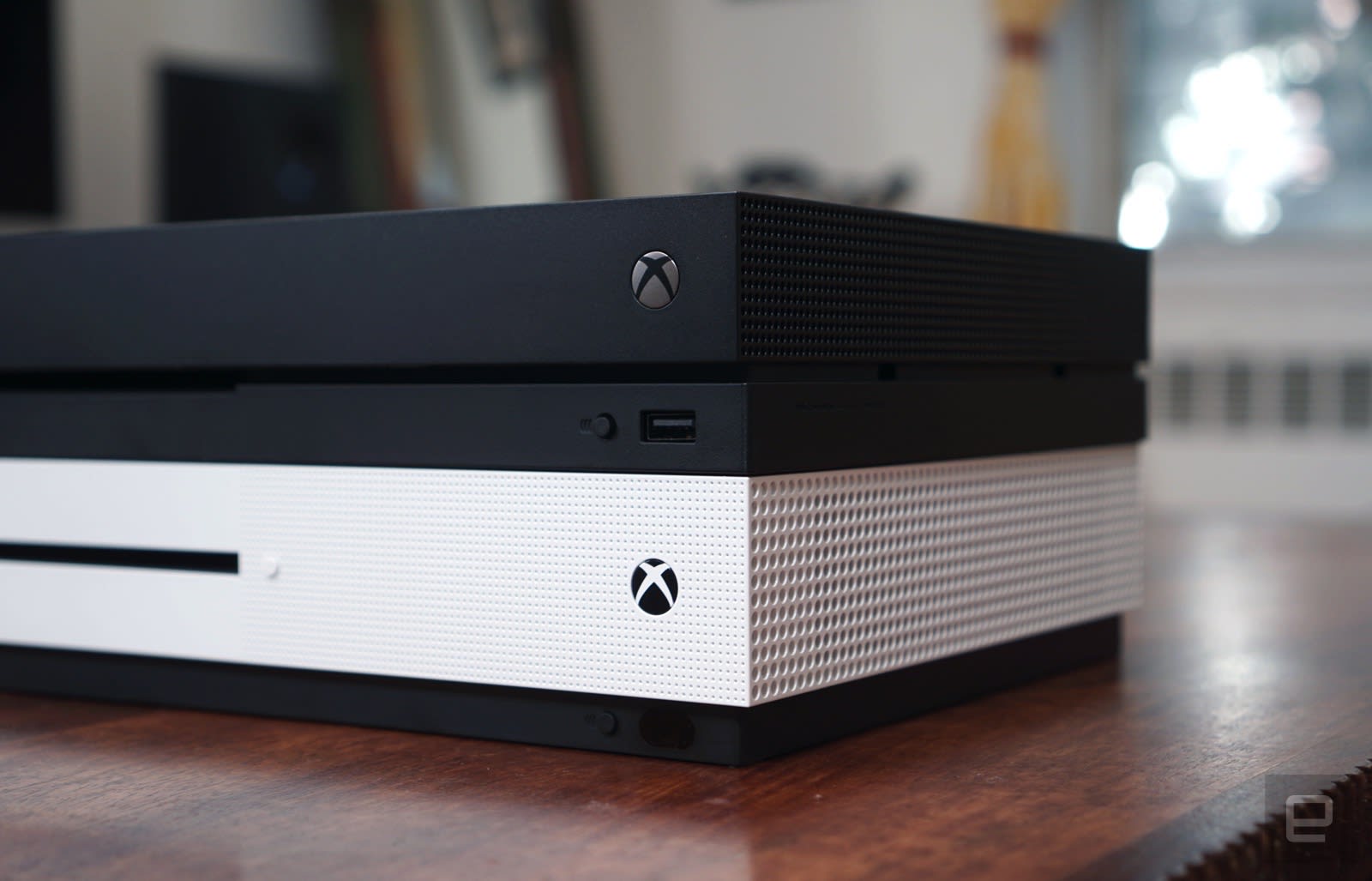
Despite all the power inside, the One X is Microsoft’s smallest console to date. It looks similar to the Xbox One S, except it has an entirely matte black case and is slightly slimmer. It’s also surprisingly dense — the console weighs 8.4 pounds, but it feels far heavier than you’d expect for its size, thanks to all of its new hardware. The One S, in comparison, weighs two pounds less.
The Xbox One X’s real upgrades are under the hood. It features an 8-core CPU running at 2.3Ghz, 12GB of GDDR5 RAM, a 1 terabyte hard drive and an upgraded AMD Polaris GPU with 6 teraflops of computing power. The PS4 Pro has only 8GB of RAM and tops out at 4.2 teraflops. Microsoft’s console is clearly faster. That additional horsepower means the Xbox One X can run more games in full native 4K than the Sony’s console.
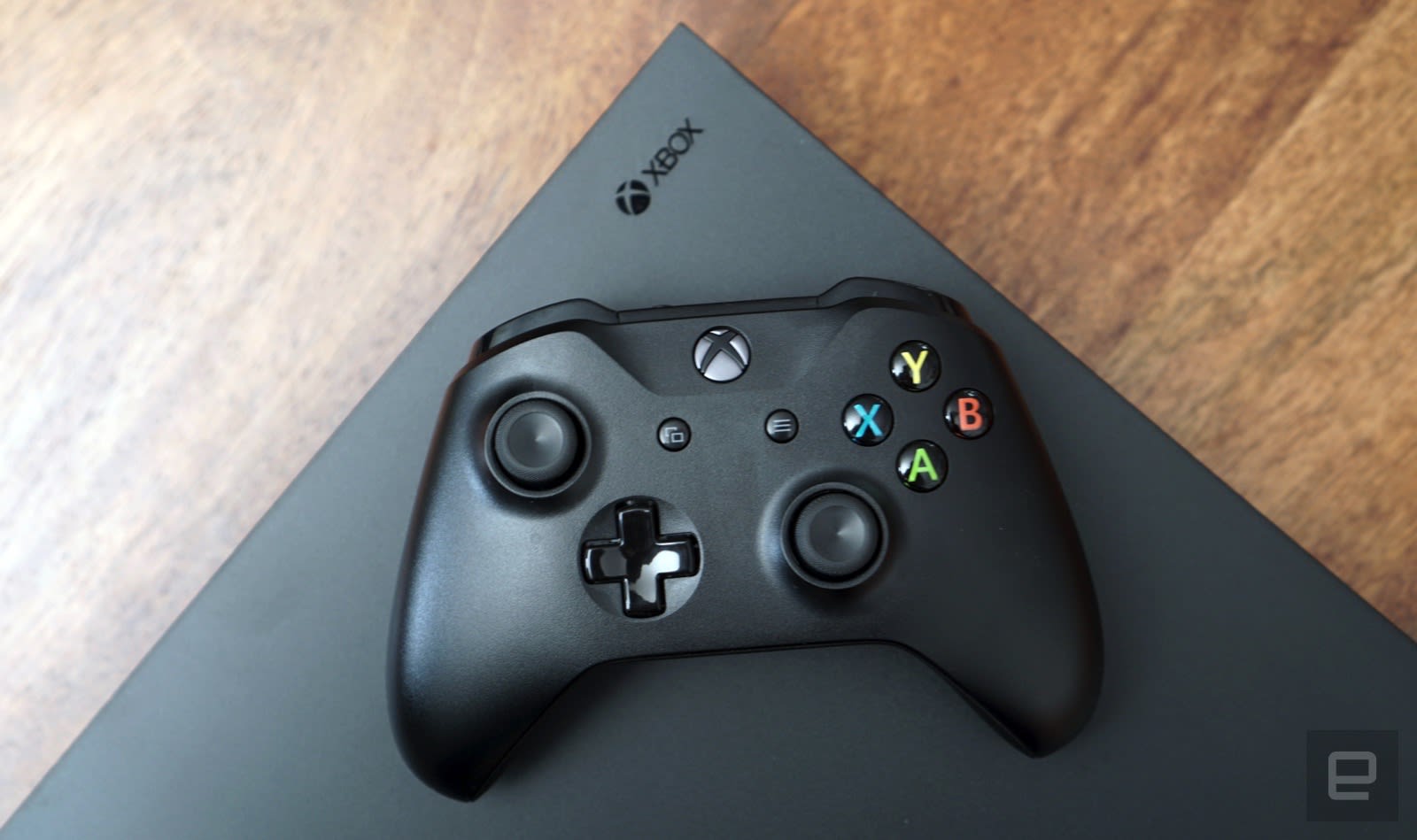
Along the front, there’s the slot-loading 4K Blu-ray drive, a physical power button, a single USB port and a controller pairing button. And around back, there are HDMI out and in ports, the latter of which lets you plug in your cable box. Additionally, there are two USB ports, connections for optical audio, IR out, and gigabit Ethernet. If you’ve still got a Kinect around, you’ll need to use a USB adapter to plug it in.

Devindra Hardawar/AOL
The console’s controller hasn’t changed since its last mini-upgrade with the Xbox One S. That revision rounded out its seams, improved bumper performance and added a 3.5mm headphone jack. It’s still a great controller, though I’m annoyed Microsoft is sticking with AA batteries as their default power source. Sure, you could just pick up some renewable batteries, or the Play and Charge kit, but that’s an extra expense. And manually swapping batteries feels like a bad user experience when every other console has rechargeable controllers.
In use

Devindra Hardawar/AOL
You won’t find any major differences between the One X and the last Xbox at first — aside from a more dramatic startup sequence. Navigating the Xbox interface is fast and zippy, but mostly that’s due to a recent OS upgrade. If you’re moving over from an older Xbox One, you can use the backup tool to transfer your games and settings to an external hard drive. Just plug that into the new console during setup and it’ll make it feel just like your old machine. It’s also a lot faster than waiting for everything to download from Xbox Live.
You’ll still have to set aside some time if you want to play an Xbox One X-enhanced title, though. Those 4K textures will make games significantly larger, but Microsoft says it’s come up with a few ways to help developers make downloading them more efficient. For example, language packs and other optional content won’t get installed by default.
We only had a few enhanced titles to test out during our review: Gears of War 4, Killer Instinct and Super Lucky’s Tale. They each took advantage of the console in different ways. Gears of War 4 runs natively in 4K at 30 FPS with Dolby Atmos and HDR (high dynamic range lighting) support. It looked great — especially with HDR, which highlighted bright elements like lightning strikes — but I noticed the frame rate dip occasionally. I was also surprised that load times were on-par with what I’ve seen with the game on the Xbox One S.

Devindra Hardawar/AOL
You can also play in Performance mode, which bumps the frame rate up to 60FPS and uses higher quality graphical effects, while rendering it lower in 1080p. Personally, I preferred this, since it makes the game much smoother — as if you’re playing it on a high-end gaming PC, not a console. Some PlayStation 4 Pro games also let you choose how you wanted to distribute its power, so in some ways Microsoft is just following in its footsteps.
I’ve been playing Gears of War 4 on my gaming PC (which is connected to my home theater) over the past year, and I was impressed that the Xbox One X is able to deliver a similar experience. It didn’t quite match my rig though, which is powered by Intel Core i7 4790k CPU running at 4GHz, 16GB DDR3 RAM and an NVIDIA GTX 1080 GPU. Typically, I play at 1,440p (2,560 by 1,440 pixels) with HDR and all of the graphical settings set to their highest level, and I can easily maintain a 60FPS frame rate. The One X felt just as solid at 1080p, but there were clearly plenty of graphics settings it couldn’t take advantage of, in particular higher levels of bloom lighting and shadow detail.
Killer Instinct and Super Lucky’s Tale run in 4K at a smooth 60FPS. They both looked and played better than their standard versions, though I was surprised they didn’t take advantage of HDR. As usual, I noticed the improvement in frame rates more than the higher resolution. Unless you’re sitting very close to a TV above 50-inches, you’d likely have a hard time telling between 4K and 1080p.
That poses a problem for Microsoft: It’s betting that gamers will actually want true 4K rendering. In practice, though, PlayStation 4 Pro titles running in HDR and resolutions between 1080p and 4K often look just as good to the naked eye. The Xbox One X’s big advantage is that its hardware could let more games reach 60FPS compared to Sony’s console.
Microsoft says over 130 Xbox One X-enhanced titles are in the works. That includes already-released games like Forza Motorsport 7 and Assassin’s Creed Origins, as well as upcoming titles like Call of Duty: WW2. You’ll be able to find them easily in a special section in the Xbox store. There is also a handful of Xbox 360 games that’ll get enhanced eventually, including Halo 3 and Fallout 3. Some of those titles will get bumped up to a higher resolution, while others will get HDR support. Microsoft describes these upgrades as a bonus for developers who were prescient about how they built their games. Basically, don’t expect your entire 360 library to get enhanced.

Devindra Hardawar/AOL
Even if a game isn’t specifically tuned for the new console, Microsoft says you might still see some performance improvements. The PlayStation 4 Pro, meanwhile, has over one hundred games built for its hardware, and its boost mode can speed up some older games.
Microsoft is still pushing the Xbox as more than just a game console, though. 4K Blu-rays loaded up quickly, and I didn’t notice many delays as I skipped around films. Planet Earth II, in particular, looked fantastic thanks to its brilliant use of HDR. Unfortunately, the One X doesn’t support Dolby Vision, so you’re stuck with the slightly less capable HDR 10 standard. That makes sense since it’s more widely supported, but it would have been nice to see Dolby’s, too.
And speaking of Dolby technology, Microsoft is also highlighting Atmos support on the One X, just like it did with the One S. The company’s app lets you configure the console to pass audio Atmos signals to your audio receiver. You can also shell out $15 to get Atmos support for headphones, which simulates immersive surround sound. It’s strange to pay money to unlock Dolby features, but it’s worth it since it’s significantly better than Microsoft’s audio virtualization technology. The Netflix app also supports Atmos for a handful of films (something that the Xbox One S and PlayStation 4 offer, as well).
One thing you won’t find in the new Xbox is VR support. Microsoft has mentioned that the console will offer some sort of mixed reality, but it hasn’t offered up any details yet. It’s technically powerful enough to work with any of the Windows Mixed Reality headsets launching this fall. It’s a shame that Microsoft is being so wishy-washy because Sony has had a very successful head start with the PlayStation VR.
Pricing and the competition
Devindra Hardawar/AOL
The biggest knock against the Xbox One X is its $500 price. The PS4 Pro launched at $400 last year, and there’s a good chance we’ll see plenty of deals around the holidays. If your friends are on Xbox Live, or you’re a devotee of Microsoft’s first party franchises, then the X makes more sense. If you just want to play third-party titles that come to both platforms, though, the PS4 Pro is clearly the better deal.
If you’re looking to upgrade from an original Xbox One, and you have a new TV, the One X might be more compelling. It’s faster and offers more features than the One S, and more importantly, it’ll last you much longer without needing an upgrade. There’s also plenty of wisdom in simply waiting a while before you buy the One X, especially if you haven’t moved to a 4K TV yet. The new console can make games look better on 1080p sets, since it’ll supersample high-res textures and have more graphical effects, but it’s simply not worth the upgrade since those TVs don’t support HDR.
If price isn’t a huge concern for you, it’s worth considering investing in a gaming PC. A decent one costs between $600 and $800, plus the price of a monitor, but it’ll easily be more powerful than the One X. And you have the added benefit of upgrading components down the line. Now that Microsoft and game publishers are offering most major titles on PC, you won’t be missing out on much by ditching consoles.
Wrap-up
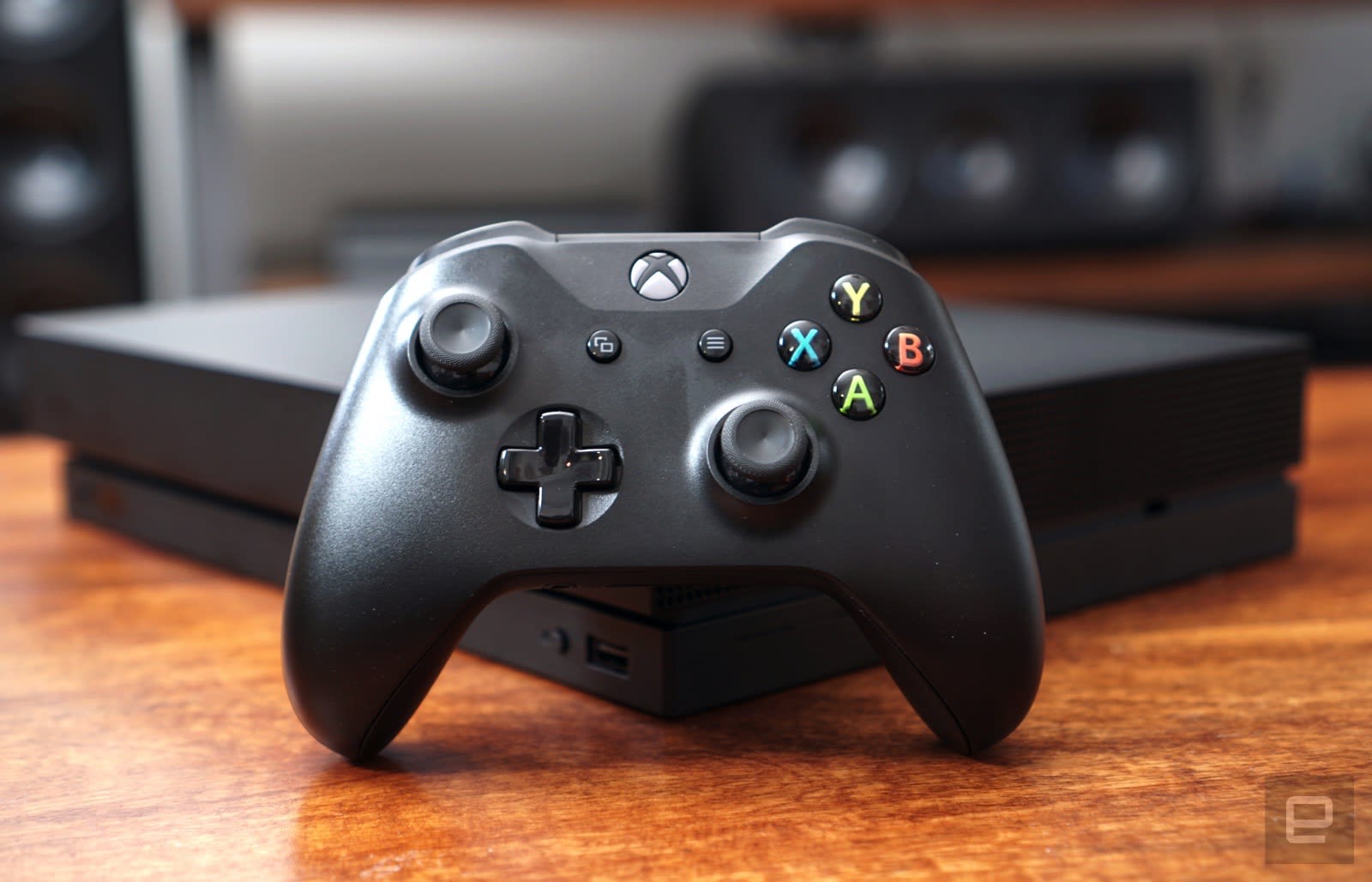
Ultimately, the Xbox One X offers some major performance upgrades that gamers will notice — especially if you’re coming from an original Xbox One. But it’s also a bit disappointing since it’s coming a year after the PS4 Pro, and it doesn’t offer VR yet. For Microsoft fans, though, none of that will matter. It’s exactly what the company promised: the fastest game console ever made.
Facebook pressured to notify users exposed to Russian propaganda
Facebook is facing pressure from lawmakers, tech analysts and even ordinary users to tell people if they were served Russian-linked propaganda during the 2016 US election period. According to Reuters, Democratic Senator Jack Reed asked during the Senate Intelligence Committee hearing the social network attended: “Do you feel an obligation… to notify those people who have accessed [those deceptive foreign government posts]? And can you do that? And shouldn’t you do that?” Time Well Spent, an organization critical of ad-supported social media, also pointed out that users who saw those posts might not believe they were manipulated unless Facebook itself tells them.
The social network said that’s a tall order, considering over 126 million Americans were exposed to the 80,000 updates and 3,000 ads Russian troll farms posted on Facebook and to the 120,000 they posted on Instagram. Its general counsel argued that he wasn’t sure Facebook could even identify everyone who saw those posts, since the company got its numbers from computer models, not from actual counts.
Nevertheless, critics are having a hard time believing the counsel’s explanation, since Facebook is known to track people’s Likes and clicks for algorithm and ad purposes. Intelligence committee vice chairman Senator Mark Warner likened their request to telling people in a hospital if they’ve been exposed to a disease. There’s even a Change.org petition calling for the company to inform users how they were exposed to Russian propaganda that has garnered over 83,000 signatures as of this writing. Widener University law professor Christopher Robinette told Reuters that the courts likely can’t compel Facebook to notify users if they were served Russian-linked ads and fake news, so it will all depend on what the social network decides.
Source: Reuters
Tor’s next-gen onion system works to keep servers hidden
The dark web is no longer just a marketplace for illicit drugs, weapons, and other nefarious material. Mainstream media and social networks, from The New York Times to Facebook, are also using it to give users an anonymous way to access their sites. These so-called “onion” services can help publishers evade country-specific web censorship, while also delivering their content to people who simply use the Tor Network to surf in private. The tradeoff for anonymity is a sluggish web browsing experience, but it’s a sacrifice more than 2 million people are willing to make. Now, with its almost decade-old onion domains getting rusty, Tor is unveiling its next-gen sites, with the focus on strengthening security.
By using new encryption algorithms, improved authentication, and a redesigned directory, Tor claims its next-gen design will keep an onion address completely private. In the past, its network could learn about your onions, which could have resulted in info leaks and cyberattacks. Just this year, news emerged that a hacker had knocked out about a fifth of the Tor network (over 10,000 “secret” sites in total). “All in all, the new system is a well needed improvement that fixes many shortcomings of the old design, and builds a solid foundation for future onion work,” writes Tor on its blog.
Users can check out the future of Tor onions by grabbing the alpha release of its browser — which itself got an update in June that was all about limiting the amount of info it could glean about your computer.
Source: Tor
Star Wars: Jedi Challenges review — The Force is strong in AR

An experience for Jedi, by Jedi, about Jedi.
Every Star Wars fan, whether you support the Rebellion or the Empire, has picked up a lightsaber at some point and dreamed of fighting an equally skilled opponent for the future of the Galaxy. Everything from cheap plastic lightsabers that extend when you flick your wrist to meticulously detailed replicas have been around for as long as the movies have been around for this very reason, but never really capture the thrill of saber combat. Disney and Lenovo have partnered up to fix that, but instead of making the lightsaber itself smarter this new experience is using your phone and a pair of cameras to trick your brain.
It’s called Star Wars: Jedi Challenges, and after a week with this experience, it is clear every fan is going to want one of these this year.
See at Best Buy

A more civilized weapon
Star Wars: Jedi Challenges Hardware
The first thing you see when you open the box is that lightsaber. Everyone knows this lightsaber. It’s the lightsaber. Discarded by Anakin until it was handed to Luke. Discarded by Luke until it called out to Rey. The most iconic metal tube speckled with buttons and knobs in the history of science fiction, only this one has a small rubbery tip where everyone normally expects to see three feet of energy blade.
That blade exists, but only once you have put the headset on.
This is augmented reality that uses your phone, and that’s as cool and weird as it sounds.
Unlike your standard Google Cardboard or Daydream VR headset, Lenovo’s Mirage AR headset is largely transparent. No matter what you are doing in your Jedi training, the real world will always be visible through the tinted lenses on this headset. It still uses your phone as the brain and the display on your phone to show you the Jedi training environment, but instead of replacing the real world entirely you are interacting with a collection of interactive holograms.
It does still require a phone to work though, and Disney has been less-than-clear about which phones are going to work with this headset. I’ve had demonstrations with a Moto Z2 Force and an iPhone 6, and according to Disney the app will support “most smartphones made in the last few years” when available in the Play Store. The official list you’ll find on the Jedi Challenges website is the list of phones that have been tested and confirmed to work, but many more phones are expected to actually support this game.

Setting this headset up is a little more complicated than it maybe should be. Every time you want to play Star Wars: Jedi Challenges you have to:
Launch the app on your phone
Turn the lightsaber on
Make sure the lightsaber is paired to your phone
Confirm you are ready to play Jedi Challenges
Insert your phone into the cartridge
Connect the USB cable to your phone
Connect the USB cable to your headset
Put the headset on
If you do any of this out of order, there’s a good chance you have to start over. If you need to use your phone to answer a call or anything while the phone is in the headset, you have to repeat this process to get back into your game. For technically-minded players this isn’t so much complicated as it is tedious. For less technically-minded people, this quickly becomes complicated enough to cause frustration.
If you didn’t believe in The Force before, you seriously consider starting.
Once everything is set up, you place the included beacon somewhere in your room and press a button on the lightsaber to let the game know you are ready to go. The game uses that beacon as a marker for where to put things like the menu. It helps the game figure out how much space you have to play in, and makes it possible for you to wander around and interact with the holograms.
One thing Lenovo’s design handles beautifully is ensure the battery on your phone isn’t toast after gameplay. In my tests with the Moto Z2 Force Lenovo provided for this review, an hour of gameplay would cost anywhere between 18% and 20% of the battery, which is considerably less than most VR counterparts. Some of this is because far less of the display is being used for this game, but in this case the why isn’t nearly as important as the ability to keep swinging that lightsaber.
All of this tech serves a single purpose, to make you feel immersed in this world. That happens instantly the first time you are told to press the button on the side of your lightsaber to summon your blade. That iconic energy sound surrounds you, and through the headset you see the blade of your lightsaber extend from the real-world accessory you are holding in your hand. As you move the handle around in the real world, the blade moves to match. If you didn’t believe in The Force before that moment, you seriously consider starting the first time you see the real world and the virtual world come together right in front of your eyes.

Meet The Archivist
Star Wars: Jedi Challenges Software
When you put the headset on and fire up your lightsaber, what you’re actually doing is activating a Jedi training program. Since the Jedi Academy is no more, and Luke is busy hiding on a secluded planet most people can’t even find, this is your last best hope at becoming a Jedi Master. Your teacher comes in the form of an AI construct called The Archivist, and she has a training program to guide you from a lowly initiate to a balanced and capable Force weilder.
Your training has three aspects. There’s physical combat through lightsaber battles, mental focus through HoloChess, and strategic planning through battlefield simulations. Each training aspect has five sections with three difficulty levels. Completing a section means successfully finishing three stages, and for the lightsaber battles the third stage is a one-on-one fight with a red saber-wielding opponent. Throughout the game you will duel with:
- Darth Maul
- The Seventh Sister
- The Grand Inquisitor
- Darth Vader
- Kylo Ren
Saber combat against these Masters is a little different from the other fights, which are almost exclusively against Stormtroopers and Droids. In the lesser forms of combat, you spend most of your time perfecting the art of returning blaster fire. Occasionally one of these opponents will get close enough for you to strike them down with a satisfying swing, but most of the time you are eliminating multiple enemies at a go by making them eat their own blaster fire.
The main event, the duels themselves, are a lot more physical. Your opponent is going to get up in your face and swing a saber at you, and you have to either block or move out of the way of those attacks. To help with the blocking, the game gives you Force Prediction to highlight where to place your saber. Raise your blade to meet that highlighted area, and you will successfully block the attack. Block enough of those attacks, and Force Prediction will grant you an attack of opportunity window where you can strike you opponent to deal the most damage. You don’t have to wait for these windows to strike, but you’ll want to pay attention when they pop up to give yourself an advantage.
As you fight through these opponents, you will gain Force powers to help you along the way. Force Push will knock down weaker opponents or halt powerful attacks from stronger opponents, and is my personal favorite. You can also summon The Force for protective barriers or to enhance your speed in battle, but being able to wipe out a group of Stormtroopers is too much fun to give up.

When you successfully fight your way through the first difficulty level, The Archivist rewards you with a change to your lightsaber. As a Padawan you are given a green saber just like Luke, and the real-world saber will change to match what you see in the game. A similar change happens when you finish the second trip through the game. If you are skilled enough to complete the third difficulty level, a sixth area will unlock and you will fight The Archivist herself. She pulls techniques from every opponent you fight in the game, and is the final indicator of your skill as a Jedi.
As entertaining as the story for this game and its characters are, halfway through the second difficulty tier I started running into the limitations of this hardware. The lightsaber blade would occasionally lag behind my movements in big obvious ways, which quickly pulls you out of the illusion and quickly reminds you this isn’t quite magic. It’s a rare occurrence in the rest of the game, but happens just enough to frustrate me into removing the headset for a while and taking a break.
HoloChess and Strategic Combat

Chess is still awesome when you’re playing it with a lightsaber in augmented reality.
While the lightsaber battles are clearly the main event here, the other two aspects of your Jedi training are a ton of fun. Strategic Combat missions put you in control of the Rebel forces across an entire map. The map looks like it has been projected all around you, so you can walk around the map to see the best angle. Your lightsaber becomes a sort of stylus in this situation, allowing you to place troops and declare combat targets. The difficulty level in these matches, even in the early stages, is refreshing. You really have to think about every aspect of the battle, which surprised me in a lot of the fights I encountered.
HoloChess is, well, HoloChess. The round board from the back corner of the Millennium Falcon appears in front of you, and you play rounds of crazy monster chess against the AI. You can unlock up to eight monsters, and can choose which ones you want to place and where. Once you learn the strengths and weaknesses of each monster, the game quickly becomes a race to see if you’re able to either outsmart or overpower the AI player. Each difficulty level increases the advantage against you, but for fans of the movies it can be deeply relaxing to sit back in a chair and play a few rounds of HoloChess.
Search your feelings
Should you buy it? Absolutely
The first and last thing this product aims to be is a fun game for Star Wars fans, and in that Lenovo and Disney have been ridiculously successful. This is without a doubt the coolest Star Wars thing I’ve played with this year, and this year included laser drones and absurdly cute droids that will watch the movies with me. The only interactive Star Wars experience that tops this in my eyes is the Pod Racer arcade game, which I’m never going to be able to fit in my house so it mostly doesn’t count.
Jedi Challenges is something every Star Wars geek should own, and at $199 it’s something they can actually afford. When you consider that’s the price range for a mostly decent lightsaber that lights up and has sound effects, this price tag is perfectly reasonable. And it does a lot more. And you can actually fit this in your backpack when you go places.
Star Wars: Jedi Challenges will be available exclusively at Best Buy, with plans for availability elsewhere soon.
See at Best Buy
Sony’s autonomous concept would make a great party bus
Sony’s concept vehicle is all about entertainment on the go. Naturally. Its SC-1 (translated) is more or less a shuttle outfitted with high-res image sensors, displays, AI, 5G data connectivity via Docomo, alternative fuels, LIDAR and a bevy of ultrasonics onboard. It can be operated autonomously, or driven, and Sony claims that the image sensors placed around the car are sensitive enough (and the displays inside high-quality enough) that you could drive the buggy at night without headlamps.

“Since the image sensor captures the surroundings, the window becomes unnecessary, and by placing a high-definition display in that area instead, you can display various images to people around the vehicle.” Sounds like a perfect way to add in face scanning to deliver highly personalized ads to everyone in the car.
Sony is going one step further than that even, and will use mixed reality to overlay CGI on the windows “so that movement itself can be enjoyed more.” Mother nature could use a digital facelift, to be sure. The chances of something like this actually making it out on the open road anytime soon are probably pretty slim, but perhaps seeing it idling at an amusement park (oh hi, Epcot Center) wouldn’t be too farfetched. Sony says that it’s been touring the SC-1 around the Okinawa Science and Technology Graduate University College since September.
A few years ago, Mercedes showed off something similar with its silver bean-like F 015 concept. That featured wood floors, leather egg-shaped lounge chairs and 4K touchscreen displays everywhere you’d look. Sony, it seems, just took that idea to the next logical step.
Source: Sony, Telecompaper
Each of your kids can have their own YouTube Kids accounts
YouTube has been steadily improving its Kids app for youngsters lately, and now Mountain View is giving it a bit of a revamp. Parents will be able to create profiles for each of their kids now, and even better, they’ll be accessible regardless of the device you’re using. More than that, when you’re doing account setup your little one’s landing page will adjust based on their age. A blog post says that the younger the kid, the profile will have less text, for example.
Each child in your house will have their own login passcode too, to keep siblings from messing with their recommendations. The announcement teases that soon parents will be able to bring more videos into the Kids app, specifically mentioning stuff for tweens. So, more Markiplier and Minecraft videos?
Source: YouTube
 AIVAnet