


How to use Autofill in Android Oreo

Android Oreo wasn’t a monumental shift in design or user experience, but it introduced Autofill, and that’s enough for us.
Most changes in Android 8.0 Oreo came in the form of under-the-hood improvements, ways of making your phone run faster, cooler and smoother. But Autofill is a change that benefits both users and developers, since it makes it super easy to people to enter usernames and passwords in apps that support them.
But how does it work? And why should you use it? Let us explain.
What is Autofill?
When you load a new phone, there are often dozens of apps to log into, requiring you to remember your unique username and password for each. Google has, for a long time, provided its own password manager, which securely (but not that securely) stores that information in a database in its cloud. The database is mainly used for web pages, but it also works inside apps that use Google’s WebView.
The notion of automatically filling in usernames and passwords for websites and apps is called Autofill. Other apps, too, from LastPass to Everpass to 1Password to Dashlane, perform the same thing, often much better than Google’s own. Before Oreo, these apps offered their own clunky ways of automatically filling in usernames and passwords, often utilizing hacks to get the job done. No more!
In Oreo, Google added a framework for apps like 1Password and Dashlane to prompt users to automatically and securely enter their login information when an app opens for the first time, or when a webpage prompts for authentication. As with default messaging apps, Google forces the system to have a default Autofill service so they’re not competing with one another.
How does it work?
If you’re already a password manager user (and you should be!) setting up Autofill in Oreo is fairly easy. By default, the system chooses Google’s own solution, but it’s very easy to switch to your own once the app is installed. Right now, there are only a handful of popular cross-platform services that support Autofill on Oreo:
- Dashlane
- 1Password (beta)
- Enpass
- LastPass (beta)
Some, like 1Password, are still in beta, while others are available in the public build. Either way, they’re really easy to set up and use.
Note: This guide takes you through the steps to enable and change Autofill defaults on the Pixel 2 running Android 8.0 Oreo, but the steps should be similar on most phones running Oreo.
Download and install a supported password manager. (We’re using 1Password here as our example).
To switch to it, swipe down on the notification shade from the home screen.
Select the Settings icon (looks like a cog**.
Scroll down to and tap on System.

Tap on Languages, inputs & gestures.
Expand the Advanced menu by tapping on it.
Select Autofill services.

Select your service.
Now, open an app and, when prompted, tap Autofill with 1Password.
Authenticate yourself using a fingerprint or password.
Log in to the app.

That’s it! Now your Autofill prompt will automatically ask you to enter your credentials using a password manager whenever it detects a compatible app.
Why isn’t every app prompting me to use Autofill?

Right now, the Autofull API is a bit buggy, and not every app will prompt you to use the service in every instance. For example, Twitter, which supports Autofill very well, sometimes just forgets it exists and I have to close the app and re-open it for the prompt to appear.
Other apps just don’t support Autofill at all. In that case, you can always open the password manager app separately to copy and paste the username and password, but I know that’s not ideal. If an app you often use doesn’t prompt for Autofill, you may want to contact the developer.
What about saving passwords to a password manager?

Another awesome aspect of the new Autofill feature is that if you have a new username or password, or haven’t logged it into your favorite password manager, once you do so for the first time, the app should prompt you to save the information into the default manager.
In the case of 1Password, it’s prompted me to create entries for apps that are already in my database, but because the Android app has a different “address” than the website, it doesn’t already know it’s in there. Bug? Maybe. Feature? Maybe. Either way, you’ll likely have a few duplicates once you start using the Autofill feature.
Coming next
The whole Autofill experience is supposed to get better in Android 8.1, which should be released to the public in December of 2017. Here’s what Google’s saying about it:
Autofill enhancements — we’ve made it easier for password managers and other Autofill services to use the Autofill framework. For example, we’ve added support for more UI customization of the Save dialog, as well as setAutofillOptions() for users to set credit card expiration using a spinner.
So there’s a lot more to come with Autofill, and it may not look so ugly in a couple months. Until then, let us know how you like the feature, and what you’d like to see improved about it.
Android Oreo
- Android Oreo review!
- Everything new in Android Oreo
- How to get Android Oreo on your Pixel or Nexus
- Oreo will make you love notifications again
- Will my phone get Android Oreo?
- Join the Discussion
The great Virtual Reality buyer’s guide

Pick the experience that best suits your needs.
Don’t let this secret slip out, but there’s actually no such thing as “the best VR headset” right now! There are new things in hardware and software being built almost every week, and while it’s easy to look at the newest or shiniest thing and slap a blue ribbon on it there’s a lot more going on.
At the same time, there are a lot of folks eager to try VR or AR and want to know where to best spend money, and we’re here to help. This guide contains all of the most compelling strengths for each of the headsets you can buy today, as well as links to our ultimate guide for getting the most out of those experiences.
Read more at VR Heads!
Android Wear 2.0 gets its first standalone podcast app with Wear Casts
Because controlling podcasts from your phone is so old-school.

Ever since the launch of Android Wear 2.0 this February, Google’s wearable platform has been in a relatively quiet and awkward state. Exciting hardware is tough to come by these days, and development on the software side of things is pretty quiet, too. However, amidst this silence, developer krisdb has created and launched the very first standalone podcast app for Android Wear – aptly named “Wear Casts.”

Although you’ll control the majority of Wear Casts through the Android Wear app, the companion phone app is used for adding podcasts to your watch by linking RSS URLs or manually importing OPML files.
Once you’ve got all of your favorite podcasts synced up, you’ll be able to use Wear Casts on your Android Wear device to scroll through all of your shows, control playback, and see the descriptions for specific episodes.


Wear Casts can also be used to schedule regular syncing to download new episodes, create automatic playlists based on podcasts you’ve downloaded or ones that are in progress, and more.
The app is relatively simple, but even so, Android Wear users can now manage and listen to all of their favorite shows (like Android Central Weekly) without ever having to pick up their phone. Nice.
5 reasons it’s worth buying an Android Wear watch right now
Telltale’s ‘Guardians of the Galaxy’ first season ends next week
Star-Lord and crew have one last adventure in them for this season of Marvel’s Guardians of the Galaxy: The Telltale Series. Season finale “Don’t Stop Believin’” debuts November 7th and finds the ragtag group of heroes reuniting to take out galactic adversary Hala. It’ll be available on just about every platform under the sun including mobile, PlayStation 4, Steam and Xbox One. Unfortunately, there’s no word of a Switch release date just yet.
Source: Telltale Games
iPhone X review: Embrace the new normal
After years of mostly iterative design changes, Apple has changed what it means for an iPhone to be an iPhone. Home button? Forget it. Touch ID? Old hat. Bezels? You get where I’m going with this. And to be totally frank, when Apple first revealed the iPhone X, I was worried. These changes to the classic iPhone formula mean more chances for stuff to get screwed up.
Well, I didn’t need to worry. The iPhone X is finally here, and while it’s not perfect, it’s proof that the old ways aren’t the only ways.
Hardware and design

Chris Velazco/Engadget
I’ve been an iPhone Plus user for years, but mostly out of necessity. The normal iPhone’s screen is too small for me, and while the Plus’s bigger display is more my speed, its design has always felt a little unwieldy. The iPhone X, meanwhile, lands right in the sweet spot. It’s just a little wider and taller than the iPhone to accommodate the expansive screen, but it’s narrower than the bigger Plus, and much more comfortable to use and hold as a result.
What’s more, the iPhone X is just a beautifully made device, even by Apple’s exacting standards. The slightly contoured sheets of glass covering the front and back melt seamlessly into the stainless steel frame that runs around the outside of the phone. The tight construction isn’t just for looks — the iPhone X is rated IP67 for water and dust resistance, and it does just fine in the shower. (Don’t ask.) That steel frame just might be my favorite flourish here: it adds some heft to a device that would otherwise be pretty light, and it lends the X a sense of gravitas. Some people have expressed concern that the frame would get scuffed like older iPod Touches, but only time will tell. The gleaming rim around the X still looks perfect after a week of use (unlike the screen, which I’ve already scratched), but I can’t say what months of real-world treatment will do to this thing.
Oh, and there’s no home button. This is the single biggest change to the way we interact with iPhones, and it’s going to take some time to wrap your head around it. At least the sleep/wake key hasn’t gone anywhere — in fact, it’s bigger and holding it down now fires up Siri. On the inside though, it’s just more of the same. The iPhone X is powered by Apple’s A11 Bionic chipset and 3GB of RAM, and it’s available with either 64GB or 256GB of storage, just like the iPhone 8s.
This time Apple paid more attention to the speakers than usual, and the iPhone X is all the better for it. You’re still better off using a pair of headphones to listen to music, but the X actually sounds pretty great without them. Music and videos were surprisingly loud and with good channel separation. A little more emphasis on the lows would give the iPhone X some extra oomph, but that would probably require the phone to be a little bigger.
This is simply the finest iPhone Apple has ever made and I’d expect nothing else from a phone that costs this much. Of course, there’s a whole lot more to consider than just build quality.
The new display

Chris Velazco/Engadget
I’ve been testing the iPhone X for a week, and basically every conversation I’ve had with someone about it started like this: “Wow, that looks really cool, but what about the notch?” Well, it’s weird at first, but you eventually just stop noticing it. For me, that process took less than a day, mostly because all the action (especially in videos) tends to happen near the center of the Super Retina HD screen anyway.
A commenter on our iPhone X preview alleged that if any other smartphone maker designed a screen with a notch cut out of it, they’d be roasted for it. I don’t think that’s the case. The question is ultimately one of value: Does that strange, strange design choice serve a worthwhile purpose? With the iPhone X, I’d say yes. In addition to the usual front camera, proximity sensor and earpiece, the notch also plays home to a flood illuminator, a dot projector and an infrared camera, collectively known as the TrueDepth camera system. Once Apple figures out how to squeeze the panoply of sensors, cameras and projectors into a smaller footprint, I could see Apple trying to squeeze everything into the bezel. For now, the notch remains, and it’s less of a big deal than it first seemed.
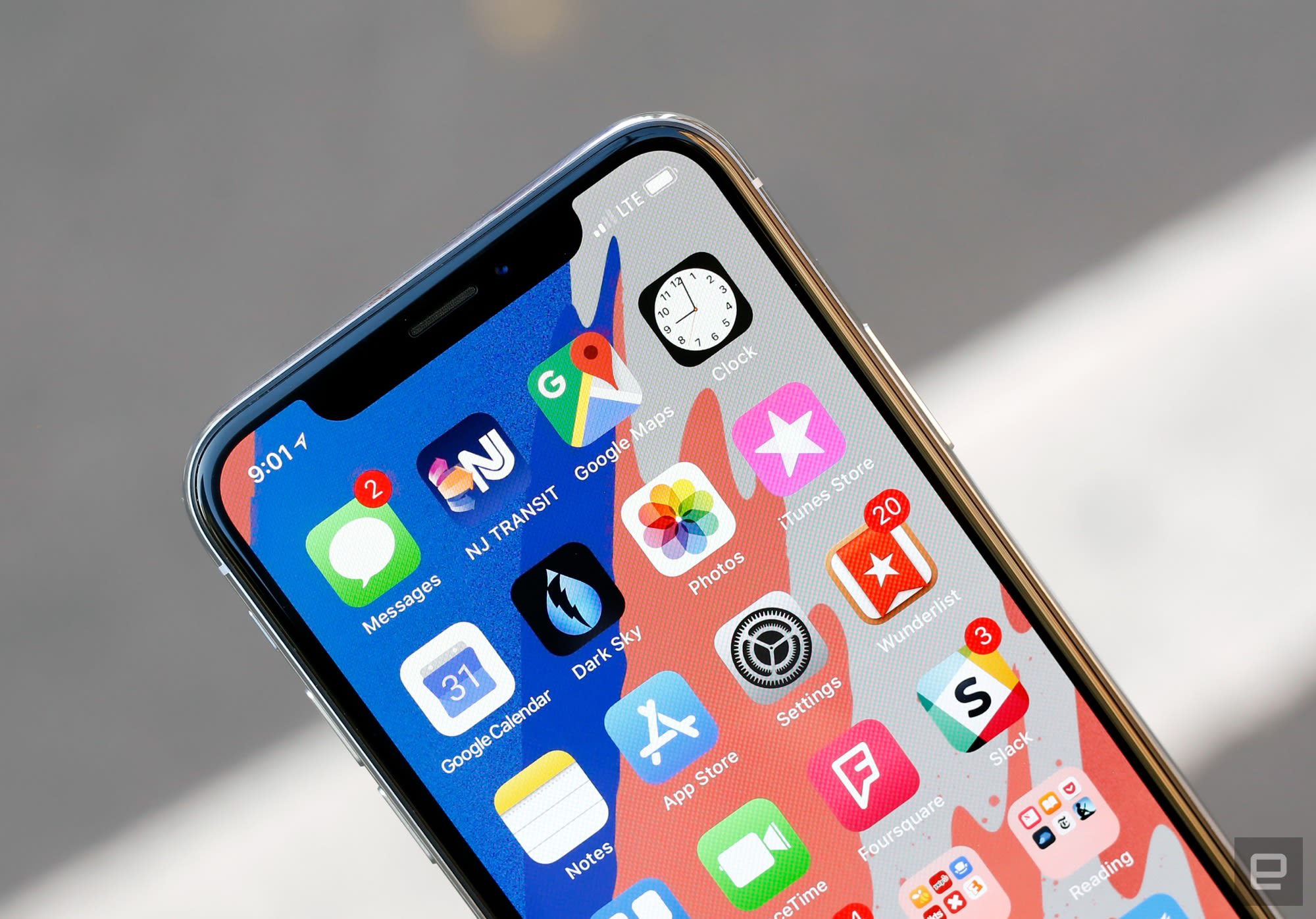
It certainly helps that the screen around the notch is one of the nicest I’ve used. Samsung actually produces the 5.8-inch OLED panel in the iPhone X, but it was designed to Apple’s specifications. The end result is a crisp (458 PPI), beautiful screen that definitely isn’t as punchy as some of the others you’ll find out there. That’s apparently by design: Apple spokespeople have decried other OLEDs as being way too saturated, and said the company tuned this screen for more natural colors. The X’s wide color gamut and support for HDR10 and Dolby Vision are certainly useful touches, but people like those punchier screens for a reason: they’re more dramatic and exciting.
There are a few other things worth noting. Yes, the screen measures 5.8 inches diagonally, and that sounds more impressive than the 5.5-inch display on the 8 Plus. The thing is, the iPhone X’s taller aspect ratio actually means the screen’s total area is smaller. Personally, I think that the X is more comfortable to hold is worth the trade-off. Also, like other OLED screens, the iPhone X’s panel does go slightly blue when you look at it from an angle. It’s not quite as bad as on the LG V30 or Pixel 2 XL, but it’s there and largely unavoidable.

Chris Velazco/Engadget
Whether or not this screen is better than, say, the Galaxy S8 is a matter of taste. They’re tuned very differently. What I can say for sure is that the iPhone X’s screen has spoiled me — every other iPhone screen just looks disappointing by comparison.
The big problem here (for now, anyway) is app support. Long story short, a lot of apps appear letterboxed since they weren’t optimized for this longer screen. In my day-to-day use, Google’s apps have been the most disappointing since they’re the ones I lean on most. Chrome scales to fit the entire screen perfectly, but Gmail, Calendar and Docs are bounded on the top and bottom by swathes of empty space. Lest you think these are the only apps that do this, I installed all available updates the night before this review was published and checked all 114 apps on my iPhone X. 49 of them don’t use the full screen.
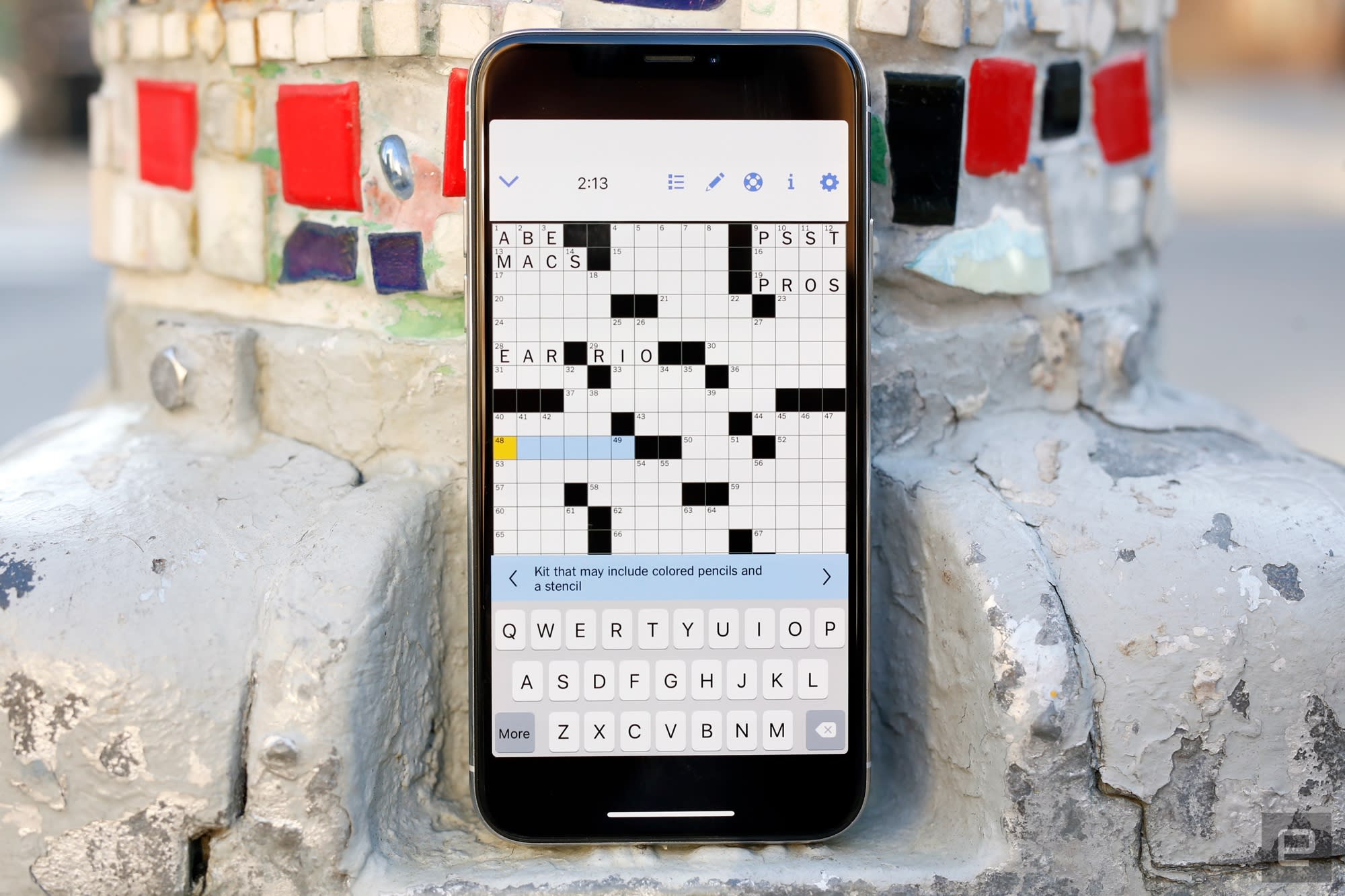

To be fair, it doesn’t look bad so much as dated. Android phones with extra-long screens will stretch apps to use the entire display, but there’s no such option here. If your favorite app doesn’t scale, you just have to wait for the developer to fix it. More complex app designs will require more fine-tuning, which means it’ll be a while before every app in your daily routine uses the iPhone X’s screen to its fullest potential.
In use

Chris Velazco/Engadget
The iPhone X runs iOS 11, but not the version you’ve come to appreciate (or loathe) for months. Because Apple killed the home button, it had to drastically rewrite the rules for how we interact with iPhones. It, uh, takes a little getting used to.
Let’s start with the basics. In lieu of tapping a home button, swiping up from the bottom of an app bounces you back to the home screen. Viewing all of your running apps in the app switcher requires you to swipe up from the bottom of the screen and hold for a split second — you’ll get a haptic bzzzt as the row of app cards slide into place. Closing those apps takes an extra step now, though. You’ll have to press and hold one of the windows then either tap a tiny x in the corner or swipe it away. It’s a necessary change since swiping up brings you to the home screen, but it was definitely annoying at first. Swiping down from the notch (or just to its left) reveals your notifications. And see that little bar at the bottom of the screen? Swiping left and right on it cycles you through all of your currently running apps. It’s a small touch, but an elegant one.

While most of this stuff became second nature quickly, some old habits still throw me for a loop. I never reach for a home button that isn’t there, but I often swipe up from the bottom of the screen hoping the control center shows up. It never does, because you now have to swipe down from the space to the right of the notch. My muscle memory will eventually rewrite itself, but in the meantime, I look like a doofus every time I try.
Now, if you’re really concerned about not having a home button, a quick trip to the phone’s settings might help. Pop into Settings>General>Accessibility and turn on Assistive Touch. Now you’ll have a virtual key that brings up various controls when pressed. If you set the single-tap action to “Home,” you’re left with what amounts to an on-screen home button. It’s far from a perfect solution though, since every time you fire up a non-fullscreen app, the home button flies to the top-right corner of the screen.

While we’re talking about accessibility settings, there’s one more you should really know about. Reachability is handy for folks with smaller hands since it brings what’s displayed at the top of the iPhone’s screen down so it’s easier to reach. The lack of a home button makes things more finicky, though — you’ll have swipe down on the very bottom of the screen to use it, and it’s a little too easy to mess up.
Of course, iPhone X comes with two features that people haven’t been able to stop talking about: Face ID and Animoji. The former replaces the Touch ID fingerprint sensor with an infrared camera system that turns the contours of your face into a password. The latter uses the same camera system to map your face’s movements onto twelve emoji so you can make a cute, yellow kitty say terrible, terrible things.

I’ll be honest: I wasn’t expecting much, but Face ID turned out to be a pleasant surprise. Enrolling a face (you can only have one) was painless, if a little awkward since you have to roll your head around so the camera fully captures your face’s nuances. After that, unlocking the phone worked with a glance worked nearly every time. Recognition generally takes about one second, but since you still have to swipe up to view your home screen after unlocking the phone, the whole process seems just a hair slower than using Touch ID.
If you’re mulling an iPhone X purchase, you’d better be OK with using Face ID for everything. Scanning your face doesn’t just unlock the phone, it also verifies login credentials in your keychain, so every app that used Touch ID now uses your face. For the most part, this is fantastic. Need to check your balance? Just launch your banking app and by the time you’re prompted to sign in, Face ID will have recognized you and filled in your password. Authenticating apps and Apple Pay payments with a glance just works, too. When everything works the way it’s supposed to, Face ID feels like a frictionless bit of the future.

I’ve only noticed Face ID falter in a few situations. For some reason, it doesn’t always work immediately when I’ve just woken up — maybe it’s because my eyes aren’t fully open, or perhaps my face is puffier than usual. Either way, checking my email before I get out of bed takes more effort than I prefer. That could change, though. Your Face ID model isn’t static and adapts over time. So if you keep trying to unlock the X while bleary-eyed, it should figure it out. Ditto if I lose weight or manage to grow a decent beard.
But what about security? In day-to-day use, it’s a non-issue. For one, the iPhone X checks to see that you’re alert and paying attention. That means that it won’t unlock if your eyes aren’t open, or if you aren’t directly looking at the screen. I’ve heard from other reviewers that this doesn’t always work as intended, but I never had any problems. That’s generally good news for people afraid that someone else (say, a jealous significant other) would try to unlock the iPhone X with the owner’s face while sleeping.
Beyond that, Face ID is just good at knowing what you look like. Most of the time I wear glasses and go clean-shaven. This week, I ditched my glasses for contacts and tried (mostly in vain) to grow some facial hair, and but Face ID kept up with them just fine. It also refused to unlock when I held up photos of myself, or put the X in front of people I’m occasionally mistaken for (‘sup Edgar). I haven’t been able to test this myself, but identical twins can indeed unlock each other’s iPhone Xs — this is an unfortunate side effect of the Face ID concept, and there’s no apparent fix aside from hoping your doppelgänger isn’t a total jerk. Thankfully, as the Wall Street Journal confirmed, a theatre-quality mask of your face won’t do the trick.
A post shared by Chris Velazco (@vlzco) on Oct 31, 2017 at 5:37am PDT
And then there are the Animoji. I’ve already accepted that the age of talking poo is here. The iPhone X’s front-facing camera cluster does a good job at mapping facial gestures onto one of twelve cutesy emoji avatars, and I was a little shocked to hear how long and crisp the accompanying 10-second audio recordings were. I can’t imagine these things won’t get obnoxious, but I can’t help but appreciate the technical achievement. There’s one thing you should know, though: the longer you spend trying on all those adorkable avatar faces, the warmer the phone gets.
Cameras

Chris Velazco/Engadget
For the most part, the iPhone X’s 12-megapixel dual camera is the same as the one we got in the iPhone 8 Plus. It’s vertically oriented now (duh), but photos taken with the main, wide-angle camera don’t really look different. Compared to the last generation of iPhones, X captures more vivid colors, and the way images are processed now make more little details noticeable. I’ve grown to prefer the Pixel 2’s computationally enhanced photos, but make no mistake, the iPhone X still takes excellent pictures.
The really important changes in the iPhone X mainly impact that other camera. The telephoto sensor now has a wider, f/2.4 aperture and optical image stabilization, both of which are really helpful when trying to shoot in low light. One of my biggest complaints about the 8 Plus was that, compared to Samsung’s Galaxy Note 8, the resulting photos were a little darker and muddy. By opening up the aperture and mitigating some of the shaking that often screws up night shots, the iPhone X’s produces low-light photos that are noticeably crisper than the 8 Plus’s. That’s not to say it’s perfect, though: in situations where there’s a lot of movement (like, say, NYC’s annual Halloween parade) the X still has trouble focusing.


Chris Velazco/Engadget
The telephoto improvements also help in broad daylight. I’ve never avoided using the iPhone’s 2x zoom, but the results often just weren’t as bright and nuanced as photos taken with the wide-angle camera. That gulf is still there, but it’s way smaller than it used to be. Using Portrait mode with the telephoto camera is improved as well, since it lets you get really, really tight on a subject without having to worry as much about whether the ambient lighting is bright enough t.
And speaking of Portrait mode, you can now use it to shoot bokeh-filled selfies. The same technology that the iPhone X uses to map your face is also used to calculate the depth of field for portrait selfies. The results are just alright. The thing is, the depth of field is rather narrow, so in just about every portrait selfie I’ve taken, my eyes, nose and mouth are pin-sharp, but everything from the middle of my forehead up gets blurred just like the background. This also means that portrait selfies with multiple people in them rarely turn out great — unless you’re all perfectly aligned, someone’s going to be out of focus. This is the one area where a device like the Pixel 2 is clearly better.
Performance and battery

Richard Lai/Engadget
If you were hoping that a $1,000 iPhone would provide a significant boost in performance, well, sorry. Since the iPhone X uses the exact same A11 Bionic chipset as the iPhone 8 and 8 Plus, they’re identical in terms of horsepower.
Allow me this in-the-weeds tangent: when the iPhone X isn’t doing anything strenuous, it uses some combination of its four low-power cores. When you’re doing something that really requires some juice, like playing games or fiddling around with a pretty augmented reality app, the iPhone X starts to add its two performance cores to the mix. Essentially, the iPhone X (and other devices with similarly designed chips) are always using some combination of those six cores to keep everything seamlessly speedy.
Like the 8 Plus, the X also comes with 3GB of RAM, but I haven’t noticed much difference between this iPhone and smaller ones with 2GB of RAM. I’ve heard that the extra RAM is used almost exclusively for the dual camera, but Apple — being Apple — has neither confirmed nor denied that. In any case, you really don’t need to worry: this current generation of iPhones is incredibly powerful, and there’s more than enough oomph here to get through just about anything.
| 3DMark IS Unlimited | 63,771 | 63,144 | 37,663 | 37,784 |
| Geekbench 3 (multi-core) | 10,413 | 10,391 | 5,544 | 5,660 |
| Geekbench 3 (single-core) | 4,233 | 4,245 | 3,295 | 3,306 |
| AnTuTu Benchmark | 217,257 | 193,297 | 165,269 | 170,650 |
Meanwhile, the iPhone X’s battery is just alright. I’ve been using the phone extensively this week and the iPhone X is generally good enough to stick around for a full day on a single charge. Bear in mind, these are pretty long days. I’d typically take the phone off its charging puck at around 8:00AM, run the thing into the ground, and plug it in at home at around 9 or 9:30PM. There was always enough fuel left in the tank to keep the iPhone X alive until morning on nights when I forget to charge it (thanks, low power mode), but I wouldn’t recommend going that route.
For those keeping track, this is basically on-par with what I squeezed out of the iPhone 8 a month ago. Apple says you can generally expect two extra hours using the iPhone X compared to the 8, but your mileage is definitely going to vary. As far as I’m concerned, the best solution would be if Apple made the iPhone X just a little bigger to accommodate a heftier battery, but that doesn’t help anyone now. Ultimately, if you’re on the market for a brand new iPhone and longevity away from a power outlet is your biggest concern, you’re definitely better off with an 8 Plus.
The competition

Chris Velazco/Engadget
If you didn’t bat an eyelash at the X’s $1,000 price tag, you should know you have other options. Consider the Galaxy Note 8 — Samsung sunk considerable effort into the Note 8 to make it the most powerful Android phone in its line up. It’s an incredibly fast machine (bolstered by a whopping 6GB of RAM) and its screen is one of the most beautiful you’ll find, even if it’s too punchy for Apple’s delicate eyes. The S Pen is remarkably useful, too, and it definitely makes a huge phone like the Note 8 useful in ways the iPhone X isn’t.
Also worth considering is Google’s new Pixel 2 XL, which in my mind offers the best Android experience out there, period. It’s really a showcase of what pure Android 8.0 Oreo is capable of, and it certainly doesn’t hurt that its main camera is arguably the best all-around shooter you’ll find on a smartphone. Even its front-facing camera has some distinct advantages over the iPhone X’s — it shoots at a higher resolution, but more importantly, its Portrait mode more accurately identified the boundaries of my head. The downside is, you’ll have to deal with the Pixel 2 XL’s screen. Our experience hasn’t been as negative as other people’s, but it’s still a clear notch below the iPhone X.
Wrap-up

Chris Velazco/Engadget
At the end of the day, here’s what you’ve got to remember: this isn’t just an expensive, ambitious offshoot of the classic iPhone lineage. It’s the future of the iPhone itself. And to be clear, Apple didn’t get absolutely everything right. The notch is weird. The interface needs a little more polish. Unoptimized apps look, and will continue to look, disappointing. Still, the fact that Apple redefined what an iPhone is and got this much right is a big deal. It’ll probably be another year or two before the iPhone X’s design and software that runs on it will come into its own, and that’s alright. After my first taste of the iPhone’s future, I’m ready to buy in.
Twitter clarifies what behavior will get you banned
Twitter’s been in the headlines for years for its poor handling of abuse on the platform. Recently, the social media service has been rolling out new tools to fight abuse. Today, Twitter’s Safety team published a new version of Twitter’s rules to clarify policies for the social media service. It’s important to note that basic guidelines and approaches haven’t changed; this is just Twitter attempting to be more transparent and clear in how it handles abuse on the platform.
The organization updated “The Twitter Rules” to reflect what it takes into account when deciding whether or not to suspend an account. In a blog post, the Twitter Safety team detailed some of the changes. Updates include further clarification of what Twitter considers abusive behavior, self-harm, spam and graphic violence/adult content. For abusive behavior, the team stresses that the context of a tweet is crucial, while self-harm clarifies how strictly the policy of sharing resources with people considering harming themselves is enforced. The improvements in handling spam and adult content include defining what these are more clearly.
It’s important to note that these clarifications are just the beginning. The Twitter Safety group is planning on releasing more in-depth descriptions of each of these issues later in November. The question is whether these steps will do anything to curb the rampant abuse on the platform. Clarifying policies is a smart step, but if Twitter doesn’t enforce its own rules, it’s not going to help at all.
Via: Recode
Source: Twitter (1), Twitter (2)
The best noise-cancelling headphones
By Geoff Morrison
This post was done in partnership with Wirecutter, reviews for the real world. When readers choose to buy Wirecutter’s independently chosen editorial picks, it may earn affiliate commissions that support its work. Read the full article here.
After testing 42 headphones, including 22 for this update, the Bose QuietComfort 25 are still the best option for most people who want over-ear noise-cancelling headphones. They have the best overall noise reduction of any wired noise-cancelling headphone available, plus they’re comfortable, lightweight, and able to fold down into a compact carrying case. They aren’t perfect—the sound quality is decent enough, just not spectacular—but if your goal is to turn down the volume on the outside world, these are hard to beat.
Who should buy this
We need to be clear up front: Buy noise-cancelling headphones only if you need noise cancellation. If you’re just looking for a pair of all-around headphones and you think you might occasionally use the noise cancellation, you’ll probably be disappointed. No pair of noise-cancelling headphones offers the same sound quality as a similarly priced pair of non–noise-cancelling headphones. And though noise-cancelling headphones do a great job of reducing low-frequency noises like the drone of an airplane engine, they aren’t magic. They do little to nothing to reduce voices, baby screams, or similar noises.
How we picked and tested
For the original version of this guide, I interviewed the top headphone reviewers working today, including Steve Guttenberg, Tyll Hertsens, and Brent Butterworth, and asked them to name their top picks. Since then, we’ve tested many new promising models and several inexpensive models not reviewed elsewhere, including 22 new models just this year.
We objectively measured each model’s noise-cancelling performance. If it was anything decent, we gave that pair to a listening panel for a subjective listening test. They also listened to each with airplane-level noise in the background to judge the noise cancelling. Brent helped with our tests using his specialized gear to check for frequency response and noise cancellation.
Our pick

The QC25s are comfortable, light, and have incredible noise cancelling. Though not wireless, you can remove the cable if you’re using them only for noise cancelling. Photo: Kyle Fitzgerald
For the third year running, the Bose QuietComfort 25 are the best noise-cancelling headphones. The amount of noise reduced is significantly more than the vast majority of noise-cancelling headphones. In our tests, they dropped an average of 24.2 dB of noise, including over 30 dB at some frequencies, and had more low-bass reduction than any headphone we’ve tested.
Of course, noise cancellation isn’t the only thing that matters. If these headphones were uncomfortable, horrible sounding, or huge and bulky, that might prompt us to look elsewhere. But thankfully, that isn’t the case. The QC25 sounds decent, offers exceptional comfort, and folds into a small case. They can also be used in passive mode (without noise-cancelling), which reduces the sound quality but comes in handy when/if the battery dies.
If you want noise cancellation with Bluetooth

The wireless QC35 have excellent noise cancelling, and include a cable for use when the battery dies. Photo: Kyle Fitzgerald
These are basically everything we said about the QuietComfort 25, plus wireless. The Bose QuietComfort 35 fold small, they’re comfortable, you can still listen to music if the battery dies, and they offer almost as much noise cancelling as the QC25. Really, Bose just kept everything we liked about the QC25, and made them wireless. Except for one thing—the sound.
It seems Bose wanted to make the sound of the QC35 more … exciting? So it boosted the bass and treble. In our listening tests there was no consensus as to if this was a good thing, with some panelists preferring the QC25 and others leaning toward the QC35.
A (cheaper) runner-up
If you can’t afford the Bose QC25, or in the unlikely event that the Bose models are unavailable, check out the Audio-Technica ATH-ANC7b. The sound quality won’t blow you away—though neither will that of the Bose—and its noise cancellation isn’t quite as good as our top picks’, but the ANC7b is a great value and great price. The noise cancelling is less than the others we recommend (with an average of 15.6 dB reduction), but because the price is also a lot lower, that’s forgivable.
Budget noise cancelling with Bluetooth

Though technically an “on-ear” design, the Level On Wireless have large, comfortable earpads. Photo: Kyle Fitzgerald
Finally, after years of waiting, we have decent low(er)-cost wireless noise-cancelling headphones. The Samsung Level On Wireless were well-liked by our testers, offer solid noise cancelling, and were quite comfortable. We were surprised at how good they sounded, especially in the mids and lows. They also sounded remarkably similar whether the noise cancellation was on or off.
The noise cancelling is good. Better than the Audio-Technica ANC7b’s, but not as good as the Boses’ or some of the über-expensive alternate options. In our testing, they averaged 18.8 dB reduction.
A luxury option
If you want a pair of headphones that does it all—Bluetooth, noise cancellation, and sound quality—and excels at the latter two, be prepared to spend a lot of money and receive a fair amount of disappointment. There’s just no such thing as the perfect headphones. That said, all our testers liked the Sennheiser HD-1 Wireless (formerly known as the Momentum 2.0). They sound great, offer okay noise reduction, and are Bluetooth. You can use the headphones (but not the mic) when the battery dies, thanks to the an included analog cable. However, we found them exceptionally uncomfortable for people who wear glasses. So if you wear glasses, try before you buy, and make sure you can get a good seal.
This guide may have been updated by Wirecutter. To see the current recommendation, please go here.
Note from Wirecutter: When readers choose to buy our independently chosen editorial picks, we may earn affiliate commissions that support our work.
We’re listening to: Chelsea Wolfe and ‘The Sounds In My Head’
Welcome back to IRL, our series dedicated to the things that Engadget writers play, use, watch and listen to. This week, we’re focusing on music and podcasts, from Chelsea Wolfe through to Kelela. First up, Senior Editor Daniel Cooper explains why he can’t stop listening to an erotic novel.
My Dad Wrote a Porno

Daniel Cooper
Senior Editor
If something gets really, really popular very quickly, then I instantly have a knee-jerk reaction toward it and want to avoid it forever. I’ve stayed away from plenty of very popular pieces of pop culture, like Garden State, because I was thoroughly sick of hearing everyone bang on about how great it was. Similarly, I’ve taken a pass on Blade Runner 2049 because of the sheer volume of critical mewling that makes me inherently mistrustful of its quality.
It’s why, despite my degenerate tendencies, I kept the smash-hit podcast My Dad Wrote a Porno at arm’s length for nearly three years. It was only due to the persistence of my colleagues and the need for something to enjoy on a long flight back to the UK that I thought I’d give the show a go. And so, in September, I dived into the first episode and found myself bingeing the first year in the better part of a fortnight.
If you’re unfamiliar, the show is a live, chapter-by-chapter reading of the erotic e-book Belinda Blinked, written by (host) Jamie Morton’s retired father. Morton Sr. (under the alias Rocky Flintstone) wanted to cash in on the Fifty Shades craze by penning his own series of digital erotica in search of a fortune. Morton Jr. is joined in the recordings by friends James Cooper and Alice Levine, who comment and react to the book’s numerous failings.
This is a story, after all, in which people routinely probe each other’s internal organs because Flintstone has no idea how human anatomy works. Characters change names partway through chapters, and there are typos galore. (“Vaginal lids,” rather than vaginal lips, is an early standout.) Then there are the awful turns of phrase, like when one character’s nipples are described as being like “the three-inch rivets that held the hull of the fateful Titanic.”
You may find it initially disconcerting to listen to a podcast with such high production values, in a way that feels overslick. Chalk it up to the fact that all three are in broadcasting, and that slickness is a natural by-product of their style, but there are times, early on, when things feel cynical and contrived. Thankfully, the trio’s natural warmth and obvious friendship, and the clanking schadenfreude that the book engenders, keep you listening.
Now, nobody spoil the rest for me. I’ve just started season two.
The Sounds in My Head

Rob LeFebvre
Contributing Writer
I started listening to the podcast The Sounds In My Head back in 2004. I was instantly smitten with the musical choices that host Daniel, a UX designer and graphic designer from Dallas who lives in Brooklyn, made each week. There’s nothing better than getting a half hour or so of curated songs from a guy whose musical taste is as close to my own as possible. While I was bummed that he had to switch to a bimonthly format a few years in, I totally appreciate how much energy it takes to continue a purely independent, unsponsored, unpaid hobby like this. (Daniel gave me a shout-out on my own mid-2000s podcast of local Anchorage-based music, TheANC.)
Thirteen years later, The Sounds In My Head is still the number-one podcast I listen to in the car or on the go; it’s so much better than the crap radio here in town. Daniel talks in between songs, sure, but usually to explain why he chose this band or that song. He’ll also occasionally add interstitial audio with a liberal political bent, which only adds to the experience for me. The podcast and its voluminous archive, available on Daniel’s site, is one of my favorite spaces to hang out when I’m looking for new music. He’s even got Spotify playlists these days, sorted into various seasons so you can just listen. If you’re in the mood for indie, twee, melodic pop and rock music, and you don’t mind listening to this smart dude talking about it, the Sounds In My Head podcast is the place to be.
Chelsea Wolfe

Timothy J. Seppala
Associate Editor
I’ve had a huge thing for female pop singers for the past few years, which would’ve shocked my 15-year-old, heavy-metal-or-nothing self. But Lorde’s Melodrama, Katy Perry’s Witness and the string of singles from Taylor Swift’s forthcoming album haven’t really struck me the way their respective past work has. Sure, Swift might be getting a little darker with her music, but she wouldn’t go anywhere near the gothy, industrial depths of singer-songwriter Chelsea Wolfe’s Abyss, from 2015, or her Hiss Spun, released in September. And only Wolfe would do a black metal duet (“Vex”) with former Isis frontman Aaron Turner. Which is why I’m so smitten.
Wolfe’s music sounds like what would happen if Deftones singer Chino Moreno and Nine Inch Nails mastermind Trent Reznor had a daughter. She deftly marries the former’s atmospherics and sultry lyrics with cave-troll-ugly guitar riffs that’d sound at home during NIN’s Broken era. And then she buries her haunting vocals behind layers of reverb in a way that makes me think of Lana del Ray. But it all feels earnest, not like she’s trying to tick off boxes to make an A&R guy happy.
“Heavy with melody” was a nü-metal signpost in the early aughts, but it always felt like a disingenuous way for heavy bands to get radio/MTV play they otherwise wouldn’t. That isn’t the case here. Wolfe isn’t straining to hit high notes; she’s crushing them with aplomb on “Twin Fawn” before the next in-your-face guitar riff comes in out of nowhere.
Kelela

Aaron Souppouris
Features Editor
I don’t have a ton to say about Kelela’s debut album, Take Me Apart, apart from it’s very good. Her Hallucinogen EP was the best thing to happen to R&B in years, and Take Me Apart is equally special. Give it a listen. (There’s a great interview up on The Quietus if you want to read intelligent thoughts on her music and motivations.)
Amazon scales back its Fresh delivery service in smaller cities
We’ve covered again and again how Amazon is interested in slowly establishing itself in every part of our lives, including in the food we buy and how we eat. The online retailer purchased organic food chain Whole Foods earlier this year, but Amazon has also been expanding its Amazon Fresh service, which provides same-day and next-day grocery delivery for Prime members. Users of the service pay an additional $15 per month, on top of the yearly Prime fee. But in a surprise move, according to Recode, it looks like Amazon is actually shutting down its Fresh delivery services in certain areas later this month.
Affected users received emails from Amazon notifying them of the service change; they live in parts of Pennsylvania, Delaware, New Jersey, Maryland and California. Amazon appears to be sticking with larger cities such as New York and Boston, though a few (but not all) users in Los Angeles and Philadelphia received notices as well. An Amazon spokesperson confirmed to Recode that the service would remain in place in larger metro areas.
As Amazon experiments with making grocery delivery economical, it’s not shocking that the company would change its services to reflect costs. It is surprising that they’d withdraw from areas altogether, though, especially considering how much they clearly are interested in being a competitor in this market. Perhaps the company is content to focus on large cities for grocery delivery, and allowing Whole Foods and its meal kit service to cover the suburbs.
Source: Recode
Mars 2020 rover will observe the red planet with 23 eyes
The Mars 2020 rover will be able to show us more of the red planet than any of its predecessors ever did. NASA says the extraterrestrial vehicle will be equipped with 23 cameras, six more than Curiosity’s and all a lot more capable. Seven of those “eyes” are tasked with collecting data for scientific experiments, nine are engineering cameras that will keep an eye on its surroundings for navigation and the last seven will capture the rover’s descent and landing. Its main camera, however, is Mastcam-Z — an upgraded version of Curiosity’s Mastcam with a 3:1 zoom (hence, “Z”) lens the original didn’t have.
Mastcam-Z will have the capability to take more 3D images than the first Mastcam and will give NASA scientists more info on the planet’s geological features. Meanwhile, the engineering/navigation cameras will be able to capture high-resolution, 20-megapixel colored images for the first time. Previous Navcams were only able to take one-megapixel black-and-white photos, so they have to capture several and stitch them together to be able to get a clear view of the surroundings. Since these new cameras have a wider field of view as well, they don’t have to waste time and processing power stitching photos together. The rover can spend that time collecting more samples and snapping more pictures instead.
All those cameras will help the Mars 2020 rover achieve its goal to search for signs of past life on the red planet. Earlier this year, the agency picked three potential sites to drill, all of which have elements that could have supported life.
Source: NASA
 AIVAnet