


FBI Unable to Retrieve Encrypted Data From 6,900 Devices Over the Last 11 Months
The United States Federal Bureau of Investigation was unable to retrieve data from 6,900 mobile devices that it attempted to access over the course of the last 11 months, reports the Associated Press.
FBI Director Christopher Wray shared the number at an annual conference for the International Association of Chiefs of Police on Sunday.
During the first 11 months of the current fiscal year, Wray says the 6,900 devices that were inaccessible accounted for half of the total devices the FBI attempted to retrieve data from. Wray called the FBI’s inability to get into the devices a “huge, huge problem.”
“To put it mildly, this is a huge, huge problem,” Wray said. “It impacts investigations across the board — narcotics, human trafficking, counterterrorism, counterintelligence, gangs, organized crime, child exploitation.”
Wray did not specify how many of the 6,900 devices the FBI could not access were iPhones or iPads running a version of Apple’s iOS operating system, but encryption has been an issue between Apple and the FBI since last year when the two clashed over the unlocking of an iPhone 5c owned by Syed Farook, one of the shooters in the December 2015 attacks in San Bernardino.
The FBI took Apple to court in an attempt to force Apple to create a version of iOS that would disable passcode security features and allow passcodes to be entered electronically, providing the FBI with the tools to hack into the device.
Apple refused and fought the court order, claiming the FBI’s request could set a “dangerous precedent” with serious implications for the future of smartphone encryption. Apple ultimately did not capitulate and the FBI enlisted Israeli firm Cellebrite to crack the device.
Following the incident, there was a push for new encryption legislation, but it largely fizzled out after it was described by tech companies as “absurd” and “technically inept.” Apple’s fight with the FBI is far from over, though, as there was no final resolution following the San Bernardino dispute.
At the conclusion of the FBI lawsuit, Apple said the case “should never have been brought” and vowed to continue to increase the security of its products.
“Apple believes deeply that people in the United States and around the world deserve data protection, security and privacy. Sacrificing one or the other only puts people and countries at greater risk,” Apple said in a statement.
Note: Due to the political nature of the discussion regarding this topic, the discussion thread is located in our Politics, Religion, Social Issues forum. All forum members and site visitors are welcome to read and follow the thread, but posting is limited to forum members with at least 100 posts.
Tags: security, Apple security, FBI, Apple-FBI
Discuss this article in our forums
Delta to Equip More Than 30,000 Flight Crew Members With iPads and iPhones
Delta plans to equip more than 23,000 flight attendants with iPhones and 14,000 pilots with iPad Pro models, according to a leaked internal email that Delta told Fortune is legitimate.
Flight attendants currently use Nokia Lumia 1520 phablets, which will be replaced by the iPhone 7 Plus as an in-flight point of sale and customer service tool.
Delta pilots are currently using Surface tablets in the flight deck as an electronic flight bag, with those tablets set to be replaced with the iPad Pro.
Though Delta is transitioning away from Microsoft products as it adopts the iPhone and iPad, the email says Delta “continues to maintain a strong and positive partnership with Microsoft.” Some of the apps used on the iPhone 7 Plus are powered by Microsoft Dynamics.
The hardware change is pard of an “overall Delta hardware refresh” to standardize on a 10.5-inch form factor, a Delta spokesperson said.
iPhones and iPads will begin rolling out to flight attendants and pilots next year.
Tag: Delta
Discuss this article in our forums
Fiber optic lines could soon deliver earthquake detection, too
Why it matters to you
Try this on for seismography: Fiber optic cables could soon have another purpose — detecting earthquakes.
Fiber optic isn’t just the future of the internet — it could also be the future of seismography. New research emerging from Stanford University suggests that we may soon be able to leverage those fiber optic networks not only to deliver high-speed connectivity to homes and businesses, but also to continuously monitor and study earthquakes. Professor Biondo Biondi, a professor of geophysics at the California institution, has led an effort to “convert the jiggles of perturbed optical fiber strands into information about the direction and magnitude of seismic events,” as per a Stanford press release.
Over the last year, researchers have been taking note of seismic disturbances in a 3-mile loop of optical fiber located underneath the university’s campus. These disturbances have been recorded with instruments called laser interrogators, which come from a company called OptaSense (OptaSense is assisting with the research).
“We can continuously listen to – and hear well – the Earth using preexisting optical fibers that have been deployed for telecom purposes,” Biondi noted. This would prove to be a far more cost-effective method than the current technique of using seismometers, which while more sensitive than fiber optic cables, are more expensive and more difficult to both install and maintain.
In contrast, Bondi pointed out, “Every meter of optical fiber in our network acts like a sensor and costs less than a dollar to install. You will never be able to create a network using conventional seismometers with that kind of coverage, density, and price.” If scientists are able to leverage fiber optic networks more broadly, they could study earthquakes more carefully and in more detail, and even detect the source of the tremor more efficiently than is possible today.
Stanford has maintained a fiber optic seismic observatory since September 2016, where it has recorded and catalogued more than 800 seismic events. Not only was the observatory able to detect disasters thousands of miles away, like the recent earthquakes in Mexico, but it was also able to pick up signals from minute local tremors, including a couple earthquakes with magnitudes of just 1.6 and 1.8.
“As expected, both earthquakes had the same waveform, or pattern, because they originated from the same place, but the amplitude of the bigger quake was larger,” Biondi said. “This demonstrates that fiber optic seismic observatory can correctly distinguish between different magnitude quakes.”
Biondi hopes that the array might soon operate throughout the Bay Area, though he still has to prove that the system works on a larger scale.
Editor’s Recommendations
- Amazing new spray-on cement could help old buildings survive earthquakes
- Machine learning can predict simulated earthquakes by listening to fault lines
- Algorithm predicts Parkinson’s disease by digging through your medical history
- Weekly Rewind: The new Moto, a 12-year-old’s lead-detection invention, and more
- Stanford’s surprise discovery may lead to new breakthrough metamaterials
5 minutes is all you need to check for allergens with AbioScope
Why it matters to you
You can determine what allergies you have in just five minutes with this newly approved home testing device.
This year’s Allergy season may be over, but before the next one arrives, you may want to figure out exactly what is causing your runny nose, itchy eyes, and other symptoms. And now, making that determination can take no more than five minutes. The Food and Drug Administration (FDA) has just approved what is being heralded as the “world’s most rapid” allergy test. Beginning in 2018, you may be able to test yourself for allergies with nothing more than a single drop of blood and a few minutes.
It’s all thanks to work from the Swiss Federal Institute of Technology in Lausanne (EPFL), who actually began developing this high-speed test a few years ago. In 2010, the research was taken over by an EPFL spinoff called Abionic, and today, the resulting test platform is called AbioScope.
It works by combining a drop of your blood with a reagent, then placing this solution on the AbioScope’s mounting plate. Here, your blood is given the opportunity to form molecular complexes with test capsules. Then, using an integrated fluorescent microscope laser, the system checks for what complexes are present, which in turn determines what allergies you may have. In just five minutes, you’ll be able to see initial results on the AbioScope’s screen — full results are said to emerge just three minutes later.
But before you get too excited, we should point out that you’ll only be able to test for the most common of allergies, and only four of them at that. The AbioScope, for now at least, can only tell you if you’re allergic to dogs, cats, common grasses, or tree pollens. While that’s a rather limited group of allergens, these allergens do represent some of the more common culprits behind your symptoms.
The AbioScope system has been approved for use in Europe for quite some time now, and will be hitting American markets in 2018. “There are 25 million adults in the U.S. who suffer from allergic rhinitis, a number that is constantly increasing,” noted Dr. Nicolas Durand, the company’s CEO, in a statement. Hopefully, this system will help those adults determine their triggers, and better treat their allergies.
Editor’s Recommendations
- Test your blood from the comfort of your home with Athelas
- How do you crown the best smartphone camera? The experts share their secrets
- Beautyrest Sleeptracker review
- HTC U11 review
- Apple’s A11 Bionic chip destroys the competition in new benchmark results
Amazon wants you to read more with a huge sale on Kindle Unlimited and Kindle bundles
If you’re getting ready to hibernate for the winter, you might as well keep your reading supply fresh.
Is this deal for me?
Amazon is celebrating the tenth anniversary of Kindle Unlimited with a big discount on Kindle Unlimited and huge sales on several Kindle products. The Kindle Unlimited sale is 33% off a one-year subscription or 40% off a two-year subscription. Those prices bring 12-months down to $80.32 (from $120) and 24-months down to $143.86 (from $240).

This is a match for a deal on Kindle Unlimited that Amazon ran in the lead up to Prime Day earlier this summer but actually excludes the six month deal from back then.
The service includes access to more than one million titles. The list includes great books like Slaughterhouse Five
or The Handmaid’s Tale, and novels you’ve always said you read but never actually did like 1984. With your subscription, you can read whatever you want covered under the Unlimited banner for free. You also get access to any available audio books, which has the nifty feature of taking over wherever you stopped reading so you can go from the couch to the car without losing your place.
Here are all the Kindles on sale:
- Kindle E-reader for $49.99 (from $80) – This is a match from November 2016
- Kindle Paperwhite for $89.99 (from $120)
- Kindle Voyage for $169.99 (from $200) – This is also a match for lowest price since November 2016
Here are all the Kindle bundles on sale:
- Kindle 6-inch Essentials Bundle for $84.97 (from $115) – The previous low for this bundle was $95
- Kindle Paperwhite Essentials Bundle for $129.97 (from $160) – The previous low for this bundle was $140
- Kindle Voyage Essentials Bundle for $224.97 (from $255) – The previous low for this bundle was $230
- Kindle for Kids Bundle for $69.99 (from $100) – Kindles for Kids come with worry-free guarantees
TL;DR
- What makes this deal worth considering? – If you’ve ever wanted to keep that promise to yourself that you should read more, this is your chance. The Kindles are down to some of the lowest prices we’ve ever seen, and Kindle Unlimited has matched a deal we’ve only ever seen once before.
- Things to know before you buy! – Remember to check out Kindle First, which releases brand new reads each month for Amazon Prime members. Use your Amazon Prime membership to your advantage with Kindle, too.
See at Amazon
Happy thrifting!
Best Leather Cases for Galaxy Note 8

Give your Note 8 a touch of class with a leather case.
The Galaxy Note 8 is a beautiful phone so it only makes sense to find a case that accents its features. You know what always looks good? Leather.
There’s a good variety of leather cases available for the Note 8, and different styles, too — whether you’re looking for something that looks like an old, weathered book, a classic folio wallet, or just something with that nice leather finish on the back. Let’s dive in.
- DAVIS CASE Genuine Leather Case
- ProCase Genuine Leather Wallet Case
- Ringke Flex S Advanced Series
- Spigen Wallet S
- LK Luxury PU Wallet Strap Case
DAVIS CASE Genuine Leather Case

We’ll start out with some cases made from genuine leather. This option from DAVIS CASE has some great aesthetics especially if you love the look of old leather-bound books.
These cases are handmade with genuine leather that’s got a nice weathered finish to it. On the inside, there’s a pocket that will accommodate some folded bills, along with five card slots including a clear one for IDs. It also supports wireless charging and like most folio-style cases it can be folded into a kickstand for hands-free viewing.
At $34.99 it’s certainly on the pricier side, but you should get your money’s worth with the genuine leather and hand-crafted quality.
See at Amazon
ProCase Genuine Leather Wallet Case

Looking for classic folio wallet case made of genuine leather and a magnetic clasp? Check out this great option from ProCase.
There are three card slots on the front, but based on reviews the slots can easily handle more than one card — and you might find your cards slip out too easily otherwise. There are precise cutouts around the camera and fingerprint sensor on the back, along with the bottom ports and S Pen at the bottom. The form-fitting inner shell is built to last and offers great protection from shocks and drops on the corners and edges. It’s also good to go as a kickstand.
Get yours from Amazon starting at $28 for the black leather model and up to $30 for the flashy red leather model.
See at Amazon
Ringke Flex S Advanced Series
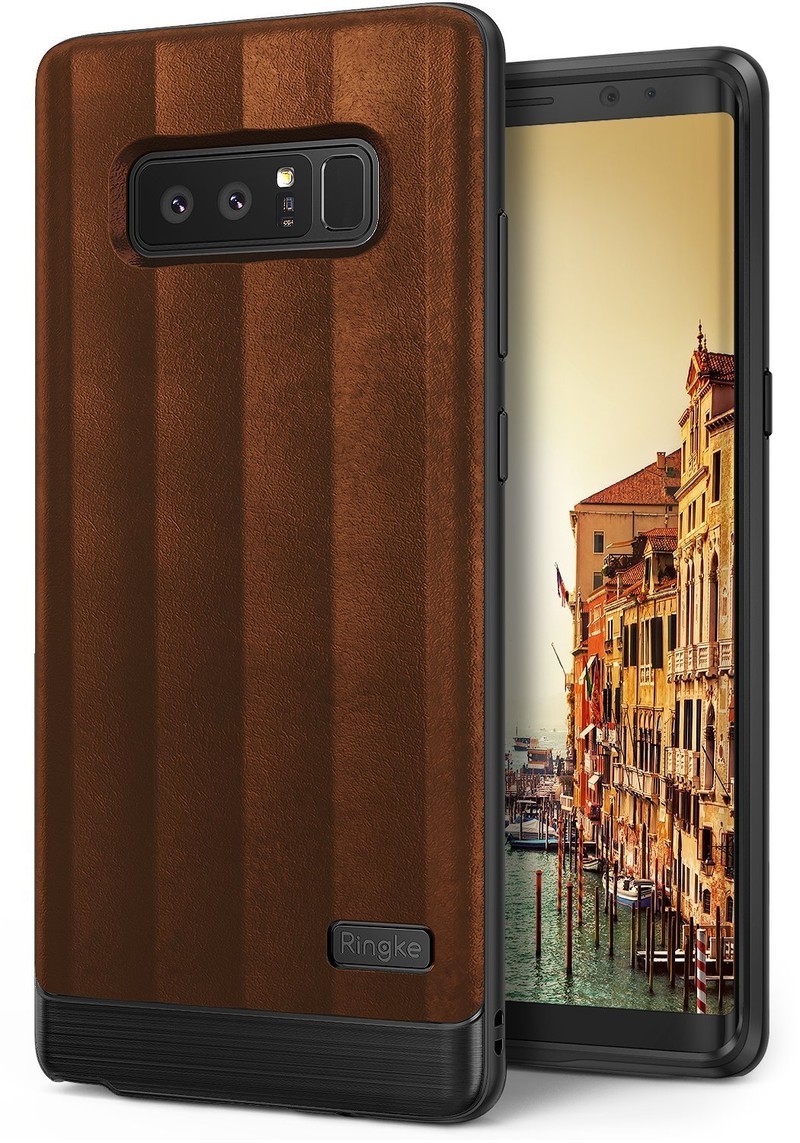
Maybe you want a leather case but don’t dig the folio-style case. Don’t sweat it, Ringke has you covered with its Flex S Advanced Series case.
There are three leather-backed case options which are admittedly PU leather (aka not genuine leather like the options above), but feature the sleek design we’ve come to expect from Ringke cases.
It’s not entirely flat on the back, so along with the glorious leather texture you also get these little ridges that’ll help you keep a solid grip on your phone. The bulk of the case is made of flexible TPU that makes it easy to slap on and off your phone while keeping the case lightweight and durable.
You can get this slim case for just $9.99.
See at Amazon
Spigen Wallet S
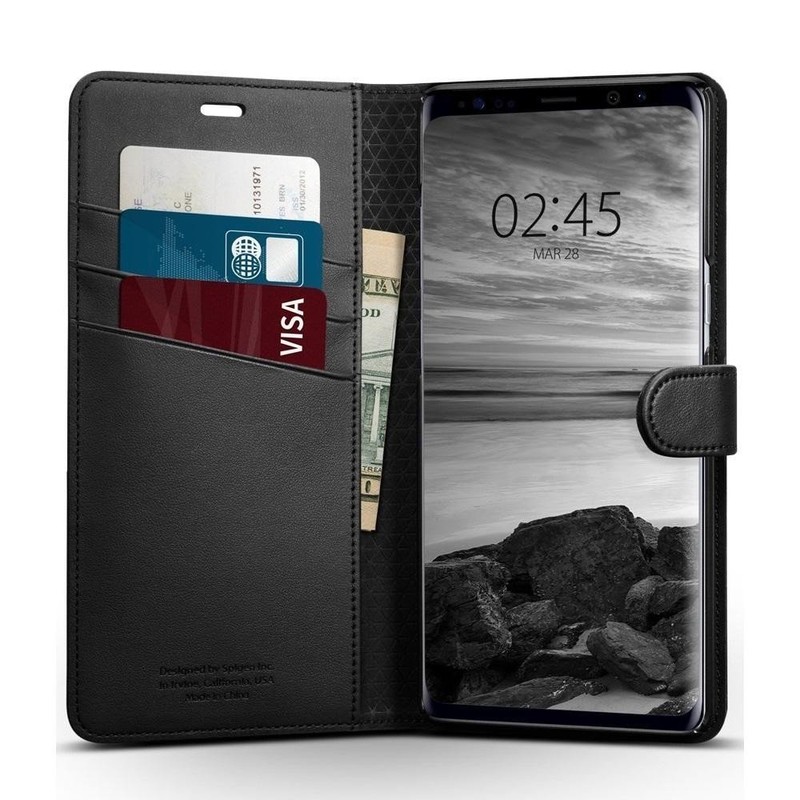
Back to folio-style cases, Spigen has offered it’s Wallet S case for the Note 8.
The Wallet S was one of my favorite cases for the short-lived Note 7 last year, so it should be a reliable option for the Note 8 as well. While it shares many of the same features as the other folio wallet cases on this list, one feature you might appreciate is the cutout around the ear speaker on the front flap, which allows you to talk on the phone with the cover closed.
It’s only available in classic black and features a magnetic strap to keep it closed. Get this premium-looking wallet case for just $17.99.
See at Amazon
LK Luxury PU Wallet Strap Case

Looking for a premium look and feel for a budget price? LK’s got you covered with this basic and functional wallet case that comes with a convenient wrist strap.
Like the other wallet cases on this list, LK’s has a pocket for cash and card slots on the inside of the front fold, including a clear window for your ID. It’s got a magnetic clasp for keeping closed and features precise cutouts for the ports, camera, and fingerprint sensor.
This case is available in black, purple, or rose gold PU leather for just $6.99, or brown leather for $9.99.
See at Amazon
Which leather is your pleasure?
Any of these picks catching your eye? Got a favorite case that didn’t make our list? Drop us a line in the comments!
Samsung Galaxy Note 8
- Galaxy Note 8 review
- Complete Galaxy Note 8 specs
- Galaxy Note 8 vs. Galaxy Note 5
- Which Note 8 color is best?
- Join our Galaxy Note 8 forums
Verizon
AT&T
T-Mobile
Sprint
Best Buy
SmartThings Link turns your Shield TV into a complete home automation hub

Shield TV with Google Assistant just got a lot smarter.
The NVIDIA Shield TV is the best 4K streaming box you can buy. It has crazy specs with the Tegra X1 that can push 4K HDR streams without breaking a sweat, access to almost any streaming service you can name through Google Play and can run console-quality games. Even the controller is great!
When Google announced that it would be bringing Google Assistant to Android TV, NVIDIA was right beside them and now you can push a button on your remote and have all the functionality of Google Home on the box you use to watch Netflix.
It’s tough to make something this good even better, but NVIDIA found a way. Starting today you can order a SmartThings Link that plugs into the back of your Shield TV and turns it into a complete home control hub.
See at SmartThings

This is the same SmartThings platform that already controls lights, door locks, security systems and thermostats (and a lot more) in homes all over the world. There are hundreds of devices that work with SmartThings, including important but boring things like window security switches or flood alarms as well as really cool stuff like lights and HD cameras. You can even buy something like this Z-Wave Microcontroller and let your imagination run wild. You’ll find the big list of things that work with SmartThings at their website.
What makes this doubly awesome is that SmartThings works with Google Assistant. Once you set everything up, you’re a button press away from telling Assistant to dim your lights or open the garage door or to power up your custom robotic dog and send him after the morning paper. Whatever you can use SmartThings to do, and that’s really only limited by your imagination, you can have Google Assistant through your Shield TV or any other device do with a voice command.
The price is pretty exciting, too. You can buy the SmartThings Link from SmartThings.com for $39.99. If you’re a Shield Rewards member, check your email. You have a special offer coming through that allows you to buy the SmartThings hub for just $14.99 (including shipping) or grab a kit with a SmartThings Link, a SmartThings Motion Sensor, and two dimmable Sengled Element Classic LED bulbs for just $49.99 shipped.
SmartThings Link will also be available on BestBuy.com and other retail sites on October 29, and it will also become part of a new Shield TV bundle for $214.98.
Set up is dead simple

- Plug the SmartThings Link into a free USB port on your Shield TV.
- Open the Play Store app and install the SmartThings for NVIDIA Shield TV app.
- Use your existing SmartThings hardware right away or set up an account with your phone through the app and pair everything to the new hub.
With the SmartThings app, you can control all your connected peripherals individually or build custom scenes for events like waking up in the morning or leaving for work. Getting everything talking and doing their thing is intuitive and there’s no programming involved. Google Assistant integration is as simple as choosing your new SmartThings Link from the Home Control menu and assigning a room or name to your devices.

The Shield TV app is also filled with tutorials and videos to help you get started if you’re unsure where to go next.
NVIDIA sent me a SmartThings Link along with some Sengled lamps and a motion controller to check out, and within a few minutes I was able to control the lights in my office with a voice command, from a button on my phone or from a motion controller that turns them on automatically when I enter and off when I leave. Extra features also let me send my phone a push message when an event is triggered, or even send an SMS message to any phone number when a specified event happens. My wife now knows exactly when my lights come on or off, or when I wave my hand in front of the motion controller hundreds of times during testing. Hundreds.
Annoying my wife may be an enjoyable pastime, but this shows how robust the service is. Every single time the right event happened, the push message and SMS were delivered. That’s peace of mind when used with an alarm system or water leak sensor.
Should I buy this thing?

Let’s be honest — not everyone is interested in smart thermostats or home automation. If that sounds like you, save your money or buy something else with it. The SmartThings platform was designed to be reliable and simple, so the products aren’t trying to break new ground. But if you have even a passing interest and are a Shield Rewards member, the $49.99 kit is a really cool and really cheap way to see if you want to go deeper.
If you’re buying a new Shield TV, it’s crazy to not buy the version bundled with the SmartThings Link for an extra $15.
If you think automation is a cool idea or already have a smart device or two in your home and have a Shield TV you need to buy this. Real talk — a standalone SmartThings Hub costs $80. Bundled with one lamp it costs $102. We’re not saying this is too much (home automation doesn’t come cheap). But you can use your Shield TV and get everything you need to start for $50.
I’m more of the last example here. I have a house full of WeMo switches and receptacles (which automatically integrate into SmartThings!), a Nest, sensors on my doors and windows, and even a homemade rig that lets me know when the mail arrives. The SmartThings Link kit impressed me because it was so easy to set up and is so reliable. I’ve been wanting to put a water alarm in the laundry room, and now I know it will be a SmartThings compatible version. If you’re already into SmartThings this is a great way to add an extender hub or just get a couple dimmable bulbs. I really dig this and have zero concerns about recommending to anyone.
See at SmartThings
NVIDIA Shield Android TV
- Read our Shield Android TV review
- The latest Shield Android TV news
- Shield vs. Shield Pro: Which should I buy?
- Join the forum discussion
- Complete Shield Android TV specs
Amazon
The state of smartphone audio: DAC, codecs, and other terms you need to know

What you need to know when all the audio chatter starts.
It’s awesome to see smartphone audio starting to get some attention. Companies like LG and HTC are stepping up and putting specialized audio components into their phones, Sony is still pushing things forward with software optimizations, and new high-resolution Bluetooth codecs have even stubborn audiophiles like me interested in what they can do. This is also important stuff because the way we listen to our music will eventually be changing, as the trusty 3.5 mm headphone jack slowly but surely becomes a thing of the past.
But not everyone is into audio, and there are so many odd-sounding words and abbreviations and secret codes getting thrown around. You don’t have to know what any of them mean to enjoy the music, but we all want to know what we’re reading or hearing. So let’s dig in and check out what some of the most common things you’ll hear actually mean!
General terms you need to know

There are a few terms you’ll see in every audio discussion. And like every other audio term, they really don’t mean what it seems like they should mean sometimes. Here are the basics to get you started so you can keep up with just about any audio talk.
- Bitrate is the number of bits of data that are processed per unit of time. When talking about audio, that rate of time is usually measured in seconds as bps (bits per second). Standard SI prefixes apply (not Binary Prefixes), so kbps (kilobits per second) = 1,000 bps, Mbps (megabits per second) = 1,000 kbps and Gbps (gigabits per second) = 1,000 Mbps. A higher number means more data is being processed so audio will sound better.
- -bit is the way audio bit depth is written. Bit depth is the number of bits of information included in each individual sample (see Hz below). CD audio uses 16-bits per sample while DVD audio uses 24-bits per sample. Hi-resolution audio players will also be able to play 32-bit audio, and this includes some phones like the LG V30.
- Container A container is a metafile format that controls and describes how multiple types of data exists inside a single computer file. A good example of this difficult idea is an MP4 file. An MP4 file can hold encoded audio, encoded video, metadata like subtitles or lyrics and album art in any combination. A container doesn’t decide how its data is encoded, so you might be able to open an MP4 file and not be able to playback any of the data without the proper codecs. Yeah, it’s kind of a mess and impossible to describe without using computer-speak. All you need to know is that audio containers hold encoded files and you’ll need the proper codec installed to play any of them.
- Codec A codec is software (we’ll leave hardware codecs for another day) used to encode and decode digital data. Codec is short for coder-decoder. The coder encodes data and gets it ready for some sort of transmission, and at the other end, the decoder reverses the encoding. MP3 is a popular audio codec. Applications like Audacity can use an MP3 coder to encode music into a .mp3 file and your favorite audio player uses an MP3 decoder to turn it back the way it was and play it.

- Compression Popular codecs compress an audio file while encoding it to make it smaller and easier to transmit. This is the same concept a .zip file uses to crunch down the contents of a folder. Ideally, you want an uncompressed file to be a bit-by-bit copy of the original, but most compression algorithms discard data that won’t drastically change the way the audio sounds. Or at least they try to.
- DAC A DAC is a Digital to Analog Converter that turns computer bits (the digital) into sounds (the analog) that can come through a pair of headphones. Every device that can play digital music has a DAC, as does every pair of Bluetooth headphones. Some just have a better DAC than others and are able to create cleaner analog audio from the digital source.
More: What is a DAC and why should I care about having a good one?
- Dolby A company that specializes in noise reduction and audio encoding. Dolby licenses its tech to several phone manufacturers.
- Hz or kHz Hz is the abbreviation for Hertz. When talking about digital audio you’ll usually see it measured in kHz (kilohertz) and it designates the sampling frequency — the number of times the audio is sampled (analyzed and recorded) per second. Landline phone audio is 8kHz. VoIP telephones are 16kHz. Audio CDs are 44.1kHz. This continues all the way up to 5,644.8kHz which is Philips and Sony’s Double-Rate DSD (Direct Stream Digital) format and absolutely insane. Generally, the higher the sample rate the better the audio will sound, but there are diminishing returns once you pass 192kHz that many people aren’t going to be able to hear.
- Lossless Lossless is a type of audio compression that can create an exact copy of the original when a file is uncompressed. FLAC and ALAC files are lossless.
- Lossy Lossy is a type of audio compression that rebuilds an “approximation of the original data” but compresses the data into a smaller file. MP3 files are lossy.
Bluetooth

Bluetooth has its own slew of audio-related terms and they will be more important as we see more and more phones without a headphone jack. It gets its own section so we can break a few things down.
Bluetooth Profiles
Bluetooth profiles are a set of specifications that both the source (the device sending the audio like your phone) and the destination (the device that receives the audio like your favorite headphones) know what each other can do and how to work together and stream audio to your ears. Even the Bluetooth earbud of old needs a Bluetooth profile to connect, and this is the only way to make everything work.
- HSP (Headset Profile) The HSP profile is required for basic headset operation. It has very limited remote control capabilities and the audio quality is 64 kbps (mono) maximum.
- HFP (Handsfree Profile) HFP is an advanced version of HSP that’s also designed for headsets (not headphones). It provides redialing and voice dialing through remote control. HFP version 1.6 uses a mono configuration of the standard SBC codec. See the codecs section below for details.
- A2DP (Advanced Audio Distribution Profile) This profile was designed for stereo audio for things like multimedia. This is the profile your headphones (not a headset) need to use.
- AVRCP (Audio/Video Remote Control Profile) AVRCP is used with A2DP to provide remote control for things like play/pause or track skipping. Versions 1.4 allow for full volume control of both devices, while lower versions control the volume of the headset only and not the source.
If you want to use a Bluetooth earbud or the like to take calls and don’t care about other audio, you need a device that uses HSP, but you want a device that uses HFP so you have more control.
If you want to also listen to music through a stereo Bluetooth device — headset, headphones, portable speaker, etc. — you want both A2DP and AVRCP for the best experience.
Bluetooth audio codecs

Bluetooth audio codecs don’t have to be Bluetooth only. They are encoding and decoding instructions that the right coder and decoder use to take raw audio, turn it into something better for transmission, then turn it back into raw audio once it reaches your headphones. You can’t play any audio without the right coder and decoder, so support for audio codecs is pretty important.
You’ll usually find information about what codecs a pair of headphones can use in the box they came in, and you’ll find information about the codecs your phone can use in the manual or on the manufacturer’s website.
- SBC (Subband Coding) This is the default A2DP codec and the minimum required for stereo audio. Every stereo Bluetooth device must support SBC because it’s the failsafe fallback if no other codec matches both the source and destination hardware. It provides an uncompressed stereo audio stream up to 328kpbs at 44.1 kHz. Because it’s not compressed there is no need for the target (your headphones) to decompress it. It does tax Bluetooth’s limited bandwidth and is subject to skipping or buffering (depending on your source) when conditions aren’t ideal. There are several “levels” of SBC (low, medium, and high) and the quality is determined by the source device.
- AAC (Advanced Audio Coding) This is the same AAC encoding you’ll find for music that’s not streamed wirelessly, and is what iTunes uses. It provides better audio than MP3 compression at the same bitrates and can rival lossless files in quality. Most headphones don’t include AAC, but high-end models designed for use with the iPhone or iPod will, and they transfer data at 250 kbps.
- aptX aptX is a proprietary audio codec developed in 2010 by APT (hence the name) to provide higher quality audio than SBC can deliver. It encodes a CD-like quality (16-bit / 44.1kHz) audio stream using more efficient audio encoding (compression, much like the .mp3 codec) and a higher data transfer rates of 352kbps. aptX is not required for stereo audio, and you’ll find a lot of equipment doesn’t include it.
- aptX LL This is a version of the aptX codec designed for especially low latency. It’s used in devices like gaming headsets that value low latency over quality, but still provides audio comparable to SBC. aptX LL can transmit stereo audio with latency as low as 32 milliseconds, which is faster than we can process so it appears to be latency-free.
- aptX HD This is a version of the aptX codec that uses newer and better compression methods and higher data transfer rates (576kbps) to deliver 24-bit / 48kHz stereo audio. the compression algorithms have been designed to inject very little noise, and aptX HD streams approach lossless hi-resolution audio in quality. aptX HD is fairly new and not very many devices support it, though this will most certainly change.
More: aptX versus aptX HD: What’s the difference?
- LDAC LDAC is an audio codec designed by Sony to deliver “true hi-resolution” audio over Bluetooth. It can transmit audio at a maximum of 24-bit / 96kHz at speeds up to 990kbps. Like SBC, it has three settings: low (330kbps transfer speeds), medium (660kbps transfer speeds), and high (990kbps transfer speeds). Sony claims LDAC can transmit audio playback up to 24-bit / 96kHz without any downsampling (lowering the sample rate in Hertz) at the source. LDAC is very new, and while Android Oreo supports the codec very few peripherals do right now.
Audio file types

There are hundreds of audio coding formats. Some are specialized, like aptX for Bluetooth or ATRAC for the PlayStation or Walkman, but there are a handful of standards you’ll find on portable devices like your phone. Most of the time the format defines the file type — MP3 format audio uses a .mp3 file extension, AAC audio uses a .m4a file extension and so on. Audio coding formats need to be supported by the player software, not your device itself, but for many your device must have a license to use them.
- AAC (Advanced Audio Coding) This format is also a standard Bluetooth audio codec, though not very popularly supported. It supports audio compression with little data loss so audio sounds clearer than MP3 but still has comparable bitrates. This is the native format your old iPod uses and some audio players can play it through an MP4 container with the .m4a file extension.
- ALAC (Apple Lossless Audio Codec) Developed by Apple as a lossless audio compression format, ALAC is now open source and royalty free. It delivers 8 channels of audio at 16, 20, 24 and 32-bit depth, with a maximum 384kHz sample rate. ALAC is also stored in an MP4 container with a .m4a file extension, but it’s not the same lossy compression used with AAC.
- FLAC (Free Lossless Audio Codec) FLAC is an open and royalty free audio codec that supports 4 to 24-bit audio at any sampling rate between 1 Hz to 655.35kHz on 8 channels. FLAC is capable of compression an audio file by 60% and still have an exact copy when uncompressed. Files using the FLAC coding format have a .flac extension.
- MP3 (MPEG-1 or MPEG-2 Audio Layer III) MP3 is a lossy codec that can shrink CD quality (1411.2kbps) audio by up to 95% and provide comparable quality when uncompressed at playback. There are various sampling and playback rates and the higher the number the better it will sound. The MP3 codec intelligently reads audio files and discards data that we won’t be able to hear during compression and encoding. You’ll find .mp3 files just about everywhere and most any player can play them back.
- Vorbis/Ogg Ogg is an open source container format that can multiplex independent streams for audio, video, text (subtitles and lyrics), and metadata. It can house numerous audio coding formats, but the most popular one you’ll see on your phone is Vorbis. Vorbis is an open source audio format that can encode source material from 8kHz to 192kHz with a maximum of 255 channels and create output files between 45 and 500kbps. Files with the extension .ogg are native to Android and play through the systems default player or any number of third-party players.
- WMA (Windows Media Audio) WMA is an audio codec that’s actually four separate audio codecs: WMA, WMA Pro, WMA Lossless, and WMA Voice. WMA was developed by Microsoft to compete with MP3 and covers the spectrum from single-channel mono audio with WMA Voice (it’s actually important to handle this type of audio in a special way) to 24-bit / 96kHz using 6 discrete channels. The compression ratio for music varies between 1.7:1 and 3:1. All WMA-encoded files carry the .wma extension and are supported by third-party players.
The most important part

You don’t need to know any of this to enjoy listening to your music through your favorite headphones, and that’s what really matters. Like everything else, some people will care and will debate about individual products until the end of time, and that’s because they enjoy the underlying tech and how it works. Neither group is right or wrong, so don’t feel left out if this just isn’t your thing.
Just know that audio from our phones is getting better, the companies who make headphones are making better ones, and the music you love today will sound just as good, if not better tomorrow.
Rock on!
TiVo’s rumored voice-controlled DVR pops up at Amazon, Best Buy
We’ve been looking forward to a voice-controlled TiVo for a few months thanks to a leak about a new peanut-style Bluetooth remote and trademark for new products with the “Vox” name appended. Now it appears that both the TiVo Bolt Vox and TIVo Mini Vox will soon be available for purchase. Originally posted on Twitter by Dave Zatz, the Bolt Vox was seen on Amazon (it has since disappeared) and the Mini Vox is still showing up on Best Buy’s Magnolia page.
Why hello there unannounced TiVo Bolt Vox! Bundled voice remote and Hydra interface. https://t.co/44KVTulkwr pic.twitter.com/fpU9QKoSlj
— Dave Zatz (@davezatz) October 22, 2017
The Bolt Vox seems to be about the same size as the previous TiVo Bolt, while the Mini Vox looks similar in size to a Roku or Apple TV device. The images posted by Zatz also show the DVR company’s new “Hydra” interface, which has been streamlined to have a more unified look across devices. Zatz also tweeted that the Vox remote will be sold as an accessory for existing Bolt units and will require the Hydra interface.
Source: Dave Zatz, Twitter
Bringing a shipwreck back to life with photogrammetry
A little over 76 years ago, the British merchant steam ship SS Thistlegorm was sunk by a WW II German bomber off the coast of Egypt, taking nine souls down with it. It has only been seen in detail by divers, but a new website from the University of Nottingham and Egypt’s Alexandria Universities lets you experience the shipwreck via immersive 3D models and 360-degree VR videos.
The underwater photogrammetry study is one of the first to use 360-degree, 3D video. Divers carried 360-degree Kolor GoPro Abyss rigs, each with six individual cameras shooting 4K Ultra HD footage. To create a 360-degree virtual “guided tour” of the ship (below), the team mounted the Abyss system on the front of an underwater scooter. Each dive captured 50GB of data, for a total of 1.5TB of footage.
“For me, 360 video is a big step forward as it recreates the diving experience,” said University of Nottingham project director Dr. Jon Henderson. “You can get the impression of swimming over it and through the internal parts of the wreck.”
To build the 3D model shown at top, the team took over 15,668 images to capture the external model of the ship and seabed, along with 11,164 interior images for the deck, holds, captain’s cabin and other areas. It took 65 days of continuous computer processing to build the five survey models.
The wreck is one of the world’s most popular scuba sites, which has created a somewhat urgent need to preserve it digitally. “Aside from looting the main issue we have is a lot of the dive boats that go out there are actually mooring on to the wreck itself because there is nowhere else to go,” Henderson said. “We have seen some boats tying on to more fragile areas, including the guns, the bridge and the railings — which can cause damage.”
The Thistlegorm survey is part of Presence in the Past, a wider archaeological study financed by the UK’s £735 million ($970 million) Newton Fund. It was also created in cooperation with UNESCO’s “Rising from the Depths” underwater preservation effort.
“Nine men died on the SS Thistlegorm, five Royal Navy gunners and four merchant sailors, just a small part of the 35,000 out of 135,000 Merchant Navy sailors that gave their lives during the war,” Dr. Henderson said. “In the Merchant Navy one in four men did not come back – that’s the highest proportion of all the fighting forces.”
 AIVAnet