


Android 8.0 Oreo is now rolling out to the Sony Xperia XZ Premium
The update includes all of the regular Oreo goodies, plus a few new additions from Sony.
Sony doesn’t have the biggest presence in the mobile landscape these days, but despite this, the company has recently been killing things in regards to timely software updates. The Xperia XZ1 and XZ1 Compact were the first phones to be announced with Android 8.0 Oreo out of the box, and shortly after their unveiling, Sony released a fairly extensive list of all the devices it would be updating to Oreo down the road.
It was recently announced that the Xperia XZ Premium will be the first Sony phone to be updated to Android Oreo, and the new software is officially rolling out starting today, October 23.

The update from Nougat to Oreo is already substantial, including goodies such as picture-in-picture, adaptive notification dots, redesigned app shortcuts, and plenty more. You’ll certainly get all of these additions when you update your XZ Premium to Oreo, but Sony isn’t stopping there.
One of the most impressive features of the XZ1 and XZ1 Compact is 3D Creator – a tool that allows you to create 3D models of your face, body, or other objects to either share on social media or bring to the real world if you have a 3D printer. You won’t find anything like this on non-Sony phones right now, and while it may not be everyone’s cup of tea, the end results that it kicks out are pretty incredible.

3D Creator on the Xperia XZ1
Along with 3D Creator, the Oreo update will also include Predictive Capture and Autofocus Burst for the camera and improved audio quality thanks to “tuning-improvements” that have been made to the front-facing speakers.
Sony Xperia XZ Premium review: $799 of lust … and disappointment
Android Pay coming to NYC subways by 2020
Traveling the NYC subway will soon get slightly less terrible.
If you live in New York City, you probably own a MetroCard for getting through downtown via the subway system. The MetroCard has been the primary way of accessing the NYC subway since the 1990s as a way to phase out the use of physical tokens, and it was recently announced that the MetroCard is now getting replaced with NFC.

London already uses near-field-communication technology for accessing its subway systems, so while this isn’t a revolutionary move, it’s one that we’re thankful to see nonetheless. The Metropolitan Transportation Authority recently approved the $573 million program that will replace MetroCards for NFC, initially installing the new system in 500 turnstiles and 600 busses in late 2018, with the plan to have all subway stations and buses outfitted with the new tech at some point in 2020.
With the NFC readers, you’ll be able to zip around the city using Android Pay, Samsung Pay, Apple Pay, and contactless debit/credit cards. Travelers will be able to use MetroCards through 2023, but when that year rolls around, the physical plastic cards will officially be discontinued.
Per the chairman of the MTA, Joseph J. Lhota, “It’s the next step in bringing us into the 21st century, which we need to do. It’s going to be transformative.”
Pay with Google connects your online purchases right to your Google account
All-new Affirm app aims to be an alternative to traditional credit cards
The new app features a clean design, easy-to-understand fees, and more.

Credit cards are both awesome and terrible at the same time. They can be crazy helpful for big purchases that you need to make, but between hidden fees, outdated mobile apps, and plenty more, credit cards can often be a pain to use. PayPal launched Affirm in 2012 for handing out loans for online purchases, and today Affirm is launching its completely overhauled app with the goal of offering people a unique alternative for credit in the modern world.

When you hop into the Affirm app, getting started with a line of credit is broken up into three easy steps. Simply type in the name of the site you’d like to shop at, the amount that your purchase will cost, and if you’re approved, you’ll get a few different options to choose from for how you’d like to pay off whatever item you’re buying.
Affirm lets you pay off your purchase over the course of three, six, or twelve months, and once you select the plan that works for you, you’ll be assigned a virtual, one-time credit card that’s used for that purchase and that purchase only.

Interest rates with Affirm range between ten and thirty-percent, with the exact number depending on how much you need to pay for. Affirm needs to approve you for each individual purchase that’s made with the app, and Affirm says that you’ll be able to get credit loans for up to $10,000. Couple this with Affirm’s partnership with over 1,000 different retailers/outlets and a sleek design for the mobile app, and you’ve got a really compelling alternative to credit cards that we’ve known for so many years.
If you want to give Affirm’s new app a shot, you can download it now from the Google Play Store and App Store for Android and iOS respectively.
Android Pay now lets you pay with a PayPal account
Affirm’s app lends you money to buy things online
Paypal co-founder Max Levchin launched Affirm back in 2012 to extend credit for folks to buy things online. Today, his company has extended that feature to a mobile app, functionally creating a virtual credit card for anyone who wants to trust a tech company instead of banks.
The service’s signature feature (aside from real financial functionality on a mobile app) is up-front and clear disclosure regarding how much a purchase will end up costing you. Affirm gives you a flat percentage interest rate ranging from 10 to 30 percent depending on what you’re buying. Lines of credit are extended for each individual purchase, tied to a one-time-use credit card number and three-digit pin that disappear after, and the repayment is dealt with in the app.
Essentially, Affirm is betting that customers will feel better paying off each purchase instead of hacking away at a collective balance. The company aims to be a more honest lender instead of setting up credit lines for customers who cannot afford them. Affirm evaluates each loan based on user credit and perceived ability to pay it back. To apply, users need to provide proof of identity and the apps can be downloaded for iOS here and Android here.
Via: The Verge
Source: Affirm
Relentlessly witty ‘Night in the Woods’ comes to your phone in 2018
If you haven’t played Night in the Woods, you’re frankly missing out. The made-partly-in-Michigan indie adventure melds witty (and often silly) dialogue with iconic visuals, varied gameplay and discussions of weighty subjects. It’s a good thing that the game will soon be available anywhere you go, then. Infinite Fall has revealed that Night in the Woods will be coming to mobile devices sometime in 2018. The studio hasn’t offered details yet, but it’s safe to say that the interface will have to change if you’re going to prank shoppers and get into knife fights on your phone’s touchscreen.
To recap: the title revolves around Mae, a humanoid cat who drops out of college and finds that her small hometown of Possum Springs has changed since she left… including some mysterious happenings. It’s that strange side which drives the plot, but the game revolves more around its memorable characters (Gregggggg!) and themes, including the decay of small towns, the evolution of friendships and mental illness. It’s not exactly the most challenging game, but there’s a chance you’ll be thinking about it long after you’ve finished playing.
Source: Night in the Woods (Twitter)
Snapchat tweaks increase sharing and privacy
Snapchat added a couple features to its iOS version today, along with a quality-of-life tweak. First, you can now send links from other apps to your Snapchat friends using iOS’s ‘share’ tray. And second, you can now temporarily turn off location sharing with the new ‘Ghost Mode’ for a few hours, a whole day or until you close the app.
You can also watch your friends’ Stories anywhere in the app by tapping and holding on their usernames, which is convenient but unrelated. The share-thru-Snapchat might be a new avenue for referral traffic, TechCrunch points out, as the old method required users to copy and paste URLs. For the record, Android already had this feature, and it’s getting the ‘Ghost Mode’ later today or tomorrow.
Ghost Mode is a nice addition for folks who previously forgot they’d permanently toggled off location sharing. Given that many users don’t even realize that’s part of Snapchat, given that it’s hidden behind the in-app camera screen and accessible via pinching out, this might bring the ‘discover nearby’ feature some needed visibility.
Via: TechCrunch
Source: Snapchat
Life insurer offers members a $25 Apple Watch (if they earn it)
You might have heard of insurers discounting the Apple Watch before, but never quite like this. John Hancock is offering all its Vitality life insurance policy holders (including newcomers) an Apple Watch Series 3 for $25 so long as they use it and remain active. Specifically, you have to exercise enough to earn “Vitality Points” that lower or eliminate the monthly installments you’d otherwise be paying. Accrue 500 points per month for 2 years and the smartwatch is yours for no extra cost. That’s potentially a big bargain, especially if you’re paying for basic coverage — John Hancock previously offered the not-quite-free wristwear solely to people with policies worth $2 million or more.
The expansion isn’t coming out of nowhere. Roughly half of everyone who got an Apple Watch in the more limited program was active enough to avoid paying more, Senior VP Brooks Tingle told CNBC. And when there was a 20 percent increase in activity with the program, it only made sense to widen its reach to every customer. And if you’re an Android user or just don’t care about having a full-fledged smartwatch, you can get a free Fitbit device instead.
There are certainly concerns about programs like this. Your insurer isn’t really tracking your every move, but you’re still sharing some of your health data in order to get a discount. Also, there are worries that this hurts anyone who doesn’t have the time, money or basic ability to work out. John Hancock says it’s transparent about the possibility of paying, but that could still mean a rude surprise if you’re injured or become a mother during the 2-year period. This is mainly about reducing health problems for people who are relatively well-off and don’t anticipate any upheavals in their lives.
Source: PR Newswire, John Hancock
‘Destiny 2’ is 2017’s best-selling game after just one month
If you have friends who own video game consoles, chances are you heard a lot about Destiny 2 in the last month. But anecdotal evidence that the game was everywhere just got backed up by some astonishing sales figures. Just one month after launching on PS4 and Xbox One, Destiny 2 is already the best-selling game of 2017, according to an NPD Group report — which was released a day before the game comes out on PC.
Those numbers also make it the third-best-selling game of the last 12 months, behind Call of Duty: Infinite Warfare (out in September 2016) and Battlefield 1 (released October 2016). Who knows when Destiny 2 will pull ahead of those in sales, but the hotly-anticipated PC version — plus the first DLC, which may come out in December — will certainly keep the cash train rolling.
Snapchat for iOS Gains Link Sharing From Third-Party Apps and New ‘Ghost Mode’
Snapchat for iOS received a somewhat significant update today that’s designed to allow users to share links or photos from third-party apps with friends and to set a specific timer for location sharing.
Starting today, iOS users can use the Share Sheet in an app like Twitter or Safari to share links to content in a direct Snapchat message. The update makes sharing content simpler, as there’s no need to copy and paste a link from an app.
Snapchat has also added a “Ghost Mode” that lets users temporarily disable location sharing for three or 24 hours, a feature that’s been introduced as an alternative to permanently disabling location sharing features.
The app is also being updated with a new feature that lets you tap and hold on a person’s name anywhere in Snapchat to access their Stories.
What’s New in Version 10.20.0.0
– Press and hold on a friend’s name to watch their Story, send them a Snap, and more.
– Tap the share button in another app to send links or photos to friends on Snapchat. If Snapchat doesn’t appear in the share menu, tap (…) to add it!
– Choose how long you’d like to remain in Ghost Mode on the Snap Map.
In other related Snapchat news, a report today from The Information suggests Snapchat parent company Snap overestimated demand for its $130 camera-equipped Spectacles and is now left with hundreds of thousands of Spectacles and Spectacles components that are sitting in warehouses.

Earlier this month, Snap CEO Evan Speigel said Snap had sold more than 150,000 Spectacles. According to The Information, Snap now has a 150-person hardware team, but what’s in development is not clear.
Tag: Snapchat
Discuss this article in our forums
VIZIO M50-E1 SmartCast display (2017) review
We’re celebrating ten years of AndroidGuys with a ton of giveaways!
Editor Note: Our review unit was provided to us at no cost and we were allowed to keep it upon publication. This did not color our scoring or impressions of the product. Our staff makes every effort possible to stay objective in reviewing.
As a site that focuses Android and smartphone-related technology, we’ve seen our scope of coverage widen quite a bit over the last decade. What used to be just just headphones, cases, and chargers has expanded into a whole new world of products and accessories.
Now we cover smartwatches, wearables, and other tech that didn’t even exist until a few years back. Take, Google Chromecast, for instance. It was not all that long ago that these little dongles and built-in smarts were just a concept. Today, though, it’s everywhere. It’s built into speakers and monitors and considered an industry standard.
We were asked by Vizio to review one of its latest displays (TVs) because a key selling point was its internal Chromecast capabilities. Moreover, it offers Google Home and Google Assistant technology, something that’s also becoming increasingly present.
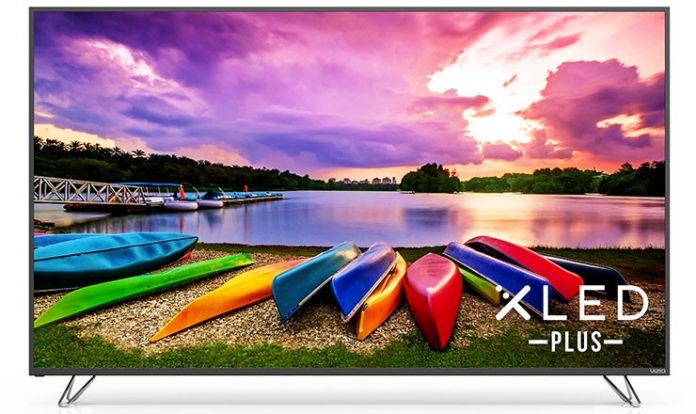
Billed as a display and not a TV, the Vizio M50-E1 is, for all practical purposes, a 50-inch television screen. As to why it’s not a “TV” in Vizio’s eyes, it’s because there is no internal tuner for over-the-air broadcasts.
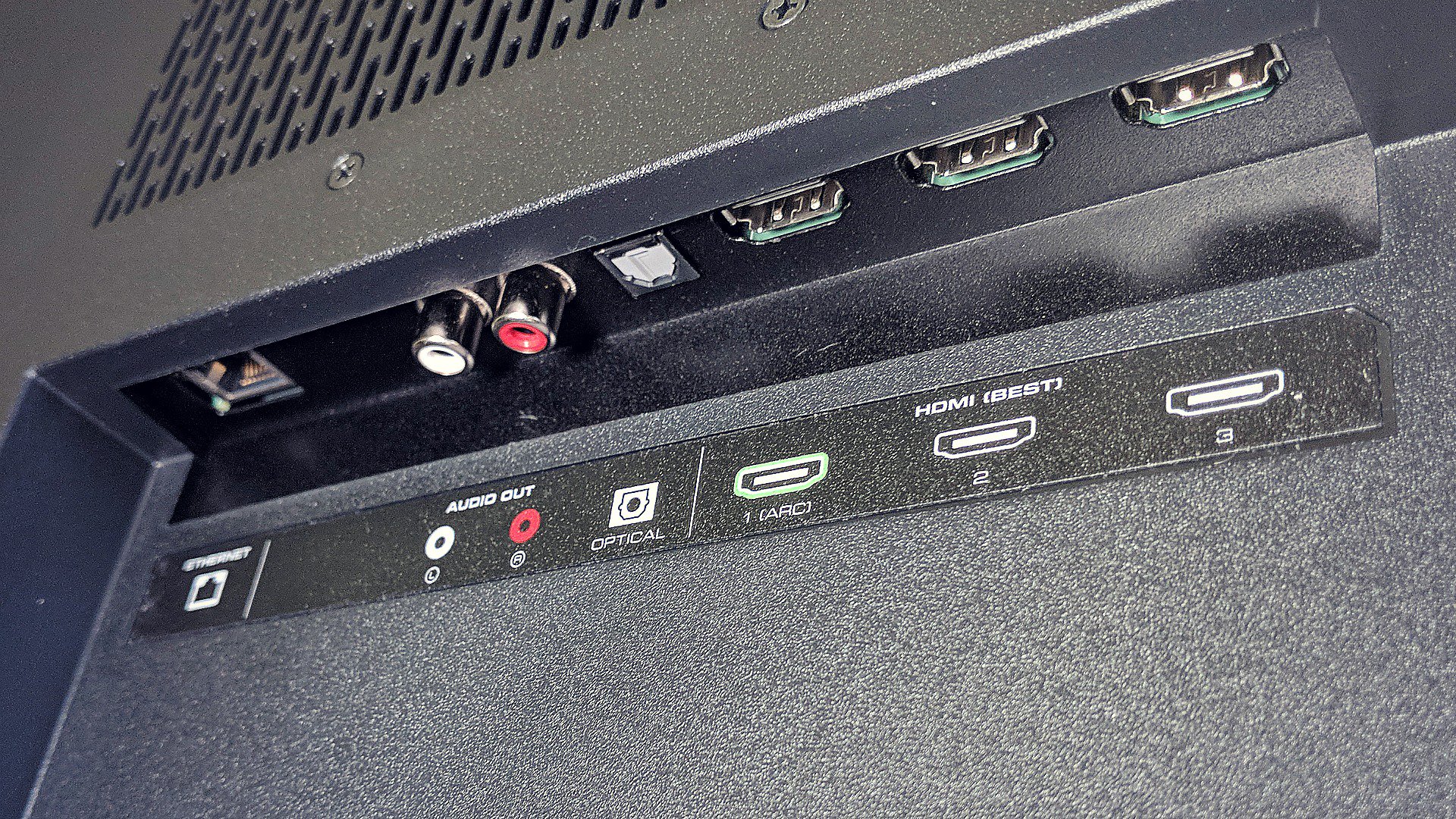
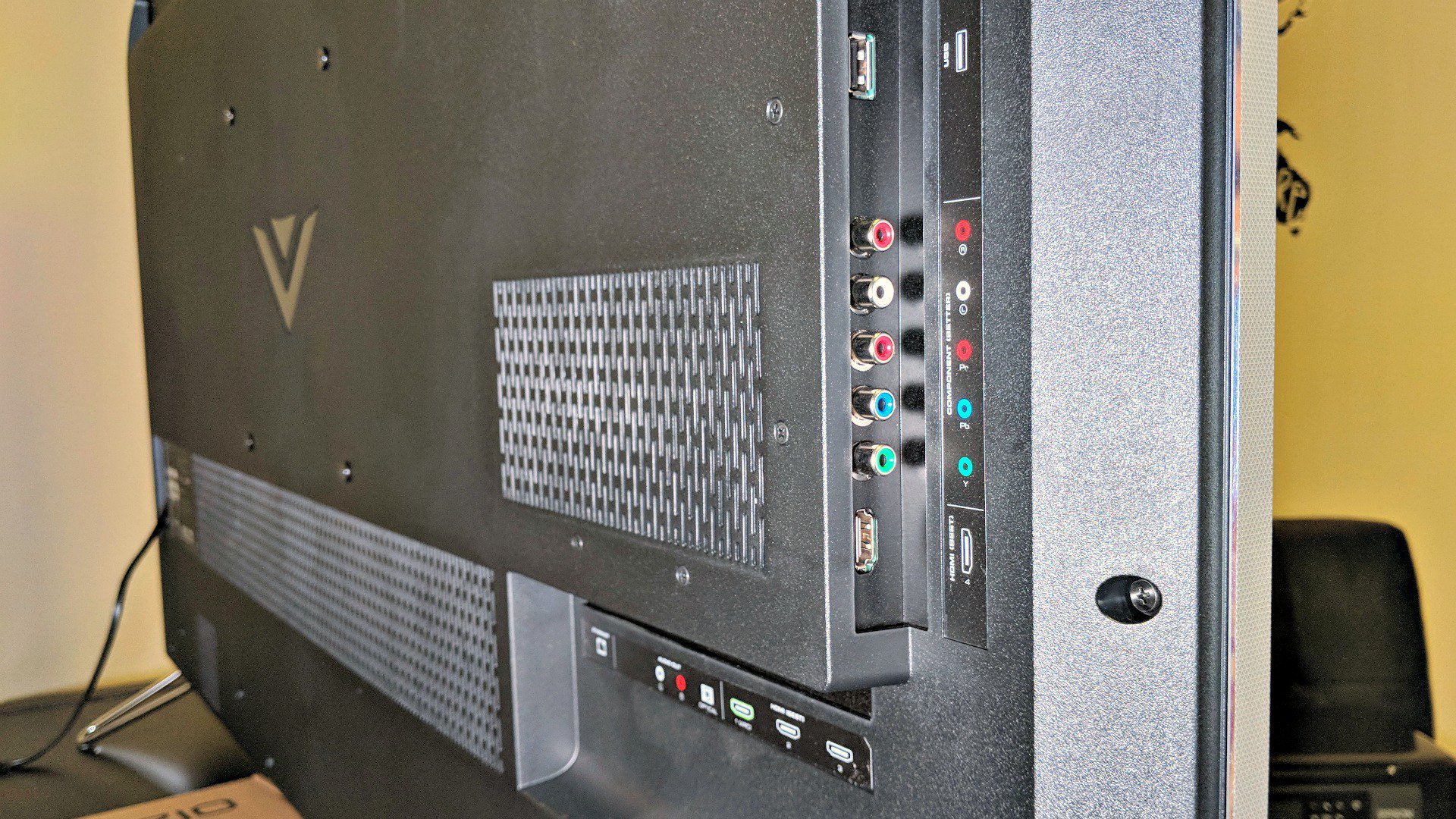
Similar to a computer display or traditional monitor, there are multiple inputs available, including 4 HDMI, 2 USB, 1 component, and 1 Ethernet. There are more than enough to connect a game console or two, plus a DVR.
We connected an NVIDIA Shield console, DVR, and PlayStation 4. This left us with an extra HDMI port as well as all other inputs. Depending on what sort of habits we’re in, we’ll often turn to the NVIDIA Shield because of its Google smarts and casting ability. Often we’ll turn it on so we can Cast our phone or tablet to the television.
Setup
Setup was incredibly easy, with a few menus to follow along. It took about as much time to take the monitor out of the box and set it up as it did to walk through the menus and configure to the network. The entire process is straightforward and intuitive.
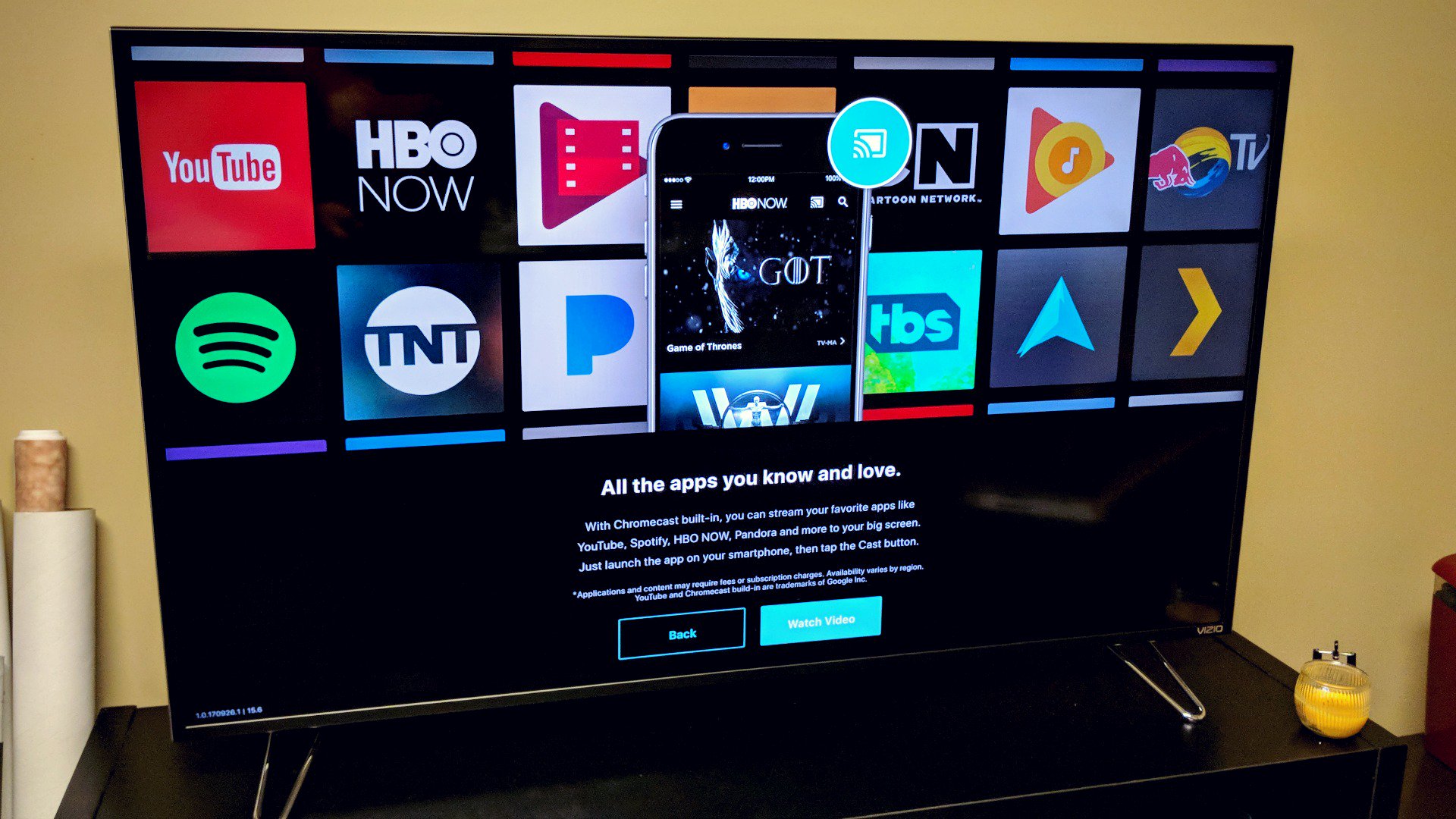
It did not take long for us to appreciate the ease in which we could start a YouTube video on our phone and send it to the Vizio. There’s a setting you can enable which will automatically wake the monitor up so you’re not fumbling for a remote or walking over to push any buttons. Quite often we’ll queue up a new episode of a show on HBO GO or Netflix and pass it off to the M50-E1.
Performance and Usage
We can’t speak to the absolute specifics of the TV and how it relates to other models on the market. There are plenty of great review sites dedicated to the cause (example) which can help spell out color contrasts, input lag, color gamut, and other fine points. As we were putting this together we looked around and found that the M50-E1 scored fairly well in most aspects and benchmark tests.
We can speak, however, to its quality as it relates to other units we’ve had around the home and office. This being our first Vizio we found it to be every bit as good as competitive models we’ve purchased in the past — and spent more money on.
The 1080p image is crisp with the 4K picture looking considerably better. Video games at that resolution, where applicable, look amazing on the Vizio. There was very little flicker in quick moving games or extremely busy images.
As for the color and overall range, we were really impressed with this unit. Thanks to support for both Dolby Vision and HDR10, the Vizio is equipped to deliver an extremely sharp, bright, picture with a much wider color range than what we’d get only a few years ago. Given these are two formats in an emerging battle, we like that Vizio doesn’t draw a line in the sand, allowing for both.
Some of the movies we’ve watched on this monitor were much more vivid than we remembered. It’s not unlike what happens when you compare a standard picture from a phone to one that can be captured by the likes of the HTC U11 or Pixel 2 using HDR.
The 120Hz refresh rate, while not as high as what you’ll find on the market, did well for scrolling sports scores, news tickers, and moving images. It wasn’t all that long ago that we were extremely happy to jump from 60Hz to 120Hz. Sure, down the road we may expect more from our sets but we’re okay with keeping prices down on models that do not have all of the bells and whistles.
Another example of this might be in having a curved screen. The M50-E1 is flat whereas the curve is becoming a standard in higher priced sets. We haven’t owned a curved unit, but we’ve spent enough time around them to appreciate what it does. Again, for us, in 2017, we’re okay with forgoing that feature in exchange for a lower sticker price.
Apps and other Smart Stuff
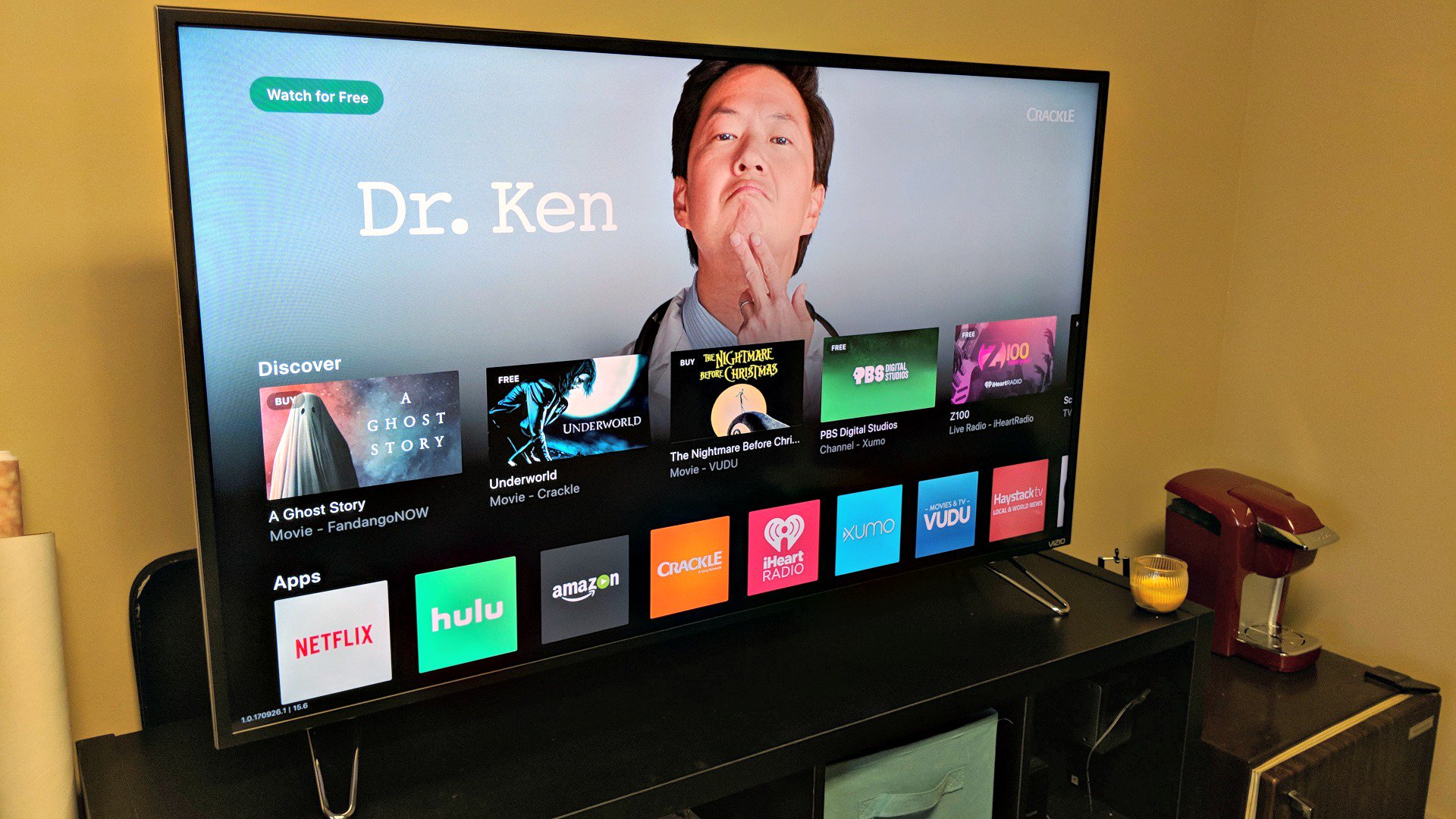
There are a number of pre-loaded apps on the Vizio M50-E1, including Netflix, Amazon Video, Hulu, Crackle, iHeartRadio, Xumo, Vudu and Pluto TV. But, when you factor in Chromecast, it becomes nearly endless. In all honesty, we tend to prefer the apps on our phones and tablets over those on the monitor. Casting is all too easy and we like the interface better.
For those of you who are existing Vizio users, you might be familiar with the SmartCast Mobile app. This monitor supports the app, which we found to be more fun and intuitive than what’s happening on screen.
There’s quite a bit going on in the SmartCast app, with the experience getting better when you own other Vizio products like a soundbar. Yes, it’s an ecosystem that tries to loop you in with brand affinity, but it’s certainly no worse than what Samsung and LG might do.
If you haven’t purchased a Google Home or something with Google Assistant built, you might want to consider doing so. Once you start to leverage the AI smarts you’ll find yourself talking to your TV way more than before. It makes sense to use in the living room, especially when you’re asking for things like how old an actor is or to play a specific show on a specific service.
The Vizio is ready to connect to your Home and tap into the smart assistant. Once you’ve downloaded a handful of apps you’ll find that you’re able to use the monitor in a variety of cool ways that your old television cannot. To be clear here, you cannot talk directly to the Vizio monitor as if it had Google Assistant installed. You’ll still speak to your Google Home or speaker with Google Assistant baked in.
Sound
Sound was on par with our expectations, but we wouldn’t necessarily call attention to it as a selling point. We’ve long wanted to get a soundbar or some better speakers for our television and the Vizio doesn’t do much to change the sentiment. It’s definitely good enough for average use, but we didn’t have any “wow” moments.
If you own some external speakers or are considering them for your next set, you’ll want to add them here. The RCA output and Digital Audio Out (SPDIF) open the door to pretty much anything on the market.
Conclusion
The 50-inch unit replaced our older 1080p HD 55-inch Samsung and we’ve not missed that five inches of screen. We were happy to trade off the display size for Google intelligence and a 4K picture.
We found that the internal Chromecast and Assistant was more than simple convenience. In fact, we’re at a point where we could probably unplug the NVIDIA Shield and not miss it in the living room. Truth be told, we’d probably move it to another area of the house where we can relegate it to gaming.
Given the features and options in the Vizio M50-E1 we have no reservations in recommending it for the suggested retail price of $599. In fact, as we were finalizing our review we saw it listed for $549 on Vizio’s website with free shipping. That is a fantastic deal to us.
You can find the M50-E1 at a variety of retailers and their respective websites. Among them are Best Buy, Walmart, B&H, Dell, Costco, and Sam’s Club. As of right now it appears that most of the vendors are offering it at the same $549 cost, or slightly less.
 AIVAnet