


The Academy awards its first Oscar for virtual reality
Virtual reality experiences aren’t just games and cheap thrills — some creators use the medium to start a dialogue and tell worthwhile stories. Take the VR exhibition Carne y Arena (Virtually Present, Physically Invisible) by Alejandro G. Iñárritu, who’s known for directing Birdman and The Revenant. He created the exhibit now on display in various museums worldwide to explore “the human condition of immigrants and refugees,” and now he’s getting the first Oscar award ever granted to a VR experience “in recognition of a visionary and powerful experience in storytelling.”
The installation’s purpose is to give people a way to live through even a small part of an immigrant’s journey. It was based on true immigrants’ accounts and uses vast spaces, sand-covered floors and cold waiting rooms to make the six-and-a-half-minute VR sequence as immersive as possible. AMPAS president John Bailey said in a statement:
“Iñárritu’s multimedia art and cinema experience is a deeply emotional and physically immersive venture into the world of migrants crossing the desert of the American southwest in early dawn light. More than even a creative breakthrough in the still emerging form of virtual reality, it viscerally connects us to the hot-button political and social realities of the U.S.-Mexico border.”
Since the Academy doesn’t have the proper category for Carne y Arena yet, Iñárritu is getting a special statuette. That doesn’t make the win any less important, though: as Polygon notes, the last time the Academy gave out a special Oscar was back in the ’90s for Toy Story 1. That special award paved way for the Academy to establish the Best Animated Feature category a few years later, something Iñárritu’s work could also do for virtual reality.
Via: Polygon
Source: Los Angeles County Museum of Art
First iPhone X Orders Begin Shipping Out to Customers
The first iPhone X orders began shipping out to customers today ahead of a promised delivery date on Friday, November 3, the official launch date for the device.
Apple hasn’t updated order statuses from “Preparing for Shipment” and won’t do so until later this week when packages begin hitting their destination countries, but iPhone X models shipping via UPS in the United States are in transit and can be tracked using a UPS My Choice account or, in some cases, by reference number on the UPS website.
Tracking by reference often requires a phone number and a zip code, but sometimes the order number minus the last two digits also works. Many of our forum members are seeing their orders on the UPS website at this point, but not every order has been transitioned to UPS as of yet, so it may take another day or two for all orders to show up.
Pre-orders for the iPhone X kicked off on Friday, October 27 at 12:01 a.m. Pacific Time, and orders slated for November 3 delivery shifted to preparing for shipment later that same day and customers began seeing charges on their credit cards.
At this point, pre-order supplies of the iPhone X are sold out and have been since minutes after pre-orders went live. Current delivery estimates for iPhone X orders placed today are at 5 to 6 weeks, so many devices won’t be arriving until late November and December. Apple is working to ship out iPhone X models as fast as possible, though, and some customers have already seen their delivery dates improve.
While it’s no longer possible to pre-order an iPhone X for launch day delivery, Apple will have iPhone X models in stock at retail stores on November 3, so there’s still a chance to get a device without a long wait. Customers hoping to get an iPhone X at a retail store should plan to line up early.
Related Roundup: iPhone XBuyer’s Guide: iPhone X (Buy Now)
Discuss this article in our forums
CAPTCHAs may be a thing of the past, thanks to new machine learning research
Why it matters to you
New AI research is giving us feedback on how our own minds work.
CAPTCHA is an acronym for Completely Automated Public Turing test to tell Computers and Humans Apart. The term was coined in 2003, when the use of automated bots was becoming commonplace, and it refers to those annoying squiggly distorted letters that you have to type in when creating an online account. Although some companies have found ways around them, CAPTCHAs are still ubiquitous online.
Researchers at the AI company Vicarious may have just made CAPTCHAs obsolete, however, by creating a machine-learning algorithm that mimics the human brain. To simulate the human capacity for what is often described as “common sense,” the scientists built a computer vision model dubbed the Recursive Cortical Network.
“For common sense to be effective it needs to be amenable to answer a variety of hypotheticals — a faculty that we call imagination,” they noted in a post at their blog.
The ability to decipher CAPTCHAs has become something of a benchmark for artificial intelligence research. The new Vicarious model, published in the journal Science, cracks the fundamentals of the CATCHPA code by parsing the text using techniques that are derived from human reasoning. We can easily recognize the letter A for example, even if it’s partly obscured or turned upside down.
As Dileep George, the co-founder of the company explained to NPR, the RCN takes far less training and repetition to learn to recognize characters by building its own version of a neural network. “So if you expose it to As and Bs and different characters, it will build its own internal model of what those characters are supposed to look like,” he said. “So it would say, these are the contours of the letter, this is the interior of the letter, this is the background, etc.”
These various features get put into groups, creating a hierarchal “tree” of related features. After several passes, the data is given a score for evaluation. CAPTCHAs can be identified with a high degree of accuracy. The RCN was able to crack the BotDetect system with 57 percent accuracy with far less training than conventional “deep learning” algorithms, which rely more on brute force and require tens of thousands of images before they can understand CAPTCHAs with any degree of accuracy.
Solving CATCHPAs is not the goal of the research, but it provides insight into how our brains work and how computers can replicate it, NYU’s Brenden Lake told Axios. “It’s an application that not everybody needs,” he said. “Whereas object recognition is something that our minds do every second of every day.”
“Biology has put a scaffolding in our brain that is suitable for working with this world. It makes the brain learn quickly,” George said. “So we copy those insights from nature and put it in our model. Similar things can be done in neural networks.”
Editor’s Recommendations
- IBM is cutting deep-learning processing times from days down to hours
- MIT’s new radio tech can monitor your sleep quality from afar
- A history of artificial intelligence in 10 landmarks
- How would Mozart play ‘Hotline Bling?’ AI will soon help us find out
- Did your surgeon wash up effectively? This AI-powered camera can tell
Get an Ultimate DIY Arduino Robotics bundle for just $29!
Anyone interested in robotics has no doubt heard about the Arduino platform, which is a leading way to break into the field. There is a ton of stuff to learn here, and the required training to get it right can be hard to find and organize.
Right now, however, Android Central Digital Offers has a deal on an Ultimate DIY Arduino Robotics bundle that contains three courses and over 22 hours of content. Instead of paying the regular price of $300, you’ll instead pay just $29. That’s 90 percent off!

The three courses, including Make an Arduino Robot, Arduino Robotics with the mBot, and Advanced Arduino Boards and Tools, are aimed at teaching you how to use Arduino the proper way, whether you’re creating a wheeled robot or working with the advanced Arduino boards.
If you’re interested in robotics and want to learn Arduino the right way, this is the course for you. Don’t wait too long; this price won’t last forever.
See at Android Central Digital Offers
No tricks — your weekend comments are all treat
Nothing spooky about these comments!
Happy Halloween!
This weekend will bring a lot of fun to a lot of people because almost everyone loves Halloween. The kids get to dress up like pirates or princesses or whatever, the older kids get together and do lord knows what, and adults will find plenty of parties and events filled with good times. Putting on a costume and being silly is something we should do more than once each year.
Of course, we have to be responsible. Don’t let kids trick or treat without a flashlight or a Glo-stick, check their bags for unwrapped candy (and steal all the mini peanut butter cups for yourself), watch the roads while you’re driving and don’t drink too much or slam a couple hits of X and get behind the wheel. You’ve heard the drill a thousand times, but for real, be careful just in case someone else isn’t.

And while you’re having fun and staying safe, be sure to snap a ton of pics! If you have a Note 8 or a Pixel 2 or another phone that can do it, take some great portrait-mode selfies, or use your G6 or V30 to take some great ultrawide shots or any of the other great Android phones with bumping cameras will make for some quality photos. Then upload them to Google Photos and drop the link in the comments so we all can check them out! It’s always cool to see what costumes people can come up with.
This year I’m going as the ghostly image of a navigation bar because that’s scary af … 🥁 ba dum tssss
Y’all have fun and be sure to let everyone know what you’ve got going on this weekend and don’t forget those pics!
Recommended Reading: Is ‘Stranger Things’ really that popular?
In Netflix’s Upside Down Reality, ‘Stranger Things’ Is a Hit Before It Even Premieres
Victor Luckerson,
The Ringer
The excitement around Stranger Things season 2 has been building for months. We’ve seen soundtracks, merchandise and all kinds of promo tie-ins with other companies along the way. As the show returns this week, the buzz is already so high that reviews probably won’t even matter — people will binge it anyway. It also helps that the first season was both really good and seemed to be really popular, despite the company not releasing any numbers. The Ringer takes a look at how Netflix creates the feeling of must-see TV even though we might not ever find out how popular its shows really are.
|
When the Facebook Traffic Goes Away A Facebook test in a handful of countries placed posts from news outlets and publishers in a second feed. In places there the site is a key link to current headlines and events, a change in policy could cause major issues. |
When Government Fails, Social Media Is the New 911 In the immediate aftermath of disasters like earthquakes and hurricanes, social media can be a lifeline to those in desperate need of help. |
LG V30 review: LG’s latest flagship needs more polish
The LG V30 caught me by surprise. The G6 was a strong contender when it was released earlier this year, but we’ve seen so many flashy flagships hit store shelves since then that I almost forgot LG was preparing another phone for the fall. And when the V30 finally showed up, I couldn’t quite believe it. This? This is an LG phone?
Well, yes, it is. And by excising gimmicks and rethinking its designs, LG has cooked up one of its most impressive smartphones ever. The level of polish on display is generally excellent too, which, unfortunately, throws the flaws this phone does have into sharp relief.
Hardware
With each new model, LG’s V series has grown more conventional. It all started with the über-masculine V10 two years ago. The V30 is much tamer, and you’d never guess they were related. That’s actually a good thing. The V30 is supremely sleek by LG standards, with rounded edges and panes of Gorilla Glass 5 that gently curve to meet a gleaming metal frame. It helps that LG ditched the gimmicky second screen that its predecessors used — it was of dubious value to start, and the phone is more streamlined without it. It’s not the most striking smartphone out there — Samsung devices generally have more of that wow factor — but LG has dramatically refined its approach to design, and the V30 feels great as a result.
It’s surprisingly comfortable, too, especially considering it has a 6-inch OLED screen. It wasn’t that long ago that phones with screens that large were enough to make your hand hurt, but the V30 is perfectly usable with one hand. It doesn’t hurt that the V30’s fingerprint sensor is located on the phone’s back, since it’s very easy to reach with an index finger that’s usually resting right next to it.
Despite the fact that the V30 is remarkably slim and light, LG didn’t skimp on the good stuff either. Unlike some other flagship phones we’ve tested this year, the V30 still has a headphone jack and a spot for microSD cards as large as 2TB on its SIM tray. Our review unit came with 64GB of internal storage, and that’s plenty for most people, but I’m not going to turn my nose up at expandable storage options.
The V30’s body is also rated IP68 for water and dust resistance, a feature last year’s V20 notably lacked. It comes at a cost, though: the phone’s 3,300mAh cell is sealed so you can’t swap batteries like you could with the V10 and V20. At first I was a little disappointed, but it’s not hard to see why LG changed course. Removable batteries make phones bigger, and people are used to plugging in whenever they can.
Display and sound

Chris Velazco/Engadget
When you crank up the brightness on the V30’s 6-inch, quad HD screen, it looks pretty nice: colors are punchy without being lurid, and you can pick out lots of detail on this pixel-dense (538ppi) panel. That’s the nicest thing I can say about this screen. See, LG has caught a lot of flak for the panels it put in the Pixel 2 XL, but the situation is worse in the V30. As with the XL, the V30’s screen has a noticeable blue cast from odd angles. I didn’t mind it much on the Pixel 2 XL, and I don’t mind it much here. It’s a notable shortcoming for a phone of this caliber, but I wouldn’t go as far as to call it a deal-breaker.
What’s more troublesome is the level of grittiness and uneven lighting that’s apparent on the V30’s screen. It’s less noticeable when the panel’s brightness is cranked, but it’s quite annoying when it’s dark and I’m trying to read in bed. At first I actually thought my screen was dirty, but it soon became clear that that’s just how it was made. I ran into this issue with our pre-production V30 test unit too. The egregious banding I saw on the pre-release phone is gone, but I hoped LG had started using better panels.

Thankfully, the audio situation is much better. Listening to music through the phone’s single, bottom-firing speaker is pleasant enough, but everything changes when you plug in a pair of headphones and fire up the built-in Hi-Fi DAC. Not only does music get substantially louder, but it sounds a little more natural and lively too. And that’s with the sound profile set to the flat, “normal” mode. If your tastes are a little more particular, there are four other EQ presets to choose from, as well as a handful of “digital filters” that let you further tweak the sound. That’s overkill for most people, but there’s no denying that even leaving the DAC’s settings alone produces better audio. It’s gotten to the point where, even on days when I’m testing other phones, I make sure to keep the V30 in my bag to help drown out the din of the subway.
Software
Chris Velazco/Engadget
Sorry, Oreo fans — while the V20 was the first device to ship with Nougat last year, the LG couldn’t finagle the same sweetheart deal for the V30. Instead, it runs the most recent version of Nougat (7.1.2, for those keeping count). Still, multi-window mode is handy as ever for running two apps at the same time, and they get more room to breathe, thanks to the V30’s 18:9 aspect ratio. Google’s Assistant is present as well, and remains (to me, at least) the gold standard for smartphone virtual assistants.
There are a few things that you’ll need to get used to, though. By default, the V30 doesn’t have an app launcher, so all your newly downloaded apps get splayed across your home screen. It’s easy enough to revive the traditional launcher, and it’s worth the effort if only for the handy app search bar.
And remember how earlier V-series phones had the weird second screen above the main display? That’s gone. LG stuck those shortcuts and controls into what it calls a “floating bar.” It’s off by default, and I’m really not surprised. The ability to change tracks or add an event to your calendar is nice, but since there isn’t a dedicated screen that’s always on to access those shortcuts from, you have to unlock the phone before you can get at them. I appreciate LG trying to maintain some feature parity between its new and older devices, but the floating bar is a poor replacement for a gimmick that was of debatable utility in the first place.
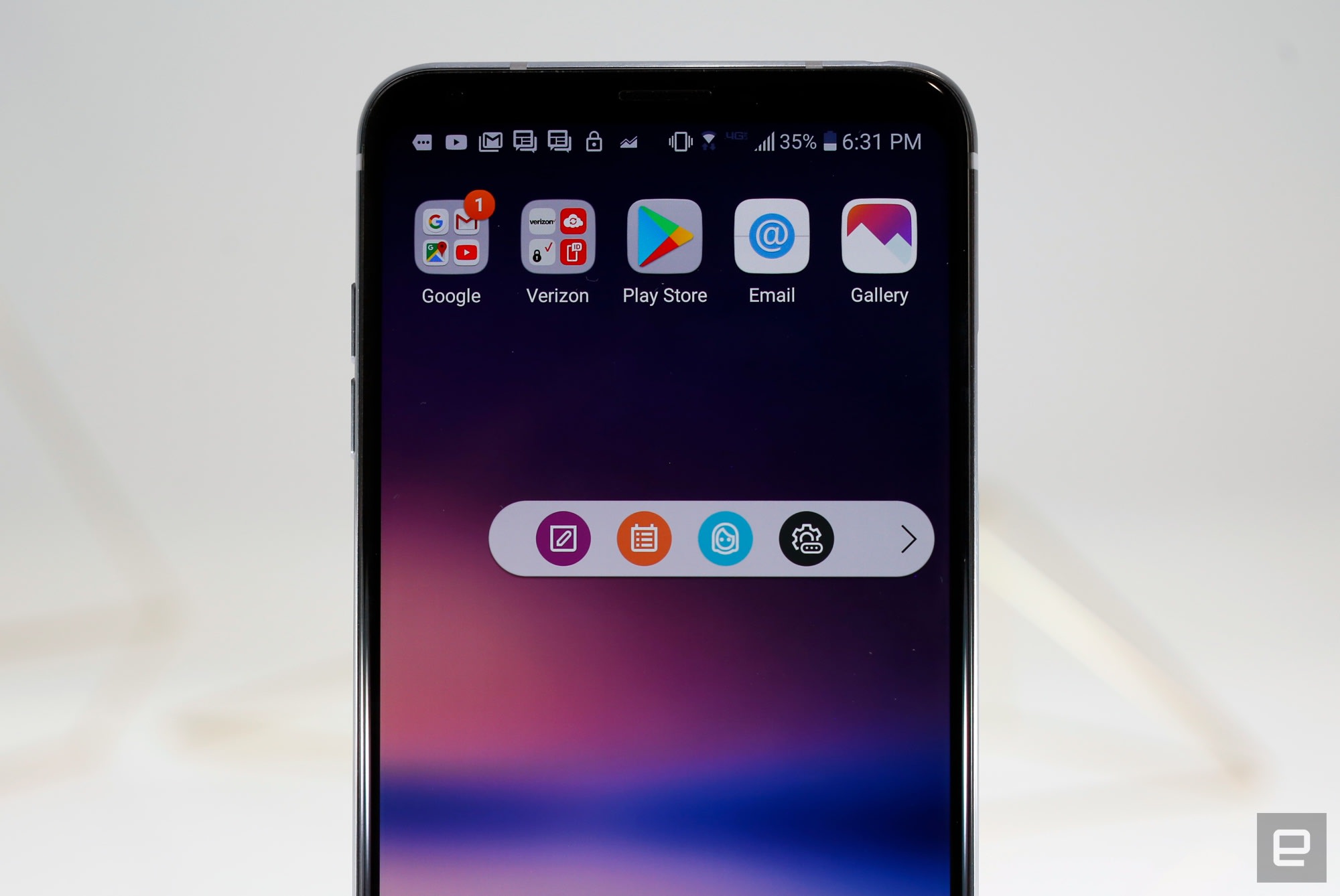
The rest of LG’s built-in apps are as colorful and useful as always, and some widgets have been slightly redesigned to make use of the bigger screen. They’re nothing to write home about, though.
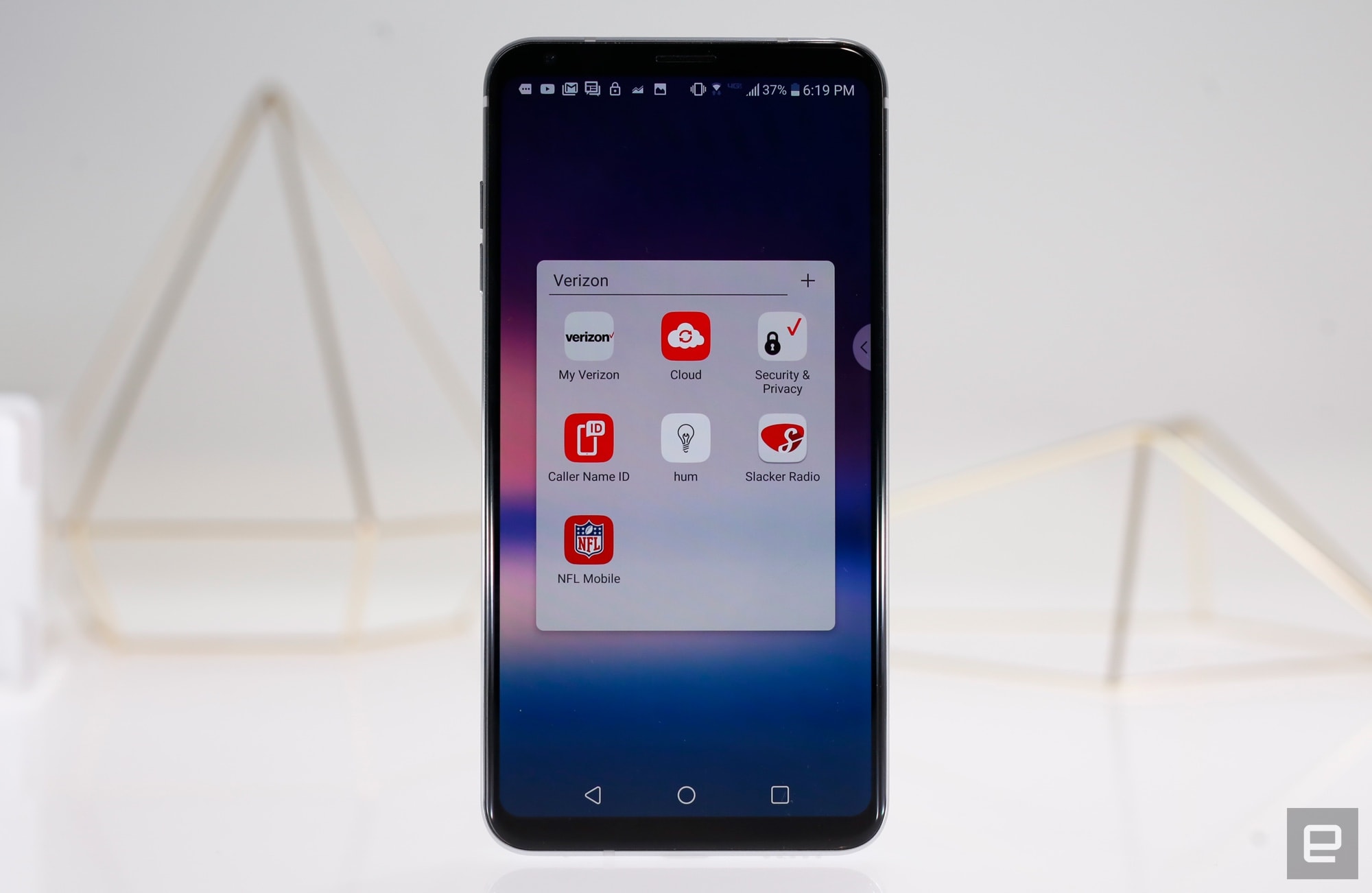
What is worth discussing, however, is the bloatware situation. Our review unit was provided by Verizon, and as such, it’s filled to the brim with apps nobody asked for. There are seven apps in a home screen folder conveniently labeled “Verizon,” two pre-loaded games and four Yahoo apps. (Just a reminder: In addition to owning Engadget, Verizon also owns Yahoo’s media properties. Verizon has no editorial control over us, though, so I’m going to keep blasting it for its obnoxious pre-loaded apps.)
Most troubling is the addition of AppFlash, a home screen panel that offers quick access to frequently used apps, news stories and a search bar that surfaces local hotspots. It sounds useful enough, and it is, but the Electronic Frontier Foundation is firm in its belief that AppFlash amounts to spyware. Thanks, but no thanks, Verizon — it’s all pretty easy to uninstall or disable.
Camera

Chris Velazco/Engadget
The V30’s main draw is its dual camera, and with good reason: It’s one of the best LG has ever made. The star of the show is a 16-megapixel main shooter with a f/1.6 aperture, and it’s complemented nicely by a 13-megapixel wide-angle camera. Other smartphone makers have invested in other kinds of dual-camera setups (most notably Huawei and its secondary monochrome sensors), but I’ve always preferred the telephoto/wide-angle combo, since it offers more flexibility.
Images captured with the main camera feature lots of detail and bright, natural colors when there was lots of light around. Consider me impressed. Low-light performance wasn’t amazing on the pre-production V30 we tested, though, and it hasn’t gotten much better here. The main camera has optical image stabilization and a very wide aperture — that’s normally a winning combination, but it’s not perfect here. Sometimes I’d get a great shot without thinking about it. Most of the time, though, the V30 struggled to pick up fine details in dim lighting that the Galaxy Note 8 and iPhone 8 Plus gathered with no problem. Sadly, that’s not the kind of thing LG’s myriad photo modes and filters can fix.


Meanwhile, the wide-angle camera routinely churned out pleasant-looking landscapes, and being able to capture more of the space around you without moving is definitely helpful. It struggled to pick up detail in some situations, but that’s not a surprise, since it shoots at a lower resolution. Even so, it’s a big improvement over the V20’s wide-angle camera, which produced a ton of distortion around the edges of photos. It also churns out passable wide shots in dim lighting, especially if you’re willing to fiddle with settings, but your best bet is to stick to the main camera. Devices like the Note 8 and Google’s new Pixel 2 series are better all-around still cameras, but respectable image quality and nuanced controls mean the V30’s camera is a serious contender.
More than anything, though, LG built the V30 to shoot video, and it shows. The V30 offers a truly remarkable level of control over the footage you capture — perfect for YouTubers and would-be videographers. We did a separate deep dive into the V30’s cinematographic chops here, so I won’t rehash everything we learned. Long story short, the V30 can do more than stand in for a proper video camera in a pinch — it could feasibly replace one for some people. Ultimately, it’s all about the control, and there is a lot of that available here.

Of course, you don’t need to be a Kubrick wannabe to get great video results. A handful of features help imbue footage with an almost professional flair, like color presets that can drastically change the feel and atmosphere of your shots. Personally, I’ve fallen in love with LG’s slick point-zoom feature. Tapping on the screen locks a focal point, and you can zoom in and out of it, even if that point is off in the corner of the frame. It’s these little additions that no one else has thought of that make the V30 such a pleasure to use. Here’s hoping LG makes still-image quality as much of a priority as video next time.
Performance and battery

Chris Velazco/Engadget
Like a lot of other flagships this year, the V30 runs on Qualcomm’s Snapdragon 835 chipset, along with the Adreno 540 GPU and 4GB of RAM. It’s a well-worn combination, to be sure, but it’s definitely an effective one. The V30 has been a speedy, smooth companion — lag was virtually nonexistent as I bounced between apps. And it didn’t break a sweat when I fired up intense games like Afterpulse and Tempest.
| AnTuTu (total) | 145,783 | 159,382 | 141,065 | 16,673 |
| 3DMark IS Unlimited | 28,193 | 39,235 | 30,346 | 38,960 |
| GFXBench 3.0 1080p Manhattan Offscreen (fps) | 49 | 52 | 42 | 55 |
| CF-Bench | 61,958 | N/A | 24,748 | 67,415 |
When it comes to day-to-day use, the V30 is pretty average. On a typical day, I’d pull the V30 off the charger at around 8 AM, take it to work, run it through my usual routine, and get a low-battery warning at around 9 PM. That’s not bad — I got similar results out of the Galaxy Note 8, and I’ve occasionally found the V30 still clinging to life after nights when I had forgotten to charge it. Thankfully, the phone is pretty quick to charge: When it’s completely dead, a 15-minute top-up was enough to get the V30’s up to between 25 and 30 percent. Another 15 minutes on top of that usually pushed the phone close to 55 percent. A bigger battery would’ve been nice, but you won’t have trouble getting through the day if you make at least one pit stop at a wall outlet.
The competition

The V30 is the most appealing phone LG has made in a long time, but the smartphone competition this year is incredibly fierce. Samsung’s Galaxy S8 Plus runs with the same chipset but pairs it with an almost flawless Infinity Display — the V30’s OLED screen simply doesn’t stack up. Samsung arguably also wins on design, and the S8 Plus packs a first-rate 12-megapixel camera. Then there’s Google’s Pixel 2 XL, a device that’s very closely related to the V30. The Pixel display is similar to the V30’s, but thankfully, it doesn’t have the same grainy look as the LG. Plus a cleaner version of Android means the Pixel just feels a little bit faster. There are strong reasons to pick either of these phones over the V30, but here’s what it boils down to: If you’re serious about audio and video quality, the V30 wins.
Wrap-up

Chris Velazco/Engadget
When I first took the V30 for a spin, I was surprised by my own optimism. At last, LG had made a phone that seemed to tick all the right boxes. After more prolonged testing, I’m not quite as enamored — thanks mostly to its questionable screen. Still, I’m impressed with what LG has managed to accomplish. The V30’s design and build quality are first rate, performance is up to snuff for a flagship, and I’m in love with the way this thing sounds. Hopefully, LG irons out these sketchy screen issues, because otherwise the V30 is a worthy phone in danger of being overshadowed.
Grovemade unveils a beautiful new Wireless Charging Pad
Why it matters to you
You shouldn’t have to sacrifice the aesthetics of your interior design for modern-day technology.
Wireless charging is on the rise (and Apple’s on board at last), but you don’t have to sacrifice the aesthetics of your interior design for modern-day technology. That’s where Grovemade steps in — with The Wireless Charging Pad.
Grovemade is known for its hand-crafted accessories made from all-natural materials. We’ve followed the team since way back when, most recently gushing over the company’s speakers and amp. Its new Wireless Charging Pad features a stainless steel base and soft, natural cork top that’s hand-sanded. Depending on your style, you can choose between two color variants, Light and Dark.
Now that Apple has released the iPhone 8, iPhone 8 Plus, and soon the iPhone X, wireless charging pads are another accessory to add to the list. While many already offer a variety of capabilities on the inside, very few focus on the design of the outside. Most look like black hockey pucks.
Both color variants were designed, manufactured, and hand-assembled in Grovepad’s workshop in Portland, Oregon. The Dark color option is hand-stained with Japanese Calligraphy ink to provide depth and richness.
You may notice that many other wireless charging pads have a 7.5-watt output. Grovepad’s Wireless Charger has a 5-watt power rating — which fits in line with next-generation iPhone users whose devices are currently only capable of taking in 5 watts.
To avoid clutter and tangled chords, it also comes equipped with a nylon braided power cord that wraps around the dock. You’ll be able to wrap almost the entire cord underneath the charger’s base so that it’s hidden from sight.
If you’re looking to add a wireless charging pad that’s also subtle, Grovemade could do the trick. It’s constructed in a slim but also secure enough size that it will compliment your desk aesthetic rather than look out of place.
For those that have a case on their phone, the charger still works with all Grovemade iPhone cases and additional cases up to 3mm thick. Even if you don’t have an iPhone, the charging pad supports all Qi-compatible devices.
Grovemade’s Wireless Charging Pads are currently available online. Either color option will cost you $80 and can be purchased from the company’s website.
Editor’s Recommendations
- Mophie vs. Belkin vs. RavPower: Who has the best wireless charging pad?
- Charge up your iPhone or Android with the best wireless phone chargers
- No cables, no hassle: Wi-Charge’s in-room wireless charging is coming next year
- Now just $15 on Amazon, the Satechi wireless charging pad is sleek and fast
- Samsung patent filing reveals interest in a dual wireless charging mat
Eight great robot kits for kids you can find right now
You say you’re a parent or teacher investigating robot kits for children? And you don’t want a simple solution with a single purpose: you want the child to experience science, technology, engineering, and math? We get it. You want a kit that teaches all four categories, from piecing together the foundation to wiring the appendages to programming the “brain” using software. That’s where our list of robot kits for kids comes in.
Most of the robot kits listed below are tied to terms such as STEM, Arduino, and Blockly. Here are a few explanations of those and other terms before we get started:
Arduino: an open-source hardware and software platform. It consists of boards that read inputs and convert data into outputs. This data is managed through the Arduino programming language and Arduino-based software. Arduino was built for beginners but is sophisticated enough for advanced users, making it a widely used platform in the educational system. Even Intel is on the Arduino bandwagon.
Scratch: a programming language designed for kids ages 8 to 16. It’s separate from Arduino but still widely used in schools for creating games, programming robots, designing animations, and more. Instead of writing code from scratch, kids piece together blocks of commands ranging from motions to events to sensing. Scratch can be downloaded and installed directly to a PC, or used online via Flash.
Blockly: another programming language for kids, Blockly relies on blocks of code that can be strung together to create a program. It now resides under Google’s umbrella and is typically web-based, although dedicated apps have appeared for Android and iOS. Of the two, Blockly is a simpler programming language; Scratch provides additional features.
STEM: this is short for Science, Technology, Engineering, and Mathematics. It’s a “movement” set forth by the U.S. Department of Education to help teachers and parents prepare students for the jobs of tomorrow. It’s designed for student interaction with real-world programs, providing experimental learning activities that push students to investigate, understand, and create solutions. Check out our list of the best STEM-based toys here.
Now on to the robots!
Elegoo UNO Project Smart Robot Car Kit ($74)
As the name implies, the final product is a “smart” robot car based on the Arduino platform. The kit includes 24 different modules, such as an infrared receiver for using a remote control, Bluetooth for connecting via a smartphone or tablet, line tracking, and obstacle avoidance. With kids in mind, it boasts a minimal design for a faster build and less errors.
According to Elegoo, the kit includes instructions and software, showing kids how to load the programs and command the robot to perform a handful of standard modes. But the kit is expandable, enabling you to add sensors not included for a customized robot. These third-party sensors must include a 3-pin XH2.54 interface to be compatible with this kit.
Meccano-Erector MeccaSpider Robot Kit ($100)
This kit is designed for kids ages 10 and older, packing 291 parts that can be pieced together in one to three hours to create a cool robotic spider. The kit also includes two “smart” motor modules, one “brain” module, and an infrared sensor module that detects movement. There’s even a built-in reservoir for holding water so it can shoot “venom” to fend off its enemies.
On the programming side, there are built-in physical buttons for activating pre-set modes, including five basic modes, two guard modes, and one game mode. Kids can customize these through the on-board buttons, or by using apps provided on Android and iOS devices. This kit falls under the STEM umbrella with an intermediate complexity level.
Tenergy Odev Tomo ($100)
Here’s another kit that falls under the STEM umbrella: a 2-in-1 transformable, programmable robot from battery maker Tenergy. Designed for kids ages eight and older, it includes an ultrasonic sensor, a tracking sensor, the main control box, and more that are color-coded and labeled clearly. The kit creates a two or three-wheeled robot that can roam freely or track specific lines you create, or you can control it through Tenergy’s free ODEV Explorer mobile app.
To manually program the robot, you’ll need the free Odev Blockly app for Android or iOS. Anything you create for the robot can be uploaded and shared with other owners in the cloud. Moreover, Tomo’s “brain” has enough ports for extending its capabilities through third-party modules.
Robolink Rokit Smart ($120)
Here’s a STEM-focused kit for Arduino learners to build a programmable robot in 11 different forms: as a crab, a clapping monkey, a pirate ship, a gorilla, and more. It’s backed by an online tutorial with instructions on how to build the robot using each design, the programming basics using Arduino software, and even how to use the kit to build a robot for “sumo” one vs one competition.
According to Robolink, each design has a specific purpose: One can shoot rubber bands, one can detect edges, one follows lines, and so on. Batteries aren’t included in the kit, but you’ll find all the circuit boards, motors, and frames you need to build a cool, working robot. Robolink actually uses this kit at its Robotics Learning Center for kids in San Diego.
UBTECH Jimu Robot DIY Buzzbot & Muttbot Robotics Kit ($135)
By default, you can use this kit to create BuzzBot, or his faithful companion, MuttBot (but not both). But there are enough pieces in the kit to build whatever you want, including 271 parts, one “brain,” six servos, and a battery. You can purchase two additional servos if needed as a two-piece kit for $40, or a non-robotic animal companion for $50.
Once kids build the robot, they can record different poses and play them all in a string via the PRP system using the Jimu app for Android and iOS. But that’s boring, right? Using the app, kids can string blocks of commands together using Blockly-based coding as well. The app even provides step-by-step instruction on how to piece both robots together.
HEXBUG VEX IQ Robotics Construction Kit ($239)
From the makers of the popular mechanical bug family is a STEM-approved robot you can build. This high-dollar kit contains more than 750 pieces you can snap together, along with motors with built-in rotational sensors, the main “brain” with 12 self-configuring input/output ports, and more. The company provides instructions for eight basic designs here, including Clawbot IQ, V-Rex, Slick, and Stretch. There are instructions for designing larger robots too using additional parts.
Included with this kit is the online version of the Modkit for VEX programming software (typically $50), a tool designed for kids that relies on drag-and-drop programming. Also thrown into the mix is the ROBOTC VEX IQ curriculum packed with step-by-step instructions, videos, and animations. Once you learn the basics, you can move on to build and program anything you want with this kit. You’ll need six AA batteries to power your robot (sold separately), but the included game-style remote control comes with a rechargeable battery.
Makeblock DIY Ultimate Robot Kit ($350)
This is Makeblock’s flagship robot kit, packing anodized 6061 aluminum mechanical parts with threaded-slot designs. The kit includes instructions for ten different designs, such as the robotic arm tank, the robotic bartender, and the self-balancing robot. These designs are backed by the Arduino-based MegaPi mainboard that’s capable of handling 10 servos or eight DC motors simultaneously. The kit is also compatible with the Raspberry Pi board.
On the programming front, kids use the company’s Scratch 2.0-based mBlock software for PCs and mobile devices. This tool provides a drag-and-drop environment where kids string together blocks of code. Advanced users can use Python via the Raspberry Pi board, Node JS, or Arduino IDE. The parts list includes a Bluetooth module, so you can program and control your creation from any Bluetooth-based PC or mobile device.
LEGO MINDSTORMS EV3 31313 ($350)
This kit consists of LEGO-based bricks, a programmable EV3 “brick” that serves as the brain, four sensors, a handful of motors, and loads more pieces. The EV3 brick includes a built-in display showing the wireless connection, battery level, what the robot is currently doing, and more. Overall, you can build 17 different robotic designs, such as a slithering snake (R3ptar), a walking dinosaur (Dinor3x), a shooting scorpion (Spik3r), and a humanoid robot (Ev3rstorm).
By default, each design comes with its own unique features and programmed behaviors. They can also be steered using the included remote control. But users can program their creation using the LEGO Mindstorms Ev3 software for PC, and download their commands to the robot using a USB cable, Bluetooth, or Wi-Fi. The software provides five programming “missions” to get kids started using icon-based programming blocks that are strung together. LEGO provides a programming app for mobile devices too.
Editor’s Recommendations
- Just in time for Halloween, this spooky robot mask will help teach you to code
- Get your child ready for school with these 5 best educational toy deals
- With Pixel, you can customize a robot and learn to code all at once
- Artificial robot muscle may look creepy, but it’s incredibly versatile
- How do you get kids into coding? Tynker and Parrot let them use it to fly drones
Eight great robot kits for kids you can find right now
You say you’re a parent or teacher investigating robot kits for children? And you don’t want a simple solution with a single purpose: you want the child to experience science, technology, engineering, and math? We get it. You want a kit that teaches all four categories, from piecing together the foundation to wiring the appendages to programming the “brain” using software. That’s where our list of robot kits for kids comes in.
Most of the robot kits listed below are tied to terms such as STEM, Arduino, and Blockly. Here are a few explanations of those and other terms before we get started:
Arduino: an open-source hardware and software platform. It consists of boards that read inputs and convert data into outputs. This data is managed through the Arduino programming language and Arduino-based software. Arduino was built for beginners but is sophisticated enough for advanced users, making it a widely used platform in the educational system. Even Intel is on the Arduino bandwagon.
Scratch: a programming language designed for kids ages 8 to 16. It’s separate from Arduino but still widely used in schools for creating games, programming robots, designing animations, and more. Instead of writing code from scratch, kids piece together blocks of commands ranging from motions to events to sensing. Scratch can be downloaded and installed directly to a PC, or used online via Flash.
Blockly: another programming language for kids, Blockly relies on blocks of code that can be strung together to create a program. It now resides under Google’s umbrella and is typically web-based, although dedicated apps have appeared for Android and iOS. Of the two, Blockly is a simpler programming language; Scratch provides additional features.
STEM: this is short for Science, Technology, Engineering, and Mathematics. It’s a “movement” set forth by the U.S. Department of Education to help teachers and parents prepare students for the jobs of tomorrow. It’s designed for student interaction with real-world programs, providing experimental learning activities that push students to investigate, understand, and create solutions. Check out our list of the best STEM-based toys here.
Now on to the robots!
Elegoo UNO Project Smart Robot Car Kit ($74)
As the name implies, the final product is a “smart” robot car based on the Arduino platform. The kit includes 24 different modules, such as an infrared receiver for using a remote control, Bluetooth for connecting via a smartphone or tablet, line tracking, and obstacle avoidance. With kids in mind, it boasts a minimal design for a faster build and less errors.
According to Elegoo, the kit includes instructions and software, showing kids how to load the programs and command the robot to perform a handful of standard modes. But the kit is expandable, enabling you to add sensors not included for a customized robot. These third-party sensors must include a 3-pin XH2.54 interface to be compatible with this kit.
Meccano-Erector MeccaSpider Robot Kit ($100)
This kit is designed for kids ages 10 and older, packing 291 parts that can be pieced together in one to three hours to create a cool robotic spider. The kit also includes two “smart” motor modules, one “brain” module, and an infrared sensor module that detects movement. There’s even a built-in reservoir for holding water so it can shoot “venom” to fend off its enemies.
On the programming side, there are built-in physical buttons for activating pre-set modes, including five basic modes, two guard modes, and one game mode. Kids can customize these through the on-board buttons, or by using apps provided on Android and iOS devices. This kit falls under the STEM umbrella with an intermediate complexity level.
Tenergy Odev Tomo ($100)
Here’s another kit that falls under the STEM umbrella: a 2-in-1 transformable, programmable robot from battery maker Tenergy. Designed for kids ages eight and older, it includes an ultrasonic sensor, a tracking sensor, the main control box, and more that are color-coded and labeled clearly. The kit creates a two or three-wheeled robot that can roam freely or track specific lines you create, or you can control it through Tenergy’s free ODEV Explorer mobile app.
To manually program the robot, you’ll need the free Odev Blockly app for Android or iOS. Anything you create for the robot can be uploaded and shared with other owners in the cloud. Moreover, Tomo’s “brain” has enough ports for extending its capabilities through third-party modules.
Robolink Rokit Smart ($120)
Here’s a STEM-focused kit for Arduino learners to build a programmable robot in 11 different forms: as a crab, a clapping monkey, a pirate ship, a gorilla, and more. It’s backed by an online tutorial with instructions on how to build the robot using each design, the programming basics using Arduino software, and even how to use the kit to build a robot for “sumo” one vs one competition.
According to Robolink, each design has a specific purpose: One can shoot rubber bands, one can detect edges, one follows lines, and so on. Batteries aren’t included in the kit, but you’ll find all the circuit boards, motors, and frames you need to build a cool, working robot. Robolink actually uses this kit at its Robotics Learning Center for kids in San Diego.
UBTECH Jimu Robot DIY Buzzbot & Muttbot Robotics Kit ($135)
By default, you can use this kit to create BuzzBot, or his faithful companion, MuttBot (but not both). But there are enough pieces in the kit to build whatever you want, including 271 parts, one “brain,” six servos, and a battery. You can purchase two additional servos if needed as a two-piece kit for $40, or a non-robotic animal companion for $50.
Once kids build the robot, they can record different poses and play them all in a string via the PRP system using the Jimu app for Android and iOS. But that’s boring, right? Using the app, kids can string blocks of commands together using Blockly-based coding as well. The app even provides step-by-step instruction on how to piece both robots together.
HEXBUG VEX IQ Robotics Construction Kit ($239)
From the makers of the popular mechanical bug family is a STEM-approved robot you can build. This high-dollar kit contains more than 750 pieces you can snap together, along with motors with built-in rotational sensors, the main “brain” with 12 self-configuring input/output ports, and more. The company provides instructions for eight basic designs here, including Clawbot IQ, V-Rex, Slick, and Stretch. There are instructions for designing larger robots too using additional parts.
Included with this kit is the online version of the Modkit for VEX programming software (typically $50), a tool designed for kids that relies on drag-and-drop programming. Also thrown into the mix is the ROBOTC VEX IQ curriculum packed with step-by-step instructions, videos, and animations. Once you learn the basics, you can move on to build and program anything you want with this kit. You’ll need six AA batteries to power your robot (sold separately), but the included game-style remote control comes with a rechargeable battery.
Makeblock DIY Ultimate Robot Kit ($350)
This is Makeblock’s flagship robot kit, packing anodized 6061 aluminum mechanical parts with threaded-slot designs. The kit includes instructions for ten different designs, such as the robotic arm tank, the robotic bartender, and the self-balancing robot. These designs are backed by the Arduino-based MegaPi mainboard that’s capable of handling 10 servos or eight DC motors simultaneously. The kit is also compatible with the Raspberry Pi board.
On the programming front, kids use the company’s Scratch 2.0-based mBlock software for PCs and mobile devices. This tool provides a drag-and-drop environment where kids string together blocks of code. Advanced users can use Python via the Raspberry Pi board, Node JS, or Arduino IDE. The parts list includes a Bluetooth module, so you can program and control your creation from any Bluetooth-based PC or mobile device.
LEGO MINDSTORMS EV3 31313 ($350)
This kit consists of LEGO-based bricks, a programmable EV3 “brick” that serves as the brain, four sensors, a handful of motors, and loads more pieces. The EV3 brick includes a built-in display showing the wireless connection, battery level, what the robot is currently doing, and more. Overall, you can build 17 different robotic designs, such as a slithering snake (R3ptar), a walking dinosaur (Dinor3x), a shooting scorpion (Spik3r), and a humanoid robot (Ev3rstorm).
By default, each design comes with its own unique features and programmed behaviors. They can also be steered using the included remote control. But users can program their creation using the LEGO Mindstorms Ev3 software for PC, and download their commands to the robot using a USB cable, Bluetooth, or Wi-Fi. The software provides five programming “missions” to get kids started using icon-based programming blocks that are strung together. LEGO provides a programming app for mobile devices too.
Editor’s Recommendations
- Just in time for Halloween, this spooky robot mask will help teach you to code
- Get your child ready for school with these 5 best educational toy deals
- With Pixel, you can customize a robot and learn to code all at once
- Artificial robot muscle may look creepy, but it’s incredibly versatile
- How do you get kids into coding? Tynker and Parrot let them use it to fly drones
 AIVAnet