


Android’s ‘instant’ apps are now leaner and faster
Right now, Google’s instant Android apps don’t quite live up to their billing. Google has to load support for every possible device, which can slow down access to the app and chew up valuable space. That shouldn’t be an issue going forward. Google has updated its instant app programming kit to let developers give you configurations that only target specific device profiles based on the display, chip architecture and language. If you’re using a low-resolution screen, an ARM processor and Chinese, for example, you won’t get the data needed for a sharper display, Intel chips and other languages. Google reckons that this saves an average of 10 percent space, which should translate to faster-loading apps.
Also, you stand a better chance of keeping that instant app data if you decide to install the full thing. Where you previously needed Android Oreo to preserve that content, it now applies to phones running Lollipop or newer.
Developers will need to roll the new features into their Android titles, so don’t expect to see improvements right away. With that said, the gap between instant and fully installed apps should be noticeably narrower, especially if you’re using one of the vast majority of Android devices that doesn’t yet have Oreo.
Source: Android Developers Blog
Windows 10’s data collection allegedly violates Dutch privacy law
Microsoft has already caught flak over claims that Windows 10’s data collection is still overly aggressive, but it’s now facing a direct legal challenge over how it handles your info. The Netherlands’ Data Protection Authority has determined that Windows 10 violates the country’s data protection law even after tweaks that came with the Creators Update. Allegedly, Microsoft doesn’t “clearly inform” you of the type of data it’s using and the reasons why that data is needed. Moreover, officials believe that Windows’ default settings prevent you from offering true consent to data gathering.
Windows defaults to the full data sharing during the installation process, and encourages you to simply accept those terms. Just because you didn’t change those settings doesn’t mean you gave permission, the DPA said. The regulator also contended that the Creators Update didn’t honor some users’ existing privacy preferences, and that Microsoft doesn’t make it clear that the Edge browser is continuously collecting app and browsing data using the default settings.
Not surprisingly, Microsoft has taken issue with the findings. In its response to the DPA, it illustrated point-by-point “concerns” with the Dutch authority’s statement. It maintained that Windows 10 informs you about the data it collects and how that info is used, although it acknowledged that you may have to dive into the privacy agreement or “learn more” sections (that is, the sections few people read) to get a full understanding. It also argued that it needs at least some device data to understand compatibility problems (there are hundreds of millions of Windows users, after all) and look for repeated app crashes that might hint at security holes. And as you might expect, Microsoft doesn’t agree that its approach to software defaults prevents people from giving true consent.
Microsoft does plan to work with the authority to take care of violations, although the disputes suggest that the two sides aren’t about to come to an agreement in the immediate future. Whatever happens, this Dutch claim could have far-reaching implications. Unless Microsoft is willing to make a version of Windows 10 with privacy changes just for the Netherlands, you may see it alter data collection policies worldwide.
Via: Ars Technica
Source: Data Protection Authority, Microsoft Pulse
The Senhance System is a robotic assistant that can help doctors with your next surgery
Why it matters to you
Your surgeon’s assistant during your next operation just might be this robotic system.
We can’t say anything for its bedside manner, but a new robotic system could be a pretty crucial assistant during your surgery. On Friday, the U.S. Food and Drug Administration gave clearance to a robotically-assisted surgical device (RASD) called the Senhance System. Intended to help facilitate minimally invasive surgery, this system allows surgeons to control three individual robotic arms while examining a 3D high-definition view of the surgical field.
Congratulations #ASCRS2017 on a great meeting! Thank you to all who visited the booth to provide feedback on #Senhance #Surgery #RoboticCRS pic.twitter.com/9U66TSaVGa
— TransEnterix (@TransEnterix) June 14, 2017
“Minimally invasive surgery helps reduce pain, scarring and recovery time after surgery,” said Binita Ashar, M.D., director of the Division of Surgical Devices in the FDA’s Center for Devices and Radiological Health. “RASD technology is a specialized innovation in minimally invasive surgery designed to enhance the surgeon’s access and visualization within confined operative sites.”
What makes the Senhance System particularly interesting is its inclusion of force feedback, which allows the surgeon to actually “feel” the tissue he or she is grasping with a robotic arm. So really, it’s as though your doctor grew three additional, extremely dexterous arms. The Senhance System also boasts eye-tracking, which is said to help control movement of surgical tools.
150 patients participated in a clinical study involving the new RASD, and their results were compared to those using another previously approved RASD. The FDA concluded that the Senhance System was just as effective as its peer (the da Vinci Si IS3000 device) for gynecological and colorectal procedures.
“The Senhance System is intended to assist in the accurate control of laparoscopic instruments for visualization and endoscopic manipulation of tissue including grasping, cutting, blunt and sharp dissection, approximation, ligation, electrocautery, suturing, mobilization and retraction in laparoscopic colorectal surgery and laparoscopic gynecological surgery,” the FDA noted in its approval. “The system is for use on adult patients by trained physicians in an operating room environment.”
This marks the first time since 2000 that the FDA has approved a surgical assistant for the abdominal area, according to the company behind the Senhance System, TransEnterix. So if you’re scheduled for surgery in the coming months (though we certainly hope you are not), you may just be able to see the Senhance in action.
Best new songs to stream: Lin-Manuel Miranda, Sufjan Stevens, and more
Every week, there are thousands of new songs hitting the airwaves — and it’s just too much for your two ears to handle. With all those options, you can’t be wasting your time on tracks that deserve a thumbs-down click — you want the best new songs to stream right now.
But don’t worry, we’re going to save you the hassle. We listen to some of the most-hyped and interesting songs each week, and tell you which are worthy of your precious listening time.
Here are our five best new songs to stream this week. And don’t forget to subscribe to our Spotify page for a playlist of our weekly picks, which can also be found at the bottom of this post. Not sure which streaming service is best for you? Check out our post about the best music streaming services, or go in depth and learn the differences between Apple Music and Spotify to better weigh your options.
Lin-Manuel Miranda — Almost Like Praying
Hamilton creator Lin-Manuel Miranda has been outspoken in his support of those affected by Hurricane Maria in Puerto Rico, and he took his support a step further this week with the release of this star-studded charity single. Hispanic musicians Jennifer Lopez, Marc Anthony, Gloria Estefan, Fat Joe, John Leguizamo, Rubén Blades, Camila Cabello, Joell Ortiz, Juan Luis Guerra, Dessa, and more appear at various points in Almost Like Praying to offer a powerful and uplifting message to those who could use it most.
Sufjan Stevens — Wallowa Lake Monster
Songwriter Sufjan Stevens promoted the upcoming release of a collection of unreleased B-sides called The Greatest Gift with the release of this gorgeous seven-minute single, an outtake from his 2015 full length album Carrie & Lowell. Fans of Stevens will love the new track — a thoughtful, ambiance-filled song that sounds like it barely missed the final cut of the album.
Landlady — Cadaver (and more, live at NPR’s Tiny Desk)
Brooklyn’s Landlady recently performed this series of perfectly arranged songs at NPR’s offices in Washington D.C. The groovy and compelling tunes showcase each member of the quartet’s outstanding and creative musicianship. They are joined by a string quartet for the final track, not that you’ll need that as a reason to stick around until the end of the 20-minute live video.
Lo Tom — Bubblegum (and more, live on KEXP)
Lo Tom‘s Bubblegum is the kind of song you imagine putting on when you start up a vintage muscle car or put on a black leather jacket. A driving bit of rock ‘n’ roll with a clean and hooky melody, the tune showcases powerful distorted guitars and fat drum tones. It’s just the kind of thing you need to start your engines.
Gregory Porter — Smile
The velvety vocal tone of singer Gregory Porter is perfectly suited to this Nat King Cole tune, part of an upcoming tribute to the late, great vocalist. Porter is joined by a full jazz orchestra and strings on the track, a beautiful recording that we can easily imagine becoming one of the definitive versions of this standard.
That’s it for now, but tune in next week for more songs to stream, and check out the playlist loaded with our recent selections below:
A new satellite is orbiting our planet to track greenhouse gases and pollution
Why it matters to you
We’ll soon have a more detailed idea of all the pollution on Earth thanks to a new satellite from the ESA.
The evidence of pollution on Earth is already pretty evident to those of us living on Earth — at least, for those of us living in large cities or manufacturing hubs. But now we’re going beyond our planet to see just how bad things really are. The European Space Agency (ESA) has just launched the most advanced air-pollution-monitoring satellite in history. Its goal is to map the global distribution of air pollutants in truly novel detail.
On Friday, ESA controllers received the first signal from the Sentinel-5P satellite, which lifted off from the Plesetsk Cosmodrome in Russia about at around 5:30 a.m. EDT. The Sentinel-5P, otherwise known as Precursor, is a member of the European Union’s Copernicus program, which is the largest Earth-observation program in the world. And while there are a total of six satellites in orbit as part of this program, Precursor is the first and only to measure the chemistry of our planet’s atmosphere.
“Having Sentinel-5P in orbit will give us daily and global views at our atmosphere with a precision we never had before,” Josef Aschbacher, ESA’s director of Earth-observation programs, said in a statement.
While Precursor isn’t the first satellite to have this important mission, it is the first in quite some time. The only other satellite currently tasked with measuring pollution is NASA’s Aura, which was launched 13 years ago in 2014. And in the time since, quite a few improvements in technology have been made. As Stephen Briggs, senior advisor to the director of ESA’s Earth Observation program, told Space.com, “Sentinel-5P carries an instrument called Tropomi, which is very powerful because it has a very wide swath — 2,600 kilometers wide (1,615 miles). That means that it will give us the view of the whole Earth every day. Every day, we will get measurements of every point on the Earth.”
With Tropomi, which was developed in large part by the Netherlands’ national meteorological agency (KNMI), the satellite will measure several pollutants, including the levels of nitrogen dioxide and sulfur dioxide, which result from fossil fuels, as well as carbon monoxide, formaldehyde, ozone, and greenhouse gas methane.
“Tropomi will make 20 million observations every day, covering the entire globe at a resolution that is 10 times better than we have ever seen before,” KNMI’s principal investigator Pepijn Veefkind told the BBC. “That allows us to see pollution in cities on a much finer scale. In Rotterdam, for example, we will be able to distinguish the harbour from the city centre; and we will be able to see the pollution in shipping lanes over the oceans.”
Become a certified AWS solution architect with this $49 bundle!
Amazon Web Services (AWS) is the world’s leading cloud computing platform, used by many of your favorite online services, including Netflix, Spotify, and Shazam. AWS pros are in high demand, but special training is required to master the tools.
If you’re new to AWS, you need a course that covers the fundamentals of cloud computing. Unfortunately, this type of training — with certification included — is usually quite expensive. Right now, however, Android Central Digital Offers has a deal on an AWS Solution Architect certification training bundle. Instead of the usual price of $649, you’ll pay just $49. That’s 92 percent off the regular price.

This bundle includes 22 hours of content, including training in EC2, S3, RDS, and EBS. You’ll learn how to design fully functional systems on AWS, as well as how to select the appropriate AWS service based on data, compute, database, or security requirements.
Interested in a career with AWS cloud computing? This is the course you need to learn the fundamentals, plus certification of completion is included. At this price, the time is now!
See at Android Central Digital Offers
After Math: Everything sucks
It’s another week down and we’re all a bit closer to death. Huzzah. While the moron-in-chief continues to systematically dismantle everything good and decent about our country, the tech industry did its part to help hasten that process along. The heads of Twitter and Facebook respectively showed that they’re not just spineless incompetents but also tone deaf stooges, Tesla had to recall a metric shit-ton of Model Xs because sitting in the middle seat could kill you, and Porsche rolled out a new service to make the lives of the 1 percenters that much more luxurious. Numbers, because screw it, nothing matters.
The best 4K TV on a budget
By Chris Heinonen
This post was done in partnership with Wirecutter, reviews for the real world. When readers choose to buy Wirecutter’s independently chosen editorial picks, they may earn affiliate commissions that support their work. Read the full article here.
After spending 80 hours testing new models for 2017, we found that the 55-inch TCL 55P607 is the best 4K TV if you’re on a budget. Not only that, but it’s also our pick for the best TV, period. Even when viewed side by side with TVs that cost two and a half times as much, the TCL won over our viewing panel. It’s simply the greatest value we have ever seen in a TV.
Who should get this
If your TV works and you’re happy with it, stick with what you have. If your TV is dying or has already died, or if you’re looking for something larger, these TVs offer great performance at a budget-friendly price and support all the important new standards that will keep your set relevant for at least the next few years.
Specifically, the TV industry is promoting three new features, all of which we think you should actually look for when buying a TV. Ultra HD resolution offers four times the pixels of 1080p HDTVs. HDR allows your TV to produce brighter, more lifelike highlights without degrading shadow details. And wide color gamuts let you see shades of colors that exist in real life but that earlier TVs couldn’t display.
How we picked and tested

All our TVs, ready for testing. Photo: Chris Heinonen
What makes a good TV? Easy: a combination of both picture quality and features. But for about $500, it’s hard to find one TV that does it all. So in addition to reading reviews from sites like Rtings and Reviewed.com and talking with David Katzmaier, CNET’s resident TV testing expert, we polled more than 1,500 of our readers to see what they wanted most in a TV.
We found that most people want a TV that’s 50 to 60 inches in size, will last at least three to five years, and has at least three HDMI inputs. They placed picture quality above all other features, and thought performance in a bright room is just as important, if not more so, than in a darkened room. Finally, they didn’t care that much about streaming features, and they really don’t care about 3D.
The best way to compare TVs is to put them side by side and actually look at them with the same content, so we did just that. First, we called in all the possible contenders and set each one up. Then, we calibrated each TV to the best of our abilities, and took some measurements of color temperature, light output, and more. We used an HDMI distribution amp to send the same signal from a Blu-ray player or Roku to each TV.
However, according to our survey, less than 2 percent of people will spend the $300 (or more) it costs to get a TV professionally calibrated, and with a budget TV, that number is probably closer to zero. As such, we returned each TV to its factory settings before making comparisons, and adjusted only the basic user-menu picture settings. We tested each TV in a group of three, looking at each display straight-on and from an angle. We also watched each TV with the lights on and with them off.
Our pick: TCL 55P607

Photo: Ashley Courter
Although the TCL 55P607 fits squarely in the price range of what we’ve considered a budget TV over the past few years, it also ticks off almost all of the required boxes for a high-end TV today. In fact, we recommend it as the best TV no matter what your budget is. It produces image quality that matches much-more-expensive TVs while also offering better media streaming services and some extra features that costlier TVs don’t have.
The TCL’s 72 zones of full-array local dimming provide deep blacks without washing out shadows and also produce bright HDR highlights. The set’s HDR support covers both HDR10 and Dolby Vision protocols. Streaming apps come in the form of a built-in Roku, which has the widest selection of apps along with an easy-to-use interface. The remote even offers a built-in headphone jack for listening without disturbing others. The TV’s preset movie modes make it simple to get good picture quality without much fuss, and the iOS and Android app offer the ability to do more-advanced image calibration for those with the necessary tools.
Runner-up: Vizio M50-E1

Photo: Chris Heinonen
We tested the 2017 Vizio M50-E1 and think it’s worth the money if you need a new TV and our other picks are unavailable. The M-Series packs local dimming, HDR and WCG support, and integrated streaming. Its image quality is exceptionally good, but the integrated streaming interface isn’t as smooth or full-featured as others out there, and the HDR performance isn’t quite as good as some other displays. It also lacks an HDTV tuner, so people that watch over-the-air content will need an external one to use an HDTV antenna.
The M-Series supports both HDR10 and Dolby Vision, and can produce highlights up to 750 nits in brightness. Using a full-array local backlight, it can do bright highlights while keeping shadows dim, and makes both HDR and SDR (i.e., non-HDR) look better. It doesn’t quite cover as much of the DCI color gamut as some other displays, but can produce 271 million different colors, which is the same as some other similarly priced TVs. It also uses local dimming to produce deep blacks and a huge contrast ratio. Using the preset calibrated modes, you get an image that is accurate out of the box and needs very little adjustment.
Budget pick: Vizio E48u-D0

The 50-inch version of the Vizio’s 2016 E-Series TVs. Photo: Chris Heinonen
The Vizio E48u-D0 is a slightly smaller version of the Vizio E50u-D2—our now widely unavailable 2016 top pick. When we tested the 50-inch model, we found it offered the best contrast ratios and darkest blacks of the models available at the time and it has lots of inputs, good daytime and nighttime performance, and can stream content from almost any source using Google Cast. The superior black levels and contrast ratios give the image better pop than competing TVs and make it stand out in daytime and nighttime viewing. However, though the E48u-D0 does support 4K, it lacks HDR and WCG, which the TCL P-Series and 2017 Vizio M-Series both have. Four HDMI inputs, more than most competitors, offer enough connections for almost any AV system.
That contrast ratio is thanks to a combination of a VA-type LCD panel and a full-array local dimming (FALD) backlight system. This lighting system, usually found only in far-more-expensive displays, allows adjustment to the brightness in 10 individual areas of the image. This lets bright parts of the image be bright while shadowy areas stay dark. Our objective measurements find that the contrast ratio is almost three times higher with the local dimming enabled, and much higher than most competitors’.
This guide may have been updated by Wirecutter. To see the current recommendation, please go here.
Note from Wirecutter: When readers choose to buy our independently chosen editorial picks, we may earn affiliate commissions that support our work.
20 Android and iOS apps for kids to keep them entertained (and quiet)
Children are able to use and understand technology at an early age. They know how to operate smartphones and tablets correctly and get into their favorite apps before they can speak. There are a sea of apps available for every platform, but not all of them are appropriate for children. We have compiled a list of apps for kids, some are silly games while others are educational, but all of them are completely child-safe and fun.
Many of these apps come with in-app purchases. If your children don’t understand that they are paying with real money every time they tap one of these, it can cause real problems. Before handing a phone or tablet over to a kid, make sure they don’t know the password for your account, and that they need to ask before they click. You can also avoid any mishaps by following our guides to turn off in-app purchases in iOS or disable in-app purchases in Android.
If you’re thinking about buying some toys here are our picks for the best tech toys and the best STEM toys for kids.
Educational (Programming)
Tynker Coding for Kids (free/in-app purchases)
Tynker is quite simple to work with, as it’s very visual — you move the blocks to build your code. With Tynker, you can play coding games, take courses to learn to code, and you can even program drones. This app works with connected toys such are Sphero, Lego WeDo2.0, and even the Philips Hue and Lux lighting systems. You can download Tynker for free, but if you pay for the subscriptions, you will have access to mobile courses, more than 350 puzzle levels, a private Minecraft server, 18 online courses, and over 100 guided tutorials. If you want your kids to get serious about programming, then Tynker should be on your shortlist.
Download now for:
Android iOS
Nancy Drew Codes and Clues Mystery Coding Game (free)
This app is a great way to learn the basics of coding. Instead of just learning to code with out-of-context isolated commands, you will need to use the code to move along a story. It’s interactive, it builds reading comprehension skills, and kids will have a lot of fun trying to find the clues to solve the mystery. Some of the skills learned are sequences, loops, pattern recognition, and algorithmic thinking. Follow the story, find the clues, and collect the charms to finish a great adventure. The first chapter is free, and if you like it, you can unlock the entire game with a one-time purchase of $4.
Download now for:
Android iOS
Think & Learn Code-a-pillar (free/$4)
A little caterpillar, named code-a-pillar, needs your help to make it to the end of the maze. Can you help? The game encourages kids to think through obstacles that will get harder as you finish each level. It helps kids with learning things like planning and sequencing, problem-solving, and number recognition.
Download now for:
Android iOS
Bee-Bot (free)
Bee-bot is very simple app that helps children develop skills in directional language and programming. Use directional arrows to move forward, backward, left, and right. The app has 12 levels that encourage you to get better and faster, as faster you can finish a level the more stars you will get. It’s suggested for children age 4 and up.
Download now for:
iOS
Kodable – Coding for kids (free/in-app purchases)
Here’s a coding app for kids that is designed to teach computer science to children from ages 4 to 11. Help the furry aliens through a maze and explore planet Smeeborg. Teachers and parents can use this app, and it doesn’t require the adult to have any programming knowledge. It includes more than 40 scripted lesson plans, more than 200 activities, and it even has Google Classroom integration. The app aims to encourage children in kindergarten to start thinking like programmers and have them writing JavaScript by grade 5. Kids will learn concepts such as syntax, classes and subclasses, variables, and a lot more. It’s compatible only with the iPad.
Download now for:
iOS
Educational (Math, Science, and Language)
Shapes Toddler Preschool (free)
This app gets kids ready for preschool with puzzles and games involving shapes, colors, numbers, and letters. The app is laid out so that a young child can click around without getting out of the game or ending up at a menu, and the controls are easy enough for anyone to use. There are four ways to play but all of them are educational and should help with development. Shapes Toddler Preschool features over 30 categories, which include shapes, colors, money, symbols, colors, and numbers. The game has puzzles, games, and flashcards to make learning easy.
Download now for:
Android iOS
Endless Alphabet (free Android, $9 for iOS)
Endless Alphabet is a unique, interactive, educational app that teaches kids their ABCs. The app uses adorable, colorful monsters to teach kids the alphabet and build their vocabulary. There are more than 50 words to explore and learn, each of which features an interactive puzzle with talking letters and short animations designed to illustrate the definition. Endless Alphabet is a fun and engaging way to teach your kids the alphabet without any pressures or limitations. The app allows kids to learn at their own pace, without any stress or pressure.
Download now for:
Android iOS
Rosetta Stone Kids (free)
Rosetta Stone Kids Lingo Letter Sounds is a fun, educational app that teaches preschoolers how to read and speak. This game is perfect for parents looking to teach their child more than one language, as the Rosetta Stone app reinforces English reading skills while simultaneously introducing Spanish. The app casts the child as a savior for trapped toys. Kids have to speak Spanish to control the actions of different characters on screen, matching the correct starting letter sound to release each toy. It’s a clever way to get them interested in speaking Spanish.
Download now for:
Android iOS
BrainPOP Jr. Movie of the Week (free/$3/$7)
This app brings you different animated movies every week with related quizzes and learning activities. The app is made for children ages 6-8, and the movies cover many topics from Science to Social Studies, Math, Reading & Writing, Arts, and Technology. The app aims to get kids to develop their critical thinking skills, ask questions, and make connections. For older kids, you can also download the BrainPOP Featured Movie app. You can pay $3 per month for an Explorer subscription which includes the Movie of the Week, plus unlimited access to all the movies and bonus features at any time. There’s also a Full Access subscription at $7 per month.
Download now for:
Android iOS
Ubooly (free)
Ubooly, which can be described as a less terrifying Furby, is essentially a far more advanced version of a Teddy Ruxpin. But rather than cassette tapes, you can insert your iPhone or iPad into the Ubooly plush toy ($30), which will interact with your kids. It can learn names, birthdays responds when spoken to, and walks kids through various lessons and games. Kids can enter math problems into the iPhone/iPad and Ubooly will work with them toward the correct solution. Ubooly also teaches children science by walking them through easy at home experiments, which make hands-on learning at home easy and fun. The toy covers a range of lessons from the human body to Spanish and has enough content to keep a kid of any age interested.
Download now for:
Android iOS
Tablo Tuner lets you scan and record broadcast TV to your NVIDIA Shield

Get the best of streaming and over-the-air TV channels with a Tablo Tuner for your NVIDIA Shield.
The NVIDIA Shield Pro is the most reliable and powerful Android streaming box for adventurous cord cutters, but it’s easy to forget about the other methods for avoiding a costly cable bill. A digital over-the-air (OTA) antenna lets you relive the bunny-ear days of TV by scanning the airwaves for channel signals available in your area.

Now you could always use your NVIDIA Shield to stream content the various services then switching over and use the antenna to see what’s on live TV is on — but the Tablo Tuner accessory takes things a step further, allowing you to connect an antenna to your Shield and use the Tablo Tuner app to watch and record your favorite shows or local newscasts.
Depending on the number of OTA channels available in your area, the Tablo Tuner offers the best perks of a digital cable subscription without the expensive DVR set box.
Setup is very easy
You only need three components to get everything set up: a NVIDIA Shield, the Tablo Tuner accessory, and an indoor or outdoor digital antenna. If the idea of setting up an antenna and DVR on your NVIDIA Shield seems daunting, don’t worry. The Tablo Tuner easily plugs into one of the available USB ports in the back of the Shield, and the hardest part might be experimenting to find the perfect placement for the digital TV antenna. I used a Philips indoor digital TV antenna, but you can find a good selection of indoor TV antennas on Amazon for under $30. Your best practice is to place the indoor antenna near a window.
Once you’ve got the hardware hooked up and have the antenna cable plugged into the Tablo Tuner, it’s time to get the Shield set up. Download Tablo Tuner Engine app and go through the setup process, which will use the antenna to scan for available channels and then populate a channel guide as you’d find on a cable set-top box.

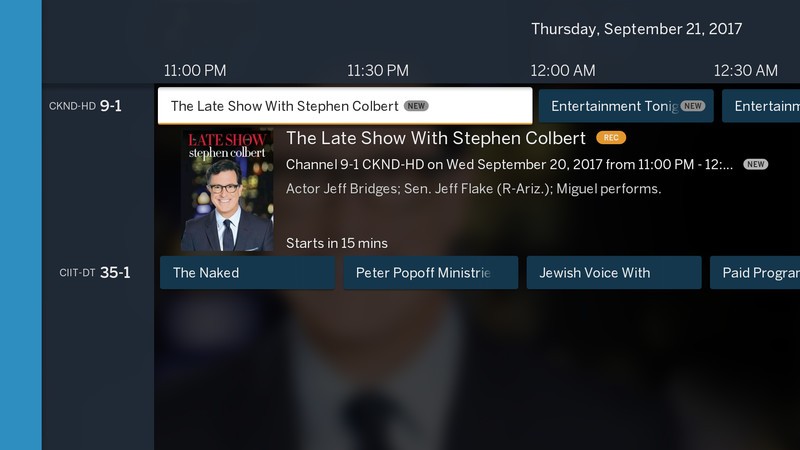

The user interface is clean and easy to navigate — if you’ve ever watched digital cable before you’ll have no issues. You can browse through the channels and select a show to get more information about it, including the option to set a recording. The DVR functionality is the real hero here, as you’re able to manually record shows or set a series to be automatically recorded.
Tablo offers a TV guide subscription as a free trial when you first set up Tablo on the Shield. The service lets you set Tablo to record an entire TV series — whether that’s all airings of a show you want to archive or all new shows that just aired — and also adds cover art, episode and series synopses and other metadata that’s really useful when perusing through your recorded content. The service costs $4.99 a month and it might be worth it depending on how many TV shows you want to record. The good news is you don’t need to subscribe to watch live TV or manually set Tablo to record individual episodes.
The value will depend on what you can pull in
The Tablo Tuner works great, but its usefulness hinges on one crucial factor — the quantity and quality of HDTV broadcast signals in your area.
Be sure to check the availability of broadcast TV signals in your area first!
Don’t know what free broadcasts are available in your area? Check out this online tool for locating TV signals which will give you specific results for your exact address. I live in a medium-sized Canadian city and was able to pull in three channels. All three channels came in crystal clear, but only one carried shows I was interested in watching or recording. Your results may vary, so be sure to check what channels are even available in your area, lest you be disappointed.
Final thoughts
The NVIDIA Shield Android TV is a fantastic tool for cord-cutters looking to stream, and the Tablo Tuner is a great way to legally watch and digitally record the HDTV channels being broadcast over the airwaves in your area. shows. The physical accessory costs $69.99, which is comparable to an average month cable bill. Even with the premium subscription, you’ll be saving money in the long run and use your NVIDIA Shield as the ultimate DVR and streaming box.
See at Tablo TV
 AIVAnet