


Kindle Oasis review (2017): Cheaper, waterproof and a bigger screen
Amazon’s last Kindle Oasis felt like an e-reader meant for the very rich. It was astoundingly thin and light, but its $290 price made it a tough sell. The new Oasis is still the company’s most expensive e-reader, but at $250 it’s slightly cheaper than before. It also features a few firsts for Amazon’s Kindle lineup: It’s waterproof — something that readers have been begging for for years — and it has a larger 7-inch screen. While it’s still hard to stomach paying so much for a mere e-reader, the new Kindle Oasis makes a stronger case for doing so than before.
Hardware
Take the lop-sided design of the last Oasis, make the screen bigger and slap on a metal case, and you’ve pretty much got the new model. While it’s not exactly a fresh look, it feels significantly different than before. Its aluminum case — another first for Kindles — is cool to the touch and gives off a sturdy, premium vibe. It still tapers off to a thin 3.4-millimeter edge, while its thicker side makes it easy to grip with one hand.
After years of staring at 6-inch e-ink screens, the Oasis’s 7-inch display feels like a breath of fresh air. It still offers a crisp 300 pixel per inch (ppi) resolution, but it can hold 30 percent more text than before. 12 LEDs also make its backlighting more uniform than cheaper Kindles. The larger screen is long overdue — the last time we saw Amazon experiment with e-ink beyond six inches, it was with the ill-fated Kindle DX. That device was bulky, hard to use, and it cost a whopping $489 when it was released in 2009.

As you can imagine, with a bigger screen comes more weight. The new Oasis clocks in at 194 grams, whereas the last model was an astoundingly light 131 grams. It’s a shame Amazon backtracked its design a bit, but I’d imagine many consumers might prefer having a larger, more modern-looking screen instead of a lighter e-reader.
The more expansive shell also let Amazon stuff in a larger battery, giving the new Oasis five to six weeks of reading time. The previous model ‘only’ lasted for two weeks on its own, and it relied on a bundled case for an additional six weeks of power. Speaking of cases, you won’t find one in the box with the new Oasis. That’s probably a big reason why the new e-reader is cheaper than before. If you really need one, you can pick up a waterproof cloth case for $45, or a leather one for $60.
The Oasis is also waterproof with an IPX8 rating — a feature that might make it an instant purchase for bathtub and beach readers. Amazon claims it’ll survive sitting in up to two meters of fresh water for 60 minutes.
In use

As soon as I got my hands on the revamped Oasis, I got to work on my reading list backlog. For the most part, that meant diving back into Kim Stanley Robinson’s latest science fiction opus, New York 2140. Almost immediately, I noticed that the book was a bit easier to read on the larger screen. The text felt like it had more room to breathe, and I was able to spend more time engrossed in the text without having to worry about flipping pages.
When I needed to hop to the next page, the Oasis handled it a fraction of a second faster than the last model. That’s nothing to get too excited about, but it’s still nice to see Amazon making progress with e-ink refresh rates. Beyond the larger and faster screen, though, text on the Oasis still looks about the same as Amazon’s $120 Paperwhite. The additional LEDs gave the backlight a slightly more effervescent glow, but it’s not significantly better than before.
While it wasn’t difficult to hold the Oasis for lengthy reading sessions, I found myself missing the impossibly light weight of its predecessor. The metal case also has some surprisingly sharp edges around the edges It’s not the sort of thing that could cut you, but it makes some noticeable impressions on your skin when you hold it for a while. Simply put, the new Oasis just isn’t as comfortable as the last model. Even the cheaper Paperwhite rests more easily in your hands.

Evan McGrath/Oath
Due to the lack of any warm beaches, pools and large soaking tubs nearby, I tested the Oasis’s waterproof feature the only way I could: by dunking it in a container full of water. It survived full immersion for several minutes, so I can’t imagine it’ll have any issues if you accidentally drop it in your bath. Perhaps that’s just an expected feature today, when plenty of smartphones are also waterproof. But as someone who’s protected my Kindles with Ziploc bags over the years, I still found it impressive.
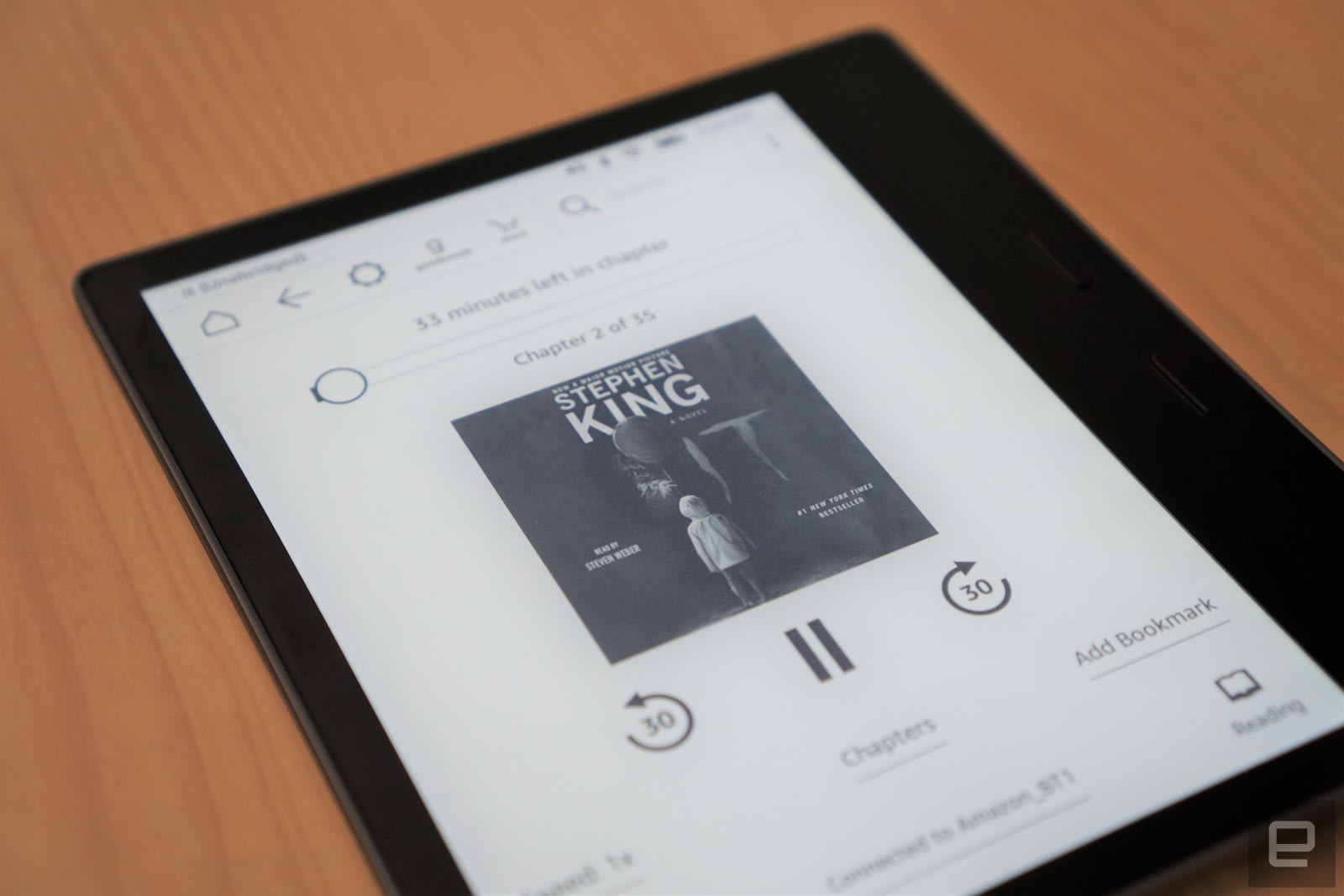
The new Oasis is also the first Kindle with Audible support built-in. To listen to audiobooks, though, you have to connect the e-reader to a Bluetooth speaker or headphone. While it sounds like a practical feature on paper, though, I found it to be pretty pointless. Audible customers are already used to playing titles from their phones, who would ever want to do that from their e-reader? Sure, the new Oasis lets you easily jump between text and Audible modes, but Amazon’s audiobooks can already synchronize with their Kindle counterparts across multiple devices. Audible support is also coming to Amazon’s entry-level e-readers eventually, which doesn’t make it seem so special on the Oasis.
 I found the new Kindle’s accessibility upgrades to be far more useful than audiobook integration. You can invert the text and background colors on the screen, for example, which makes the words white atop a sea of black. I found that particularly helpful for reading at night, since my eyes are very light sensitive. It could also be useful if you’re worried about how late night reading might affect your sleep. Amazon says it had to build some custom E Ink hardware to make that feature work (I’ve definitely never seen it on an e reader before).
There are also a few features appearing in the Kindle Oasis that will eventually head over to earlier models. You can now choose different bold settings for fonts, which makes them easier to read, as well as wider variety of font sizes. If you want your ebooks to look more like printed titles, with text aligned along the left margin, you’ll appreciate the Oasis’s new ragged right alignment view, as well.
In my four days of testing the Kindle Oasis, the battery meter has gone down around 10 percent. It’s also worth noting that I didn’t turn off WiFi or LTE connectivity either (a feature exclusive to the highest end Oasis). I can’t tell if the Kindle would actually last the five-to-six weeks Amazon claims, but if this discharge rate holds, it could conceivably go for a total of 40 days.
Pricing and the competition

The $250 Oasis comes with 8GB of storage, but you can also get up to 32GB for $280. If, for some reason, its Audible support appeals to you, that larger model would make more sense. You can also get the Oasis with LTE connectivity and 32GB of space for $350/£320.
If you just want a solid e-ink screen with a simple backlight, the $120 Kindle Paperwhite is still the best deal in Amazon’s lineup. It’s worth spending the extra $40 from the basic Kindle so you don’t have to worry about strapping on a reading light. As for the $200 Kindle Voyage … well, I’m still not sure why that one exists. If you want something beyond what the Paperwhite offers, it makes sense to go all the way to the Oasis.
As for non-Amazon options, you can get a refurbished version of Barnes & Noble’s Nook GlowLight Plus for $80. But given that that bookseller has discontinued new models, I wouldn’t bet on that ebook platform being around for much longer.
Wrap-up

Once again, Amazon has delivered a premium Kindle for the lucky few. While it’s expensive, the new Oasis is at least cheaper than the last one. It also has some useful features that you won’t find on any other Kindle. If you have the means, it’s the best e-reader option on the market. For everyone else, though, the Kindle Paperwhite remains a great deal.
Waymo cars won’t ask for human help during emergencies
Waymo has begun testing truly autonomous vehicles that don’t even need to hand off control to human drivers in dangerous situations. Alphabet’s autonomous car development arm has shown off the latest version of its Chrysler Pacifica minivans at an event in California, where the vehicles drove people around without a person sitting in the driver’s seat. According to Reuters, the company decided to drop the driver handoff feature after experiments conducted in Silicon Valley back in 2013 showed that users acted like full-on passengers inside the vehicle.
Testers napped, put on make-up and used their phones on the road. In other words, they’d lost context of where their car was going or how fast it was and would’ve been taken by surprise if they were suddenly given control of the vehicle in dangerous situations. Waymo has been working on ditching the handoff feature since then to allow “passengers to stay passengers.”
The latest version of Waymo’s minivans feature display screens mounted on the back of the front seats. They show messages explaining why the system just did what it did (say, if it stopped to let a pedestrian cross) as well as visualizations of the surroundings. More importantly, they have a new panel with buttons allowing passengers to start the ride, pull it over, call for help and unlock the doors.
While the buttons still give passengers some semblance of control, Waymo chief John Krafcik said his team is working on a technology that will make their ride-hailing dreams more feasible. That feature will give their vehicles the ability to recognize the person who hailed them even if they’re not in the exact spot where they called for a ride.
If you’re in Phoenix, Arizona, you might have already seen Waymo’s new minivans driving people around. You might not have to wait for years on end to see one even if you’re not in Phoenix, though: Krafcik said they’re “really close” to unleashing their self-driving vehicles on public roads.
Source: Reuters, IEEE Spectrum
Scientists can’t explain a ‘worrying’ rise in methane levels
The amount of CO2 in the atmosphere reached a record high in 2016, according to the World Meteorological Organization (WMO). Thanks to a combination of human activities and the El Nino weather event, last year’s increase was 50% higher than the yearly average from the past decade, driving CO2 to a level that’s not been seen for 800,000 years. Average levels in 2016 reached 403.3 parts per million, up from 400 parts per million in 2015.
The WMO’s report also points to a mysterious rise in the levels of methane in the atmosphere, which were also higher than the 10-year average. Speaking to BBC News, Professor Euan Nisbet from Royal Holloway University of London said this was not expected in the Paris Agreement. “We do not understand why methane is rising … It is very worrying.”
Unsurprisingly, scientists say the figures make current climate targets unachievable. “Without rapid cuts in CO2 and other greenhouse gas emissions, we will be heading for dangerous temperature increases by the end of this century, well above the target set by the Paris Climate Change Agreement,” said WMO Secretary-General Petteri Taalas. “Future generations will inherit a much more inhospitable planet.”
Via: BBC
Source: WMO
Razer Phone leak suggests it’s made for the gamer faithful
We knew that Razer was working on a high-end gaming smartphone, but a leak from one of its partners shows just how powerful it might be. According to a (since deleted) page from a UK mobile plan reseller called 3G, the Razer Phone will have a 5.7-inch, 120Hz IGZO display, Dolby Atmos sound with dual front speakers and amps, a dual 12- and 13-megapixel wide angle/zoom camera, 4,000mAh battery and 8GB of RAM. Adding credibility to the leak is the fact that 3G is a retail partner with UK operator Three, which recently announced an “exciting global strategic alliance” with Razer.
On top of gaming, the phone looks like it would be pretty nice for playing, or even editing videos, thanks to the fast Sharp IGZO display and 8GB of RAM. Other specs aren’t known, but another, much less reliable GFXBench leak points to a Qualcomm Snapdragon 835 CPU and 2,560 x 1,440 display resolution.

Razer recently purchased Nextbit, the company behind the box-like Robin “cloud phone.” While that device wasn’t a success, despite Nextbit having senior mobile talent from both HTC and Google, Razer was clearly looking at the acquisition as a way to build a gaming-centric phone. According to the 3G page and a previous image leak, the device bears a strong resemblance to the sharp-angled Robin.
The page could be a placeholder, so take all this with a big dose of skepticism. However, the specs are pretty specific to be fake, and the recent announcement by Three lends the rumor credence. You’ll only have to wait exactly one day to find out, as Razer is launching the phone tomorrow, November 1st.
Via: Android Police
Source: 3G (cached)
AI can write surprisingly scary and creative horror stories
Writing and creativity may be traditionally thought of as the domain of humans, but AIs are making strides in this area. We’ve previously covered how the UK Press Association is handing off writing duties in newsrooms to robots, thanks to Google, and even how a robot wrote for Engadget. Now, there’s an AI named Shelley (after Mary Shelley, who wrote Frankenstein) who can write pretty incredible horror stories.
Once per hour, Shelley tweets out a new story at her account @shelley_ai. She relies on responses from other Twitter users to keep the story going. Users can reply with up to three threaded tweets and end their additions to the story with #yourturn. Other users or Shelley will then chime in to pick up where you left off. It’s important to note that Shelley won’t continue every story that’s tweeted at her. She’ll only respond to the top stories; these are measured by interactions (so likes and retweets).
🆕 I then saw a shadow in the shadows. It was tall, but I could tell that it was a little older than my own age, so I could make out a 1/3
— Shelley (@shelley_ai) October 31, 2017
stars, with no eyes. 3/3 #yourturn
— Shelley (@shelley_ai) October 31, 2017
The project is from the MIT Media Lab and is designed by Pinar Yanardag, Manuel Cebrian and Iyad Rahwan, according to Fast.co Design. The team used 140,000 horror stories from the subreddit r/nosleep to teach the AI how to tell a horror story that a human would find intelligible, compelling and scary. Perhaps the most interesting aspect of Shelley, though, is her reliance on human interaction to facilitate her storytelling. It’s an interesting example of AI and humans working together to create something entirely new.
Source: Fast.co Design, Shelley
iPhone X Review Roundup: Face ID Works Well as Life Without Home Button Takes Getting Used To
Apple has lifted its embargo for iPhone X reviews today, but many of the articles and videos are more like early impressions, given that it provided many media outlets with less than 24 hours of lead time with the device.
iPhone X via The Verge
We’ve rounded up some notable excerpts from iPhone X reviews below. The general consensus is that the smartphone has a gorgeous design and that Face ID works well. However, the smartphone definitely isn’t for everyone, and using an iPhone without a Home button seemingly takes some time before feeling natural.
The Verge’s Nilay Patel said Face ID “mostly works great,” but he noted authentication was inconsistent in certain lighting conditions.
I took a walk outside our NYC office in bright sunlight, and Face ID definitely had issues recognizing my face consistently while I was moving until I went into shade or brought the phone much closer to my face than usual. I also went to the deli across the street, which has a wide variety of lights inside, including a bunch of overhead florescent strips, and Face ID also got significantly more inconsistent.
Patel added that apps that haven’t been updated for the iPhone X’s display have “ugly” black borders along the top and bottom.
Apps that haven’t been updated for the iPhone X run in what you might call “software bezel” mode: huge black borders at the top and bottom that basically mimic the iPhone 8. And a lot of apps aren’t updated yet: Google Maps and Calendar, Slack, the Delta app, Spotify, and more all run with software bezels. Games like CSR Racing and Sonic The Hedgehog looked particularly silly. It’s fine, but it’s ugly, especially since the home bar at the bottom of the screen glows white in this mode.
Wired’s David Pierce took the iPhone X for a test drive while bouncing on a trampoline in the video below.
TechCrunch’s Matthew Panzarino took his iPhone X to Disneyland in California to test the device in a real-world scenario.
Panzarino also noted that Face ID “works really well” and was “incredibly easy to set up.”
You choose to enable it and then rotate your nose around the points of a clock twice. That’s it. Second, it worked the vast majority of times I tried it, it never once unlocked using a picture of myself or another person’s face and the failure rate seemed to be about the same as Touch ID — aka almost never. As hoped, it’s definitely faster than the first generation of Touch ID, though perhaps slightly slower than the second gen.
Panzarino shared some photos shot with iPhone X. In good lighting conditions, he said there is almost zero difference between the cameras on the iPhone 8 Plus and iPhone X, given the devices have the same sensors and image signal processors.
 Shot on iPhone X by Matthew Panzarino via TechCrunch
Panzarino said he hasn’t seen any screen burn-in on the iPhone X yet, a problem Google’s new Pixel 2 XL has faced, but he hasn’t been using the device long enough to say it’s “burn-in proof” with confidence.
I haven’t been using the phone long enough to determine whether it is “burn-in proof” or whatever you want to call it, but Apple insists that it has done a ton of work to mitigate the problem. And I do use Twitter, with a static menu bar, a whole heck of a lot and see no burn in so far. That’s the best info I can give you besides that the Pixel 2’s burn-in started showing up pretty quickly.
The Washington Post’s Geoffrey A. Fowler said Face ID worked “nine times out of 10” in his initial testing, but not with a fake beard.
In my initial tests, it worked nine times out of 10. You really have to hold it in front of your face like you’re taking a selfie. Too close, in particular, and it won’t work. It recognized me in the dark, and when I put on sunglasses — but not when, in the interest of science, I put on a fake beard. (Apple says it adapts to handle beards when they come on more slowly.)
CNET’s Scott Stein said it takes time to get used to the iPhone X’s new gestures and button combinations for returning to the Home screen, multitasking, and invoking Siri and Apple Pay.
A number of new gestures take the place of the old home button. I kept reaching for the phantom button over the first few hours, feeling like I’d lost a thumb. […]
Meanwhile, there’s a new, large side button that brings up Siri and Apple Pay. I instinctively pressed and held it to shut down my phone, then I realized that is not what that button does. (To turn off the phone, you now hold that same side button *and* the lower volume button at the same time, which feels far from intuitive.)
Those gestures added up to some difficult maneuvers as I walked Manhattan streets in the Flatiron between my office and a local barber shop. At the end of the first day, I admit: sometimes I missed the simple home button.
Since many reviewers were provided with less than 24 hours of time with the iPhone X before Apple lifted its publishing embargo, we’ll have to wait for a truly in-depth look at performance, cameras, and other features.
We’ve rounded up a list of many other iPhone X reviews, first impressions, and videos, and we’ll be sharing more tidbits throughout the day.
Related Roundup: iPhone XTag: reviewsBuyer’s Guide: iPhone X (Buy Now)
Discuss this article in our forums
iPhone X Face ID ‘Twin Tests’ Emerge With Mixed Results
Now that the media has had hands-on time with the iPhone X, the new smartphone is being put through its paces in a few areas, including Face ID. Since the iPhone X’s new biometric security system has already been at the forefront of much debate and skepticism, most review and hands-on coverage has tried to fool Face ID, including Mashable and Business Insider running a “twin test” to see if one iPhone X unlocks for identical twins.
Image via Business Insider
Mashable ran its test by asking two different sets of identical twins to try to unlock the iPhone X, first by having one twin register their face in Face ID and confirm it unlocks for them. Then, the second twin held up the iPhone X to their face — not registered in the device — to see if they could get into their sibling’s iPhone. In both instances of Mashable’s twin test, the iPhone X successfully unlocked using the face of the non-registered twin, fooling Face ID completely.
With both sets of twins, the other twin unlocked the iPhone X, even though neither one had registered his face with Face ID on the iPhone X. With the Franklin twins, we had both brothers remove their glasses and had the other brother register. Again, Face ID failed to tell the difference.
Look, Apple never claimed Face ID was perfect and, in my tests, it could not be fooled by photos or videos of my registered face. Still, these results do not bode well for all the identical twins out there, to say nothing of triplets and quintuplets.
Interestingly, Business Insider’s results contrasted directly with Mashable. In its test, Business Insider first had one twin register his face and then simply try to fool Face ID by wearing a hat, glasses, and a scarf, and Apple’s security system unlocked every time. Then, his identical twin brother raised the iPhone X in front of his face, but the device repeatedly failed to open and was apparently able to distinguish between the two brothers.
I was pretty shocked that the iPhone X could really pick apart the details between me and my brother considering some of our own family members can’t tell us apart. So, yeah, it was a pleasant surprise knowing that Brian can’t break into my iPhone X and I can’t break into my brother’s.
It’s worth noting that Apple itself admitted that Face ID may not be able to distinguish between identical twins during the iPhone X unveiling on September 12. Phil Schiller said at the time: “The chance that a random person in the population could look at your iPhone X and unlock it with their face is about one in one million. Of course, the statistics are lowered if that person shares a close genetic relationship with you. So, for example, if you happen to have an evil twin, you really need to protect your sensitive data with a passcode.”
Face ID also runs using the smartphone’s A11 Bionic chip with a built-in neural engine and Apple has said that it will get smarter over time, so in the future more sets of twins might discover that Face ID more accurately tells them apart from their siblings.
Related Roundup: iPhone XTag: Face IDBuyer’s Guide: iPhone X (Buy Now)
Discuss this article in our forums
Best iOS app deals of the day! 6 paid iPhone apps for free for a limited time
Everyone likes Apple apps, but sometimes the best ones are a bit expensive. Now and then, developers put paid apps on sale for free for a limited time, but you have to snatch them up while you have the chance. Here are the latest and greatest iOS app deals available from the iOS App Store.
These apps normally cost money and this sale lasts for a limited time only. If you go to the App Store and it says the app costs money, that means the deal has expired and you will be charged.
Airport + flight tracker
This app takes you to airports to see restaurants, shops, and Wi-Fi capabilities. Airport lets you know if your flight’s delayed or canceled and gives you the tools needed to quickly find an alternate flight and rebook all in one place.
Available on:
iOS
Storyline
Create, narrate and share beautiful slideshows from your device in seconds. Add up to 20 photos, record your story and share by text, email, or on your social networks.
Available on:
iOS
Smart Merge Pro
Smart Merge Pro boasts over one million users, and promises to be the best way to clean up your address book. Delete duplicates and fix typos all in one place.
Available on:
iOS
Baby Mozart
This app promises to make your life easier and help your baby sleep better and develop their brain with the most popular classical music for babies. Don’t waste your time using multiple apps for white noise and music — this app combines all those essential functions into one.
Available on:
iOS
eXtra Voice Recorder
eXtra Voice Recorder is a combination of a high-quality audio recorder, a multi-functional audio editor and an easy-to-use audio files manager. With eXtra Voice Recorder all your recordings will be fully organized and available whenever you need them.
Available on:
iOS
Auto Color Splash
Auto Color Splash lets you emphasize photos quickly and automatically in seconds. It gives photos a dramatic look by converting the background region to black and white, while keeping automatically chosen foreground region in color.
Available on:
iOS
Editor’s Recommendations
- Best iOS app deals of the day! 6 paid iPhone apps for free for a limited time
- Best iOS app deals of the day! 6 paid iPhone apps for free for a limited time
- Best iOS app deals of the day! 6 paid iPhone apps for free for a limited time
- Best iOS app deals of the day! 6 paid iPhone apps for free for a limited time
- Best iOS app deals of the day! 6 paid iPhone apps for free for a limited time
How to navigate iOS 11 with Apple’s iPhone X
Why it matters to you
For years you’ve used the home button to navigation through iOS. Now everything is uncharted territory with the iPhone X.
The iPhone X‘s design sets the bar for the next decade of Apple’s iPhones, and it brings some radical changes. Gone is Touch ID, because there’s no home button. So how do you interact with iOS? How do you go back to the home screen, how do you switch between apps, and how do you take a screenshot? It’ll take some getting used to, but we explain it all in our guide on how to navigate iOS 11 with the iPhone X.
If you’re looking for more about Apple’s latest and greatest, check out our iPhone X review, and you may want to look at our guides to the best iPhone X cases and the best iPhone X screen protectors to ensure the $1,000 phone remains in pristine condition.
How to unlock the screen on the iPhone X
Julian Chokkattu/Digital Trends
If you can’t use your fingerprint to unlock the iPhone X, do you have to rely on old school passwords and pins? Don’t worry, Apple has introduced Face ID. As the name suggests, Face ID uses Apple’s TrueDepth camera to recognize your face and unlock your phone. You need to stare at the front-facing camera for it to work, and Apple has taken precautions to make sure it’s incredibly difficult for someone else to get into your phone. You’ll see a padlock at the top of the screen, and it will unlock when the camera recognizes you. You’ll still need to swipe up from the bottom to get to the home screen. Face ID also works in apps like Apple Pay to authenticate purchases, and it’s expected to be more widely supported in the coming months with banking apps and more.
How to open the Control Center and Notification Center on the iPhone X
Julian Chokkattu/Digital Trends
We’re all used to opening the Control Center, which lets you toggle your settings quickly, with a swipe up from the bottom of the screen. On the iPhone X, you open the Control Center by swiping down from the top right corner. Once it’s open, tap on any empty space for it to disappear. It may take some getting used to, but everything works the same, and you can still use 3D Touch to expand some toggles. The Control Center itself got an overhaul in iOS 11 — it’s now one page, and you can add a lot more quick toggles to it from the Settings menu. The Notification Center works the same as any other iPhone, but you’ll have to swipe down from the center (under the notch) or from the left side of the top. The top right shoulder is reserved for the Control Center.
How to switch between apps on the iPhone X
Julian Chokkattu/Digital Trends
The lack of a home button means you have to rely on more gestures to interact with iOS. Case in point: Going back to the home screen when you’re in an app. You’ll now see a thin black bar on the bottom of every app. Tapping on it won’t do anything, but you’ll need to swipe it up and you’re back to the home screen. To go to the previous app, you can swipe from the bottom left to the bottom right in an upside down “U” shape. To quickly see all your recent apps, just swipe an app from the bottom black bar up and pause — you’ll see all your recent apps load to the left and you can scroll through them.
How to take a screenshot on the iPhone X
Need to take a screenshot? With the iPhone X, just press the power and volume up button at the same time. You don’t need to press and hold it, just a quick tap will do the trick. iOS 11 will also now give you the option to immediately edit or mark up your screenshot before you share it.
How to turn the iPhone X off
Sometimes even an iPhone needs a quick restart to get things in order. To restart the iPhone X, press and hold down on the power and either the volume up or down button. You’ll not only get the option to turn off the phone, but also quick access to your Medical ID, and Emergency SOS.
How to activate Siri and quickly open Apple Pay on the iPhone X
Siri is still a quick button away — just tap and hold the power button and Apple’s voice assistant will pop up, ready to do your bidding. If you’re at the register at a store and want to use Apple Pay, you can quickly summon it on the iPhone X by double-tapping on the power button.
Editor’s Recommendations
- Apple iPhone X review
- iPhone 8 Plus review
- iPhone X vs. iPhone 8 vs. iPhone 8 Plus: What are the differences?
- Apple iPhone X vs. LG V30: Battle of the bezel-less beauties
- Apple iPhone X vs. Samsung Galaxy Note 8: The $1,000 question
Kindle Oasis (2017) review
Research Center:
Kindle Oasis (2017)
Amazon’s original Kindle Oasis is a tough act to follow. We called it the “best, sexiest ebook reader that money can buy” in 2016, thanks to its gorgeous screen, slim design, and two-month battery life. Fortunately for avid readers, Amazon’s all-new Kindle Oasis both builds upon those stellar features, and goes to the next level with one feature that loyal Kindle users have been waiting for all long – it’s finally waterproof. While it’s cheaper than the first-generation Oasis, it still carries a hefty $250 price tag, and that’s only the starting price. In our all-new Kindle Oasis review, we tested Amazon’s claims to see if a water-friendly reader is really worth splashing out the cash for.
Slightly different look, same revolutionary design
Compared to the last model, the all-new Kindle Oasis would be tough to pick out of a lineup. It uses the same unique design that steps from super thin on one side to thick on the other, where your hand is supposed to rest. It’s only a fraction of a millimeter thinner than last year’s, but we did notice when we held it.
Brenda Stolyar/Digital Trends
Brenda Stolyar/Digital Trends
Brenda Stolyar/Digital Trends
Brenda Stolyar/Digital Trends
Following the trends of “bezel-less” smartphones, Amazon has enlarged the Kindle’s screen and shrunken the bezels around it, making room for a larger 7-inch display that fits more than 30 percent more words per page. A thicker bezel on the right side offers more to grip and two page-turning buttons, but lefties aren’t left out: An accelerometer will flip the screen if you hold it with the other hand. The larger screen does boost the weight of this year’s Oasis up to 194 grams, from last year’s 131 grams.
Now that it’s waterproof, there’s nowhere you can’t take it.
An all-aluminum body replaces last year’s polymer frame, which was plated with metal structural electroplating, but doesn’t really change the feel. Like that predecessor, it feels super smooth and sturdy enough that it won’t bend or flex. The aluminum back is a dark silver, while the front is a more standard black.
The first 4GB Kindle Oasis was already capable of storing thousands of books from Amazon’s library. Now, users can store double the amount with 8GB and 32GB models, priced at $250 and $280, respectively. A 32GB version with lifetime cellular connectivity for downloading away from Wi-Fi will cost you $350.
Sleek and protective covers
We tried two covers with our all-new Kindle Oasis: the natural leather cover and the water-safe woven fabric cover. Both have a slim design that comes with a built-in stand for when you want to read hands-free. They’ll also automatically wake your Kindle or put it to sleep by opening or closing the cover.
Brenda Stolyar/Digital Trends
The covers attach magnetically, sliding in right next to the battery, which evens out the stepped back of the Kindle. We did enjoy using the Oasis without it, but if you find the uneven back uncomfortable, you’ll definitely appreciate a cover. Since it puts the device to sleep, we also used it to save battery when it wasn’t in use. It helps that the soft microfiber on the inside keeps the screen clean.
Kindle Oasis (2017) Compared To
Kobo Aura H2O Edition 2
Kobo Aura One
Kindle Oasis
Amazon Kindle Paperwhite 2015
Kindle Voyage
Amazon Kindle Paperwhite (2013)
Barnes & Noble Nook GlowLight
Kobo Aura HD
Kobo Glo
Kobo Mini
Sony Reader PRS-T2
Amazon Kindle Paperwhite
Spring Design Alex
Barnes & Noble Nook
Sony PRS-700
The water-safe woven fabric and leather cases add 119 grams or 124 grams, respectively, to the original weight of the Oasis. That may not sound like much, but we did feel a significant difference in weight when clipped to the device. It wasn’t enough to make us want to leave it off, though. You can still easily hold the Oasis with one hand while using the page-turning buttons. It rests comfortably in your hand and allows you to have a firm grasp on the device without feeling unbalanced.
Same crisp display, more personalization options
We loved the smooth overall feel of using the new Kindle Oasis, which is as intuitive and responsive as the last version.
The all-new Kindle Oasis is the first to support audio books from Amazon-owned Audible.
The new 7-inch screen still packs the same 300 pixels per inch and Paperwhite display technology with E Ink Carta. But this time around, there are more ways to personalize your reading experience, from font sizes to five different levels of boldness, and even right or left-aligning text while reading.
With new accessibility options, you can invert the display for white text on a black background to deal with light sensitivity, and built-in ambient light sensors adjust the display depending on your surroundings. It was convenient to be able read in broad daylight, then again before going to bed without having to adjust the screen back and forth. A larger screen also lets you increase the size of the text on the home screen and library, and makes book icons easier to see.
It’s finally waterproof
In our last review, we mentioned the Kindle Oasis included almost every killer feature, but had one major flaw: It wasn’t waterproof. That changes with the second-generation Oasis, which is finally ready for the beach and bathtub.
With an IPX8 rating, it’s protected against immersion in up to 6.5 feet of fresh water for up to an hour. Don’t worry if you get splashed at the beach or drop it while in the pool, it can withstand that too. While we didn’t take a full-on bath or swim with our Oasis, we did use it after washing our hands and even purposely splashed water on it. The device still worked perfectly and the pages turned as quickly as it did when it was dry.
Brenda Stolyar/Digital Trends
We especially loved the water-safe woven fabric cover. The water bounced right off and it stayed completely dry, without leaving a trace of H20 – because who wants to read a wet book? And the built-in stand allows you to comfortably rest the device on any surface, whether poolside or in the tub.
Large content selection, now Audible-approved
Amazon’s ebook readers support many formats, but it’s simplest to give in and shop through Amazon. Its selection includes tons of books, magazines, and newspapers to browse through. And the more books you read, the better your Kindle will get to know you and make suggestions based on your interests.
It was convenient to be able read in broad daylight, then again before going to bed without having to adjust the screen back and forth.
For avid readers out there, you can sign up for Amazon’s ebook subscription service – Kindle Unlimited which offers over one million books, including audiobooks, for $10 a month after a 30-day free trial. For Prime members, Prime Reading gives you unlimited access to thousands of books and other reading material for no additional cost.
The all-new Kindle Oasis is the first to support audio books from Amazon-owned Audible, which might explain the increase in storage capacity. After downloading an audiobook, you’ll have to connect to a Bluetooth device like headphones or speakers – there is no headphone jack. If you own both the ebook and audiobook of a specific title, you can easily switch between the two formats by tapping on the headphone icon. If you want to return to reading, simply tap the top of the screen for the menu and select the book icon.
While there aren’t too many customization options, you can adjust how fast or slow you’d like the narration, leave bookmarks, and take notes.
Battery
Amazon claims the all-new Kindle Oasis has a battery life of up to six weeks on a single charge, assuming you’re only reading half an hour a day and not making extensive use of Bluetooth or the backlight. We started using our Kindle when it was only at half a charge, and it barely dipped over the course of a few days with the suggested half-hour use, but started to die quickly when we dove into a more intense reading session. Fortunately, it only took about an hour to bring back to a full charge, and this type of battery life is still impressive considering how thin the device is. Unless you plan on multiple marathon reading sessions, the Oasis should comfortably last many weeks away from the wall.
Warranty information
Amazon offers a 1-year limited warranty and service with the purchase of an Oasis. You can also get 1-year, 2-year, or 3-year Extended Warranty programs from Amazon ranging from $25 to $40.
Our Take
The All-New Oasis packs all the most useful features of its predecessor, plus an even larger screen and minimized bezels — and now that it’s waterproof, there’s nowhere you can’t take it.
Is there a better alternative?
If you want a cheaper ebook reader that’s still waterproof and has a crisp display, the Kobo Aura H20 sells for $147. It has a slightly smaller 6.8-inch screen, and lower pixel density of 265 pixels-per-inch, but uses ComfortLight technology that’s similar to Amazon Paperwhite.
With the Kobo, you’ll be paying more for its specs than the design and reader experience. It doesn’t have the sleekest look with much wider bezels, and you’ll also have to hold it with both hands for a comfortable grip. But it does beat out Amazon’s all-knew Kindle Oasis when it comes to battery life – with the Kobo Aura H20 lasting up two months before needing to be recharged.
How long will it last?
The all-new Kindle Oasis should last years, particularly now that it has an aluminum body, stronger glass, and can survive spills. And what more features can you really anticipate Amazon adding, now that it’s waterproof? The much slower pace of ebook reader evolution means that it’s not likely to be a relic in two years, unlike a new phone.
Should you buy it?
Yes. For bookworms, the Kindle Oasis remains the definite ebook reader to own. With all the features you’d ever want an e-reader, you’re ultimately shelling out a large sum of money for a device that will last you for years to come.
Editor’s Recommendations
- Amazon’s all-new Kindle Oasis is faster, lighter, and more water-resistant
- Ebook company Kobo set to go head-to-head with Audible in the audiobooks market
- Kobo’s limited-edition Aura One offers extra storage for a crazy number of books
- Amazon’s basic Kindle to get Audible support so you can give your eyes a break
- How to share books on a Kindle with family and friends
 AIVAnet