


Nostalgic ‘Evoland’ is a hidden gem on Android

It’s like stepping into a video game time machine…
Every once in a while, we return to games we loved in years past. From puzzlers to arcade games to minimalist gems, Android’s vaults have something for everyone, and you can read about them here in our occasional series called Classic Game Reviews.
Play Evoland for FreeGAMESTASH
Evoland offers a standout gaming experience that belies its subtle presence in the Google Play Store. More than just another RPG clone, it’s an interactive journey through the evolution of adventure RPGs, and the history of gaming. The game starts out as a monochrome 2D game but quickly changes and evolves as you discover and unlock chests that add color, textures, a storyline, and much more. The gameplay is deeply nostalgic, and changes to parody classic games and gameplay styles — from free-roaming adventure (Zelda), to the turn-based battles found in JRPGs (Final Fantasy VII) to clearing out demonic dungeons (Diablo).
The game was originally developed in 2012 by Nicolas Cannasse as part of, Ludum Dare, a 48-hour game jam where the competitors were given theme of “evolution”. Cannasse decided to create an RPG game that explored the history of the RPG genre, where the game’s graphics and gameplay evolve as the player progresses through the story. Evoland would go on to win first place in the competition and earn accolades for its brilliant design.
Ported to Android in 2015 by Shiro Games and Playdigious, Evoland has been kind of overlooked on the Google Play Store likely due to its $4.99 price tag. But it’s well worth checking out if you’re a hardcore RPG fan, or even if you’re the type who finds RPGs to be boring and repetitive. Because the way the game evolves and changes as you play helps to alleviate the grinding nature of some RPGs, shifting gears from area to area which not only keeps everything feeling fresh, but also compels you to keep playing to unlock that next feature.


Evoland is a fantastic game, but the controls leave a lot to be desired.
What could have felt gimmicky never does, as the different gaming evolutions really give each area of the map a unique but the novelty never wears off and is cleverly used to denote time travel — hit a time crystal with your weapon and the game goes from third-person perspective in 3D to a top-down, pixel-laden landscape. Your character is able to access different areas by switching between the different styles and it’s a really fun and well-executed game mechanic.
My biggest criticism of the game is the touchscreen controls, which change slightly based on the evolution and are simply awful in some sections. One particular hidden ruin with floor panels that fall into a pit of lava when your character steps close would be clever and challenging with a Bluetooth controller in hand, but instead, you’re punished for being off by a bit and ends up feeling like the developer was just troll the player. An epic boss battle is also hampered by similarly frustrating control issues, which is disappointing.


But while that particular section was frustrating as hell, it still felt like part of the overall theme of the game and the journey that Evoland takes you on, perhaps parodying some of the needlessly frustrating puzzle sections thrown into some games. That might sound like weak justification for a poorly designed level, but given the attention to detail, tongue-in-cheek humor, and a treasure trove of gaming references and tropes you can’t discount that it was included to specifically be frustrating. The main storyline only takes a few hours to complete, and then you can keep playing to collect the 30 hidden stars and collector cards which you can use to play a simple card game.
Download: Evoland ($4.99)
Evoland is an easy recommendation for anyone who’s called themselves a gamer in the past 30 years. It’s an awesome concept for a game feels like a stroll through your childhood gaming memories. It’s only shortcomings really are the lack of controller support and the story length — both which could be addressed if the sequel Evoland 2 ever comes to Android.
Try Evoland for FreeGAMESTASH
Stock up the game closet with up to 40% off board games today only
Remember setting up the game Mouse Trap for 45 minutes only to play it for 10? Good times.
Is this deal for me?
Today only, Amazon is offering up to 40% off a huge selection of family board games and puzzles. All of the classics are included, as well as some highly-rated newcomers. There are even some Amazon Exclusives featured in this sale.
While there are some games appropriate for all ages in this sale, note that several of them are geared towards children. If you’re sick of your child giving YouTubers ad revenue all day, these games and puzzles are sure to keep them occupied.

Good Deals on Good Games:
- Sorry Game (Amazon Exclusive) – $13.99 (normally $22.77)
- Operation Classic Skill Game (Amazon Exclusive) – $13.99 (normally $19.99)
- Mouse Trap Game – $11.99 (normally $21.99)
- Candy Land Game: Disney Princess Edition (Amazon Exclusive) – $13.99 (normally $19.99)
- Loaded Questions – $15.89 (normally $24.99)
TL;DR
- What makes this deal worth considering? – This one-day sale offers up some great prices on games for the whole family.
- Things to know before you buy! – If nothing at Amazon is catching your eye, or you’re looking for off-color games for grownups like Cards Against Humanity, there is another board game sale at Target that has a bigger selection.
See at Amazon
Happy Thrifting!
More from Thrifter:
- These mobile apps will pay you for doing small tasks
- Amazon suggested some electronic gifts, but we have some better ideas for you
For more great deals be sure to check out our friends at Thrifter now!
ZTE Axon M available for purchase on November 1 from AT&T
Available online November 1 and in stores on the 17th.
ZTE’s Axon M is undeniably one of the most unique phones to be announced so far in 2017, and while the real-world functionality of the gadget’s dual-screen setup remains to be seen, it’s still exciting to see a manufacturer take a risk and try something new. ZTE previously announced that the Axon M would be available for purchase in November, but we now have a more exact timeline as to when AT&T customers will be able to get their hands on the device.
The Axon M will be available for purchase through AT&T’s website starting on Wednesday, November 1, and the device will then make its way to physical stores on November 17.

You’ll be able to purchase the phone outright or through AT&T Next with 30 monthly payments of $24.17, and for that price, ZTE and AT&T will be faced with a tough sell. Getting the Galaxy S8 on AT&T Next only costs $25/month, the V30 goes for $27/month, and the G6 can be yours for just $19.50/month.
Having two screens to work with instead of just one is undeniably a cool trick, but once all is said and done, you’ll be paying $725.10 for that privilege.
The Axon M certainly won’t be for everybody, but for those interested in trying out ZTE’s latest experiment, you won’t have to wait too much longer before getting your hands on the phone.
ZTE Axon M has thick bezels and two screens, coming to AT&T for $725

Waggit is a Fitbit-style health tracker for Man’s Best Friend

Track your dog’s vitals and whereabouts with the Waggit smart collar!
There’s a ton of tech out there for tracking human health, but what about your family pooch? Dogs hold a special place in our families — don’t they, too, deserve a bit of smart tech to help keep them healthy and safe?
Enter the Waggit, a smart dog collar designed for 21st century living. This collar is jam-packed with smart features to help track the health and well being of your pet.

First off, it’s a ruggedly designed to withstand whatever your dog gets up to (or in to). The band is made of standard nylon and the tech is housed in a case made of bendable rubber that’s flexible, waterproof, and comfortable for your dog. Connect the collar to your phone via the Waggit app (available for both iOS and Android) and you’ll be able to monitor your pup’s vitals and receive alerts if there are any changes that may require a vet visit. It’ll also track your dog’s activity levels and compare them to similar dogs on the Waggit leaderboard — just like the Fitbit app does for humans! It also tracks your dog’s average calories burned so you can adjust their food accordingly.
But perhaps the best Waggit feature is the tracking tech included for safety assurance. Each collar includes built-in GPS that will let you track your dog via the app no matter where they are in the U.S. This is accomplished with a cellular antenna which uses the AT&T network. This service costs $4.95 a month and gives you the peace of mind that your dog will be quickly found if they ever get lost.

Waggit has already well surpassed its goal, but there’s still a couple weeks remaining to back the project and get in on early bird savings off the retail price. The Waggit team has spent two years testing and optimizing the collar with the help of hundreds of dogs of all sizes and breeds, and the collar is available in three sizes. Waggit plans to start shipping orders by May 2018.
Waggit will retail for $279, but you can save 29% by backing this Kickstarter with an early bird pledge of $199. Got more than one dog, or know someone who would love this as a gift? You can save even more — up to 40% — by pledging $339 or more.
This is the first Kickstarter campaign created by Waggit and the good news is they’ve already well surpassed their goal of $25,000 four times over! This is a great bit of tech for any dog owner who cares about the well being of their furry friends, and you can’t beat this deal.
See Waggit on Kickstarter
Let this discounted Philips Hue 4-bulb Starter Kit begin your smart light obsession
Control your lights with your voice, not your hands!
Is this deal for me?
If you would have told me a few years ago that I would have lights all over my new house that I can control with my voice, I would have told you that you were crazy and walked away. Now, that’s the life I live, and I kinda love it.
Amazon is making that life possible for you too by offering the Philips Hue 4-bulb Starter Kit for $159.99, a savings of $40 from its regular price. This happens to be an all-time low for this kit.

- Automate your lighting experience with Philips Hue and control your lights from home or away. Create light schedules from the Philips Hue App and never come home to a dark house.
- Connect to the Hue Bridge, and add up to 50 lights. Expand your system with up to 12 Hue accessories (sold separately), such as a Hue Dimmer Switch, Hue Tap, or Hue Motion Sensor.
- Install the LED lights as you would install ordinary bulbs and pair them with the Hue Bridge, which allows you to control smart-bulb-equipped lamps and overhead lights via the Philips Hue App.
- Control your lights with your voice using Alexa, Apple HomeKit, or Google Assistant. Pair it for home automation with your existing Nest or Samsung SmartThings system.
This kit comes with a Hue Bridge, power adapter, ethernet cable, and four White and Color Ambiance lights. Philips offers a two-year warranty. If you are looking to spend a little less, the 3-bulb Starter Kit is on sale for $138.58. You’ll probably also want to grab a couple extra bulbs to use around the house.
TL;DR
- What makes this deal worth considering? – This is the lowest price that we have seen on the 4-bulb starter kit. It’s only $20 more than the 3-bulb kit, and considering each bulb goes for around $40 normally, you get the extra bulb at half price right now.
- Things to know before you buy! – These lights get addictive. Before you know it, the four bulbs will turn into eight, then 10 and then who knows. Luckily, the one Hub can control them all, and the Hue accessories will all work together.
See at Amazon
Happy thrifting!
The Pixel 2 is the first phone that feels like it was built for me

The Pixel 2 is a phone filled with features that can appeal to anyone.
I’m not really the kind of person who gets excited about new technology. Don’t get me wrong, I enjoy the software updates, the new sleeker looks, the increased abilities and new features that come alongside a brand spanking new phone. But I am not the kind of person who goes running to the store to grab one as soon as possible.
So nobody was more surprised than me when I fell completely in love with the new Pixel 2 and everything it’s capable of. From the feel of it in my hand to the features hidden under that casing, there is a lot here to love. I’ve picked my favorite features out and I’m going to tell you why they come together to deliver a phone built for everyone from your mom to your tech-obsessed roomie.
Look and feel

There is something to be said for a phone that fits easily in your hand and feels solid and stable. Over the last few years, the trend towards ‘bigger is better’ has been marching slowly forward, and that’s been bad news for people with tiny hands like me. Trying to take a photo one handed with a Note 8 or Galaxy S8 was an effort in futility form me.
The Pixel 2 is small enough to fit comfortably in my hand without feeling small or flimsy. Even better, it feels solid, and not slippery. Considering I’m as clumsy as the day is long, being able to keep a solid hand on my phone is key. The colors are fantastic, and even though the kinda blue seemed super washed out in photos, it’s a gorgeous grey-blue that I’ve come to absolutely adore.
A sweet, sweet, camera

The first thing that I checked out after getting a hold of this bad boy was the camera. I’ve never been what you could call a photog, but I love capturing the awesome moments of my life. From selfies when my makeup is on point, to hundreds of photos of my dog, to photos from day trips and important moments, my phone is always there. In the past, I’ve always enjoyed the camera on my phone but it’s rare that I’m blown away.
The Pixel 2 changed all of that. It captures clear, vibrant photos that just cannot be overstated. It works beautifully in normal light, and it takes some jaw-dropping shots in low light as well. But my favorite features of the camera come in the form of EIS stabilization, and portrait selfie mode. Portrait selfies let me take amazing shots that take next to no effort and look absolutely amazing.
The addition of both OIS and EIS makes a big difference.
From the blur around faces in the photos with this mode to the fact that you get access to the original and the edited shot, there is a ton here to love. Of course without the addition of both OIS and EIS I wouldn’t love it nearly so much. I suffer from benign tremors in both of my hands at all times. This means that even on the best days they tremble pretty noticeably, and I can’t count the number of photos at places like weddings that have been ruined by this tremble.
Since getting my Pixel 2, I’ve only managed to come out with one blurry photo, and that can be blamed on my rambunctious dog moving at an inopportune moment. Compared to every third or fourth photo with a Note 8, and roughly one out of every four with an original Pixel, I’ve already noticed how much more often I whip out this phone to snag a snapshot.
Now Playing lets me keep discovering new music

I’ve always been a pretty big music fan, and for most of my luck, my only hope was to look up lyrics or hope that I heard a song title or artist when I heard a new song that I enjoyed. For the most part, this hasn’t been too problematic, but with the addition of Now Playing, finding the new details is easier than it has ever been.
Even when I’m offline it’s got access to a catalogue of over 10,000 songs.
Now Playing will automatically detect, and show me the Song Title and Artist, for whatever song it can detect playing nearby. This feature works whether I have an internet connection or not, and even when I’m offline it’s got access to a catalogue of over 10,000 songs. While it didn’t recognize Delta Rae when I put it on, it did catch both BabyMetal and even Space Unicorn within moments.
While initially Now Playing just shows up on the lock screen, if I tap on it, will launch Google Assistant giving me all the information about the song playing. This means links to albums, upcoming appearances, anything else I might want to know. All I know is that it makes finding the new music I hear easier and more awesome than it’s ever been before.
Google Assistant is better than ever

Being organized has never actually been a strong suit of mine, but Google Assistant does make it easier to keep better track of everything without losing my mind in the process. Still, with my last Pixel, I was never what you’d call an avid user of Google Assistant. After spending the spring with Galaxy devices, being able to easily launch Google Assistant made a huge difference.
Being able to easily launch and access Google Assistant has made a pretty significant difference.
I can launch with a squeeze, or now with a better verbal command of Hey Google and that makes more of a difference than you’d think. The AI behind Google Assistant has also been improving over time meaning that it understands me easier, and brings up the relevant information that I’m looking for easier as well.
Being able to easily launch and access Google Assistant has made a pretty significant difference too. I’m more apt to use it to set reminders for additions to my schedule, and the algorithm for delivering the news I’ll want to see has been top notch so far. Unlike in the past where Google Assistant seemed neat, not integral, it’s now so easy to use that I have it open before even really thinking about it.
This is a phone worth getting excited over

It’s easy to see how much work went into the little details with Google’s Pixel 2, and that work has paid off in every avenue. For the first time I feel like a phone was made with me, and people like me, in mind. Features like Now Playing, and stabilization when taking photos, make even the most common uses for your pocket computer even more awesome.
Google Pixel 2 and Pixel 2 XL
- Pixel 2 FAQ: Everything you need to know!
- Google Pixel 2 and 2 XL review: The new standard
- Google Pixel 2 specs
- Google Pixel 2 vs. Pixel 2 XL: What’s the difference?
- Join our Pixel 2 forums
Google Store
Project Fi
Verizon
Best Buy
Samsung Gear Sport review: A versatile fitness-first smartwatch
As the holiday season approaches and New Year’s and its inevitable fitness-related resolutions draw near, wearables makers are scrambling. Major brands like Apple and Samsung have realized that smartwatches need to at least be good activity trackers for users to keep wearing them. Samsung decided that “good activity tracker” wasn’t enough, though, and built a device around exercise that also packs a slew of smartwatch features. The Gear Sport does so much that it’s one of the most versatile health-centric smartwatches in this price range.
Hardware
I adore the Gear Sport’s round face and shiny chrome finish. I especially love my review unit’s subtle blue case that manages to be at once unique and understated. The body itself feels sophisticated, but it’s a tad chunky even for a sport watch. It’s heavier than the Fitbit Ionic, Garmin Vivoactive 3 and the Apple Watch series 3, although slightly smaller than the Gear S3. In fact, it’s hefty enough that I dreaded wearing it to track my sleep. But I did anyway, for you, dear Engadget readers.

The Gear Sport’s standard blue rubber strap isn’t the most attractive, and almost makes the watch feel cheap. But at least it’s easy to swap this out for any better-looking 20mm band. With the original strap, though, the Gear Sport is water-resistant up to 50 meters, and can even withstand a salty dip in the ocean. I didn’t get to go to the beach, so I haven’t tested that claim, but it survived being stuck under a running tap.
Like most Samsung smartwatches, the Sport runs Tizen OS and features a rotating bezel that you use to navigate the interface. I love how easy this makes scrolling through notifications and apps, plus it clicks satisfyingly each time I turn it a notch. In fact, this may be my favorite way to use a smartwatch. Those who prefer to swipe may swipe away, too, but I prefer not to smudge up the vibrant, round 1.2-inch Super AMOLED display, which is a pretty crisp 360 x 360.
In Use
Tizen OS has come a long way since its birth five years ago. It’s easy to use, if somewhat cluttered. It now supports thousands of apps, and there are plenty of useful options you can download, including Uber, MyFitnessPal and Spotify.

Even if you don’t add any apps yourself, the Gear Sport comes chock full of pre-installed options, most of which you can’t delete. Some of these are useful, like Messages, Samsung’s own S Health and S Voice. But some, like Flipboard’s “News Briefing” just add clutter. Install too many, and your app menu quickly loads up. Luckily, you can rearrange them so your favorites are up front and easier to access.
Something the Gear Sport does that the competition can’t is let you track your calorie input from the watch itself. No need to whip out your phone to enter how much you’re stuffing your belly. It’s a lot more convenient, and also gives a clearer picture of your progress throughout the day. Since the Gear Sport knows your net calorie performance all day, it can remind you to either work harder to burn more calories to reach your goal, or eat more if you’re under your target.
That never happened during my testing, though, even when the numbers I estimated for breakfast and lunch never added up to my daily target. It’s not clear if I had to be off my goal by a certain number before the alerts would kick in, either. Guessing my calories consumed isn’t a very accurate way to track my progress, and you can’t search for food from a database from the watch itself. But for someone who already knows how much they typically consume, this is a welcome convenience.
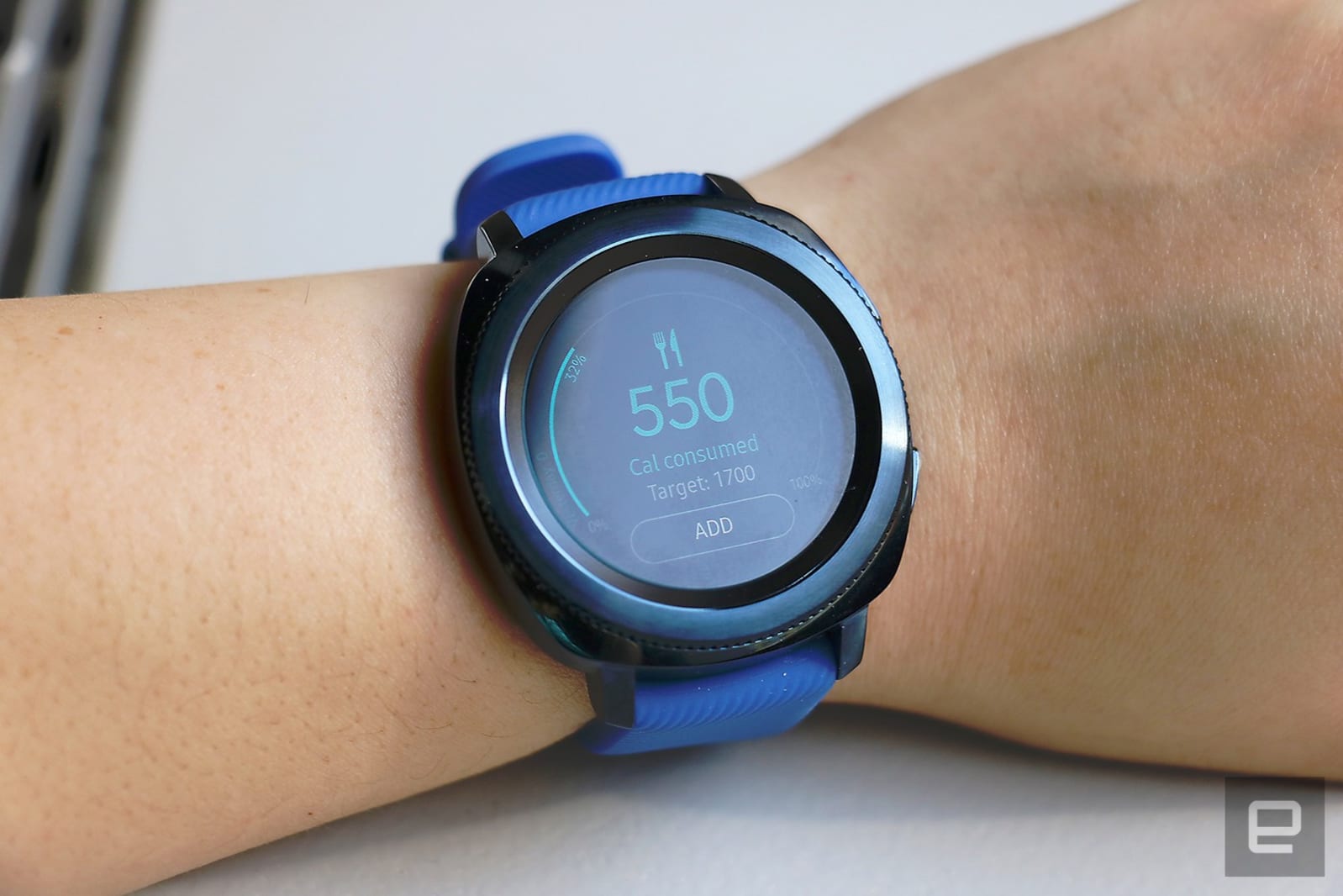
This also makes the Gear Sport feel like a health-first device. Of course, you can map your runs with built-in GPS, and even get your heart rate underwater while you’re taking a break between laps. Plus, it will automatically detect workouts like running, cycling and elliptical activity once you’ve been at it for at least 10 minutes.
If you’re using the Gear Sport with a recent Samsung phone or TV, you can get training guides and your heart rate cast to the bigger screens. There are more than 60 workouts available, and the company says more are coming. You’ll have to go to the Programs section of the app’s menu on your phone, but once you’re there, you’ll find a comprehensive array of tutorials across categories like “Weight loss,” “Endurance training,” “Muscle training” and “Running”.
I picked “Tabata 4-minute Beginner Fat Burn” from the weight loss group, which added a schedule to my profile, as well as an icon to the watch’s Workout widget that would start the tutorial. I tapped the symbol, and a countdown appeared simultaneously on the Gear Sport and my Galaxy Note 8. Both the watch and phone told me what exercise to do, kept me updated on each set’s duration and let me skip ahead or pause if I needed. Only the phone displayed a video of each exercise, though.
It felt slightly cumbersome to keep looking at the phone while working out, especially for exercises like planks and leg lifts that made it difficult to see the device. But I can see how convenient this would be on a TV. Fitbit offers a similar guided workout feature on the Ionic, except it shows the tutorials directly on the watch face, which is easier to follow. Fitbit only provides three to five guides for free though, and those who want more need to subscribe to the company’s premium plan. Personally, I prefer Samsung’s generosity over Fitbit’s convenience.

Like rival fitness trackers, the Gear Sport also monitors your sleep, although from my experience it’s not as accurate as the Fitbit Ionic. I woke up one night to grab a stray pillow before it fell off my bed, but the Gear Sport didn’t register even a blip in my slumber. It also counted an hour I spent looking at my phone one morning as time spent asleep.
The Gear Sport is better at being a smartwatch than it is at being an activity tracker. Not only does it let you send and receive messages, it also stores up to 4GB or so of music. If you’re a Spotify Premium user, you can even save your playlists locally. You can stream your tunes to any Bluetooth headphones, but connecting to the $200 IconX earbuds that Samsung launched in tandem is easiest. They feel comfortable, last for two days with my 40-minute commute and deliver decent audio quality.
Being able to play music from your watch is one of a few features meant to make it easier to leave your house without your phone. There’s also Samsung Pay, although it works only with NFC and doesn’t support magnetic-swipe transmissions like it does on the phone, so you can’t use it at terminals that only accept MST. When you’re home, you can also use the watch to control connected devices if you own a SmartThings hub.

A fun, if slightly gimmicky, thing the Gear Sport can do is act as a remote control for PowerPoint slides on your PC. This was surprisingly easy to set up — I just had to connect my watch and laptop via Bluetooth, fire up my presentation and use the Gear Sport’s bezel to click through pages. I could also draw on the wearable’s screen to move the laptop’s cursor — neat!
So far, I hadn’t been pushing the Gear Sport very hard. It was 60 percent charged when I first put it on and lasted about three-and-a-half days before asking me to enable low-power mode. That’s in line with Samsung’s estimate of about three to four days depending on use and beats the Apple Watch 3 by about two days.
The competition
The Gear Sport occupies an awkward niche in the $300 smartwatch category. On one end, you have the Apple Watch Series 3, which, by virtue of its better messaging and Siri integration, makes the most sense for iPhone users.
On the other end of the spectrum sits the Garmin Vivoactive 3, which uses the company’s own operating system and tracks a wide variety of workouts. It’s not as stylish as Samsung’s watch, but serious runners may prefer Garmin for its established GPS expertise. Plus, the Vivoactive 3 is supposed to last up to seven days on a charge (though, we haven’t tested the device for ourselves and can’t vouch for its performance).
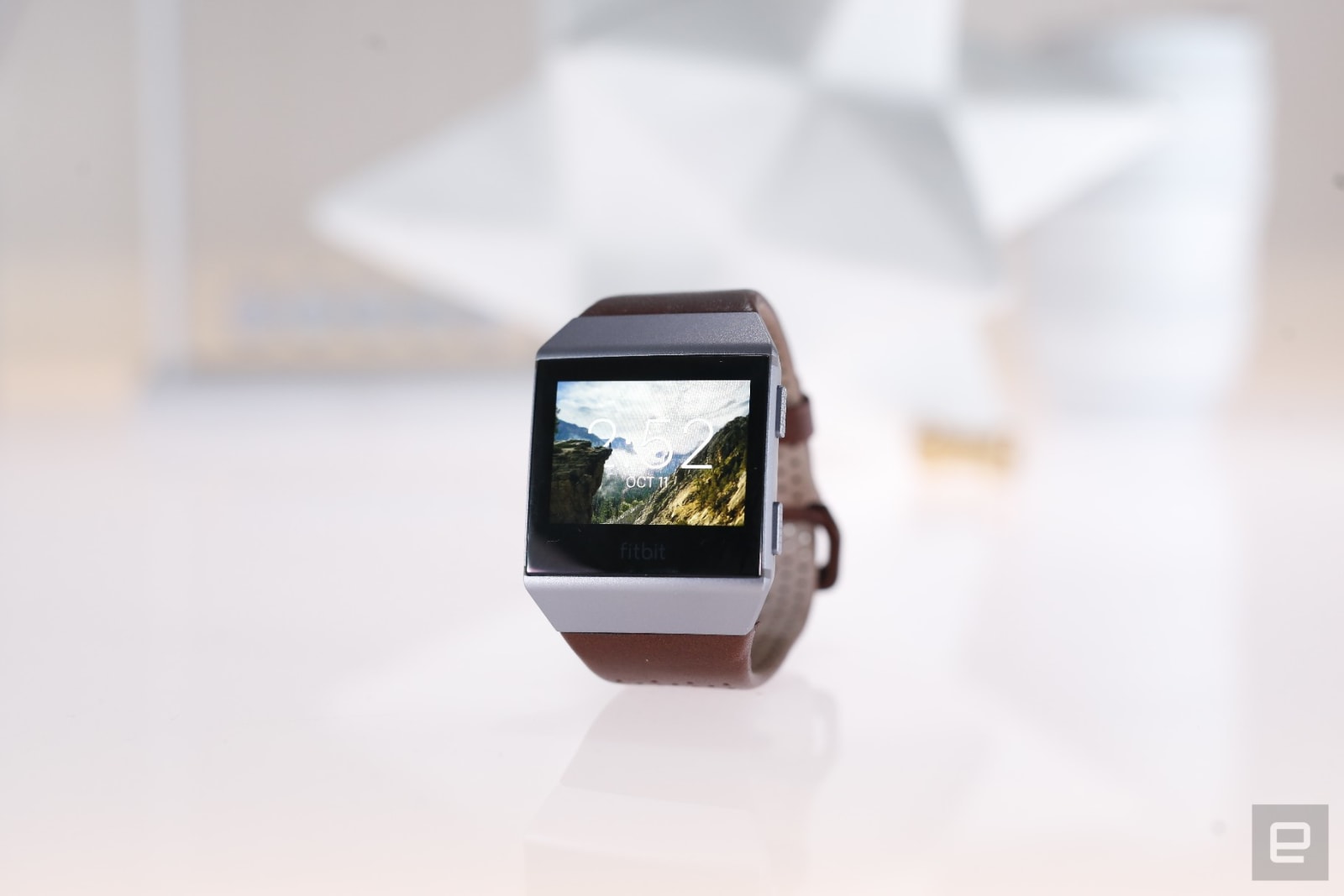
There’s also the Fitbit Ionic, which offers better sleep-tracking and more comprehensive fitness features than the Gear Sport. The Ionic’s battery also lasts five days with typical use, which is longer than the Gear. But Fitbit’s first real smartwatch doesn’t offer many of the apps or features we’ve come to expect. Plus, its geometric design isn’t for everyone. The Ionic will most likely appeal to existing Fitbit fans.
Android Wear watches, like the Huawei Watch 2, are the most similar to the Sport. They often pack a heart-rate monitor and track your activity via Google Fit. On the downside, they typically don’t last as long as the Gear Sport, aren’t as water-resistant and tend to lack the built-in fitness-tracking features like calorie monitoring or automatic activity-detection.
Wrap-up
Ultimately, the Gear Sport is almost as robust a fitness tracker as it is a smartwatch, and is one of the most versatile in the category, especially for those who already own Samsung’s phones and TVs. Plus, its unique rotating bezel continues to stand out as the best way to interact with a smartwatch. Despite its ambitious array of helpful tools, it still manages to squeeze out impressive battery life. Samsung’s fitness-tracking features may not be as accurate as the competition, but the Gear Sport does enough to satisfy casual gym-goers.
An AI detected colorectal cancer with 86 percent accuracy
We’ve heard of many different uses for AI within the medical field, including for prediction of heart attacks and detection of Alzheimer’s. Now, it looks as though machine intelligence could be applied to early detection of cancer as well. A group of Japanese researchers has figured out a way to use AI to spot colorectal cancer tumors before they become malignant, according to Inverse.
The team compiled a database of over 30,000 images of pre-cancerous and cancerous cells in order to help the AI detect the difference between the two. After the machine learning process had taken place, they fed it an image of a colorectal polyp that had its magnification increased by a factor of 500. The program was able to determine within a second whether that specific polyp was cancerous.
Dr. Yuichi Mora from Showa University made a presentation about these results this week at the United European Gastroenterology Conference in Barcelona. He cited the AI’s detection accuracy at 86 percent, which is impressive.
This is specifically important for colorectal cancer; it’s highly treatable in early stages, but detection often comes very late, after the cancer cells have spread into the bloodstream. The cancer originates as benign polyps in the rectum and colon that turn into malignant tumors. This AI could help detect colorectal cancer early, ensuring that the cancer is treatable for more people.
Source: Inverse, PubMed
‘Digital vegetables’ emit music and light when touched
Small-plot urban farming used to be widespread in Tokyo, but other than specialized projects like the Pasona Urban Farm, there aren’t many tomato plots around the city anymore. A Tokyo creative lab called Party has created an art installation that aiming to puts residents literally back in touch with their gardening roots with a digitally-enhanced greenhouse installation called “Digital Vegetables,” or “DigiVege” in Japan.
The greenhouse is situated in Tokyo Midtown’s garden space as part of the 2017 Design Touch event. The exhibition encourages visitors to touch the greenhouse’s seven different vegetables, including cabbages, mini-radishes, carrots and tomatoes. “Start off by touching the seven types of lives now growing strong in the soil,” the instructions say.
A touch detection system fires off a light and music show that’s different for each vegetable. Sound designer Ray Kunimoto mixed recordings of people rubbing seeds, touching leaves and eating fruit with different orchestral instruments. “Tomatoes are violin, carrots are trumpet, cabbages are oboe, mini radishes are flute, sweet potatoes are piano, eggplants are harp and pumpkins are clarinet,” the website explains.
The effect is to sort of anthropomorphize the veggies, assigning each different visual and auditory characteristics. That helps visitors to look at them in a new way and not just see them as food. The other aim, of course, is to attract visitors to the Design Touch event and get them to touch, smell and experience organic food in an otherwise non-organic environment.
The exhibition is free and open until November 4th if you happen to be in Tokyo. To get the full effect you’ll want to visit it by night in order to see the dazzling, animated lighting effects. As shown in a Facebook post below, by day it looks pretty much like a regular greenhouse.
Via: Colossal
Source: DigiVege
Listen to a discarded score for ‘Star Trek: Discovery’
Cliff Eidelman (pictured) famously penned the ominous score for Star Trek: The Undiscovered Country after (first pick) James Horner was too expensive. Now, the composer has revealed that he was in the running to produce the soundtrack for Star Trek: Discovery. The job eventually went to Jeff Russo, but Eidelman chose to continue working on the project since he was never tied down to a contract. As a consequence, the musician has published a four-track look into an entirely different form of theme for the series.
The backstory here is that Bryan Fuller, the producer CBS tasked with reviving Star Trek, was looking for a composer for the show. Nicholas Meyer, who had previously been Trek’s savior in the early ’80s, recommended Eidelman. Fuller engaged in informal talks with the composer, asking if he would scratch out a concept for a theme and music for the first episode. But because no paperwork was signed, when Fuller dropped out of the show, Eidelman was cast aside.
“New people came in and they went in a different direction. The reason I was there was because of Bryan Fuller, and when he left I kind of went with him and wasn’t kept on. I was not signed on. I was never hired or engaged formally. I was just encouraged.”
The lack of a formal agreement has enabled Eidelman to polish and release Into the Unknown, a four-track EP of music that was intended for Discovery. As TrekMovie, which broke the story, reports, the other tracks would have possibly been used during the Battle at the Binary Stars. Sure, we’ll never know for certain if, had Fuller stayed on, Eidelman’s music would have been adopted for Discovery proper. But it’s a nice peek into an alternative universe where other the show wasn’t blighted with a super generic theme song.
Oh, and we’re expecting some wag to splice together Discovery’s current title sequence with this theme in 5… 4… 3…
Via: io9
Source: TrekMovie
 AIVAnet