


Android 8.1 preview unlocks your Pixel 2 camera’s AI potential
Remember how Google said the Pixel 2 and Pixel 2 XL both have a custom imaging chip that’s just laying idle? Well, you can finally use it… in a manner of speaking. Google has released its first Developer Preview for Android 8.1, and the highlight is arguably Pixel Visual Core support for third-party apps. Companies will have to write support into their apps before you notice the difference, but this should bring the Pixel 2 line’s HDR+ photography to any app, not just Google’s own camera software. You might not have to jump between apps just to get the best possible picture quality when you’re sharing photos through your favorite social service.
You don’t have to use a Pixel 2 to see some benefits. There’s a neural network programming kit that offers hardware-boosted machine learning through frameworks like TensorFlow Lite. Google has also spent some time fine-tuning memory use to improve performance for low-cost Android Go devices, and there’s a new kit that lets apps hand out shared memory to speed access to common data. And if you’re fond of password managers, they can make better use of Google’s Autofill framework.
Anyone who’s enrolled in the Android Beta Program can install the 8.1 preview on a compatible Google device (the Nexus 5X or later). You may want to hold off until the completed update’s expected December release if you aren’t a programmer, though. Even relatively minor test releases like this can have their share of bugs, and there won’t be that much of an incentive to upgrade until 8.1-ready apps reach Google Play in earnest.
Source: Android Developers Blog
‘Social robot’ Jibo reaches Indiegogo backers three years later
Three years after an astronomically successful crowdfunding campaign raised over $3.6 million, Jibo the robot is finally ready. The social bot is available to buy on its site for $900; Those who backed its Indiegogo have already started receiving their robots, while more recent preorders will start shipping on November 7th.
Huge smiles. Tons of laughs. #Jibo’s already making an impression, and it’s only the beginning. Order yours today. https://t.co/EII4DvRqdQ pic.twitter.com/lRYZsJOx1N
— Jibo Inc. (@jibo) October 25, 2017
On its Indiegogo page, Jibo claimed to be “The World’s First Social Robot for the Home,” which was a bold and auspicious claim in 2014. But delays to work out the robot’s kinks pushed the release date further and further back. In the interim, personal assistants from Google, Amazon and soon Apple have hit the market and given users a modicum of what Jibo promised.
But Jibo intends to be a companion, not just an assistant to bark at. It uses speech and face recognition to remember individuals, remembers preferences, and attempts to converse with jokes and stories. Plus, its angled head bends and moves to face whoever it’s talking to. Unfortunately, it seems that Jibo still isn’t shipping outside the US and Canada — the company refunded outside backers, citing international latency to its US servers as reason to avoid giving non-North American customers a subpar user experience.
Source: Jibo
Cochlear Launches New Made for iPhone Hearing Implant in Partnership With Apple
As was announced back in July, Apple partnered with Australian company Cochlear to develop the Nucleus 7, the first made for iPhone Cochlear implant, which is able to stream audio from a compatible iPhone, iPad, or iPod touch directly to a surgically embedded sound processor.
Cochlear’s new Nucleus 7 Sound Processor is launching in Australia this week, and should soon also be available in other countries for customers who have profound hearing loss that can’t be alleviated with traditional hearing aids and requires implant technology.
Apple’s accessibility engineering team worked with Cochlear to create a new form of Bluetooth low-energy audio that allows the implant to connect to the iPhone without draining significant amounts of battery life. Through an iPhone connection, patients who adopt the Nucleus 7 implant will be able to watch movies, listen to music, make calls, and more.
In a comment to The Australian about the launch of the Nucleus 7 from Cochlear, Apple director of accessibility Sarah Herrlinger said the Cochlear project is something Apple is “passionate about.” Creating the Bluetooth improvements and developing integrations across multiple companies with hearing aid products took two to three years to complete, says Herrlinger.
“It’s something that we are really passionate about as a company,” she said. “We consider it one of our core corporate values, an area where we put significant amount of time and energy ensuring our products work for everyone.
“We started looking at this program around the concept of Bluetooth LE and how it would be a beneficial tool in this specific circumstance. The work we have done is applicable both to hearing aids and sound processors.”
The Nucleus 7 Sound Processor is compatible with a wide range of Apple devices, including the iPhone 5 and later, all iPad Pro models, the iPad mini and later, and the fourth-generation iPad and later.
Tag: accessibility
Discuss this article in our forums
The best 15-inch laptops of 2017
Like their 13-inch counterparts, 15-inch laptops keep getting thinner and lighter, but they’re still the same workhorses they’ve always been — and that’s a good thing. They might not be as exciting or flexible as some of the better 2-in-1 laptops, but what they lack in versatility they more than make up for in muscle. Modern 15-inch laptops still routinely outperform their 13-inch counterparts, and usually offer better battery life — after all, a bigger chassis means room for a bigger battery.
So whether you’re in the market for a mobile workstation, a commendable gaming behemoth, or something a little more exotic, there’s something in the 15-inch form factor that’s sure to fit the bill. That said, here are the best 15-inch laptops on the market today.
Looking to purchase a new machine? Consult our comprehensive roundups of the best laptops and best Chromebooks, if you don’t mind working with a less-capable device.
Dell XPS 15 ($850+)
There’s no steadier hand in the 15-inch laptop market than Dell, and its XPS 15 exemplifies the reputation 15-inch laptops have rightly earned: They’re dependable, powerful, and robust. The latest XPS 15 features an Intel Core i7 processor, and an optional Nvidia GeForce GTX 1050 graphics card. The XPS 15 is also one of the smallest 15-inch laptops available, weighing in at just 4 pounds and measuring a svelte 17 millimeters at its thickest point. Remarkably, the XPS 15 is nearly as thin and light as its 13-inch cousin, the XPS 13.
This extra real estate comes with a few perks though, not least of which is the display. The XPS 15 features an Infinity Edge display, meaning its bezels are razor-thin, and in our tests it was incredibly vibrant, hitting a contrast ratio of 770:1, with nearly pitch-perfect color accuracy. It’s also a capable gaming rig — if you don’t mind turning down some settings. All in all, it’s your best option if you’re looking at picking up a 15-inch laptop, and it starts at just $850.
Read our full Dell XPS 15 9560 review
Buy it now from:
Amazon
Lenovo ThinkPad X1 Carbon ($1,400+)
The ThinkPad laptop brand just celebrated its 25th anniversary, and its safe to say it’s just as relevant and capable as ever. The ThinkPad X1 Carbon is a worthy successor to the ThinkPad’s storied legacy, with a chassis made from carbon fiber, and a no-nonsense, straightforward design that exists solely to get out of your way and let you get to work. The X1 Carbon places the company’s signature, cherry-red TrackPoint in the middle of a wonderfully tactile keyboard, but modernizes the traditional ThinkPad design with a thin-bezeled display and fingerprint sensor.
Outfitted with the latest internals, the ThinkPad X1 Carbon is a robust and capable business laptop, and as such, it’s not exactly cheap. It starts at $1,400, but it has a lot of little features you won’t find elsewhere — like optional LTE connectivity. The spartan ThinkPad design is alive and well in the X1 Carbon, and for good reason. There’s just one catch: It’s technically a 14-inch laptop. That said, what you lose in screen real estate you more than make up for in versatility.
Read our full Lenovo ThinkPad X1 Carbon (2017) review
Buy it now from:
Amazon
Surface Book 2 ($1,500+)
Finding a 2-in-1 or tablet that comes in a 15-inch form factor is not an easy task. Thankfully, Microsoft’s latest version of the Surface Book features a massive 15-inch display that detaches from the keyboard to become one of the largest and most luxurious tablets on the market today. Coupled with support for a new, more colorful version of the Surface Pen and the intuitive Surface Dial, the Surface Book 2 offers access to a unique ecosystem of peripherals and accessories. When it comes down to it, however, it’s just a super-slick laptop.
If you’re on the fence about whether you should invest in a 2-in-1, a laptop, or a tablet, then you may want to give the Surface Book 2 a good look. This thing does it all, and a little more. The top-end model features an Nvidia GeForce GTX 1060 graphics card, which could mean your Surface Book 2 can pull double duty as a gaming rig, or triple duty, if you count all the other ways you can use it (i.e., on your lap, as a tablet, or flipped around like an easel). Sadly, however, it starts at $1,500, meaning you definitely pay for the added flexibility.
Read our full Microsoft Surface Book 2 review
Pre-order it now from:
Microsoft
Acer Predator Helios 300 ($1,400+)
Finding a 15-inch gaming laptop is pretty easy — it’s where you’ll find most of them, to be honest. Some hit 14 inches, like the Razer Blade, while others venture into 17-inch territory and beyond, like the Razer Blade Pro and the Acer Predator 21x. For the most part, however the best balance between performance and form factor can be found in the 15-inch range. That’s where the Acer Predator Helios 300 lands. It’s not the slimmest or the fastest gaming laptop in the 15-inch space, but it’s one that benefits from impeccable balance.
Featuring an Intel Core i7 processor and an Nvidia GeForce GTX 1060 graphics card, the Predator offers solid gaming performance for about $100 less than the aforementioned Surface Book 2. It still features some of the bells and whistles we’ve come to expect from gaming laptops, too, which can be a pro or a con depending on your preferences. Overall, the Helios offers a good mix of performance and affordability, assuming you can tolerate a little red.
Read our full Acer Predator Helios 300 review
Buy it now from:
Amazon
Acer Chromebook 15 ($250)
If you just need a 15-inch laptop to carry to and from class or the office — i.e., the kind of laptop that’s only ever going to open a word processor or send the occasional email — then the Acer Chromebook 15 is a good bet. At just $250, it’s not only one of the least expensive laptops in any segment of the market, but also the cheapest one on our list by more than $1,000. To be fair, however, you do get what you pay for. This isn’t a laptop that’s going to run even the most casual game, partially because its budget-oriented design means it’s not very powerful, and partially because it’s a Chromebook. This means you’re not running Windows, you’re running Chrome OS, Google’s desktop operating system.
Essentially, you’re limited to whatever you could feasibly run in a web browser. You can still access cloud storage, check your email, and sign into Slack and productivity suites like Google’s G Suite, but that’s about it. You’re limited here, not only by your hardware but also by your software. That said, it’s not a bad tradeoff for a 15-inch laptop that costs a fraction of what you’d spend on a new smartphone.
Read our full Acer Chromebook 3 review
Buy it now from:
Amazon
Update: Added the Lenovo ThinkPad X1 Carbon, Surface Book 2, Acer Predator Helios 300, and Acer Chromebook 15.
Editor’s Recommendations
- The best Galaxy S7 Edge cases
- Here is our rundown of the 27 best iPhone 6S cases and covers
- For a laptop that lasts, these are the brands to buy
- Need something to watch? Here are the best Amazon Prime TV shows
- The best Micro USB cables to keep your gadgets juiced up
Keep an eye on your pet or child with Fynd, the 4G LTE tracking device
Why it matters to you
With Fynd, you can track location, temperature, and activity in real time without having to worry about distance.
Currently on Indiegogo, Fynd is a tracking device that runs on Sprint’s 4G LTE coverage. While most Bluetooth trackers don’t work beyond 100 feet, this tracker has unlimited nationwide range.
With Fynd, you can track down your child, pet, or valuable item in real time to see the precise location and if it’s moving or stationary. The device also tells you the speed of how fast or slow your subject is moving, along with the ambient temperature of your child or pet to make sure it is at a comfortable level.
The small pebble-shaped tracker comes in black, white, and blue color variants. Its size makes it easy for children or pets to wear without feeling uncomfortable or bothered by it. You can also attach expensive items to it with the carabiner that is provided with the device.
Underneath the hood is a Qualcomm Snapdragon 1100 chipset and a Li-ion rechargeable battery. Fynd should be able to last you up to five days using 4G LTE and up to 60 days if you decide to use Bluetooth.
To keep up with the sporadic lifestyle of both children and pets, the device is waterproof with an IP67 rating. If they play in water or go for a swim while wearing it, you don’t have to worry about ruining it. For durability, the outside shell is made of flame-resistant, medical-grade plastic that is easy to clean with soap and water.
The Fynd app — available for iOS and Android — allows you to stay connected to multiple devices. You can put one device on your child, one on your pet, and one on an item like your backpack. The app provides you with information on all of the existing devices. It’s also possible to track one device by multiple users.
In addition to a live location, the device tracks the history of location, temperature, and activity as well. After looking back at all the past readings, you’re able to compare activity from day to day.
The Fynd tracking device has an estimated ship date of February 2018 with a retail price of $100 — or $60 for backers. It also comes with either 30 days or one year of 4G LTE nationwide service, depending on the package you choose. After the subscription ends, it will cost you $3 a month.
Editor’s Recommendations
- PetMio’s connected tracker, food, and bowl turns dogs and cats into smart pets
- The best smartwatches you can buy
- Tile Pro Series locating beacons are twice as loud, work up to 200 feet away
- The best fitness trackers you can buy
- Chipolo Bluetooth trackers are the solution to your absent-mindedness
Google’s sentiment analysis API is just as biased as humans
Google developed its Cloud Natural Language API to give customers a language analyzer that could, the internet giant claimed, “reveal the structure and meaning of your text.” Part of this gauges sentiment, deeming some words positive and others negative. When Motherboard took a closer look, they found that Google’s analyzer interpreted some words like “homosexual” to be negative. Which is evidence enough that the API, which judges based on the information fed to it, now spits out biased analysis.
The tool, which you can sample here, is designed to give companies a preview of how their language will be received. Entering whole sentences gives predictive analysis on each word as well as the statement as a whole. But you can see whether the API gauges certain words to have negative or positive sentiment, on a -1 to +1 scale, respectively.
Motherboard had access to a more nuanced analysis version of Google’s Cloud Natural Language API than the free one linked above, but the effects are still noticeable. Entering “I’m straight” resulted in a neutral sentiment score of 0, while “I’m gay” led to a negative score of -0.2 and “I’m homosexual” had a negative score of -0.4.
AI systems are trained using texts, media and books given to it; Whatever the Cloud Natural Language API ingested to form its criteria to evaluate English text for sentiment, it biased the analysis toward negative attribution of certain descriptive terms. Google didn’t confirm to Motherboard what corpus of text it fed the Cloud Natural Language API. Logically, even if it started with an isolated set of materials with which to understand sentiments, once it starts absorbing content from the outside world…well, it gets polluted with all the negative word associations found therein.
Google confirmed to Motherboard that its NLP API is producing biased results in the aforementioned cases. Their statement reads:
“We dedicate a lot of efforts to making sure the NLP API avoids bias, but we don’t always get it right. This is an example of one of those times, and we are sorry. We take this seriously and are working on improving our models. We will correct this specific case, and, more broadly, building more inclusive algorithms is crucial to bringing the benefits of machine learning to everyone.”
There are clear parallels with Microsoft’s ill-fated and impressionable AI chatbot Tay, which the company quickly pulled offline in March 2016 after Twitter users taught it to be extremely a hideously racist and sexist conspiracy theorist. Back in July, the computer giant tried again with its bot Zo, which similarly learned terrible habits from humans, and was prompty shut down.
Users had to deliberately corrupt those AI chatbots, but Google’s Cloud Natural Language API is simply repeating the sentiments it gains by absorbing text from human contributions…wherever they’re coming from.
Source: Motherboard
Reddit’s stricter stance on violence bans more racist communities
Reddit has previously had success cleaning up its act by banning hate communities, and now it’s expanding those crackdowns. The social site has widened its policies on violent content to forbid material that “encourages, glorifies, incites or calls for violence,” and has used that to ban numerous subreddits that have celebrated racist violence. Some of them were very small, but others had as many as 7,000 subscribers or weren’t exactly hiding their violent ideology, including /pol (an offshoot of 4chan’s notorious board), /Nazi and /far_right.
The stricter policy came after Reddit decided that its previous policy was “too vague,” and needed to be be “more clear and comprehensive.” It’s aware that this expanded approach to violent material could create problems when they encounter a gray area, but it’s stressing that it’ll take context into account when making judgment calls.
The move is bound to be helpful to both Reddit (which doesn’t want to spook advertisers) and its users (who put up with fewer hatemongers). However, it also raises a major question: who’s next? The policy theoretically gives Reddit the power to ban other toxic subreddits, but users are concerned that it won’t touch communities known to promote violence if they’re ‘too big’ (and thus pull in a lot of ad money), too political or could trigger retaliatory campaigns. We’ve asked Reddit if it can respond to those complaints, but there’s no doubt that redditors will be watching closely to see if the new policy is applied consistently.
Via: Gizmodo
Source: Reddit
Steam introduces digital gift cards ahead of holiday sales
Got friends who wait for Steam’s holiday sales to buy a ton of games they might not get around to playing? Is that friend you? Now you can help your friend soften the blow by sending them digital gift cards that add to their Steam Wallet balance. Or, since that friend is you, have your parents/cousins/distant aunts help fund your habit.
You can only send funds to a Steam Friend you’ve had for more than three days, but once you select them, “send money” appears as an option. Easy! They come in the typical denominations of $5, $10, $25, $50 and $100. You can buy them with major credit cards (Visa, Mastercard, American Express, Discover, and JCB), PayPal or Bitcoin.
Via: VentureBeat
Source: Steam
Gear Up: Samsung makes some of the best Galaxy S8 Plus cases

We’re celebrating ten years of AndroidGuys with a ton of giveaways!
Yeah, we know that the Galaxy S8 and S8 Plus have already been out for some time, but that isn’t stopping folks from still picking these devices up today. In fact, with all of the issues surrounding the Pixel 2 XL, I’ve seen folks opt for the Galaxy S8 Plus as a replacement while Google figures out what’s going on with its displays.
This means that folks are still looking for the best cases for their shiny and new Galaxy S8 Plus, and that brings us to the options. While you can hit Amazon for some cheap, yet great cases, some will overlook the OEM cases that Samsung has created for its lineup of devices.
Today, we’re taking a look at four different options – the Alcantara Cover, Silicone Cover, LED View Cover, and Keyboard Cover.
Silicone Cover
Starting off with the basic options, you can’t get much more basic than a silicone case for the Galaxy S8 Plus. Samsung’s own silicone case pretty much falls in line with what you expect from a case like this, while giving owners a bit extra.

The outside of the case is made from silicone, making the device more comfortable to hold, and less likely to accidentally slip out of your hands. Around the sides, the silicone has been raised for all of the different buttons on the Galaxy S8 Plus, while the bottom of the case is cut out, altogether. This gives you easy access to the charging port and 3.5mm headphone jack, while not leaving you worrying about covering up the speaker.
The real benefit from this case (and most of these cases) comes with the camera cutout. It’s well-documented how annoying the placement of the fingerprint scanner has been for the Galaxy S8 lineup and the Galaxy Note 8. However, with the cutout on the back, there’s a cutout for the camera and heart rate sensor, and a separate cutout for the fingerprint scanner. 
This makes life a WHOLE lot easier if you still like using the fingerprint scanner, or even if you need to use it when you iris scanning is acting funky.
Moving to the inside of the case, the Silicone option features a soft interior which will help keep your Galaxy S8 from getting scratched up with extended usage. The only gripe that I have here comes from owning the white version of this case. There’s definitely some concern about using a white case and keeping things look pretty after awhile.
Nonetheless, the Silicone case is a great option to consider, and you can hit the button below to snag one for yourself.
Buy the Samsung Silicone Cover!
Alcantara Cover
This is my favorite case that I have ever used with my Galaxy S8 Plus. The Alcantara case doesn’t look that impressive from the start, but then when you take it out of the packaging, you are immediately impressed.

The Alcantara case feels like a sweater for your precious device, a feeling that is extremely welcome regardless of the situation. Obviously, this won’t be the case you take with you if you’re going on a hike, but when you get home and ready to go out for dinner, the Alcantara looks absolutely gorgeous.
As with the Silicone case, the camera cutout makes life so much better by making it easier to access the fingerprint scanner without smudging the camera lens. The buttons are raised just enough to make them clicky, but don’t protrude enough to stick out like a sore thumb.
Another recurring theme here is the cutout at the bottom of the case, providing easy access for the charging port, headphone jack, and speaker. The only complaint that I have with this case comes from the fabric itself.

Over my extended usage period with the Alcantara case, I found the case shedding fibers occasionally. This would leave fibers on my display, forcing me to wipe them away from time to time. Hopefully, this won’t turn into a case of male-pattern baldness, but only time will tell.
Pricing may be a little steep for some as this is priced at $49.99, but in my opinion, it’s well worth it if you want to keep things looking good and don’t want a generic case.
Buy the Samsung Alcantara Cover!
LED View Cover
Generally, I’m not a huge fan of flip cases, as I want to get into my device as fast as possible, and the same rings true with the LED View cover. While this case is rather durable, it’s just a bit too thick for my taste but does include some interesting use cases.

The LED View cover takes advantage of your display, while ensuring that you always know what time it is. Plus, whenever you receive a notification, the outer case will light up, letting you know what app the notification is coming from.
Moving around the case, there is a cutout on the front for the earpiece, and the side features labels for the volume up and down buttons, as well as the Bixby button. These aren’t actually buttons themselves, but let you know where to push if you need to silence a call or activate Bixby quickly.

Flipping the case open, there’s a small cutout capable holding one or two credit cards (or an ID) if you want to leave the wallet at home and take advantage of Samsung Pay. There’s also some soft-feeling material on the inside of the case, again, helping to keep your Galaxy S8 Plus protected.
Around the edges of the inner case, there are cutouts at the top, bottom, as well as cutouts for the various buttons around the edge of your device. This is great for providing easy access, but is rather unlikely to keep the device protected if dropped from a substantial height.
Buy the Samsung LED View Cover!
Keyboard Cover
This case threw me off the most out of the bunch, and is still one of the weirdest “cases” that I’ve used. I thought it was neat when Samsung announced the cover at the Galaxy S8 event, and you can definitely tell this is an attempt to appease those who have been wanting a hardware keyboard to use.

The Keyboard Cover actually comes in two pieces – the rear cover, and the keyboard. The rear cover itself is nothing more than a hard shell with cutouts for the buttons and easy access to the ports on the bottom.
However, some slight cutouts can be found on the sides of the hardshell cover where the keyboard portion will rest when not in use. When you’re ready to use the keyboard, you’ll need to (gently) pry it off the back, and then flip it around and attach it.

As soon as you attach it, you will notice your display moved up slightly to account for the space being taken up by the keyboard. General interaction is not impeded, except for the navigation buttons, which are now activated using the keyboard itself. Unfortunately, this is what drove me nuts the most.
Instead of being able to remap the hardware buttons (I know, I know), you’re stuck using Samsung’s backwards orientation of the navigation keys. THEN, when you are done using the keyboard, Samsung automatically reverts the navigation button orientation on your device, forcing you to go back into the settings and change things back to normal.

As for the keyboard itself, it’s rather tactile, and I was able to easily reply to some emails with minimal errors. That’s a pretty impressive feat considering the fact that I suffer from finger-itis, and have never had luck with hardware keyboards on mobile devices.
Nonetheless, if you can ignore the glaring issue surrounding the navigation keys, the Keyboard Cover is a viable option to give you the tactile feedback you want.
Buy the Samsung Keyboard Cover!
Google Pixel 2, Pixel XL 2 early impressions
We’re celebrating ten years of AndroidGuys with a ton of giveaways!
It must be fall again. We’re in that all-important time of year where the big companies trot out their brightest and best, hoping to steal your attention and money. The Google Pixel 2 and its larger counterpart, the Google Pixel XL 2, are now available.
The question du jour is, “What’s your opinion of the Pixel 2?” Well, it’s either that or a variation wondering whether it’s worth upgrading from an existing flagship phone. It’s a highly coveted device that promises to build on its successor. The easy answer should be yes, right? Let’s dig in a bit and talk about the Pixel 2 and Pixel XL 2.
A Qualifying Statement
Before going further, I’d like to qualify my statements and perspective. I’ve had the two phones in my possession for around twelve days, including two busy weekends. In other words, I am in no way saying that these words are final. I’m reserving the right to make adjustments in the coming days and weeks as I spend more time with the phones.
 As much as I would have liked to put one or both of these phones through their paces in time for the press embargo, I simply couldn’t. Keep in mind as you read other reviews that most outlets have spent roughly the same amount of time.
Assuming some of the largest outlets out there got the phone on the day of introduction, that means they still spent less than two weeks with it. With that said, there are some sites who have done a good job diving deep into a particular area including benchmarks, performance, and more.
The review units provided to us by Google were both Just Black in color. As someone who used the Google Pixel as his main device over the last year, I’ve become quite familiar with it. Also worth noting is that my personal phone is also black.
First Impressions
Taking the phones out of the box and giving it a quick once-over, I was hit with mixed feelings. I really like the subtle changes in design; the glossy top section looks gorgeous in my opinion. However, both were a little too close to last year’s model for me to get too excited.

Let’s be honest: the Pixel is not the sexiest device on the planet. Google never really sold it on its looks or sleek lines and there are plenty of phones that beat it the cosmetic department. The Pixel 2 and Pixel XL 2 are slight modifications on the existing models but don’t stray very far for 2017.
I’m reminded of how Google’s early Chromebooks, the CR-48, were unfinished and basic looking. Further, it also calls to mind when we see devices with fake shells or cases that hide the final product.
This is not to say, though, that the other colors wouldn’t be a completely different experience. There’s something about the way Google mixes the black and white (with a hint of red on power button) that signals “modern Google”.
If you look at the new line of products as a whole, they all seem to fit. Even though they have different materials and do vastly different things, they feel cohesive and like they’re all part of a family. To me, though, the all black phones look like beta versions or unfinished takes on the more appealing counterparts.
This is all personal opinion, of course, and has nothing to do with a “review”. That is, unless you are like me and want to know if the new stuff is better looking or much more advanced than the old stuff.

If you are using a Google Pixel or Pixel XL now, there’s not enough here to outright suggest the upgrade. Find the right discount or incentive, such as switching carriers, and it’s easier to make the recommendation.
Jump back a generation to the Nexus 5X or 6P and it’s much more obvious. The hardware performance alone is worth the upgrade. Plus you’re dealing with much a smoother, and cohesive operating system in Android 8.0 Oreo. It’s Android as it is supposed to be done.
As for the actual build quality, I find no issues with the Pixel 2 or Pixel XL 2. The phones feel solid in hand, if not a little bit utilitarian. Looking the phone over and getting a feel for it, the Pixel 2 is more my style and fits my hand size. Last year’s Pixel XL was always just a little bit too big for me to fall in love with it, especially with a case on it.
This year’s Pixel XL 2 also verges on the edge of being too cumbersome to me. The Pixel 2 feels much more in line with what I like for reaching in the pocket, waking up, and using with one hand.
To be fair, the larger screen is great for just about all practical purposes. Reading text, watching video, and playing games all benefit from the extra space. Even the weight is almost negligible, too. The preference between the two is going to be a personal choice.
About that Pixel XL 2 Display
Before moving on, though, I definitely have to touch base on the difference in the tech behind the two displays. If you’ve been looking into pre-ordering the Pixel XL 2, you likely already know about the issues plaguing some users. Indeed, even pre-launch review units are experiencing burn-in and less than desirable image quality. Yes, after only a few days and weeks, there’s chatter about poor images and what figures to be burned in navigation bars.
For what it’s worth, I review unit does not have any of the problems. This is not, however, to suggest it’s perfect. In fact, after powering both on and placing them next to each other, the first thing I noticed about the larger phone was that the picture was more blue-ish and more drab.
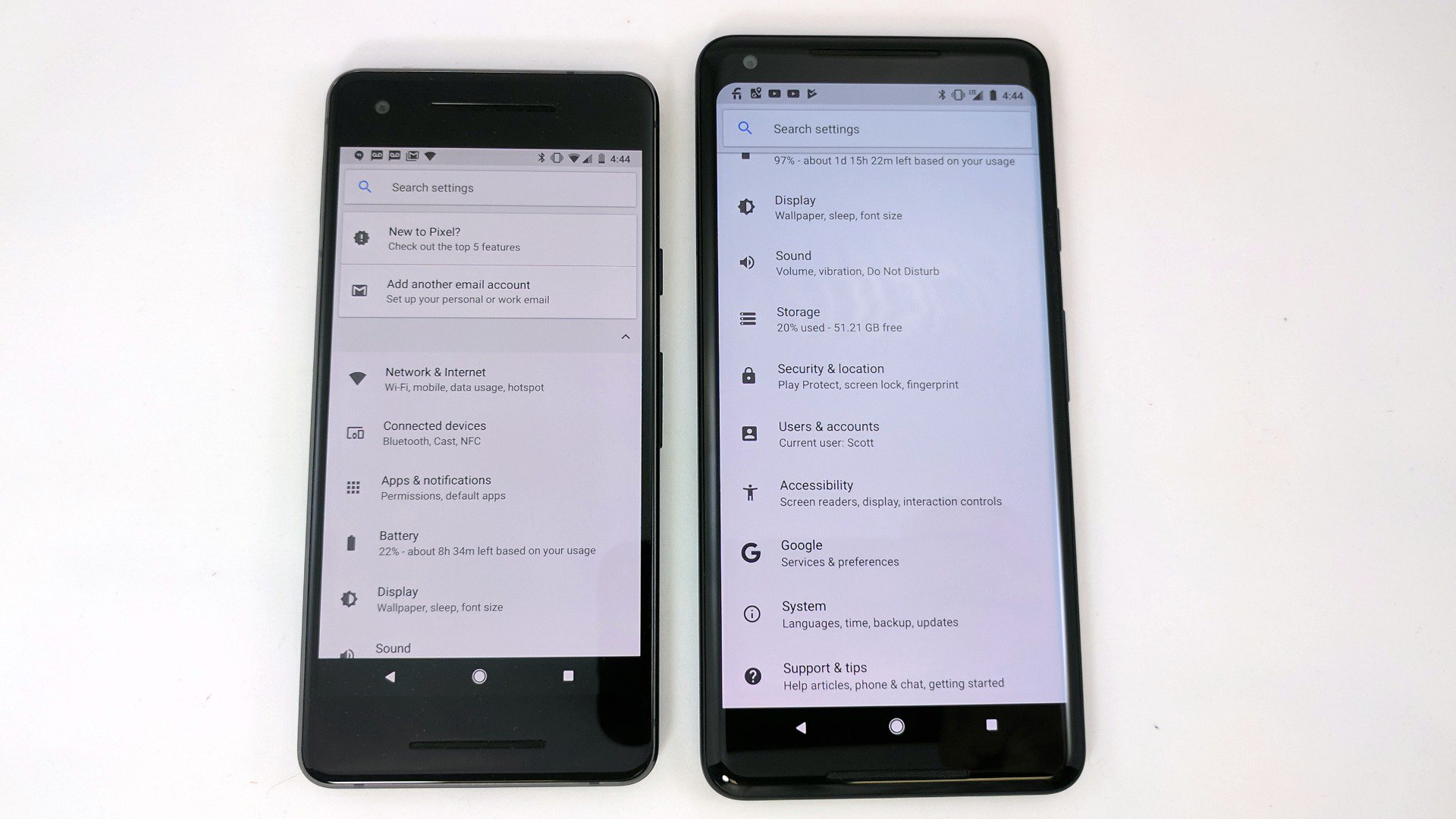
Dig around and you’ll find that this comes down to LG manufacturing the screen in the Pixel XL 2 and Samsung creating the one for the Pixel 2. On paper, the larger phone has the same screen size and tech as the V30. And, depending on how deep of a rabbit hole you climb into, you’ll find that the LG phone is not without its own issues.
Mileage will vary per user. Some of the loudest complaints come from the smallest crowds. You’ll find plenty of angry mob types on forums and threads but it could be a simple case of angry few making noise loud enough for all.
To be fair, some of the images I’ve seen online look downright nasty. Google definitely has its hands full right now as it tries to look into the issue and/or fix it. I have no doubt that Google will do its part to replace or repair the problem devices. Given the flagship nature of the phone, it doesn’t want this to last long.
Build Quality
The Pixel 2 is more squared off and slab-like than its predecessor. I happen to like the slight changes from the first generation, even if they’re minimal. There’s less glass than in last year’s phone, but it also give us less to scratch or scuff. As for the other material, the texture is more rough and gives a better grip.
A welcome change in this year’s line, water resistance, is one of the only gripes I had with last year’s model. Given that so many other phones come with the feature I come to expect it in any handset commanding flagship pricing. Really, it should be standard for all mobile devices.

You might go an entire year without needing water resistance, but the one time your phone catches a sudden rain or poolside cannonball splash, you’ll be glad it’s there. I appreciate that both the Pixel 2 and Pixel XL 2 have water resistance.
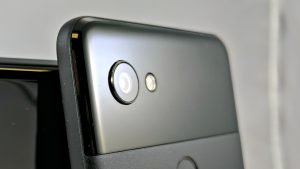
Flip the phones over and you’ll find that there’s a slight lip that encircles the rear camera. It’s a minimal protrusion but it’s worth pointing out. It doesn’t make them feel uneven when lying on the back, but there’s just enough here to catch on a surface or to potentially scuff. Put the handsets in a case and you won’t have any problems.
Ask your snobby friends to speak on the build of the Pixel phones and a common argument is that they have too big of a bezel. By ways of comparison, they sure do. Last year’s models we more prominent than the new phones; the Pixel 2 has more “wasted space” than its larger counterpart. There’s a justifiable reason.
Queue up some music or a YouTube video and give it a listen. Google moved the bottom speaker from below the handset into a position directly under the screen. The front-facing stereo setup is excellent and offers up an incredible sound. I suppose there could be just a little bit trimmed from the top and bottom bezels but I can’t imagine Google leaving extra space for no reason at all. Plus, it looks symmetrical when turned on its side.
Camera
Phone makers almost always brag about the camera experience on their devices, especially the bigger names who deliver flagships on a regular basis. Yes, they have gotten much better over the years, and the software experience always improves, too.
Google, for its part, made a very big deal out of its camera and the highest DxOMark score to date. After spending just a few days with the Pixel and Pixel XL it was very obvious that this was more than lip service and indistinguishable benchmarks. The Pixel camera was the real deal and its 90 score was incredible and well worth the praise.
For this year we find that Google has managed to up the ante even more, pulling in a commanding 98 DxOMark score. Beating all others again, I couldn’t wait to test the Pixel 2 and Pixel XL 2. Would it be incremental and something that matters only on paper?
Flickr Gallery of Camera Samples

I’ve already captured some incredible photos with excellent detail and very accurate color. The shutter is super fast, mowing through pictures at a rapid rate. Things will get even better over the next few months as Google enables the Pixel Visual Core. Suffice it to say, the out of box experience now is already a winner.
I look forward to testing out the optical image stabilization and electronic stabilization. The demo at Google’s unveiling tells us it should be almost revolutionary and change video captured on smartphones.
Performance
Man, I miss the headphone jack. My office is only a couple of miles from home, and I don’t travel too far around town, but I almost always have my phone plugged directly into my stereo. I wish I could tell you that I had Bluetooth in my truck but I don’t. In truth, pretty much all modern cars do have the technology, including my wife’s. Nevertheless, I love plugging in for Audible or Google Play Music because terrestrial radio sucks.
If you rely on an auxiliary cord on a regular basis, you’re going to take issue with the Pixel 2 and Pixel XL 2. Indeed, after mocking Apple and others for removing the plug only one year earlier, Google removed the 3.5mm jack from both phones.
I would have loved a pair of inexpensive Bluetooth earbuds in the box. Or, perhaps maybe a discount code for the new Pixel Buds. If the industry is going to evolve, Google and others should help make the changes easier.

Given the hardware that powers the Pixel 2 and Pixel XL 2, you’d expect a snappy experience. You get that here; there’s nothing I’ve thrown at the phones yet that’s caused them to stutter or slow. Android 8.0 Oreo is as smooth as ever, building slightly on the great foundation that was 7.0 Nougat.
If there’s one word that I can use to sum up the Pixel line of devices it’s “cohesive”. For good reason, it’s the full Android experience as intended by Google. While they’re not yet a hardware manufacturer, Google does an excellent job in working with the platform and phone makers.
I’m a huge fan of how Google integrates its apps and services. The list of pre-loaded titles has evolved over the years but today’s suite feels appropriate. It skews a little more toward new smartphone adopters with Allo, Duo, and Messages, but longtime Google users can easily install Hangouts, Google+, or other apps.
As much as I like the idea of squeezing the phones to trigger Google Assistant, I don’t think I will be using it that often. There are already a number of ways to pull it up, some of which feel just as intuitive. I would really like a setting in the phone that lets me trigger an app or function. I’d use it much more if I could squeeze to launch email.
Conclusion
It’s really hard to throw shade at the Pixel 2 or Pixel XL 2, at least on paper. Display issues aside for the select few users of the Pixel XL 2, the general consensus seems to be that these phones are winners.

I love the fact that Google Photos lets me upload my pictures and videos at original resolution. Really, I’d enjoy that with any quality of camera, but it’s extra good when you have the top-rated smartphone camera on the market.
The Pixel 2 and Pixel XL 2 are nice steps forward in the family of devices; the changes are in the right areas and are appreciated. To me, it’s not worth the $200 difference to go for the larger model. That’s a personal preference, though, and a call you’ll have to make. For now, if you can wait until the display problems are cleared up by Google, I would suggest holding on just to be safe.
I would like to see wireless charging added to the Pixel line. To be honest, I was surprised that Google didn’t add it this time around. It’s not as if we’re still waiting on an industry standard to emerge.
Should you upgrade?
If you own an existing Pixel or Pixel XL, I am going to suggest sitting tight for now. There’s enough changed from last year to qualify as an upgrade, but it’s certainly evolutionary and not revolutionary. Given that your current model already has or is in the midst of receiving Android 8.0, you’re not missing out on much.
For everyone else, though… If you’re sitting on something older from another phone maker, the Pixel 2 is certainly worth a look. There’s something to be said about a stripped down, lean version of Android, particularly if you’ve never experienced it. I encourage long time Samsung, LG, or HTC users to give it a try.

On a related note, I’ve always tried to sway friends and family away from buying phones through carriers. In addition to OEMs baking in the extra software and apps we often find things loaded by the service provider. You might not realize it, but all that junk matters.
Spend some time with a Nexus or Pixel phone and you’ll be tempted to stay with Google’s hardware. The total package gets better with each iteration and the 2017 bundle is a tough one to beat.
For $650 the Pixel 2 is definitely worth the price. It was the right cost for last year’s model and the updates for this just gives you more for the same cost. What’s more, it keeps you from wandering into that area of $800+ devices that look sexier but really just do the same stuff. You’ll have to figure out for yourself if it’s worth the cost difference to go with the XL 2.
She’s not the most beautiful girl in school, but she is super smart and really understands your needs. You won’t go broke dating her for awhile, you’ll have a lot of fun together, and you may come to appreciate that the important stuff is below the surface.
 AIVAnet