


LG’s phone arm continues to eat away at its profits
One of the great problems with being a popular musician or comedian is that your audience is always aching for you to play the greatest hits. That can get pretty boring, especially if you want to be known as an artists with a broader, or deeper, body of work than just Achy Breaky Heart. Bear that in mind for poor LG which, yet again, has to announce that its mobile division is a furnace that turns money into ashes and dust.
In terms of the chaebol’s various businesses, sales of premium TVs jumped 12 percent compared to the same quarter last year. That translated into an operating income of $407.3 million, while LG made $375 million in its home appliances arm thanks to higher demand for premium kitchen devices.
The company’s nascent vehicle components business did lose $25 million, but LG says that the loss was down to R&D investments, with in car-infotainment and EV systems selling well. It’s expected that the surge in development in electric vehicles from even traditional car manufacturers will push this division into profitability in the near future.
And then there’s LG Mobile Communications which managed to get more handsets out of the door compared to the same quarter in 2016. But the notes of optimism end there, since the business managed to lose $331 million thanks to higher raw material and component pricing.
LG’s turnaround strategy is, as it always seems to be, to look to reduce manufacturing costs and push well-regarded devices like the V30 and Q6. Although it remains to be seen if users will vote with their wallets in the face of so many other well-regarded handsets out there on the market right now.
Overall, LG made a net profit of $298.9 million, but you could imagine how much bigger that figure would be if its mobile division wasn’t such a liability. Despite the losses, the company concluded that it’s doing pretty well, especially considering the geopolitical situation it finds itself mired in.
In the report, LG specifically mentions a “continued business risk caused by trade conflict from increasing U.S. trade protectionism,” which threatens LG’s access to the North American market. Not to mention the overall political outlook for the world, which the company euphemistically describes as “gloomy.”
Source: LG (.PDF)
Bloodhound preps for land speed record with 200MPH test run
It’s finally happened. Nine years after the Bloodhound project was announced at London’s Science Museum, the supersonic car has completed its first test runs. At a closed-off airstrip near Newquay airport, Cornwall, the monstrous vehicle roared across the tarmac at roughly 200 MPH. That figure is a long way off the team’s ultimate goal of 763 MPH, however, and a new world land speed record. Eventually, the team hopes to crack 1,000 MPH at the dusty Kalahari desert in South Africa. Before then, however, the team had to prove that the car was more than vapourware and broken promises.
Today, the car relied on a Eurojet EJ200 jet engine for thrust. That on its own could take the car to 650 MPH. The final configuration will also have a rocket system provided by Nordic aerospace company Nammo. For the initial record attempt, the Bloodhound will use a single monopropellant rocket which can produce around 40kN of thrust. It will then be swapped out for a hybrid rocket system that, combined with the jet engine, can carry the car to 1,000 MPH. In total, the vehicle will produce 212kN of thrust, which is eight times the power output of a Formula 1 starting grid.
To install the rocket system, however, Bloodhound needs cash. Funding has always been a problem for the team in Bristol, which relies on sponsorship and fan donations to operate. The trial runs in Cornwall, then, serve two purposes; they’re a vital form of testing, giving the team valuable data and insight into the practicalities of running the vehicle. They are, though, also a marketing tool which the team hopes will attract the interest and, ultimately, the cash of a deep-pocketed investor. Without extra funding, the team will have to delay its record attempt in late 2018.

Bloodhound is driven by Andy Green, an RAF pilot who set the previous world land speed record with the Thrust SSC in 1997. He’ll be piloting the vehicle both for the initial land speed record (the team hopes to hit about 800 MPH) and the 1,000 MPH attempt. Bloodhound is a complicated and intimidating car to operate, measuring 13.4 meters and weighing roughly seven and a half tonnes. In Cornwall, however, Green seemed unfazed —excited even — as he clambered into the cockpit. We’re not surprised; he’s waited as long as the public to finally push the accelerator pedal. Here’s hoping it won’t be quite as long before we see Bloodhound run again.
‘Super Mario Odyssey’ is everything it needs to be and more
“A return to form.” “A reinvention.” There are lots of clichés we fall back on when describing a fresh game in a long-running series. The truth is, Nintendo has constantly reinvented the idea of a 3D Mario game, relentlessly pushing the franchise forward with each release. Super Mario Odyssey is just one more step in the right direction, another evolution of a perfect formula.
The setup in Odyssey is as familiar as ever: Bowser has kidnapped Princess Peach, so you need to collect an arbitrary item (Power Moons rather than Stars this time) and chase him down to save the day. This time around, Bowser is going from kingdom to kingdom collecting items — a ring, a gown and so on — for a wedding ceremony. It’s a coherent enough narrative, but the joy of Mario has never been in its story.
The structure is essentially a combination of Super Mario 64 and Galaxy. There are hundreds of Moons dotted around more than a dozen kingdoms, some nestled in hard-to-reach and hidden locations, others handed out for defeating bosses or winning races. Just as Galaxy‘s spaceship would only advance after you collect a certain number of Lumas, Odyssey‘s Moons power up an airship that will fly you to new kingdoms.
There are certain things you know you’re getting with a Mario game. It almost goes without saying that Odyssey offers tight controls, creative platforming and gorgeous art with near-perfect levels of polish. But every Mario has a twist. Sunshine has the water pack, Galaxy has space, 3D World has multiplayer score chasing. Odyssey‘s is a hat.
At the start of the game, as Princess Peach is kidnapped, Mario’s famous hat is shredded. Luckily, he soon meets a character called Cappy, whose regular appearance is a cross between a Boo and a top hat. Cappy’s sister, Tiara, has been kidnapped to act as a headdress for the ceremony. The pair quickly resolve to join forces to stop Bowser from wreaking his personal brand of comic mischief and mild havoc.
Cappy has a single talent: He can be thrown. But that one move opens up a world of possibilities. You can throw Cappy with the X button and use him to grab coins and hit certain enemies. Hold X and Cappy will hover in place, ready to be used to jump over gaps or as a springboard to reach high platforms. (If you run into Cappy, Mario jumps roughly as high as with a backward or sideways somersault.) This alone makes platforming challenges far more dynamic and interesting: Where before you would simply long jump and somersault around a level, now there are multiple approaches to any obstacle.
The real fun starts when you use Cappy to “capture” enemies and objects, which grants you full control over them. Many Mario favorites can be possessed in this way, just by throwing Cappy at them. Goombas can shuffle around and stack themselves on top of one another to reach high places; Cheep Cheeps allow Mario to swim freely underwater; Lakitu will let you fish; Fire and Hammer Bros. grant you huge jumps and their respective projectiles.
At its core, Cappy is a replacement for the power-ups of every Mario game, but Nintendo takes the system to weird and wonderful places. Within a few hours, you’ll have controlled a T. rex, a tank, a fork, an RC car, a lava bubble and … a slab of meat. Each of these possessions brings new mechanics, and there are dozens of characters you can control. Some, such as the Goombas, are ubiquitous, while others appear in just one kingdom or even a single sequence. Just as using Cappy to jump allows for more divergent platforming sequences, the capture system gives rise to ceaseless variety in gameplay.

I played the vast majority of Odyssey in portable mode, maybe eight hours docked with a Pro Controller and a couple more with Joy-Cons in each hand. The Joy-Con controls were fine: There are lots of motion-control options, particularly when throwing Cappy or controlling foes, but I always found the button-press alternatives more intuitive. I’m not a huge fan of the Pro Controller, as I tend to use the Switch as a portable, but it’s definitely the most comfortable way to play in front of a TV.
I also briefly tested the two-player mode. It’s an asynchronous affair, with one player controlling Mario and the other Cappy. It’s certainly useful for playing with very young children, but those coming from the superb multiplayer of 3D World aren’t going to be blown away. If you’re desperate to play with friends, you’re probably better off just passing the pad between Moons.

My friends and I used to reference “Resident Evil logic,” which was the notion that people always seem to leave caches of ammo or herbs down dead-end corridors. The core tenet there is if you stray away from the beaten path, you’ll be rewarded. That idea is everywhere in modern gaming, often with collectible items as the prize. Most recently, Nintendo used the concept to encourage wayfinding in The Legend of Zelda: Breath of the Wild.
3D Mario games have always done this to an extent — many of the stars in 64 or Lumas in Galaxy were squeezed into forgotten corners of their respective games. They reward inquisitiveness and prompt players to embrace exploration.
Every kingdom is like a rabbit warren, full of secrets and unique trials.
You’ll probably stumble upon your first hidden Moon or bevy of coins entirely by accident. For me, “I wonder what’s up there?” gave way to “Well, how do I get up there?” which, after a couple minutes of problem solving, led to, “Oh, a Moon!” In Odyssey, that observation-investigation reward loop drives the whole game forward.
Every kingdom is like a rabbit warren, full of secrets and unique trials. In five minutes of gameplay, you might waddle about stacking Goombas before flying around as a Bullet Bill and then head down a pipe for some 2D platforming. But despite this occasionally frantic pacing, Odyssey never descends into a mini-game compendium, thanks in part to the Cappy conceit keeping you in control of proceedings.
A quick word about those well-publicized 2D-platforming levels: Nintendo has clearly borrowed from the creativity of Super Mario Maker, integrating many new ideas into the format. Some levels look graphically interesting, with 2D planes that wrap around a cylinder, while others mess with gravity or even require you to follow a backdrop or “fall out” of the 2D world and into the 3D one. The spirit of exploration from the main game is also present here, with Moons hidden offscreen or behind drops that would usually mean death for Mario. These levels are great set pieces, with the New Donk City sequence being particularly memorable. I’m really hoping we get a new Super Mario Maker soon.

New tricks
While it doesn’t stray too far from the established Mario formula, there are a number of additions that make Odyssey feel like a more modern game than we typically see from Nintendo.
Perhaps the most notable addition is a proper map system with fast traveling. Kingdom maps are beautifully put together in a travel-guide format. This not only helps you find your way but also facilitates travel between checkpoints in seconds rather than running the length of a level. Getting to any particular spot in the game (after you’ve unlocked everything) shouldn’t take longer than a minute, which makes mopping up Moons way less of a chore.
Coins are now actually used as currency. You can use them to buy clothes and other items, and each kingdom also has 100 unique coins that can be used on outfits, stickers and collectables specific to that region.
The outfits are a lot of fun: You can select your hat and outfit independently, which has been hilarious to the kids I’ve shown it to. Most collectables live inside your airship, so by the time you’re finished it’ll look like a Mario gift shop. Stickers are actually applied to the outside of the airship, a little like the luggage stickers of old, which vibes well with the travel-guide maps and a lot of the end-game dialog.
The modernization continues with the addition of a decent-enough photo mode, which lets you pause the action and move the camera around to capture images. The graphics quality seems to increase a little when you’re in this mode. I think the render resolution is the same, but to my untrained eye the draw distance is improved and there’s some anti-aliasing added on top to smooth out the edges a little. Beyond that, there are a few fun filters, along with an option to add a logo. It’s not on the level of games like Uncharted 4 or anything that supports NVIDIA’s Ansel, but it’s a solid feature.
Another welcome feature is minigame leaderboards. Nintendo is clearly held to a different standard when it comes to online functionality, as its efforts have been so hit or miss. For it to have a functional online leaderboard with settings for filtering global and friends’ scores, just for a collection of side content, at least shows it’s moving in the right direction. Also, it was enjoyable briefly being third worldwide for something. I’m sure by the time you read this I’ll be a few million spots lower.
While we’re on the subject of moving with the times, there’s Princess Peach. Yes, Nintendo is still leaning on the kidnapped cliché, but without spoiling things, she at least has one scene where she’s given some agency in this game.

Super Mario Odyssey‘s main story is short. I wasn’t rushing through it, but I arrived at the end credits in around eight hours. I was a little concerned when I reached this point — I wasn’t ready to call it a day, and we’ve all seen developers put together a great short game only to be slammed by The Internet for not padding it out with hours of tedium.
 The Mushroom Kingdom is stuffed full of Easter eggs and fan-favorite characters. If you can avoid social media until you’ve had the chance to explore it, you should.
Luckily, both my fears and disappointment were short lived. After the credits finish rolling, you soon unlock a new area, which contains more to do than any other world in the game. Hundreds of new Moons are also added to places you’ve already visited, and extra challenges like races appear on each kingdom map.
These segmented trials are perfect for when you have five minutes to burn, which naturally leans into the Switch’s strengths as a portable device.
After around 30 hours of playtime, I’ve now collected 330 Moons, which is less than half of the 800 in the game. Even though I know at least one other reviewer who’s approaching 800 Moons and I’ve definitely been taking it easy, I can happily report that Odyssey should last you weeks and months rather than days.
I’m not one to complain about game lengths — I actively avoid longer games because I worry I’ll never find time to complete them. But Odyssey‘s end game is extremely pleasing, and this is one game I’m definitely going to finish. Whether they’re at the end of a tricky challenge or just a reward for following your instincts, hunting down new Moons is an enjoyable task. Because you can zip around worlds and checkpoints so quickly, these segmented trials are perfect for when you have five minutes to burn, which naturally leans into the Switch’s strengths as a portable device.

Super Mario Odyssey is not the departure from the norm that Breath of the Wild represented for the Zelda series, but it didn’t need to be. Super Mario 64 was that, and Sunshine, Galaxy and 3D World didn’t rest on its laurels in the same way that the main Zelda games hemmed to the Ocarina of Time formula.
Instead of sea change, we got another great Mario game. Controlling Mario in three dimensions has been fun for more than two decades, and with each iteration Nintendo hones its mascot a little more. I had as much fun jumping and somersaulting around in Odyssey as I did when I was 12 playing Mario 64.
Yes, we got some important updates, like fast travel and maps, and a truly memorable mechanic in Cappy. But it’s that core, that joy of Mario, that makes collecting 800 meaningless objects fun. It’s the joy of Mario that makes Odyssey one of the best games I’ve ever played, and a firm contender for game of the year. Now the challenge for Nintendo is to meet the standards it set with Odyssey and Breath of the Wild over the coming years. And that’s a good problem to have.
[Image credits: All screenshots captured by Engadget on a Nintendo Switch.]
AMD stuffs Radeon Vega graphics into its Ryzen Mobile chips
It’s been a revival year for AMD. Its Ryzen chips thrust it back into the desktop arena — so much so that it practically forced Intel to dramatically ramp up the capabilities of its upcoming eighth generation Core CPUs. And with its RX Vega video cards, AMD finally had a way to compete against NVIDIA’s latest batch of GPUs. Now, the company is setting its sights on laptops with its upcoming Ryzen Mobile chips. And, as you might expect, they’ll feature integrated Vega graphics. AMD’s goal? To power ultrathin laptops that can still play a few rounds of Overwatch.
Although AMD is no stranger to laptops, it’s never been a market where the company truly shined. Last year’s seventh-generation APUs (its term for processors that combine CPUs and GPUs) helped it catch up with Intel. But with Ryzen Mobile, AMD is looking to leap far beyond the competition. The company claims it delivers desktop-class CPU performance, and its integrated Vega graphics are about as powerful as NVIDIA’s GTX950M dedicated GPU.
To start, AMD is launching two new mobile processors: the Ryzen 7 2700U and Ryzen 5 2500U. Both chips will pack in four cores with eight threads — just like Intel’s eighth-generation laptop processors. The higher-end Ryzen 7 will feature clock speeds between 2.2GHz and 3.8GHz, and it’ll pack in 10 Vega cores. The Ryzen 5, meanwhile, will see between 2GHz and 3.6Ghz speeds and eight Vega cores. In comparison, Intel’s new chips can reach up to 4.2Ghz, but its integrated graphics aren’t nearly as powerful.

AMD also announced a few intriguing stats: The new chips pack in 200 percent more CPU speed and 128 percent more graphics performance than the last generation, all while using 58 percent less power. That’s the result of moving to more efficient architecture on all accounts. Ryzen Mobile shines when it comes to multithreaded performance, in particular. It reached a surprisingly high Cinebench R15 score of 719, while Intel’s Core i7-8550U clocked in at 498, and AMD’s last-gen chip scored a mere 325. (Single threaded performance barely made a budge in Cinebench, though.)
Even when pitted against Intel’s Core i5-7600K — a powerful desktop chip — the Ryzen 7 mobile processor won out, reaching 707 compared to Intel’s 662 in Cinebench’s multithreaded benchmark. That’s even more impressive when you consider the Intel chip has a high 91-watt thermal design profile, or TDP, which means its meant to withstand much more voltage. The Ryzen 7’s TDP is a mere 15 watts.
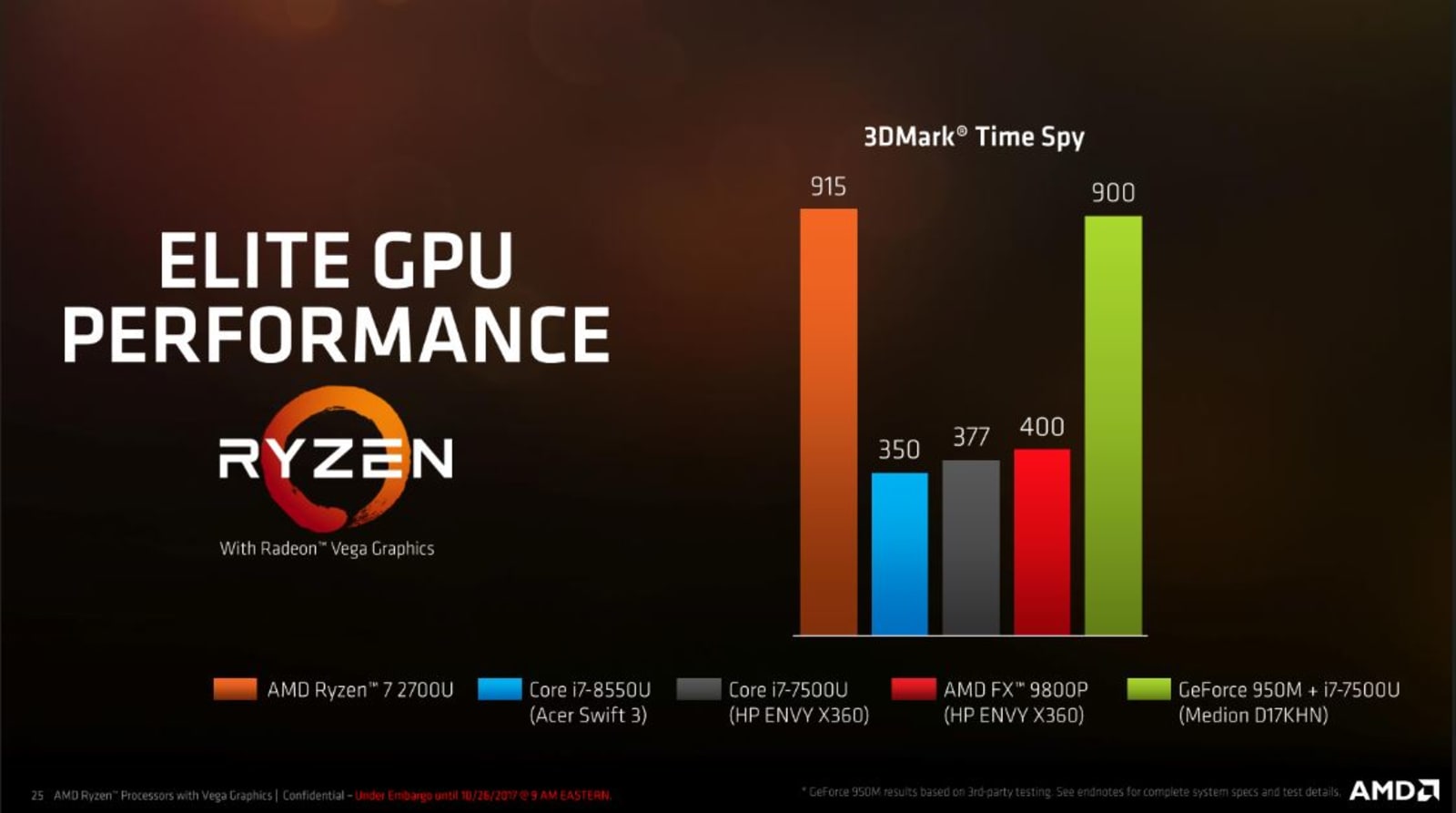
As for pure GPU performance, Ryzen Mobile blows away last year’s chips, as well as Intel’s current integrated graphics. In 3DMark Time Spy, the Ryzen 7 reached a score of 915, while Intel’s Core i7-8550U scored just 350. You’d have to combine an Intel chip with NVIDIA’s 950M dedicated graphics to get anywhere close.
Of course, AMD isn’t directly comparing itself to NVIDIA’s 10-series mobile GPUs, which deliver astounding desktop-like performance. But that makes sense. Those graphics cards are dedicated components, not integrated directly with a CPU like Ryzen Mobile. At this point, AMD is basically trying to push what’s possible with thin laptops and mid-range gaming. And though the company isn’t saying much about future plans yet, reps noted that it wouldn’t be difficult to scale Vega’s performance in laptops to directly compete with NVIDIA’s fastest hardware.
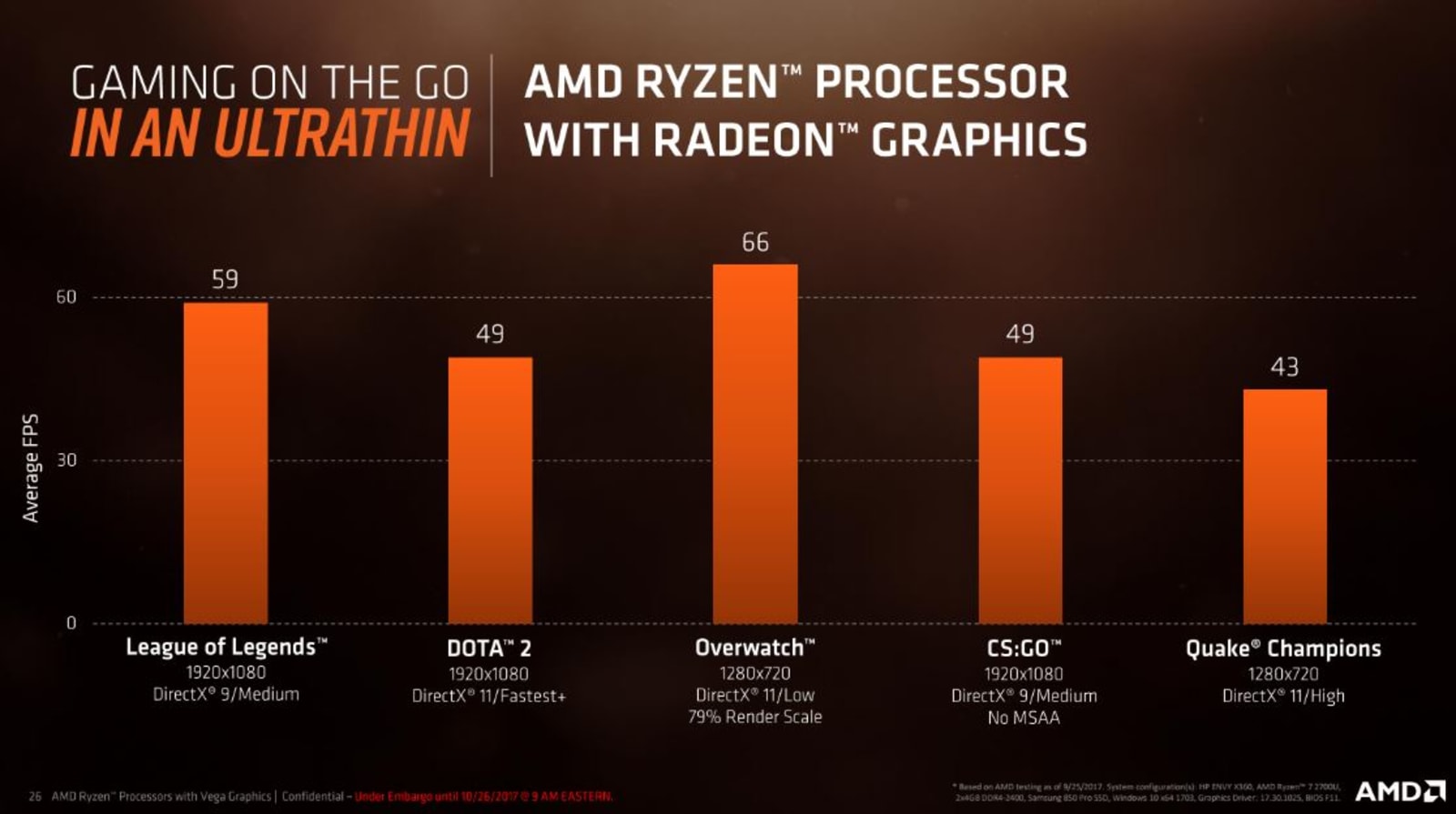
Although Ryzen Mobile machines certainly won’t replace dedicated gaming machines, they’re fast enough to satiate gamers on the road. AMD claims the Ryzen 7 chip gets around 59 frames per second in League of Legends while playing in 1080p. Overwatch, meanwhile, scores a respectable 66 FPS in 720p with low settings.

AMD’s Ryzen Mobile die with Radeon Vega GPU.
AMD
The new laptop chips also sport several beefed-up features. AMD’s Precision Boost 2 technology lets them scale down their clock speeds gracefully as more threads are required. Previously, there would be a big speed dip as you needed more processing threads. AMD describes its new technology as more opportunistic — it’ll take as much performance as it can get depending on the current temperature, voltage and load. Additionally, the company’s new mobile XFR technology lets well-cooled laptops sustain peak clock speeds for much longer than before. Turning that feature on gave the Ryzen 7 a 23 percent speed boost in Cinebench’s multithreaded benchmark.
And of course, there’s battery life. AMD claims you’ll see up to twice the performance of last year’s chips, according to its reference benchmarks. Ryzen Mobile gets over nine hours of YouTube video viewing on a test system, compared to 4.5 hours for the previous generation. MobileMark 14, which recreates typical laptop usage, saw around 13.5 hours of battery life, whereas the last generation saw 10.7 hours. These figures are just meant to give you a sense of the improvement, though. Actually battery-life times will depend on the hardware manufacturers actually use in their systems.
You’ll find the Ryzen Mobile first in HP’s Envy X360 convertible, Lenovo’s Ideapad 720S and Acer’s Swift 3, all of which are being refreshed later this year. AMD points out it’s relatively simple to integrate the new chips into existing laptop designs. In fact, it can get some serious performance boosts when it’s placed into cooling systems meant for much hotter chips. The Ryzen Mobile chips are also 24 percent thinner than before, which means it’ll fit into thinner systems.
Given that AMD is typically known for its mid-range and low-end laptop chips, it feels strange to be genuinely excited about what its next processors mean for high-end laptops. Who wouldn’t want a machine that’s as thin as a MacBook Air that you can also use for a bit of gaming? Ryzen Mobile, in particular, is something only AMD could build. Intel has faster desktop chips, and NVIDIA has faster dedicated mobile graphics. But nobody else could combine the strengths of both into a single mobile-ready processor.
Amazon discounts LG’s G6 if you accept Prime ads
Amazon didn’t have much joy selling its own phone, but has achieved plenty by selling other people’s under its Prime Exclusive Phones label. The deal is that users get a discount off the price of a mid-range handset in exchange for Amazon slinging you ads on your lock screen. If you turned your nose up at an Alcatel A50 or Moto G5, then perhaps LG’s early-2017 flagship, the G6, might be more of a temptation.
The handset launched at the start of the year and was something of a recovery for LG after the mis-step that was the G5. That ambitious yet massively flawed handset tried something new with modularity that did not find a welcome home with customers. As a consequence, the G6 hits all of the core buttons buyers would hope to expect from a flagship smartphone. In our review, we praised everything bar the underwhelming battery life and clunky user interface, but it’s still pretty stellar.
The G6 comes packing a 5.7-inch QHD display with that slightly quirky 18:9 aspect ratio paired with a 1.6GHz Snapdragon 821. 4GB RAM sits beside 32GB internal storage, and LG still includes a microSD-card slot in its devices that’ll let you expand its capacity up to 2TB. The ad-supported LG G6 is available for $399.99 for Prime members and is unlocked on all major networks.
Amazon is also stocking some of the other members of the G6 family, including the enthusiast-level G6+ with 128GB internal storage and a 32-bit DAC for better sound. That’ll set you back $499.99, and is similarly unlocked for all of the major US phone networks. Prospective buyers can also find a lower-end Q6, priced at $299.99, and the LG X Charge, which packs a 4,500mAh battery, for just $199.99.
Uber’s multi-destination feature makes riding with friends easier
Uber has launched a multiple stop feature that lets riders add up to three stops on their trip, eliminating the need to add a new address after each drop or pick-up. Open the app, hit “Where to?” and then tap the “+” symbol to add the addresses of each stop. You can add or remove stops in real time, with your requests syncing with your driver’s directions immediately, and you can still split the cost of the fare with friends via the app.
It’s a useful feature for both parties, helping drivers minimise the time spent on each trip and giving riders more transparency on their fares. The function is already in use in some major cities worldwide, but will roll out more widely in the coming week. Londoners, of course, will miss out (for now, at least).
Google Pixelbook review: A premium Chromebook that’s worth the price
When we reviewed Google’s Chromebook Pixel in 2013, we said it was a gorgeous, well-built computer that almost no one should buy. That’s also how we felt about the follow up in 2015. See, Chrome OS has been considered fine for a cheap second computer, but it was pretty much impossible to recommend anyone drop $999+ for the Pixel. Chrome OS was too limited, when a computer running Windows or macOS costs the same amount.
Google’s ambitious new Pixelbook suggests that won’t be the case anymore. The laptop bears no resemblance to the original Pixel, but it’s cut from similar cloth. It’s still one of the nicest laptops you can find — but it’s also still running Chrome OS.
But for a growing segment of the population, that might not be a problem. Google believes that as the many students who’ve used Chrome OS for years transition into adulthood, they’ll be looking for high quality laptops that run the software they’re familiar with. Moreover, Google says that premium laptops make up 20 percent of the market — the Pixelbook is its latest attempt to get a piece of that pie.
Hardware

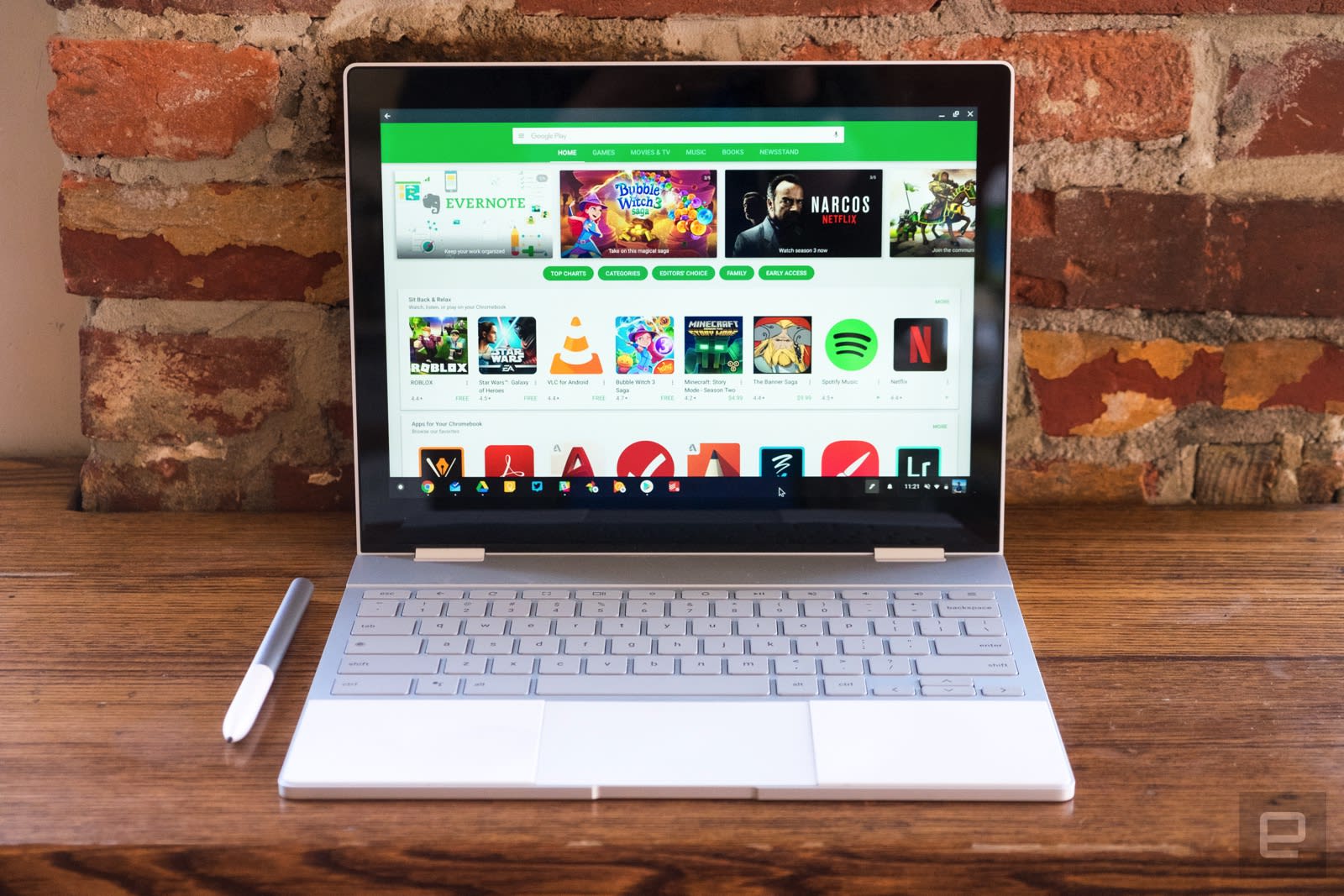
The Pixelbook makes a striking first impression, with a design that borrows heavily from Google’s Pixel smartphones. The whole computer is made up of silver aluminum matched with white accents. On the lid, it’s made of glass, which helps let WiFi signals through. The bottom of the laptop (not a part of the computer we look at very often) has a matching white panel, but it’s made of plastic rather than glass. Along the edges you’ll find a power button, a volume rocker, a headphone jack and two USB-C ports.
Open up the Pixelbook and you’ll find another white panel that makes up the trackpad and palmrests. The palmrests are raised, which keeps the keyboard from touching the screen when the Pixelbook is closed. They’re also made of a soft plastic that’s much more comfortable than resting your wrists on the sharp aluminum of a MacBook. It’s a similar effect to what Microsoft achieved by covering the Surface Laptop with soft, Alcantra fabric. I am concerned the pure white rests will get grubby after extended typing sessions — hopefully they’re easy to clean.
Like many other Chromebooks, the Pixelbook has a 360-degree hinge that lets you use the computer in four different modes: Laptop, tablet, tent (with the hinge pointed up in the air) and “entertainment” (with the keyboard folded underneath). The latter two modes are functionally indistinguishable and not all that useful, honestly. But given the number of computers that offer these options there must be someone who appreciates it.

As with most other convertible laptops, I find using the Pixelbook in tablet mode to be… fine. At 2.4 pounds, the Pixelbook is a light laptop but a heavy and awkward tablet. I don’t mind holding my one-pound iPad Pro for hours at a time on a flight watching movies or playing games, but I wouldn’t do the same with this computer.
In laptop mode, the Pixelbook shines. The keyboard is totally different than the one found on the original Pixel, but it’s almost as good. Since the Pixelbook is so much thinner, the keys only have 0.8mm of travel, but there’s none of the shallow feeling that you find on Apple’s newer MacBooks. Instead, the keys are soft but not squishy and very quiet. Despite the fact that the Pixelbook is essentially the same size as Samsung’s Chromebook Pro, the keyboard on Google’s machine is much, much better. Nothing is cramped, all the keys are big enough, and there’s even a nice backlight. I happily typed away on this computer for hours at a time and had zero issues.
Sadly, the trackpad isn’t quite as good. Basically all other laptops have a small bit of space between the end of the trackpad and the edge of the laptop’s body. The Pixelbook doesn’t, and I was surprised at how much that bothered me, particularly when the computer was in my lap. Compounding the problem was a feeling that the trackpad was positioned too low on the Pixelbook. I wish that the entire trackpad and keyboard assembly was moved up just a bit from the Pixelbook’s edge. The good news is that the trackpad itself is very responsive, it’s just not the most comfortable to use.

One of the reasons I had such an irrational love of the original Pixel laptop was its screen. Not only was it gorgeous, it also had a somewhat-rare 3:2 aspect ratio. While most laptops go for 16:9, the Pixel’s screen was taller and better for browsing the web and writing. The Pixelbook keeps that ratio, but the smaller 12.3-inch touchscreen (the original Pixel had a display closer to 13 inches) means that the resolution has decreased to 2,400 x 1,600, from 2,560 x 1,700. That slight loss of pixels is enough to make the Pixelbook’s screen feel a little cramped, especially when using it at the default scaled resolution of 1,200 x 800.
Otherwise, it’s a very bright and crisp display with excellent color reproduction and viewing angles. It doesn’t feel overly saturated, but the great contrast helps make colors pop. Some have complained about the large bezel surrounding the display, but for a convertible device meant to be used as a tablet, it’s not terribly surprising.
Performance and battery life

Most Chromebooks don’t use powerful processors, but the Pixelbook is an exception. The base $999 model includes a quad-core Intel Core i5 processor paired with 8GB of RAM and 128GB of storage. It’s the first Chromebook with that much storage, which allows users to install more Android apps and save more files offline. The $1,199 model I tested sticks with the same processor and RAM but bumps the storage to 256GB. And if you’re feeling particularly crazy, you can spend $1,649 on a Pixelbook with a Core i7 processor, 16GB of RAM and a 512GB SSD.
For most users, the entry-level model should be more than sufficient. I never came close to filling up the SSD, and performance was outstanding. I typically run several Chrome windows with no less than a dozen tabs in each, along with web apps for Tweetdeck, Todoist, Google Play Music, Google Keep, Hangouts and Slack. I never ran into any slowdowns or stutters, and the extra horsepower kept Android apps working faster and smoother than I’ve seen on any Chromebook. I was even able to dive into fairly graphics-intense games like Asphalt 8 while keeping the rest of my windows and web apps running without performance taking a hit.
Unfortunately, that performance comes at the cost of battery life. Despite Google’s claims that the Pixelbook lasts 10 hours between charges, we got just under eight hours in our standard battery test (looping a 1080p video with brightness set to 66 percent). Under my actual workday routine it fared even worse — I typically needed the charger after about six hours. It’s disappointing, but in line with what other Chromebooks with less powerful processors offer these days.
One bit of good news is that the Pixelbook charges very quickly with its included USB-C power adapter. Google says that plugging in for 15 minutes will get you through two hours of work, which was accurate in my tests. Powering back up to 95 percent took about an hour and change all told, which is pretty quick. I just wish that it didn’t drain quite so fast — and that Google provided better battery estimates so I didn’t get my hopes up to begin with.
Software

As usual, Google made a few tweaks to Chrome OS to go along with the new hardware. The biggest is easily the addition of the Google Assistant. Once you get the Pixelbook set up, say “OK, Google”, and it’ll respond just like an Android phone or Google Home. The Assistant lives in a little window that pops up in the lower left hand side of the screen; it reminds me a bit of the Siri window that slides in on a Mac or Google’s Allo chat app.
There are multiple ways to access the Google Assistant — you can say “OK, Google,” or hit a dedicated key (it’s basically the Chromebook equivalent of the Windows key). The Assistant is smart enough to open the various apps on your Pixelbook needed to answer your queries. When I told it to play Stranger Things on Netflix, the Android app opened up right to the show’s episode list. If you ask for a movie, playback will start right away. The same goes for music; ask for tunes and the Assistant will open up your music app of choice and start playing.
Other than the Assistant, you won’t notice many changes to Chrome OS. Google redesigned the app launcher — again — to make it look like the Android app menu. There’s a handful of recently launched apps at the top, followed by the full list of everything installed on your Pixelbook.
The Pixelbook features the Google Play Store, which is finally out of beta. The combo of the Google Assistant and improved Android apps makes the whole Chrome OS experience feel more complete. Even though I mostly used web apps on the Pixelbook, having the option to open up responsive versions of Lightroom or Microsoft Office was definitely helpful, even just the mobile versions.
Android tablets never took off because too few apps were designed for large screens, but on the Pixelbook, running some apps in “phone” mode can be useful. Having Facebook Messenger running on the side of my screen just makes sense, for example. I also liked having the Todoist app running in a little phone-sized window so I always had my current task list handy.
Even though I did almost everything on the Pixelbook over the last few weeks, I still needed my MacBook Air to get photos edited, resized and watermarked for this review. Basic photo clean up is possible with apps like Lightroom and Snapseed, but professionals will still feel hamstrung. And video editing is still basically impossible.
Pixelbook Pen

The last piece of the PIxelbook story is the Pixelbook Pen. It’s a pressure- and tilt-enabled stylus that uses Wacom technology. Unfortunately it is not included with the Pixelbook. You’ll have to shell out an extra $99 for it. The Pen’s most unique feature is that it offers another way to interact with the Google Assistant. Pressing and holding a button the side of the Pen and then circling something on your screen will prompt the Assistant to search for information related to what you highlighted.
If you circle an album cover, for example, Assistant will bring up info on the artist along with links to find out tour dates and so on. Sadly, it’s not hard to confuse the Assistant — it had a hard time recognizing an image of Google’s own Pixel 2. To be fair, the phone is just a black rectangle, but it shows how tricky image recognition can be.
Otherwise, you can do typical stylus things with the Pixelbook Pen, like taking notes and sketching. Google claims that the Pen’s latency is only 10ms, but I found performance to be a disappointment. When taking notes in Google Keep, there was significant lag; writing on the iPad Pro with the Apple Pencil or on the Surface Pro with Microsoft’s Surface Pen was definitely a better experience. Noticeable lag showed up when I tried making some crude drawings in various apps like Painter, ArtCanvas and ArtFlow. That said, it appears the Pixelbook Pen can achieve low-latency results if the app is properly tuned. I tried a beta version of the Squid note-taking app, and it was notably better than Keep.
For now, the Pixelbook Pen isn’t a must-buy. I like using it to grab screenshots and mark them up, but I’m not much for using a stylus to take notes — I’d rather just type them out, particularly when the input is laggy. The Google Assistant features are fun, but not essential. Think hard before shelling out money for it, chances are you’ll get by just fine without it.
The competition

The Pixelbook doesn’t have any real direct competition — no one else is making Chromebooks quite like this. The best Chromebook on the market is probably the Asus Chromebook Flip C302, which costs less than half of what the Pixelbook will run you. But it doesn’t have a stylus and its screen isn’t nearly as good as the one on the Pixelbook. Its construction feels much less solid, but that’s par for the course on a $479 computer. It’s still an excellent machine for people who want to get the Chrome OS experience without breaking the bank. If you have to have stylus support, Samsung’s Chromebook Pro and Chromebook Plus are worth taking a look at. The keyboard and battery life are let downs, but they’re both still solid machines.
Outside the Chromebook space, Microsoft’s new Surface Laptop is the same price as the Pixelbook. It’s similarly well-designed and powerful and has battery life that is essentially unmatched. You get a lot of computer for your money and it also can run any software in the Windows Store. Shelling out a little cash to upgrade the limited Windows 10S to the full version of Windows 10 gives you access to all programs for the platform. It won’t run Android apps, but that’s not a concern when you have the breadth and depth of Windows available.
Wrap up
The question is the same one we asked of the Chromebook Pixel: Is it worth spending $1,000 on a laptop running Chrome OS? The answer this time is different: Yes… with a couple of caveats.
Photo and video editors as well as serious gamers will still need to look at more traditional options. But, anyone else looking for a high-quality laptop should give it real consideration. In the last two and a half years, Chromebooks have become more popular and many essential services work perfectly well in a browser. Plus, Android apps on Chrome are finally a real and useful thing
Look, computers with this level of design and specs don’t come cheap. The Pixelbook is among the best laptops I’ve used in a long time. It’s thin, light, fanless, powerful, comfortable to use and beautiful to look at. Unless you need a full-featured Mac or Windows PC, the Pixelbook is worth the price.
Uber faces another lawsuit alleging gender and race discrimination
Things have been relatively quiet on the Uber front recently, at least in regard to lawsuits, as CEO Dara Khosrowshahi gets his new house in order. That changed today, as Reuters reports that three female engineers are suing Uber for racial and gender discrimination. The lawsuit was filed Tuesday at California’s Superior Court in San Francisco.
The women, Ingrid Avedano, Roxana del Toro Lopez and Ana Medina, are software engineers who identify as Latina. They assert that Uber’s employee ranking system favors men, white and Asian employees, rather than being based on “reliable performance measures,” according to Reuters.
They claim that women, black and Latino/Latina employees are not granted pay raises, bonuses, stock, benefits and other wages and compensation because of the preference Uber gives men and white and Asian employees. The three engineers say that this has made it more difficult to advance at the company and, as a result, their jobs consist of more menial tasks than their male and white/Asian peers.
It’s too early to tell what will happen here, but Uber has a terrible track record of sexual harassment and gender discrimination, so much so that former CEO Travis Kalanick was forced to leave the company. Clearly it’s going to take awhile for the company to clean up its act — if that’s even possible, considering how entrenched toxicity is in Uber’s company culture.
Source: Reuters
Developer Warns That Granting iPhone Camera Permissions Allows Apps to Secretly Capture You
Following the demonstration of a phishing attack that used Apple-style password requests to get into an iPhone user’s Apple ID account, developer Felix Krause this week has detailed another proof-of-concept project, this time focused on the iPhone’s cameras.
Krause warned that any time you grant an app permission to access your iPhone’s front and back cameras, the app can secretly take pictures and videos of you as long as it’s running in the foreground (via Motherboard).
Similar to his previous blog post, Krause’s camera privacy project isn’t about disclosing a new iOS bug, but more about warning users that this kind of privacy violation is possible within iOS. Many apps regularly request permission to the camera in iOS, allowing users to post photos from their Camera Roll, take a picture within the app without leaving it, and more.
Krause explained that with these permissions granted to a malicious app, the iPhone’s front and back cameras can be turned on when that app is running. From there it could record content, upload it online, and even run real-time facial recognition software to detect emotions, all without indicating that your iPhone is recording you or your surroundings.
 Image via Felix Krause
Krause created a demo called watch.user to further emphasize his point, creating a fake social network app that tracks the user. As you browse, Krause explained, “you’ll suddenly see pictures of yourself, taken a few seconds ago while you scrolled through the feed.” In the image above, he explained that with a vision framework in iOS 11 a developer could even map someone’s face to track their expressions, and Krause’s mapping software displayed a corresponding emoji as a further proof of concept.
The developer said that there are “only a few things you can do” to potentially prevent this from happening, including purchasing camera covers to place over your iPhone’s lenses. Otherwise, you have to revoke camera access for all apps — which would greatly hinder the usefulness of many apps — and instead always use Apple’s built-in Camera app.
Krause reported the issue to Apple, and mentioned a few ways it could be potentially addressed:
– Offer a way to grant temporary access to the camera (e.g. to take and share one picture with a friend on a messaging app), related to detect.location.
– Show an icon in the status bar that the camera is active, and force the status bar to be visible whenever an app accesses the camera
– Add an LED to the iPhone’s camera (both sides) that can’t be worked around by sandboxed apps, which is the elegant solution that the MacBook uses
To double check which apps have access to your iPhone’s cameras and photo library, navigate to the Settings app in iOS, tap Privacy, and there you’ll find Photos and Camera. Apps that you’ve granted access to each will be listed, and you can change settings with toggles or choosing to “Never” allow access. As a point of emphasis, Krause’s project isn’t a bug or a major security breach you need to worry about, but it is a good reminder to ensure the apps you grant camera access to are trustworthy.
Related Roundups: iPhone 8, iOS 11Buyer’s Guide: iPhone 8 (Buy Now)
Discuss this article in our forums
The Morning After: Thursday, October 26th 2017
Hey, good morning! You look fabulous.
It’s the end of the road for Kinect, and Google’s testing an update for Android that Pixel 2 owners will be very interested in.
The iPhone X is almost here.Apple denies reports that it altered Face ID specs

Pre-orders for the iPhone X open up Friday morning at 3 AM ET, but according to rumors, the supply for Apple’s premium phone will be tight. Bloomberg reports from the factory saying that the company relaxed specs for Face ID to help boost production — a claim that Apple quickly denied as “completely false.” Whatever the truth is, that OLED-screened iPhone is almost here, and it will probably be difficult to get — at least at first.
That’s it.Microsoft ceases production of the Kinect

In interviews with Co.Design, Microsoft revealed that manufacturing for its Kinect sensors has ceased. While retailers will continue to sell off stock, that’s the end for the device that launched as an accessory for the Xbox 360 and moved a reported 35 million units. Despite later launching as a pack-in with the Xbox One, support and popularity have dwindled, and Microsoft’s attention has moved on to platforms like Windows Mixed Reality. Meanwhile, PrimeSense — the company responsible for tech used in the original Kinect — was acquired by Apple, where it’s being used to make FaceID work.
Oreo update.Android 8.1 preview unlocks your Pixel 2 camera’s AI potential

We’ve barely gotten a taste of Android 8.0, but Google is already working on the next edition. The feature we’re most excited about? Pixel Visual Core support for third-party apps, which will let any camera app use the phone’s AI chip for stuff like HDR+ photography.
How much do you trust your courier?Amazon Key opens your home for indoor deliveries

Amazon’s latest innovation for Prime members is a little different. The Key service uses an Amazon security camera and approved Smart Lock to let delivery people and other service providers into your home even when you’re not around. The camera records their entry and exit, while to gain entry they’ll use, when necessary, apps on their phone, which can be tied to something like the barcode on a package. We don’t see how this could go wrong.
Canto means ‘I sing.’Nissan’s EVs will swap engine noises for a ‘song’

DoT rules say that EVs and hybrids need to make noise to alert pedestrians, and Nissan has come up with an interesting solution — take a listen.
But wait, there’s more…
- Verizon will allow 4K video streaming… for $10 extra a month
- Netflix’s ‘Bright’ movie has a new trailer and release date: December 22nd
- AT&T looks to DirecTV Now as customers ditch satellite
- AT&T’s ‘5G Evolution’ mobile hotspot promises twice the speed of LTE
The Morning After is a new daily newsletter from Engadget designed to help you fight off FOMO. Who knows what you’ll miss if you don’t subscribe.
 AIVAnet