


VIZIO M50-E1 SmartCast display (2017) review

We’re celebrating ten years of AndroidGuys with a ton of giveaways!
Editor Note: Our review unit was provided to us at no cost and we were allowed to keep it upon publication. This did not color our scoring or impressions of the product. Our staff makes every effort possible to stay objective in reviewing.
As a site that focuses Android and smartphone-related technology, we’ve seen our scope of coverage widen quite a bit over the last decade. What used to be just just headphones, cases, and chargers has expanded into a whole new world of products and accessories.
Now we cover smartwatches, wearables, and other tech that didn’t even exist until a few years back. Take, Google Chromecast, for instance. It was not all that long ago that these little dongles and built-in smarts were just a concept. Today, though, it’s everywhere. It’s built into speakers and monitors and considered an industry standard.
We were asked by Vizio to review one of its latest displays (TVs) because a key selling point was its internal Chromecast capabilities. Moreover, it offers Google Home and Google Assistant technology, something that’s also becoming increasingly present.
Billed as a display and not a TV, the Vizio M50-E1 is, for all practical purposes, a 50-inch television screen. As to why it’s not a “TV” in Vizio’s eyes, it’s because there is no internal tuner for over-the-air broadcasts.
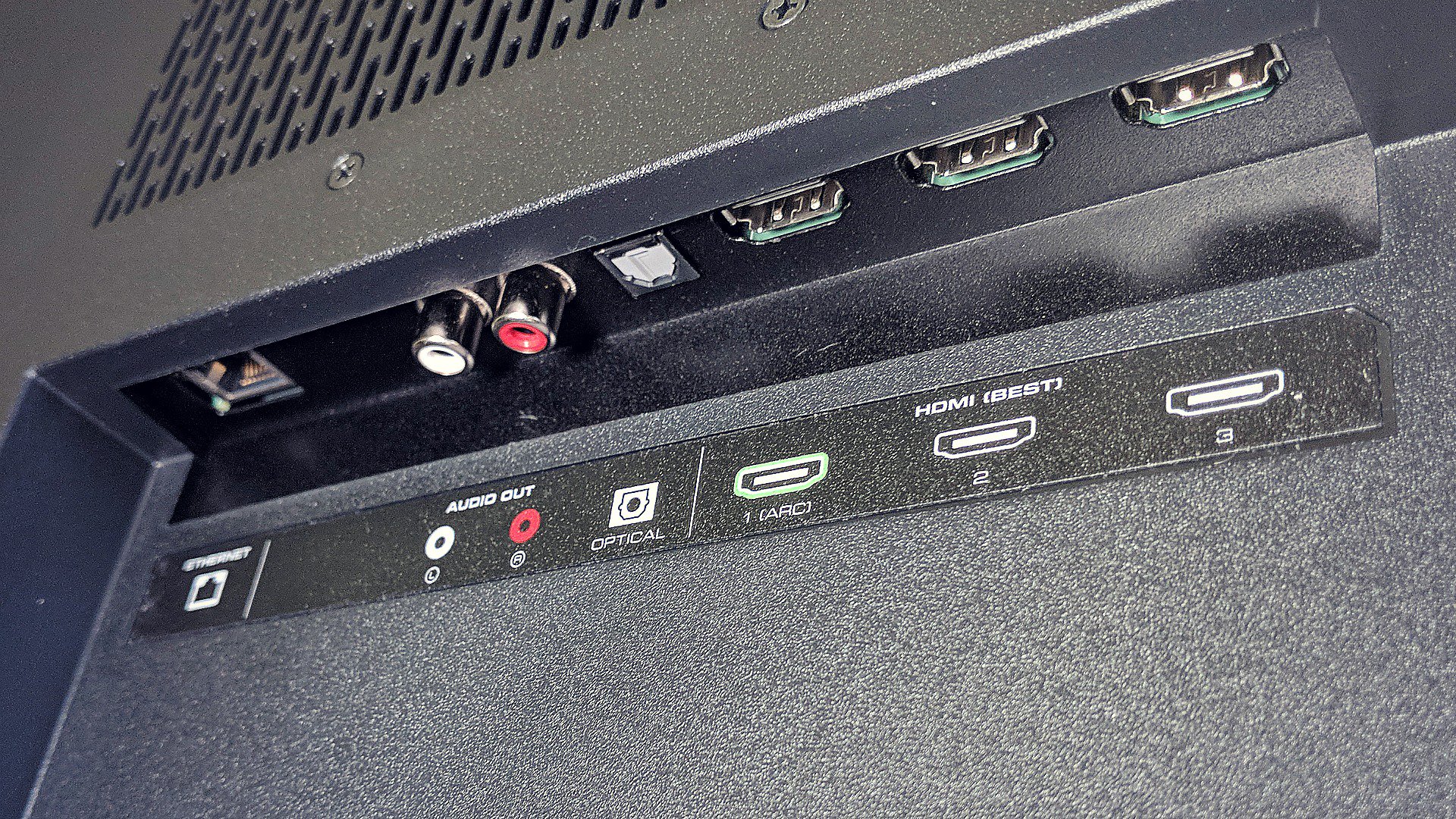
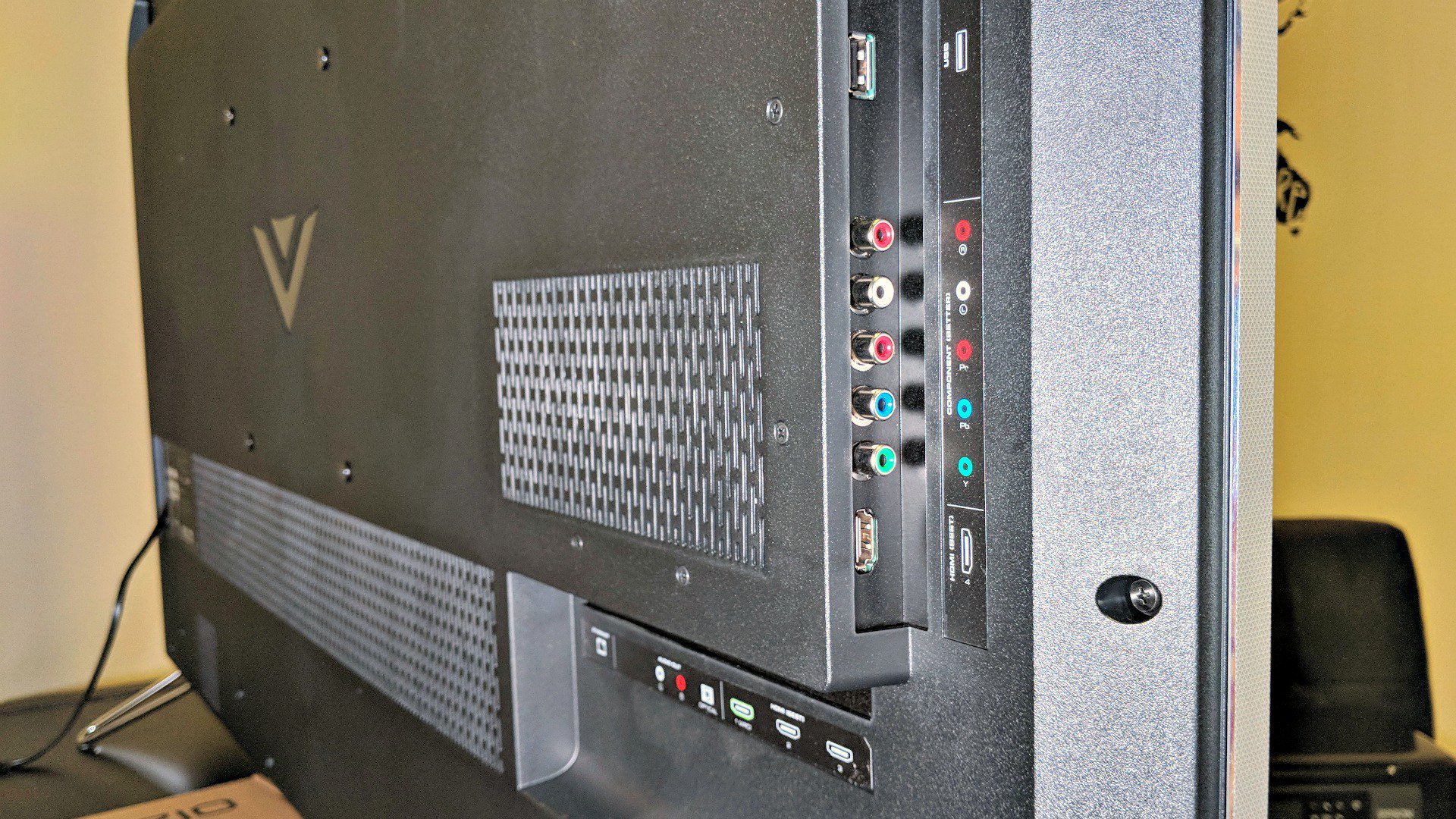
Similar to a computer display or traditional monitor, there are multiple inputs available, including 4 HDMI, 2 USB, 1 component, and 1 Ethernet. There are more than enough to connect a game console or two, plus a DVR.
We connected an NVIDIA Shield console, DVR, and PlayStation 4. This left us with an extra HDMI port as well as all other inputs. Depending on what sort of habits we’re in, we’ll often turn to the NVIDIA Shield because of its Google smarts and casting ability. Often we’ll turn it on so we can Cast our phone or tablet to the television.
Setup
Setup was incredibly easy, with a few menus to follow along. It took about as much time to take the monitor out of the box and set it up as it did to walk through the menus and configure to the network. The entire process is straightforward and intuitive.
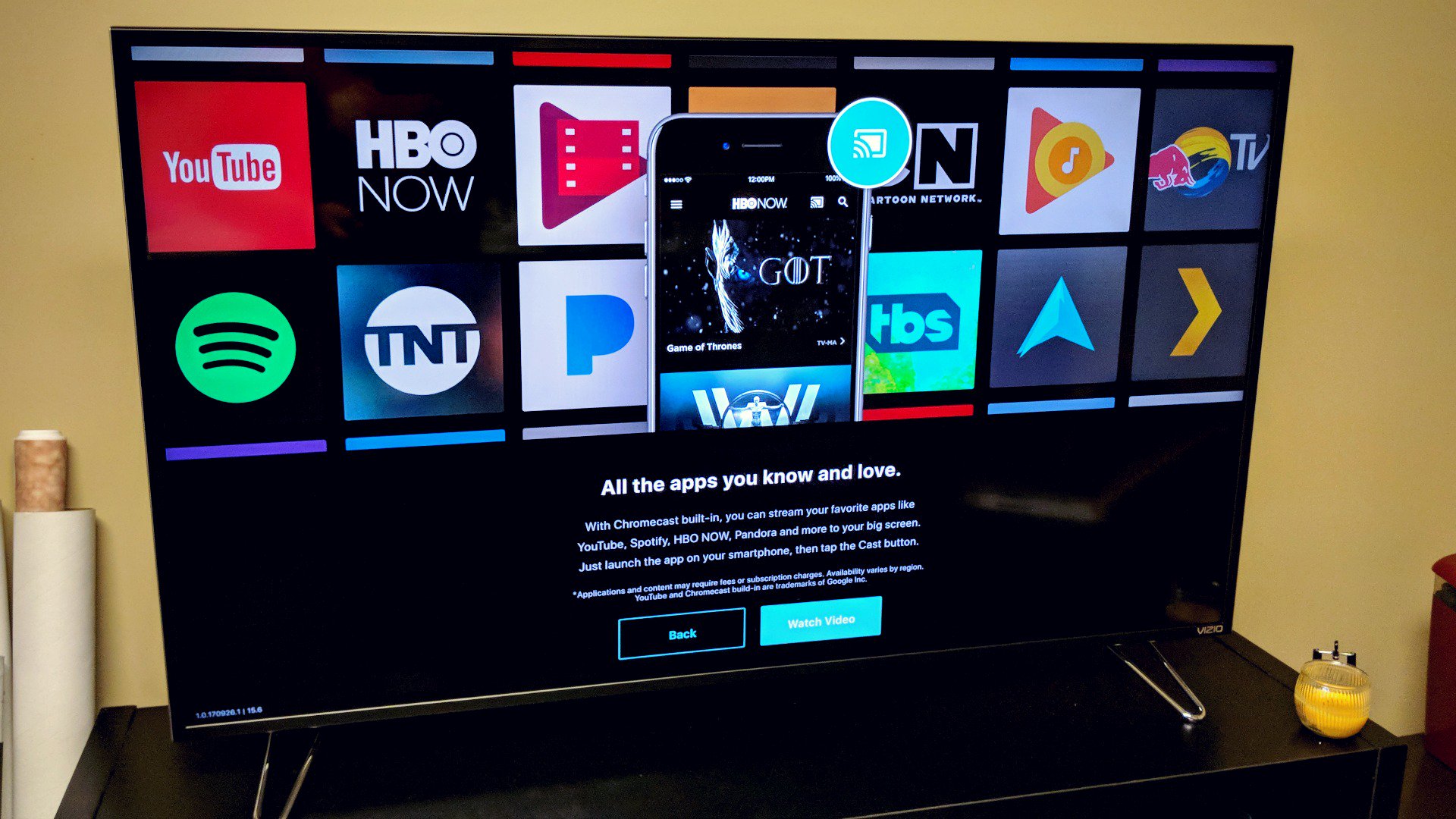
It did not take long for us to appreciate the ease in which we could start a YouTube video on our phone and send it to the Vizio. There’s a setting you can enable which will automatically wake the monitor up so you’re not fumbling for a remote or walking over to push any buttons. Quite often we’ll queue up a new episode of a show on HBO GO or Netflix and pass it off to the M50-E1.
Performance and Usage
We can’t speak to the absolute specifics of the TV and how it relates to other models on the market. There are plenty of great review sites dedicated to the cause (example) which can help spell out color contrasts, input lag, color gamut, and other fine points. As we were putting this together we looked around and found that the M50-E1 scored fairly well in most aspects and benchmark tests.
We can speak, however, to its quality as it relates to other units we’ve had around the home and office. This being our first Vizio we found it to be every bit as good as competitive models we’ve purchased in the past — and spent more money on.
The 1080p image is crisp with the 4K picture looking considerably better. Video games at that resolution, where applicable, look amazing on the Vizio. There was very little flicker in quick moving games or extremely busy images.
As for the color and overall range, we were really impressed with this unit. Thanks to support for both Dolby Vision and HDR10, the Vizio is equipped to deliver an extremely sharp, bright, picture with a much wider color range than what we’d get only a few years ago. Given these are two formats in an emerging battle, we like that Vizio doesn’t draw a line in the sand, allowing for both.
Some of the movies we’ve watched on this monitor were much more vivid than we remembered. It’s not unlike what happens when you compare a standard picture from a phone to one that can be captured by the likes of the HTC U11 or Pixel 2 using HDR.
The 120Hz refresh rate, while not as high as what you’ll find on the market, did well for scrolling sports scores, news tickers, and moving images. It wasn’t all that long ago that we were extremely happy to jump from 60Hz to 120Hz. Sure, down the road we may expect more from our sets but we’re okay with keeping prices down on models that do not have all of the bells and whistles.
Another example of this might be in having a curved screen. The M50-E1 is flat whereas the curve is becoming a standard in higher priced sets. We haven’t owned a curved unit, but we’ve spent enough time around them to appreciate what it does. Again, for us, in 2017, we’re okay with forgoing that feature in exchange for a lower sticker price.
Apps and other Smart Stuff
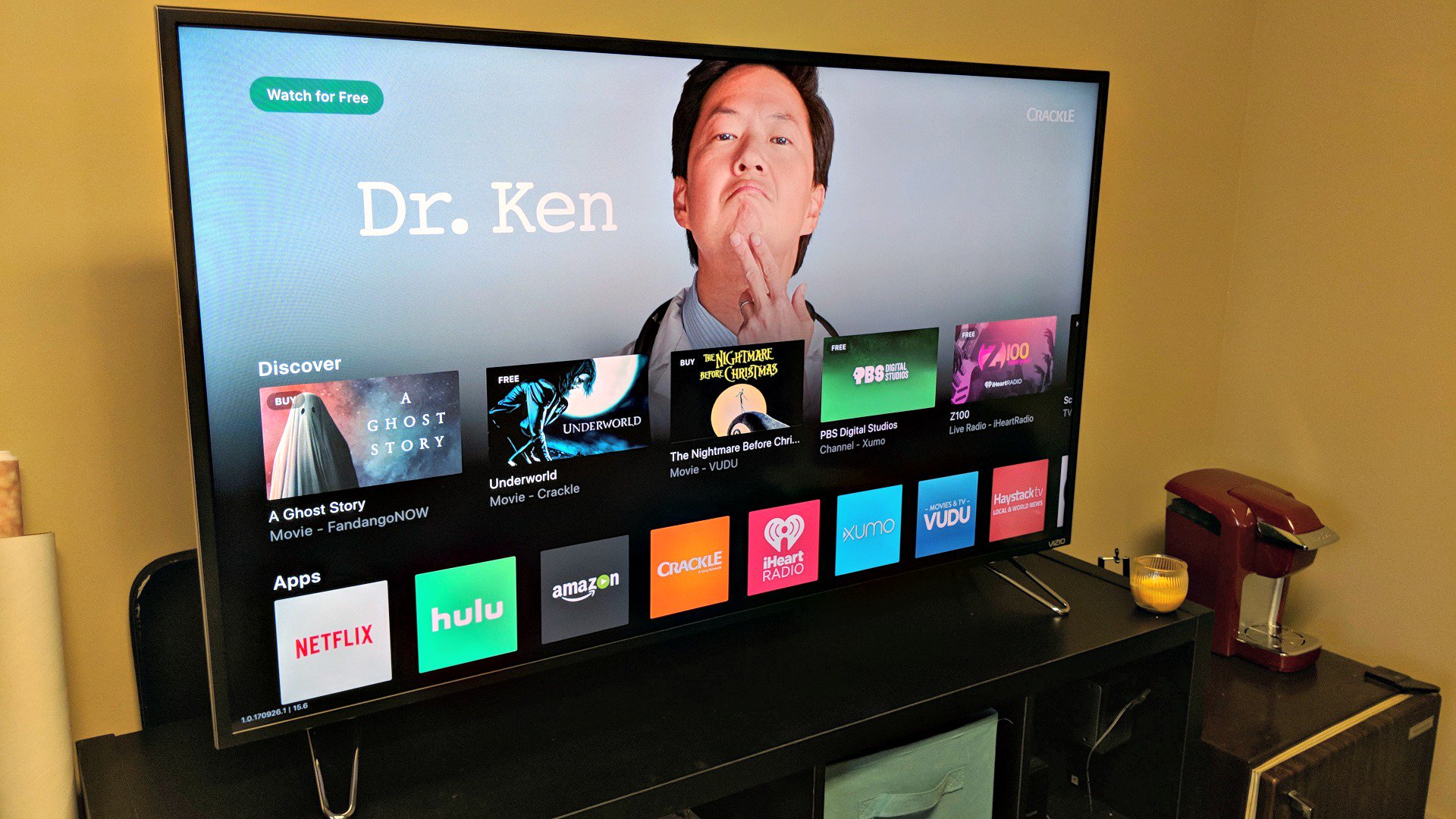
There are a number of pre-loaded apps on the Vizio M50-E1, including Netflix, Amazon Video, Hulu, Crackle, iHeartRadio, Xumo, Vudu and Pluto TV. But, when you factor in Chromecast, it becomes nearly endless. In all honesty, we tend to prefer the apps on our phones and tablets over those on the monitor. Casting is all too easy and we like the interface better.
For those of you who are existing Vizio users, you might be familiar with the SmartCast Mobile app. This monitor supports the app, which we found to be more fun and intuitive than what’s happening on screen.
There’s quite a bit going on in the SmartCast app, with the experience getting better when you own other Vizio products like a soundbar. Yes, it’s an ecosystem that tries to loop you in with brand affinity, but it’s certainly no worse than what Samsung and LG might do.
If you haven’t purchased a Google Home or something with Google Assistant built, you might want to consider doing so. Once you start to leverage the AI smarts you’ll find yourself talking to your TV way more than before. It makes sense to use in the living room, especially when you’re asking for things like how old an actor is or to play a specific show on a specific service.
The Vizio is ready to connect to your Home and tap into the smart assistant. Once you’ve downloaded a handful of apps you’ll find that you’re able to use the monitor in a variety of cool ways that your old television cannot. To be clear here, you cannot talk directly to the Vizio monitor as if it had Google Assistant installed. You’ll still speak to your Google Home or speaker with Google Assistant baked in.
Sound
Sound was on par with our expectations, but we wouldn’t necessarily call attention to it as a selling point. We’ve long wanted to get a soundbar or some better speakers for our television and the Vizio doesn’t do much to change the sentiment. It’s definitely good enough for average use, but we didn’t have any “wow” moments.
If you own some external speakers or are considering them for your next set, you’ll want to add them here. The RCA output and Digital Audio Out (SPDIF) open the door to pretty much anything on the market.
Conclusion
The 50-inch unit replaced our older 1080p HD 55-inch Samsung and we’ve not missed that five inches of screen. We were happy to trade off the display size for Google intelligence and a 4K picture.
We found that the internal Chromecast and Assistant was more than simple convenience. In fact, we’re at a point where we could probably unplug the NVIDIA Shield and not miss it in the living room. Truth be told, we’d probably move it to another area of the house where we can relegate it to gaming.
Given the features and options in the Vizio M50-E1 we have no reservations in recommending it for the suggested retail price of $599. In fact, as we were finalizing our review we saw it listed for $549 on Vizio’s website with free shipping. That is a fantastic deal to us.
You can find the M50-E1 at a variety of retailers and their respective websites. Among them are Best Buy, Walmart, B&H, Dell, Costco, and Sam’s Club. As of right now it appears that most of the vendors are offering it at the same $549 cost, or slightly less.
Lego pulls the plug on future ‘Dimensions’ toys
Chalk up another casualty in the decline of collectible-based video games: Lego, Warner Bros. and TT Games have stopped producing new expansions for Lego Dimensions. They’ll continue to sell existing expansion packs, and servers will continue to run, but there won’t be any new toys or gameplay. The companies didn’t explain the move in the announcement tweet beyond saying it came after “careful consideration.” We’ve asked if they can elaborate and will let you know if there’s more they can say on the record.
Off the record, though, it’s another story. Eurogamer understands that Dimensions is winding down earlier than expected (it was originally meant to have a three-year strategy) due to lackluster performance and the very nature of the toys themselves. Lego sets are expensive to make compared to rival toys, especially in specialized sets like this, and the packs had to be sold at razor-thin profit margins to remain at a competitive price. If a set didn’t sell, it was a costly mistake — and that magnified problems less-than-stellar sales, which were a serious problem in year two. An overemphasis on the Ghostbusters tie-in and the overall dip in toy-based games led to disappointing sales.
Reportedly, plans scaled back quickly after that. The creators shelved year three, and even dropped plans for a year two “finale” pack that would have wrapped up the story in place of a brand new year. There had even been plans at TT Games to make a camera that scanned Lego creations to reproduce them in-game, but it never ventured beyond the prototype stage.
On top of these revelations, you could add that Dimensions may be the victim of the Guitar Hero effect, where an attempt to milk every last drop from a toy-based game franchise ends up killing it. When there’s an overcrowded market with a seemingly never-ending stream of new games and expansion packs, you’re bound to see customers burn out and companies struggle to compete. There are only so many expansion packs that parents are willing to buy for one game, never mind additional games. Simply put, Lego might not have stood much of a chance with families that already had boxes full of Skylanders toys.
From building and rebuilding to the most bricktacular mash-ups, the Multiverse would be nothing without our amazing community. Thank you. pic.twitter.com/NEDbBXqjyZ
— LEGO Dimensions (@LEGODimensions) October 23, 2017
Via: CNET
Source: Lego Dimensions (Twitter)
Best parental control apps for your kid’s smartphone
If your kids have their own mobile devices, you may want a way to track and control what they’re doing. The best parental control apps offer ways to limit time spent on the device, track usage and location, and block apps or games as necessary. Let’s take a look at the top apps that made our list. We’ve also got resources if you want parent controls for mobile game systems and gaming consoles.
FamilyTime (iOS and Android) – $1 to $2 per month
FamilyTime does a lot of everything, allowing you to customize your control options for the precise content or behaviors you want to prevent. The software gives you tools to set homework and bed times, or merely limit the time that your kids spend on their phones. Then it adds options for geofencing (you get alerts when that phone enters or leaves a specific area) and tracking. On top of that, you can block or control on an app-by-app basis, monitor texts, and keep an eye on contact lists.
While it’s great that FamilyTime meets so many needs, this is also a consideration for parents: The software suite may take some time to learn before you can use all the features effectively. It’s often better to get a simple control app that you know how to use rather than a complicated app that you don’t really understand, so FamilyTime may not be for everyone.
Get Started at:
FamilyTime
Qustodio (iOS, Android, Kindle, Nook) – $55 per year
Qustodio is user-friendly, efficient, and excellent for parents who are short on time. It offers a dashboard that shows you all recent mobile activity for any connection device, including time spent on specific services like Instagram or Twitter. From there you can set time limits, track texts, filter out racy sites, and set time limits for any game or app. It’s relatively un-invasive, but still effective — a great control app to use when managing devices for kids of multiple ages (it also works on the Kindle, if you want to protect Amazon devices). On the downside, the software is a little expensive at $55 annually for the 5-device plan, and higher rates if you want to add more devices: You can check out our top free control software here.
Get Started at:
Qustodio
ESET Parental Control (Android) – $30 per year
ESET has a collection of features that allow for more subtle control than some of the other big child security apps available. It offers app and website blocks, but allows you to choose age-based features that you can switch as kids grow up, allowing them to access a wider range of websites in the future while still keeping them protected. There’s also a parent message feature, which sends out a message that kids are required to respond to before they continue using their phones (if you prefer starting with gentle reminders). As is common, you can set time limits on device use, although ESET also allows kids to request extra time. If you are particularly invested in Android, you may want to compare this option to Google’s own Family Link control app.
Get Started at:
ESET
PhoneSheriff (iOS and Android) – $50 per six months
PhoneSheriff is one of the old guard, a control service that’s been around since the early 2000s and has gone through many changes in its lifetime. Currently, it’s a straightforward parental control app with a focus on real-time activities. You can block sending or receiving calls from specific numbers, set time limits or blocks for specific apps, and receive alerts for monitoring text messages. There’s also location tracking and a full lockdown option when necessary. This approach takes more work, but it’s useful if you want to monitor your kid’s contacts number by number. Unfortunately, the price is particularly high.
Get Started at:
PhoneSheriff
Pumpic (iOS and Android) – $15 per month
Pumpic’s clean interface helps parents deal with the long list of tools that come with the app. You can track calls and texts, or block and limit them as you see fit. You can also monitor a variety of social media activities, along with any websites visited, with blocking options provided here as well. Pumpic also allows you to track device location and the history of where the device has been: For more direct action, you can choose to lock down or even wipe the phone at any time.
Get Started at:
Pumpic
OurPact (iOS) – $2-$5 per month for full services
OurPact is a streamlined app that offers core parental control services without getting too complicated (and a more affordable pricing plan to match). You can block apps or internet access, create time schedules, and control access in real time as you need to. It’s not the best choice if you want to watch everything your kid is doing online, but it’s useful for protecting younger children and working out smartphone limits early on.
Get Started at:
OurPact
Net Nanny (iOS and Android) – $60 per year
From a feature perspective, Net Nanny is similar to Qustodio or PhoneSheriff: The suite of features includes an internet filter, porn blocker, time schedules, alerts about activity, and usage reports. However, there aren’t as many options to control specific app access, so games and social media get less attention with this approach. There are also a couple extra features, such as a profanity filter that allows kids to visit web pages but blocks out the bad words. Net Nanny’s knowledge sources also deserve a shout-out — the company has one of the best collections of guides and tips for parents learning more about digital security.
Get Started at:
NetNanny
KidLogger (iOS and Android) – Free to $90 per year, depending on plan
KidLogger is a more aggressive option with a plethora of “spy” features for watching everything your kids do on their mobile devices. Reports include everything from web history recording and message/social media monitoring to random computer screenshots, detailed app usage, and records of all files and folders open (this extends to external storage as well). Basically, you can watch anything that goes on – as well as recording keystrokes and tracking time spent on the device. However, while it’s certainly a Big Brother approach, Kidlogger is relatively lax about actually blocking or limiting content, so it may ultimately offer more freedom for tweens and teens.
Get Started at:
KidLogger
Final note: There are thriving teen forums online discussing all possible ways to get around parental controls, some with highly advanced and/or sneaky tactics. If you know teens, that shouldn’t surprise you, but it’s still something to prepare for. When picking a parental control app, don’t write down your password or login information (no matter how well you think you can hide it). You may also want to create a news alert for the software you choose, to help keep an eye out for any new vulnerabilities or workarounds. Some software can be bypassed with phone resets, customer service requests, and other tricks that you should know about.
Editor’s Recommendations
- Save data, save money: How to reduce your data usage on Android or iOS
- With Pixel, you can customize a robot and learn to code all at once
- Michael Kors Access Sofie smartwatch review
- Michael Kors Access Grayson smartwatch review
- Michele Hybrid Smartwatch Review
9 high-tech examples that prove Dubai is the world’s most futuristic city
Why it matters to you
Thinking of visiting Dubai in the near future? Here are some of the most exciting technologies ready to hit one of the world’s most impressive cities.
In addition to being home to some of the world’s most luxurious hotels and biggest shopping malls, Dubai has also carved out a well-deserved reputation for being willing to go big with the latest emerging technology. From robotic police forces to autonomous taxis, here are our picks for Dubai’s most exciting (and, if you don’t live there, envy-inducing) tech innovations.
Firefighters with jetpacks
The saying “fight fire with fire” doesn’t mean much in Dubai. Instead, they prefer to do their firefighting with jetpacks.
That’s thanks to a deal between Martin Aircraft and the Dubai Civil Defense (DCD), which involves rolling out a number of custom $35k water-powered jetpacks, which can be used to put out fires along the city’s extensive shoreline. The device allows the firefighters to get a better vantage point for extinguishing blazes, as well as dodging the traffic.
Autonomous drone taxis
While most cities are still caught up wondering about regular self-driving cars, Dubai is busy putting self-driving flying cars through their paces. Given a test flight last month, Dubai’s the Autonomous Air Taxi (AAT) is described as the world’s first “self-flying taxi service.”
Although it’s not yet available commercially, the 18-rotor flying drone promises to be the eco-friendly, electrically-powered transportation solution of tomorrow — so long as you don’t want a flight longer than 30 minutes, that is!
The hotel of the future
Zas Architects
Planning a trip to Dubai next year, and looking for somewhere high-tech to stay? If so, you might want to check into the Rosemont Five Star Hotel & Residences. Still in development at the time this article was written, the 450 room hotel boasts a high end restaurant, manmade beach, giant aquarium, infinity pool, and more.
The reason the hotel made this list, though? Giant 36-degree computer-generated rainforests in the public areas, and a robotic host on the reception desk. It’s like you’ve gone on holiday to the future.
A real life robo-cop
Dubai Media Office
Less smiley, but just as metallic as the robot host at the Rosemont Five Star Hotel is Dubai’s latest law enforcement officer. The first robot cop was introduced this summer, complete with a camera for transmitting live images and identifying suspects, and a touch screen which can be used by members of the public to report crimes and ask questions. According to the Smart Services division of the Dubai police, such humanoid robots will make up an entire quarter of the local police force by 2030.
Autonomous police cars
OTSAW Digital
Not content to just have humanoid robot cops on the street, Dubai has also signed an agreement with Singaporean startup called OTSAW Digital to introduce self-driving cop cars. The “cars” themselves are more like a child’s pedal car in size, and have a top speed of just 9.3 mph, but they boast the same LIDAR and sensing technology as larger autonomous vehicles. Most importantly, they can act as portable surveillance systems to search for wanted individuals or vehicles, or suspicious objects left unattended.
Mega solar plant
AETOS Wire
Having last month received a contract to build yet another extension, Dubai’s Mohammed bin Rashid Al Maktoum Solar Park will eventually stretch to cover a massive 83 square miles, making it the world’s largest single-site solar park.
As if that wasn’t enough of a record breaker, it will also soon boast an enormous 260-meter (853-foot) solar tower, the tallest in the world. It’s a key ingredient in the Dubai Clean Energy Strategy 2050, which aims to increase the share of clean energy in the city to 7 percent by 2020, 25 percent by 2030, and a massive 75 percent by 2050.
Plus, it totally looks like the HQ for a future James Bond villain!
The Red Planet on Earth
Just when you think Dubai is out of ideas, you hear about plans to build an enormous “space simulation city” that will offer up, “a viable and realistic model to simulate living on the surface of Mars.”
With a budget of $135 million and a footprint stretching to 1.9 million square feet, the Mars Science City will simulate as closely as possible the conditions of a real life Mars colony — complete with greenhouses for testing out agricultural techniques, solar radiation-blocking 3D printed walls, and far more.
It’s all part of a plan for the United Arab Emirates to send its first unmanned probe to Mars in 2020, and establish a colony there sometime in the next century.
The tallest building in existence
Burj Khalifa, Dubai, United Arab Emirates
What kind of super city of the future would Dubai be without laying claim to the world record for world’s tallest skyscraper? The Burj Khalifa stands at a whopping 2,722 feet, giving it a comfortable 700 feet on the second highest building in the world.
A great example of Neo-futurism that could come straight out of the world of Blade Runner, the Burj is an angular masterpiece of engineering which contains a luxury hotel, observation decks, apartments, corporate offices, restaurants, observatories, and the world’s highest nightclub. Not to be missed. Unless you’re terrified of heights, we guess.
Iced coffee delivered by drone on the beach
When you think about the kind of optimistic future promised to us by (some) science fiction writers, what could sound more utopian than a drone descending from the heavens to deliver you an iced coffee while you’re lounging on the beach?
That’s something Costa’s Jumeirah Beach Drive-Thru store trialled earlier this year in the swanky Kite Beach area of Dubai, with its niftily-named Coffee-Copter. While there’s no guarantee that this becomes a permanent fixture of the beach scene, it speaks volumes about Dubai’s zany innovation that this was even trialled.
Editor’s Recommendations
- Dubai is building a huge ‘Mars city’ so we can practice living on the red planet
- Dubai just commissioned a new 700-megawatt extension for its mega solar park
- 8 times that movie and TV sci-fi got the future right
- The Nvidia Pegasus system may turn robotaxis into a reality
- Ford, Lyft partnership aims to bring autonomous cars to the masses
Everything you need to know about Google Assistant
Google Assistant is getting smarter than Google Now ever was. Not only does the service support more than one language, but it also will soon feature more robust third-party integration, meaning that it can help you control your entire digital life — not just your Google life.
Assistant is similar to Google Now in that it allows you to ask questions and get answers. The service goes beyond the the messaging app Allo where it debuted — it’s also now featured in Google Home, Google’s answer to the Amazon Echo. And, of course, it’s also found in all kinds of Android smartphones that run Android Marshmallow, Nougat, or Oreo. Here’s everything you need to know about the Google Assistant.
‘Hey Google’ voice command coming to Google Assistant on phones
For quite a while, Google Home has allowed users to enable Assistant using both “OK Google” and “Hey Google” commands. Phones, on the other hand, have thus far only allowed for “OK Google.” Well, that’s now changing — users are reporting the ability to trigger Google Assistant on their phone using the “Hey Google” command, which many argue is much easier to say and simply rolls of the tongue a little better.
If you don’t have the ability to use the “Hey Google” keyword just yet, it will likely come to your phone in the near future. When it does come, it will appear as a notification which you’ll need to tap on to retrain the voice model for the new command.
Google Assistant can order products from Target through Google Express
Google and Target are making it a little easier to order products through Assistant. The companies have announced a partnership that will see users able to search for, reserve, and buy products from Target’s catalog. You will need a Google Express account to do so, and it’ll only work in covered areas, but if you fit those criteria you’ll be able to say things like “OK Google, order paper towels from Target.”
Soon you’ll be able to do things like specify which stores to order from within two hours, and REDcard customers will be able to use their cards for a discount.
Don’t want to talk? You can now type to Google Assistant
Christian de Looper/Digital Trends
Google Assistant is a great voice-based digital assistant, but sometimes it just doesn’t make sense to be talking — like in a library, for example. Thankfully, Google has remedied that by allowing users to instead type to Assistant. Simple hold down the home button to trigger Assistant, then hit the little keyboard button in the bottom left-hand corner of the display, which will pull up the keyboard.
Google Assistant won’t come to tablets
If you’re a tablet user, brace yourself for some bad news: Google has confirmed that Google Assistant will not be coming to tablets — at least not anytime soon. Google didn’t say exactly why it won’t bring Assistant to the tablet, instead choosing to stick to the script of telling us Assistant is currently rolling out to phones running Android Marshmallow or higher.
“The Assistant will be available on Android Marshmallow and Nougat phones with Google Play Services, this does not include tablets,” said Google in a statement to Android Police.
It’s important to note that this doesn’t mean tablets won’t ever get Assistant — rather it just means that this current rollout doesn’t include tablets. So, you could still find yourself with an Assistant-enabled tablet in a year or so. At this point, however, don’t get your hopes up.
Google Assistant is available on the iPhone
Google Assistant is currently rolling out to all kinds of Android smartphones with Android Marshmallow and Nougat — but it’s also available on Apple’s iOS too. Rumors first started circulating that Google was interested in bringing Assistant to the iPhone early this year, until the company finally launched an Assistant app in May.
It make Microsoft’s Cortana has been available on both Android and iOS for some time now, however the service has had a hard time gaining a large user base. Could Assistant be the digital assistant that gains popularity on an operating system other than its own? Only time will tell.
Google Assistant can now take screenshots
While you can’t vocally ask Google Assistant to take a screenshot just yet, there is still a way to take a screenshot with Assistant. If you’re on a device that isn’t the Google Pixel, you can press and hold the home button to bring up the Screen Search feature — formally Now on Tap — which has an option to take and share screenshots.
This method is easier than the traditional method of holding down the volume down and power button to take a screenshot — it also cropped out the navigation buttons and status bar out of the image for you.
Since Google added the Assistant on the Pixel, Screen Search has been available, but the screenshot option wasn’t. Now, when you press and hold the home button and swipe up, you’ll see an option to “Share Screenshot.” This screenshot, like the method on non-Pixel devices, crops out the navigation and status bars.
Google Assistant is available on Android TV
Google Assistant is set to be a part of Google’s entire ecosystem, and that means all kinds of Android devices — including Android TV. In fact, Google Assistant launched on Android TV just recently on the Nvidia Shield, and it will come to other Android TV devices running Android 6.0 Marshmallow and later in coming months.
Using Assistant on Android TV, you’ll be able to make commands like “Play Stranger Things on Netflix,” or “Tell me about Jurassic Park.” You’ll even be able to control other areas of your smart home with commands like “Dim the lights” — perfect for when you want to watch a movie.
Google Assistant has a childhood
Google Assistant is a little different than other digital Assistants. Why? Because Google wants to give it a back story. The search giant has enlisted the help of Google Doodle head Ryan Germick, as well as ex-Pixar animator Emma Coats, to give Assistant a personality. There’s now a job listing for a creative writer that will work on the Assistant’s story.
“Content will include a range of interactions, such as dialogue and instructions and will be delivered through various Google products,” according to the listing.
Coats describes working on Assistant as working on a “character,” the same way she would over at Pixar. Part of that means giving Assistant a childhood, allowing users to relate to it as if it actually had a life. Not only that, but the team is experimenting with ways to build trust between the user and Assistant by making it seem vulnerable every now and then as if it needed the user.
This is not available yet in the Assistant in Allo. If you ask for its story, Assistant responds with, “I’m still on the very first chapter.”
Google Assistant will feature third-party integration with Actions by Google
“Think of the assistant — we think of it as a conversational assistant — we want users to have an ongoing two-way dialogue,” Google CEO Sundar Pichai said at I/O when the feature was first announced. Of course, part of offering an ongoing conversation is being able to carry on that conversation with other apps and products.
Google Assistant will soon feature more third-party integration through “Actions on Google.” These “actions” are basically ways for developers to build Google Assistant integration into their apps and services. That way, you can ask Assistant to order you an Uber or reserve a table via OpenTable. A number of the integrations have started to go live, and it’s likely that we’ll only see more as time goes on.
You can already see the landing page for Actions on Google, but you can sign up for notifications on news and updates for the service.
Google is expanding Assistant’s language support
At launch, Google Assistant was only able to respond in English — but since then Google has added support for a number of other languages. Currently, the system can respond in English, French, German, Hindi, Indonesia, Japanese, Portuguese, and Spanish.
That’s a pretty wide range of languages, and it’s only likely that the expansion will continue.
Update: Reformatted article and added news that phones are getting “Hey Google” voice command.
Editor’s Recommendations
- Allo for web brings Google Assistant to Chrome
- Here’s how to use Google’s Allo chat app on your desktop
- Get the Google Pixel and Pixel XL at a discount from the Google Store
- Google Home Mini review
- With the TicHome Mini, you can take Google Assistant with you anywhere
Best Huawei Phones

The Chinese brand is now a real contender at the high end, with some great handsets to its name.
The smartphone space is an increasingly overpopulated — crowded, really — place to be. And it’s getting more so as manufacturers such as Huawei start to pump out more, and better, phones, and push to expand its availability into more western markets. The past year was a pretty good one for Huawei with some excellent devices launched, and more sure to be on the way.
As new phones come and go, though, it’s tough to keep up with things. So we’re breaking it down into a continuously updated list to highlight the best devices that Huawei has to offer. These are the devices we’ll be writing about, and they’ll also be the ones you’ll likely want to consider.
Huawei Mate 10 Pro

Available November 2017: The Mate 10 Pro is Huawei’s late-2017 flagship, and one of the first Android flagships to ship with the new Android 8.0 Oreo. It’s also the first Android phone with a dedicated Neural Processing Unit, or NPU, meaning it’s future-proofed for the coming wave of AI-powered Android apps in 2018 and beyond. Other highlights in Huawei’s best phone to date include a 6-inch, 18:9 display in a slim body, with a shiny new glass-backed chassis that’s also water-resistant. And Huawei includes the same 4,000mAh battery capacity we’ve come to expect from the Mate line, delivering some of the best longevity we’ve seen in a high-end phone — backed up by super-quick charging technology.
And to top it off, the Mate 10’s camera can go toe-to-toe with Google’s Pixel 2 phones, with f/1.6 lenses, optical stabilization, and improved image processing. At €799, Mate 10 Pro isn’t cheap, but it is one of the most technologically advanced phones of late 2017.
More: Huawei Mate 10 Pro hands-on

Huawei P10 / P10 Plus
Launched April 2017: Huawei’s smaller flagship for early 2017 takes everything that was great about the Mate 9, and shrinks it down into a more pocketable handset. In the regular P10 you get a 5.2-inch 1080p panel — bumped up to 5.5-inch 1440p in the Plus — along with the same proven Kirin 960-based internals, and 4GB or 6GB of RAM. The same capable dual camera setup from the Mate 9 makes the transition to a smaller handset, with f/2.2 lenses in the P10, and f/1.8 in the P10 Plus.
The P10 and P10 Plus also feature one of the most unique back panel designs of the year, with a “hyper diamond cut” pattern (in some color options) allowing for extra grip and a unmistakeable in-hand feel. The P10 is more than six months old, but still a decent buy if you can pick it up at a discount.
More: Our Huawei P10 review
See at Amazon

Huawei Mate 9
Launched December 2016: Huawei’s late 2016 flagship represents a coming of age for the company, with top-notch internals, a solid camera and completely overhauled software based on Android 7.0 Nougat. And it’s soon due for an update to Android 8.0 Oreo.
If you pick up a Mate 9, you’ll be getting a big, speedy phone with fantastic battery life. It boasts an enormous 5.9-inch 1080p display in a body the size of many 5.7-inchers. And you’ll benefit from Huawei’s still capable Kirin 960 processor, along with 4GB of RAM and 64GB of storage, plus micro-SD, plus a dual-SIM option. It’s a beast of a phone, and currently the best big-screened Android you can buy — assuming it’s on sale in your region.
More: Read our Huawei Mate 9 review
See at Amazon
Update, October 2017: This article was last updated with the Mate 10 and P10 series.
The $13 Seneo wireless charger works with a whole lot of phones
If your phone can wireless charge, it can charge with this. The Seneo works with everything.
Is this deal for me?
The Seneo fast wireless charger pad is down to $12.99 with code BOMINXFX on Amazon. The average street price for this charger is $20. This deal matches a price we’ve seen only once before.

Wireless charging is just one of those things that makes life just a bit easier. It’s not a perfect technology yet but dang it, it’s better than fishing around under the bed for the tip of the power cord just to drop it again. Features include:
- Seneo Qi fast wireless chargers save you time and free up space by eliminating “rat’s nests” of cords on or around your desk. Get rid of your power cords and grab a wireless phone charger to add extra simplicity and ease to your life.
- The fast charging mode is compatible ONLY with Samsung Galaxy Note 8, S8, S8 Plus, S7 Edge, S7, S6 Edge Plus and Note 5.
- For upcoming iPhone X, iPhone 8, iPhone 8 Plus and other Qi-enabled devices will charge at regular wireless charging speeds. Those phones without Qi-function need an additional Qi wireless receiver.
- Solid and Sleek; Easily answer emails, text messages, receive calls and whatever else you might need to do at office while your phone is charging; Excellent for watching videos from bed while phone charges on wireless charging station.
- Foreign Body Detection Function: Seneo wireless charger will turn into blue for 2 seconds when it connects to the power, and will turn into green and stays when it starts to charge the phone; The blue light will flash all the time and stop charging if there is foreign body on wireless charger stand, like magnetic pad, metal case and incompatible phone
If you’re using a phone with Quick Charging technology, get this Aukey QC 2.0 USB wall adapter to pair with the charger.
TL;DR
- What makes this deal worth considering? – This is a great, inexpensive way to introduce some wireless charging to your life if you’re using one of the newer iPhones. The stand is built so you can still use the phone from an angle. Plus, it’s a match for the lowest price we’ve seen.
- Things to know before you buy! – If you want to take advantage of your phone’s Quick Charging tech, you’ll want this $13 wall adapter to pair with the Seneo.
See at Amazon
Happy thrifting!
Facebook tests split News Feed that keeps friends front and center
Facebook is currently testing a new dual-feed setup that separates Page-generated posts from ads and posts from friends, The Guardian reports. The trial is currently underway in six countries — Bolivia, Guatemala, Cambodia, Slovakia, Serbia and Sri Lanka.
Under this arrangement, the main News Feed is still populated by things shared by friends and family as well as advertisements. But posts shared by Pages — like those of publishers, for example — are moved to a secondary feed. The tests began last week and Slovakian journalist Filip Struhárik told The Guardian, “Pages are seeing dramatic drops in organic reach. The reach of several Facebook Pages fell on Thursday and Friday by two-thirds compared to previous days.” And that number was confirmed by analytics service CrowdTangle, stats from which showed that popular Slovakian Facebook Pages saw two-thirds to three-quarters reductions in their Facebook reach.
This could be bad news for outlets that heavily rely on Facebook traffic and it stands to impact their revenue. Matti Littunen, a senior research analyst with analytics company Enders Analysis told The Guardian, “The biggest hits will be to the likes of Buzzfeed, Huffington Post and Business Insider, who create commoditized content aiming for the biggest reach.”
Facebook has been playing around with how it presents content to its users. It recently gave News Feed an overhaul, making it easier to navigate, and brought its Explore Feed to desktop. The company also redesigned its Trending section in order to incorporate different viewpoints on a popular topic, began testing a feature that gives more detailed information about an article’s publisher and has introduced a slew of changes aimed at combatting the spread of fake news.
A Facebook spokesperson told Engadget that as of now though, there are no plans to expand this test further. “With all of the possible stories in each person’s feed, we always work to connect people with the posts they find most meaningful. People have told us they want an easier way to see posts from friends and family, so we are testing two separate feeds, one as a dedicated space with posts from friends and family and another as a dedicated space for posts from Pages,” said the spokesperson. “To understand if people like these two different spaces, we will test a few things, such as how people engage with videos and other types of posts. These tests will start in Sri Lanka, Bolivia, Slovakia, Serbia, Guatemala, and Cambodia. We have no current plans to roll this out globally.”
Source: The Guardian
NYC subways get tap-to-ride turnstiles starting late 2018
New York City’s plan to modernize its mass transit payments is getting underway… although you definitely won’t want to chuck your MetroCard any time soon. The Metropolitan Transportation Authority is greenlighting a hefty $573 million contract that will install NFC-equipped fare systems across NYC. The plan should start installing readers in 600 buses and 500 subway turnstiles starting in late 2018, so you may tap your phone or card sooner than you might have thought (there was talk of a rollout in 2021). The rollout won’t reach every corner of the city (plus Long Island Rail Road and Metro-North trains) until late 2020, though, so it won’t be consistently convenient for a while.
MetroCards will continue to work through 2023, so don’t worry about rushing to replace your phone or bank cards. The new system shouldn’t be picky about payment types, either, so you can expect Android Pay, Apple Pay and Samsung Pay (among others) to function just as well while you’re scrambling to catch your ride to work.
The city is late to the party when it comes to tap-to-ride systems — just ask the Londoners who’ve been using one for years. However, its introduction could speed up (or at least cement) the adoption of NFC in the US. When roughly 6 million people are riding the NYC subway every day, that’s a lot of people who’ll eventually need to tap cards and phones on a daily basis. If tap-to-pay doesn’t become ubiquitous in the US in the near future, that 2023 MetroCard cutoff might just finish the job.
Source: New York Times
Ford’s on-demand van service is running again in San Francisco
The Ford-owned on-demand commuter van company, Chariot, paused its service in San Francisco last week to fix compliance issues with the California Highway Patrol. The CHP had found that some Chariot drivers did not have required Class B licenses. The company confirmed via email that “effective Monday afternoon, service will be back on and running as regularly scheduled.”
In the same email, CEO Ali Vahabzadeh also says that Chariot “passed all inspections on Friday as expected and continue to be in compliance with all regulations.” Chariot also operates in other cities like Seattle, Austin and New York City.
 AIVAnet