


Livestream Mevo Plus can now broadcast live to more platforms, record in 4K
The Mevo camera was the first that’s designed specifically for Facebook Live. It’s easy to use, and let’s you create live broadcasts on Facebook in a few taps. Even better, it lets you edit while recording live, allowing you to zoom and pan around the frame by simply tapping, pinching, or sliding on the screen of a paired smartphone. Although we liked it, we felt it was a bit of a pricey novelty that had issues and limitations. And since the Mevo’s launch, several cameras and phones have jumped on the Facebook Live bandwagon.
Enter the Mevo Plus, an improved camera from Livestream that addresses those issues and limitations. You could call it the camera we wished the original had been. It’s faster and stronger, and more stable, yet it retains the ease-of-use of the original, including the zoom-and-pan functions we liked. It also now records in 4K and 1080p, works with Android, and supports more live-stream platforms other than Facebook Live, including YouTube and Periscope/Twitter. And from the first impressions in our Livestream Mevo Plus review, it’s a better product. It’s still pricey, and it’s still niche, but the improvements make it a more compelling reason to add it to your camera arsenal, especially if do a lot of live broadcasts.
The Mevo Plus is on sale now, for $500. The first-generation Mevo is being phased out of the retail channel, but you can get one for $300.
Same look, but reengineered
The original Mevo was well designed, so we don’t have major qualms about Livestream repurposing the same look and feel. The only observable difference is a switch from a red grille to a gray color, covering the speaker and stereo mics.
The big changes are inside, and they affect performance. New are 2×2 MIMO antennas that offer improved data transmission speeds. A new 802.11ac Wi-Fi chip also increases performance and range. You can also stand farther from the camera when operating it remotely. And if you’re handholding the camera for action shots, there’s now electronic image stabilization, although like most cameras with EIS, it requires cropping into the image.
As for the main guts, the Mevo Plus is the same as the original. It uses a 150-degree glass lens and 12-megapixel Sony 4K CMOS sensor. However, you can now record to the included 16GB MicroSD card up to 4K and stream in 1080p (where supported), whereas before, you were limited to 720p. You can also stream to more places, like YouTube and Twitter/Periscope in addition to Facebook Live and Livestream’s own service.
Another nice update is support for Android devices (6.0 or higher). This opens up the Mevo Plus to more users, which is a good thing especially with YouTubers. Support for Android and YouTube were two of our wishes with the original Mevo. For iOS, it supports iOS 9 or higher.
The Mevo Plus works with the existing Boost accessory that increases battery life by up to 10 times. It also has Ethernet and standard USB jacks for more stable connectivity, ideal for broadcasting important live events where you can’t rely on Wi-Fi or LTE. The USB port also works for recharging the battery or attaching a better microphone. It’s a pricey accessory, at $250, but necessary if your job depends on equipment reliability.
Performance and use: first impressions
The Mevo Plus and the Mevo app work exactly the same as the first-generation Mevo, so you can read about our thoughts in our review. In a nutshell, the Mevo Plus is a portable, live-broadcasting camera that gives independent producers the features that you would get with a camera crew. With a paired smartphone or tablet, you can shoot a wide scene, zoom in quickly by tapping on any part of the frame, or create smooth zooms or pans by pinching or sliding — you get to play director and cameraman. There are still the adjustable picture settings in the app, and the face-tracking feature that automatically follows a subject.
Our favorite thing about the Mevo Plus, so far, is the improved performance, from start to finish. Although it employs the same pairing and operation processes as the first-generation Mevo, the Mevo Plus just does it better. We haven’t encountered any pairing issues, nor have we suffered dropped connections — things we had to deal with in the first model. Wi-Fi just seems more robust, and we were also able to live-stream to Facebook Live with two bars of LTE. The only complaint is that it does take some time for the camera to pair, so if you’re creating a live broadcast, it’s best you spend 15 minutes to get it set up before you go live.
Image stabilization is nice to have, but we see the camera more as a stationary product that an action cam. Still, we are sure there will be creatives who want to attach it to a moving object, or those who want to physically move around the room than using the virtual zoom and pan.
We love that it can record in 4K, but there are limitations. First, you can’t live-stream in 4K, even to YouTube. Second, the Mevo Plus disables the zoom-and-pan functions. Remember, those functions don’t actually involve physical movement of the lens; it’s cropping into the sensor. Third, you generate a bit of heat, and because it sucks up battery, you need to plug the Mevo Plus into an outlet, or use a portable USB battery or the Boost accessory. And fourth, 4K takes up a lot of space, and it’s more difficult to work with. Because you don’t get any value from shooting in 4K, at this time, you’re better off sticking with 1080p or even 720p if you’re dealing mainly with a mobile phone audience.
Interestingly, there’s no built-in support for Vimeo, Livestream’s new owner. It would be nice to upload a 4K video directly to Vimeo, from the app.
The other noticeable issues are no fault of the Mevo Plus, but more with the live-streaming platforms. Facebook Live only supports streams of up to 720p, so you will get a softer image that isn’t as sharp or detailed. Word is that Facebook plans to roll out 1080p support next year, but until then, you’re stuck at the lowest resolution. And while YouTube is great for creatives with established channels, general users won’t be able to create live broadcasts.
We’re also not thrilled that battery life is also short. It’s rated for up to one hour, the same as the original. This was a complaint we had in our review, and we think it will be the same complaint we will have in our full review of the Mevo Plus.
The camera for indie live-broadcasting
These features were teased earlier this year at the 2017 NAB show, and the Mevo Plus is essentially the final product that Livestream promised we would see by the end of summer (you can also add some of these features to the original Mevo). While it an evolutionary product versus something completely new, it addresses the most of the main cons we had with the original, particularly improved connectivity and the ability to show in higher resolutions.
As a general consumer product, it’s pricey at $500, especially considering that you create live broadcasts with your phone, albeit minus the zoom-and-pan functions. But for YouTube creatives, event producers on a budget, wedding photographers who want to offer more value to their services, or Facebook Live junkies, the Mevo Plus is still a powerful, little live-broadcasting tool that’s easy and fun to use. Even if you ever live stream, the Mevo Plus is a capable camera for recording videos, although if that’s your jam, we would steer you toward something like the GoPro Hero5 or Hero6 instead.
We will have a final review after we complete our tests. Stay tuned.
Editor’s Recommendations
- Ricoh Theta V brings reality to VR with 4K and surround sound
- DxO One review
- FrontRow Camera Review
- Sharp shooters: The best camera phones you can buy
- Meet the Samsung 360 Round, a pro-level 360 with 3D and impressive live-streams
The best cheap printers you can buy for under $100
Looking for a good, sub-$100 printer is like panning for gold: a real pain in the neck. This specific market slice is dominated by HP and Canon, followed by well-known printer manufacturers Epson and Brother. Those produced by Dell and Xerox are typically above the $100 range, thus you’re forced to use a sifting pan to find the golden nuggets produced by the Big Four. That’s where our list of the best cheap printers comes in: we sifted out all the rocks for you.
For starters, you want to choose an affordable printer with multiple connectivity options. That includes wireless connectivity so you can print from any device (or gadget) in your home. You also need a USB connection on the side, and an easy setup process so all you do is connect and print. Of course, features like Google Cloud Print, Apple AirPrint, and NFC-based connectivity are great benefits in a sub-$100 printer.
The following list should make finding the perfect cheap printer easy, but if it leaves you unsatisfied, consider upping your budget with one of the best inkjets you can buy. Good luck — between these two lists you’re sure to strike it rich.
HP OfficeJet 4650 ($70)
This all-in-one color printer is jam-packed with features for $70, such as two-sided printing and borderless printing, and there’s a 2.2-inch touch-enabled LCD screen to easily manage all settings and printing assignments right on the machine. Connectivity options include USB-based tethering to a PC, wired Ethernet and Wi-Fi networking, or communicating directly to the printer. This is done through Apple’s AirPrint wireless feature, or the built-in wireless access point (aka Wireless Direct).
HP claims that the OfficeJet 4650 can print in color at up to 6.8 pages per minute, and in black at up to 9.5 pages per minute. Outside the printing aspect, it includes a built-in flatbed scanner for converting printed documents and photos to digital form (TIFF, JPG, BMP, PDF, etc), make high-resolution copies, or turn physical documents into something you can edit, sign, and email. The fax component can transmit at up to four seconds per page.
The OfficeJet 4650 is backed by HP’s Instant Ink service that provides discounts on its high-yield cartridges. Given ink cartridges will be the biggest drain on your bank account, any discount will help.
Color print maximum resolution:
4,800 × 1,200 dots per inch
Black print maximum resolution:
1,200 × 1,200 dots per inch
Scanner maximum resolution:
1,200 × 2,400 dots per inch
Copier resolution (black text):
600 × 300 dots per inch
Copier resolution (color text and graphics):
600 × 300 dots per inch
Canon PIXMA MG6820 ($85)
Here’s another affordable all-in-one solution capable of printing on both sides. What you won’t find here is a fax component, which is a dying technology anyway thanks to email and the internet. In its place you’ll get a larger three-inch LCD screen to easily navigate and adjust the printer’s settings. You get a side dish of built-in filters, too, for adding special effects to your prints such as Blur Background and Soft Focus.
What’s unusual about this printer is that it doesn’t rely on one cartridge for black, and one cartridge for cyan, magenta, and yellow. Instead, Canon provides five slots for five separate ink cartridges: Pigment Black, Black (to be combined with color), Cyan, Magenta, and Yellow. That means you replace only the color that’s low, at just $13 per cartridge. You can get these cartridges in combo packs as well.
Canon’s MG6820 specifications show the printer can crank out color prints at up to 9.7 standard A4 pages per minute, and black prints at up to 15 pages per minute. The connectivity options include a USB-based tether to your PC, wireless networking, and using Canon’s app to print from a mobile device. It support Apple AirPrint and Google Cloud Print too.
Color print maximum resolution:
4,800 × 1,200 dots per inch
Black print maximum resolution:
600 × 600 dots per inch
Scanner maximum resolution:
1,200 × 2,400 dots per inch
Copier resolution (black text):
600 × 600 dots per inch
Copier resolution (color text and graphics):
600 × 600 dots per inch
Epson WorkForce Pro WF-3720 ($99)
Here is Epson’s take on the all-in-one printer in the sub-$100 bracket. This model packs a 35-page auto document feeder, automatic two-sided printing, and a 2.7-inch color touchscreen for navigating and changing the printer’s settings with just a finger. It includes a fax component too in case you still need that old-fashioned document transport technology.
What makes this printer stand out is its support for NFC technology. That means if your mobile device packs an NFC component (and it probably does), all you need to do is touch that device to the printer’s surface for a direct connection. Otherwise, you can print to the WF-3720 using a USB cable, through your wired/wireless network, or directly through Apple’s AirPrint or Wi-Fi Direct.
On a performance level, Epson says the printer than crank out up to 20 sheets per minute using only black, and up to 10 sheets per minute using color. Epson promises “print-shop-quality” color prints, and “laser-sharp” black text.
Color print maximum resolution:
4,800 × 2,400 dots per inch
Black print maximum resolution:
4,800 × 2,400 dots per inch
Scanner maximum resolution:
1,200 × 2,400 dots per inch
Copier resolution (black text):
N/A
Copier resolution (color text and graphics):
N/A
Brother MFC-J460DW ($89)
This compact printer is an all-in-one solution for your home office, covering your fax, printing, copying, and scanning needs. It includes a 1.8-inch color display to easily manage the settings, an automatic document feeder, and support for two-side printing. It promises print speeds of up to 12 pages per minute using only black, and up to six pages per minute using color.
On the connectivity front, Brother’s printer includes a USB port for a wired tether to your PC (cable not included), an Ethernet port for a wired connection to the local network, Wireless N networking, and Wi-Fi Direct for a wireless printer-to-device connection. It also supports Apple AirPrint, Google Cloud Print, and several other services.
With the MFC-J460DW, Brother provides a free suite of apps for your mobile devices for printing images and more from Facebook, Google Drive, Dropbox, and other cloud-based services. The printer actually includes built-in apps for adding effects to your prints, or creating editable Office documents from a scan. The fax portion relies on a 14.4K modem.
Color print maximum resolution:
6,000 × 1,200 dots per inch
Black print maximum resolution:
6,000 × 1,200 dots per inch
Scanner maximum resolution:
2,400 × 1,200 dots per inch
Copier resolution (black text):
2,400 × 1,200 dots per inch
Copier resolution (color text and graphics):
2,400 × 1,200 dots per inch
Dell E310DW ($84)
Finally, if you’re looking for a simple printer that only deals with black ink, Dell’s E310DW may be the affordable solution you need. It’s the only monochrome unit in our batch, capable of cranking out up to 27 pages per minute. There’s no built-in LCD panel for touch-based navigation, but it does pack automatic two-sided printing, and a cassette input paper tray to keep dust off your paper.
On a connectivity front, you can tether this printer to your PC using a USB cable, tether it to the network using a wired Ethernet connection, or throw it on your wireless network for cable-free printing. It’s backed by the Dell Document Hub cloud service suite for printing your files and pictures from cloud services including Dropbox, Google Drive, OneDrive, and more. You can also use this suite to print files, pictures, and documents straight into these services.
This printer supports a monochrome output of up to 2,400 × 600 dots per inch. It handles Legal, A4, and custom media measuring up to 8.5 × 14 inches.
For additional printer choices above the $100 price tag, check out these buying guides:
- The best photo printer you can buy
- The best inkjet printer you can buy
- The best 3D printers you can buy (or build) in 2017
Editor’s Recommendations
- These are our favorite 5 laser printer deals to save you time and money
- Get cheaper prints than ever with Brother’s new all-in-one home office printer
- Canon’s versatile new Pixma inkjet printers can handle any print job at home
- The best 3D printers you can buy (or build) in 2017
- With the Mooz, you can 3D print, carve, and engrave, too
The Netherlands is home to the world’s first 3D-printed concrete bridge
Why it matters to you
3D-printing a concrete bridge isn’t just cool — it’s also environmentally friendly.
3D-printing isn’t just for constructing flimsy little prototypes or delicate human organs. This 21st-century technique is now being employed in the real construction industry, as it’s just been used to create a concrete bridge. That’s right, friends — you can now ride across a 3D-printed concrete bridge, apparently the first of its kind in the world, given that you’re riding a bike. On Tuesday, October 24, the bridge saw its maiden journey take place, as hard hat-wearing officials rode across the new structure, located in Gemert.
“The bridge is not very big, but it was rolled out by a printer, which makes it unique,” Theo Salet, from the Eindhoven University of Technology (where the bridge was printed), told Dutch broadcaster NOS. The 800 layers of the bridge took around three months to completely print out of the reinforced, pre-stressed concrete material; a far cry from the plastic that most of us are most accustomed to seeing extruded from these machines.
Stretching 8 meters (around 26 feet), the bridge is said to be “the first civil infrastructure project to be realized with 3D-concrete printing.” And while the structure is intended for cyclists, engineers tested the integrity of the bridge with a load of 5 tons, a much more significant weight than the bridge will ever carry. That said, the new structure is anticipated to see “hundreds of cyclists … every day.”
Outside of the novelty of being the world’s first 3D-printed concrete bridge, the project also has quite a few environmental advantages to traditional construction. As per the Eindhoven University of Technology’s website, “One of the main advantages of printing concrete is that much less concrete is needed than in the conventional technique, in which a mold (formwork) is filled with concrete.” On the other hand, the 3D-printing technique “deposits only the concrete where it is needed, which decreases the use of cement. This reduces CO2 emissions, as cement production has a very high carbon footprint.”
Furthermore, the university noted that a 3D-printer allows architects to design a bridge in almost any shape, and for construction workers to actually build the bridge at much faster rates. “No formwork structures have to be built and dismantled, and reinforcement mesh does not have to be put in place separately,” the university noted. “Overall, the researchers think the realization will eventually be roughly three times faster than conventional concrete techniques.”
Moving forward, there’s interest in designing and printing even larger structures. To do so, researchers anticipate needing to print separate pieces then assembling these individual components into their final form. So who knows — our imaginations just might be the limit when it comes to what 3D-printing can create.
Editor’s Recommendations
- Innovative suction robot is designed to hitchhike on the side of a shark
- Clever ‘bikepacking’ system makes carrying your bike easier than ever
- Heetch wants to help Europeans get home from the late party safely
- Hisense sets its sights on cord cutters with the affordable R6 4K Roku TV
- Survive the apocalypse (or just a week off the grid) with these zombie-proof rides
Prepaid MetroPCS Halloween handout is four lines of unlimited data for $100
Why it matters to you
If you’re looking for an unlimited prepaid plan on the cheap, MetroPCS has your back this October.
T-Mobile’s own prepaid homegrown mobile virtual network operator (MVNO), MetroPCS, has treats in store for All Hallows’ Eve. Starting October 24, it’s offering up to four lines of unlimited data for $100 — and a free phone to boot.
Here’s how to take advantage: New and existing subscribers who add at least one line of service get four additional lines of unlimited talk, text, and LTE data for $100 per month. But it gets even better: For every extra line they port in from another carrier, they get to choose a free smartphone from a list of midrange Samsung, LG, and Motorola handsets.
Here’s what’s available:
- Alcatel Fierce 4
- Alcatel Fierce A30
- Coolpad Defiant
- LG Aristo
- LG K20 Plus
- Motorola Moto e4
- Samsung Galaxy J3 Prime
- Samsung Galaxy J7 Prime
- ZTE Blade Z Max
- ZTE Avid TRIO
The deal comes out to a little more than half of what you’d pay on Cricket, Sprint’s prepaid brand ($100 vs. $180), but don’t ditch your current carrier just yet: There’s a catch or two. MetroPCS caps all videos streamed on its network to 480p (standard definition), and customers who use more than 35GB of data in a billing cycle are subject to reduced speeds. Tethering isn’t available on MetroPCS’s four-line promotional plan, and if one of the lines is deactivated, all lines lose the promotional rate.
If those restrictions don’t bother you and you don’t need unlimited data, MetroPCS’s standard-rate lines aren’t that bad of a deal. The carrier’s single-line, $30-per-month plan includes unlimited talk, text, and up to 2GB of 4G LTE data. You’re free to add multiple lines to a single plan (a two-line plan starts at $55 per month, and up to 4 lines is $25 per month for each additional line). And international calling and texting to over 75 countries starts at just $10 more per month.
With prices as competitive as those, it’s not surprising that MetroPCS was one of T-Mobile’s biggest revenue drivers over the past year. In the third quarter of 2017 alone, the MVNO added 226,000 new prepaid subscribers and committed to opening hundreds of new retail locations.
Editor’s Recommendations
- Looking for a cheap phone plan? Here are the best MVNOs out there
- Best mobile plans and cell phones for seniors who just want to stay in touch
- Which Verizon plan is best for you? We check out family, individual, and prepaid
- Here’s everything you need to know about Google’s Project Fi
- How to buy the Apple iPhone 8 and iPhone 8 Plus
The Galaxy Note 8 might be a better buy over Google’s Pixel 2 XL
Pixel 2 XL vs. Galaxy Note 8
The Pixel 2 XL’s “Display-gate” is no secret at this point, and it’s resulted in a lot of unhappy customers. We’re still waiting on an official response from Google other than the fact that it’s “actively investigating” the situation at hand, and while we’d advise everyone to do the same, we also understand why some buyers may already be looking at alternatives to the hole that the Pixel 2 XL has left in their hearts.

We’ve seen a lot of big phones this year, and for a lot of people, Samsung’s Galaxy Note 8 is looking more and more like a solid alternative to the Pixel 2 XL with each day that passes.
The Galaxy Note 8 and Pixel 2 XL each share their own set of strengths and weaknesses, but for some of our forum users, Samsung’s option is the better purchase.
polbit
10-23-2017 07:08 AM“
I have to be honest, the consistent screen issues have gotten to me. I can ignore the blue tint, the sRGB colors, but the latest reports of burn-in, I just don’t want to deal with it anymore. I will most likely exchange it, and the only other viable alternative is Note 8.
For people that switched from N8, can you tell me why? I purposefully didn’t put the question up in Note 8 forum, as I…
Reply
EnemiesInTheEnd
10-23-2017 12:32 PM“
The Note 8 is a phenomenal phone. I haven’t had to charge my Note 8 since yesterday. Tests have also shown that the Note 8 is virtually just as fast as the Pixel 2/XL. I haven’t noticed any lag and the only time I have seen stuttering is while the web content is loading and one time due to a weird advertisement in an app. Otherwise, the phone is very fast (by ANY standard) and rarely ever lags….
Reply
quietlybrilliant
10-23-2017 01:58 PM“
Just to add one thing about the Note 8, the *quality* of the screen (not the aspect ratio, see above) is unbelievable. It’s so satisfying to look at and pleasant on the eyes, I find myself reading or watching things on it for very long stretches of time when my much larger laptop screen is right in front of me going unused. It’s that damn good. Really in a different league from any other screen…
Reply
Despite the Pixel 2 XL’s issues, not everyone is ready to jump on board the Samsung train quite yet.
Stang68
10-23-2017 07:22 AM“
I understand why you’re doing it, but to me they’re not comparable. It all comes down to software. I prefer the Nexus/Pixel/Google experience and always will. No matter how much you try to make a Samsung phone like a Pixel, it will still always be built on TouchWiz.
Plus, software updates lag months and months behind on Samsungs. Google is the best when it comes to giving new features to the…
Reply
djepperson1
10-23-2017 07:24 AM“
I switched from a note 8 to ordering the pixel 2 xl. The note 8 was a good phone I just couldn’t get used the inconsistent software one minute it would be blazing fast then lag from no where. I know people will say that it’s the fast phone which for a Samsung it is. But my secondary phone is one plus 5 which i never have had a slow down or a stutter. Hardware wise the note 8 is gorgeous.
Reply
If you’re currently debating between which large phone to get, we want to know – After all of the recent controversy, will you be buying a Google Pixel 2 XL or Samsung Galaxy Note 8?
Join the conversation in the forums!
Google Pixel 2 vs. Pixel camera comparison: Fine-tuning a winner

Let’s see how Google improved upon one of the best cameras of 2016.
Google’s first Pixel phones, released in 2016, were surprise stunners in the camera department. A year on, Google has doubled down on its desire to take great photos by introducing super-advanced post-processing techniques — oh, and it upgraded the hardware at the same time.
Yes the Pixel 2 (and 2 XL) has a great camera. That much was shown in our Pixel 2 review and all over social media the week it launched. But how much better is it than last year’s Pixel, which up until a few weeks prior to the Pixel 2’s launch was still considered one of the best cameras available?
We’ve taken both the Pixel and Pixel 2 cameras out for a spin in different situations to get a feel for how they compare head-to-head today.
Daylight


Pixel 2 (left) / Pixel (right) — click to view larger.


As you can easily see, both of these phones take excellent photos in relatively good lighting conditions. What I didn’t necessarily expect is to have the results be so close together — a year on, the 2016 Pixel really holds its own. There isn’t anything the Pixel 2 does worse than its predecessor, and everything it does better is very subtle.
The new phone has all of the same characteristics as its predecessor, with some fine tuning for even better photos.
Color representation is still relatively accurate with a little bit of extra kick, and the Pixel 2 seems to bring out a little more saturation in the colors, and just a bit more light out of scenes that needed HDR to brighten dark areas — this leads to challenging scenes being captured more consistently across the photo as a whole. When you zoom in on the photos you notice the Pixel 2 is much better with sharp edges and fine detail in textures, without over-processing and creating more issues — though it’s wroth noting this really is only noticeable when you start to finely scrutinize things.
One other interesting thing to note is that the Pixel 2 has completely eliminated the exaggerated lens flare “issue” that was pointed out on the original Pixels. You now get typical light artifacts and banding when shooting directly toward a bright light, rather than the bothersome purple rings and halos the original Pixels often produced.
Being that Portrait Mode is exclusive to the Pixel 2, it isn’t part of this comparison directly. But it is worth mentioning that it’s a neat feature to have on the newer phone and it works surprisingly well. It just isn’t such a big deal that it’d make an upgrade from last year’s Pixel to the new Pixel 2 worth it.
Low light


Pixel 2 (left) / Pixel (right) — click to view larger.


At a glance, things are once again in a dead heat between these two when taking low-light photos. Viewing photos side by side at typical sizes you’d be hard pressed to pick which one came from which phone, and that’s a great sign for the original Pixel. The new Pixel 2 tends to take slightly cooler photos, and getting the white balance a bit better seemed to help with color reproduction in some scenes. This wasn’t the case universally, though.
Both phones take near-identical low light shots, but the Pixel 2 offers better colors and fine detail in dark areas.
Once again when you start to zoom in you’ll find where the Pixel 2 has made improvements in fine detail and lines. You get far more detail in textures in dark areas, whereas on the original Pixel things would kind of be blotched together and smoothed out. The same goes for detail in areas with high ISO grain, where the Pixel 2 does a better job defining sharp lines and detail even though it keeps a very similar amount of grain.
The OIS, wider aperture, and overall faster capture time on the Pixel 2 all add up to a more consistent shooting experience in low-light situations, but as you can see from the samples above, the end result isn’t much ahead of the 2016 Pixel. That’s not a knock on the Pixel 2, honestly — last year’s phone was just that fantastic in low-light photography.
Bottom line

With how much of an amazing standout performer last year’s Pixel was, it’s not surprising that it continues to take fantastic photos a year on from its release. But still, Google has only done better with the 2017 version.
The Pixel 2 has made improvements in capturing fine lines, detail, and colors, all while keeping the same core characteristics from its predecessor. The new phone isn’t dramatically better, but it does take better photos overall and that didn’t come at the cost of a trade-off in any area — that’s what we always like to see. Outside of just photo quality, the Pixel 2 brings an improvement in capture and HDR+ processing time, which has typically been a weak point of Google’s camera app.
Now we wait to see what the Pixel Visual Core brings to the table for the Pixel 2.
These conclusions are, of course, prior to Google turning on the “Pixel Visual Core” in the new Pixel 2 (coming in Android 8.1), which should add even more speed and capability to the camera. We don’t yet know how much of a quality improvement we’ll see, but having the processing handled by a powerful dedicated image processor will definitely be a boost to the Pixel 2’s photography overall.
If you still have an original Pixel and are thinking about an upgrade, you can rest assured that your first-gen phone’s camera is still strong compared to Google’s latest. And anyone looking to buy a Pixel 2 today can know that they’re getting a wonderful camera as well.
Google Pixel 2 and Pixel 2 XL
- Pixel 2 FAQ: Everything you need to know!
- Google Pixel 2 and 2 XL review: The new standard
- Google Pixel 2 specs
- Google Pixel 2 vs. Pixel 2 XL: What’s the difference?
- Join our Pixel 2 forums
Google Store
Project Fi
Verizon
Best Buy
Use the $90 Harmony Home Hub and Echo Dot to control your home theater
Time to enhance your home theater setup with some smart home automation.
Is this deal for me?
Get the Logitech Harmony Home Hub and the Amazon Echo Dot in one bundled package for just $89.98 at Best Buy. The Home Hub itself is normally $90, so it’s like you’re getting an Echo Dot (normally $50) for free with this deal.

The Home Hub is part of Logitech’s Harmony lineup designed to make the universal remote an even better experience. The Harmony Home Hub has Bluetooth, Wi-Fi and Infrared, which it uses to connect to everything in your home theater setup. You can use the Harmony app to turn your phone or tablet into a universal remote control, too. Logitech has a compatibility list that includes more than 270,000 pieces of equipment. It works with Alexa and the Echo Dot to give you voice control over your home theater.
TL;DR
- What makes this deal worth considering? – If you’ve wanted to add home automation to your home theater setup, and combine all those remotes and devices together, this is a great bundle. The price is one of the best we’ve ever seen for the combo.
- Things to know before you buy! – If you use Z-Wave or Zigbee wireless protocols, you’ll need more than just the Harmony Hub and Echo Dot to control them. You’ll also need the Logitech Harmony Home Hub extender, which is another investment.
See at Best Buy
Happy thrifting!
Some buyers experiencing clicking and hissing sounds on their Pixel 2
Have some hissing with your burn-in.
The Pixel 2 XL has been under fire ever since its release for its display, and while we wait for Google to announce what it’ll be doing following this controversy, the smaller Pixel 2 is now experiencing issues of its own. Rather than having screen burn-in after just days of use, some units of the Pixel 2 are exhibiting clicking and high-pitched hissing sounds as reported in Google’s Pixel User Community.

One particular thread shows that over a hundred different users are afflicted with this problem, and while the Pixel 2 seems to be the main device that’s affected, Android Police’s Artem Russakovskii has the same problem on his Pixel 2 XL.
Google’s currently advising users to start the RMA process if they have this issue.
Some users report that the hissing/clicking only occurs when the display is turned on, with another stating that there’s constant beeps and clicks when on a phone call. The noise doesn’t appear to be noticeable unless the Pixel 2 is right next to your ear, but even so, it’s something that Google needs to fix.
Google is encouraging people to begin an RMA for their device if they’re affected by hiss-gate, but in the meantime, turning off NFC appears to stop the clicking sound. Unfortunately, there’s currently no way to temporarily stop the hissing.
One representative from Google said that a fix would be released in the “upcoming week”, but until we get an official statement from Google itself, we wouldn’t advise holding your breath for that – especially since it’s still unclear as to whether this is a software or hardware issue.
I haven’t noticed any hissing or clicking on my Pixel 2 XL, but if you’ve noticed any such issues on your Pixel 2, let us know in the comments below.
Google Pixel 2 and Pixel 2 XL
- Pixel 2 FAQ: Everything you need to know!
- Google Pixel 2 and 2 XL review: The new standard
- Google Pixel 2 specs
- Google Pixel 2 vs. Pixel 2 XL: What’s the difference?
- Join our Pixel 2 forums
Google Store
Project Fi
Verizon
Best Buy
Best Google Pixel 2 XL Cases

What are the best cases for the Google Pixel 2 XL?
The Google Pixel 2 XL is a beautifully designed phone — especially if you snagged the panda/Stormtrooper Black and White edition. But as much as you’ll want to show it off, you’re also going to want to protect a phone that cost you close to $1000.
We’ve rounded up the best case options specifically for the Pixel 2 XL.
- Google Live Cases
- Google Fabric Cases
- Incipio Esquire Series
- Spigen Thin Fit
- Ringke Fusion
- Caseology Vault Series
Google Live Cases

Just like the smaller Pixel 2, Google offers its customizable Google Live Cases for the Pixel 2 XL with a personal photo or a wide range of styles curated by Google.
Maybe you’ll decide on a gorgeous satellite photo from Google Earth which also pairs with a matching live wallpaper for a cohesive look around your device. Looking to add a bit more of an artistic flair to your case? Check out the Artworks Live Case and find something that matches your style.
Google has curated a great selection of cases that feature artwork, photos from space, and naturally beautiful images that are really quite stunning. Prices range from $40 to $50 depending on whether you choose a minimalist shell or a more rugged dual-layer case. Create and customize your own case via the Google Store.
See at Google Store
Google Fabric Cases
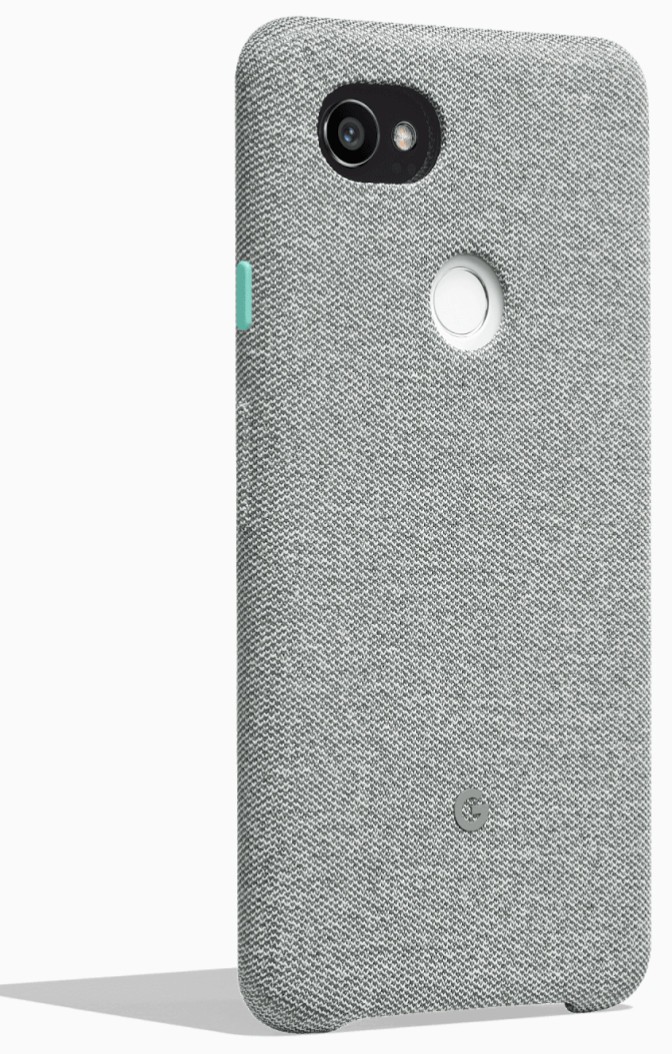
If you prefer your phone case to have some texture for grip, you’re probably going to love the Google Fabric Case. It features the same fabric finish look found on other recent Google products such as the Google Home Mini.
Designed in-house by Google, you can be sure of the build quality and fit for your Pixel 2 XL. These cases offer a premium microfiber liner to ensure your device stays scuff-free and your choice of four color combinations for $40.
See at Google Store
Incipio Esquire Series

Like the concept of the Google Fabric Case but don’t like the idea of spending $50 for it? You’ll definitely want to check out the Incipio Esquire series case.
This case is made of an impact-resistant TPU frame that will keep your phone protected, but the real eye-catching feature here is the ultra-soft fabric finish on the exterior of the case. There is a nice-sized cutout around the fingerprint sensor and camera on the back but it’s otherwise a very sleek and minimalist design.
You can get yours straight from Incipio or from Amazon for just $35.
See at Amazon
Spigen Thin Fit

It can be an issue finding a case for larger phones like the Google Pixel 2 XL that doesn’t add too much bulk to your phone. The Spigen Thin Fit case is about as minimalist as phone cases get.
Available in black, this case will match the look of the Pixel 2 XL and features precise cutouts around the fingerprint scanner and camera on the back. It’s thin enough to keep the Active Edge compatibility fully intact and yet still features Spigen’s Air Cushion technology in the corners for added drop protection.
Keep your Pixel 2 XL safe from scuffs and scratches without sacrificing the slim design with the Thin Fit case for just $12.
See at Amazon
Ringke Fusion

Looking for a reliable clear case for the Pixel 2 XL at a very reasonable price? Check out the Ringke Fusion case.
Starting at just $9 for a crystal clear version, these cases offer two layers of protection for your phone — a rugged and shock-resistant TPU bumper combined with a ridged PC panel covering the back. There’s a protective lip around the front to save the display glass from harm, and there are precise cutouts around the fingerprint sensor, camera, and USB-C charging port.
Get the clear version if you want to preserve the original look of the Pixel 2 XL, or opt to spend $11 on the Rose Gold or Smoke Black versions.
See at Amazon
Caseology Vault Series

Caseology has a couple different cases available for the Pixel 2 XL. We recommend the Vault Series ($13) because it’s got a classic design. Made of flexible TPU, it features a sleek finish along the back and textured grip around the edges. It’s available in black and should look great whether you went with the Just Black or Black and White Pixel 2 XL.
If you’re looking for something a bit more substantial, check out the Parallax Series ($16) which offers a slim, two-piece design to keep your Pixel well-protected. It’s also available in some really cool color combinations. Or consider the Legion Series ($17), which offers a more rugged matte shell around the back of the case.
See at Amazon
How will you keep your phone protected?
Are you going to be picking up a case for your Pixel 2 XL? Let us know if you’re getting one off our list or opting for a different option in the comments below!
Google Pixel 2 and Pixel 2 XL
- Pixel 2 FAQ: Everything you need to know!
- Google Pixel 2 and 2 XL review: The new standard
- Google Pixel 2 specs
- Google Pixel 2 vs. Pixel 2 XL: What’s the difference?
- Join our Pixel 2 forums
Google Store
Project Fi
Verizon
Best Buy
Two new PlayStation PlayLink games are now on the Play Store
Just about a month ago, Sony outlined the first five PlayStation PlayLink games. PlayLink is a new technology that Sony created that enables you to play PlayStation 4 games by using your phone or tablet as a controller, and the two latest PlayLink games to be released include “Knowledge is Power” and “Hidden Agenda.”

Starting off first with Knowledge is Power, this is a game that’s perfect to break out during trivia night at your house while hanging out with family and friends. There are over 5000 questions to answer, and along with the traditional trivia setup, Knowledge is Power also features Power Play abilities that can give you a competitive edge over your opponents.


With the Knowledge is Power app, you’ll use your phone to take selfies for your in-game character, answer questions without rivals seeing what you choose, participate in on-screen challenges, and plenty more.
Moving on to Hidden Agenda, this ditches the lighthearted trivia theme for a darker and more serious murder mystery. You can play Hidden Agenda with two to six players, and you’ll use the app on your phone to check biographies on characters you meet, use your touchscreen as a cursor for making in-game choices, and complete secret objectives.


Hidden Agenda was developed by the same team that created the fantastic Until Dawn, so you know you’ll be in for a story-heavy ride with a tale that unfolds based on the choices you and your friends make.
Knowledge is Power and Hidden Agenda will be joining That’s You! in the Play Store as the first three PlayLink games to hit the scene. You’ll still need to actually buy the games themselves on your PS4, but their companion apps for your phone are free to download.
These are the 5 PlayStation PlayLink games you’ll be able to control with your phone
 AIVAnet