


Stretchable ‘skin’ gives robots the sense of touch
Robots show a lot of promise as first responders, but they can’t effectively dismantle bombs or perform delicate first aid procedures if they can’t feel what they’re touching. To remedy that problem, a team of engineers from the University of Washington and UCLA have developed stretchable skin that can cover any part of a robot. The skin can give a machine the power to sense vibrations and shear force, or the unaligned forces that push one part of the body in one direction and another part in the opposite.
Ever slid your finger across a flat surface? You’ll notice that a part of your flesh under the nail bulges out in the opposite direction of where you’re sliding to, while the other side gets pulled taut. That’s shear force at work — and that’s one of the things the artificial skin can mimic. See, the team embedded very, very tiny serpentine channels throughout the stretchable material and filled them with electrically conductive liquid metal. As the University of Washington explains:
“As the robot finger slides along a surface, serpentine channels embedded in the skin and filled with electrically conductive liquid metal stretch on one side of the [robotic] finger and compress on the other. This changes the amount of electricity that can flow through the channels, which can be correlated with shear force and vibration.”
By giving the skin the ability to sense vibrations and forces, team leader Jonathan Posner said “we have achieved a level of sensitivity and precision that’s consistent with human hands.” It’s an important breakthrough, which could lead to robots that can perform delicate surgery and disarm explosives without the need for remote human operators.
Source: University of Washington
Amazon UK now has over 100 instant-order Dash buttons
In order to be the biggest, sometimes you need to be the fastest. It’s a philosophy that Amazon has strictly adhered to, thanks to 1-Click ordering and its one-click Dash buttons. It’s been just over a year since Amazon introduced its instant order buttons, and in that time, the company has continued to add big-name brands like Heineken and Tassimo. Today, Amazon UK has announced that as part of another product refresh, it’s made another 39 items available via Dash buttons, taking the total to over 100.
As expected, the large majority of new additions are household products. Brands like Bold, Calgon and Cillit Bang now have their own one-click buttons, as do pet food companies like Purina, Wagg, Bakers and Felix. The English Tea Shop, Evian and Vitacoco have also been added for customers who value hydration.
Amazon UK’s Dash catalog is still some way off the 250 products offered across the pond, but it’s no longer just a list of carefully-selected partners. Products like Batteries, sanitary products and alcohol can now be instantly-ordered the minute they’ve run out, reducing the need to trudge to the local supermarket.
The full list: Always Discreet, Ambi Pur, Applaws, Bakers, Beta, Bold, Calgon, Cillit Bang, Clairol Root Touch-Up, Dentalife, Encore, English Tea Shop, Evian, Febreze, Felix, Flash, Gaviscon, Harringtons, Head & Shoulders, Lily’s Kitchen, Napisan, Nescafé, Nescafé Azera, Pampers Baby Wipes, PetSafe, Purina Go-Cat, Purina Gourmet, Purina Pro Plan, Simple Solution, SMA, Tampax, Vet’s Best, VIPoo, Vitacoco, Wagg, Waterwipes, Windolene and World’s Best Cat Litter.
Source: Amazon UK
Apple responds to Sen. Al Franken’s Face ID concerns in letter
Apple has responded to Senator Al Franken’s concerns over the privacy implications of its Face ID feature, which is set to debut on the iPhone X next month. In his letter to Tim Cook, Franken asked about customer security, third-party access to data (including requests by law enforcement), and whether the tech could recognize a diverse set of faces.
In its response, Apple indicates that it’s already detailed the tech in a white paper and Knowledge Base article — which provides answers to “all of the questions you raise”. But, it also offers a recap of the feature regardless (a TL:DR, if you will). Apple reiterates that the chance of a random person unlocking your phone is one in a million (in comparison to one in 500,000 for Touch ID). And, it claims that after five unsuccessful scans, a passcode is required to access your iPhone.
More significantly, Apple provides a summary on how it stores Face ID biometrics, which gets to the heart of the privacy concerns. “Face ID data, including mathematical representations of your face, is encrypted and only available to the Secure Enclave. This data never leaves the device. It is not sent to Apple, nor is it included in device backups. Face images captured during normal unlock operations aren’t saved, but are instead immediately discarded once the mathematical representation is calculated for comparison to the enrolled Face ID data.”
On the topic of data-sharing, it writes: “Third-party apps can use system provided APIs to ask the user to authenticate using Face ID or a passcode, and apps that support Touch ID automatically support Face ID without any changes.” It continues: “When using Face ID, the app is notified only as to whether the authentication was successful; it cannot access Face ID or the data associated with the enrolled face.”
Interestingly, the company dodges the Senator’s question about data requests from law enforcement. But, by indicating that data lives inside a “secure enclave” that it can’t access, it’s suggesting that it won’t be able to handover info that it doesn’t possess. It could also be holding back in light of its scrap with the Department of Justice last year, which saw it refuse to unlock an iPhone 5C owned by the San Bernardino shooters.
As Sen. Franken noted in his letter, Apple trained its Face ID neural network on a billion images. But, that’s not to say the photographs were of a billion different faces. For its part, Apple claims it looked at a “representative group of people” — although it’s still silent about exact numbers. It adds: “We worked with participants from around the world to include a representative group of people accounting for gender, age, ethnicity and other factors. We augmented the studies as needed to provide a high degree of accuracy for a diverse range of users.” Of course, we’ll get to see how accurate Apple’s tech is when the new iPhone makes its way into more hands next month.
For now, it seems the Senator is satisfied with the company’s initial response, which he plans to extend into a conversation about data protection. You can read his full statement below:
“As the top Democrat on the Privacy Subcommittee, I strongly believe that all Americans have a fundamental right to privacy. All the time, we learn about and actually experience new technologies and innovations that, just a few years back, were difficult to even imagine. While these developments are often great for families, businesses, and our economy, they also raise important questions about how we protect what I believe are among the most pressing issues facing consumers: privacy and security. I appreciate Apple’s willingness to engage with my office on these issues, and I’m glad to see the steps that the company has taken to address consumer privacy and security concerns. I plan to follow up with the Apple to find out more about how it plans to protect the data of customers who decide to use the latest generation of iPhone’s facial recognition technology.”
Bigelow Aerospace plans an inflatable habitat for lunar orbit
Bigelow Aerospace has been working on inflatable space habitats for a while now. The company sent a small inflatable unit to the ISS that added a small living area on the space station and it partnered with United Launch Alliance (ULA) last year on plans to launch its B330 module to Low Earth Orbit. Now, the company has just announced that it will continue the partnership and send another B330 inflatable habitat to Low Lunar Orbit by 2022.
This new module, about a third of the size of the ISS itself, is first set to launch to Low Earth Orbit via on a Vulcan 562 rocket that’s currently in development by ULA. Once it’s in orbit, Bigelow Aerospace plans to outfit the habitat and make sure all is working well. When it’s ready, ULA will use two more Vulcan ACES rockets deployed in low earth orbit to push the B330 into low lunar orbit. The idea is to provide a platform for lunar business development as well as a place for NASA to train astronauts and launch longer-term exploration programs.

“We are excited to work with ULA on this lunar depot project,” said Bigelow Aerospace’s president, Robert Bigelow. “Our lunar depot plan is a strong complement to other plans intended to eventually put people on Mars. it will provide NASA and America with an exciting and financially practical success opportunity that can be accomplished in the short term.” Such a program could re-energize human interest in returning to the moon, too.
Source: United Launch Alliance
Sonos One review: The best-sounding smart speaker you can buy
When Sonos released the Play:5 speaker in late 2015, the Amazon Echo was still an unproven tech curiosity. But since then, Alexa and the Echo have grown rapidly in both popularity and functionality, inspiring competition from the likes of Google and Apple. Talking to a speaker is totally normal now — but Sonos users haven’t been able to do that. They’ve instead had to choose between the convenience of products like the Echo and Google Home and the superior audio quality that Sonos speakers offer.
Sonos has known for some time that this is a problem. In early 2016, then-CEO John MacFarlane cited the Echo as primary competition and promised that voice recognition would be a key technology for the company moving forward. Now we’re finally seeing the fruits of that effort. The Sonos One takes everything that worked in the company’s entry-level Play:1 speaker and adds in support for Amazon’s Alexa, which means you can finally talk to a Sonos speaker and have it play music for you. But with Google, Amazon and Apple all working on music-focused speakers of their own, Sonos could get buried if the One doesn’t do everything right.
Hardware
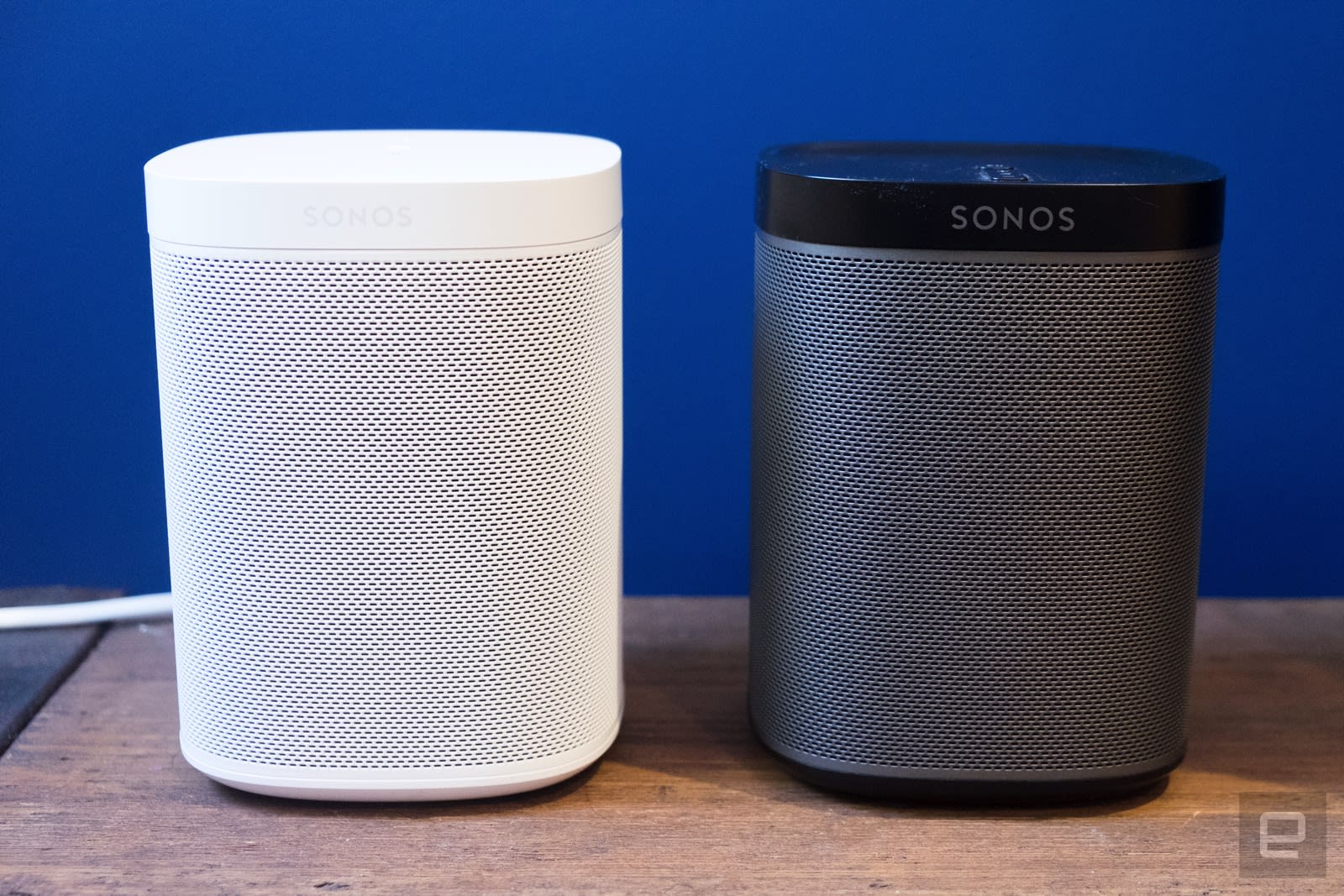
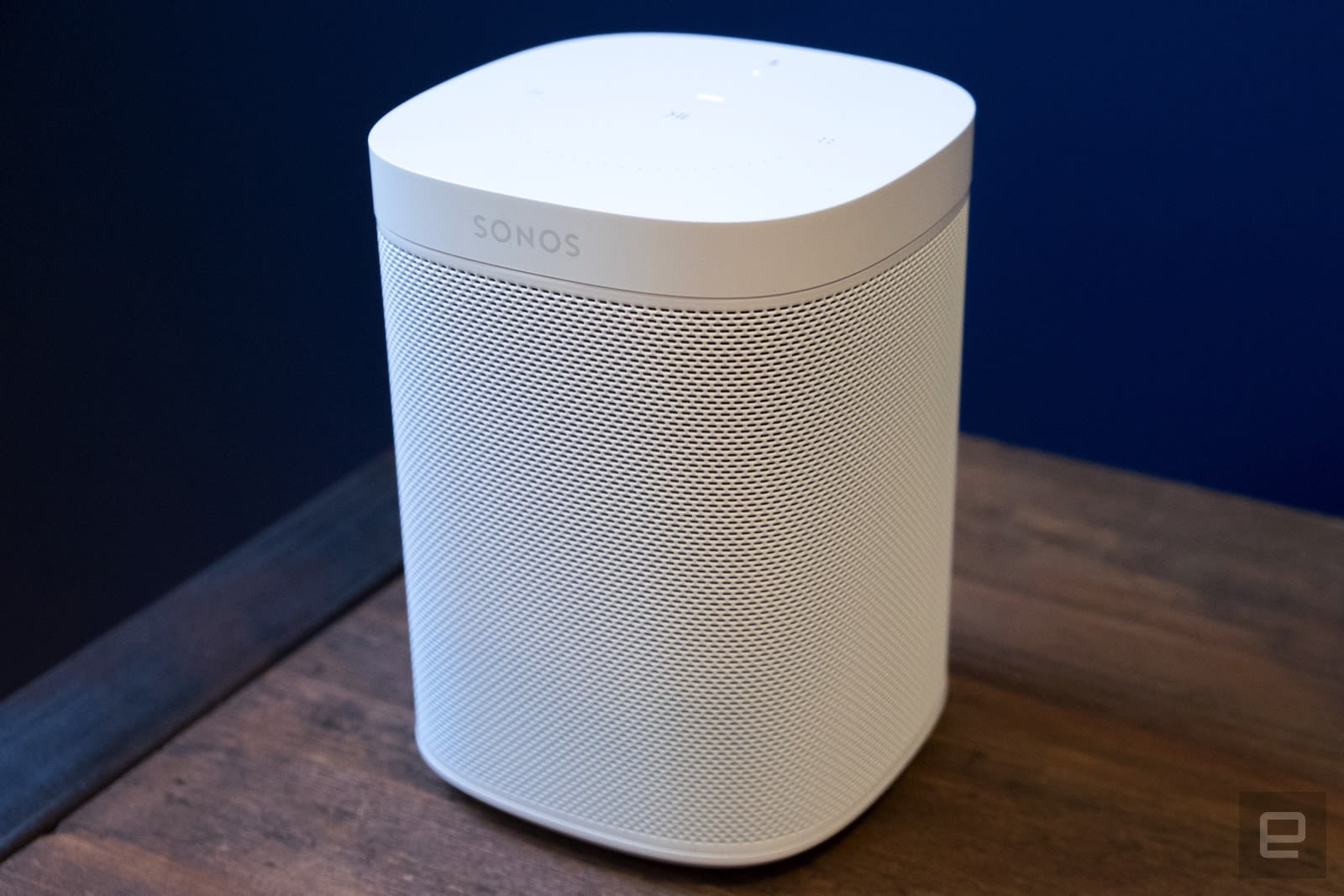
If you’ve used the $199 Play:1 speaker, you’ll feel right at home with the Sonos One. At a glance, it features the same rounded rectangular shape as the Play:1 but adds a few new design flourishes to match Sonos’ current design language. The top of the One is completely flat now, with no physical buttons like the ones on the Play:1. Instead, the One’s top surface doubles as a touch panel, with a play/pause button dead center. On either side are spots to tap to raise and lower volume, and sliding your finger left to right lets you skip to the next track. This setup is identical to what Sonos introduced on the Play:5 and carried over into the recently released PlayBase; I’m glad to see it here as well.
There are two LED lights on top of the speaker. One is a status light to show you when the device is working or having trouble connecting to the internet; the second is underneath a little microphone icon. As you’d expect, this shows you whether the six-microphone array in the One is active. Tap the mic icon to keep the speaker from listening in and the light goes out.
Other than updates to the top of the speaker, the only external difference between the One and the Play:1 is that the grille is now color-matched to the rest of the speaker, which comes in black or white. The Play:1’s grille is gray, regardless of what color the rest of the exterior is.
The Sonos One uses the same audio components and speakers as those found in the Play:1, but the internal layout had to be completely redesigned in order to fit the microphones. But Sonos was able to make the necessary changes without affecting the size or weight of the One — these specs remain unchanged from the Play:1.
Setup
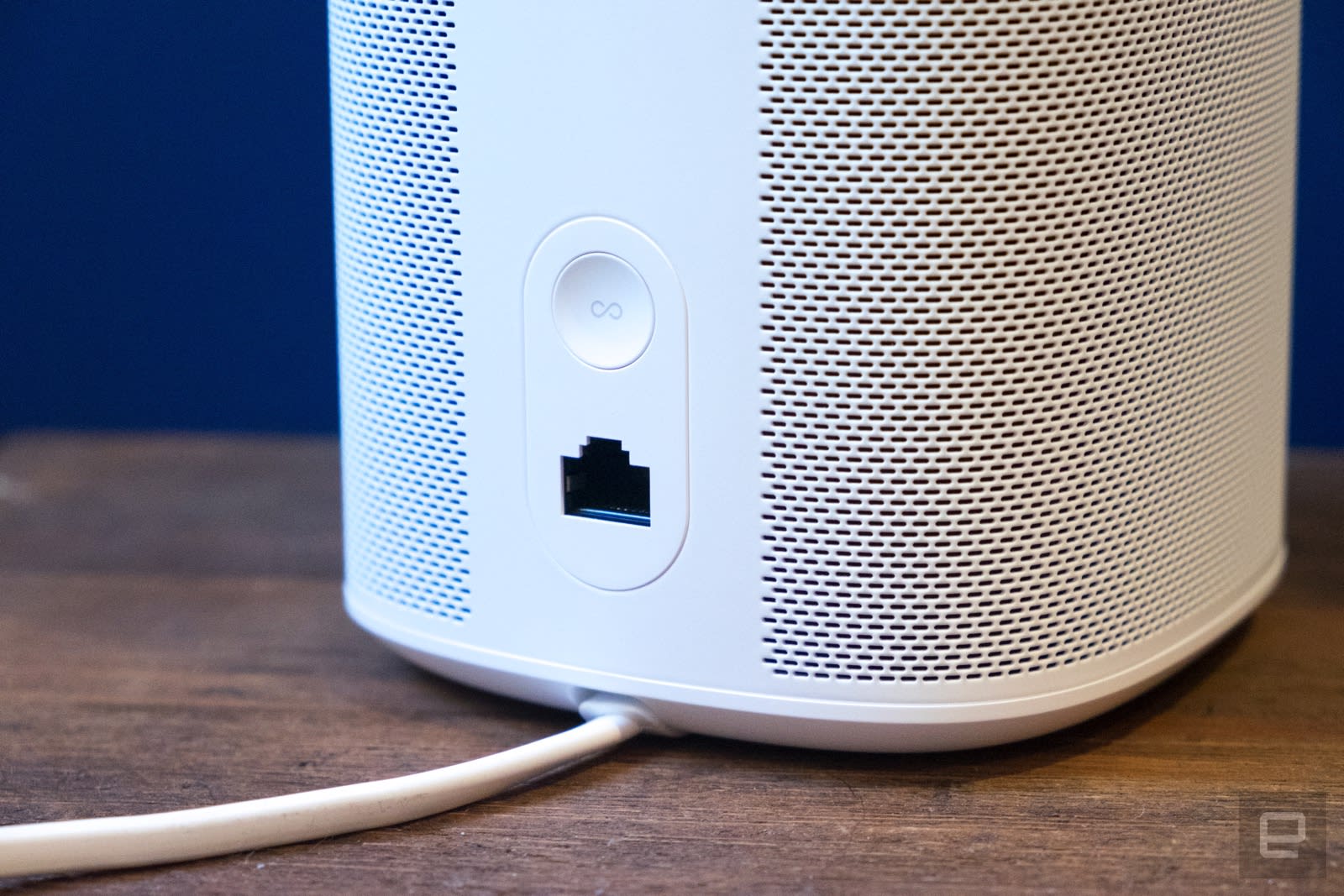
Once you plug in the Sonos One, all of the setup is done on your smartphone. If you’ve never set up Sonos products before, you’ll need to create a Sonos account; from there you just need to connect the speaker to your WiFi network. You’ll then want to sign in to the music services you use — Sonos supports essentially every available option: Spotify, Apple Music, Google Play Music, Pandora, Tidal, Amazon Music and many more.
The next part of the setup process is entirely new: enabling Alexa. You’ll need to have the Alexa app installed on your smartphone — the Sonos app will direct you there, at which point your new speaker will show up as ready to be configured. It’s a pretty simple process, but you’ll then have to enable your music services in Amazon’s app as well.
That’s where I encountered a hiccup. The speaker works only with music services supported by Amazon and Alexa, which currently include only Amazon Music (naturally), Pandora, iHeartRadio and TuneIn. Even though Spotify works with other Alexa-enabled devices, it doesn’t yet work on the One, though Sonos says it’ll be ready soon. Other music services that aren’t supported by Alexa will work with the One through the app, and you’ll still be able to use voice commands to pause, resume and skip tracks. But you won’t be able to ask Alexa to play specific albums or playlists from your Play Music or Tidal account, at least for now.
One last word on setting up voice services. Over the years, Sonos has committed to supporting every audio service that it could, and it wants to do the same with voice control systems. As such, the Google Assistant will come to the Sonos One sometime early next year. So if you prefer Google’s voice assistant, know that it should be available before too long. In particular, those using Google Play Music or YouTube Music will want to give this a shot.
Audio quality
Since the Sonos One has the same audio hardware as the Play:1, sound quality was essentially indistinguishable between the two, and that’s a good thing. The Sonos One impressed me with clear, dynamic and loud sound that far outstrips Google Home or the original Echo. (The second-generation Echo, announced three weeks ago, is supposed to have better audio.) Of course, you’re paying a bit more for the One, but $199 is a totally reasonable price for the sound quality you get here. The One lacks the bass performance, stereo separation and improved clarity you’ll get from a larger, more expensive speaker like Sonos’ own Play:5 or the forthcoming Google Home Max, but the price-to-performance ratio here is excellent.
As with the rest of the Sonos lineup, you can tune these speakers using a feature called “TruePlay.” It uses the mic on your iPhone to analyze your room and optimizes the sound of the speaker based on where it has been placed. I’ve been impressed with TruePlay since it was unveiled two years ago, but it’s worth noting that Google and Apple are both releasing speakers that can tune themselves anytime you move them. Since no Sonos speaker (until the One) has had working mics, this hasn’t been possible, and the One still uses the same tuning process as the rest of the Sonos lineup.
The downsides to the One mostly come down to bass, as I mentioned earlier. There’s only so much you can get out of such a compact speaker. The audio still sounds balanced — I didn’t feel like the music was lacking when listening to the One on its own — but the low end is not as strong as what you’ll get from larger (and more expensive) speakers.
The One is also a mono speaker, but you can pair two of them together to get stereo sound as well as increased volume. I’ve tried this before, with a pair of Play:1 speakers, and it makes a significant difference in the music quality and listening experience. One speaker is just fine for background music, but people serious about audio quality will appreciate having a stereo pair.
Unfortunately, it’s not possible to pair a Sonos One and a Play:1 together in stereo, despite the fact that they’re essentially the same speaker. Sonos said that most customers pair speakers together when they buy them in a pair, but there are probably people who’ve bought one Play:1, to try Sonos out, who’d be interested in adding a One for voice control and stereo playback. The company did at least say that this feature could be added in the future via a software update.
Otherwise, the One works with the rest of the Sonos lineup just as well as you’d expect. If you have other Sonos speakers and want to group the One with them for multi-room playback, you can do that right in the Sonos app.
Alexa integration

But if you’re buying the Sonos One, you don’t want to use the music player app — you want to control it with your voice. Assuming you’re using a service that works with Alexa, this functions basically the same way it does on an Echo. This means that you can ask your One to start play any song, album, artist, playlist or anything else in your music library. The Alexa app also lets you pick different services for your “music library” and “stations,” if you’re so inclined. That lets you access playlists and albums from one service but have another play genre-based stations (what Pandora has focused on for so many years).
Once you’ve started playing some tunes, you can ask Alexa to raise and lower the volume, skip tracks or pause your music entirely. You can also send music to other Sonos speakers in your setup using Alexa. You can tell Alexa to play music on other speakers using the names that you’ve assigned them in the Sonos app (living room, office, etc.). Overall, music control with voice works just fine, whether using a music session you kicked off with your voice or something you started in the Sonos app. If you’ve used Alexa on one of Amazon’s own devices before, you’ll mostly be right at home with the Sonos One voice commands.
Unfortunately, there were a few times I ran into some strange and frustrating bugs — the speaker wasn’t recognizing that it was playing music, so “pause” or “next track” requests didn’t work. Amazon Music also occasionally got confused and told me it was playing on another device so it couldn’t play on the speaker I asked for. Sonos helped me troubleshoot the problem — just asking Alexa to “discover devices” cleared things up. It seemed to re-sync the Sonos skill with the speaker, essentially, and then I was happily playing tunes again.
I also occasionally had trouble getting the One to hear my cries of “Alexa” when I wanted its attention. That was only when I had music playing pretty loudly, and I’m pretty sure that was the cause of my problem. It’s not a deal-breaker, but it’s probably worth noting that you might have a hard time getting Alexa’s attention if you’re cranking some tunes.
Alexa integration means the One can also do almost anything that Echo devices can do. You can install skills for managing smart home devices, sync your calendar and reminders to Alexa, get weather forecasts and news updates, ask random trivia questions and add the many third-party skills that Amazon’s service supports.
There are a couple of notable Alexa services that aren’t enabled when using the Sonos One: voice calls and messaging. Those features are saved for Amazon’s own hardware at the moment. Sonos said that those features could be added in the future, but the company wanted to focus the experience more on music than on the full suite of Alexa features — a reasonable claim, but the One can do nearly everything else that Alexa can do, so it feels more like this is something Amazon wanted to save for itself. This one feature aside, though, the Sonos One is a strong option for getting an excellent music speaker that also taps into nearly everything that Alexa can do.
The competition

Sonos products have historically been pretty unique, but as we’ve mentioned, the past year has seen some major players get into the music speaker market. With Alexa on board, the new Echo and Echo Plus are the Sonos One’s most direct competitors. We haven’t fully reviewed either, but I’d be surprised if either offered audio quality that’s on par with the One. But at only $99, the standard Echo will offer an improved speaker as compared with its predecessor. Plenty of people were already listening to music on the Echo, and now new buyers will end up with an even better speaker. For lots of people, the Echo speaker will be good enough.
The Echo Plus is slightly bigger than the standard Echo, and as such, it has a bigger tweeter. That said, improved audio over the standard Echo isn’t a selling point Amazon has mentioned, so it’s safe to assume it’ll provide a similar listening experience. We can’t say for sure yet, but we’ll be reviewing both of them soon.
Apple and Google are both launching their own music-focused, voice-controlled speakers this winter: the HomePod and Home Max, respectively. Based on the various demos we’ve had, both seem like they’ll outperform the Sonos One from an audio standpoint. But that’s to be expected — Google’s Home Max will cost twice as much ($399), and Apple’s HomePod will come in just under that at $350. And in both cases, you won’t have access to Alexa; you’ll have to be content with the Google Assistant or Siri as your digital assistant.
If you’re thinking of spending that much money on a speaker but would prefer the Sonos ecosystem, you might as well consider the $499 Sonos Play:5. No, it doesn’t have voice control built in, but you can pair it with an Echo Dot and get the same level of voice control that the Sonos One offers, with audio quality that far surpasses any other connected speaker you could buy.
None of these options match the Sonos One’s $199 price point; the speaker really does sit alone in this category. It’s better than an Echo or Google Home, but probably not as good as what Google and Apple have coming up. But if you have even a passing interest in playing music around your house, the Sonos One hits a sweet spot, offering great music quality without breaking the bank.
Wrap-up

The Play:1 has been Sonos’ best-selling speaker, and with good reason. It offers significantly better music quality than your average Bluetooth or smart speaker, at a reasonable price. It’s also a great first step into a multi-speaker setup for your home. The Sonos One does all of that and adds voice controls without raising the price. Those voice controls may have a few bugs to work out, but aside from one frustrating afternoon, it worked well for me.
Anyone who is considering an Echo or Google Home would do well to consider the Sonos One as well. In a world where white earbuds, laptop speakers and Bluetooth devices have come to dominate the music-listening experience, a lot of people have forgotten how good a dedicated music speaker can sound.
The Sonos One is a great way for most people to significantly upgrade their audio setup while also getting the convenience of voice controls. I wish that both Spotify voice commands and the Google Assistant were supported at launch, but this speaker will keep getting more features through upcoming software updates. Given that, I have no problem recommending it now. It’ll work right out of the box as an Alexa-enabled device, it’ll support more music services over time and it’s a great way to dip your feet into the Sonos ecosystem. Just don’t be surprised if you end up wanting to buy a few more.
HP ZBook X2 hands-on: A hulking tablet for a niche audience
HP claims to have made the “world’s most powerful detachable.” The company is unveiling its ZBook X2 convertible at the Adobe Max conference today, which is appropriate since this device is designed for people who use Adobe’s pro software suite. Specifically, people who use apps like Photoshop, Lightroom and Illustrator and need a capable tablet that can keep up with demanding graphics editing on the go. I enjoyed doodling on the Zbook X2 during a recent demo, but I’m not sure its $1,749 asking price is justified. To be fair, of course, I didn’t use it as it was intended and I’m not the target audience.
What makes the ZBook X2 ideal for designers and illustrators is its advanced 14-inch 4K display. HP chemically treated the screen to give it a grippier, matte texture that felt smoother during my testing than regular glossy touchscreens. The anti-glare display is also color calibrated for accuracy and can render 100 percent of the Adobe RGB color spectrum. All of this makes the ZBook’s screen a brilliant canvas. I not only enjoyed seeing individual eyelashes of a man up close, but I also appreciated how smooth it felt to pinch and zoom in on images with the tablet.
The texturized screen also makes drawing a pleasant experience. HP includes a stylus with the ZBook X2 that it claims is its “most accurate and expressive” pen yet. The company teamed up with Wacom to make the digitizer, which can recognize 4,096 levels of pressure, as well as understand the angle at which you’re tilting it. My favorite thing about the pen is its dedicated eraser button at the top, which actually acts like a real eraser instead of simply undoing your last stroke when you tap on the screen. It was so realistic that I almost tried to brush away imaginary eraser dirt after using it to remove stripes on a pink background.

Since HP’s pen uses magnetic (EMR) technology instead of Bluetooth, it doesn’t need to be recharged; it draws power when it interacts with the screen. I sketched a cute cartoon of a girl under the word “Engadget” with the stylus and found it smoother and better at detecting pressure changes than others I’ve tested (mostly lower end offerings that accompany the Note tablets or phones).
I also appreciate that HP includes a full-size keyboard with the ZBook X2, although at this price I’d be appalled if it didn’t. The keyboard snaps on securely via a magnetic connection, but it takes the tablet a few seconds to sync, so I have to wait before typing. The keys are evenly spaced, with generous travel that makes typing comfortable. The touchpad was similarly responsive — it quickly recognized my two-finger scroll and zoom gestures. HP also offers a row of shortcut keys for functions like “Home,” “End,” “Page Up” and “Page Down” here, which make multitasking easier.

Speaking of shortcuts, the ZBook X2 features vertical rows of buttons on either side of the screen. Each column has up and down keys that can be programmed to tweak settings like brush size and opacity in apps like Adobe Photoshop. By default, they’ve been tailored to what HP and Adobe understand are the most popular tools in Photoshop and Lightroom. You can customize these to control system settings like volume or display brightness, too. During my testing, it was convenient to change the brush size just by pushing the up or down button mid-drawing instead of having to drag a slider in the app’s setting bar.
The ZBook X2 looks and feels as beefy as it purports to be. Its aluminum-and-magnesium body is significantly heavier than most tablets, and its 3.6-pound weight is greater than most laptops its size. If you count the ZBook X2’s keyboard, the entire device weighs 4.6 pounds, which is even heavier than the 15-inch MacBook Pro. That heft was manageable when I propped the ZBook X2 up on a table (with its built-in kickstand) but quickly became tiring when I sat with it cradled in one arm and drew with the other hand. You most likely won’t use it in this position as often, though.

The tablet’s cut-off corners and the vents on its side add a rugged aesthetic. Under the vents lie the device’s dual-fan cooling system. This helps prevent overheating of the X2’s powerful processors: a seventh-generation Intel Core i7 CPU that reaches a clock speed of 4.2GHz in Turbo Boost, along with an NVIDIA Quadro M620 graphics card. The tablet’s 32GB of RAM should also make for smooth multitasking even with multiple canvases open. In addition to premium internal components, the ZBook X2 also sports a slew of ports like USB-A, HDMI, Thunderbolt 3 and an SD card slot. To keep your investment safe from falls, the device is also designed to meet MIL-STD-810G durability standards.
The rest of the ZBook’s features are relatively straightforward. It has a fingerprint sensor and a 720p webcam that supports Windows Hello’s facial recognition technology for convenient logins. HP estimates the ZBook X2 can last up to 10 hours, and that it can recharge to 50 percent in 30 minutes.

That all adds up to a detachable that does indeed sound powerful, although to be fair I didn’t push the ZBook X2 very hard during my demo. The thing is, I have a hard time believing that even the most ardent Adobe fan will be willing to spend $1,749 just to get the better screen and pen in such a hulking tablet. Someone with such specific needs is probably already happy with their Wacom Bamboo desktop digitizer, and also possibly even prefers macOS over Windows. An iPad Pro or a Surface Pro may not be as powerful, nor will they offer the same dedicated shortcut buttons and comfortable keyboard that HP does, but Apple’s and Microsoft’s tablets are easier to tote around. The ZBook X2 will be available in December, so you can spend that time wondering if you need it, or start saving up if it’s something you want.
Intel proposes a mathematical formula for self-driving car safety
As autonomous vehicles become a part of the landscape, there are more questions than ever about their safety, and how to determine responsibility when they get in an accident. With so many companies (Alphabet, Uber, GM, Tesla and Ford — just to name a few) working on different technology, there’s also a question of how to establish standards on any level. Now, Amnon Shashua, the CEO of (recently acquired by Intel) Mobileye is proposing a model called Responsibility Sensitive Safety to “prove” the safety of autonomous vehicles.

In practice, the AV needs to know two things:
- Safe State: This is a state where there is no risk that the AV will cause an accident, even if other vehicles take unpredictable or reckless actions.
- Default Emergency Policy: This is a concept that defines the most aggressive evasive action that an AV can take to maintain or return to a Safe State.
We coin the term Cautious Command to represent the complete set of commands that maintains a Safe State. RSS sets a hard rule that the AV will never make a command outside of the set of Cautious Commands. This ensures that the planning module itself will never cause an accident.
The paper (PDF) backing this model up tries to establish some baseline equations (the setup pictured above is just one of the situations) for self-driving cars to make sure they will behave safely. That includes in situations where it’s possible for pedestrians to appear from behind another car, or, for example, making sure they’re not following another car too closely. The point is to make sure that autonomous vehicles don’t cause collisions, even if it may not prevent all collisions.
Source: Intel, Arxiv (PDF)
AI-powered app finds and locks away your racy photos
Hiding racy photos on your phone can be a tedious, manual affair. Depending on the app, you need to first select all the pics you want to move, move them and then delete them from your original cameral roll. That’s not to mention making sure they didn’t go to any automatic cloud backup locations like iCloud or Google Photos. A new app, Nude, aims to make the process a lot easier by scanning your photos for nudes, putting them in a private vault, deleting them from your camera roll and then erasing them from iCloud. All of this analysis is done on your iPhone, too, so no sensitive information hits the cloud.
Fully named Nude: The Sexiest App Ever, the app uses either a PIN or Touch ID to secure your photos, as well as an integrated camera to take them in the app itself. You can view your naughty photos and video in Nude, too, and the app keeps track of any attempts to get into your photo vault. The iTunes description says you can protect copies of your driver’s licence, ID, and credit cards, though it doesn’t mention if the built-in AI will detect these in the same way as, say, those naked photos.
Private, on-device analysis is only available with iOS 11, though; users of iOS 10 and under will have their photos categorized by Amazon’s cloud-based Rekognition tech, so be wary. Nude is free to download but will run you $1 for a monthly subscription and $10 for an annual one. The app is only on iOS for now, though an Android version is in the works, according to The Verge.
Via: The Verge
Source: Nude App/iTunes
Indiegogo created a marketplace for successfully-funded projects
Indiegogo has become a viable alternative to Kickstarter for crowd-funding projects in the last few years. It’s not just small projects, either — big names like IBM, Honeywell and Atari have used the site to pull in funding. Now the crowd-sourcing company is looking to help successfully-funded initiatives get attention after they launch, as well. The company has launched a new Marketplace page where you can find a ton of gadgets, devices and other products that you can purchase directly from the site.
The marketplace section’s homepage currently has a smart nightlight, an ultra-portable grill, a battery-life extender sleeve, a smart VPN router and a STEM learning project box for kids and hobbyists, among others. You can filter the marketplace view by category, like Tech & Innovation, Creative Works and Community Projects, too. Each of these larger categories have several sub-categories, as well, like Art, Comics, Film, Music and Video Games under Creative Works. You can also filter what shows on the marketplace page by whether the crowd-funded projects are “just launched” or “ending soon.” If nothing else, Indiegogo is now a place that project creators can sell their stuff to folks who didn’t get in on the initial funding phase.
Via: Gamasutra
Source: Indiegogo
Samsung believes ‘programmable objects’ will blanket your home
While Samsung continues to reap the rewards of being the world’s largest Android partner, it also has its eyes set on the future of the connected home. “Samsung is very focused on the internet of things,” said David Eun, the president of Samsung Next, the company’s investment arm. At the Wall Street Journal’s D.Live conference today, he said that there’ll come a time when your home will be covered in connected devices.
“We think this could be the third wave where you have programmable objects blanketing your home,” he said. Eun said that the company has already been investing in certain companies to help accelerate this effort, such as the purchase of home automation platform SmartThings in 2014. Now, it’s the defacto platform for all of Samsung’s connected devices, such as the Connect Home router and a cellular smart tag.
Yet, the internet of things hasn’t leapt off to a great start. For many, it’s still confusing to use, with far too many apps and a laborious set-up process. There’s also the recent problem of security, with IoT devices frequently used as a target for botnets.
Eun remains optimistic, however. “The internet of things is an interesting area of growth for us,” he said. Connected homes can also prevent theft, he said, by alerting the owner of any disturbances. And while rivals like Amazon and Google are relying on embedding existing devices with their own smart assistants (Alexa and Google Assistant respectively), Samsung has the advantage of making its own hardware too. Imagine a Bixby-powered Samsung fridge, for example, or a Bixby-powered Samsung washing machine.
All of this means heavy investment not just in hardware, but also in software and services, which is what Eun has been focusing on for the past few years. “We have to get the software equation right,” he said, adding that it’s essential to have a thoughtful integration of both hardware and software.
Part of the idea behind Samsung NEXT is to act as a startup within a very large company, and its job in recent years has been to identify “transformative software and services” and to discover them through investment and VC funds.
“We invested in virtual reality two to three years before coming out with a headset,” said Eun. “It turns out investments can be incredibly strategic when you’re thinking about innovation.”
As for the past year, Eun admits that it’s been a rough time at the company as it dealt with the fall out from the Galaxy Note 7 scandal. Still, the recent reception of Galaxy Note 8 was welcome. “It’s been a record year,” he said. “It’s the most gratifying thing.”
 AIVAnet