


How to add rounded screen corners to your Android phone
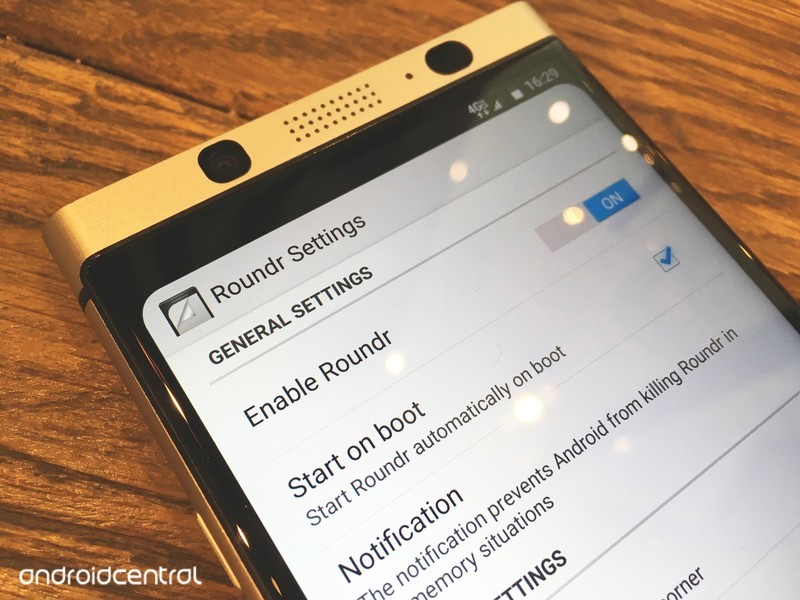
If you’ve seen the iPhone X and thought “I want those rounded corners”, then you’re in luck. There is an app that brings rounded corners to your Android device, without root!
If you ever felt like square corners on a screen look too rough, you can round them bu using a simple app. The best part is that no root is required. Of course, this won’t physically round your corners, but if you have an AMOLED screen, or if you don’t mind having the curve be a little smaller, then it will look great nonetheless.
Read more at ModMy!
Why I pre-ordered the Pixelbook
Chromebooks are great for low price devices, but this is why I’m choosing a Pixelbook as my next laptop.
In early October, Google had an event to showcase all its latest hardware. While most attention was (rightly) focused on the new Pixel phones, I wasn’t too interested in those. They look nice for sure, but my OnePlus 3T is working just fine for now. I was much more interested in the Pixelbook: the new, ridiculously expensive Chromebook.

But why? Chrome is great on a low-cost device because the simpler operating system will let that device perform much better than an equivalent laptop running Windows. And there are already pseudo-flagships in the way of the Asus Chromebook Flip C302 and Samsung Chromebook Plus and Pro, which hover around half the price of the entry model Pixelbook. To be clear, I did order the entry level Pixelbook with 128GB of storage, an Intel Core i5, and 8GB of RAM.
When I buy a gadget, I try my best to find something that will serve multiple roles. A smartphone is an obvious example in that it’s also a camera, a music player, and the most convenient way to see pictures of adorable dogs. A traditional tablet would fill most of these roles as well and would be even better for certain tasks like reading a novel. However, I prefer owning a convertible laptop instead of a tablet for reading, since I also need a laptop in my life. This year, there have been plenty of convertible Chromebooks at different price points, including at the entry level. While a more powerful Chromebook might be a little smoother, a lower-end Chromebook wouldn’t be objectively bad.
 A Windows or macOS laptop can run the Chrome browser, as well as “real programs.”
Why not other operating systems?
But why bother with a Chromebook that starts at $1,000? Why buy that over a MacBook Air or Surface Laptop and just install the Chrome browser? Those laptops would be able to run the Chrome browser and also run “real programs.” I haven’t used macOS at any point in my life, and while it’s always nice to expand my horizons, there isn’t anything I would want to do on a MacBook that I couldn’t do on a comparable Windows laptop. I’m not tied into the Apple ecosystem at all, but I still used a Windows laptop back when I owned an iPhone.
On a related note, I also considered buying a 12.9-inch iPad Pro earlier this year, but the lack of mouse support and Apple’s use of Lightning instead of USB-C for charging put me off. The Pixelbook starts at $50 more than the iPad Pro 12.9, and for that price, it includes a real keyboard (the iPad Pro keyboard is an additional $169 over the base price), mouse support, a desktop browser with full extension support, and USB-C for charging. Tablet apps are going to be miles better on the iPad compared to Android apps on Chrome, but I only use three apps and the other factors more than makeup for that.
 The iPad Pro is also a nice lightweight computer, but it misses the mark for me.
In my day job, I manage Windows desktops and laptops, as well as Chrome devices for a healthcare-focused non-profit. If I had to guess, I’d say 75% of our devices are Chromebooks or Chromeboxes, but a vast majority of my time is spent handling the Windows computers. It sounds cliché, but the Chrome devices just work. Updates are nice and seamless and don’t harass our users the same way Windows updates do. And the Chromebook or Chromebox is rebooted within seconds due to the way updates work on Chrome.
I literally never worry about a Chrome device being infected with malware or a virus, because by and large they can’t. There absolutely are exploits for Chrome devices, but they are much, much less likely to occur than an exploit for Windows.
That experience played out when I used a Windows laptop in my personal life. There was always something less than great about the experience. This ranged from Bluetooth problems on one laptop to inconsistent battery life on another to sleep/wake issues on another. None of these are insurmountable, but they’re also issues I never faced on any of the Chromebooks I used. When I open a Chromebook, the screens come on. When I go to pair a Bluetooth mouse, it pairs. When I’m sick in bed and watching Netflix, the battery lasts just as long as other times I binge watch my favorite shows.
I love this consistency that comes with using a Chromebook, and I never found the same consistency on any of the Windows laptops I used over the course of 10 years before I switched to a Chromebook. For what I want to do on a laptop, Chrome has more than enough power, while remaining consistent and enjoyable to use.
Android applications are another key point for me. I can read from my Comixology or Play Books collection inside a web browser, but that experience is…less than smooth. Similarly, I could emulate Android applications on any Windows device, but even on high-end Windows laptops that’s just clunky. I only use three Android applications on my Chromebook: Play Books, Comixology and Polarr, but they’re services I love using every day.
 This Acer Chromebook will do nearly everything the Pixelbook can for a fraction of the price.
What about other Chromebooks?
But again, lower-end Chromebooks also run Android apps. So why spend $1,000 on a Chromebook? That answer is likely to differ for every buyer, but for me it comes down to the fact that other Chromebooks don’t have all the features I want. I spent most of this year with the Asus Chromebook Flip C302, and it was great. With the exception of the odd assignment that required a piece of Windows software, the second half of my Bachelor of Science in Information Technology was completed on a Chromebook. My courses were completed online, which certainly helped.
At the same time, Google Docs, Sheets and Slides have gotten much better over the years, and I think most users would be perfectly comfortable using those in place of Word, Excel or Powerpoint. I still did most of my academic writing inside of Microsoft Office for formatting reasons (and my school gave everyone an Office 365 license), but I would have been just at home inside Google’s apps.
Other Chromebooks didn’t have the combination of features I desired. The Pixelbook does.
The Asus C302 is a fantastic laptop, but a pretty awful tablet. The 16:9 ratio and heavier weight make the device cumbersome to hold as a tablet, even with two hands. A 3:2 ratio screen feels much more like a tablet, while not sacrificing usability when the device is being used as a laptop. I tried a Samsung Chromebook Plus — which has a 3:2 display — when it was released earlier this year, but the lack of a backlit keyboard killed it for me. I recently sold my Asus C302 and picked up another Samsung Chromebook Plus because I’ve been doing more reading. It works well, and it is indeed comfortable to use a tablet. But the lack of a backlit keyboard still hampers the device in my mind.
If that were the only flaw of that model (and its brother, the Chromebook Pro) I’d deal with it. But the keyboard is a bit cramped, the trackpad isn’t great, and it maxes out at 32GB of internal storage. I haven’t seen or used the Pixelbook in person like some of my colleagues, so the first two issues may well be present on that device. While Chromebooks haven’t historically needed lots of storage, with Android apps that equation changes. I wouldn’t mind if the Chromebook Plus had 64GB of storage, but 32GB is just too small if I want to download a bunch of movies from Netflix or Plex, or if I install any games. An SD card or USB drive can’t integrate with Android apps on Chrome yet, and even if they did I’m not sure if the slower read speeds on the card would still allow for a smooth user experience.

At the time of writing, a brand new Chromebook Plus goes for $437 on Amazon. A little more than twice the cost nets me four times as much internal storage, more RAM (which I honestly don’t need) and a glorious backlit keyboard.
There are other aspects of the Pixelbook that I’m sure will be nice but didn’t factor into my purchasing decision. The design looks fantastic, but the Asus and Samsung Chromebooks look fantastic as well. I’m sure the pen works really well, but I’m not a pen user. I don’t currently plan on buying the pen, and I’m glad it wasn’t included so it wouldn’t drive up the price of the laptop itself. With my phone close to me at all times, I’m not too concerned with Assistant being on any other device. It also won’t be long before Assistant comes to every Chromebook because Google wants Assistant on as many devices as possible.
I also don’t intend to boot into a different flavor of Linux, but I’m sure it’ll work wonderfully for those that want to do that. While there have been rumors of Chrome being able to run virtual machines inside the browser, I’m not buying this based on what it may or may not do someday. If that capability does come out, I’ll most likely give it a try before never using it again.
I’m not going to try and convince anyone to run out and buy a Pixelbook. Any lower priced Chromebook will perform just as nicely and will get features like Assistant later on. There are certain pieces of software that others legitimately need that aren’t fully featured on Chrome, or just aren’t available in the first place. I still have a Windows desktop at home that is my gaming, media conversion, and Plex server machine, and it isn’t going anywhere anytime soon. I personally love using Chrome on a convertible laptop, and I’m sure the Pixelbook will be the Chromebook I love the most.
See at Google
Google Hardware

- Google Wifi review
- Google Home review
- Everything you need to know about the Chromecast Ultra
- Chromecast vs Chromecast Ultra: Which should you buy?
Google Wifi:
Google
Amazon
Google Home:
Google
Best Buy
Chromecast Ultra:
Google
Best Buy
An upgraded version of Bixby might be announced on October 18
Bixby 2.0 will reportedly offer deeper third-party integration and move the assistant beyond smartphones.
Back in February, Samsung used its Galaxy S8 and S8+ to introduce Bixby to the world. Bixby has had a rocky life so far, but despite a delayed release in the United States and a lacking feature set from day one, the AI has actually progressed into something that’s not complete garbage.

Samsung will be holding a developer conference in San Francisco on Wednesday, October 18, and according to a new report from The Korea Herald, this is where the company will be announcing Bixby 2.0. Bixby 2.0 is expected to be an upgraded version of the assistant that we already have, and although not too much is known about the update just yet, there are a couple key features that we can supposedly look forward to.
The first of these is further integration with third-party services. You can already use Bixby Voice to call an Uber, start playing a song on Google Play Music, and plenty more, so we’re excited to see what other apps the AI will be expanding to. Along with this, it’s also suggested that Bixby 2.0 will have a big focus on its use in devices other than smartphones.
Moving Bixby to smartwatches seems like the most natural next step.
We’ve already seen Bixby make its way to Samsung’s incoming Gear IconX wireless earbuds, but we’ve yet to see the assistant appear on any of Samsung’s smartwatches. Moving Bixby to the likes of the Gear S3 and Gear Sport only makes sense, and along with this, there’s also the chance of a Samsung smart speaker that we’ve been hearing rumors about for months now.
Leading up to Bixby 2.0’s announcement, Samsung has also appointed Chung Eui-suk as the head of service intelligence for future development of Bixby. Chung Eui-suk is Vice Chief of Samsung Research America, and the move was made as a result of Bixby’s poor market response.
Bixby might not ever become as popular or powerful as Google Assistant or Amazon’s Alexa, but with a new exec leading the charge and a big 2.0 release less than a week away, it certainly seems like Samsung is going to try it’s best to do so.
Samsung Galaxy S8 and S8+
- Galaxy S8 and S8+ review!
- Galaxy S8 and S8+ specs
- Everything you need to know about the Galaxy S8’s cameras
- Get to know Samsung Bixby
- Join our Galaxy S8 forums
Verizon
AT&T
T-Mobile
Sprint
Unlocked
‘Life is Strange’ prequel’s second episode arrives next week
Life Is Strange was one of our favorite games of 2015 and its prequel of sorts turned out to be pretty great, even though it was made by a different studio. Titled Before the Storm, the game’s first episode came out in August of this year. On October 19th, you’ll be able to jump back into Chloe and Rachel’s story with the second episode, titled “Brave New World.” A new trailer sets the scene for the upcoming episode, which will be available on Xbox One, PS4 and PC (via Steam).
The trailer teases some new characters and places, while returning to familiar ones from the first game. Chloe isn’t too happy with the “dillhole” that her mom is moving in with them, and she gets mixed up in a shady errand for Frank Bowers at Blackwell Academy. Chloe and Rachel’s relationship seems to deepen as well. Fans of the series will likely thrilled about the new installment — if you want to get caught up by starting at the beginning, the first episode of the original BAFTA award-winning Life is Strange is free on all platforms.
Source: Square Enix
Airbnb plans five more complexes after its first Florida apartments
A new report from Financial Times confirms last month’s rumors that Airbnb will launch a new apartment complex in Florida in partnership with a real estate firm. The rental company plans to pitch the location as prime opportunity for seasonal tenants who will be able to rent their units out for up to 180 days a year.
Real estate developer Newgard Development Group will construct the 300-unit building located in Kissimmee, Florida and open it next year. Located just south of Orlando, the complex will be poised to lure tourists and workers away from hotels, which is the ultimate goal of the venture. Newgard plans to build five more such Airbnb-partnered apartment complexes amounting to 2,000 total units in the next two years, its chief executive told Financial Times.
The Kissimmee location will have keyless doors and long-term storage for tenants to more easily rent out their units while away. Hosts will use a proprietary app to organize renters and coordinate cleaning services, which are mandatory. There will also be a “master host” on-site to, presumably, supervise the location.
As for revenue, Newburg will take a 25 percent cut from each rental, Airbnb will take its usual 3 percent and the tenant will get the rest. It’ll be interesting to see if Airbnb exports this model to other real estate partners in the future as it continues to try prying more business away from hotels.
Source: Financial Times
LG will build Europe’s biggest EV battery factory next year
As the auto industry fatefully moves into electric vehicles, Europe’s major car-makers need high capacity batteries. Until now, companies like VW, Volvo and BMW have had to import batteries from Asia. LG’s forthcoming car battery factory in Poland, the first in Europe, hopes to fulfil that growing demand. “The company has chosen Poland as the most competitive location for production to satisfy the needs of European and global car producers,” said Chang-Beom Kang, vice president at LG Chem. The facility will cost $1.63 million, based in the city of Wroclaw which is close to the country’s border with Germany. (In case you didn’t know, Germany is a major car manufacturing country.)
The company’s chemical arm is planning to manufacture up to 100,000 EV batteries starting next year, recruiting 2,500 people in the process. According to Reuters, the factory will also include an R&D center.
While the factory may sound big enough, LG Chem’s production estimates place it at around 10 percent of the capacity of Tesla’s Gigafactory estimates for 2018. Demand is ramping up in Europe, and this is likely just the start. Paris stated today that it aimed to ban the sales of new fossil fuel car by the year 2030, while both France as a country, and the UK, aim to ban the sale of combustion engine vehicles by 2040.
Source: Reuters
Fear of the US government led me to censor myself on Twitter
The day I’ve been dreading for months is drawing near. On October 18th, the Department of Homeland Security’s modified system of records is scheduled to go into effect. The updated policy would affect all US immigrants, whether they are new, existing or permanent residents or even naturalized citizens, and how they are identified by the government. More accurately, it would allow the DHS, Border Patrol and other immigration authorities to collect social media handles as part of an individual’s official record. As someone who’s working in the US on a visa, I was immediately worried about how it would affect my standing.
The reason the DHS gave for the update is that it is beginning to conduct “more immigration actions in an electronic environment” and that the U.S. Citizenship and Immigration Services (USCIS) is adjudicating “more immigration benefits and requests for action in its USCIS Electronic Immigration System.” Basically, people are increasingly applying online, and the changes would reduce the existing reliance on paper records. What the DHS wants to do is be able to officially identify you by your online persona in addition to existing attributes like your name, birthday and address. The update would also add an individual’s “country of nationality; country of residence; the USCIS Online Account Number; social media handles, aliases, associated identifiable information, and search results” to one’s records.
A DHS spokesperson said in a statement, “This amendment does not represent a new policy.” The notice published on September 18th was “an effort to be transparent (and) comply with existing regulations” and “due to updates in the electronic immigration system.” Multiple requests for clarity on what would change for immigrants — whether they would have to fill out new forms asking for their social media handles or what would happen for those with private profiles, were not answered.
I was raised in Singapore, where political criticism can get you sued (if interpreted as libel), arrested (if seen as inciting violence) or even jailed. At my first full-time job, as a marketing executive for a local oil and gas company, my boss told me not to speak in meetings — playing dumb was always better than potentially making a mistake, he said. For most of my life, I learned to swallow my feelings. My mother’s mantra was “Keep your opinions to yourself,” and she sternly repeated it as we made our way to family gatherings and social functions.
When I first came to live in the US, in 2008, I was surprised by how liberally people expressed themselves. I learned that individuals’ thoughts have value but also, more important, that we are entitled to them. The notion of freedom of speech was new to me, but as I observed the thriving arts and culture in American society, I understood what liberty was worth. Just as people grow and improve by accepting and learning from different opinions, so a country flourishes by embracing and encouraging open discourse.
I got used to the freedom to air my thoughts on any topic in public forums like Twitter and Instagram. I still refrain from saying anything that would make me look insensitive or give away too much personal information, though. Part of me also continues to fear the wrath of the Singapore government; I worry about what could happen to me when I return to visit family should I unwittingly say something too critical. But for the most part I feel carefree. My posts tend to be a mix of my own articles, random musings, funny videos or frustrating stories about poor customer service and bad PR.
Something changed a few months ago, after I first heard of the DHS’ plans to incorporate social media into its visa application process. I started to second-guess myself. I avoided weighing in on topics that would show my political leanings. I dutifully wished my followers a happy Fourth of July, shared the results of the Super Bowl and retweeted posts honoring the fallen victims of 9/11. I sent these tweets mostly out of goodwill, but a small part of me felt it was better to look like I participate in American activities.
I started posting what I imagined a immigration officer would like to see, rather than show an unfiltered version of my thoughts. Truth is, Chinese New Year matters more to me than Fourth of July does, and I didn’t really care if the Patriots won. I love America, and I love many of its festivities and people, but I can’t change the fact that I grew up elsewhere. And honestly, I shouldn’t have to.
I continued to tweet, trying mostly to stay on neutral topics. Occasionally, I let myself express anger at institutions or people, but I only feel safe ranting about issues that people agree on regardless of political views.
I don’t want to let my fear get in the way of me expressing myself, but it already has.
But it’s what people don’t see that I found the most telling. I agonized over whether to soften a jokingly violent tweet about New York’s subway system. I didn’t want someone to come across those thoughts, assume I was serious, and decide I’m a dangerous individual. Who knows what an immigration officer might think? Eventually, I toned down the language and added qualifiers like “I guess” to make it clear I was merely musing.
There are times I’ve avoided posting altogether. I kept quiet during the white nationalist rally in Virginia and generally don’t comment on things Donald Trump does. But things came to a head when I found myself holding back from sharing negative tweets about American gun laws and political gridlock after the Las Vegas shootings. As my feed filled up with statistics showing how the US and its (lack of) gun control policies have led to massive loss of lives, I longed to retweet and share. But I didn’t. Instead, I vented in private messages to trusted friends. I felt like I was back in Singapore.
I’m torn. I don’t want to let my fear get in the way of me expressing myself, but it already has.
Maybe I’m being paranoid. A DHS spokesperson said the agency already does “and continues to monitor publicly-available social media to protect the homeland.” They might already know everything they need to about me from years of unfiltered tweeting. But when your job, life and future depend on how strangers in some government agency perceive you, wouldn’t you be careful too? Yes, my profile is public and anyone can already access it and judge me. But it’s one thing to allow random people online to decide if they like you — it’s almost debilitating when your beliefs or personality are used to officially determine if you can visit a country.
The good news is, based on the thousands of comments on the proposal’s forum, an overwhelming majority of people are against the upcoming update. Many of them argue that the move would be a violation of the First and Fourth Amendments. Some even claim this is a slippery slope toward a Big Brother–like future with the government monitoring the social media of citizens and immigrants alike. It’s still unclear exactly how the changes would affect us, or how they are new, given the vague responses from the USCIS and the DHS. At this point though, my social media is no longer an accurate representation of the person I actually am. It’s some facade I’ve created for the powers that be. Which really makes monitoring it useless anyway.
Jaybird Run review: The perfect truly wireless earbuds for workouts
Completely wireless earbuds are everywhere this year. Call it the Apple AirPods effect, or perhaps it’s just a matter of the right components being available at the right time. But now that completely cordless designs are less novel than they used to be, companies have to work harder to stand out. Jaybird, which has had years of experience in wireless audio, is taking a stab at the increasingly crowded field with its $180 Run earbuds. They’re comfortable, sound great for their size and offer solid reception (for the most part).
Hardware
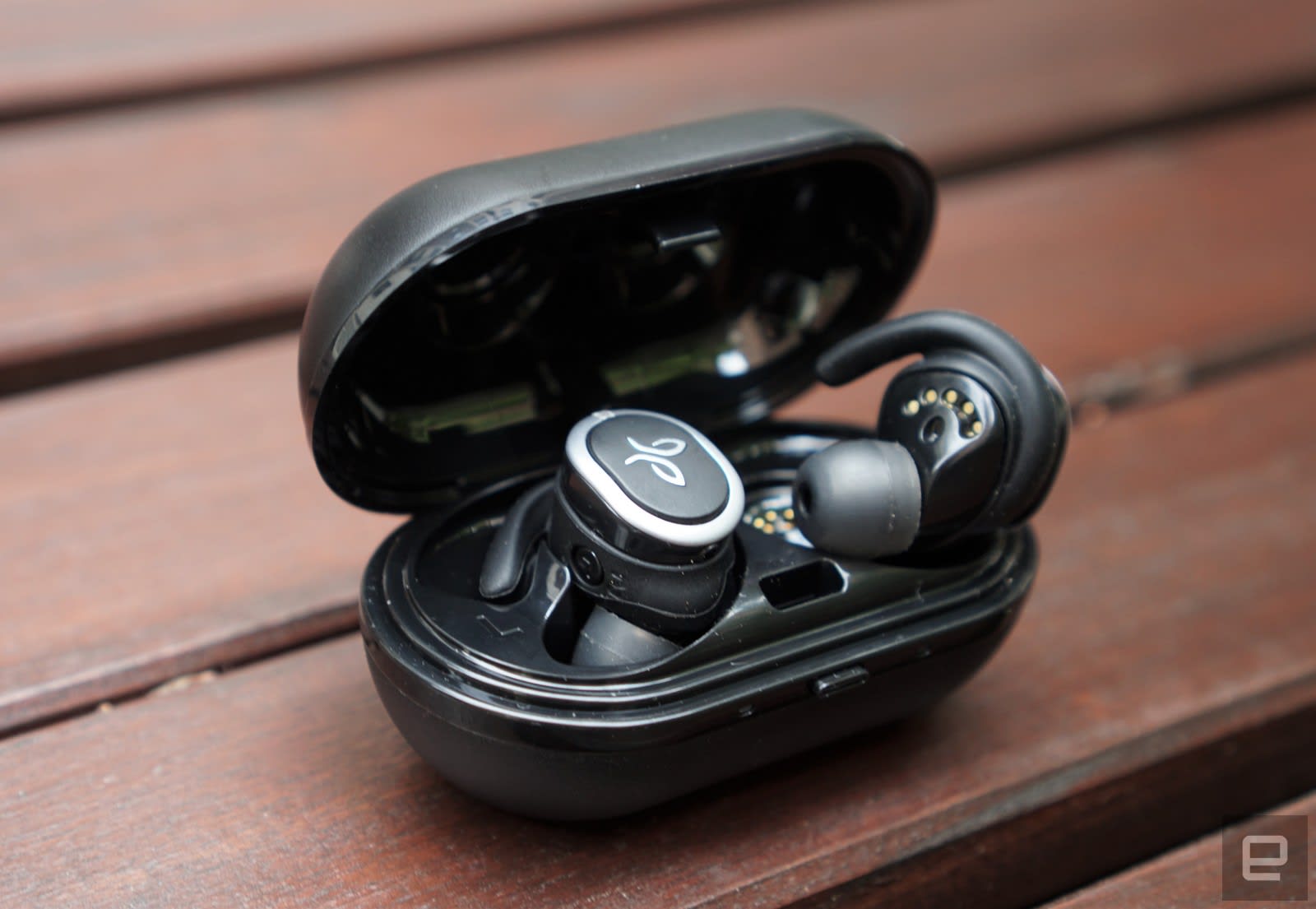
The Jaybird Run don’t look particularly distinctive, aside from a small logo on the outside. At this point, most companies seem to be settling on a similar style for fully wireless earbuds. They generally try to make them as small as possible — a departure from the clunky Bluetooth headsets you might be used to. One unique element here is that the metal ring around the outer edges of the Run serves as the antenna, which should technically give it a leg up on reception over competitors with internal antennas. They’re about as subtle as the earbuds from Her — noticeable, but they don’t call attention to themselves either.
The differences between wireless buds come down to the earpiece design. They need to stay in your ears reliably — there’s no cord to save them from falling on the ground, after all — and ideally, they should be comfortable enough to wear for hours at a time. This is one area where the Jaybird Run excels: It features the “fin” typically found on the brand’s headphones, which fits into the upper groove of your ear to hold them in place. Once you get them in, it’s hard to notice you’re wearing them.

Jaybird gives you four sets of silicone tips: small and large round options as well as two different oval-shaped tips. There are also three different types of fin accessories, along with a finless one if you have very small ears. And as you’d imagine, the Run earbuds are both sweatproof and water resistant. Jaybird says they feature a “double hydrophobic nano coating” to deal with sweat, which is much tougher on gadgets than plain water.
The Jaybird Run also comes with a chunky carrying case, which adds another eight hours to its advertised four-hour battery life. The case is too large to fit comfortably in your pocket, but it’s easy to chuck into a messenger bag or backpack. It can also give the Run earbuds one hour of juice with just a five-minute charge. The case could use a more secure latch though. It popped open in my bag on several occasions, which made my iPhone automatically connect to them. That was particularly annoying when it was causing my phone to deprioritize my other devices.
In use

Setting up the Run earbuds was a cinch. Within 30 seconds of tearing open the packaging, I had them securely in my ears and paired with my iPhone 6S. I was lucky enough to have a perfect fit with the default buds. It was definitely the fastest setup period I’ve seen with any pair of wireless headphones, even my BeatsX.
The right Run earbud handles all the connectivity with your phone. You can choose to wear it by itself if you’d rather keep one ear open (which is how I typically walk around New York City). The left earbud automatically connects to the right one over Bluetooth when you turn it on, and the sound carries over without any interruption. Everything sounds a bit compressed when you’re just using the right earbud, but the audio field expands seamlessly once you turn on the left bud.
You don’t have many options for controlling the Run. Each earbud has just one button. Powering them on and off takes one long press, but you can also skip forward to the next track by double-clicking them. The buttons are easy enough to find, but they’re difficult to press. Pushing them simply felt painful, since doing so also jams the Run deeper into your ear. Because of that, I avoided the buttons entirely while wearing the earbuds.

Devindra Hardawar/Engadget
When it comes to sound quality, the Run delivers far more than you’d expect, given its tiny frame. My usual round of test music tracks, including “Like A Dog Chasing Cars” from The Dark Knight soundtrack, and Little Dragon’s “Klapp Klapp,” all sounded great, with a healthy amount of detail and a surprising bass. The JayBird Run unfortunately had trouble with complex high notes; cymbals sometimes sounded like a distorted mess. They certainly didn’t sound as good as the BeatsX or the Jaybird Freedom, both of which deliver quality that’s almost on par with wired headphones.
The Jaybird Run was especially great for podcasts. Dialog sounded rich and natural, with none of the tinniness you get from some wireless headphones. And since podcasts are usually recorded at a much lower fidelity than music, they ended up being ideal for the Run’s more limited audio range. I caught up on a big chunk of my podcast backlog while testing them, simply because they were so convenient to wear.
If you like to customize your audio experience, you can also use Jaybird’s mobile app to tweak the Run’s sound profile. It’s flat by default, but the company provides a variety of options like “Bring the bass,” which boosts the low end, or “Extended listening,” which cuts down harsh high notes. There are also custom profiles from athletes like Nick Rimando and Kerri Walsh Jennings, and you can find profiles from other Jaybird users as well. If you want, you can also adjust your levels manually. (I opted for the “Signature” settings, which boosts bass and high notes a bit.) The app changes the Run’s sound at the firmware level, so any tweaks will apply no matter what you’re listening to. If you need help finding exercise tunes, there’s also a curated selection of Spotify playlists within the app.
With no wires in the way, the Jaybird Run made listening to just about anything feel completely seamless. It takes just a few seconds to pop them out of the case, and they paired with my phone quickly too. Since they’re so comfortable, I occasionally forgot I was even wearing them. At times it felt like they were simply an extension of my hearing. They didn’t fall out of my ears once after hours of testing, and after a while my low-level anxiety about dropping them on a New York City sidewalk evaporated.

However, my honeymoon with the Jaybird Run almost ended abruptly during my first jogging session. They simply couldn’t stay synchronized in stereo mode while I was moving, a problem multiple reviewers have brought up over the past few weeks. When I asked Jaybird for comment, a spokesperson said that the unit I was testing was preproduction and not the final hardware consumers would get. Typically I’d find that answer suspicious, but since the Run earbuds aren’t actually shipping to customers until later this month, all I can do for now is take the company at its word.
So that’s the story of how I received a second Jaybird Run pair to review. I immediately took them out for a two-mile run around Brooklyn’s Prospect Park and thankfully didn’t experience any further synchronization issues. My podcasts and exercise playlist all played without incident. Compared to the Jaybird Freedom, which is wirelessly connected to your phone but still has a thin cable attaching the earbuds, the Run offered a completely different experience.
It’s one thing not to have to worry about managing a headphone cable, but running through the park unencumbered by any cables felt truly liberating. I still experienced minor synchronization issues when walking around Manhattan, but that’s something I’ve also noticed with other wireless buds. Extreme radio interference is part of the cost of living in a dense urban environment.
Jaybird’s four-hour battery-life claim for the Run was close to what I actually saw. The buds would typically last for around three hours and 45 minutes during my testing. As you’d expect, that timing changed a bit if I was listening to quiet podcasts or loud music. Together with the battery case, the Run typically lasted around two to three days, depending on if I could fit in a jogging session. As our resident marathoner, Engadget’s executive editor Dana Wollman notes that the Run’s battery life should be fine for most runners. But you’d probably want a wired pair if you’re hitting the pavement beyond four hours.
Pricing and the competition

At $180, the Jaybird Run is slightly more expensive than competing wireless earbuds. Apple’s AirPods go for $159 while Bragi’s The Headphone comes in at $149. If you want to cut the cord mainly for exercise, though, the added cost will likely be worth it for the Run’s sweat-and-water resistance. Jabra’s Elite Sport are another solid workout alternative, but they’re a lot pricier at $250.
If you’re considering wireless headphones, it’s worth taking a step back and considering how you plan to use them. If you’re a fitness fanatic, it makes more sense to forgo wires entirely with the Jaybird Run. But if you care more about having higher audio quality and only need headphones for occasional exercise, you might be better off with something like Jaybird Freedom or BeatsX, which still have short cables.
Wrap-up
Jaybird didn’t disappoint with the Run. The earbuds are everything I’d want in a pair of truly cord-free headphones. While they still require sacrificing a bit of audio quality, that’s true of everything else in this category. Losing a bit of fidelity is worth it, though, if you’ve ever dreamt of going for a run while losing yourself to music and not worrying about any annoying cords.
Facebook locks down key data as researchers analyze Russian influence
The truth behind Facebook’s involvement in Russian voter hacks continues to get more complicated. The social media company apparently knew about Russian meddling even before last year’s US election. Mark Zuckerberg’s company reported that 10 million people saw Russian political ads, and has handed over Russia-linked ads to Congress. According to a report in The Washington Post, however, Facebook recently scrubbed the internet of thousands of posts related to social media analyst Jonathan Albright’s research that apparently concluded that at least twice as many people had seen the ads than Facebook reported.
Needless to say, the researcher is upset. “This is public interest data,” Albright told the Post. “This data allowed us to at least reconstruct some of the pieces of the puzzle. Not everything, but it allowed us to make sense of some of this thing.”
Facebook confirmed to The Washington Post that while the posts had been removed, it was due to a bug in its analytics tool CrowdTangle. According to the company, Albright should never have been able to see this information. When the “bug” was quashed, Facebook told the Post, advertisers (and analysits like Albright) could no longer see information from “cached” posts that had already been taken down on Facebook (and Instagram). “We identified and fixed a bug in CrowdTangle that allowed users to see cached information from inactive Facebook Pages,” Facebook spokesman Andy Stone told the Post. “Across all our platforms we have privacy commitments to make inactive content that is no longer available, inaccessible.”
It’s hard not to see this as a convenient excuse to hide tens of millions of potentially damning data, of course, especially as COO Sheryl Sandberg has committed the company to transparency around the fake Russian ads. Social media analysis has become a large part of figuring out what happens in our society, and not allowing access to even “taken down” posts can seem alarming. We’ve reached out to Facebook for comment on this matter and will update the post when we hear back.
Source: The Washington Post
Sony’s Xperia Touch projector arrives in the US at an absurd $1,700
We’ve been keeping an eye on Sony’s Xperia Touch projector for over a year now (closer to two, in fact). It’s a smart speaker, a projector and an Android tablet all combined into one device, and the US price (which was revealed today) reflects that. The Xperia Touch’s suggested retail price is a whopping $1,700 and is available at Amazon, the Sony Square display room in New York and select T-Mobile stores in Chicago, Los Angeles and Miami.
Do its features justify that hefty price tag? Its projector features turn any flat surface (wall, table, floor, etc.) into an interactive screen. It uses a combination of infrared light and a built-in camera to detect and interpret motion at a 60 fps rate. The device is portable, but the battery only lasts about an hour with continuous use. The resolution is 1366 x 768 and it can project to a maximum of 80 inches. It also has a 13-megapixel camera, a stereo speaker and responds to voice commands using Google Assistant. You can see more about the Xperia Touch in our hands-on review and in the video below.
 AIVAnet