


Virgin’s Sir Richard Branson climbs aboard the Hyperloop
Why it matters to you
Input from a global brand like Virgin has the potential to take this remarkable project to the next level.
Hyperloop enthusiasts may be finding it a challenge to convince everyone that the ultra-high-speed transportation project is for real, but entrepreneur Sir Richard Branson is clearly convinced.
The Virgin Group founder has announced his company is investing in L.A.-based Hyperloop One, one of several outfits that’s been making significant progress in developing the technology. Billionaire Branson has snagged a seat on the board, too, and the company will soon re-brand to become, what else … Virgin Hyperloop One.
Describing the Hyperloop system as “the world’s most revolutionary train service,” Virgin said it was “incredibly excited about the technology … and the way it could transform passengers’ lives.”
The Hyperloop, if you didn’t already know it, was dreamed up by SpaceX and Tesla CEO Elon Musk, a man so creative that he would likely self-combust in disgust were his brain ever to present him with an idea considered by the general population as “old hat.”
Having put the Hyperloop concept out there around five years ago, Musk decided to take a back seat with that particular project and instead concern himself with all of his other extremely ambitious plans, which include building a city for humans on Mars, a rocket-based travel service that’d fly you from New York to Shanghai in 39 minutes, and a vast subterranean network of transportation tunnels with high-speed “car sleds” to ease road congestion in busy cities. But that’s enough of that.
The Hyperloop would use propulsion technology to push passenger-filled pods through elevated tubes at speeds of up to 750 mph. At that kind of speed, a ride between L.A. and San Francisco would take just 35 minutes instead of the usual six hours by car. U.K.-based Virgin offers up another example, saying the Hyperloop could run you between London and Edinburgh in around 45 minutes. Anyone that’s driven it knows it can forever on a congested highway, and even longer if you take one of Branson’s Virgin trains and it gets delayed along the way.
Yes, Virgin already has plenty of experience with more conventional forms of transport. Besides its U.K. train service, it also operates an international airline. At the more ambitious end of the spectrum is Virgin’s space plane that could one day give moneyed tourists the ride of a lifetime.
Although Branson has declined to reveal just how much cash Virgin will be pumping into the project, Hyperloop One is known to have so far received nearly $250 million in funding — including a recent injection of an additional $85 million — from a range of interested investors since the firm was founded in 2014.
The involvement of a global brand like Virgin is a real boost for Hyperloop One, with development cash and wider exposure helping to propel the project forward, hopefully to a point where we can finally discover if the extraordinary plan is truly viable.
Xiaomi’s Mi Robot vacuum cleaner is on sale for just $276
The Mi Robot is one of the best robot vacuum cleaners available.
I love the Mi Robot vacuum, mostly because it saves me from having to clean the house every weekend. The vacuum has a white color scheme and a powerful 1800Pa motor, and like all Xiaomi products, it offers great value for money. It usually retails for $299, but Chinese retailer GearBest is selling the vacuum for just $276 with coupon code XMIVCHK.

The vacuum itself is manufactured by Rockrobo, one of Xiaomi’s ecosystem partners. The Mi Robot uses a combination of sensors — an ultrasonic radar sensor, a cliff sensor, a gyroscope and an accelerometer — to navigate around the house, creating a virtual map of its surroundings. Once the vacuum is finished cleaning a room, it automatically goes back to its charging dock.
Read: Xiaomi Mi Robot vacuum review
Best of all, you’ll be able to control the vacuum with your phone by installing the Mi Home app. Xiaomi rolled out an update earlier this year with the English language pack, so you’ll be able to see all the functions the vacuum is capable of directly in the Mi Home app.
You can see the cleaning time, battery life of the vacuum, and the area covered from the app, and there’s also the option to manually initiate a cleaning cycle or set an automated schedule. If you’re interested, hit up the link below and enter coupon code XMIVCHK to get your hands on the Mi Robot vacuum for $276.
See at GearBest
#WomenBoycottTwitter protest spreads across social media
Twitter has been home to many hashtag campaigns, but tonight one is trending that’s a little different: #WomenBoycottTwitter. Sparked by its “temporary lock” of Rose McGowan’s account yesterday, the movement’s purpose is to go dark “In solidarity w @rosemcgowan and all the victims of hate and harassment Twitter fails to support.” Participants include fellow celebrities, women who have experienced harassment online and men who support its cause.
The campaign’s source is Kelly Ellis, a software engineer and former Google employee who has previously written about the harassment she’s experienced and Twitter’s failure to address it. Last year Ellis wrote about a weeklong string of harassing tweets she received that Twitter would not act on, and just yesterday noted that while McGowan’s account was silenced, rape threats she had received stayed live on the service.
Signing off for the night and all day tomorrow in solidarity with @rosemcgowan + the women and survivors everywhere who deserve to be heard. pic.twitter.com/KjnFuxH05G
— raqtober (@raqueldesigns) October 13, 2017
#WomenBoycottTwitter Friday, October 13th. In solidarity w @rosemcgowan and all the victims of hate and harassment Twitter fails to support. https://t.co/G0my9EyKpQ
— Kelly Ellis (@justkelly_ok) October 12, 2017
MEN: if you are on here tomorrow, I urge you to AMPLIFY our voices. Call on your brothers to be better, go after ones who won’t. #ROSEARMY
— rose mcgowan (@rosemcgowan) October 13, 2017
By its nature, it’s hard to say exactly how many people have joined the campaign, but it rapidly gained steam yesterday, joined by McGowan herself, Alyssa Milano, Chrissy Tiegen, Jeffrey Wright and others. At the same time, even among people who support its message, there have been reactions asking why now, instead of at times when others, in particular women of color, have experienced harassment on Twitter or bans of varying degrees from the site itself.
Calling white women allies to recognize conflict of #WomenBoycottTwitter for women of color who haven’t received support on similar issues.
— Ava DuVernay (@ava) October 13, 2017
Suspended ESPN host Jemele Hill has been a frequent target of harassers, while comedian Leslie Jones experienced a sustained campaign including the hacking of her iCloud account, just last year. Ellis responded to those concerns before going dark, saying that “We can and should do better. It’s not ok for solidarity to only be for white women. I regret the timing. Finally, the “women” part of #WomenBoycottTwitter is exclusionary to nonbinary folks. I can and will do better in the future. I apologize.”
My mentions since posting #WomenBoycottTwitter 3 minutes ago #thisiswhy pic.twitter.com/c1GKSmBu32
— christine teigen (@chrissyteigen) October 13, 2017
The list of people who have been targeted by trolls and worse on social media is long — late last year Tim & Eric collaborator Vic Berger IV joined the list — but Twitter’s inability/outright unwillingness to deal with the nastiness that so frequently appears has been there from the start. Author and Engadget contributor Ariel Waldman wrote in 2008 about the harassment she received, and heard from (current Twitter CEO) Jack Dorsey at the time that “We’ve reviewed the matter and decided it’s not in our best interest to get involved.” (In the last 24 hours, he tweeted that “We do need to do a better job at showing that we are not selectively applying rules.”)
We do need to do a better job at showing that we are not selectively applying rules.
— jack (@jack) October 12, 2017
By its nature, it’s not immediately clear how many people are participating in the #WomenBoycottTwitter campaign, or how many are remaining active for various reasons. Still, it’s clear that nearly a decade after Waldman’s complaint, despite Twitter’s promises of transparency, revamped blocking tools and tweaked policies, many — starting with those most frequently targeted for harassment just because of who they are — are still not satisfied with the company’s reaction.
Source: Kelly Ellis (Twitter), #WomenBoycottTwitter
Raspberry Pi laptop teaches code with modular innards
The power and affordability of the Raspberry Pi has given rise to a new type of computer. One that goes beyond the credit-sized board, with colorful shells and displays that make it feel like a normal laptop or PC. The latest is the all-new Pi-Top, a modular laptop with a unique sliding keyboard. Pull it toward you and a large tray is revealed underneath with a Raspberry Pi 3 board and space for additional parts. The idea is to tweak and upgrade its innards for different coding projects designed by the Pi-Top team, thereby learning about code and electronics simultaneously.
Pi-Top has experimented with this concept before. In December 2014, the company raised $193,000 on Indiegogo for its first do-it-yourself laptop. It was a functional, but unattractive machine with a cramped keyboard and small, right-aligned trackpad. A large, horizontal panel sat between the keyboard and the hinge, taking up valuable space. (You could keep your lunch there, I suppose.) To access the Pi and modular tray underneath, you had to slide the panel out through a slot hidden on the right-hand side of the machine. It worked, but clearly the design had room for improvement. One year later, the company returned to Indiegogo and raised $220,000 for the pi-topCEED, a $99 desktop computer powered by the Raspberry Pi.
The new Pi-Top is a slicker machine. It’s a drastically easier build — six steps, rather than 23 — which might sound like a step backwards, but in return you’re getting a design that feels more competitive with cheap Chromebooks and Windows laptops. It has a full-size keyboard and a centrally positioned trackpad. Above the hinge is a 14-inch, full HD screen that can tilt up to 180 degrees, besting the original’s 13.3-inch display and 125-degree opening angle. Around the back, you’ll find one ethernet and three USB 2.0 ports, a regular 3.5mm audio jack and a place for power.
Slide the keyboard down and you’ll gain access to the tray. This is where the Raspberry Pi sits, alongside a custom cooling system that Pi-Top claims will improve your productivity. If a Raspberry Pi runs too hot, it will start closing applications automatically. The Pi-Top’s extra cooling should, therefore, stop this from happening, allowing you to multitask with fewer restrictions and sudden app closures. Each laptop also comes with an “inventor’s kit” which includes a Pi-Top Proto Plus add-on board, LED lights, a microphone and motion sensor. Unlike the previous laptop, which required a screwdriver, they all snap into place magnetically.
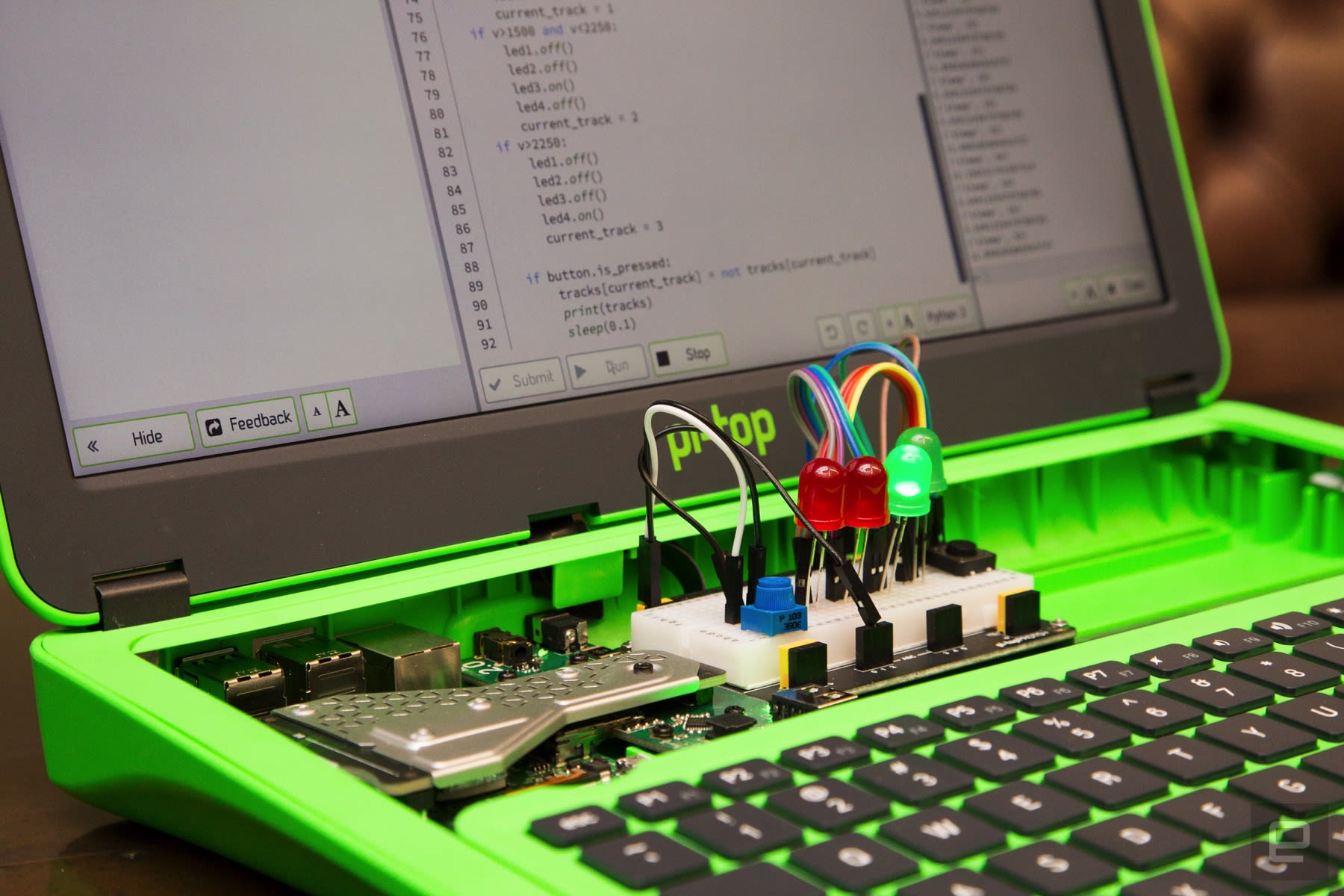
The inventor’s kit unlocks three coding activities, or “journeys,” inside the Pi-Top Coder app: Smart Robot, Music Maker and Space Race. The “Robot,” for instance, is a boxy cardboard shell that sits on top of the Proto Plus. Using code, you’ll adjust his blinking speed, teach him to talk as you walk by, or make him think that he’s being fed whenever you cover the proximity sensor. Each Pi-Top also comes with CEEDUniverse, a space exploration game that tests your creativity and problem-solving skills. You will, of course, be using and learning about code at the same time.
The Pi-Top runs a custom operating system called Pi-TopOS Polaris. It runs some basic software including Google Chromium, LibraOffice and Minecraft Pi Edition. So while it can’t compare to a Windows machine, it’s possible that a child or student could use it as their first laptop. The sticking point is the price: the new Pi-Top costs $320, or $285 without a Raspberry Pi. That’s expensive for an arguably underpowered laptop. In exchange, of course, you’re getting a device that’s easily customisable. You can upgrade the Pi board whenever you like and use external components in the tray (I’m told it’s possible to add a BBC micro:bit, for instance).

The laptop faces fierce competition from Kano, however. The London startup, which has a range of built-it-yourself coding kits, announced a “laptop” bundle last month that includes an all-in-one display unit and wireless keyboard. It doesn’t offer much in the way of hardware customisation, but is powered by Pi and offers similar learn-to-code software. (It’s also compatible with Kano’s standalone coding kits, such as the Pixel.) The “Computer Kit Complete” is also $50 cheaper than the Pi-Top, which might give parents pause while browsing for Christmas gifts.
T-Mobile is about to put borders on its ‘Mobile Without Borders’ plan
Why it matters to you
If you’re using Mobile Without Borders and use your device a lot in Canada and Mexico then you may be affected by the cap.
T-Mobile unveiled Mobile Without Borders to great fanfare in 2015, a plan for customers that added unlimited calling, texting, and 4G LTE data throughout Mexico and Canada at no extra cost.
It meant that using your phone or making a call in Canada, Mexico, and the U.S. would be “just like going out of state,” T-Mobile CEO John Legere said at the time. “Go from New York to Canada, or from California to Mexico; it’s just like going from Idaho to Texas, from Georgia to Kentucky.”
Two years on and the Uncarrier has decided to slap a monthly limit of 5GB on LTE data before throttling speeds. Why? “In order to prevent usage beyond the intent of the product,” according to T-Mobile.
The change comes into effect on November 12, 2017, and hits customers on T-Mobile One, One Plus, Simple Choice, and legacy rate plans.
Once you reach the new 5GB limit of high-speed data in Canada and Mexico (or your high-speed data allotment is reached, whichever comes first), connection speeds will be throttled to just 128kbps, or 256kbps for T-Mobile One Plus customers. If that’s a problem, then those on postpaid T-Mobile One plans can also add T-Mobile One Plus International for an extra charge and receive unlimited high-speed LTE in Mexico and Canada, T-Mobile said.
When the new cap kicks in, some customers traveling to Canada and Mexico might want to know how they’re doing with their data. For those on an unlimited high-speed plan, T-Mobile says it’s going to send out alerts when you hit 80 percent and 100 percent of your 5GB data limit. You can also check overall data usage by dialing the short code #WEB# on your device.
The company said that less than than 1 percent of people with Mobile Without Borders travel to Mexico and Canada and use more than 5GB a month, indicating the cap will have little impact on its customers. But for the 1 percent, whether they’re travelers hooked on YouTube or business people relying on the service, it could be problematic.
For more information on the upcoming change and a list of related FAQs, check out T-Mobile’s dedicated webpage on the matter.
Samsung once again forecasts record-breaking profits
Samsung forecasts an operating profit of $12.8 billion in Q3 2017.
Samsung Electronics is losing a CEO, but the company itself is riding a high. In its earnings guidance for the third quarter, Samsung says it recorded operating profit of $12.8 billion (14.5 trillion won) on sales of $54.7 billion (62 trillion won).

Samsung is set to record a revenue hike of 29% from the same period a year ago, with operating profits going up a massive 178%. The latest figures highlight a third straight quarter of record profits for Samsung. Back in Q1 2017, Samsung posted a profit of $9.9 billion, its best-ever first quarter, and followed it up with a Q2 profit of $12.5 billion, its most profitable quarter ever. That number is set to be eclipsed once again in Q3.
Strong sales of the Galaxy Note 8 — the device saw 850,000 pre-orders in South Korea — combined with an increase in demand for DRAM and NAND modules are the likely contributors to the record profit this quarter. We’ll know the division-wise breakdown once Samsung announces its earnings later this month.
Samsung Galaxy Note 8
- Galaxy Note 8 review
- Complete Galaxy Note 8 specs
- Galaxy Note 8 vs. Galaxy Note 5
- Which Note 8 color is best?
- Join our Galaxy Note 8 forums
Verizon
AT&T
T-Mobile
Sprint
Best Buy
T-Mobile puts 5GB cap on high-speed data in Canada and Mexico
T-Mobile has been a tempting option for travelers, and for good reason: if you’ve traveled to Canada or Mexico, you’ve had as much LTE data as you wanted without fear of returning to a giant phone bill. Unfortunately, the party’s over. T-Mobile has revealed that, as of November 12th, it will cap the no-extra-charge LTE data to a maximum of 5GB per month while you’re visiting the US’ neighbors. You won’t run into overages (this is T-Mobile), but you’ll have to make do with speeds as low as 128Kbps if you go over your high-speed allotment. One subscribers can tack on unlimited LTE by adding One Plus International, but that’s another $25 per month on top of the base plan.
Also, you may have less data to play with if you aren’t subscribed to an unlimited plan. A customer with a 6GB limit will only have 4GB to use abroad if they’ve already burned through 2GB, for instance. Also, those with capped plans can no longer use their Data Stash while in Canada or Mexico (though any unused data will carry over).
It’s not shocking that T-Mobile would do this. The network still has to pay roaming costs, and it’s probably dreading the bill from your Netflix marathon in Vancouver. All the same, this does limit T-Mobile’s appeal to jetsetters. While 5GB is a healthy amount for a short trip, it’s still going to change your behavior — you may end up using hotel WiFi when you can instead of relying solely on cellular data.

Via: Android Police
Source: T-Mobile
Tesla recalls 11,000 Model X SUVs for seat issues
Tesla is no stranger to voluntary recalls. The company issued notices to 90,000 Model S sedan owners for possible seatblet defects back in 2015, another for 2,700 Model X SUVs in 2016 for a third-row seat problem, and one for 53,000 S and Model X SUV earlier this year over potential parking brake issues. It’s the price of doing business — and better that the company jumps ahead with a voluntary recall than a legally-mandated one after tragedy. Today, the automaker issued another for about 11,000 Model X’s released last year, this time for the second-row seats.
The recall only affects Model X’s with second-row fold-flat seats built between October 28th, 2016 and August 16th, 2017, and the company estimates that only 3 percent of vehicles sold experience the issue. Any of Tesla’s SUVs with single-post seats aren’t affected. During internal tests, the company found that poorly-adjusted cables connected to the driver’s side second-row seat yanked it forward during a crash. Tesla hasn’t received any reports of this happening to Model X owners, but is issuing the recall based on its research.
Thankfully, the fix is easy: Just take your Model X into a service center or use Tesla’s mobile repair service and a technician will adjust the cable correctly, which takes all of 10 minutes. Until then, the company suggests not stacking two adults in the center and behind-driver seats in the second row.
Source: CNBC
‘Dragon Age’ director Mike Laidlaw leaves BioWare after 14 years
Today Mike Laidlaw announced his departure from Bioware, where he’s been involved with games including Jade Empire, Mass Effect and the entire Dragon Age series. He served as creative director on Dragon Age: Inquisition, and mentioned in a note about the team that “I have every confidence that the world we’ve created together is in good hands and I’m excited for the road ahead.” He didn’t mention a reason for leaving other than that it is time to move on, even as his exit follows DA:I lead writer David Gaider, who left the company early last year.
pic.twitter.com/gFOiV53W3q
— Mike Laidlaw (@Mike_Laidlaw) October 12, 2017
Big day. Intense. Gonna stream some Overwatch tonight, though.
— Mike Laidlaw (@Mike_Laidlaw) October 13, 2017
Source: Mike Laidlaw (Twitter)
What is HDR photography and how can I shoot it with my camera?
Ever tried to photograph a high-contrast scene, only to be frustrated when you find that the pictures you snapped just don’t do it justice? Don’t worry, it’s not just you. Even with the perfect exposure, there are certain scenes that will always tend to get blown-out highlights, flat shadows, or both. Despite the fact that it’s nearly impossible to find a happy medium in these types of situations, there is a solution. This age-old dilemma can be solved through the magic of HDR processing. We’ll explain what is HDR photography, and how to make it.
What is HDR photography?
HDR stands for “high dynamic range.” For those who aren’t so acquainted with this high-tech shutterbug lingo, dynamic range is basically just the difference between the lightest light and darkest dark you can capture in a photo. Once your subject exceeds the camera’s dynamic range, the highlights tend to wash out to white, or the darks simply become big black blobs. It’s notoriously difficult to snap a photo that captures both ends of this spectrum, but with modern shooting techniques and advanced post-processing software, photographers have devised ways to make it happen. This is basically what HDR is: a specific style of photo with an unusually high dynamic range that couldn’t otherwise be achieved in a single photograph.
You’ve probably seen these types of images scattered across the web. Depending on how they’re processed, HDR photos can be anything from stunningly accurate reproductions of what your eyes see, to mind-blowing, surreal works of art that transform reality into a high-def dreamscape. Here are a few examples from HDR guru Trey Ratcliff.
How it works
At the most basic level, an HDR photo is really just two (or three, or nine) photos taken at different exposure levels and then mashed together with software to create a better picture. It’s a bit more complicated than that, but not much more — that’s basically the gist of it. Ideally, the photographer takes a range of bracketed photos – that is, photos of the same subject taken with varying shutter speed/aperture combinations in order to produce a set of images with varying luminosity and depth of field. Then, with the help of advanced post-processing software, the photographer is able to blend the photos together and create a single image comprised of the most focused, well-lit, and colorful parts of the scene. Check out the images below to see how it looks:
-4 stops
-2 stops
+2 stops
+4 stops
Stitched-together HDR image
How to create an HDR image
Before you set out on your mission to create a mind-bogglingly beatiful HDR image, you’ll need a few things. For best results, here’s what we recommend:
A camera, preferably with an Auto Exposure Bracketing (AEB) function. AEB isn’t 100-percent necessary, but without it you’ll have to adjust your camera settings manually between each shot, which increases the chances you’ll move the camera, and takes more time — increasing the likelihood that your subject will move or change positions. If your pictures don’t line up, the final HDR image will probably come out looking weird. (Not sure if your camera has an Auto Exposure Bracketing feature? Check out this chart to find out.)
A tripod or other type of stabilizer. You can shoot by hand if you must, but you’ll likely have trouble aligning your images later on, so a tripod is definitely recommended for best results. It’s true that certain HDR software programs are equipped with image alignment features, but they don’t always work perfectly, so generally speaking the best plan is to take measures necessary to ensure a stable shot. If you’re in the market, check out our seven favorite tripods for DSLRs and smartphones.
HDR photo-blending software. There are a number of different programs out there that’ll get the job done, but the general consensus amongst the HDR photography community is that Photomatix is one of the better options. It is powerful, fast, and full-featured, but those features do come at a price: $99 for the Pro package and $39 for the Essentials pack. Another very popular software is Aurora HDR ($89). Obviously, these programs isn’t ideal if you’re just looking to dip your toes into the HDR pool and do a bit of experimenting, so for those of you looking for a good free option, we recommend Luminance HDR. Luminance is one of the most capable and flexible HDR programs we know of, despite the fact that it doesn’t cost a dime. It offers six different photo-blending algorithms for you to mess with, so no matter if you’re going for a more realistic or surrealistic look, you should be able to achieve it with Luminance. These programs are a good place to start, but keep in mind that once you’ve stitched the images together and have something to work with, there’s nothing stopping you from using other programs to achieve further effects.
Once you have all the necessary equipment gathered up, it’s time to go out and snap that jaw-dropping, eye-popping National Geographic-status photo. Here are a few tips for getting a good shot:
- Due to the nature of HDR and exposure bracketing, you probably won’t be able to capture a moving subject very easily. HDR just isn’t meant for things that move. Stillness is the name of the game here, so do your best to shoot a scene that isn’t going to change very drastically in a 5-10-second period.
- Try to keep an eye out for scenes and subjects that have a large, noticeable contrast between light and dark areas. This is usually easier said than done since our eyes see in HDR already, but if you can spot these types of scenes it totally pays off in the end. These are the kinds of shots that benefit most from HDR post-processing techniques, since you otherwise wouldn’t be able to capture all the full dynamic range in one shot.
- If your memory card is big enough, shoot in RAW format. JPEGs use heavy compression to cut down on file size and will typically result in a noticeable loss of detail in your photos. Shooting in RAW is better for quality, but takes a bit longer for your camera to process and write to your memory card. For best results, snag yourself a class 6 or class 10 SD card — these have faster minimum write speeds and will help reduce the time your camera takes to store RAW images after you shoot them.
- Above all, remember that these tips are nothing more than loose guidelines. It’s all good advice, but don’t let our tips impede your artistic impulses. Experiment and play around lot, and you’ll start to get a feel for it on your own.
Mobile HDR
DSLR and mirrorless cameras aren’t the only devices capable of capturing HDR images. Nowadays, even the most basic smartphones capture impressive HDR images. In fact, Android and iOS both offer HDR shooting modes in their stock camera applications, while third-party mobile apps, like Adobe Lightroom, are implementing HDR editing as well.
The process for capturing HDR photos on your smartphone is almost identical to capturing them on a dedicated camera — a series of images are captured at varying exposures to ensure the greatest possible dynamic range in a scene. The big difference is that capturing HDR photos on a smartphone is far less complicated, thanks to software.
Rather than capturing three separate images at different exposures, overlaying them, and merging them together for the best tonal range, your smartphone will do all of this for you — and likely with a single click. The only thing you should have to do, besides pressing the shutter, is make sure the HDR mode on your phone is enabled.
HDR on iOS
Apple devices will have three distinct HDR options that can be used with any of the still image modes: On, Auto, and Off. When turned “On,” your iOS device will automatically capture three separate images and merge them together into a single image that will be saved in your camera roll. Setting your iOS device to “Auto” will ensure your phone uses HDR mode when it notices a high-contrast scene. “Off,” of course, will deactivate HDR capture mode. In iOS 11, however, you only have Auto and Off. Note: iOS can save an HDR and a normal exposure version; enable Keep Normal Photo in the camera settings.
HDR on Android
Android also offers an HDR mode, but it’s not always as straightforward. Due to manufacturers adding their own skins and default camera apps, the experience isn’t the same across the board. That said, the experience isn’t much different. Inside the camera app, you will find an HDR shooting mode, although sometimes it’s called something else, such as “Rich Tone.”
When shooting in this camera mode, your Android device will capture multiple exposures in a quick sequence and automatically stitch them together to create a final HDR photo.
HDR video
Still photography isn’t the only form of visual media HDR imagery has impacted. Now, thanks to increasingly capable video cameras and compatible TV sets, HDR video capture is possible as well. But HDR photography and HDR videography use different processes.
While the end result is almost identical to still HDR photography, HDR video is captured by different means. Rather than capturing multiple images and merging them together, either in-camera or via post-production, HDR video is (more often than not) captured as a single exposure.
How is this possible? Two parts: hardware and software. Newer camera sensors are capable of capturing more dynamic range than ever before. Combine the impressive sensor technology with the increasingly-capable color profiles used to capture the video and what you end up with is an out-of-camera image with so much color and exposure information that almost any range of tones is acheivable in post-production.
As you can see in the above comparison, the image on the left is straight out of camera, captured with RED’s proprietary image profile. It appears flat, almost to the point of it looking gray. But when you import the video into a post-production program and color grade it, the ridiculous colors and dynamic range comes through, creating a stunning look that hasn’t been possible until recent years.
Got any pro tips for taking great HDR photos? Share them with us in the comments below.
 AIVAnet