


Stay Pixel-perfect: Seven of the best Pixel 2 cases and covers
If you’re looking for a smartphone that represents the very best Android experience, you rarely need to look further than Google’s own Pixel phones. The Pixel 2 range comes complete with the latest improvements to the Android experience, including Android 8.0 Oreo, Daydream VR, and the powerful Snapdragon 835 processor. It’s not a bad looker either — the glass strip from the original Pixel phones has returned, and the rest of the phone is clad in an attractive unibody metal shell.
Of course you want to protect those good looks. A smartphone’s lifespan is anywhere above two years, and it’s best to keep your phone looking as good as the day you bought it with a protective case that will keep it safe from dirt and scratches, and insulate it from sudden shocks like drops and bumps. But choosing a case can be a complicated affair — do you want a slim, sleek gel case or an executive-style leather wallet? Ultra-protection against drops, or something with a little more style? The right pick can be hard to find — and that’s why we’ve put together a list of the best Pixel 2 cases that you can buy to keep your phone protected.
LK Ultra Slim Gel Case — Clear ($9)
We always like to kick off these round-ups with some of the slimmer and less restrictive case options. This clear, TPU gel case from LK ticks all the right boxes if you’re looking for a case, but don’t want to compromise the unique look of the Pixel 2. The flexible TPU easily snaps around your phone, resists stains, and is so slim that you’ll probably forget it’s there. A raised edge along the outside of the front of the case protects your phone’s display when placed face down, and specially formed button covers match the placement of the buttons on your device, giving extra protection against dirt to those vulnerable areas. While it won’t offer as much protection as some of the other cases on this list for more serious drops and knocks, it will certainly resist scratches and give some protection to the device inside. A good choice if you want a case that doesn’t obscure your view of your phone.
Buy one now from:
Amazon
Olixar ExoShield Tough Case — Clear ($11)
Another clear option that doesn’t obscure your phone from view, Olixar‘s ExoShield for the Pixel 2 is perhaps the next step up in protection from a standard clear case. Using elements of stiff polycarbonate, as well as TPU, means that the ExoShield has the flexibility to lend additional grip and impact-absorption to your phone, and to resist damage that other TPU cases might lack the structure to resist. In particular, Olixar has reinforced the corners of the case — since the corners are the areas most likely to take the brunt of any fall. It’s also a slim-fitting case, adding barely any bulk to your phone — though the slight increase in size on the corners may mean it’s not for everyone. However, it’s good all-round protection (including a raised edge around the front, again protecting the screen), and is a great choice for anyone who wants protection, but doesn’t want a bulky case.
Buy one now from:
Mobile Fun
Ringke Bevel Case ($7)
There’s nothing technically extraordinary about Ringke’s Bevel case. As a TPU case it covers everything that you’d expect from Ringke — good protection from scratches against the exterior of the case, and some protection against impacts and drops from the soft TPU material. A raised edge around the screen and camera cut-out keep those areas from touching surfaces and getting scratched, and it comes with all the cut-outs for ports and button covers that you’d expect. But this case really caught our eye because of the stunning looking bevel pattern that takes it to another level beyond the usual gel case. It’s a slim, translucent offering that adds another layer of style to your already stunning phone. It’s also available in Smoke Black and Clear if the Rose Gold doesn’t tickle your fancy.
Buy one now from:
Amazon
Spigen Neo Hybrid Herringbone Case ($16)
Spigen is one of the finest names in device protection, and it’s a measure of a device’s success whether or not the veteran case creators are putting out their full range for it. The Neo Hybrid is always one of the standout designs. We’ve seen the winning combination of TPU and polycarbonate earlier on this list, and the Neo Hybrid doesn’t disappoint in terms of toughness. Drop protection and resistance to outside scratches is heightened with Spigen’s shock-absorbent TPU and hard outer polycarbonate shell. Spigen cases feel and look good, and the Neo Hybrid is no different in this regard, with a herringbone look that brings a whole new style to your Pixel 2, and a weighty feel that screams of a high-quality construction.
Buy one now from:
Amazon Spigen
Tauri PU Leather Wallet Case ($10)
If you’re looking for something a little more executive and sleek, then this leather-style wallet case from Tauri might be your thing. Made of a synthetic PU leather that’s durable and easy to keep clean, this case is designed to wrap around the front of your device when not in use, protecting your screen from scratches and damage while in your bag or pocket. It also folds into a handy kickstand, perfect for hands-free media viewing, video calls, or just setting up at the side of your bed like an alarm clock. Built-in card pockets mean that you can consolidate your credit cards and cash into the case, or use it to keep loyalty cards in when you pay with Android Pay, giving you the option of leaving your wallet at home.
Buy one now from:
Amazon
Speck Presidio Grip + Glitter ($45)
The perfect case for anyone who wants to make a statement with their choice of accessories, the Speck Presidio Grip + Glitter is a gorgeous case that offers fantastic protection. Speck’s drop protection pedigree is well known, and Speck claims that the two-layer construction will keep your Pixel 2 safe against drops up to 10 feet — though we don’t recommend you testing that claim. It’s also a looker, if you like the style. The shimmering crystal finish isn’t all style with no substance either, as the pattern on the back aids grip on your phone, making sure you can keep hold of your phone while still looking good. It’s slim in design, and a fantastic choice to keep your phone looking great and well protected — even if it is on the pricey side. Still, Speck’s a name worth paying for.
Buy one now from:
Speck
Moment Photo Case ($30)
If prior performance is anything to go by, the Pixel 2 is likely to have an incredible camera. Google is using a whole new method of machine learning to bring out a host of new camera tricks, so why not get a case that complements your shooting style? This case from Moment has been specially designed to facilitate easy use of your Pixel 2’s camera, with curved edges and a textured back that helps you to keep your grip, an attachment for wrist straps, and a durable construction that puts your mind at ease while shooting. The real draw here, though, is Moment’s range of additional camera lenses that clip on top of the case itself, letting you shoot with wide angle, fish-eye, macro, and a telephoto zoom. While the lenses are on the pricey side, if you’re looking to get serious with your smartphone photography, then this case is worth a look. But even if you’re not interested in the lenses, this is still an attractive case that offers good protection.
Buy one now from:
Amazon Moment
Best iOS app deals of the day! 6 paid iPhone apps for free for a limited time
Everyone likes Apple apps, but sometimes the best ones are a bit expensive. Now and then, developers put paid apps on sale for free for a limited time, but you have to snatch them up while you have the chance. Here are the latest and greatest iOS app deals available from the iOS App Store.
These apps normally cost money and this sale lasts for a limited time only. If you go to the App Store and it says the app costs money, that means the deal has expired and you will be charged.
Tangle Patterns Mega Pack
Learn to draw beautiful illustrations while you practice mindfulness and meditate. It’s a must-have tool for tangle artists and enthusiasts.
Available on:
iOS
Time Manager
Time Manager is an easy way to keep track of your daily activities. All your tasks will be totaled and broken down into reports and graphs for you to see how well you’re spending your time.
Available on:
iOS
TranslateSafari
The app is a Safari extension that translates and speaks aloud the entire web page of Safari app. A must-have app to translate and speak aloud web pages of Safari.
Available on:
iOS
OVLA
OVLA is an application to add text and artwork into your own photo. Make your photo into an awesome work in the easiest and simplest way.
Available on:
iOS
Extreme Week Calendar
This app is the light version of the popular Extreme Agenda organizer app. It gives you a seven-day-week view and an inline day view to add great features not found in the default calendar.
Available on:
iOS
DayCalc Pro
DayCalc is an easy-to-use, beautifully packaged calculator and Unit Converter. It includes both a standard and scientific calculator, and just might be the best calculator for your iPhone.
Available on:
iOS
Brother launches its latest all-in-one printer exclusively at Staples
Why it matters to you
You can now grab one of Brother’s cost-saving INKvestment printers at a lower price than ever.
Office technology manufacturer Brother has lowered the barrier to entry in its INKvestment lineup of printers with the release of its all-in-one MFC-J775DW printer.
For those who missed the news last year, Brother’s INKvestment lineup of printers is designed to reduce the cost of printing both black-and-white and color pages through high-yield cartridges and duplex (two-sided) printing. According to Brother, using its high-yield ink cartridges can reduce the cost of printing black and white pages to just one cent and color pages to just five cents.
Like its predecessors, the MFC-J985DW, MFC-J5830DW and MFC-J6535DW, the MFC-J775DW doesn’t offer anything new or revolutionary in the world of home office inkjet printing. Instead, it focuses on providing simple, reliable printing without costing you an arm and a leg.
The MFC-J775DW works with smartphones, tablets, laptops and desktops through either wireless connectivity or a single USB port. Documents can be printed through mobile devices using Google Cloud Print, Morris, Wi-Fi Direct, and Brother’s own iPrint&Scan functionality. It can even connect to cloud drive services including: Google Drive, Evernote, Dropbox, Box, OneDrive, and OneNote to print documents from the cloud.
Accessing the settings and navigating the menu is done using the integrated 1.8-inch color display, which is placed alongside a collection of other navigational and input buttons on the front face of the printer.
Similar to the other printers in Brother’s INKvestment lineup, this entry-level printer is designed with the home office in mind. It doesn’t have all of the bells and whistles higher-end printers offer, but that’s what its more robust siblings are for. If you’re looking for an all-in-one solution that can print, scan, copy, and fax documents, it has you covered.
The MFC-J775DW is available for order online exclusively at Staples and will make its way into physical Staples stores by November. The standard printer package, which comes with a single set of ink retails for $150. A special INKvestment package, which comes with three sets of ink cartridges, is also available for $250. Brother says the INKvestment package should have enough ink for two years worth of printing.
How to set up and get started with Movies Anywhere

Set your digital movies free!
Before there was Android, before there was Google Play, there were movies on iTunes and Amazon, and there were digital copies of movies that were redeemed on iTunes, Amazon, and Vudu. Well, we can free them from their unused services and bring them all together on Movies Anywhere, adding them to your Google Play library and making them watchable just about anywhere!
Getting set up is a breeze, and you can get 5 free movies for doing it, so what are you waiting for?
Movies Anywhere is the multi-studio successor to Disney Movies Anywhere, and the setup works exactly the same, which is simple and you can do most of it straight from your phone after downloading the Movies Anywhere app.
Open Movies Anywhere.
Tap Get Started.
Tap the account you wish to log in with. On Android, Google will connect with the account set up on the device.


Agree to the Video Data Sharing agreement, which is required for the various studios and video services to talk to each other and share your library information.
Tap the checkbox next to the terms of use for the service to agree. You can also opt out of the marketing and promotion emails from Movies Anywhere and its studios by unchecking the opt-in boxes below the terms of service.
Tap I Agree.


If you already had a Disney Movies Anywhere account linked to the same email you used for setup, you’ll be prompted to import all your Disney movies. Tap Agree & Continue.
Tap Finish.
Tap the three-line menu icon in the top left corner.


Tap Manage Retailers.
Tap Google Play to link your account to Google Play.
Choose a Google account to link your account to.


Tap Allow to allow Movies Anywhere to add movies to your account and see what movies you own that are Movies Anywhere eligible.
You’ll receive the first two promotional movies. Tap Connect Retailers to link another account.


You can easily link Google Play and Amazon via the Movies Anywhere app. Vudu was experiencing issues connecting to Movies Anywhere on mobile and desktop, but this should be cleared up. Connecting iTunes requires you to log into Movies Anywhere on a device with iTunes, such as an iPad or desktop computer.
Note: After you link any account, give Movies Anywhere a few minutes for your movies to show up. The eligible titles will appear once your libraries sync. The current studios working with Movies Anywhere are Disney, Sony, Universal, Warner Bros., and 20th Century Fox.
Once you’ve linked all your accounts, you can stream the movies to your device, or you can Save Offline to watch when you’re stranded without data. As was done in Disney Movies Anywhere, offline copies in Movies Anywhere are handled by Google Play. By default, Movies Anywhere has Wi-Fi Only enabled to help you avoid breaking any data caps, and it can be easily toggled off from the main menu.
Because you sometimes hand your phone over to your kids to let them watch something while in the car/grocery store/backyard, Movies Anywhere has a profile system to let you quickly and easily switch to an age-restricted account for your little ones.
Tap the three-line menu icon in the top left corner.
Tap Add Profile.
Tap Change Avatar.


Tap the avatar that you desire for the profile.
Name the profile.
Slide the rating viewer to adjust what movie ratings your kids can see.
Tap Create Profile.


Now you can switch profiles by coming back to the main menu and tapping Switch Profile.
How are you liking Movies Anywhere? The bonus features UI could use a little work right now, but the app is as stable and capable as its predecessor, with a whole lot more movies that can use it. And once more studios sign on, I can see the next frontier for this service: TV shows.
Movies Anywhere: Everything you need to know!
Google Home vs. Google Home Mini: Which should you buy?

Should you buy a Google Home or a Google Home Mini?
Big in importance but small in stature, the Home Mini was overshadowed by the Pixel 2 announcement at Google’s recent hardware event. But it’s an important addition to the company’s hardware canon.
At just $49, the rounded plastic puck, covered in fabric, is an inexpensive entry into Google’s burgeoning smart home ecosystem. It offers a speaker that while lacking in bass is adequate for most voice-based tasks. As it sits, its microphones listen for the “OK Google” hotword and, offers a growing number of commands through the Google Assistant, a cloud-based AI that hooks deep into Google’s Knowledge Graph — the same back-end that powers the company’s ubiquitous search engine.
For many people, the $49 price is right, and will likely prove to be an excellent holiday gift. But is it worth springing the extra $80 (when not on sale) for the larger, better-sounding Google Home? Let’s discuss.
Capabilities

Google Home is the company’s flagship smart speaker (for now, until the $399 Home Max comes out) and it was built with Google Assistant in mind. It has two far-field microphones that are designed to pick up one’s voice even when there is ambient noise around it. It has a touch-sensitive top area with four colored LEDs that light up and dance when activated. It’s powered by a proprietary DC power connection and a has a mute button on the back for times you don’t want the microphone to listen.
For some reason, Google chose Micro-USB instead of the more-versatile USB-C to charge the Home Mini.
The Home Mini is significantly smaller and doesn’t have the same number of features — for obvious reasons. It lacks the top touch controls of the Google Home (which turned out to be a critical design flaw in the hardware itself, forcing Google to permanently disable the feature), and has neither the absolute volume nor the microphone sensitivity of its larger counterpart.
It also charges with Micro-USB instead of a more power-hungry DC plug, and the mute function is a switch, not a button. Finally, changing the volume on the Home Mini involves tapping on the left or right edge of the front instead of the more tactile and, ultimately, functional way of moving one’s finger over the Home’s top touch panel.
At the same time, the units are functionally identical where it counts: Google Assistant. Each improvement made to Assistant — from supporting new smart home products to being better able to answer direct questions using the “OK Google” hotword — is rolled out to every unit. Both the Home and Home Mini will grow and improve in abilities over time, and neither should benefit disproportionately from software improvements made over time.
Sound quality

The main difference between the two speakers isn’t functionality but sound quality. Google Home has a 2-inch driver and dual 2-inch passive radiators, which drive a tremendous amount of low-end for a speaker of this size. It’s certainly better than the first-generation Amazon Echo, and very enjoyable to listen to when jamming to hip-hop, rock, or even jazz.
The Google Home Mini is a circumaural (or 360-degree) speaker, and lacks the size for a bass-generating woofer. As you can see in the video below, both sound good, but the larger Home definitely has a wider range and emphatic low-end.
Still, the Home Mini holds its own, and does so in a form factor that is less than a quarter the size of the Google Home itself. And if the sound quality from the Home Mini isn’t good enough, it supports outputting music to a Chromecast Audio-connected speaker system.
Which should you buy?

At $49, you can buy two Home Minis for the price of a single Home, with money to spare. Given that Google’s Home ecosystem supports multi-speaker groupings, for people with a large house it may be a better idea to purchase a duo of Home Minis over a single Home, especially if they’re going to work in conjunction with a Chromecast Audio-enabled speaker.
See Home Mini at Google Store
But for a smaller apartment, or the sake of simplicity, a Google Home is the right answer. It has the perfect balance of volume, sound fidelity, and bass for a small to medium-sized room, and its microphones are scary-accurate, even when music is blaring or the room is full of other sounds.
See Home at Google Store
Google Hardware

- Google Wifi review
- Google Home review
- Everything you need to know about the Chromecast Ultra
- Chromecast vs Chromecast Ultra: Which should you buy?
Google Wifi:
Google
Amazon
Google Home:
Google
Best Buy
Chromecast Ultra:
Google
Best Buy
People have mixed feelings about the Pixel 2/Pixel 2 XL
With Verizon stores now equipped with Pixel 2 demo units, people are starting to get hands-on time with the phone – here’s what they have to say.
Although we’re still waiting for Pixel 2 preorders to ship, Verizon recently received demo units of the device so that customers can get some hands-on time to hold them over until orders are finally sent out.

Verizon stores across the United States now have demos of the Pixel 2 and Pixel 2 XL that you can use to get a hands-on impression for yourself, and now that people are doing so, initial thoughts seem to be all over the place. It’s impossible to make a final judgment on a phone without carrying it around for a few days as your daily driver, but here’s what some people have to say so far.
Starting with the positive comments.
GTvert90
10-12-2017 10:35 AM“
Both phones felt great and are a definite upgrade. I only compared the 2XLs screen to my small OG Pixel because that’s all I really care about is that I think it’s better than what I have. The colors are a little different but I believe it to be an improvement.
Reply
effreyj
10-12-2017 11:45 AM“
I went to the store and compared the new Pixels to my OG Pixel XL. The new XL 2 feels a lot thinner and sleeker than the OG XL. I also took a photo of the red Verizon wall on the XL 2 as well as on the OG XL, and the colors were noticeably more accurate on the XL 2 and less oversaturated. I played a song by Pink! on the front facing speakers, and the sound was a lot better than the OG XL. They…
Reply
maverick7526
10-12-2017 12:22 PM“
I went in one and the XL wasn’t charging so it was dead. played with the pixel 2 it looked and felt great. the XL2 is a definite upgrade over my 6P
Reply
We were certainly impressed with our hands-on time of the Pixel 2 at Google’s October 4 event as well, but that doesn’t appear to be the case for everyone.
bonnie100th
10-12-2017 01:41 PM“
I have mix emotions about the XL2, does not feel premium at all, the aluminum in the back feels like plastic, I’m bummed, my current first generation Xl does feel like a premium phone, and the back aluminum feels real metal, this new one seems that they painted the surface and apply a plastic sort of clear coat. The speakers sounds inferior than my previous than Pixel …
Reply
10-12-2017 02:28 PM“
Just came back from using both phones at a Verizon store. I agree with others that have said the quality of the XL 2 doesn’t feel as nice as its smaller brother. The way the screen sits on the body and the edges of the phone don’t have a premium feel. The other thing I noticed (and somebody else next to me noticed too) was that the screen isn’t as bright as expected and the viewing angles were…
Reply
10-12-2017 03:37 PM“
This video shows the screens of the pixel 2 and xl2. I assume it was shot today at a verizon store and you can see what I said previously about the smaller pixel having better viewing angles than the xl. Kind of disappointed since i ordered the xl.
Reply
Our full review for the Pixel 2/Pixel 2 XL is coming soon, but until then, we’ve got a question for you – If you’ve had the chance to go hands-on with either the Pixel 2 or Pixel 2 XL, what are your initial impressions?
Join the conversation in the forums!
You can now download the Google Pixel 2 launcher on any phone
The Pixel 2’s updated launcher is here, and it looks pretty great.
Google’s been known to tweak its vision for Android’s home screen setup with each new release, that’s no different with this year’s Pixel 2. Thanks to the folks at Android Police, you can now download the Pixel 2’s launcher onto any of your devices.
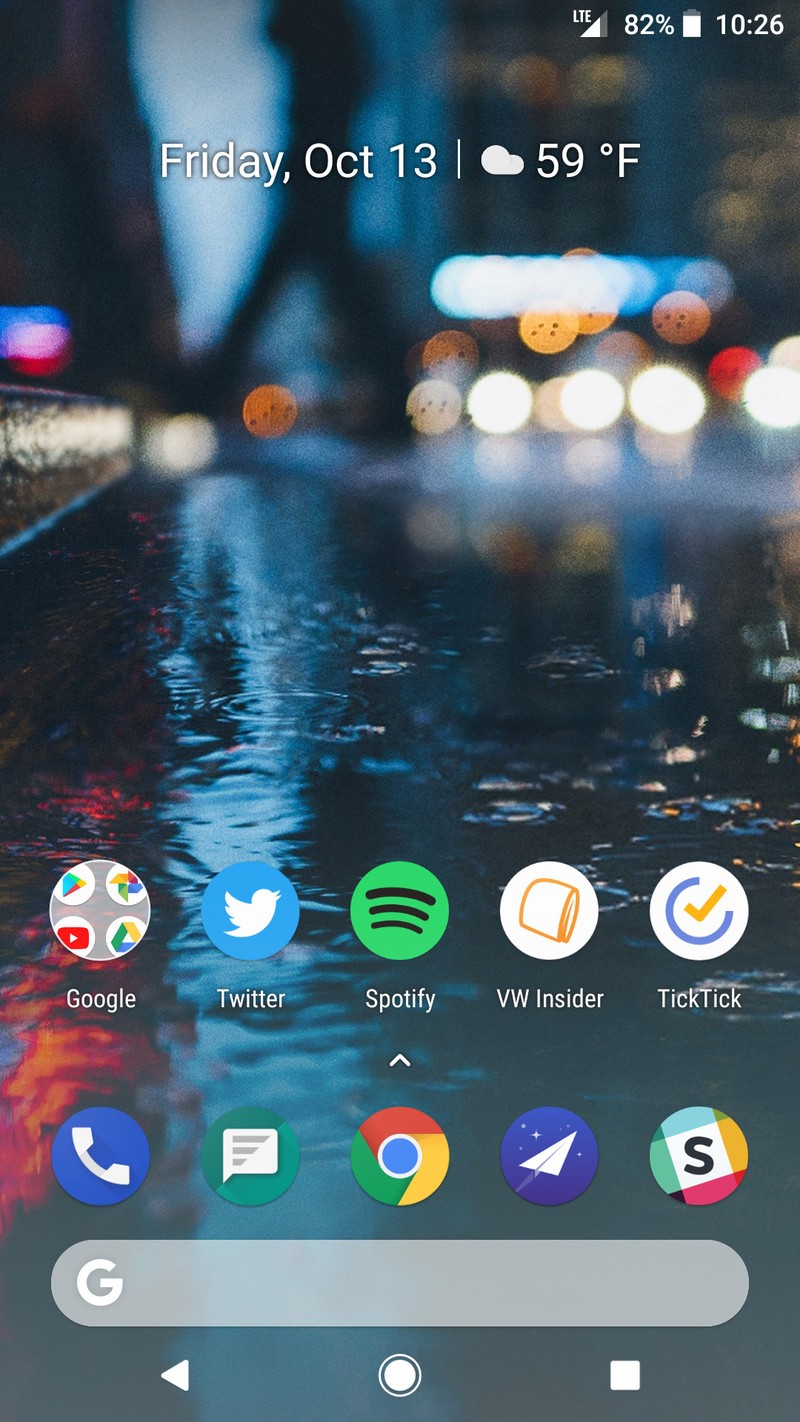
The launcher on the Pixel 2 isn’t as drastic of a change as we saw last year, but there are still a few changes that are worth checking out – most notably the repositioned Google search bar and updated weather/date widget.
Google’s search pill in the upper-left corner of the screen has been replaced with a more traditional search bar below the apps in your dock, and it now features a transparent grey color with a white “G” (although the “G” seems to be colored for some users). Tapping on the search bar still brings the regular Google search that we all know and love, and while its new placement does take some time to get used to, it does help tremendously for reachability.
The second big change is with the new At A Glance widget. This is the centered widget that shows you the date, time, and upcoming calendar events, and it’s also an improvement over what we had last year.

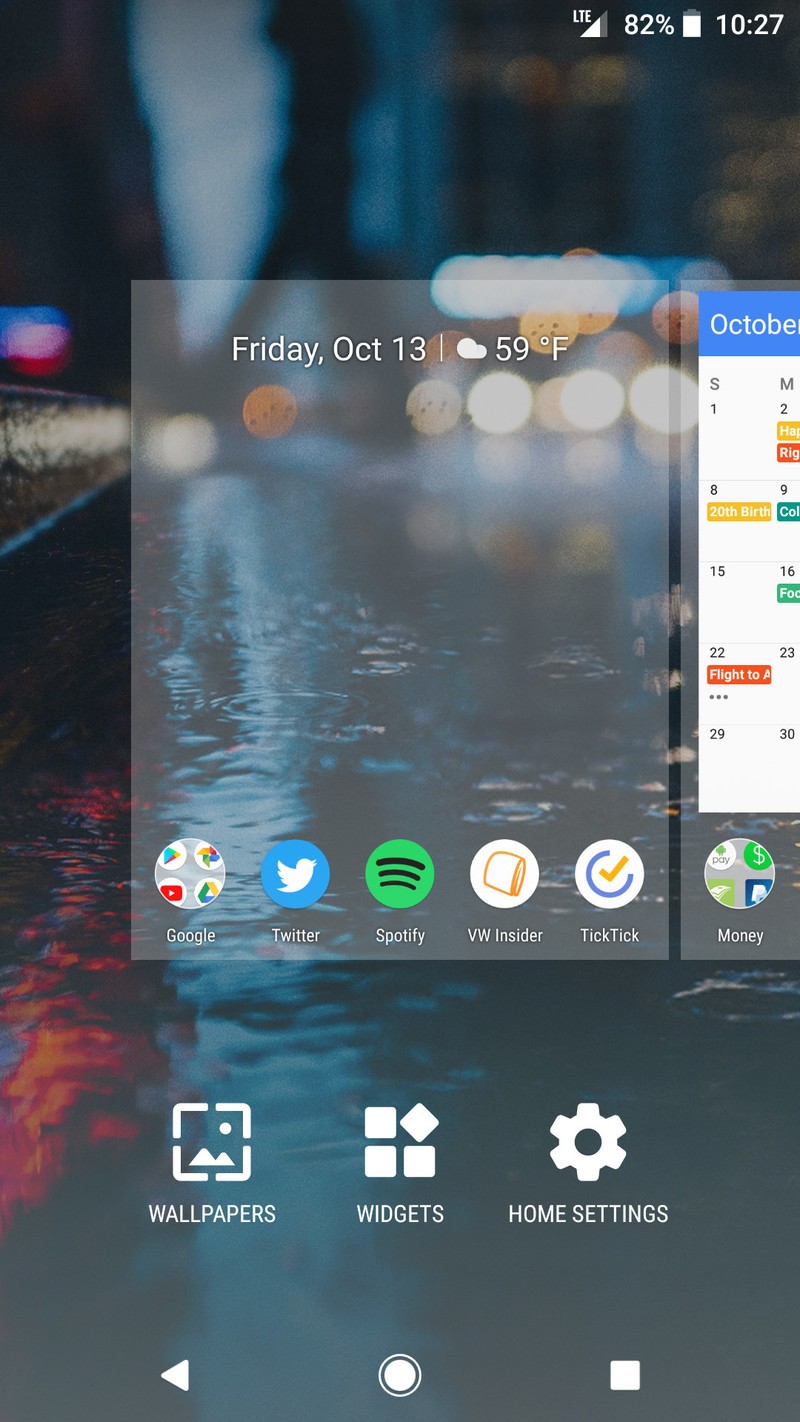
Tapping on the date will open Google Calendar, and tapping on the weather will open (you guessed it) Google Weather. If you have an upcoming calendar event, the weather icon will be shrunk down and the date will be replaced by information for that event, including the name, when it starts, and its duration.
Along with these bigger updates, there are smaller changes as well. The app drawer now shows slightly more apps than before (about half of an additional row), folders have a new opening animation, swiping quickly to the top or bottom of the app drawer now has a subtle bounce to it, and the clock app icon now updates accordingly to the actual time (similar to what iOS has done for years).


If you want to get the Pixel 2 launcher on your device, you can do so by downloading the APK file here. The launcher can be downloaded to the Pixel and Pixel XL without any sort of modifications, but if you want a working Google Feed on the left-most side of your home screens, you’ll need to install the launcher as a system app.
Google Pixel 2 and Pixel 2 XL
- Pixel 2 FAQ: Everything you need to know!
- Google Pixel 2 and 2 XL hands-on preview
- Google Pixel 2 specs
- Google Pixel 2 vs. Pixel 2 XL: What’s the difference?
- Join our Pixel 2 forums
Google Store
Project Fi
Verizon
Facebook’s food delivery feature now brings Five Guys to all
Facebook is already a place where people can check into restaurants and search recommendations to decide where they’re going to eat next. Now, the social media giant is taking that a step further. The company announced today that users in the US can use the platform to order food for takeout and delivery. Previously, this feature was only available to select users. The new service is rolling out today on iOS, Android and the web.
The release cites Five Guys, Panera, Chipotle and Papa John’s as a few of the chains that are participating in their program. The really interesting aspect of this, though, is that Facebook isn’t just partnering with individual restaurants and fast food joints to get this done. They are combining various delivery services such as ChowNow, EatStreet, Delivery.com, Olo and DoorDash. This provides the user with a one-stop shop to look at everything you can have delivered to your home, rather than having to visit individual apps and websites. Note that some of the larger delivery providers, such as Seamless and Caviar, do not appear to be working with Facebook on this feature.
If Facebook’s goal is to allow users to do pretty much everything from within their service, which keeps users engaged, then they’re doing a solid job of it with this new development. You do have to create an account with an individual delivery provider if you’re ordering through their service on Facebook (say Delivery.com), but you don’t have to leave the social network to do it. It’s a pretty easy, low effort way to have food delivered right to your doorstep.
Source: Facebook
An appreciation of 2017’s in-game shopkeepers
In-game shops are more than handy outlets to transform random metal scraps and tired old gear into new and useful items. Shops offer a reprieve from the action of whichever digital world you’ve entered, allowing you to take a moment, breathe and consider the situation from afar. Do you want to play as a gun-toting tank or a sneaky spy? Is your bow powerful enough for the battles ahead? Do you have enough health potions? Does your character look better in green or purple? Only the shop can provide the answers.
Overseeing all of these calculations — and guarding stores’ impossibly large piles of loot — are the shopkeepers. The past year has been incredible for video games, as we’ve discussed at length, and this infusion of creativity extends to the stingy store servants selling wares and wiles along our adventures.
From Cuphead to The Legend of Zelda: Breath of the Wild, 2017 has offered up a buffet of adorable, wacky and nostalgia-ridden shopkeepers for us to enjoy — so we might as well get to it.

Kilton, The Legend of Zelda: Breath of the Wild
It’s easy to imagine Kilton soaring through the skies of Hyrule in his patchwork hot-air balloon, whipping over fields and grazing mountaintops, surrounded by bundles of monster parts and masks. It’s easy to imagine, but we never actually see this — instead, Hyrule’s favorite five-head is always nearby (as long as it’s nighttime), ready to sell you a stockpile of exclusive clothing and accessories. You just have to find him first.

Crazy Cap clerks, Super Mario Odyssey
In a game all about hats, the Crazy Cap store does not disappoint. One of its most charming locations is in Tostarena, where friendly, bright skeletons stand by wearing caps on caps on caps while you browse their headwear.

All of the merchants, Splatoon 2
Nintendo does “charming” extremely well, as demonstrated by every one of the sea-creature shopkeepers in Splatoon 2. There’s Murch the emo sea urchin, Bisk the sneaker-obsessed spider crab, Flo the bohemian sea slug and her shrimp buddy Craymond, Jelfonzo the stylish jellyfish, and Sheldon the horseshoe crab and weapons expert. And then there’s Crusty Sean — he’s a food-truck operator who is, in fact, a giant tempura-crusted shrimp. It’s either irreverently adorable or incredibly morbid, but since this is Nintendo, we’ll go with the latter.

Porkrind, Cuphead
“Welcome,” Porkrind growls as you enter the Emporium. His voice is gruff and he has an eye patch over a twirled villain’s mustache. However, any danger in his demeanor is dispelled by his pink upturned nose and floppy ears — it’s hard to be scared by a pig in overalls. Cuphead is a feat of visual delight, and Porkrind fits into this retro world brilliantly, evoking the image of Porky Pig every time he waves goodbye and the screen circles to black.

Tae Takemi, Persona 5
Takemi is a punk-rock doctor on a mission to clear her name — she’s direct, intuitive and entirely badass. Fortunately for players worldwide, Persona 5 is a ridiculously dense game and we get to know Takemi better than shopkeepers in many other games, as she’s an important player in the overall story. Besides, who doesn’t love an in-game merchant that you can eventually, well, love (even if she is a few years older than the protagonist)?
Also, shoutout to another Persona 5 shopkeeper: Munehisa Iwai, the former Yakuza member with a heart of gold.

Emil, NieR: Automata
The only thing better than a shopkeeper you can love is one you can fight. Emil is an established and important character in the Nier anthology, and this time around his giant, grinning, bald head is attached to an item cart. Or it could be one of his clones (he used to be a boy, mind). Either way, Emil the shop(keeper) isn’t just a hub for all of your Android accessories — you’re able to battle him in an epic secret ending.

Baknamy merchant, Final Fantasy XII: The Zodiac Age
This one is an oldie but a goodie. The 2006 title Final Fantasy XII reappeared this year in high-definition with The Zodiac Age, and it brought the Necrohol of Nabudis’ secret merchant along for the ride. This Baknamy shopkeeper is tough to track down, which only makes buying his goods all the more sweet.

Xur, Destiny 2
Xur is the Destiny universe’s fickle exotic-gear dealer, showing up on the weekends to stuff your inventory with random, rare goodies. Xur is something that couldn’t have existed in a game before internet connectivity — he’s a living shopkeeper, always offering new secret items and popping up only when he sees fit.
IRS freezes its fraud prevention contract with Equifax
The IRS got a lot of flak from both ordinary citizens and lawmakers when it awarded Equifax a fraud prevention contract earlier this month. After all, they forged their partnership after the credit reporting agency revealed that it recently suffered a massive security breach that affected 145 million Americans. Now, after reports came out that an adware installer lived in the agency’s website, IRS has decided to temporarily suspend the $7.2 million, no-bid contract.
IRS commissioned Equifax to verify the identities of taxpayers signing up for a Secure Access account, which gives people access to online tax records and transcripts, on its website. Sign ups for Secure Access accounts have been suspended as a result, but anybody who already has one will not be affected.
The government agency didn’t elaborate why it suspended the contract, but it could have something to do with the faux Adobe Flash installer a security analyst found on Equifax’s website. After investigating the incident, Equifax admitted to Engadget that a downloader serving up malware lived in its website but stressed that it wasn’t hacked yet again.
“Despite early media reports, Equifax can confirm that its systems were not compromised and that the reported issue did not affect our consumer online dispute portal,” a spokesperson told us in a statement. “The issue involves a third-party vendor that Equifax uses to collect website performance data, and that vendor’s code running on an Equifax website was serving malicious content. Since we learned of the issue, the vendor’s code was removed from the webpage and we have taken the webpage offline to conduct further analysis.”
As for the IRS, spokesman Matthew Leas said Secure Access account holders have nothing to worry about. Yes, it froze the contract, but “there is still no indication of any compromise of the limited IRS data shared” with Equifax.” He explained that “the contract suspension is being taken as a precautionary step as the IRS continues its review.”
Source: Politico
 AIVAnet