


Is the Google Pixel 2 a good replacement for Windows phone converts?

In a world where Microsoft has given up on consumer mobiles, is the Google Pixel 2 a good fit?
Google makes Android, and while it’s the likes of Samsung that usually take the spotlight, the Pixel 2 is 2017’s showcase for Android as a platform. While some other phone makers have a tendency to layer on their own custom user experiences, the Pixel is Android as Google intended.
So, you’re getting the latest software mixed with the latest phone hardware. But if you’re inside the Microsoft ecosystem, perhaps looking for a place to go now that Windows 10 Mobile is out to pasture, would the Pixel 2 be a good fit?
Latest software, no fluff

Aside from some custom apps and maybe a little sponsored pre-loading, Windows mobile users have been accustomed to getting a consistent user experience across whichever brand of phone they may have been using at the time. Carriers sometimes got in the way, but Microsoft did a pretty good job at keeping things in line and pushing out updates.
Even now, folks who are sticking with the platform can get updates first through the Insider’s Program.
If you’re the kind of mobile user who puts great importance on having the latest software and timely updates, the Pixel is probably the best Android phone to get. Google handles it directly, and it’ll launch on the latest version of Android 8.0 Oreo. And you’ll be good for at least a couple of years.
Great hardware

The open secret is that HTC makes the (smaller) Pixel 2 phone hardware for Google. And that means high quality. The company may have struggled in recent years with selling phones under its own brand, but the quality of the hardware made by the Taiwanese manufacturer has never been in doubt. (LG manufactures the larger Pixel 2 XL.)
The Pixel 2 doesn’t reinvent the wheel, but it’s a harmony of metal and glass in two sizes. You’ll either get a smaller phone with chunky bezels or a larger phone with skinny ones, but the quality will be the same whichever you choose.
And naturally, it ticks all the hardware boxes: Snapdragon 835 processor, 4GB of RAM, USB-C, fast charging, up to 128GB of storage and more.
More: Google Pixel 2 specs
A quality camera

The Google Pixel had an excellent camera in 2016. The Google Pixel 2 in 2017 also has an excellent camera. Take or leave the “class-leading” results at DxOMark, but if you’ve used Lumia phones before, then a good camera is probably high on your shopping list.
Spec-wise the rear shooter is 12.2MP ƒ/1.8 with 1.4μm pixels. Those are still numbers, albeit pretty good ones. Early signs are promising as we found out with an early unit and putting it up against the iPhone 8.
Pixel 2 vs. iPhone 8 camera: A real-world test
All Microsoft’s apps and services

Microsoft’s new approach to mobile involves servicing its customers whatever device they choose to put in their pocket. That means if you’re a Windows mobile convert or just a heavy Windows desktop user, you’ll be well taken care of.
Microsoft has a ton of apps on Android. From staples like Skype, OneNote, the Office suite, and Outlook, to newer additions like the Microsoft Launcher and, coming soon, Microsoft Edge.
Windows 10’s Phone Companion app has helped ease folks using Android phones into working with their PC, but it’s going so much further. Cortana can help mirror notifications to your desktop, and with Edge on Android coming soon along with the continue on PC feature, you’ll be able to go seamlessly between your mobile device and your Windows computer.
Best Microsoft apps for Android
The bottom line

The Pixel 2 embodies much of what Windows mobile fans have come to enjoy over the years. You get great hardware with a no-fluff software experience, an excellent camera, and timely updates.
Microsoft is doing its part, too, making it easier than ever to seamlessly go between an Android phone and a Windows PC, all the while improving its mobile applications for Google’s platform. If you’re thinking of moving over to an Android phone, this is one you should definitely consider.
More: Pixel 2 hands-on
Google Pixel 2 and Pixel 2 XL
- Pixel 2 FAQ: Everything you need to know!
- Google Pixel 2 and 2 XL hands-on preview
- Google Pixel 2 specs
- Google Pixel 2 vs. Pixel 2 XL: What’s the difference?
- Join our Pixel 2 forums
Google Store
Project Fi
Verizon
Eco-friendly concrete protects old buildings from earthquakes
Concrete has become the high-rise building material of choice because it’s relatively cheap, easy to work with, long-lasting, and highly resistant to fire or explosions, unlike steel. It does have one inherent flaw, though: It’s not great under tensile loads, so it requires heavy steel reinforcement to resist earthquakes. However, researchers from the University of British Columbia (UBC) have developed a new type of concrete with steel-like properties that can resist powerful quakes and is eco-friendly, to boot.
The material, called EDCC, replaces much of the the cement with an industrial byproduct called fly ash. “The cement industry produces close to seven percent of global greenhouse gas emissions,” says UBC Professor Nemy Banthia. ” By replacing nearly 70 percent of cement with fly ash, we can reduce the amount of cement used. This is quite an urgent requirement, as one tonne of cement production releases almost a tonne of carbon dioxide into the atmosphere.”
The final product is similar to steel, being strong, malleable and much more ductile than regular concrete. Researchers sprayed concrete block walls with about 10mm (a half-inch) of EDCC, then subjected them to a simulated magnitude 9 earthquake, not unlike the one that struck Tohoku, Japan in 2011.
While the unreinforced wall collapsed dramatically at about 65 percent intensity (shown at about 0:50 in the video above), the reinforced wall withstood full intensity shaking, flexing impressively. “A 10 millimeter-thick layer of EDCC … is sufficient to reinforce most interior walls against seismic shocks,” said researcher Salman Soleimani-Dashtaki.
Far from being just an experiment, EDCC cement is a commercial-ready product that has been designated as an official retrofit option in British Columbia, Canada. In many cases, it could be a more cost-effective option than major structural renovations or steel bracing for earthquake protection. For one of the first projects, contractors will use it to upgrade an elementary school in earthquake-prone Vancouver. It’ll also be used to retrofit a school in a seismically active area of northern India.
Via: ArchDaily
Source: University of British Columbia
Cadillac’s hands-free feature fixes the worst parts about driving
The 145-mile jaunt between Flagstaff, Arizona, and Phoenix is almost entirely downhill. With a drop of approximately 5,800 feet between the two cities, the road that joins them — Interstate 17 — has multiple warnings about saving your brakes (meant mostly for big rigs) and is peppered with sharper twists and turns than your typical highway. Yet, while I was behind the wheel, I did almost nothing for the entire drive thanks to Cadillac’s new Super Cruise feature on the 2018 CT6.
Super Cruise is Cadillac’s answer to semi-autonomous features from BMW, Mercedes and of course, Tesla’s Autopilot. But unlike those systems where you’re chastised by the car within moments of removing your mitts from the wheel until you return them, Super Cruise is totally hands-free.
Before we get into the nitty-gritty of the car and Super Cruise, let’s talk about the steering wheel with a built-in light. I’ll admit when Cadillac announced its semi-autonomous feature and showed off the light-infused steering wheel, I rolled my eyes. It seemed gimmicky and more importantly, ugly. When you drop a big wad of cash on a luxury car, the last thing you want is a feature that just annoys your senses. And yet, when I sat behind of the wheel CT6, it didn’t seem so bad. While I was actually driving, the wheel’s notification lights made sure I knew exactly which driving mode I was in.

When the car is in Super Cruise mode, the wheel glows green. When it determines that you’re not paying enough attention to the road it flashes green and when you’ve ignored that or the vehicle encounters something it can’t handle on its own, it flashes red.
Super Cruise also has a sort of “standby” mode — if you take the wheel to switch lanes (the car will not switch lanes for you) the lights will pulse blue to indicate that as soon as the car is back in the middle of a lane, Super Cruise will take over again.
This all leads me writing something I didn’t expect: I like the light on the steering wheel. It’s helpful without being overbearing. Yeah, I’m also surprised by that admission. But there you have it. Yes, having a light bar embedded in a steering wheel is slightly odd, but it adds a layer of safety to a feature that’ll be brand new to most of the people that buy this car. Changing the way people drive usually involves changing the way they interact with their vehicles, especially when they’re told they can take their hands off the wheel for an extended period of time.
Because you can leave your hands by your sides, the system uses an infrared camera mounted on the steering column to make sure you’re still ready to take over if things go south. It tracks your eyes, nose, mouth and ears and figures out where you’re looking. If you’re looking forward out the windshield or checking your mirrors, you’re fine. But let’s say you start staring out the side window or worse, at your phone, the car prompts you to start paying attention by flashing the green steering wheel light. If you ignore that, the flashing light on the wheel and accompanying audible warning for too long, the car will slow down, stop, turn on the flashers and call the authorities via OnStar.
I did turn my head to test the feature (while keeping a side eye on the road), and the car reacted by first flashing green then red to get my attention. Even when I was wearing dark sunglasses, it was able to determine where I was looking. Cadillac says that if the IR camera can’t see your eyes, it uses the rest of your facial features to see where you’re looking. The only time the system failed is when it had direct sunlight blinding its sensor. In the nearly 1,000 miles I drove the car that only happened for about 10 minutes. I continued on the same heading on the painfully straight Interstate 10, the sun moved slightly in the sky, and the feature was back in business and I was back to sort-of driving.
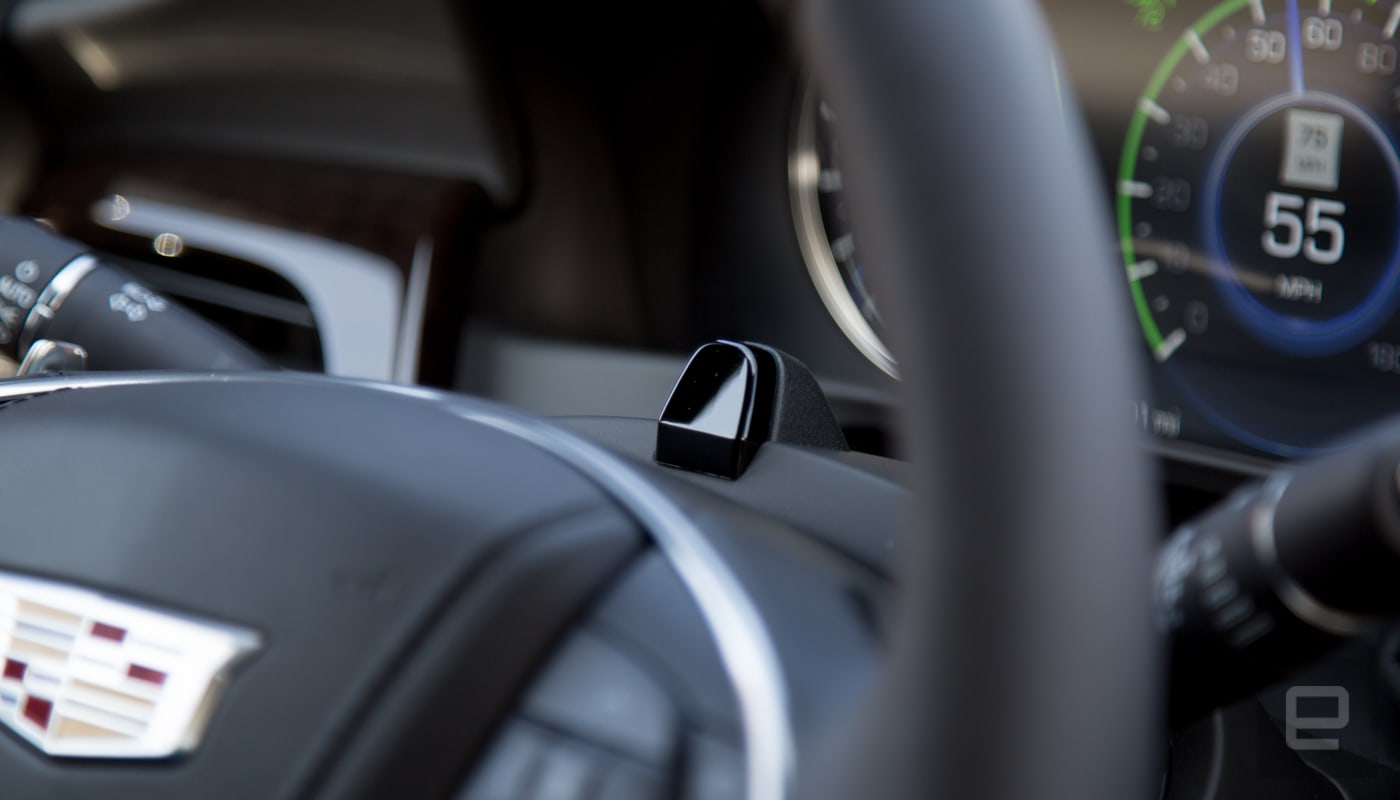
During my two very long drives with the 2018 $85,300 high-end Platinum trim level of the CT6 with Super Cruise (first from Sante Fe to Phoenix then from Phoenix to LA), 80 percent of the time the car was doing all the work while I rested my hands on my legs. Like all new semi-autonomous features, it was initially unnerving to give up that much control while cruising down the highway at 70 miles per hour. I’ve seen videos of, and experienced, features like this suddenly jerk out of their lane so as we started to pass our first big rig I had my hands hovering over the steering wheel.
In fact, I did that for the first dozen or so semitrucks, and yet at no time did the car drift into danger or deviate from the center of the lane. By the end of the first day’s drive, Super Cruise’s promise of truly hands-free cruising down the freeway had delivered. Sure there were a few hiccups; none of these systems are infallible and you should always, ALWAYS, give the road your full attention and be ready to take over control at any time. But I’m a fan of Super Cruise even though it comes with a few caveats.
First off, it’s geo-fenced to divided highways without any sort of cross traffic. You can’t trick it into working on a back road or highway with grade crossing. But as the saying goes, that’s not a bug, it’s a feature. A big portion of the system that makes Super Cruise possible is the high-definition LiDAR maps that ship with every car.

Cadillac teamed up with mapping company Ushr to create LiDAR maps of approximately 160,000 miles of divided highway in the United States and Canada. The automaker uses those maps along with the car’s high-precision GPS, long-range radar and camera to keep the car centered in a lane. Cadillac says the LiDAR maps are precise within 10 centimeters and are updated quarterly to take into account changes to the roads.
While the maps help power a feature that keeps the CT6 centered, it also removes any chance that you’ll be able to use this feature anywhere Cadillac has deemed unworthy of Super Cruise. This could turn off some potential buyers. For others, it’s a stop gap from them trying to make the car do something it’s not ready to accomplish. I don’t see it as an issue and judging by the amount of YouTube videos of Tesla owners “hacking” their cars to run hands-free in environments Autopilot is not built to handle, it’s probably a worthy restriction at least for the sake of other drivers on the road.
Super Cruise will work between zero and 85 miles per hour, which makes it great for long boring road trips and the worst part of driving: commuting. In addition to solidly staying in a lane for long periods of time at highway speeds, it was also handled dense Los Angeles traffic with ease for the most part.
Cadillac annotated its LiDAR maps with information about interchanges, on- and off-ramps, lane endings, toll booths and other items you’ll encounter on the road. When those are approaching, the system will instruct you take over driving. Because the map can see 2,500 meters (about 1.5 miles) in front of the car, it’s usually before the driver notices something is about to happen.
On more than a few occasions, I was prompted take control for a mysterious reason that would later reveal itself. While driving on Interstate 10 through the Arizona and California desert, those instances were few and far between. Los Angeles’ complex interchanges (which frankly confuse most humans) on the other hand meant I was taking control of the car on a regular basis. It wasn’t annoying but it’s worth noting. Yet it was when LA traffic came to a standstill that the value of Super Cruise was really apparent.

The ability to track the vehicle ahead of it and stop and start with traffic while staying in its lane is a blessing for commuters. Yes, you’re still stuck in traffic, but your stress level is going to go down because the car is doing all the monotonous work. A few vehicles did cut me off and the CT6 reacted by slowing down or stopping without my input, but one driver decided to throw caution to the wind and turned into my lane with only inches to spare and the car had me take over. It’s a nice reminder that you need to stay alert with these systems and that people are horrible drivers.
All that tech is crammed into the luxury CT6 sedan that we reviewed last year. Other than Super Cruise, it’s essentially the exact same car. It’s comfortable and chock full amenities like massaging seats and rear passenger video screens. The Platinum edition I drove had twin-turbo 3.0 liter engine pumping out 404 horsepower and 400 pounds of torque. It’s a beast that cruises smoothly on the high, but when it’s needed can chew up the pavement. I’m still not a fan of the eight-speed automatic transmission during spirited driving, but the paddle shifters are solid in that type of environment and frankly 95 percent of the time, it’s not even remotely an issue.
Of course all that fancy and Super Cruise means you’re going to be shelling out some big money. On the Premium trim of the car, which starts at $66,300, Super Cruise is part of a $5,000 option that includes adaptive cruise control. Meanwhile, the top-of-the-line Platinum edition starts at $85,300 with Super Cruise standard.
While Super Cruise is currently only available on the CT6, expect to see it land on the Escalade in the next few years and if enough buyers tack it onto their cars, it’s very likely the feature will permeate the entire Cadillac line and other GM vehicles.

Will those cars get the light steering wheel though? It’s tough to tell. As drivers become more accustomed to semi-autonomous features determining which mode a car is in might become second nature. For now, though, Super Cruise is a surprisingly solid solution to highway driving with a totally not annoying green light at the top of the wheel leading the way.
Kamigami is a cute robot bug you build yourself
There are plenty of products out there that teach STEM skills, from robots you can code to kits for building musical instruments or games. But the “fun” is often short-lived. Most of the activity is rooted in the building process, and the final product is often too basic or simplified to be very interesting. By contrast, Dash Robotics and Mattel’s new Kamigami robotic kits are very much focused on what kids do after they finish putting them together. They still get a sense of accomplishment and might pick up a few STEM skills in the process, but in the end it’s really about having your very own cute bug bot to race, battle and customize.
The basic design of each Kamigami robot is based on company founders Nick Kohut and Andrew Gillies’ academic work in biomimicry, which involved building machines that could walk like insects. When fully assembled, each Kamigami has six legs, like a real bug, with three of the feet facing forward and three facing backward, in an alternating pattern. This means that once you put it together and start controlling it with the app, there’s always one set of legs driving the robot forward, letting it run very, very fast.
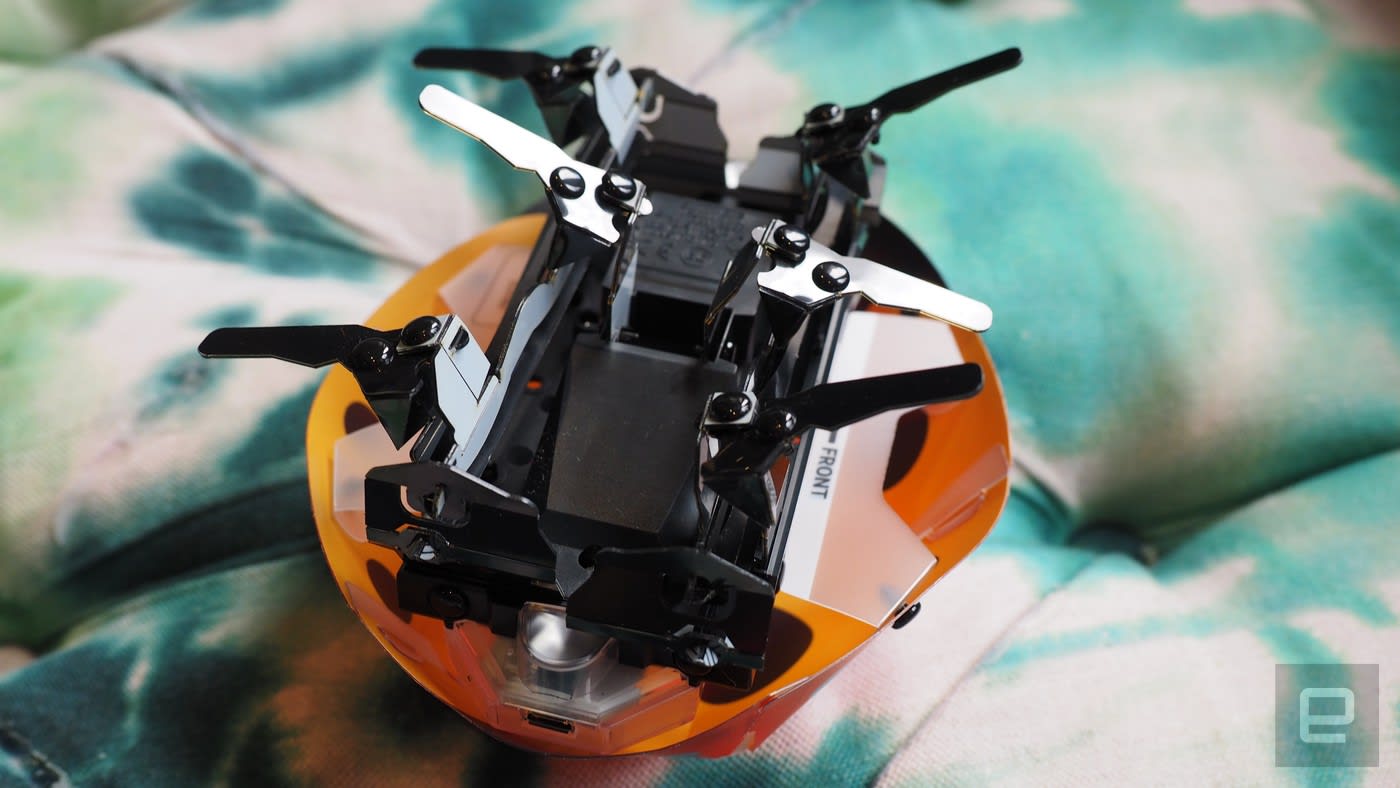
The legs are one of the main things you’ll have to assemble yourself, along with the distinctive plastic shell, based on one of six different insects, including a cute ladybug, a shiny rhinoceros beetle and a fierce-looking scorpion. Each kit comes with a preassembled central unit containing the electronics module and gearbox, equipped with useful sensors like an accelerometer, gyroscope, IR transmitter and two IR readers, as well as speakers and LED lighting. You’ll be asked to download the app on your phone and sync with the base unit via Bluetooth, after which the program will walk you through assembling the Kamigami.
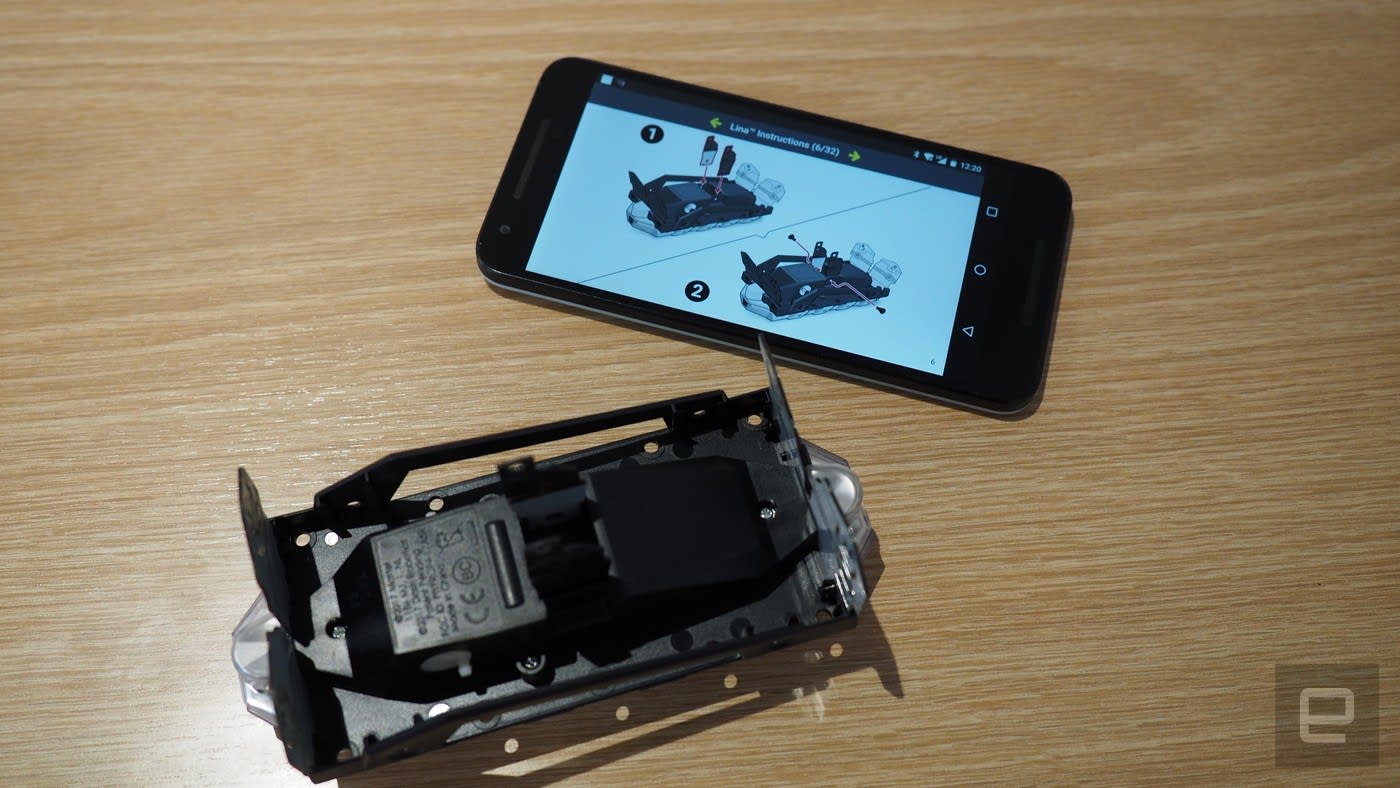
It’s actually pretty simple, though a bit nerve-racking. At first I was scared I would accidentally break the plastic pieces, but they proved to be pretty sturdy as I slotted them together and bolstered them with black rivets. But while I managed to put together the Kamigami in less than an hour, it was still somewhat challenging. The rivets are hard to remove if you make a mistake, and some of the tabs are really small and hard to manipulate: I could see a kid getting frustrated and handing it off to their parents to finish.
Once you’ve got the legs and shell attached, you can just jump into the rest of the app and have the bug skittering around almost immediately. You control the robot’s actions directly using the joystick on your screen, or select preprogrammed actions like a figure eight or a little dance. A coding mode lets you program simple movement, light and sound patterns for your bug. There’s even a battle mode that allows two Kamigami to wrestle physically in a sumo match and shoot virtual ray guns at each other.
I started out with just having mine run around and it worked fine, though I noticed it had a tendency to list to the left a bit. When left to its own devices, the Kamigami avoided most obstacles thanks to its array of sensors, though it would occasionally get stuck under things like the legs of an office chair. When placed on a long bench, it successfully detected and avoided the edge several times. When it eventually did fall off, it kept running on its merry way, no worse for the wear.

While the racing and battling aspects are fun, especially when you have multiple Kamigami to play with, the coding functions felt a little weak. The number of commands the app gives you is rather limited, and the drag-and-drop interface, combined with my phone’s small screen, made it hard to design any long or complex routines. If you want to teach your kids coding, they’re better served by products like LittleBits, which have a more explicit focus and can be used on a desktop.
But if building and battling your very own skittering robotic insect is something that appeals to you, Kamigami goes on sale today at Target for $50.
Pornhub is improving search with an AI porn addict
NSFW Warning: This story may contain links to and descriptions or images of explicit sexual acts.
One of the (many) problems that porn websites that rely upon user-generated content have, is that its one-handed users often don’t respect proper database use. As a consequence, you may have thousands of clips, all described with the same five words and two tags. That makes discovery and cataloging a problem, especially if you’re looking for videos to cater to your very specific niche or favorite performer.
It’s an issue that Pornhub is looking to remedy by implementing an artificial intelligence that will scrub through every frame of every video in its catalog. The system has been fed thousands of images of specific models and acts to create a database of names, faces and positions. Then, that data will be compared with the clips on Pornhub’s system to automatically tag and catalog all of its vast library of content.
The system will then attempt to use computer vision to identify the act being carried out on screen at any given time. In (very, very unpublishable) clips shared with Engadget, the system was able to identify both the names of the performers in a scene, and what they were doing. Tags such as “blowjob,” “doggy,” “cowgirl,” and “missionary” floated on screen with the corresponding action. The system is also capable of, for instance, identifying blonde performers and adding the requisite tags.
Currently, Pornhub groups videos by what other people watched on their research trail, combined with the aforementioned tags. In the future, it’s hoped that visitors will be able to find clips according to PornHub’s AI smarts, with a confidence rating attached. If you’re looking for Model X, you’ll be shown all of the clips that the system believes they’ve performed in, alongside a percentage rating. Users will be asked to help train the machine further by up-voting correct guesses and down-voting errors.
The system has run through around 500,000 featured videos as of today, but the company is hoping to have cataloged its entire library by the start of 2018. And as dystopian as this all sounds, PornHub has pledged that it will only tag professional, “known” models rather than amateurs. Not to mention that the system can’t identify performers with masks or obscured faces. As a consequence, perma-masked BDSM / fetish performers like Emma Lee, and those looking for anonymity should be able to keep their identity off the site.
As creepy as this could sound (and, it does), the news also highlights AI’s power to highlight and correct for human error. Pornhub could use the system to find low-quality duplicate clips and cut-downs of material and eliminate them. Not to mention that it can utilize machine vision and learning to effectively automate tagging and identification, plus description-writing. The end result should be better discoverability, higher quality videos and fewer duplicates. Should, at least.
Oculus open sources Rift DK2 hardware ahead of its next reveal
Three years ago, Oculus made the source code for the Oculus Rift DK1 open to all. Now, with the fourth Oculus Connect on the horizon, the company is doing it again with the Rift DK2. It has released the Rift Development Kit 2 (DK2) to the public; Oculus’s intention is “to preserve and share what we learned about VR in the early days, and to let anyone use the design in their own projects.”
The schematics are available on Github; the CAD, artwork and documentation are licensed under Creative Commons Attribution 4.0 International, meaning they can be reused and modified, but Oculus must be credited. The firmware situation is a little more complicated; it’s available under a BSD+PATENT license, which you can dig into on the DK2 page.
The files are divided into four different folders: Documentation, which consists of high-level specs on the firmware, sensor and headset. Cable contains information about the cable, which Oculus says was actually one of the most complex and challenging parts of the device. It had to handle high speed over long distances, be removable, have Y-splits on both ends and be able to measure up to repeated and sustained use. They warn that the cable is likely not replicable. There are also challenges with the Sensor, the third folder, as its firmware wasn’t available for redistribution. Finally, Headset has the mainboard firmware, artwork and CAD for the headset.
You likely will not be able to build a full DK2 according to these specifications because of challenges sourcing components, but it’s still a nice move on the part of Oculus. Clearly the company wants to make sure the developer community is invested in its product, and this is a great way to go about it.
Via: Tom’s Hardware
Source: Oculus
Microsoft and Facebook’s open AI ecosystem gains more support
Artificial intelligence has helped jump start everything from self-driving cars to soft robotics. As if that wasn’t enough, it’s also tearing down language barriers to bring the world closer together. But, at the same time, machine learning is dealing with its own, self-constructed walls. Last month, Facebook and Microsoft came together to target a major roadblock — specifically the process of switching between machine learning frameworks, such as PyTorch and Caffe2. Their solution: An open-source AI ecosystem dubbed ONNX (or Open Neural Network Exchange), which allows developers to jump between AI engines at various stages of development. The tech titans claimed the Exchange would make machine learning “more accessible and valuable for everyone.” And, they’ve apparently had no qualms in recruiting other big-name firms to help out. The latest additions to ONNX include IBM, Huawei, Intel, AMD, Arm, and Qualcomm — companies that (to varying degrees) are also working within the field of AI.
Here’s how Facebook described the all-star collab last month: “In Facebook’s AI teams (FAIR and AML), we are continuously trying to push the frontier of AI and develop better algorithms for learning. When we have a breakthrough, we’d like to make the better technologies available to people as soon as possible in our applications. With ONNX, we are focused on bringing the worlds of AI research and products closer together so that we can innovate and deploy faster.”
If we’re to take the company’s statement on face value, that means ONNX could accelerate the development process for AI tech, delivering things like connected cars even faster. On Tuesday, Microsoft also announced that devs would soon have more tools to play around with on the repository, including its Cognitive Toolkit and Project Brainwave platforms.
But, this is far from the first machine learning initiative to bring industry heavyweights together. Microsoft and Facebook are already part of the ‘Partnership on AI,’ along with Apple, Amazon, Google, and IBM. That team-up is all about increasing public awareness, and boosting research. Funny how machine learning has a knack for turning rivals into pals. Maybe, it won’t end up destroying the human race after all.
Source: Microsoft
Smart bakeware tells you when your cheesecake is ready
Temperature is everything when you’re baking, but it’s not all that fun to keep poking your dessert with a thermometer or toothpick to make sure it’s truly finished. You might not have to before long: GE Appliances’ FirstBuild community has unveiled a Precision Bakeware concept that alerts you through a mobile app when your baked goods reach their ideal temperature. Instead of hanging around the kitchen out of fear that your cheesecake is overdone, you can walk away and finish watching that favorite show.
At the moment, Precision Bakeware only exists as a cake pan, and you’ll have to wait until early 2018 before FirstBuild starts selling the range through its website for an as yet unnamed price. The line may soon accommodate more of your culinary ambitions, however. The team hopes to expand the lineup to cover bread, pies and other baked creations. While you probably won’t need this if you’re a skilled baker, you might appreciate it if your chocolate cake tends to taste like charcoal.
Source: FirstBuild
iPhone X Billboards Appear in Toronto, London, Tokyo, and More Cities Around the World
We’re just over two weeks away from the pre-order date of the iPhone X on October 27, meaning it’s just over three weeks until the first group of customers will finally have Apple’s next-generation iPhone in their hands on November 3. As these dates near, Apple has begun to put up billboards for the new device all over the world in cities like Toronto, London, Tokyo, San Francisco, and more.
This week, Redditor turnaround_ shared an image of workers painting a new iPhone X ad in Toronto.
Image via Redditor turnaround_
Earlier in October, a second iPhone X billboard was spotted going up nearby in the city by Financial Post reporter Josh McConnell. Both billboards are located in Downtown Toronto.
 Image via Josh McConnell
In London, a billboard was spotted at Boxpark Shoreditch, a pop-up mall in East London that was constructed in 2011 using refitted shipping containers. The area is known for its shopping, galleries, cafes, restaurants, and nearby there’s an Apple reseller called “Shoreditch Macs” that offers repairs, part exchanges, and refurbished Macs.
 Image via @FarrugiaJose
Below the city, Apple has also put up iPhone X billboards in the London Underground.
 Image via @ianfogg42
iPhone X ads are lined up in the Harajuku district of Shibuya, Tokyo. Similar to Apple’s advertising targets in London and Toronto, Harajuku is locally known for attracting visitors to its wide variety of retail locations — ranging from locally-owned boutique shops to international chain stores — as well as multiple cafes and restaurants.
 Image via @BienPerez
Closer to Apple’s home in California, billboards have also appeared outside of San Francisco. As the launch of the iPhone X grows nearer, more billboards, commercials, and other pieces of advertising for the new smartphone are expected to continue sprouting up around the world and online.
Likewise, the iPhone X itself has begun appearing in the wild as Apple employees test out the device in the weeks leading up to the public launch. Last week, an iPhone X with an new dynamic wallpaper appeared on Reddit. Prior to that there have been a handful of iPhone X in-the-wild shots shared online, with screen grabs of the device caught on Snapchat, shared to an Instagram Story, and seen by a Redditor in an airport.
Related Roundup: iPhone X
Discuss this article in our forums
Apple Trails Google, Amazon, and Microsoft Among Ideal Employers in Recent Survey
Apple has ranked fourth, behind Google, Amazon, and Microsoft, in a recent survey of the most ideal employers for tech professionals in the United States. Apple ranked ahead of Facebook, IBM, The Walt Disney Company, and Tesla.
The online survey was conducted by tech careers site Dice between June 2017 and August 2017. There were a total of 5,477 respondents, who were asked to name their top three choices for the most desirable company for which to work.
When asked what matters most to them in an employer, tech professionals mentioned competitive salaries, challenging work, benefits, positive organizational culture, and transparent communication as the most important factors.
While the survey results are subjective, having a career at Apple undoubtedly has some benefits, including generous compensation and the chance to work on some of the world’s most iconic products like the Mac and iPhone.
Dice also highlighted the equity that Apple awards its employees, in the form of restricted stock units, in addition to its progressive stance on diversity and social issues and innovation within the tech industry.
The survey results likely refer to Apple’s corporate positions, but there are also opportunities at the retail level. Apple recently shared a video in which several employees say their jobs help them connect with and inspire customers.
Apple was ranked the 36th best place to work this year in the United States on Glassdoor. The company has an average rating of four out of five stars on the website. Apple CEO Tim Cook has a 93 percent approval rating.
Discuss this article in our forums
 AIVAnet