


These med students are learning how to dissect human bodies in virtual reality
Why it matters to you
From surgery to spaceflight, VR simulations can offer an unmatched learning experience.
For centuries, the practice of dissecting cadavers is how future doctors have learned about the anatomy of the human body. Medical students at the University of California San Francisco, however, are using virtual reality training as an optional component in their first-year curriculum, allowing them to explore the human body before ever setting foot in an actual lab.
Knowledge of anatomy is the foundation of all medical knowledge, and VR lets med students get a more complete understanding of the complex structures that make up our bodies.
Assistant Professor of Anatomy Derek Harmon, PhD, told Science Blog that he thinks it’s an important addition to the school’s curriculum. “Virtual reality is exciting for me as an anatomy instructor because it is going to help enhance the students’ understanding of the arrangement of the body,” he said. “Because the better they know the body, the better physicians they will end up being for the rest of their careers.”
Textbooks and actual dissections of cadavers are useful, but VR adds a whole new dimension to the instruction. Students can remove each layer individually, from the skin all the way down to bones. The VR interface allows them to better understand the interaction between muscles, organs, nerves, and blood vessels. “It’s a learning experience almost like putting a puzzle together,” Harmon said.
The VR simulation learning is part of UCSF’s Bridges Curriculum, a revolutionary new program at the School of Medicine that emphasizes new ways of looking at the interconnected nature of health care.
Surgeons have already broadcast actual operations in VR, and some can even prep for upcoming procedures by practicing every step in VR before they even enter operating room.
Kimberly Topp, a PhD and Professor of Physical Therapy and Anatomy at UCSF, says there are many more real-world medical experiences that VR can simulate, such as what a doctor might encounter in an emergency room. “It is hard to simulate a realistic trauma experience where nobody is going to get hurt,” she said. “This is a great way to get students more comfortable with the actual clinical environment that they are headed into.”
“People are really wowed when using virtual reality. That is how I think it is going to help students remember the anatomy that is so dense in their education,” she added.
On the other hand, for the rest of us who may not be up for the rigors of medical school, we can always buckle on an Oculus Rift headset and give Surgeon Simulator a try.
Security firm reports vulnerabilities within Apple firmware affecting Macs
Why it matters to you
Nearly 3,000 Mac computers were found to be vulnerable to firmware exploits.
A team of researchers at Duo Security revealed that there are some issues with Apple’s application of firmware updates, which has resulted in some users being left with out of date EFI firmware.
The researchers analyzed 73,000 Mac devices and found that Apple’s security updating process was not working as the company intended. They found that a little over four percent of those computers were running with outdated Apple firmware, despite having received recent updates. Duo’s report didn’t give the exact cause of the problem, but simply noted that for “some reason” the EFI firmware was not being updated when the computers in question received security or OS updates.
Firmware is the software which runs underneath the OS and controls the computer when it is booting up. Security issues within firmware can be difficult to notice, which often makes it a target for more advanced hackers. Duo noted that average home users have little reason for concern, due to the fact that the complexity of firmware attacks usually relegates hackers to target enterprises and other valuable entities.
“If you’re a home user with a Mac that falls into one of the above categories as their personal computing device, then the sky isn’t falling for you, in our opinion,” Duo said. “Attacks against EFI have so far been part of the toolkit used by sophisticated adversaries who have specific high value targets in their sights.”
Duo did caution that enterprise users should take some extra precautions. In addition to ensuring that all their Macs ran the latest version of Mac OS, the security company advised phasing out, or at least isolating, those computers which were not eligible for the most recent security updates.
For its part, Apple has worked to improve its firmware and patch security vulnerabilities as they arise.
“We appreciate Duo’s work on this industry-wide issue and noting Apple’s leading approach to this challenge,” an Apple spokesperson told Gizmodo. “Apple continues to work diligently in the area of firmware security and we’re always exploring ways to make our systems even more secure. In order to provide a safer and more secure experience in this area, macOS High Sierra automatically validates Mac firmware weekly.”
An edible sensor could help you keep tabs on the freshness of your food
Why it matters to you
Monitoring the freshness of your food hasn’t always been the easiest task. But these biodegradable sensors could help.
Keeping tabs on the viability of your ingredients is obviously a top priority for chefs, both professional and amateur, and now you can both keep and eat said tabs. Researchers from ETH Zurich have developed biodegradable microsensors that might just “provide the vital link between food products and the Internet of Things.” The tiny sensors are not only incredibly thin, but also biocompatible and biodegradable, which means that you can, in fact, eat them.
As it stands, it’s somewhat difficult to continually test foodstuffs for freshness. After all, it doesn’t seem particularly efficient — or pleasant — to send an employee around the fish market, smelling every cut to ensure that it’s still fresh enough to be sold. But now, there’s a tech-forward solution. Thanks to this 16-micrometer-thick sensor (a human hair is 100 micrometers thick), food professionals (or you!) are able to check the temperature of the food from afar. This allows for constant and wireless monitoring of food temperatures, which is a key component to freshness, especially during transport.
The sensor itself is made of magnesium, which the team points out is “an important part of our diet,” and other parts of the sensor are composed of silicon and nitride, as well as a compostable polymer based on corn and potato starch. So really, you can eat the whole thing. Of course, you wouldn’t necessarily want to snack on a bag of them, but ingesting one of these things wouldn’t do you any harm.
Aside from being edible, the sensor is also incredibly malleable. You could bend, stretch, or even crumple it up, and it would still be capable of determining the temperature of your food.
According to Giovanni Salvatore, who led the research, producing biocompatible microsensors has historically been a rather time-consuming and expensive process. However, as technology becomes more advanced, many of the obstacles to the widespread proliferation of these tools could be rendered obsolete. “Once the price of biosensors falls enough, they could be used virtually anywhere,” Salvatore said in a release. Similarly, “Their use would not be limited to temperature measurement either: similar microsensors could be deployed to monitor pressure, gas build-up and UV exposure.”
Best HOTAS Controller for PlayStation VR

Is there a HOTAS controller I can use with PlayStation VR?
Hands On Throttle And Stick (HOTAS) controllers are extremely popular in the flight simulator community and are now gaining a lot of traction in the VR world. These controllers essentially give you a ton of control over your airplane or spaceship, and you can also look and feel like a boss while playing. HOTAS controllers will usually have a familiar joystick for one hand and a throttle for the other.
With rumors of War Thunder and Elite: Dangerous coming to PlayStation VR, and with a few VR games already supported, including EVE: Valkyrie and Starblood Arena, you might be tempted to set up a cockpit in your VR space. Here’s the best — and so far really the only — one you’ll want to get for PlayStation VR.
Read more at VRHeads!
Apple Watch Series 3 review: A good watch, a so-so phone replacement
With each generation, the Apple Watch’s purpose has seemed to shift. The first one demonstrated what Apple thought a wearable should be, and the second tried to be the perfect workout companion. When it came time to build the Series 3, though, Apple took everything it got right with the fitness-friendly Series 2, polished it up, and threw an LTE radio inside.
And lo, the $399 Apple Watch Series 3 became the first of a new breed of Apple devices — it straddles the line between smartwatch and phone, with a dash of iPod thrown in for good measure. For those who’d rather play it safe, Apple also built a $329 Series 3 with just GPS and no cellular connection. In fact, that safe bet will probably pay off for most people — the cellular Series 3 is a little too inconsistent for my taste.
Hardware and design

Chris Velazco/Engadget
Despite what some redesign rumors suggested ahead of the big event, this year’s Apple Watch looks… just like an Apple Watch. Shocking, I know. As ever, the Series 3 comes in 38mm and 42mm sizes, so earlier bands will continue to fit just fine. And, as with the Series 2, all versions feature a built-in GPS radio and 50-meter water resistance. Don’t let that classification fool you, though — you can take the Watch for a swim, but you almost certainly shouldn’t take it 50 meters underwater. (Why the watch industry continues to use such counterintuitive terminology is beyond me.)
Not much has changed with the display either — we’re still working with a tiny OLED screen running at 390 x 312, covered by a plate of Ion-X glass. (The stainless-steel and ceramic models instead use tougher sapphire crystal, but this Watch’s glass face was very good at resisting nicks as I accidentally banged my hands into walls and fixtures.) Max brightness still tops out at 1,000 nits, which is more than enough to keep notifications and apps readable under bright sunlight. More interesting is the way the screen doubles as the Watch’s wireless antenna; it’s a nifty feat of engineering that seems to get the job done well.
In any case, I’ve been wearing a 42mm Apple Watch on and off since the first version launched in 2015, and the fit and finish of my 42mm cellular review unit is first-rate, as always. It’s impossible to tell that the Series 3 is slightly thicker than the models that came before it, and thankfully, it’s just as hard to feel the difference when it’s strapped to your wrist. That’s because the Watch’s aluminum squircle of a body hasn’t changed — the ceramic hump around back housing the heart rate sensor is, according to Apple, two sheets of paper thicker than it was before. The 42mm body’s weight hasn’t changed either, which is pretty impressive considering the extra stuff needed to turn this wearable into a tiny, functional phone. Throw in an improved, dual-core S3 chipset and a slightly bigger battery, and we’ve got a remarkably snappy little package.
Until you start talking into your wrist, there’s only one way to tell if a Watch is LTE-enabled or not: You need to spot the red dot. This red highlight serves no technical purpose; it’s purely for looks, and if you’re the type who likes visual metaphors, you’ll notice a certain symmetry with the Watch’s red notification dot. I get the need for some sort of visual signifier, but fashionistas, beware: That red flourish clashes with a lot of Apple Watch bands out there.
As a traditional smartwatch

Chris Velazco/Engadget
The original Apple Watch gave shape to the company’s vision for wearable computing, but, man, it was frustratingly slow sometimes. Fast-forward two years, and we finally have an Apple Watch that feels as fast as it should. Swiping between watch faces is smoother than before, and launching apps seems to take considerably less time, all thanks to Apple’s updated S3 chipset. Series 1 and 2 owners might not find the difference that pronounced, since both devices have dual-core processors of their own, but the fractions of a second I’m saving every time an action works more smoothly becomes time I get to spend doing something else that matters to me.
One of the best ways to see all this power in action is by talking to Siri — and, for once, the experience won’t make you want to tear your hair out. Siri can finally speak to you on the Series 3, and it uses the same natural-sounding voice you’d hear it use on an iOS device running iOS 11. I never really used Siri on the Series 2, because it required me to glance down at my wrist all the time. This year, Siri’s audible responses and generally spot-on voice transcription meant I could ask it to send a message or email for me and not worry too much about what happened next. Yes, this eventually bit me in the ass, but never too badly. Beyond handling messages and tasks, Siri has also been helpful for navigating to hole-in-the-wall restaurants and answering various random questions.

As useful as Siri is now, it still has its limits. For one, you need to be careful with how you ask for things — “open News” does what you’d expect it to, but “show me the news” kicked me out to external search results. Oh, and don’t forget that the Watch’s screen has to be on to get Siri’s attention with a voice command. A version of Siri that constantly listens for commands would be ideal, but that’d probably wreak as much havoc on battery life as, well, a cellular radio would.
 The Series 3’s new watch faces sure are… interesting.
Chris Velazco/Engadget
Beyond just Siri, Apple’s new watchOS 4 offers a few other new features as well. There are new customizable kaleidoscope watch faces, along with a handful of faces starring characters from Toy Story. The music app has been updated with a new look and slightly more seamless syncing — some playlists, like “New Music” and “Favorites,” are transferred over by default while the Watch charges for the first time. Individual tracks and playlists can be moved over easily enough too, but literally any support for podcasts would’ve been nice. To make the most of the Watch’s music player, though, you need to be an Apple Music subscriber; the Watch still offers media controls for whatever audio is playing on the iPhone, but you’re out of luck if you’d prefer to interact with Spotify’s superior playlists.
The Series 3 technically works as a standalone device, but let’s be real: We’re so attached to our phones that the Watch will spend most of its time connected to an iPhone anyway. I’m not complaining either, mostly because the Watch has very good battery life as a result. I usually pull my Watch off its charger at around 8AM, and I’ve routinely seen it chug along until midafternoon the next day if I didn’t make many voice calls on it. Over the weekend, when my phone was gloriously quiet, I got nearly two full days of screen-on time before needing to charge the Watch again. Apple bumped up the Series 3’s battery capacity to maximize cellular usage time, so while I’m pleased that tethered battery life has improved, I’m not surprised.
As a standalone device

Chris Velazco/Engadget
The connection between the Apple Watch and an iPhone is the core of Apple’s wearable experience, and for the first time, the company gave the Watch the tools to function independently. Seeing the Watch hop onto an LTE network and use your same phone number is undeniably neat, but honestly, it’s not something I’d want to do very often.
First off, yes, you’re going to have to pay your carrier $10 a month for the privilege, not to mention an activation fee once this first wave of promotions dies down. Setting up the Watch with my AT&T phone plan was mostly a breeze, but some reviewers have experienced issues getting everything squared away, especially when older rate plans were involved. Your mileage may vary, but I suspect most of you won’t need to worry much.

Actually using the phone is easier than expected — you can either punch in a number or select one of your contacts — and call quality was generally very good. In a majority of conversations I had, the people on the other end couldn’t even tell I was talking into a watch. That can change suddenly, though. Earlier this week, I parked myself outside the office to take a few phone calls, and the signal indicator bounced between two and four dots of coverage while I was just sitting there.
As a result, call quality got really strange — I could hear the other party just fine, but I sounded like a mess to them. This happened only one other time, in a completely different location, and I’m at a loss as to why. In any case, if you’re interested in taking calls on a Series 3, a Bluetooth headset is a must. It’ll also help in situations where the Watch’s speaker just isn’t loud enough, which is most of the time, frankly.

Messages rolled in quickly too, but here’s the thing: Not all messages are treated equally. As long as you have some kind of wireless signal, iMessages will be delivered just fine. Text messages are usually subject to a delay, since they’re routed through your iPhone, but this also means that SMSes won’t come through at all if your iPhone is dead. Emails running through Apple’s Mail app worked fine but took longer than usual to pop up on my wrist, so I wouldn’t advise going watch-only when urgent business is in the offing. And most of the Watch apps I installed worked normally, though a few — like Slack and Twitter — either did nothing or force-quit when I tried to use them.
Early review models also seemed prone to connectivity issues stemming from a Wi-Fi bug — in a bid to conserve battery life, the Series 3 tries to latch onto wireless networks your other Apple devices have flagged as being suitable for use. The problem was, not every network was flagged correctly, so captive portals (like those used at, say, Starbucks) would get the OK and the Watch would try to connect, with no way of getting past whatever interstitial screen popped up. It’s not that the Watch was going out of its way to jump onto unfamiliar networks — it’s that some of the networks it thinks are kosher actually aren’t.
This is a major goof, but I can see why it might have escaped detection — I have had precisely zero issues with my Series 3 attempting to latch onto bum networks. Then again, I’m one person, and I find it hard to believe that not a single engineer testing the Series 3 prior to launch ran into this. I’m fairly sure you won’t run into this very specific kind of trouble, but it remains a risk; Apple promised a fix after catching some well-deserved flak, but it still hadn’t materialized when we published this review.
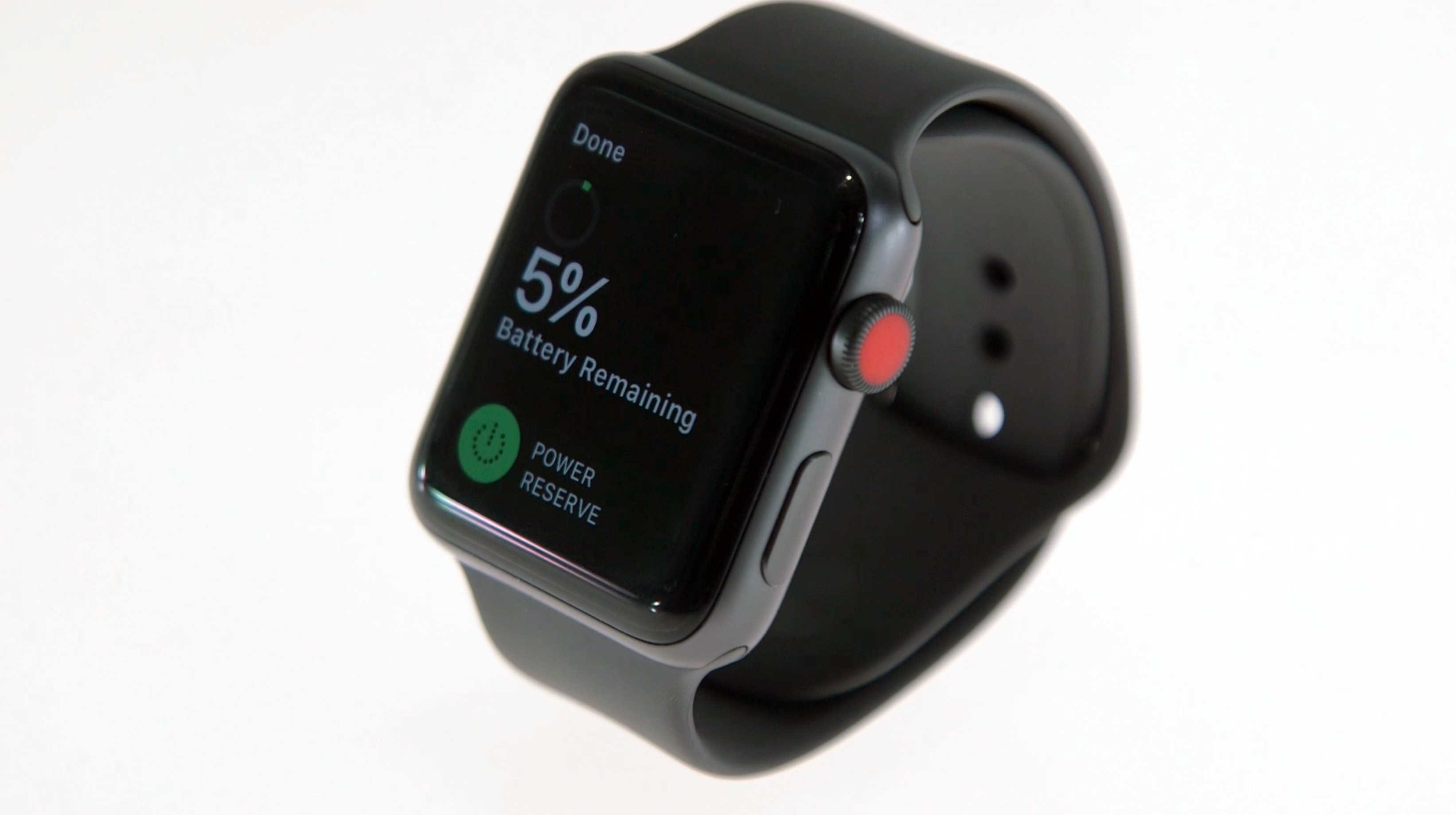
Really, my biggest concern is much more mundane: Going completely iPhone-free means the Watch’s battery life will take a huge hit. After an early-morning run while listening to music and using the GPS, followed by a couple of test calls, the Series 3 was on its last legs by early afternoon. Apple has always been clear that the Series 3 is more of a temporary phone substitute than an actual replacement, so this probably won’t seem shocking to you. Still, if this morning routine sounds like your idea of a good time, remember to have a charger handy.
I don’t mean to make the Series 3 sound terrible at this stuff — when everything works properly, it makes for an adequate untethered companion. It’s just too bad that those moments weren’t as common as I expected.
As a fitness tracker

Chris Velazco/Engadget
With the Series 2, Apple decided the Watch should be a serious fitness wearable, and its focus on getting people out of their chairs clearly isn’t going away. Thankfully, the Series 3’s blend of capable hardware and thoughtful software make it a great choice for people who take their workouts seriously, but not that seriously.
The Series 3’s step counts were in line with other wearables I tested it against, though accuracy is a weird thing to look for in cases like these. Every fitness tracker I’ve ever worn seemed to interpret my steps a little differently, but the Series 3 was consistently within +/- 10 steps of my own counts (in my head, up to 250). Strangely, I guess I define “a flight of stairs” differently from how the Watch’s new barometer does, since it consistently underestimated me on days when I decided to avoid the office’s elevators. Meanwhile, the updated Workout app packs support for new workout types (perfect for you crazy high-intensity interval people) and easier controls for setting time or calorie burn goals for your swim, walk or run.

Speaking of running, I’ve had no issue with GPS accuracy either — I run the same route a few times a week, and the distance was basically bang-on every time. Granted, I don’t precisely know how long that makeshift course is, so hardcore runners (like Engadget marathoner-in-residence Dana Wollman) may be better served by more purpose-built wearables that can more accurately measure one’s pace. Now, once I get moving, I don’t have too much trouble powering through to the end; the real trouble comes in getting off my ass to start with. For better or worse, Apple’s three-ringed activity app now offers more proactive notifications, the most effective of which tells me roughly how much longer I’d need to walk to hit my goals at the end of the day. It’s just enough of a push to get me where I want to be, and I’m surprised Apple didn’t implement this sooner.
 Your author really needs to chill out.
Chris Velazco/Engadget
Even though I’m not the exercise nut I used to be, I appreciated Apple’s enhanced focus on your heart. The Watch tries to get more accurate readings of your resting heart rate by checking it when it knows you haven’t been moving, and it plots your heart rate readings on handy graphs to show you changes over time.
It’s especially helpful for tracking your recovery after intense exercises, but that’s one of the few areas where the Watch offers a little more data than casual users are probably interested in. All told, this a wearable best suited for generalists. Good thing for Apple, then, that there are a lot of them out there. Hardcore athletes may get more mileage out of a wearable that measures even more, like blood oxygenation. (Curiously, the Apple Watch’s heart rate sensor works in such a way that it could also function as a pulse oximeter, but the feature has never been activated.) What’s more unfortunate is that two features that should be great for exercise buffs — Apple Music streaming over LTE and integration with gym equipment through GymKit — won’t be ready for a few more weeks.
The competition

Chris Velazco/Engadget
There haven’t been too many Android Wear 2.0 watches released this year, which leaves the LG Watch Sport at the top of the proverbial pack. Chatting with Google Assistant is mostly a pleasure, and it uses a rotating crown button for navigation, just like the Series 3. One of Android Wear’s biggest assets has always been its visual flexibility, and I’ve spent more time than I care to admit sifting through watch faces in the Play Store in hopes of finding the perfect look for my wrist. The Sport can also jump onto cellular networks, but LG’s approach is problematic: There’s an actual SIM card inside, so the watch’s body is huge, and the antennas extend into the watch’s unremovable bands. It’s a solid option if you’re a smartwatch shopper who doesn’t care for Apple, but beware of its compromises.
Samsung’s Gear S3 Frontier comes to mind too, since it also packs an eSIM and an LTE radio for truly phone-free use. It’s a bigger, more masculine-looking watch than the Series 3, and it’s a little less comfortable, but its rotating bezel remains one of the most inspired interaction methods I’ve ever used on a smartwatch. It’s effing excellent, and so is its Spotify streaming support. The Frontier can also tell when you’ve started to work out and will track your movements accordingly, an intelligent touch that (sadly) doesn’t always work as well as it should. The biggest knock against the S3 Frontier, however, is its Tizen OS. Who cares if you can install apps in the woods if they’re mostly apps no one cares about?
Wrap-up

Chris Velazco/Engadget
The Apple Watch Series 3 often feels like two devices in one. When it’s connected to a phone, it’s an improvement over its predecessors in just about every way that matters. More important, the tight integration of improved hardware and more thoughtful software give the Series 3 a very notable edge over its smartwatch competition. It’s that good. As a standalone device, though, the Series 3 can be maddeningly limited. Over time, I’m sure apps will grow to take advantage of persistent data connections, and still other kinks will be worked out entirely. For now, though, the kinks remain and the overall experience suffers as a result. Apple’s vision of a wearable that remains forever connected to the things that matter to you is an enticing one, and the Series 3 is an important first step down that path. Here’s hoping Apple’s next step is as consistently good on its own as it is when connected to a phone.
Ask Engadget returns (and you should send us your questions)!
A long time ago in a far-away land called 2013, we used to run a feature called “Ask Engadget” where you — our readers, fans, followers and critics — could ask us for our advice, opinions and recommendations on everything from cheap laptops and starter cameras to routers and email clients. You would write into ask@engadget.com with all the pertinent details about your issue, and like your favorite trusted oracle, we would gather all our knowledge and experience into a reply (and let the community weigh in as well).
It was fun, it was informative and honestly, we’ve missed doing it. So, we’re bringing it back! Starting in October, we’ll be using our super powers for good and answering questions that are sent to the ask@engadget.com email address. We’ll gather advice from our staff, from experts and from the community at large to provide you with a solution. If you’ve got questions, well, you know what to do.
Nuviz motorcycle HUD review
Are motorcycle riders ready to join fighter pilots with a Head Up Display (HUD) in the sightlines of their helmets? Or is it too much distraction while riding? We set out to find some answers in our review of the Nuviz, a stick-on HUD that attaches to any full-face helmet.
Some backstory: In 2014, a startup named Skully got motorcyclists’ mouths watering with a concept video demonstrating a super-connected helmet. It included an integrated HUD system that displayed GPS maps, navigation prompts, phone controls, music tracks, and even a live feed from a rear-facing camera.
Riders poured $1,500 apiece into Skully’s record-setting crowdfunding campaign, before the whole project dramatically imploded into bankruptcy amid wide-ranging allegations of corporate malfeasance.
But Skully’s high-flying ideas lived on in other ventures, and now Nuviz, another startup, has managed to do what Skully could not. It delivers nearly every option the Skully helmet offered – except for the rearward view – for just $700, not $1,500. That includes scrolling GPS maps and navigation, phone and music controls, a 1080P front-facing video camera for recording your rides, 8-megapixel still photos, and the ability to map your route as you ride.
Installing the Nuviz: patience and proper setup is key
Unlike the Skully helmet, the 8.5-ounce Nuviz device rides on the outside of a full-face helmet, clicked on to a quick-release mount that sticks to the helmet with some (very) strong adhesive tape. That plate also wires into included low-profile in-helmet speakers and microphone. A round controller mounts on your left handlebar pod.
If you own multiple bikes, Nuviz will soon have various mounting bits for sale separately.
Nuviz emphasized to us that setup is key to making the system work properly, and provides thorough installation instructions and videos both online and in the app. We used a garden-variety Bilt full-face helmet with no tech in it, and for the most part, the install went by the numbers. At present, the Nuviz only works with full-face type helmets.
Locating the mounting plate properly takes some forethought, but a clever hinge design on the HUD allows you to make minute adjustments after attachment, so you have some leeway. We adjusted the device a little bit pretty much every time we used it, so the ease of use here is much appreciated.
At 5 inches long, the Nuviz does seem a bit bulky when you attach it to your lid, but once installed, the HUD screen is the only visible element to the rider for the most part. Our initial worries that airflow at high speeds would “unbalance” the helmet in some way never materialized.
Bill Roberson/Digital Trends
The quick-release mount makes it easy to remove — perhaps a bit too easy. While the device never came loose while riding (no matter the speed), it still came loose a bit too easily post-ride, making us wish for a more robust clasp. A small cover to protect the mount on the helmet while the Nuviz is removed is included in the kit.
The small puck-like Nuviz controller came with several mounting solutions, but the simplest one slipped between the grip and turn signal module on our test bike, a Honda Blackbird. It was the easiest to use and has proven to be both stable and unobtrusive, while allowing us to work the device and bike controls all with our thumb. If you own multiple bikes, Nuviz will soon have various mounting bits for sale separately, and the control puck features a quick-release base for instant removal, re-installation and theft avoidance. Smart.
Once everything is powered up, the Nuviz pairs with your smartphone and the controller via Bluetooth. The well-rounded Nuviz app powers much of the device, although there is a huge amount of tech actually in the unit itself.
We installed the in-helmet speakers and mic setup in our test helmet using the included Velcro-like adhesive bits, and while the speakers generally stayed put, the microphone tended to de-stick itself since the helmet interior didn’t like the adhesive. A bit of super-sticky mounting tape took care of that, and we also remounted the speakers as well. They haven’t moved since. Cords simply tucked into the liner for a clean installation.
Once all the hardware is installed, the Nuviz app walks you through an initial setup procedure, which includes downloading GPS maps (specific states are selectable) and some other data sets over Wi-Fi. After about half an hour of setup and tweaking the many options in the app, the Nuviz quickly paired with both our iPhone SE and the handlebar controller either automatically or with minimal fuss (you press any button on the controller to “wake it up” and it then pairs).
We also tested pairing a Bluetooth-equipped Bilt helmet with the Nuviz (that makes three Bluetooth connections all working at once) and everything worked fine (and sounded better), which is impressive. We never had a device disconnect while riding.
On the road with the Nuviz
Though it takes a little while to boot up and find GPS satellites (a progress counter in the display shows … progress), the Nuviz was ready to go by the time we got our helmet, gloves and jacket on.
The default information screen shows your speed in large digits, along with a circular “speedometer” graphic around the numbers, with a colored tick at the present speed limit. There’s also a clock, battery-level indicator, and a current speed limit reminder in smaller digits (ported from GPS data) which turns red if you get a bit throttle happy. We usually left the Nuviz on this display mode, since it was just very convenient to have our speed showing in the lower sightline all the time. The speedo numbers on the Honda are comically small and hard to read, so right there, it already solved a problem.
The Nuviz app is incredibly easy to customize this way, especially for the GPS and speedometer functions.
Additionally, we programmed in-helmet audio cues to sound when we were exceeding the speed limit by more than 10mph, without having to look at the display. Admittedly, we made them ping a bit too often, but it also changed our riding behavior for the better. The Nuviz app is incredibly easy to customize this way, especially for the GPS and speedometer functions. This is not some beta version of an app.
Clicking up and down on the handlebar controller flips between the primary display options including speedo, music, phone, ride logging, and the live GPS map. There are dedicated buttons for voice commands and the camera. A short push on the camera button snaps an 8mp photo (which are smartphone caliber, and quite sharp) and a long push activates the 1080p HD video recorder (also quite good). Tap again to stop recording. You can position the camera independently to ensure you’re shooting the road ahead and not pavement. Again, a small but smart touch.
When a call comes in, the Nuviz automatically jumps to phone mode and shows the name and number of who is calling. At freeway speeds, wind noise resulted in a few “What did you say?” moments, but overall, communication was possible where it hadn’t been before. Nuviz recently pushed out a software update that increases speaker volume, which did seem to help the stock audio bits. The sound out of the speakers isn’t great, but it’s serviceable, and we enjoyed being able to listen to the news while rolling back and forth to work. Music was a bit more of a challenge, especially at higher speeds. The audio jack for the speakers and mic is a standard 3.5mm smartphone type, so you could upgrade it with better headphones.
Bill Roberson/Digital Trends
When you shoot photos, the HUD shows — in color — what you’re shooting in real time. When you shoot video, it reverts to the speedo or another display (GPS, etc.). You’ll need to supply a MicroSD card (up to 128GB) to record your video footage, but photos can be saved directly to the unit’s internal 16GB memory – it comes with about 10GB free.
Not surprisingly, GPS is the true killer app for the Nuviz. Punch in a destination using the app, and it guides you down the road with arrows, roadmaps and instructions in the display, along with spoken cues. Even on a very distant back road, the routing home was efficient and accurate.
The Nuviz is largely weather proof, so with proper care and handling, it should last many years.
Nuviz says the easily removable 3250mAh battery is good for eight hours of “regular” use, which is about the daily max for most riders anyway. Recording video will reduce that to about five hours or less. Fortunately, it accepts standard 18650 li-ion batteries and charges using a common MicroUSB connector.
The Nuviz is largely weather proof, so with proper care and handling, it should last many years. The HUD lensing system is perhaps the most delicate and vulnerable component in the Nuviz, but the reflector is modular, so if it breaks, replacement should be fairly straight forward and inexpensive. A crash or even dropping your helmet with the Nuviz attached could destroy the device (we suggest you insure it), but seeing how most riders rightfully treat their helmets as delicate kit already, the Nuviz should benefit from that existing mindset.
Is this thing safe
At first, the Nuviz seemed a bit overwhelming. We’ve used Bluetooth helmets and even that low level of helmet tech took some getting used to. Adding a live video display to the mix initially seemed a bit much. We typically left it on the helpful speedometer display for the first couple of rides — that was novel enough. It took some time before we felt comfortable exploring its wider capabilities on the road.
Is a HUD too much of a good thing? Dr. Marcus Weller, the inventor of Nuviz’s ill-fated predecessor Skully, gave us an interesting answer when we asked him that back in 2013. The Skully idea came to him after he rear-ended a car while trying to decipher a road sign during a motorcycle ride in a foreign country, and he insisted that the “old ways” of riding were actually more dangerous than a HUD. After all, he pointed out: Every time you glance down at your speedometer, at your mirrors, or perform the “lifesaver look” over a shoulder, your eyes are off the road ahead of you where danger lurks — approaching at 88 feet per second if you’re doing 60mph. Put your speed, directions, and other critical information in a HUD, and you’re still looking forward at the road ahead while getting essentially the same information.
After riding with the Nuviz, we think Dr. Weller nailed it. We were able to keep our eyes on the road much more than if we were checking the speedo, or a bar-mounted nav system. If the Nuviz had some sort of rear-view option like the Skully helmet promised, that would provide even greater safety, and we hope Nuviz will add it to a future model.
Bill Roberson/Digital Trends
If all the features get a little overwhelming, you can also put the Nuviz in a sort of “low-power” mode with a quick press of the power button. It shuts off the HUD display, but allows most other functions to continue uninterrupted. This is a great feature because, like many riders, sometimes we just want to focus on the ride … but some tunes or phone call ability are still nice to have. Just tap the button again to revive the display as needed.
Nuviz is the future
Some day, likely sooner than later, many helmets will come with a HUD and advanced connectivity built right in. Andrew Artischev’s Livemap helmet, which projects GPS and other data directly into the visor of a helmet, is still in development and could arrive soon at more than twice the price of the Nuviz. But for now, Nuviz is the only player, and motorcyclists interested in this kind of technology have lucked out. The company has done a fantastic job of making a device that flat-out works as promised. It’s not perfect, but for a first effort, it’s very nearly a home run: a complete, functional, fun and useful device that is easy to use.
The Nuviz is a giant first step on our inevitable road to the total high-tech helmet.
There will always be riders who value the cone of tech silence a helmet has traditionally provided. But for many tech-friendly riders, including this one, who took apart headphones and modified helmets decades ago in a quest to just enjoy some tunes while riding, the Nuviz is a giant first step on our inevitable road to the total high-tech helmet. The fact that it works as well as it does makes it worth the cost of admission. And hey: You can always just turn it off, and even take it off your helmet.
If you were interested in the Skully helmet or are ready to take the next step past a Bluetooth hat, buy one. If you swore you’d never put a teched-out helmet on your head, this probably isn’t your jam, but if you get a chance to use it for even a single ride, the Nuviz will likely change your mind about what a motorcycle helmet can — and maybe even should — do. This is the best tech to come to motorcycles since fuel injection.
Russian yacht company builds boats with car-shaped top decks
Why it matters to you
If you’ve always wanted a yacht styled like your car, this boat builder is ready.
Big name car brands commonly collaborate with yacht builders for stylized vessels. Moscow-based Baikal Yachts Group is taking a different tack, styling the top deck and the interior of its 14-meter (46-foot) Discovery Sport Catamarans after the buyer’s choice of car automotive brand.
Notable luxury automotive brands and yacht builder partnerships include Aston-Martin with Quintessence, AMG and Cigarette Racing, Bugatti with Palmer Johnson Yachts, Mercedes-Benz with Silver Arrows Marine, and Lexus with parent company Toyota’s Ponam yacht division.
Baikal first offered to build a 10-meter catamaran styled after a Porsche Cayenne in 2012, but there were no takers. The project didn’t go beyond the design concept phase, and the boat never hit the water. The Russian engineers are taking a different course with the Baikal Yachts Discovery Sport Catamaran.
A new aluminum and magnesium alloy developed by Rusal Company is a key factor in Baikal’s plan. Rusal is the second largest aluminum producer in the world. The alloy, which also contains scandium, is as strong as steel. Because it is 20 to 25 percent lighter than aluminum, the new alloy is also lighter than composites, according to Baikal.
Catamarans are built for speed. Optimal hull and structural materials are strong and light. The Discovery Sport model, for example, is rated for a maximum 52 knots. The new alloy from Rusal meets Baikal’s performance and durability requirements and also allows the one-off customization planned for potential auto brand-loving customers.
Baikal does not plan to build yachts on speculation. The boat builder’s business plan for this project is to start a new yacht build based on a preliminary order. The hull and other major exterior components are designed and constructed first. As the project goes forward, interior and exterior stylistic features will be designed. That way, if a buyer bails part way through the project, Baikal isn’t left with a custom boat with no customer.
Baikal suggests people who own Maseratis, Ferraris, Lamborghinis, Range Rovers, Bentleys, BMWs, Jaguars, or Aston-Martins could be their best market. However, Baikal co-founder and owner Sergey Gmyra said in a press release, “It is feasible to engineer any styled variant and inside the original parts will be used for inner trim and control station.”
According to chief project designer Maxim Lodkin, “I think that the future owners will proudly show it to their friends and fill them with enthusiasm by its speed characteristics.“
Pricing for car-styled Baikal Discovery Sport Catamarans is not disclosed. Depending on design complexities, the company estimates each yacht will take 6 to 12 months to build.
Digital Trends looks forward to seeing the first commissioned automobile-styled Baikal catamaran hit the water. We noted that Baikal didn’t mention licensing arrangements with car companies. Unlike collaborations between car companies and boat builders, licensing issues may be a factor if Baikal catamarans are marketed or promoted using specific auto company brand names.
New technology from Regaind may be coming to organize your iPhone photo album
Why it matters to you
Sophisticated new image analysis technology could streamline your cluttered photo collection.
Apple has recently purchased a French startup named Regaind, an image analysis company that could add powerful new features to your iPhone or iPad photo library. Notoriously secretive about its corporate acquisitions, Apple confirmed the move with its customary terse boilerplate statement about such matters to TechCrunch: “Apple buys smaller technology companies from time to time, and we generally do not discuss our purpose or plans.”
Regaind claims it can actually look inside your photos and “extract game-changing insights from your images,” perhaps meaning that their AI recognition and sorting algorithms will bring some sort of order to that sprawling mess of photos stored on your iPhone.
Apple added intelligent photo search features in iOS 10 with the Memories feature, allowing you to automatically organize images based on categories, such as “cats” or “vacation.” You can also search for specific people, places, or things in your photo library.
Regaind promises a far more in-depth analysis, with technology that assesses the “technical and aesthetic value” of your photos. A new photo management system for your smartphone or tablet could conceivably gather and sequence visually similar photos, select the most striking image from a burst shot, or even automatically create a video or slideshow using the best photos from thousands of images.
Then there’s the facial recognition API that Regaind has developed, which can detect the age, gender, and even emotions of faces in a photo. Apple may already be using some of this technology for the iPhone X Face ID recognition features, as well as the much-touted Animoji, custom messages that are derived from your voice and facial expressions.
Apple is tight-lipped about what specific role Regaind will play (or is already playing) in products such as the iPhone X, but it’s an interesting move that may signal a focus for the company in the upcoming years. If you’re still on the fence about the iPhone X, we recently got our hands on one and put it through its paces. There were some things we liked, and a couple things we didn’t.
Pre-orders for the iPhone X (which could top 50 million, according to some accounts) begin October 27, and the new device itself lands on store shelves November 3.
Your weekend comments thread is open for business
Reset and recuperate with friends both online and off.
Weekends are all about taking time to shake away the work-week brain dust. No matter your job, work can get stressful and everyone needs to find time to step away and remember how to enjoy themselves. That could mean something quiet and relaxing or extreme and adrenaline pumping, or anything in-between. And while you’re winding down from it all here’s the place where you can get together with friends and chat about anything.

I like to spend my downtime with either a fishing pole or a guitar in my hands, and it seems like everything is awesome while I’m doing either. My job is filled with cool stuff that I enjoy, but it still can be stressful so I value doing the other things I love whenever I get a chance. I imagine most of us feel the same way, even if you’ve not yet found the job you love.
More of that fun and possibly stressful work will be heading our way very soon, as we get our keyboards and minds lubricated to prepare for Google’s October 4 hardware show. Andrew and Russell are headed to San Francisco, Daniel is going to get together with Google Canada and the rest of us will be typing furiously and watching the live stream. Nobody is sure exactly what Google’s one big thing will be this go ’round, but we’re sure they will drop a bomb about something while they show off the new Pixel 2 phones and other products. They always do.
It will be fun, and we’ll be ready!
So what are you up to this weekend? Jump into the comments below and let’s talk about it.
 AIVAnet