


Nest Thermostat E review: The perfect downgrade

The Nest Thermostat E is one of the best entry-level thermostats you can buy, and it can save you real money.
The biggest compliment I can give to the $169 Nest Thermostat E is that no one noticed it.
I’ve had a third-gen Nest Learning Thermostat in my entrance way for years, conspicuously placed so that everyone who walks into my living room inadvertently wakes up its bright LCD screen as they saunter past. The round stainless steel bezel is shiny — garish, even — inviting speculation and questions. “That’s the touchscreen thermostat, right?” they ask. In fact, it’s not touchscreen, but it looks like it.
After nearly two years with a Nest, I’ve learned a few things about it. For starters, it’s very good at what it does; I’ve probably saved close to $1000 in electricity by intelligently rationing out central heat and air conditioning, and by allowing the system to learn my habits and create a schedule that accommodates my work-from-home lifestyle and my wife’s desire for the house to be a tiny bit warmer than I’d prefer.

The second thing I’ve learned is that the Nest hardware itself is complete overkill, and totally unnecessary to enjoy the unit. It’s a vestigial remnant of a time that you needed to physically walk up to a thermostat to make changes. And while I occasionally do make adjustments using the satisfying clicker ring used to navigate the basic user interface, I spend far more time in Nest’s excellent Android and iOS apps. To that end, the $249 Nest Learning Thermostat is a nice-looking widget that tells people I have a smart home.
The Nest Thermostat E is not that. It’s cheaper — $169, a full $80 cheaper — and wonderfully understated. Gone is the shiny stainless steel and black bezel, replaced by a smaller, plastic housing and a lower-resolution screen. The screen is also covered by a frosted white glazing, meant to slightly obscure the screen and allow it to blend it better with its surroundings. And you know, it totally works.
Installation and compatibility

If you’ve used a Nest before, you know exactly how this one works.
The Nest E, as I’ll refer to it, requires basically the same setup as its larger predecessor; it assumes that your house already has the necessary wires protruding from some wall in your house, likely in a basement or main floor. Compared to the Nest proper, there are fewer connections — six instead of 10 — which makes it less likely to be compatible with some higher-output dual fan systems, but it had no problem interfacing with my fairly generic single-blower forced air system.
Installing the Nest E was as simple as removing the older Nest, disconnecting the wires and removing the backplate, and installing the newer, smaller equivalents. My system was wire-for-wire identical, though that may not be the case for yours. If you’re coming from an older system, or just don’t really trust yourself to install it correctly, the company offers very detailed installation videos and, at a cost, professional installers, to ensure that it will work right.
Unlike the regular Nest, which claims to work with “95% of 24V heating and cooling systems, including gas, electric, forced air, heat pump, radiant, oil, hot water, solar and geothermal,” the Nest E works with “most” heating and cooling systems, according to the company. In other words, the Nest E will probably work for you unless you have a bespoke or high-powered commercial system that probably needs a professional to maintain, anyway.
The experience

The Nest E offers what amounts to the identical experience as the regular Nest, with a few minor differences. The interface, due to the lower-resolution glazed screen, is a bit simpler, but it still allows you to turn the sphere to maneuver around, and push in to select, just as before. (If you’re new to Nest, the controls are extremely intuitive, and you definitely won’t mistake this one for a touchscreen.)
The Nest E is easy to set up and a joy to use.
Once set up and connected to Wi-Fi, the Nest E can be controlled either through the unit itself or the accompanying iOS or Android app (which we’ll get to shortly). Like any thermostat, the Nest E sits on your wall and monitors the ambient conditions using built-in sensors; these include temperature, humidity, proximity/occupancy, and ambient light. When it detects the temperature is above or below a given threshold, it activates cooling or heating, respectively. When it detects humidity is too high, it can be programmed to run the fans for a few hours. When it detects people aren’t home, it can be made to automatically activate Eco mode, which sets the conditions a bit higher or lower than is comfortable to save energy.
What the Nest E doesn’t have are the near-field and far-field sensors built into the original Nest, which means it has a hard time determining whether people are home by the ambient movement or sound around it. To make up for it, a proximity/occupancy sensor ensures that if someone walks past, it jumps to attention and figures out whether it should start working, but it’s a little less precise. In real-world testing, however, I’ve noticed no difference at all.
The upside


In fact, that’s what I’m taking away from my experience with the Nest E. If it works with your furnace, it’s exactly the same experience as its more expensive counterpart.
Much of that is due to the fact that Nest’s app, which has grown in usefulness while remaining remarkably simple, is the primary control center for your thermostat, and any other Nest products (of which there will be a lot more in a few months) you may have, from cameras to smoke detectors. I have all three, so I spend a lot of time in the Nest app, and I’ve absolutely come to depend on it.

Anything you can do on the Nest itself can be replicated in the app; Nest’s best features are the ones you set once and forget about, from Airwave, which uses the fan to continue blowing cold air through the system once the air conditioner itself has been shut off, to Early-On, which suggests a time for reaching a certain temperature in the house and adjusts the cooling or heating accordingly.

That Nest has been available since 2013, which may suppress a bit of its magic to long-time owners, but anyone coming from a clunky offline thermostat will marvel at the ability to remotely set temperature a few hours before returning home from vacation, or even from work, to compromise between comfort and cost.
And now that the asking price is a considerably lower-than-before $169, Nest is accessible to even more people.
The downsides

Nest isn’t the only game in town. Others, like ecobee, have shown considerable innovation in areas that, for some reason, Nest refuses to touch. ecobee, in particular, uses in-room sensors to detect temperature in multiple rooms throughout the house, allowing the thermostat to make intelligent decisions about heating or cooling with additional data points. My bedroom is a good five degrees warmer in the summer, and five degrees cooler in the winter, than my living room — such is the agony of a tall house.

Nest is really good at a lot of things, but it still falls short when it comes to multi-room sensing.
When it’s really hot or cold outside, I often have to manually adjust the temperature to accommodate for such discrepancies, something that I’m sure ecobee, and a couple of extra sensors, would take into account. ecobee’s latest version, the ecobee 4, also integrates Alexa in the U.S.; Nest, owned by Google parent Alphabet, has no such plans to integrate Assistant into its thermostats anytime soon.
And Nest is a standalone product, owned by Alphabet; big names like Honeywell, Emerson, and Carrier, which either build their own or partner with many furnace providers across the United States and Canada, are manufacturing their own (admittedly dumber) smart thermostats, and providing heavy incentives for customers to upgrade. Nest isn’t able to compete with such an entrenched market that is typically moved less by Silicon Valley than the Yellow Pages. Most of these companies throw in a so-called smart thermostat for free with a furnace or air conditioner upgrade, which puts Nest out of the conversation completely.
Should you buy it? Definitely

Even though I have the more expensive Nest Learning Thermostat, I have no intention of ditching the Nest E anytime soon. Not only do I think its white plastic housing looks better and disappears more easily than the chrome metal of the regular Nest, its simpler interface is a joy to use — I simply see no reason to go back.
For me, Nest built the perfect downgrade, a product that promises less and delivers more because of it. If you already have a Nest, you can completely ignore this review — there’s no reason to switch. But if you’ve been on the fence about moving up in the thermostat world, the Nest E is probably your best place to start.
See at Amazon
Grab Aukey’s cell phone tripod for $8 to become a better mobile photographer
It’s time to take your photography game to the next level, and this inexpensive accessory can help!
Smartphone cameras have become significantly better over the past few years, and people like to push them to their limits. A great way to really take advantage of how far they’ve come is by using a tripod to take your skills to the next level. We know, people don’t want to lug around a full-sized tripod to “get the shot”, but what about a mini one?
Aukey is currently offering its cell phone tripod for $7.91 when you use the coupon code LSYFN9DC during checkout at Amazon. This is a savings of around $3 from its regular price. Beyond just your smartphone, you’ll also be able to use this for a GoPro or even a DSLR.

- Take clearer shots or time-lapse videos from a stable fixed position
- Best for capturing a variety of landscapes and points of view
- Compact, lightweight, foldable design to easily to grab, setup, and put away
- Mount to smartphones up to 5.7″ with included holder, or attach digital cameras, GoPros, camcorder, and more
If you are already having fun taking amazing photos with your phone, try adding one of these to your arsenal. Think of the long exposures, time lapses, and more that you’ll be able to capture with this!
You can also check out the option with bendable legs for $10 with coupon code BGKMIGGR.
See at Amazon
More from Thrifter:
- How to get the most out of your Amazon Prime membership
- How to save money when driving
For more great deals be sure to check out our friends at Thrifter now!
Jerry says, ‘Hit me!’ [#acpodcast]
It’s a huge week of news and leaks in the Android world! Daniel Bader, Andrew Martonik, and Jerry Hildenbrand settle in for a roundtable feast of epic proportions, beginning with Android 8.0 updates to some Motorola phones, the Blueborne Bluetooth vulnerability, and data throttling on T-Mobile.
Moving on to the main course, Google spent $1.1 billion to acqui-hire HTC’s best engineers, more details and photos have surfaced for Pixel 2, Pixel 2 XL, and Pixelbook, and a smaller Google Home Mini speaker is on the way.
For dessert, the Moto X4 is coming to Project Fi as the first Android One device for the U.S., and an unlocked Moto X4 with Motorola’s software will be shipping this year.
Show Notes and Links:
- Motorola confirms Android 8.0 for Moto Z, Moto G5 lines and Moto G4 Plus
- Let’s talk about Blueborne, the latest Bluetooth vulnerability
- T-Mobile is raising monthly prioritization limit to 50GB per month
- Google is spending $1.1 billion to hire HTC’s best smartphone talent
- Google Pixel 2 XL shown in black and white, pricing rumored at $849
- Google Pixel 2 will start at $649, offer ‘Kinda Blue’ third color option
- Google Pixelbook convertible breaks cover with high-end hardware, big price
- Google’s smaller Home Mini speaker will cost just $49
- Moto X4 coming to Project Fi as first Android One device for the U.S., priced at $399
- Unlocked Moto X4 with Motorola software will come to the U.S. this year
Podcast MP3 URL: http://traffic.libsyn.com/androidcentral/androidcentral353.mp3
Samsung’s great Galaxy Note 8 order freebies end Sept 24, so act fast!
Well, we had a good run.
After weeks of pre-orders and another full week of actual in-store sales, the Galaxy Note 8 is falling out of its honeymoon period and getting into the swing of things. That means that Samsung’s “do bigger things” incentives for getting in on the Galaxy Note 8 are coming to a close — September 24 is the end of the line for the freebies.

That means if you want to get a free Fast Wireless Charging Convertible charger bundled with a 128GB SD card, or a free Gear 360 camera, you’ll need to order within the next couple of days. The nice thing is that Samsung makes it pretty darn easy to get these goodies if you order before the deadline. It doesn’t matter if you’re ordering through Best Buy, the carriers, Amazon or from Samsung’s own site — you get the option to verify your purchase and have Samsung send you some free accessories.
More: Where to buy the Galaxy Note 8
Once you have your order in, it’s pretty easy to register and get your gift. You just need to download the Shop Samsung app or visit the Samsung promo website and give Samsung some details so it can verify your purchase. Wait a bit, and you’ll have the sweet free accessories.
Samsung Galaxy Note 8
- Galaxy Note 8 review
- Complete Galaxy Note 8 specs
- Galaxy Note 8 vs. Galaxy Note 5
- Which Note 8 color is best?
- Join our Galaxy Note 8 forums
Verizon
AT&T
T-Mobile
Sprint
Best Buy
‘PUBG’ studio isn’t happy about ‘Fornite: Battle Royale’
Epic Games’ cartoony horde game Fortnite is still in Steam Early Access, but the studio recently announced that a free-to-play version of the game would come out for free next week… and it looks a lot like another really popular game. Fortnite: Battle Royale’s gameplay doesn’t just closely resemble PlayerUnknown’s Battlegrounds: Epic admitted it inspired their new title while promoting its game. Bluehole, the studio behind PUBG, is none too happy, and even stated in a press release that it’s considering ‘further action.’
There’s no ignoring the similarities between the titles: Like PUBG, which launched back in March, Battle Royale drops dozens of players into a huge map filled with randomly-dropped items where they kill-or-be-killed until someone wins. They’re not identical, as the core Fortnite gameplay of creating bases and traps makes the jump over to Battle Royale. Bluehole’s game is built on Unreal engine 4, which Epic created and is using to power Fortnite and its Battle Royale spinoff.
“We’ve had an ongoing relationship with Epic Games throughout PUBG’s development as they are the creators of UE4, the engine we licensed for the game,” Bluehole’s Chang Han Kim said in the press release. “After listening to the growing feedback from our community and reviewing the gameplay for ourselves, we are concerned that Fortnite may be replicating the experience for which PUBG is known.”
They’re also upset that Epic is using PUBG’s name in its press materials, including the announcement trailer (below):
“We have also noticed that Epic Games references PUBG in the promotion of Fortnite to their community and in communications with the press,” Chang Han Kim said in the press release. “This was never discussed with us and we don’t feel that it’s right.”
Not that the PUBG team thinks it won’t have competition in the space. In a Reddit AMA from a couple days ago, Bluehole creative director and the game’s conceptual originator, Brendan “PlayerUnknown” Greene, mentioned that “Other companies will of course enter the marketplace, but I would just hope they put their own spin on the game-mode and not just make a carbon copy!”
What makes Battle Royale seem to ape PUBG is its deviation from the tower defense gameplay of its source title Fortnite. Waypoint’s Janine Hawkins, who has been playing Epic’s game since it launched in Early Access back in July, noted how its protective playstyle contrasts with that of its spinoff’s survival deathmatch, describing the difference as ‘tend-and-befriend vs. fight-or-flight.’ It’s convenient that Epic repurposed its game to capitalize on the genre that has been around for years, yet which PUBG has singelhandedly made wildly popular as it rose to the top of Steam’s player charts.
Chang Han Kim closed the press release with: “The PUBG community has and continues to provide evidence of the many similarities as we contemplate further action.”
Hours after the ominously-worded press release went out, other game developers cheekily responded as game developers do.
Hotline Miami Battle Royale has been canceled.
— Devolver Digital (@devolverdigital) September 22, 2017
Why Equifax’s error wasn’t hiring someone with a music degree
In the wake of the Equifax breach, a significant number of people lost their minds this week upon discovering that one of its newly-deposed security executives has a degree in music composition. Despite 14 years of experience as a security professional in other companies, Susan Mauldin was mocked and dragged online for being a “diversity hire” who is “unqualified” for the job.
All those people are about to be proven so, very, very wrong in an upcoming, in-depth report from internet infrastructure organization Packet Clearing House in collaboration with Prof. Coye Cheshire at the U.C. Berkeley School of Information. Their findings show data concluding that most infosec professionals don’t hold a degree in a computer science-related field. What’s more, the report shows that degrees are the least important feature of a competent practitioner and degree programs are the least useful places to learn security skills.
Portions of the report prior to its November publication, titled “A Fragmented Whole: Cooperation and Learning in the Practice of Information Security” were shared with Engadget. It combines surveys, interviews, and ethnographic research.
The project’s lead researcher Ashwin Mathew told us via email, “There are many things for which we should fault Equifax, which other coverage has already pointed to, such as insufficient staffing and bad practices.”
He added:
The CISO not having a CS degree is a distraction at best from the underlying problems — and it is incredibly problematic the fact that the CISO is a woman who is called upon to defend her qualifications, in a field dominated by white men, many of whom do not have CS degrees or infosec certifications.
The question of Ms. Mauldin’s fitness for the position became a lens for many — mostly dudes — to exact their anger at Equifax for probably ruining millions of people’s lives with a single missed patch. And as far as we’ve been told, that’s what it came down to: A flaw in Apache Struts that should’ve been fixed in March led to its major breach the same month, which we only found out about on September 7.
That’s not all, of course. Right when we were learning about the theft of sensitive information belonging to at least 200 million U.S. consumers, as well as information on some Canadians and up to 400 thousand British residents, we found out that Equifax execs sold off stocks before the breach was made public. Shares of Equifax plummeted 35 percent since the disclosure of its breach. Those shady Equifax stock sales are now the focus of a criminal probe by the FBI in conjunction with U.S. prosecutors in Atlanta.
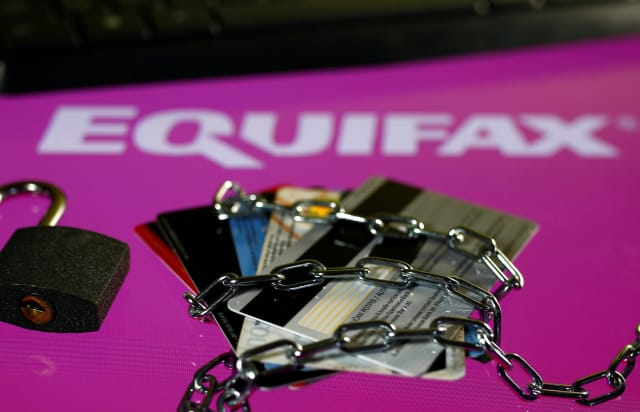
In addition to the FBI, several attorneys general in various states have announced formal investigations. Collectively, U.S. senators “want copies of all Equifax penetration test and audit reports by outside cybersecurity firms,” according to Bloomberg.
To top it all off, Equifax has behaved horribly in the wake of the breach. Its website to help consumers was broken, Equifax itself sent the public to the wrong website that was a fake phishing site set up by a white hat hacker, and the company quietly disappeared its apps from both the Apple App and Google Play Stores.
But when the male-dominated discussions about infosec heard about Ms. Mauldin’s degree in music, it was decided that she was a suitable target for their rage, with some well-deserved anger at Equifax as the catalyst. The hate was visible on Twitter, Reddit, and Slashdot, and put into press by MarketWatch’s Brett Arends (a history major himself). He wrote,
When Congress hauls in Equifax CEO Richard Smith to grill him, it can start by asking why he put someone with degrees in music in charge of the company’s data security.
And then they might also ask him if anyone at the company has been involved in efforts to cover up Susan Mauldin’s lack of educational qualifications since the data breach became public.
This thinking begins to look unqualified, and worse, in light of the upcoming Berkeley report. Lead researcher Mathew told us, “I spoke with CISOs and senior engineers at large Silicon Valley firms who both did and didn’t have degrees.”
He explained that among those who even had degrees, those with degrees outside of computer science outnumbered those with a degree in CS. “For many of the positions which they hired for (including their own), degrees are not a consideration,” he said. “Degrees are in general important only as a marker of character.”
What’s more, Mathew confided, “As several interviewees told me, having a degree shows a certain level of persistence and fortitude when evaluating junior positions, with the degree indicating that a candidate was willing to sit through several years of coursework — but the subject of the degree is irrelevant. Many of the online services which we take for granted are secured by people who do not have degrees, or whose degrees are not in CS.”
Insofar as what the report will tell us about what all those people in infosec actually have degrees in, Mr. Mathew told Engadget:
“Respondents indicated a diverse array of fields of study from “hard” sciences like biology, chemistry and physics, to agriculture, languages, journalism, sociology, and so on.”
I hope we find out what happened with the Equifax breach, but I’m not holding my breath. Maybe Ms. Mauldin and her forcibly retired colleague were part of a decision-making chain that deprioritized a single patch, or maybe they’re just scapegoats. Or maybe they were the ones who hired penetration testing teams to audit the company, but couldn’t get their superiors to take the audit’s finding seriously — a situation that happens so often it’s insane.
After all, according to her now private LinkedIn page, Mauldin was the Senior Director of Information Security Audits and Compliance for Hewlett Packard from 2002-2007.
Short of literally punching a baby, it’s hard to imagine what else Equifax has done wrong. The sky seems to be the limit here, and Ms. Mauldin was a part of it. So the only thing that’s certain is that things aren’t going to get better for anyone involved with Equifax, past or present. Especially all of us, who are involuntarily Equifax victims.
Either way, we should all be looking forward to “A Fragmented Whole: Cooperation and Learning in the Practice of Information Security.” It’ll be announced, and findable, on the front page of The Center for Long-Term Cybersecurity in early November.
How to Use the New iOS 11 Document Scanner in Notes on iPad and iPhone
In iOS 11, there’s a new feature in Notes that allows you to quickly scan all kinds of documents so you can keep track of everything from receipts to recipes to photos.
The Document Scanner detects the edges of a document, aligns things properly, and removes all glare and tilt so you get a clean scan every time. The new feature is available on both iPhone and iPad. Here’s how to use it:
Open the Notes app.
Create a new note.
If the keyboard is open, tap on the black “+” button located above the keyboard. On iPhone, it’s in the middle, and on iPad, it’s on the right side of the display.
If the keyboard is closed, tap on the yellow “+” button at the bottom of the Notes app.
Choose “Scan Documents.”
Once the document scanning interface is open, there are a few additional steps to follow to get a clear scan.
Tap on the three circles at the top to choose color, grayscale, black and white, or photo for your scan. The default option is color.
Tap on the flash icon if you need to adjust the flash options. The default is auto, which will cause the flash to go off if you’re in a room with low light.
Focus the camera on your document, making sure the yellow box is lined up with the edges of your document.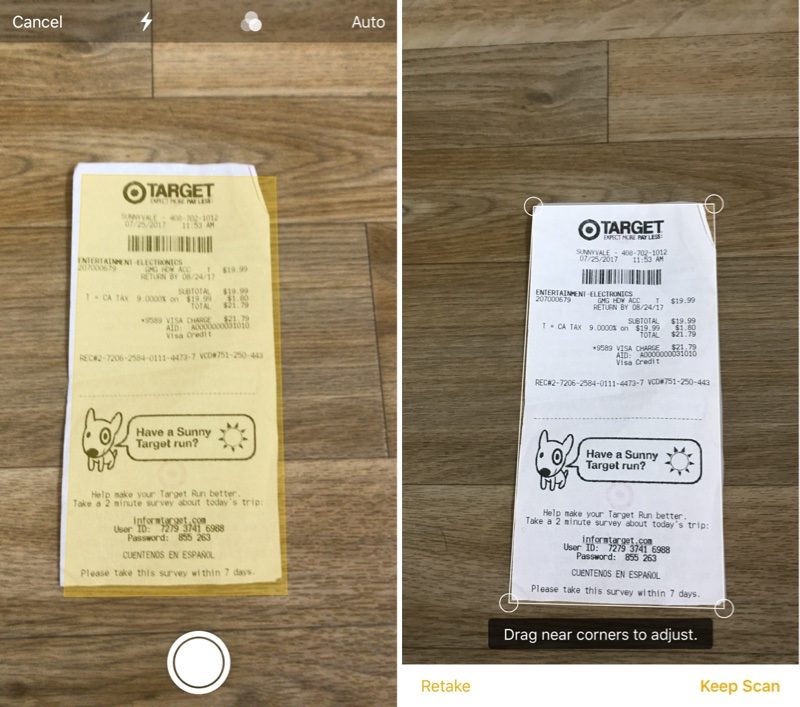
When it’s aligned, press on the camera button to snap a photo.
Adjust the edges of your scan to get a perfect alignment. The Notes app will automatically correct for any tilting.
If the scan is to your liking, choose “Keep Scan.” If you want to try again, choose “Retake.”
The Document Scanner is set up to take multiple scans in a row, so once you tap “Keep Scan,” it returns to the scanning interface. To get back to Notes after you’ve scanned all of your documents, you’ll need to tap on “Save.”
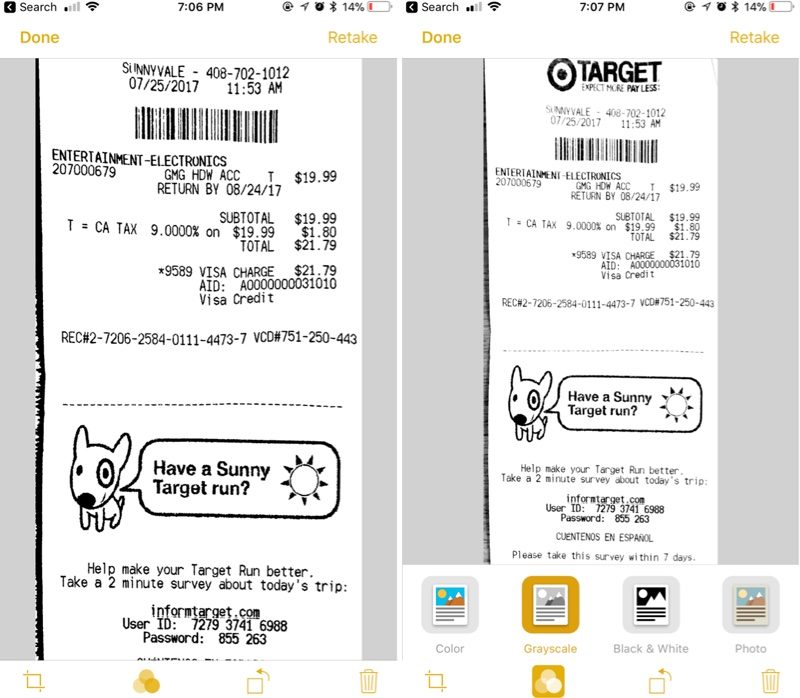
Your scanned document is inserted into the current note, where it can be edited. To edit, simply tap on the scan. Editing tools include adding an additional scan, cropping, changing the color, changing the orientation, and opening up the Share sheet to send it to Messages, Mail, social networks, and other apps.
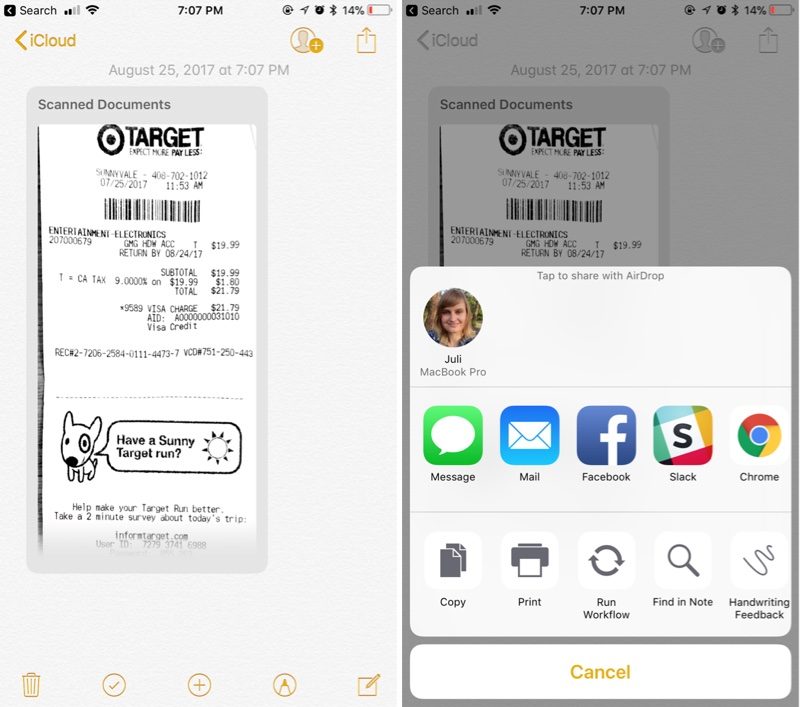
Apple’s document scanning tools are well engineered and impressive, producing dozens of clear, clean scans in our tests, with excellent performance on everything from photos to documents. Apple’s new Notes tool rivals even well-established third-party document scanners and can easily replace them.
Related Roundup: iOS 11
Discuss this article in our forums
‘Destiny 2’ factions will reward you with powerful discount weapons
If you’ve been playing Destiny 2 for a while, you probably know the fate of “the city”. What’s set to follow — as I try not to spoil anything– is the return of factions. We all love some good in-game tribal battles, and the shooter’s Faction rallies will kick things off on September 26, at the decidedly precise hour of 2AM PT / 5AM ET / 9AM BST — with some nice rewards for the faction that comes out on top.
On a Bungie blog post, Senior Designer Tim Williams explains that factions of the Tower will rally to collect resources for its cause. This involves both gathering their own supplies… and destroying the enemies’. Do a good job and you’ll be suitably rewarded. According to Williams: “As an incentive, each faction has set aside a powerful weapon to entice players to choose their side. The faction whose Guardians collect the most faction packages will be declared the winner.”
The eventual faction that wins will offer the weapon to everyone, but if you picked the right side to support you’ll land a huge discount. Oh, and you must already be level 20 character, with access to the Tower. Once you’ve picked your faction, you can assist through public events, Lost Sectors, strikes, raids, or simply winning in the Crucible. Wins mean tokens, and tokens can be turned into loot.
The official blog post details what’s on offer, but rest assured, there’s plenty of items on offer, regardless of your affiliation. You’ll be able to save up faction tokens until 2AM Pacific on October 3, with the eventual winner declared eight hours later, at 10AM Pacific time. While it’s a temporary event, it’s a nice touch to see the return of the factions, with a more interesting proposition that the rep system of the original, which depended solely on individual players’ actions.
Source: Bungie
EU withheld a study that shows piracy doesn’t hurt sales
In 2013, the European Commission ordered a €360,000 ($430,000) study on how piracy affects sales of music, books, movies and games in the EU. However, it never ended up showing it to the public except for one cherry-picked section. That’s possibly because the study concluded that there was no evidence that piracy affects copyrighted sales, and in the case of video games, might actually help them.
Done by Dutch organization Ecorys, the study might have been lost altogether if not for the effort of EU parliamentarian Julia Reda. She submitted a freedom of information request in July 2017, and after stalling twice, the commission finally produced it. The conclusion? “With the exception of recently released blockbusters, there is no evidence to support the idea that online copyright infringement displaces sales,” Reda wrote on her blog.
It’s not as though the EU just forgot the study in a drawer. It concluded that one specific category, blockbuster movies, is negatively impacted by piracy, with ten downloads leading to about four fewer cinema visits. Overall, that reduced sales for certain films by about 4.4 percent on average. Two EU Commissioners used those results in a 2016 academic paper to bolster claims that piracy impacts cinema ticket sales, digital rights group EDRi noticed.
As for the other industries that rely on copyright (games, books and music), the study found “no robust statistical evidence of displacement of sales by online piracy.” In the case of games, it concluded that unauthorized playing might actually make it more likely users will buy them. None of those results ever appeared in any EU Commission academic studies or to the public anywhere else, however.
This seems to substantiate suspicion that the European Commission was hiding the study on purpose and cherry-picked the results they wanted to publish, by choosing only the results which supported their political agenda towards stricter copyright rules.
Why not? Reda observes that the EU has been trying to force ISPs to install filters that spy on all user-uploaded content, and may have hoped the study would justify such heavy-handed enforcement. “This seems to substantiate suspicion that the European Commission was hiding the study on purpose and cherry-picked the results they wanted to publish, by choosing only the results which supported their political agenda towards stricter copyright rules,” EDRi wrote.
Shortly after the information request by Reda, the EU elected to release the study to the public after all. “We understand that the Commission says that it is a complete coincidence that its decision to publish the study, a year and a half after it was finished, happens to coincide with Ms. Reda’s freedom of information request,” said EDRi.
It’s not surprising that piracy may be impacting sales less than before, considering that paid streaming and downloading have made it more economical for consumers to purchase content. That has resulted, for instance, in a music sale boom, with 2016 the best year since 2009, and 2017 looking even better. Yet, blockbuster films are still vulnerable to piracy. “This might be due to the higher price policy for films in comparison to the music, books and games industry,” the EDRi says.
Via: Gizmodo
Source: European Commission (PDF)
The best cheap compact camera
By Ben Keough
This post was done in partnership with The Wirecutter, a buyer’s guide to the best technology. When readers choose to buy The Wirecutter’s independently chosen editorial picks, it may earn affiliate commissions that support its work. Read the full article here.
After 42 hours of research and testing over the past few years, we’ve found that the Canon PowerShot ELPH 360 HS (or the IXUS 285 HS, outside the US) is the best cheap point-and-shoot camera. It produces crisper, clearer photos than even some more-expensive models, and fits better into tight jeans pockets. But before you buy one, you should ask yourself if you really need this camera or if you could just use your smartphone instead.
Can’t you just use your smartphone?
The cheap compact camera is on life support, facing an existential threat from ubiquitous smartphone cameras. In response, camera manufacturers have pruned their lineups to a startling degree. In years past we would see dozens of new models launched every year, but today, only a handful of models are available. If you’re already an avid smartphone shooter and you haven’t found yourself routinely wishing for a zoom lens, you probably don’t need a stand-alone camera—or at least not one this pared-down. You’d be much better off saving your money for something that provides a more noticeable improvement in image quality and features, such as the picks in our midrange point-and-shoot guide.
But a cheap dedicated camera can still make sense. Though the battery capacity of cheap compacts is necessarily limited by their svelte design, they’ll still last longer during a day of shooting than a smartphone that’s also in use for navigation, texting, and video chat. The low price of beginner-level compact models also means that if your camera is lost or damaged, it’s a lot less painful to fix or replace, making them a great choice for kids and tweens.
How we picked

Our test group included, from left to right, the Nikon Coolpix S7000, the Canon PowerShot ELPH 360 HS, and the Canon PowerShot SX620 HS. Photo: Ben KeoughK
If you’re looking to buy a cheap compact camera, you really have only a few choices from reputable brands. Former heavy hitters such as Fujifilm, Olympus, Panasonic, Pentax, Samsung, and Sony have essentially given up on the category, leaving only the big two—Canon and Nikon—to duke it out. Still, these two brands make enough near-identical models that it can be hard for the average shopper to separate the wheat from the chaff. Here’s what we look for:
- A higher-end but slightly older model: A camera that’s been marked down from say, $300 to $200 will generally have better features than one that started at $200.
- An easy-to-use interface: Nothing turns off photography novices like complex control schemes.
- A Wi-Fi phone app: It should be simple to set up, and able to quickly and easily transfer images from your camera to your phone.
- A CMOS sensor: The older CCD sensors found in many budget cameras have worse low-light performance and are slower to take photos.
- A 10x (or greater) zoom and 1080p video recording
- Long battery life: You want one that will get you through at least an afternoon of shooting.
- Frustration-free performance: Does the camera produce sharp, detailed images? Does it focus quickly, with minimal delay between your pressing the shutter button and its taking the photo?
Our pick

Photo: Ben Keough
For most people looking for a very inexpensive camera, the Canon PowerShot ELPH 360 HS (aka the IXUS 285 HS, outside the US) is the way to go. In good light it takes sharp, brightly colored photos with minimal effort, and it also produces reasonably clean low-light images. At about 1 inch thick and 5.2 ounces in weight, it’s easy to slip into your pants pocket, even in tight jeans. Canon also managed to stuff in an impressive 12x zoom.
The best thing about the 360 HS is its image quality. It produces crisp images with vibrant colors and keeps image noise to a manageable level up to about ISO 800 (even ISO 3200 is acceptable if you’re only posting photos to Facebook). Canon’s engineers have wisely set exposure parameters to prioritize faster shutter speeds in low light to avoid camera shake and blurry photos. Simply put, you can just turn this thing on, and most of the time it’ll take a good photo. Startup time—from when you hit the power button to when you take a shot—is brisk at just over 1 second. Autofocus is also speedy, which is important when you absolutely have to catch a shot.
Wi-Fi connectivity is now standard on cameras in this price range. The Canon PowerShot ELPH 360 HS can connect directly to your computer, or you can use Canon’s free Camera Connect app (for iOS and Android) to create a link between your camera and a mobile device. From the phone, you can browse all of the images stored on the camera’s SD card and select which ones to copy over. You can also use the app for remote shooting, zooming the 360 HS’s lens, and triggering its shutter button from your phone.
The Canon PowerShot ELPH 360 HS, like any camera in this price range, has some shortcomings. That isn’t to say it’s a bad camera, but you do have to accept a series of trade-offs for something this inexpensive. The most obvious compromise is short battery life. The 360 HS is rated to shoot just 180 photographs on a full charge, which is substantially fewer than what you can get from a more full-featured compact camera. Its maximum burst speed of 2.5 frames per second is also pretty slow, even by cheap-compact-camera standards, so it will struggle to catch the action at, say, your kids’ weekend games.
Zoomier and longer-lasting, but more expensive

Photo: Ben KeoughK
If our main pick is out of stock, stepping up to the Canon PowerShot SX620 HS makes sense. Just be aware that this model is a slightly bigger, slightly heavier, and somewhat more expensive camera. Of course, you get some extra features in exchange for your extra dollars. The SX620 HS provides more than double the zoom of our top pick, along with significantly longer battery life.
On the downside, the SX620 HS’s shots are slightly fuzzier than the 360 HS’s in bright light. The two cameras use the same 20-megapixel CMOS sensor and DIGIC 4+ image processor, so we can attribute this difference only to the SX620 HS’s more ambitious 25x zoom lens. In lens design, it’s a truism that bigger zoom ratios amplify optical imperfections. But in dim conditions, the SX620 HS produces slightly better image quality, most likely thanks to its marginally wider aperture at both wide-angle (f/3.2 versus f/3.6) and full telephoto (f/6.6 versus f/7.0).
This guide may have been updated by The Wirecutter. To see the current recommendation, please go here.
Note from The Wirecutter: When readers choose to buy our independently chosen editorial picks, we may earn affiliate commissions that support our work.
 AIVAnet