


Deals Roundup: Save on Newest MacBook Pros, Speck and Insignia Cases, Mac Games, and More
Today we’ve rounded up some of the past week’s best deals that have come to Apple products, accessories, and apps, all of which are still alive at the time of writing. If you’re looking for discounts on newer models of the MacBook Pro, B&H Photo has discounted special configurations of both the late 2016 models by up to $700, and the mid 2017 models by up to $200. These include MacBook Pros both with and without the Touch Bar. Check out more details in the lists below:
MacBook Pro
Late 2016
-
13-inch MacBook Pro: 2.0 GHz CPU, 256GB SSD, 8GB RAM, Intel Iris Graphics 540 – $1,199.00, down from $1,499.00
-
15-inch MacBook Pro with Touch Bar: 2.6 GHz CPU, 256GB SSD, 16GB RAM, AMD Radeon Pro 450 – $1,899.00, down from $2,399.00
-
15-inch MacBook Pro with Touch Bar: 2.7 GHz CPU, 512GB SSD, 16GB RAM, AMD Radeon Pro 455 – $2,099.00, down from $2,799.00
Mid 2017
-
13-inch MacBook Pro with Touch Bar: 3.1 GHz CPU, 256GB SSD, 16GB RAM, Intel Iris Plus Graphics 650 – $1,899.00, down from $1,999.00
-
13-inch MacBook Pro with Touch Bar: 3.1 GHz CPU, 512GB SSD, 16GB RAM, Intel Iris Plus Graphics 650 – $2,099.00, down from $2,199
-
15-inch MacBook Pro with Touch Bar: 3.1 GHz CPU, 1T SSD, 16GB RAM, AMD Radeon Pro 560 Graphics – $3,199.00, down from $3,399.00
Accessories
Although Force Friday II was last weekend, many of the toys sold during the promotion have already been discounted. B&H Photo has three of PROPEL’s Star Wars-themed drones marked down by $20, including the T-65 X-Wing Star Fighter Quadcopter, TIE Advanced X1 Quadcopter, and 74-Z Speeder Bike Quadcopter. Each drone can be controlled by an iOS or Android smartphone and can fly with speeds of up to 35mph.

Best Buy has discounts on a few Apple accessories, including $10-$30 off a wide variety of Speck cases for the MacBook Pro and MacBook Air. You can also get $50-$60 off select Ultimate Ears Bluetooth speakers, including the UE Boom 2 and UE Megaboom. This brings the price of the speakers down to as low as $139.99 for the UE Boom 2, and $249.99 for the UE Megaboom. DailySteals has the smaller UE Roll 2 on sale for $54.99, down from $99.99.
Even cheaper than Speck’s cases at Best Buy are two Insignia Hard Shell accessories: one for the 13-inch MacBook Air and one for the older model 13-inch MacBook Pro. Both cases are priced at $6.99, down from $34.99.

At Costco, iTunes gift cards are on sale for members only: get $20 off a $200 iTunes gift card, $10 off a $100 card, and $2.50 off a $25 card. The deal ends September 11, and the codes are delivered to your email.
Apps and Games
Along with the usual iOS app sales, this week The Humble Store has an End of Summer sale occurring with big sales on notable games that you can play on a compatible Mac computer via Steam. Some games taking part in the sale include The Walking Dead: Season 1 for free, down from $24.99; Alien: Isolation The Collection for $12.49, down from $49.99; Mad Max for $7.99, down from $19.99; Broken Age for $3.99, down from $19.99; and Gone Home for $5.99, down from $14.99.

Thousands of more games are on sale through September 21, although sales on certain games will end before that. At the top right of each game’s page, you’ll find a countdown clock that serves as a reminder of how long before that game’s discount ends. Be sure to double check that the games are compatible with Mac by looking for the Apple logo in the “Platform” and “Operating System” fields on the bottom left of each page.
Some iOS apps on sale this week worth checking out include:
-
Batman – The Telltale Series – Free (Episode One), down from $4.99
-
Streaks Workout – Free, down from $2.99
There are plenty more deals to discover, so visit our Deals Roundup for more discounts on Apple products and accessories, including a list of items marked down for Walmart’s End of Summer Sale.
Note: MacRumors is an affiliate partner with some of these vendors
Related Roundup: Apple Deals
Discuss this article in our forums
Apple’s WWDC App Updated With Bug Fixes and Handoff Support
Apple today updated its official WWDC app to version 6.0.2, introducing a handful of bug fixes and bringing Handoff support for the app for the first time.
With Handoff, you can begin watching a video in the WWDC app and continue it on another iOS device or in the Safari browser on a Mac by tapping the Handoff icon as you would with any other Handoff interaction.
Along with Handoff support, the app introduces improved navigation on the Apple TV when swiping up and down, it makes sure previously downloaded videos remain available when switching between HD and SD, and it fixes an issue that caused previously downloaded videos to be lost when upgrading.
Apple’s WWDC app is the official app for the Worldwide Developers Conference. It houses all of the WWDC videos from sessions that have been conducted over the years and allows them to be streamed on iOS devices and the Apple TV.
During conferences, it also provides times for sessions and labs, indoor event mapping, full schedules, and important news updates.
The WWDC app can be downloaded from the App Store for free. [Direct Link]
Tags: App Store, WWDC
Discuss this article in our forums
What to Expect at Apple’s September 2017 Event: Radically Redesigned iPhone, LTE Apple Watch and 4K Apple TV
We’re just four days away from Apple’s 2017 iPhone-centric event, and this year’s keynote promises to be the most exciting we’ve seen since the larger-screened iPhones came out in 2014. For the first time in 10 years, the iPhone is getting a complete overhaul, both inside and out, with the most advanced technologies Apple has to offer.
While the new iPhone will be the star of the event, we’re also expecting to see new versions of the Apple Watch and the Apple TV, both coming with some highly anticipated features. For an idea of what to expect on September 12, watch the video below and read the post for even more detail, but be warned: there are some serious spoilers here based on all of the rumors we’ve heard about Apple’s plans so far.
5.8-inch OLED iPhone
It’s been 10 years since the original iPhone was introduced, and to celebrate the anniversary of the device that changed the world, Apple has been working on a re-engineered iPhone that will dictate the next 10 years of smartphone development.
We started hearing the first rumors of a radically redesigned iPhone in early 2016. Hints of an OLED display came in March of 2016, and in May, Daring Fireball’s John Gruber said it would feature an all-new form factor with an edge-to-edge display.
Apple tested more than 10 prototype devices while developing the new iPhone leading to considerable confusion over what we could expect, but over the last month or two, rumors have consolidated and given us a clear idea of what’s coming.
The upcoming redesigned iPhone, which could be called the iPhone 8, the iPhone Pro, the iPhone Edition, or something else entirely, is expected to feature a 5.8-inch OLED display that’s taller and slightly wider than the display of the iPhone 7 Plus, with rounded corners. It has super slim bezels around all sides, but there are no thicker bezels at the top or the bottom aside from a top “notch” that houses the front-facing camera and its accompanying sensors.

In a nutshell, it’s all display. With no bottom bezel, there is no space for a Home button, and Apple is said to be shifting away from the Home button concept entirely. Rather than a virtual Home button, the new iPhone, which we’ll refer to as the “iPhone 8,” may adopt a gesture system similar to what’s used for the iPad in iOS 11.
A thin, omnipresent bar at the bottom of the screen will be used to access the Home screen and the App Switcher when dragged upwards, with the gesture and an app dock replacing Home button functionality. As for that notch at the top, the traditional status bar icons, like time, signal strength, and battery, are split up and located to the left and right of the cutout.
 A mockup of the iPhone 8 with gesture bar and top notch via Olivier Charavel
The iPhone 8’s OLED display offers several benefits over a traditional LCD display, including brighter, more vivid and true-to-life colors, improved viewing angles, better contrast for whiter whites and blacker blacks, faster refresh rates, and the potential for better power efficiency when fewer pixels are lit.
That OLED display is built into an enclosure that’s made of glass, a departure from the aluminum Apple has stuck with since the iPhone 5. The design of the iPhone 8 is actually similar to the iPhone 4 and 4s, featuring a glass body encased in a stainless steel frame with small antenna cutouts in the steel band for improved reception. Size wise, it’s on par with the iPhone 7, but it will be taller, and the general body design is the same.
At the back, there are cutouts for a dual-lens vertical rear camera and flash, while one side features the standard volume buttons and mute switch. At the other side, there’s an elongated sleep/wake button that’s meant to be easier to press with one hand, and there is evidence it could be used for activating Siri.

Rumors suggest Apple will limit the number of colors available for the iPhone 8, and we can expect that glass body to be available in Silver, Black, and perhaps a more coppery shade of gold that’s been referred to as “Blush Gold.” iPhone 8 dummy models have been spotted in all colors and with both black and white front bezels, but rumors have been mum on whether Apple is truly planning a device with a white face, which could perhaps be jarring given the edge-to-edge display and the front notch.
Like the iPhone 7 and the iPhone 7 Plus, the iPhone 8 will be water resistant and able to withstand splashes, rain, and other incidental water exposure. As with previous-generation devices, no headphone jack will be included.
Apple has opted for a glass body to implement an inductive wireless charging feature, similar to what’s available for the Apple Watch. Said to be based on the Qi wireless charging standard, Apple’s solution will allow the iPhone 8 to be charged wire-free using a separate accessory, but body contact between the iPhone and the accessory is required.
The iPhone 8 may charge at 7.5 watts of power, and its compatibility with existing Qi accessories is unknown. Qi is an open standard already used by many Android devices, but Apple may require manufacturers to acquire a Made for iPhone license before developing a charging accessory. Depending on Apple’s methods to restrict inductive charging, it may not be available right out of the box – there have been rumors Apple will delay the feature and accompanying Apple-made wireless charging accessories until later in the year.
 A Qi wireless charging accessory made for Android devices
Along with its external revamp, the iPhone 8 will feature overhauled internal components, including a new biometric system replacing Touch ID: facial recognition. Facial recognition popped up in early iPhone 8 rumors, but until July, it was believed to be a feature that would co-exist with Touch ID, rather than replace it.
Apple seems to have experimented with putting Touch ID under the display of the device or on the rear of the device, based on rumors and prototypes, but neither of those ideas panned out. Instead of fingerprint-based authentication, the iPhone 8 will unlock the iPhone and authenticate payments/passwords with a new facial recognition system.

Facial recognition as a replacement for Touch ID has been controversial with MacRumors readers given the poor implementation by other companies like Samsung and questions on how it will work, but Apple’s technology is said to be superior to other solutions and more secure than Touch ID.
Using a 3D system built into the front of the iPhone 8, the device can be unlocked within a few hundred milliseconds, and it works from multiple angles, including when it’s lying flat on a table or making an Apple Pay purchase in a store. The 3D sensor scans the topography of the face and collects more data than a fingerprint scan, so it is not able to be fooled by photographs or other facial replicas.
Because the iPhone 8 uses an infrared sensor to cast light on its surroundings to make the 3D face map, it also works in the dark and in other conditions where lighting is poor. It’s not clear how Apple will deal with sunglasses and hats, but there are enough modern 3D facial recognition systems already on the market to suggest this is unlikely to be a major problem in Apple’s solution. Machine learning, thermal imaging, and partial detection are all techniques that can be used to mitigate face blocking factors.
Aside from the addition of 3D sensors, we don’t know much about the cameras on the iPhone 8. Those 3D sensors on the front-facing camera are likely to enable improved augmented reality features, and similar improvements could be made to the rear camera, which is oriented vertically instead of horizontally, supposedly for augmented reality purposes. Both lenses of the rear camera are expected to feature optical image stabilization, and while there will undoubtedly be other improvements, we don’t know what they are yet.
 An iPhone 8 dummy compared to an iPhone 7 and 7 Plus
Powering the iPhone 8’s new technology is an A11 chip manufactured on TSMC’s 10-nanometer process for more power, better efficiency, and a smaller size. The device is rumored to include 3GB RAM, a stacked logic board design to make better use of space, and an L-shaped battery for longer battery life (think iPhone 7 Plus battery life in an iPhone 7-like form factor). Rumors on storage space have been mixed, but we could see 64, 256, and 512GB options.
Other rumored features we know little about include a new 3D Touch module, an enhanced Taptic engine with a high-performance motor for a wider range of tactile vibrations, fast charging with a USB-C power adapter, and speaker improvements with better sound consistency.
All of the iPhone 8’s features aren’t expected to come cheap. Pricing for the phone, which may be positioned as a high-end “premium” device, is expected to start right around $1,000. It could also be hard to come by for quite some time — there have been persistent rumors of manufacturing issues and supply constraints, and recently, there’s been a rumor suggesting the device won’t ship out to customers until later in the year.
For more on the iPhone 8, make sure to check out our iPhone 8 roundup.
iPhone 7s and iPhone 7s Plus
Apple plans to sell the OLED iPhone 8 alongside two more moderately priced devices, which are upgrades to the current iPhone 7 and iPhone 7 Plus. The iPhone 7s and the iPhone 7s Plus (these names are guesses too) won’t get the OLED display or facial recognition system coming to the iPhone 8, but these devices are also expected to be significant upgrades over the previous generation.
The iPhone 7s and 7s Plus will continue to feature the same body style Apple has used for the last few years, with thick top and bottom bezels, a Touch ID Home button, and a standard LCD display. They will be available in 4.7 (iPhone 7s) and 5.5-inch (iPhone 7s Plus) sizes, and are likely to be priced similarly to the iPhone 7 (starting at $649) and iPhone 7 Plus (starting at $769).
 iPhone 7s Plus dummy next to iPhone 8 dummy, via Danny Winget
While the front of the two devices will look the same, they’re expected to adopt glass bodies to support the same inductive wireless charging feature that will be available in the iPhone 8. Unlike that device, though, rumors suggest the more affordable devices will feature aluminum banding instead of stainless steel. With a glass backing, the new phones will work with the wireless charging accessories Apple is expected to release.
Inside, the iPhone 7s and 7s Plus will use the same A11 chip as the iPhone 8 so performance will be similar, but the devices will not include the same front and rear-facing camera systems. The iPhone 7s Plus is expected to continue using a horizontal dual-lens rear camera, while the iPhone 7s will continue using a single-lens camera. Neither device is expected to have the front-facing 3D sensor setup necessary for facial recognition, and both will continue to offer the traditional haptic-based Home button with Touch ID fingerprint authentication.
The two devices may only be available in three colors — black, silver, and the same new coppery gold shade expected for the iPhone 8 — and it’s not entirely clear what storage options will be available. There will be no headphone jack and the bodies are expected to continue to be water resistant and able to stand up to light water exposure.
Most rumors have focused heavily on the iPhone 8, so if there are other internal component improvements coming to the iPhone 7s and iPhone 7s Plus, like better cameras, more RAM, or other upgraded features, those will be a surprise.
LTE Apple Watch
A third-generation Apple Watch will be introduced in September, and its main selling point will be an optional LTE chip that will allow the device to be fully uncoupled from the iPhone. Apple is expected to offer both LTE and non-LTE third-generation Apple Watch models.
Aside from LTE functionality, the new device may feature better battery life, an upgraded processor, and perhaps a few other improved internal components, but there won’t be any “obvious change” to the form factor. There have been mixed reports about the design of the watch, so it’s possible there could be smaller, less noticeable refinements and tweaks.

Instead of major design changes, Apple is said to be focusing on under-the-hood improvements to boost performance and offer more battery to compensate for LTE connectivity.
Though the Apple Watch will feature LTE for standalone connectivity, it’s not expected to be able to make traditional phone calls. VoIP calls are an option, though.
As always, we can expect the new third-generation Apple Watch to be sold alongside a selection of bands in new colors and perhaps new materials.
For more info on the third-generation Apple Watch, make sure to check out our Apple Watch roundup.
4K Apple TV
The Apple TV is expected to receive its first update since 2015, with Apple planning to introduce a refreshed set-top box that features a faster processor and support for ultra high definition 4K video playback.
Along with 4K, the new set-top box is said to support High Dynamic Range (HDR) video for brighter, more accurate colors.

Apple is planning to introduce 4K iTunes content to go along with the 4K Apple TV, but the company is having some trouble negotiating deals with content providers. Apple reportedly wants to charge $20 for 4K movies, while studios would prefer them to be sold for $25 to $30.
Aside from the addition of 4K support, we’re not expecting any major changes to the Apple TV, and it is expected to continue to be available in the same form factor with Siri Remote.
For additional details on the new Apple TV, check out our Apple TV roundup.
Software Updates
Following Apple’s iPhone event, we’re likely to see golden master versions of iOS 11, macOS High Sierra, watchOS 4, and tvOS 11, representing the final software that will be released to the public.
Official public releases of watchOS 4, tvOS 11, and iOS 11 are likely to come a few days ahead of the official launch of the new iPhones, while macOS High Sierra could be released shortly after.
If you want to know more about Apple’s upcoming software, we have detailed roundups available: iOS 11, macOS High Sierra, tvOS 11, watchOS 4.
Apple’s iPhone event will kick off at 10:00 a.m. Pacific Time on Tuesday, September 12. Apple plans to live stream the event, but if you can’t watch, MacRumors will be live blogging the keynote both on MacRumors.com and our MacRumorsLive Twitter account. As always, we’ll also have extensive coverage of the new devices following their introduction, so make sure to stay tuned.
Related Roundups: Apple TV, tvOS 10, Apple Watch, watchOS 3, watchOS 4, iPhone 8
Tag: September 2017 event
Buyer’s Guide: Apple TV (Don’t Buy), Apple Watch (Caution)
Discuss this article in our forums
Review: Iris by Lowe’s home automation and security pack

In the ever-crowded world of smart home and home security systems, Lowe’s is trying to carve out its niche. The retailing giant has been working on its Iris smart home/home security system for years, basically using generation 1 and some of gen 2 as a public beta test. This has hurt its standing in the area because those previous customers got some buggy hardware and software as well as an unfinished web interface and app.
But, Lowe’s has been making strides. Within the past few months, massive upgrades to the web interface and app have brought stability and a clean look to a platform that badly needed it. Now, Iris has one of the better-looking apps out there and a powerful web interface that gives you complete control over your system. Bugs have been squashed and Iris finally feels like a real player in the smart home game. Not only can it offer you control over third-party accessories like Nest, but there’s a huge list of first-party accessories too.
Lowe’s sent over a starter kit for us to play with for a while. In the package came the base, which is central hub/brain of the entire system along with a keypad, two door sensors, a motion sensor, a water sensor and a smart plug adapter.
Jumping into the app, the hub is pretty easy to pair. You remove a tab that allows the hub to immediately start the pairing process, enter a number on the back and you’re pretty much good to go. The hub connects to wall power through an AC adapter, but also has batteries inside so that you don’t lose your entire system when the power goes out. This is an excellent addition and something that should be standard on all security and smart home systems.
Once you get your hub paired, you can move onto your accessories. Much like that hub, there’s a tab in all the first-party accessories that blocks the battery connection. Once you remove that, the pairing process starts. Hit the + in the app and select the accessory you want to pair. Once they’re added, you can name them and set rules for them too.
One thing to watch out for here is the battery level. Most of the accessories are pretty small and run on CR2 batteries, but mine had almost no battery life left in them. If you’re picking your starter kit up in store, you might want to grab an extra set of batteries as well.
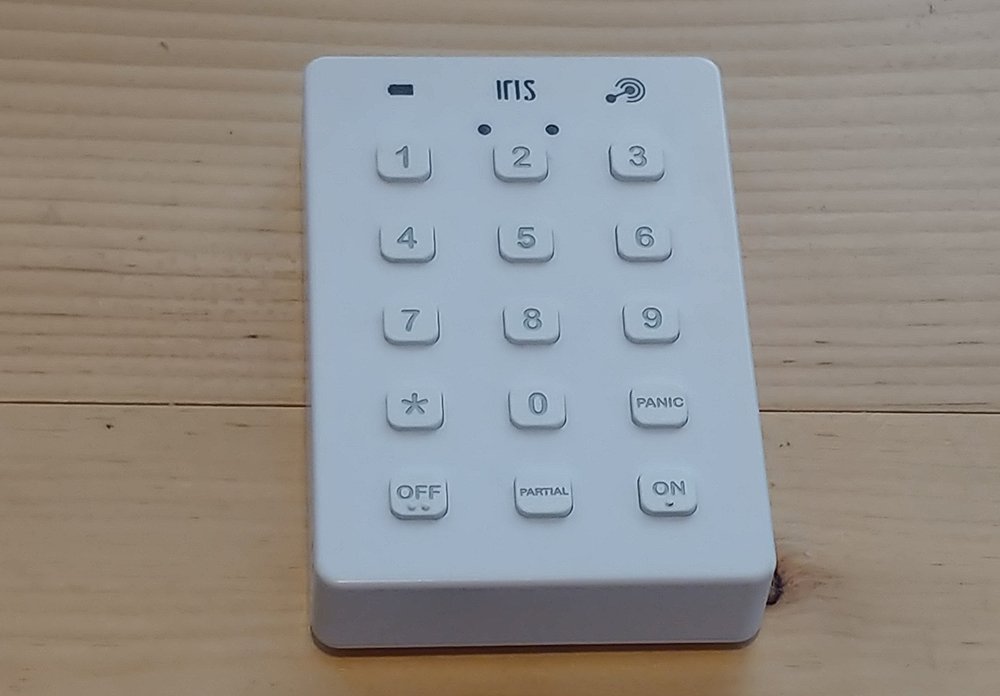
The first thing I paired was the keypad. This allows your system to work as a normal alarm. It’s placed inside my door (sorry, no pictures of where I placed everything for security reasons) and allows us to quickly turn it on and off before we leave. There’s also a “partial” mode that we turn on at night. This deactivates the motion sensor so the alarm doesn’t go off at night if we get up to use the restroom or get a drink of water.
We’ve never had any issue with our keypad. It turns on and off quickly and you can adjust the grace period in the app if you have a problem getting to yours in time. The mounting bracket that comes with it is very sturdy and keeps it in place, even when it gets bumped pretty hard. The build quality is also excellent so I have zero doubt that it’ll last for as long as we use it for.
1 of 2
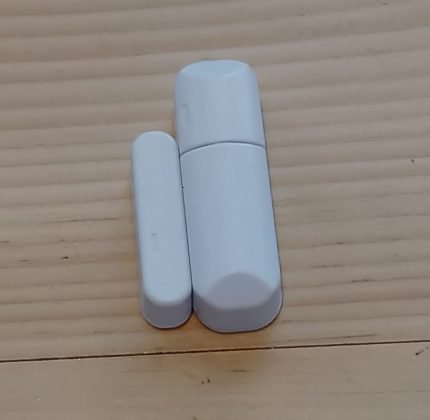

The keypad works with the door/window sensors to let you know if someone is trying to break in. These sensors can go either on your windows or doors to let you know when one of them has been opened. The magnetic contacts keep the sensors together until movement is detected. At that point, as long as you have your app set up, your alarm may sound or you might get an alert on your phone that something has opened. Again, you can name these sensors so you know exactly what’s being opened.
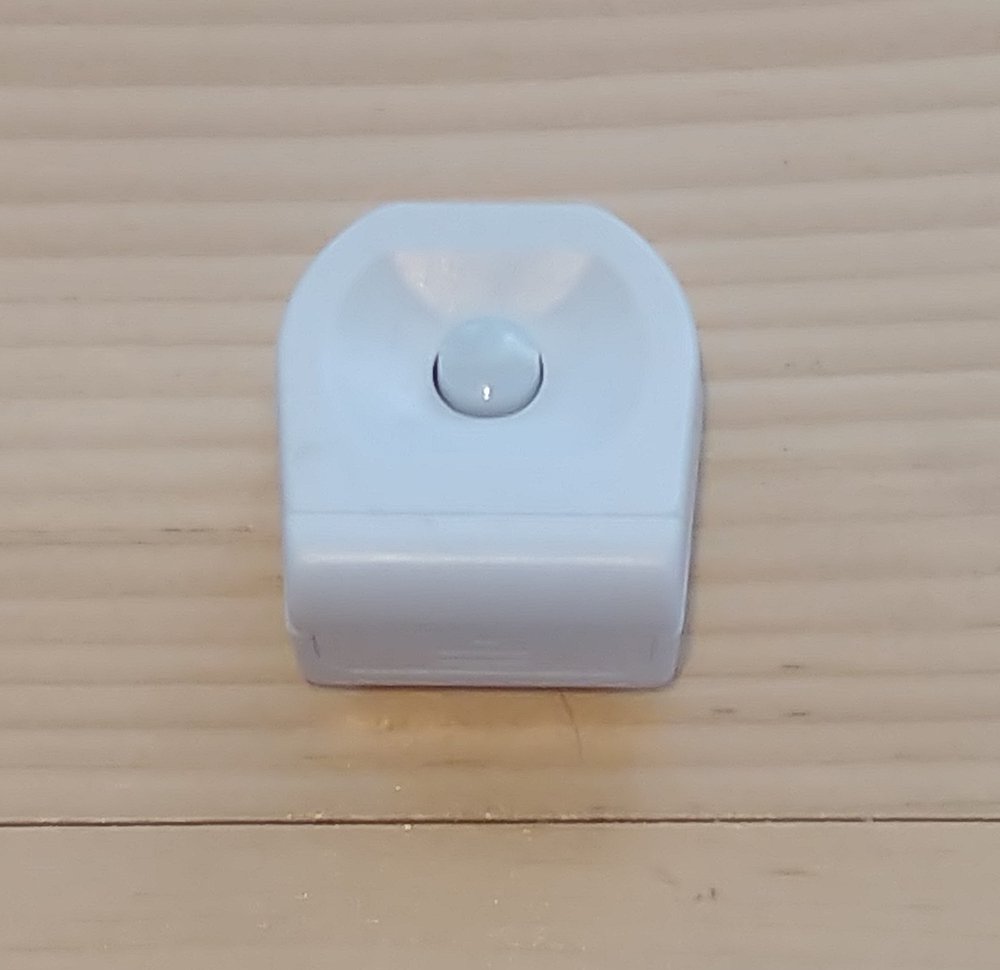
For an added level of security, the Iris Motion sensor can be mounted on a wall to alert you of movement. There’s nothing revolutionary about the motion sensor, to be completely honest. It’s a nice added level of security if you want to seep an entire room. Again, I’ve not had an issue with the one we’ve been using so nothing to report there.
If you have loose pipes or an old water heater, you might want to invest heavily in the water sensors that Lowes offers. We have a refrigerator that tends to leak water from time to time so we’ve got one of these stashed on the floor in front of it. As soon as the alarm goes off, we can jump up and clean up the mess that our fridge makes without the water seeping into the floor. It’s a fantastic way to keep on top of things and with the way water can destroy pretty much anything in its path, the water sensor is a great way to stay on top of things. I don’t love having my phone go off at 2 AM when I’m trying to sleep, but I’d much rather be aware of a leak than get a few more hours of uninterrupted sleep.
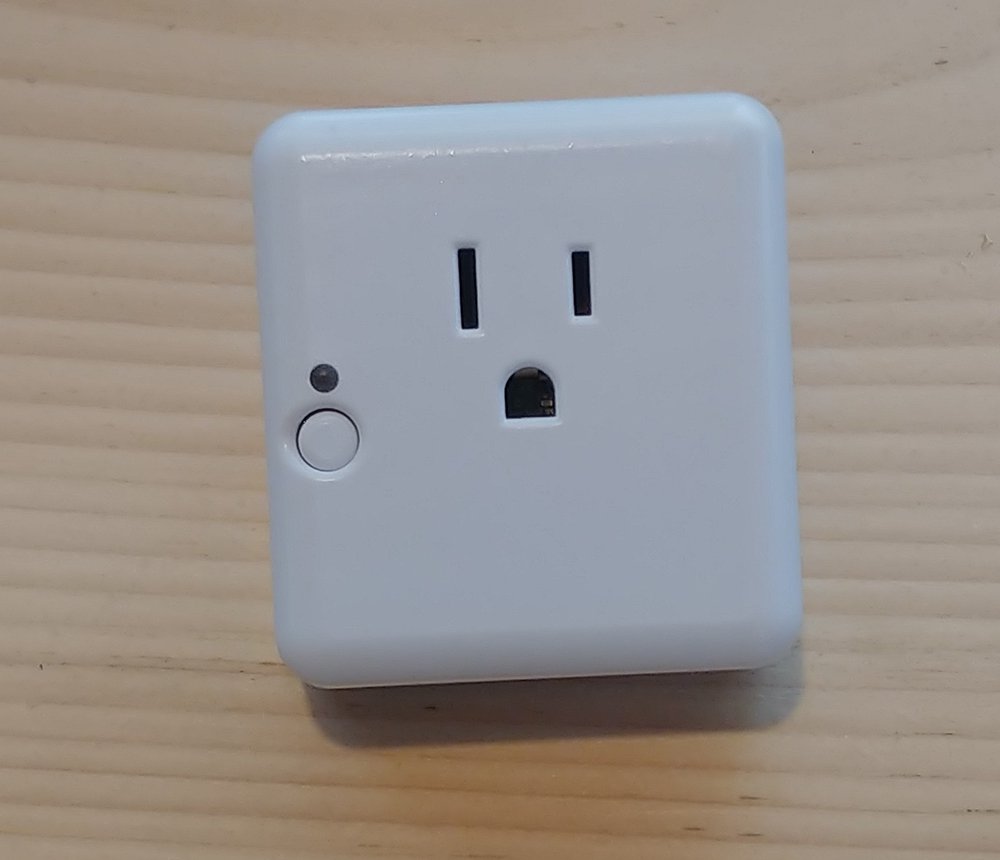
The last, and maybe my favorite part of the starter kit is smart plug. The smart plug sits between your outlet (three prong, grounded) and allows you to control the power going to whatever is plugged into it. This is a perfect solution for turning your lamp into a smart light. You can set the smart plug to follow a schedule through the app so it’s pretty easy to have your lights turn on for you when you need to wake up in the morning or turn off at night at a certain time. We have a very forgetful five-year-old that loves turning on lights so we are constantly using this to turn off the lights in her play room.
I’ve been using the Iris system for a little over a month now without incident. I did a fair bit of research on the system as a whole and people have been pretty mad about the direction Lowe’s went with the current generation. It came out too early, with too many bugs, and cost too much at the time of release. But, I have to give Lowe’s credit because they have been working on it and have made steady progress. I hope sales are good enough for them to continue down this road because there is some real potential here.
If you want to pick up Lowe’s Iris system, you can stop into one of their brick and mortar stores or head to their website.
Kobo now offers audiobooks along with its ebooks and readers
Why it matters to you
If reading by yourself requires too much energy, you can use Kobo to have an audiobook read to you instead.
You can finally look beyond Audible if you’re in the market for an audiobook. This week, Canadian company Rakuten Kobo, known for its ebook readers and library, expanded its offerings by diving into the audiobooks marketplace. So if turning physical pages is too much for your fingers and reading epaper screens is too much for your eyes, rest assured that you can still consume literature thanks to this new service.
Subscriptions to the new service start at $10 a month, or more casual readers (or listeners) have the choice of buying titles a la carte. Promising books across a wide range of genres, including bestsellers like Into the Water by Paula Hawkins, Truly Madly Guilty by Lianne Moriarty, and the Harry Potter series; Kobo notes that its expansive library could make a bibliophile out of just about anyone.
“We have more books than time, always. Audiobooks let our readers fit the books they love into more parts of their day,” Rakuten Kobo CEO Michael Tamblyn said. “Audio lets you be in two places at once — exploring the galaxy on the daily commute, solving a crime while doing the laundry, or wherever you want your favorite story to take you.”
Tamblyn continued: “Last year, we built the Kobo Aura ONE eReader with the help of our best customers, and our new offering is no different. What we unequivocally heard was that they wanted the best deal on audiobooks, and we are pleased to offer the lowest subscription price available.”
Both audiobooks and ebooks from Kobo can be accessed via the Android or iOS app in an intuitively designed player. You can easily swipe through an audiobook and keep tabs on exactly where you are in a narrative. Plus, Kobo promises that you can see how much time is left in a book at a glance, and also select your narration speed. If you tend to use audiobooks as lullabies, you can even set books to turn off after a set amount of time so you’re lulled to sleep by a reader, but won’t snore through major plot points.
Like other services, you can sign up for a 30-day free trial of Kobo audiobooks, and also download your first audiobook for free.
Umidigi S2 Pro offers Galaxy S8’s infinity display for less than half the price
Why it matters to you
Looking for a bezel-free smartphone, but don’t want to spend serious cash? The Umidigi S2 and S2 Pro could be your answer.
So much emphasis has been placed on bezel-less phones this year, you might be wondering how little you’ll have to spend to get your hands on one. And while the iPhone 8, set to be revealed next week, is expected to cost nearly $1,000 at launch, and Samsung’s Galaxy S8 is pretty pricey, too, it’s reassuring to know there are other options. Like this, for example — the Umidigi S2 Pro.
If you’ve never heard of Umidigi before, it’s a Chinese firm that specializes in budget smartphones. The S2 Pro looks exactly like a Galaxy S8 head on — in fact, the resemblance is so uncanny, we wouldn’t be surprised to learn Samsung’s lawyers have taken notice. However, whereas the Galaxy S8 costs upward of $700, the S2 Pro goes for less than half that — $300.
Of course, that’s not the only difference. Umidigi has fitted the S2 Pro with MediaTek’s Helio P25 processor — a far cry from the Qualcomm Snapdragon 835 featured in most other full-screen flagships. Then again, you do get a whopping 6GB of RAM and an absolutely massive battery, rated at 5,100mAh.
Despite the budget appeal, Umidigi hasn’t skipped on the contents of that big 6-inch display. In the S2 Pro, you’ll find a Sharp LCD panel with a resolution of 2,160 x 1,080. That’s a perfect 18:9 aspect ratio, like what the LG G6 offers. All things considered, those are respectable numbers for a device costing the same as a 64GB Moto G5 Plus.
Around the back, the similarities to the Galaxy S8 pretty much end, with a set of vertically stacked dual cameras and a fingerprint sensor seemingly placed just where it belongs, smack dab in the middle of the chassis. Umidigi says it relies on Sony to provide the image sensors, which is encouraging though hardly a confirmation of the phone’s photography prowess.
Alongside the S2 Pro, the company is also offering a presumably lower-end model called the S2, for just $230. We say “presumably” because all we know about the device is that it doesn’t match the screen resolution of the Pro variant, but shares the same design. Otherwise, details are scant at the moment.
Phones like these are becoming increasingly common. In August, we reviewed Maze’s Alpha 4G — a similarly inexpensive handset that flaunts the design of Xiaomi’s Mi Mix, in a package that costs just over $200. We were pleasantly surprised with the results, and the S2 Pro looks as though it could follow that example. If you’re interested, pre-sale begins on September 18 on Umidigi’s site.
T-Mobile and Verizon fight for top U.S. mobile speed results

These days, the U.S. carrier conversation appears to dominated by Verizon and T-Mobile — for good reason.
America’s networks are all getting faster, according to a report by Ookla-owned Speedtest released this week.
But T-Mobile is the fastest network, and Verizon, despite prevailing in large cities like San Diego and New York City, is nipping at its heels. AT&T is slightly behind, and beleaguered Sprint brings up the rear, despite making large strides in the last year.

According to Speedtest, T-Mobile’s rise to the top has been spurred by a number of factors, including the acquisition and deployment of additional low-band spectrum, refarming of existing spectrum that was previously used for 3G service, and the proliferation of “capacity enablers” like 4×4 MIMO, 256QAM, unlicensed LTE, and a focus on selling efficient Gigabit-enabled phones like the Galaxy S8 and upcoming LG V30. With average speeds of 23.17Mbps, T-Mobile isn’t that far ahead of Verizon at 21.13Mbps and AT&T at 20.05Mbps, but it’s enough to maintain CEO John Legere a stockpile of verbal ammunition when talking about his biggest rivals.
Average mobile download speed in the U.S. increased 19.2% between Q1-Q2 2016 and Q1-Q2 2017 to 22.69 Mbps. That is not as strong as the year-over-year growth of 33% we saw in last year’s report. The U.S. still only ranked 44th in the world for download speed, immediately behind Fiji and Germany and just ahead of Oman for Q1-Q2 2017.
Verizon’s capacity advantage does help in urban areas, though: the company’s second-place narrows considerably against T-Mobile in big cities where spectrum is at a premium and millions of people try to connect to overloaded towers. Verizon still does it this better than T-Mobile, for the most part, and had fewer signal drops. On the other hand, Verizon may not own the speed crown in rural areas — that’s T-Mobile — but it completely dominates in terms of coverage, according to Speedtest.
Although the majority of each carrier’s tests do take place in urban areas, some carriers have a much larger footprint in rural areas than others. The coverage maps above give a sense of this, but the numbers are even more telling. Verizon accounted for a full 51.6% of all samples we saw in rural areas. AT&T made up 27.3%, T-Mobile 11.5% and Sprint 9.6%. Verizon’s rural coverage is laudable.
Speedtest does not a drop in speeds from Verizon and AT&T since the introduction of unlimited plans in February, something that CEO John Legere and co. continue to use as justification for switching to T-Mobile.
Our data shows that in the case of Verizon and AT&T, the percentage of test results with the lowest-end download speeds (those under 5 Mbps) shot up compared to the period before these unlimited data plans were widely available. For comparison, both T-Mobile and Sprint are seeing the opposite effect in the same time period where fewer results are below 5 Mbps in Q2 2017 than they were in Q4 2016.
In other words, T-Mobile and Sprint, due to fewer people on the network, have been better able to weather the storm of increased load on the networks than much-larger Verizon and AT&T.

Advertisement
Of course, speed is just one metric; the differences between top speed and acceptable performance are enormous, and both T-Mobile and Verizon are able to offer the most consistent experience, or in Speedtest’s parlance, an “acceptable speed ratio”, compared to AT&T and Sprint.
The metrics are fascinating, but all this comes back to a point that we’ve been stressing a lot in the past few months: AT&T, despite maintaining its considerable install base lead over T-Mobile, is no longer at the top of the conversation when it comes to U.S. carriers. It’s now T-Mobile vs. Verizon in most peoples’ minds.
Which unlimited plan should you buy?

Kickstart your IT career with this 11-course bundle, now 98 percent off
When it comes to IT success stories — who doesn’t want a lucrative career doing something they love? — CompTIA A+ certification is usually right in the middle. However, training for a complete career doesn’t stop there.
If you’re serious about completing training and passing a multitude of the top IT certifications, Android Central Digital Offers has a bundle for you. Instead of $3,289, we’re offering this bundle for 98 percent off. That brings the final price down to just $49.

This bundle has 11 courses, including:
- CompTIA A+ 220-901
- CompTIA A+ 220-902
- CompTIA Network+ N10-006
- CompTIA Cloud+
- CompTIA Project+ PK0-003
- CompTIA Security+ SY0-401
- Microsoft 70-410: Installing And Configuring Windows Server 2012 R2
- Microsoft 70-411: Administering Windows Server 2012 R2
- Microsoft 70-412: Configuring Advanced Windows Server 2012 R2 Services
- Cisco 100-105: ICND1 – Interconnecting Cisco Networking Devices Part 1
- Cisco 200-105: ICND2 – Interconnecting Cisco Networking Devices Part 2
If you’re ready to take your IT career to an ultimate level, this is the bundle for you. At this price, how can you resist?
See at Android Central Digital Offers
The $90 Plantronics BackBeat Fit headphones are perfect for runners who like quality sound
Our friends at Thrifter have a great deal on some excellent Bluetooth headphones for your workout!
The Plantronics BackBeat Fit Bluetooth headphones are down to $89.99 on Amazon. These headphones are normally $130 and have never dropped lower than $100 before.

The BackBeat Fit released back in 2014 and earned a lot of praise from critics, including 4 star reviews from CNET and PC Mag. They have only gotten better over the years because as their value has gone up as the price has gone down.
These are headphones designed specifically for exercising. They have a secure fit that doesn’t block noise, in case you want to run outside and don’t enjoy being hit by things. They also have a long battery life up to eight hours and great sound.
Features include:
- Flexible design fits comfortably and stays put for all levels of exercise with easy on-ear controls for calls and music.
- Sweatproof and waterproof: Protected by a P2i nano-coating, these headphones deliver sweatproof durability and meet the IP57 rating for withstanding fresh water up to one meter for 30 minutes.
- Quick Charge Technology: Powers a week of workouts with up to eight hours of listening time and a 15 minute quick charge can power up to a full hour of listening.
- Heart-pumping bass: Powerful speakers and custom codec deliver the heart-pumping bass and crisp highs of your music and only pause to let you take a call.
- Wireless updates: Get the latest firmware improvements sent directly to your headphones from the free Plantronics BackBeat FIT Companion app.
Plantronics offers a one-year warranty for these headphones.
See at Amazon
More from Thrifter:
- How to get the most out of your Amazon Prime membership
- How to save money when driving
For more great deals be sure to check out our friends at Thrifter now!
The Big Four U.S. carriers are joining together to build a new mobile authentication solution
Your carrier wants to help keep your identity safer.
AT&T, Sprint, T-Mobile and Verizon have joined forces and created what they are calling the Mobile Authentication Taskforce.
Because hacking, identity theft, and phishing are becoming a bigger problem, especially with mobile devices, the carriers want to create a system to make sure you are who you claim to be when using your phone for things like banking or shopping. Going through the hassle of fixing any type of bank or credit card fraud or data theft in general is no fun, but it’s especially expensive on the enterprise end. With more and more unethical people looking for ways to exploit your phone’s software or trick you into giving away your passwords, this is a problem that’s not going away anytime soon.

This is an area where the carriers can help. They have plenty of ways to check where and when a phone is being used and can build a pattern to check against anytime you need to prove your identity with your phone.
With the four largest U.S. mobile network operators onboard, the Mobile Authentication Taskforce possesses significant capabilities and insights to address this issue, such as network-based device authentication, geo-location and SIM card recognition.
The GSMA (Groupe Spécial Mobile Association) is working closely with the carriers on the project. Alex Sinclair, the GSMA’s Chief Technology Officer says this will cut down on fraud and data theft and that they are monitoring things to make sure the solution is interoperable with all the carriers and their different systems.
Through strong collaboration, the taskforce announced today has the potential to create impactful benefits for U.S. customers by helping to decrease fraud and identity theft, and increase trust in online transactions. Further, we will be working closely with the taskforce to ensure this solution is aligned and interoperable with solutions deployed by operators.
There are potential drawbacks as well. Carriers aren’t exactly known for their rigid standards of protecting our data, and any identification system tied to your SIM card could potentially be held hostage until any contract conditions are met. Still, if the carriers can get together to keep us and all of our data a little safer that’s a good thing. We hope they come up with an easy and secure system that benefits the users as well as the carriers themselves.
In the meantime, everyone should follow a few basic security practices like using a secure lock screen, strong passwords and two-factor authentication wherever it’s offered. Keep your data safe!
More: Two-factor authentication: What you need to know
 AIVAnet