


Hands-On With Apple’s New Glass-Backed iPhone 8 and iPhone 8 Plus
Apple today at the Steve Jobs Theater introduced the iPhone 8 and iPhone 8 Plus with an all-new aluminum and glass design.
iPhone 8 and iPhone 8 Plus via The Verge
The Verge managed to get some hands-on time with the two new smartphones, which look more or less the same as the iPhone 7 and iPhone 7 Plus, beyond their glossier looking glass-backed finishes.
The iPhone 8 and 8 Plus look pretty much the same as their predecessors, but they have a new back cover that’s coated in glass and gives them a somewhat fresher look. The glass blends into the sides of the phone incredibly well, better than we’ve seen on other phones. There’s a subtle density to the glass, too, and overall it looks a lot better than the back of the 7. That glass back allows for wireless charging, which is one of the big new features here.
 iPhone 8 and iPhone 8 Plus via SlashGear
Those who owned an iPhone 4 may be concerned about Apple’s return to a glass back, but it said the iPhone 8 and iPhone 8 Plus have “the most durable glass ever in a smartphone, front and back.”
Engadget’s Chris Velazco held the iPhone 8 and felt it had a “bit of extra density” compared to previous models. Fortunately, SlashGear’s Chris Burns said the difference is “near-impossibly-perceivable.”
Apple’s tech specs confirm the iPhone 8 and iPhone 8 Plus are slightly heavier at 5.22 ounces and 7.13 ounces respectively, compared to 4.87 ounces and 6.63 ounces for the iPhone 7 and iPhone 7 Plus respectively.
iPhone 8 and iPhone 8 Plus are also 0.2mm thicker than the iPhone 7 and iPhone 7 Plus respectively, so only the tightest of current cases may not fit.
Beyond their slightly thicker, glass designs, the iPhone 8 and iPhone 8 Plus still have Touch ID, Lightning connectors, side Lock buttons, and no headphone jacks. And unlike the iPhone X, both still have bezels on the front.
Related Roundups: iPhone 8, iPhone X
Discuss this article in our forums
LTE Apple Watch to Cost $10 Per Month on AT&T and Verizon
Apple today unveiled the Apple Watch Series 3, which is the first Apple Watch model that includes an LTE chip for standalone cellular service on the device. Neither carriers nor Apple are offering information on what we can expect as far as pricing for connectivity goes, but a report from TheStreet sheds some light on what carriers are planning to charge on a monthly basis for the LTE Apple Watch in the United States.
AT&T plans to charge $10 per month to add an Apple Watch to an existing service plan while Verizon will also charge $10 per month after offering customers three free months of service.
Sprint and T-Mobile both plan to support the LTE Apple Watch, but have not provided details on how much it will cost per month. With AT&T and Verizon charging $10, pricing could be similar at Sprint and T-Mobile.
Because the Apple Watch and the iPhone share a phone number, both devices must use the same carrier for connectivity.
The LTE Apple Watch will be available in the United States, Canada, Puerto Rico, Australia, France, Germany, Japan, Switzerland, United Kingdom, and China, with Apple offering a list of supported carriers in each country on its website.
Pricing on the new LTE Apple Watch starts at $399 in the United States for the 38mm Aluminum model. Non-LTE versions are also available, with pricing on those models starting at $329. The Series 3 Apple Watch will be available for pre-order on September 15, with orders arriving on September 22, the official launch date of the device.
Related Roundups: Apple Watch, watchOS 3, watchOS 4
Buyer’s Guide: Apple Watch (Caution)
Discuss this article in our forums
Self-assembling nanoparticles turn this window into a mirror and back
Why it matters to you
Research could lead to electric windows that are able to switch between transparent and mirrored at the press of a button.
Chances are that you’re familiar with one-way glass, which looks like a mirror from one side, but is completely transparent from the other. Researchers from the United Kingdom’s Imperial College London have taken this tech to the next level, courtesy of a material that’s capable of transitioning between a mirror and a window with the press of a button. And all it requires is a layer of tiny nanoparticles, an electrical current, and a whole lot of cutting-edge chemistry.
“Put simply, we have developed a system which can change from being transparent to a mirror and back to being transparent by applying an electrical voltage,” Anthony Kucernak, a professor in Imperial’s Department of Chemistry, told Digital Trends. “This voltage drives nanoparticles to an interface, where they congregate and form a mirror. When we switch the system to a different voltage, the particles move away from the interface and the mirror disappears.”
To make their electronically switchable windows, Imperial College researchers created a layer of evenly spaced gold nanoparticles, thousands of times tinier than the width of a single human hair. This layer is formed when gold nanoparticles self-assemble between two liquids which don’t mix. These nanoparticles are then made to change configuration through the use of a small voltage. When they’re closer together, they act as a mirror; when further away, they offer window-like transparency.
Imperial College London isn’t the first place to explore this territory, but the researchers’ work is unusual in the sense that it describes a reversible process, capable of transitioning back and forth between mirror and transparent surfaces as many times as required. As to what’s next, Anthony Kucernak says that, “We are considering the possibility of commercialization. Our future work is looking into ways of increasing the speed of response.”
It’s definitely nifty tech — and something we’d love to see in the smart home of the future, alongside similar research into dimmable windows. We guess that in this case you just need to remember which mirrors it’s safe to undress in front of!
A paper describing the work, titled “Electrotuneable Nanoplasmonic Liquid Mirror,” was recently published in the journal Nature Materials.
Google Play Family Library is rolling out to nine additional countries
Why it matters to you
Google Play Family Library allows you and your family members to save money by sharing purchased content.
Until last year, Android users were unable to share apps between family members — meaning each person had to buy an app to be able to use it. That was no longer was the case when Google Play Family Library debuted in July 2016.
It functions just like it sounds — it’s a library of purchased apps and content that’s shared with up to six family members. It applies to purchasing an “app, game, movie, TV show, or book in the Play Store,” and there’s no extra fee. Still, it only works on content and apps that are “eligible,” meaning developers have to allow it. Google sent an email around in May urging them to do so. Now, the feature is finally rolling out to more countries, meaning that millions more will be able to take advantage of it.
When Family Library launched, it was available in 12 countries: Australia, Brazil, Canada, France, Germany, Ireland, Italy, Japan, Mexico, New Zealand, the U.K., and the U.S. Now, Google is now pushing the feature to South Africa, Chile, Belgium, Czech Republic, The Netherlands, Norway, Poland, Switzerland, and Ukraine.
“All purchases added to Family Library are available across Android devices, and movies, TV shows, and books can be enjoyed on iOS devices and the web,” writes Raj Iyengar, product manager at Google Play, in a blog post.
Of course, you can choose what you want to share with your family and what you want to keep to yourself — for example, you can keep a “collection of comic books” in your personal library, but share other books you have purchased to your Family Library. You don’t even have to use this service with family members, as it should work with any six people you add to the Library.
You can designate a specific credit card to handle all purchases for Family Library, but a member can still make purchases with their personal card or a gift card whenever they choose. Don’t worry about payments made by your kids — you can enable the option to require approval for their purchases.
Family Library isn’t the first family-centric feature Google has unveiled — in late 2015, the company introduced the Google Play Music family plan that allows subscribers to add up to six members to share the service for $15 a month. You can sign up now on the web for that plan, which is now rolling out to Ireland, Italy, New Mexico, and New Zealand.
Apple introduced Family Sharing for iOS content between six people in iOS 8, and it also began offering an Apple Music Family Membership last year. Google’s playing catch up, but it’s a welcome feature that is long overdue.
Update: Google Play Family Library is rolling out to nine more countries.
AT&T extends its offer of free HBO to Unlimited Choice plan users
Why it matters to you
Looking for a new data plan? Free HBO access could be enough to convince you to go for AT&T’s.
AT&T wants you to sign up for its unlimited data plan, and it’s sweetening the pot by giving subscribers on its Unlimited Choice plan free access to HBO.
In April, the carrier threw in free HBO subscriptions for new and existing customers on Unlimited Plus, its $90-a-month unlimited talk, text, and data plan. And on Tuesday, September 12, it expanded that offer to folks on its $60-a-month Unlimited Choice tier.
Starting September 15, new and existing Unlimited Choice customers will be able to access HBO either through the HBO Go app or an existing DirecTV television subscription. If you already have an AT&T video account and aren’t paying for HBO, the channel will be added automatically to your account at no extra cost, and if you currently already pay for HBO, you’ll get it free of charge.
So now that both Unlimited Choice and Unlimited Plus include HBO, what’s the difference between these two AT&T’s unlimited plans? It mostly comes down to extras. Unlimited Choice customers get video at “DVD quality” (480p) while on AT&T’s wireless network, while Unlimited Plus subscribers get HD (1080p) when available, and Unlimited Plus customers also get 10GB of hot spot data at no extra charge.
AT&T and HBO seem to have a pretty good relationship. Just last month, AT&T began including a free year of HBO access to those who sign up for DirecTV Now. This new deal, however, seems a little better because you will apparently keep your HBO access as long as you stay on AT&T Unlimited Plus or Unlimited Choice, which could potentially be a lot longer than a year.
Before the promotion, access to HBO came with a $5-a-month price tag.
The news comes as AT&T is preparing to purchase HBO’s parent company, Time Warner, with a bid of approximately $85 billion.
U.S. carriers are engaged in quite the war over who can offer the best unlimited data plan. In early September, T-Mobile added a free Netflix subscription for customers with two or more lines on its T-Mobile One or One Plus unlimited plans, and in June, Sprint began giving unlimited customers six months of free music streaming from Tidal.
Zero-rating schemes and free video have been a big part of these offerings, and while HBO is currently unique to AT&T, we wouldn’t be surprised to see similar add-ons from other carriers in the near future.
Update: Added information about AT&T’s expanded HBO offer for Unlimited Choice customers.
Defense giant BAE says future fighter jets will be piloted in augmented reality
Why it matters to you
Augmented reality controls could offer a whole new customizable way of controlling fighter planes, as well as training their pilots.
To paraphrase the movie Zoolander, augmented reality (AR) is so hot right now. Used to refer to technology designed for superimposing a computer generated image onto a user’s view of the real world, AR has been leaped on by tech leviathans ranging from Apple to Google — all of whom are convinced that it represents the next frontier for consumer technology.
AR isn’t just considered transformative for regular users, however. United Kingdom defense giant BAE Systems believes that augmented reality has a valuable role to play in the future of combat. BAE is known for its far-out tech concepts, which have ranged from UAVs that can be “grown” using chemistry in large-scale labs to submarines piloted by virtual reality. In a “wearable cockpit” concept unveiled today, BAE’s department of military air and information showed off its ideas for incorporating AR technology into combat jet cockpits.
These could be used for both training and combat scenarios, with the use of a Striker II full color Helmet Mounted Display (HMD) for projecting augmented and virtual reality displays and controls in front of the pilot’s eyes — entirely replacing the need for physical cockpit layouts.
“Because the controls and displays are projected onto the helmet display, the technology allows pilots to customize the cockpit display and the way they interact with it based on their own personal preferences and mission objectives,” Suzy Broadbent, human factors lead for cockpits at BAE Systems, told Digital Trends.
“The move away from hard wired controls and displays and into virtual reality is something that has interested us for a while. However, it is only now that the technology is developing enough for us to see it as a definite potential for use in the fast jet domain. The idea is that the pilot can ‘wear the cockpit,’ and the innovations within HMI technologies allows us to provide a variety of methods for the pilot to interact with the system beyond the traditional HOTAS (Hands On Throttle And Stick).”
In addition to this, BAE’s proposed system focuses on “adaptive autonomy,” meaning that it could monitor pilot health and mental workload and, based on its assessments, shift what it is showing to the pilot at any one time. If mental workload becomes too much, the system could allow the aircraft to take over certain tasks the pilot would otherwise manually control.
“This is a technology demonstration concept, but one which is being looked at in research and development terms for potential exploitation on future platforms,” Broadbent continued. “The platforms of the future will be more ‘information heavy’ than ever and, we will therefore need more innovative ways of presenting that information to a pilot to allow them to interact with it.”
What are you most excited about at today’s Apple Event?
It’s finally here! The big September Apple event, and the grand unveiling of the iPhone X. It’s cause for celebration, rejoicing, and checking the trade-in price on your beat-up iPhone 7 Plus. If you’re a die-hard Android user, don’t worry, there will probably be more than just a few iPhones unveiled during to Tuesday’s event.
Rumor has it there might be a new Apple TV with 4K support unveiled at the event, alongside an update to the increasingly popular wireless earbuds, the AirPods. But that is not all! We’re very likely going to see a bit more information about the highly anticipated incremental operating system update, MacOS High Sierra. So with all that on the table, what are you most excited about?
What are you most looking forward to at the #AppleEvent?
— Digital Trends (@DigitalTrends) September 12, 2017
What are you most excited about at today’s Apple Event?
It’s finally here! The big September Apple event, and the grand unveiling of the iPhone X. It’s cause for celebration, rejoicing, and checking the trade-in price on your beat-up iPhone 7 Plus. If you’re a die-hard Android user, don’t worry, there will probably be more than just a few iPhones unveiled during to Tuesday’s event.
Rumor has it there might be a new Apple TV with 4K support unveiled at the event, alongside an update to the increasingly popular wireless earbuds, the AirPods. But that is not all! We’re very likely going to see a bit more information about the highly anticipated incremental operating system update, MacOS High Sierra. So with all that on the table, what are you most excited about?
What are you most looking forward to at the #AppleEvent?
— Digital Trends (@DigitalTrends) September 12, 2017
How to use Apple’s new iOS 11 camera effects on your iPhone
Apple’s Live Photos first debuted on the iPhone 6S and 6S Plus, and the feature added a bit of flourish to standard still photographs. In this mode, the camera captures 1.5 seconds of video and audio before and after you tap the shutter button to take a photo. It’s why Live Photos-enabled images slowly shift, like photographs from the wizarding world of Harry Potter, in your Camera Roll. The latest version of Apple’s mobile operating system improves on the feature with a handful of new iOS 11 camera effects.
There’s Loop, Bounce, and Long Exposure. Loop finds a perfect time to start and end the Live Photo, and plays it on an endless, er, loop. Bounce starts the Live Photo video and then reverses it, and Long Exposure blends all the frames together to create a single image where any movement is blurred.
How to use Loop, Bounce, and Long Exposure
To use these new iOS 11 camera effects, you’ll have to make sure Live Photos is on. Open the Camera app, and at the top center you should see a ringed circle. If it’s yellow, it’s on; if it’s white with a diagonal line across it, then it’s off. Tap on it to turn it on.
Now any photo you take will be capable of using Loop, Bounce, or Long Exposure. Tap on the shutter icon to take a photo. Then find the photo by tapping on Camera Roll on the bottom left corner of the camera app. Swipe the photograph up, and you’ll see all four effects in a carousel gallery — swipe left to see all of them.
Alternatively, you can go to the Photos app, tap on an image captured with Live Photos (it will say so on the top left corner of the image), and swipe up to add one of the effects. You can go to any Live Photo in your Photos app to add this effect, no matter the date you captured it. If you choose an effect, like Loop, the photo will always Loop until you change the effect by swiping up on the photo again and choosing a different effect.
Loop and Bounce
Loop and Bounce are effects that work well with a lot of movement. Take a look at the images below:
Loop
Bounce
Bounce
Again, Bounce is playing and reversing the videos at a automatically selected time frame. Loop also selects a good start and end point, but plays the Live Photo forward on repeat. Both these effects may be tricky to share at the moment. Instagram, for example, thinks of these file formats as .mov, so you’ll need to convert it to a GIF or cut the video. We were unable to share these to Twitter, though Facebook was able to play them.
Long Exposure
Long Exposure
Long Exposure
As you can see in the examples above, Long Exposure is best used with a tripod for your iPhone. The phone needs to be incredibly stable, and it works best with a subject staying still while the background moves, or vice versa. Above left, you can see our photo editor Les Shu is blurry likely because our iPhone wasn’t as stable as it needed to be. The photo of the cube, though, captures its rotating movement, while the background buildings are relatively sharp and still. These files are far easier to share, as they can automatically be converted as JPEGs.
If you want to know more about all the fun features in Apple’s latest operating system update, check out our iOS 11 tips and tricks guide.
Amazon Echo Dot vs. Eufy Genie: Which should you buy?
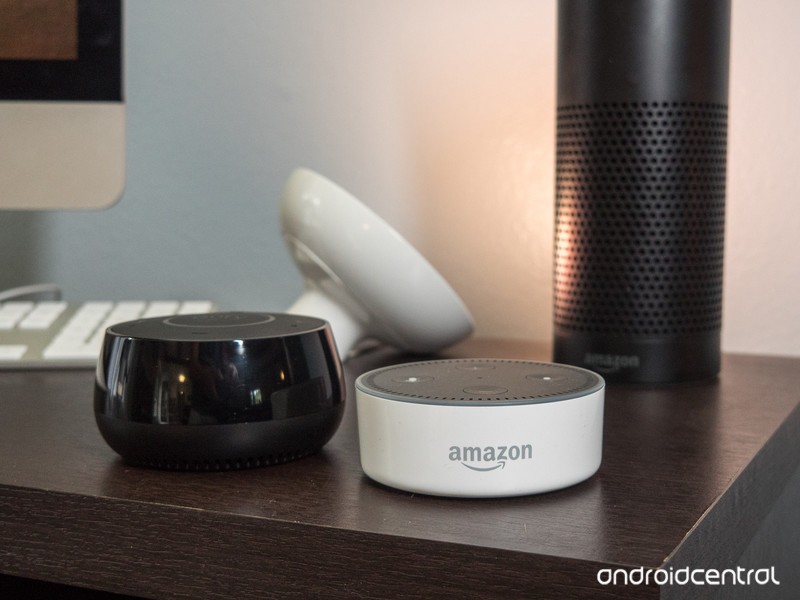
One is the original. The other, more than just an imitator. But should you buy the Echo Dot or the Eufy Genie?
It’s tempting, I know. You want to get an Amazon Echo Dot and see what the fuss is all about. And all it’ll cost you is $50 — and quite often you can pick it up for less.
But there’s also the newer Eufy Genie. It’s pretty much the same thing. Small, with a small speaker, and the ability to be tucked into a corner somewhere, out of the way. And it’s $20 less.
So which should you buy? The Amazon Echo Dot, or the Eufy Genie?
Let’s break it down.
Echo Dot or Eufy Genie: Price
This one’s pretty simple. At current prices, the Echo Dot costs $50. The Eufy Genie is $30. (Note that these fluctuate some time, and the Eufy Genie actually started life at $35.)
Winner: Eufy Genie. But …
Echo Dot or Eufy Genie: Design
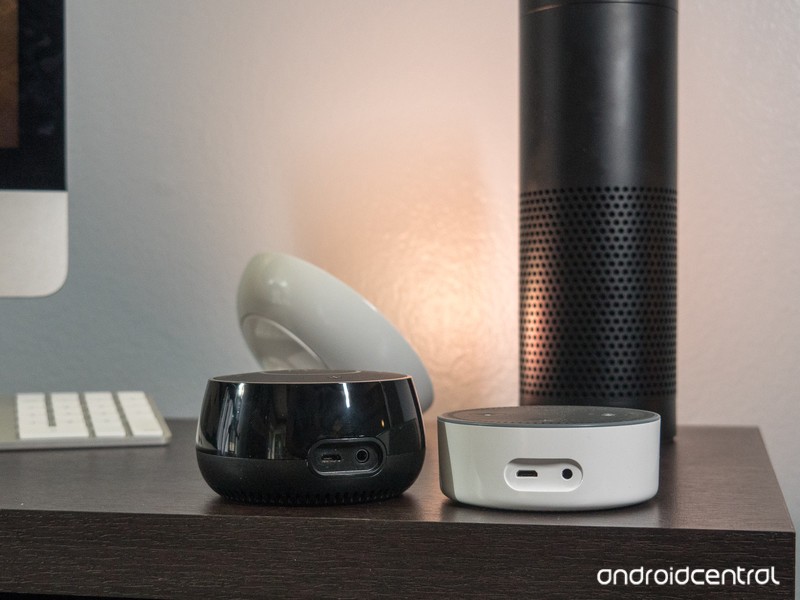
This one’s pretty simple, in my book. The Echo Dot is like an oversized hockey puck. You get either matte black, or glossy white, and plastic all over the place (as you’d expect). But it’s otherwise pretty shapeless.
The Eufy Genie, however, has some curves to it. It’s taller than the Dot but tapers off at the top. That gives it a sense of depth that the Dot just doesn’t have.
I think the light ring in the middle of the Genie’s top section is a little more subtle, too, and very nicely done. Amazon could learn a thing or two here when it comes to design from this thing.
Winner: Eufy Genie
Read our full Eufy Genie review
Echo Dot or Eufy Genie: Performance
OK, so looks aren’t everything. How well do these stand up when it comes to actually doing the thing you paid for them to do?
Let’s start with the speakers. Neither the Echo Dot nor Eufy Genie is going to win any awards here. They’re just too small and too inexpensive, and you get what you pay for. Audio is passable, but far from great. Spoken word is better than music, as you’d expect.
Both the Echo Dot and Eufy Genie allow you to plug in another speaker via a 3.5mm audio cable. So that’s cool. But the Echo Dot goes one further by connecting to another speaker over Bluetooth. And fewer wires is almost always better, especially in this case. (You also can connect phones to the Echo Dot the same way, to stream music in that way.) The Eufy Genie just doesn’t have Bluetooth at all. So that’s a point for the dot.
Talking to you is just one side of the coin, though. These things have to be able to understand you in the first place. And the simple fact is the Echo Dot has more microphones than the Eufy Genie, and in my experience, the Dot understands my voice faster and more accurately than the Genie. And that’s important — it’s the thing you need it to do right the first time, every time.
For me, this is the whole enchilada.
Winner (by far): Echo Dot
Echo Dot vs. Eufy Genie: Accessories
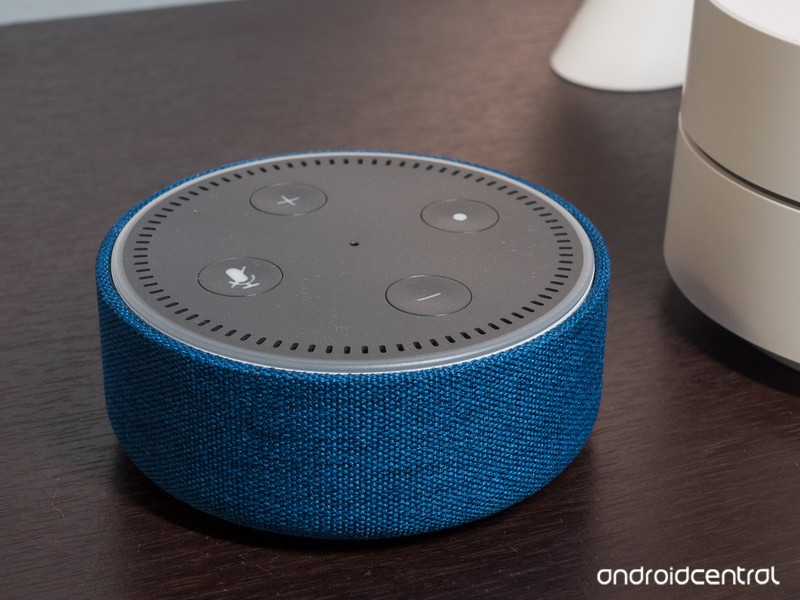 The Echo Dot is a pretty mature product at this point, having been out for a while. The Eufy Genie? Brand new. And so it should come as no surprise that you’re able to buy accessories for the Echo Dot. Start with the basic Echo Dot Case ($10), if you want, which camouflages the look of the Dot a little.
Or bump up to the Vaux speaker ($50), which turns your diminutive Dot into a battery-powered, nearly full-size Echo with a much better speaker.
The Genie? No such accessories yet.
Winner: Echo Dot
Which should you buy? Echo Dot
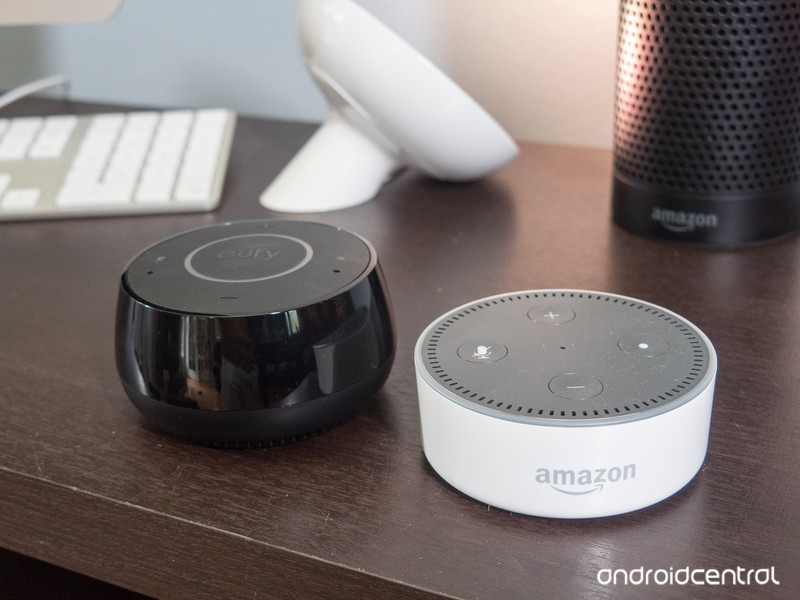
For my money, I’d buy the Echo Dot. It’s a better product, even if it doesn’t look quite as nice as the Eufy Genie. The Echo Dot does voice recognition much better, and that’s its prime purpose.
If you just can’t bring yourself to spend $50 for an Echo Dot, the Genie will work, and it’ll work fairly well. Just not as good as the Dot.
See Echo Dot at Amazon See Eufy Genie at Amazon
 AIVAnet