


The Wype ‘snack rag’ wants to keep your gadgets from going kaput
Why it matters to you
If you like to snack during a PC or gaming session, the Wype can take care of the mess and protect your devices in the process.
Crumbly cookies, greasy pizza, or a particularly nasty bout of influenza — these can all leave your fingers covered in muck, and as you may have already learned to your cost, gunk-covered hands can soon lead to messed-up tech gadgets.
To keep your equipment protected from all the mess, Utah-based Open-Vision Labs has come up with the Wype, a “personal desktop snack rag” designed to ensure your fingers always stay clean. At least, that’s the theory.
The Wype is a round piece of custom-made carpet consisting of microfibers that take dirt from your fingers with a quick wipe. It also includes an antimicrobial solution to kill any germs that may have been using your hands as a home.
“If you’re anything like me, you spend a lot of time on your computer, your phone, your gaming console,” Open-Vision Labs’ Seth Konopasek explains in his Kickstarter video. “You know that napkins don’t really get your fingers clean, neither do paper towels or wiping it on your pants. And we all know what happens if you have dirty fingers.” Yes, it screws up your gadgets.
The Wype’s cloth is removable and sits on a secure base that you can place beside your keyboard or console so it’s easy to reach. When it gets so gross that you don’t want to touch it anymore, you can either throw it in the laundry or donate it to scientific research — you never know, they might discover some new strains of bacteria living in there.
The team suggests a variety of scenarios besides PC and gaming sessions where the Wype might come in handy. You can use it to protect your TV controller when you’re snacking in front of the box, for example, or when you’re cooking in the kitchen and using a tablet to read the recipe.
Provided the campaign reaches its $15,000 funding goal, the Wype will be ready to cleanse your fingers in December, 2017. Pledge $15 and you’ll score yourself one Wype set comprising a black base and three covers; $30 will get you double that, while a $40 pledge offers better value for money with three black bases and nine covers coming your way.
Google Drive vs. Dropbox: Original cloud storage titans duke it out
Two of the most popular cloud storage solutions are Google Drive and Dropbox, and with good reason. Their feature sets, pricing, and free trial options make them some of the best cloud backup offerings out there. But how can you choose one over the other? In this guide, we’ll pit Google Drive vs. Dropbox to find out which is the best for you.
Free storage
Both Dropbox and Google Drive offer free storage space for those who would like to try out their respective services before putting down a few dollars a month for something more expansive and permanent. Google Drive comes as standard, with 15GB of free space, which is far more than Dropbox’s initial free storage offering of just 2GB.
Although that does give Google a serious edge in this section, Dropbox offers a number of ways to increase your free storage. Basic (free) accounts can earn an additional 500MB of storage space for each friend or family member referred to the service, up to 16GB. Dropbox also recently introduced the chance to earn a further 500MB for earning the “Mighty Answer” badge for helping out a fellow Dropbox user on the forum.
While the additionally earned free storage space does lead to Dropbox offering more free space than Google Drive, referring hoards of friends isn’t a simple task, especially in today’s world, where most people who want cloud storage already have it. It’s good that Dropbox has that option, but ultimately Google Drive’s free storage is simply better.
Winner: Google Drive
Premium storage
If you want to store anything beyond a few gigabytes, it doesn’t matter which cloud storage solution you opt for: you’re going to have to pay for it. Both Google Drive and Dropbox offer premium subscription services which give you much more remote storage to work with. The question is, which one has the better packages available?
For personal users, Dropbox has a very simple pricing structure for its premium storage offerings, as it has only one main one. The Dropbox “Plus” account offers a terabyte of storage space with most of the same features as the Basic and business accounts. It’ll set you back $100 for the year, or $10 a month. There’s also an option for an extended version history download window for an additional $40 a year.
For teams and business users, Dropbox also offers “Advanced” accounts, which feature additional file recovery time and a few other features. Most notably though, storage space is essentially unlimited, listed as “as much space as needed.” It’s much more expensive, though, costing $20 per user per month when paid annually, or $25 per month on a rolling basis. The minimum number of users is three.
In comparison, Google offers a trio of options beyond its free account. The entry level option is $2 a month for 100GB, followed by its “most popular,” option for $10 a month, which comes with a terabyte of space. For the heavy users, there’s also a 10TB account, though that comes with a rolling monthly charge of $100.
For those who require even more space, it also offers 20TB and 30TB packages, costing $200 and $300 a month respectively.
Ultimately, Google Drive and Dropbox both have their advantages when it comes to pricing. If 100GB of space will suffice, Google Drive’s $2 a month option is the best bet. It also has many more varied options for larger storage capacities. However, Dropbox’s Business package offers unlimited storage space for as low as $75 a month, which is far more and far less, monetarily, than Google Drive’s biggest offering.
Winner: Draw
File Syncing
Although in an ideal world cloud stored files and folders would update instantaneously if updated locally, that’s rarely the case. But which service, Google Drive or Dropbox, syncs their files the quickest and most efficiently?
Dropbox has the ability to sync files across multiple devices and operating systems, including all major desktop and mobile platforms. As Cloudware breaks down in its comparison, its Linux support and “smart-sync” set Dropbox apart from the competition, as it means only changes are synchronized, not the entire file or folder.
In comparison, Google Drive’s syncing supports multiple devices and operating systems, though doesn’t support Linux natively. There are some workarounds to make it so, but it’s not an officially supported platform for file syncing. While it does let you select specific files to sync, it doesn’t support syncing of file changes, often called “block level” synchronization. That means it needs to re-upload or download entire files to sync them.
Winner: Dropbox
File sharing
File sharing is of paramount importance to many cloud storage customers, as it makes it much easier to send large files or folders to groups of people. When you pit Google Drive vs. Dropbox, how do they each fair?
Google Drive lets you share files and folders using the mobile app or in the web-browser interface, with direct links, or the option to email access to your trusted share partner. It also offers the option to give view and edit permissions to those you share with, letting you customize the power they have. The only downside is that without passwords or expiry dates on those links, they do present a potential security problem if you don’t move your shared files or folders in the future.
Mark Coppock/Digital Trends
Dropbox offers just as much flexibility with where you can designate shared folders and files from, but Pro account holders have the ability to set passwords and expiry dates on links, which help protect your data long term. You can also set edit permissions for users.
Dropbox’s share page makes it easy to see which folders and files you’ve’ made accessible to others. Ultimately that, combined with better security protections for user data, make Dropbox the better choice.
Winner: Dropbox
Outside support
Google Drive can quickly save and store Gmail attachments, twin stored images with Google Photos, and makes collaboration easier through Google Docs, Sheets, and Slides. The Chrome Web Store has more than 100 compatible third-party apps for Google Drive too, giving the cloud storage solution a lot more potential than some of its competitors.
Dropbox has some service integrations of its own. Personal users can enjoy a partnership with Microsoft that sees Office documents openable and editable from within Dropbox itself, making collaboration easier. Dropbox Business users can also use integrated PDF viewing and sharing with Adobe, and real-time messaging through Slack.
There’s also Dropbox Paper, which is handy for note taking.
As strong as Dropbox’s additional service support is, though, it can’t quite match Google Drive.
Winner: Google Drive
Security and privacy
In a world of post-Snowden revelations and regular hacks of major organizations, making sure your remote data and your privacy is protected is a major consideration for many cloud storage customers.
For its part, Dropbox encrypts your data to a 128-bit AES standard while files are in motion, and then to a 256-bit AES standard when at rest. It also offers two-factor authentication for decrypting files, to prevent unauthorized users from gaining access to them. Paying customers can also remotely wipe sync files should they lose a relevant device. Version rollback even lets you replace updated files for differing periods of time depending on your package, offering some measure of protection against ransomware.
Google Drive offers comparable security features, though uses 256-bit AES encryption with files in transit and 128-bit AES encryption when at rest. It also supports two-factor authentication.
EFF
One area where Dropbox does show a slight advantage over its competitor, is in privacy. While both protect their user’s information in many respects, Dropbox is one of only a few companies awarded a five-star privacy rating by the Electronic Frontier Foundation (EFF). Google itself was given four stars, though it fell behind Dropbox in that it does not stand up to national security letter (NSL) gag orders, which prevent companies from informing their customers that their data has been requisitioned by authorities.
Dropbox does stand up to that, giving it a slight edge in this category.
Winner: Dropbox
Conclusion
Pitting Google Drive vs. Dropox was always going to be a tight race, as both offer some of the best cloud storage features available today. Both services have expansive free and paid for versions, as well as solid consumer protections and file sharing capabilities. Time and again though, we had to give the win to Dropbox, because it just offers that bit more than Google Drive.
However, your needs are dependent on what you want to use the cloud storage facility for. If you have a few files and folders or are merely giving cloud backup a try, Google Drive would be our first recommendation, as its free offering is vastly superior to Dropbox’s. Google Drive is also excellent for those that want plenty of third-party app support, but for everyone else, Dropbox offers the superior service.
With faster file syncing, better password control for shared links and the ultimate unlimited storage package if you take out a business account, Dropbox is our pick.
Overall Winner: Dropbox
The best iPhone X screen protectors to protect your new Apple iPhone
The iPhone X, Apple’s new top-of-the-line iPhone, has a speedy A11 Bionic processor, dual rear cameras, and a state-of-the-art facial recognition system — Face ID — that’s more secure than Touch ID. It’s by far the most advanced iPhone ever released, it’s also the most expensive: When the iPhone X pre-orders open up in October, it’ll start at $1,000 unlocked.
That’s quite an investment, and no better reason to pick up a durable screen protector for your iPhone X. Apple’s flagship is IP67 rated for water- and dust-resistance, but the company makes no claims the glass back and front will survive drops on concrete, tile, or less forgiving surfaces. Luckily, accessory makers are more than happy to fill the need. Check out our a list of the best iPhone X screen protectors and where to buy them. When you’re finished, don’t forget to check out our guide to the best iPhone X cases.
Olixar Full Glass Screen Protector ($33)
The Olixar Full Glass Screen Protector is a low-profile, anti-scratch, high-tension tempered glass cover that’s shatterproof and extremely scratch-resistant. An oleophobic coating flicks away fingerprint oils, and an edge-to-edge design covers every corner of the iPhone’s curved edges. Unlike some screen protectors on the market, Olixar’s offering is engineered not to interfere with the iPhone’s 3D Touch technology.
The Olixar Full Glass Screen Protector starts at $33.
Case-Mate Screen Protector ($30)
Case-Mate’s Glass Screen Protector is designed from the ground up to protect the iPhone X from impact damage. It boasts a 9H hardness rating and low profile that won’t mess with the touch responsiveness of the iPhone X’s screen or 3D Touch haptics. Case-mate’s anti-fingerprint technology prevents smudges, and a multi-layer design guarantees a high degree of scratch resistance.
The Case-Mate Screen Protector starts at $30.
Tozo Tempered Glass Screen Protector ($9)
Tozo’s super-thin Tempered Glass Screen Protector stretches the entire length of the iPhone X’s front, covering not just the display but the bezels around the screen. That makes it exceptionally good at protecting against falls, bumps, and scratches, and at resisting fingerprints (thanks to an oleophobic coating), and careful cutouts around the front-facing cameras and depth sensors let the iPhone X’s Face ID facial recognition see you bright as day.
The Tozo Tempered Glass Screen Protector starts at $9.
EasyACC Tempered Glass Screen Protector ($12)
The EasyACC Tempered Glass Screen Protector is tempered glass solution that’s not only shatterproof, but thin enough to avoid interfering with the iPhone’s touch responsiveness. Thanks to a proprietary weave design, it shatters “cleanly” when you drop it, meaning you won’t have to worry about cutting your finger on jagged pieces jutting from the iPhone ‘s screen.
The EasyACC Tempered Glass Screen Protector starts at $12 in a two-pack.
Tech21 Impact Shield ($35) and Evo Glass ($45)
Tech21’s new iPhone X screen protector collection has something for everyone.
Take the Impact Shield for example: It has a self-healing polymer surface layer that smooths over new scratches. Tech21’s BulletShield technology deflects forces safely away from the iPhone X’s screen, and its thin crystal layer ensures the phone’s touchscreen remains smooth and responsive. The Impact Shield starts at $35, and it’s available in an anti-glare model that makes the iPhone X’s screen easier to read in direct sunlight.
Tech21’s other new iPhone X screen protector, the Evo Glass, comprises a thick 4mm-thick tempered glass screen layer that shields the phone’s screen against accidental scratches and drops. It’s bendable, durable, and fingerprint-resistant, and thin enough to avoid dulling the iPhone X screen’s colors.
The Evo Glass starts at $45.
InvisibleShield Glass+ ($40) and HD ($20)
InvisibleShield, a brand with a long history in the iPhone accessories business, has a new screen protector designed for the the iPhone X: The Glass+. It features Ion Matrix technology, a blend of ultra-strong impact material and surface fracture-filling finish. With a thorough inspection process that weeds out imperfections, InvisibleShield claims the Glass+ is two times stronger than most of the competition.
Glass+ starts at $40.
InvisibleShield’s cheaper alternative, the InvisibleShield HD, is an all-film adhesive that won’t protect against bumps and falls. But it’s thin, lightweight, and designed with lab-grown “smart molecules” that heal scratches over time.
The HD starts at $20, and it comes with InvisibleShield’s life-of-device policy. If the screen protector ever shows signs of scratches or wear, the company will replace it no questions asked.
Princess Yachts 35M film blows the superyacht marketing paradigm wide open
Why it matters to you
Have you ever fantasized owning your own superyacht? This video gives you a clearer picture of what it could be like.
Superyacht marketing may never be the same following the release of the new Princess Yachts 35M marketing film. The Plymouth, England-based superyacht company recently released a short video that shows real people enjoying their own yacht while anchored in the Spanish island of Mallorca.
Unlike most big boat videos, the Princess 35M video doesn’t include a feature walkthrough with models in swimsuits on every deck. Instead, you see glimpses of an extended family with three generations interacting with each other and their crew and enjoying the yacht. They also eat and drink a lot, but that gives the barefoot crew members a reason to walk around as the cameras follow. Check out the video below to get a tour of the 35M. You will quickly realize this is not your everyday smartphone video shoot.
Nice, huh? This cinema-standard mini-movie entailed an award-winning production crew. Craft Films’ cinematographers used lightweight cameras and lenses, equipment, often attached to handheld gimbals. The film crew followed family and yacht crew members up and down stairs, through multiple passageways and rooms, and even underwater. Extensive cable and pulley systems enabled the cameras to track the yacht exterior. The crew also used a high-end video drone.
All parties involved were aware they were taking yacht marketing to a new level. “When we first embarked on this project, the word ‘ambitious’ felt like an understatement,” Craft Films cinematographer Nick Brown said. “We wanted to follow the interaction of the family and crew moving through every space, and that could only be achieved by rigging up the cameras to move from deck to deck seamlessly.
“From a technical point of view,” Brown continued, “our major challenge was moving smoothly through different rooms on the boat to truly capture the feel of continuous motion. And an added layer of narrative complexity entailed creating the sense of an experience moving through time, to emulate an entire day aboard within just a few minutes.”
Princess Yachts Marketing Director Kiran Haslam gave huge props to the film’s crew and cast. Haslam also noted the significance of this film beyond its depiction of life on a luxury superyacht.
“We are enormously proud of this original film, and it is a testament to the fantastic team involved both in front of and behind the lens. It was one of our most ambitious projects to date, and is a sign of things to come as we now plan our next epic cinematic experience to further propel the Princess brand, and raise the bar on audiovisual production in the marine industry.”
The 35M is a magnificent vessel. The yacht was a World Superyacht Awards 2016 winner and you can check its specs on the Princess Yachts website. The point of the new video, which the film makes so well, is that you don’t have to check specific details for a fully realized sense of what life could be like on your own 35M.
The Essential Phone is a remarkable product released as a beta

This beta should have stayed in testing a bit longer, but now that it’s out, the Essential Phone is turning into a good phone.
It’s not uncommon for people to accuse Google of treating its users as beta testers, but that notion — release fast and broken, and fix problems later on — is, in fact, an entrenched part of the startup culture as a whole. It just looks unbecoming of a company with a market cap approaching $650 billion USD.
But year after year, Google gets away with it because it releases dozens of pieces of software for various platforms and ecosystems, and usually, over time, improves the reliability and performance of each one. It also gets away with it because Google as a company is an indelible part of our culture’s fabric, and its core products — search, Android, Docs, and increasingly hardware like the Pixel, Home, and Chromecast — are used by millions of people every day. The occasional buggy software release stings, but does not linger.

The Essential Phone is not finished. It shouldn’t have been released until later this year.
Other companies don’t have the luxury of such inconsistency. Essential, the nascent hardware startup run by former head of Android, Andy Rubin, has been embroiled in this kind of controversy — if you can call it that — over the past couple of weeks. Essential committed the worst sin a new company can make: it released a product before it was ready.
The Essential Phone is a remarkable achievement. It’s dense and compact and beautifully made. Its screen goes right up to the edges, and the camera cutout forms a cyclops that, to me, enhances its visual appeal, mainly because in every other way it is the quintessence of minimalism.


But the hardware was finished long before the software. And Rubin, after announcing the product in May to enormous support and an uncharacteristic amount of anticipation from an industry cynical of new entrants and their ability to compete, likely felt a disproportionate amount of pressure to put this thing out into the world, to give the people, few as they may be, what they want.
After three big software updates, the phone has gone from almost unusable to almost amazing.
That was Rubin’s biggest folly. The Essential Phone is not finished; it should have been kept under wraps until the late summer, and released in October or November — yes, later than he would have liked — so the team could iron out the enormous number of issues with the software. To the degree that public availability has given Essential’s software engineers additional vectors to find and quash bugs, it has also marred what could have been a flawless release from a company that had 10 years of missteps by other manufacturers to use as guidance.

I’ve been using the Essential Phone for the better part of two weeks, and after three sizeable software updates peppered throughout the testing period, it has gone from unreliable to unbelievable. After the most recent (and largest) update, I have yet to experience a single hangup within the software itself — an approximation of “pure” (not stock) Android that wastes no time on extraneous features or bloat. There are features from other phones I miss, like the ability to pull down the notification shade with a swipe of my finger over the rear fingerprint sensor, but overall I’ve thoroughly enjoyed my time with the device.
That wasn’t the case for the first few days with the Essential Phone, and that metronomic leap between frequent slowdowns and seamless performance shouldn’t have taken place at all. Given that these updates are being pushed on a fairly regular basis not just to the press but to buyers (early adopters, natch) of the phone is what gives me pause; this is an egregious overstep of the trust placed demanded from a company selling a $700 computer that one relies on all day, every day.

But here we are — we’re over the hump. If you’re a Sprint customer or just late to the party and are just picking up the phone today, all of this drama merely passed you by on the way to smartphone bliss. But the disproportionate amount of press coverage for a company this small speaks to the influence Rubin has over the wireless industry in general, and it doesn’t look good for the Father of Android. This, however, will pass.
So that brings us to the Essential Phone of today. For a company of its tiny size, it has done a tremendous job fixing the majority of the phone’s software problems. Using it today is largely like using any other phone running mature software, except it’s doing so in a body covered tightly with titanium and ceramic. The white version I have, which isn’t widely available yet, is eye-catching and tasteful.


That brings me to the single remaining sore spot of the Essential Phone, and one that Rubin says his team is furiously working to fix: the camera. It’s been stated and restated that the Essential Phone’s camera hardware is top-notch and that the company is trying to figure out how to improve photo quality on the software level. To this, I will say, “sure, that could happen,” but more realistic is that this generation of Essential Phone will be remembered, once the dust settles, as the first-generation phone with the terrible camera.

It takes three or so of these…

…to produce one of these (which isn’t even that good).
That’s really unfortunate because the camera is actually quite good in many environments. I’ve taken some stupendous shots, both still and action, in the light of day — photos that would stand up to most other high-end cameras on the market right now. Given those results, I was shocked by how bad the camera performed in poor lighting. It’s abysmal.
I’d wager that Essential will get it from abysmal to just plain bad at some point down the line, but that improvement is also going to have to mirror improvements to the camera app itself, which, as Andrew pointed out in his review, feels like “a programmer’s first camera app.”

The same is true of the 360 camera accessory, which slickly attaches to the two magnetic power ports on the back of the phone. The accessory works most of the time, but its quality is pretty low, even compared to comparably-sized competitors like Motorola’s 360-degree attachment for the Moto Z. Essential likely deserves credit for the audaciousness of its gamble, but credit doesn’t sell phones.
At the end of the day, Essential built a beautiful phone with a lot of great ideas without the engineering talent to reinforce its vision. It’s clear that many entities, perhaps even Essential itself, underestimated what went into building and optimizing a “pure” version of Android that resembles Google’s own vision for the platform.

Perhaps Google, with its tendency to release software that, too, always seems to be one step away from stable, shouldn’t have been the model for Essential’s house of cards.
But no phone is perfect, and the Essential Phone is a fundamentally solid and approachable piece of hardware that, while expensive, does a lot of things really well. I actively and enthusiastically recommend it to anyone who doesn’t need to take great photos in every lighting condition, because once you get past that, there’s a hell of a lot to like here.
I’ve been using the phone on TELUS’s network (which is helpful, because it’s a TELUS exclusive) and while there’s no VoLTE yet, it performed beautifully in all network-related affairs, from calls to big downloads.
See at TELUS
Essential Phone
- Essential Phone review: First impressions
- Essential Phone specs
- The latest Essential Phone news
- Join our Essential Phone forums!
Amazon
Best Buy
Sprint
Telus
Best Strategy Games for Android

Put on your thinking hat with these strategy games for Android
We’re rounding up some of our favorite strategy games on Android for the deep thinkers out there. These are more than just simple puzzles games — these require careful planning and forethought to emerge victorious. You’ll find some great replay value in games like these as well, since the same strategy won’t always work twice.
Strategy gamers, pop on your thinking caps and get downloading these outstanding Android games.
- Mushroom Wars 2
- Clash Royale
- Plague Inc.
- Pandemic: The Board Game
- Vainglory
- Hearthstone
- Plants Vs. Zombies 2
- Star Command
- The Battle for Polytopia
Mushroom Wars 2
Mushroom Wars 2 is an award-winning real-time strategy game that has you controlling tiny armies of mushroom soldiers in online or offline battles. Finally released for Android, this game features beautiful graphics, and gameplay that’s easy to learn but challenging to master.
Your goal is total domination, which requires you to move your troops across the map, taking over strategic mushroom huts and other structures while defending against advances from your enemy. There are four Mushroom tribes to choose from with a full campaign episode available for each, but the real action begins with the online multiplayer. You’ll need to keep your wits about you as you balance your troop levels, build morale, and use special skills to dominate your opponents.
Don’t let the cutesy characters confuse you — this is a cutthroat strategy game at its core, and certainly a game you’ll want to check out!
Download: Mushroom Wars 2 (Free w/IAPs)
Clash Royale


From the makers of Clash of Clans comes Clash Royale. Battle human opponents in real time via frantic card-based battles where you must take out the enemy’s Crown Towers while defending your own.
To be successful in Clash Royale, you’ll need to learn the strengths and weaknesses of all the different cards, then use them very strategically during battle. Play the wrong card at the wrong time and it might be game over, so be smart, and patient.
The longer the play and the more trophies you collect, the more cards you unlock. In-app purchases can help expedite your progress, but they’re not necessary as you’ll be automatically matched up with opponents at your skill level. Clash Royale is one of the best games of 2016, so download it and find out what the hype is all about.
Download: Clash Royale (Free)
Plague Inc.


Plague Inc. is a rather dark global virus simulation game. Players gently guide a disease from a modest cough to a deadly worldwide pandemic by evolving it with new symptoms, means of transmission, and resistances. Over time, players unlock new disease types with their own unique traits. World events also randomly pop up every game, forcing you to change your evolution path.
With an in-app purchase, you can get rid of ads and add a fast-forward option, or shortcut to new virus types. As morbid as it may be, Plague Inc.’s gameplay is truly infectious.
Download: Plague Inc. (Free)
Pandemic: The Board Game
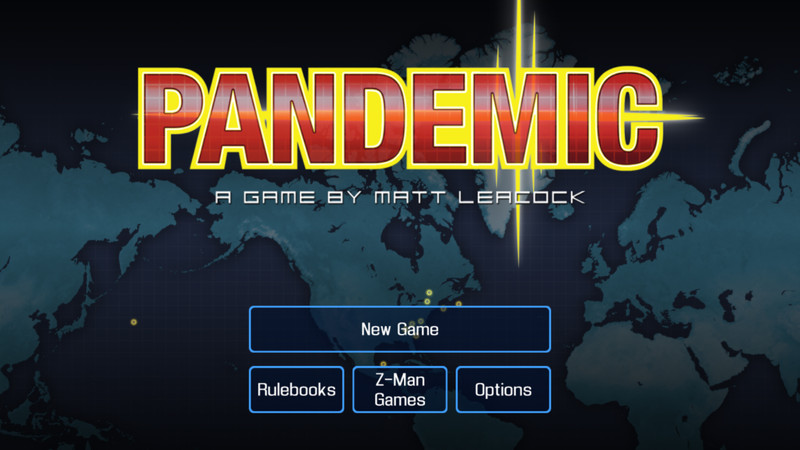

From spreading the plague, to trying to prevent one, this mobile version of the popular strategic board game of the same name that provides a real challenge whether you’re playing alone or with friends. Your goal: Try to cure four contagious diseases from spreading and taking over the world.
You select your characters at the start of the game, with each character performing specific roles to help eradicate the diseases. Which characters you pick will have a big effect on your team’s ultimate success. This is a pass-and-play game to play with friends, and you’ll all have to work together and use your teams strategically if you want to win. There’s an in-app purchase available for expansions, which improves the replayability of this addictive and challenging game.
Download: Pandemic: The Board Game ($6.99)
Vainglory


Vainglory is the complete package, featuring all the frantic MOBA action fans of the genre have come to expect — jump into a quick match with random teammates and opponents, create your own party of friends and take on all comers, or chill offline and practice your strategies against bots. There are five hero classes featuring a total of 25 unique heroes to unlock, upgrade and take into battle. The touch controls are smooth and easy to pick up, so you’ll be able to jump right into the heat of the battle instantly. As you fight your way down the lane, there’s a significant upgrade system that branches out, allowing you to react and counter your enemies more effectively.
If you’re new to the MOBA genre, no worries! After introducing you to the gameplay fundamentals on first launch, Vainglory also features the Academy, an extensive tutorial section that will help you bolster your skills and abilities in the game. There’s also a ton of things to unlock, live events to participate in, and a bustling online community on Twitch. Jump in!
Download: Vainglory (Free)
Hearthstone


Hearthstone is a free, turn-based card game that follows a familiar formula: players summon creature cards and cast spell cards based on the Warcraft universe in an effort to defeat online opponents.
Every one of the nine heroes has their own unique special ability as well as a sizeable batch of collectible and craftable cards. Casual online games, ranked matches, wacky weekly Tavern Brawls, and gruelling Arena games appeal to varying levels of commitment, as you build your deck and your best strategies.
Hearthstone is without a doubt the best free card game to come to Android to date.
Download: Hearthstone (Free)
Plants Vs. Zombies 2
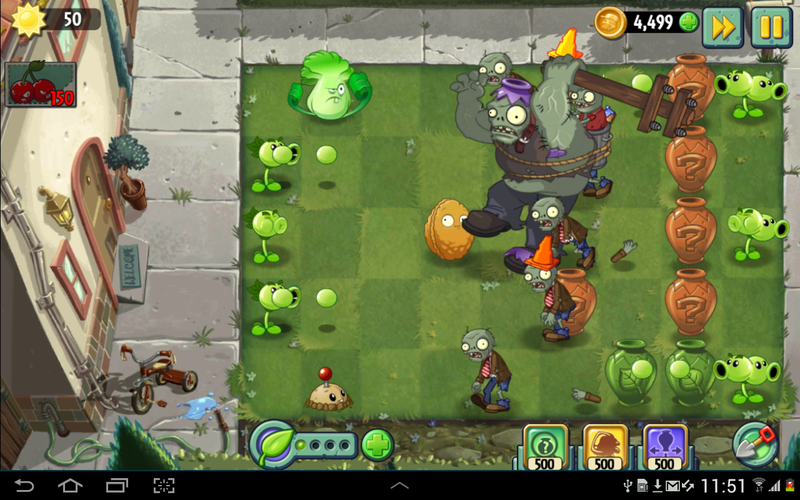

Plants vs. Zombies is a venerable mobile franchise for a good reason.
The bizarre premise of protecting your back lawn from hordes of undead with sunflowers and pea shooters (literally pea plants turned weapons) is certainly part of that, but there’s a lot of tactical thinking in terms of plant choices before the attack begins, and placement. In Plants vs. Zombies 2, you’re taken back in time to defend against zombies dressed in era garb, and try out all sorts of new mechanics. The zombies are getting smarter, and challenge your reaction speed in a number of ways, though you also have a whole new complement of plants to use. Stages also have new terrain features to keep every round fresh. Plant food can be collected to super-charge any plant when things get especially hairy.
All in all, Plants vs. Zombies 2 presents deep strategic gameplay in a fun, colorful package.
Download: Plants Vs. Zombies 2 (Free)
Star Command
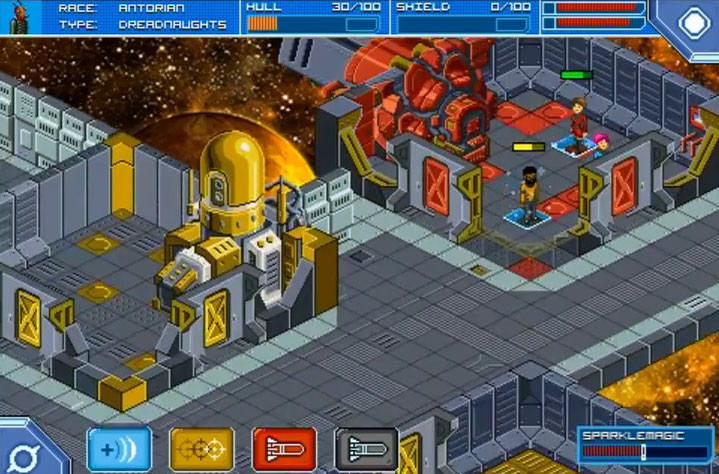

Star Command is a sci-fi strategy game with a retro pixel art style. Players take command of a spaceship that vaguely looks like it could have been pulled out of a Star Trek movie, and recruit a crew, upgrade facilities, and embark on intergalactic adventures that usually end in a firefight with grotesque aliens.
Battles rage between ships with different mini-games for each weapon system, or against boarding parties, where you need to move crew members into position, put out fires, and make sure your people don’t get sucked out into the cold void of space when there’s a hull breach. Over time, your crew increases in skills, enabling them to man the ship’s various stations with increasing effectiveness.
If you’re looking for a fun, light-hearted single-player experience with great writing and a lot of long-term progression, Star Command is where it’s at.
Download: Star Command ($2.99)
The Battle for Polytopia


If you’re a fan of the Civilization franchise, you just have to check out The Battle for Polytopia. This indie game features polygon tribes battling for control of the battle arena. The game features simple turn-based gameplay that’s quick and easy to pick up and play. Each turn, you collect stars based on the number and size of the cities you control, which you can spend on upgrading your tribe’s technology tree, building troops, or collecting resources. You must be wise with how you spend your resources and position your troops on your turn.
There are multiple ways to play. For solo play, you can create a custom game that either ends after 30 turns, or play until only one tribe remains. There’s also the rarely scene pass-and-play multiplayer option, which lets you set up a custom game among friends and even keep them saved so you can play the same game over time. If you aren’t able to play in person with friends, the AI offers a pretty decent challenge with difficulty levels ranging from easy to “crazy”. There are four tribes available to you when you download the game, with six others available via in-app purchases.
Download: The Battle for Polytopia (Free w/IAPs)
What are you playing?
These are our picks, but we love to hear what our readers are playing. Let us know in the comments and your picks just might appear in a future update!
Updated September 2017: We’ve added the award-winning Mushroom Wars 2 to our list! Check it out!
Android Gaming

- Best Android games
- Best free Android games
- Best games with no in-app purchases
- Best action games for Android
- Best RPGs for Android
- All the Android gaming news!
Galaxy Note 8 cases: Zizo keeps it safe and stylish!

The Galaxy Note 8 is here! And Zizo is here to help you keep it safe.
There are a lot of case companies out there, but none protect your phone from the calamities of daily live quite as well as Zizo. With a full collection of unique, stylish options for the new Galaxy Note 8 from Samsung, you’ll be able to stand out with Zizo’s fun and powerful Bolt or color-forward and throwback Retro.
Check out all the options below!
Zizo cases for the Galaxy Note 8
All of Zizo’s cases are built to withstand drops and scrapes, and most come with screen protectors.
The BOLT

The Zizo Bolt case is designed perfectly to suit all of your needs in any adventure. It is carefully structured to become the ultimate phone case. Additionally, the Bolt is 12 ft. military grade drop-tested (810-G Compliant), so you can adventure on, knowing your precious Note 8 will be protected.
See at Amazon
The ION

The crystal clear Zizo ION case is designed to accentuate the already elegant features of the Samsung Galaxy Note 8. The case fits snugly to provide protection and durability up to and beyond that of military standards. This minimalist styled case provides that excellent protection you’re looking for without adding bulk or extra weight.
See at Amazon
The STATIC

The Zizo Static case is engineered to protect your phone without adding bulk. It is made to absorb shock force when you drop your phone and it implements impact-dispersing technology so your phone doesn’t take a beating.
See at Amazon
The PROTON

The Zizo Proton is the perfect ride-or-die sidekick for any thrilling adventure. The Proton is military grade drop-tested (810-G Compliant) and features multiple layers of protection to handle all of life’s bumps and drops.
See at Amazon
The RETRO

The Zizo Retro allows you to carry your ID and Credit Cards in one retro case. This military grade, drop-tested Samsung Galaxy Note 8 side wallet case is designed to protect your phone and keep your ID and cards accessible. Everyone wants a protective phone case, but you don’t need a phone cover that gets in the way! Slip your phone into our polycarbonate cover that offers a snug slim fit.
See at Amazon
Samsung Galaxy Note 8
- Galaxy Note 8 review
- Complete Galaxy Note 8 specs
- Galaxy Note 8 vs. Galaxy Note 5
- Which Note 8 color is best?
- Join our Galaxy Note 8 forums
Verizon
AT&T
T-Mobile
Sprint
Best Buy
How to block calls on the Samsung Galaxy S7

Unwanted calls becoming annoying? Block them on your Galaxy S7.
Between all the texts, emails, and other notifications you get on your phone, phone calls are usually the most intrusive. That’s why unwanted phone calls sometimes make our blood boil. Luckily for Galaxy S7 users, they are easy enough to block.
- How to block all anonymous calls on Galaxy S7
- How to block specific numbers on Galaxy S7
- How to block a contact on Galaxy S7
How to block all anonymous calls on Galaxy S7
Samsung gives you the ability to block all incoming calls that are from unknown numbers. Whether it’s telemarketers or just the wrong number, you won’t have to worry about being disturbed with pointless calls.
Launch the Phone app from your Home screen or app drawer.
Tap on More. It’s in the top right corner for you screen.
Tap on Settings.

Tap Call Blocking.
Tap on Block list.
Tap the On/Off switch.

How to block specific numbers on Galaxy S7
If you keep getting spam calls from the same number you can block just that number from bugging you ever again.
Launch the Phone app from your Home screen or app drawer.
Tap on More. It’s in the top right corner for you screen.
Tap on Settings.
Tap Call Blocking.

Tap on Block list.
Type the number you want to block.
Tap the add button. It’s the little + on the righthand side of your screen.

How to block a contact on Galaxy S7
Launch the Phone app from your Home screen or app drawer.
Tap on More. It’s in the top right corner for you screen.
Tap on Settings.
Tap Call Blocking.
Tap on Block list.
Tap on contacts.

Tap on the contact you wish to block.
Tap the add button. It’s the little + in the on the right of your screen.

Recommended Reading: Why Cassini had to be destroyed
Analysis: Why Nasa’s Cassini Probe Had to Be Destroyed
Fedor Kossakovski,
PBS
By now, you’ve likely read a bit about NASA’s Cassini probe plunging into Saturn to end its tour of duty this week. You’ve also probably wondering why that had to happen. PBS breaks it down.
|
29 New TV Shows to Watch This Fall There’s a lot of new TV material to sort through this fall. From HBO to Netflix and more, The Atlantic has a guide to fall television so you know what to look for. |
Meet the Camperforce, Amazon’s Nomadic Retiree Army Amazon employs thousands of retirees and people in their 50s and 60s to work during the busy Q4 season. For many, it’s a fresh start even if it means living in an RV. |
|
Bodega Isn’t Just Bad Branding, It’s Bad Business Bodega made big news this week with its plan to offer corner store-like convenience without the retail shop. Eater explains why the name isn’t the biggest issue — the concept is. |
There’s Blood in the Water in Silicon Valley BuzzFeed takes a look at the current state of the US tech industry, including a solid case for why the golden age is over. |
The Morning After: Weekend Edition
Hey, good morning! You look fabulous.
Welcome to the weekend. Apple’s big hardware event dominated the week’s news, but it wasn’t the only thing going down. We’re still dealing with the aftermath of Equifax’s leak, and now NBA jerseys come with NFC tags.
iPhones, Apple TVs and more.Apple iPhone event 2018

A week flooded with Apple news means that even while paying close attention you could’ve missed something. Whether you’ve already pre-ordered an iPhone 8 or you’re waiting for an iPhone X you can find all the information you need right here.
This mess isn’t going away.Equifax’s chief security and information officers are out

The latest revelation from Equifax is the sudden “retirement” of two executives. Chief Security Officer Susan Mauldin and Chief Information Officer David Webb had their departures announced Friday, just a few days after the company explained hackers used a security hole that it could have closed with a patch a month earlier.
Are more Great Firewalls on the way?The missing trade war against China’s digital protectionism

As China’s digital economic power grows, the question is whether that will change, as freedom-of-expression groups and, increasingly, the tech industry have been asking. The goal: ensure that digital trade and information flows as freely in and out of China as do lightbulbs, shoes, or any of the other Chinese-made consumer goods found in stores across the US.
Interact with your apparel.Nike’s ‘NBA Connected’ jerseys tap into the game with NFC tags

On Friday night Nike officially unveiled new NBA jerseys and included some news for the fans as well. Its replica and authentic jerseys will include NFC tags that bestow digital bonuses to wearers via the NikeConnect app. Tap the correct spot to your iOS or Android phone on game day, and you could see exclusive team-related content, or get a boost for the corresponding player in NBA 2K18.
New game? Y/NNintendo’s NES Classic Edition is coming back in 2018

Nintendo says that due to demand, it plans to resurrect the tiny retro console in 2018. Shipment timings are yet to be announced, but this is big news for fans who thought they were going to miss out after the console began disappearing from store shelves. Until then, you’ll have to make do with that tiny Super NES Classic Edition, which lands at the end of this month.
Good news?Chrome will make autoplay videos less annoying in 2018

Starting in January next year, the browser will no longer autoplay videos unless they’re muted and don’t have sound or you’ve shown interest in watching them.
Everything Apple.The Engadget Podcast Ep 42

Unless you’ve been living under a rock, you know that Apple held a keynote at its glass-empaneled new “spaceship” campus this week, during which it announced a boatload of stuff. Join Dana Wollman and Chris Velazco as they talk about the new iPhones (all three of them), plus the Apple TV 4K and LTE-enabled Apple Watch Series 3.
But wait, there’s more…
- Bad Password: How Bodega typifies Silicon Valley’s cultural ignorance
- ‘Cowboy Bebop’ director Shinichiro Watanabe made a ‘Blade Runner’ animated short
- BMW unveils the zippy i Vision Dynamics electric concept car
- Google’s next Pixel smartphones arrive October 4th
- Now the Essential PH-1 phone will work on Verizon too
The Morning After is a new daily newsletter from Engadget designed to help you fight off FOMO. Who knows what you’ll miss if you don’t subscribe.
 AIVAnet