


Matrix mattresses want to use data to help you live your best life
Why it matters to you
Could tracking your heart rate variability be the key to a better night’s sleep? Matrix certainly thinks so.
If you’re looking to get a better night’s sleep, what better place to start your search than your mattress? After all, if you don’t have a solid foundation, it’s no wonder that you’re sleeping in fits and starts. The latest company to attempt to win your affections in the bedroom is Matrix, a smart mattress maker that claims to be the first to employ ballistocardiography in order to keep tabs on heart rate variability, breathing, movement, stress, and sleep cycles. Yes, it’s a mattress, but it’s also a highly sophisticated piece of technology.
Promising sleepers a holistic look at how their daily habits affect their nightly repose, the Matrix claims to provide customers with a veritable treasure trove of actionable data. Thanks to its companion app, you can determine not only how you slept, but how your actions in waking hours affected your sleep. How does it do this? It’s all dependent on your heart rate variability, or HRV. Considered a key indicator of overall health, HRV is effectively the inconsistency between your heart beats. A high HRV is generally correlated to a healthy diet and sufficient sleep, whereas a low HRV tends to indicate a lower fitness level and higher amounts of stress.
The Matrix mattress, along with its companion app, is said to keep tabs on your HRV levels. You will be alerted when HRV is at its peak (which means it could be a good time for you to go work out), or when it’s particularly low (which means you might need to go home and relax).
While this smart mattress hangs it hat on technology, it has not forgotten its primary purpose — comfort. The mattress is made of cooling memory foam and all the sensors are integrated into the very bottom of the bed, which means that you won’t feel all the tech.
The Matrix also claims an “innovative fabric cover [that is] cool to the touch and wicks away moisture by circulating air and dissipating body heat.” Plus, it has a copper-infused zone (because apparently, copper is all the rage in mattresses these days).
Like other mattress startups, the Matrix comes to you in a box and will start at $1,000 for a twin. The mattress is slated to appear on Indiegogo in October.
NikeConnect lets NBA fans unlock exclusive content from their team jersey
Why it matters to you
If you think an expensive jersey should offer a bit more in terms of benefits, you should check out NikeConnect. The replica and authentic jerseys provide NBA fans with access to exclusive content.
In the age of smart clothing, wearing a player’s name on the back of your jersey is just not enough. These days, when companies promise to be the Netflix of jersey rentals, the clothing you spend a good chunk of change on ought to offer something beyond the display of your team allegiance.
Nike on Friday, September 15, introduced its line of NikeConnect jerseys. The replica ($110) and authentic ($200) jerseys provide NBA fans with access to exclusive content. After downloading an accompanying app for an iPhone 7 or an Android device with NFC capability, NikeConnect wearers will be able to unlock highlights, stats, game tickets, Spotify playlists, and limited exclusive apparel deals, among other unannounced benefits, by scanning the jersey’s “jock tag.” Gamers who purchase a specific player’s jersey will also be able to provide that player with a boost when they play NBA 2K18.
“We know what we can do — make amazing gear,” Stefan Olander, Nike’s vice president of digital innovation, told ESPN. “But we wanted to do something more, and we know the passion that consumers have for these players and their teams.”
Olander told ESPN that NikeConnect can also serve as a more limited platform for athletes who want to engage directly with their most loyal, ardent fans, rather than using their social media channels for all the public to see. For example, say NBA superstar LeBron James wants to post a workout video of himself as a means of getting fans hyped for the upcoming season, it might be more prudent for him to do so in a more private setting, rather than potentially being openly mocked by his NBA peers. Nike will also know who bought the jersey, where they live, and where they scan it from, according to ESPN. Nike already seems to be salivating at the potential treasure trove of marketing data.
“We could tell LeBron how many fans of his checked in from Beijing,” Olander said. “If you look at this as a new gateway to a connection with a consumer, you could just imagine where this goes.”
NikeConnect launches on September 29 at nike.com/nba, nbastore.com, and a Nike store or team retailer near you.
Let Alexa set the mood for you with this $17 Eufy Lumos dimmable LED bulb
This Eufy Lumos smart dimmable LED bulb is down to $16.99 on Amazon. It normally sells for $20 and has never had a direct price drop like this before.
You can also get the tunable version of the Eufy Lumos for $25.49. That’s a drop from its normal price around $30. The only difference between these two light bulbs is the latter can be tuned to an ambiance of 2700K to 6500K.

These are smart bulbs from Anker’s home brand. They connect to your Wi-Fi, work with Alexa, and do not require a hub. Features include:
- 9W, 60W equivalent, A19, 800 Lumens
- Comfortable Lighting: Dim or brighten for your ideal illumination.
- Voice-Controlled: Alexa-compatibility means turning on and dimming the lights is effortless, even when your hands are full. (Alexa devices sold separately.)
- Access From Anywhere: Whether you’re at home or away, control the lights from your smartphone or tablet with the free EufyHome app (Android 4.3 and above or iOS 8 and above devices required).
- Functional Lighting: Set schedules to automatically turn on and off and enable Away mode to simulate a non-vacant house while you’re out.
The bulbs come with an 18-month warranty.
See at Amazon
More from Thrifter:
- How to get the most out of your Amazon Prime membership
- How to save money when driving
For more great deals be sure to check out our friends at Thrifter now!
Cheapest Phones for Seniors
- Best overall
- Best for Verizon
- Best Battery Life
Best overall
Moto E4

See at Amazon
The Moto E4 is a perfect size and has great, easy to use software so you can keep in touch without any of the frills, or install apps from the Google Play Store if you want a bit more. And best of all, the price is right: you can pick up the Moto E4 for about $130 unlocked and ready to use with any phone carrier in the U.S. If you’re an Amazon Prime customer, you can also buy a version with Amazon ads and offers on the lock screen for just $100.
The bright 5-inch HD display is paired with a four-core processor and 2GB of memory to keep up with almost anything. The 8
megapixel camera is paired with a 5 megapixel front-facing camera so you’ll be able to take great photos and videos, and the space for a removable SD card means you’ll never run out of space to keep taking them. And sharing those photos is a breeze with the high-speed LTE network radios the Moto E4 processor delivers.
Android 7.1.1 also offers great accessibility features like a screen magnifier or text-to-speech reader if you need a little help in low light or in general. Other features include a fingerprint reader so you can keep things like your messages and banking information locked away safely where only you have access.
Bottom line: The Moto E4 is the perfect balance of features and price in a great compact package.
One more thing: The Moto E4 is splash-resistant and has a scratch-resistant screen to keep it safe in your pocket or bag.
Why the Moto E4 is best
More than your money’s worth.
There’s a market for folks who want a phone that can not only keep you in touch with friends and family but is powerful enough to also do things like balance your bank account or use Facebook, and the Moto E4 is at the top of it.
Packed full of friendly features yet easy to use, the Moto E4 is a phone you’ll want to take with you everywhere. And with the option to use any company you like for phone service, you’ll have the freedom to do it. And the Moto E4 doesn’t forget that you’re also supposed to be able to make calls! The perfect size to hold against your ear and dual-microphones with a built-in active noise canceling feature means calls a clear on both ends so you won’t miss a single word.
Motorola’s software is unintrusive and easy to use, and full support for the Google Play Store gives you over 2 million apps to choose from once you decide you want to do more. It’s hard to believe you can get this much phone for $130.
Cheapest for Verizon Prepaid
Moto G Play

See at Amazon
Users of Verizon’s pre-paid service have a really great option with the Moto G Play. And it’s only $40!
With many of the same features of our top pick, like an 8MP camera (rear) and space for removable SD card storage, the Moto G Play uses a Qualcomm Snapdragon processor optimized for Verizon’s high-speed prepaid network. Introduced in late 2016, the Moto G Play is still a great phone and at $40 it’s the clear choice for anyone who needs an easy to use a phone with Verizon service.
Bottom-line: The Moto G Play offers an incredible value for Verizon prepaid service.
One more thing: The Moto G Play also has a removable 2800 mAh battery so you can carry a spare!
Best battery life
ASUS ZenFone 3 MAX

See at Amazon
The ASUS ZenFone 3 MAX is like buying a phone and a portable battery all at once. And you can buy it for about $125! (For AT&T and T-Mobile only.)
The ZenFone 3 MAX has great features like a 13MP rear camera and a 5.2-inch HD display, but the real star of the show it the 4,100 mAh battery. You won’t have to worry about not being able to spend the whole day away from the charger, and ASUS has estimated the phone will last an amazing 30 days in standby mode. There’s even a dedicated Super-Saving mode to delivers 36-hours of standby time after the battery level reaches 10%.
With this much battery on-board, ASUS also includes a cable so you can charge another phone using the ZenFone 3 MAX as a power bank.
Bottom line: A dead cell phone is no use to anyone. You won’t have to worry about it with a ZenFone 3 MAX.
One more thing: The fingerprint sensor also acts as a camera button so you won’t need to tap the screen to get a great photo.
Conclusion
The Moto E4 is one of the best values of any phone you can buy right now, and Motorola’s software keeps things simple and easy to use. And full access to over 2 million apps in the Google Play Store means you can add more if you want to, at your own pace.
Best overall
Moto E4
See at Amazon
The Moto E4 is a perfect size and has great, easy to use software so you can keep in touch without any of the frills, or install apps from the Google Play Store if you want a bit more. And best of all, the price is right: you can pick up the Moto E4 for about $130 unlocked and ready to use with any phone carrier in the U.S. If you’re an Amazon Prime customer, you can also buy a version with Amazon ads and offers on the lock screen for just $100.
The bright 5-inch HD display is paired with a four core Snapdragon processor and 2GB of memory to keep up with almost anything. The 8 megapixel camera is paired with a 5 megapixel front-facing camera so you’ll be able to take great photos and videos, and the space for a removable SD card means you’ll never run out of space to keep taking them. And sharing those photos is a breeze with the high-speed LTE network radios the Qualcomm processor delivers.
Android 7.1.1 also offers great accessibility features like a screen magnifier or text-to-speech reader if you need a little help in low light or in general. Other features include a fingerprint reader so you can keep things like your messages and banking information locked away safely where only you have access.
Bottom line: The Moto E4 is the perfect balance of features and price in a great compact package.
One more thing: The Moto E4 is splash-resistant and has a scratch-resistant screen to keep it safe in your pocket or bag.
How to completely disable the Bixby button

How do I disable the Bixby button on the S8 and Note 8?
Samsung has pushed out an update to Bixby for the Galaxy S8 and Note 8 that allows users to completely disable the functionality completely. This means that once the button is pressed (the button itself ain’t going away), it doesn’t do anything. This is a long time coming for many phone owners not exactly enamored with Samsung’s decision to include such a button, but it’s the best we’re going to get.
And if you’re using Samsung’s TouchWIZ Home launcher, you can easily disable Bixby from showing up on the home screen, too, further hiding the feature from the phone.
Why do you want to disable Bixby?
One of the biggest frustrations with the Bixby button is its placement; the button is right under the volume keys and nearly directly opposite the power buttons. On larger phones like the Galaxy S8+ and Note 8, this often leads to accidental presses and unintended Bixby launches, especially when double-pressing the power button to launch the camera.
The Bixby button is also not mappable to another action; Samsung wants you to use it for Bixby, or not at all. This isn’t ideal, so many people will inevitably choose to just forget it exists and move on.
Want to just disable Bixby Voice? You can!
How to disable the Bixby button entirely
It’s easy to disable the Bixby button, as long as you have the latest version of Bixby, which as of writing is version 2.0.03.3.
Press the Bixby button.
If prompted to accept update, update Bixby. (If not, see alternate instructions below.)
Slide Bixby key toggle to off.

That’s it! The Bixby button should be completely disabled now, so accidental presses shouldn’t do anything. Rejoice! But what if you’re not prompted to update Bixby, and that toggle isn’t at the top of the screen when you open Bixby? Because the app automatically updates, you may not get the prompt, so here’s how to disable the Bixby button from the settings.
Press the Bixby button.
In the top right, tap the three dot menu button.
Tap Settings.
Scroll down to Bixby key. Tap on it.
Set to Don’t open anything.

If you don’t want the Bixby button to do anything, you’ll have to disable Bixby Voice (if it’s enabled in your location) which will also prevent an errant long press from accidentally activating the voice assistant.
How to disable Bixby Home from the TouchWIZ launcher
Now, the final step to disabling Bixby entirely is to disable Bixby Home access from the TouchWIZ launcher which, by default, puts it on the left-most home screen panel.
From the home screen, hold down on empty space until the menu appears.
Swipe to the right to reach the left home panel.
Disable Bixby Home.

That’s it! Now neither the Bixby button nor the Bixby Home screen will work and you can move on with your life, Bixby-free.
Should you want to access Bixby again, though, you’ll need to follow these steps in reserve, first enabling Bixby Home from the launcher and then the Bixby button from inside the menu.
Questions? Comments?
Got any questions about this process, or just want to share your sheer joy at being able to disable Bixby? Let us know in the comments below!
Samsung Galaxy Note 8
- Galaxy Note 8 review
- Complete Galaxy Note 8 specs
- Galaxy Note 8 vs. Galaxy Note 5
- Which Note 8 color is best?
- Join our Galaxy Note 8 forums
Verizon
AT&T
T-Mobile
Sprint
Best Buy
Replace your wall outlets with ones that have two USB ports for $17
Odds are most of your gadgets charge using a USB cable, so wouldn’t it be nice to be able to plug that cable right into the wall without having to find a wall charger to plug it into? Well, with TopGreener’s dual USB outlet receptacle you can do just that. Right now you can pick one up for just $17.02 with coupon code OPZ757GL. This is a savings of $5 from its regular price.

All you have to do is replace an existing wall receptacle with this new one and you’ll instantly have access to the two plugs as well as two USB ports.
- Upgraded High-Speed Charging Tech: In-wall dual USB power outlet with a total output of 4.8 Amp, 24W, 5VDC. Each port reaches up to 2.4A maximum
- Smart intelliChip USB ports precisely read the power needed to maximize charging efficiency up to 2.4A per port or up to what the device allows without overcharging (does not support Qualcomm Quick Charge)
- Design Innovation: 3 interchangeable face covers that snap on to outlet face for easy color changes.
- 3 face cover colors include: White (comes attached), Black, Light Almond
- Duplex power outlet with tamper-resistant (TR) shutters enhance electrical safety, preventing unwanted objects from being inserted into the outlet; Meets 2011 NEC
- TR Duplex Receptacle 15 Amp/120VAC; UL listed;
- Easy installation includes simple back and side wiring. Wall plate NOT included.
As noted above, this outlet does not come with a wall plate. You’ll need to buy one separately, and we recommend the Leviton options which are extremely affordable.
Keep in mind that you’ll want to turn off power to the outlet before attempting to switch them out. If you aren’t comfortable doing the swap yourself, contact a local electrician to do it for you. It shouldn’t cost much, and your safety is important!
See at Amazon
More from Thrifter:
- 8 weird things you probably have in your house that sell on eBay
- How to save money when driving
For more great deals be sure to check out our friends at Thrifter now!
U.S. unlocked Galaxy Note 8 receives first software update, stays on August security patch
Samsung cares about the U.S. unlocked Note 8! It really does!
Just a handful of days after the Galaxy Note 8 left pre-order status, Samsung has sent out its first update to the proper U.S. unlocked model. The update, which brings the phone up to software version 1AQI5, is a respectable 81.63MB. The changelog, if you could call it that, isn’t as exciting. There’s “improved stability” particularly in relation to Google Maps and the Weather widget — and then of course the standard “bug fixes” we all know and love.
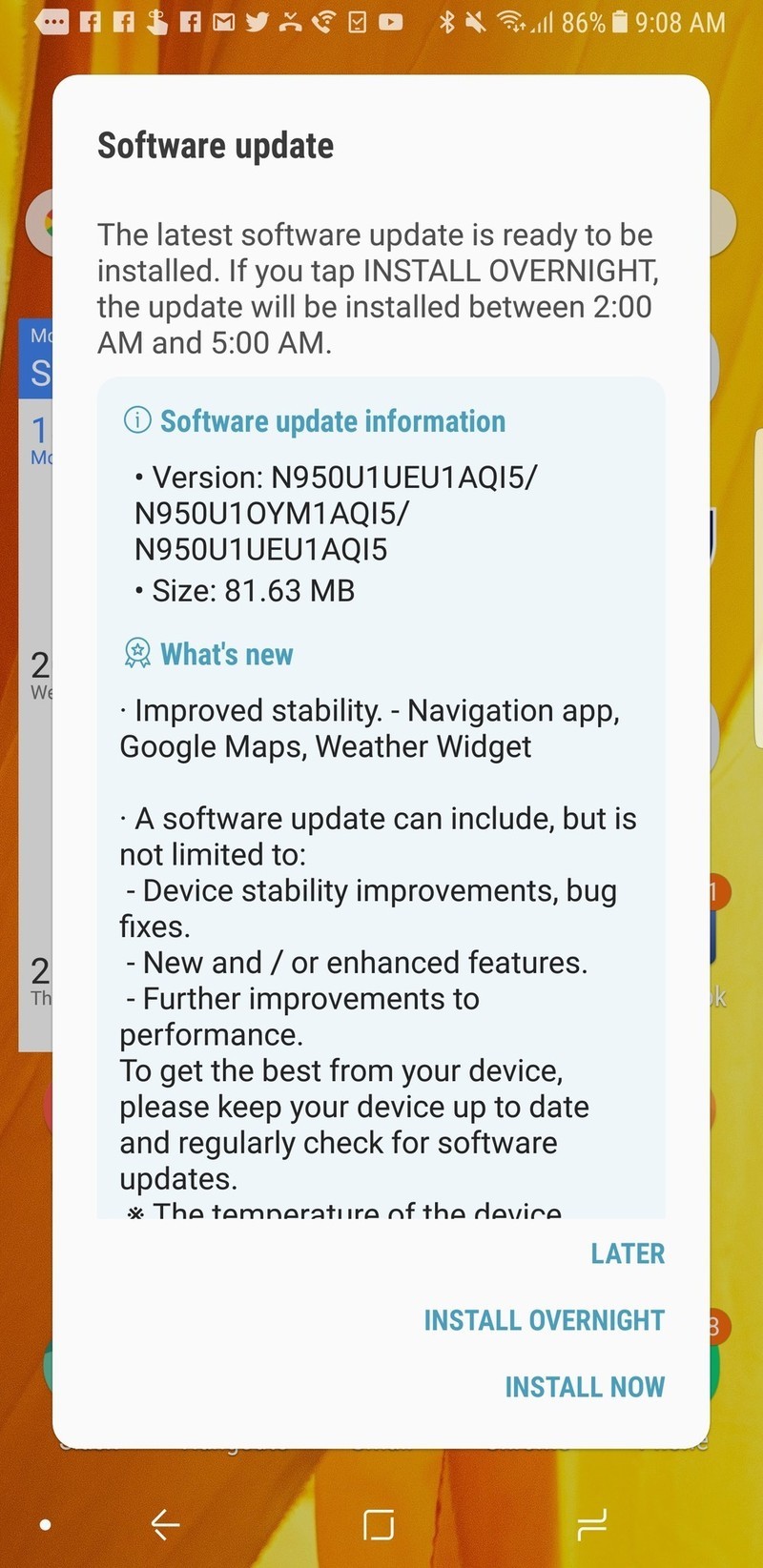
The update doesn’t seem to change anything that can actually be seen in the interface, and with an update of this size that isn’t all that surprising. Despite rolling out in mid-September the update unfortunately doesn’t include the September security patch from Google … we’re still on August here.
The important part of this update, really, is that Samsung is actually pushing out an update to a U.S. unlocked phone. Something it’s been well-known for neglecting to do.
Is this one update going to change the perception that Samsung simply doesn’t keep up with updates on its U.S. unlocked models? No, it’s going to take more than that. But, this is a great first sign — pushing out an update just a few days after the Note 8 officially went on sale and hit stores gives us confidence that the company has an eye on its unlocked version.
Are you noticing anything different on your Note 8 after the update? Let us know in the comments below!
Samsung Galaxy Note 8
- Galaxy Note 8 review
- Complete Galaxy Note 8 specs
- Galaxy Note 8 vs. Galaxy Note 5
- Which Note 8 color is best?
- Join our Galaxy Note 8 forums
Verizon
AT&T
T-Mobile
Sprint
Best Buy
Apple’s iPhone screen repair prices are now $20 higher
Some Reddit users reported yesterday that Apple has increased its screen repair prices for certain iPhone models. Fixing a broken iPhone 6s or 7 screen will now cost $149, up from $129. And repairs for iPhone 6s Plus and 7 Plus screens has increased from $149 to $169, according to Apple’s service pricing page.
Those prices are for phones not covered under an AppleCare+ warranty. Screen repairs on phones that are covered under the extended warranty will still cost $29. But AppleCare+ has gone up as well, with larger phones like Plus models costing $149 and the new iPhone X warranty priced at $199.
The new iPhone 8 models are priced under the new screen repair plan — the 8 will cost you $149 and the 8 Plus, $169 for a new screen. There’s no price on Apple’s site for an X screen repair, but we can probably expect it to be even higher. We’ve reached out to Apple about the new pricing and we’ll update this post if we receive any additional information.
Via: The Verge
Source: Apple
New Apple File System Coming in macOS High Sierra Won’t Work With Fusion Drives
When macOS High Sierra is released to the public next week, the new Apple File System (APFS) feature will be limited to Macs with all-flash built-in storage, which means it won’t work with iMacs that include Fusion Drives.
iMacs with Fusion Drives were converted to APFS during the beta testing process in the first macOS High Sierra beta, but support was removed in subsequent betas and not reimplemented.
With the release of the Golden Master version of the software, Apple has confirmed APFS will not be available for Fusion Drives and has provided instructions for converting from APFS back to the standard HFS+ format.
Public Beta testers who had an iMac with a Fusion Drive converted to APFS will need to follow a long list of instructions to convert back to HFS+, including making a Time Machine Backup, creating a bootable installer, and using Disk Utility to reformat their iMacs and reinstall macOS High Sierra.
Apple on September 5 published a support document confirming compatibility. When customers with an all-flash machine upgrade to macOS High Sierra install the update next week, their drives will be converted to AFPS. Apple explicitly says “Fusion Drives and hard disk drives aren’t converted.”
Apple says APFS will not be supported on Fusion Drives “in the initial release of macOS High Sierra,” which suggests support could be added for Fusion Drives at a later date after lingering bugs are worked out.
Apple File System is a more modern file system than HFS+ and is optimized for solid state drives. It is safe and secure, offering crash protection, safe document saves, stable snapshots, simplified backups, and strong native encryption.

It’s also more responsive than HFS+ with features like instant file and directory cloning, fast directory sizing, high performance parallelized metadata operations, and sparse file writes.
Apple plans to release macOS High Sierra on Monday, September 25.
Related Roundup: macOS High Sierra
Discuss this article in our forums
Lyft requests will light up phones for deaf drivers
Back in April, Lyft launched features that made its system easier to use by deaf drivers and those who are hard of hearing. Now, it’s adding a couple more to celebrate National Deaf Awareness Month. Thanks to its partnership with the National Association of the Deaf, the ride-hailing firm has developed “flash-on request” for drivers. If they’ve activated the app’s hard-of-hearing accessibility function, they’ll get a powerful visual notification whenever a ride request comes in: their phone’s screen and flashlight will both light up. When combined with the Amp emblem flashing the words “New Ride,” it could lower the chances of a driver missing out on a request.
In addition, Lyft is also making an attempt to breach the language barrier between drivers and passengers. It’s beefing up the automated text it sends out notifying passengers that their drivers are deaf or hard of hearing with a link to a tutorial on how to say “Hello” and “Thank you” in American Sign Language. The company didn’t say when the features will be available exactly, but it promises to roll them out soon.
Source: Lyft
 AIVAnet