


Deal: OnePlus 5 now comes with free Bullets V2 earphones for a limited time
The OnePlus 5 now comes with a free pair of Bullets V2 earphones, but only until September 30.
Despite its overhyped camera and familiar design, the OnePlus 5 is still one of the best values in smartphones right now. As if the device didn’t already offer enough bang for your buck, OnePlus is now bundling a free pair of its Bullets V2 earphones with the purchase of its latest flagship killer.
The OnePlus Bullets V2 aren’t the greatest earphones ever made, but even at their regular price of $19.95, they follow the OnePlus 5’s theme of offering a lot of value for the money you spend. OnePlus partnered with German audio company LOFO when designing the Bullets V2, and as such, the Bullets V2 offer professional tuning to kick out deep bass, pleasing treble, and a smooth midrange for all of your tunes.

Add this together with a super lightweight design at just 2-grams, anti-allergy silicon tips, inline audio controls, flat tangle-free cord, and a sleek design for earbuds themselves, and you’re looking at a pretty awesome freebie.
You can get the Bullets V2 for free between now and Saturday, September 30, and if you want to take advantage of this deal, you’ll need to order the 8GB RAM/128GB storage OnePlus 5 variant for $539.
See at OnePlus
OnePlus 5
- Complete OnePlus 5 review
- OnePlus 5 specs
- Which OnePlus 5 model should you buy?
- Camera comparison: OnePlus 5 vs. Galaxy S8
- The latest OnePlus 5 news
- Join the discussion in the forums
OnePlus
Amazon
The LG V30 has an amazing camera, but it won’t make you a great photographer

7,000 miles from home is no place to realize that you’re a bad photographer with no real knowledge of photography.
Five years ago, I was flown to Seoul to cover the launch of a brand new smartphone line. Business class, on Korean Air. In my gear bag was a brand new, full-frame DSLR. It cost well over $1,000 and was a pretty big step up from the prosumer model I’d been using pretty well until then.
Taking smartphone pictures isn’t the same as being a photographer. At all.
It was my first trip to Asia, I was riding in style (though 14-hour flights are 14-hour flights no matter which end of the airplane you’re in), and I had some hot new (to me) gear in the bag to work with.
I then proceeded to take some of the worst pictures of my career while on deadline. Blurry. Dark. Dark and blurry. Or blurry and blown out. I had no idea what happened. So I went back and took more pictures. They were slightly less horrible.
My better, more expensive camera let me down. Or, rather, I’d let it down.
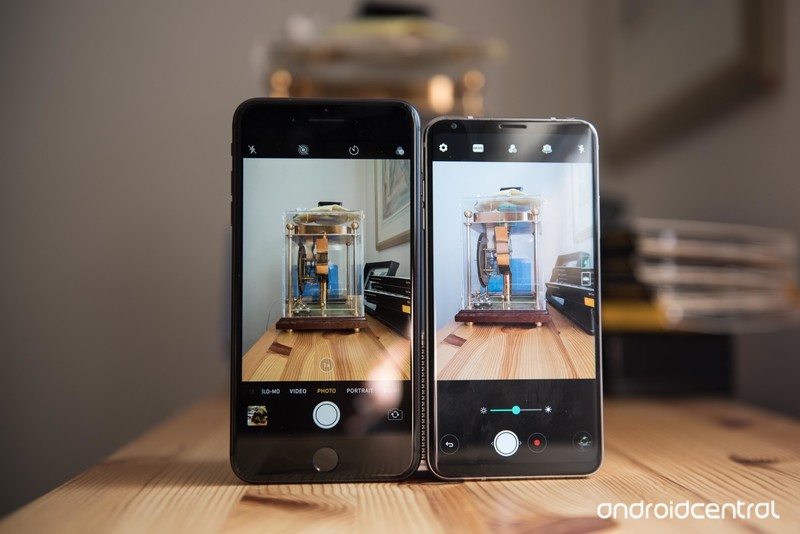
We’ve seen plenty of headlines the past few years — and especially the past few weeks with the LG V30 and now the iPhone 8 — about how you can take “professional” photos with a smartphone. It wasn’t true years ago, and not still not true now, and for one simple reason:
You can fly 7,000 miles with a fancy $2,000 camera and still take shitty pictures. I proved it.
I was reminded of this by my Verge pal Dan Seifert as a tangent to a pretty good tweet storm.
the base of it all is you need to know Photographic Principles if you’re really going to get great shots. the phone can’t make up for that.
— trying my best (@dcseifert) September 22, 2017
It’s that simple.
Smartphone cameras have gotten exponentially better over the years. My first child was born in 2006. The second in 2010. And looking back at those pictures versus what I can take today, well, you’ll see the difference.

Larger sensors let in more light. Better lenses and optical image stabilization help make things look better, too. The algorithms companies use to process photos have gotten better and better — and we’re just at the cusp of letting artificial intelligence do a lot of the heavy lifting, which is going to open up a whole new world of features and improvements.
But that absolutely does not mean that the person on the other end of the camera doesn’t matter. Far from it.
Take a photography class. Even your most basic phone pic will be better for it.
For one, a lot of the hot new features — such as the “Cine Log” styles — are left to the “manual” mode in the camera. Maybe you’re the type of mobile photographer who’ll stop what you’re doing to hop into manual mode and set up everything just so. And in that case, you’re a better mobile photographer than I — and I’m willing to bet better than most folks out there.
But as Dan explains in that tweetstorm, it’s about more than automatic settings and filters. It’s about composition. And lighting. (It’s almost always about lighting.) And so much more.

You can have all the tools in the world at your disposal. And they definitely can help you take better pictures on a daily basis.
But there’s absolutely no substitute for having some basic knowledge of photography, whether you’re using a smartphone or full-frame DSLR.
That’s a lesson I wish I’d known back in 2012 in Korea.
LG V30
- LG V30 review: The no-BS flagship
- Top LG V30 camera features
- Full LG V30 specs
- LG V30 vs. G6 vs. GS8
- The V30 is the first phone to support 600MHz spectrum
- Join our LG V30 forums
Free up your outlets with this $33 Aukey power strip
This trash can-looking power strip gives you access to plenty of ports and outlets for all your charging needs!
The Aukey vertical power strip with 12 outlets and 6 USB ports is down to $33.19 with code AUKEYPS4 on Amazon. It has a street price of $40 and hasn’t sold lower than that through a direct price drop.

As far as power strips go, this is one fancy-looking doodad. I love the look of it. It’s a power strip you wouldn’t be embarrassed to keep up on your desktop, and it gives you easy access to 6 USB ports along with the regular outlets. If you have a bunch of phones, tablets, and little things that need charging, this would be great for you.
Features include:
- Consolidate your power supply – 12 AC outlets and 6 USB ports meet all your power requirements
- AiPower Adaptive Charging Technology – Tuned to provide the safest maximum recharge rate for all your USB-powered devices, up to 2.4A per port (6A total max)
- Column design provides more space and convenient angles to easily plug in all your electronic and electrical devices
- Built-in safeguards protect your devices against excessive current, overheating, and overcharging
All Aukey devices come with a two-year warranty.
See on Amazon
More from Thrifter:
- 8 weird things you probably have in your house that sell on eBay
- How to save money when driving
For more great deals be sure to check out our friends at Thrifter now!
How to use App Pair on the Galaxy Note 8

Just one change can save you time every single day.
Samsung didn’t change a whole lot about the software experience in the Galaxy Note 8 compared to the Galaxy S8+, but it did add a couple of useful tricks. One of them is “App Pair,” a feature that lets you open directly into a multi window session with two apps of your choosing, saving you multiple taps to launch a pairing that you access regularly.
Here’s how to get it done and upgrade your multi window productivity in an instant.
In order to use App Pair, you’ll have to enable your Edge Screen if you’re not already. You can edit the panels of your Edge Screen independently of using App Pair — so long as you have the Apps Edge panel enabled, you’re good.
Swipe in from the edge of your screen to reveal the Apps Edge.
Tap on an empty Apps Edge space (denoted by a + sign).
Tap create app pair in the top-right corner.
Tap the two apps you wish to link from the list of multi window apps and tap done.
- Use the “switch” button to choose which app goes on the top and bottom when you launch the pair.
-
Note: Not all apps are available in multi window mode.

You can add, remove or rearrange any selection of single apps and App Pairs in the Apps Edge at any time — it only takes a minute. With your App Pairs set up, you may end up using multi window even more!
The only hope we have for App Pair is that it makes its way back to the Galaxy S8 and S8+ in a future software update, because this feature isn’t only beneficial on the Note 8’s 6.3-inch screen. It saves you taps and time on a phone of any size!
Samsung Galaxy Note 8
- Galaxy Note 8 review
- Complete Galaxy Note 8 specs
- Galaxy Note 8 vs. Galaxy Note 5
- Which Note 8 color is best?
- Join our Galaxy Note 8 forums
Verizon
AT&T
T-Mobile
Sprint
Best Buy
Showtime websites used visitors’ browsers to mine cryptocurrency
Over the weekend, visitors to Showtime’s website or its streaming site ShowtimeAnytime might have noticed their computers slowing down a bit. That’s because someone slipped in some JavaScript into the sites that caused them to siphon off processing time from users’ browsers in order to mine the cryptocurrency Monero. The Register reports that the software took up as much as 60 percent of visitors’ CPU capacity.
It’s unclear who introduced the JavaScript into the websites — it could’ve been a hacker, it could’ve been Showtime or its parent company CBS, though the latter seems less likely. But the Monero-mining scripts were written by a company called Coinhive, which provides this kind of code so that webmasters can choose to generate some revenue without having to resort to ads. The Pirate Bay did this recently. Coinhive told The Register, “We can’t give out any specific information about the account owner as per our privacy terms. We don’t know much about these keys or the user they belong to anyway.”
The mining code is now gone from the websites and Showtime doesn’t seem to want to talk about the incident. As for Coinhive, which seems to be perturbed by websites using its code without letting users know and a little irritated that it’s now being blocked by adblockers, said on its website that it’s working towards making its script opt-in, a move that would hopefully circumvent both issues. And in theory, prevent others from sneaking it into someone else’s website.
Source: The Register
Giphy taps Google AI tech to help you find the right GIF
Giphy’s collection is a good way to find the right GIF to express your feelings… up until you’re tracking down that one elusive GIF that’s improperly tagged. The company has a clever solution, though: make AI technology look through the GIFs itself. It’s implementing Google machine learning that combs through the animated image files looking for caption text. If you’re trying to find the “where are the turtles” quote from The Office, you’ll actually see GIFs related to that quote — not every vaguely turtle-related picture under the Sun.
Notably, the new system (developed by an intern, Bethany) prioritizes captions over its source description. Giphy does take care to prevent this from overriding common searches, though. Looking for “happy birthday” won’t suddenly turn up every celebratory movie scene.
To no one’s surprise, the new feature had a dramatic influence when put to the test in the summer. Many more people were clicking through to GIFs when they searched for phrases (32 percent more for “never give up never surrender,” for example). In other words, visitors are actually getting the GIFs they looked for. That’s rather important for a company whose business revolves around originals and cutting deals with media creators, and it increases the odds that you’ll come back.
Uber Adding Feature to Let Drivers Provide More Rider Feedback
Uber today introduced a new feature for its iOS app that allows drivers to provide feedback when giving a rider a rating of less than five stars.
As outlined by The Verge, drivers are now asked “what went wrong” when providing a four star rating or lower. Drivers can then choose from reasons like wait time, patience, number of riders, attitude, wanted a new route, or other.
Riders who get two of the same rating tags in a 30 day period will receive a notification letting them know about the low ratings and the reason why.
Uber is also changing the way its UberPool service works in an effort to make the feature less stressful for drivers. UberPool allows passengers to choose a cheaper fare, but it’s a shared ride with the potential for several passenger pickups.
For UberPool rides, drivers will now receive an additional flat fare for each passenger picked up, and Uber says it is planning to pay much of the added cost for the trips through a service fee reduction. Riders will not pay more for a trip even if there are additional pickups.
Uber in June launched a “180 Days of Change” initiative designed to improve working conditions for its drivers and bolster its public image, and today’s changes are part of that effort. Uber has been introducing new driver features since then, starting with a long-desired in-app tipping option.
Tag: Uber
Discuss this article in our forums
 AIVAnet