


Best iOS app deals of the day! 6 paid iPhone apps for free for a limited time
Everyone likes Apple apps, but sometimes the best ones are a bit expensive. Now and then, developers put paid apps on sale for free for a limited time, but you have to snatch them up while you have the chance. Here are the latest and greatest iOS app deals available from the iOS App Store.
These apps normally cost money and this sale lasts for a limited time only. If you go to the App Store and it says the app costs money, that means the deal has expired and you will be charged.
Fireworks Tap
Tap the screen and watch the fireworks explode! This app promises ceaseless entertainment for kids and adults alike — there are no extra buttons to tap and no ads to distract you.
Available on:
iOS
Multi Translate Voice
Multi Translate is a professional translator and interpreter app that is able to translate any language into three others at the same time.
Available on:
iTunesiOS
Professor Ball
The ball in this addictive game is bouncing and seeking to escape from obstacles. You’ll have to help the ball escape in order to save the day and win the game.
Available on:
iOS
Universal Doctor Speaker
Universal Doctor Speaker is a multilingual app providing key medical phrases translated across 17 languages, with audios to facilitate communication between patients and healthcare professionals who don’t share a common language.
Available on:
iOS
Japanese
Japanese is the ultimate study companion for any Japanese language learner. Japanese is comprehensive, with over 175,000 dictionary entries and 58,000 example sentences, and fits perfectly in your pocket.
Available on:
iOS
Edge Music
View the top artists from major music labels side by side with emerging indie artists, all in one place. Edge Music is your source for an unrestricted music video experience.
Available on:
iOS
How to buy the LG V30 unlocked, and on every carrier
The LG V30 is arguably one of the best smartphones of the year, boasting LG’s huge and beautiful display, Qualcomm’s latest chip, the Snapdragon 835, and even IP68 water-resistance.
It makes sense, therefore, that you might want to get your hands on the device for yourself. But how can you do so? So far, the phone has only been launched in South Korea, while other markets are set to get the phone “soon.”
Here’s everything we know about buying the LG V30 in the U.S. so far.
Buying an LG V30 unlocked
If you’re willing to pay full price for the LG V30, then perhaps the best thing to do is buy one unlocked. Why? Well, not only does that mean that you can take the phone to whatever carrier you want, but it also means you don’t have to worry about paying extra fees each month — because you’ve already paid those extra fees.
It hasn’t been confirmed if the LG V30 will be available unlocked, but we’ll update this article as we hear more. The phone has been released in South Korea, and its price equivalent comes out to be around $840 for the 64GB model, and $885 for 128GB.
Buying an LG V30 from your wireless carrier
Don’t want to buy it outright or have some credits from your carrier to use? You’re in luck — wireless carriers around the U.S. will offer the LG V30, and while they’ll likely offer slightly different deals and prices, your carrier should be able to set you up with the new device. Here’s everything we know about buying the LG V30 on a wireless carrier.
Buying an LG V30 from AT&T
AT&T has confirmed that it will indeed be offering the LG V30, but it has not given us a specific release date or pricing for the phone just yet.
Buying an LG V30 from Sprint
Sprint will offer the LG V30, as the company’s CEO confirmed on Twitter. We’ll update this article when we hear pricing and availability.
Buying an LG V30 from T-Mobile
T-Mobile said it will carry the LG V30, and it says it will be the first smartphone to support the “un-carrier’s” 600MHz LTE, which means better cell signal for you. It has “nothing to share” about V30 availability or pricing, but we’ll update this article when that changes.
Buying an LG V30 from Verizon
Verizon will offer the LG V30, but it hasn’t announced pricing or availability. We’ll update this article when that changes.
Alexa will now play Amazon Music on your iPhone or Android phone
Why it matters to you
Just recite a few lyrics to Alexa and she’ll play the song you’re talking about on Amazon Music, all on your iPhone or Android device.
Look out, Siri. You’re no longer the only smart assistant capable of controlling tunes on an iPhone. The latest update to Amazon Alexa places the popular virtual assistant firmly within the Amazon Music streaming app on both iOS and Android, which means that you can tell Alexa what song to play next not only while in your home, but while on your phone, too.
The addition of Alexa to the Amazon Music app promises to combine natural language voice control with a rich, visual app experience. As Amazon noted in a release, “Tens of millions of songs are now at the tip of your tongue as well as the tips of your fingers – wherever you go.”
Using Alexa in the app, regardless of your operating system, is straightforward — simply tap the push-to-talk function in either iOS or Android and start barking out your commands to Alexa. Of course, you’ll have to update the Amazon Music app in order to ensure it has permission to access your microphone. Once you’re ready to start using Alexa, however, you don’t even have to be that specific in your requests. For example, you can tell Alexa, Play the new song by Fifth Harmony,” and the AI assistant will play He Like That.
Alternatively, you can ask Alexa to “Play music for a road trip,” or if you have a song in mind but don’t know the title, just say a few of the lyrics, and Alexa will do the rest.
“Amazon Music customers already know and love Alexa from listening on Echo devices,” stated Steve Boom, vice president of Amazon Music. “Now our mobile listeners can enjoy an entirely new app experience that combines the power and simplicity of Alexa voice controls with the visual richness of the Amazon Music app.”
If, for some reason, you’re not interested in controlling your music with your voice, you can still use the search box in Amazon Music to type in your search queries, but if you ever need (or want) hands-free operation, that’s now an option as well.
Alexa for Amazon Music is available in the U.K., U.S., Germany, and Austria, and it seems reasonable to assume that additional countries could soon enjoy the experience as well.
Plug that phone in while you navigate: Our 10 favorite iPhone car chargers
There’s no reason your traffic-laden commute to work can’t double as the perfect time to charge your Apple device. Although there are plenty of car chargers with Lightning connectors out there that are capable of getting the job done, only a select few deserve your attention and hard-earned money. Some may tout a lightweight design or additional USB ports, while others are compact and attempt to save space, but nearly all of them provide a quick and convenient solution for charging your smartphone via the 12-volt socket — aka the circular cigarette lighter — housed within your vehicle’s dashboard or main interface. Below are a few of our current favorites.
Best iPhone car chargers
iOttie Rapid Volt Dual Port USB Car Charger
- MFi Certified: No
- Length: N/A
- Warranty: None
- Price: $12
iOttie’s car charger doesn’t include a USB cable, but it makes up for it by having two USB ports (each charging at 2.5Amp / 12.5-Watt each port). Not only can you charge multiple devices at once when you’re on the road, but the green halo glows to indicate the charger is on and working. When your device is at 100-percent capacity, the Rapid Volt’s ‘Smart Charge’ technology stops charging to avoid premature battery wear.
Buy one now from:
Amazon
PowerBear Car Charger
- MFi Certified: Yes
- Length: 3 feet
- Warranty: 24 months
- Price: $22
PowerBear’s offering is another charger that comes with a built-in Lightning cable and also has two extra USB ports for charging other devices simultaneously. The charger will adjust to the connected device to charge it as quickly as possible. Unlike the Shine Future charger, it is smaller, but depending on where your car’s 12V socket is, the USB ports and cable may be harder to access or, at the very least, the cable will be bent in an uncomfortable-looking direction. Should anything happen to the charger, it’s covered by a 2-year warranty, so you can reach out to PowerBear to get a replacement.
Buy one now from:
Amazon
E. T. Pocket Car Charger
- MFi Certified: No
- Length: 3 feet
- Warranty: Limited
- Price: $13
The car charger from E. T. Pocket features a retractable Lightning cable that puts out 1.2 Amps. It also comes equipped with one additional USB port in case you need it, and that’s really all this particular charger has to offer. Its design is straightforward and easy to use, which may be exactly what you want from a car charger.
Buy one now from:
Amazon
Anker PowerDrive Car Charger
- MFi Certified: Yes
- Length: 3 feet
- Warranty: 18 months
- Price: $14
If you don’t care about extra USB ports or the ability to retract the cable, and just want a charger with one use, Anker’s car charger is the way to go. It just has the one, 3-foot Lightning cable built-in to it and, overall, it may be one of the smallest products on this list. Anker notes that its charger isn’t compatible with Lifeproof or Otterbox iPhone 6 cases, so if you prefer cases from those manufacturers, this charger may not be for you. On a more positive note, though, it is backed by an 18-month warranty.
Buy one now from:
Amazon
1byone 3-Port USB Car Charger
- MFi Certified: No
- Length: N/A
- Warranty: 12 months
- Price: $10
If two USB ports just won’t cut it, 1byone’s three-port charger has you covered. At just $10, this is one of the cheapest ways to charge multiple iOS devices while assuring you don’t overcook your toys. Up to 2.4 Amps of power can be delivered to whatever is connected. An LED light is displayed when the device is on and delivering charge. Also, that red aluminum casing looks pretty snazzy.
Buy one now from:
Amazon
Amazon Music app adds Alexa support (but only in four countries)

Now you can ask Alexa to play you all sorts of things instead of just hoping you hit the right result.
 Amazon has added the ability to search through the Amazon Music app using your voice with Alexa, instead of … erm … searching with your voice through whatever it was it was using before. The update is a good thing, really, prominently placing an Alexa button at the bottom of the app and making it easier to do voice searches. (Instead of searching and then hunting for the voice command mic button thing.)
Amazon’s touting the contextual ability of the Alexa search. For example: “Just use the push-to-talk feature and say, ‘Play the new song by Fifth Harmony,’ and Alexa will play ‘He Like That.’ ” (I’ll have to take Amazon’s word for it in this case, but contextual searches in music is a big deal.)
One caveat here: The Alexa search is available so far only in the U.S., UK, Germany and Austria.
Amazon Music
- Get started with Amazon Music
- Which Amazon Echo should you buy?
- All about Alexa Skills
- Top Echo Tips & Tricks
- Amazon Echo vs. Google Home
See at Amazon
Plex adds its own personalized free news service

Following its acquisition of Watchup, Plex is launching its first in-house content stream in the form of Plex News.
Plex is best known for being a home media server, running on basically any device you can imagine. For a while, you’ve been able to add in channels delivering third-party content, but now Plex is getting into that game on its own.
Plex News is launching as a free addition to the service for all users, though those with Plex Pass subscriptions will get a 48-hour head start on proceedings. You don’t even need a Plex Media Server to try it out, literally anyone can use Plex News and get a taste of the Plex service for free.
More: A beginner’s guide to Plex
So, what is Plex News? Well, the news is something we all consume every day, whether we like to admit it or not, and Plex is taking it upon itself to serve you up a personalized newscast throughout the course of the day.
Today we’re rolling out an awesome addition to your balanced media diet: Plex News. It’s the perfect complement to your media library — video news from some of the most trusted sources on the planet, presented beautifully and seamlessly alongside your own media. And because Plex is all about your media your way, you can personalize your news feed, and our advanced AI learns what you like and gets smarter the more you watch (since it’s just a robot, it’ll never mock your obsession with the Kardashians or insatiable appetite for stories about kittens being rescued from floods).

Plex has over 190 channel partners at launch, but that doesn’t mean that’s what you’ll be watching. Part of the strength of Plex News is that you’re able to set your location in the settings so it’ll serve up local content that matters to you as well as more global news. In the U.S. alone, Plex is promising an 80 percent coverage of local news affiliates already. It’s also important to note that Plex News is ad supported. As it’s not being made part of Plex Pass, the service is self sustaining, and so every now and again you’ll see a short ad in the stream.
You won’t see celebrity gossip unless you actually want to.
And it’ll cover all the subject areas you’re interested in. While you’re able to manually select areas of interest, the AI will learn over time what you like to see and make sure that your newscast contains only good stuff. Absolutely no celebrity gossip. Not unless you like that sort of thing. Besides telling Plex News what interests you, you have a more granular control to mute, follow or unfollow specific channels, as well as just plain old searching for content and browsing the various hubs.
Plex News is launching in almost all of the apps on all of the platforms. Android mobile and Android TV are supported at launch, alongside Roku, Apple TV and iOS. The web app is on a fast track and should get it within 30 days. And even though it’s free for everyone, you don’t have to use it. If you prefer to keep your Plex just your own media, you can just hide the Plex News channel away and never have to look at it.
Plex News will push out to all Plex users from September 26, 2017, and as long as you’re on the most recent version of the app it’ll just appear at some point in the next few days. No further updates are required. Find out more on the official Plex blog.
Download Plex from the Google Play Store
The drone can’t fly but this deal price can, so jump on it while you can
Parrot’s Jumping Sumo is not your average drone. You can experience your own for just $19.99 refurbished when you enter promo code THRFTR10 at checkout to save $10 off this item’s sale price at Daily Steals. Amazon has the refurbished version for $29.99, and Groupon has them in new condition for $49.99 right now.

The Jumping Sumo is tiny, and it doesn’t soar through the sky like other drones. Instead, like its name suggests, it’s a land drone which jumps. Not only that, but it’s pretty acrobatic. You can do sudden 90 and 180-degree turns and change your direction in an instant, do quick spins or jump across 80cm gaps. You’ll basically be a parkour star at that point.
It’s equipped with a wide-angle camera which streams live immersive film directly to whatever device you download its included FreeFlight 3 app on. With a flick across the screen, your drone will instantly turn in the direction you swiped. Have fun!
See at Daily Steals
More from Thrifter
- How to prevent your kids from making purchases using Alexa
- How to add a DVR to your OTA antenna setup
For more great deals be sure to check out our friends at Thrifter now!
Google Assistant expands to LG refrigerators, washing machines, and more
The Google Assistant is now available for 87 of LG’s smart appliances, and you can score a free Google Home by purchasing one next month.
Since its debut on the Google Pixel and Home last October, we’ve seen a fairly rapid expansion of the Google Assistant to other phones and smart home devices. LG is the latest company to inject the Assistant into more of its products, adding the AI to 87 different smart appliances.
LG made this announcement in Seoul this morning, revealing that the Google Assistant is now available for its Wi-Fi connected refrigerators, ovens, washing machines, dryers, air purifiers, vacuums, etc. Because of this, you can now control many of LG’s smart appliances through your Android or iOS device, Google Home, or other smart speakers with the Google Assistant built-in.

Users have previously been able to control LG’s smart appliances through the LG SmartThingQ application, but with the introduction of Google Assistant support, you’ll now be able to use your phone or Google Home to issue voice commands for making more ice in your fridge, checking how much time is remaining on a wash cycle, change the temperature on your oven, and plenty more.
Per LG’s Home Appliance & Air Solution Company’s President, Song Dae-hyun, “LG makes it especially easy for consumers to connect and interact with Wi-Fi built into virtually all of its 2017 appliances. Our collaboration with Google is an example of our strategy of Open Partnership, Open Platform, and Open Connectivity.”
To commemorate the arrival of Google Assistant, LG will be including a free Google Home with the purchase of any of its smart appliances released in 2017. The promo will be available in the United States starting on October 8, and it will end on the 25th.
Google Hardware

- Google Wifi review
- Google Home review
- Everything you need to know about the Chromecast Ultra
- Chromecast vs Chromecast Ultra: Which should you buy?
Google Wifi:
Google
Amazon
Google Home:
Google
Best Buy
Chromecast Ultra:
Google
Best Buy
You can now browse the web in VR with Google Chrome and Daydream
Google Chrome 61 now lets you view the World Wide Web in VR.
Google’s Daydream VR platform is one of the best around for mobile virtual reality experiences, and although the list of available VR apps is already rather lengthy, there are still plenty of other apps/games that we’d like to see added. Just about a year after its debut alongside the Google Pixel, Daydream now supports web browsing with Google Chrome.
Googler François Beaufort announced on Google+ that you can now view any website in virtual reality with Daydream as long as you’re running Chrome 61 on your Daydream-supported Android device. At this time, Chrome 61 allows you to view and navigate through any website of your choosing in a VR setting, including the ability to click on links and seamlessly switch between regular 2D pages and 3D ones that support WebVR.

If you want to give virtual reality web-browsing a try for yourself, the process is fairly simple. Just open Google Chrome on your phone, go to the website you want to view, place your phone in your Daydream headset, and you’re good to go!
Beaufort says that “this is just the beginning” for browsing the web in VR and that “there’s more to come” as well. We aren’t entirely sure what this means, but with Google’s big Pixel 2 event just a few short days away, we wouldn’t be all that surprised if we saw a more complete/polished version of Chrome for Daydream shown off at the event as well.

The NIFTY Mobile Charger is the smartest battery pack you’ll ever buy
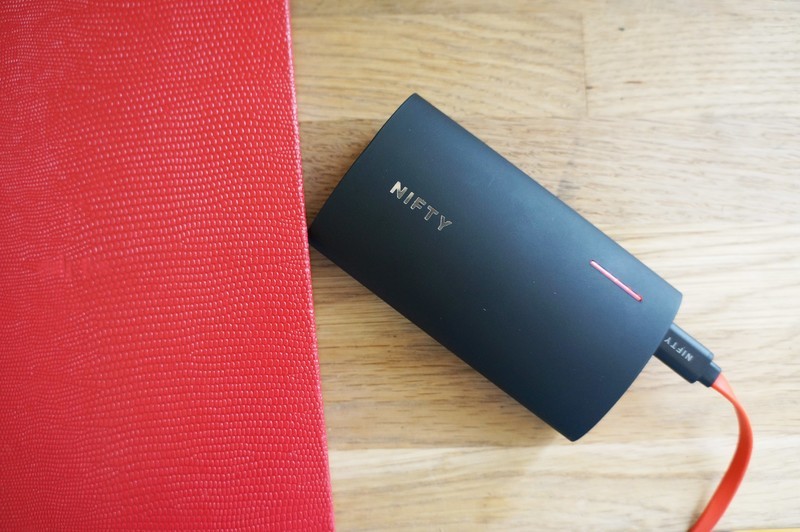
This NIFTY battery pack sure lives up to its name, but can its slick design justify the price?
Battery packs are essential phone accessories these days. We rely on our phones to do so much, and heavy phone users often can’t rely on their phone’s internal battery to get them through a full day without a recharge along the way.
Furthermore, few battery packs offer the same functionality and features, making it sometimes confusing as to which will best support your devices. Enter the 6800mAh NIFTY mobile charger, a stylish battery pack that aims to solve the charging needs of all your mobile devices
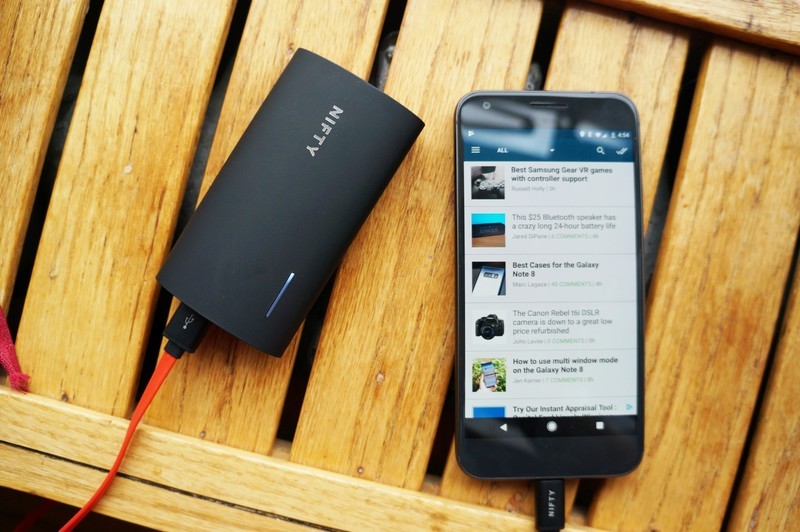
The folks behind the NIFTY battery pack sent me a unit to review this summer, and my first reaction was that this battery pack sure lives up to its name. Fans of well-designed products are sure to swoon over this battery pack. It’s compact, sleek with no buttons to fuss with, and just two ports on the top, both of which can be used to charge devices simultaneously with 24W of dual output being intelligently split to give priority to the device that needs more juice. The USB-C port doubles as the one used for recharging the battery pack itself, which only takes a few hours.
NIFTY claims to have includes the most powerful chipset in a mobile charger, with support for Qualcomm Quick Charge 3.0, 3A Type-C output, as well as safe fast charging capabilities for iPhones, iPads, and even the latest MacBooks, too. There’re no screens or buttons to fiddle around with — simply plug in and the NIFTY automatically detects and delivers the fastest charging speeds for your device.
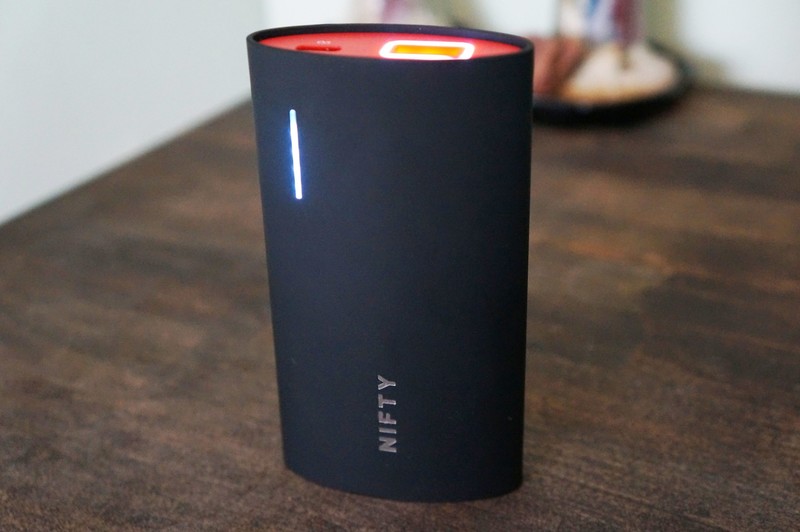
A row of 5 LEDs give you an indication of how much charge is left, and all you do is give the NIFTY a tap and they come to life to show you the remaining charge. A tap also illuminates another LED ring located around the USB-A port on top, which is a fantastic feature for those times when you’re fumbling around in the trying to plug in a USB cable in the dark.
I’ve kept it on me through most of my weekend travels this summer when I’ve often been away from a wall outlet. At 6800mAh, it’s far from the beefiest battery pack you can buy and will reliably recharge a phone from battery warning to full no problem, but that’s about it. On a weekend trip, I was able to get about a full charge and a half for my Google Pixel before the NIFTY needed to be recharged itself. The pack does get quite warm both when charging a device and while being recharged, so you’re likely losing some energy in the heat transfer.
I accidentally left the NIFTY outside overnight during a rainstorm and was pleasantly surprised to find it still functioning perfectly the day after. NIFTY makes no claims of water resistance but it was nice to see it survive a wet night.
There’s something to be said about great design, and the curvy design of the NIFTY’s casing feels great in your hand.
The only drawback is the price — at $80, it’s asking a lot for a battery pack with a battery capacity under 10,000mAh. You can buy an Anker PowerCore charger with three times the charging capacity for $20 cheaper than the NIFTY. For those who value capacity and bang-for-your-buck over anything else, that’s bound to be a deal breaker.
But there’s still something to be said about great design, and the curvy design of the NIFTY’s casing feels great in your hand. Tapping to reveal the power levels is an ingenious feature and I love how you can plug any phone in and NIFTY delivers the fastest charge without hesitation. Whether the NIFTY is worth the money is ultimately a matter of personal preferences. The NIFTY serves my need for a compact and portable charger that gives my phone an extra boost when I need it most.
The NIFTY Mobile Charger is available in your choice of color —Signature Stone Red, Stone Grey or Suede Black — and comes with both a USB-C and Micro-USB charging cable.
See at NIFTY
 AIVAnet