


Fox readies its VR suite for a key college football matchup
From Super Bowl 51 to the recent Gold Cup broadcasts, Fox Sports has been ramping up its virtual suite tech to let viewers view big sporting events in virtual reality. Now the broadcaster, in association with fast-food company Wendy’s and the sports VR group LiveLike, has plans to offer a similar experience to college football fans as it brings historic rivals Notre Dame and Michigan State to virtual reality on September 23rd at 8:00 PM ET.
Like the past virtual suite offerings, Fox’s system will give you the opportunity to view the football action through multiple live, high-resolution camera angles and go back in time to watch your favorite plays again. You can choose the viewpoint yourself, or lean back to watch a director’s cut of the live game. New to this broadcast is a 360-degree Skycam look at the action between the Spartans and Fighting Irish, like you’re watching the game from the blimp itself. You can connect with up to four of your Facebook friends — or random fans, if you like — to watch the game together in Social VR. Plus, you can check out the pre-game action, halftime events and post-game analysis right in the VR app itself.
The Fox Sports VR app is on iOS, Android, Gear VR (and Oculus), which means all you really need is to pop your smartphone into a headset to get in on this historic football rivalry in virtual reality. Don’t want to use VR? You can watch the game on your favorite Fox channel in regular high def.
Source: Fox Sports
Watch an entire New York City music festival live in VR
NextVR and Live Nation are getting pretty good at covering concerts in VR compared to others, and now they’re amping up their ambitions. In partnership with Citi, they’ll broadcast the Global Citizen Festival live in VR from New York’s Central Park on September 23rd, with performances by The Chainsmokers, The Lumineers, Big Sean, Alessia Cara and others. They’re also presenting “Backstage with Citi,” with access to artists, bands and producers not available to concert-goers.
Virtual reality still can’t compete with the real thing, but thanks to its use of 6K RED cinema cameras and cutting edge VR production tech, Next VR has generally won over critics. It launched a partnership with Live Nation last year, and the companies have already broadcast concerts by Coldplay, Anthrax and others. NextVR has also collaborated with the NBA, broadcasting free highlights and selling VR games by subscription and à la carte.
The VR concert series will be free, apparently underwritten by Citi, a partner of the Global Citizen festival. The event — which also runs concerts in Hamburg and Mumbai — is organized by the Global Poverty Project with the aim of reducing extreme poverty. You’ll be able to watch the September 23rd Central Park concert on Samsung Gear VR or Google Daydream headsets by downloading the respective apps (from the Oculus store or Google Play) to a compatible smartphone. The Backstage with Citi segments will be available on demand on Citi’s VR channels.
TripIt will keep your shared travel plans updated in iMessage
After giving its travel organization app a tidy makeover for iOS and Android last year, TripIt is back with another update. This time it’s focussing on iPhone messaging. With the arrival of iOS 11, TripIt for iMessage can now update your shared itinerary plans to account for any changes. That includes real-time flight info for TripIt Pro users (which costs $49 per year).
Whether you change a hotel booking at the last minute or add more guests to your dinner reservation, the app will ensure people in the conversation stay on top of your plans. What’s more, all the info is automatically refreshed, meaning your friends and family needn’t leave iMessage to keep up with you. Flight info tracking in particular is a boon for frequent travellers.
Users can send all or part of their info via iMessage. But, keep in mind that all parties must have the app downloaded in order to access the itinerary.
24 hours with Fitbit’s first smartwatch
The holiday season is almost upon us, but as you fantasize about the mouthwatering delicacies you’re going to put in your bellies, some of you may already be getting ready to shed a few pounds. A new and improved crop of fitness-centric smartwatches will be arriving soon to make staying in shape easier, and the Fitbit Ionic may be one to consider. It’s the company’s first full-fledged smartwatch, and the device packs a slew of new features designed to help people follow through on their workout plans. Well, that’s the promise, anyway. As the Ionic’s October arrival approaches, the company has pushed out software updates to early reviewers, but the device still feels unfinished.
I’ve had the Ionic for a few weeks now, but for most of that time I was making do with early software. You can read my preliminary impressions here. Last week, the company issued an update, but it hasn’t appeared to do very much other than add a music app for transferring and managing onboard songs and rearranging the order of apps in the gallery. The rest of the company’s debut smartwatch platform, Fitbit OS, needs some serious fine-tuning.

First of all, there still aren’t many apps available for download, and all 13 of them are installed on your watch by default. To remove them, you’ll have to go to the Fitbit app on your phone, navigate to the Apps section and uncheck each one. Rearranging them is easier — you can do so from your wrist by holding down on the app you want to move and then dragging it elsewhere.
These apps mostly work as promised. The Today app tells me my daily progress toward my step and calorie goals, while Alarm and Timer are serviceable. After setting a default location via my phone, the Weather app now shows the daily temperature range and sunset times.
One of the best apps is Coach. It offers the same three short workout guides it did before (albeit with different graphics): 10-minute abs, a 7-minute workout and “Treasure Chest” (set of chest-centric exercises). To get more options, you’ll have to sign up for the premium Coach service, which costs $8 a month. That’s the same price as a Netflix or Hulu subscription, both of which offer workout videos in addition to award-winning TV shows and movies.

I kicked off my morning with a 10-minute ab session, which was thankfully easy to follow and well-paced. A lot of the suggested exercises were familiar: a 30-second set of bicycle kicks followed by 45 seconds holding a plank stance. Whenever each set was up, the watch would vibrate so I knew to stop. There aren’t audio cues for now, those will come with the premium version later. I also enjoyed learning new moves (to me, anyway) like something called “Windshield Wipers,” which involved sticking my legs straight up while lying down, and then swinging them from side to side. The in-app animations made it easy to follow along.
As someone who strings together random Instagram-inspired exercises at the gym, I appreciate having something else tell me what to do. I only wish there were a way to customize the intensity of each workout, but that appears to be a feature available to paid Coach users. In fact, the Guided Health Program service learns your fitness habits over time and tailors workouts to you. It will even recommend that you go to bed at certain times to optimize recovery, or suggest a so-called Relax session to bring down your heart rate. As useful as the three free guides are, I wish Ionic owners could get more options built in instead of having to pay an extra fee each month. The premium service launches this winter, and Fitbit says it will continue to add programs like audio coaching through 2018.

Still, despite its limits, Coach is a useful tool that sets the Ionic apart. Unfortunately, a lot of the other features Fitbit promised are either buggy or not yet ready. I spent a frustrating hour trying to transfer music to the watch’s local storage to no avail. There are two ways to play music from the watch: via the Pandora app (which requires a Pandora Premium account) or Fitbit’s Music app.
After I signed up for a Pandora Premium trial, I selected the Dance Workout station in the Fitbit app’s settings on my phone, which is then supposed to send that playlist to the Ionic. But when I looked at the Pandora app on my wrist, nothing happened. The next morning, the playlist finally showed up on the watch. Fitbit said the delay might have been caused by the watch having too little battery at the time I initiated the transfer or possible WiFi issues.
After my initial failed attempt with Pandora, I tried to load my own music onto the watch, which requires you to use the Fitbit app on your PC. Not only that, it also asks that your music be in either Windows Media or iTunes playlist formats. So I went through the rigmarole of putting my individual tracks in a Windows Media playlist and then setting the source folder for my music, only to be told at the final step that my music files weren’t found. My songs were in .WAV and .MP3, two of the most common music formats, so I was puzzled.
After a 48-minute-long call with several Fitbit reps, we finally figured out that the files I had been trying to sync may have had conversion issues — a different MP3 file eventually made the journey from my PC to my watch successfully.
Fitbit also said it understands that not everyone organizes music on their PCs in playlists, and is working on allowing Windows users to manage and organize tracks directly within its desktop app. When this rolls out in October, you’ll be able to add individual songs to the Fitbit app on Windows without having to first set up a playlist.

Another feature that’s not live yet is Fitbit Pay. For now, this is limited to specific MasterCard gift cards that Fitbit had issued for testing and worked when I tried it out at the company’s launch event last month. When the Ionic arrives in stores in October, though, Fitbit Pay should be up and running with other (real) MasterCards, as well as eligible Visa and American Express cards. But since I wasn’t able to test this out myself, I’m not sure how well it will work outside of a controlled test scenario.
Those are my major complaints about the Ionic so far; hopefully they’ll be addressed by the time the watch comes out next month. Meanwhile, the rest of the Ionic works as smoothly as it did when I first checked it out — you can read previews of notifications from your phone (but you can’t reply), install pretty watch faces and control music playback. Fitbit said this software is close to final, in that it will mostly look the same, but that there could be further updates before launch to address bugs.
What won’t be changing is the hardware. I have to admit I’ve come to terms with the way Fitbit’s wearables look. If this were any other brand, I’d hate on the Ionic’s blockish aesthetic. But not only is this one of those devices that looks better in person than it does in pictures, it’s also a Fitbit. People who are considering the Ionic are likely to already be fans of the brand’s distinctive design language or are at least willing to make do with the tracker’s unexciting appearance for its fitness features.
All told, there is still too much pending or buggy about the Ionic’s software for me to get a real feel for its prowess as a smartwatch. I was only able to try out the new features that were activated with the update, but there are plenty more to test, and I’ll be doing a deeper dive when those are ready. I also want to know how the Ionic compares to the Apple Watch Series 3 (or at least watchOS 4) and the Samsung Gear Sport, too. Since the Ionic doesn’t actually arrive until October and as so much of it feels unfinished, I’d strongly recommend waiting until we have a final version tested before you order one.
Here’s everything from Playstation Japan’s 2017 press event!
As is tradition, PlayStation kicked off Tokyo Game Show by showcasing most of its announcements days before the full show actually starts. Besides a bunch of limited-edition PS4 and PS4 Pros of varying levels of desirability, we had some remakes, a new game or two, and more Monster Hunter. Of course. Here’s the best trailers from the showcase earlier today.
iPhone 8 and 8 Plus Review Roundup: Powerful Devices With Great Cameras Set Stage for iPhone X
iPhone 8 and iPhone 8 Plus reviews are out, providing us with a closer look at two of Apple’s latest smartphones ahead of their Friday launch.
iPhone 8 and iPhone 8 Plus via The Verge
The devices represent Apple’s first glass-backed iPhones since the iPhone 4s in 2011. Most reviews complimented the glossier design, although there were naturally some concerns about glass being more prone to shattering.
And not everyone was sold on the new look.
The Wall Street Journal’s Geoffrey A. Fowler:
The glass might remind you of the iPhone 4, one of the most iconic Apple designs. But I’m not sold. The iPhone 7’s glossy black finish gives it a contiguous surface, like a pebble smoothed by the ocean. The iPhone 8 shows seams where the glass touches the aluminum band, making it feel a little like a knockoff. And there’s no denying it looks dated compared with the curved glass on rival Samsung’s Galaxy S8, which takes the screen all the way to the edge.
Apple stressed that the glass on iPhone 8 and iPhone 8 Plus has a strengthening layer that is 50 percent deeper, but we’ll have to wait for drop tests to see how the devices hold up from both ordinary and extreme heights.
The switch away from aluminum was necessary to facilitate wireless charging, an overdue feature many Android smartphones have had for years.
Wired senior writer David Pierce:
Wireless charging makes the iPhone feel less like a Tamagotchi needing constant feeding, and more like a digital sidekick that’s always ready to go. Pick it up when you need it, put it down when you don’t; whenever you’re not using your phone, it’s charging. Android users have known this feeling for years, but a lot of iPhone users are going to love it now.
TechCrunch editor-in-chief Matthew Panzarino focused on the new cameras, which he said are “killer” and the best reason to upgrade this year yet again. He was particularly impressed with Apple’s new Portrait Lighting effects, which he described as the marquee feature of the iPhone 8 Plus.
The studio and contour options are going to be flooding social networks and phones internet-wide as soon as people get their hands on their iPhone 8 Pluses. The stage lighting takes a bit more effort, but when you nail it and the software is able to do its job by accurately detecting hair and head shapes, it really stuns. It can produce images that feel professional and would take dozens of lights and pieces of equipment to pull off.
One of the new Portrait Lighting effects is called Stage Light, which spotlights the subject’s face against a deep black background.
 Original photo on left with Stage Light on right via TechCrunch
CNET photographer James Martin tested the iPhone 8 Plus camera by shooting more than 2,000 photos in San Francisco, and he was thoroughly impressed with everything from detailed textures to low-light performance.
With the new sensor, HDR delivered better details in highlights and shadows. HDR is always on, signaling Apple’s deeper commitment to computational photography with the iPhone 8 Plus. That’s different than the iPhone 7 Plus, which gave you the option to set HDR to auto, off or on.
Martin added that even his high-end DSLR can’t achieve the kind of exposure he achieved with the iPhone 8 Plus.

Mashable editor-at-large Lance Ulanoff ran Geekbench 4 on the iPhone 8 and iPhone 8 Plus, and Apple’s new A11 Bionic chip delivered. The smaller iPhone 8 in particular more than doubles the single-core performance, and more than triples the multi-core score, of the A10 Fusion chip in iPhone 7.

The Verge editor-in-chief Nilay Patel, however, said the increased performance “feels like headroom for the future,” and not something you immediately notice compared to the iPhone 7 in particular.
I didn’t notice a huge performance boost over the iPhone 7 while doing basic things like browsing the web, watching videos, and taking photos. I played a few games and everything seemed fast and fluid, of course. Apple sells iPhones for years after they’re released — the iPhone 6S is still in the lineup! — so a lot of this extra power just feels like headroom for the future, not something you immediately sense when upgrading from a previous model.
Should You Upgrade?
It depends on who you ask.
While most reviews recommend waiting for the iPhone X, particularly if you currently own an iPhone 7 or iPhone 7 Plus, the iPhone 8 and iPhone 8 Plus are still respectable and more affordable updates with faster A11 Bionic chips, True Tone displays, improved cameras, wireless charging, and more.
Daring Fireball’s John Gruber said the devices are “excellent year-over-year upgrades” compared to their iPhone 7 counterparts.
These are solid year-over-year updates — at least as impressive as the iPhone 7 was over the iPhone 6S. If they hadn’t debuted alongside the iPhone X we’d be arguing about whether these are the most impressive new iPhone models since the iPhone 6.
The Verge’s Nilay Patel was much less impressed, noting that he “can’t think of a single compelling reason to upgrade from an iPhone 7.”
After spending a week with the 8, I can’t think of a single compelling reason to upgrade from an iPhone 7. The 7 is still extremely fast, offers virtually the same design in a lighter package with a bigger battery, and will get almost every feature of the 8 with iOS 11. If you really want Qi wireless charging, you can get a slim $15 case that supports it. And if you’re dying for Portrait Lighting, there are tons of photo apps in the App Store that offer similar effects. Of course, if you’re upgrading from anything older than an iPhone 7, the improvements in the camera and the overall speed of the phone are going to really impress you.
Engadget’s Chris Velazco:
The iPhone X will continue to suck the air out of the room for the foreseeable future, but one thing has become clear after my week of testing: They might not have the X’s style, but the 8 and 8 Plus are truly excellent phones that won’t let Apple die-hards and new customers down.
Business Insider’s Steve Kovach:
My advice is to ask yourself how much you’re willing to pay. If you don’t mind giving up some of the futuristic features in the iPhone X, then the iPhone 8 models will give you the same power and performance and most of the same features of iOS 11 for hundreds of dollars less.
The Wall Street Journal’s Geoffrey A. Fowler:
That is what is frustrating about the iPhone 8: In the past, Apple rarely raised prices when it made a better phone with more storage. This time, it releases an incremental update and charges $50 more. It’s the first time the most basic new iPhone costs $700.
The virtues I see in the iPhone 8 are niche: I’m glad you don’t have to spend $1,000 to get an improved camera and processor and even wireless charging, if that matters to you. But Apple’s confusing iPhone family now includes three pairs of practically identical phones: the regular and Plus versions of the iPhone 8, 7 and 6s. Don’t buy the spendiest one.
More Reviews: The Loop, iNews, Financial Post, The Independent, The Washington Post, 9to5Mac, Associated Press, and BuzzFeed News
Related Roundup: iPhone 8
Tag: reviews
Buyer’s Guide: iPhone (Buy Now)
Discuss this article in our forums
iOS 11 review
Even though the changes are minor, iOS 11 transforms how we rely on the iPhone and iPad.
After a months-long beta program, the official iOS 11 is finally available. Since June, we’ve been trying out the latest version of Apple’s mobile operating system through both public and developer betas. In our iOS 11 review, we’ve found the update adds a little more customizability, with a redesigned control center, new App Store design, along with more accessibility options.
iOS 11 has a lot to do with attention to small details. In iOS 10, many of the improvements were more visual, such as animations through iMessage, improved 3D Touch, a more organized Photos app, and more. It completely re-invented the way we not only saw, but also interacted through our devices. iOS 11 is more about streamlining the user experience.
Revamped, customizable Control Center
Brenda Stolyar/Digital Trends
One of the biggest makeovers in iOS 11 is the control center. In iOS 10 and earlier, the control center only included the basics — toggles for the flashlight, Wi-Fi, Bluetooth, camera, calculator, along with brightness adjustments. The new interface, which you still access by swiping up from the bottom of the screen, includes the same toggles, but with the option to add more.
You can now add quick access toggles for Notes, Apple TV Remote, Stopwatch, Text Size, and Wallet, among others. The most helpful of all is the option to add Lower Power Mode, which used to require multiple steps to simply toggle it on. Now, you can swipe up to the control center and click the low battery icon whenever your phone is running low on juice.
The new Control Center looks a lot more modern, and the toggles are compactly organized. In the Control Center’s settings, you can easily move the specific widgets up or down to line them up however you like for easy memory. Having useful apps available to you in one swift motion makes us wish we could add others. Since the feature is new with iOS 11, we hope future updates will be less restrictive with what you can add. We also would have liked to see some more improved functionality, such as the ability to choose a Wi-Fi network to connect to from the Control Center.
A confusing lockscreen and notification center
Brenda Stolyar/Digital Trends
The notification center was tweaked several times during the beta period, and the final version is far better than the first iteration in iOS 11. But it’s still going to take some time getting used to it.
In iOS 10 and before, unlocking your phone and then swiping down would reveal another page with your notifications. In iOS 11, the notification center and lock screen have fused to become one. Swiping down will always bring you back to your lock screen, but with your notifications. You can clear or view them by swiping a notification to the left, and a swipe to the right will open it.
For past notifications you haven’t gotten to yet, swiping up will reveal them separated by day. Each day will have an “x” symbol next to it so you can clear notifications, but if you press and hold on the “x” (via 3D Touch), you can clear everything. You can also press and hold notifications to interact with them, such as replying to messages.
It will take some time getting used to the new format. Especially opening your phone and pulling down what was once the original notification center, only to find your lock screen staring back at you after you already unlocked it. What may confuse you even more is when you pull down the notifications after unlocking the iPhone, swiping the screen to the left will open the camera, and swiping to the right will open the Today View.
We don’t think the new system is any better than the old one. It’s a minor update to a part of the operating system that really didn’t need tweaking.
More useful photo effects and editing options
Brenda Stolyar/Digital Trends
One of our favorite features added to iOS 11 are the new camera effects in the Photos app. Instead of using third-party apps like Boomerang to create loops and other fun animations to ordinary photos, there’s now three effects native in the Photos app: Loop, Bounce, and Long-exposure.
Live Photos will need to be on, as it takes several photos when you tap the shutter icon. The Loop function will play all these captured photos repeatedly, creating a never-ending loop of the photo. Bounce will pick the best start and end points to play it forward and then in reverse. Long-exposure combines all the photos to create a stunning effect, though it’s best if you use a tripod.
As far as editing goes, you can trim your Live Photos if there’s a clip you don’t like. You can change the “Key photo” or default frame of the Live Photo as well when tapping on the edit tool.
Each of these are extremely simple to add to your photos, and they’re fun. There’s still one majorly glaring issue — you still can’t upload them to all major social media platforms. Facebook and Tumblr work, but we weren’t able to share Bounces or Loops to Twitter or Instagram (Instagram considers it a video that needs to be 3 seconds long). You’ll still have to use a third-party app. Having the tools are useful, but don’t uninstall those third-party apps just yet.
For those who refuse to spend any more money on iCloud storage, you’ll be happy to know iOS 11 will help save space with its new camera formats. For photos, there’s HEIF (High Efficiency Image Format), which Apple claims offers twice the compression effectiveness of JPEG. For those who take more video, your files now use HEVC (High Efficiency Video Coding), which is helpful for the high-resolution 4K videos the iPhone shoots.
Under both formats, you’ll have more storage and data available without sacrificing the quality of your footage. To set your iPhone to High Efficiency, go to Settings > Camera > Formats and check off High Efficiency. Images will then automatically be saved as HEIC and movies as an HEVC .mov file. If you check off the other option – Most Compatible – images will save as JPEGs and movies will save as an h.264 .mov file, which will likely be more helpful until more services support these formats.
An App Store to keep you up-to-date
The App Store is completely different in iOS 11. It’s redesigned to focus more on your interests. The interface is not only light and airy, but also divided neatly into specific sections. Past experiences felt bland and boring — it was a place not for exploration, but simply to download or update an app and leave. The new App Store makes us want to keep scrolling, and keep coming back every day to see what’s new.
The new store is easy to navigate, but doesn’t stray completely far from the previous design. The menu still lives on the bottom of the screen, making it easy to skip from tab to tab. The main difference is the layout: Photo galleries showing off featured apps are larger and more prominent, making it clear which category a specific app is under. The product page after clicking on an app also got a facelift, with more important information in the center of the description to help you decide whether you want to download it or not.
We were particularly interested in the new “Today” tab which acts as the homepage for all the latest app news along with feature stories. With new content added on a daily basis, the Today tab provides you with timely “Apps of the Day” depending on relevancy. For example, after Labor day we noticed the App of the Day was the Starbucks app — just in time for fall and those Pumpkin Spice lattes.
With so many apps on the App Store, it can become overwhelming to find exactly what you’re looking for. The new redesign does the searching for you, with sections like “Try Something New” or “Editor’s Choice.” Even if you’re not looking for a specific app, it’s still fun to scroll through and find ones you might not have known about before. The idea of incorporating discovery into apps has become common, with Instagram and Snapchat dedicating sections to help users find content outside of their interests. The new App Store is no different and aims to push different types of apps on your radar within one view of the main page.
With “behind-the-scenes” features and interviews from app developers themselves, Apple is creating a more personal bond between people and apps.
Take notes the way you want
One of our favorite improvements is the Notes app. Before, we were limited in ways we could organize or edit notes, but in iOS 11 there’s now the option to add tables, the ability to create inline drawings, and new title formats. Formatting tools, such as bold and italicize, now have their own easy-to-access section.
We never relied on Notes before due to its basic capabilities, but we’ve found ourselves using it more in iOS 11. The new options make your notes easy to digest and follow.
You can also now easily scan any piece of paper and convert it into a PDF to markup afterwards. Documents are simple to scan, just point the camera and shoot. Notes does a great job of organizing all your scanned documents into one file which you can then email or message. It’s wonderful to have when you’re in a time-crunch and really need to have those papers signed.
As for the iPad Pro, Notes can now be accessed from the lock screen with a simple tap of the Apple Pencil.
Completing tasks is easier
Files is a new app you’ll find in iOS 11. It’s a file management system, which is something iOS has sorely needed for a long time. With the new app, you no longer have to remember to upload your files elsewhere. As long as you’re signed into iCloud, all the files from your Macbook will automatically be accessible on your iPhone or iPad, and vice versa. For those dependent on Google Drive, Dropbox, or Box, these services are integrated into the app so you can access files in the same app. It’s a great app for those who love to keep everything organized, especially since you can sort by name, date, size, and tags. The interface is similar to Finder on Mac, so it’s easy to get the hang of if you’re a Mac user. You can also markup PDFs and images uploaded to Files within the app.
If you love to multitask, iOS 11 provides you with a better version of Slide Over and Split View on your iPad. For Split View, all you need to do is open an app and pull up the dock by swiping up from the bottom of the screen. Then, you can drag your preferred app to the left or right of the screen. You’ll then see a Slide Over window with the new app on top of the one that’s open.
You also no longer have to open and quit the Slide Over interface to add an app. By toggling on Gestures in the Multitasking section within your Settings, being able to focus on multiple apps at once is not longer a chore. The drag and drop feature that’s heavily prominent in iOS 11, makes it easier to choose and access all apps with a few gestures.
Old habits die hard with Do Not Disturb While Driving
The Do Not Disturb While Driving feature turns on automatically when your iPhone senses the acceleration of your vehicle. Your notifications will still be able to reach your phone, but they’re muted – meaning they won’t show up on your lock screen. You can turn it on and off manually by accessing it through the control center. If you have Bluetooth enabled in your vehicle, then it’ll turn on as soon as it’s connected.
If you receive a text while driving, they’ll receive an automatic response which can be customized through settings. But it will only send if you have the text message window open. Otherwise, any other text messages or notifications can be seen after your turn off the feature. If you’re sitting in the passenger’s seat, you can also tap on the notification and select the “I’m Not Driving” option to disable the feature.
It used to be that texting while driving was the biggest issue, but horror stories have expanded to social media platforms as well. Even though third-party apps for this exact scenario have been around for a while, it’s convenient to have it built into iOS. When we tried it out, the feature connected as soon as the car was in motion. The phone was locked but we left a text message window open and received a message. The feature then sent an automatic response letting them know we were driving. Within the message is also an option to text ‘urgent’ if there’s an emergency. It’ll then allow it to show up as a notification on your phone even if you’re still driving.
Do Not Disturb While Driving does work seamlessly. The only issue that might get in the way is your habit to pick up your phone while behind the wheel. But with muted notifications, you’ll no longer have the distraction of your phone vibrating or going off. Since it’s so quiet, you’ll actually find yourself forgetting to check it too.
iOS 11 brings refinements
Overall, iOS 11 isn’t entertaining and fun when it comes to its major features. It has instead made significant improvements on the everyday user experience. Even though the changes are minor, it transforms how we rely on the iPhone and iPad by extending all the ways we can use these devices.
There are a few Apple iPhone X-specific features in iOS 11, and some camera improvements as well on the iPhone 8 and 8 Plus. We’ll update this review when we’ve played around with the new features after the devices have been released.
To download iOS 11 on your device on September 19, simply go to Settings > General > Software Update. You may have to clear out some data first to allow it to download the update. Don’t forget to back up to the cloud, and make sure your device is compatible.
The iPhone X is hurting Apple’s iPhone 8 pre-orders, analysts say
Why it matters to you
If you’re holding out for an iPhone X, you may not be alone, meaning the device is likely to be in high demand at the end of October.
Pre-orders for the new Apple iPhone 8 and iPhone 8 Plus are underway, and unusually, even now you can still order one and receive it on release day. Analysts examining the data related to those orders say many people are holding back, and haven’t decided to grab Apple’s latest hardware yet. The reason? The iPhone 8 will only be Apple’s latest device for about a month, at which time the iPhone X will be released, and it’s a very different beast. The consensus is, Apple fans are waiting for the X, which means the real iPhone rush will start at the end of October.
Data published by analyst Gene Munster shows the new iPhone models had a one- to two-week delivery time over the first weekend after pre-orders went live, while some models still have a September 22 release day delivery date attached. It’s noted that compared to previous years, the more expensive but better-equipped 8 Plus also has a shorter lead time, suggesting either supplies are greater or that people are saving their money.
The evidence of a less-than-enthused response to the iPhone 8 continues. In previous years, some desirable new iPhone models have had a three- to six-week wait attached by this point, analysts at KGI Securities say. It believes the iPhone X is a prime reason why the iPhone 8 is so readily available. Pre-orders are traditionally placed by early adopters and hardcore Apple fans, who are more likely to be attracted to the iPhone X than the mildly updated iPhone 8.
A Twitter poll we took shortly after Apple’s September event also showed the general feeling towards the iPhone 8, 8 Plus, and iPhone X. We asked which new iPhone model they were most likely to buy, and out of the more than 1,300 people responded, 72 percent chose the iPhone X.
Ahead of the iPhone X announcement, there were concerns the device would be in very short supply. Apple hasn’t restricted the iPhone X’s release, and will have the new phone available to order in 55 countries on October 27, so clearly doesn’t anticipate extremely tight supplies. Has it instead underestimated how many people would be willing to pay $1,000 or more for the phone?
If more people are waiting to buy the iPhone X, as analysts are suggesting, then don’t expect shipping times to reflect those of the iPhone 8 during the first week of pre-orders. If you want one, and aren’t quick off the mark, you should be prepared for a long wait.
Gmail now converts addresses and phone numbers to actionable links
Gmail finally auto-converts addresses and phone numbers to links.
Google is adding a new feature to Gmail and Inbox that brings a much-needed feature to the mail clients. Starting today, addresses, emails, and phone numbers on Gmail and Inbox will be automatically converted to interactive hyperlinks.
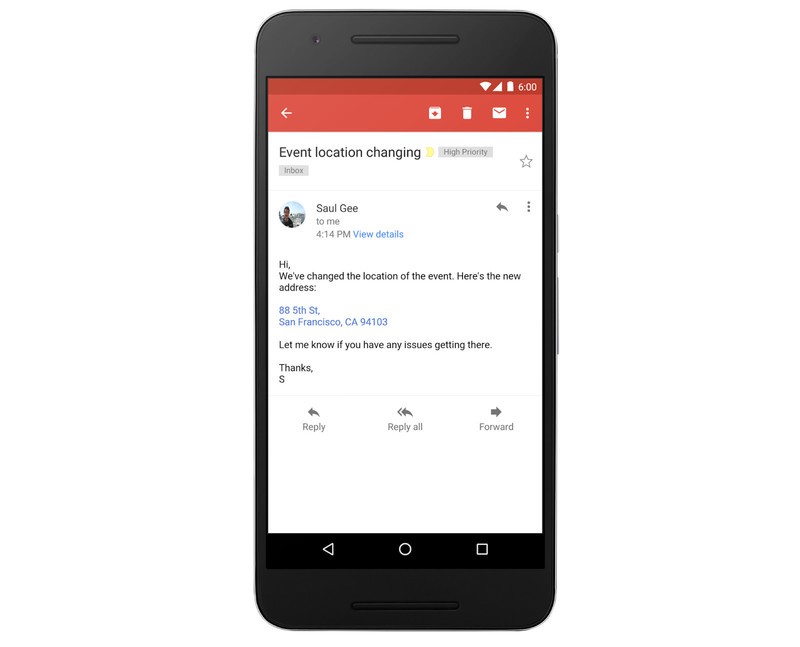
For instance, an address link in Gmail automatically opens Google Maps, clicking on a phone number will take you to your dialer of choice on your phone, and selecting an email address within Gmail will open the compose window in your default mail app.
Google mentions that the update is now rolling out to all Gmail and Inbox users on Android and iOS globally, with the rollout set to be complete in three days’ time.
The Morning After: Tuesday, September 19th 2017
Hey, good morning! You look fabulous.
We have some bad news from Toys ‘R’ Us, CCleaner and Equifax, but at least Galaxy S8 owners can disable the Bixby button, and Jerry Seinfeld’s latest stand-up is available on Netflix.
The internet claims another victim.Toys ‘R’ Us files Chapter 11

Between the rise of internet shopping and a crushing debt load, Toys ‘R’ Us is struggling. The company announced it’s filing for bankruptcy protection in the US and Canada but says all of its stores will continue to operate as normal. The Wall Street Journal reports some “underperforming” stores may shut down, while others are revamped to focus on experiences like in-store play areas.
0 to 60 in less than 3.5 seconds.Porsche’s Mission E will be priced to challenge Tesla

Porsche is still a couple of years away from releasing the production version of its Mission E speedster, but Chairman Oliver Blume revealed some key details about the project. When it arrives before the end of 2019, it should have a price similar to the Panamera (between $80,000 and $90,000), which makes it a competitor for the Tesla Model S 100D and could make it cheaper than the $135,000 Ludicrous Mode-equipped P100D. Porsche is also planning for 350kW fast-charging that can give 250 miles of range (out of a possible 300 miles) in just 15 minutes.
Good news, bad news.Galaxy S8 owners can finally disable the Bixby button

They just can’t do anything else with it.
Somehow this keeps getting worseEquifax stock sales prompt DOJ investigation for insider trading
You probably already knew that three Equifax officials sold $1.8 million in shares after the company learned of the security breach. The DOJ is investigating that, and while the company says those execs were not aware of this breach when they sold their shares, the story is complicated further now that Bloomberg reports Equifax suffered a separate breach even earlier, in March.
Stop worrying.August’s latest smart locks let you know if you left the door open

August is introducing two new locks, the $150 August Smart Lock and the $280 August Smart Lock Pro, that both include a sensor to determine whether or not the door is really closed. If it’s ajar, the lock can let you know on your phone, so you never have to wonder again. Oh, and there’s a new doorbell camera that buffers its recordings to capture the seconds leading up to a button press.
That’s how you get ants.Hackers slipped malware into popular PC software CCleaner
Piriform’s CCleaner utility, owned by antivirus provider Avast, was found to be hosting a “multi-stage malware payload” that could install ransomware or keyloggers and further infect targeted computers on command. The company says this backdoor has been removed, and it already forced updates to push some two million users off of the affected version. Still, it may be worthwhile to clear your own cookies in the future.
Will you sign up for CBS All Access?What’s on TV this week

CBS is ready to premiere its new Star Trek series on broadcast television before pushing Discovery as a streaming exclusive, while Netflix brings Jerry Seinfeld (plus Jaden Smith in Neo Yokio) and Amazon drops in a new season of Transparent. Movie fans can choose Wonder Woman, Close Encounters of the Third Kind or Starship Troopers on Ultra HD Blu-ray, while gamers have Marvel vs. Capcom: Infinite and Project Cars 2 incoming.
How was this not already a feature?Gmail finally turns addresses and phone numbers into links
Google has rolled out an update that gives its mail apps the power to turn addresses, phone numbers and email addresses into hyperlinks.
But wait, there’s more…
- Kevin Hart made a family-friendly mobile game
- Apple’s iPhone screen repair prices are now $20 higher
- ‘Half-Life 2’ mod puts the sequel inside of the original
- ‘Minecraft’ adds ‘Oregon Trail’ to teach kids about frontier life
The Morning After is a new daily newsletter from Engadget designed to help you fight off FOMO. Who knows what you’ll miss if you don’t subscribe.
 AIVAnet