


Red Sox reportedly cheated with a Fitbit, not an Apple Watch
Reports that the Boston Red Sox cheated in games with an Apple Watch may have been slightly off the mark. A source speaking to Boston Globe baseball writer Nick Cafardo claims that the team used a Fitbit device, not Apple’s smartwatch. It’s not certain which model would have been used, but the Blaze seems like a prime candidate given its smartwatch-like design. You don’t need a high-priced smartwatch to get text messages, after all.
We’ve asked Major League Baseball for comment and will let you know if it has a response.
Yes, the cheating is undoubtedly more important than the devices involved. The Red Sox could have swiped pitching cues using CB radios and it would still have been relevant. If the scoop is true, however, this might be a classic case of a device becoming so synonymous with a category that people don’t realize there are alternatives. Just as every game console is “a Nintendo” to some people, someone in the pipeline may have assumed that the wearable was an Apple Watch just because it had a touchscreen.
Turns out there was no Apple Watch involved in Red Sox sign stealing. It was a Fitbit product according to a major league source. .
— Nick Cafardo (@nickcafardo) September 16, 2017
Source: Nick Cafardo (Twitter)
MacRumors Giveaway: Win an iPhone 8 With Presidio Ultra Case From Speck
We’ve teamed up with Speck for a very special giveaway that includes one of Apple’s brand new 256GB iPhone 8 models in Silver and a Presidio Ultra Case designed by Speck to go along with it.
Speck is offering a wide range of cases for the new iPhone 8 and iPhone 8 Plus at prices starting at $39.95, but the Presidio Ultra is Speck’s most protective iPhone case.
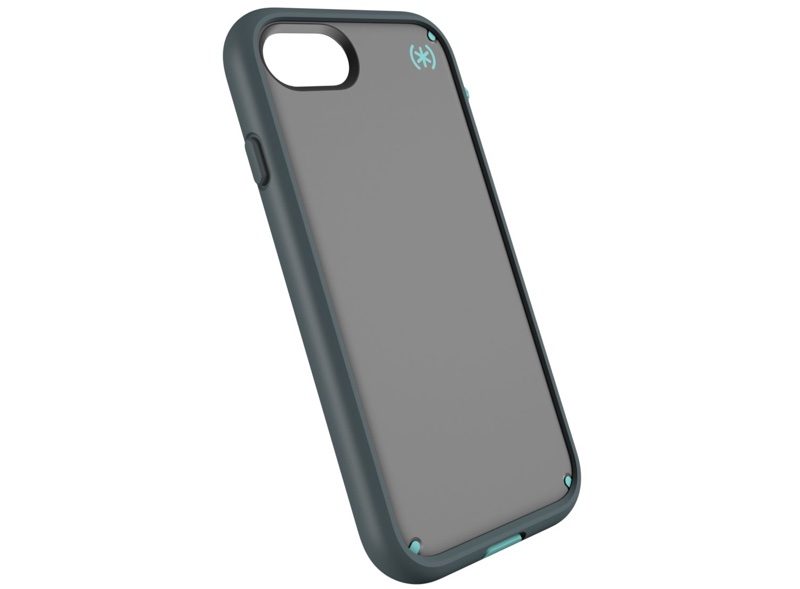
The Presidio Ultra has four layers of protection, including a removable Impactium Ultra bumper that offers up extra drop protection on demand. On its own, the Presidio case offers drop protection up to 10 feet, but that extends to 15 feet with the bumper.

Speck’s Presidio Ultra case also offers coverage of all ports and it’s resistant to both dirt and dust. It comes in a range of fashionable colors, including black, pink/purple, gray/red, and gray/teal.

The Presidio Ultra case is available for the iPhone 8 for $49.95 and the iPhone 8 Plus for $54.95. It can be purchased soon from the Speck website.
Apple’s iPhone 8, though it looks similar to the iPhone 7, is a major upgrade with several new features. Along with a glass body that has a new pearlescent silver finish and support for Qi wireless charging, the iPhone 8 offers up a much faster A11 chip, camera improvements, and better support for augmented reality apps through the introduction of a new accelerometer and gyroscope.
We have one iPhone 8 and Presidio Ultra Case in Gray/Teal to give away to a lucky MacRumors reader. To enter to win, use the Rafflecopter widget below and enter an email address. Email addresses will be used solely for contact purposes to reach the winner and send the prize. You can earn additional entries by subscribing to our weekly newsletter, subscribing to our YouTube channel, following us on Twitter, or visiting the MacRumors Facebook page.
Due to the complexities of international laws regarding giveaways, only U.S. residents who are 18 years of age or older are eligible to enter. To offer feedback or get more information on the giveaway restrictions, please refer to our Site Feedback section, as that is where discussion of the rules will be redirected.
a Rafflecopter giveawayThe contest will run from today (September 18) at 3:30 p.m. Pacific Time through 10:00 a.m. Pacific Time on September 22. The winner will be chosen randomly on September 22 and will be contacted by email. The winner will have 48 hours to respond and provide a shipping address before a new winner is chosen.
Related Roundup: iPhone 8
Tags: giveaway, Speck
Buyer’s Guide: iPhone (Buy Now)
Discuss this article in our forums
Gmail Now Converts Phone Numbers and Addresses to Links on Desktop and in iOS Apps
Google today announced an update to Gmail that will see the popular mail client able to convert addresses, phone numbers, email addresses, and contacts to into clickable hyperlinks.
The new hyperlink feature is available on the web and in the Gmail mobile apps for iOS and Android — Gmail and Inbox by Gmail. This is something that has long been available in Apple’s own Mail app on iOS and Mac devices.
When an address is clicked from Gmail, it will automatically open up Google Maps. Clicking an email address will compose a new email using the user’s default email client, and clicking a phone number will start a call request.
Google says it will take approximately one to three days for the new feature to roll out to all users.
Tags: Google, Gmail
Discuss this article in our forums
PSA: Your Older 32-Bit Apps Won’t Launch After Installing iOS 11 Tomorrow
When millions of iPads and iPhones are updated to iOS 11 tomorrow, older 32-bit apps that have not been updated with iOS 11 support will no longer launch.
If you attempt to open one of these 32-bit apps, iOS 11 will refuse to open it and will offer up a message that says the app needs to be updated to work with the new operating system.
You’re also not going to find 32-bit apps available when searching in the new App Store, nor can previously downloaded 32-bit apps be installed through the Purchased tab.
Apple has not widely publicized the imminent lack of support for 32-bit apps, so when older apps stop working tomorrow, it could come as a shock to the users who are still have them installed and use them regularly.
Apple has, however, attempted to warn customers. Starting with the launch of iOS 10.1 in October of 2016, when launching a 32-bit app, Apple informed customers that older apps “may slow down your iPhone.” As of iOS 10.3, a more explicit message has been provided: “This app will not work with future versions of iOS.”
Customers who have paid attention to these warnings may not be as surprised, but not everyone may have seen or read the warnings.
Apple began transitioning to 64-bit apps when the iPhone 5s launched in September of 2013. All apps and app updates have been required to use 64-bit architecture since June of 2015, so all apps that are 32-bit have not been updated for at least two years.
Many app developers have gone back and added 64-bit support to older apps, but there are still bound to be many apps that lack support.
Current iOS 10 users can check to see if there are any 32-bit apps on their iOS devices in the Settings app. Go to General –> About –> Applications to see the “App Compatibility” section that lists any outdated apps.
iOS 11 is only compatible with devices that feature a 64-bit chip, meaning it works with everything that has an A7 or newer chip. Specifically, iOS 11 is compatible with iPhone 5s, SE, 6 Plus, 6, 6s Plus, 6s, 7 Plus, and 7, along with the new fifth-generation iPad, the iPad Air, the iPad Air 2, all iPad Pro models, the iPad mini 2 and later, and the 6th generation iPod touch.
Customers on older devices like the iPhone 5 and 5c that can’t install iOS 11 will not be affected.
Related Roundup: iOS 11
Tag: App Store
Discuss this article in our forums
Blitzwolf BW-BS3 Selfie Stick review

For all the negative connotation that comes with the idea of a selfie stick, they can actually be quite practical to own. That is, of course, if you have the right one. We’ve long shied away from having one of these as we’re not the “vain” selfie-obsessed user types. Rather than marking a special group selfie shot, we’d rather capture a moment from the rear camera.
 When we were asked to review the Blitzwolf BW-BS3 Selfie Stick we, admittedly, were not all that excited about it. What else is there besides putting our phone on a long arm and snapping a wider shot? As it turns out, there’s plenty at work here. We’re not going to run out and snap selfies at an Ed Sheeran concert, but we will consider packing the stick for our next day at the park.
Unpack the selfie stick and you’ll see that there’s little that needs to be done in order to get going. It’s essentially a quick pairing process over Bluetooth and then pressing a button when ready to shoot. It takes all of one minute to get set up.
Massive giveaway!

Celebrating ten years of Android and AndroidGuys (Giveaway Week 3)
September 14, 2017
The stick is primarily composed of aluminum with traces of plastic here and there. It feels really light yet it’s also sturdy in the right places. It doesn’t feel like it’s cheaply made.
 The expanding phone holder works well and fit all of the different models we tried, even some of the older and wider devices. Moreover, there’s a 360-degree rotation and swiveling head that lets you put the phone in whatever angle you need.
The arm, when fully extended, adds about three feet to your reach. So, rather than taking a shot of 3-4 people squeezed in, you can grab an entire group shot without effort.
One of the hardest things about taking a selfie is pressing the camera button when it’s time to snap the picture. That problem is alleviated here, thanks to the Bluetooth-connected button. While its standard placement is in the base of the stick, you can pull it out and use it a remote, too. It’s small enough that you can hide it in the palm of your hand without anyone seeing it.

Another cool feature of the Blitzwolf Selfie Stick is that it can be used as a tripod. Indeed, you can pull the base apart into three sections which act as legs. This is pretty convenient when you want to place your phone in a static spot and snap pics. Pull out the remote and you’ll be even better positioned to take group shots.
Priced around $15-$20, we found this to be one to be worth its cost. It’s portable, lightweight, and practical — everything you’d want in a selfie stick. The versatility impressed us and we think you’ll enjoy it, too. Throw in the 18-month warranty and you’ve got a real winner. As of the time of publishing this review you could purchase the Blitzwolf BW-BS3 for $15.99 at Banggood and $21.99 at Amazon.
1 of 7


Color’s breast and ovarian cancer DNA test is $99 through October
During Ovarian Cancer Awareness Month (September) and Breast Cancer Awareness Month (October), genetic testing company Color is reducing the price of its new BRCA Test. The test — which looks for mutations in the BRCA1 and BRCA2 genes that are linked to breast and ovarian cancer — has a regular price of $149, but for this month and the next, customers can get it for $99.
Color already has a test that estimates your risk for hereditary cancers like pancreatic cancer and melanoma as well as breast and ovarian cancers. That test costs $249 and analyzes 30 genes. But the new BRCA Test from Color only looks at the two BRCA genes and estimates risk based on which mutations of the genes you have. This price point puts Color’s test below its competitors cost-wise. For example, a similar test from Veritas costs $199.
For those not familiar with Color’s genetic tests, let’s compare them to 23andMe. With 23andMe, customers can purchase a kit, send it away and get their results in a few weeks. But Color’s tests have to be ordered by a physician — either your own or one that Color connects you with — and your results are read by and explained to you by that physician. This is largely the standard for genetic tests that aim to estimate your risk of disease while you’re more or less on your own with 23andMe. However, with an April FDA approval, 23andMe can now provide you with risk information for certain conditions — like Parkinson’s disease and late-onset Alzheimer’s disease, making it the first at-home kit allowed to do so in the US. And 23andMe is reportedly working on getting approval for BRCA gene testing as well, which it currently doesn’t include.
Color’s BRCA Test makes it easier and cheaper to get screened for hereditary breast and ovarian cancer risk, which is especially useful for those whose tests might not be covered by insurance. Color said in a blog post, “From pap smears to HIV testing, the medical community has made great investments in universal, low-cost screening programs that empower patients and providers alike. Now BRCA screening joins these programs as a part of routine health care that’s both feasible and sensible.”
Source: Color (1), (2)
Shure Announces its First Bluetooth Wireless Earphones
Shure today announced the launch of its first ever Bluetooth-compatible earphones, bringing wireless connectivity to its SE headphone lineup. Both the new SE112 and the SE215 models are designed to connect to an iPhone using Bluetooth.
Shure says that both models feature high-quality, detailed sound that Shure headphones are known for, with a sound isolating design that blocks up to 37dB of outside noise, and a fit kit featuring a variety of sleeves for the best possible fit for each user.
The headphones each offer eight hours of battery life on a single charge and have a range of 30 feet.
Shure’s SE215 Earphones, priced at $150, come with a detachable Bluetooth Accessory Cable, an accessory that Shure is also selling on a standalone basis for $99. The cable can be used to add wireless connectivity to current Shure SE earphones.
The SE215 is available in translucent black, translucent blue, white, and clear.
Shure’s more affordable SE112, priced at $100, does not include the detachable cable, instead offering only a fixed Bluetooth cable. This model is also only available in black.

The new wireless SE112 and SE215 will be available from retailers that offer Shure products soon.
Tag: Shure
Discuss this article in our forums
Hate needles? MIT’s new injection tech delivers multiple vaccines with one poke
Why it matters to you
A new technique that enables one vaccine injection to carry multiple doses could be a game changer, particularly in the developing world.
Regardless of what it’s protecting you against, few people would likely say that getting a vaccine injection is an altogether enjoyable vaccine. Fortunately, engineers at the Massachusetts Institute of Technology are coming to the rescue with a new 3D fabrication technique that could allow for multiple doses of a drug or vaccine to be delivered to a patient over an extended period of time — with just one jab needed.
“We figured out a way to make tiny polymer cups, smaller than a grain of sand, that can be filled with any drug, including vaccines,” Ana Jaklenec, a research scientist at MIT’s Koch Institute for Integrative Cancer Research, told Digital Trends. “Once filled, these cups are sealed with a lid made from the same material, and the drug or vaccine is protected inside. Because the microparticles are so small, hundreds can be injected into the arm just like any vaccine. Once in the body, the cups stay closed and open up at a predetermined time, releasing the drug or vaccine. This is exciting because one can fill the different cups with essentially all the vaccines and boosters, and potentially have the 10 to 20 required vaccinations all in one shot.”
These particles are made of a U.S. Food and Drug Administration-approved polymer, which degrades once inside the human body, and allows each one to be “programmed” to degrade at a different time. In experiments involving mice, the researchers showed that the particles injected during one injection could release their contents — with no early leakage — at intervals of 9, 20, and 41 days.
As good as this might sound to those needle-phobic folk fortunate enough to live in a part of the world with readily available health care, the work’s most exciting application is likely to be in the developing world, where medical resources are more limited. It’s no doubt for this reason that the project attracted the interest of Bill and Melinda Gates, whose foundation funded the work.
“These micro cups could be used to deliver any drug which requires multiple injections over weeks or months,” Jaklenec said. “Single-shot vaccines is one application of this technology which could have significant impact in the developing world, where millions of children remain under-immunized as repeated patient access in some of these areas is challenging.”
A paper describing the research was recently published in the journal Science.
iPhone 8 Plus vs. Google Pixel XL: How do the two flagship phablets differ?
Apple has finally taken the wraps off its latest-and-greatest iPhone lineup, including the much-hyped iPhone X and the new iPhone 8 and iPhone 8 Plus, which are the two phones aimed at continuing the standard iPhone succession. Of course, the new phones have some competition from another tech giant in Silicon Valley — namely Google, which is still selling its Google Pixel and Pixel XL phones. There are a few reasons why bigger is better in the case of the iPhone 8 Plus and Pixel XL. Which one should you buy, though? Here, we pitted the two phones against one another to find out.
Specs
Apple iPhone 8 Plus
Google Pixel XL
Size
6.24 x 3.07 x 0.30-inches (158.4 x 78.1 x 7.5mm)
6.09 x 2.98 x 0.33-inches (154.7 x 75.7 x 8.5mm)
Weight
202g (7.13oz)
168g (5.93oz)
Screen
5.5-inch IPS LCD
5.5-inch AMOLED
Resolution
1,080 x 1,920 (401ppi)
1,440 x 2,560 pixels (534ppi)
OS
iOS 11
Android 7.1 Nougat
Storage
64/256GB
32/128GB
MicroSD card slot
No
No
NFC support
Yes
Yes
Processor
A11 Bionic
Qualcomm Snapdragon 821
RAM
3GB
4GB
Connectivity
GSM / CDMA / HSPA / EVDO / LTE
GSM / CDMA / HSPA / LTE
Camera
Dual 12MP rear, 7MP front
12MP rear, 8MP front
Video
4K at 60fps
4K at 30fps
Bluetooth
Yes, version 5.0
Yes, version 4.2
Fingerprint sensor
Yes
Yes
Other sensors
Accelerometer, gyroscope, proximity, compass, barometer
Accelerometer, gyroscope, barometer
Water resistant
IP67 rating
No
Battery
2,675mAh
3,450mAh
Ports
Lightning
USB-C, headphone jack
Marketplace
App Store
Google Play
Color offerings
Gold, Space Grey, Silver
Very Silver, Quite Black, Really Blue
Availability
Apple, AT&T, Sprint, T-Mobile, Verizon
Google Play, Verizon
Price
Starts at $799
Starts at $770
DT review
Hands-on
4.5 stars
The first thing to compare is how the phones perform under the hood, though, we may have to wait until benchmarks come out to get any hard data on that. Still, it’s pretty safe to assume that the iPhone 8 Plus will perform better than the Google Pixel XL — after all its predecessor, the iPhone 7 Plus, with its last-gen processor, beat out phones with the Qualcomm Snapdragon 821. The A11 Bionic chip should do even better. This is despite the fact that the iPhone 8 Plus has only 3GB of RAM, compared to the Pixel’s 4GB.
When it comes to storage, the iPhone 8 Plus has the Pixel beat. The former comes in both 64 and 128GB configurations, while the Pixel comes in either a 32 or 128GB configuration. Unfortunately, neither of the phones offer a MicroSD card slot. The iPhone 8 Plus also features Bluetooth 5.0, whereas the Pixel comes equipped with Bluetooth 4.2.
There’s really not much competition here — the iPhone 8 Plus is a far better performer.
Winner: Apple iPhone 8 Plus
Display, design, and durability
Apple paved the way for great displays back when it first announced its Retina display, but other manufacturers have sped ahead in the time since. Not only that, but it seems like Apple is not offering the same display advancements on the iPhone 8 and 8 Plus as it is on the iPhone X. Instead, it’s sticking with LCD technology and a 1,920 x 1,080-pixel resolution. The Pixel XL, on the other hand, offers an AMOLED display with a resolution of 2,560 x 1,440 pixels.
When it comes to design, we’re not going to award a winner. Both phones offer excellent builds, and while they’re starting to seem a little dated given the current trend toward edge-to-edge displays, they’re both in the same boat. One differentiating factor is the headphone jack — the Pixel XL actually has one.
On paper, it looks like the iPhone might be more durable than the Pixel. The iPhone offers IP67 water-resistance, but it is glass front and back, making it potentially more prone to cracks when dropped. The Pixel uses much more metal in its build, so it’s more likely to withstand a drop. Both smartphones, however, make use of a fingerprint sensor, which allows you to unlock your phone, authorize purchases, and make use of certain apps.
The Google Pixel offers a better display, and that’s enough to give it the edge here.
Winner: Google Pixel XL
Battery life and charging
Android phones have traditionally offered more charging and battery options than iPhones, but it looks like that’s about to change. The Google Pixel XL offers a battery capacity of 3,450mAh, which is far more than the iPhone’s 2,675mAh battery, and will net you 32 hours of talk time. The iPhone 8 Plus, on the other hand, will only provide 21 hours of talk time. The Pixel XL also offers fast charging, which will land you 7 hours of use after a mere 15 minutes of charging. The 8 Plus reportedly has the same feature, but it will take some additional accessories to harness it.
Still, the iPhone does offer one additional feature that makes it unique: Wireless charging. That’s a feature that the Google Pixel XL does not have, though, it’s not quite enough to give the iPhone the win in this category.
Winner: Google Pixel XL
Camera
Apple has always outfitted the iPhone with an excellent camera, but when Google first launched the Pixel XL, the device was hailed for its superb shooter.
The camera on the Google Pixel XL sits in at 12-megapixels with an f/2.0 aperture, phase detection autofocus, and laser detection autofocus. The iPhone 8 Plus’ camera, on the other hand, offers two 12-megapixel sensors — one wide-angle and one telephoto — with an f/1.8 aperture on the main lens, phase detection autofocus, and optical image stabilization. On paper, this makes the iPhone’s camera quite a bit better than the Pixel’s.
The front-facing camera on the iPhone is a 7-megapixel shooter, whereas the front-facing camera on the Pixel measures 8 megapixels. The iPhone 8 Plus also offers a refined Portrait Mode, which allows you to easily blur the background of an image. Currently, neither of Google’s smartphones offer such a feature.
Winner: Apple iPhone 8 Plus
Software
Spoiler alert: We will not be awarding a winner here. It’s a classic case of iOS vs. Android, with each operating system offering its own set of advantages.
Although we don’t intend to declare a winner here, we can still talk about the differences between the two phones. Generally speaking, Android offers far more ways to customize your software experience, thanks to things like widgets. The version of Android included in the Google Pixel XL is stock Android — a vanilla version of Android that many users like because of its lack of promotional apps and bloatware. In that sense, the Android experience on the Pixel XL is probably as close to iOS as you’re going to get on an Android device.
Apple’s iOS, on the other hand, limits customization, though this often results in software that “just works.” That’s not an exaggeration — iOS is straightforward and works seamlessly.
Winner: Tie
Price and availability
The price of these two phones is actually pretty similar. The iPhone 8 Plus starts at $799, while the Google Pixel XL will cost $770 at the very least. Although the Google Pixel XL is cheaper, it’s also a little more limited in terms of availability — you can currently only get it from the Google Store, Verizon, and Best Buy, not through other carriers such as Sprint, AT&T, or T-Mobile, like the iPhone. That’s not to say the handset won’t work on those carriers — you just can’t buy it from them.
The iPhone 8 Plus was made available for pre-order starting September 15, and ships on September 22.
Winner: Tie
Overall winner: Tie
Both of these phones have their advantages and disadvantages. If you’re trying to find the most powerful phone or the phone with the best camera, then the Apple iPhone 8 Plus is probably the better option. But if you want a phone with better battery life and a better display, then the Google Pixel XL is the phone for you.
After the Equifax hack, what steps will you take to protect your identity?
Equifax, one of the big three credit monitoring bureaus — along with TransUnion and Experian — gathers information on basically every American with a credit card in order to determine their credit-worthiness and keep track of their credit histories. As you’ve probably heard by now, Equifax suffered a massive hack recently, and for some 143 million Americans, the sensitive personal information contained in those credit reports is now compromised.
Their information — your information — might be out there among the treasure trove of stolen information hackers made off with. There’s not much you can do about it, but there are a few steps you can take to protect yourself from something like the Equifax hack. So, how will you protect yourself and your credit from falling prey to internet criminals hungry for a slice of your credit?
What steps will you take after the @Equifax hack? #CloseToTheMetal
— Digital Trends (@DigitalTrends) September 18, 2017
 AIVAnet