


What are you most excited about at today’s Apple Event?
It’s finally here! The big September Apple event, and the grand unveiling of the iPhone X. It’s cause for celebration, rejoicing, and checking the trade-in price on your beat-up iPhone 7 Plus. If you’re a die-hard Android user, don’t worry, there will probably be more than just a few iPhones unveiled during to Tuesday’s event.
Rumor has it there might be a new Apple TV with 4K support unveiled at the event, alongside an update to the increasingly popular wireless earbuds, the AirPods. But that is not all! We’re very likely going to see a bit more information about the highly anticipated incremental operating system update, MacOS High Sierra. So with all that on the table, what are you most excited about?
What are you most looking forward to at the #AppleEvent?
— Digital Trends (@DigitalTrends) September 12, 2017
What are you most excited about at today’s Apple Event?
It’s finally here! The big September Apple event, and the grand unveiling of the iPhone X. It’s cause for celebration, rejoicing, and checking the trade-in price on your beat-up iPhone 7 Plus. If you’re a die-hard Android user, don’t worry, there will probably be more than just a few iPhones unveiled during to Tuesday’s event.
Rumor has it there might be a new Apple TV with 4K support unveiled at the event, alongside an update to the increasingly popular wireless earbuds, the AirPods. But that is not all! We’re very likely going to see a bit more information about the highly anticipated incremental operating system update, MacOS High Sierra. So with all that on the table, what are you most excited about?
What are you most looking forward to at the #AppleEvent?
— Digital Trends (@DigitalTrends) September 12, 2017
How to use Apple’s new iOS 11 camera effects on your iPhone
Apple’s Live Photos first debuted on the iPhone 6S and 6S Plus, and the feature added a bit of flourish to standard still photographs. In this mode, the camera captures 1.5 seconds of video and audio before and after you tap the shutter button to take a photo. It’s why Live Photos-enabled images slowly shift, like photographs from the wizarding world of Harry Potter, in your Camera Roll. The latest version of Apple’s mobile operating system improves on the feature with a handful of new iOS 11 camera effects.
There’s Loop, Bounce, and Long Exposure. Loop finds a perfect time to start and end the Live Photo, and plays it on an endless, er, loop. Bounce starts the Live Photo video and then reverses it, and Long Exposure blends all the frames together to create a single image where any movement is blurred.
How to use Loop, Bounce, and Long Exposure
To use these new iOS 11 camera effects, you’ll have to make sure Live Photos is on. Open the Camera app, and at the top center you should see a ringed circle. If it’s yellow, it’s on; if it’s white with a diagonal line across it, then it’s off. Tap on it to turn it on.
Now any photo you take will be capable of using Loop, Bounce, or Long Exposure. Tap on the shutter icon to take a photo. Then find the photo by tapping on Camera Roll on the bottom left corner of the camera app. Swipe the photograph up, and you’ll see all four effects in a carousel gallery — swipe left to see all of them.
Alternatively, you can go to the Photos app, tap on an image captured with Live Photos (it will say so on the top left corner of the image), and swipe up to add one of the effects. You can go to any Live Photo in your Photos app to add this effect, no matter the date you captured it. If you choose an effect, like Loop, the photo will always Loop until you change the effect by swiping up on the photo again and choosing a different effect.
Loop and Bounce
Loop and Bounce are effects that work well with a lot of movement. Take a look at the images below:
Loop
Bounce
Bounce
Again, Bounce is playing and reversing the videos at a automatically selected time frame. Loop also selects a good start and end point, but plays the Live Photo forward on repeat. Both these effects may be tricky to share at the moment. Instagram, for example, thinks of these file formats as .mov, so you’ll need to convert it to a GIF or cut the video. We were unable to share these to Twitter, though Facebook was able to play them.
Long Exposure
Long Exposure
Long Exposure
As you can see in the examples above, Long Exposure is best used with a tripod for your iPhone. The phone needs to be incredibly stable, and it works best with a subject staying still while the background moves, or vice versa. Above left, you can see our photo editor Les Shu is blurry likely because our iPhone wasn’t as stable as it needed to be. The photo of the cube, though, captures its rotating movement, while the background buildings are relatively sharp and still. These files are far easier to share, as they can automatically be converted as JPEGs.
If you want to know more about all the fun features in Apple’s latest operating system update, check out our iOS 11 tips and tricks guide.
Amazon Echo Dot vs. Eufy Genie: Which should you buy?
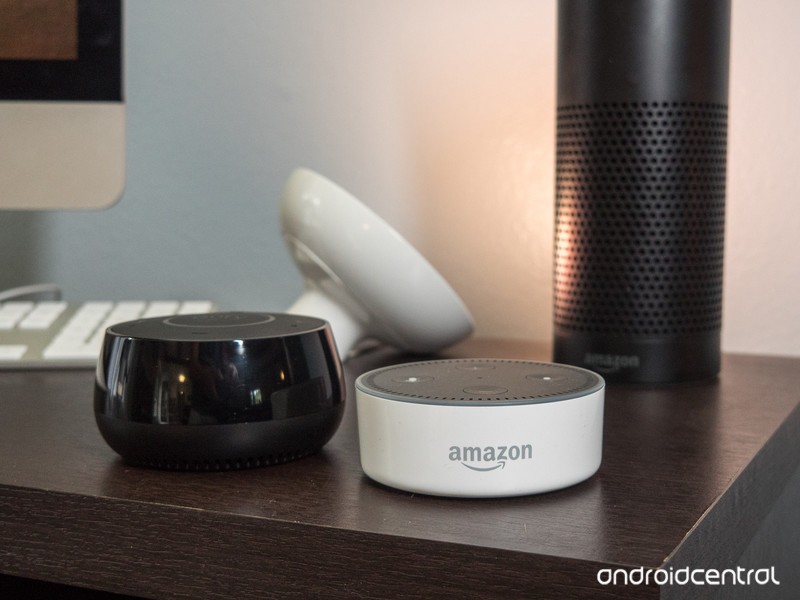
One is the original. The other, more than just an imitator. But should you buy the Echo Dot or the Eufy Genie?
It’s tempting, I know. You want to get an Amazon Echo Dot and see what the fuss is all about. And all it’ll cost you is $50 — and quite often you can pick it up for less.
But there’s also the newer Eufy Genie. It’s pretty much the same thing. Small, with a small speaker, and the ability to be tucked into a corner somewhere, out of the way. And it’s $20 less.
So which should you buy? The Amazon Echo Dot, or the Eufy Genie?
Let’s break it down.
Echo Dot or Eufy Genie: Price
This one’s pretty simple. At current prices, the Echo Dot costs $50. The Eufy Genie is $30. (Note that these fluctuate some time, and the Eufy Genie actually started life at $35.)
Winner: Eufy Genie. But …
Echo Dot or Eufy Genie: Design
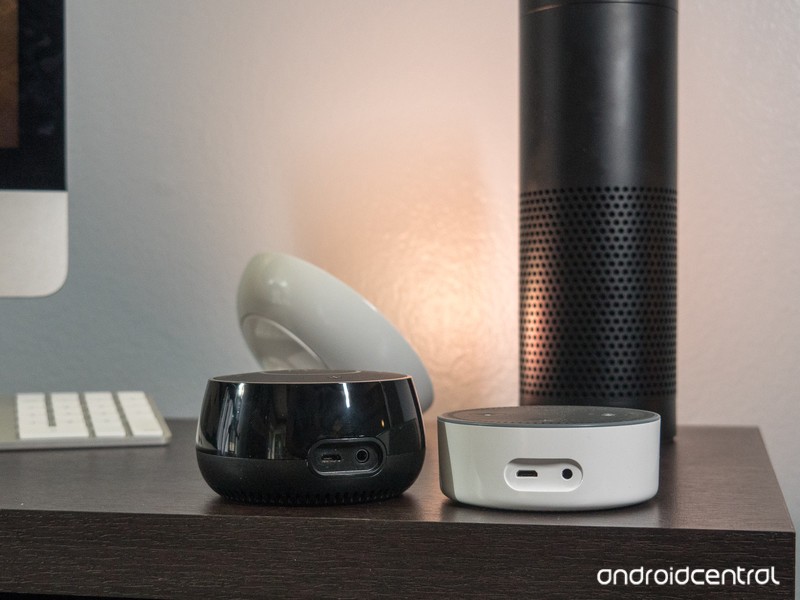
This one’s pretty simple, in my book. The Echo Dot is like an oversized hockey puck. You get either matte black, or glossy white, and plastic all over the place (as you’d expect). But it’s otherwise pretty shapeless.
The Eufy Genie, however, has some curves to it. It’s taller than the Dot but tapers off at the top. That gives it a sense of depth that the Dot just doesn’t have.
I think the light ring in the middle of the Genie’s top section is a little more subtle, too, and very nicely done. Amazon could learn a thing or two here when it comes to design from this thing.
Winner: Eufy Genie
Read our full Eufy Genie review
Echo Dot or Eufy Genie: Performance
OK, so looks aren’t everything. How well do these stand up when it comes to actually doing the thing you paid for them to do?
Let’s start with the speakers. Neither the Echo Dot nor Eufy Genie is going to win any awards here. They’re just too small and too inexpensive, and you get what you pay for. Audio is passable, but far from great. Spoken word is better than music, as you’d expect.
Both the Echo Dot and Eufy Genie allow you to plug in another speaker via a 3.5mm audio cable. So that’s cool. But the Echo Dot goes one further by connecting to another speaker over Bluetooth. And fewer wires is almost always better, especially in this case. (You also can connect phones to the Echo Dot the same way, to stream music in that way.) The Eufy Genie just doesn’t have Bluetooth at all. So that’s a point for the dot.
Talking to you is just one side of the coin, though. These things have to be able to understand you in the first place. And the simple fact is the Echo Dot has more microphones than the Eufy Genie, and in my experience, the Dot understands my voice faster and more accurately than the Genie. And that’s important — it’s the thing you need it to do right the first time, every time.
For me, this is the whole enchilada.
Winner (by far): Echo Dot
Echo Dot vs. Eufy Genie: Accessories
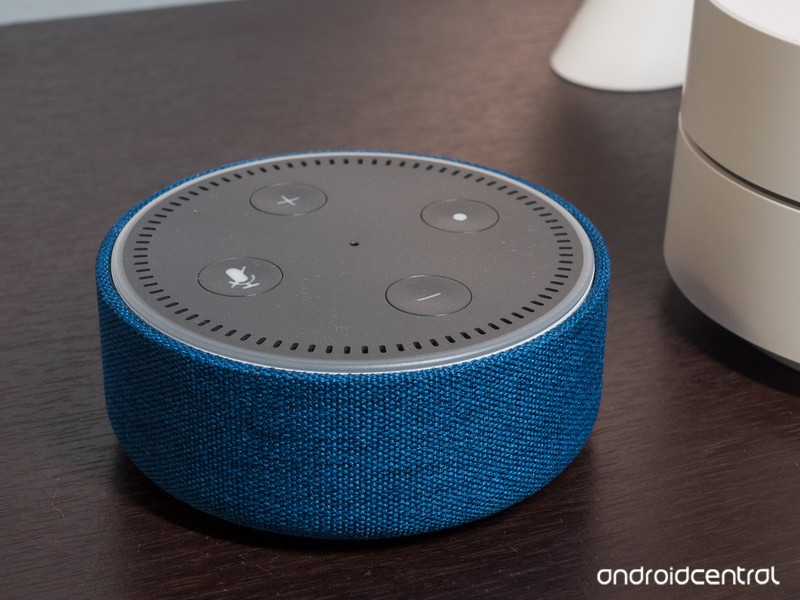 The Echo Dot is a pretty mature product at this point, having been out for a while. The Eufy Genie? Brand new. And so it should come as no surprise that you’re able to buy accessories for the Echo Dot. Start with the basic Echo Dot Case ($10), if you want, which camouflages the look of the Dot a little.
Or bump up to the Vaux speaker ($50), which turns your diminutive Dot into a battery-powered, nearly full-size Echo with a much better speaker.
The Genie? No such accessories yet.
Winner: Echo Dot
Which should you buy? Echo Dot
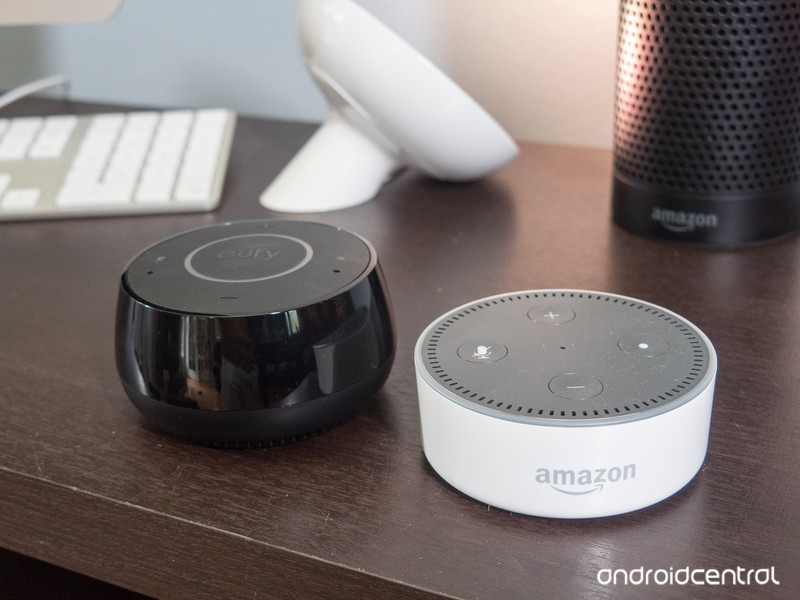
For my money, I’d buy the Echo Dot. It’s a better product, even if it doesn’t look quite as nice as the Eufy Genie. The Echo Dot does voice recognition much better, and that’s its prime purpose.
If you just can’t bring yourself to spend $50 for an Echo Dot, the Genie will work, and it’ll work fairly well. Just not as good as the Dot.
See Echo Dot at Amazon See Eufy Genie at Amazon
Play audio through your car stereo with this $13 Bluetooth FM Transmitter
Listening to the radio and its countless commercials regarding products you hardly ever care about can be such a waste of time. Ditch the controlled playlists and songs you don’t want to hear over and over for Otium’s Bluetooth FM Transmitter which is now available at Amazon for just $12.99 when you enter promo code Y2RJCO6I at checkout to save $5 off its regular price.

Plug Otium’s FM Transmitter into your cigarette lighter socket and tune it and your radio to the same station. After connecting it to your phone via Bluetooth, you can play audio from your device straight through your car’s speakers. The transmitter includes two built-in USB ports which can both be used to charge your phone, while one can read MP3 files off your device too.
- Special Design – Amazing 1.44” LED display can show current voltage of the storage battery of your car, also the name of songs playing from TF Cards or phone number when incoming call, and FM channel and volume
- Great Sound Quality – A2DP supports a stereo music lossless transfer to your car speaker. Built-in microphone feature offers you a hands free talking and wonderful music.
- Frequency Range – FM Transmitters range from 87.5Mhz to 108.0Mhz; Supports AUX output and input, also supports full frequency point to launch.
- Broad Compatibility – Work best with iPad (max speed), iPhone (max speed), iPod, HTC, Blackberry, MP3 Players, PDAs, Mobile Phones; Supports TF/SD Card & A2DP& USB input, only MP3/WMA format.
Complete your hands-free car setup with this $10 magnetic car mount by Anker. It clips into your air vent and uses a strong magnet to keep your phone in a safe place while you’re driving.
See at Amazon
More from Thrifter:
- Save on popcorn, soda and movie tickets at AMC Theatres on Tuesdays
- Here are some of the best AmazonBasics products to buy
For more great deals on tech, gadgets, home goods and more, be sure to check out our friends at Thrifter now!
Apple watchOS 4 comes to your wrist September 19th
It won’t be too long before you can give watchOS 4 a spin — Apple has announced that the upgrade will arrive on September 19th for all Watch models. This isn’t as dramatic a release as last year’s (which added on-device apps and a revamped interface), but it has more than a few tangible improvements, particularly if you’re a health or fitness maven — including a few that weren’t known until now.

For one, it tracks your heart rate much more closely. You can see your heart rate through a complication on your watch face, and the heart rate app shows more details about your heart rate history. And you’ll be warned if there are problems, too. Your Watch will notify you if it detects an elevated heart rate when you’re inactive. Apple is even using heart rate data to analyze arrythmias as part of an FDA-sanctioned heart study whose results will be available later in 2017.
Also, version 4 not only makes quicker to start exercise, but tracks a lot more of it. In addition to supporting new activity types like high intensity interval training, you can switch activities on the fly. If you regularly hit the gym, there’s now support for syncing your Apple Watch with treadmills, bikes and other equipment. And expect to get more motivation — there are daily you’re-almost-there nudges and monthly challenges to keep you going.
The upgrade includes the obligatory round of new watch faces, including the psychedelic Kaleidoscope and a slew of Toy Story characters. However, the centerpiece of the bunch is a Siri face that displays timely info, such as reminders, meetings and news. There’s a Siri complication for other faces, too.
Other big improvements are more functional than anything. You can browse your apps in a list instead the signature honeycomb grid, and the multitasking menu is now vertical. There’s also a reworked music app that not only has a more visual interface, but automatically syncs most of Apple Music’s automatic playlists (the New Music Mix, Favorites Mix and Heavy Rotation) so that you have something to listen to if you leave your phone behind. Finally, if you owe someone for dinner (and live in the US), Apple Pay Cash can send money from your wrist.
Follow all the latest news from Apple’s iPhone event here!
Apple Watch Series 3 gains LTE for $399
Just a year after the Apple Watch Series 2 was launched onto an unsuspecting public, Apple has updated its iconic timepiece once again. The Apple Watch Series 3 shares a similar case to its forebear, but most crucially, comes with a built-in LTE radio. That means that users can now make calls to their friends without the use of their smartphone, letting you finally live all of those Babylon 5 fantasies.
Built-in LTE connectivity is the headline feature, which enables both calls and the ability to stream music directly from Apple Music. In addition, the internals are now faster, thanks to a new dual-core chip and other refinements to the overall system. Plus, with “mixed use,” you’re still expected to wrangle the usual 18 hours of life from the device. Given that the company made the point that the battery life was unchanged, we can expect GPS performance to remain the same, too.
Apple has clearly doubled-down on the health and fitness tracking aspects of its latest timepiece, will Jeff Williams showing off improved heart-rate tracking. Now, the watch will surface your current heart-rate whenever you raise your wrist to check the time, and the device will also constantly calculate your base HR. In addition, the company will spend time looking to develop a way for the watch to detect the subtle, hard-to-diagnose symptoms of atrial fibrillation before they strike. Fitbit, a major rival in the wearables space, has promised to do similar to support a future update to its own new device.

If you’re a fan of subtle hardware tricks, you’ll be delighted to learn that Apple managed to keep the case the same size by building the antenna into the display. In addition, the company promises that its new W2 chip will ensure low-power WiFi and Bluetooth connections are handled seamlessly. The W2 name is likely to indicate a successor to the W1, the custom-designed wireless chip that was found inside Apple’s AirPods.
In terms of surprises, much of the Apple Watch launch was spoiled by a leak of iOS 11 that showed off many of Apple’s cards. A screenshot from the Watch companion app showed a device with a black case and red digital crown — a color feature available on the new bodies. More importantly, however, the face of the preview screen showed off icons denoting both cellular communication and navigation icons. Details of the latter feature weren’t touched on during the keynote, but it’s possible that the watch now offers standalone turn-by-turn guidance.
Since the launch of the first Apple Watch, the wearables industry has changed beyond all recognition, thanks to Apple. The nascent smartwatch world is now dominated by the humble squircle, with independent estimates claiming that Cupertino has sold anything up to 30 million devices. Tim Cook, in his opening remarks, said that the device had grown in sales by 50 percent year-on-year, and now Apple Watch is the world’s most popular watch — although it’s probably not the world’s biggest watchmaker.
The Apple Watch Series 3 will ship with an aluminum case in either Gold, Silver or Space Gray as well as premium ceramic options in White or Black. In addition, the company wanted to crow about its new Sport Loop band — a cloth, Nato-style smartwatch band that’ll handle the elements. The base model Series 3 will ship for $329, while the LTE variant will set you back $399, with size and case options running up into the thousands depending on your wallet.
Oh, and Apple is keeping the Series 1 model around as a super-low budget option, with pricing beginning at $249. The Series 3 units, meanwhile, will be available to pre-order from September 15th, with shipping expected to commence on September 22nd.
Follow all the latest news from Apple’s iPhone event here!
Apple details new heart-tracking features for Watch
Apple is expanding the health-monitoring features of its Watch line with a focus on the heart. The Apple Watch is getting an improved heart-rate monitoring system that allows users to raise their wrists to see their heart rates and fresh metrics, among a raft of other new features. The Watch will also notify wearers if their heart rate jumps up when they’re not actually exercising, signaling a potential problem.
Apple wants the Watch to be able to detect common heart conditions such as atrial fibrilation, which affects tens of millions of people and often goes undiagnosed. To this end, Apple is partnering with clinicians at Stanford for a study to determine whether the Watch can accurately detect abnormal heart rhythms, or arrhythmias, in wearers.
The study uses data from the Apple Watch to analyze arrhythmias, and the company has been working closely with the FDA to organize this entire endeavor. The Apple Heart Study and new features will go live in the US App Store later this year.
Apple sees a clear role for the Watch in the health-monitoring market, launching services like HealthKit and ResearchKit that are designed to provide biometric feedback to patients and doctors alike. A recent study from Cardiogram and the UCSF Health lab demonstrated the Apple Watch’s ability to reliably detect paroxysmal atrial fibrillation when the system is paired with neural network algorithms. All of this work provides a solid foundation for the nationwide Apple Heart Study.
Follow all the latest news from Apple’s iPhone event here!
Apple TV 4K lands on September 22nd for $179
The last Apple TV was everything we wanted from a set-top box — except for 4K support. That’s being fixed this year with the Apple TV 4K. It finally gives Apple fans a way to watch higher-resolution streaming video and, not surprisingly, it’ll also accompany the debut of 4K video on iTunes. Naturally, you’ll also be able to watch high-res content on Netflix and other services, as well as take advantage of high-dynamic range lighting with HDR10 and Dolby Vision. The new set-top box puts Apple on a level playing field with competitors like Roku and Amazon, which have offered 4K and HDR support for a while.
Surprisingly, Apple isn’t planning to charge more for higher-resolution versions of iTunes films. Your existing HD iTunes purchases will be upgraded to 4K/HDR for free, and the company says new 4K releases will cost the same as existing films. That’s notable since services like Vudu charge a premium for higher-res releases. As you’d expect, Apple has also redone the TV’s interface in 4K. At the launch event today, the company played a short clip from Spider-Man: Homecoming in 4K, which started up without a hitch.
The Apple TV 4K is powered by the A10X Fusion chip — last seen in this year’s iPad Pro models — as well as 3GB of RAM, just like we expected. The company claims its CPU performance is twice as fast as the last Apple TV, and its graphics speed is four times as fast. With all of that power, it’ll be able to handle 4K video at up to 60 frames per second. While most video either runs at 24 or 30FPS, being able to handle 60FPS future proofs the Apple TV a bit.
Billy Lynn’s Long Half-Time Walk is the first 4K Blu-ray on the market supporting 60FPS, and I wouldn’t be surprised if more directors start experimenting with the higher frame rate. It’ll be particularly useful in nature documentaries, as it makes footage look much more fluid and realistic. There’s also plenty of 4K/60FPS content on YouTube to help you get a taste of the format.
As for content, Apple says it’s working on getting more local video services on the streaming box. It’ll be particularly important for regional sports, which typically requires a cable or satellite subscription. Naturally, the additional horsepower will also enable more immersive game experiences. Journey developer Jenova Chen showed off a new game called Sky, which you control by waving the Apple TV remote around.
You’ll be able to order the Apple TV 4K on September 15th for $179, and it’ll ship on September 22nd.
Follow all the latest news from Apple’s iPhone event here!
Apple won’t charge extra for 4K movies, upgrades 1080p flicks for free
Now that there’s a 4K, HDR-ready Apple TV, the company is pushing content that takes advantage of those capabilities. Eddie Cue just announced on stage that not only will 4K movies cost the same amount as 1080p flicks on iTunes, the company is also upgrading existing HD purchases to 4K for free.
Developing…
Follow all the latest news from Apple’s iPhone event here!
 AIVAnet