


US DOT outlines safe transition to self-driving cars
US legislation for self-driving cars first made its way to the House of Representatives this past July. The bipartisan SELF DRIVE Act passed the House vote on September the 6th, and will now need to go through the Senate. Odds are that we’ll see autonomous cars on the road sooner rather than later, thanks to this bill and new voluntary guidance The US Department of Transportation and the National Highway Traffic Safety Administration (NHTSA). The governmental agencies released new guidelines on Tuesday that provide federal guidance for automated driving systems to both individual states and businesses.
There are driver assist systems already in place that can help you swerve before you even realize you need to, of course. According to the NHTSA, 94 percent of serious crashes are due to human error. The new federal guidelines attempt to make sure we can transition from these semi-autonomous cars to fully driverless ones safely and effectively.
“The new Guidance supports further development of this important new technology, which has the potential to change the way we travel and how we deliver goods and services,” said U.S. Transportation Secretary Elaine L. Chao in a statement. “The safe deployment of automated vehicle technologies means we can look forward to a future with fewer traffic fatalities and increased mobility for all Americans.”
Called “A Vision for Safety 2.0,” the voluntary guidelines build on the previous policy by focusing on the next three levels of automated driving systems (ADSs): conditional assistance, high assistance, and fully automated systems. Under the new guidance, states and companies do not need to wait to test or deploy their ADSs, either. The Department of Transportation is already planning for the next version 3.0 to make sure automated vehicles can be on the nation’s roads safely and quickly.
Via: US DOT
Source: NHTSA
Apple’s AR efforts will only work if the battery can keep up
All of Apple’s new iPhones are ready for augmented reality. The iPhone 8, 8 Plus and X are designed with AR capabilities built-in, a lot like ASUS’ ZenFone AR and other Google Tango-powered devices. AR is being billed as the medium of the future, allowing users to seamlessly blend the real world with fantastical creatures, sprawling battlefields and cosmic adventures — or to just see if that IKEA Billy bookcase will actually work in their living rooms.
The promises of AR are vast. On-stage today during its 10th anniversary iPhone event, Apple showed off a competitive multiplayer game called The Machines that superimposed a gritty sci-fi warzone over a blank table. On the iPhone 8, tanks and soldiers blasted lasers into buildings and enemies, and a spaceship was eventually engulfed by a massive explosion. It looked like the future of gaming. And it might be — for 30 minutes at a time, at least.

We’ve been here before. Pokemon Go was the first AR game to truly take off in the mainstream market and it’s still going strong — but it offers a cautionary tale for anyone dreaming of untethered AR gaming.
On mobile devices, AR is a massive battery suck. Plain and simple.
Playing Pokemon Go for an hour, with no other apps open, will drain about 30 percent of an iPhone 6S’s battery, according to CNET. And with other apps open, it’s easy to lose 45 percent of an iPhone 6S’s battery life in just 30 minutes. Anecdotally, plenty of Pokemon Go enthusiasts using a range of phones have reported massive battery drain when playing for extended periods of time — that’s why they usually have portable-power-pack cables slithering out of their pockets and purses.

The iPhone 8, 8 Plus and X are more powerful than ever, and all of our smart phones are only going to get more sophisticated as time rolls on. However, no amount of dual-camera action, f/2.4 aperture or 12-megapixel sensors can save the new iPhones from themselves. Simply put, AR is useless if it bricks your phone every time you flip it on.
This isn’t just Apple’s problem. Battery life was a major concern when we reviewed the ASUS ZenFone AR last month. The phone itself was pleasantly powerful, running AAA-style games like Afterpulse and VR experiences nearly flawlessly — but the battery simply couldn’t keep up. The ZenFone AR packs a 3,300mAh cell, far outpacing the iPhone 6S’s 1,715mAh battery, but still, the phone couldn’t stay charged for a full day. Here’s how reviewer Chris Velazco explained it:
“I’d pull the phone off the charger between 7 AM and 8 AM, and it would be right on the edge of death by 6 PM. Things got worse when I spent time playing Daydream VR games or using Tango apps for more than a few minutes.”
You catch that? Messing around with AR for just a few minutes has a drastic impact on the ZenFone AR’s battery life, and that phone features one of the most powerful cells in the business.
There are no concrete battery details for the iPhone 8, 8 Plus or X, though Apple did reveal the iPhone X should last two hours longer than the iPhone 7, which features a 1,960mAh cell.
Apple is clearly excited about AR. In June, it opened up the tech to developers with ARKit, a platform that has already resulted in some truly freaky and fun experiences. However, these are early days for AR and the hardware is still catching up to this software explosion.
But, that may be just fine with Apple, at least for now. After all, the company generally makes billions each year from accessory sales alone, and a shorter, AR-driven battery life may mean they’ll sell a few more AirPower mats this holiday season.
Follow all the latest news from Apple’s iPhone event here!
Apple finally embraces wireless charging with new iPhones, AirPower charging mat
Why it matters to you
If you’re an Apple user, you’ll soon be able to charge your devices much more easily thanks to Qi wireless charging support.
Apple has finally taken the wraps off the new iPhone 8, iPhone 8 Plus, and iPhone X — a new generation of iPhones with a host of innovative features. Perhaps most notable of those new features is wireless charging, which has long been requested of Apple and is now finally a significant part of the iPhone experience.
In fact, Qi wireless charging goes beyond the iPhone. It was already available on the Apple Watch, and it’s now available in a new AirPods charging case, so you’ll be able to wirelessly charge all your mobile Apple devices.
Does that mean you’ll need three wireless charging pads? Thankfully, no. After announcing that the iPhone would support wireless charging, the company also announced that it’s working with Qi to develop AirPower, Apple’s Qi-based wireless charging standard that basically allows for the charging of multiple devices at one time. Apple will launch the AirPower charging mat in 2018, which unfortunately means that you’ll have to use multiple charging pads until then.
Still, there are third-party options. For starters, Powermat’s charging mats work through Qi, which means the iPhone will support all Powermat chargers. They are located in public places like Starbucks restaurants and airports around the world, and you can find nearby Powermat chargers by downloading the app.
Companies like Belkin and Mophie are also working on charging mats of their own. In fact, Belkin has already released information about its new wireless charging mat, called the Boost Up Wireless Charging Pad. The device costs $60, and is able to charge through cases up to 3mm thick.
Apple embracing wireless charging is good news, but not all that surprising. Rumors have been circulating for some time that Apple would start implementing wireless charging on the iPhone. Some reports even indicated that Apple is working with wireless charging company Energous, which has already shown off tech for truly wireless charging — whereby your devices will charge simply by being in range of a charging device, without the need to place them on a mat.
It’s still possible that Apple could be working with Energous — though that tech is still in its early stages, and it will likely be a few years before we see any kind of consumer implementation of it.
The new iPhone 8 and 8 Plus phones will both go up for pre-order on September 15, with full sales set to start on September 22. The iPhone 8 starts at $699 for the 64GB version, while the 8 Plus has a starting price of $799. The iPhone X starts at $999, and will be available in November.
Update: Powermat charging pads around the world will support the iPhone.
Here’s how you can get your hands on the iPhone X
The iPhone X has been revealed at long last, but you’ll have to wait well more than a month before you’re able to get one in your hands. While Apple’s futuristic flagship was announced at its special event on September 12, the device won’t be available for pre-order until October 27, and won’t ship to customers until a week later on November 3.
It won’t be cheap. The base model of the iPhone X with 64GB of storage starts at a whopping $1,000 if you buy through Apple. The 256GB variant will go for an extra $150. You only get two color options, too — Silver and Space Gray — with no hue resembling gold anywhere to be found.
Still, that won’t stop all four major carriers from issuing special discounts and promotions to earn your dollars. We take a look at the deals out there to make Apple’s latest and greatest a bit kinder to your wallet. If the iPhone X is out of your budget, take a look at our iPhone 8 and iPhone 8 Plus buying guide to see if it’s a better fit.
How to buy an unlocked iPhone X
Apple typically makes unlocked models of its phones available shortly after they launch on wireless carriers, and we expect the same for the iPhone X. If you want to buy the device with no commitment, this is the way to go. Apple also offers its own financing, so you aren’t required to pay all up front. Do note, there’s no mention of an unlocked, SIM-free model on the Apple website yet.
How to buy on T-Mobile
T-Mobile will issue you $300 toward your iPhone X if you trade in your iPhone 6 or newer in “good condition.” This deal also applies to the new iPhone 8 and 8 Plus. The savings will be issued in 24 monthly bill credits, so you’ll receive them in installments over the life of the device as your pay it off.
T-Mobile has not yet announced how much it will sell the iPhone X for, nor has the company said when it will open up pre-orders. We’ve contacted the carrier and will report back as soon as we receive word.
You will be able to upgrade to the iPhone X if you are already enrolled in the iPhone Upgrade Program. We’re still awaiting information from Verizon, AT&T, and Sprint, and we’ll continue to update this guide as soon as we know more.
iPhone X Impressions: ‘Striking’ Display and ‘Sensational-Looking’ Design Make High Price Worth It
Apple just officially announced the iPhone X, its all-new, drastically redesigned, tenth anniversary iPhone. Right after the keynote where it debuted, reporters were treated to the hands-on demo room within the Steve Jobs Theater where they got to be among the first people in the world to hold an iPhone X. Below we’ll round up some of the first impressions on the device, which many publications are describing as “beautiful,” “striking,” and a “sensational-looking” iPhone.
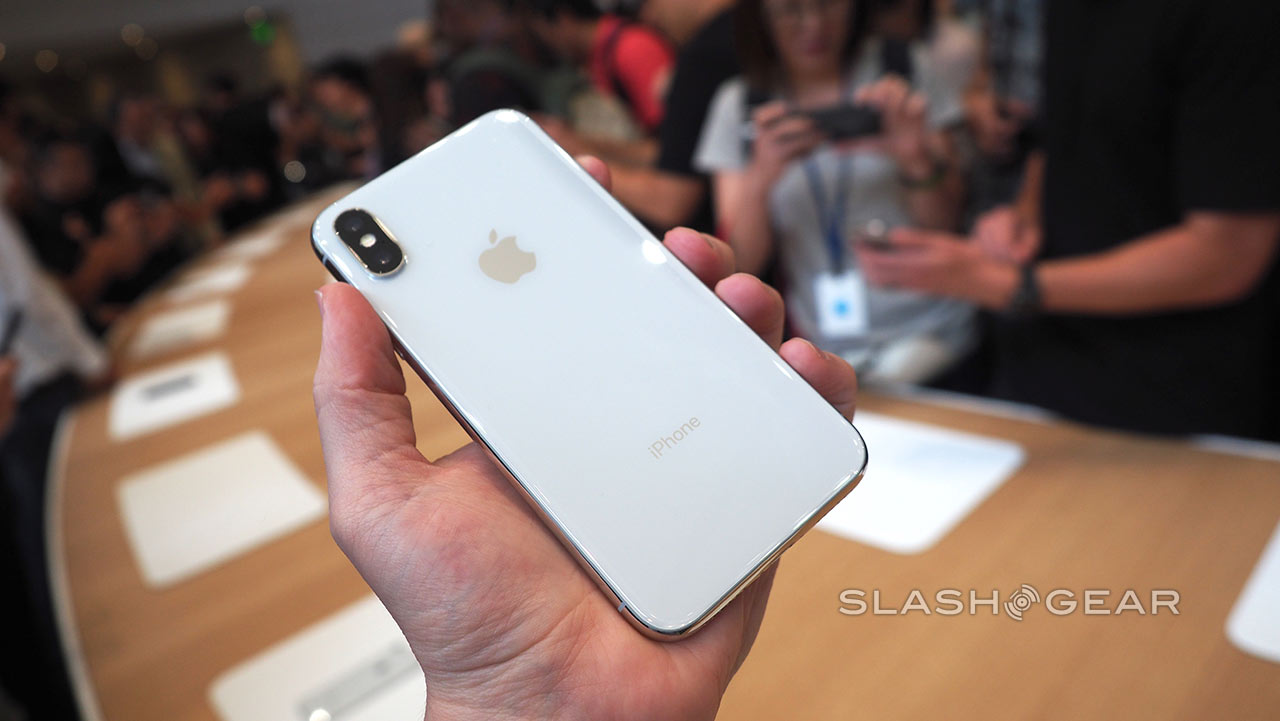
SlashGear called the iPhone X “familiar, and yet so very different,” alluding to the aluminum casing of the new iPhone that matches the original iPhone’s design, while also commenting on the “striking” OLED display. While other smartphones have had OLED screens, SlashGear said the iPhone X “takes it to another level,” with text and graphics that look “embedded into the toughened glass” of the display.
Images via SlashGear
Although the top “notch” of the screen looked intrusive in viewing some photos and videos, the site largely said that it shouldn’t get in the way much elsewhere.
Most striking, of course, is the display. Apple has not only pushed the 5.8-inch OLED panel to the very edges of the bezel, it has hugged the corners too. The much-discussed “notch” in the top – housing not only the new TrueDepth Camera, but various other sensors used for the new Face ID system – looks intrusive in photos but, in my brief use of the iPhone X, didn’t feel like it would get in the way.
You’re too busy marveling at Apple’s OLED screen, really. We’re used to bright, color-rich panels from OLED technology but the iPhone X takes it to another level, text and graphics looking like they’re embedded into the toughened glass that protects the phone front and back. It’s pleasingly smear and lag-free, even in fast-paced augmented reality games, too.
The Verge said that the “star of the show” for the iPhone X is its 5.8-inch OLED screen, which goes to great lengths in proving that an iPhone without a Home Button can actually work. Furthermore, the site said Face ID “actually works,” with a nearby Apple demo assistant repeatedly showing off the biometric security feature, which “worked every time” even under the bright and erratic conditions of the demo area.
The Verge continued by noting a few of the iPhone X’s control gestures will likely take some time to get used to, including swiping up to go home, but over time the site predicted it’ll become just as natural as current UI controls on iOS 10. Like many sites, The Verge noted the $999 price tag for the starting model of the iPhone X, but said that for most users it’ll feel “worth it.”
The thing that a lot of people want to talk about with the iPhone X is its $999 starting price, but when you have the phone in your hand, it feels… worth it. The X is an extremely beautiful device, with a stainless steel band and glass back curving into a 5.8-inch OLED display that stretches all the way across the front of the phone.
The screen dictates everything about the iPhone X’s design, including its lack of a home button. This will probably be one of the most controversial things about the phone among iPhone users, but Apple has done a lot of work to make iOS feel natural without a home button. I couldn’t test out the new FaceID authentication myself without setting it up, but it was configured for one of Apple’s demo assistants, and it worked every time he showed it off, even under the frenetic conditions and bright lights of the demo area.
TechRadar called the iPhone X “easily, easily the best-looking phone Apple’s ever made,” with rear glass that feels “solid and secure” in the hand and the rounded edges and light form factor make it “pleasant to hold,” although fingerprints will be a problem. Despite being slightly smaller than an iPhone 7 Plus, TechRadar noted that some iPhone X gestures will still require two hands, and pointed out that “you can’t reach the top right-hand corner as easily” for bringing up the new control center.
Unlike The Verge’s experience, TechRadar described a questionable demo experience with Face ID, where the demo worker had to keep turning the display off and on to active the facial recognition system. Still, it noted that daily testing will be required to truly see the potential of Face ID — as well as all of the iPhone X’s new features — and came away largely impressed by the smartphone, particularly the display.
It’s hard to overstate how beautiful this screen is – and that’s not hyperbole brought on by extreme fatigue. It’s deep, rich and smooth, and draws level with Samsung in the quality stakes easily. If the planned effect of the iPhone X was to wow with its display, it’s certainly done that. The colors are just so vivid on the all-screen front, and it truly feels like you’re holding one of the iPhone concepts we wrote about years ago.
We’re definitely going to need convincing with Face ID – Apple’s done a good job of explaining why its system is better than anything we’ve seen before, but without trying this day to day it’s hard to know whether it’ll be good enough to replace Touch ID and the demos weren’t anywhere near convincing enough. But while question marks remain, there’s no doubt that this is the futuristic iPhone from Apple we’ve been waiting for. Just be ready to pay a hefty sum for it.
The iPhone X will officially be up for pre-order on October 27, and then go on sale November 3, starting at $999 for the 64GB version and rising to $1,149 for the 256GB version. Apple revealed the iPhone X earlier today, alongside the iPhone 8, iPhone 8 Plus, Apple Watch Series 3, and Apple TV 4K.
Related Roundups: iPhone 8, iPhone X
Tag: September 2017 event
Discuss this article in our forums
How to clean Daydream View

Your Daydream View is probably easier to clean than you think!
As you play with a headset and share it with your friends, it’s going to take some minor damage and accumulate dirt. To keep your adventures in VR as awesome as possible, then you’ll need to know how to easily clean your headset. It can be a little bit trickier with Daydream View because it is covered in fabric and not plastic. Thankfully Google has made it easy to keep your headset in tip-top shape, and we’ve got a few tips to help you out.
Read more at VRHeads.com
Apple’s TV App Expanding to Seven Countries, Starting With Canada and Australia Later This Month
Apple today announced that its TV app for iPhone, iPad, and Apple TV will be expanding to seven additional countries by the end of the year.
The app will be released in Canada and Australia later this month, followed by France, Germany, Sweden, Norway, and the UK by the end of the year. The app has been available in the United States only until now.
Apple’s TV app simplifies the television-watching experience, and helps users discover new TV shows and movies to watch. The app provides a unified experience for accessing TV shows and movies across multiple video apps.
The announcement was made by Apple’s services chief Eddy Cue during the company’s iPhone X event at the Steve Jobs Theater today.
Related Roundups: Apple TV, tvOS 10
Buyer’s Guide: Apple TV (Don’t Buy)
Discuss this article in our forums
Best Clear Cases for Samsung Galaxy Note 8

Show off your Note 8’s design while keeping it safe with a quality clear case.
We get it — you just ordered your brand new Galaxy Note 8 and you can’t wait to show it off to your friends and family. But you also want to keep it protected, right?
A clear case is a great option for those of us who love to show off your phone’s sleek lines without worrying about the shattering from an accidental drop. We’ve rounded up our favorite clear cases for the Galaxy Note 8!
- Spigen Liquid Crystal
- Ringke Fusion
- Speck Presido Clear
- Caseology Skyfall case
- OtterBox Symmetry Series
Spigen Liquid Crystal

A great clear case is going to offer protection for your phone without drawing attention to the fact that you’ve got a case on your phone. In that regard, the Spigen Liquid Crystal is an outstanding choice.
Made of lightweight and flexible TPU material, this single-layer case is easy to pop onto your phone while adding next to no bulk to the phone. Precise cutouts and buttons means that your phone’s functionality is never affected, and it’s thin enough to allow for wireless charging, too.
Spigen has a couple other clear case options you might be interested in — the Rugged Crystal ($12) features reinforced corners to help with drops, and the Ultra Hybrid S ($15) features a built-in magnetic kickstand for hands-free media viewing. But if you’re just looking for a reliable and slim clear case, the Liquid Crystal is your best value at just $11.
See at Amazon
Ringke Fusion

The Ringke Fusion case is one of those case styles that’s offered for nearly every major phone release, and it’s a reliable option if you want to keep your phone protected without impeding the look and design of your new phone.
This is a two-layer case with a soft, shock-absorbing TPU bumper paired with a hard plastic back plate that offers serious protection against drops and scratches. There’s tapered lips around the corners to ensure the screen isn’t in direct contact with surfaces if you put your phone screen down on a table, and it’s been precisely designed so that all the ports and buttons are functional.
You can get the standard all-clear version for just $7.99, or opt to add some character to the bumper — Rose Gold or Smoke Black — for just $9.99.
See at Amazon
Speck Presidio Clear

Speck’s clear case is as minimalist as it gets — at a glance, you’d never know your phone has a case on it if not for the subtle Speck logo in the top-right corner.
This dual-layer case is rugged, having been test dropped from 8 feet by a third-party testing lab. If you’ve shied away from a clear case in the past because you’ve seen the yellowing effect that UV rays can have on them over time, you’ll be happy to know that the Presidio case is made with a custom-engineered material that resists turning yellow over time.
At just under $20, this is one of the more expensive clear case options for the Note 8, but if ruggedness and anti-yellowing are important features for you, don’t settle for anything less.
See at Amazon
Caseology Skyfall

The Caseology Skyfall series of cases for the Note 8 are the perfect choice for anyone who wants a clear case with accents around the edge to match the color of the phone.
These dual-layer cases combine a crystal-clear acrylic hard cover with an impact resistant PC bumper that comes in your choice of three colors — Blue Coral, Orchid Gray, and Warm Gray.
If you’re set on a specific color for your Note 8 and want a clear case that actually accents your phone rather than attempting to be invisible, get at Caseology Skyfall case starting at $13.
See at Amazon
OtterBox Symmetry Series Clear Case

OtterBox is a brand that’s become synonymous with outstanding quality and customer support — and that’s important because OtterBox cases always tend to be on the more expensive side.
The OtterBox Symmetry Series is an ultra-slim offering, available as a clear case or your choice of six other stylish options. It’s compatible with screen protectors and features a lip around the screen to protect the touchscreen from damage.
At $50 it’s a decidedly a pricy investment, but so is the Note 8 itself. Backed by OtterBox’s limited lifetime warranty, you can buy with confidence.
See at Amazon
Which clear case will you get?
These are our picks for best clear case — which one are you going with? Got a favorite that didn’t make our list? Let us know!
Samsung Galaxy Note 8
- Galaxy Note 8 review
- Complete Galaxy Note 8 specs
- Galaxy Note 8 vs. Galaxy Note 5
- Which Note 8 color is best?
- Join our Galaxy Note 8 forums
Verizon
AT&T
T-Mobile
Sprint
Best Buy
Apple Introduces ‘Animoji’ as iPhone X Exclusive Feature
With every new iPhone release, Apple introduces a new “magical” feature like Live Photos, and in the iPhone X, that new unique, Apple-only feature is Animoji, a new set of emoji-style characters that animate based on an iPhone user’s facial expression.
Animoji take advantage of the new TrueDepth front-facing camera, which powers Face ID and features several new 3D sensors to detect your facial expressions. The TrueDepth camera analyzes more than 30,000 invisible dots projected onto your face to get a precise depth map that’s able to accurately translate your own facial movements to the Animoji.

When used for Animoji, the TrueDepth camera is able to analyze more than 50 muscle movements in different areas of your face to mimic your speech patterns and expressions. It detects movement of the eyebrows, cheeks, chin, eyes, jaw, lips, eyes, and mouth.

There are 12 different Animoji to choose from, modeled after existing emoji characters: monkey, robot, cat, dog, alien, fox, poop, pig, panda, rabbit, chicken, and unicorn.

Animoji exist in the Messages app alongside stickers, emoji, and other Messages apps. You can use Animoji to record and send messages to friends, with the characters mimicking your movements and using your voice.

Animoji are exclusive to the iPhone X and won’t be available until the device launches later this fall. Apple plans to accept iPhone X pre-orders starting on October 27, with an official launch coming on November 3.
Related Roundups: iPhone 8, iPhone X
Discuss this article in our forums
Take it from a Note 8 user: temper your iPhone X Face ID expectations

Sometimes it turns out the solution to a problem is something you already have: a fingerprint sensor.
Alongside the predictably named and designed iPhone 8, Apple just announced the all-new iPhone X (pronounced “ten” by the way). With its very familiar “lots of screen and tiny bezels” design, the iPhone X ditched one of the most recognizable parts of an iPhone: its home button. And in doing so, it lost Touch ID — one of the key features of the iPhone and a real driver for the rest of the industry to get up to speed with fantastic, fast one-touch fingerprint sensors.
It’s replaced with what Apple calls “Face ID” instead. A complex set of purpose-built hardware and software that identifies hundreds of tiny details of your face in order to securely unlock your phone when you’re looking at it. It sounds wonderful. It even works in demos (well, mostly). But take it from me, as a Galaxy Note 8 user living with iris and face recognition every day: temper your expectations.

Apple, of course, isn’t the first to do away with a front-mounted fingerprint sensor in favor of other authentication methods. Many companies have done face and iris unlocking. Google unveiled a rudimentary face unlock as far back as Android 4.0. Samsung has popularized it with the Note 7, Galaxy S8 and now Note 8. While it works pretty well, months and months of people using these phones with these alternate authentication methods has given us lots of information on how it works in the real world. Here’s a glimpse into the daily life of using Samsung phones:
“Look here to use irises”
“Hold phone closer”
“Phone too close to face”
“Hold farther away”
“Irises not recognized”
And in the end, I wiggle my finger up to the fingerprint sensor on the back or just swipe on the screen and use my pattern instead.
Switching to Face Recognition, which can’t operate at the same time as Iris Scanning, improves unlocking performance but is, by admission, not as secure. (Apple claims its Face ID can’t be fooled by a photo — we’ll see about that.) And in the end, it still isn’t as fast as using a one-touch fingerprint sensor — even the awkwardly placed ones on the back of modern Samsung phones.

Now Face ID, as demoed today at the Apple launch event, seems to go one important step beyond Samsung’s implementation. The designated phone hardware isn’t looking at just your face or just your irises, but instead the entire profile of your face and eyes for authentication. That means the iPhone X can identify your “face” even if you change your hair, put on glasses, grow a beard, wear a hat or just stand in different lighting. Theoretically.
Face ID may very well be better than Samsung’s iris scanning — but it isn’t a fingerprint sensor.
But Face ID, as shown, no matter how good its scanning capabilities are, still can’t match fingerprint sensors in many situations we’re in every single day. With a properly-placed fingerprint sensor you can unlock your phone as you take it out of your pocket before it’s anywhere near your face, or with it sitting on a table, or in the dark, or in harsh sunlight … or while you’re wearing sunglasses. The only thing that can foil a fingerprint sensor, really, is a glove on your hand.
And that’s why I want you to temper your expectations for what Face ID can actually accomplish when it comes to the daily goal of simply unlocking your phone when you want to use it. I’m sure it’s quite secure, and Apple definitely isn’t going to sell the scans of your face to some advertising company. Based on what’s inside the iPhone X’s little screen cutout, and what Apple is saying about the technology, it very well may be better than what the Galaxy Note 8’s iris scanning can do — I’d actually be surprised if it wasn’t notably better.
But simply improving facial recognition isn’t what’s required to be a better authentication solution than a fingerprint sensor. The system, no matter how good it is, is going to have a tough time overcoming inherent constraints with facial recognition. Sometimes the best solution to a problem is something we already had: a fingerprint sensor.
Samsung Galaxy Note 8
- Galaxy Note 8 review
- Complete Galaxy Note 8 specs
- Galaxy Note 8 vs. Galaxy Note 5
- Which Note 8 color is best?
- Join our Galaxy Note 8 forums
Verizon
AT&T
T-Mobile
Sprint
Best Buy
 AIVAnet