


T-Mobile’s latest plan gives seniors a discount on unlimited data
You can’t really sugarcoat it: senior citizens get a raw deal when it comes to cellphones. Carriers tend to either assume that you don’t use data (and want a basic cellphone) or else give you a modest discount at best. T-Mobile thinks it can do better: it’s launching a One Unlimited 55+ plan on August 9th that, for the most part, acknowledges that many seniors use smartphones as enthusiastically as the younger crowd. The offer gives you two lines with unlimited data, talk and texting for $60 per month, or $50 for one line. There are a few gotchas, but it still amounts to a huge deal for empty-nesters who want to post their vacation shots on Instagram.
The plan offers many of the perks that everyone else gets, including unlimited text and basic data when traveling (plus full service in Canada and Mexico), freebies on Tuesdays, Digits phone number syncing and some free use of your phone on Gogo’s in-flight wireless access. The catches? You need to set up automatic payments to get those rates (it’s $5 more per line otherwise), and you won’t get Kickback, Insider Hookup or a handful of other discounts. There’s also no mention of video streaming at higher quality than 480p or tethering beyond 3G speeds, although we’ve asked the carrier if customers can upgrade to higher video quality and faster hotspot connections.
This isn’t necessarily the best option if you don’t make heavy use of your phone (Google’s Project Fi could cost as much or less with modest use, for example). However, it might just beat the alternatives. AT&T and Verizon will both give you a 65-plus plan at $30 for one line, but that doesn’t include data. Verizon asks at least $30 to add a reasonable amount of data, at which point you might as well pay for regular service. You can get discounts on some carriers if you’re an AARP member (AT&T’s is 10 percent), but you might still end up paying more. In short: so long as you actually intend to take advantage of all that data and airtime, T-Mobile might have the edge.
It’s not surprising why T-Mobile would cut a deal like this, at least. Cellphone use is near a saturation point in the US, with few new customers — by courting a relatively untapped market, T-Mobile might continue growing at the expense of rivals who only make minimal efforts to accommodate older users.
Source: T-Mobile Newsroom
YouTube adds in-app direct messaging and sharing features
Don’t look now, but Google has yet another messaging service — sort of. Today, YouTube announced that it is rolling out a new in-app direct messaging feature, much like what you’ll find in Instagram. Google’s been testing and teasing this feature for over a year now, but after taking user feedback into consideration, the company is rolling it out to all of its users around the world.
As noted, it’s not dissimilar to what Instagram has been doing with its own direct messaging features that arrived in December 2013. When users tap the “share” button on a video, they’ll now have the option to send it directly through the YouTube app to their contacts. The share pane shows people you’ve recently chatted with, as well as some suggestions for people to add to your list. When you tap the “add contacts” button, the app asks if you want to pull in people from your phone book or send an invite link.

Sadly, the phone book doesn’t actually show whether or not your contacts are using YouTube; it just pulls up a “add me as a contact on YouTube” message and dumps it into an SMS. It would be a lot more elegant if the app could recognize which of your friends are signed into YouTube and just start the conversation there. That’s the challenge with what YouTube is trying to do here: It’s easy enough to just use the standard Android or iOS sharing pane to drop a video into iMessage or your chat app of choice, but it’s beneficial for YouTube to keep the conversation going on its own platform.
YouTube’s suggested contacts feature makes it a little easier to get started sharing things. With those people, you can send and confirm invites within the app itself, no SMS needed. Google says those suggestions take into account which people you interact with on YouTube and other Google services, which is to say, people that you email or chat with in Hangouts will presumably show up here as well. Regardless of whether you invite someone through SMS or in the app itself, once the invite is accepted you can freely share videos back and forth.
Fortunately, this new feature works pretty well once you get past dealing with contacts. Once you share a video (your first conversation with a contact needs to be initiated by sharing a video), you and your friend can just chat about it right in YouTube. Whether just one-on-one or in a group, you can chat just as you would with basically any other chat app. Naturally, there’s a button right in the compose area to drop another video into the conversation. Pressing it pulls up your most recently viewed videos, but you can also tap a search button to find basically anything else you’d want to add to the conversation.
Given YouTube’s focus on video, you can only add other videos to the conversation. Otherwise, you’re limited to text and emoji. There are also limited “reaction” features; users can add a heart to any message or video dropped in their chat. But other than that, YouTube wisely keeps things basic here, as there’s no real need for this to compete with more full-featured chat apps like Facebook Messenger, iMessage or even Google’s own Alto.
Indeed, this new feature will probably be most utilized by heavy YouTube users — probably the kinds of people who frequently upload and create their own videos as well as just watch. But even more casual YouTube users will probably find themselves using this new feature pretty quickly. The in-app option is now the default way to share YouTube videos, so chances are good that you’ll either send or receive a video like this pretty quickly.
And while it’s easy to chide Google for coming up with yet another messaging system, it’s also something the company had to do to keep people sharing video on its platform instead of through other apps. Instagram made in-app sharing and messaging a focus over the years, and it makes sense for YouTube to do the same — it helps control the experience users have and makes it more likely they’ll keep sharing more clips. Fortunately, YouTube implemented this feature in a way that makes sense and is easy to use, my one qualm about SMS invites aside. If it means my friends are more likely to share ridiculous videos with me, so much the better.
Researchers develop method for real-time speech animation
Researchers at the University of East Anglia, Caltech, Carnegie Mellon University and Disney have created a way to animate speech in real-time. With their method, rather than having skilled animators manually match an animated character’s mouth to recorded speech, new dialogue can be incorporated automatically in much less time with a lot less effort.
To do this, the researchers recorded over eight hours of audio and video of a speaker reciting more than 2500 different sentences. The speaker’s face was tracked as they spoke, which was used to create a reference face for an animation model. Off-the-shelf speech recognition software was then used to transcribe the speech sounds. All of this information was subsequently used to train a neural network to animate a reference face, frame-by-frame, based on phonemes — or individual distinct bits of sound — pulled from new audio. That reference face was then superimposed on and matched to computer generated characters in real-time.
Training the AI with the reference video and audio takes only a couple of hours and this method lets you use speech from any speaker with any accent and even in different languages. It also accommodates singing. “Realistic speech animation is essential for effective character animation. Done badly, it can be distracting and lead to a box office flop,” said lead researcher Sarah Taylor in a statement. “Doing it well however is both time consuming and costly as it has to be manually produced by a skilled animator. Our goal is to automatically generate production-quality animated speech for any style of character, given only audio speech as an input.”
This new method was recently published in ACM Transactions on Graphics and presented at SIGGRAPH 2017. You can check out a video of the method at work through the study’s supplementary material download here.
Source: University of East Anglia, ACM Transactions on Graphics
Leaked Foxconn Images Show Off Internals of iPhone 8, Including Wireless Charging Coil
A Foxconn employee has allegedly taken new images of the iPhone 8’s internals and posted them to the Chinese social networking site Weibo over the weekend, providing a look at the inside of Apple’s OLED iPhone that’s expected to be announced next month. The images lack a layered glimpse into the iPhone’s internal components, so they were probably not taken via x-ray and were more likely captured through some other form of black and white image processing.
The images depict an iPhone in the “engineering validation test” (EVT) stage of manufacturing with a codename of “Ferrari,” the internal name for the iPhone 8 that was previously leaked in supply chain documents late last year. Within the iPhone 8, there’s a large, central black spot that represents the device’s wireless charging coil, which is what will fuel the smartphone’s long-rumored wireless charging features.
Otherwise, you can see the dual camera module for the rear camera, blown up shots of what appears to be the front-facing camera or sensors, a large space for the L-shaped battery, and a stacked logic board design previously rumored by KGI Securities analyst Ming-Chi Kuo. These changes will result in an iPhone with a longer battery life, which Apple hopes will entice those with older model iPhones to upgrade this year.
The EVT stage that the iPhone 8 images represent is a very early stage of manufacturing for Apple to be in at this point, with design validation tests (DVT) and production validation tests (PVT) to go ahead of a consumer release. This calls the validity of the images into question, but they could have been taken at an earlier date. At this point, we know that Apple supplier Samsung Display is entering into full scale production for iPhone 8 OLED panels, while numerous reports have pointed towards a shortage for the iPhone 8 come launch.
Feeding into more delay and shortage rumors surrounding the iPhone 8, Foxconn vice president Luo Zhongsheng said that the yield rate of the iPhone 8 and its OLED display is only at 60 percent — a number previously estimated by industry watchers — because crafting the “special-shaped” OLED display is proving difficult (via MyDrivers). The vice president shared the news on Weibo, and the post has since been deleted. Zhongsheng was likely referring to the front-facing “notch” that’s rumored to hold the iPhone 8’s camera and 3D sensors for facial recognition.

Rumors and leaks related to the iPhone 8 are growing more and more steady as we near the device’s announcement, expected at an event in September. Thanks to the release of the HomePod’s firmware, we now know the general front-facing design of the iPhone 8, and that the smartphone might record 4K video at 60 fps. The facial recognition system was also discovered to potentially be able to scan a user’s face even when the iPhone is lying flat on a table.
Related Roundup: iPhone 8
Discuss this article in our forums
Apple Maps Transit Directions Expand to Brisbane, Perth, and Surrounding Areas in Australia
Apple Maps has been updated with transit data in Queensland and Western Australia, enabling iPhone users to navigate with public transportation directions in large cities such as Brisbane and Perth, and surrounding areas.
In Brisbane, supported vehicles include TransLink buses and Queensland Rail trains, with routes extending to, from, and within the Gold Coast and Sunshine Coast suburbs. Apple Maps also supports G:link trams in the Gold Coast.
Travel north to smaller cities like Rockhampton and Townsville and Apple Maps provides routes for Sunbus buses. Of note, long-distance train routes along the Queensland coast don’t appear to be available at this time.
Many other regions of Queensland are now supported, so check the Transit tab in Apple Maps if you live somewhere else in the state.
In Western Australia, the biggest addition is Perth. Transperth buses and trains routes extend to suburbs like Mandurah and Rockingham. Long-distance Transwa train routes are also supported between several Western Australia destinations.
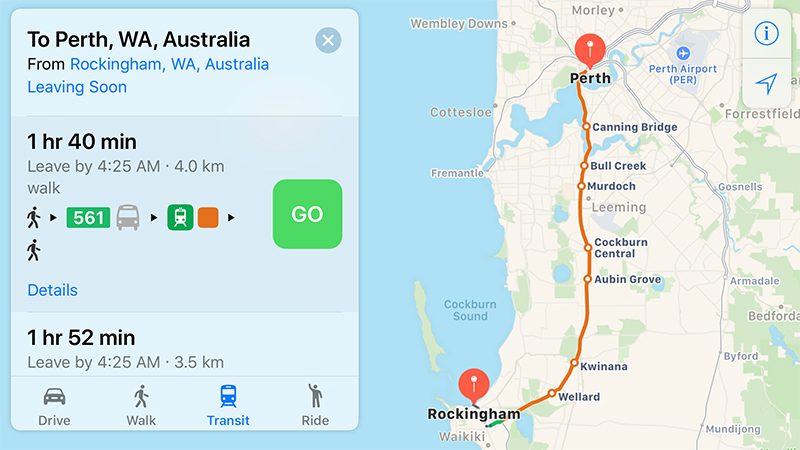
Apple Maps transit directions were already available in Adelaide, Melbourne, and Sydney prior to today’s expansion.
Apple Maps gained a Transit tab in iOS 9. The feature lags several years behind Google Maps, but Apple’s public transportation support is exhaustive, mapping all station entrances and listing departure times.
At launch, the feature was limited to Baltimore, Berlin, Boston, Chicago, London, Los Angeles, Mexico City, New York, Philadelphia, San Francisco, Sydney, Toronto, and over 300 cities in China. Since then, Apple has been working to expand support for public transportation to other cities around the world.
Newer additions include Atlanta, Calgary, Columbus, Dallas, Denver, Detroit, Honolulu, Houston, Kansas City, Las Vegas, Madrid, Manchester, Miami, Minneapolis–Saint Paul, Montréal, New Orleans, Paris, Portland, Pittsburgh, Prague, Rio de Janeiro, Sacramento, Salt Lake City, San Antonio, San Diego, Seattle, and Singapore.
For a regularly updated list of cities with Apple Maps transit, visit the iOS Feature Availability page on Apple’s website.
Tags: Australia, Apple Maps, transit
Discuss this article in our forums
Apple Seeds Fifth Beta of iOS 11 to Developers, Removes iCloud Messages for Now
Apple today seeded the fifth beta of iOS 11 to developers for testing purposes, two weeks after releasing the fourth beta and two months after introducing the new update at the Worldwide Developers Conference.
Registered developers can download the fifth iOS 11 beta from Apple’s Developer Center or over-the-air once the proper configuration profile has been installed.
According to Apple’s release notes, in the fifth beta, iCloud Messages has been removed. Apple plans to reintroduce it in a future update to iOS 11. Today’s beta fixes AirPlay, and tapping the AirPlay button in videos that are not full screen will no longer crash some apps. There’s also a fix for a Calendar bug that could cause crashes when dragging items into the Calendar app, and FaceTime Live Photos is now an option that’s enabled by default.
Favorites that were added to the Health app in iOS 11 beta 4 or earlier are no longer available, with Apple having restored Favorites that were selected prior to iOS 11.
iOS 11 introduces significant design changes, including a customizable Control Center and a new Lock screen that’s been merged with the Notification Center. Peer-to-peer Apple Pay payments are coming in the Messages app, which is also gaining a new App Drawer, and there’s a Do Not Disturb While Driving feature that’s meant to help drivers stay focused on the road. Siri, Photos, the Camera app, and more are also gaining new features and refinements.
Subscribe to the MacRumors YouTube channel for more videos.
ARKit for developers will bring a range of new augmented reality apps and games to iOS devices, while a Core ML SDK has the potential to let developers build smarter apps. iOS 11 is also the biggest update ever for the iPad, with a new Dock that introduces much improved multitasking, a Files app for better managing files, improved Apple Pencil support, a revamped App Switcher, and a system-wide drag and drop feature.
iOS 11 is available for both registered developers and public beta testers and will see another month of testing ahead of a prospective September release date alongside new iPhones.
For complete details on all of the new features included in iOS 11, make sure to check out our extensive iOS 11 roundup.
Related Roundup: iOS 11
Discuss this article in our forums
Apple Provides Fifth Beta of Upcoming tvOS 11 Update to Developers
Apple today seeded the fifth beta of an upcoming tvOS 11 update designed for the fourth-generation TV, two weeks after seeding the fourth beta and two months after releasing the first beta during the 2017 Worldwide Developers Conference.
Registered developers can download tvOS 11 by connecting the Apple TV to a computer with a USB-C cable and installing the beta software using iTunes.
tvOS 11 didn’t receive a lot of attention at the Worldwide Developers Conference due to time constraints, but according to Apple’s release notes, it introduces a few new features to the operating system.
tvOS 11 offers automatic switching between light/dark mode based on local time, Home screen syncing options that keep multiple Apple TVs in a household in sync, new background modes and notification support, Focus API improvements, custom sound support, network-based pairing and development support, improvements to Mobile Device Management, and more.
The fifth beta of tvOS 11 most likely focuses primarily on bug fixes and other small refinements, as the first four betas did. Apple’s new tvOS 11 update is available for both registered developers and public beta testers. It will see a public release later this year.
Related Roundups: Apple TV, tvOS 10
Buyer’s Guide: Apple TV (Don’t Buy)
Discuss this article in our forums
Best iOS app deals of the day! 6 paid iPhone apps for free for a limited time
Everyone likes Apple apps, but sometimes the best ones are a bit expensive. Now and then, developers put paid apps on sale for free for a limited time, but you have to snatch them up while you have the chance. Here are the latest and greatest iOS app deals available from the iOS App Store.
These apps normally cost money and this sale lasts for a limited time only. If you go to the App Store and it says the app costs money, that means the deal has expired and you will be charged.
QuickPark
QuickPark is the ultimate parking assistant, both in your pocket and on your wrist. Use QuickPark to set how much time you’ve got left in your meter and you’ll get notified when you’re running out of time.
Available on:
iOS
Happy Hypnosis
Lift your spirits with an encouraging and uplifting hypnotherapy session by Rachael Meddows Hypnosis. Don’t forget to snap out of it!
Available on:
iOS
Fireworks Tap
This simple app lets you tap on the screen to create fireworks. Keep your baby or yourself entertained for hours with these optics.
Available on:
iOS
MoneyCoach
MoneyCoach brings you more money and financial freedom by helping you manage all your financial accounts, create amazing reports and give you personalized finance tips.
Available on:
iOS
Step Out of Bed
The only way you can turn off this alarm clock is by actually stepping out of your bed. It uses advanced image recognition and step tracking technologies to confirm that you’re far away from your bed.
Available on:
iOS
Electronics Calculators
Need some help calculating these metrics? This app can help you find the value of resistors, and includes an Ohm’s law calculator and a 555 timer that calculates output frequency.
Available on:
iOS
Your insurance adjuster may soon be a drone or an app
Why it matters to you
If you’re not a fan of human interactions when it comes to your insurance claims, the rise of drones and apps in the industry may be good news.
Your insurance agent may start looking a bit more … robotic in the months and years to come. As we continue to inhabit an increasingly digitized world, a growing number of our interactions will be not with our fellow humans, but with machines. And that’s certainly the case when it comes to your insurance company. As per the 2017 Future of Claims Study survey by LexisNexis Risk Solutions, these companies are looking to “virtual” or “touchless” methods of handling claims. In fact, a solid 38 percent of insurers are said to no longer send human employees for physical inspections. Instead, they’re using drones and apps.
Faster and more efficient than their human counterparts, drones (and the photos they take), apps, and artificial intelligence are revolutionizing the insurance industry. As the Wall Street Journal noted, filing a claim has traditionally involved a long and rather arduous process, taking weeks and many a phone call to resolve. But now, drones and other technology could be injecting the industry with some much-needed efficiency.
As per the LexisNexis survey, about 40 percent of car insurers do not use employees to physically inspect damage, and as the Journal reported, “Claims that rely on greater automation can be handled in two to three days compared with 10 to 15 days for a more traditional approach that involves an in-person visit.”
And new-fangled insurance companies like Lemonade have made headlines for promising to resolve claims in a matter of seconds.
In the insurance world, time is money. “The faster you can settle a claim, typically the less you can settle it for, so there is a direct financial incentive,” said Matthew Josefowicz, chief executive of insurance-technology consulting firm Novarica. He pointed out that water damage and similar claims can get worse if they’re not addressed immediately.
That said, there’s certainly some skepticism when it comes to relying too heavily on machines to resolve what often comes down to human error. As Andrew Newman, president of reinsurance broker Willis Re told the Journal, “It’s great to speed up certain parts of the process, [but] to think that one photograph, one piece of code or one algorithm is the Holy Grail, I think is a bit of a misnomer.”
Genesis Virtual Guide uses augmented reality to explain car features
Why it matters to you
No one wants to waste time flipping through an owner’s manual, but can augmented reality make the experience better?
The number of features and the general complexity of modern cars means owner’s manuals can now double as doorstops. It is unlikely that many owners will want to take the time to read through these tomes, but they contain vital information.
Hyundai’s Genesis luxury brand hopes to address this problem using augmented reality. It created the Genesis Virtual Guide for its G80 and G90 sedans as a high-tech update of the traditional owner’s manual. Owners can download it for free from the Apple App Store or Google Play Store. The digital manual currently compatible with 2017 models only, but Genesis plans to update it for 2018 models later this year.
This app-based owner’s manual packs a lot of information and features into a Genesis owner’s smartphone or tablet. In addition to a complete digital owner’s manual, it includes 135 how-to videos and 25 3D-overlay images that appear when the user scans different areas of the car, like the engine bay or dashboard.
All a Genesis owner needs to do is hold their smartphone or tablet over a given area of the car and different visual aids appear. Scanning the engine compartment, for example, pulls up maintenance instructions. These cover engine oil and brake fluid levels, jump starting, air filter replacement, topping off washer fluid, and provide an explanation of the fuse box. Owners can also use the AR manual to learn how to change a tire.
Scanning the interior shows labels for each of the buttons, knobs, and other controls, and how-to videos for the functions they perform, such as Bluetooth phone pairing. A section for the instrument cluster explains all of the warning lights, sometimes referred to by the less-polite name “idiot lights.”
Both Genesis and parent Hyundai are getting serious about connected features for their cars. The two brands also offer smartwatch integration and an Amazon Alexa skill for the cars. These features are certainly in keeping with tech zeitgeist, but to be anything more than generators buzzwords, owners have to actually want to use them. A digital makeover could be just what the unloved owner’s manual needs or the Genesis Virtual Guide might just become an unloved app on owners’ home screens.
 AIVAnet