


Battery Bar turns checking your phone’s battery into a colorful experience (Review)

Overview:
As a smartphone user, you probably check your device’s battery levels at least a few times a day. After all, you want to make sure you have enough juice to be able to play a game while you’re waiting for the subway to take you home from work, right?
But what if I told you there’s a cooler way of checking your battery’s status? Forget the boring battery icon that sits in the top right corner of your display and say hello to a more colorful battery checking experience. Say hello to Battery Bar.
Getting started
As always you need to download the app from the Play Store (warning: it’s a paid app, it costs $0.99). Battery Bar requires system overlay permission in order to draw the energy bar on the Android status bar.
Experience
The app basically replaces the plain generic status bar on top with something more eye-catching and colorful. And offers plenty of options to customize it.
 For starters, you can choose how the app displays the Battery Bar. For example, you can have it live on top of the status bar or at the bottom or to fill the whole status bar with battery bar color indicating current Battery level. You can center it, or choose to have it displayed to the Right or Left.
The best part is that you get to set the bar’s color segments that help differentiate from 25% remaining or 50% remaining. You also get choose how the bar is divided into the five segments, meaning you can set the percentages. However, the app does not allow you to choose the number of segments. With Battery Bar you’ll have only two options: two segments or five segments – no options in between.
And yes the app plays nice with apps that take up the full screen like YouTube (there’s the option of hiding the bar in landscape if you want that).
Once you set the colors, you can tinker with Thickness and Transparency settings. Once you get started, you can try out many different styles and see which one fits your phone’s display better.
Furthermore, you’re also allowed to pick a charging pulsating animation which will be displayed in the depleted bar(s). You have a choice between things like a moon, little heart or a smiley face and you also get to set the color and the how the animation is displayed (linear, blink, wave).


You can also have the app display the exact battery percent you have left (ex: 82%) in a color of your choosing and align it however you want.
While the app offers a rich palette of customization options, it doesn’t always work smoothly. Perhaps the most annoying part is that the Battery Bar randomly disappears from view, which forces you to fire up the app again.
At other times, after setting the segment’s colors, the app would revert them to default gray without much warning. So I had to start all over again.
There’s also a Theme feature in the Advanced Options section which doesn’t seem to work, most of the time.
Conclusion:
I had fun customizing my Battery bar with the app, especially since it didn’t seem to put a toll on the phone’s performance or battery life. The app in itself is easy to use and offers a wide range of tools to help you create a unique Battery bar. More will probably be added with future updates. However, there are a few issues that need to be addressed like the disappearing bar, before the app can hope to gain popularity among the Android crowd.
Download Energy Battery Bar from the Google Play Store
Xbox Insider program opens its doors to all Xbox One owners
Why it matters to you
Anyone who wants a sneak peek at upcoming features on their Xbox One should consider taking part in the Insider program.
Much like the Windows Insider program, the Xbox Insider members can test out upcoming features on their Xbox One before they go live for the masses. Now, Microsoft has announced plans to open up admissions to anyone who wants to opt in.
Previously, only certain Xbox Live members were invited to take part in these tests, according to a report from Gamespot. The doors are now being flung wide open for everyone, but there are certain tiers to the program that determine what individuals will get access to.
The basic group is labeled Omega, and will be used to test minor tweaks to the most recent monthly update. Members of the Omega group will typically get those monthly updates a little earlier than the bulk of users.
Then there’s the Delta group, which is open to anyone who has been an Xbox Insider for more than a month, and has attained Xbox Insider Level 2 or higher by participating and providing feedback. These testers might get to tinker with new features ahead of time, but not all of them will receive the same updates simultaneously.
The next step up is the Beta group, which is open to any Xbox One owner who has been an Insider for over three months, and is sitting at Insider Level 4 or higher.
The zenith of the Insider hierarchy is the Alpha group, which is invite-only. Beta and Delta group members who provide a lot of feedback, issue clear instructions on how to reproduce problems, and are particularly active will sporadically be given the opportunity to graduate to Alpha.
However, there’s a caveat to these tests: If your internet bandwidth is a concern, the higher tiers might not be a good idea. The Alpha ring will receive around 15 to 20 updates a month, which could tear through as much as 60 and 80 GB of bandwidth. Lower tiers aren’t quite so intensive, with the Omega group expected to use between 4 and 32 GB across up to eight updates.
For more details on the Insider program, as well instructions on how to sign up, check out the announcement post published this week via Xbox Wire.
Opera 47 improves design, finally adds exportable bookmarks
Why it matters to you
Opera 47 is light on new features, but its improvements related to bookmarks, visual design, and security make it an essential install if this is your browser of choice.
This week saw the release of Opera 47, which was a little earlier than expected based on the browser’s typical six-week update cycle. In a blog post, Krystian Kolondra, the executive vice president of the company’s desktop division, laid out some of the changes that users can expect.
The biggest news is that it’s now possible to export bookmarks from the browser, which is handy if you’re testing out an alternative. The stable build of Opera gives users the option to take every single bookmark from the Speed Dial, bookmarks bar, and all other folders, and have them served up as a handy, portable HTML file.
The bookmarks pop-up that appears when users add a new item to the bookmarks bar or the Speed Dial has also been fixed in response to bug reports.
Opera 47 also brings some improvements to the browser’s visual design. The dark color scheme now tempers darker favicons with a dab of a lighter shade, in order to help them stand out against the rest of the user interface. Meanwhile, the light color scheme has received some color contrast improvements to make it as legible as possible.
Elsewhere, users can now select background loading of news to occur every three hours or six hours. The video pop-up player has also been adjusted for smoother playback, and there are specific tweaks to video for two operating systems; flickering images on YouTube should be fixed for Windows 7 Aero users, and the MacOS crowd should no longer suffer from issues with going to fullscreen while watching YouTube videos on auto-play.
Another user request addressed in Opera 47 is the larger capacity for the ‘recently closed’ tab in the tabs bar. Previously, only 10 recently closed tabs would be retained, but this has now been upgraded to a whopping 32.
Finally, there’s a minor but useful tweak to the browser’s security protections. Opera will warn users about certain ‘risky’ file types before instigating a download, and now the Shell Command File (.scf) has been added to the list.
Installation links for Windows, MacOS, and Linux are available now via the announcement blog post, alongside a full changelog for more details on what’s new.
NASA working on Venus rover that can can stand planet’s extreme heat, acid rain
Why it matters to you
NASA’s unique designs could help a probe survive longer on Venus and beam back more data about the planet.
Much like the goddess it’s named after, the planet Venus is unforgiving. At its surface, pressure is equal to that encountered 3,000 feet below Earth’s oceans, and temperatures average above 850 degree Fahrenheit, which is hot enough to fry conventional electronic equipment. Add sulfuric acid rain and dense cloud cover that makes solar power practically impossible, and it’s clear why the record for the longest survival time of a Venus rover — held by the USSR’s Venera 13 probe — is a mere 127 minutes.
Suffice it to say that the next mission to the surface of Venus will be difficult, but NASA is known for overcoming seemingly insurmountable challenges. The agency is now investigating new ways to keep a probe functioning in the planet’s formidable atmosphere, the most intriguing of which removes electronics all together and instead focuses on developing a mechanical machine.
In theory, this mechanical rover would function without much of the electronic components we’ve grown accustomed to. Computers, batteries, and electronic sensors would be replaced by clockwork mechanisms, such as gears and springs. They’re calling it the Automaton Rover for Extreme Environments (AREE).
“We realized that there are two places that make a lot of sense for something like this, where electronics don’t survive,” Jonathan Sauder, a technologist and mechatronics engineer working on the project, told IEEE Spectrum. “One is Venus, because the longest we’ve been able to survive on the surface of Venus is two hours because electrical systems overheated overhead, and one is around Jupiter, because of the high radiation environment that disrupts electronics.”
The AREE team has gone through a few designs for the rover, one of which was inspired by artist Theo Jansen’s semiautonomous Strandbeest sculptures. A later phase featured tank treads that enable it to move with power supplied by an internal wind turbine. The team expects to go through many more concepts — perhaps one with wheels — before settling on a final design.
“Basically, what we’re doing is developing some very specialized systems in terms of obstacle avoidance and determining whether there’s enough power to move or not, rather than a standard centralized system where you have a rover that can do multiple processes or be reconfigured or changed at any time via software,” Sauder said.
The team has received funding to continue its work. The technology that goes into the machine may be used elsewhere in the solar system, such as on Jupiter’s moon, Europa.
Magnetic microbots mark milestone by capturing and transporting single cells
Why it matters to you
Future versions of these microbots may be able to function autonomously at a cellular level for targeted drug delivery.
Microscopic robots have been created by researchers at North Carolina State University and Duke University. By converting magnetic energy from their environment into movement, the devices can capture and transport single cells, demonstrating a step forward for microbots that function at a cellular level.
“To create the microbots, we started by making polymer cubes that have a metallic coating on one side, essentially allowing the metallic side to act as a micro-magnet,” Koohee Han, first author of the study and Ph.D. candidate at NC State, told Digital Trends. “Depending on their position, the cubes can be assembled in many different ways. Once assembled, the microbots open when a magnetic field is applied and close when the field is removed. The orientation and gradient of the magnetic field allows us to control the rotation and movement of the microbots.”
Microbots aren’t a new development but the new study demonstrates progress in the field. Whereas previously reported versions had rigid bodies that restricted them to simple tasks like pushing and penetrating, the bots made by Han and his team have the ability to fold and change their shape like origami, enabling them to attach together, open, and close through magnetic stimulation.
In their study, the researchers tasked the microbots with capturing and transporting a live yeast cell, and controlled their movement by activating and deactivating the magnetic field.
“The ability to remotely control the dynamic reconfiguration of our microbot creates a new platform for exquisitely manipulating micro-scale objects such as single-cell isolation and targeted drug delivery,” said Wyatt Shields, co-author of the study and postdoctoral researcher at Duke University and NC State University. “Although this technology is still in its early stages, we believe these tools could one day entirely replace expensive and tedious micro-manipulators.”
The researchers point out that their current design is limited to 2D functions but they see their study as driving forward small, self-reconfigurable machines.
“We expect the principles of this simple platform can be extended to more advanced structures by using more advanced particle shapes, compositions, and field parameters to address a broad range of applications, from robotics and micro-manipulation to responsive materials and on-demand reconfigurable structures,” said Orlin Velev, corresponding author and professor of chemical and biomolecular Engineering at NC State.
A paper detailing the study was published this week in the journal Science Advances.
Charge your gear all over the world with this $16 adapter
Our friends at Thrifter are back again, this time with a way to charge your phones and computers no matter where in the world you travel!
Traveling out of the U.S. and still want to charge your phones and tablets? Amazon’s Gold Box deal of the day has the Poweradd international travel adapter kit for $18.99. Normally this kit hovers around $26. Today’s deal is the lowest price in almost a year.
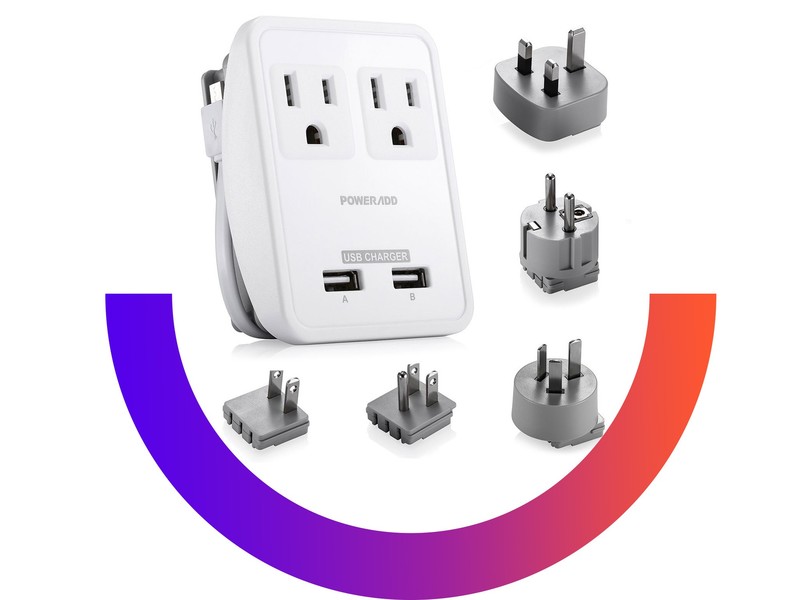
This adapter kit comes with two power outlets, two USB ports and a micro USB connector. On the back of the device is a place where you can easily replace the plug based on where you’re traveling.
The kit comes with 5 international adapters for the U.S., U.K., Australia, Europe, and Japan. It’s compatible with more than 150 countries. (It specifically mentions not being compatible with 5: Italy, Switzerland, Brazil, Chile, South Africa. However, many places in Italy and Switzerland would have both the traditional sockets and the European standard based on my experiences traveling there.)
Poweradd offers a 2-year warranty on all devices. More than 1,000 users give this product 4.6 stars, and many of them have shared their positive traveling experience with this kit.
You can also get the Poweradd surge protector with international adapters for $19.49. That’s down from a regular price of $24 and is its lowest price drop ever.
See at Amazon
More from Thrifter
- How to keep your passport safe while travelling
- Here’s how a Priority Pass Select Membership can help you save BIG at the airport
For more great deals be sure to check out our friends at Thrifter now!
Win your own OnePlus 5 from Android Central Digital Offers!
Win your own OnePlus 5 from Android Central Digital Offers!
The OnePlus 5 is in the running for one of the best phones of 2017. Right up there with Apple and Samsung, OnePlus has slowly built up it’s brand by offering phones with top-end specs at affordable pricing, proving that you don’t need to spend a bunch of money to get a dazzling new flagship. With its sleek design and trendy dual-camera setup, it’s a true marvel to behold — and it can be yours for free thanks to Android Central Digital Offers!
Right now we’re giving a way a OnePlus 5 to one lucky reader — and it could be you! It’s free to enter, so don’t delay! Valued at $539, you won’t want to miss out on this opportunity!

Even though it’s absolutely free to enter, you may still need some convincing so check out this exert from our OnePlus 5 review:
You’re getting a jam-packed and future-proof spec sheet, an above-average display, solid speaker, good battery life, fast charging and a well-built aluminum body. The software is slick, fast and consistent in ways that few phones can match, and doesn’t include piles of features that get in your way.
This contest is open to all legal residents of the United States who are eighteen (18) years of age or older as of the date of entry. Don’t delay! A winner could be you!
Enter to win your own OnePlus 5!
What’s the first thing you do on your phone every morning? [Roundtable]

How does your phone tell you good morning?
Our phones are an extension of ourselves. They’re more than just another a tool and we use them for almost everything and reach for them many, many times throughout each day.
For many, our phones are also part of our morning routines. Now we’re not saying this isn’t just a little bit obsessive. We are smartphone and technology enthusiasts from top to bottom. And we’re not ashamed. And when we wake each morning here’s how our phone fits in.
Jerry Hildenbrand

This is an easy one. I reach over and check Allo Messenger every morning to see the daily photo my daughter sends me of the newest member of the family. It’s the perfect way to start the day, and taking 30 at a time for a Google Photos printed photo book is pretty cool, too.
Sorry if you were expecting me to log into servers and scan logs from my bed (I do that after breakfast). I’m just a softie for kids, especially when I get a chance to spoil them and promote bad behavior. I hope that makes me a great Grandpa!
Andrew Martonik

Generally, the day starts by wading through a mound of notifications that came in, which takes enough time for it to act as a wake-up routine. For me, that means right off the start tapping the jam-packed Gmail notification for my personal account, then doing the same for my work account. I quickly archive what I know I don’t need to read, then save the rest unread for when I can actually comprehend the content.
Then it’s onward to the usual rounds, going through the rest of the notifications. Usually, that means Twitter, Facebook, and Slack (everyone’s been awake and chatty for a couple hours by the time I wake up) need to be checked. After that, I’ll check the Twitter timeline to see what’s happening, and I’m up and out of bed at that point.
Now and then I’ll fire up Pocket Casts and listen to whatever ongoing podcast I have for the handful of minutes I’m triaging notifications, just to get my brain functioning a little bit.
Ara Wagoner

My phone wakes me up thanks to Tasker turning on Google Play Music, and once the music draws me out of dreamland, there’s usually one of three things I do with my phone. The first is checking my notifications, if there’s anything pressing like a missed call or text message, I can see it and reply. If my notifications are blissfully empty, there are a few apps I’ll check depending on my mood. If I’m feeling playful or groggy, I’ll open Disney Emoji Blitz to play a few rounds of my favorite match-three game.
If I’m feeling more productive or inquisitive, I’ll open up my trusty Twitter app to see what’s going on in the world and see if I missed anything jaw-dropping overnight, and to kill a little time while I try to get my mental gear turning. After Twitter, I hit Inbox to see if there are any good sales or pressing messages, and then it’s back to Disney Emoji Blitz or DeviantArt until I have to haul myself away from my heavy, heavy blankets and put on some clothes.
Jen Karner

I’m really not what you would call a morning person. So by the time I grope for my phone after four or five alarms have gone off, there are always notifications. I mean like, a page of notifications that all want me to know what I’ve missed during my few hours of sleep.
I tend to check Slack first, to make sure nothing at work has burned to the ground. After that, I’ll check on Facebook where I always have the most notifications waiting for me, and then after that, I peek into my email accounts. Of course, all of this happens while I’m still under the covers because waking up is hard.
Tom Westrick

I have a special playlist of slow music I listen to at night to help me sleep, and that’s the first thing I hear when I wake up in the morning. I usually schedule my alarm to go off about 30 minutes before I need to be up and moving to give myself time to just listen to music and ease into the day.
I usually don’t remember much of what happens between me waking up and me drinking a cup of coffee, but somewhere in there, I manage to check notifications and respond to anything urgent. Once I’m sufficiently caffeinated, I hop in the shower, in which case I change over to my general music library and use my JBL Charge 3 speaker to blast whatever I feel like listening to while I get my suds on.
Marc Lagace

The first app I typically gravitate to in the morning is Bacon Reader for Reddit, where I check to make sure that the world is still turning and maybe get a few chuckles in to start my day. Otherwise, I’m checking for any new notifications and then checking into my Gmail, Slack, and Trello apps to see what my work day looks like.
From there I log into my health apps like MyFitnessPal to log my breakfast, EufyLife to log my weight, and then find a new podcast to listen to on Spotify while I pop into the shower. Pretty basic stuff, however, it’s kind of concerning that I’ve become really good at finding my phone in a half-asleep state, and that it’s quite literally the first thing I go for every day I wake up. Feels like a habit worth breaking at some point down the line…
Richard Devine

Usually, the first thing I do on my phone is look and see what time it is. Then I usually roll back over and go to sleep! On a more serious note, since do not disturb is a thing, and a very good thing, I’ll check any notifications that may or may not have come in (I’m not that popular) then I’ll check social media. Then I might get out of bed.
What’s particularly useful in my daily routine are the Slack and Trello mobile apps. As boring as it sounds, while I’m getting up and getting myself ready for the day I’ll open both of those and see what the day brings. Because we’re on so many different time zones at Mobile Nations there’s usually something that needs attention, and I like triaging that stuff on my phone before I sit down at my desk with a large cup of caffeine.
Harish Jonnalagadda

I tried a radical thing at the start of the year where I didn’t bring any phones into the bedroom. I tend to get up without needing an alarm anyway, and considering I spend a majority of my day looking at a screen of some sort, I figured it’d be a welcome change to not stare at my phone before going to bed. That worked for a few months — instead of browsing Twitter, I ended up reading for an hour or so every night, and it was great. I even came close to meeting my yearly quota.
That didn’t last, however (I got lights I can control with my phone), so now I usually start my day looking at all the WhatsApp notifications I’ve missed overnight. Admittedly not the best way to kick off a day as most WhatsApp forwards are inane. Then it’s off to Gmail to see all the updates from services I didn’t know I signed up for, along with a flood of promo emails. Then I look through Slack to see if Google decided to buy BlackBerry, and because I don’t drink any coffee, I indulge in a quick round of Mini Metro instead.
Daniel Bader

I’m not a morning person, and I usually rely on my wife’s alarm to wake me up, so my phone is, as terrible as it sounds, my lifeline to finally getting out of bed. I have Samsung’s convertible wireless charging pad next to my bed that doubles as a stand, even for phones that don’t offer wireless charging and usually glance at my phone, bleary-eyed, for a couple of minutes before diving into the notifications.
The first thing I usually do is check the weather using Dark Sky, which I find to be the most accurate predictor of precipitation and other inclement weather in my area. Then I open Twitter, which is usually a terrible idea, so I close that and open the NYTimes app, which is less terrible but still also sad.
Less sad is when I, like so many others, open Slack to check in with the overnight crew, many of whom have been working already for many hours. Slack is addictive because, being in a remote company, it’s the place everyone congregates, so there’s usually plenty to catch up on. I’ll finally end my morning romp (often while brushing my teeth) scrolling through Instagram, which is where I find myself spending much of my social media time these days.
Your turn
We know we’re not the only ones who reach for the phone when we wake up. Tell everyone your morning routine and how your phone fits in!
There may be an LG V30 Plus this year
LG V30 Plus to reportedly include special features such as hi-fi audio and wireless charging.
The announcement of the LG V30 is right around the corner, and a report from ET News suggests there will be a separate model announced along side the V30. The LG V30 Plus is said to be exclusive to South Korea and will include some special features over the standard LG V30.

LG pursued a similar strategy for the LG G6, with various regions getting different features initially, a G6 Plus with extra storage released a few months later in South Korea. There’s no indication just what features the V30 Plus will include, but it’s easy to presume it will include wireless charging and better audio playback than the standard V30.
The report also noted that the LG V30 and V30 Plus would be released on September 15th in South Korea, the same day the Samsung Galaxy Note 8 would be released in the country. There’s no news on when the device would be released in other markets, but the phones are set to be announced on August 31st at IFA.
Would you be interested in an LG V30 Plus? Let us know down below!
LG V30

- LG V30: Everything you need to know!
- Latest render shows LG V30 alongside Galaxy Note 8
- LG V30 will have curved OLED display
- LG V30 will be announced on August 31
- Join our LG V30 forums
Two platforms, one house: Choosing between Google Assistant and Amazon Alexa

I have a Google Home and Amazon Dot in my house, and their core differences are making it difficult to choose between a connected ecosystem.
I live in a multi-platform household. It’s incredibly jarring at times, particularly when I find myself unable to choose between platforms. Do I stick to Google and its Assistant, because my devices are all Google-born and tied to the search engine’s services? Or do I finally decide to make full use of my annual subscription to Amazon Prime? This is the conundrum I face.
I’m not just talking about connected speakers here: When you’re choosing between a Google device and an Amazon product, you’re choosing between two vastly different, robust ecosystems. Just as Google has its AI-driven assistant, Chromecast and Android TV platform, and a variety of integrated third-party services, so does Amazon offer its connected gadgets and library of content for anyone who is also excited by the idea of free two-day shipping. It’s not just a product these companies are selling here; it’s a lifestyle and the one you choose locks you into a rhythmic way of life where you rely on nothing but the services offered by your connected speaker.
I’ve been experiencing this myself as I recently bought an Amazon Echo Dot to accompany my two Google Home devices, just to add a bit more variety to my pitiable connected home. Granted, it’s part of my job to use this stuff (especially considering Alexa is on smartphones now), but it’s also helping me understand some of the core differences between Google’s and Amazon’s connected ecosystems.
Amazon buys you stuff
As if this wasn’t clear from the beginning, the sole purpose of Amazon integrating more variety into its commerce is to sell you stuff. And it works marvelously! There’s a reason the term “Daily Amazon” is a staple in some households.
I’ve spent months living with the Google Home and not once have I asked it to purchase anything. Conversely, the Amazon Echo Dot has become the shopping gadget; it’s there when my husband and I are going crazy attempting to organize our lives by stocking up on necessities. We are that commercial you often see for Alexa.
The commercial you often see for Amazon Alexa.
It’s not a bad thing; in fact, this might explain why Amazon is taking the lead. According to TechCrunch, though the Google Home sold well during last year’s holiday season, it was the Amazon Echo Dot that maintained consistency throughout the first quarter the year:
Google Home also sold more units than the Echo Dot during the holidays, but just barely, accounting for 39 percent of unit sales versus Dot’s 38 percent. The original Echo held a 21 percent share during this time.
After the holidays, though, the Dot quickly caught up in terms of unit sales, topping Google Home with a 53 percent share compared with Home’s 30 percent.
Connected speakers still aren’t considered a mainstream household item, but the small sampling of data we do have shows that interest in increasing. I have no doubt the Amazon Alexa is the one that more people know about because now there are four different Amazon Echo devices to choose. That’s four more chances to add Alexa into your home through a device that can also function as your main shopping portal.
Google works better with my stuff

I’m not a fan of the Alexa app. It’s a tad tawdry, and when it comes to visuals and third-party integration, I find it easier to navigate the Google Home app. Perhaps it’s because I’m used to the Google-fied way of life and the way that the menu structures and apps are laid out, but there’s something about Alexa’s gray-hued interface that feels unrefined.
I’ve yet to delve into the smart home components of the Alexa app, which is what The Wirecutter suggests the Echo Dot is best used for, but the Google Home remains the one best suited for my living room because it has actual Chromecast integration. I can use voice commands to stream music through Soundcloud and play podcasts through Pocketcasts; the Google Home also integrates well with my multi-room audio setup, which helps when I’m setting up the ambiance for a dinner party.
They’re both still a work in progress

In a test conducted by Gigaom last month, the results showed that often, Google Assistant and Amazon Alexa don’t even answer questions the same way. Some of that has to do with the fact that these are two individual artificial intelligence platforms with their algorithms processing in the background. As a result, the manner in which you ask a question will have a different implication depending on your query.
According to 360i, in a test of 3,000 questions, Google Assistant answered 72 percent, while Alexa answered only 13 percent. But when I use either product, I find that my laziness in phrasing questions the proper way will net me an unfortunate result. Google Assistant and Alexa both require a present state of mind when you’re interacting with it. Otherwise, you’ll find yourself consistently repeating questions.
I’m looking forward to the day where I don’t have to program either device with a service like IFTTT to prepare it for my laziness; I want to be able to shout out half a command and have Alexa and Assistant know what at I’m asking.
Which platform are you using?
The answer to whether Google Assistant or Amazon Alexa is the best as a home assistant is entirely relative. It’s possible I can answer that after another few months of using the two connected devices, but I’m also not in a rush to figure it out. The platforms are both so nascent, but it’s promising to see that sales numbers point to interest. Perhaps we’ll have a clearer picture of which platform consumers like the best after this holiday season — and after Google brings those updates it previewed at Google I/O 2017.
Are you using a connected platform in your home? What do you love about it? Tell us in the comments!
Google Hardware

- Google Wifi review
- Google Home review
- Everything you need to know about the Chromecast Ultra
- Chromecast vs Chromecast Ultra: Which should you buy?
Google Wifi:
Google
Amazon
Google Home:
Google
Best Buy
Chromecast Ultra:
Google
Best Buy
Amazon Echo
- Amazon Echo review
- Echo Dot review
- Top Echo Tips & Tricks
- Tap, Echo or Dot: The ultimate Alexa question
- Amazon Echo vs. Google Home
- Get the latest Alexa news
See at Amazon
 AIVAnet