


Sling TV extends cloud DVR to iOS devices
Sling TV’s cloud DVR service is now available for iPhone and iPad. The streaming service’s DVR “First Look” option costs an additional $5 per month and gives you 50 hours of DVR storage.
The iOS devices now join the growing list of DVR-supported systems, which includes AirTV players, Amazon Fire TVs and tablets, Android TVs and mobile devices, Apple TVs, Roku™ streaming players and TVs, Xbox consoles and Windows 10 devices.
Sling TV began beta testing its cloud DVR option last year and started rolling it out to users in April. This month, the feature got an upgrade with an added option to protect recorded shows from being deleted.
However, there are still a number of channels that don’t allow DVR recordings. Those channels are ABC, Freeform, Disney Channel, Disney XD, Disney JR, ESPN, ESPN2, ESPN3, ESPN Deportes, ESPN Goal Line, ESPN Buzzer Beater, ESPN Bases Loaded and the SEC Network as well as any on-demand only channel.
An app update released today will enable the new service on iOS devices for those with the “First Look” subscription.
Source: Sling TV (iTunes)
Griffin Launches New Survivor Cases for 10.5-Inch iPad Pro
Griffin today announced a new range of Survivor cases designed for Apple’s new 10.5-inch iPad Pro, introducing the Survivor Rugged Folio, Survivor Journey Folio, and Survivor Journey.
The Survivor Rugged Folio is the most protective case of the bunch, protecting the new iPad Pro from drops, dings, and scratches. It keeps the iPad safe from drops up to four feet with a polycarbonate exterior and flexible TPU shell that has a stain-resistant Tactical Grip cover.
It includes Griffin’s impact dispersion system for additional drop protection, and the frame includes built-in magnets that allows the iPad to be mounted on most magnetic surfaces.
Griffin’s Journey Survivor Folio is a folio-style case with front and back protection for the iPad. It is also made from a durable polycarbonate material, with a magnetic cover that can fold into a stable stand with multiple viewing and typing angles. It also protects the iPad Pro from drops up to four feet and it can be mounted on magnetic surfaces.
The Survivor Journey is Griffin’s simplest and lightest-weight case, offering protection for the rear of the iPad Pro. Like Griffin’s other cases, it can survive drops up to four feet, and it also includes magnets at the back of the case so the iPad Pro can be mounted on magnetic surfaces like refrigerators.
All three cases are available today from the Griffin website. The Survivor Journey is priced at $29.99, the Survivor Journey Folio is priced at $59.99, and the Survivor Rugged Folio is priced at $59.99.
Discuss this article in our forums
OnePlus 5 vs LG G6: quick look
OnePlus just took the wraps off their highly anticipated 2017 flagship, and it’s only natural to wonder how the latest and greatest from OnePlus compares to the other high-end smartphones out there. In this post, we go hands-on and give you a quick look at the OnePlus 5 vs LG G6!
See also:
OnePlus 5 review – the Never Settle promise lives on
2 days ago
Design
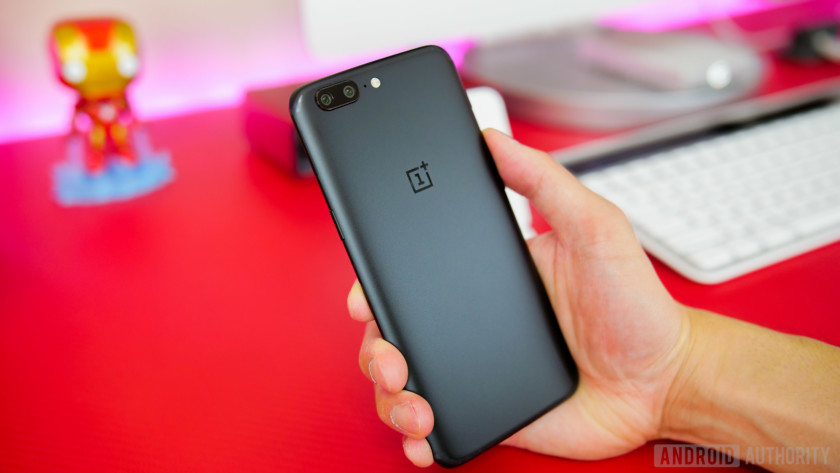
OnePlus has made significant design changes with the OnePlus 5, and the reaction to the new look has been divisive to say the least. There’s no denying that the OnePlus flagship shares a lot of similarities with the iPhone 7 Plus and even more so with the recently-announced OPPO R11. Regardless of how you feel about that, it has to be said that that the OnePlus 5 is definitely the most premium feeling flagship from the company yet. With its sleek full metal unibody, it’s also the thinnest smartphone released by OnePlus, with a thickness of just 7.25 mm.
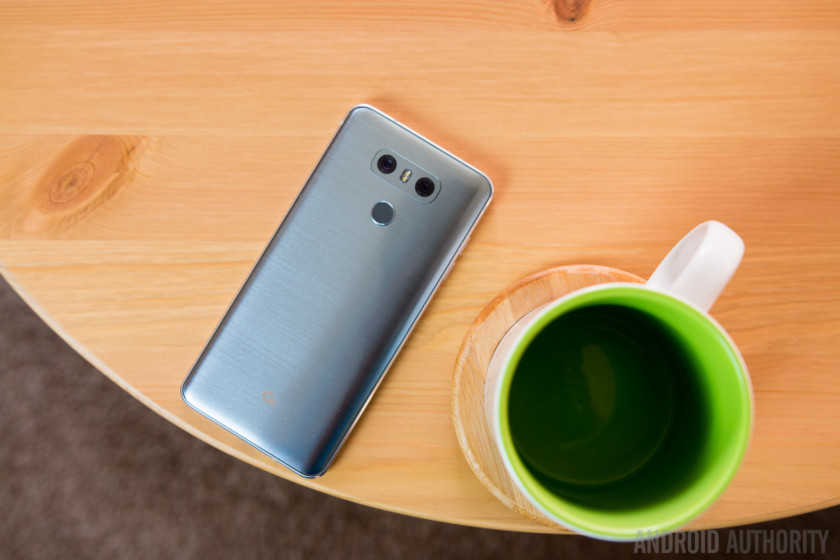
The LG G6 is definitely the more unique looking of the two, with ultra-thin bezels along the sides of the display that also comes with rounded corners to provide better impact protection. However, the metal and glass combination is increasingly common, with phones from Samsung, HTC and others featuring similar build materials.
Despite the slightly larger display, the LG G6 is the more compact of the two smartphones, which is a testament to what great job LG has done to keep the bezels thin and leave the front free of any capacitive or physical keys.
Display
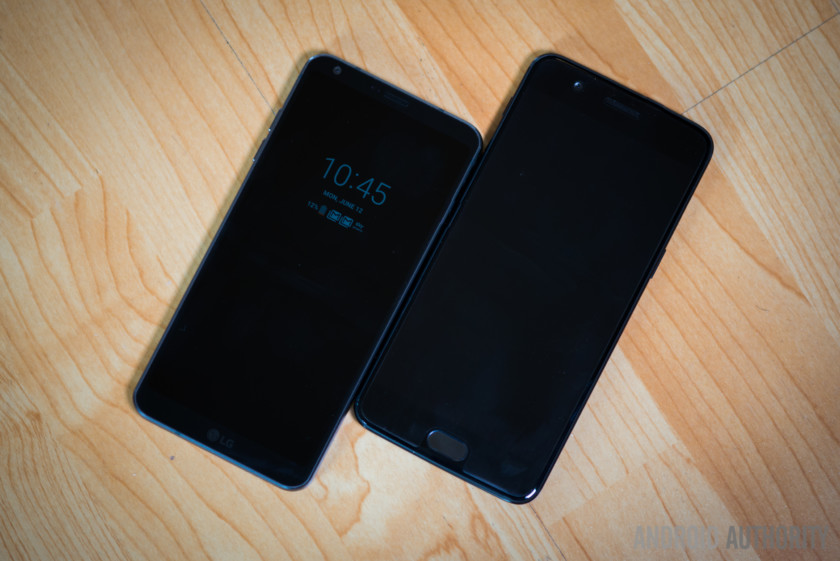
Speaking of the display, the LG G6 comes with a 5.7-inch screen with a Quad HD+ resolution, while OnePlus sticks with a 5.5-inch display with a Full HD resolution. This is another polarizing decision on the part of OnePlus — even though 1080p more than gets the job done and there are certainly some benefits in terms of battery life, it’s not wrong to expect or want a Quad HD screen from your flagship phone. That’s particularly true given that the OnePlus 5 is not as affordable as its predecessors.
See also:
OnePlus 5 vs Samsung Galaxy S8: quick look
2 days ago
Hardware and performance

Where the OnePlus 5 does have a leg up is when you take a look at what’s under the hood. OnePlus has always offered the latest and greatest in terms of specs and this device is no different, coming with a Qualcomm Snapdragon 835 processor and either 6 GB or 8 GB of RAM. Both options are more than the 4 GB of RAM you get with the LG G6, and LG has also decided to stay with the Snapdragon 821 as the processor. Of course, this setup is still very capable and performance is not an issue at all with the G6, but it’s still an odd choice nevertheless.
(The brand new LG G6 Plus offers 6GB of RAM and 128GB of storage space, for what it’s worth.)
32 GB and 64 GB are the built-in storage options available with the G6, while the OnePlus 5 comes with either 64 GB or 128 GB, which also dictates how much RAM you are getting. However, the G6 does support expandable storage via microSD card. Another great feature of the G6 that the OnePlus 5 does not have is the IP68 rating for dust and water resistance.
In terms of battery, both smartphones come with 3,300 mAh units. The battery life of the LG G6 has been quite impressive, and we can expect even more from the OnePlus 5 because of its lower resolution display and more power efficient processor. Of course, we’ll only know for sure once we conduct our battery tests with the OnePlus 5.
Both devices support fast charging, but while the Qualcomm Quick Charge 3.0 with the LG G6 is fast, OnePlus’ upgraded Dash Charge offers impressive charging speeds, with OnePlus promising that you can get a full day of use after charging the phone for just half an hour.
Camera
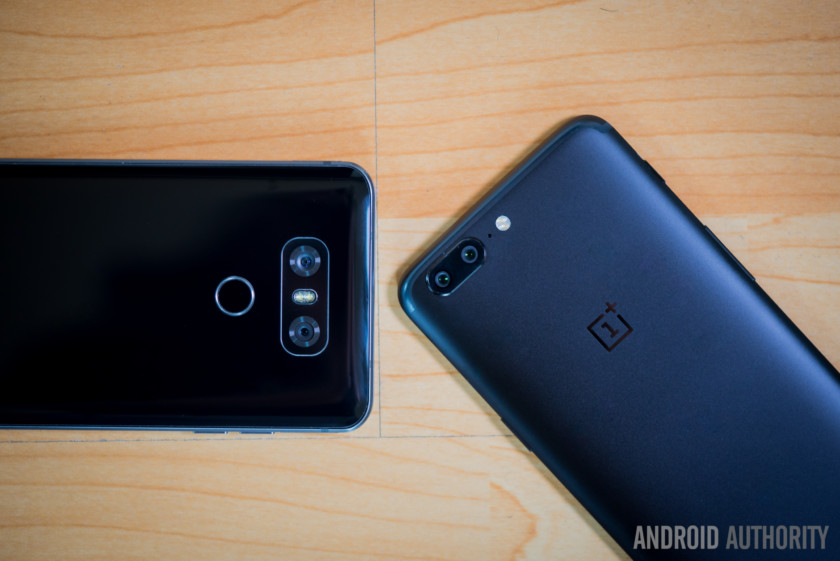
The biggest change with the OnePlus 5 is when it comes to the camera. The device features a dual camera setup on the back, with one 16 MP sensor with an f/1.7 aperture, and another 20 MP telephoto lens with an f/2.6 aperture. OnePlus says this is the highest resolution dual-camera system on any smartphone. The OnePlus 5 camera is central to the phone’s marketing message, and we are definitely excited to run it through its paces.
Related: OnePlus 5 vs the rest: what’s the best Android camera?
LG has its own take on the dual camera system, with the G6 featuring two 13 MP units on the back. The standard lens comes with a f/1.8 aperture, while the wide-angle lens unit comes with a f/2.4 aperture. The cameras of the LG G6 are excellent and are capable of taking breathtaking photos, and it will be interesting to see how the OnePlus 5 fares against the great smartphone cameras we now have in comprehensive comparisons.
Software
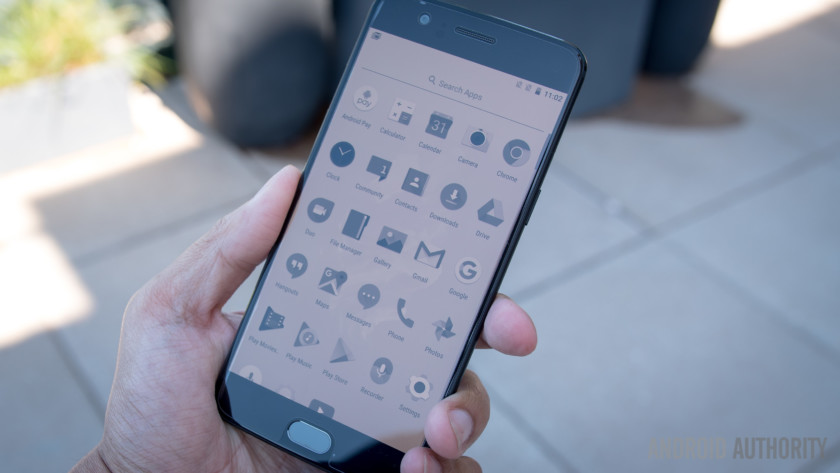
The OnePlus 5 is running OxygenOS based on Android 7.1.1 Nougat. As it’s always been the case, there are a lot of customization options here, but with a minimalist approach overall. New software features include a Reading Mode that uses gray-scale mapping and a blue light filter to provide a reading experience similar to what you get with an e-reader. Other notable features include automatic Night Mode, expanded screenshots, a Do Not Disturb gaming mode, and a whole lot more.

The LG G6 is running Android 7.0 Nougat with the latest version of the LG UX on top. LG has continued to clean up their software experience to provide a more minimalist interface. LG’s own apps have also been updated to take advantage of the 18:9 aspect ratio of the display which is also perfect when it comes to split view multi-tasking. LG has worked hard to optimize its software package and that really shines through with the smooth performance that we see.
Specs comparison
| Display | 5.5-inch AMOLED 1920 x 1080 resolution 16:9 aspect ratio 401 ppi |
5.7-inch IPS LCD 2880 x 1440 resolution 18:9 aspect ratio 564 ppi |
| Processor | 2.45 GHz Qualcomm Snapdragon 835 | 2.35 GHz Qualcomm Snapdragon 821 |
| GPU | Adreno 540 | Adreno 530 |
| RAM | 6/8 GB | 4 GB |
| Storage | 64/128 GB | 32/64/128 GB |
| MicroSD | No | Yes, up to 256 GB |
| Camera | Main: 16 MP Sony IMX 398 sensor, 1.12 μm, ƒ/1.7 aperture, EIS, dual LED flash Telephoto: 20 MP Sony IMX 350 sensor, 1.0 μm, ƒ/2.6 aperture 16 MP front-facing camera |
Rear: Dual 13 MP wide-angle sensor (ƒ/2.4 aperture / 125°) / 13 MP standard sensor (ƒ/1.8 aperture / 71°), OIS 2.0, PDAF
Front: 5 MP |
| Battery | 3,300 mAh | 3,300 mAh |
| Software | Android 7.1.1 Nougat OxygenOS |
Android 7.0 Nougat LG UX 6.0 |
| Water resistance | No | IP68 |
| SIM | Nano Dual-SIM |
Nano Single or dual-SIM |
| Dimensions and weight | 154.2 x 74.1 x 7.25 mm 153 grams |
148.9 x 71.9 x 7.9 mm 163 grams |
Pricing and final thoughts

As far as pricing is concerned, the higher-end variant of the OnePlus 5 is priced at $539, while the one with 6 GB of RAM and 64 GB of storage will set you back $479. On the other hand, the price of the LG G6 ranges from anywhere between $600 and $720 depending on the the color option and whether it’s unlocked or from a network carrier. While the price of the OnePlus 5 does push closer into high-end pricing, it still remains the more affordable choice among current generation flagships.
So there you have it for this quick look at the OnePlus vs LG G6! When choosing between these smartphones, it really comes down to what you are looking for from your smartphone experience. The LG G6 has the advantage of a Quad HD display, water resistance, and a more unique design, while the OnePlus 5 offers a superior processing package and a more affordable price point. The camera of the G6 is fantastic and we’ll have to see how the promising OnePlus 5 fares in this regard. In any case, you aren’t going to be disappointed with either smartphone.
Want to learn more about the OnePlus 5? Check out our full review!
Use emoji to search Kayak for travel deals
The inevitable march to replace words with emoji continues apace, with the world granting more legitimacy to the cartoony mini-images. Last month, an Israeli court ruled that they counted as enough “intent” in a civil case to turn the tide in one side’s favor. But today is for you, travel fiends: Kayak now lets you search for destinations by emoji.
Most of the first ten emoji Kayak’s search engine will recognize make sense: The Statue of Liberty translates to New York City, sushi means Tokyo, a three-leaf clover for Dublin, a slot machine for Las Vegas. Others are abstract jokes, with the rabbit emoji surfacing Chicago’s O’Hare Airport (har har) and the red light klaxon bringing up Amsterdam (get it?).
Kayak is putting the next batch of 15 emoji-location pairings up to a vote, so head over if you want to elect a city you hate to surface when someone searches with the poop emoji. Or you can wait until T-Rexes and Zombies enter the emoji equation.
Source: Kayak
The Rave 15 sleeping bag features built-in gills for heat ventilation
Why it matters to you
The Nemo Rave 15 sleeping bag is the ideal solution for sweaty sleepers or summer campers.
Climbing into a sleeping bag on a hot, sticky summer night might not seem that appealing — unless your sleeping bag has gills.
Outdoor gear company Nemo designed the Rave 15 with breathability in mind, so you can be comfortable in milder temperatures. In addition to thermal gills for increased summer camping amenity, the new bag boasts an array of added features including a waterproof and breathable footbox.
This company first utilized this ventilation feature in its Canon -40 sleeping bag in order to increase the product’s utility across a wider range of temperatures.
For the Rave 15, Nemo modified the traditional mummy design into a unique spoon shape, which allows for more room around the elbows and the knees. The integrated thermal gills comprise two zippered slits down the front of the bag that can be pulled down in warm conditions to let heat out and keep you cool — without letting cold air back in.
On colder nights when staying warm is the primary concern, simply zip the slits back up. Vertical baffling ensures that no cold spots occur and the waterproof and breathable footbox fights condensation that forms on tent walls, attributing to dry, toasty feet all night long.
The Rave 15 is crafted with RDS certified 650-fill-power Nikwax Hydrophobic Down with its own water resistant properties, and is fluorocarbon-free.
An extra section of material around the neck is designed to be shoved into the collar to serve as a sort of draft prevention or can be pulled out for extra breathability.
For those who sweat in their sleeping bags or for balmy summer nights, the ventilating Rave 15 serves as an ideal solution. While its thermal gill features make for use in summer conditions, high-quality materials and design ensure it will keep you warm in colder conditions as well. The bag is rated to 15 degrees Fahrenheit.
Although not the lightest product on the market weighing in at a hefty 3 pounds, 3 ounces — its adaptability is worth its weight. The product is available in jade and pink or jade and sea glass. It also comes with its own cotton storage bag and drawstring stuff sack. The Rave 15 retails for $300 for the regular length on REI’s website, and $320 for the long version.
Windows 10 Task Manager now keeps an eye on graphics card usage, too
Why it matters to you
Insiders now have access to a tool that lets them track GPU usage without third-party software and it should come to all Windows users before long.
Microsoft updated the Windows 10 Task Manager in a new Insider build which allows it to keep an eye on graphics card usage. It joins trackers and graphs for CPU, memory, disk and network usage and offers support for single and multiple graphics processor (GPU) builds.
Although there are many advanced applications for keeping an eye on what your PC is doing, Windows 10 Task Manager remains one of the easiest baked-in tools for Windows users to see what’s going on inside your desktop or laptop. While it has provided CPU and memory tracking for some time though, GPU usage was never displayed, until now.
Released as part of the Windows 10 Insider Preview Build 16226 to insiders on the Fast ring, the new GPU tracking task manager offers some detailed information about your graphics cards and how they are working. The Task Manager can now tell you which graphics card you are running and what driver version you have and when they were updated.
More importantly, though, it also gives you a graph and percentage output for how much of the GPU itself is being utilized. There is even a smaller, secondary graph and read out for how much of your dedicated and shared GPU memory is being used, letting you know how close you are getting to pushing your card to its limit. That could be useful for when you are trying to find out how high to set certain graphical features in your favorite game, or during temperature testing.
If you need even more information that that, the Details tab can show your graphics processor utilization by process, so if running multiple programs or simulations at once, you can see which requires the most GPU power to render properly.
Microsoft states in its announcement that this feature is very much considered “under construction,” so there are likely to be bugs and problems with it. It asks that anyone discovering such issues get in touch and let it know via the Feedback Hub under “Desktop Environment > Task manager.”
This feature joins a number of new additions coming to Windows 10 in upcoming Insider builds, but Task Manager itself has a lot of extra tricks it up its sleeve you may not know about. Check out our handy guide to master this important Windows tool.
The Steam Summer Sale kicks off with a tempting discount on HTC Vive headset
Why it matters to you
VR headsets are still pretty expensive, and while the Steam discounton the HTC Vive isn’t huge, it’s still enough to make the headset an enticing choice.
Usually, the Steam Summer Sale means you’ll be picking up a bunch of half-priced games to fill up your already overflowing backlog. This year, however, Steam is upping the ante by offering a discount on the HTC Vive. Yep, the $800 VR headset.
The HTC Vive is now available on the Steam store for $750 — that might not sound like a huge discount, but buyers will also receive a $50 Steam credit. So, if you were already planning on spending at least $50 on Steam games and have an extra $750 lying around, this is a pretty good deal. Plus, it comes bundled with Star Trek: Bridge Crew, Richie’s Plank Experience, and Everest VR, along with a free month of HTC’s Viveport subscription service.
For everyone else, however, it might not be a deep enough discount to justify purchasing the HTC Vive. The VR headset has met with some serious competition from the Oculus Rift now that both platforms have their own touch controllers, but the Vive remains at the top of its game. According to Epic Games CEO Tim Sweeney, the HTC Vive is outselling the Oculus Rift 2-to-1, and this sale could push those numbers even higher.
There are still some pretty massive barriers to entry for most users, who will need a powerful PC to get the most out of the HTC Vive — plus a bunch of extra space to take advantage of the Vive’s room-scale VR experiences.
But with a growing catalog of games, including some high-profile entries like Star Trek: Bridge Crew, the Vive and its competitors — PlayStation VR and the Oculus Rift — are becoming more and more appealing to the average gamer. It’s with that in mind that the Steam Summer Sale also includes a number of popular VR games at a discont alongside the HTC Vive hardware.
The marked-down games currently up for grabs are all Vive Studios titles. They include Virtual Sports, Arcade Saga, Remembering Pearl Harbor, Knockout League, and Make VR.
So if you’ve been on the fence about VR, now would be a great time to get in on the action, but hurry up — the sale ends at 10 a.m. PT on July 5.
Here are the best Moto E4 Plus cases to keep your phone blemish-free
If you followed the advice of our Moto E4 review, you’re either buying a Moto E4 or getting ready to grab to the E4 Plus when it’s out later this summer. It can be tricky to find the right accessories, especially ones that that are worth the money. Sometimes there aren’t many to choose from, or there are only a few that suit your specific preferences. If you’re dealing with this particular dilemma, don’t fret — we’re here to make your life easier.
Compared to Moto Z Force cases, there’s a relatively small selection right now, but there’s bound to be something for you, whether you’re a fan of wallet style cases, ones with a snug fit, or those that let you to stand the phone up.
C&U Ultra Slim TPU Bumper ($8)
C&U’s case is of a simple design that’s best enjoyed by Moto E4 Plus owners who want a case that offers standard protection without covering up the phone’s aesthetic; the back of the case is completely clear to show off the E4 Plus’ design. If going completely transparent isn’t your style, you can add a bit of color to the surrounding edges if you get the black bumper variant. Accurate cut-outs for various ports, buttons, and the camera are present, and it’s at an affordable asking price for a case from a manufacturer that may not be as well known as brands like Spigen and OtterBox.
Buy one now from:
Amazon
J&D Shock Resistant TPU Slim Case ($8)
J&D has made cases for other smartphones in the past that are cheap, minimalist, and effective, and their TPU slim case for the Moto E4 Plus has those same qualities. Unlike C&U’s case above, this case only comes in black, and is meant to shield your phone from the outside world. As the name implies, it’s made using a TPU material, resulting in a comfortable-feeling case that provides a little more grip during use, and is capable of handling your everyday drops and minor impacts. The case will only fit the Moto E4 Plus, so expect all cut-outs to be exactly where they’re supposed to be.
Buy one now from:
Amazon
Circlemall Hybrid Shockproof Case ($9)
The main reason a lot of people buy protective cases is so they don’t have to deal with their phone being permanently damaged until it’s repaired or replaced. E4 Plus owners who have this fear should look no further than this hybrid case from Circlemall, which comes ready and willing to defend your investment from just about anything that could harm it. Judging by the look alone, you can tell this case is equipped to take on impacts with stairs, pavement, or hardwood floors, due to the combination of a hard outer shell and a soft silicone inner bumper. The assembled case forms a tight fit around the phone preventing it from moving around or flying out upon impact. Cut-outs keep the ports and camera far away from any surface it comes into contact with, and buttons are covered by the same silicone protecting the rest of the case, so you’ll never have to worry about them being chipped or dented. Lastly, the package comes with a tempered glass screen protector.
Buy one now from:
Amazon
NagaBee Heavy Duty Defender Case ($9)
NagaBee has taken the same approach as Circlemall when it comes to creating cases that focus on protection, using a hybrid design composed of a hard outer shell that fits onto the back of a softer rubber case. The smooth outer shell reduces scratching and chipping, and the flexible inner layer absorbs shock. The buttons are also covered by the aforementioned inner rubber layer, and they’re labeled so you’ll always know which buttons you’re pushing. Available in both rose gold and black, you can apply this case knowing it won’t make your slim smartphone uncomfortably large, and it comes with a 7-day money back guarantee on top of a 30-day warranty.
Buy one now from:
Amazon
Wellci Folio Flip Cover Case ($9)
Flip cover cases may not be as popular as other cases that emphasize style, heavy-duty protection, or slim form factors, but they have their uses, especially if you’re trying to cut down on the number of things you need to carry in your pocket. When it comes to the storage capacity of Wellci’s flip cover case, you can carry a couple of debit or credit cards within the inner pocket found on the inside of the cover. When closed, only the side buttons and connector ports are accessible, while the rest of the phone is well protected. Unfortunately, the cover itself doesn’t magnetically close or have a strap, but this shouldn’t be a huge issue if your phone is usually in your hand, pocket, or bag. Being a flip cover case, you may expect it to add to the overall bulk of your smartphone, and while it does, it’s not an obscene amount that will be hard to live with. If you’re at all familiar with these kinds of cases, you’ll know that you can also use the cover as a kickstand to prop the phone up, in the event there’s a video you want to watch hands-free.
Buy one now from:
Amazon
The Dish Music app uses DTS Play-Fi to turn your Hopper DVRs into multiroom streamers
Why it matters to you
Multiroom streaming setups are increasingly a part of the home theater landscape, and Dish Music turns your DVR setup into one.
Dish Network is getting into the increasingly crowded multiroom audio game. On Thursday the company announced a new DTS Play-Fi-powered app, Dish Music, which enables Dish subscribers to use their Hopper DVRs and Joey devices as hubs for streaming audio throughout the home through TVs or home theater systems. The app is a free addition available on iOS and Android devices.
With the Dish music app, users will be able to sync music playback on TVs connected to Hopper 2 and Hopper 3 DVRs as well as any connected Joey boxes — automatically transforming a home with multiple TVs into a multiroom speaker setup.
That said, users will have plenty of other options for adding sound throughout the home beyond their TVs. Built on DTS Play-Fi streaming technology, any of the long-list of DTS Play Fi-enabled speakers and devices will also work with the app, including wireless speakers from the likes of Klipsch, Martin Logan, Pioneer, and many others.
The Dish Music interface works similarly to the Play-Fi app, as well as other multiroom streaming systems. Users can create “zones” that include one or more playback devices, or select different audio sources to play in different rooms. With Play-Fi in hand, you can stream from your personal library directly on an iOS or Android device, a DLNA media server, or from Amazon Music, Tidal, Pandora, iHeartRadio, Napster, Sirius XM, or Spotify Connect.
Dish Music will also display information like artist name or song title on the TV, and will indicate which source the music is being streamed from.
While multiroom streaming is far from new, being able to use your DVR to connect is a pretty novel idea, quickly allowing Dish subscribers to setup music throughout the home, without the need for buying new equipment.
If you’re new to multiroom streaming, you can check out our buying guide on wireless speakers, which includes a detailed explanation of multiroom setups, as well as other ways to stream music throughout the home.
Those looking to try the Dish Music App now can find it on the Apple App store, Google Play Store, or Amazon app marketplace.
The Amazon Echo Show now integrates with the Vivint and August Home
Why it matters to you
Before this Echo Show integration, you had to pull out your smartphone to check your smart camera’s footage.
Amazon’s Echo Show has not been around for all that long, but smart home device makers are already jumping at the opportunity to integrate with the new technology. On Thursday, both Vivint and August Home (both of which produce smart cameras to keep your household safe) announced compatibility with Amazon’s new Alexa-enabled touchscreen device, making managing your connected devices easier than ever before.
Thanks to the new Vivint integration, you can now ask Alexa to show you live camera feeds from your indoor, outdoor, and doorbell cameras. If you say, “Alexa, show me my doorbell camera,” you will be able to look to your Echo Show and view content immediately. Similarly, the Echo will be able to control other Vivint smart home products, like smart locks, lights, garage doors, and thermostats. Of course, given that those products do not have cameras attached, Echo’s functionality here is not quite as special.
“We continue to expand our relationship with Amazon to enhance and simplify the smart home,” said Jeremy Warren, chief technology officer at Vivint Smart Home. “By enabling consumers to use their voice to access high-quality, live video and audio from their cameras, we’re giving them another convenient way to keep track of what’s happening in and around their homes.”
Similarly, for smart lock maker August Home, the Amazon Echo Show will now allow you to check out live video footage of what is happening outside your front door. If you have an August Doorbell Cam, you can ask Alexa to show your doorstep and watch real-time video of visitors. “It’s great to delight customers by adding value to the products they already own and rely on as part of their daily lives. We added the ability to control the August Smart Lock with Alexa earlier this year, which has been an extremely popular,” said Jason Johnson, CEO of August Home, Inc. “With the expansion of our Amazon Alexa skill, we are making it easier for our customers to control their Doorbell Cam. Now they can display video of visitors outside their door using their voice.”
This marks the first time that users have been able to divorce their smartphones when it comes to actually monitoring footage from the August Doorbell Cams or Vivint devices, and certainly drives home the usefulness of the Amazon Echo Show.
 AIVAnet