


Qualcomm’s Quick Charge 4+ is both faster and cooler
We all want more power with less charging on our mobile phones. Qualcomm, the maker of the Snapdragon 835 processor, has long been working to provide lower power usage and faster battery charging. The current Quick Charge 4 technology, announced in November of last year, promises five hours of charge in five minutes, a 20 percent improvement in charging speed and 30 percent improvement in efficiency than the previous Quick Charge system.
The company announced even more improved specs today: the Quick Charge 4+ system, which the company promises is up to three degrees cooler, up to 15 percent faster and 30 percent more efficient than Quick Charge 4. The first smartphone to use this new charging technology will be the Nubia Z17 from Chinese phone maker ZTC.

The new Quick Charge 4+ designation means that your smartphone or accessory has three enhancements: dual charging abilities, intelligent thermal balancing, and more advanced safety features. These all seem important in a world with exploding mobile devices. Dual charge devices include a second power management integrated chip which cuts the charge current in half, letting the chip dissipate heat faster and reducing charging time. Intelligent thermal balancing takes this even further, moving current to the coolest path automatically, which eliminates hot spots. Quick Charge 4+ devices must also monitor both case and connector temperature levels at the same time, which can help avoid overheating and damage to the Type-C connector.
Only a few notable handsets include the Snapdragon 835 chip, including Samsung’s Galaxy S8 and S8 Plus, Sony’s Xperia XZ Premium, Xiaomi’s Mi 6 and HTC’s U11. Further, Qualcomm’s list of Quick Charge-enabled models shows no devices with the 4th generation charging technology yet. This scarcity could mean that the new 4+ is more likely a replacement for the QC4 in upcoming smartphones, rather than a sequel.
Source: Qualcomm
VR headsets could soon be half the size of the Oculus Rift
The digital worlds we see through today’s virtual reality headsets are amazing, but the goggles themselves leave something to be desired. Despite offering high resolutions and room-scale VR, the Oculus Rift and HTC Vive are bulky, front-heavy devices. Wouldn’t it be better if they were smaller? Soon, they could be. Today at Augmented World Expo, Kopin revealed a new, 4K reference design VR headset that’s half the size of today’s consumer goggles.
It’s a startling difference, too. Most headsets are at least as large as Google’s Cardboard viewer. Kopin’s prototype, on the other hand, is at least a third smaller. That’s because it’s built around two tiny, low-power high resolution displays that measure just 1-inch diagonally — the same tiny 2K VR panels the company showed off at CES earlier this year. The end result is a diminutive headset that looks like a squashed version of the Oculus Rift. I only wore the rig for a few minutes, but during that time the compact, lightweight headset felt comfortable.

Unfortunately, it’s not perfect. Kopin’s pint-sized VR headset showed me sharp, high-res visuals, but it confined them to a small field of view. The shrunken optics offer a sphere of vision that’s about half the size of a typical VR headset. The optics can’t currently be adjusted either. Kopin told Engadget the company is experimenting with different lens configurations to try and expand the FOV, but it’s ultimately a limitation of the display technology. A one-inch 2K screen is amazing, but it’s just too small to make a completely immersive VR headset.
Still, we’re talking about an early prototype here, and Kopin says the above issue can be fixed. The miniaturized screen technology can be used to make larger displays, and improved optics could also increase the FOV — but it might not need to. Kopin announced the prototype with the eventual goal of fitting a VR display into a device about the size of a pair of sunglasses. If they created a headset that really was that small and portable, a loss of peripheral vision might be an acceptable compromise.

Either way, it’s still a bit early to judge. The company says it only started designing the prototype two months ago, and there’s still a lot of work to be done. Today, the company’s tiny reference headset is just a curiosity — but it’s an encouraging one. One that may lead to smaller, lighter and more consumer accessible virtual reality in the future. And that future may come sooner than we expected.
Nintendo’s solution for ‘Splatoon 2’ chat requires lots of wires
Saying Nintendo’s solution to voice chat on the Switch is inelegant would be a gross understatement. At least for Splatoon 2, that is. This morning the game’s Twitter account posted images of how you’ll talk smack in the ink-fueled multiplayer shooter. The setup, dubbed “Empera Hook HDP,” consists of a arrow/squid-shaped dongle, a set of swoop-style on-ear headphones with a boom mic and a trio of 3.5mm aux cables. One cable goes from the Switch’s headphone port to the dongle, another runs from your cellphone to the dongle, and the last one connects the dongle to said headset. Phew.

Why so complicated? Because while the Switch is Nintendo’s first console to offer online voice chat, the system isn’t compatible with wireless headphones. That means if you want to play Splatoon 2 from your couch, you’re going to need an awfully long cable. The aux cords packed in with the kit are apparently only 1.2 meters (just under 48-inches) long. And because voice chat is handled via a smartphone app, well, everything needs to be in close proximity of each other. Hopefully you don’t have an iPhone 7, because, well, that will entail yet another dongle.
The kit is made by Hori and officially licensed, so at least we know it should be decent quality. Nintendo Switch (translated) says that the headset will be released June 21st in Japan to coincide with Splatoon 2 for ¥3480 ($31.25). You’ll also be able to dress your Inkling kid up with an in-game version of the headset.
On the surface, this looks like an accessory built specifically for Splatoon 2 in the way that the GameCube controller adapter was built specifically for Super Smash Bros for Wii U. Nintendo’s overall plans for voice chat are still ambiguous, so maybe consider this piece of hardware an awkward olive branch.
In January, Nintendo America president Reggie Fils-Aime defended his company’s decision to use a smartphone app and headphones for handling voice chat to IGN with the following:
“We want to reinforce the capability to take your experience with you on the go…. The ability to do matchmaking, voice chat through your phone, it’s a hell of a lot more convenient than having a gamer headset stuck into your backpack trying to do that. That’s why we’re doing it the way we are. We see the convenience, we see the ease of delivery. We think it’s going to lead to a better experience.”
What a difference five months makes. And you thought the amount of dongles and wires needed to connect accessories to a new MacBook was ridiculous.
そんなフォーリマのギアをかたどった「ステレオヘッドセット エンペラフックHDP for Nintendo Switch」が、ホリさんから発売されることが決定した!
着脱可能なフレキシブルマイクが付属し、当たり前だが、実際にヘッドセットやヘッドフォンとして使用できるぞ! pic.twitter.com/KYTxdfJfEv— Splatoon(スプラトゥーン) (@SplatoonJP) June 1, 2017
Via: Kotaku, Nintendo Switch
Source: Splatoon (Twitter) (Japanese)
Zen robot analyzes oddly shaped rocks, figures out how best to stack them
Why it matters to you
This robot’s impressive balancing act could one day pave the way for robots that are able to create structures with local materials.
Remember those mysterious piles of rocks left outside the kids’ tents in The Blair Witch Project? It seems that we might have been barking up the wrong tree with supernatural explanations because, as it turns out, it may have been robots after all!
At least, that’s if the folks at ETH Zurich had anything to do with it. At this week’s ICRA 2017 event in Singapore, the Swiss researchers showed off a robot that is designed to autonomously stack pieces of limestone into balanced towers.
While that is the kind of thing that a human child may be able to do, it is a tough ask for a robot due to the planning involved — not to mention the odd shape of the irregular rocks it is being asked to manipulate. To handle this, the researchers each took charge of a different operation the robot had to carry out: Either object detection, object manipulation, or a pose-searching algorithm that works out how best to stack the rocks based on what it knows about previous rock stacks.

The researchers do, admittedly, cheat a little bit. Sure, each rock is different, but the robot has 3D scanned them in advance of its building task, thereby letting it carry out simulations before starting work on the actual physical stacking. That does not make its achievement any less impressive, though. While kids can, as mentioned, create stacks of a few rocks without too much trouble, the ability to heap six on top of one another is something that is a bit trickier than it looks.
In all, the work represents an exciting step forward in what its creators hope will one day be the ability of robots to use local building materials to create structures — or, at the very least, carry out a spot of landscape gardening.
You can check out the authors’ paper, titled “Autonomous Robotic Stone Stacking with Online next Best Object Target Pose Planning,” here.
‘Pokémon Go’ drove The Pokémon Company’s profits to record heights
Why it matters to you
Pokémon Go’s profitability could mean downloadable expansions, sequels, and new features in the future.

Thought Pokémon Go — the augmented reality smartphone game about hunting, capturing, and battling monsters — was just a fad? Think again. Thanks in part to the app’s continued success, The Pokémon Company recorded 26 times the profit it made the previous year.
That is according to Katan Games, Inc. CEO Serkan Toto, who noticed the line item in Japan’s Kanpo Gazette. “Net profit reached a staggering US$143.3 million in the fiscal year that ended on February 28, 2017 (there are no sales figures given),” Toto wrote in a blow-by-blow analysis on his blog. Last fiscal year (which ended Feb. 29, 2016), the Pokémon Company recorded profits of just $5.6 million.
“It’s widely known that if a developer lands a big hit on mobile, the profitability is much higher than for other platforms,” Toto told The Verge. “Some publicly traded mobile-game makers in Japan, for example, regularly boost operating margins of 40 percent and higher. I think that thanks to Pokémon Go being a mobile title and [Pokémon developer] Niantic getting better at live operations (at servicing, updating, tweaking the game), The Pokémon Company will continue to enjoy handsome profits over the next years,” he said.

Julian Chokkattu/Digital Trends
Pokémon Go’s profitability is something of an open secret. In July 2016, app analytics firm Sensor Tower estimated that it hit 50 million downloads from the Google Play Store, Android’s app store, over the course of a single weekend. And in January, Nintendo reported a profit of $569 million on revenue of $1.5 billion — an uptick the company attributed in part to Pokémon Go.
It wasn’t just Pokémon Go that boosted The Pokémon Company’s bottom line, of course. Pokémon Sun and Moon helped — they clocked a collective 15.69 million in sales on Nintendo’s 3DS — as did Pokémon X and Y, which drove The Pokémon Company’s profits to $10.6 million last fiscal year.
But The Pokémon Company remains very much invested in the app’s future. In a recent interview with Brazilian outlet O Globo, Mathieu de Fayet, Niantic’s vice president of strategic partnerships, said that the company was “working on new features” like “how to give more value to the choice of teams,” the “release of Legendary Pokémon,” and battles between players. “Because of the great success, we had to postpone a few features that were planned,” he said.
The Pokémon Company was founded in 1998 in Tokyo by three companies — Nintendo, Game Freak, and Creatures. It manages the Pokémon brand, including the franchise’s video games, animated series, films, trading card game, and other ventures.
Since 2008, Apple’s App Store has paid more than $70 billion to developers
Why it matters to you
As Apple pays out more for developers, you could see higher-quality apps being released in the App Store.

Apple announced today that its global developer community has earned over $70 billion since the App Store’s launch in 2008. This brings Apple to a new record-breaking number after app developers earned over $50 billion last July.
The high earnings don’t come as a shock — after all, Apple saw $240 million in App Store sales on the first day of 2017 alone.
Developers create apps — from lighthearted games to personal finance tools — for consumers in 155 different countries for the App Store. Within the last year alone, Apple said app downloads have grown over 70 percent. The growth is attributed to the release of hits like Pokémon Go, another record-breaking milestone for the App Store.
Aside from the gaming category, lifestyle along with health and fitness apps have also grown more than 70 percent, with photo and video at 90 percent growth.
“People everywhere love apps and our customers are downloading them in record numbers,” said Philip Schiller, Apple’s senior vice president of Worldwide Marketing, in a statement.
The App Store’s active paid subscriptions also attribute to the rise in numbers since subscription business models became available to developers. With customers binge-watching on streaming services such as Netflix and Hulu, active paid subscriptions are up 58 percent.
Apple is consistently hitting higher numbers with the App Store — it has since been trying to improve the overall experience for developers to keep the influx of apps rolling in. While the 70/30 revenue model still remains, with developers receiving 70 percent and Apple taking 30 percent of App Store sales, the submission process has been simplified. Developers now, for example, only have to submit one screenshot for their app across all devices such as the iPhone and the iPad rather than multiple.
As Apple’s WWDC 2017 quickly approaches, there could be more announcements on whether or not more changes will be made for developers to help the App Store continue to exceed its current metrics.
How to find your lost Android, iPhone, or other smartphone
Update: We included Google’s new Find My Device service and a word on Factory Reset Protection. By Carlos Vega.
So you’ve lost your phone. We’ve all been there. It was just in your pocket a minute ago — and now it’s gone, lost to the phone fairies, forgotten between the seats of your couch, or misplaced somewhere during your busy day. Maybe it’s just in your other coat, or maybe it’s already in the hands of someone who found it on the sidewalk. Either way, all you want to do is get it back.
Thankfully, there are plenty of ways to get a hold of your missing phone. If it’s a smartphone (or even a tablet) running iOS, Android, or even Windows Phone, chances are good it already has the software needed to hunt it down — or there’s an app you can install to track your phone. Here’s our guide on how to find your phone or a similar device, including the old-fashioned way if you still own an aging flip phone.
Smartphones
If your lost phone happens to be a smartphone, all three of the major smartphone platform providers (Apple, Google, and Microsoft) now include phone retrieval technology in their smartphones, just in case you ever end up losing it but forget to install a “find my phone” app. Usually, the way these apps work is through the account associated with your device. For Android devices this is your Google account, for iPhones this is your iCloud account, and for Windows Phones this is your Microsoft account. All three allow you to remotely lock and wipe your phone, make it ring, and set up special messages to alert whoever finds it.
Of course, these features are only as good as your phone’s battery. If your smartphone dies, it’s about as easy to find as your wallet or anything else you might misplace.
We also recommend caution when communicating with anyone who has found your smartphone. Be careful to avoid giving away any personal information, such as your home address, until you know you’re dealing with someone you can trust. Stick with sending phone numbers or email addresses to communicate how the good Samaritan can return your phone. Here’s how each of the three operating systems work.
How to find a lost Android phone
Android not only offers Google’s proprietary service for finding and managing your device remotely, but also a number of third-party apps designed for finding your smartphone. The easiest to use is Find My Device, which is built directly into your Android smartphone through Google Play Services — it can also be used in a browser or downloaded from the Google Play Store. Most devices running Android 2.3 or later should be able to use this feature. Using the feature is as easy as searching “Where is my phone” in Google, which will prompt the service to start looking for your smartphone. We’ve previously written about Find My Device and its ability to call you, set up a new password, and make your phone ring from afar, along with the variety of other functions it uses for notification purposes. While you can configure Find My Device ahead of time, the service should be available in the event you lose or misplace your phone. It will use Wi-Fi or GPS to help you hunt down your device.
To verify your Android smartphone has the Find My Device feature turned on, go to Settings > Google > Security and make sure Remotely locate this device and Allow remote lock and erase are turned on in the Android Device Manager section.
If you can’t find your smartphone, you can always wipe it to prevent sensitive information from getting into the wrong hands. Your device will need an internet connection, however, and enough juice to communicate with you. In Android 5.0 Lollipop, Google also introduced Factory Reset Protection (FRP). It’s designed to prevent would-be thieves from being able to steal your phone, wipe it, and then use it or sell it. If you factory reset a phone with FRP enabled and try to set it up as a new device, you’ll be prompted to enter the user name and password for the last Google account that was registered on the device, and if you can’t, the phone will remain locked.
There are also third-party apps that you can install to help you find your phone. Cerberus Anti-theft is a great app that can be installed remotely, allowing you to obtain more information regarding the whereabouts of your phone. It provides a number of additional features, such as more granular control on how you track your device, screenshots of what your device is doing, photos from the camera to possibly catch the would-be thief, and other, more detailed notifications that Find My Device doesn’t offer. If your device is rooted, there are even more features available to prevent someone from resetting or turning off your device until you can recover it.
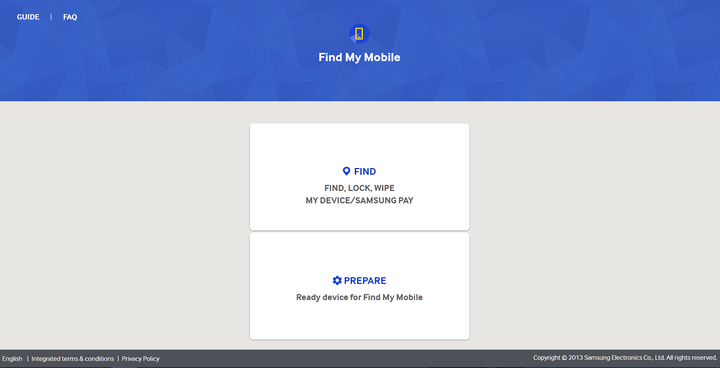
Another option for select Samsung smartphones is the Find My Mobile service. It can be used to locate a missing phone, lock it down, or wipe it completely. You’ll need a Samsung account, though, and the Remote Controls options enabled on your phone. To check and see if Find My Mobile is available for your smartphone, go to Settings > Security. If you see Find My Mobile in the menu, you can use the service; enable the Remote Controls options via Settings > Security > Find My Mobile > Remote controls.

How to find your lost Android, iPhone, or other smartphone
Update: We included Google’s new Find My Device service and a word on Factory Reset Protection. By Carlos Vega.
So you’ve lost your phone. We’ve all been there. It was just in your pocket a minute ago — and now it’s gone, lost to the phone fairies, forgotten between the seats of your couch, or misplaced somewhere during your busy day. Maybe it’s just in your other coat, or maybe it’s already in the hands of someone who found it on the sidewalk. Either way, all you want to do is get it back.
Thankfully, there are plenty of ways to get a hold of your missing phone. If it’s a smartphone (or even a tablet) running iOS, Android, or even Windows Phone, chances are good it already has the software needed to hunt it down — or there’s an app you can install to track your phone. Here’s our guide on how to find your phone or a similar device, including the old-fashioned way if you still own an aging flip phone.
Smartphones
If your lost phone happens to be a smartphone, all three of the major smartphone platform providers (Apple, Google, and Microsoft) now include phone retrieval technology in their smartphones, just in case you ever end up losing it but forget to install a “find my phone” app. Usually, the way these apps work is through the account associated with your device. For Android devices this is your Google account, for iPhones this is your iCloud account, and for Windows Phones this is your Microsoft account. All three allow you to remotely lock and wipe your phone, make it ring, and set up special messages to alert whoever finds it.
Of course, these features are only as good as your phone’s battery. If your smartphone dies, it’s about as easy to find as your wallet or anything else you might misplace.
We also recommend caution when communicating with anyone who has found your smartphone. Be careful to avoid giving away any personal information, such as your home address, until you know you’re dealing with someone you can trust. Stick with sending phone numbers or email addresses to communicate how the good Samaritan can return your phone. Here’s how each of the three operating systems work.
How to find a lost Android phone
Android not only offers Google’s proprietary service for finding and managing your device remotely, but also a number of third-party apps designed for finding your smartphone. The easiest to use is Find My Device, which is built directly into your Android smartphone through Google Play Services — it can also be used in a browser or downloaded from the Google Play Store. Most devices running Android 2.3 or later should be able to use this feature. Using the feature is as easy as searching “Where is my phone” in Google, which will prompt the service to start looking for your smartphone. We’ve previously written about Find My Device and its ability to call you, set up a new password, and make your phone ring from afar, along with the variety of other functions it uses for notification purposes. While you can configure Find My Device ahead of time, the service should be available in the event you lose or misplace your phone. It will use Wi-Fi or GPS to help you hunt down your device.
To verify your Android smartphone has the Find My Device feature turned on, go to Settings > Google > Security and make sure Remotely locate this device and Allow remote lock and erase are turned on in the Android Device Manager section.
If you can’t find your smartphone, you can always wipe it to prevent sensitive information from getting into the wrong hands. Your device will need an internet connection, however, and enough juice to communicate with you. In Android 5.0 Lollipop, Google also introduced Factory Reset Protection (FRP). It’s designed to prevent would-be thieves from being able to steal your phone, wipe it, and then use it or sell it. If you factory reset a phone with FRP enabled and try to set it up as a new device, you’ll be prompted to enter the user name and password for the last Google account that was registered on the device, and if you can’t, the phone will remain locked.
There are also third-party apps that you can install to help you find your phone. Cerberus Anti-theft is a great app that can be installed remotely, allowing you to obtain more information regarding the whereabouts of your phone. It provides a number of additional features, such as more granular control on how you track your device, screenshots of what your device is doing, photos from the camera to possibly catch the would-be thief, and other, more detailed notifications that Find My Device doesn’t offer. If your device is rooted, there are even more features available to prevent someone from resetting or turning off your device until you can recover it.
Another option for select Samsung smartphones is the Find My Mobile service. It can be used to locate a missing phone, lock it down, or wipe it completely. You’ll need a Samsung account, though, and the Remote Controls options enabled on your phone. To check and see if Find My Mobile is available for your smartphone, go to Settings > Security. If you see Find My Mobile in the menu, you can use the service; enable the Remote Controls options via Settings > Security > Find My Mobile > Remote controls.
Your next notebook will run for days thanks to Qualcomm — not Intel
For the longest time — as in, forever – most notebooks have run some version of Windows on an Intel processor. A few machines have run with AMD inside rather than Intel, and MacBooks have run MacOS instead of Windows. But in general, your choices were limited to machines that ran hot, didn’t last all that long away from a plug, took a long time to boot up, and were connected to the internet on a part-time basis.
Smartphones have changed all that, however. They turn on instantly, last a long time on a single battery charge, and are always connected. And it’s the mobile ARM processor that’s made all that possible. Intel has chased the smartphone ever since, introducing features like Intel Rapid Start in a partially successful quest to make PCs feel as responsive as smartphones.
Now, there’s a version of Windows 10 that runs on ARM processors, specifically on Qualcomm’s latest system-on-chip (SoC), the Snapdragon 835. The combination promises significantly longer battery life on machines that start up as fast as smartphones, and packs in a LTE modem that keeps it connected to the internet on a full-time basis.
That’s a nice vision of the future of truly mobile computing, but is it real? We’ve been down this road before, with Microsoft’s Windows RT platform that showed up on its original Surface tablet, and was then promptly put to death. What makes us think that this time around, Microsoft’s initiative will make a difference in how we use our Windows 10 machines?
Yes, things really are different this time around
If we want to predict if Windows 10 on ARM has a chance of being successful, then we need to discuss exactly why Windows RT was such a failure. There are two main reasons why, and we’re already seeing Microsoft, Qualcomm, and PC makers doing some things differently that could make instant-on, long-lasting, and always-connected Windows 10 notebooks a reality.
Windows 10 on ARM will run all 16 million of the Windows desktop applications that people have come to know and love.
First, Windows 10 on ARM will run all 16 million of the Windows desktop applications that people have come to know and love. The full version of Office 2016, Adobe’s professional suite of creativity applications, and niche software like AutoCAD will run on the platform this time around. Windows RT was limited to only the paltry apps in the Windows Store, in addition to a ported version of Office 2013. That wasn’t good enough.
Second, it’s not just Microsoft working on the project. Qualcomm is fully on board, and at least three influential PC makers are already slated to make ARM-based Windows 10 systems. This forms an interesting alliance. Qualcomm wants to sell more processors, and the PC makers want to sell budget computers without paying for expensive Intel hardware. Everyone involved has reason to make Windows 10 work on ARM, and work well.
What will ARM-based notebooks look like?
This time around, ARM-based Windows 10 machines will offer real benefits that you’re going to love, without major drawbacks.
To begin with, ARM processors use less power than Intel processors, which makes sense. They were designed for smartphones, which are all about squeezing as much battery life as possible out of much smaller battery capacities, while still providing decent performance. According to Qualcomm, ARM-based Windows 10 notebooks will provide up to 50 percent more battery life, and will last for 20 hours on average. It will turn the PC into a device you don’t need charged every day.
Next, devices running ARM processors are instant-on. People demand that their smartphones wake up instantly — push the button, and they’re ready to go. The iPad and Android tablets have done this forever. Intel, Microsoft, and PC builders have made some headway into building notebooks that respond quickly, but their efforts are most visible in high-end hardware. People who buy budget computers – in other words, most people – must wait.

Better still, ARM-based systems use very little power when in standby mode. Again, Windows notebooks have improved here, but smartphones remain the king of standby power. While a good notebook can last a week or more in standby, the Google Pixel smartphone can last 19 days. This, too, will help make ARM-powered Windows PCs last for days on a charge.
Finally, ARM-based systems run cooler. That will enable exclusively fanless designs that run completely silently and won’t require unsightly venting and won’t subject their users to blasts of hot air. Some Intel-based systems are fanless as well, but they typically need to throttle performance more aggressively to keep things cool, and most such devices are expensive.
ARM-based notebooks running Windows 10 will be thin and sleek, and they won’t weigh much. Many of them will be 2-in-1 devices, and allow the screen to be used independently as a tablet. In other words, they’ll probably look a lot like iPads, Android tablets, and Chromebooks – but they’ll run Windows 10, instead.
What about the performance penalty?
Windows 10 on ARM won’t match the performance of Intel’s latest Core processors, or AMD’s Ryzen. Aside from the fact those companies build more powerful, more power-hungry chips than Qualcomm, the way software is written is also an issue.
Windows is coded for the x86 instruction set, which is what Intel and AMD chips understand. To make Windows 10 work on ARM hardware, Microsoft has written a comprehensive emulation layer. That is certainly going to result in a performance penalty. The size of the penalty is the biggest unanswered question. No one’s going to want a Qualcomm-powered Windows notebook if it feels slow.
The real impact will be on low-end Windows notebooks, where ARM’s advantages are more important.
Also, some of the largest and most complex applications, like Adobe’s professional video editing application, Premiere, and AutoCAD, which is used for rendering 3D images, already demand high-end, quad-core Intel Core i7 processors, lots of RAM, and fast GPUs for any kind of performance. Today’s ARM processors aren’t yet capable of matching Intel’s performance running these kinds of apps.
However, high-end PCs aren’t the target. The real impact will be on low-end Windows notebooks, where ARM’s advantages are more important. What this means for you is that you will finally be able to use all your favorite Windows productivity, media consumption, and communications apps on a machine that can really last a full day on a single charge. You won’t have to wait for it to boot up, and you won’t have to worry about finding a Wi-Fi connection.
Windows 10 on ARM is a big deal
So, does Windows 10 on ARM matter? Yes, we think it does. It solves some problems that have plagued Windows notebooks for a long time, and it will likely do so for hundreds less than similar Intel-powered notebooks.
In the meantime, you’ll still have those powerful Intel-based Windows 10 machines to choose from if you need to do 3D rendering in AutoCAD or play the latest games in VR and at high frame rates.

Companies like Nvidia will keep working on initiatives like GeForce GTX with Max-Q Design to bring increasing levels of gaming performance to even more mobile devices. Gaming may in fact be the greatest weakness of Windows 10 on ARM, as it’s doubtful that games will run well on Qualcomm hardware, particularly after translated through emulation.
For most people, though, Windows 10 on ARM will make for a better, more affordable experience, and it leaves plenty of room for Intel and others at the higher ends of the market. Choice is a good thing, and that’s what makes this new platform so important.
While the timing of production notebooks powered by Qualcomm is still an open question, they’ll seriously disrupt the PC arena whenever they arrive. Unlike Windows RT, which could only run the more limited Windows Store applications, Windows 10 on ARM looks like the real deal.
Courts in Florida grapple over Fifth Amendment as it applies to passcodes
Why it matters to you
Can your smartphone passcode and the secrets it protects be used against you in a court of law? A pair of recent rulings did little to answer that question.
Generally speaking, locking your smartphone with a PIN or passphrase is a good idea. It hides your social media, budgeting, and finance app data from prying friends and family, and it is a simple safeguard against theft.
But in some United States courts, passwords can be a liability.
The Miami Herald reports that Christopher Wheeler, a child abuse suspect, has been held in criminal contempt and sentenced to 180 days in jail for refusing to reveal his iPhone’s passcode. That is despite the man’s claims that the password he provided, which did not work, was correct.
“I swear, under oath, I’ve given them the password,” Wheeler told a Florida circuit court judge on Thursday.
Wheeler, who was arrested on accusations he hit and scratched his young daughter, was charged with child abuse in March. Detectives believe that his phone contains pictures of the child’s injury, which could help prove the case.
A judge authorized a search warrant for Wheeler’s iPhone, but police were unable to get in. Wheeler will be allowed to post bond pending an appeal, or set free if he provides a working passcode.
In a separate Florida case, a judge declined to hold in contempt a man accused of extortion for refusing to unlock his iPhone.

maxkabakov/123RF
The man, Wesley Victor, had been ordered by a judge to hand over the passcode of phones suspected of containing incriminating text messages. He and his girlfriend, reality TV star Hencha Voigt, are accused of threatening to release sex videos stolen from social media icon YesJulz in exchange for $18,000.
Victor claimed he could not recall the password, and Miami-Dade Circuit Judge Charles Johnson ruled that there was no way to prove that he remembered his PIN code more than 10 months after his initial arrest.
According to the Fifth Amendment, defendants have the right not to say anything that could be used against them. But recent court decisions have muddied the waters.
Both Wheeler and Victor were ordered to give up their passwords under a Florida precedent that let police force a voyeur to give up his passcode. The state Court of Appeals ruled that defendants can sometimes be compelled to give up passcodes based on the “foregone conclusion” doctrine of the Fifth Amendment, which states that if police can compel a defendant can testify if they’re reasonably certain of what they’re going to find.
The Florida Supreme Court has yet to take up the issue.
Some legal experts argue that smartphones should be exempt from the doctrine, arguing that passcode demands lead to “fishing expeditions” — phone searches without clear objectives. Short of final world from the Supreme Court, though, little seems poised to change.
“[It’s] the law in Florida at this point,” Johnson said, citing the Court of Appeals judgement in the case of Voigt.

